WhatsApp makes a big change: no more annoying photos from your contacts

Soon you’ll have the power to stop photos and videos sent by your WhatsApp contacts from appearing in your phone’s photo gallery. How many times have you opened your gallery to show a photo to a friend, only to find dozens of goofy photos or videos from those idiotic, muted group chats? Never fear. Those uncomfortable moments are at an end.

WhatsApp Messenger Download WhatsApp
8

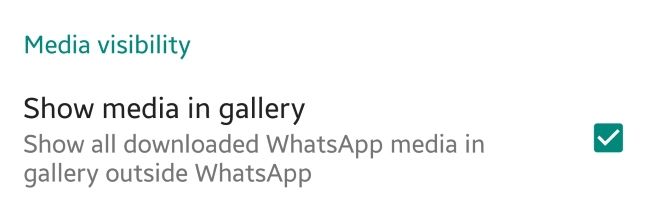
This new feature appears in the latest WhatsApp beta version. This means that soon we’ll have it available in the regular version. Once the update rolls out, just have to go to the settings section of WhatsApp and then to Data and storage. There will be a new option called “Media visibility.” Simply disable “Show media in gallery” and the problem is solved.


What do you think about this new feature? Will you use it? Leave us a comment!

How YouTube chat works and what you can do with it

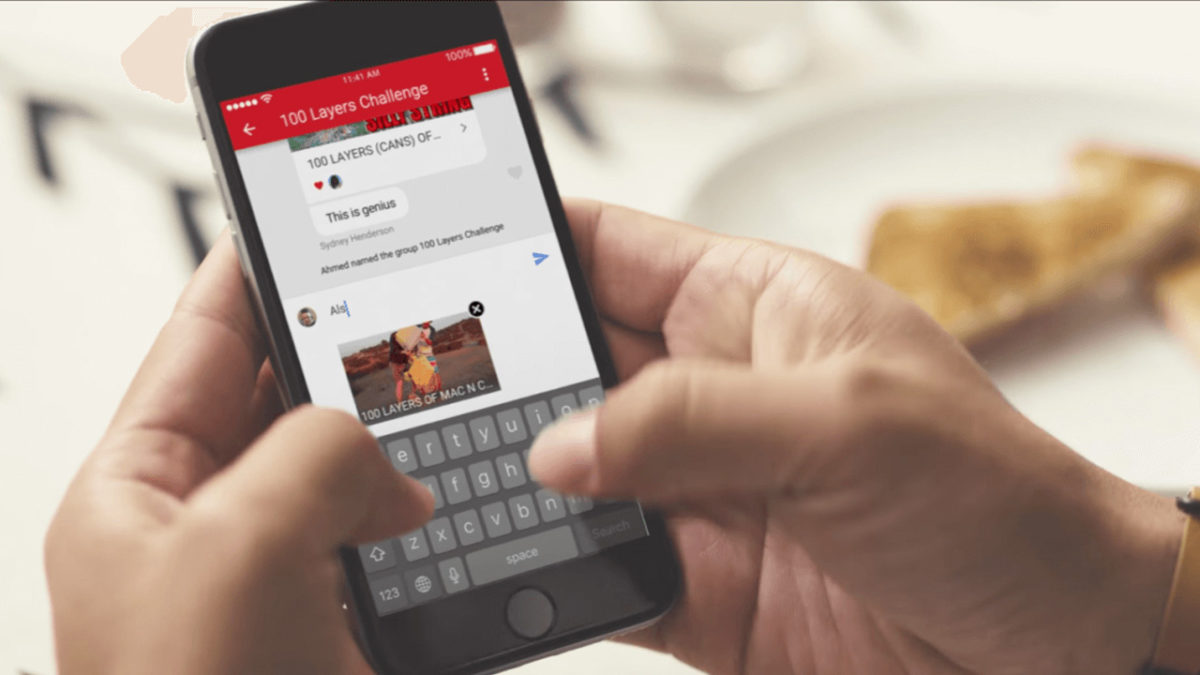
YouTube got non-stop updates in 2017. The video streaming platform knows that industry competition is fierce, so last year it launched a lot of new features, and developed some features that were already available but easy-to-miss. This is where YouTube chat comes in. Although it’s hard to believe, the system has a messaging service like WhatsApp or Facebook Messenger. Today at Softonic, we’ll tell you how YouTube chat works and what you can do with it.

Step by step

YouTube chat isn’t any different from what you see on major messaging services. In other words, you can write messages, send emojis and hold a normal conversation. However, the biggest difference is that everything is focused on YouTube. Instead of attaching videos or images, the icon is of sharing a YouTube clip. It’s a chat designed for browsing on the platform.

YouTube Download Free
8

For whatever reason, Google hid the chat feature in a place you’re unlikely to look. To chat, we’re going to select a video and click “Share.” When the menu opens, select the user you want to send the video to. Do this and the chat will open.

This screen is the main conversation interface, which hides some secrets. If you click on the three dots that appear on the top, the app will display a menu where some options appear, such as “View participants” of the chat, “Add participants,” “Delete chat” and “Mute notifications.” Of course, each name indicates what you can do under each.

In case you want to see the chat you’ve opened previously, all you have to do is click on “Activity” and then “View contacts.” There all your previous conversations will appear, as well as all possible chats of yours.

A big asterisk to this is that you have to have a confirmed name on YouTube or none of this will work. We spent about an hour looking for these options and couldn’t find them in the app, probably because we don’t want to use our real name on the site.

How to download all your WhatsApp data

You can find out everything WhatsApp knows about you. The latest beta version of WhatsApp (version 2.18.128) lets you download a transparency report, a document that the European Union has imposed on social networks and messaging apps. The normal version of your favorite app will have this report ready before May 25, which is the deadline the EU has determined for making this report available to users.

WhatsApp Messenger Download WhatsApp
8

Want to take a look at this report? Download the beta version of WhatsApp (from this link), click on the three vertical dots, then on Settings and Account. There, you’ll see the new option “Request info on my account.” Hopefully, you’re not in a rush because WhatsApp will notify you that the report could take between 1-3 days to complete. However, the first users to try it out say that the report takes a few hours to be sent over, not days.

While you wait for this report to arrive, don’t even think of making any drastic changes to your account, such as changing your number. In this case, the process of creating and sending the report will be canceled.

Once you receive the report, download it. You’ll then have a .ZIP file in your hands. Inside, there will be two folders: one in HTML format, the other in JSON. You only have to worry about the first: this one has all the info that matters and can be opened using any browser.

If you don’t want to download the report but you want to know what type of info it has about you, you’ll be relieved to know that the content WhatsApp stores isn’t as worrisome as Facebook. There is basic info on the user (cell phone number, device operating system), registration info (such as cell phone model), and the status of your settings.

WhatsApp failure means blocked contacts can send you messages

A serious WhatsApp failure is allowing users to send messages to the users who have blocked them. The avid WhatsApp watchers WABetaInfo posted the bug on their Twitter feed and it has since been confirmed by several of their followers. Users have reported being contacted by blocked users and that their statuses have been visible also.

The error is only affecting users who have downloaded the latest WhatsApp update for iOS. This means if you use WhatsApp on Android you should still be safe.

There has been no official word from WhatsApp yet, regarding the bug, but as the messaging app regularly updates, we can be sure they’ll fix it soon enough. Until the official patch comes out, there is a simple, quick fix. You can do this yourself right now to make sure you won’t be bothered by any of your blocked contacts.

How to stop your blocked contacts messaging you on WhatsApp

If you’ve received a WhatsApp message from somebody you’ve blocked, the solution is simple. All you have to do is unblock that contact and the re-block them again. This should reset their blocked status on the WhatsApp server.

You might soon be able to share your Facebook posts via WhatsApp

People are reporting on Twitter that the Facebook mobile app now includes a Share to WhatsApp button. This new button allows users to share their Facebook posts with friends on WhatsApp quickly. You can already do this of course, but it currently takes a lot more than simply clicking a button.

This new button appears to be only a test, for now at least, as only some people have reported seeing it. Facebook is yet to announce anything about a share to WhatsApp button, so we can only guess that we’re waiting to gauge public opinion on the matter before they press ahead with a broader release.

You’ll find the Share in WhatsApp button underneath the Write Post button when you click the standard share button on your post.

Facebook (Mobile) Download
8

This button is similar to Facebook’s Send in Messenger button. It is another example of Facebook making it easier for users to communicate across its multiple platforms and slip from one to another with a minimum of effort.

Do you think a Share to WhatsApp button for Facebook is a good idea? Let us know below.

WhatsApp Messenger Download WhatsApp
8

WhatsApp adds useful new emoji feature

WhatsApp just added a very useful option to the emojis section: now your most-used emojis appear, making it easier to select your go-to images.

This option, called “Top Emoji,” appears when you tap the magnifying glass to search for emojis. Besides showing the little box to put in keywords, now we can see a history of our emojis:. the ones we use most.

WhatsApp Messenger Download WhatsApp
8

This option is similar to what some cell phone keyboards offer, including iOS and Android.

The “Top Emojis” option appears in the beta version of Android 2.18.133. To learn to become a part of the app’s beta program to receive updates before everybody else, click here.

Source: WABetaInfo

These are the 104 new emojis coming to your phone in 2019

A flamingo, falafel, new clothing items, icons that represent inclusion… and even a sloth! These icons, plus nearly a hundred other images, have been proposed by the Unicode Consortium to become emojis in 2019.

The Unicode Consortium is the organization in charge of designing and proposing new emojis that operating systems and apps have to include over time. Though we’re still waiting for the 2018 emojis to come to most devices, Unicode has already presented its suggestions for the upcoming year.

Like previous editions, Unicode is committed to inclusion, adding several icons that represent functional diversity: an ear with a hearing aid, two types of wheelchairs, a prosthetic arm or leg, a guide dog…
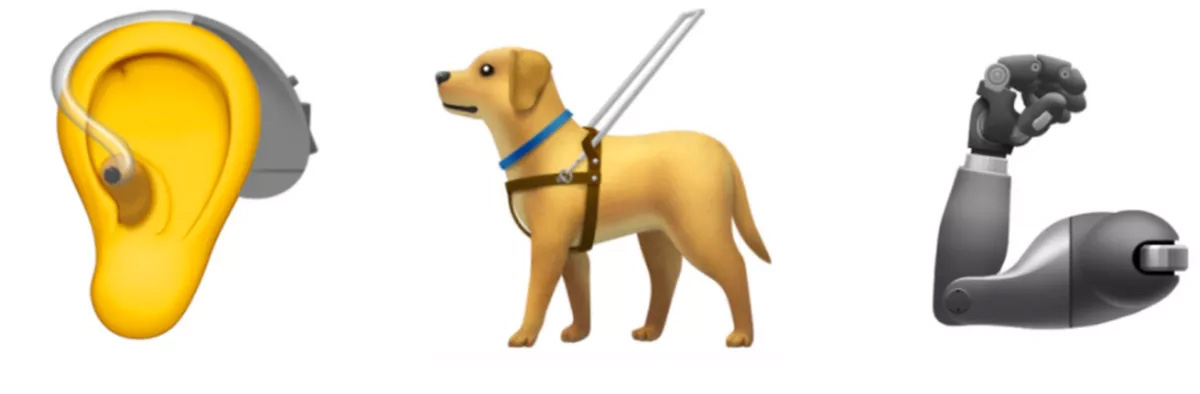
It also considers the unique characteristics of some countries, adding typical foods and drinks, such as mate in South America, or different icons of Hindu culture like the sari and a temple.

And, of course, emojis have to keep up with trends: what would a chat be today without adorable animal emojis such as flamingos, otters, and orangutans?

New colored hearts and other symbols will also be available.

Remember, Unicode’s suggestions are the first step of the process. This means that not all 104 icons may end up on every operating system, not to mention how each system uniquely adapts them (remember the controversy over gun emojis).

You can see the full list of 2019 Unicode candidates here.

WhatsApp Messenger Download WhatsApp
8

What emoji would you still like to see on WhatsApp and other programs? Tell us your suggestions in the comments! Maybe we’ll give the Unicode Consortium ideas for their 2020 list!

How to record a video call on WhatsApp

A great option for video calling is WhatsApp. There are a lot of reasons why you might want to record a video call so, naturally, a lot of people ask how to record a video call on WhatsApp.  You can record a WhatsApp video call, but you will have to download a third-party app. You can’t record WhatsApp video calls using only WhatsApp. This is how to record WhatsApp video calls.

6 steps to record a WhatsApp video call on Android and iPhone

  1. Download a screen recorder for your phone.
  • To record the WhatsApp call on Android an excellent option is ADV Screen Recorder
  • There are two ways to record a WhatsApp call on an iPhone. iOS 11 has a built-in screen recording functioning. If you have an older iPhone, a great WhatsApp video recorder is Go Record: Screen Recorder
  1. Open up the screen recorder app.
  2. Activate WhatsApp and find the contact you want to record a video call with.
  3. Enable screen recording using your new app.
  4. Hit video call on WhatsApp and the screen recording app will record the WhatsApp video call.
  5. Save the WhatsApp video call.

Your recorded WhatsApp chat will then be saved into your device’s memory. Remember that if you are going to record your WhatsApp calls, you should first ask the permission of all people involved in the video chat.

WhatsApp Messenger Download WhatsApp
8

You don’t have to use the two screen recording apps we listed above. At Softonic, you will find a lot of different screen recording apps. You’ll also find many more tutorials about WhatsApp and your favorite other apps and programs and all the latest news about the biggest apps in the world.

For more on WhatsApp, check out the links below:

What updates can we expect for WhatsApp?

A new WhatsApp update has been added to the Google Play Beta program. The guys over at WABetaInfo have put together a little breakdown of what we can expect once the features being tested in the beta version get a wider rollout. There is still no Sticker availability but it looks like WhatsApp are working on a Double Sticker function for future updates. Other cool functions added via the new update include a Location Sticker, a Dismiss as Admin feature, and Priority Messages. Let’s take a look.

WhatsApp Messenger Download WhatsApp
8

Location Stickers allow you to add a signpost to your favorite places to your WhatsApp messages. There are two different styles of Location Stickers, which you can check out below.

Image Via: WABetaInfo

Dismiss as Admin is aimed at WhatsApp group messages. The new feature gives group admins the power to demote other admins without having to remove them from the group. Until now, kicking other admins out of the group entirely was the only way to remove their admin privileges. To dismiss an admin, hold your finger on their name in the group chat menu. The option should then pop up in the drop-down menu.

Image via: Gadgets 360

High Priority gives you more control over the push notifications. If you enable High Priority, then your incoming WhatsApp notifications will be pinned to the top of your notification center. This feature will only be available on phones with Android version 5.0 or higher. To enable High Priority, open Settings and then tap Notifications. High Priority should be at the top of the screen if you have the latest beta version of WhatsApp installed on your phone.

Are you a member of WhatsApp’s beta testing program? If you’d like to try out the latest WhatsApp features before everybody else gets their hands on them, you should give it a try. We’ll be posting a guide to accessing beta versions of apps, games, and programs soon, so remember to keep checking in with us.

Hold the phone! You can now use WhatsApp with a landline

The launch of WhatsApp Business has given the messaging service a completely new dimension. WA Business gives companies and customers an official and secure way to communicate with each other and in the coming months and years; we’ll see all sorts of entrepreneurs using this new facility to sell us their wares. WA Business also brings with it an interesting new function; it allows you to hook up your WhatsApp account using a landline number instead of your mobile number.

Although WhatsApp Business is designed for use by businesses, anybody can download the app. You will still need a mobile phone to run the app but you’ll be able to register your landline number instead of the number associated with your SIM card.

WhatsApp Business Download WhatsApp Business Now
7

Once you’ve downloaded WhatsApp Business all you have to do is tell the app that you won’t be registering your mobile number but rather your landline. Normally WhatsApp sends an SMS to verify your number but for landlines, you’ll have to select the Call Me option.

After you receive the call and verify your number, you’ll be able to use WhatsApp Business with your landline number the same you use WhatsApp with your mobile number.

Follow me on Twitter: @PatrickDevaney_

WhatsApp Messenger Download WhatsApp
8