
Joaquin Phoenix’s ‘Joker’ gets first trailer

Joaquin Phoenix’s Joker offers a fresh take of the classic character.

Joaquin Phoenix as JokerAfter several films with mixed results, the DC cinematic universe looks like it might just get the last laugh.

Today, Warner Bros. released the first trailer for “Joker,” the new standalone film for the clown-prince of crime. The film is set to be released on Oct. 4 this year, but you can watch the trailer now:

The character

Thankfully, Joaquin Phoenix appears to be giving the Joker his own unique identity. He isn’t copying Jack Nicholson or Heath Ledger’s characters. He is also not taking something completely out-of-left-field like Jared Leto.

This Joker has an element of tragedy to his character, coupled with the growing negativity oozing from Gotham City.

For the first time since Tim Burton’s 1989 film “Batman,” the Joker will be getting a backstory on the silver screen. His true identity in this film will be a failing comedian named Arthur Fleck. 

Joker unmaksedFans may be turned off by adding a backstory to the character (shrouding him in mystery is the usual treatment). However, the Joker himself gave a bit of insight into his character in the graphic novel “Batman: The Killing Joke.”

“Sometimes I remember it one way, sometimes another. If I’m going to have a past, I prefer it to be multiple choice.” 

Basically, you should accept the film as one interpretation of how the Joker went mad, rather than the universal truth.

The story

Beat-up JokerThe beginning of the movie looks like it’s gonna be pretty bleak for the Joker. From being harassed at work to being beaten on the subway, it’s not hard to see why the harlequin eventually takes his rage out on Gotham.

Along with beatings from criminals of Gotham, we get several other ideas of what might lead to Joker’s breaking point.

A scene featuring Joker washing his mother’s hair in a bath shows that he has a very close relationship with her. His mother doesn’t appear to be the only woman in his life, as Joker also has a female therapist and a female friend/love-interest. 

In one iteration of the Joker, a contributing factor to his insanity was the untimely death of his wife. Though the trailer doesn’t hint at an ill fate for the women in Joker’s life, one bad day for them might be the straw that broke the camel’s back.

As Joker said in “Killing Joke,” “All it takes is one bad day to reduce the sanest man alive to lunacy. That’s how far the world is from where I am. Just one bad day.”

Along with seeing a therapist, Joker appears to make an attempt to maintain his sanity. In one shot, we can see Joker walking towards Arkham Asylum.

Arkham AsylumThe asylum is infamous for making the criminally insane even more insane. If you don’t believe us, there are several video games about the asylum’s impact on Gotham. We love them so much that the games topped our list for the best superhero games ever. 

We didn’t get to see any footage of the Joker committing crimes. We did get a hint to the fact that the Joker will attract a following. This is shown in one scene where several Gotham citizens parade the streets in clown masks. 

What we hope to see

DC has recently struggled with dark storytelling. The dark tones the writers hope to capture have not fit the plot or characters in the films. The Rotten Tomatoes scores for “Suicide Squad” and “Batman v. Superman: Dawn of Justice” are evidence of that.

We hope that “Joker” finds the balance that DC has been hoping to capture. The trailer has shown that Joaquin Phoenix definitely has the ability to command the screen in every shot. We just hope that the writers make the story into the circus the Joker deserves.

How to back up contacts on Android

This is how to back up your contacts on an Android smartphone.

These days, our mobile phones are like mini supercomputers that we carry around in our pockets. They can perform all sorts of tasks via the internet or standalone apps. At the heart of it all though, they are still phones and we still use them to keep in contact with our friends and family.

With all the other things we use our phones for, we’re more likely to lose them as we take them out of pockets much more often. The more expensive the phone, the more likely somebody is to see it and maybe try and take it from us. If we do lose our phone, it could mean losing all of our messages and all of our contacts.

A phone with a phone book app
You don’t want to lose your phone book just because you lost your phone.

So, with an increased chance of losing our phone, it is worth knowing how to back up our contacts so that if our phone goes missing, our mom’s phone number doesn’t go with it.

This is how to back up your contacts on an Android smartphone

Normally, contact details are stored on your phone’s sim card. Unfortunately, this is inside your phone so if your phone goes missing, so does your sim card. Fortunately, however, the Google support pages lay out two simple ways you can backup all the contacts in your address book that you have saved on your SIM card.

How to export your Android contacts to a VCF file

VCF files are the standard format for storing contact information for people or businesses. To export your Android contacts to a VCF file, you need to:

  1. Open your Android phone and boot up your Contacts app.
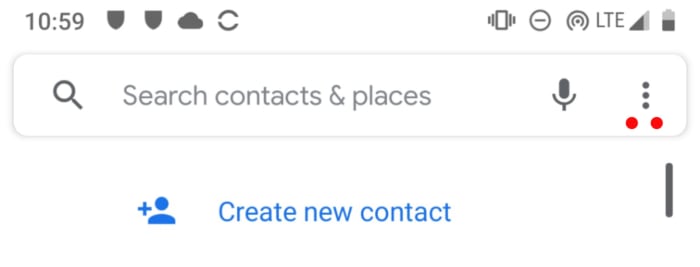
  2. Hit the menu button in the top-right, which is displayed as an icon of three dots.

The menu icon on the Android contacts app

  1. Then go to Settings and finally hit Export.
  2. You now have to choose which account you want to export all your contacts from and hit Export to .VCF file.

How to back up your Android contacts automatically

This newer option is much more convenient than exporting your contacts to a VCF file. If your contacts are being backed up automatically, then you won’t need a new VCF file every time you add a new contact to your Android address book. To turn on automatic backup you need to:

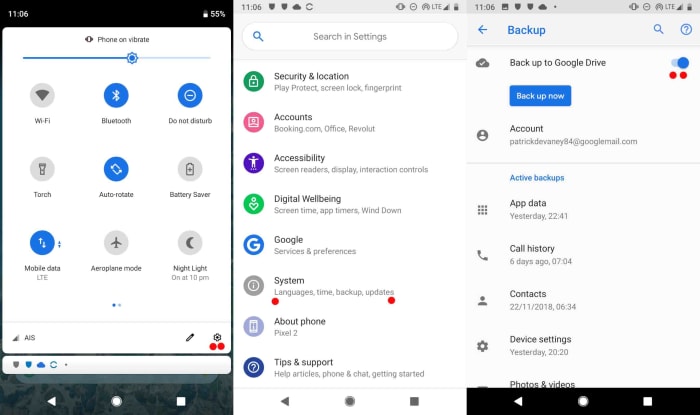
  1. Go to Settings on your Android device.
  2. Tap System and then Backup.
  3. Select Backup to Google Drive to turn the feature on or off.

Screenshot of Android contact automatic backup

Once you’ve followed the above instructions all of your contacts will automatically be added to an address book held on your Google Drive account. This means that should the worst happen and your phone disappears, you can simply restore all of your contacts to the Contacts app on your new phone.

What version of Android do I have?

Follow these steps to find out which version of Android you have.

Android is Google’s famous mobile operating system. Every time Google updates Android, it gives each new version a title named after a sweet treat that begins with the letter of the alphabet that follows the last version of Android. The latest version of Android is Android Pie, the version before Pie was Oreo, and the version that will follow Pie will be a sweet treat beginning with Q (all guesses on what that Q may end up as are welcome in the comments).

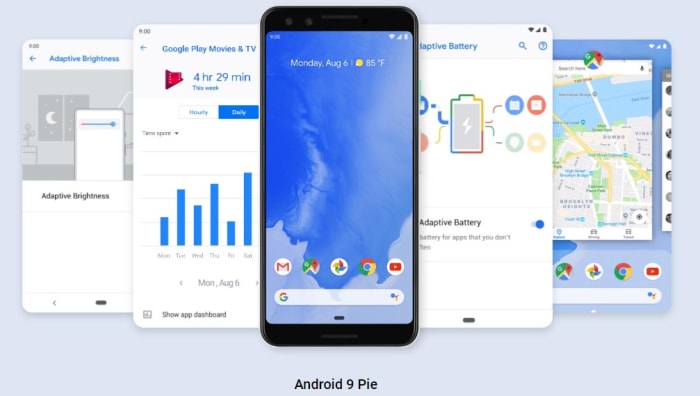
Android Pie the ninth version of the Google mobile operating system

Android Pie is also known as Android 9, and each time the number goes up so does the letter, as we’ve described above. This is a little confusing, however, as P isn’t the ninth letter of the alphabet. Why? In the early days of Android’s history, Google moved up a letter for every major update, even if the update wasn’t big enough to warrant a new number. For example, Android Kit Kat was actually Android version 4.4.

The letters used to go up quicker than the numbers

All this means if you have an Android phone, you could have one of many different versions of Google’s mobile operating system. With each version having its own unique features, it is worthwhile knowing exactly which version of android you have. Let’s look at how you can find out which version of Android your phone is running now.

This is how to find out which version of Android you have

To find out the version of Android you’re running on your smartphone, you need to:

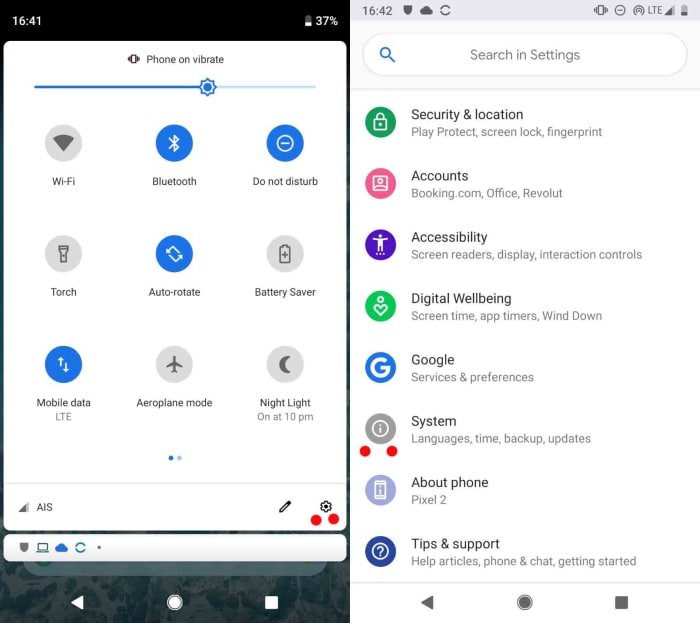
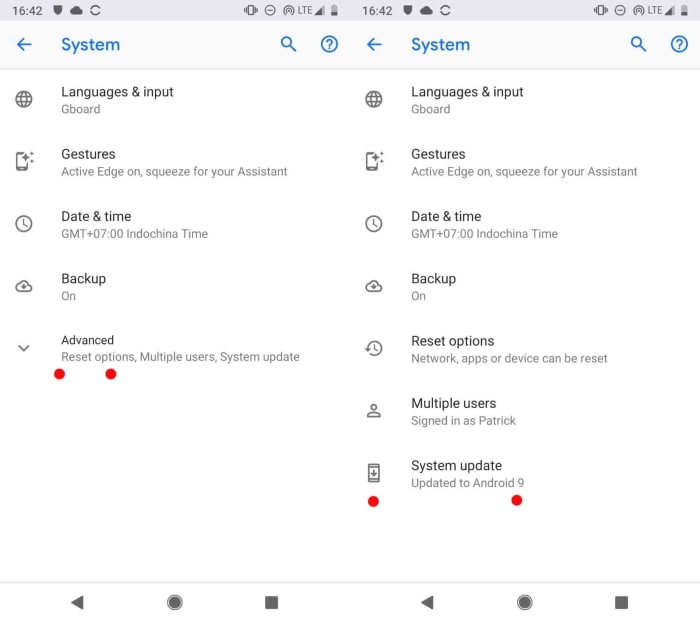
  1. Go to the Settings menu on your Android smartphone.
  2. Scroll down to the bottom of the page and tap System. Then hit Advanced, and finally System update.

How to find out what Android you have

On the Google Android system support page for checking and updating your Android version it says that if you can’t see “Advanced”, you should click About phone.

How to find out what Android you have

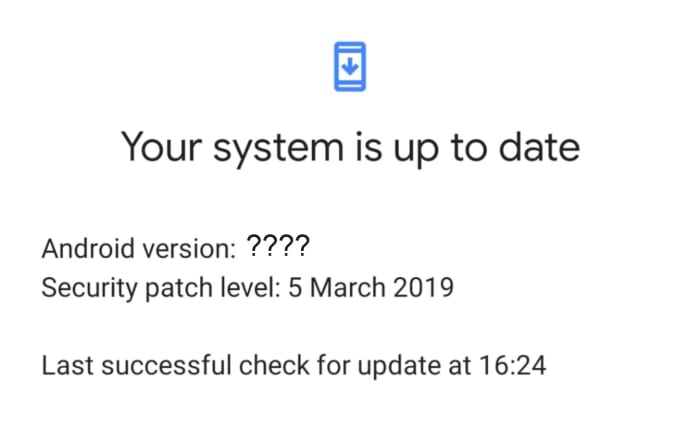
  1. If you’ve followed the instructions above that apply to your mobile, you should now see which version of Android you have.

If you have a Pixel device, you will likely have the latest version of Android installed on your device. Pixels are Google’s own handsets, so they’ll receive updates as and when Google releases them. These updates usually come in October of each year, but you can find out more information on when and for how long your Pixel smartphone will receive updates here.

If you don’t have a Google smartphone, you’re at the mercy of your smartphone manufacturer. You’ll receive Android updates whenever they get around to taking the Google update and doing whatever they need to do to it before they can push it out to owners of their handsets. For more information, you’ll have to contact the company that built your Android smartphone and ask them when your update is coming. You’ll find links to all the support pages of the major Android smartphone manufacturers here.

Borderlands 3 gets release date, pre-order bonuses

We are only five months away from Borderlands 3.

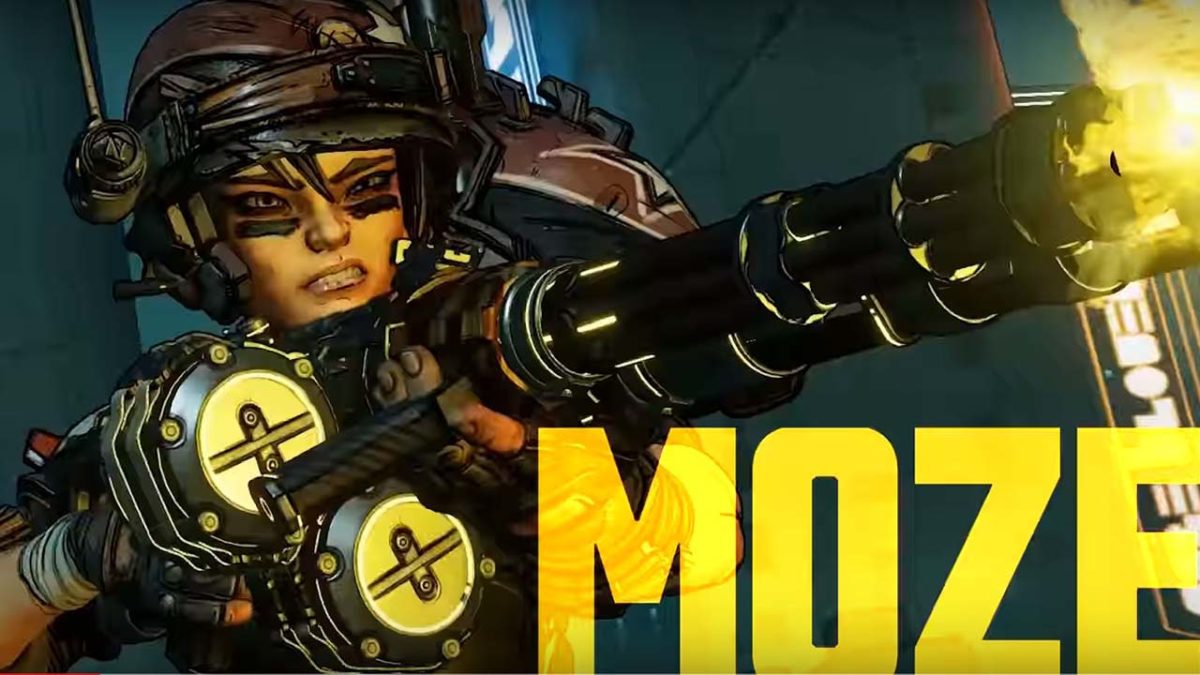
Borderlands 3 Moze

We waited seven years already; five months is nothing.

Gearbox Games released the newest trailer for Borderlands 3 today. The trailer showed a few more details for the storyline, and set Sept. 13, 2019, as the official release date. You can see these new details yourself below:

New characters

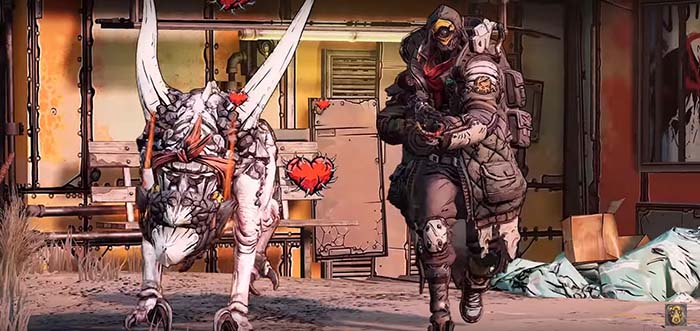
The four new playable vault hunters finally have names. The swashbuckling-looking female with the helmet is called “Moze.” The brutish, heavy, tanky character is named “Fl4k.” The character who appears to be the series’ newest Siren is “Amara.” The grizzled-looking older male character is named “Zane.”

We also got clues as to why each characters’ Action Skills might be. Moze appears to summon a mech-warrior to fight enemies. Fl4k has a Skag who looks hungry for Psychos. Amara grows several limbs to pummel enemies. Zane deploys a small drone-like bot onto the battlefield.

Borderlands 3 Fl4k

New villains

The final major detail you trailer gave us was the identity for the new main villains. The new male and female counterparts are called the Calypso Twins.  Frames from last week’s reveal trailer showed signs saying “Children of the Vault.” Today’s trailer has confirmed that these Children of the Vault are brother and sister.

We don’t have any more details on what their impact has been to Pandora, or what they have planned. A hidden message from the initial teaser trailer saying, “Count the Sirens,” might give us a clue for the motive of the new baddies. You can read about all the hidden messages in the trailer, and watch the trailer in the article below.

Pre-order details

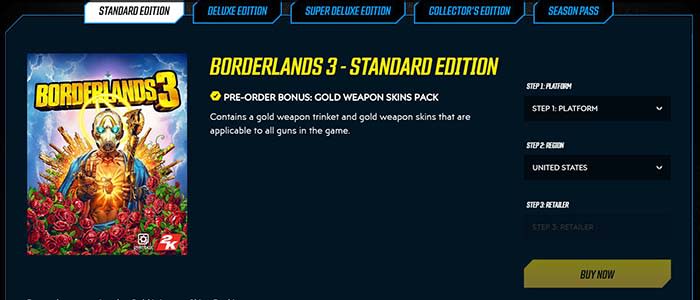
Borderlands 3 preorderBorderlands 3 is now available for pre-order. If you pre-order the game, you get trinkets and skins for all your in-game guns.

The season pass will include four additional campaigns and the Butt Stallion pack. Named after our favorite diamond-pony, the pack includes weapon skins, a weapon trinket, and a grenade mod.

Two different deluxe editions are also available. Each contains additional packs with skins, mods, etc. Finally, there is a collector’s edition valued at $250. The collector’s edition includes the game, the season pass, everything available in the deluxe editions, and figurines of characters, among other baubles.

Borderlands 3 Download Now ►
8

Best alternative sites to Steam

Save money and find new games with these Steam alternatives.

Over the past decade, Steam has all but monopolized the PC gaming industry. It is the first place many gamers go to when looking for a new game. It has one of the most extensive collections of games, which immediately draws you in. However, there are plenty of other great retailers to choose from. Many of which have their own clients, just like Steam. Here are some of the best alternatives, when looking for some better pricing:

Best Steam alternatives

Twitch

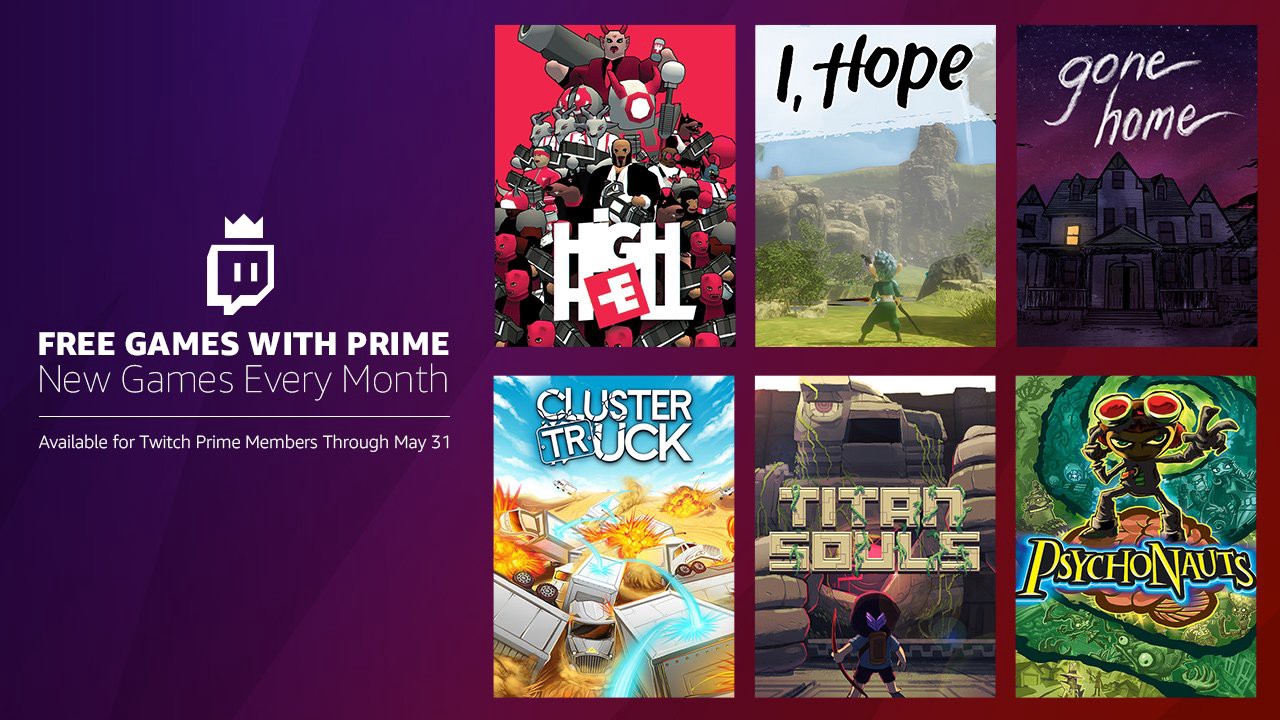
Twitch is mostly used for streaming games, but it also has its own sales front and client. This can be really useful if you use Twitch to stream, since the client will already connect you to your account. Additionally, if you have Twitch Prime, you can receive free games every month, as well as a variety of game rewards. Definitely worth checking out if you stream or use Amazon Prime.

Twitch Free Download
10

Twitch

Origin

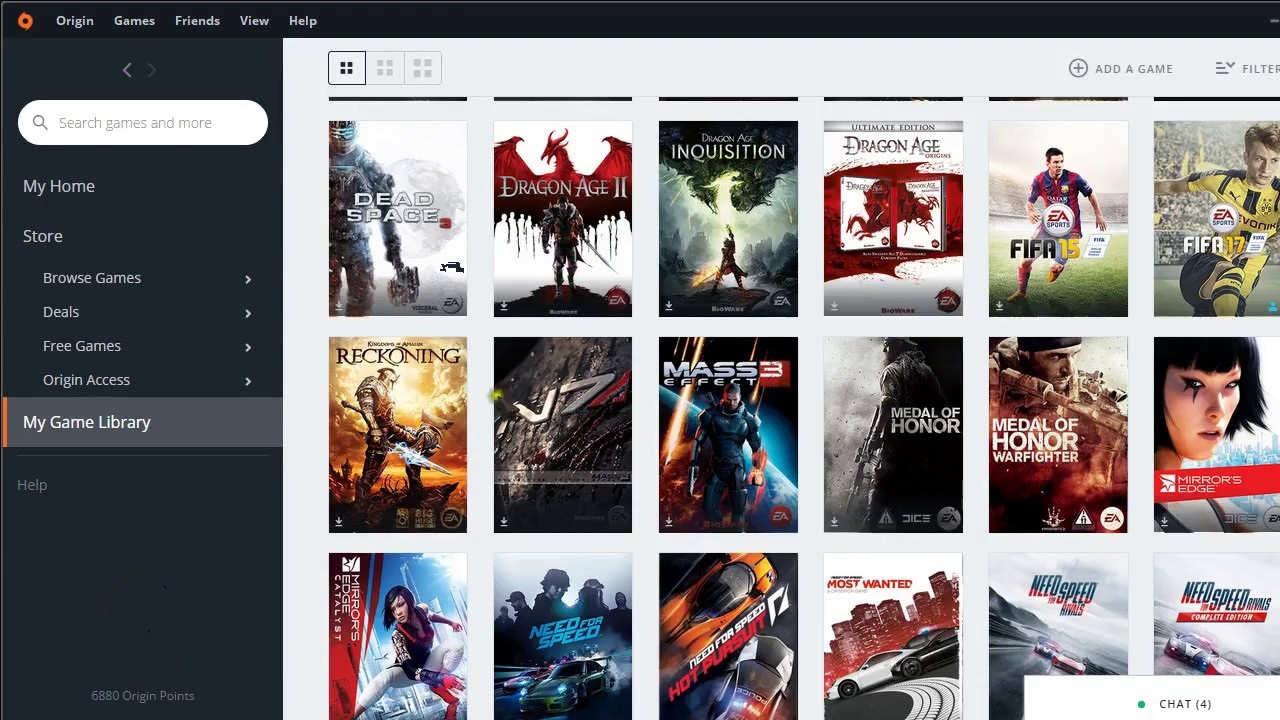
EA has made some questionable business decisions in the past, but none can deny the appeal that many of their titles have. Unfortunately for fans of the Sims, Mass Effect, and other popular EA games, Origin is the exclusive platform to get these on. However, that doesn’t mean it’s exclusively for EA games. Origin also hosts some amazing indie games that can only be found on the Origin client as well.

Origin Free Download
7

While the exclusive games are one major appeal to using Origin, it also has some of the best deals among PC retail clients. It frequently gives out older EA games for free, and for only $5 a month, you can subscribe to Origin Access. This gives you access to dozens of old EA games and demos for upcoming releases. Its return policy is also one of the best, as you can return any game within seven days of purchasing it or 24 hours after installing, “no questions asked.”

Origin

Uplay

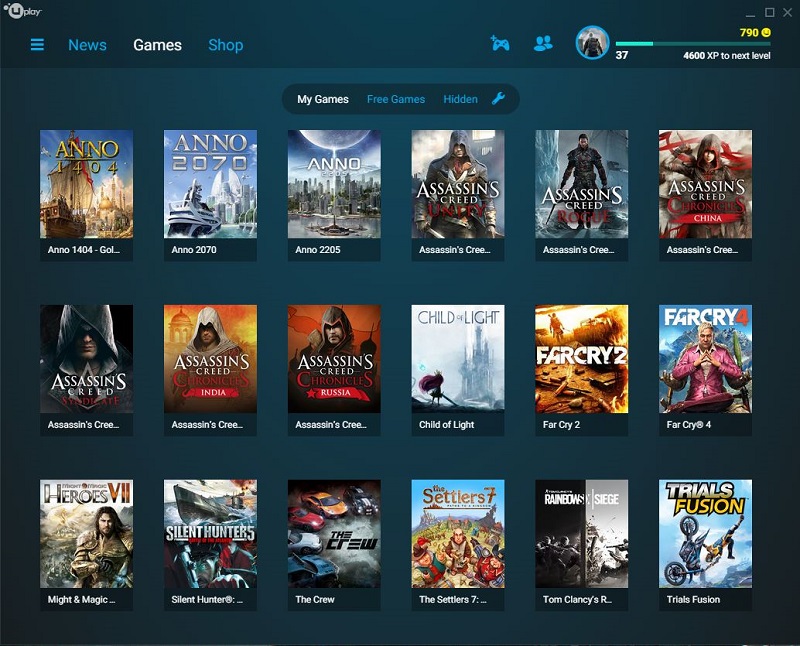
Uplay is basically Ubisoft’s version of Origin. Despite the fact that Ubisoft features its games on other platforms, like Steam, Uplay is still worth checking out. It has frequent sales on new releases and a unique client currency that you receive from playing the games you buy. So the more you play, the more discounts you’ll get.

3

Ubisoft

Facebook Gameroom

Just like old Facebook games, Facebook Gameroom features mostly casual mobile games like Candy Crush Saga and Trivia Crack. That doesn’t mean it’s not worth looking into, though. Most mobile titles can’t be found on PC storefronts, so Facebook Gameroom gives you a place to play these games.

Facebook Gameroom Free Download
9

Of course, you could choose to use an Android emulator for these free-to-play titles as well.

Facebook Gameroom

Green Man Gaming

Unlike many PC retailers, Green Man Gaming doesn’t double as a downloadable client. Instead, it provides digital keys for other downloadable clients like Steam, Origin, and Battle.net. It’s a good site to check out if you use any of these since it sometimes has sales and rewards you can collect when buying new games.

Green Man Gaming

Humble Bundle Store

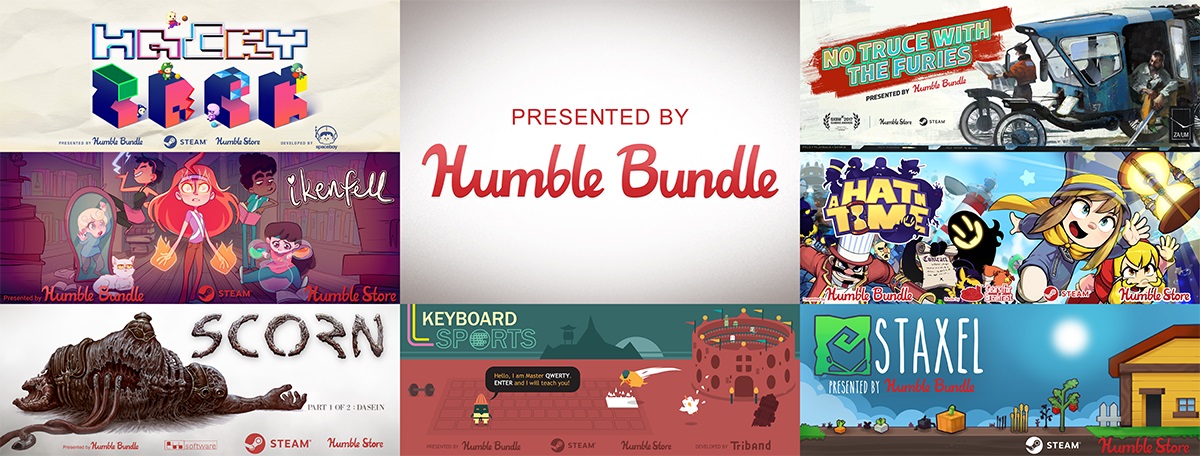
Known for its “Humble Bundles” where you create your own prices for a bundle of games, the Humble Store is a large collection of indie games (with a few major games thrown in), at a discounted price. A portion of your sales go to a charity of your choice, so it’s not only cheaper, but you know you’ll be helping out a cause you believe in.

Humble Bundle

GOG (Good Old Games)

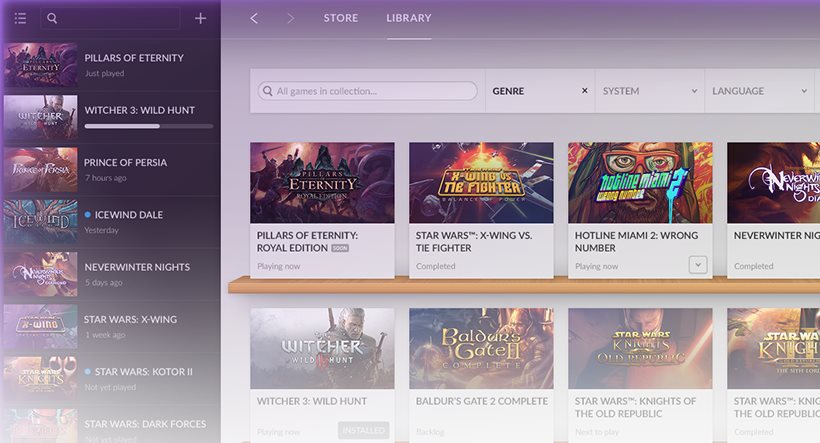
As the name implies, GOG specializes in selling old games that are often hard to find on other storefronts. It mostly features old and forgotten indie games. These games are often sold at a fraction of their original price, so it’s absolutely worth looking into if you like older games.

GOG Galaxy Free Download
9

Gog

Itch.io

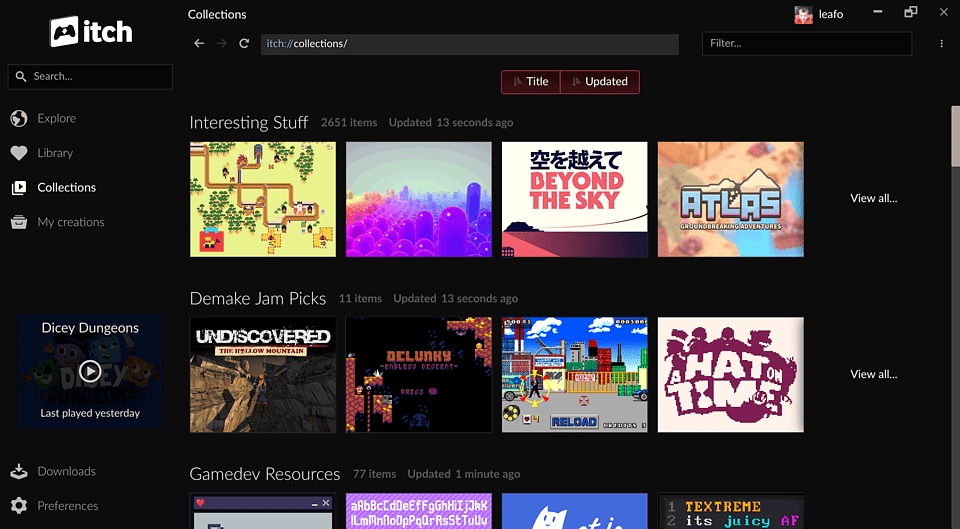
Steam (and many other retailers) requires a pretty thorough process for indie games to go, in order to get on their site. Itch.io makes this process much easier, allowing for practically any indie game to be featured on their site. Many of these games are put up for free, with only a few developers charging for their games. This is a great site for checking out indie games since free is an unbeatable price.

Regardless of the gaming retailer you choose, always make sure to compare prices before purchasing anything. Even with the benefits that Steam or its competitors may have, the same game may be priced differently between them. So take advantage of sales, and try going to a variety of game retailers before making a final purchase.

Itch.io

Best ways to learn web design from home

Whether you might be a beginner or a master, these resources can help you hone your craft.

Web Design

If you’re interested in learning web design, there is a long list of options. You can take the time to go back to school, take classes online, or look toward the online community.

With web design, formal education doesn’t offer immunity against falling behind on industry standards.

Those new to the game don’t have the same benefits as their peers with existing knowledge, but that should not discourage you. Just remember, learning on your own isn’t out of the question.

Here, we’ll look at some of the skills that the modern web designer needs in order to compete. We also can tell you where to level up your know-how.

What aspiring web designers need to know

If you want to pursue a career in web design or development, there are a few components that make up the required skillset:

  • Coding — HTML and CSS are essential, even if you’re planning on sticking to the visual stuff. Knowing how to code makes it easier to make changes during the design process. These days it’s becoming less acceptable to pass off a web design to a developer without code.
  • Design theory — Design theory teaches the basics of design, shape, rhythm, color, typography, balance, and design fundamentals.
  • UX/UI (usability) — Aesthetics aren’t everything. Instead, you need to understand how to design something that works well for users.
  • Photoshop/Illustrator — The Adobe programs have become the backbone of web design. These pieces of software are required knowledge across the industry.

Best ways to learn web design from home

Udemy’s Adobe Illustrator CC MasterClass

Illustrator Master Class

This program aims to teach participants the techniques needed to create logos and graphics in Illustrator. Illustrator is an application that allows you to create typography, logos, icons, and illustrations. With 12 hours of on-demand video, you’ll cover all of your basics from learning your way around the tools to advanced techniques.

Udemy also offers classes that cover the full Adobe Suite, as well as one focused on Photoshop. Courses offered here range from free to a  few hundred bucks. The Illustrator class is currently just $11.99, which is 94% off the normal price.

Gymnasium: Coding for Designers

Gymnaisum coding for designersGymnaisum’s Coding for Designers course is a free, self-paced intro for designers that need to learn coding.

Like MIT’s intro, there’s no need to bone up on HTML before enrolling. What’s different about the Gymnasium course is it focuses exclusively on where coding and design intersect. This free class teaches students how to translate graphic design to the web and troubleshoot some common problems. You’ll learn page layout with CSS, receive an intro on typography for the web, and create a website with Twitter Bootstrap.

Career Foundry

Career Foundry

Career Foundry is a paid option, but they’re a reliable source for all things UX/UI/web design. The site offers a few options — a certification in each of the previously mentioned specialties. We recommend looking through the site to see where you might need to learn the most. For those who have some art and design background, a UX certificate can bolster your career, as this area is in high demand.

Career Foundry is one of the more expensive programs in this category. However, they offer a project-based curriculum that allows you to build a portfolio aimed at helping you find a job.

The course spans 10 months and includes a one-on-one mentor there to evaluate your projects daily.

What’s more, if you’re on the fence, take the site’s free UX short course and its free consultation.

General Assembly

General Assembly

Like Career Foundry, General Assembly is not cheap. Still, there’s a reason these boot-camp-style programs have become so popular in recent years. They offer an accelerated program designed to give you skills you can use in the workplace.

General Assembly offers both UX design and visual design — and you’ll have the option to take an accelerated one-week program. You can also spread the lessons across a few months.

The curriculum combines user-interface fundamentals, web layout, and typeface design with research methods and responsive design. It’s a modern approach to web design that covers user-interface and usability tactics, along with graphic design principles.

The UX curriculum covers design in a broader sense. Much of the lessons focus on information architecture, consumer research, and usability testing. There is a unit on visual design as well, but the focus is on a website’s experience as a whole rather than just the aesthetics.

MIT OpenCourseWare: Introduction to Computer Science and Programming

MIT Open Coursework

This class may sound intimidating to those unfamiliar with coding and web development, but don’t let the name scare you. MIT’s free online program teaches beginners the ins and outs of Python, as well as computer programming basics.

While designers don’t need to become experts in coding, getting comfortable with the backend activity will serve you well.  This program isn’t necessarily design-focused. We think that the more information you can gather within the tech space, the better prepared you’ll be for digital transformation.

Udacity: Intro to HTML and CSS

Udacity

This online intro is a self-paced, three-week course designed to teach you the basics of CSS and HTML. It will make things easier for you if you end up working as a designer. In this course, you will learn the fundamentals of web development, how to style a website with CSS, and CSS syntax, units, and selectors.

Final thoughts

This info might be tech-heavy, but the design world is changing. No longer is it enough to have amazing artistic abilities and a knack for fonts; you need to have a strong command of the web from usability to CSS.

While we get that programs like General Assembly and Career Foundry can be pricey, they can be helpful for those looking to learn fast. If you’re just starting out or need to round out your skillset, take a few of these low-cost or free options. Later, you can decide if you need to invest more in your new career path.

Fortnite fans in uproar over latest update

Find out why Fortnite’s elite players are furious.

Fortnite

Fortnite players are not happy with the game’s latest title update. Implemented at the end of last month, the update in question removed the health bonus for eliminating other players and made it harder to harvest materials. Many Fortnite gamers, including prominent streamer Ninja, have taken to social media to express their displeasure and demand Epic revert the changes.

The health and materials bonuses in question were first added to the game via an update in February. Epic states that the removal of these bonuses was implemented after gathering player data over the past several months. According to Epic, the health and materials bonuses were encouraging “encouraging an unhealthy level of aggressive play.” Ninja (real name Tyler Blevins) released a short video explaining what he believes to be the reasoning behind the changes:

In the video, Blevins states that he believes the changes are meant to make the game more approachable for less experienced players while simultaneously encouraging professionals to switch to the game’s Arena mode. Arena mode has retained the health and shield bonuses, but continuing issues with the mode have led to additional outcry from professional players. In particular, wait times to enter a match in the Arena can stretch as high as 20 or even 30 minutes, and players are concerned that those wait times will only get longer as more players shift to the mode.

Fortnite: Battle Royale Play Now
10

Pros are particularly irate with the $40 million Fortnite World Cup beginning on April 13th. These changes have made it difficult for professionals to practice for the event, as they’ll have to endure Arena’s long queues rather than simply jumping into a standard Battle Royale match. Streamers have also expressed concerns that because the update has made it harder to get kills, their streams will attract less viewers.

Reddit and Twitter are awash with other players demanding Epic revert the changes. For a brief period after the update, streams of the card game UNO became more popular on Twitch than Fortnite streams. Though Epic does enjoy major support from a community of Fortnite streamers and professional players, the vast majority of Fortnite players are simply casual gamers. It’s these gamers that Epic is aiming to please by implementing these changes, so it remains to be seen whether the sheer numbers of this majority or the popularity of the streamers will win out.

Epic has yet to comment on the outcry, and with the game receiving weekly updates, it’s still possible that the changes may be reverted. In the meantime, however, players can enjoy the new explosive Boom Bow weapon, or hop into a match of the returning LTM Sniper Shootout. 

AI battles chimp in bid for intellectual supremacy

Discover why animal competition is helping create a smarter AI.

animal AI olympics

If you think about it, AI’s aren’t much different than chimpanzees. They’re both unpredictable, meltdown-prone creatures whose intelligence slowly and scarily approaches our own. Naturally, it’s only right that we pit them against each other in a desperate attempt to save our species.

Enter the Animal-AI Olympics: where chimps and other members of the animal kingdom compete for fame and glory against soulless automatons. The AI’s match up against “established benchmark tests” (a.k.a. tests that various animals have completed in the past). You can watch a brief video of the competition below.

The whole basis behind the competition is that currently, artificial intelligence is totally capable of beating humans at specific tasks. Whether that be beating a chess master or top-level Starcraft players at their own game, AI has shown the capacity to master specific tasks to the point of beating the most proficient human beings.

However, if you took the same AI that mastered chess and had it play checkers, for example, that AI would fail hopelessly. The brain of an animal is completely different. For example, while a dog would never come close to beating a human at a strategic game, the mind of a dog is much more adaptive than an AI, allowing them to better complete a variety of smaller and simpler tasks.

Hence the goal of the Animal-AI Olympics is to create adaptive AI instead of specialized AI. This ability to adapt and complete simple problems is called generalized intelligence, which is present in many animals, including crows, rats, dogs, and chimps.

At the competition, entered AI’s will be exposed to hundreds of tasks that they have never seen before, which tests their ability to solve general problems instead of mastering one. Researchers can then compare how the AI performs compared to the animals, allowing them to study various forms of generalized intelligence. Animals generally have an advantage in these competitions due to millions of years of evolution leading to finely tuned senses and instincts. These generalized intelligence tests can also be applied to babies and small children, and as AI evolves, it should be able to complete these tasks with a similar aptitude to a grown human.

If we are to fully integrate AI into our households and everyday lives, then they need to have some form of generalized intelligence. If AI can achieve a sort of biological intuition, then it will be significantly more useful than a specialized AI at completing and adapting to various tasks. Of course, there will always be a need for specialized AI to complete specific tasks that are incredibly difficult or impossible for humans to do. The future of AI is generalized intelligence. If an AI has the ability to adapt and improve itself, then it won’t have a need for human tinkering. The thought of this is somewhat terrifying, but rest assured that today, the chimp is still kicking the AI’s ass.

7 things we learned from Captain Marvel

Here’s what you need to know from “Captain Marvel” before you see “Endgame.”

Captain Marvel

The best and worst thing about the Marvel Cinematic Universe is that everything connects somehow. If you’re an avid fan, you’re always half watching the films from a more macro approach, hunting for any references or hints related to other installments in the franchise and geeking out about things like Bruce Banner mispronouncing Wakanda, Howard Stark hanging out with Hank Pym, or Ronan the Accuser making a surprise appearance in the new “Captain Marvel.”

While these interconnected moments are awesome if you’re ‘in the know,’ they can make you feel pretty left out if you don’t catch the reference. Since “Avengers: Infinity War” we’ve gotten two standalone movies: “Ant-Man and the Wasp” and “Captain Marvel,” which is still in theaters. As you’d expect, the latter film carries with it a handful of new information pertinent to the MCU: Infinity Stones, warring alien factions, and timey-wimey stuff. If you just left the theater with your head spinning, or if you want to get caught up before “Avengers: Endgame,” here’s a list of seven things we learned from “Captain Marvel.”

Oh, and spoilers ahead:

1. Captain Marvel is crazy powerful

Marvel Studios president Kevin Feige said in an interview that Captain Marvel “will be the most powerful character in the Marvel Cinematic Universe” and that promise has definitely been kept. With experience both on Earth and on the cosmic scale, space flight, super strength, deadly photon blasts, and combat training that could give Black Widow a run for her money, she’s certainly not lacking for punch, even next to powerhouse characters like Thor, Iron Man, or Hulk.

Captain Marvel
Captain Marvel is basically the MCU’s Superman.

As to how she stacks up to someone like Thanos, it’s tough to say. But the mere sight of her was enough to make Ronan the Accuser turn tail and run. And let’s not forget that she was the first person Nick Fury called when things got too dangerous for comfort. Will she play well with others? Thor seems to like her already.

2. The full path of the tesseract

There have been numerous unexplained jumps in the tesseract’s location throughout the series, and “Captain Marvel” answered one of the biggest ones. After falling out of Captain America’s jet and being recovered by Howard Stark in “Captain America: First Avenger,” the next time we saw the Space Stone was with SHIELD in “Avengers.” Did Stark give it to SHIELD? Were they fruitlessly studying it for all those decades? The answer is no to both questions, as we learn in “Captain Marvel:”

MCU tesseract Space Stone Captain Marvel
This thing keeps trading hands.

The tesseract was being studied by a scientist in the covert Project Pegasus. While she went by the name Dr. Wendy Lawson, the researcher was actually the Kree Mar-vell, who was studying the cube in order to uncover its secrets of hyperspace travel. The cube was stored on her orbiting lab, and that’s where we see it in “Captain Marvel” … where it gets promptly eaten by Goose the cat, er, Flerken. If you stay for the post-credits scene, you’ll get to see Goose cough it up on Fury’s desk.

3. Don’t mess with cats

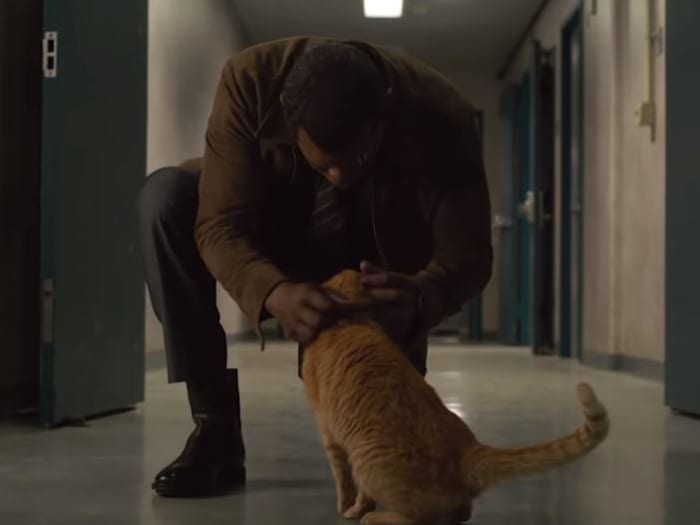
Among the more important things we learned from “Captain Marvel,” there’s a pretty funny minor detail that finally gets answered: How Nick Fury lost his left eye. Remember the cuddly cat from the above point? Fury got a little too excited about Goose, and the mischievous feline decided to gouge his eye out. No, we’re not kidding.

Nick Fury Goose Captain Marvel
“Last time I trusted someone, I lost an eye.”

Is it an epic tale of vengeance and heroism? Eh. Not really, but it is pretty funny.

Captain Marvel Goose
*purrs innocently*

4. Kree vs Skrulls

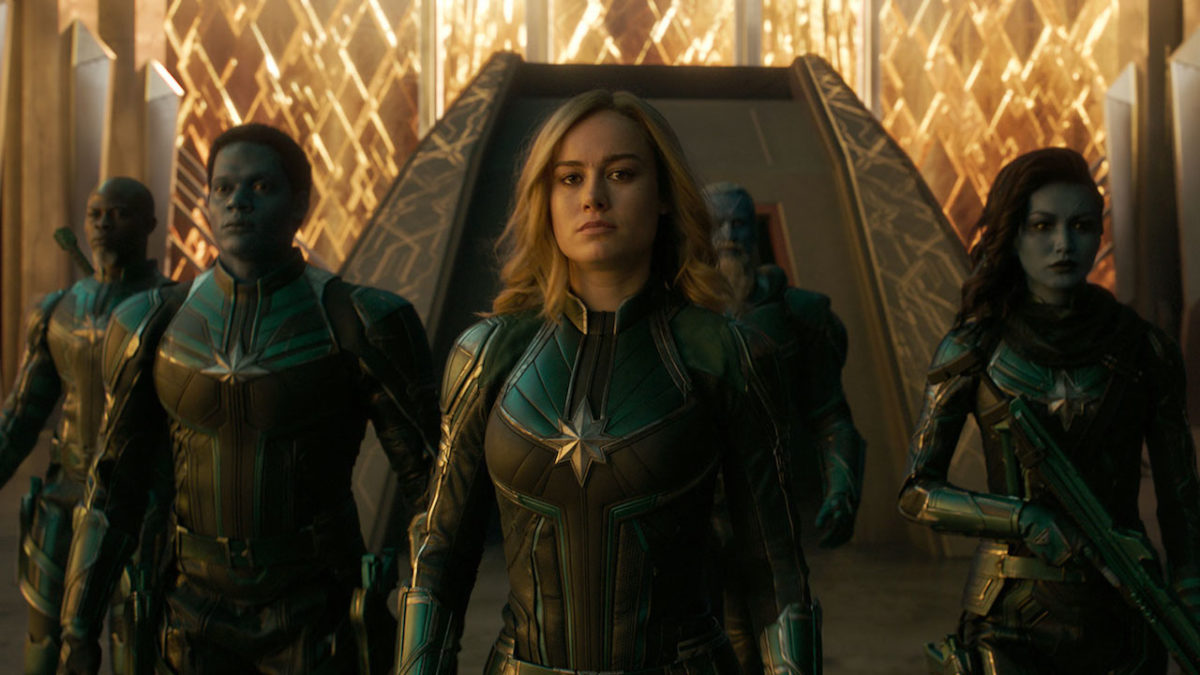
As most Marvel fans expected, “Captain Marvel” introduces the famous intergalactic war between the Kree and the Skrull, one of the major ongoing conflicts of the original comics. True to the comics, Carol Danvers herself is a human pilot turned Kree soldier, and the aliens obey the orders and policies of a Supreme Intelligence.

Captain Marvel Kree
“For the good of all Kree!”

Also similar to the comics are the Skrull, shape-shifting green aliens who are locked in a galactic battle against the Kree. Where the movie veers away from the comics, however, is that the Skrull are not the bad guys here. In something of a plot twist, they’re actually searching for a home while being bullied around and exterminated by the Kree. At the film’s midpoint, Danvers opts to side with the Skrull instead of the Kree, promising to help them find a place to call their own.

Captain Marvel Skrull
The Skrull aren’t the bad guys, at least not these Skrull.

5. There are Kree on Earth

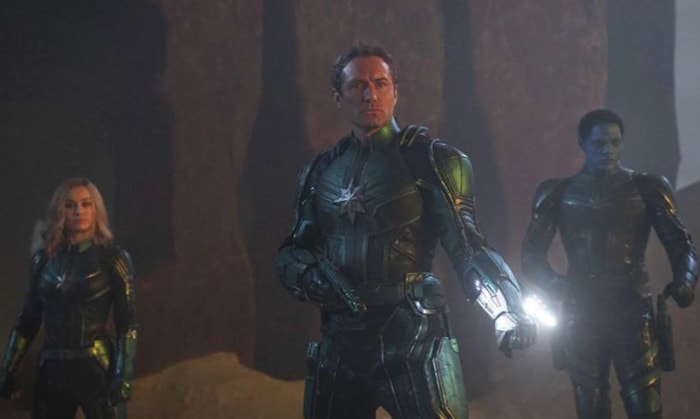
It goes like this: Mar-vell was undercover on Earth for years, working to uncover the secrets of the Space Stone. She went unnoticed for all that time, and even had a gigantic invisible Kree science lab orbiting around the planet … which also went unnoticed. Considering that, and that the Kree are actively angry with Danvers after the events of “Captain Marvel,” it seems likely that there are more Kree hiding in plain sight.

Captain Marvel Nick Fury Skrull
Secret Invasion?

And if the Kree had an easy time acclimatizing to Earth, imagine how easy it would be for the shape-shifting Skrull! While the Skrull in Captain Marvel were friendly, that doesn’t mean they’re all like that. It would be very easy (and very in keeping with the comics) for the MCU to cover the Secret Invasion in Phase Four.

6. Fury’s been looking for Avengers since the ’90s

We knew Nick Fury was looking for gifted individuals to put into his ‘Avengers Initiative;’ he told Tony Stark as much as far back as the first “Iron Man” movie. What we didn’t know was how long he’d been actively looking. Turns out Carol Danvers was the one who inspired him to start the project; even her jet was called ‘Avenger,’ as we cleverly see pointed out at the end of the movie.

Captain Marvel Carol Danvers
Good thing her ship wasn’t called ‘The Inhumans’

Fury’s had over 20 years to find more candidates for his program, and he didn’t pick up Iron Man until around 10 years later. Did he find other possible talents during the ten years prior to that? Might we be seeing some of them show up later? We don’t know yet, but it seems unlikely for his efforts to have been fruitless all that time.

Captain Marvel Nick Fury bar
Did Fury’s screening process look something like this?

7. Danvers has been fighting Kree for over 20 years

A fact that’s been glossed over a bit is exactly how long it’s been since Danvers made an official appearance back on Earth. Taking on the whole Kree empire is a lot of work, and Danvers’ absence from the MCU until now hints at a pretty epic story of her adventures off-world. We’d imagine someone of her power, courage, and determination would be able to make a pretty significant dent in the faction in that amount of time (especially given how much she was able to accomplish so shortly after unlocking her full potential). So what’s the status of the Kree empire now?

Captain Marvel ship fight
Will these escapades be the focus of a Captain Marvel sequel?

We already know Ronan’s fate, which must have hurt Kree morale, but we don’t know specific details about the faction’s military strength, plans, or how they were affected by Thanos’ snap. For that matter, we don’t know how it affected the Skrull either. The fact remains that Danvers was away for a very long time. We expect she’ll fill us in on the details in Endgame.

All caught up? Let us know in the comments below how you think Captain Marvel will fit into “Avengers: Endgame,” and we’ll see you in theaters on April 26!

How to defrag Windows 10

PC running slow? Try this easy fix.

defragment hard drive

If you’re noticing a significant drop in your computer’s processing speed and startup time, running a defrag is a pretty simple go-to solution. Barring specific hardware issues like maybe a failed driver or a broken power supply, as long as you’ve been keeping your OS up to date, your PC should never be slower than it was right out of the gate.

There are several tricks that can speed up your PC regardless of your OS, such as running a disk check or disk cleanup, removing startup services, tweaking your power settings, or switching off superfluous visual effects through your performance options menu. For info or a walkthrough of how to perform any of this maintenance, check our article on the subject:

What does defragging do?

In simple terms, defragging your computer will reorganize the files on your hard disk so they can be accessed faster by your PC’s subsystems. It physically organizes the contents of any mass storage device into the smallest number of contiguous regions (fragments), thus making your processes run faster. Defragging also uses data compaction to impede the return of fragmentation, creating larger regions of free space. It may even remove restore points, providing you with more disk space, so defragging is a useful thing to learn how to do.

Defragging on Windows 10 is a simple process, and runs automatically by default at scheduled intervals. As such, there’s no third-party download required, and you can also choose to manually start the process any time you like. Doing so requires minimal-to-zero background knowledge, so don’t worry if you’re not a computer geek. You can launch into it immediately after booting up your PC, and it’s three super easy steps.

How to defrag

1. Open your drive properties

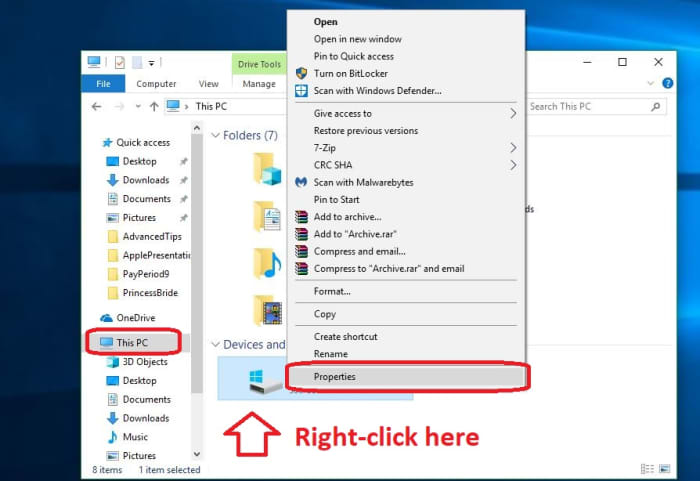
To start, open your File Explorer (Win+E for a shortcut), click on This PC, and right-click on your drive (C:). Select Properties.

Windows 10 driver properties2. Optimize and defragment

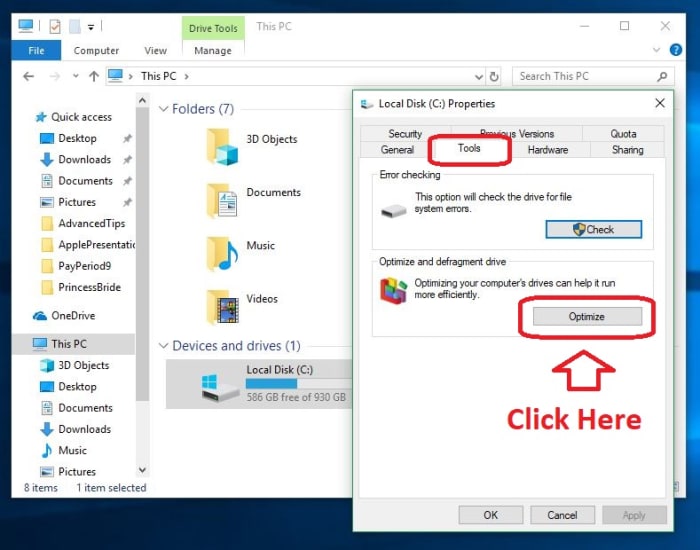
Selecting Properties in the previous step should have opened up a window with a bunch of different tabs. Click on the one that says Tools. You should see two options, the bottom of which says Optimize. Click that.

Windows 10 optimize and defragment drive3. Select a drive to optimize

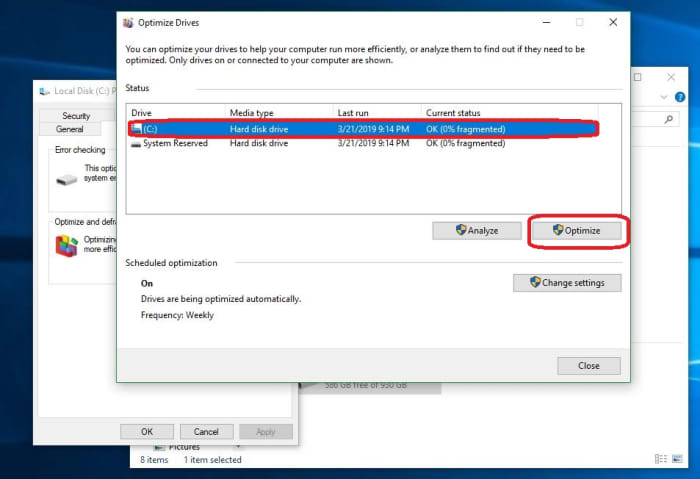
Now for the easiest step. Just select which drive you want to defrag, and click Optimize. Let your computer work its magic.

Windows 10 Optimize drive windowOn this same window, you’ll notice that on the bottom left it says that your PC is scheduled to defrag weekly. This means that you shouldn’t need to run a defrag unless you’re specifically hit by a sudden slow-down. You can always adjust the frequency at which your computer defrags, if you like: Daily, weekly, or monthly. We recommend keeping it on default, but if you want to adjust it just click Change Settings and switch to your preference.

And that’s it!

Your computer will do the rest of the work for you, and you should end up with a better-optimized drive. Be warned that the defrag will make about 7-10 passes, so this could take 30-60 minutes. You can also check out this video guide if you’re running into trouble:

There are more advanced options for speeding up your PC that you can initiate through the Command Prompt, such as checking your drivers’ health and memory, and the aforementioned power settings and startup services are probably the real culprits behind a slow PC. You can check out our other solutions right here.