LinkedIn rolls out new reaction buttons

LinkedIn will be offering new post reaction options.

LinkedIN reactions

Taking a cue from Facebook, LinkedIn introduced a feature allowing users to react to posts. The change was announced in a recent blog post from LinkedIn. 

7

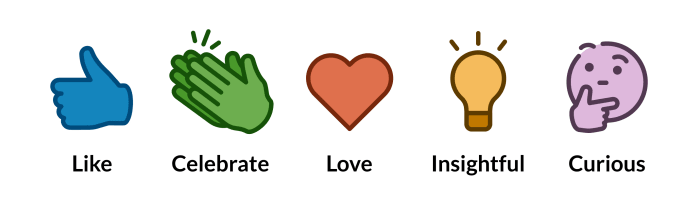
Along with the normal “Like,” users can now label a post as “Love,” “Curious,” Insightful,” and “Celebrate.” 

The reactions will be available for all users on desktop and mobile in the coming months.

“People come to LinkedIn every day to discover what’s happening in their professional communities and talk to one another about topics and ideas related to their work,” Cissy Chen wrote in the blog post. “These conversations cover a wide range, whether it’s discussing industry news, celebrating a company milestone, giving advice on someone’s job search journey, or sharing thoughts on important workplace topics like being a working parent. That’s why today we’re starting to roll out a set of reactions on LinkedIn, giving you more ways to quickly and constructively communicate with one another.”

When will I use these?

More often than naught, you probably aren’t going to need to take “Love” out of its holster. As you want to maintain professionalism on LinkedIn, “Like” is probably your go-to.

LinkedIn reactions

“Curious” on the other hand is a wonderful new tool. Jobs are posted on LinkedIn all the time, and the “Curious” reaction would be a great option to express your interest. The job poster now can sift through the reactions, and private message everyone who reacted “Curious” with details on the job.

LinkedIn has been known to be a home for humble-bragging. Most of your LinkedIn notifications are probably your connections announcing a new job or a milestone in their career. Now, rather than just offering a mere “like,” you can use the “celebrate” reaction to offer a bit more emotion and praise.

“Insightful” sounds… interesting. The idea is that you’d use it when someone posts something thought-provoking. Basically, next time your old college friend posts an article about the shift to working remotely, you have another way to express your thoughts.

LinkedIn is a great tool to help post and find jobs. If these reations can help both of those processes, we’re all for them.

Lake Trio spotted in Pokémon GO

Azelf, Mesprit, and Uxie are appearing in the wild, and there may be a trick to finding them.

Pokemon Lake Trio

Niantic announced today that Azelf, Mesprit, and Uxie can be challenged in Raids.

The mons will be able to be challenged in raids from May 2 until May 27.  Uxie can be challenged in the Asia-Pacific area. Mesprit can be challenged in Europe, the Middle East, Africa, and India. Azelf is in the Americas and Greenland.

According to a tweet from Pokémon GO’s Twitter page, Azelf, Mesprit, and Uxie are spawning in the wild.

If you have friends overseas, hope and pray that they catch two, so they’ll trade you one.

Pokémon GO Download Free ►
7

They are also very rare and have a high-catch rate, so break out those Golden Razz Berries. There is some evidence that came from Reddit suggesting that they are more likely to spawn near bodies of water.

Along with the Lake Trio, Shellos made its debut in Pokémon GO. However, it was only available in a 10-minute window. It is unclear whether or not this was intentional from Niantic. The lovable snail was available in both his pink and blue forms. Ground-type mons have also been appearing in greater numbers. Even Groudon has made its way back, appearing in raids.

How to remove Internet Explorer from your PC

Don’t leave yourself open to the latest hacking threat, completely eliminate Internet Explorer with these steps.

Internet Explorer has long been the butt of jokes and the wearer of the dunce cap in browser class. It’s no news that IE’s best days are long behind it, but now it’s not only terrible – it’s dangerous. Internet Explorer currently sports an unpatched exploit in the way it processes MHT files, the web archive format that the browser uses. Consequently, any hacker with malicious intent can easily spy on a Windows user and break into their local data. The flaw puts you at risk for doing something as harmless as opening an attachment. With so many better browsers out there, Internet Explorer is doing you more harm than good. Time to get rid of it:

But first…

Is removing IE dangerous?
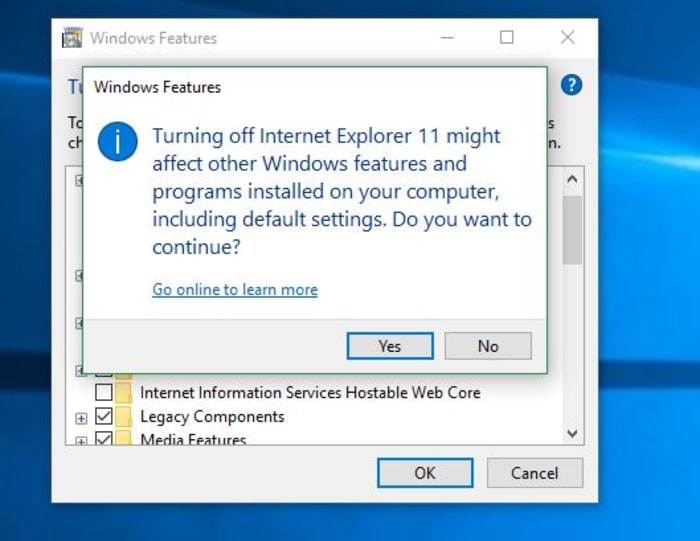
Windows Features turn off Internet Explorer 11

When you try to turn off IE, you’ll get a scary message from your PC, saying that removing IE might mess with your default programs or settings. Surely this means the process is dangerous, right? Is this meddling in affairs that we do not comprehend?? Honestly … it’s not that big of a deal. Removing IE will change a couple of small things:

1. Links leading to IE are removed

If you remove IE, you’ll no longer have a shortcut for it (boo hoo), and until you elect to restore it, you’ll have no conventional way to run the browser. Obviously, you should have another browser in place before you remove IE (even if it’s just Windows Edge, the other default), otherwise, when you try to open a URL web address, nothing will happen.

2. IE is no longer the default for opening HTML

You won’t be given the option to use IE as a default program for opening HTML or FTP. It won’t even be listed in your Control Panel’s Default Programs anymore. Again, we’re not going to shed a tear.

Removing IE from your device in the following manner will shuffle how certain programs get opened, but it won’t actually delete any of your files that rely on the browser. As long as you have some other browser installed, you’ll be totally fine. All of your universal Windows apps will continue to function as normal, too. You’ll even gain hundreds of MB of free space!
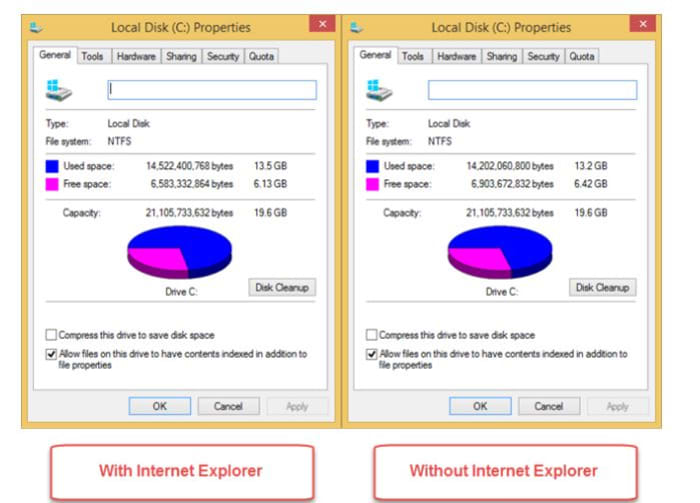
Local disk space Windows 10 Internet Explorer 11

Install an alternative browser first!

9
Browse better for free

As we mentioned above, turning off Internet Explorer is perfectly safe, but we strongly encourage you to install some other browser first. Our recommendation is Brave, a browser that prioritizes speed, safety, and privacy. Brave was created by Brian Bondy and Brendan Eich a few years back. Like Eich’s previous baby, Firefox, Brave boasts great speed, safer connections, and more private browsing, even integrating other big names in anonymity like DuckDuckGo and Tor. In a lot of ways, Brave feels like an upgrade to Firefox, it’s default being to block any and all trackers, cookies, ads, pop-ups, and banners right out of the gate. It even automatically boosts your connections to HTTPS for the highest protection.

On top of that, the browser also introduces Basic Attention Tokens, a form of e-currency that safely allows users to distribute “attention” to their favorite publishers. The token encourages a more direct relationship between user and content publisher, and is working to usher in a “web 3.0” atmosphere where users are only given ads that are relevant, and only when they elect to see them. The Brave browser is free, and can be installed in three easy steps, so our recommendation is to install Brave before you rid yourself of Internet Explorer, which we’ll walk you through right now:

How to remove Internet Explorer

1. Open Settings

The easiest way to get to your Settings screen is to simply hit the ‘Win’ key and start typing “settings.” Once the option pops up, click on it.
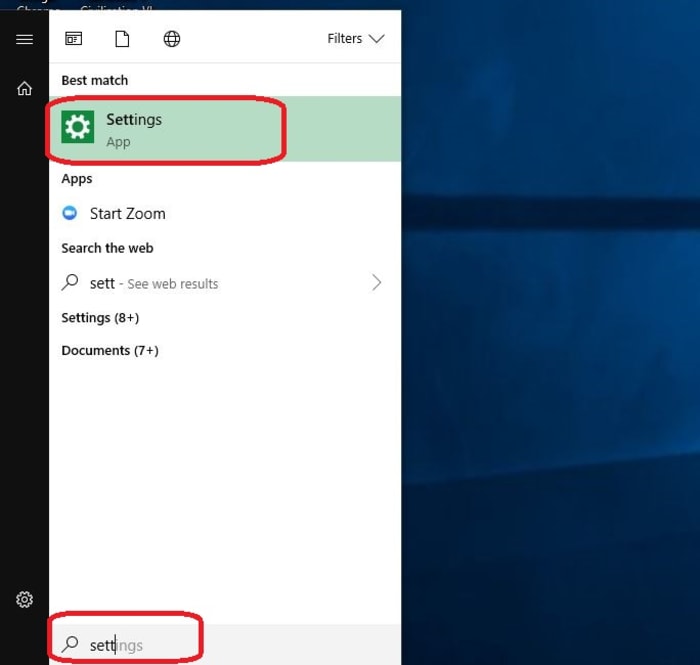
Windows 10 open settings

2. Go to Apps

On the right of your Settings page you’ll see ‘Apps.’ Click here.
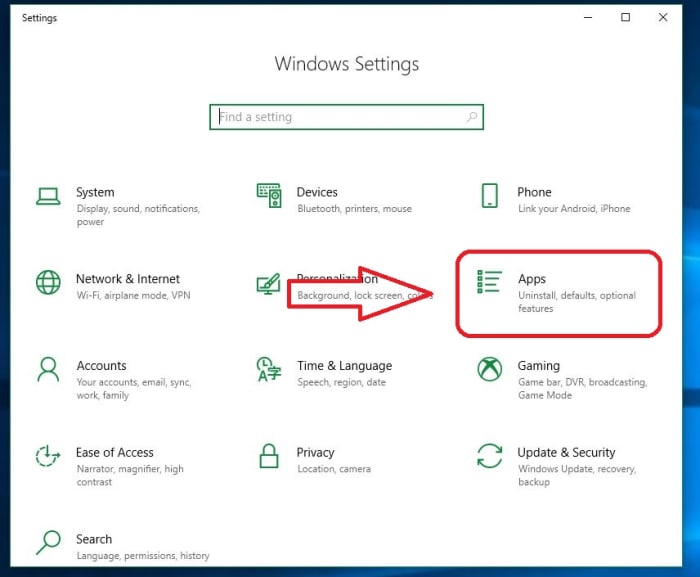
Windows 10 Settings Apps

3. Open Apps and Features

On the left of the Apps page you’ll see a list of subcategories. The first one on the list is ‘Apps and Features.’ Click this and it’ll take you to them.
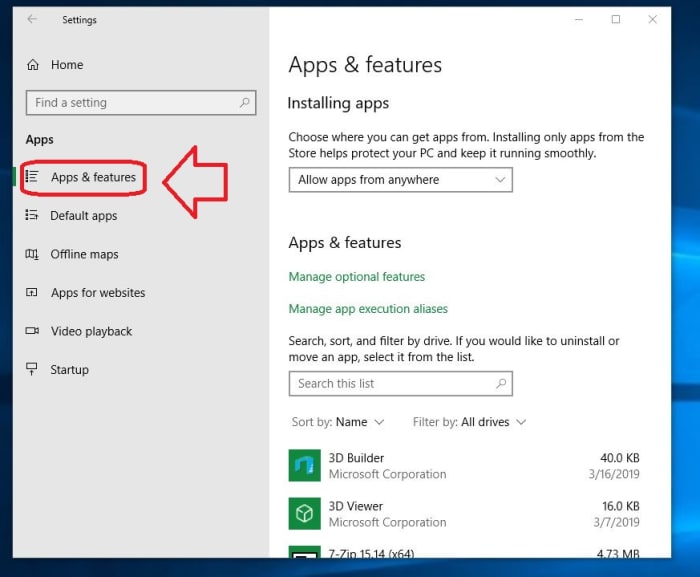
Windows 10 Apps and Features

4. Open Programs and Features

The only tricky part of this whole process is finding where your Programs and Features link is located. Luckily, there are two easy ways to do this. The first is to maximize the window and you should see ‘Programs and Features’ on the right. Alternatively, you can also just scroll past all your apps and you’ll find it under the list. Typing in the search portal will not help here, so don’t let that discourage you. Eventually, you should see ‘Programs and Features’ right under ‘related settings.’
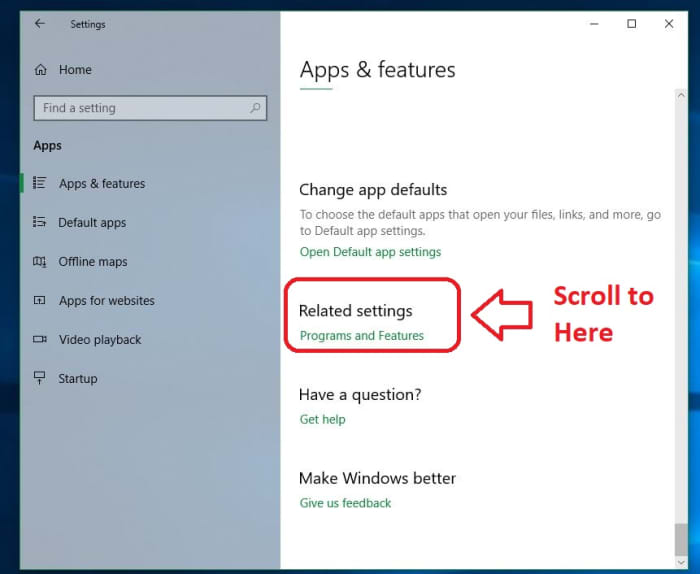
Windows 10 Related Settings Programs and Features

5. Toggle Windows features

On the left of this new window, you’ll see an admin option to toggle Windows features. Clicking this will bring you to a list of Windows features, one of them being the elusive IE 11.
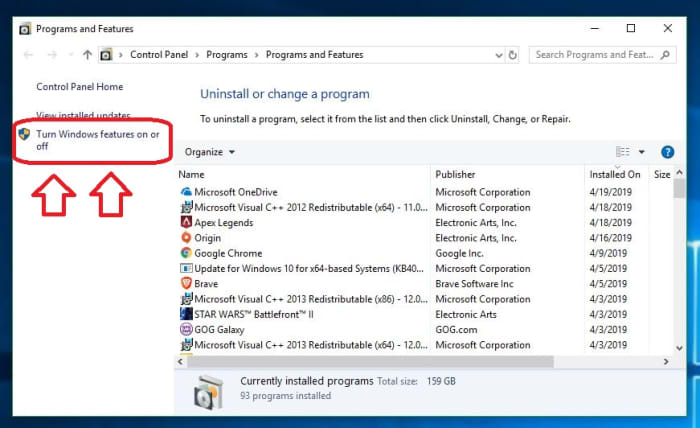
Windows 10 Settings Programs and Features Admin features on or off

6. Uncheck Internet Explorer

Now that you’ve found it, disabling IE is as simple as unchecking the box next to it. Do so and banish it from your realm.
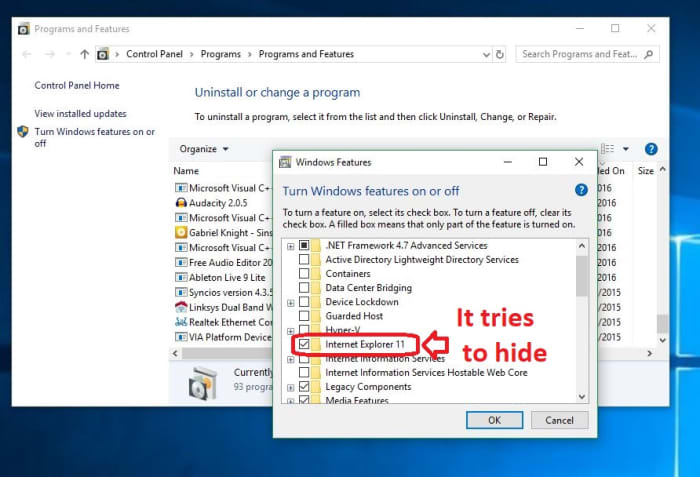
Windows Features Internet Explorer 11

Once the box is unchecked, click OK, then ‘yes’ to confirm that you want this dastardly piece of software removed from your OS. When prompted, click ‘restart now’ and enjoy your newly protected computer that’s at last free of its IE shackles. It’s also worth noting that if you want to bring the browser back (though we can’t see any reason why you would), you can just repeat the process above and when you get to step 6, re-check the Internet Explorer 11 box.

And there you have it! Your computer is safer, more efficient, and now has a bunch more space to boot. Let us know in the comments below if you have any questions with the process, and stay tuned with us for more tech tips and tricks.
Google Chrome is getting a secret Reader mode; this is how to access it

Chrome’s Reader mode has been spotted in the Chrome Canary, the experimental browser Google uses to test new features.

Web browsers are like windows to the online world. Through them, we see and access all the information that the internet has to offer. Unfortunately, however, the internet is also filled with distractions and ads, which means reading all the web has to offer isn’t as simple as it should be. This is why browsers like Firefox, Edge, and Safari have dedicated Reader modes. The main job of a Reader mode is to cut out all the clutter that comes along on every web page. Now, after years of waiting, Google is adding a Reader mode to Chrome on desktop, too.

Chrome’s Reader mode has been spotted in the Chrome Canary build, the experimental browser Google uses to test new features

Google Chrome in a book

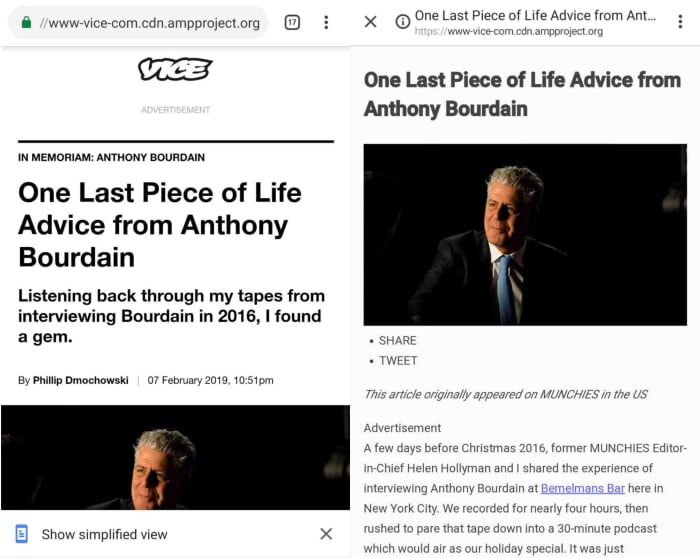
It isn’t really known why Google has waited so long to bring a Reader mode to Chrome for desktop. Google first introduced a Reader mode to Chrome on mobile back in March 2018. If you’re unfamiliar with the Chrome mobile Reader mode, it is called Simplified View and we’ll show you to use it. It now looks like Google is introducing a similar feature to Chrome on desktop (at least, that is what the Chrome Canary code indicates).

Google Chrome Canary Download now
7

First spotted by ZDNet, Chrome Canary users can use the new Reader mode right now. To activate the Reader mode, you first need to make sure you’re using the latest version of Chrome Canary, which is Canary V75. Then, all you have to do is enter “chrome://flags/#enable-reader-mode” into the omnibox, turn on the feature and then restart the browser. You then activate the feature by right-clicking on the page and hitting “Distill page.”

Image via: ZDNet

It looks as though Google is keeping the feature pretty basic, though, as there isn’t much to it, unlike the advanced Reader mode you can find on Firefox. The feature is available on Chrome Canary now, but there is still no news about when the feature will land on the regular version of Chrome that most users have on their PCs at home.

How to enable the Reader mode on Chrome for Android

Google Chrome mobile simplified view

If you would like to know how to access the feature on Google Chrome on your mobile, you’ll be pleased to know that you can do it right now. The feature is called Simplified View, and this is how to enable it.

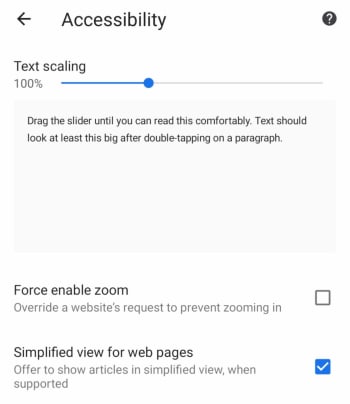
  1. Open Chrome on your Android smartphone and hit the three dots icon in the top-right of the screen.
  2. Tap Settings and then scroll down until you find Accessibility and then click it.Google Chrome on mobile accessibility menu
  3. Hit the Simplified view for web pages at the bottom of the screen and then get back to browsing the web.

Once you’ve done this, whenever you navigate to a new web page, an option will appear at the bottom of the page offering you the chance to load the page with a simplified view. Hitting this option will take out all the ads and hyperlinks and leave you with just the text, making it all much easier to read.

Notre Dame fire: The apps that could help rebuild Paris’ historic cathedral

Need to rebuild an iconic landmark that’s been struck by tragedy? Don’t worry, there could be an app for that.

As the dust begins to settle on the frenzied and emotional days that followed the tragic fire that struck the Notre Dame cathedral in Paris, a plan of action is beginning to emerge. With hundreds of millions of dollars already raised to aid Notre Dame’s resurgence, and an architectural competition launched to redesign the Cathedral’s lost spire, it is clear that Notre Dame will rise from the ashes of the fire that claimed it. Will it be the same though, or is a lot of the Cathedral’s historical significance lost forever?

Well, there are apps for this exact kind of thing. Over the last few years, a number of conservation projects have been established, designed to digitally capture sites of historical importance so that they can be kept for posterity’s sake. Let’s take a look at a few of these in greater detail and see just how they could help restore Notre Dame to its former glory.

Need to rebuild an iconic landmark that’s been struck by tragedy? Don’t worry; there could be an app for that

digital and virtual representations of Notre Dame

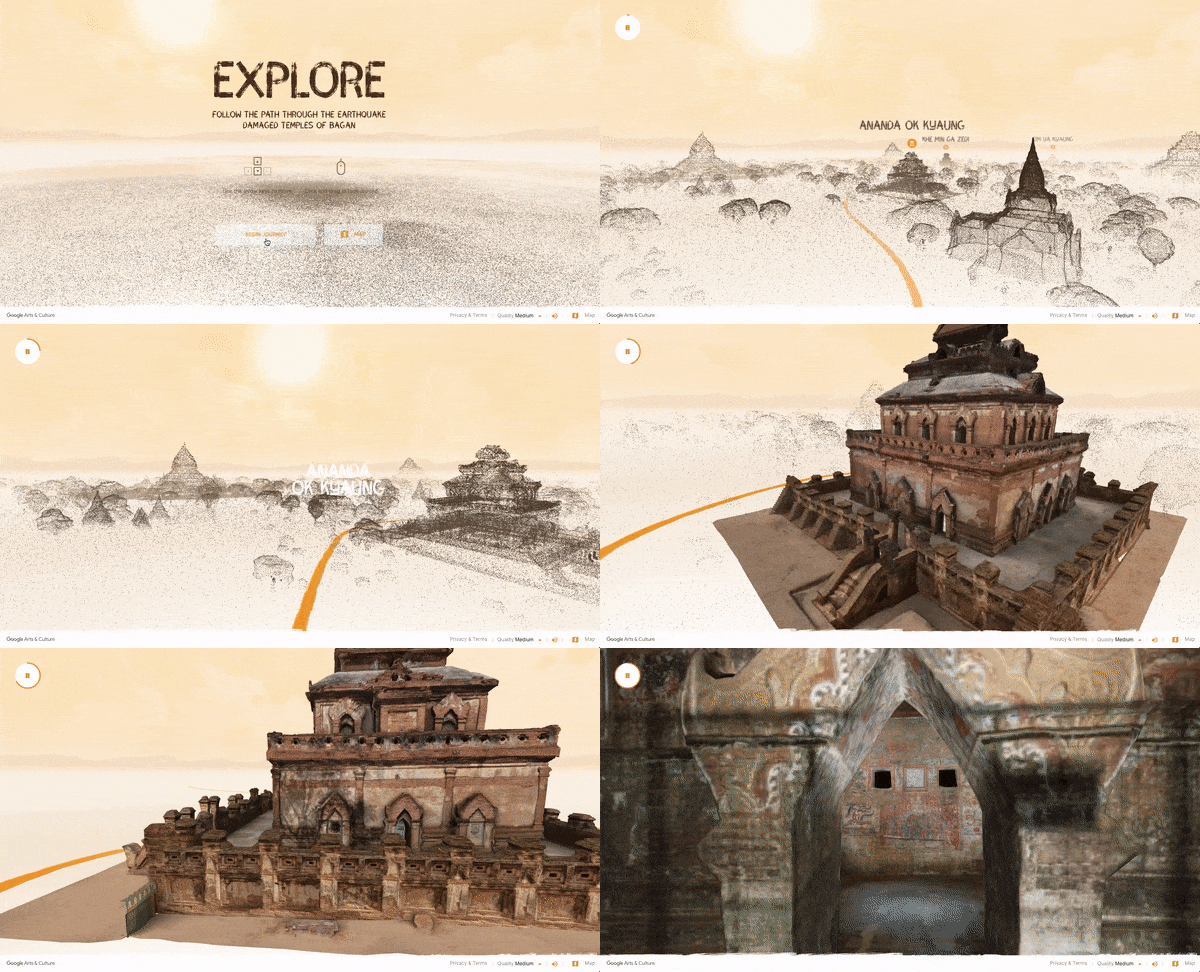
Last year, we first reported on the Open Heritage Project, which is a partnership between Google and the non-profit organization CyArk. The Open Heritage Project uses 3D laser scanners and drone-mounted DSLR cameras to capture areas of cultural and historical significance around the world that could be in danger due to political or geographical instability. Think about the destruction of Palmyra and Aleppo in Syria and you’ll have a good idea about the types of locations the Open Heritage Project is looking to digitally preserve.

The cool thing about the Open Heritage Project is that it has digitally recreated many of the landmarks it has scanned. These can be viewed from your desktop and in some cases even walked around and explored via virtual reality technology. To give this a go, you can visit the Open Heritage Project website or download the Google Arts and Culture app.

Google Arts & Culture Download Now
8

Unfortunately, and rather ironically, a Parisienne Cathedral wasn’t considered sufficiently at risk for the Open Heritage Project to scan. The good news, however, is that they’re not the only gunslinger in town. An organization called Mapping Gothic has also been using digital scanning technology to preserve the Gothic architectural wonders of France and they have complete digital scans of Notre Dame, which they took back in 2015.

Digital representation of scanning data taken at Notre Dame
Image via: Extreme Tech

According to Extreme Tech, the Mapping Gothic team, led by art historian Andrew Tallon, used a similar digital laser scanner and high-resolution photography method to the one described above to capture an impressive digital recreation of the iconic French Cathedral.

“The actual laser modeling is done by mounting a laser from a tripod and shooting the gallery, taking time to measure the distance between the scanner and every point it hits. Each one of these points represents a distance — by mapping millions of points from a single location, historians can measure how the building expands and contracts during the day, as well as how it shifts over longer periods of time. By combining the point cloud data generated by the laser scanner with on-site photographs taken at the same time, Tallon has created extremely accurate models of the underlying structure and design of the cathedral, and identified points where the cathedral’s masons either deviated from the original plan or paused work to allow the ground to settle.”

National Geographic did a great video on Tallon’s methods when he captured the National Cathedral in Washington:

There is no news yet about whether the Mapping Gothic scans will be used to help rebuild Notre Dame, but they are there should they be needed. Interestingly enough, however, those scans are not the only recreation of Notre Dame out there. In fact, another one allows you to walk through the historic cathedral just like you can with some of the Open Heritage Project scans. Furthermore, this other recreation even allows you to climb all over the magnificent building. We’re talking here about Assassin’s Creed: Unity.

The thing about Assassin’s Creed: Unity is that it did a great job of recreating Paris at the time of the Revolution. The game looks great and a lot of work was put into making the virtual Paris look exactly like the real one back in the day. All except for one detail. At the time the game is set, Notre Dame’s famous Spires still hadn’t been added to the Cathedral. When making Unity, however, Ubisoft decided that it was too integral to the essence of the Notre Dame everybody knows and loves today so they put them in the game anyway. This makes the Unity recreation of Notre Dame complete, in the modern sense.

Notre Dame cathedral in Assassin's Creed
Image via: Ubisoft

To build Notre Dame in the game, one particular member of the Assassin’s Creed: Unity team, Caroline Miousse, spent two years modeling the real thing. In all, it took up about 80% of the work she did on the game. According to The Verge, Miousse spent years fussing over every tiny detail, including the texture and placement of every brick, and even which paintings were on which walls. The results are quite spectacular and should be seen to be believed.

A view of Notre Dame cathedral from ACU

France wants to rebuild Notre Dame in time for the Paris Olympics in 2024. This is a very short period of time to rebuild a Gothic masterpiece and will be a tough task. As we’ve seen though, there is plenty of information available to whomever gets the job and should they wish, they’ll have all the data they need to rebuild Notre Dame exactly as it once stood, in all its former glory. On top of that, we already have both digital and virtual recreations and we can still get up close and personal to the famous French Cathedral even as investigators still try to figure out what actually caused the fire.

Epic Games announces Fortnite World Cup Creative

Flex your creativity and win money!

The Fortnite World Cup is in full swing. The World Cup is a global competition that will culminate in a massive live finale event this summer in New York City. Though most of the competition involves traditional Battle Royale gametypes, Epic has just announced a new World Cup event that should considerably widen the scope of the competition.

Epic Games announces Fortnite World Cup Creative

fortnite world cup creative
Image courtesy Epic Games

Fortnite World Cup Creative will take the shape of five different gametypes made by the community using the game’s Creative mode. Every other week from April 29-June 7, players will have the chance to participate in a different creative game mode. To enter into the World Cup, players simply need to submit video clips of their best moments, which will then be reviewed by a team of judges. The best submissions will then be selected to compete as finalists in New York, where they’ll have a shot at a piece of the massive $3,000,000 prize.

Fortnite: Battle Royale Play Now
10

There’s been no news yet as to what players can expect from these user-created gametypes, but Epic announced that the first World Cup Creative event will be created and judged by user Cizzorz. Players can follow Cizzorz and Fortnite on social media for the latest news and updates for hints on how to prepare for the first round of the competition. If Creative gametypes that have been showcased in the game so far are any indicator, players should prepare for some truly out-of-the-box gameplay.

The World Cup Creative is the latest iteration of the huge event that is the Fortnite World Cup. First announced earlier this year, the global event is part of Epic’s push to bring Fortnite into the realm of competitive gaming. Epic is putting serious resources behind this vision, with over $100,000,000 dollars of prizes available to competitors. This competition isn’t only open to pros, either: any Fortnite player can compete for a chance to make it to the finals. Check back with Softonic for more Fortnite news as the competition progresses.

How to play Matchington Mansion and create your dream home

Build the mansion of your dreams, and make your friends jealous with Matchington Mansion!

Matchington Mansion

If your dream is to have a big fancy mansion fall into your lap, it’s probably not going to happen. The good news is, you can live out this dream with an addicting app called Matchington Mansion.

Matchington Mansion Download now ►
7

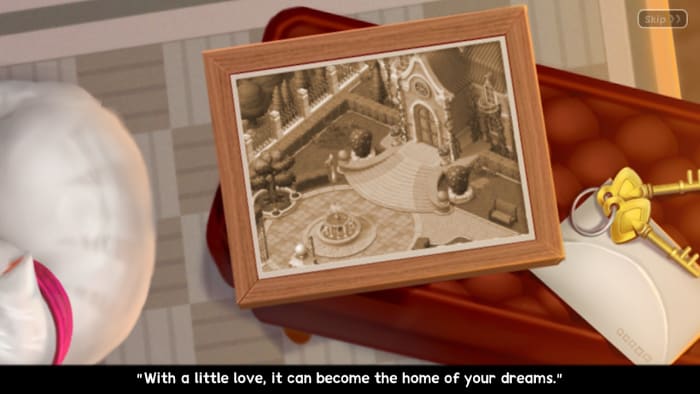
In Matchington Mansion, you play as a character who has been gifted a huge mansion and told that it only needs a little love.

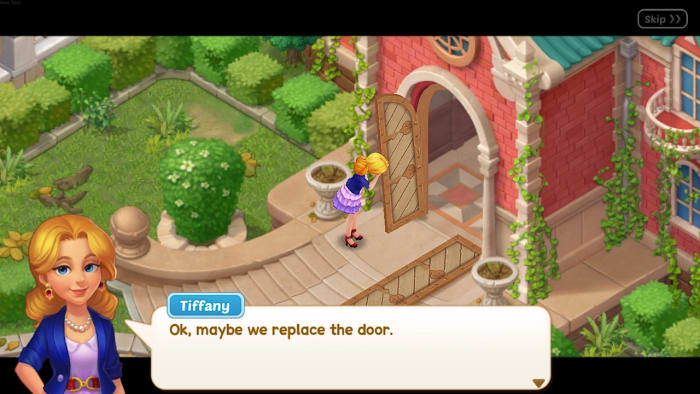
Matchington Mansion screengrab 1You have some help from your best friend Tiffany, an interior designer, who is excited to help you decorate and give you tips. Upon visiting the home for the first time, the door completely falls apart after just knocking on it. You then realize that maybe this home needs a lot more work than you thought.
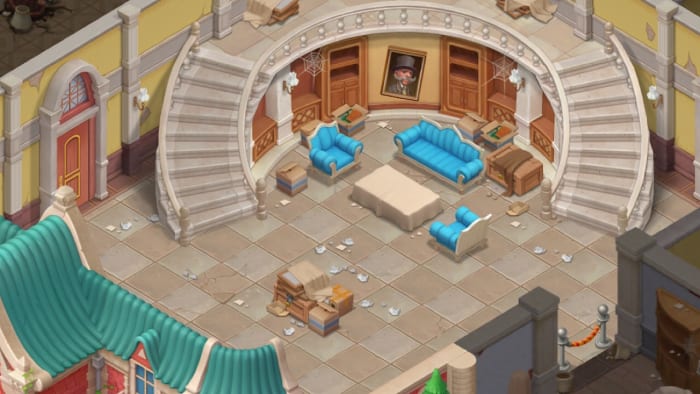
Matchington Mansion screengrab 2Just then, a new character named Rex enters, and you learn that he believes that the mansion should have been left to him. He’s planning to get his hands on it somehow so he can knock it down and build a casino on the land. Once you shake him off, you go inside and discover that the mansion is an absolute mess.
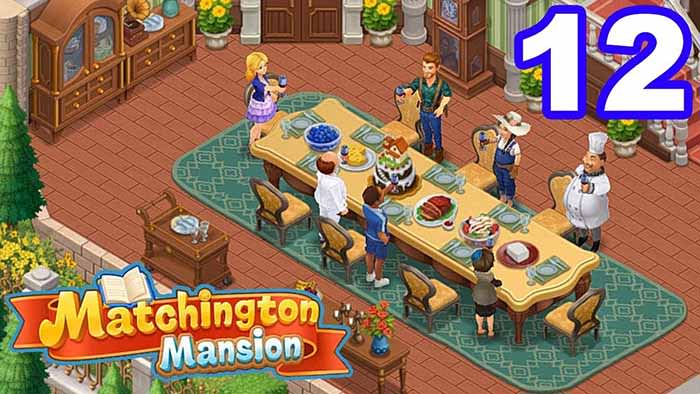
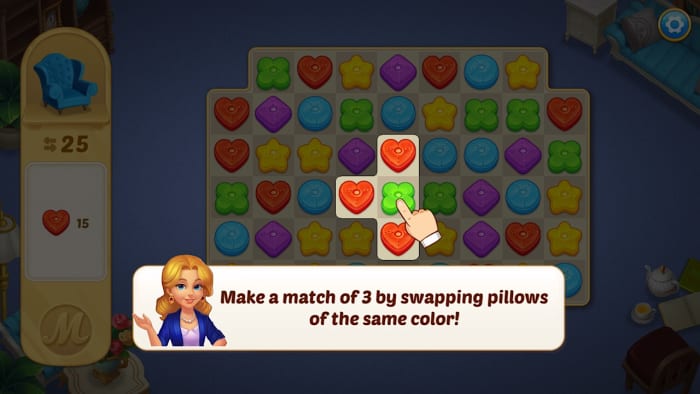
Matchington Mansion screengrab 3Here is where the game begins! Play games of matching different shapes and colors of decorative pillows, books, and other items. Three of a kind is a match, and four of a kind creates a firecracker which explodes and knocks out more pillows.

Matchington Mansion screengrab 4

Match five to create rainbows which clear pillows in whichever color that you choose from the entire board. When you win a round of matching, you earn coins and stars which you spend on decorating and renovating the mansion.

It may seem easy,  but keep in mind that you only have a certain number of moves to clear the board. If you run out, you have to start the level over. The more levels you complete, the more decorating you can do. This advances the story and allows you to unlock more rooms in the mansion to clean up.

You can  visit other players’ mansions, purchase new artwork, unlock mysterious chests with hidden keys, and work toward making the mansion the home of your dreams.

Matchington Mansion Download now ►
7

Netflix tests ‘random play’ feature

Tired of deciding what new show to start? Netflix is testing a new tool that may give you an option!

It happens time and time again. You have about an hour or so to kill, so you look for something to watch on Netflix. You search and search for shows and movies to watch, but nothing tickles your fancy. Suddenly, you realize 40 minutes have passed by, and you lost your shot.

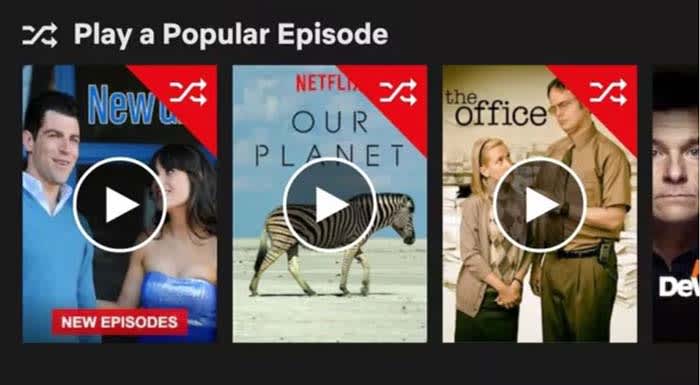
First discovered by Android Police, Netflix is testing a feature that will allow users to randomly watch an episode of a show.

Netflix random episode

This tool may not be suitable for every show. You could randomly get sent to an episode of “Breaking Bad” and have no idea what’s happening. On the other hand, you could get thrown into a random episode of “Jeopardy” and have no issue.

8

“We are testing the ability for members to play a random episode from different TV series on the Android mobile app,” a Netflix spokesperson told Variety. “These tests typically vary in length of time and by region, and may not become permanent.”

It is yet to been seen whether this feature will be available on all devices, as it was only discovered on the Android app. Whether or not this tool will become a permanent feature is up in the air.

Russo brothers announce Endgame is their last MCU film

It is the end of an era as Joe and Anthony Russo announce they are leaving the MCU for the foreseeable future.

Captain America Endgame

They gave it whatever it took.

Joe and Anthony Russo have announced that “Avengers: Endgame” will be their last MCU film for the foreseeable future.

The Russo brothers began started directing films in the MCU in 2014 with “Captain America: The Winter Soldier.” They have also directed “Captain America: Civil War” and “Avengers: Infinity War.”

“It’s our Endgame, at least for now,” said Anthony Russo in an interview with GamesRadar. “We don’t have any plans for now to make any more Marvel movies. It certainly may come up in the future at some point. We have a wonderful working relationship with [Marvel Studios] and a great passion for what they’re doing.”

The Russo brothers have other non-MCU projects on the horizon, according to IMDb.

The brothers have teamed up with Tom Holland who plays Spider-Man in the MCU for a new movie called “Cherry.” The movie is about an army medic who becomes a drug addict and a bank robber.

Although it is not part of the MCU, the Russo brothers recently announced a project about Marvel’s greatest hero, Stan Lee.

Stan Lee

“We are fascinated by the life of Stan Lee and we are actually developing a little something that has to do with his work in the history of Marvel,” said Anthony Russo in an interview with Cinemablend. “But we are not ready to present it or talk about it yet. It’s more of a documentary.”

Seeing the Russo brothers leave the MCU is upsetting. The movies they made for the MCU are some of the best it has to offer. “Avengers: Endgame” had the biggest opening weekend in film history.

We’re sad to see the Russo brothers go. Their love and commitment to the characters have been a joy to witness. We don’t know much about who may or may not be replacing them. Jon Watts will return as director for “Spider-Man: Far From Home,” and Scott Derrickson is set to direct the next Doctor Strange film. However, we don’t know who will direct the next MCU team-up film. Whoever it may be, they have big shoes to fill.

Amazon Prime works toward free one-day shipping

Prime members will soon be getting free one-day shipping.

Amazon delivery

Prime members may be getting a sweet new deal.

According to a recent article from CNBC, Amazon Prime members will soon have free one-day shipping. One-day shipping would then be the new standard on Prime.

Amazon Shopping Download Free ►
8

We’re currently working on evolving our prime free two-day shipping program to be a free one-day shipping program, ” Amazon CFO Brian Olsavsky said.

Amazon will spend about $800 million on warehouses and improving delivery to make the transition possible.

The change won’t take place all at once. The company is expected to take the change a little at a time, quarter by quarter.

Amazon Prime currently costs $12.99 a month, and $6.49 per month for students.

What does this mean?

Amazon delivery

Amazon already offers free one-day shipping on many products for Prime members. However, this change will eventually spread to the majority of the products offered.

Amazon currently has about 103 million Prime members. They are without a doubt the current kings of shipping and retail. Companies like Target and Walmart are going to need to step up their game and make changes to their business model in order to compete.

The question as to whether or not Amazon is good for the country is up for debate. Amazon recently came under a harsh light when it was revealed that they did not pay any federal income tax in 2018 on $1.1 billion in profit. The company also received more than $120 million in tax breaks. 

Prime members will enjoy this perk once it is available for their home, but until then, maybe we should look into shopping local.