How to read messages on Facebook Messenger without the sender knowing

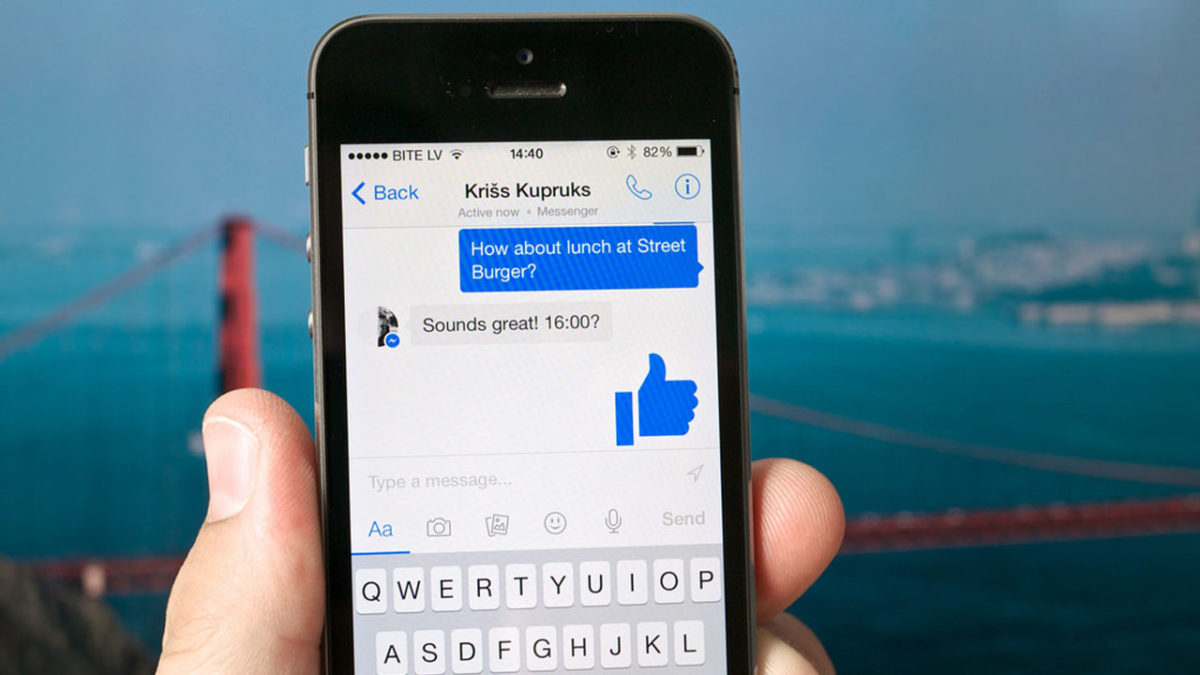
Messaging services have spurred new ways of communicating around the world. That blue checkmark is a confirmation that your message has arrived and been read. You know it. The recipient knows it.  And that can be awkward at times.

In the case of WhatsApp, you can disable the message confirmation, but with Facebook Messenger it’s not so easy… or maybe it is. We’ll show you how to read messages on Facebook Messenger without the sender knowing.

On your cell phone

Let’s start this guide with your smartphone, where this app is most used. In the case of mobile devices, making it so Facebook Messenger doesn’t detect your view is so easy it might scare you: simply put it on Airplane Mode. Yup, that’s the big reveal. If you put it on this mode, your messages on Facebook Messenger won’t appear as seen.
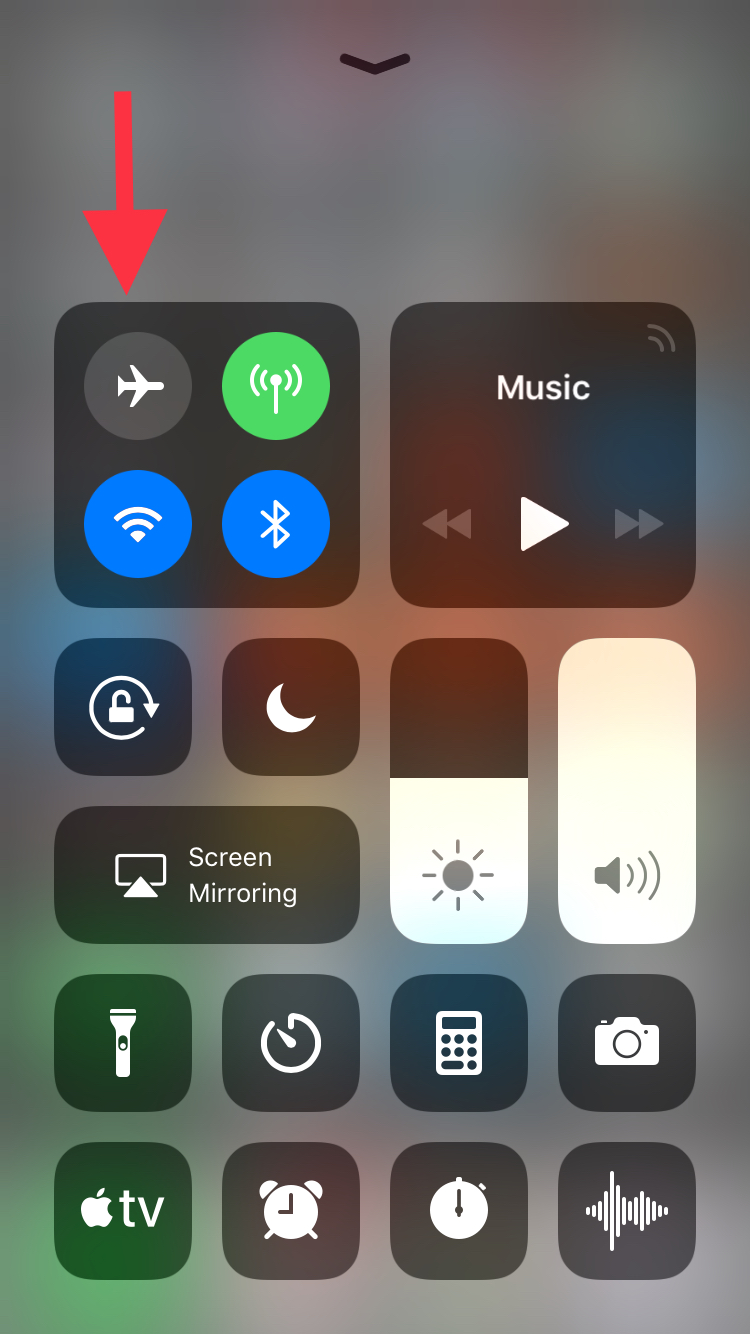
This happens because the app downloads all the messages going to your phone, regardless of whether they are read or not. However, if you enable Airplane Mode and then go into the messaging app, without internet there won’t be any read receipt or even the possibility of responding. It’s the modern day equivalent of “driving into a tunnel.”

On your PC

We already mentioned that it’s pretty easy to get this unseen message with your smartphone and it’s just as straightforward with your PC, though there are a few additional steps.

If you use Google Chrome, what you should do is install the extension Unseen. The name is straightforward. It blocks received messages so they don’t appear as read when you go into the app.

FB Unseen Download Free
7

If you use Mozilla Firefox, there are several extensions like this, though our advice is to go for Message Seen Disable. It works pretty well and doesn’t give you any trouble with browsing or using Facebook Messenger, so it’s one of the best options.

Now that you know how to read messages without them appearing as seen, you just have to choose how to do it. We like the smartphone method best, which takes a matter of seconds (literally) to complete the process. It’s up to you.

Reddit now gets more traffic than Facebook in the US

Reddit’s recent design overhaul was all about modernity. CEO Steve Huffman explained that he didn’t want Reddit to feel old anymore. If Reddit were to compete in the future, it would have to look like it belonged there. Reddit is already seeing that it belongs in the future as the popularity of the so-called “front page of the internet” is on the upswing. So much so, that according to Amazon’s web traffic analysis platform Alexa, Reddit is now getting more U.S. visitors than Facebook and is the third most popular website in the U.S. behind only Google and YouTube.

This, of course, isn’t all about the rise of Reddit. Facebook’s slow demise, exacerbated by a user base that is migrating to other social platforms (including Reddit, and, fortunately for Mark Zuckerberg, WhatsApp and Instagram) and the recent Cambridge Analytica scandal also deserves attention. The stats, however, do not lie and Reddit looks to be in a strong position going into the future. A lot of people like visiting Reddit, and when they’re there, they like it and spend a lot of time on the site.

Reddit: The Official App Download Now
8

The average Reddit user spends over 15 minutes on the discussion hub every day. This is almost five minutes longer than Facebook users spend on the social network. It is substantially longer than YouTube users, who on average spend 8 minutes and 31 seconds on the site, and Google users, who clock in an average of 7 minutes and 16 seconds.

Users like Reddit

For years, Reddit has been the go-to place for all manner of online chat ranging from pop culture to the fringes of acceptable discourse. As we’ve seen Easter egg-filled TV series, movies, and video games become the norm, Reddit’s community has taken the lead in finding the hidden details and discussing what they mean. The recent redesign was supposed to make the site more welcoming to those who discover the site through those conversations, and it already seems to be working. More people than ever are finding Reddit, and more and more of them are coming back. Reddit’s little alien can definitely look to the future with a smile on its face.

Facebook: Send us your nude photos to prevent revenge porn

Revenge porn is one of the big problems of the Internet today: an intimate photo you sent privately to your partner can, out of spite, end up in front of everybody on social media. Aware of how easy this is, Facebook has developed a system so users’ intimate photos can’t be uploaded to the social network. But it’s weird. Really weird.

To prevent an ex-lover from uploading your naked pictures, Facebook wants you to send them your naked pictures. You read that right.

If this interests you, get in touch with Facebook using a special form, now available in Australia, the United States, the United Kingdom and Canada. Next, Facebook will send you a one-time link for you to upload all those intimate photos that you want to prevent from being uploaded by other people to the social network. From each of these photos, an identifier will be extracted to prevent third parties from distributing your images: the moment they try, FB will block them on Facebook as well as on Messenger and Instagram. Also, you’ll be notified that somebody tried to do this.

Although the idea behind this method could work, the implementation is fairly odd. While Facebook promises that it doesn’t store the info of your photos and absolutely nobody will have access to them, the idea of handing them over requires a significant amount of trust, especially considering Facebook’s recent scandals surrounding the privacy of its users.

Would you trust Facebook to prevent revenge porn?

Source: Facebook Safety

How to recover a deleted WhatsApp photo or video

It’s one of the most frequently asked questions when you’re having issues: “How can I recover a deleted WhatsApp photo or video?” For some reason, you deleted that snapshot and now want to get it back on your device. Yes, friends, you can recover it. In fact, today at Softonic we’re going to teach you how.

Before we get started, check carefully

We’re going to recommend a series of recovery programs, but before we get started, we want to ask you something: are you sure you’ve checked carefully?

We’re asking this question for a simple reason: WhatsApp saves all your images and videos in two different folders. One is the device’s “Image gallery” and the other is a dedicated folder for the app called “WhatsApp Images” (within the “Gallery,” of course).

In the case of iOS, the images are also found within every user. If you click on the profile name once the chat is open, you’ll see a field called “Multimedia, links and docs.” Go in and you’ll have access to all the images that you’ve downloaded since you installed the app (if you didn’t delete them previously, of course).

With apps

Once you’ve checked that the images aren’t there, it’s time to use apps to recover the snapshots. For this, we have two tools that work fairly well: DigDeep and Disk Digger, the first free and the second paid.

Starting with DigDeep, this app is extremely easy to use, so much so that its design is the most complex part. With a rough and ugly appearance, this software lets you recover all deleted images with two simple clicks. Literally. Once you have it downloaded and installed, you’ll see that several pictures of deleted images will pop up. Click on the one you would like to recover and click on “Restore.” It doesn’t get any easier.

DigDeep Image Recovery Download Free
9

For Disk Digger, the ins and outs are the same, except the free version of the app only recovers a thumbnail of the photo. Of course, the developers’ idea is that you’ll see the images or videos that you want to recover. And you won’t think twice about upgrading to the paid version.

DiskDigger Undelete Download Free
8

About WhatsApp Web

We’ll wrap up with a little trick that you may not know: WhatsApp Web, i.e. the computer platform for this app, may have your photos. For this, you only have to enter the site, scan the QR code that it requests (following the instructions that WhatsApp indicates) and you’ll see the app opens on your computer.

If you click on the chat of any user, you’ll see that same box as the iOS version (“Multimedia, links and docs”). Go in and you’ll have all the photos and videos that you’ve exchanged with that person at your fingertips!

WhatsApp makes a big change: no more annoying photos from your contacts

Soon you’ll have the power to stop photos and videos sent by your WhatsApp contacts from appearing in your phone’s photo gallery. How many times have you opened your gallery to show a photo to a friend, only to find dozens of goofy photos or videos from those idiotic, muted group chats? Never fear. Those uncomfortable moments are at an end.

WhatsApp Messenger Download WhatsApp
8

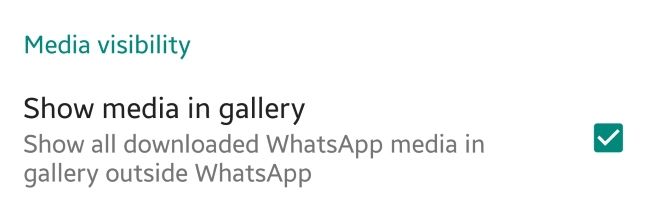
This new feature appears in the latest WhatsApp beta version. This means that soon we’ll have it available in the regular version. Once the update rolls out, just have to go to the settings section of WhatsApp and then to Data and storage. There will be a new option called “Media visibility.” Simply disable “Show media in gallery” and the problem is solved.


What do you think about this new feature? Will you use it? Leave us a comment!

Facebook banned: New national policy aims to limit negative effects of social’ media

The government in Papua New Guinea has decided to ban Facebook for a month. The move comes in a bid to study the effects of social media on the people of the small island nation. In addition to the study, fake users will also be targeted and eliminated from the social platform.

Papua New Guinea’s communication minister, Sam Basil, said:

“The time will allow information to be collected to identify users that hide behind fake accounts, users that upload pornographic images, users that post false and misleading information on Facebook to be filtered and removed.”

With recent scandals like the Cambridge Analytica Facebook data leak still fresh in people’s minds, Basil says that the country is acting with its citizens’ best interests at heart. There are also plans for a local social network being set up on the island, but Basil says the government will wait until the results of this study are known before action is taken.

This isn’t the first time a country has temporarily banned Facebook. Sri Lanka did the same at the beginning of the year to prevent the spread of racial hatred. Banning Facebook is no doubt a controversial option but with the social network getting in trouble in Myanmar recently for helping incite racial violence, it is clear Facebook isn’t doing enough to meet its global responsibilities.

What do you think? How would you feel if Facebook was banned in your country?

How to use Facebook Marketplace to sell what you no longer use

When Facebook implemented its own system for buying and selling, many wondered if it would actually be successful. And although it has a long way to go before overthrowing Craigslist, Facebook Marketplace is making a dent. At Softonic, we want to tell you about this option, so we’ll show you how to use Facebook Marketplace to sell what you no longer use.

How to access it

The first thing you should know is that Facebook Marketplace isn’t an extra app or hidden site. This buying and selling hub is available from the main Facebook app or browser. You can access the marketplace from PCs or smartphones, and the only requirement is to have a Facebook account.

In the case of PC, the option appears on the left, fourth from the top. As for Android or iOS devices, the Marketplace can be found in the drop-down menu that appears next to “Notifications.”

How to use it

The first thing to clarify is that the Marketplace isn’t a place where you can make financial transactions like Ebay or Paypal, for example. On Facebook Marketplace, you can put a product for sale, but the money needs to be sent with another method, whether that’s Venmo or Zelle or whatever.

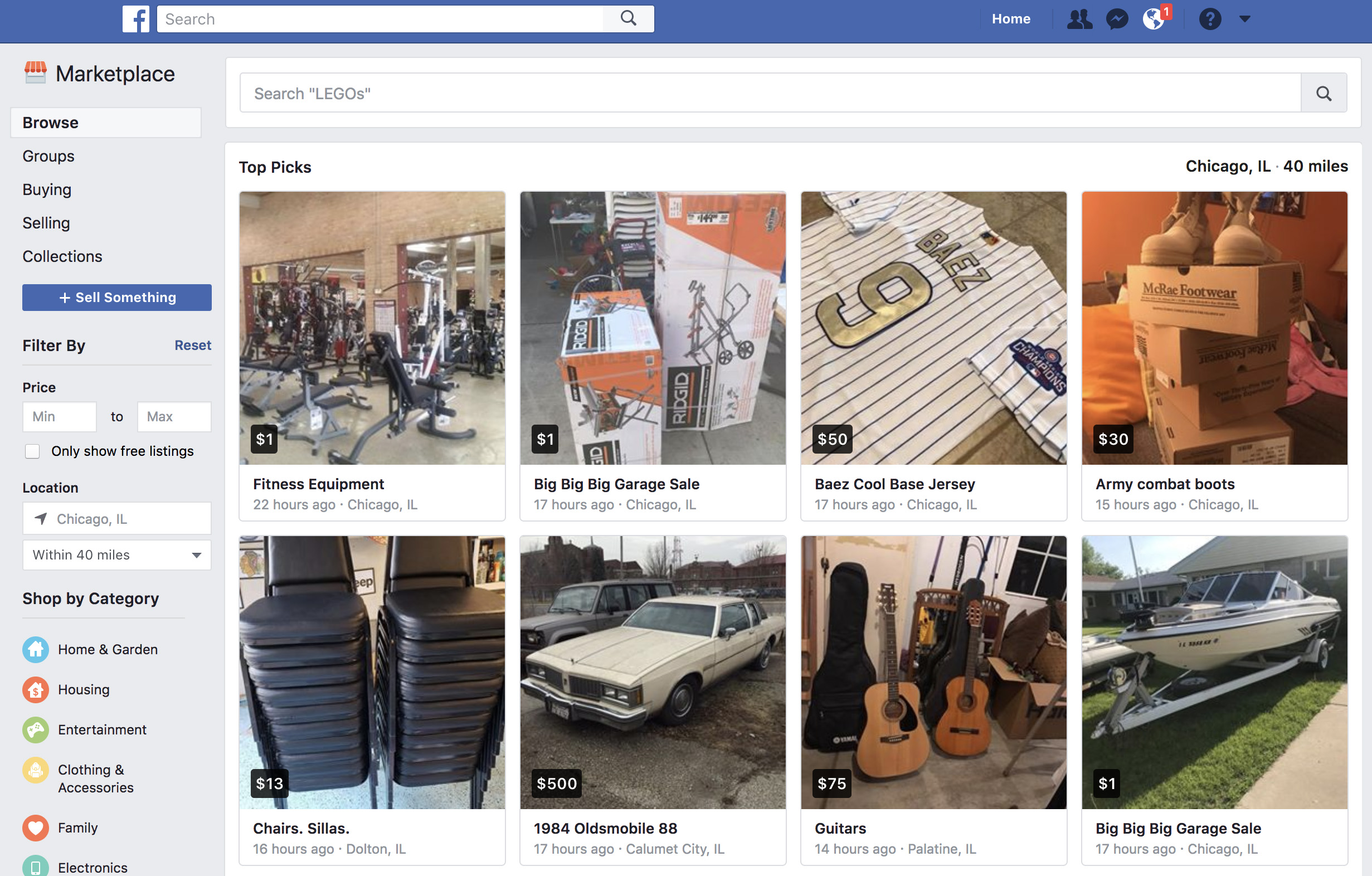
Once you enter Facebook Marketplace, you should check out the categories that appear on the top left: “Browse,” “Buying,” and “Selling.” “Browse” is self-explanatory: it’s where you can search for products. Enter the name of the item you’re searching for and look carefully at the settings that appear on the left, where you can narrow the price and the location. Once you’re interested in the product, click on it and get in touch with the seller. 

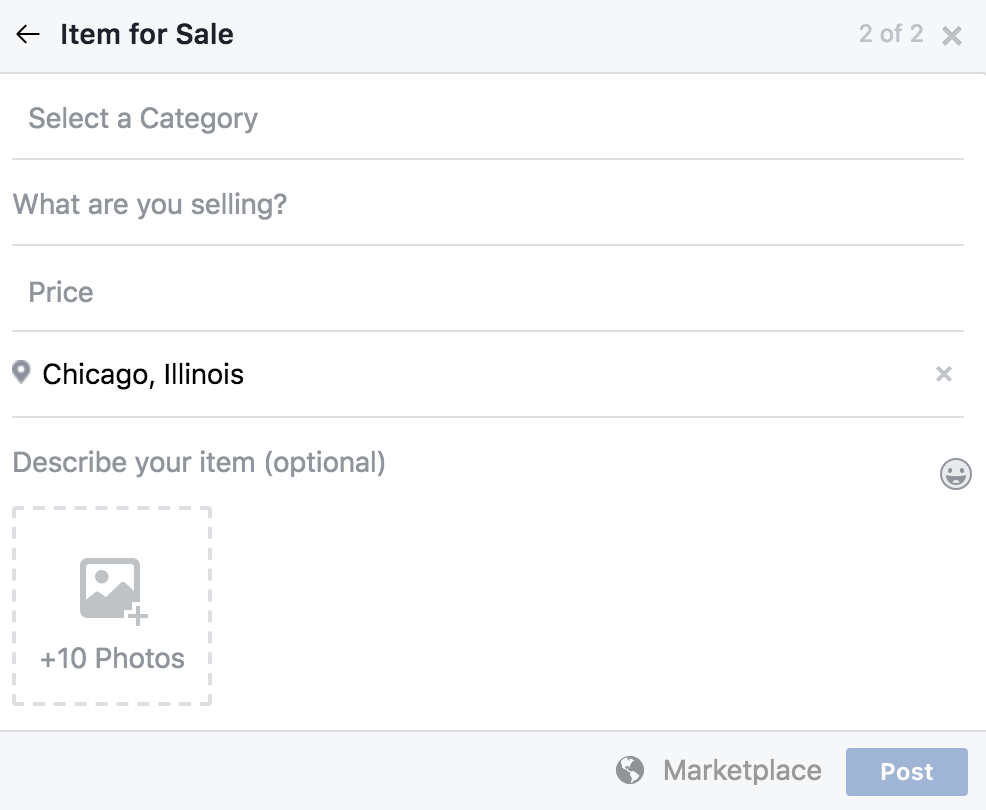
As for the other option (“Selling”), this is for everything you want to get rid of, once somebody has contacted you. However, you just have to click on “Sell something” to create a corresponding ad. Just fill in the “What are you selling?” field, add a price, a location, select a category and upload the photos that best highlight the item. Once you’ve got everything, click on “Publish” so it appears on the Marketplace. Then sit back and let the money roll in!

How YouTube chat works and what you can do with it

YouTube got non-stop updates in 2017. The video streaming platform knows that industry competition is fierce, so last year it launched a lot of new features, and developed some features that were already available but easy-to-miss. This is where YouTube chat comes in. Although it’s hard to believe, the system has a messaging service like WhatsApp or Facebook Messenger. Today at Softonic, we’ll tell you how YouTube chat works and what you can do with it.

Step by step

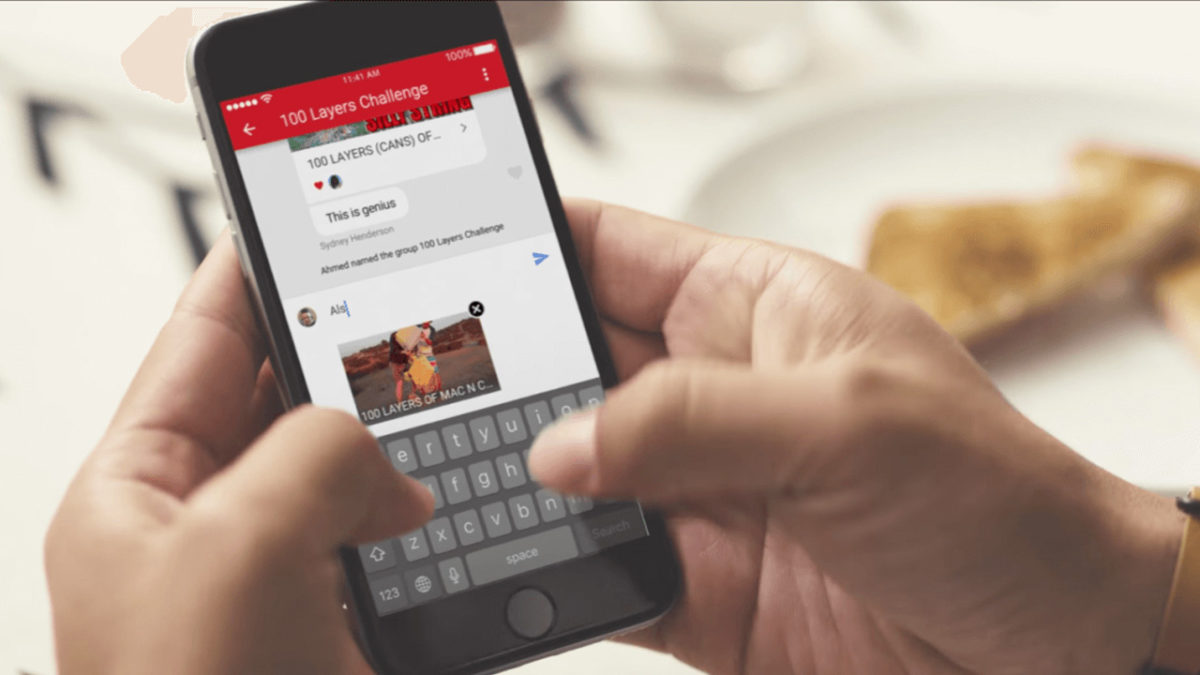
YouTube chat isn’t any different from what you see on major messaging services. In other words, you can write messages, send emojis and hold a normal conversation. However, the biggest difference is that everything is focused on YouTube. Instead of attaching videos or images, the icon is of sharing a YouTube clip. It’s a chat designed for browsing on the platform.

YouTube Download Free
8

For whatever reason, Google hid the chat feature in a place you’re unlikely to look. To chat, we’re going to select a video and click “Share.” When the menu opens, select the user you want to send the video to. Do this and the chat will open.

This screen is the main conversation interface, which hides some secrets. If you click on the three dots that appear on the top, the app will display a menu where some options appear, such as “View participants” of the chat, “Add participants,” “Delete chat” and “Mute notifications.” Of course, each name indicates what you can do under each.

In case you want to see the chat you’ve opened previously, all you have to do is click on “Activity” and then “View contacts.” There all your previous conversations will appear, as well as all possible chats of yours.

A big asterisk to this is that you have to have a confirmed name on YouTube or none of this will work. We spent about an hour looking for these options and couldn’t find them in the app, probably because we don’t want to use our real name on the site.

How to set up two-factor authentication on Facebook

Two-factor authorization adds a much-needed extra layer of security in today’s ever-turbulent digital age. It adds an extra way of proving who you are should you access your online accounts in an unusual way. If you log in on a friend’s device, for example, or from an internet café, you’ll be prompted to authorize access to your account using a predefined method. Should your password be compromised, your account needn’t be, and because of this two-factor authorization is recommended by every security expert who is good at their job.

Facebook wants to make it easier for you to set up two-factor authorization on your Facebook account, so let’s have a look at how to do it now.

Until now, you’ve had to give Facebook your phone number to activate two-factor authorization, which itself comes with certain security implications. Now, however, you can use a third-party authentication app such as Okta or Google Authenticator. These apps generate instant verification codes that can then be used to authenticate who you are.

Google Authenticator Download Now
7

How to set up two-step authorization on Facebook

On top of this new feature, Facebook has added a simple step-by-step walkthrough guide that will get you set up with two-factor authorization. All you have to do is go to Settings in the Facebook app or on the desktop version. From there click on Security and Login and towards the bottom of the screen, you’ll find the Use two-factor authorization option. After that simply click Get Started and Facebook will walk you through the rest.

We can’t recommend enough that you activate two-factor authorization and take advantage of this new, easy to use security profile.

WhatsApp failure means blocked contacts can send you messages

A serious WhatsApp failure is allowing users to send messages to the users who have blocked them. The avid WhatsApp watchers WABetaInfo posted the bug on their Twitter feed and it has since been confirmed by several of their followers. Users have reported being contacted by blocked users and that their statuses have been visible also.

The error is only affecting users who have downloaded the latest WhatsApp update for iOS. This means if you use WhatsApp on Android you should still be safe.

There has been no official word from WhatsApp yet, regarding the bug, but as the messaging app regularly updates, we can be sure they’ll fix it soon enough. Until the official patch comes out, there is a simple, quick fix. You can do this yourself right now to make sure you won’t be bothered by any of your blocked contacts.

How to stop your blocked contacts messaging you on WhatsApp

If you’ve received a WhatsApp message from somebody you’ve blocked, the solution is simple. All you have to do is unblock that contact and the re-block them again. This should reset their blocked status on the WhatsApp server.