You have until the end of the month to redeem Google’s Valentine’s Day giveaway

Valentine’s Day isn’t over yet! You can redeem $1 off all apps over $3.

Love is a tricky business. So much so, that is easy to feel left behind at a time of the year that has been hallmarked for love and romance. If you’re not in a relationship, hearing your friends talking about candlelit dinners or surprise flowers at the office on Valentine’s Day can leave you feeling sad and alone. Even if you’re normally fine with being single, February can be a hard month. Trust me, I know.

Google Valentine's gift
Google is giving you until the end of the month to take your Valentine’s day “gift”

If you didn’t receive anything special on Valentine’s Day, don’t worry. Google has a gift for you, and you have until the end of the month to redeem it. For Valentine’s Day, Google is giving everybody $1 to spend on the Google Play Store. The only catch is that you can only redeem the code on apps or games that cost more than $3. To redeem your free dollar, all you have to do is type in VALENTINE2019 when you’re purchasing your app.

OK, so it isn’t quite a giveaway but if there are paid apps or games out there that you’ve been thinking about downloading for a while, this could be your chance to get your hands on one of them at least. Let’s have a quick look at three of the best apps on the Google Play Store that cost more than $3.

Infinite Painter Download now ►
10
If you’re looking for an excellent alternative to Adobe Photoshop to use on your Android phone or tablet, look no further than Infinite Painter. Our users love it. Comes with excellent brushes, tools, an easy to use interface and multi-layer support. Download now for a free 7-day trial and then pay only $7.99 to unlock the premium features.
8
Djay 2 is a full version dj platform that is powerful enough to see you playing full gigs and parties from your mobile phone. Djay 2 integrates with Spotify and allows you to perform live or to record your mixes to post on your webpage and share across social media. If you want to be a DJ, you need djay 2.
Monument Valley 2 Play Now ►
8
Monument Valley 2 is one of those rare mobile titles which manages to create an emotional experience within the restricted medium. The puzzles are clever but never frustrating, the world engaging but simple and the characters open to interpretation. While the game is more expensive than similar titles, it is worth the money.

New scam spotted on the Google Play Store

Look out for scam apps with fake star ratings in the icon that automatically sign you up for paid subscriptions

As well as offering you a place to download apps for your Android devices, the Google Play Store is also home to an eternal battle between the forces of good and evil. The good want to see you enjoying useful and entertaining apps while the bad are constantly looking for ways to steal your data and profit from its use.

Over recent weeks and months, we’ve seen all sorts of efforts from fake GPS navigation apps to non-existent driving simulator games. When downloaded, these fake apps would pump your device full of malware and then hide themselves to make it as difficult as possible to uninstall them. A number of the tips we’ve received about bogus Android apps in the Play Store have come from security expert Lukas Stefanko, who has just released details of a new type of scam app to hit the Google Play Store.

Look out for scam apps with fake star ratings in the icon that automatically sign you up for paid subscriptions

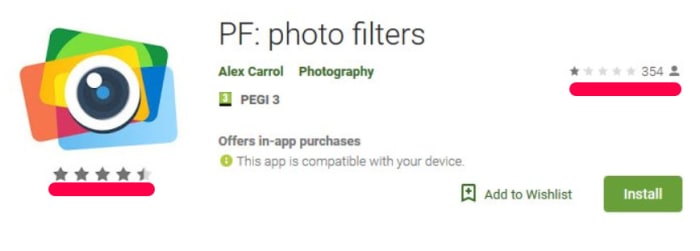
Fake with fake star rating in the logo
The icon makes it look like this app has a rating higher than four stars when it actually has a review rating of one star.

Stefanko has discovered apps that include a fake star rating in their logo. The logos have been designed to make it look like they’ve been receiving positive reviews from users when really the fake stars have just been added to the app logo. This means that the logo could instill a false sense of security in unsuspecting users when they’re searching through the app store. When the app is selected the app’s home page then shows the true review score that represents genuine reviews made by real users.

Whereas other types of scam apps that Stefanko has discovered have concentrated on inserting ads into the user experience or installing malware onto the machine that steals user data, these new scam apps take more direct action. These apps invite users to enjoy a free trial of the apps “full features” but then set the subscription to automatic payment.

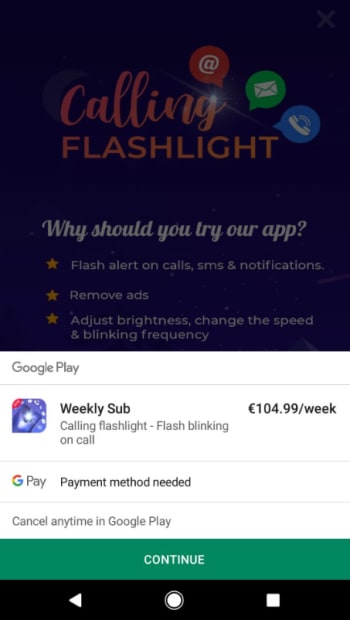
Scam apps target huge auto subscriptions

Unless canceled, the apps will charge the payment method linked to the user’s Google account. In one case the price of subscription was a massive €49.99 ($56.40) a week. Another flashlight app asked for a €104.99 ($118.95) subscription. Any victim who falls prey to these scams will see these massive amounts automatically taken from their linked bank accounts until they cancel the subscription. Google will take a massive 30% of all payments for the first year, too, with Google’s cut lowering to 15% if the victim keeps paying for more than 12 months.

The fact that these apps are targeting such huge amounts of money illustrates just how important it is to double check every app you download from the Google Play Store. Always check the developer’s name and make sure you double check the actual reviews of other users rather than merely relying on the visual cues the app’s icon and other promo graphics might give.

Google Play Store: Fake camera apps that steal your photos discovered with millions of downloads

Millions of people have downloaded malicious camera apps that send their photos to third-party servers

scam apps

Cameras are one of the major features on all smartphones. We’ve seen a battle recently between all the major smartphone manufacturers, all hoping to have their handsets crowned the best phone for photographers. New hardware features like multi-lens setups and software solutions like AI-assisted camera apps now allow us to capture magic moments better than we could ever have imagined.

As well as giving us the tools we need to document our lives, however, cameras can offer a new vulnerability for hackers to exploit. If we don’t take the right precautions the very photos we take could end up in the wrong hands. Unfortunately, it looks like this could already be the case for millions of Android users.

Millions of people have downloaded malicious camera apps that send their photos to third-party servers

In total, security researchers Trend Micro discovered 29 fake camera apps in the Google Play Store. These apps offered a range of photography linked features from taking photos to applying edits and filters.

The apps in question had no functionality at all. Rather than capturing images or applying edits, they’d simply send the photo in question off to a third-party server before showing an error message on the victim’s device. Some cases included the user being shown ads and even pornographic images. Furthermore, some of the apps, once installed, would try to hide themselves in order to make it as hard as possible for users to remove them from their devices.

malicious camera apps steal photos google play store
Some incidents showed pornographic images

The full list of the fake camera apps discovered by Trend Micro is:

  • Art Editor
  • Art Effect
  • Art Effect
  • Art Effects for Photo
  • Art Filter
  • Art Filter Photo
  • Art Filter Photo Editor
  • Art Filter Photo Effcts
  • ArtFlipPhotoEditing
  • Artistic effect Filter
  • Awesome Cartoon Art
  • Beauty Camera
  • Cartoon Art Photo
  • Cartoon Art Photo
  • Cartoon Art Photo Filter
  • Cartoon Effect
  • Cartoon Photo Filter
  • Emoji Camera
  • Fill Art Photo Editor
  • Horizon Beauty Camera
  • Magic Art Filter Photo Editor
  • Photo Art Effect
  • Photo Editor
  • Pixture
  • Prizma Photo Effect
  • Pro Camera Beauty
  • Selfie Camera Pro
  • Super Camera
  • Wallpapers HD

If you have any of these apps on your Android device, you should delete them immediately.

The good news is that since Trend Micro reported the apps to Google the internet giant has removed them from the Play Store. The bad news is that as they made it passed Google Play Protect and were able to rack up millions of downloads before being detected there is nothing to say that there aren’t more fake and malicious apps on the Google Play Store right now.

fake apps fake reviews google play store

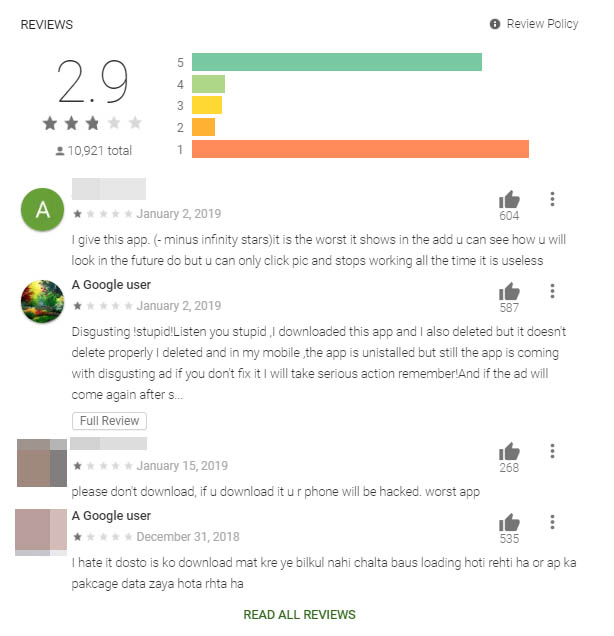
This means that you need to be extra vigilant when you’re downloading apps from the Google Play Store. You should always check the app developer before hitting download and it is also very important to check user reviews too. Trend Micro suggests looking out for a “U” pattern, which will show if an app has a high number of fake 5-star reviews. The large number of five-star reviews together with a large number of negative reviews, following genuine downloads, will look like the letter U written on its side.

For more information on staying safe while downloading apps from the Google Play Store, check out our tutorial below.

Scam apps are all over the Play Store

The Google Play Store is packed with dangerous apps. Here’s what to look for.
scam apps

At the end of last year, the App Store and the Play Store removed a fake Alexa set-up app that was stealing users browser history and sending data to an unknown Chinese server.

We also recently posted an article covering the fraudulent GPS apps lurking in the Play store, and popular apps like WhatsApp and Fortnite are repeat targets of scammers trying to get a cut of the action.

Suffice to say, users from both the Apple and Android sides of the aisle should tread carefully when it comes to downloads.

Scam apps have long been a problem, yet, it’s difficult for the platforms to get ahead of these bad actors.

Widespread ad fraud

A few months back, Buzzfeed published an article that revealed a massive fraud ring in the Google Play Store. A company, called, We Purchase Apps was responsible for stealing millions in ad revenue. The story broke back in October 2018, and it looks like the company has since taken down their website.

And then there are instances like this one involving Cheetah Mobile and Kika Tech in December 2018. It was discovered that the two popular apps were engaging in ad fraud, by way of three malicious SDKs: AltaMob, BatMobi, and YeahMobi.

In this case, the scheme was something called app install attribution abuse, which means SDKs fake the number of new downloads to receive the payout from the developer. Google did remove the apps in question, demanding that they remove the SDKs.

It’s easy to ask why Google doesn’t just pull these apps automatically and inform consumers of fraudulent activity. But the sheer volume makes this a near-impossible task. Mobile attribution firm, AppsFlyer looked at 17 billion app installs spanning 7,000 apps globally. According to their findings, more than a quarter of those apps have engaged some form of install fraud.

The reason is, anyone can create and upload an app — and with so many amateur developers competing for space on the platform, there are plenty of opportunities for scammers to slip through the cracks.

A look at some of the biggest Play Store scams in recent memory

Fortnite fakers

Like WhatsApp, scammers are capitalizing on another one of the biggest apps in the game; Fortnite. Fortnite is a prime target for scammers, as the app is free and can be played across game consoles, phones, and PCs. While scams have spanned a range of mediums—the Play store has been walloped by fake apps.

One example is this Google Play app that claimed to help users earn free V-Bucks. As you can see in the image below, the scammers benefitted by including a link that “automatically gives the app a five-star rating.” That skewed results and prompted more downloads.

fortnite android scam

Navigation apps

Researcher Lukas Stefanko of ESET found that the Google Play Store is loaded with navigation apps that pass Google Maps off as their own, then run ads over the program. Stefanko says that creating these fake apps is easy — all scammers need to do is add a small modification and they can start making ad revenue.

While the problem may be more of an issue for advertisers, consumers have found that the apps ask for a lot of information that has nothing to do with the program.
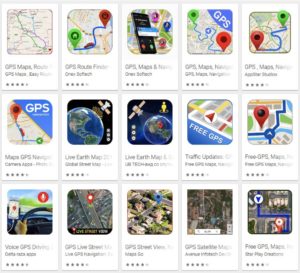
fake google map fraud

Fake WhatsApp

Over a million people were tricked into downloaded fake Android apps posing as WhatsApp. Initially, the fraudulent app was called “Update WhatsApp,” then it changed its name to “Dual Whatsweb Update” when users started to catch on.

Battery saver and performance booster fakes
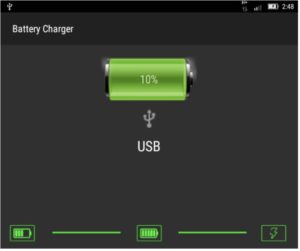
battery saver apps

Many of the fraudulent apps currently lurking in the Play Store are apps that claim to save your battery charge or boost performance by freeing up RAM.

These apps are BS. They don’t do anything except give you a little animation to look at;  a technical representation of how “hard” the tool is working to generate more power.

Avoid these so-called performance boosters, as their advertised benefits are things your phone does automatically.

Apple users aren’t off the hook

Sure, Google might get more attention for their massive collection of scammy Android apps, but the App Store has its own share of problems.  One example is a Touch ID scam, a tactic that asks for your thumbprint or Face ID to authorize charges that, according to Wired, range from $90 to $120 each.

There have been several instances of these scams showing up in fitness assistant or health-focused apps, like this heart rate monitor or a since-removed app called Fitness Balance.

Tips for staying safe while shopping Google Play

The common wisdom for Play Store installs is; don’t download anything from malicious third-party apps. Unfortunately, fraudsters are becoming increasingly sophisticated.

These days you’ll need to be more careful; try the following preventive measures to lower your risk of installing infected apps:

  • Make sure you download from reputable sources only. Okay, duh. But, just a reminder: the top search result is usually the “official” version of the app you’re looking for. Double-check that the official developer posted the app. Additionally, add-ons or “cheat” apps like the Fortnite example from third-parties are especially risky, so be extra careful with these.
  • Read the reviews. Chances are, an infected app will have some low ratings, along with several bad reviews.
  • Do not change any security settings or root your device.
  • Use a reputable anti-virus scanner. While PCs are the usual malware victims, hackers can also break into your phone.
  • Check app permissions before downloading. Make sure permissions make sense. Granting access to sensitive data should be a red flag, so just double check that the fine print seems within the normal range.

Remember that you can also download apps from Softonic’s catalog as well, and we ensure that the apps we carry are free from any malware. Stay safe out there!


Warning: avoid these GPS navigation apps

These 19 Navigation apps are just Google Maps with extra ads bolted on.

The Google Play Store is the main app store for the biggest mobile operating system on the planet. It is home a to a whopping 2.1 million apps. The market is booming, and it offers up plenty of choice, but the sheer size of it means it can be hard to police every new app that becomes available. This has led to plenty of fake apps getting through Google’s security web and making their way onto the Android app store. Security researcher Lukas Stefanko has found 19 such apps that all have something in common.

These 19 navigation apps are just Google Maps with extra ads bolted on

Stefanko reports that the 19 navigation apps he tested all have more than 1 million installs each and between them have been installed over 50 million times. In the series of tweets Stefanko published to raise awareness of the apps and this type of issue, Stefanko said, “These apps pretend to be full featured navigation apps, but all they can do is to create useless layer between User and Google Maps app. They attract potential users with fake screenshots stolen from legitimate Navigation apps.” Although the apps present themselves as being unique and can even have their own UI experience when opened, as soon as the user begins navigating, the app opens Google Maps.

The main reason these types of scam app exist is to raise revenue through ad placement. With over 1 million installs each, these apps will be able to raise quite a bit of money by inserting ads into each user’s navigation process. One of the apps Stefanko tested even offered an in-app-purchase that would remove the ads in exchange for a payment.

Unfortunately, however, some of the apps went further than this and asked for strange permissions like access to the phone’s dialer. In itself, this represents an extra security risk on top of the annoyance of having extra ads pop up every time you want to find out how to get somewhere.

Worryingly, for Google and users of the Google Play Store, three of the scam apps came up as the top three Recommended for you apps when Stefanko opened the Maps and Navigation section of the Play Store. Furthermore, Stefanko only tested apps with more than 1 million downloads. As none of the other recommended Maps and Navigation apps were from reputable companies like TomTom or Waze, there is a good chance some of the other top apps were fake too.

What this all shows is that Google still has a large fake app problem with the Play Store. To ensure you only install legitimate apps always follow the steps laid out in this tutorial. It also shows, however, that if you’re looking to download a navigation app, you’re best sticking with one of the big boys. There aren’t many big tech companies who are able to collect the huge amounts of detailed mapping data needed to create a reliable navigation app, as this new deal between Apple and DuckDuckGo highlights.

How to set up parental controls on iPhone and Android

Keep your kids safe with these simple steps.

Parental controls are important to set up when you want to give your child access to a mobile device. Not only can it prevent your child from doing something harmful or inappropriate, but it can also keep them from doing basic mistakes like deleting important apps. These parental controls can also free you up because you won’t have to worry about what they can access and when. Here’s an easy way to set these controls for Androids and iPhones.

How to set up parental controls on iOS and Android

Android instructions

Restricting a child’s Google Play access can be easy on Android devices. There are two ways to access parental controls on Google Play devices, depending on how you have set up your child’s device. The first way is if your child’s Google Play account is already linked to yours under Family Link. This makes things easy, as all you need to do is access your Family Link app on your device, click on your child’s Google Play account, then “Manage Settings” and “Controls on Google Play.” This will give you access to your child’s settings so you can restrict their account however you want. You actually don’t even need to do this on app, since you can access Family Link on a browser.

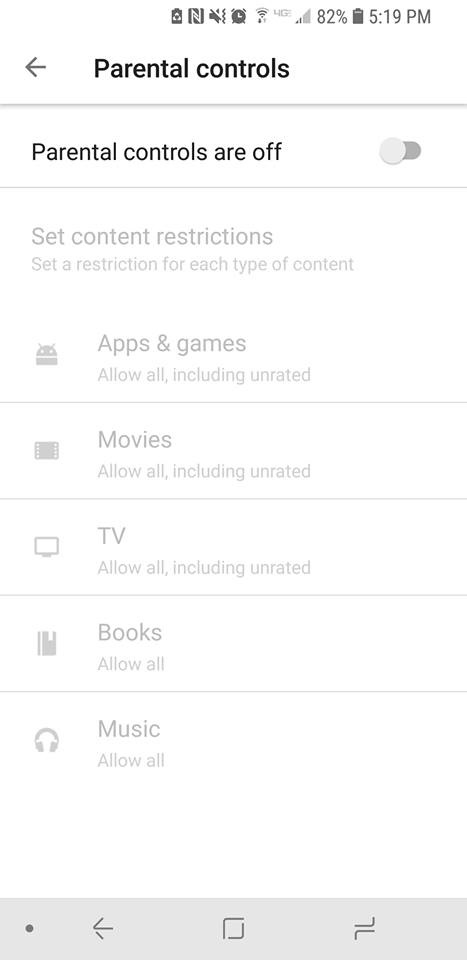
If you don’t have your child’s account linked to yours through Family Link, then you’ll have to go on their device itself, rather than being able to set it up on your phone or a browser. Once you’re on their device, you can go to “Settings” under the Google Play app and press “Parental Controls.” Once you switch them to on you’ll be prompted to create a PIN. This PIN will be how you access and manage the controls, so pick something that isn’t easy for your child to guess. Once it’s created, you can pick and choose the settings you’d like to set for the device.

Android parental controls

If you wish to restrict access to features outside of Google Play on an Android, then you will find each Android has different ways to go about this, depending on which model you are using. As such, it may be easier to use a third-party app for setting up your parental controls. There are many apps out there to use, but we recommend Mobile Fence. This app provides makes management of your child’s phone incredibly easy.

iPhone instructions

Apple has recently updated their terminology and process for setting up parental controls, so there are also two ways in which you may have to go about setting these parental controls.

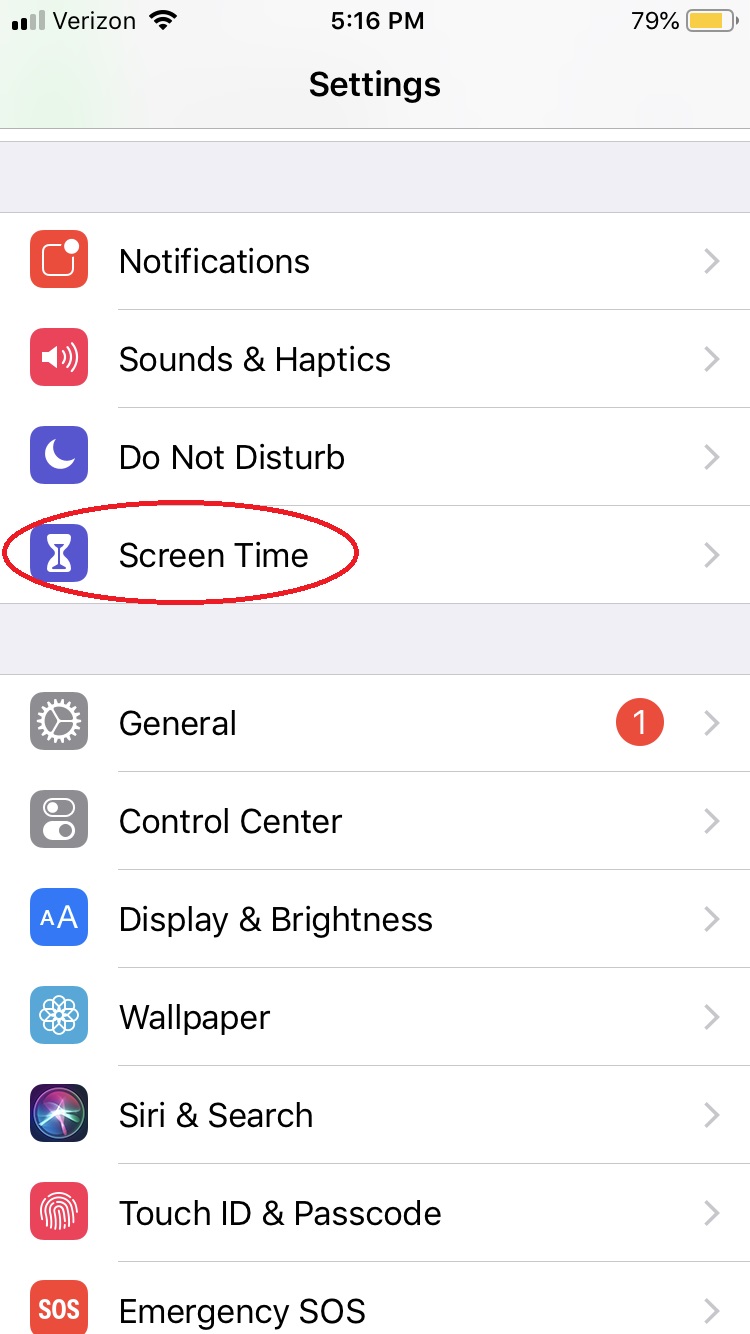
For iOS 12 and newer, under Settings there is a button titled “Screen Time.” 

Parental Controls iphone

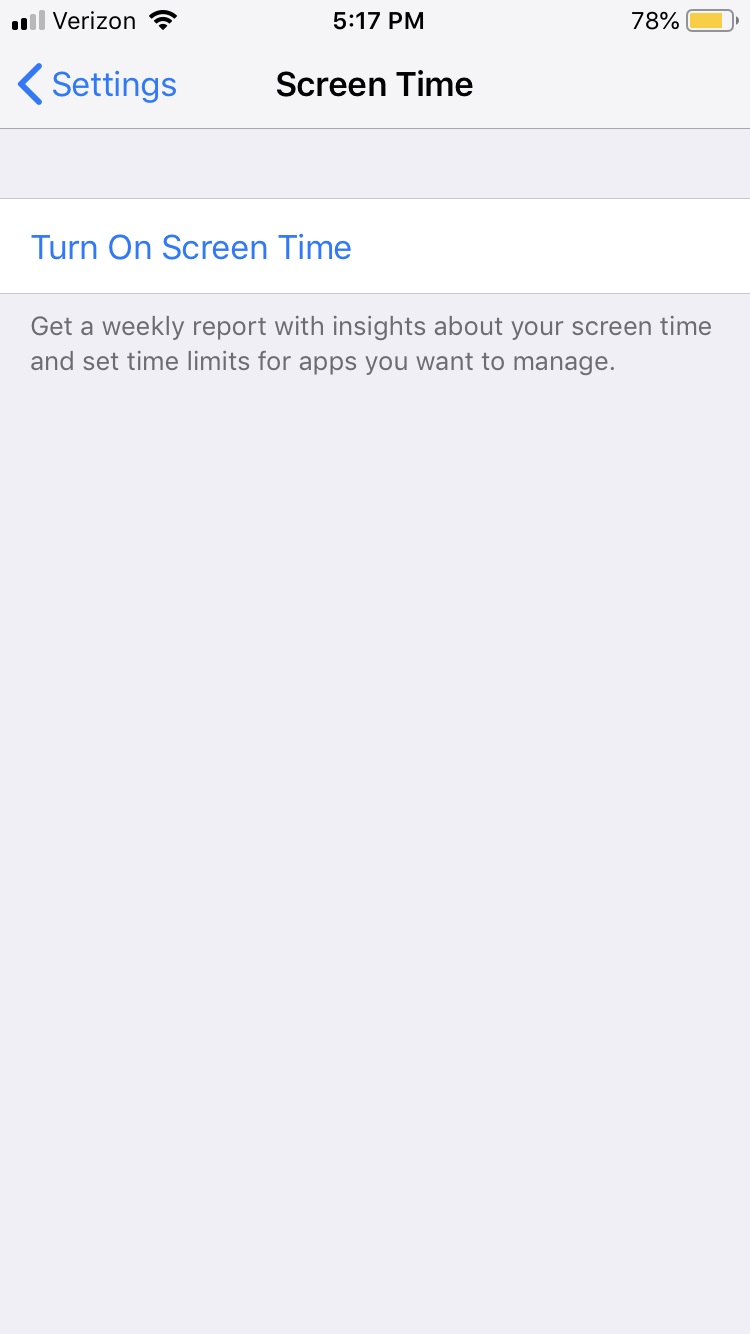
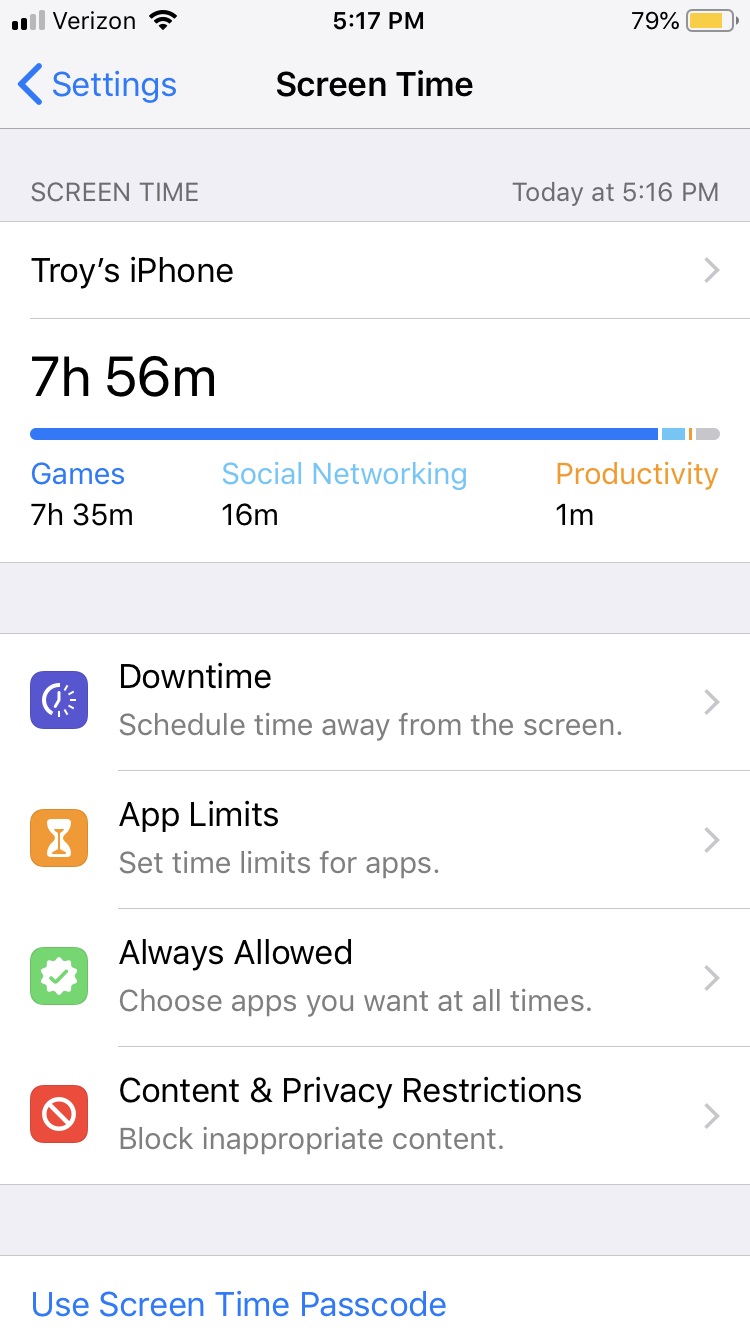
This is essentially the parental controls for Apple devices now. You’ll want to turn on Screen Time to monitor all activity on the phone and create any restrictions you want.

iPhone parental controls

Notable things you’ll want to check out in the Screen Time menu are: “Downtime,” which lets you turn off the phone at specific times; “Content & Privacy restrictions,” which let you block any specific activity or app from your child’s access; and “Set Up Screen Time for Family,” which will let you access your child’s Screen Time from your personal iOS device.

iPhone parental controlsAny iOS before 12 will have parental controls in the settings tab under “General” > “Restrictions.” Enabling restrictions will prompt you to create a passcode that you can use to disable those restrictions if you ever feel the time is right.

With these simple steps, you’ll protect your children and provide yourself a little peace of mind, knowing your little ones aren’t accessing the dark web and setting up an illegal Bitcoin gambling ring or whatever.

Be careful what you download from the Google Play Store

Google has found malware in apps that have been downloaded more than 500,000 times from the Play Store

Malware play store 500,000 app downloads

Android is the biggest mobile operating system on the planet. Its popularity can it make it harder to police. Accordingly, we’ve seen a number of problems hit the Google Play Store, which is where most Android users go to get their apps. We’ve seen malware added to established apps and we’ve even seen apps serving up pornographic ads to children. Google acted quickly to head off both of those problems and the search giant has been forced to act quickly again and remove a number of apps from the Play Store that were infected with malware.

Google discovered malware in apps that have been downloaded more than 500,000 times from the Play Store

A security researcher named Lukas Stefanko recently found 13 apps on the Play Store containing malware. Unfortunately, at the time Stefanko found the malware, the apps had already been downloaded by 560,000 people. All 13 of the apps were developed by the same person, a guy called Luiz Pinto. The fake apps posed as games and included luxury car, motorbikes, truck, and firefighter simulators. Google has now removed the apps, but embarrassingly two of the apps made it into the Play Store’s trending section.

Once installed on a user’s device, the apps installed malware and then deleted their own icon so that they’d be harder to delete. The last point is important as none of the 13 apps actually worked. They’d crash the phone and then when the user would search for the app to delete it, they wouldn’t be able to find it. The malware would gain full access to all device network traffic, which would offer it an excellent opportunity to steal private and personal data. If you’ve downloaded any of the apps listed in the tweet above, you need to delete them now or contact the Play Store for further advice.

As we pointed out, Google has been dealing with similar problems for a while now. The internet giant is committed to getting on top of the issue, but ultimately the responsibility lies with you. When downloading apps make sure to check the developer’s name as well as other users’ reviews. If something doesn’t look right, avoid downloading the app you’re looking at. For a more in-depth guide to spotting fake apps on the Google Play Store check-out our guide below.

Why you should be careful downloading Fortnite on Android

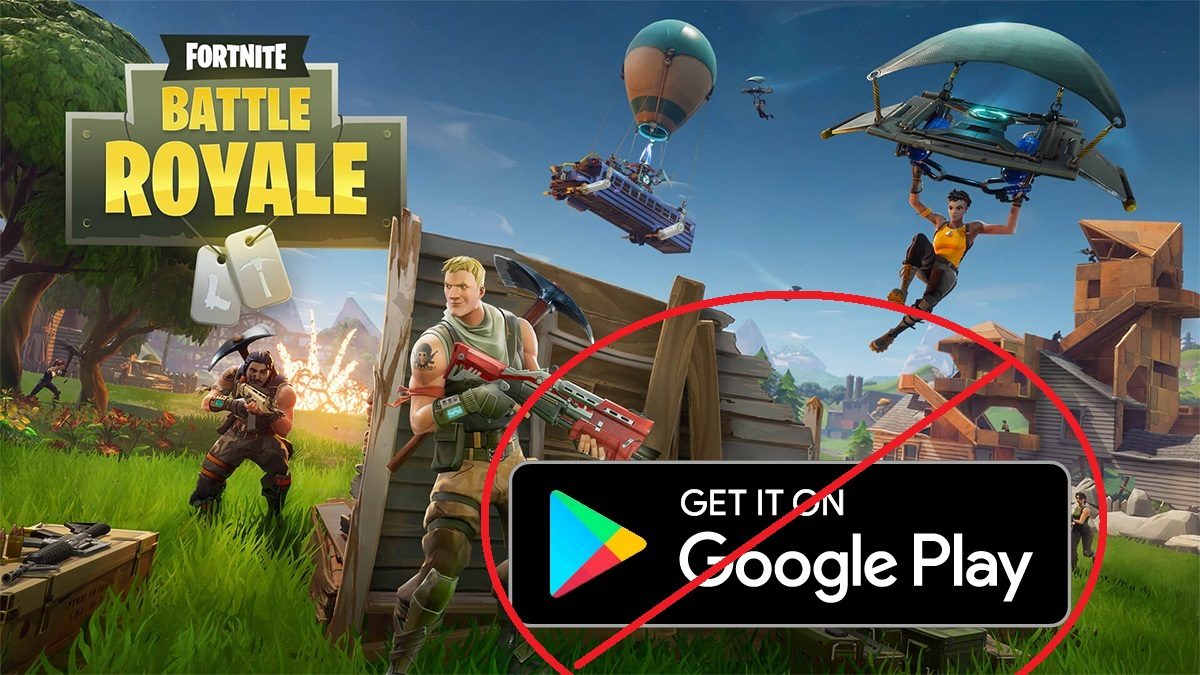
Epic turned heads when they revealed their highly anticipated Android port of Fortnite would not be using the Google Play Store. When asked why, Epic stated that they want a “direct relationship with our customers on all platforms where that’s possible.”

Fortnite: Battle Royale Download Fortnite: Battle Royale ►
10

Presumably, Epic Games is doing this in order to bypass the 30% cut that Google receives from any revenue gained from Google Play Store apps. With Fortnite currently being the most popular game in the world, Epic is not eager to share their profits. Epic is able to do this on Android but not iOS, as Apple does not allow apps on their iOS platforms if they didn’t come from the App Store, giving them no other options and forcing them to share their revenue with Apple.

On Android, Google allows apps to come from sources other than the Google Play Store through a process called sideloading. Sideloading is when an apk (app) file is installed on an Android device from a source other than the Google Play Store. This is common practice among Android users who are tech-savvy. However, the problem is that with Fortnite’s mega-popularity, millions of people who have never sideloaded an app before are suddenly going to try.

When users sideload an app, the basically have to trust the developers not to include any malware or malicious content within it. Apps on the Google Play Store are much more rigorously tested for malware. Epic needs to make the process of sideloading Fortnite as simple and clear as possible. There will inevitably be thousands of copycat apps that look like Fortnite but will actually be malicious software in disguise. Children comprise a large portion of Fortnite’s userbase, and it will be hard for them to distinguish between the real Fortnite app and a virus-filled copy.

Basically, having to sideload Fortnite on Android is a security disaster waiting to happen. If you want to download Fortnite onto your Android device, you need to make absolutely sure that you’re downloading it from the official Epic Games website. Hackers will inevitably try to cash in on Fortnite’s popularity by making malware-infested lookalike sites, so be on your guard.

Some of the best Android apps might be spying on you

Some of the most popular Android apps might be actively sending data on your mobile phone usage to third-parties. This tracking includes listening to you, taking screenshots, and monitoring your mobile phone habits.

A study by researchers at Boston’s Northeastern University has highlighted some worrying findings. Some of the most popular Android apps might be actively sending data on your mobile phone usage to third parties. This tracking includes listening to you, taking screenshots, and monitoring your mobile phone habits. David Choffnes, a professor at Northeastern, said:

“We found that every app has the ability to record your screen and anything you type.”

The researchers looked at 17,260 Android apps, taken from Google Play, AppChina, Mi.com, and Anzhi, and discovered that some of them were snooping on users in various ways. For example, around 9,000 apps requested permission to use the phone’s camera or microphone. Of those 9,000 apps, 12 were sending screenshots of what the user was doing to app developers or malicious third parties.

Researchers found several Android apps were sending data to third-parties

The apps that were snooping on users could only do so using permissions they had been given by the user. This means that you need to be extra careful when you’re agreeing to permission requests from apps you’re downloading. This also goes for browser extensions and email plugins.

The researchers also pointed out that although the study was carried out on Android apps there is no reason to believe that apps on other operating systems like iOS wouldn’t exhibit similar behavior.  Make sure you’re extra vigilant of the permissions you’re granting apps when downloading new programs. As always with these problems, your vigilance is the first line of defense.


How to scan APK files so you don’t get a virus on your Android device

Google takes the security of its online store very seriously. However, it’s often been blamed for allowing too much harmful content and potentially dangerous apps.

Last year, it launched the Google Play Protect service, a tool that helps provide an extra security layer. Although the problem has improved, the risk still exists. Today, we’re going to take your protection to the next level: we’ll show you how to scan APK files so you don’t get a virus on your Android device.

Preventing before fixing

Every time we install an APK app from outside the Google Play Store, we’re exposing ourselves to risk. You may know the manufacturer, but nobody is free from encountering problems with an app, whether you’ve downloaded it from the Google Play store or another website. Because of this, running a program analysis is a great solution.

Google Chrome Download Free
7

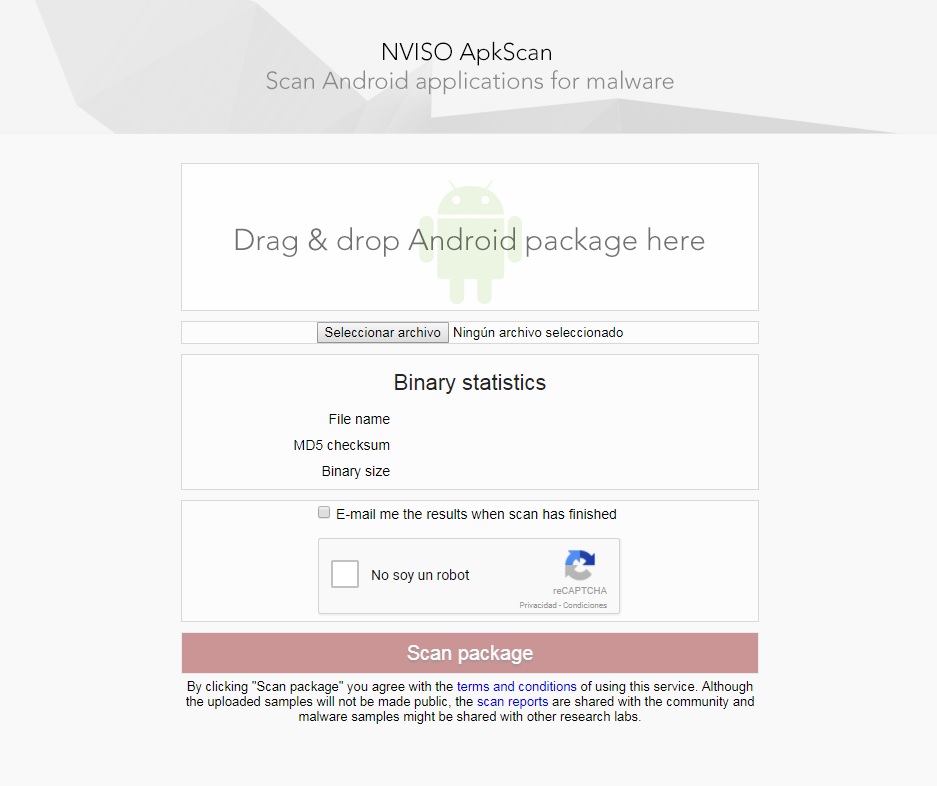
For this, we recommend NVISO ApkScan. This website is becoming a trusted resource in the online community. Why? Because it meets your needs perfectly: making sure there’s no virus in the app you want.

Using it is as simple as dragging the file into the box (or uploading it); the platform takes care of the rest. In addition, you can ask to be sent an email with the data of the analysis. Just check the box that appears above the captcha.

Once you click on the Scan package, be patient, since the analysis usually takes a few minutes. When finished, you have two possible options: one, it’s clean (you can install the app worry-free) or two, it’s infected. If the second happens, the tool will give you extra info.

Google Play Services Download Free
8