How to play Matchington Mansion and create your dream home

Build the mansion of your dreams, and make your friends jealous with Matchington Mansion!

Matchington Mansion

If your dream is to have a big fancy mansion fall into your lap, it’s probably not going to happen. The good news is, you can live out this dream with an addicting app called Matchington Mansion.

Matchington Mansion Download now ►
7

In Matchington Mansion, you play as a character who has been gifted a huge mansion and told that it only needs a little love.

Matchington Mansion screengrab 1You have some help from your best friend Tiffany, an interior designer, who is excited to help you decorate and give you tips. Upon visiting the home for the first time, the door completely falls apart after just knocking on it. You then realize that maybe this home needs a lot more work than you thought.

Matchington Mansion screengrab 2Just then, a new character named Rex enters, and you learn that he believes that the mansion should have been left to him. He’s planning to get his hands on it somehow so he can knock it down and build a casino on the land. Once you shake him off, you go inside and discover that the mansion is an absolute mess.

Matchington Mansion screengrab 3Here is where the game begins! Play games of matching different shapes and colors of decorative pillows, books, and other items. Three of a kind is a match, and four of a kind creates a firecracker which explodes and knocks out more pillows.

Matchington Mansion screengrab 4

Match five to create rainbows which clear pillows in whichever color that you choose from the entire board. When you win a round of matching, you earn coins and stars which you spend on decorating and renovating the mansion.

It may seem easy,  but keep in mind that you only have a certain number of moves to clear the board. If you run out, you have to start the level over. The more levels you complete, the more decorating you can do. This advances the story and allows you to unlock more rooms in the mansion to clean up.

You can  visit other players’ mansions, purchase new artwork, unlock mysterious chests with hidden keys, and work toward making the mansion the home of your dreams.

Matchington Mansion Download now ►
7

FigLeaf: The app that’s reimagining privacy

FigLeaf has all of the tools to keep you safe on the internet along with none of the headache of typical privacy apps.
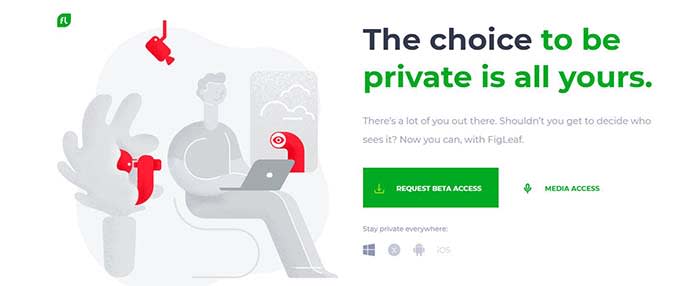
Figleaf privacy

Everything we do online reveals a lot about us. That includes the sites we visit, the things we buy, and even our email subscriptions. Our actions give companies insight into our personal lives, habits, interests, and more.

You might feel comfortable sharing some of your info. A lot of us do. But when we do share, we usually do so under the assumption that it will be used responsibly.

That assumption is wrong.

How is my privacy being violated?

The websites and advertisers gathering our info do so for one specific reason — to make money. Here’s how the information gathering and profiting works:

  1. Websites track your online behavior — often without your consent or knowledge
  2. They create a digital profile
  3. They send you targeted ads
  4. They tailor what you see as you browse

So how do we get control back?

FigLeaf has the answer.

10
FigLeaf puts your privacy first. Be the first to try it.

The all-in-one privacy app is designed to help you take control of your privacy online. But it’s more than an app. It’s a complete restructuring of our relationship with our data, built on these three principles:

  1. Privacy by design
  2. Privacy control for everything you do
  3. Zero-knowledge promise & complete transparency

All in all, Figleaf has the answers to your privacy needs.

Privacy by design
Figleaf by design

FigLeaf gives you the power to choose your online visibility at any given time, for every website you visit. You can increase your level of privacy on one site while you happily share your info with another site you trust. Total anonymity at one moment. A little transparency the next. Your level of privacy is always up to you.

Privacy control for everything you do

FigLeaf combines privacy tools to let you control your privacy your way. When you first fire up the app, FigLeaf scans the internet and the dark web. If it finds your email address and password in a data breach, FigLeaf will tell you right away and give you the power to fix it on the spot.
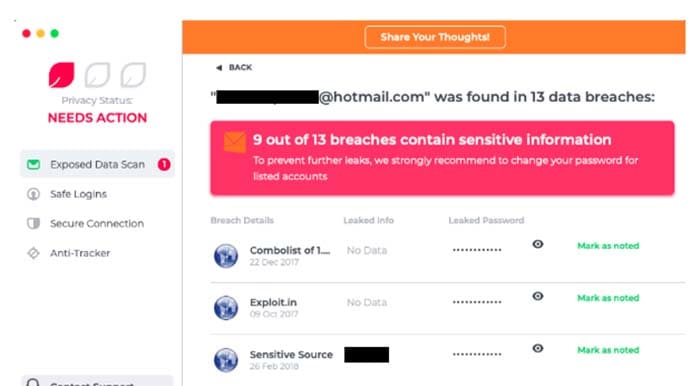
Figleaf data breach

However, FigLeaf isn’t just about reacting to breaches. It’s about being proactive, too. When you sign up somewhere new, FigLeaf is there to create a masked email address for you. A masked email address is essentially a fake email address so websites won’t know your real one.

This is a big deal for your privacy. If the site is involved in a data breach, your real email won’t be part of it. And since a lot of us reuse emails and passwords for multiple sites, one breached site could wreak havoc on your privacy.

FigLeaf also creates hard-to-crack passwords to go along with your masked emails. You might be thinking, “Oh great, more obscure passwords I need to remember.” Fear not. Figleaf will remember your login information for you.
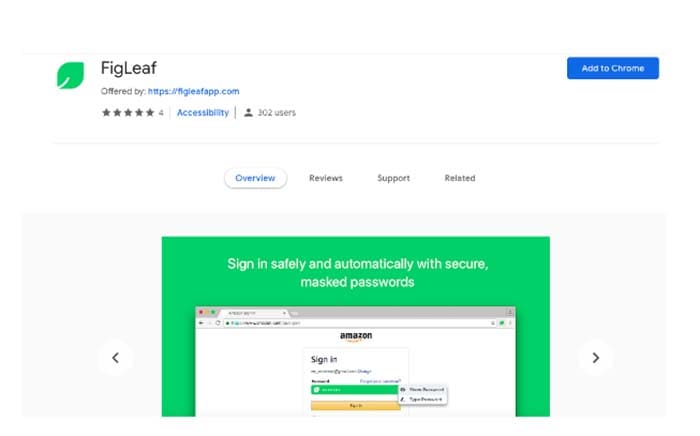
Figleaf Masked passwords

The masking concept extends to shopping online. When you’re checking out, FigLeaf can offer you a virtual credit card to pay with instead. If the site you’re shopping at is hacked, your real credit card number will remain private. Tens of millions of credit cards are stolen every year. FigLeaf stops you from becoming a statistic and lets you keep being you.

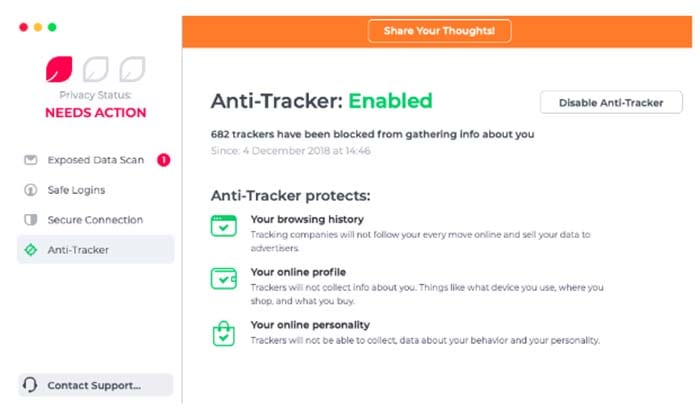
FigLeaf also lets you connect privately and cover your location and IP address. In one click or tap, you can block trackers from learning your personal interests, habits, and sites you visit.

Complete transparency & zero-knowledge promise
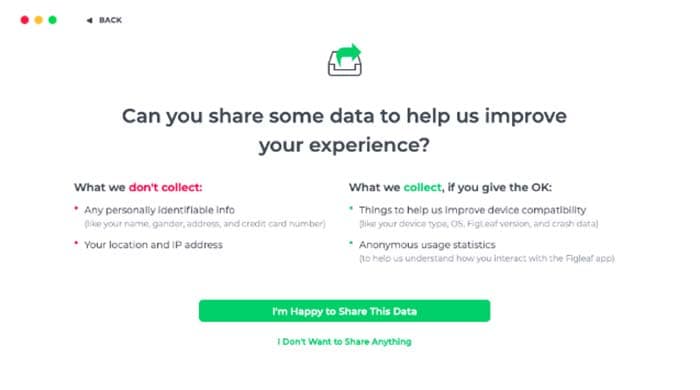
Figleaf complete transparency

Most companies aren’t very transparent in how they collect and use your data. They count on longwinded privacy policies littered with legalese to give them the upper hand. FigLeaf doesn’t try to pull that with you.

They let users keep their data in their own hands by granting automatic privacy from the get-go. For starters, FigLeaf explicitly asks for permission to access your data when it’s needed — usually only to help with a transaction or to improve the app. If you do grant permission, all data is anonymized Any behavior in the app is not tied to you.

What’s more, all data is encrypted on FigLeaf’s servers and on your device. Also, your data can’t be decrypted without your password and security key. Only you have access to those.

Try FigLeaf for free

You can currently download the beta version of FigLeaf. The only thing FigLeaf asks is that you provide feedback as you use the app to reclaim and control your privacy. FigLeaf is the next generation of privacy, and you can try it out today.


TikTok banned in India

TikTok is banned in India for showing inappropriate content to minors, but are they alone?

Tik Tok

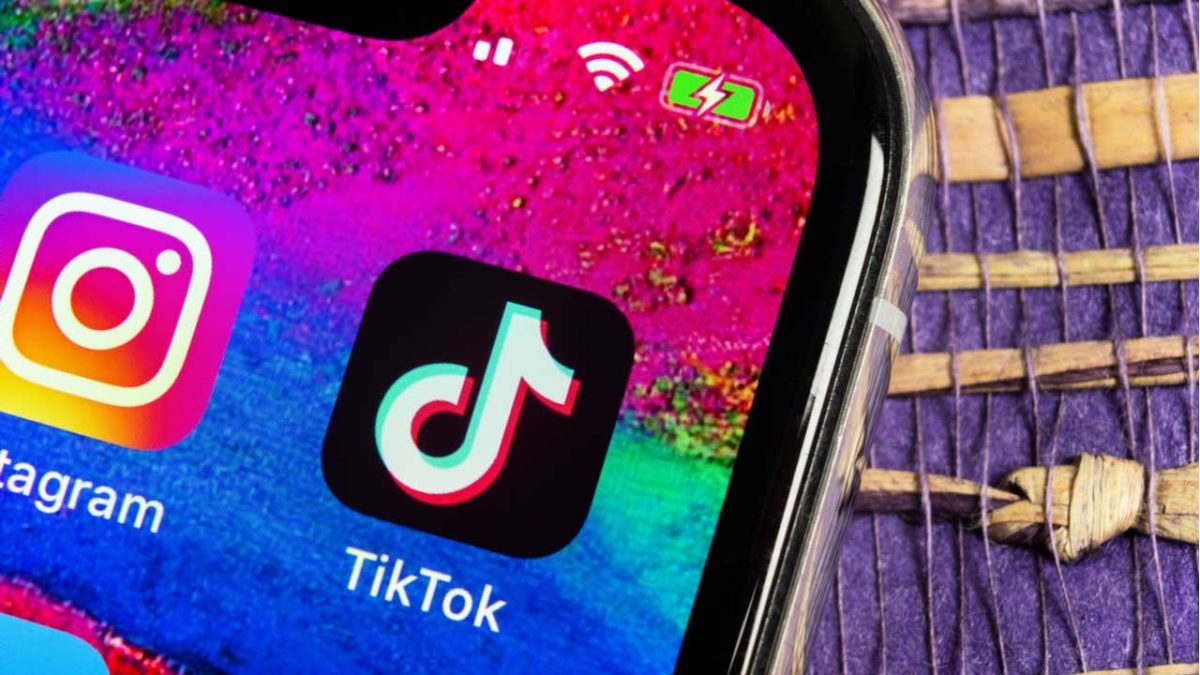
TikTok has been removed from the App Store and Google Play store in India today after a court ruling. TikTok is fighting the removal in court. You can still download it through Softonic’s catalog here:

9

In a statement to CNN Business, TikTok said, “We have faith in the Indian judicial system and we are optimistic about an outcome that would be well received by over 120 million monthly active users in India.”

TikTok has about half a billion downloads across the globe. Of those, about 25% of users are in India making this a massive hit for the company.

Why is TikTok being blocked in India?

TikTok has been blocked in India due to the fear that the app is helping to spread inappropriate content to children.

TikTok does list policies against inappropriate content such as porn, cyberbullying, and harassment. Those who violate TikTok’s policies can be reported and banned from the service. This is the protocol for most apps.

The app description suggests it is for ages 12+, but the purpose of the app is not to share material for an 18+ audience. The main purpose of TikTok is to share original videos, typically with musical flair like this:

Does TikTok have inappropriate content?

As we all know according to Rule #34 of the internet, “If it exists, there is a porn version of it.” TikTok is no exception.

Users have been using the app to make pornographic content. Finding pornographic material through the app is not difficult. Then again, finding porn on the internet isn’t hard.

Sure, you can use the app to shoot and share inappropriate content, but you can do that with a slew of other apps as well. 

You can potentially cyberbully people on any social media platform as well. TikTok is not the only offender, so they shouldn’t be singled out for this.

What does this mean for TikTok?

We’re guessing that this ban will only be temporary. This happened before in Indonesia for the same reason, but it was overturned.

The 18+ crowd in India that loves to use TikTok will voice their stance on the issue. Most likely, the app will return to making more videos like these:

Where do we go from here?

The inappropriate content is far from the only reason why you might want to consider removing TikTok. In February, the app had to pay nearly $6 million in fines for stealing information from its 13-and-under users. 

TikTok might be unintentionally exposing kids to inappropriate content. However, it is intentionally stealing their data. 

Banning one app won’t keep children safe. If you don’t want your children looking at inappropriate content, TikTok is far from the only app you need to worry about. Parental vigilance and child education are your best bets to keeping your family safe.

How to recover deleted WhatsApp conversations

Whether or not you meant to delete them, we can help you bring back WhatsApp conversations.

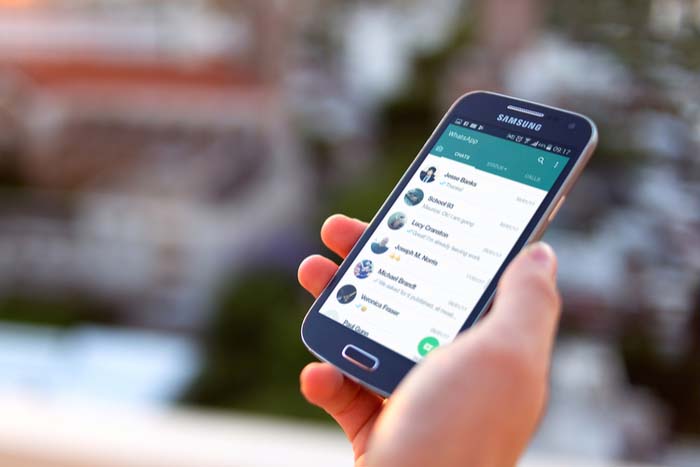
WhatsApp

In most cases, if you deleted a conversation on WhatsApp it wasn’t by accident.

Maybe your friend sent you a bunch of spoilers for the next big Marvel movie, and you want to avoid those at all cost. Perhaps that guy you met on Tinder is now annoying you. After deleting those conversations, you might regret it after realizing all of the messages now lost to the ethers of WhatsApp.

Regardless of your reasoning, if you need to recover those conversations, we can help you. 

WhatsApp Messenger Download Now ►
8

There are several methods with which you can recover WhatsApp conversations, so breathe easy. You can read those messages that you thought were lost forever.

How to recover WhatsApp conversations on Android

WhatsApp Android

Step 1: Make sure you have the backup function activated

WhatsApp for Android has a backup function that saves all your conversations on the app and keeps them even if you erase them for a week. If you erase something and regret it, you will be able to recover it easily.

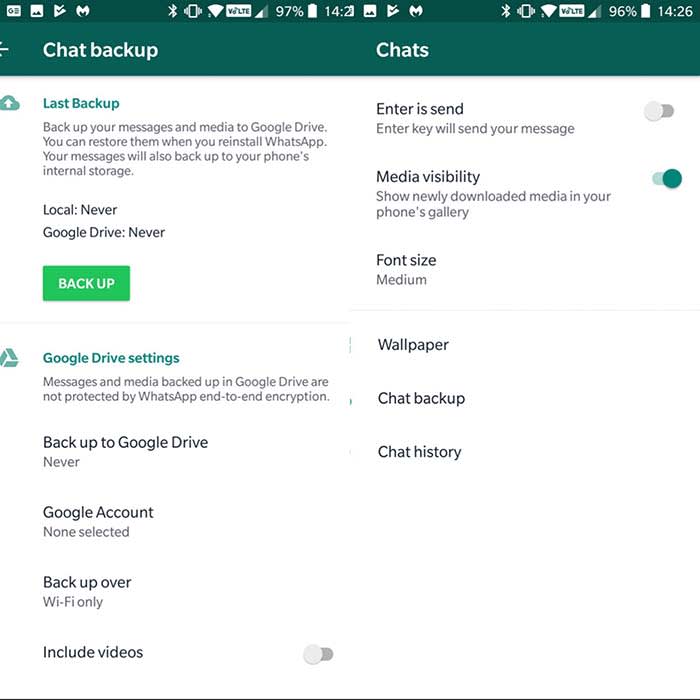
First, make sure you have the backup function enabled. To do this open WhatsApp on your phone, click on the three dots in the upper right corner, and then click “Settings.”

Once inside the Settings menu, click on “Chats” and then on “Backup.” Click on “Save” to make a backup. You will also have the option of selecting the frequency with which you want this backup to be made. Options include: never, only when I hit”save,” daily, weekly, and monthly.

For more security, you can link your WhatsApp account with Google Drive by clicking on “Google Drive Settings.” This way, your messages do not take up space and these are automatically saved in the Google cloud.

Step 2: Recover your deleted messages

WhatsApp Android

Now that we know that WhatsApp will keep a backup copy of our messages, here’s how you will be able to recover them. Remember that these copies exist for just seven days, so you will not be able to recover them without altering the files on your phone after that window.

To recover your messages, you will have to delete the app from your phone. We’re not joking. Erase the application in its entirety and download it again.

Once reinstalled, click on the “Restore” option to recover all the history of messages that you had saved in your backup. Voilà! Your messages will reappear by magic.

How to recover WhatsApp conversations on iPhone

WhatsApp on iPhone

Step 1: Make sure you have activated iCloud

Unlike the Android version, where messages are stored on your phone, if you are an iPhone user, your conversations will be stored in iCloud. To recover them, you must have this option activated.

Activating iCloud is very simple. Access iCloud in your settings. Follow the prompts and your info should synchronize automatically.

You can always just ask Siri to help you out as well. 

Step 2: Configure WhatsApp to create backup copies

Once we have activated and configured the iCloud, it’s time to configure the backup system of WhatsApp.

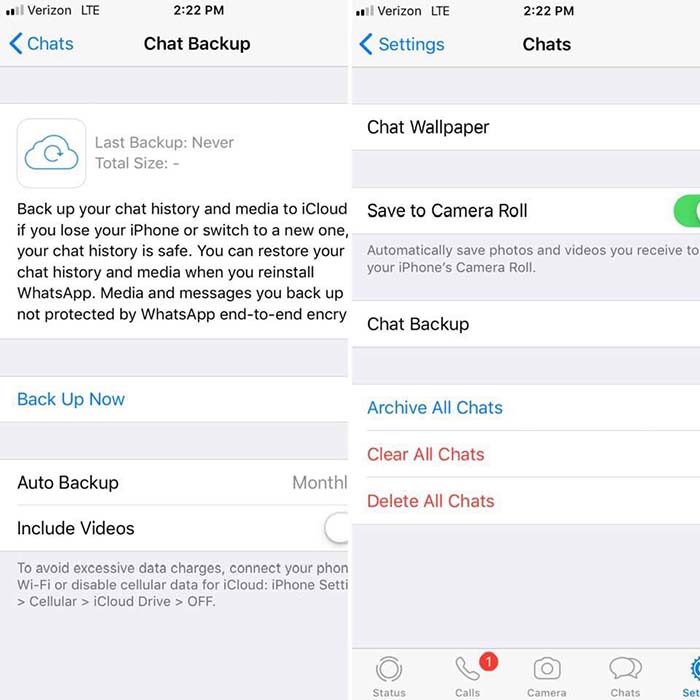
To activate it first open the WhatsApp application, click on “Settings,” followed by “Chats.” Finally, click on “Backup.” From here, click on “Auto Backup” to choose how often your conversations will be saved in iCloud.

WhatsApp iPhoneStep 3: Recover your conversations from the iCloud


Finally, to recover the messages deleted by mistake, you must first delete WhatsApp from your iPhone and then reinstall it. Once the phone is verified, select the “Restore backup” option and your messages will appear on your iPhone again.

3 great iPhone apps for learning a new skill

Turn your iPhone into a powerful learning tool with these great apps.

learning apps

Playing games on your phone can be a fun way to pass the time, but sometimes, you need something more. Why not learn a new skill in your free time? Whether you just want to challenge yourself or become the best you that you can be, the following iPhone apps will help you to do exactly that as you develop some new skills.

3 great iPhone apps for learning a new skill

Mind Tools Download Free ►
7
This app will help you develop essential career-related skills, such as management, problem solving, time management, and leadership skills. Mind Tools includes a variety of videos, articles, and other resources to help you build these crucial skills. You’ll be able to choose from a list of skills you want to develop, create a learning plan, create goals, and track your progress. It’s important to note that this is a subscription service; Mind Tools offers both standard and premium monthly subscriptions. But with more than 27 million users per year, we promise this is worth a shot.
The Great Courses Plus download free ►
8
This iPhone app allows you to have all of Great Courses’ lectures and lessons with you at all times. That way, you’ll never miss a chance to learn a new skill when you have free time. With Great Courses, you don’t have exams or a strict schedule. You’re free to access all of the info whenever you want — and however you want, through audio or video — and you can learn at your own pace. Although the app is free to download, you must purchase the courses.
Elevate Brain Training Download Free ►
8
In the digital age, this app is more important than ever. This brain-training app will help you to improve a variety of skills that may have deteriorated thanks to technology. With Elevate, you can work on improving your focus, processing speed, math skills, memory, and speaking abilities (among others) through personalized training programs. You’ll also be able to track your performance, and as you improve, the tasks and games will become harder. Elevate comes in both free and subscription versions.

Who says you have to pick just one of the above apps? Download all three to start learning a variety of new skills today.

What to do if your iPhone won’t hold a charge

iPhone dying too fast? These could be the reasons.

So, your iPhone has suddenly stopped holding a charge and you’re not sure what changed or what to do. Don’t panic! This doesn’t necessarily mean you have malware or that you need to drop $1,000 on a new iPhone. There are many other possibilities that could explain why your phone might be dying quickly.

What to do if your iPhone won’t hold a charge

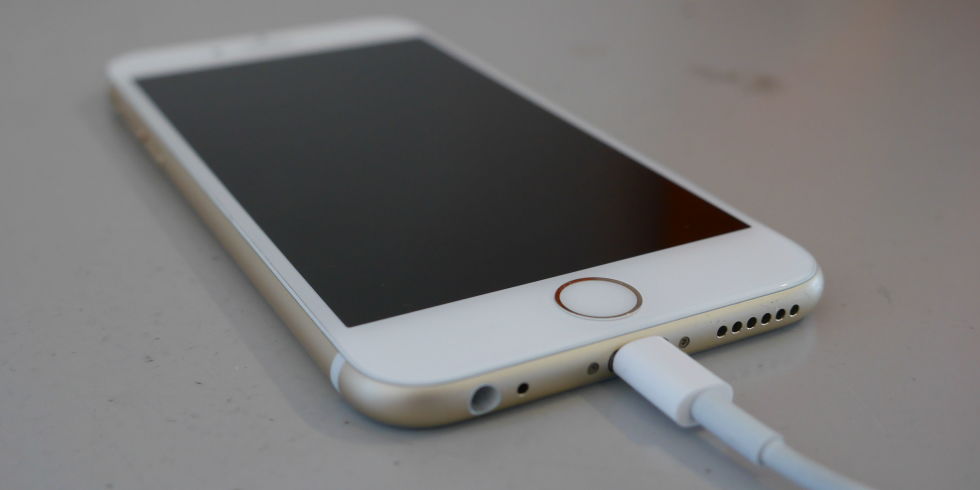
iphone charging

1. A software update could be to blame

New software updates can be much more demanding on newer and older phones alike. If you were used to using your phone without much battery drain, but you’re suddenly seeing your charge rapidly disappear — especially if your phone is dying while you’re not using it — it could be because of a new software update. Check out Apple’s support forums to see if other users are having the same problem with the update. If this is the problem, you may have to wait until Apple corrects the issue.

Conversely, you may also be experiencing battery issues if you don’t update your phone regularly. Although you may seemingly have more battery issues with phone updates, you should update your phone regularly. Doing so could jeopardize your phone’s health and security.

2. Which apps do you use?

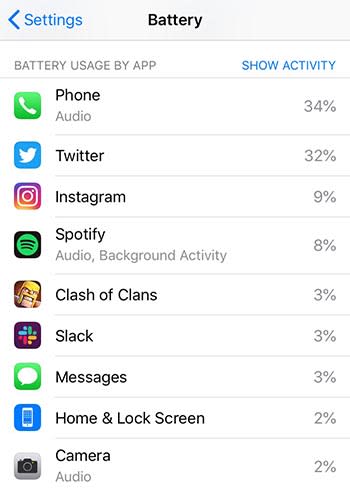
If you love to bounce between Facebook, Instagram, and Google Maps, this could be the reason your phone battery is quickly draining. Or, maybe the new version of your favorite app is too demanding for your phone. If you’re a huge fan of AR or VR, those could also be the culprit.

Go to your phone’s settings and click on Battery to see which apps are using up your battery the most.

phone battery

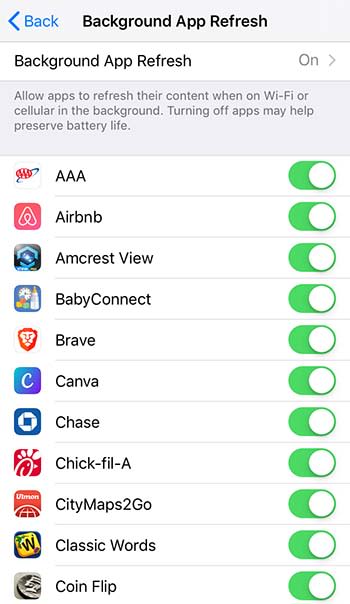
While in your settings, you should also go to General > Background App Refresh to see if you have too many apps refreshing while you’re not using them.

background appsYou may also want to see if too many apps are accessing your location (Settings > Privacy > Location Services), or if your screen brightness is too high. Note: Depending on your phone model, some of these might be in a different location in your phone’s settings.
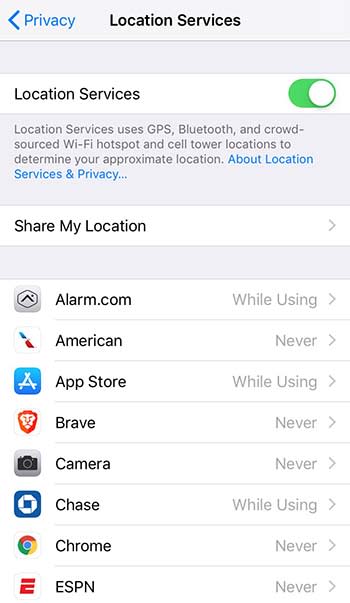
location services

3. How old is your phone?

Do you have one of the latest iPhone models, or is your iPhone a few years old? It’s not unusual for a brand new iPhone to experience some initial battery drainage, but if this lasts longer than a few days, another issue may be at play. Regardless of age, if your phone isn’t holding a charge for more than an hour or so, that’s a problem.

It’s normal for any phone to stop holding a charge over time, especially after a year or two. Instead of going 24 hours between charges, you might have to charge it every 10 or 12 hours, depending on usage. Nonetheless, you may experience more battery drain issues with models older than the iPhone 7.

4. You could have a bad or old battery

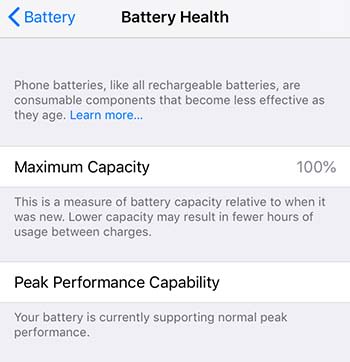
If you’ve tested the above and your battery is still not holding a charge for a reasonable amount of time, then you might have an old or failing battery. If you just bought a new or refurbished model within the last few months, your phone’s battery should not be dying within a few hours. (Still, you need to consider your usage.) This could mean that you’ve got a bad battery. If your phone is under warranty, you can replace it for free. To check your battery health, go to Settings > Battery > Battery Health.

iphone battery

If your phone is two or three years old and it’s not holding a charge, your battery may be finally reaching the end of its lifespan. But that doesn’t mean you have to buy a new iPhone. Battery replacements, even out of warranty, are much more affordable than buying a new phone. Costs currently range from $49 to $69.

5. You’ve damaged your phone recently

While the newer iPhone models are water resistant for a certain amount of time and up to a certain depth, older iPhone models might experience battery issues if exposed to water. Try putting your phone in a bag of rice to draw the water out, and see how it functions after.

Additionally, if you recently exposed your phone to extreme hot or cold temperatures, this can also affect your phone’s battery life. If you left your phone out in the sun on a very hot day, and it won’t hold a charge when at a normal operating temperature, it might have irreversible damage. You’ll need to replace it.

Top 5 portable chargers

If you’re going to be away from electricity for a while, these great portable chargers will keep your devices topped off.

It’s 2019 and we all live on our smartphones. While battery life has improved tremendously from model to model, nothing lasts forever, and that can be a real problem for people who forget to charge their phones or are away from home for an extended period (which can be an unintended circumstance this time of year when weather is dicey). Seeing a battery level under 20% can be especially scary if you’re relying on your smartphone for GPS or for emergency phone calls.

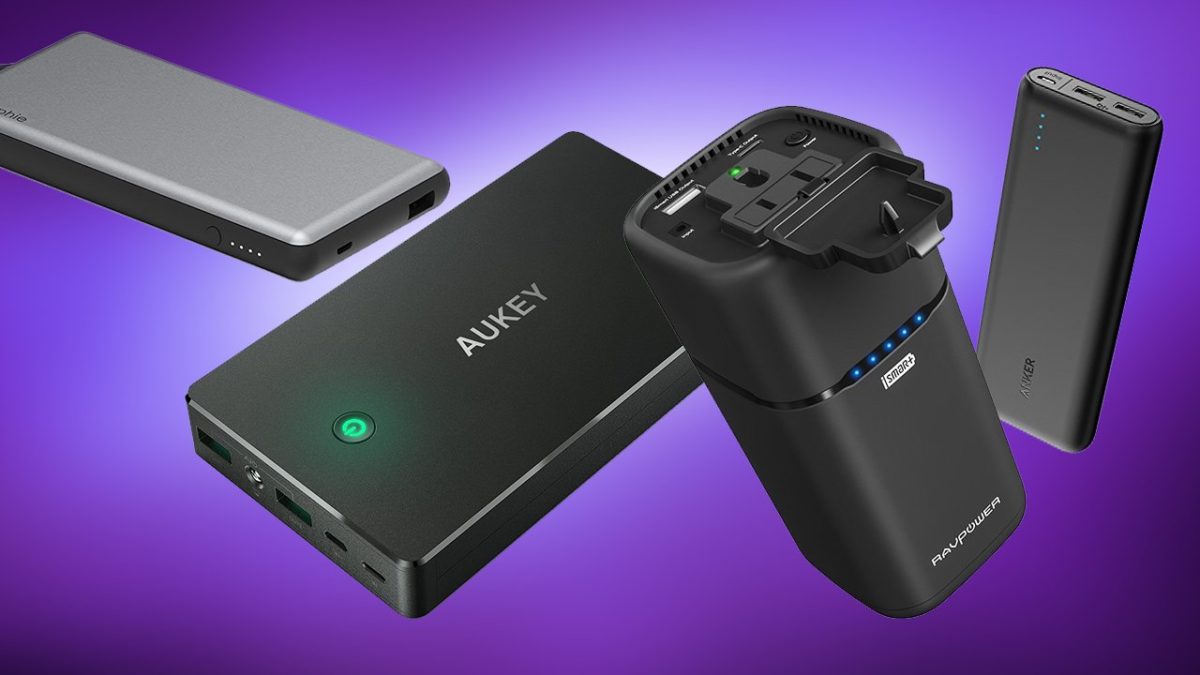
A portable charger can be a literal lifesaver, but there are tons of models to sift through before you find the one that’s right for you. Lucky for you we’ve done the research so you don’t have to! Check out this list of our top five portable chargers.

5 best portable phone chargers

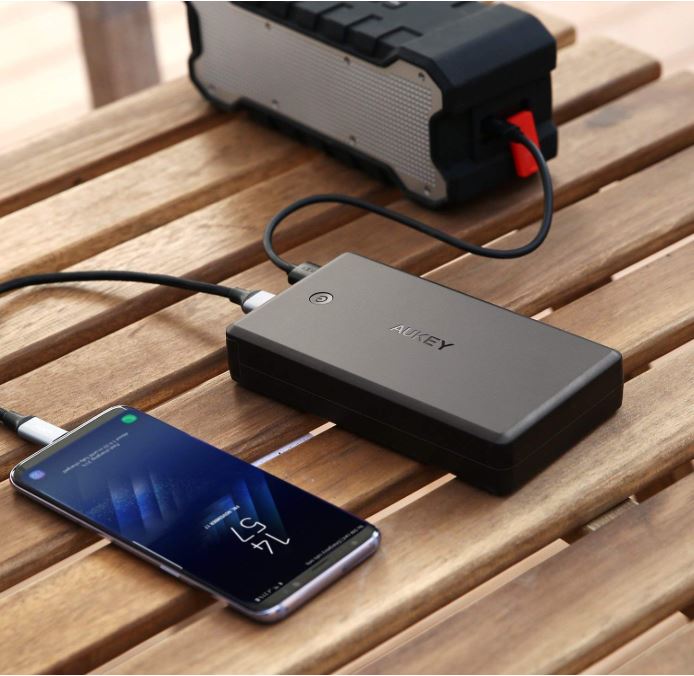
5. AUKEY Power Bank 26500mAh

Aukey portable charger charging an iPhone
AUKEY supports lots of different devices, but it is pretty heavy.

This AUKEY Power Bank is a terrific model that’s compatible with a variety of devices, including Nintendo Switch, Android phones, iPhone XS (and XS Max), iPhone 8, and pretty much anything you can fit with a standard USB cable – which conveniently comes in the package. This device is four times faster than your conventional charger, but the increased battery size does make it a little heavy. is a little more expensive as a result. It’s also one of the more costly options on our list.

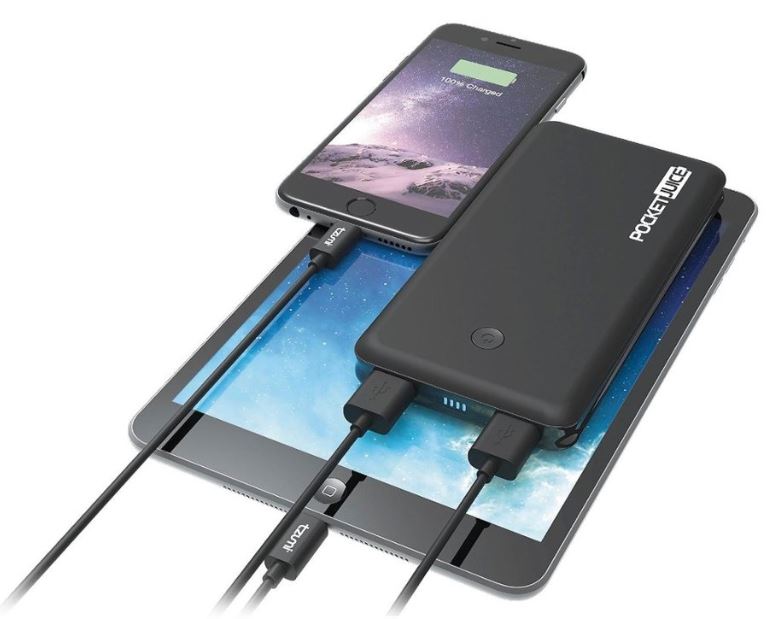
4. Tzumi – PocketJuice Endurance 8000

PocketJuice charger charging iPad and iPhone
The multiple ports on the PocketJuice allow for charging two devices at once.

Selling for a third of the price of the AUKEY Power Bank, the Tzumi is also a much lighter option, making it ideal to put in your pocket or toss in your purse before leaving the house. Like the AUKEY, the Tzumi is compatible with practically every USB-powered device, meaning your smartphone can stay connected and ready to work while you’re traveling or on the go. The 8000 mAh lithium-polymer battery pack will even see you through up to around four separate charges for your phone! Its two ports allow for two devices to be charged simultaneously, and the QuikChip technology regulates power discharge in order to keep your device from overcharging or overheating. Built with convenience and safety in mind, the Tzumi is high quality at a low price.

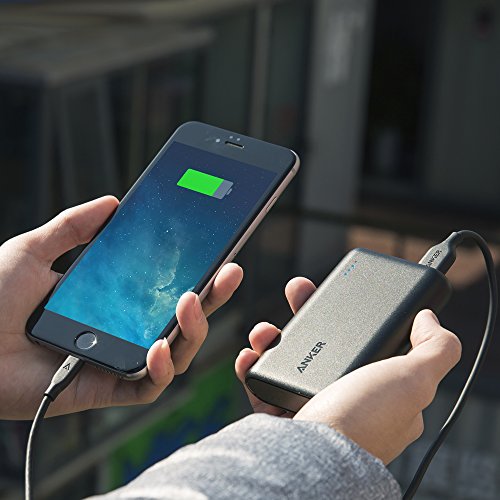
3. Anker PowerCore 10000 Portable Charger

Charging an iPhone with an Anker 10000 portable charger.
The Anker 10000 is about the size of a credit card.

One of the smallest and lightest models on the market, Anker delivers their usual great quality with this more portable device. Featuring a compact design, the Anker PowerCore 10000 is perfect for mobility and its 10,000mAh capacity is enough to charge your smartphone several times over – enough to power two whole phones with battery still to spare. Additionally, the PowerCore 10000 is integrated with a MultiProtect safety system to boost its security and reliability even further. The system boasts a combination of eleven safety features that work together to provide the ultimate protection for your devices and your charger. If you like the Anker brand (which we do) and want a less expensive model that provides peak power and accessibility on the fly, this is an excellent model.

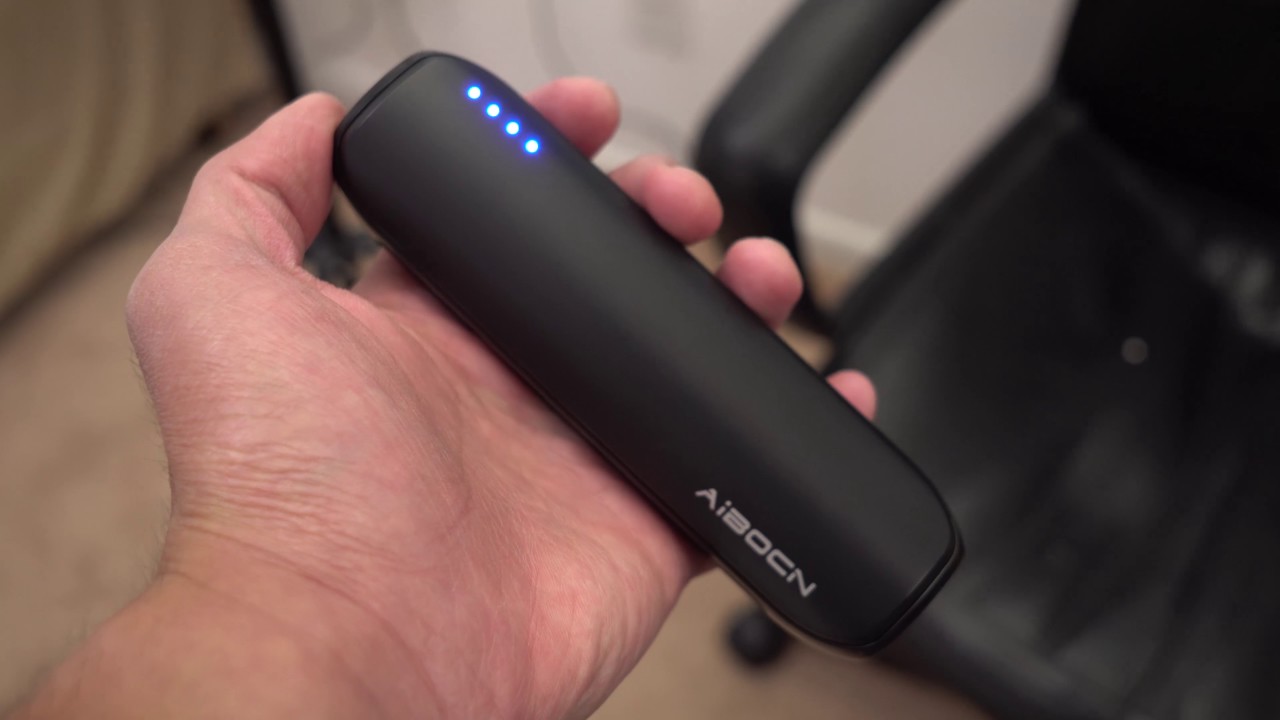
2. Aibocn 8000mAh Portable Charger

The aibocn portable charger is compact and ready on the go.
The Aibocn offers high-speed charging, portability, and user safety.

If you’re looking for ease of use, flexibility, and fast charging all at the lowest cost possible, the Aibocn is your number one choice. For under $20, the Aibocn 8000mAh gets the job done efficiently and consistently. The Venus power bank supports over three times faster charge speeds (for iPhone) than the normal 1.0A input backup charger, and supports Apple, Google, and Samsung products. Like the Tzumi (but cheaper), the Aibocn will also automatically shut down if a short-circuit or overload output occurs during charging.

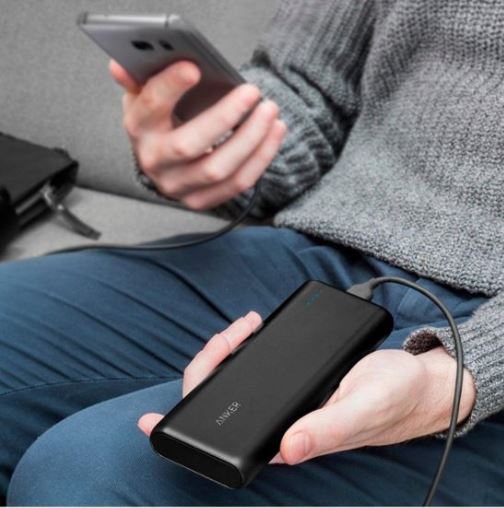
1. Anker PowerCore 20,000

Anker PowerCore 20000 charging smartphone
The Anker PowerCore 20000 is the king of quality, and our number one pick.

It should come as no surprise that Anker holds the highest place on our list, and the PowerCore 20,000 just might be the best they’ve got. To start off, the 20,100mAh battery inside is huge, meaning this will cap out your phone’s battery multiple times before needing a recharge. The charger totally refueled a Galaxy S8 in just 95 minutes, and did the same for an iPhone 8 Plus in 98 minutes. Not only that, but the battery was large enough to do so up to seven times, and the dual-port functionality allows for two devices to be charged at once. While it’s one of the more expensive models, you’re definitely getting the most bang for your buck with the Anker PowerCore 20,000.

So which charger is the best?

While the Anker is our personal favorite, it really comes down to what you’re looking for in your product. Do you favor heavy and pricey but worth its weight in quality? Or maybe something cheap and lightweight that you can use on the fly should you forget to charge your phone the night before. Let us know which charger is your favorite (or if it’s one we didn’t include in our list) and stay tuned for more gear, gadgetry, and great deals!

This article contains affiliate links, which means Softonic may receive some compensation if you choose to make a purchase.

Apple AirPods are spying on people

Another privacy scandal for Apple.

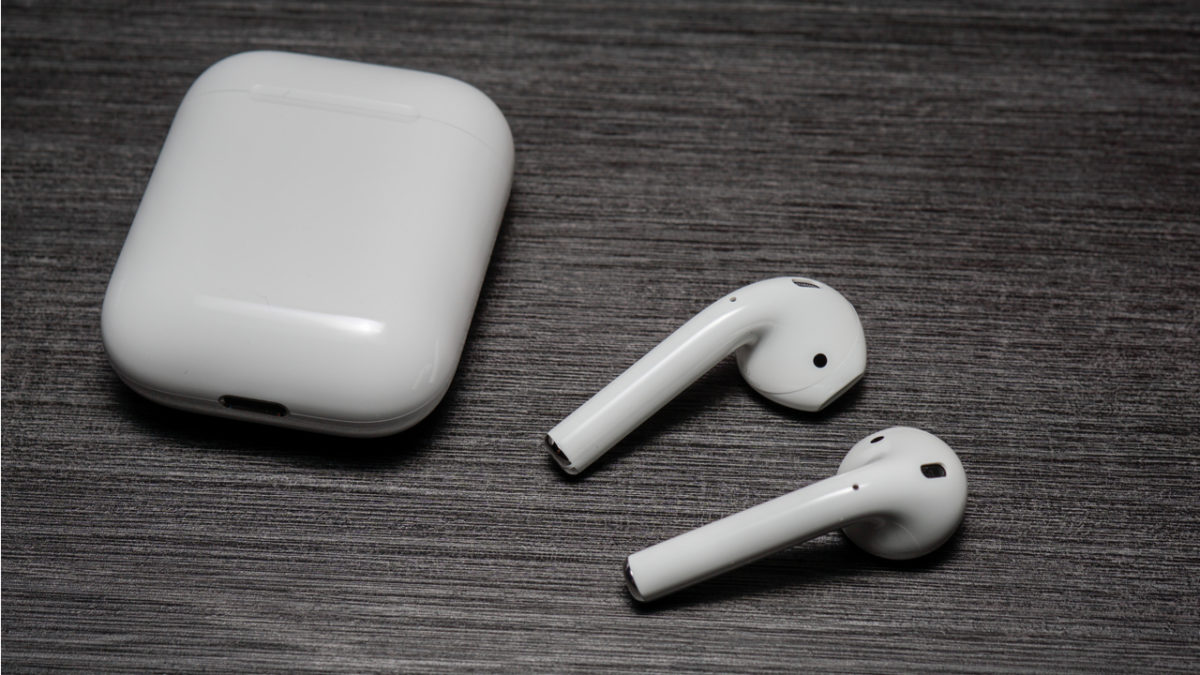
Apple Airpods

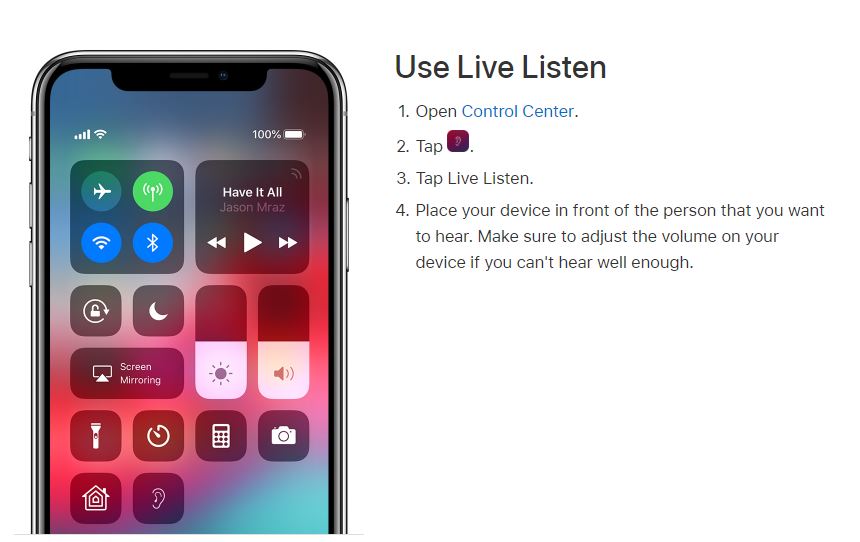
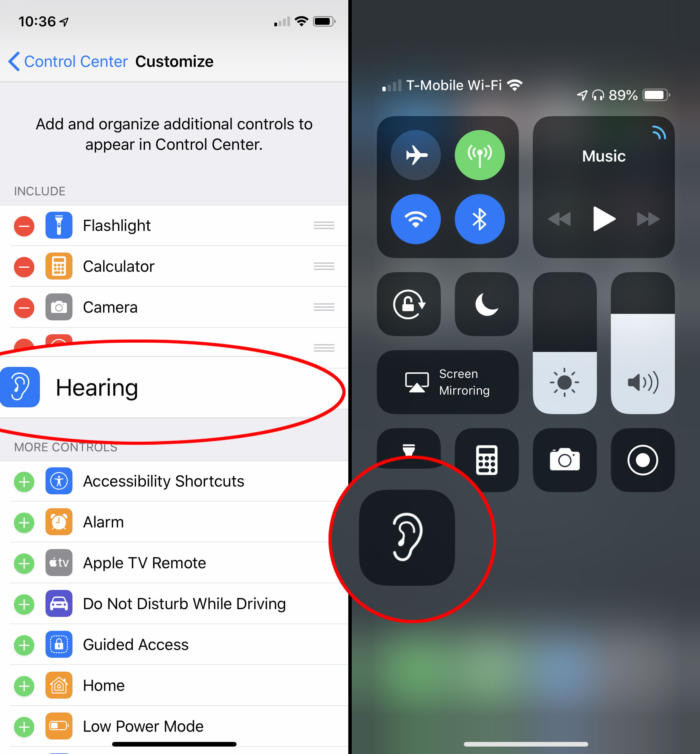
With the iPhone 7 came the death of the headphone jack and the birth of the AirPod. The wireless earbuds are good enough, we suppose, but their reception has been a largely mixed bag. The iPhone X has a Live Listen feature right on the front screen (if you swipe down, it’s the ear icon) and again we have to wonder whether its inclusion is a good thing.

You can even access it right on the top menu.
Live Listen helps you to better hear anything near your iPhone.

What is Live Listen?

Live Listen allows for iPhone users with hearing impairment to hear people across a room, in a noisy environment, or even tune into a TV without having to crank up the volume. All they need to do is enable the Live Listen feature on their iPhone and sync it to their hearing aid (or AirPod) and their iPhone turns into a directional mic.

In Apple’s own words, “with Live Listen, your iPhone, iPad, or iPod touch becomes a remote microphone that sends sound to your Made for iPhone hearing aid. Live Listen can help you hear a conversation in a noisy room or hear someone speaking across the room.”

Will people with hearing issues really be able to use this tech to help in their daily lives? Apparently, they already have. Apple has always been known for their intuitive, user-friendly gadgetry and the Live Listen feature is no exception. There’s even an option to adjust volume on the fly, and set it as a preferred Accessibility Shortcut like we mentioned earlier.

Pair it to your control center like so
Access Live Listen with a simple downward swipe.

No good deed goes unpunished, however, and for all the help that this feature is giving to the hearing-impaired, it’s also creating some more questionable uses.

The problem with Live Listen

Live Listen works well – maybe too well. Users have discovered that if you leave your iPhone in another room, it still transmits sounds straight to your AirPods. The result is that you can now use Live Listen to pick up conversations you wouldn’t normally be a part of: Eavesdropping.

The feature works from up to 15 meters away, which makes it very easy to conveniently leave your phone a couple rooms over and still remain privy to what others are saying. The Twitter user above also commented that Live Listen could be used as a makeshift walkie-talkie, or even to cheat on school tests.

Apple still promises privacy

It’s 2019 and we’re all very quick to be afraid and point fingers at anything that threatens our privacy. The great data breaches and leaks of late have made us more fearful than ever. Apple is still standing resolute, however, and maintains their stance that privacy is of the utmost importance to them. Besides, can you really hold Apple accountable for something that you could have already done with a standard recording device? If you’re that concerned you could always just disable the Live Listen feature like this:

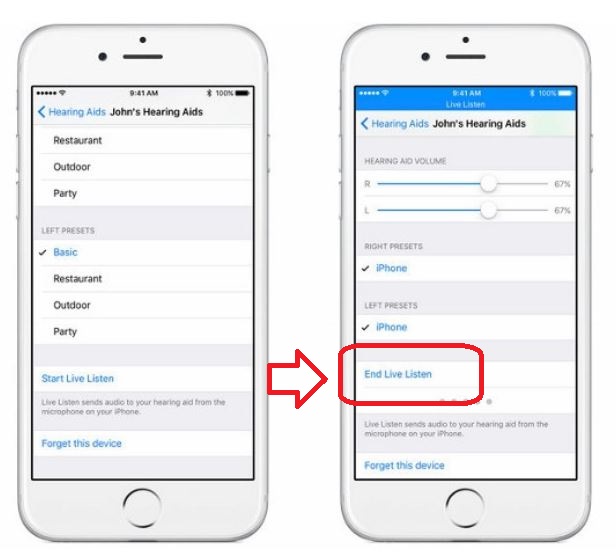
How to turn off Live Listen

1. Open your iPhone Settings
2. Go to General
3. Press Accessibility
4. Open MFi Hearing Devices
5. Tap on the name of your hearing aid or AirPod
6. Select End Live Listen

You can manage your own phone, but not other peoples'.
Press this to end all feed to the synced AirPods.

Is this a helpful feature that will help the hearing-impaired from this point forward? Or should Live Listen be removed from all future models of iPhone? Let us know your thoughts in the comments below, and stay tuned for the latest in tech news.

Apple rumored to be developing Netflix-like gaming service

Is Apple about to make a huge splash in the gaming industry?

Rumors are swirling that Apple is in the early stages of developing a subscription-based service for games, similar to Netflix’s model for movies and shows. There are few details about the service beyond this, as we don’t know if this service is being developed for mobile devices, home computers, or both.

Making a gaming service is a puzzling move on Apple’s part for multiple reasons. Even though Apple basically created the mobile gaming market with the App Store, they’ve never really gone all in on the gaming industry. Though Apple has placed tight quality control restrictions on the App Store, for the most part, they’ve been content to lay back and get their (sizable) cut from in-app purchases. Additionally, though Macs have received increased support from game developers over the years, the vast majority of PC gamers play on either Windows or Linux. Apple does not seem to mind this as their core Mac audience usually buy their devices for business or creative purposes. With this in mind, it’s relatively safe to assume that Apple’s upcoming gaming subscription service will focus on mobile gaming.

What would an Apple gaming subscription look like?

A subscription for mobile games wouldn’t make much sense, as the most popular mobile games by far are free titles that heavily utilize microtransactions. Why would anyone pay to play free games?

To make the subscription price worth it, Apple would have to offer some sort of premium content. Games could lock special levels, characters, or power-ups behind the subscription service, incentivizing hardcore players into subscribing. This model would make financial sense, as research has shown that mobile games make their money not from casual players, but from “whales.” Whales are hardcore players who pour tons of money into freemium games. Locking content behind a subscription would encourage whales and completionists to make the dip. There’s also the possibility that instead of locking content, the subscription would give a small amount of money to spend in every game included in the service. This would give players a brief glimpse into the premium side of popular games, encouraging them to spend more money after their subscription credits run out.

Another possibility is that Apple could focus on “premium” iOS games rather than free to play ones. These games are often console quality and cost around $10-$20, but don’t feature additional microtransactions. Examples of these games include Civilization VI and XCOM: Enemy Within. Apple could allow subscribers to play these games at no additional cost, which would encourage people to play these games who would have never before considered them due to their price.

By combining these two ideas, it’s possible that Apple could have a success on their hands. The subscription hinges entirely on how it is embraced by whales. If whales don’t see value in paying for a subscription, the service will fail.

This ingenious phishing scam is targeting iPhone users

Scammers are calling iPhone users from a number that appears to be Apple Support

iphones

Phishing scams are nothing new. For years, fake websites, emails, text messages, and phone calls have been trying to trick us in a bid to steal valuable personal information like credit card details or login credentials. Just because these types of scam are old, however, does not mean that they’re not still dangerous. We always need to be on our toes when clicking on links and handing over our details.

A basic scam targeting Netflix users has recently grabbed the attention of the FTC even though it comes in the form of a simple email. The more convincing the scam though, the more likely it is to trip us up. This means we have to put a warning out about what is possibly the most sophisticated phishing attack we’ve seen so far.

Scammers are calling iPhone users from a number that appears to be Apple Support

The trick for phishing scams is to persuade users they are dealing with an official communication from a company, which usually translates into fake emails or websites adorned with official-looking logos and literature. This one, however, is in a whole different league. This latest phishing scam is calling Apple users from what appears to be a genuine Apple number and raising the standard security alert that requires the victim to hand over their security credentials.

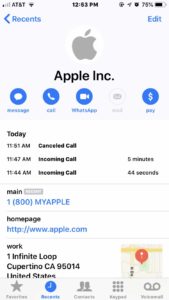
If you’re thinking this is just another spam phone call, hold your horses. The reason why this scam stands out is that the call really does look like it is coming from Apple Support. When one iPhone user raised the issue with Apple, they noticed something rather chilling when Apple called them back to discuss it. Obviously, Apple told them it was a scam, but when they looked at their call log after they’d completed the call, the scam call and the official call had been grouped together as calls from the same contact, Apple Inc.

Image via: Krebs on security

This new scam was first highlighted by security specialist Brian Krebs. Krebs noted that although it is disappointing that the iPhone can’t differentiate between a real call from Apple and a scam call, it isn’t too surprising. Scammers are constantly trying to come up with new ways to get past our defenses by making us lower our guard.

Although this trick is more sophisticated than other phishing scams we’ve seen, the trick to defeating it is still the same. As with the scam emails, you need to be aware when things are out of the ordinary. In this case, the call itself should raise eyebrows as Apple never contacts users by phone to raise issues their account, it is always done by email.

Any time anybody contacts you by any medium and asks for your details, make sure you are absolutely sure of the legitimacy of the request before you hand your details over. If you are not 100% sure you should contact the company requesting your details yourself, using the contact details shown on their official website.