WhatsApp infects millions of Android phones with malware

About 25 million Android users have been hit with a Malware attack that sends them malicious ads.

WhatsApp

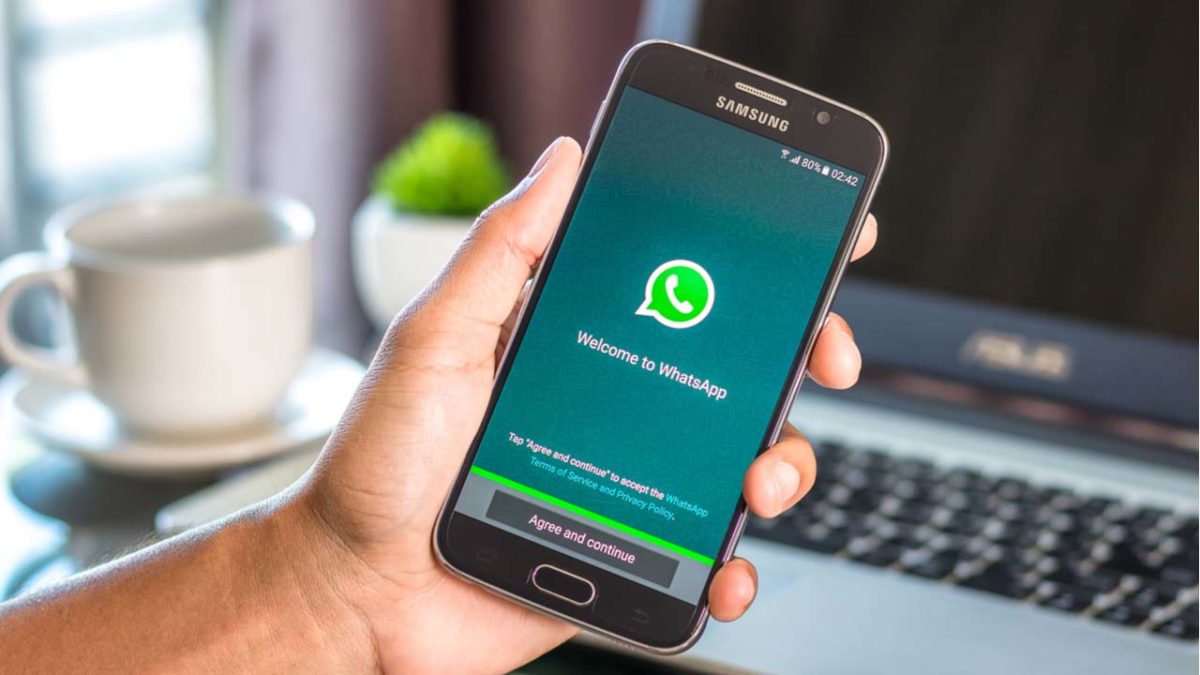
About 25 million Android phones were infected with malware hidden inside WhatsApp, according to an article from Forbes. Essentially, the virus replaced certain apps (including WhatsApp) with fake versions that bombard the user with ads. 

Because it is copying and replacing apps with a malicious version, the Malware virus has been named Agent Smith based on the character from “The Matrix.”

How did this happen and what is it doing?

A third-party app store called 9apps.com is responsible for the spread. If you downloaded your apps from the Play Store, you should be safe. You can still download WhatsApp from the website, but we’d recommend downloading it from us just to be safe.

WhatsApp Messenger Download Now ►
8

As of now, the only thing that the malware appears to be doing is bombarding the user with malicious ads. However, Agent Smith has lots of harmful potential. Since it can hide in plain sight, the virus can present a privacy risk without the user knowing what’s happening. 

Most of the infected Android phones are in India (about 15 million). However, there are still about 300,000 infected phones in the U.S. and about 137,000 in the U.K.

What should I do?

If you downloaded anything from 9apps.com, you should uninstall all of those apps immediately just to be safe. Although WhatsApp was the main app infected with Agent Smith, there were others.

You should also regularly scan your phone for viruses. Free apps like Malwarebytes can do that for you lickety-split.

Malwarebytes Download now ►
8

Should I uninstall WhatsApp forever?

Although WhatsApp has had virus attacks in the past including a spyware attack a few months back, this one doesn’t seem to be their fault. Only downloads from 9apps.com appear to be harmful.

If you enjoy using WhatsApp or if you need it on a daily basis, you can still keep doing so. Just make sure you download it from a safe source.

Facebook to try WhatsApp’s message forwarding limits

Facebook is limiting message forwarding on Messenger in Sri Lanka and clamping down on purveyors of fake stories in Myanmar

Fake news and Facebook

We’ve written a lot about WhatsApp’s fake news problem over the last few months and how the problem has also gripped Facebook in various parts of the world. We’re technology advocates and marvel at the way apps can change our modern lives. We also, however, understand the power that social technology on a global scale can have and this is why we report on the bad stuff like fake news as well as the good stuff like helping you get to work on time, for example.

WhatsApp and Facebook’s fake news scandals have been truly shocking with WhatsApp being at the heart of lynchings and horrific beatings in India and Facebook helping facilitate genocide in Myanmar. It is in India where most action has already been taken, with WhatsApp starting a number of initiatives including placing limits on message forwarding capabilities and even setting up an investigatory helpline to look into how users interact with false news stories.

It now looks as though Facebook is starting to apply what it has learned from its WhatsApp efforts in India to other parts of the world experiencing similar problems.

Facebook is limiting message forwarding on Messenger in Sri Lanka and clamping down on purveyors of fake stories in Myanmar

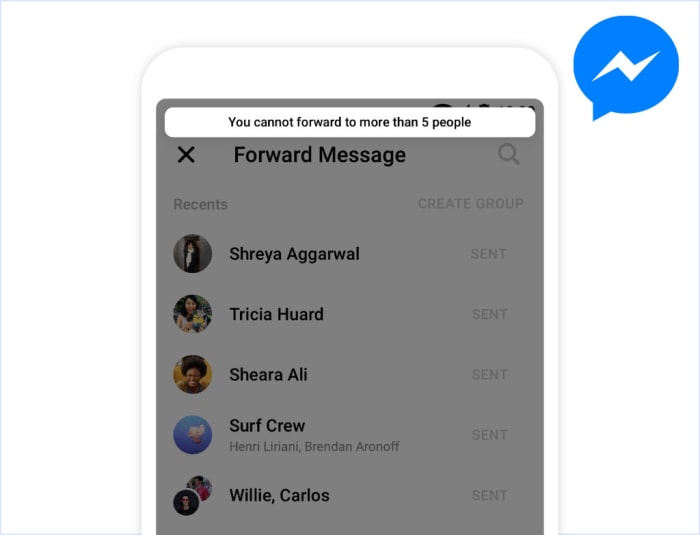
Facebook has released a blog post describing its efforts to halt the spread of fake news across its network and the most telling claim is that Facebook is starting to replicate what it has been doing on WhatsApp. In the post, Samdih Chakrabarti, who is a Facebook Director of Civil Integrity said, “In Sri Lanka, we have explored adding friction to message forwarding so that people can only share a message with a certain number of chat threads on Facebook Messenger. This is similar to a change we made to WhatsApp earlier this year to reduce forwarded messages around the world.”

Message forwarding n Messenger limited to five people

A screenshot posted to the Facebook blog indicates the limits Messenger uses in Sri Lanka face will be the same as those faced by WhatsApp users in India. If you’re forwarding a message on Facebook Messenger, you’ll only be able to forward it to five people at a time.

In Myanmar, where Facebook’s fake news problem has helped whipped up hatred of the local Rohingya Muslim population, Facebook is taking a different approach. Chakrabarti went on to say, “In Myanmar, we have started to reduce the distribution of all content shared by people who have demonstrated a pattern of posting content that violates our Community Standards, an approach that we may roll out in other countries if it proves successful in mitigating harm.”

They’re targeting the sources of the problem, which is refreshing, and Facebook even said it is prepared to ban individuals or organizations promoting violence. This echoes past action taken by the social network against the Myanmar military.

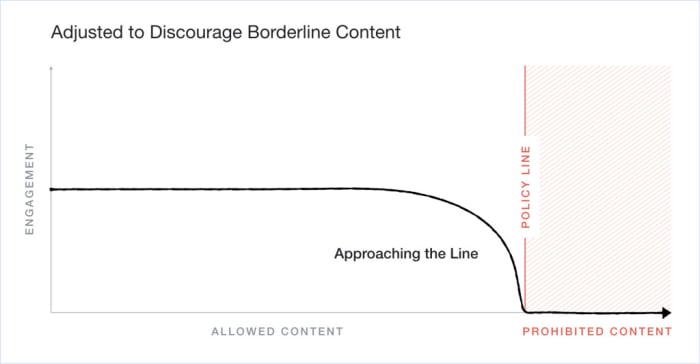
Facebook's new borderline content publication policy
Facebook’s new policy takes a harsher look on content that is close to its prohibition limit, rather than allowing it to naturally engage with other users.

It is good to see Facebook taking affirmative action in its bid to stamp out a true evil that has been able to spread across its network. It is also heartening to hear Chakrabarti recognize that, “This is some of the most important work being done at Facebook, and we fully recognize the gravity of these challenges.”

The damage that has already been done though, can’t be ignored and cleaning up the mess is only half of it. If Facebook truly understands the gravity of the situation, it will act more responsibly in the future to ensure this type of thing never happens again. With similar problems growing at home and with the hugely significant unveiling of Facebook’s planned cryptocurrency, it is more important than ever that the social giant recognizes its responsibilities and moves to fulfill them.

WhatsApp Privacy: India wants fingerprint ID on every message

The Indian government is pressuring WhatsApp to fingerprint all messages so they can be more easily tracked

End-to-end encryption is a double-edged sword. There is no doubt we all love the fact that we can talk away to our friends and family safe in the knowledge our messages really are private. In a modern world that has seemingly declared war on personal privacy, it really is something to be valued. The flip of that, however, is that some people hide behind that privacy and use the cover to cause problems.

These problems could be the planning of illegal activities or the whipping up of hatred by sending false infromation across the network. One country facing problems due to WhatsApp and its rigorous anonymity has been India, where lies spread across the network have caused lynchings, beatings, and even interfered in the democratic process.

The Indian government is now pushing WhatsApp to make changes so that it can better track who has been sending messages on WhatsApp in India. It is a little worrying, however, to see exactly what the Indian government wants WhatsApp to do.

The Indian government is pressuring WhatsApp to fingerprint all messages so they can be more easily tracked

a fingerprint on the WhatsApp logo

The Economic Times in India is reporting that two officials from Narendra Modi’s right-wing Hindu nationalist BJP government have said that they’re pressuring WhatsApp to add fingerprints to all messages sent, so it’ll be easier to track who has sent what.

The government has been pushing WhatsApp to add more traceability measures to messages ever since the first fake stories of child kidnappings in 2018 led to lynchings. One of the government officials is quoted as saying, “Fingerprinting WhatsApp messages will help find the originator of the message. That is all we want… We don’t want to read the messages but when we see a problematic message, we should be able to go to WhatsApp to help us trace the sender.” The official added that the government believes what it is asking is “technically possible.”

The official also went on to clarify that it will only request the data in limited circumstances, but the worry is that once the technology exists to do so, it could easily be abused.

WhatsApp has not commented on the government’s request, but industry insiders have said that should it go along with the request the messaging app will have to redesign its entire architecture. At the moment, WhatsApp doesn’t store this kind of data, so it’d be a major change if it were to suddenly start harvesting it. Such a change would then most likely affect WhatsApp all over the globe and not just in India.

WhatsApp is everywhere
WhatsApp will likely have to make the change everywhere and not just in India

If you’re a privacy advocate, this is something that should be grabbing your attention. The change could have massive privacy implications all around the world. This means we’re at a dangerous juncture here, but that global public opposition to the move could be the biggest thing standing in the way of the Indian government getting what it wants.

The question remains then, how do you feel about your fingerprint being added to every message you send?

13 best tricks for WhatsApp

Wanna be a WhatsApp master? These tips and tricks can help you get there!

WhatsApp

You may think you know all the functions of WhatsApp, but the fact is that this messaging app has many hidden secrets.

Did you know that you can hide your profile picture? That’s just the tip of the iceberg!

WhatsApp has endless tricks and hidden tools that only the most clever users have been finding over the last few years. Keep on reading below, and you’ll see all of the best tricks for WhatsApp!

WhatsApp Messenger Download free ►
8

The best tricks for WhatsApp

Trick 1: Disable the blue double-check

Without a doubt, this is the best-known trick since WhatsApp first came out.

Sometimes, we don’t want people to know when we saw their message. It isn’t that we’re trying to be antisocial, we just don’t want to leave our friends on “read,” and come off like a jerk.

To deactivate this cumbersome option, simply go to the Settings menu WhatsApp, click on Account followed by Privacy and deactivate the Reading Confirmation option. It’s as simple as that!
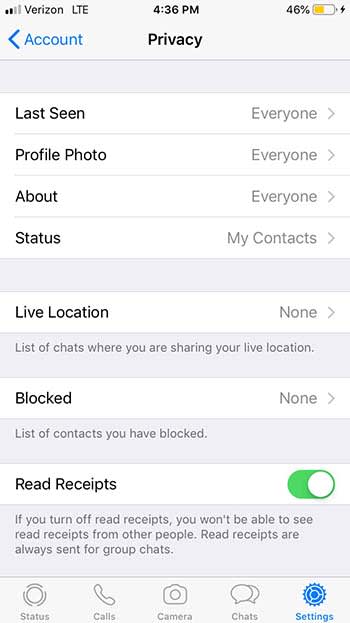
WhatsApp Privacy

Trick 2: Meet your best friends

To see a list of your best friends on WhatsApp click on Settings, then on Data and Storage, and finally on Storage Usage. From this menu, you will see which groups are the ones you talk to the most and with which contacts you share more hours in front of your screen.
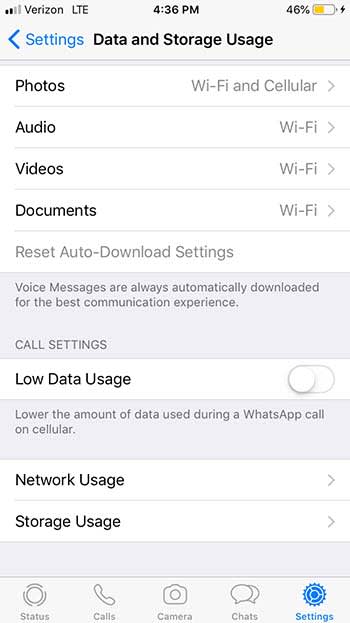
WhatsApp data

Trick 3: Find out when your messages have been read

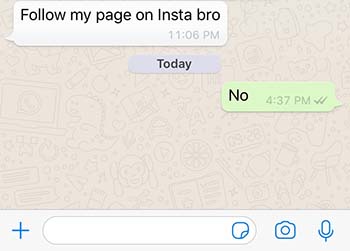
If you are an Android user, press and hold a message until a menu appears. Then click on the Info option and you will see both what time you sent the message and when it was read.

If you use iOS, slide the conversation to the left and press Info.
WhatsApp Insta bro

Trick 4: Hide your profile picture

If you want to be a mysterious contact through WhatsApp you have two options. Find a profile picture of a masked hero in the style of Batman or simply hide your photo so no one can see it.

To keep your identity secret, click on Settings, Account, Privacy, and Profile Picture. From this menu, click on the option Nobody. Now nobody will know what you look like!
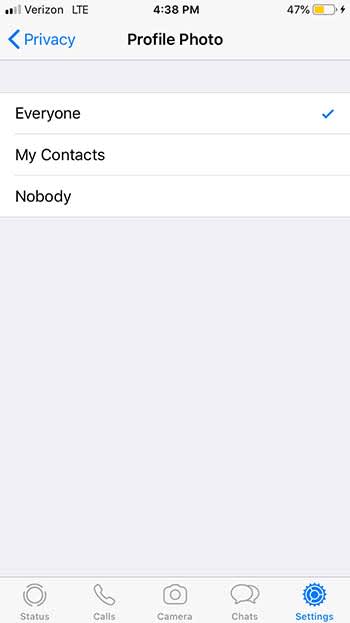
WhatsApp profile

Trick 5: Mute a group

Groups on WhatsApp can be really useful among small groups of friends or a living hell if it’s you’re annoying classmates in a group project. For those occasions, it’s valuable to know how to silence WhatsApp groups.

To mute a group, just click on it until the Group Information option appears. From there, click on Silence. You will have the option to block any type of message for eight hours, a week, or even a year.

Trick 6: Create shortcuts to conversations

WhatsApp allows you to create shortcuts to your most frequent conversations.

To create direct access to a conversation simply click on it until a menu appears. From here, select the option to create a shortcut and the chat will appear with the profile picture of the person. Unfortunately, this trick only works for Android smartphones.

Trick 7: Share your location with a friend

If you’re talking with a friend on WhatsApp, and you need them to find you, you can share your location with them. This option will add a pin with your current location that your contact can follow in the map application. You can also send a pin with the place you’re going to in case you have not got there yet. Finally, and for the more daring, you can also share in real time the place where you are at that moment.

If you are an iOS user you can start sharing your location by clicking on the “+” option and then on Location.

If you are an Android user, click on the Add option and then on Location. In both cases, you must authorize WhatsApp to use the location services of your mobile phone.
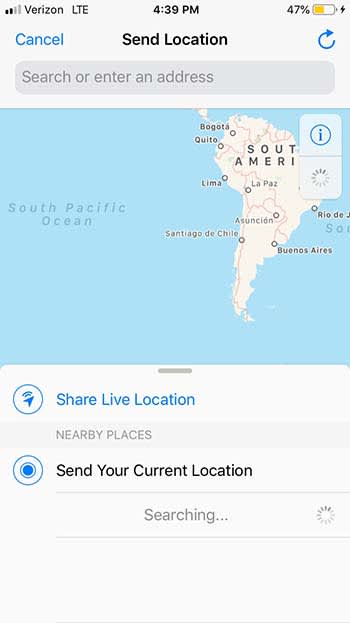
WhatsApp Location

Trick 8: Use Incognito mode

If you do not want to worry about your contacts seeing if you are connected or not, activate the Incognito mode. This is very simple to configure and will save you from more than one uncomfortable conversation if you forget to respond to a message.

To activate Incognito mode, go to the Settings and then click on Account. Enter the Privacy menu and then click on Last Seen. Change your status to Nobody so that no one can see when was the last time you were connected.
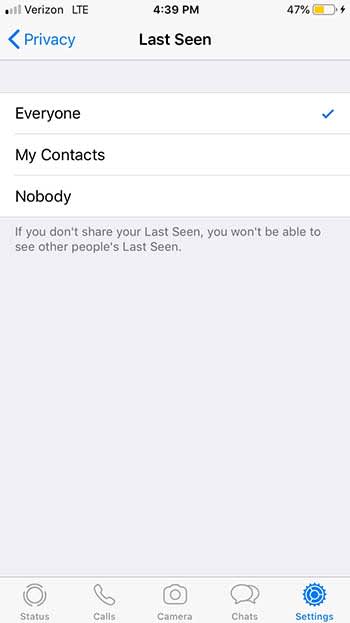
WhatsApp incognito

Trick 9: Send invitations privately

If you are having a party, you can send invitations to multiple contacts at once, and do it privately.

To do so, simply click on Chats and then on the Broadcast List option that is located just below the search bar. Create a new list, and add all the recipients you want. Create the message and that’s it! All your friends will receive it and believe that it is a personal invitation instead of a public one.
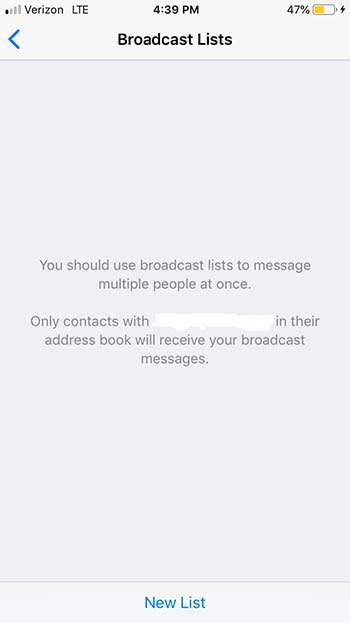
WhatsApp brodcast

Trick 10: Edit your photos

We have all sent photographs on WhatsApp on more than one occasion, but not everyone knows that we can edit them before sending them to our contacts.

To edit the images that you send through WhatsApp, use the icons that are at the top of the screen. You can add a message, draw, or even stick stickers and emoji on them. Keep in mind that depending on your phone’s OS, this option will not be available.

Trick 11: Respond to a specific message

When you get 30 messages from several different friends, it can be nauseating to sift through all of them in order to find the one or two you actually want to respond to. Luckily, WhatsApp has a trick to help you!

If you are an Android user, just click on the message you are interested in and click on the Reply option. If you are an iPhone user, swipe the message to the left and click on Reply. It’s as simple as that!

Trick 12: Keep your messages secret
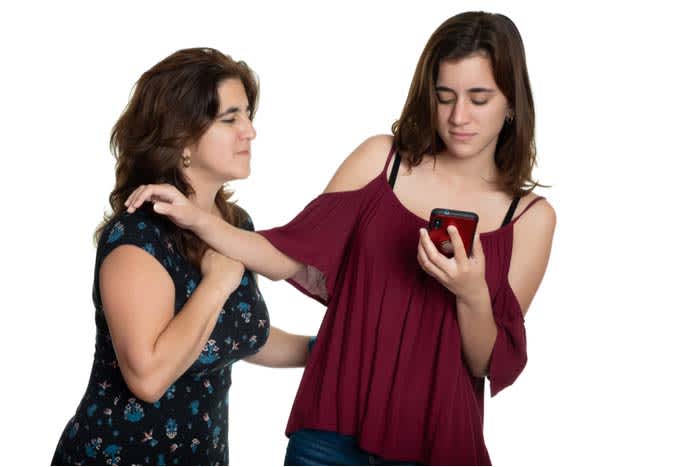
Nosy mom

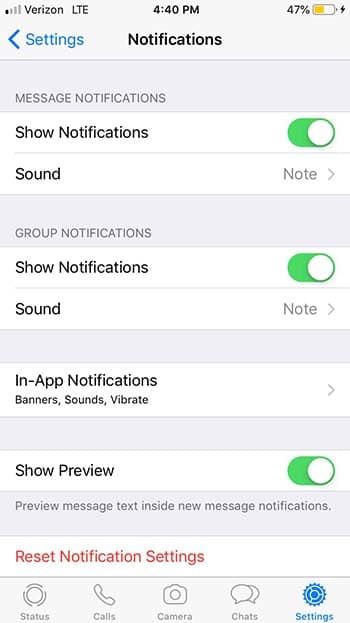
While it is true that WhatsApp messages are private, the notifications that appear on our phone are vulnerable to prying eyes. You know who we are talking about: moms and significant others. You’re having a casual conversation with someone, and your mother just has to be a Nosy Nelly and check to see if you have a new love in your life.

WhatsApp has an option to only show you who sent a message rather than the content of the message.

To activate this option and keep your notifications secret, go to Settings, Notifications, and then click the option to disable the preview. Take that, mom!
WhatsApp Notifications

Trick 13: Find a specific message within a conversation

It is likely that at some point you need to look for a specific message. However, in the sea of messages you have gotten since, it can be hard to find. For those cases, it is really useful to use the WhatsApp message browser.

To find a specific message, use the search bar located at the top of the chat window. This will give you all the conversations in which you have used the word or phrase you need to find.

If you prefer, you can also search within a single chat. If you are an iOS user, click on the chat in question and then on the name at the top of the screen. From there, click to search the chat.

If you are an Android user, click on the chat and then on the three bullets for more options. From there, hit Search.

Wrapping up

We hope that you learned something in this list! What are your favorite hidden secrets on WhatsApp? Let us know in the comments below!
Google is bringing a cool Gmail feature to Google Messages

Google Messages will remind to reply to text messages you’ve forgotten about.

Ever since WhatsApp ushered in the era of free text messaging, we’ve all been guilty of ignoring a text message or two. Even those of us who don’t explicitly ignore messages still delay responding for some mystical and unknown reason. We could reply straight away but sometimes we just don’t. Of itself this isn’t a major problem or something to worry about; the real problem is when we forget to get back to those messages like we originally told ourselves we would.

Although not as popular, Google Messages has proven itself to be quite the capable free alternative to WhatsApp. Google’s messaging app shares many of WhatsApp’s best features and even packs in a fair bit of Google ingenuity that gives it the edge over the Facebook-owned messaging platform.

Google’s email service, Gmail, is packed full of ideas and if you’ve ever forgotten to check your Google Messages, you’ll know that Gmail reminds you about messages you haven’t dealt with. It now looks like this feature, or at least one similar to it, is coming to Android Google Messages too.

Google App Download Now ►
8

Google Messages will remind to reply to text messages you’ve forgotten about

A report by XDA Developers indicates that Google is testing SMS Reminders in Google Messages. The discovery was made by an XDA-recognized developer called Quinny899 when he was looking around some of the hidden features Google had packed into the app. Sometimes, Google tests new features on select users by adding the code to the app but disabling it for everybody else, and this is how Quinny899 stumbled upon the Messages feature.

Google Messages SMS Reminder screenshot
Image via: XDA Developers

The feature is simple enough but gives your text messages a solid email feature. With the numbers of text messages we receive every day climbing steadily, it becomes easier and easier for them to slip through the cracks. Nobody likes to be ignored and it is just as awkward when somebody asks you if you received the SMS they sent you. This feature is designed to stop that happening.

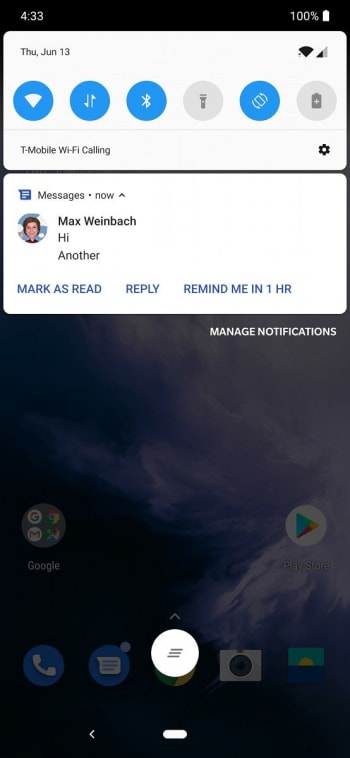
The feature works by adding a new button to the Android system notification you get when you receive an SMS on Google Messages. As well as “Mark as Read” and “Reply” Messages users will now find “Remind Me in 1 HR”. This gives you a little bump to deal with the message an hour after it landed in your inbox. There is no way to change the amount of time for the reminder, but Google may add that to the feature later on if it even implements the feature at all.

So it looks like Google is adding a Gmail feature to Messages to try and help you remember to text your friends back. WhatsApp doesn’t have this feature, but is it enough to make you switch?

New WhatsApp feature fights fake news

More than 75,000 WhatsApp users sent authentication requests to the new WhatsApp tip line.

With so many Softonic readers being avid WhatsApp users, we always try to keep you up to date on what is going on with the Facebook-owned app. Unfortunately, this has meant reporting extensively on the spread of fake news across the network and WhatsApp’s attempts to fight it.

We’ve covered everything from limits to message forwarding to a tip line WhatsApp set up to learn more about how false information spreads. Today, we have some very encouraging news to report on the response to the tip line mentioned above.

WhatsApp tip line

Whatsapp hotline doing well
The response has been strong to WhatsApp’s new fake news tip line.

The WhatsApp Checkpoint tip line was set up in the run-up to the recent Indian elections. More than 600 million people voted in the biggest democratic exercise on the planet – a prime target for people trying to push false political narratives. This has been done before in countries like Brazil.

Checkpoint allows WhatsApp users to request verification on news stories they receive via WhatsApp. WhatsApp has now revealed that in just two months about 75,000 people have sent verification requests to Checkpoint. However, it isn’t able to actually provide verification to all users. Instead, Checkpoint is a research project, designed to help the ubiquitous messaging app learn more about how people interact with fake news.

WhatsApp Messenger Download free ►
8

Working with an Indian media start-up company called PROTO, Checkpoint will now analyze the data. PROTO also plans to submit all the findings to the International Center for Journalists in a bid to help other organizations learn from how the project was designed and run.

Not everybody who asked for verification received it, but WhatsApp is now sitting on a huge cache of useful data. This data could help it fight fake news and all its awful consequences.

In an article with Economic Times, a WhatsApp spokesperson said, “ The response on the tip line has been tremendous and has received over 75,000 claims since the launch, in five languages — Hindi, Telugu, Bengali, Malayalam, and English.”

It is the large scale of the data that could make a difference, with one of the co-founders of PROTO saying, “As more data flows in, we continue to identify the issues, languages, regions that are most susceptible to or affected by this problem.”

Fake news on Whatsapp
Fake news has been a big problem for WhatsApp for quite some time now

What comes next?

WhatsApp’s fake news problem is far from over. If anything, the Checkpoint numbers show just how big the problem actually is. The messaging app is moving in the right direction. However, it has already built up a huge database of information relating to the types of false stories shared. This should help it prevent the spread in the future.

The other good news to take from this is the public response. A lot of people have felt suspicious enough to pass stories they’ve received on to a verification service, which is a very good sign. If WhatsApp can give people the tools to fight fake news themselves, the people will use them.

WhatsApp and Facebook take their first public steps towards integration

WhatsApp will soon allow users to post status updates on Facebook.

It was only recently, that Facebook announced it planned to pull together its three biggest apps. The code behind Facebook, Instagram, and WhatsApp would be transformed so that it would all resemble one single system. Although Facebook assured everybody that each would retain their independent qualities, the move was a controversial one as it was exactly what Facebook said it wouldn’t do when it acquired Instagram and WhatsApp way back when.

The move makes sense for Facebook as managing one big system is much easier than managing three smaller ones. Just ask Microsoft about why it is so determined to have all Windows users update to Windows 10, if you don’t believe us.

Facebook and WhatsApp link revealed
The links between WhatsApp and Facebook are beginning to show

For the users, the move is controversial as each app collects data from us in different ways, which means they collect different data. Putting the three together offers Facebook a much more complete picture of each of us to sell to advertisers and whoever else is willing to pay.

The flip side is that it might make it easier for us to start communicating across all three networks. Have a friend who is on Instagram but doesn’t have WhatsApp? No problem, soon you might be able to shoot them a message anyway. It looks like we might be about to start seeing these cross-platform features land on Facebook’s three big apps.

WhatsApp will soon allow users to post status updates on Facebook

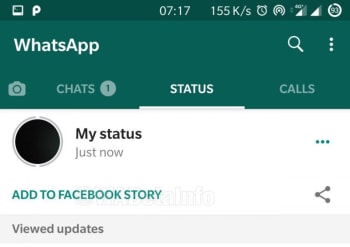
The latest beta version of WhatsApp for Android, version 2.19.151, has a very interesting new feature. For WhatsApp users who also have Facebook installed on their phones, a new button appears in the WhatsApp Status tab. Just below the My status button there should be the brand new “ADD TO FACEBOOK STORY” button.

WhatsApp share to Facebook
Image via: WABetaInfo

Tapping the new add to Facebook button gives WhatsApp users the chance to post status updates on Facebook. For now, the feature is pretty limited. Users will be able to post status updates including images, videos, GIFs, and text but it’ll all have to be done manually. It isn’t as simple as just sharing your WhatsApp status on Facebook just yet. But then again, who posts WhatsApp status updates anyway? When users tap the “add to Facebook” button, they’ll be redirected to Facebook where they’ll be able to share their story.

In itself, this new feature is not something to get too excited about. It is, however, the very thin end of what is looking like a very large wedge. As time goes by, we can expect to see many more of these inter-compatibility features coming to Facebook, WhatsApp, and Instagram. As to whether they’ll be worth the privacy sacrifices that go with them, that’ll be up to you.

The “add to Facebook story” button is currently in beta testing, so you shouldn’t expect to see it on your regular version of WhatsApp just yet. If we hear anymore about when to expect it, you’ll be the first to know.

What is the difference between WhatsApp groups and WhatsApp broadcast?

What are the differences and similarities between WhatsApp’s two major multi-message sending tools?

What is whatsapp broadcast?

Everybody knows about WhatsApp groups chats. We’re willing to bet that everybody is a member of at least one WhatsApp group. Broadcast, however, is much more mysterious and less well-known than the ubiquitous group chat. It is funny really because both offer ways for WhatsApp users to message more than one user at a time and both are useful in their own right and in certain situations. Let’s have a good look then at the main differences between WhatsApp groups and WhatsApp broadcast.

WhatsApp Messenger Download Now ►
8

WhatsApp groups vs WhatsApp broadcast

How to create a WhatsApp group

WhatsApp groups allow you to set up multi-directional chat rooms with your friends and family. Once people have been added to the group, they can send a group message and all other members of the group will receive it. They’ll also receive every message sent to the group by other group members.

Whats~App user tag
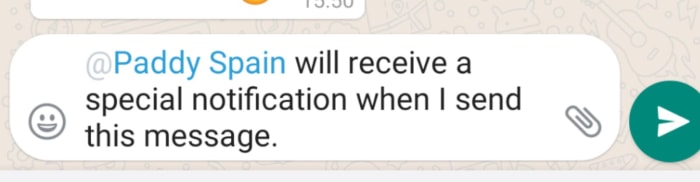
You can tag users in group chats to grab their attention, but the rest of the group will still be able to see the message

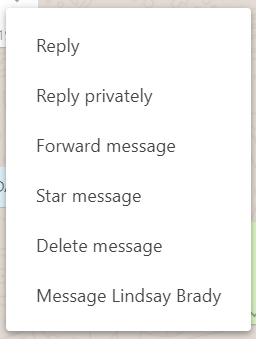
There are a number of WhatsApp group features like user tagging and Reply privately that allow you to aim messages at certain members of the group, but as long as you send a message to a WhatsApp group every member of the group will get to read it. Reply privately actually sends a message to the individual user you’re replying to, opening up in their chat with a quoted reply taken from the group.

WhatsApp private reply

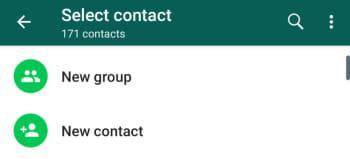
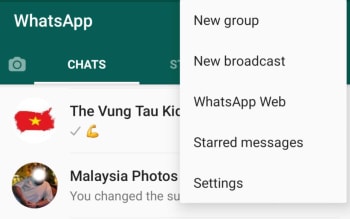
WhatsApp broadcast also allows you to send messages to lots of people at once, just in a different way to WhatsApp groups. You create a broadcast list in much the same way to create a group, too. You open WhatsApp and then click the more settings icon in the top-right. Once you’ve done that, you select all the members you want to add to the list and a chat window will pop up just like it does with a group chat. That’s where the similarities stop.

New WhatsApp boradcast

When you send a message to a broadcast list, it will appear to everybody who receives it as a normal chat would. They’ll receive a message from you, and it’ll appear in your normal chat window underneath the last messages that you sent to each other. When a user replies to a message you’ve broadcast, you’ll see the reply in much the same way, in your regular chat window beneath your broadcast.

You can only broadcast to WhatsApp users who have your phone number saved in their phonebeook

The other big difference between WhatsApp groups and WhatsApp broadcast is that you can only broadcast messages to contacts who have your phone number saved in their phone book. If they don’t have your number saved, they won’t receive any broadcasts from you. Also, unlike with a group chat, you can’t create a broadcast list from WhatsApp Web.

When to use WhatsApp groups and when to use WhatsApp broadcast

WhatsApp group chats are great ways to keep groups of friends and coworkers talking to each other, even if they’re separated by great distances. They’re also good for arranging social events and managing complex tasks across teams.

WhatsApp broadcast, however, is more about one-way communication. The admin who creates the broadcast list is the only person who can talk to everybody on it at once. This makes WhatsApp broadcast lists excellent tools for sending out important messages and alerts, like a birthday invitation or a prompt to ensure your tax information is up to date on your employee records.

The key factor with WhatsApp broadcasts is the private nature of responses. Once the original information has been sent out, all subsequent communication remains between the admin and the individual user. This also means that everybody’s inbox remains clutter free and safe from everybody else’s annoying messages.

Ads are coming to WhatsApp

Ads are coming to WhatsApp next year, but they might not be as annoying as you think.

WhatsApp

You’re about to hate WhatsApp just as much as you hated the finale of “Game of Thrones.”

Whether you want it or not, in 2020 your favorite messaging app will include ads.

WhatsApp Messenger Download Now ►
8

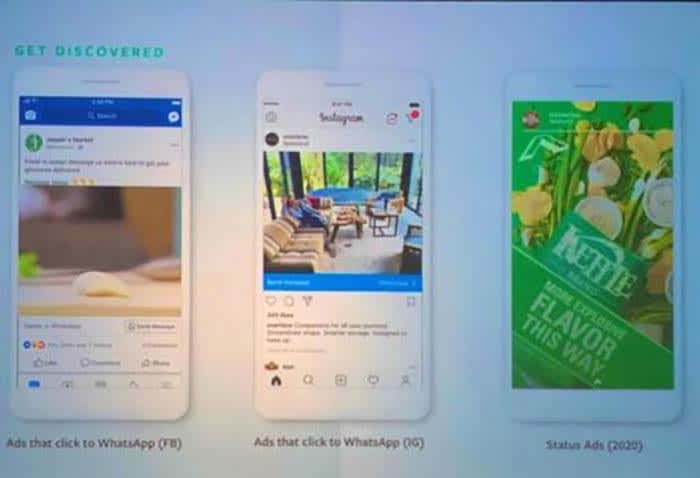
This was announced at the Facebook Marketing Summit 2019 in Rotterdam.

The ads will be similar to those on Instagram. They will appear as you navigate through the app.

WhatsApp ads

The good news is that they will not be as annoying as you might have feared. The ad will be in the form of a video or photo. You can swipe the ad the go to the advertiser’s page, or just scroll past it.

WhatsApp FMS

Also announced: WhatsApp Business, the app for companies, will have new functions including more complex message formats.

These initiatives by Facebook are meant to help monetize the application with more than 1.5 billion active users.

Up until now, WhatsApp was the only app under the Facebook umbrella that did not run advertisements. It was just a matter of time before this happened.

WhatsApp cracks down on clone apps

WhatsApp has sent out cease and desist letters to a number of clone apps.

WhatsApp logo

Recently, WhatsApp has been gripped by a number of crises as fake news has spread across its network. This fake news has been used to aid political campaigns but has also seen terrifying attacks carried out by crowds whipped into a frenzy by horrifying stories that weren’t true.

In response to this, the messaging app has enacted a number of initiatives, with the most prominent being limitations to message forwarding.

WhatsApp Messenger Download Now ►
8

The first move saw a new Forwarded tag appearing above a message that didn’t originate from its current sender. This then evolved into a Frequently Forwarded tag. A tag becomes a Frequently Forward tag if the message had been shared more than four times. Eventually, WhatsApp set a limit on how many times a message could be forwarded at all. Thanks to this move, WhatsApp messages can only be forwarded five times at once.

Problem is though, the people who were spreading all of that fake news in the first place want to continue doing so. This means there is a demand for software that will help them bypass WhatsApp’s message forwarding limits and, accordingly, WhatsApp clone apps have sprung up that do just that.

Tech 2 reports that these clone apps can cost as little as $14 yet give users the ability to send up to 100,000 messages per day, if not more. A report by Reuters found that these tools were available to buy on Amazon. They were also being used to subvert WhatsApp’s new policies for political reasons as well as in marketing attempts for regular businesses.

WhatsApp has sent out cease and desist letters to a number of clone apps

WhatsApp’s response to these clone apps has been strong. The messaging app wouldn’t even allow Reuters to use one for test purposes.

WhatsApp responded, “We are continuing to step up our enforcement against imposter WhatsApp services and take legal action by sending cease and desist letters to hundreds of bulk messaging service providers to help curb abuse… We do not want them to operate on our platform and we work to ban them.”

As well as ordering the owners of the fake apps to stop operating, WhatsApp is also banning accounts that use them.

Whatsapp's fake news problem
WhatsApp knows it has fake news problem and is trying to stamp it out.

This isn’t the first time WhatsApp has taken strong action against users of unofficial versions of the app. Recently, users of GBWhatsApp and WhatsApp Plus were targeted with temporary bans. Some lost their entire chat histories in the process. Those apps were built to offer more user-friendly features like themes and added customization options.

This time, however, the clone apps have a much more criminal underworld feel to them. This money being made facilitating attempts subvert attempts by WhatsApp to make its network a safer place. There is a real battle taking place on WhatsApp, and we all need to hope that the right side wins it.