How to keep your kids safe on YouTube

Any parent with small children and a tablet knows that kids LOVE their YouTube videos. While there are many innocent, entertaining, or educational videos on YouTube, there is a shady and impenetrable industry of YouTube content creators making nonsensical and/or harmful videos for children.
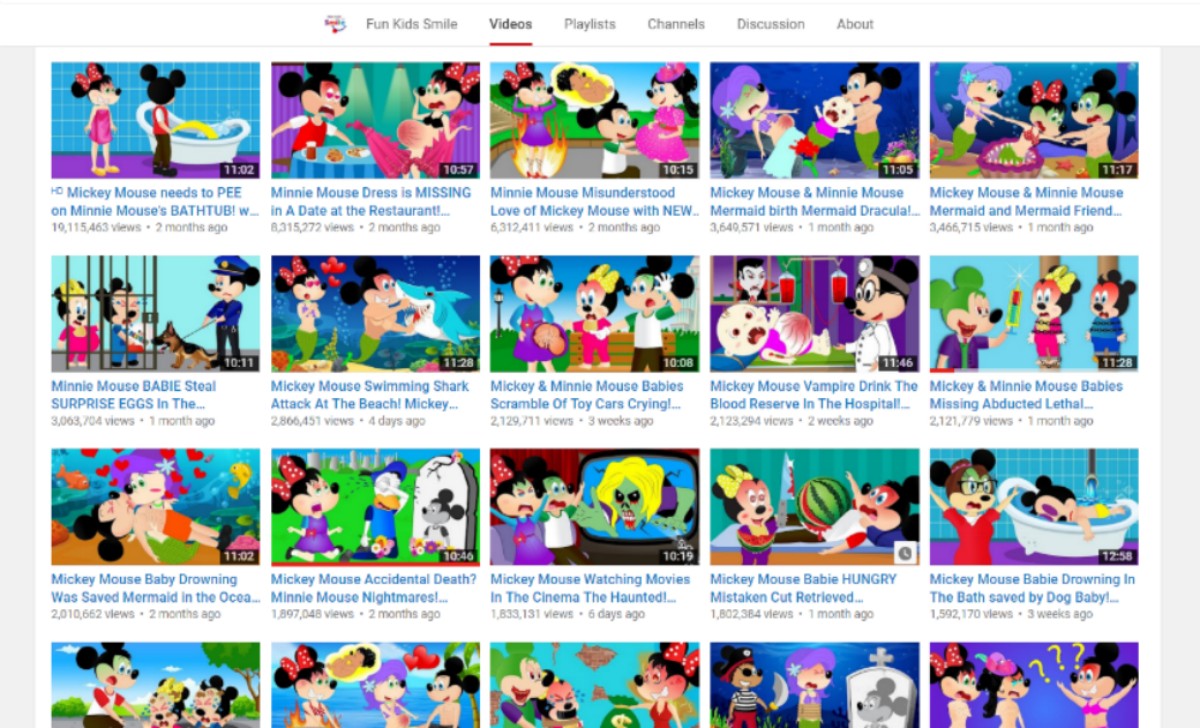
A brief glance at the above image might seem like a bunch of Mickey Mouse cartoons, but a closer look at the thumbnails and video titles are disturbing and nonsensical.

There is an alarming trend on YouTube where content creators take characters popular with children such as Mickey Mouse, Peppa Pig, Spider-man, and “Frozen’s” Elsa, and create scarring or frightening videos for children starring them. Because these videos feature characters that kids love that are featured in millions of normal YouTube videos, the parental control algorithms of YouTube and YouTube Kids do not recognize these videos as harmful to children. It’s unknown who creates these videos or why, but there are thousands of accounts that pump these videos out.

Today’s parents are the first to deal with Web 2.0 and its effects on young children, so it’s understandable that they might not know what to do. Below are a few tips that can help keep your kid clear from disturbing content on YouTube.

How to keep your kids safe on YouTube

Turn on Restricted Mode

YouTube has an option called Restricted Mode that uses computer algorithms to automatically block mature content. The feature is far, far from perfect but it’s a start and should be enabled when kids are watching YouTube. To enable Restricted Mode on the YouTube app, first tap the three dots in the top right of the screen.

This will open up a menu, tap “Settings”. This will open up a new menu.
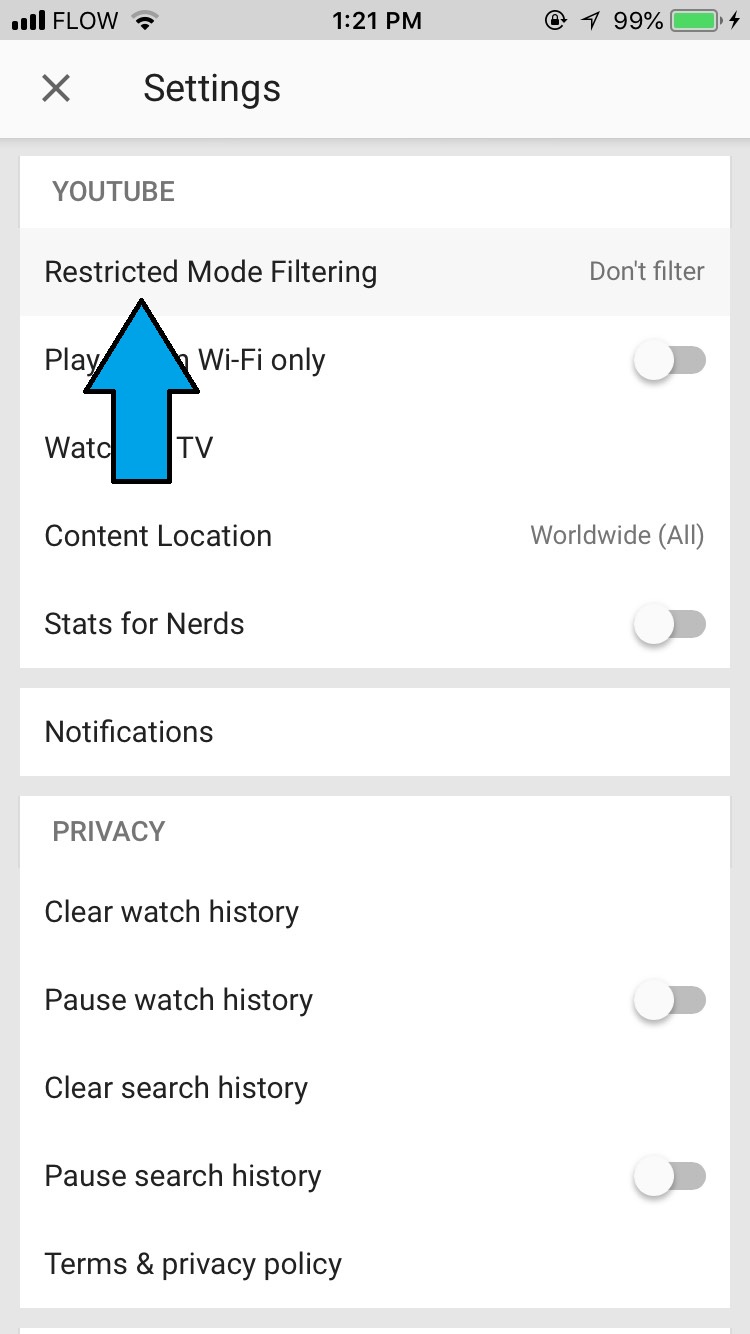
Tap “Restricted Mode Filtering” and select “Strict”. This will enable Restricted Mode. Remember, this alone will not filter out all disturbing content, only some.

Avoid the YouTube Kids app like the plague
YouTube created an app specifically for children called YouTube Kids. The app is incredibly popular and is supposed to block kids from seeing disturbing content while using it. However, the problem is that the app uses algorithms to automatically sort videos and determine their kid-friendliness. As stated earlier, these algorithms have a hard time determining if videos are family friendly or not if they contain popular kids characters, causing many disturbing or frightening videos to slip through the cracks. Fortunately, Google is currently working on a kid-friendly YouTube app that will use real humans, not algorithms, to determine which videos are kid friendly.

Create your own playlists for your kids

If you have little-to-no faith in YouTube’s ability to monitor videos for your kids (which you should) you can create playlists for your kids yourself. For the uninitiated, a playlist is a series of videos put together. You can put any amount of videos in a YouTube playlist and in any order. To create a playlist, you need a YouTube account. We’ll show you the steps on how to create a playlist below.
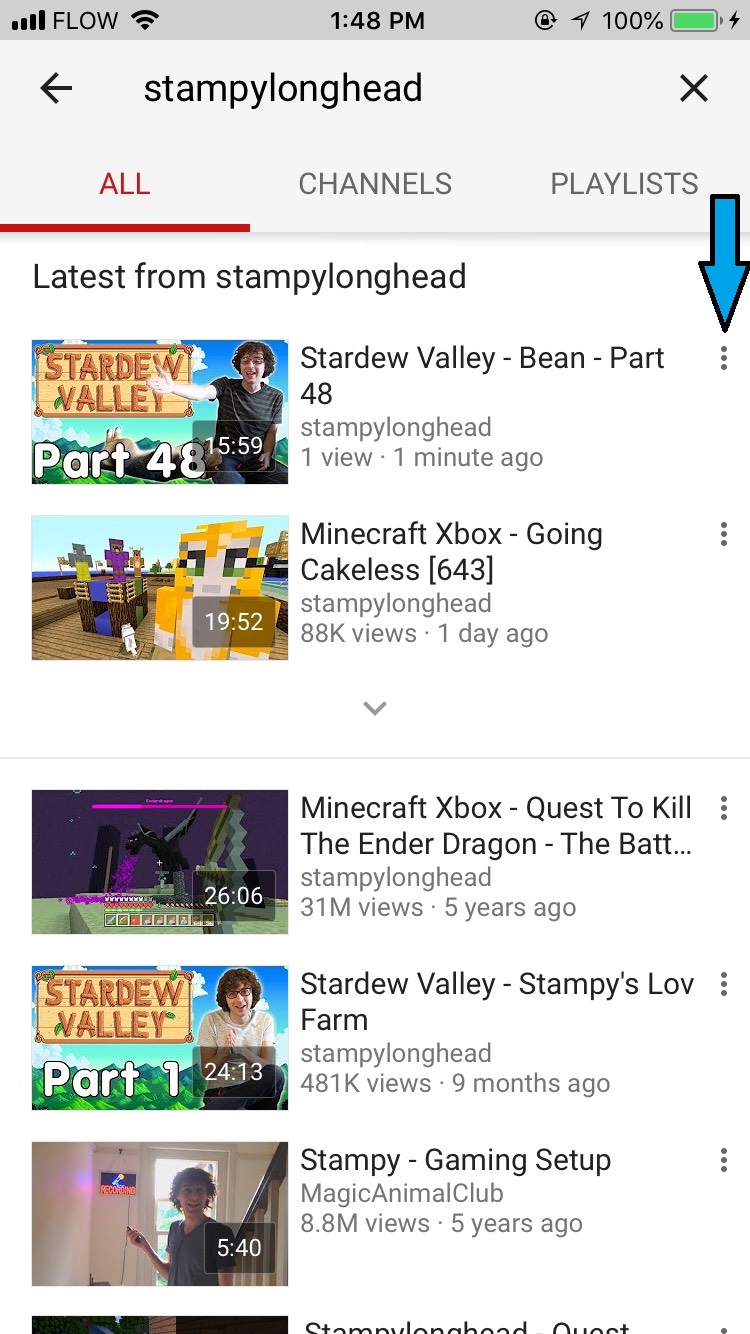
After creating a YouTube account and logging in, look up whatever video you’d like to add to your playlist. Tap the three dots on the video you’d like to add, and then choose “Add to Playlist.” You can then either add the video to an existing playlist or create an entirely new one. When searching for the types of videos your kid likes, we recommend grabbing videos from their official YouTube channels. For example, if your kid likes Sesame Street, add videos from the official Sesame Street YouTube channel instead of videos added by unfamiliar accounts.

To access your created playlists, tap the person icon in the top right of the YouTube app and your playlists will be there. Remember to actually check up on your kid once in a while to make sure they’re watching the playlist instead of something inappropriate.

Avoid YouTube altogether

If none of the suggestions above seem to be working, just avoid YouTube for the time being. Google is developing a new version of the YouTube Kids app that will feature moderation by real humans instead of computer algorithms. It remains to be seen if that app will actually work or not, but until then, it’s still risky to leave your kid to wander YouTube unsupervised.

YouTube is testing a new feature you’ll love

YouTube is testing a new Explore tab to help you find more videos you’ll enjoy

YouTube loves it when you watch videos. Without video creators, however, there wouldn’t be any videos for you to watch. This means that YouTube loves its video creators and wants to help them succeed. A recent blog post from YouTube CEO Susan Wojcicki laid down this pledge recently, and the video sharing platform has started to put those words into action. YouTube is currently testing an Explore tab on iOS to help put video creators in touch with new users.

YouTube Download Free
8

The new Explore tab will include new videos and channels based on previously watched videos. YouTube felt that the new tab was needed as the current recommended videos were coming up short and creators weren’t happy. Fresh content from new creators wouldn’t make it onto user’s recommended videos, meaning it was always the more established creators who were having their content promoted. If you watched a video, you’d often just be recommended other videos from the same creator.

The new Explore tab wants to go further. According to YouTube product manager Tom Leung in a recent YouTube video:

“Explore is designed to help you be exposed to different kinds of topics, videos or channels that you might not otherwise encounter, but they’re still personalized.”

So if you watch a video about an action camera, you might then be recommended videos about snowboarding, scuba diving, or drones. There’ll also be a Trending section so that users discover which videos are trending across YouTube at any given moment.

For now, the explore tab is only a test that will go out to 1% of YouTube users on iOS. It represents a step in the direction for the video hosting platform, which has seen a lot of problems over the last year regarding inappropriate videos being recommended to kids. If YouTube can crack this and put users in touch with better content, it could be well on the way to keeping creators happy while also regaining trust with its user base. Only time will tell.

YouTube has a new incognito mode: This is how to use it

If you’re an Android user, you’ll now have access to a handy new feature on your YouTube app.  For the times when you don’t want anybody knowing the videos, you’ve been watching on YouTube you now have an Incognito mode. There is still no official word from YouTube about whether the iOS version of YouTube will be getting an Incognito mode so for now, this quick guide is only for Android users. This is how to use YouTube’s new Incognito mode.

YouTube Download Free
8

Activating YouTube’s Incognito mode

  1. Open the YouTube app on your Android phone
  2. Tap on your avatar in the top right-hand corner
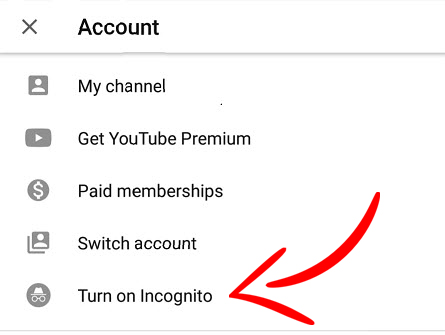
  3. In the Account menu, hit Turn on Incognito
  4. Hit OK

How to use Incognito mode on the YouTube Android app

If you can’t see the Turn on Incognito option, you will need to update the YouTube app on your phone.

The first time you use YouTube’s Incognito mode, you’ll be prompted to confirm that you want to watch videos that won’t go into your video history. Once you’ve confirmed, you won’t be asked this again, and Incognito mode will launch as soon as you tap Turn on Incognito.

It is worth remembering here that Google is essentially logging you out of your YouTube account to prevent tracking our usage. This also means that you won’t be getting recommended videos based on your viewing history, so there might be a few strange videos turning up in your feed. If you want to deactivate Incognito mode and get back to more familiar surroundings, the process is easy enough.

Turning off Incognito mode in the YouTube app

  1. Tap the Incognito icon in the top right-hand corner of the app.
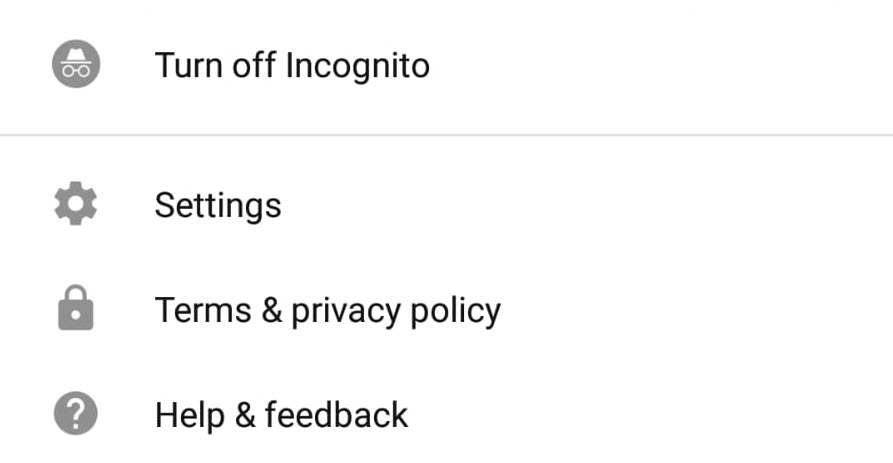
  2. Hit Turn off Incognito in the small menu that appears at the bottom of the screen.

Deactivate YouTube's Incognito mode

With Incognito mode active, video history is paused. None of the videos you watch will be added to your viewing history, and you won’t be able to see the video history linked to your account. As soon as you deactivate Incognito mode, YouTube will begin adding videos watched to your history again, and you’ll be able to review all the videos you’ve watched while logged into your account.


You can now control what Google knows about you

Google knows a lot about you. So much, in fact, that it can show you personalized ads. Starting now, you can carefully control what Google shows you in ads by removing categories that it has “assigned” you.

This Google option, which can be found at this link, lets you see the profile that the company has on you, based on your online behavior and any data that you’ve given out: age, sex, and tastes. Think a category doesn’t represent you? (According to Google, I’m a man.) Or simply don’t want to be shown ads from certain categories? Just click on that category and then “Disable.”

In addition to this option, Google now gives you more info about why you see certain ads for its products, such as YouTube. If you click on “Why am I seeing this ad” within an ad, it will explain in detail why it’s being shown to you (because of your tastes, where you live, etc.).

Of course, these new options don’t mean that Google will stop having info about you, but at least now you can call the shots by controlling the profile Google keeps on you.

This option reminds us of Facebook, which a while back included a section with all the info it was storing on you. In the article “How to find out what Facebook knows about you,” we explain this in detail.

What do you think about Google storing so much info on us?


This amazing mobile web browser can help you unlock a YouTube Premium feature for free

There are lots of web browsers out there that you can get for your mobile, but we think we might have just found the best one. If you have an Android mobile, you need to download Kiwi browser. Let us tell you why.

There are lots of web browsers out there that you can get for your mobile, but we think we might have just found the best one. If you have an Android phone, you need to download Kiwi browser. Let us tell you why.

Like with Android, Google made the code that powers its Google Chrome web browser open source so that developers can use it to build their own web browsers. These are called Chromium browsers, and Kiwi is a Chromium browser that has some exciting features built on to the Google Chrome source code.

Kiwi Browser has some really impressive features

For starters, Kiwi browser is lightning fast. Speed was always one of Chrome’s biggest selling points, but Kiwi has taken it to another level. It is much quicker than Google Chrome. On top of the speed, Kiwi also has a built-in pop-up ad blocker, and it also sports a crypto-mining blocker. As we’ve mentioned many times, crypto-mining malware is on the rise. So it’s great that we have a browser that automatically blocks attempts to use all your phone’s processing power to make money for somebody else.

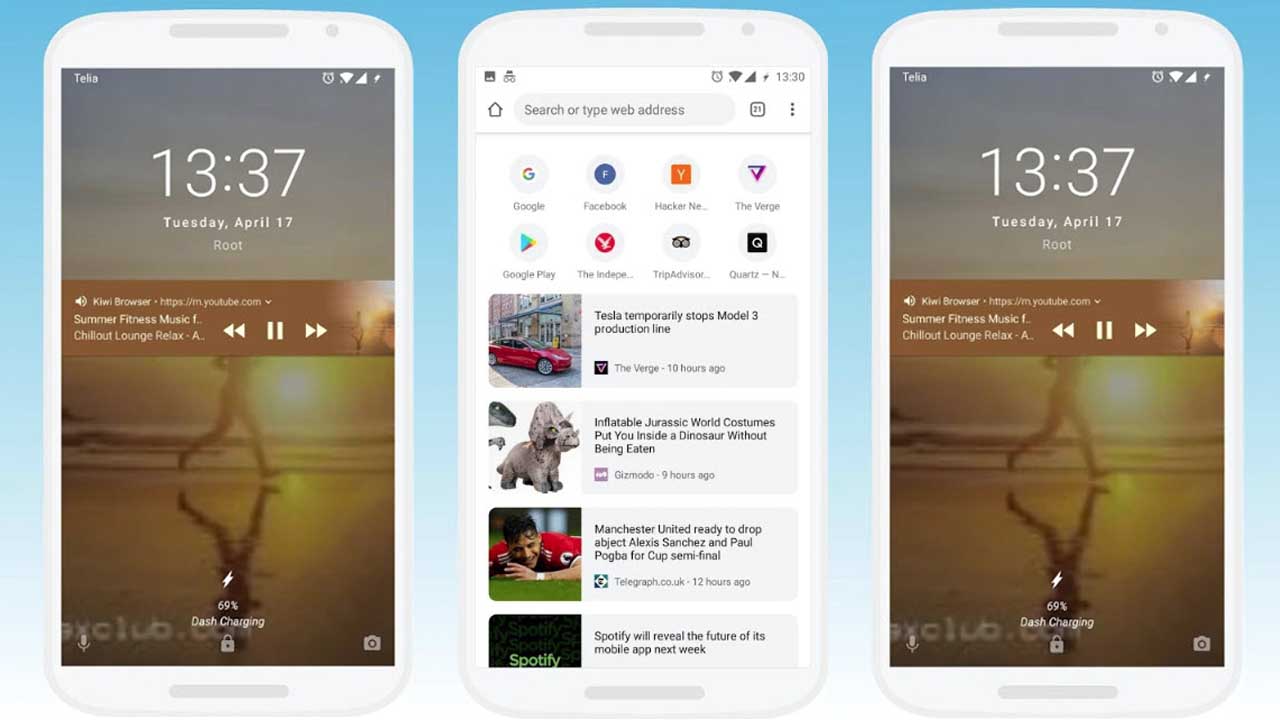
The most amazing Kiwi browser feature, however, is even more impressive due to the recent launch of YouTube’s two new paid subscription services, YouTube Premium and YouTube Music. Both services offer many cool features like downloads for offline viewing and listening; and exclusive access to singles, albums, and remixes. One of the most significant premium features, however, is background playing. If you subscribe to either service, you can have your YouTube music videos playing in the background while you are doing something else. Usually, this is impossible using the YouTube app or your web browser, but not with Kiwi Browser.

Kiwi browser has background play so you can have YouTube playing in the background while you are working away on something else, or just browsing the internet.

Other cool features include a Night Mode, which makes everything dark and there is an even cooler feature on the way. According to a Reddit thread, the developer is working on a feature that will allow users to place the address bar at the bottom of the page, rather than the top. This common-sense feature will make it a lot easier to browse the web with just one hand, considering how big some phones are these days.

Click here to download Kiwi Browser


YouTube Music and YouTube Premium launch in 17 countries

Image via: Pexels

YouTube has finally launched its much talked about new services YouTube Music and YouTube Premium in 17 countries around the world. Users in countries such as U.S., Australia, New Zealand, Mexico, South Korea, Austria, Canada, Finland, France, Germany, Ireland, Italy, Norway, Russia, Spain, and Sweden can now access YouTube’s new paid-for services.

There are two versions of the new YouTube Music. The free version presents us with the popular YouTube music that we like. Theoretically, the recommendations will be greatly improved thanks to improvements to YouTube’s search algorithms. It’ll also offer full albums, singles, remixes, playlists, etc.

YouTube Download Free
8

For $9.99 a month users gain access to the paid version of YouTube Music, offers an ad-free experience and the ability to listen to YouTube in the background, with the app minimized. Paid users will also be able to download tracks for offline listening.

As many YouTube users listen to music on the video platform, it has been trying to crack a paid-for music service for some time now. Let’s see if YouTube Music finally makes the breakthrough and offer some serious competition to the likes of Spotify.

YouTube Go Download YouTube Go
8
YouTube Go is a free, official app from Google that provides a variety of features that make the YouTube more bandwidth-conscious and help avoid buffering while on the go.

For an extra $2 a month users can subscribe to YouTube Premium for $11.99 a month. YouTube Premium offers everything that comes with the paid version of YouTube Music, but also provides a premium service for all YouTube videos. Subscribers to Premium won’t see any ads, will be able to download videos, and will also get access to YouTube Originals.

YouTube Originals is the home of YouTube’s original series and movies. Some of the more prominent YouTubers make many of these, but YouTube is trying to compete with the original content produced by Netflix and HBO with Originals. The video platform offers creators production budgets so that they can create higher quality videos than usual.

What do you think of YouTube’s new services? Will you be signing up?

Instagram’s IGTV video hub offers videos of up to an hour

Image via: Kerwin Rae

Instagram is launching IGTV, a new hub where content creators can showcase up to 60 minutes of video content. IGTV is not supposed to be to be a direct competitor to the likes of Netflix, Amazon Prime Video, or HBO; but rather an attempt to take on YouTube. The onus will be on well-made user-generated video content created by the people who are most familiar with the Instagram platform.

Instagram Download Instagram
7

We first reported on Instagram’s plans for video at the beginning of the month when a report from The Wall Street Journal indicated that the social network was thinking of removing video time limits. Since then, Tech Crunch reported that the platform will be launching today, June 20. Instagram has been meeting content creators all week to discuss the creation of videos that are much closer to the 10-minute length commonly found on YouTube.

Tech Crunch also revealed various details about the types of videos that Instagram will on allow on IGTV. Videos will be vertically oriented, and content creators will be able to upload 4K videos up to an hour in length. They’ll be available in a centralized hub, which we know will be called IGTV. There’ll also be options for creators to link out to their own social media and web platforms, but the social network will also offer a revenue sharing system.  More info will follow on the partnerships Instagram has fostered over the last week, and examples of the types of content we’re likely to see on IGTV


Does Instagram want to take on YouTube with longer videos?

According to The Wall Street Journal, Facebook is considering removing video length limits on Instagram. The change would mean that people publishing videos on Instagram could start sharing videos up to an hour in length. This is yet to be confirmed, however, as the report in The WSJ says that the big wigs at Instagram are still on the fence and may decide against the change.

At the moment, there is only one way to share videos longer than a minute on Instagram, and that is by live streaming. Other than that, videos in Instagram Stories can be up to 15 seconds, with main feed videos having the one minute limit.

Instagram Download Instagram
7

Instagram Stories has been very successful, with Tech Crunch reporting over 300 million daily active users of the feature back in November. The Stories feature allows users to upload temporary narratives that can include images, stickers, and videos. Many people see it as a direct knockoff of what Snapchat offers, and it looks now like Instagram might be about to start copying YouTube too.

This move towards longer video makes sense for Instagram, and The WSJ reported that they’ve already started discussing partnerships with professional content producers. Facebook has long been pushing premium video content, but with younger users preferring Instagram to Facebook, these efforts will have escaped millions of social media users. If Instagram decides to push ahead and remove video time limits, it’ll surely be a bid to recapture this younger audience and earn the higher yield ad revenues that come with longer video content.

The decision is still very much up in the air, but according to the WSJ report, if Instagram does make the change, users won’t need to download a new app. The longer form videos will be hosted on the main Instagram app.

Would you like to see longer videos on Instagram?


The 5 best YouTube tech channels

YouTube is one of the best sources of high quality, independent reviews and opinion on the latest tech trends. Whether it’s a 3-minute unboxing of a new smartphone, or an hour-long review of a gaming chair, you’ll find all the detail you need at a time that suits you. 

An easy way to stay up-to-date is to subscribe to YouTube tech channels. As these are a mix of professional and amateur videographers, the quality of the videos and content does vary a bit. So, in an effort to separate the great from the not-so-great, we’d like to recommend our favorite Youtube technology channels for you to enjoy.

1. MKBHD

Run by the charismatic Marques Brownlee, this channel is famous for both the quality of its reviews, and for the videos themselves. 

MKBHD mainly focuses on phone and desktop reviews, but he also fights for the social good by exposing things like the truth about Beats by Dre headphones, and the five most overpriced pieces of tech.

Marques’ technique is very professional, with great camera work and super-slick editing. Plus, you never leave one of his videos without having learned something new – the hallmark of a great channel.

2. Unbox Therapy

Ah, life’s simple pleasures. Warm spring days, birds singing in the trees, and peeling screen protectors off your new phone. This channel, as the name suggests, is related to the unboxing and unpacking of brand new consumer electronics, and the first impressions of these shiny new toys.

Again, the camera work is fantastic, the host is charismatic, and there’s always something interesting to watch, like unboxing the most expensive mechanical keyboard in the world.

3. Android Authority

If you’re looking to know everything, and we mean everything, about Google’s mobile operating system, this is the channel for you. They don’t call themselves the authority for nothing.

The channel has a review of just about every Android phone ever, plus a plethora of other useful and interesting videos such as how to install a tablet in your car, visits to Android factories, and a huge number of panic-inducing drop tests.

4. Austin Evans

This channel has a bit of everything: best / worst lists, unboxing, talks about Bitcoin and tech in general, and a huge number of reviews including various phones, tablets, laptops, and even cars. 

Where this channel really shines is the sheer depth of information Austin gives on building your own Gaming PCs. Ranaging from the super budget ($50), through to mid-range ($750), and right up to the ultra-high end ($4,000).

Austin seems like a good guy, and his hair is always perfect. Oh, and he tried a $700 vacuum cleaner once so… there’s that.

5. Softonic

Well, no list would be complete without a bit of self-glorification, would it? Our own channel covers a whole host of the best and most useful information we have on our website, but in easy-to-digest video form. We review the latest apps, provide advice and tutorials, and answer such burning questions as “How can I kill Pou?“

That completes our round-up of the best YouTube tech channels. Subscribe to them all and you’ll always have something fun and interesting to watch!

Reddit now gets more traffic than Facebook in the US

Reddit’s recent design overhaul was all about modernity. CEO Steve Huffman explained that he didn’t want Reddit to feel old anymore. If Reddit were to compete in the future, it would have to look like it belonged there. Reddit is already seeing that it belongs in the future as the popularity of the so-called “front page of the internet” is on the upswing. So much so, that according to Amazon’s web traffic analysis platform Alexa, Reddit is now getting more U.S. visitors than Facebook and is the third most popular website in the U.S. behind only Google and YouTube.

This, of course, isn’t all about the rise of Reddit. Facebook’s slow demise, exacerbated by a user base that is migrating to other social platforms (including Reddit, and, fortunately for Mark Zuckerberg, WhatsApp and Instagram) and the recent Cambridge Analytica scandal also deserves attention. The stats, however, do not lie and Reddit looks to be in a strong position going into the future. A lot of people like visiting Reddit, and when they’re there, they like it and spend a lot of time on the site.

Reddit: The Official App Download Now
8

The average Reddit user spends over 15 minutes on the discussion hub every day. This is almost five minutes longer than Facebook users spend on the social network. It is substantially longer than YouTube users, who on average spend 8 minutes and 31 seconds on the site, and Google users, who clock in an average of 7 minutes and 16 seconds.

Users like Reddit

For years, Reddit has been the go-to place for all manner of online chat ranging from pop culture to the fringes of acceptable discourse. As we’ve seen Easter egg-filled TV series, movies, and video games become the norm, Reddit’s community has taken the lead in finding the hidden details and discussing what they mean. The recent redesign was supposed to make the site more welcoming to those who discover the site through those conversations, and it already seems to be working. More people than ever are finding Reddit, and more and more of them are coming back. Reddit’s little alien can definitely look to the future with a smile on its face.