5 weirdest product placements in games

Uh, what’s that thing doing in your video game?

Any economist can tell you that video games are a goldmine. High profile games like Grand Theft Auto V have generated more revenue than any movie that’s ever released. Naturally, advertisers want in on the action. Just like in movies, the logic is that if a product is featured in a popular game, people are more likely to buy it. Product placement must be used carefully, however, as it can easily stick out like a sore thumb and turn people off from both the game and the product. Whether they worked or not, here are the five weirdest product placements that have ever been featured in a video game.

5 weirdest product placements in games

5. Mercedes-Benz in Mario Kart 8

Mayonnaise-colored Benz I push Miracle Whips!

Seeing Mario and friends hurling bananas and Koopa shells at each other out of a Benz will never not be hilarious. It’s so jarring that it actually works. It’s common for car companies to license their vehicles for racing games, but usually, it’s for realistic racers like Forza, not kart racers. Funnily enough, some car brands like Toyota don’t allow their cars to be featured in video games at all, because they fear that their brand would become devalued. Then, a luxury brand like Mercedes hops straight into the Mushroom Kingdom. You can’t exactly blame Mercedes-Benz for wanting their cars featured in the most popular racing game in the world, even if that game is cartoon chaos. Plus, the crossover gave us this amazing commercial:

4. Everquest II and Pizza Hut

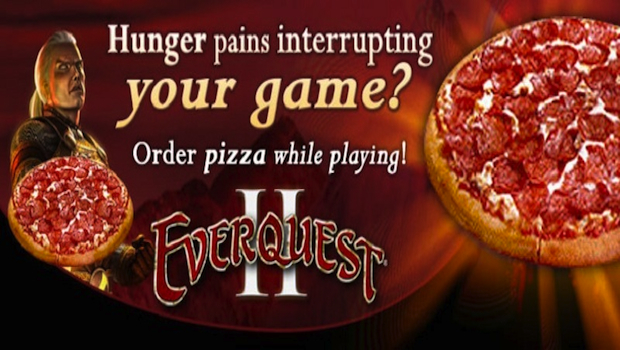
Since the dawn of time MMO players and pizza deliveries have had a symbiotic relationship: one cannot exist without the other. Realizing this, Pizza Hut teamed up with popular MMO Everquest II to allow players to order pizza in-game. If you’re hours into a raid and IRL starvation is preventing you from getting your hard-earned loot, simply type “/pizza” into the all chat to get a pizza at your door within minutes. While many people mock MMO players for their fast food addictions, you have to hand it to Pizza Hut for this stroke of marketing genius.

Finally, a pizza delivery service for me!

3. Burnout Paradise and Barack Obama

And with that, the race was won

Back in 2008, then president-elect Barack Obama was noted for using the internet to advertise his campaign. He took it a step further and bought advertising space in the racer Burnout Paradise. Burnout Paradise is famous for its massive open world that spans multiple American states. Billboards for Obama appeared in-game in Ohio, Florida, Iowa, Colorado, Indiana, Montana, North Carolina, New Mexico, Nevada, and Wisconsin, states that had voted Republican in the last election cycle. It’s unknown how well this campaign strategy worked, but look forward to seeing Trump’s face plastered all over the next GTA come 2020.

2. Sonic Adventure 2 and Soap Shoes

Sonic’s iconic buckle shoes vs. his TUBULAR Soap shoes

Sonic fans may have noticed that in Sonic Adventure 2 the titular blue hedgehog wears brand-new shoes. The new shoes are Soap shoes, which is actually a real brand of extreme sporting shoes. The shoes had a hard plastic indent on the bottom that allowed wearers to “grind” on rails, like so:

I will give you $50 if you can find a more early-2000’s picture than this one

As if Sonic wasn’t radical enough already, Sega teamed up with Soap to let the blue blur grind rails. I didn’t know anyone who wore Soap shoes back then, but I can only assume that attempts to grind rails with them led to countless injuries. Remember kids, just because Sonic can grind on rails and run through loops doesn’t mean you can.

Note: The final product placement truly needs to be seen to be believed. I truly believe, deep within the recesses of my heart, that no one will ever top how absolutely baffling this next product placement is.

1. Skittles and Darkened Skye
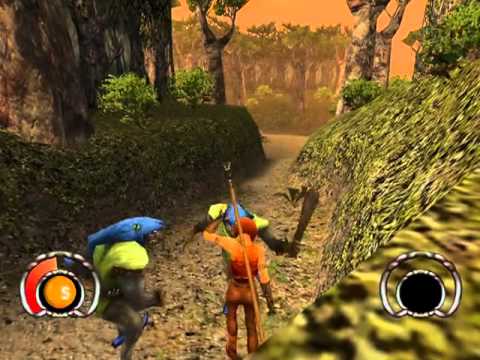
Look at the above screenshot, what do you see? At first glance, it may just look like another mid-2000’s fantasy game. But if you look in the bottom left corner, something looks extremely out of place. That something is a Skittle.

Back in 2002, publisher Simon & Shuster wanted to make video games based on Mars candy, like M&M’s and Skittles. After securing the rights to use the candies, S&S quickly got their developers at work creating the candy based games. The developers of Darkened Skye initially refused to make a Skittles-based game, but eventually agreed to make it on the condition that it would be a humorous fantasy game.

In Darkened Skye, the player uses different magic based on differently colored Skittles. It’s clear that the developers knew that making a high-fantasy Skittles game was incredibly stupid. as the characters in-game constantly use self-deprecating humor. The most hilarious part is that Skittles do not appear at all on the game’s box art, which instead appears as a normal fantasy game. I can only imagine the poor kid who bought the game expecting an epic fantasy adventure only to find themselves using the magical power of Skittles™ candy!

Do you think these ads actually worked? Any weird crossovers we missed? Let us know!

Top 8 gag gifts to give this Christmas

Laughter is the best gift. Here’s how to deliver.

gift ideas

We know what it’s like to be a terrible gift giver, and if you’re like us, Christmas is a stressful time of the year. The thought of giving someone you care about a present and the fear of them being disappointed can be too much to bear. The good news is that you can mask your crippling fear of rejection with humor! Check out the list below of gag gifts that your loved ones will enjoy.
Top 8 gag gifts to give for the holidays

1. Selfie Toaster

selfie toaster

Ideal gift for: the cousin who has a picture of herself as her phone background.

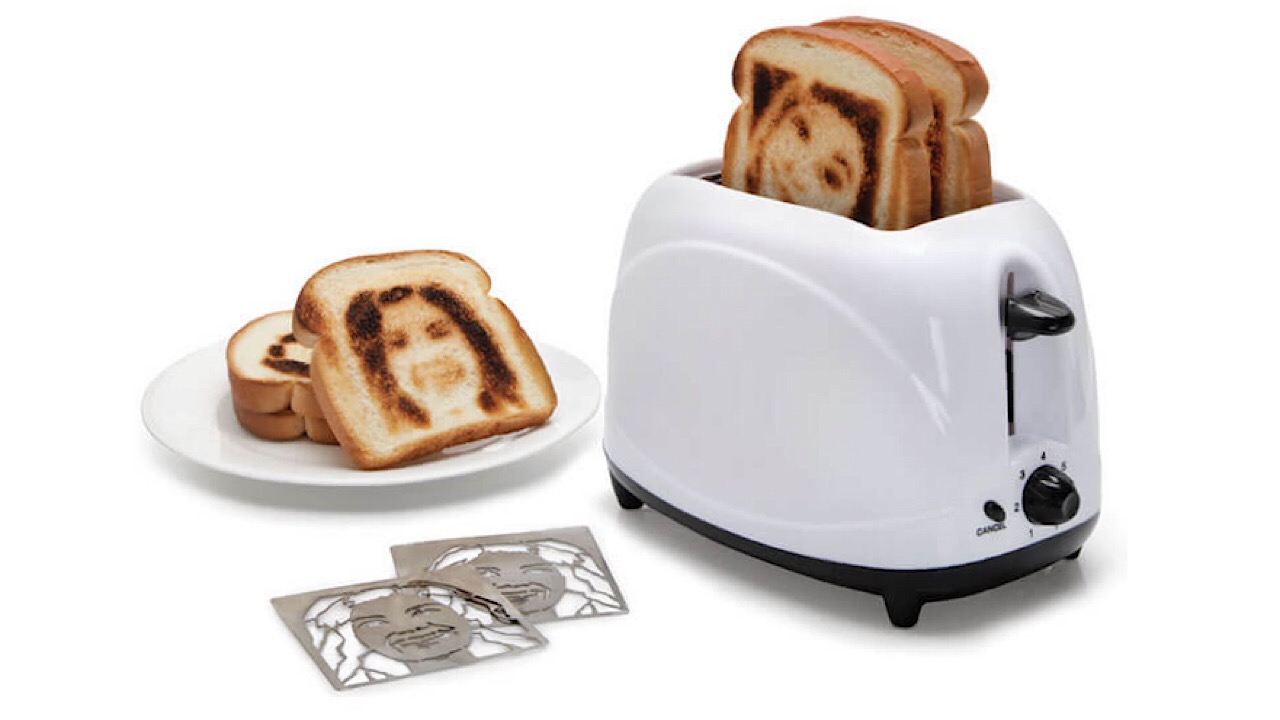
The selfie toaster is perfect for your most conceited loved one. When you order, you’ll be prompted to submit a photo for the toaster’s insert. Make sure that the photo has a bright background behind the subject, and bam – an edible face. Purchase one for $49.99, and pay a little more if you want more than one insert.

2. Crafting with Cat Hair Book

crafting with cat hair

Ideal gift for: the coworker who has no idea what a lint roller is.

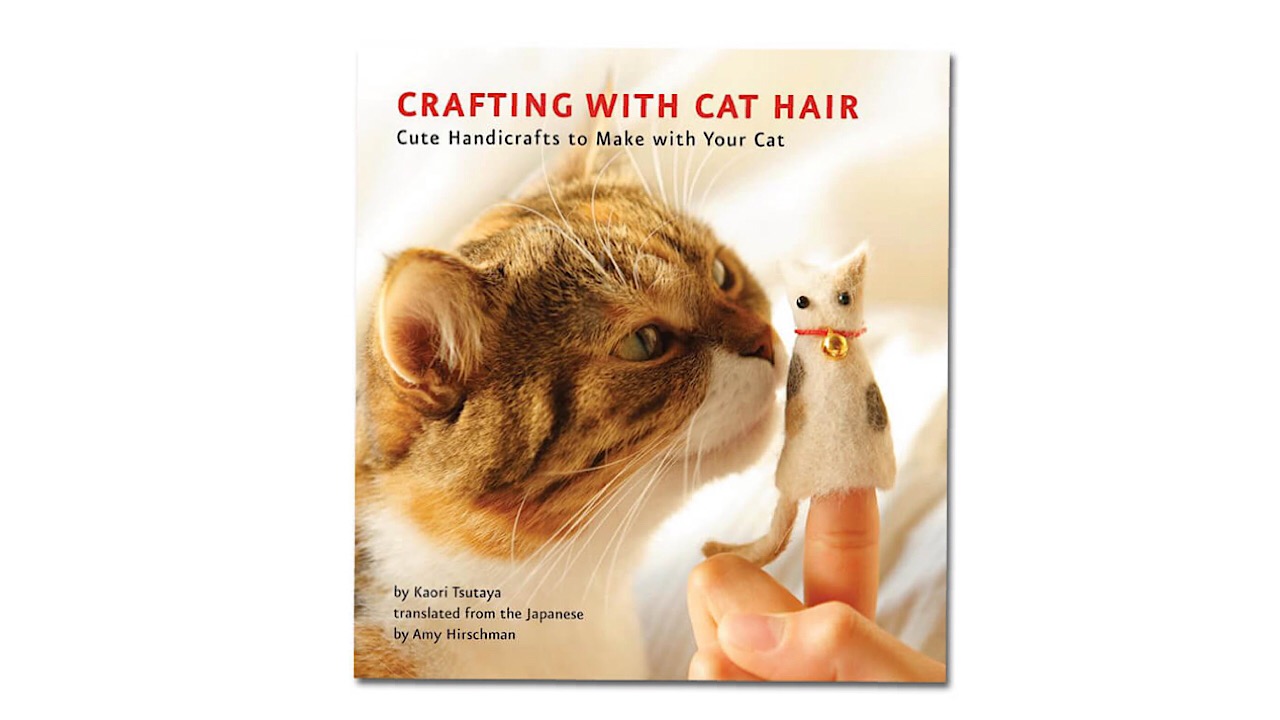
Coin purses for your change, and warm winter mittens – there’s nothing you can’t create with cat hair, apparently. For an affordable price, the receiver of this book will have enough craft inspiration to last them a lifetime, and they’ll be doing a favor for everyone that they come in contact with that is allergic to cats as well.

3. Star-Filled Envelope

star filled envelope

Ideal gift for: that friend who won’t shut up about Mercury being in retrograde.

It’s okay. Bad things happen and crappy decisions are made, but you can’t blame it on the planets. The inside of this envelope is black and speckled with little glowing stars, so hopefully ,your annoying friend is so busy trying to see her future that she won’t have time bore you to death with her daily horoscope. Where there’s one, there are many, so buy a pack of five and have her pass them out to her other friends.

4. Chewbacca Hoodie

chewbacca hoodie

Ideal gift for: the person who is always cold.

Winter is coming and if you’re in a part of the world that experiences it, get this gift for the person you know who is always wearing three pairs of socks and a hat inside. They’ll be warm and stylish and your heating bill won’t suffer. It’ll keep you warmer than the inside of a tauntaun. Buy yours from Amazon.

5. Unforgettable Senior Moments Book

senior moments book

Ideal gift for: anyone 30 years old or above.

Technically, we die a little every day. Tease anyone older than you with this book of the funniest moments of forgetfulness. Let’s hope they’ll remember to read it. Buy it on Amazon.

6. World’s Largest Cup of Coffee

largest cup of coffee

Ideal gift for: the person who spends half of their paycheck at Starbucks.

If the person who gets this gift actually tries to drink from this cup, you should probably worry. Hey, at least they’ll be able to tell concerned family and friends that they only had one cup of coffee today. Grab yours from Amazon today.

7. Customized Fortune Cookies

customized fortune cookies

Ideal gift for: anyone and everyone.

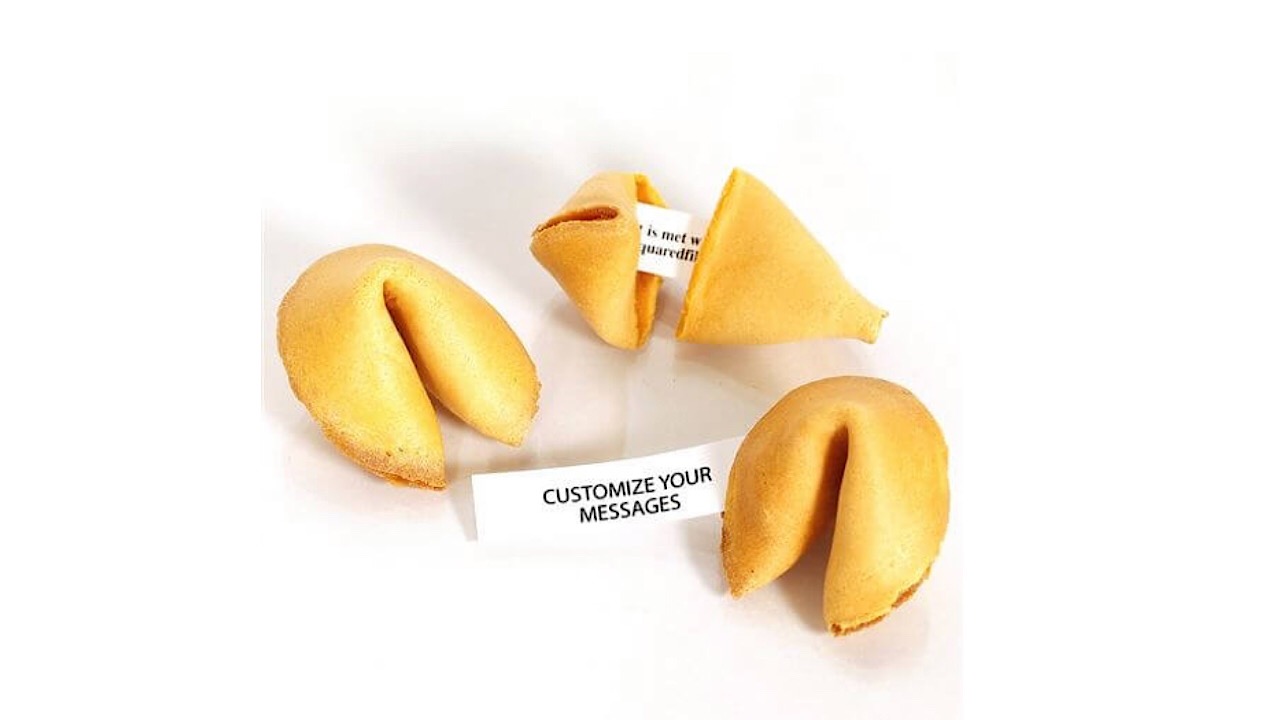
This gift is great because you can personalize it for anyone you can think of and have it say anything. Message for your Mom? How about “I don’t want to have children”? For your boss? “I don’t get paid enough to deal with you.”  Nothing is off-limits, so have at it. These cookies come in a variety of different flavors starting at 25 cents per cookie, so check out your options here.

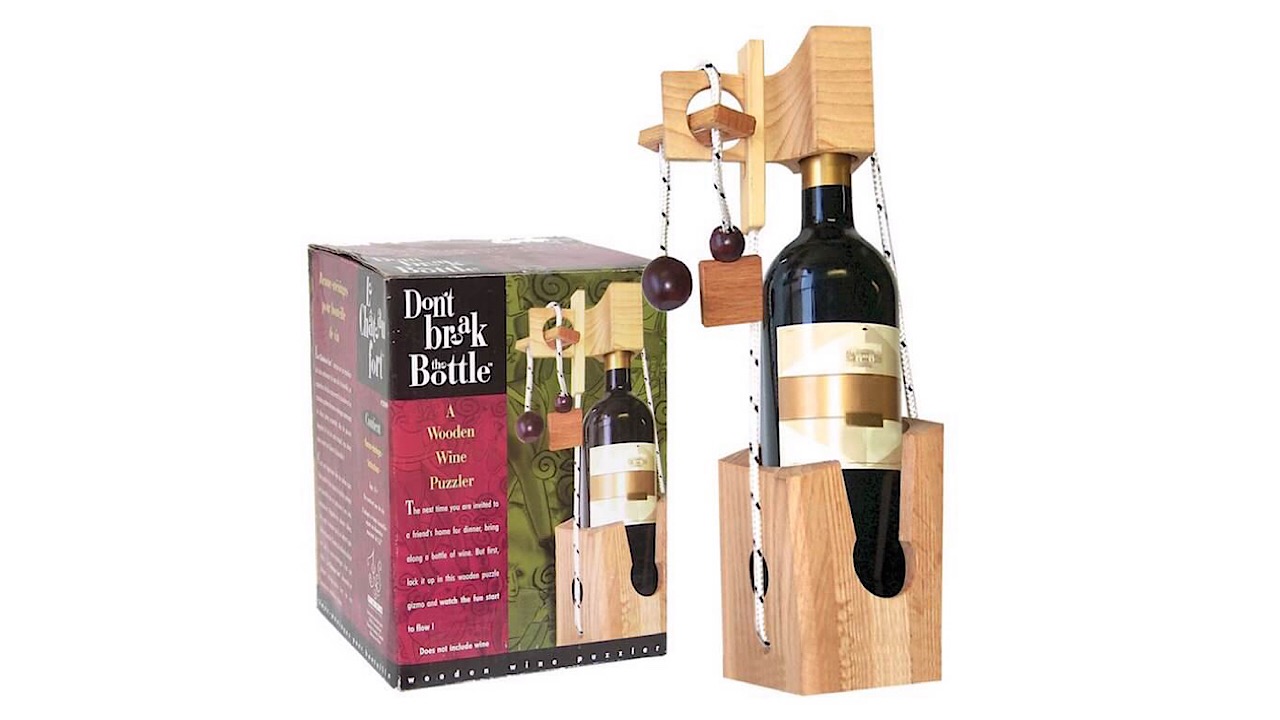
8. Wine Bottle Puzzle

wine bottle puzzle

Ideal gift for: the aunt that you only see at Christmas who drinks all the wine, then leaves.

If your moods tend to get a little elevated at your family gatherings when alcohol is involved,  gift this to the person most responsible. Greet them at the door with it, then hide the rest of the alcohol. Everyone else will thank you, and you’ll have about 50% fewer arguments happening around the dinner table. Pick from a variety of different puzzles from Amazon.

There’s something for everyone on this list, so give these gifts and have a hilarious holiday season.


Social media worse for mental health than we thought

Discover how Instagram erodes self-esteem and how to fight back.

social media depression

The link between social media and our collective mental health has been the focus of news coverage since Tom’s My Space was the biggest name in the game.

But, many of these worries have been more speculation than fact. Social media is still relatively young, so its full-blown effects remain something of an unknown.

But, as it turns out, social media can do a number on our brains.

A recent study from the University of Pennsylvania found that Instagram, as well as Facebook and Snapchat, might not be so good for our well-being.

In fact, the research revealed a causal link between the time we spend on social media and an increase in loneliness and depression.

Here’s a look at how, if we’re not careful, social media can affect our overall mental health.

The impact of social media on mental health

Why is Instagram the “worst” social platform?

is instagram the worst social channel?

What’s interesting about the ill effects of Instagram is, it’s supposed to be a positive force. It’s all bright colors, beautiful food, and many of the top posts boast messages of self-love or inspirational affirmations.

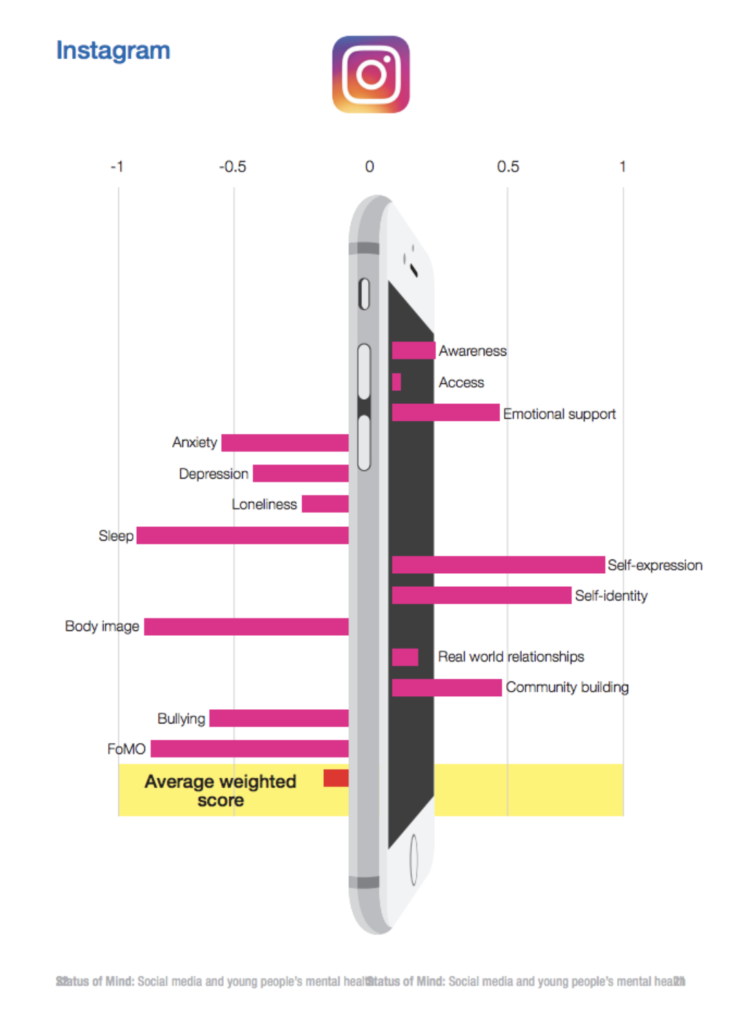
But that may well be the big issue with the platform. In 2017, the Royal Society for Public Health, a nonprofit focused on well-being found that of the top social platforms, Instagram had the most negative impact on 18-24-year-olds.

Participants in the UK survey stated that the photo-sharing app came equipped with a negative impact on sleep and a hefty dose of FOMO.

Instagram’s emphasis on positivity has resulted in a platform of users that use the tool to present the best version of themselves. Users edit pictures, selected from a lineup of rejects, and upload vacation highlights, #fitspiration, and their prettiest meals.

As such, those scrolling at home feel as though all of their friends are off living this glamorous life—without them.

Body image is just the beginning

body image

The combination of face-tuning, fit-spiration, and glamorous influencers has undoubtedly had an effect on body image–particularly for girls and young women.

This Dazed Digital article cited research from Carmen Papaluca, a researcher from the University of Notre Dame in Australia, who focused her Ph.D. on Instagram and its effects on 18-25-year-old women. Inspired by studies suggesting the platform’s risk factors, Papaluca wanted to dive deeper into how the visual platform and its effects on overall well-being.

She found that the girls were dealing with more than the common issue of wanting to look like someone else; it was more about wanting someone else’s life altogether.

The University of Pennsylvania study we referenced above uncovered similar results as Papaluca’s research. Their experiment split student participants into two groups–with one group limited to 10 minutes of social media activity per day, while the other group going about their social business as usual.

The students who limited social media use saw a reduction in symptoms of anxiety and depression. One participant said they felt much better about themselves during the three-week experiment, as they no longer were comparing their lives with others.

The FOMO factor is strong

The fear of missing out–FOMO–concept sounds a bit silly, but its effects are the real deal. With social media, we now have this portal into our friends’ lives, and often, we see them spending more time with other people than they do with us.

Two studies from the University of British Columbia looked closely at the effects of FOMO. One found that 48% of student participants believed that their friends had more close friends than they did themselves.

The second study found that those students who felt less social than their friends had a lower sense of wellbeing and belonging.

On a positive note, researchers mentioned that the negative feeling could motivate students to get out there and socialize.

Censoring yourself takes a toll, too

self-censorship online

In general, we think before we speak. And, with social media, we often overthink before we type. According to researchers from Carnegie Mellon University and Facebook, 71% of surveyed users self-censored at least one post or comment over a 17-day period.

While this may sound like a good thing—and perhaps more of us should do this before blasting out our opinions on social media—there’s also a downside.

We’re tailoring our comments to fit into what we assume our audience wants to hear. So beyond trying to use language that won’t offend (probably good) we’re also trying to conform to a set of standards that may be at odds with our sense of self.

Final thoughts

As we spend more time on social media, we’re beginning to understand more about its impact on our mental health and wellbeing.

The RSPH report found a lot of positives associated with social media—from emotional support to community building, so it’s not like it’s all doom and gloom. And, according to their report, YouTube’s only real negative effect was that participants stayed up too late watching videos.

However, between bullying and body image issues, as well as anxiety, depression, and loneliness, we may need to start arming future generations with a better toolkit for mitigating the ill effects linked to Instagram, Facebook, and the rest.

For those of us already entrenched in FOMO hell or sad scrolling, it may well be time to rethink how we approach our use of the platforms. Follow real friends only and skip the influencers, save for a few pet accounts. And, perhaps consider imposing your own 10-minute limit on use.

Top 7 online tools to improve your writing

Use these tools to master grammar, punctuation, and more!

writing

Whether you’re a professional writer or simply writing for fun, writing assistant tools are useful for virtually everyone. From mobile apps to browser extensions, there are hundreds of tools out there, each with its own unique uses. Here are some of the best ones for making your writing more professional.

Top 7 tools to make your writing better

7. Whitesmoke

Whitesmoke

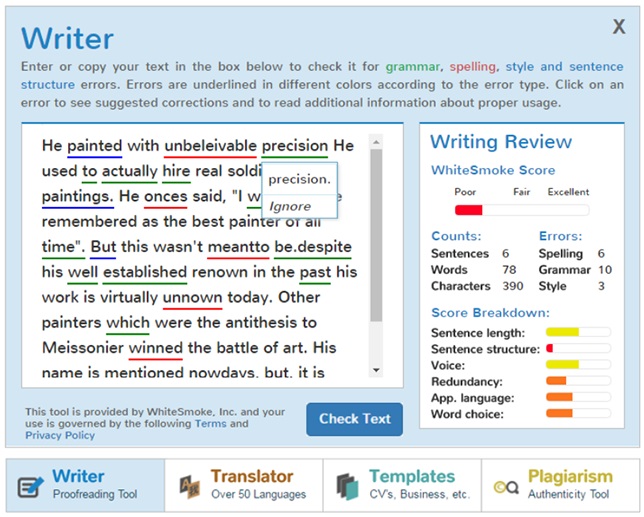
Whitesmoke works as an extension to your word processor, and essentially an upgrade to the basic grammar check that is pre-built into the processor. While most grammar checks simply tell you what’s wrong, Whitesmoke is a sophisticated program that will help you rewrite your work to create sentences with more substance. Their website also contains educational videos on various grammar subjects to improve your overall writing skills.

WhiteSmoke Writer Executive Download Now
7

6. Evernote

Have you ever struggled through a mountain of windows and browser tabs, looking for a little note you wrote down? This extension lets you have your notes right next to your work as you’re writing. This means you can keep track of multiple things without needing to sift through a variety of tabs and windows to look at all of them.

EverNote Free Download
8

5. EasyBib

Easybib

While this app is perfect for students, it can be used by anyone who finds themselves struggling with citations. This is a great app for avoiding plagiarism, as it helps you create in-depth bibliographies for your work. While you may not always need citations in your writing, it is important to make sure you’re not stealing someone else’s work.

EasyBib Bibliography Creator Free Download
7


4. Just Not Sorry

Just not sorry

A Gmail extension specifically created for professionals. If you find yourself using words like “just,” “very,” and “sorry” too frequently, then this extension is a great way to change the tone of your emails, so you don’t sound unprofessional. It finds synonyms for these common fluff words, so you aren’t overusing them.

Just Not Sorry -- the Gmail Plug-in Free Download
7

3. Grammarly

Similar to Whitesmoke, Grammarly is a browser extension and mobile app that will help check your grammar and spelling in your everyday life. It is a natural upgrade from autocorrect that anyone can use, as it will also check the grammar of your sentences, instead of just the spelling. We use it here at Softonic, and it’s saved us from some embarrassing situations.

Grammarly Lite Free Download
8

2. LibreOffice

LibreOffics is a free alternative to Microsoft Word that comes in both desktop and mobile forms. This can really save you a lot of money if you don’t want to pay for Word. It contains virtually all the same functionality (besides being able to run Word documents themselves), without the pesky fee.

LibreOffice Free Download
7

1. Diaro

Diaro

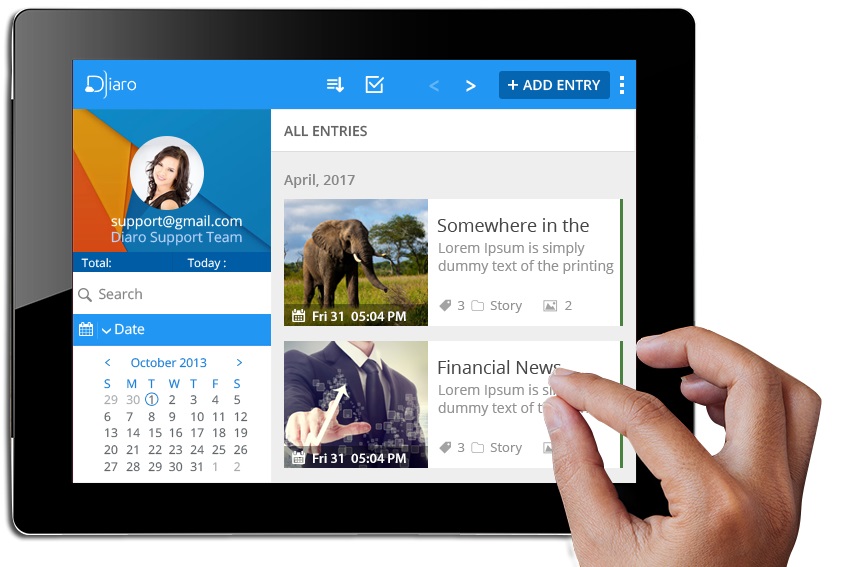
This journal app works similar to a mobile version of Evernote, as it is a perfect way to keep track of any information you have, pulling it up on short notice. It allows for an easier organization format than the pre-built notes app. As the name implies, you can also use this app as a virtual diary, making it easy to document important parts of your day and life.

Diaro - diary, journal, notes Free Download
7

While many of these are their own application, a good portion of them work as extensions to everyday programs like Microsoft Word, and Google Chrome. These aren’t the only great extensions out there, so be sure to check out our list on the best Chrome extensions to improve all aspects of your browsing experience.

How to find all rare guns in Red Dead 2

Don’t bring a knife to a gunfight. Here’s how to build your Red Dead arsenal.

No Wild West gunslinger is complete without a gun. In the world of Red Dead 2, your firearm is an extension of you. Base firearms in the game are able to be intricately customized so each of your guns has a personal flair. However, some of the most unique guns in Red Dead can be found hidden in the game world. Here’s how to track down and add these unique guns to your arsenal.

How to find all rare guns in Red Dead 2

Granger’s Revolver

red dead redemption 2 granger's revolver
Granger’s Revolver

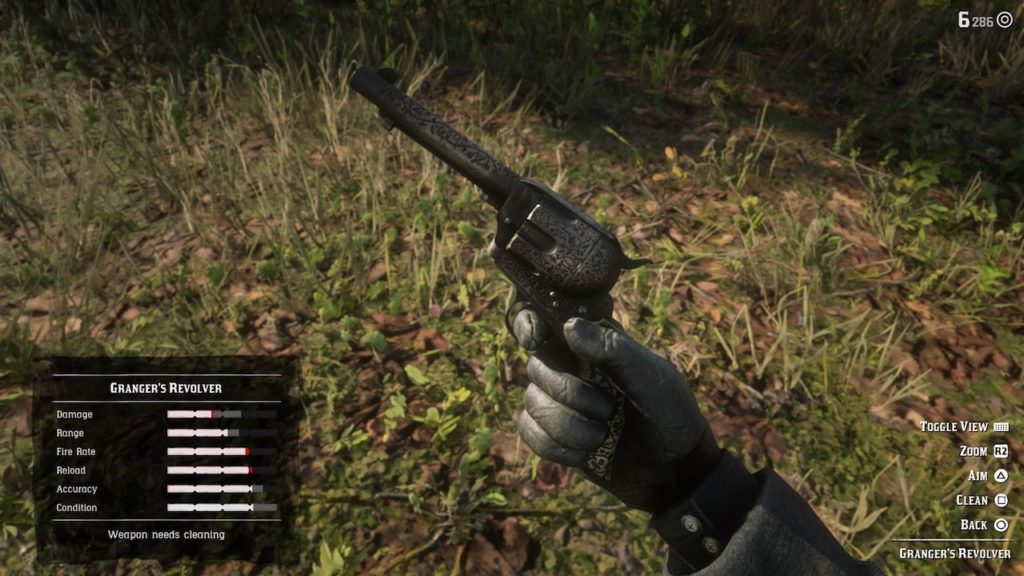
Granger’s Revolver is a unique variant of the Cattleman Revolver. It sports a dark metal finish, bone grips, and an intricate deep red floral engraving. It can be looted off the corpse of Emmet Granger during the quest “The Noblest of Men, and a Woman.” Check out our guide for how to complete the quest. It excels with a fast rate of fire and quick reload speed.

Flaco’s Revolver

red dead redemption 2 flaco's revolver
Flaco’s Revolver

Flaco’s Revolver is another variant on the standard Cattleman Revolver. This one sports a sugar skull engraving and silver finish, as well as a set of carved ivory grips. It sports similar stats to Granger’s Revolver, excelling in rate of fire and reload but falling short with damage. This unique firearm is also obtainable during the quest “The Noblest of Men, and a Woman.”

Midnight’s Pistol

red dead redemption 2 midnight's pistol
Midnight’s Pistol

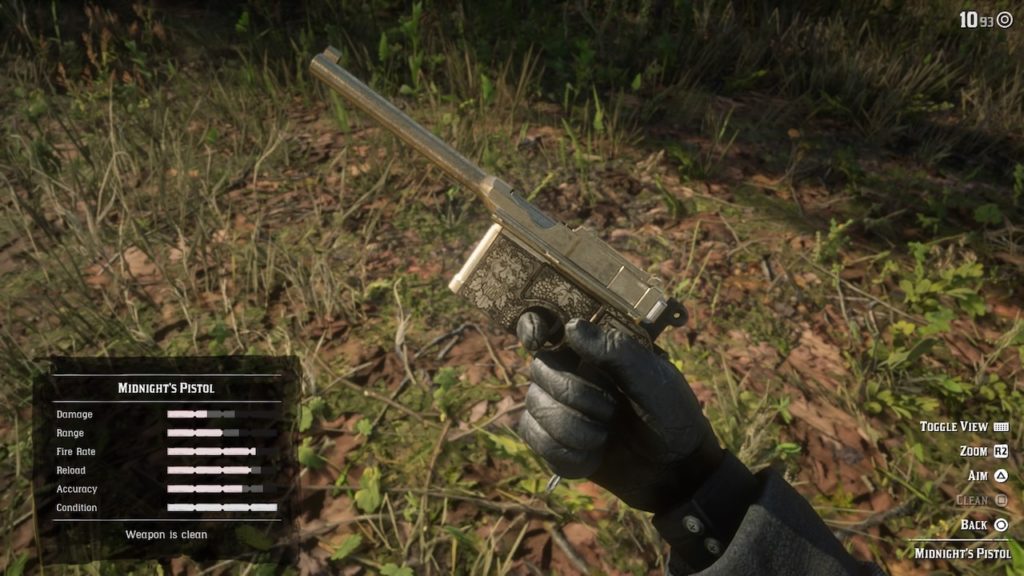
Midnight’s Pistol is a variant on the Mauser Pistol. The gun has been customized with a gold frame, black grips, and a black inlay design. Formerly belonging to gunslinger Billy Midnight, it can be obtained during the quest “The Noblest of Men, and a Woman.” Notably, this gun can be obtained as early as Chapter 2, with the standard Mauser staying locked until late in the game.

Calloway’s Revolver

red dead redemption 2 bully pistol
Calloway’s Revolver

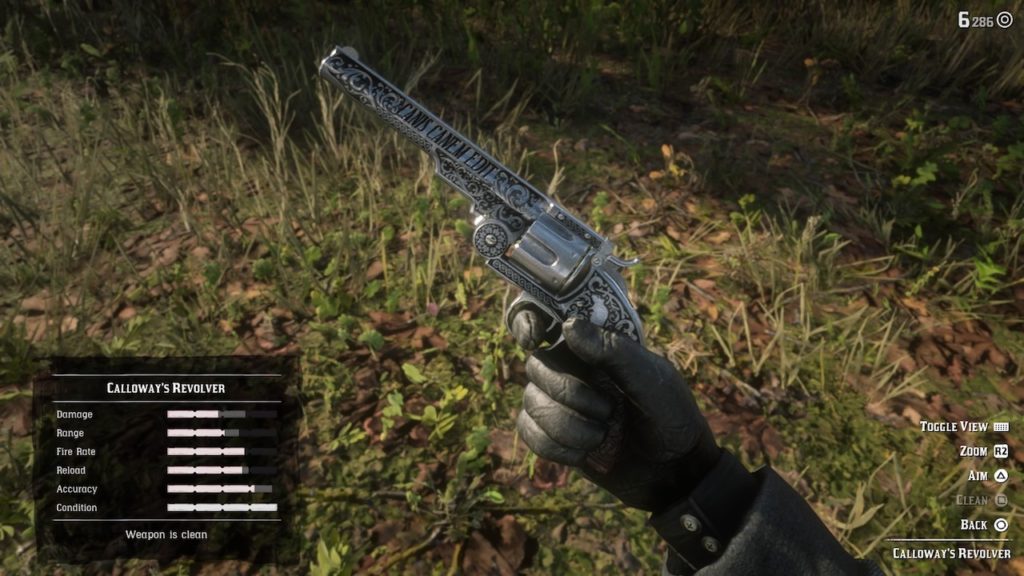
Calloway’s Revolver can be obtained during the final part of “The Noblest of Men, and a Woman” during Chapter 4. As with the others, simply pick up the gun where it falls after completing the quest. Calloway’s Revolver is a variant on the Schofeld Revolver, sporting a silver finish, ornate engravings, a light wood grip, and “Canis Canem Edit” engraved on the barrel.

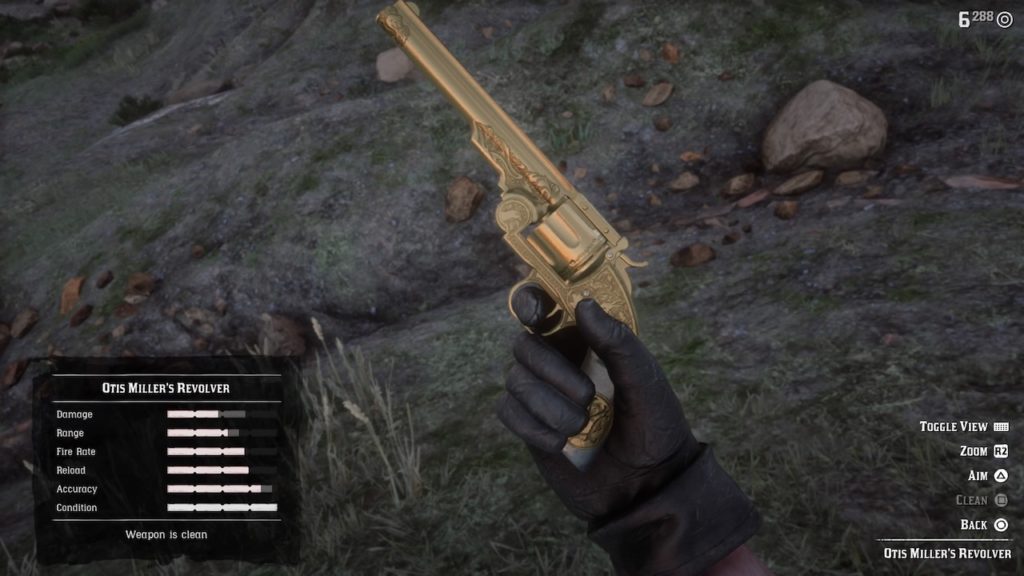
Otis Miller’s Revolver

red dead redemption 2 otis miller revolver
Otis Miller’s Revolver
Otis Miller’s Revolver location

Otis Miller’s Revolver is the subject of a treasure hunt. You’ll likely have to wait until the main story is complete to obtain it, after the rest of the map opens up. Though you can find the gun by collecting the scraps of the treasure map, you can also head to the location on the map above, north of Armadillo in Cholla Springs. Otis Miller’s Revolver is an upgraded Schofeld with pearl grips and a solid gold finish. It boasts a higher accuracy and improved reload time compared to the base version of the gun.

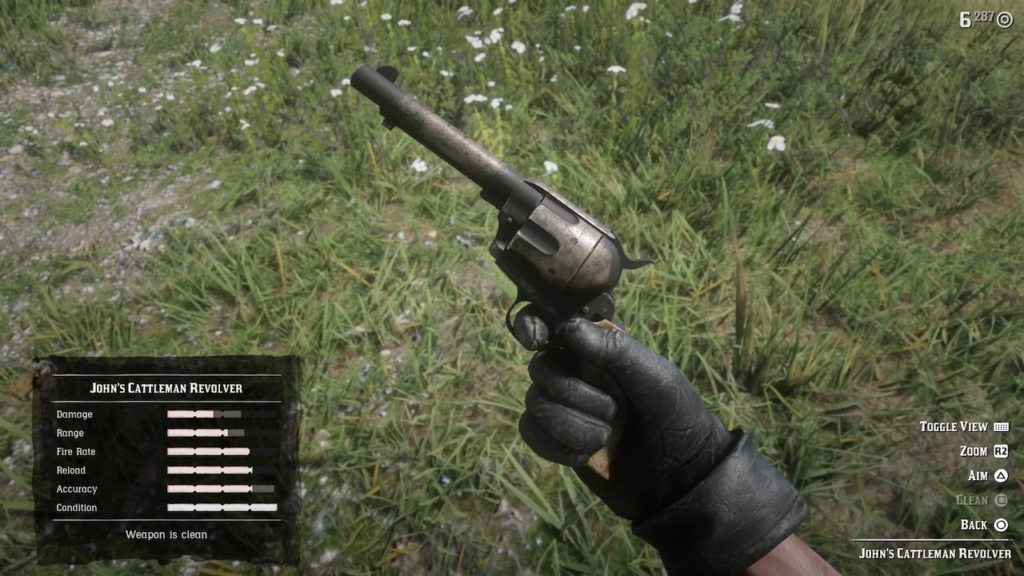
John’s Cattleman Revolver

Red Dead Redemption 2 john's revolver
John’s Cattleman Revolver

This Cattleman Revolver is John Marston’s trusty companion. It features a worn and weathered metal finish and light tan grips. To obtain this gun, simply beat the game, and you’ll find this weapon in your inventory as soon as you can access your guns in the Epilogue.

Micah’s Revolver

micah's revolver map
Micah’s Revolver location

Micah’s Revolver is obtainable after the mission “American Venom.” To get the guns, head back up the mountain to the shacks where the mission ends, and you’ll find this gun on a body between two of the shacks. It’s a unique Double Action Revolver with a black finish, an engraving on the barrel, and a bright red inlay on the grips.

Algernon’s Revolver

red dead redemption 2 algernon's revolver
Algernon’s Revolver

Algernon’s Revolver is another variant on the Double Action Revolver. It’s got a short barrel, gold Art Deco design, and pearl grips with a silver finish. This weapon is obtainable as a reward upon finishing the side quest “Duchesses and Other Animals.” It’s a five-part quest that can be a bit of a pain to complete, so check out our guide to finish the quest quickly and easily.

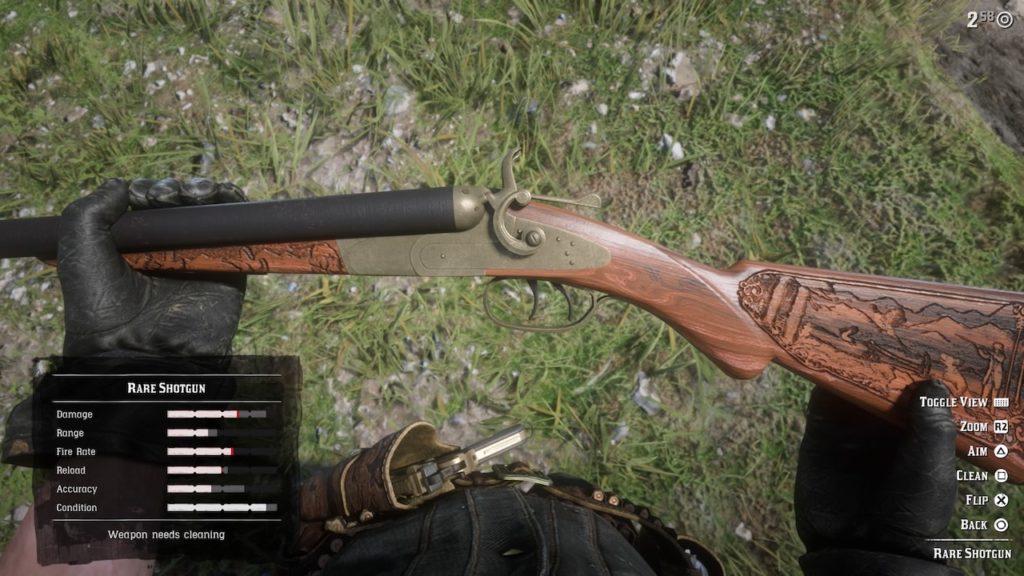
Rare Shotgun

red dead redemption 2 rare shotgun
Rare Shotgun
red dead 2 rare shotgun location
Rare Shotgun location

To find this shotgun, head north of Annesburg to the small settlement at Manito Glade. Approach the cabin here, and a hermit will step out and open fire. Take him down, then loot the shotgun of his corpse. It’s a truly beautiful gun with a brass action and light wood stock with nature scene engravings.

Rare Rolling Block Rifle

red dead redemption 2 rare rolling block
Rare Rolling Block Rifle

This unique sniper rifle can be found in Chapter 3, during the story mission “Magicians For Sport.” Late in the mission, you’ll pursue a gang of bounty hunters into the fields around Braithewaite Manor. You’ll come under sniper fire from a nearby barn, and be prompted to head inside to take out the sniper. Once you do, you can snag this rifle off of his corpse. It’s been upgraded with a light wood stock and Celtic style carvings.

Alright, cowboy. Go get those guns!

WhatsApp voice notes get a great new feature

WhatsApp ‘Consecutive voice messages’ feature will allow users to play voice notes back to back

WhatsApp voice notes have grown in prominence over the last few years. Voice notes started as quite a niche feature, but they’ve now been widely adopted by many users. Whether we’re sending small voice notes when we can’t be bothered to type or we’re sending epic 15-minute-long podcasts, we all use voice notes in different ways. It is the hands-free nature of voice notes that makes them so popular. For both sender and recipient, voice notes are easy to use because there is no fiddling about required. You simply hit record or play and away you go.

WhatsApp Messenger Download WhatsApp ►
8

That is, of course, unless you have just received a stream of multiple voice notes. If that is the case, you have to hit play to start each of them individually. This slight annoyance is in WhatsApp’s sights and there seems to be an update on the way that will do away with the need to hit play every time one voice note ends and you want to start the next one.

WhatsApp ‘Consecutive voice messages’ feature will allow users to play voice notes back to back

Thanks to another leak by the writers over at WABetaInfo, we can bring you details of this new feature for WhatsApp voice notes. Code for the new Consecutive voice messages feature has been spotted in the latest beta version of WhatsApp for Android.

The feature still has a way to go, however, before public testing will begin but the code for the new feature and various screenshots showing the feature in action have been published. When it finally does roll out, the feature will allow multiple voice notes to play continuously without the receiver having to hit play. It will work automatically whenever two or more voice notes are detected by WhatsApp.

Image via: WABetaInfo

Whenever you receive multiple voice notes, you will only have to hit play on the first voice note. After that, all other messages will begin playing automatically after the one before it has finished playing.

Interestingly, we might be about to start hearing brand new WhatsApp tones. The WhatsApp Web notification has become one of the most recognizable notification tones out there and the new consecutive voice note tones may be set to join it. There will be two new WhatsApp tones introduced with this feature. The first will let you know that the voice note you’re listening to is finished but that you have another one to follow it. The second tone will let you know that the final voice note has finished and there are no more to come.

This feature is yet to arrive on the WhatsApp beta, but it doesn’t look like WhatsApp beta users will have to wait long before they get to give it a try. The rest of us, however, will have to wait much longer for this feature to receive a wider roll-out. Make sure you stick with us to stay up to date with all the latest news relating to WhatsApp and your other favorite apps.

How to call Santa using Google Assistant

You can now call Santa Claus using Google Assistant

google assistant can talk to santa

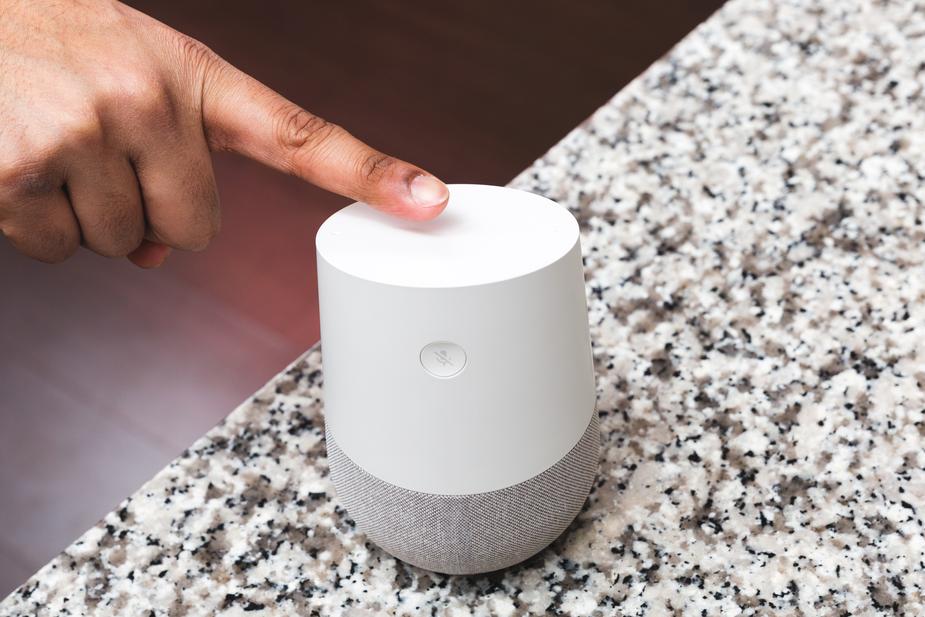
Every year, Google helps kids around the world track Santa as he brings them their presents on Christmas Eve. This year will be no different and Google’s Santa tracker should come online again on December 24. This year, however, Google is going one better and if you’ve got a Google Assistant powered device, like the Google Home, you and your kids are in for a treat.

Google Assistant Download now ►
8

You can now call Santa Claus using Google Assistant

We know this one isn’t just for the kids. We all go through that brief period between the ages of around 11 to 21 when we stop believing in Santa. The jolly guy then comes back into our lives as we grow a little older and become a little more mature. We all realize Santa is real and then spend our adult lives regretting those few teenage years we spent doubting the big guy. Well now, thanks to the Google Assistant, we can call him up and speak to him ourselves and so can our kids. All we have to do is call out, “Hey Google, call Santa,” to open up a direct line to the North Pole.

Of course, in the run up to Christmas, Santa will be very busy so there is no telling what he’ll be up to when you call him. If you’re planning on telling Santa what you want for Christmas this year, you might not get the chance. This means it’ll probably be a good idea to still send him that letter, like you do every year. That way you can just enjoy your call to Santa rather than worrying about letting him know everything you hope to find under the tree on Christmas morning.

This new skill for Google Assistant is part of seven new holiday-themed features from Google. These new skills include creating gift lists, adding a little extra magic to Christmas story time, and even responding positively when you ask for things nicely, saying ‘please’ or ‘thank you.’ As well as bringing a little magic when you read a story to your children, Google Assistant is now able to read stories aloud if you don’t have any books with you. Assistant can now read over 50 stories. You can ask for specific stories or you can ask for stories based on a theme by saying something like, “Hey Google, tell me a story about Christmas.”

You’ll be able to use any of these new Christmas-themed skills and, most importantly, call Santa from any Google Assistant enabled device. These include the Google Home and Google Home mini, but also many Android smartphones now come packed with Google Assistant baked in. If you have a Google Assistant-enabled device that has a screen, then you’ll also be able to view fun holiday-themed visuals to go with all of the audio related to the new skills.

How to use Fortnite’s new Gifting feature

Here’s how to give the gift of Fortnite fun.

With the holidays fast approaching, it’s time to starting gathering up some gifts for the gamers in your life. That could be about to get a lot easier if you’re a Fortnite player. Fortnite has just added a new gifting feature that will allow players to purchase and send items directly to each other. It sounds straightforward, but there are a few important things to know before using the new feature.

How to use Fortnite’s new Gifting feature

Previously, if you wanted to gift Fortnite players items from the in-game shop, you’d have to undergo a fairly roundabout process. First, you’d need to purchase an Xbox Live or PSN gift card, which players can then redeem to by V-Bucks (Fortnite’s in-game currency), which then can be used to buy everything from sprays to skins to new emotes. Unfortunately, if you don’t have a copy of Fortnite, you’ll still have to do this if you want to give gifts to the Fortnite players in your life. However, if you also own a copy of the game, gifting items is about to get much more streamlined.

Fortnite: Battle Royale Download Fortnite: Battle Royale ►
10

Firstly, open up your game and head to the Item Shop. When you find an item in the shop and select it, the pop-up window will now offer the option to either purchase the item for yourself or send it to another player as a gift. You’ll even have the option to send a personalized message alongside your gift. However, you might open the game and get to this window only to find yourself unable to send the gift. Don’t fret: Epic Games has included a few restrictions alongside the feature to prevent scams and other abuse.

fortnite birthday gift
Image courtesy Epic Games

To use the gifting feature, your account has to meet the following criteria:

  • Enable two-factor authentication. If you haven’t already, you can head to this page on the official Epic Games site to do so. You’ll even get a free emote for your troubles!
  • You can only send 3 gifts in a single 24 hour period.
  • You can only gift items currently available in the Item Shop
  • You can only send gift items to an account that you have been friends with for 48 hours

As noted in the final item on this list, you can only gift items that are currently rotating through the Item Shop. As the items for sale rotate every day or so, if you see the perfect gift for someone on your list, snag it before it disappears. Finally, it’s also important to note that any gifts are non-refundable, so make sure you’re totally certain you’ve got the right one before sending it out!

Instagram gives you greater control over who sees your Stories

Instagram rolls out ‘close friends’ so that you can share your Stories with smaller groups

beach selfie

Instagram, like all social networks, is a digital place for getting together with friends. Like all social networks, however, Instagram is a place where we’ve all built up networks of people that aren’t our actual friends. We can find ourselves sharing our posts with people we barely know. For people who value their privacy, this is a real problem and for months Instagram has been working on a solution to this problem, a solution called ‘favorites.’ Now, after over 18 months of testing, the hip social network is ready to roll out the feature to everybody.

Instagram Download Instagram
7

Instagram rolls out ‘close friends’ so that you can share your Stories with smaller groups

The new feature will only be limited to Instagram Stories. This means that anything you post to your profile will still be shared with everybody. Instagram hopes that the new limited groups of close friends will encourage users to share more.

Instagram update close friends for Stories
Image via: Instagram

When you post your Stories, you’ll be given an option to create a list of close friends that represent your inner circle. Instagram will suggest friends based on your prior interactions but ultimately, it’ll be up to you who you add to your list. According to Instagram, during the testing phase, people usually added around two dozen people to their list.

How to use Instagram close friends

When you’ve created an Instagram Story you want to share, you’ll notice a green circle with a white star on it. Clicking it will bring you to the “close friends” list where you can decide who will and won’t make the cut. As well as the friends Instagram suggests, you’ll also be able to search for friends using a search box. When you’ve completed your list of close friends, you’ll then be able to share your Stories exclusively with them by clicking the green circle before you hit share.

From the other end, whenever your friends receive a Story that has only been shared with close friends, they’ll see a green ring around the Story as it sits in the tray at the top of their feed. This means whenever you see a Story with a green ring instead of the typical pink ring, you will know that it is something personal that has come from a close friend. Other than the green ring, your close friends will receive no notifications telling them whether they’ve been added to or removed from your close friends list. This is because Instagram wanted to make sure there was no social stigma attached to the process of adding or removing friends from your list. (Shout out to memories of the MySpace Top 8.)

This is a positive move from Instagram that should encourage people to share more via Instagram Stories. As our Followers lists grow and we add more and more transient acquaintances to our social networks we become less and less likely to be as open. Adding close friends takes social networks back towards one of their main original purposes. Putting us in closer contact with the people we care about the most.


You’re not going crazy, the Microsoft Office icons really have changed

The new Microsoft Office icons are part of new design philosophy

update microsoft office new icons

Some things never change. They stand forever as bastions of the status quo. Unchanging, undying, and forever representing beacons of reliability. Everything will be alright as long as these epic pillars of stability remain as they have always been, reminding us that the world we live in is built on solid foundations.

In the tech world, Microsoft has been one such pillar and, at its heart, Microsoft Office has for so long provided us with the type of mundane security you can only take from something that is slow and steady while also being completely and totally reliable. Microsoft Office doesn’t bother being sexy, it just gets the job done. You might have noticed, however, that things are changing over at Microsoft Office headquarters. Things are starting to look different and the Microsoft Office icons, have started to look, well, cool.

6

The new Microsoft Office icons are part of new design philosophy

Microsoft does change the Office icons, but the changes are often slow and slight. The last time Microsoft changed the Office icons was over five years ago and the icons pretty much stayed the same, they just looked a little more modern. This time, however, there has been quite a leap from the old to the new and there is good reason for the significant change.

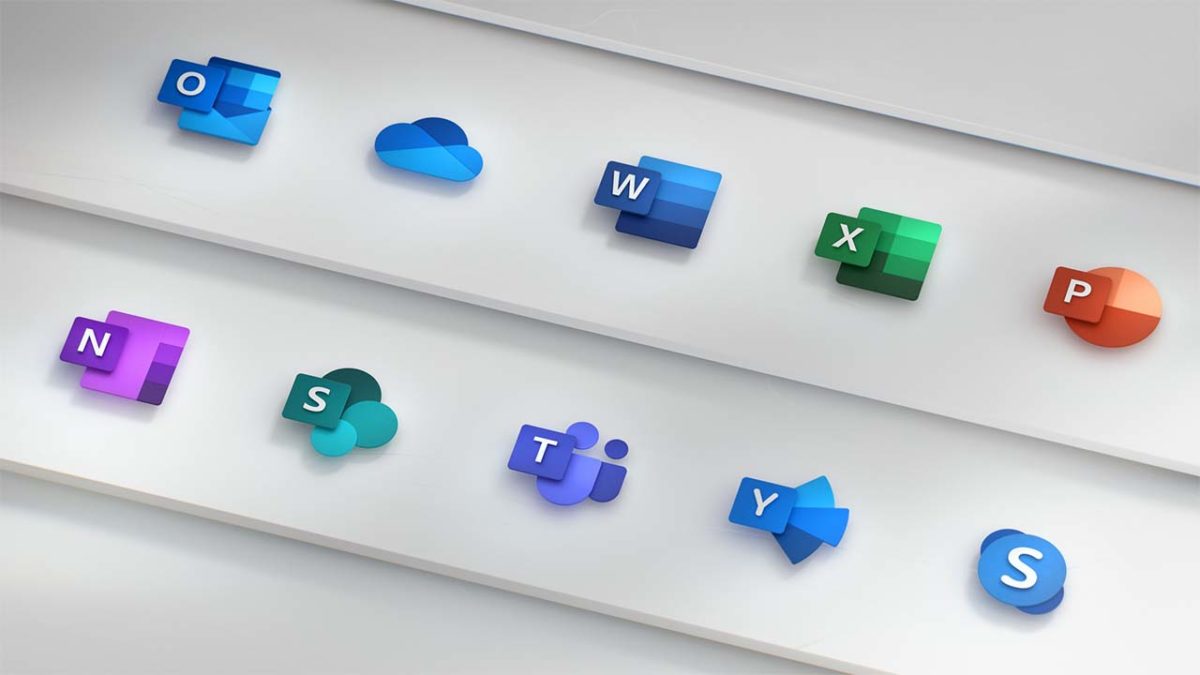
As well as modernizing the look, the new icons are supposed to be much simpler too. This is because Microsoft Office apps now reach out across multiple platforms and Microsoft wants them to be adaptive across each of them. You can use Microsoft Office apps on Windows, Mac, Android, and iOS devices; Microsoft wants the icons to reflect this big change for its core productivity suite. On top of this, the new icons are supposed to represent other key changes to the Office apps including the new AI features and collaborative aspects that have been baked into Microsoft Office.

The icons redesign marks a small part of a complete design overhaul as Microsoft brings the Fluent Design from Windows 10 to the Microsoft Office apps. This change will only bring about small and subtle changes but will modernize the look of apps like Word and Excel while giving Microsoft apps a more consistent look. We’ve also seen Google recently moving to align design aspects across all of its major apps, too.

The big changes in the new Microsoft Office icons show the letter for each app playing a much less significant role. The W in the Microsoft Word app is now much smaller, with the app’s blue color now playing more of a role in making the icon recognizable. Jon Friedman, who is a partner director of design at Microsoft, explained the change in a blog post published on Medium, “Our design solution was to de-couple the letter and the symbol from the icons, essentially creating two panels (one for the letter and one for the symbol) that we can pair or separate… This allows us to maintain familiarity while still emphasizing simplicity when inside the app.”

new microsoft office updated icons
Image via: medium.com

The good thing about all this is that we don’t need to worry. Society is not about to start crumbling around us as we’ve lost the solid foundation of something we could always rely on. Despite the significant change to the Microsoft Office icons, they are still instantly recognizable. If you’re a Microsoft Office 365 subscriber, you may give a quick double take next time your apps update, but you’ll definitely know which app is which.