You might have downloaded an app infected with adware. Here’s how to fix it!
More than 80 Android apps infected about 8 million Android users’ phones.
The apps in question were fakes impersonating photo editing tools and games.
All of the apps in question were removed from the Play Store, so you don’t need to worry about downloading them going forward.
What do adware apps do?
As the name suggests, adware apps deal with advertising. While you surf the internet on your phone, adware clicks on ads in the background, which generates money for advertisers. This might not sound bad, but you can be bombarded with ads as a result, and your phone will also waste battery and data in the process.
The best thing you can do is to download a trusted antivirus program like Avast. If you run Avast, you can delete all traces of the adware. Just make sure you restart your phone after you run it.
However, from now on when you download apps on from the Play Store, make sure that you know the app comes from a trusted publisher. If an app has thousands of downloads and positive reviews, you can probably assume that you’ll be safe. According to the TechCrunch article, pretty much all of the apps in question had awful reviews on the Play Store. However, weekly virus scans are a great way to make sure you are safe from adware and other viruses.
There are hostile aliens behind every corner, and puzzles set to challenge your psyche in these amazing games!
The science fiction genre has been around for hundreds of years, and for good reason. Sci-fi lets us take a peek at what might be, showing us visions of hundreds of possible futures… some hopeful, and some bleak. Sci-fi lets us explore far off worlds, encounter colorful new creatures and species, and at the same time lets us take a look back at ourselves through a unique lens. Sci-fi games are no exception and have left an indelible mark on gamers everywhere. Here’s our roundup of the top 10 most definitive sci-fi video games.
10 best sci-fi games of all time
For this list, we had to draw a hard line between fantasy games and science fiction games. Although you might not consider it to be one, the Mega Man games are technically sci-fi games. Sci-games are games where the setting is only made possible by advancements in science, technology, or major social and environmental changes.
10. Portal
Image courtesy Valve
Though sci-fi is known for letting players experience unique perspectives, Portal took that rather literally. This puzzle game has players taking control of a test subject, Chell, in a mysterious scientific facility. She’s tasked with using futuristic portal-gun technology to navigate a variety of increasingly difficult testing chambers.
Portal is a totally unique puzzle game that will have players looking at the world in entirely different ways and provides some truly mind-blowing and sometimes head-scratching scenarios.
It’s also loaded with Valve game developer’s trademark dry sense of humor and more than a few colorful characters, all of which combines to make this sci-fi puzzle game truly stand out from the crowd.
To call Starcraft a worldwide phenomenon might be an understatement. It is the definitive RTS game. Since arriving on the scene several decades ago, Starcraft has endured with a loyal following of competitive and casual players across the globe.
The real-time strategy game allows players to take control of one of several factions and duke it out for battlefield supremacy. Starcraft has since become a staple of professional gaming leagues and inspires an almost disturbing level of fanaticism among fans.
Some sessions will last for hours or even days at a time, and some players have even died while playing. The game is so wildly popular that even UC Berkeley offered a class on it. It’s incredibly addictive and incredibly fun, and players that give the game a shot will soon find that out for themselves.
Prey is a spiritual successor to the iconic sci-fi classic System Shock and has been given a modern makeover. Players take control of a scientist aboard the orbiting Talos space station after things have gone out of control. Unfortunately, the space station has suffered an alien invasion. A sinister alien species has slaughtered most of the station’s inhabitants, and it’s up to the player to stop the threat.
Like its cousin, Bioshock, Prey sports a stunning retro-futuristic aesthetic, and players will use a combination of both conventional weapons and supernatural powers to combat the alien threat. You can call it a sci-fi game or you can call it a horror game. We call it “fun.”
In the future, corporations hold almost unchecked power, and humans are able to be augmented to near godlike status with various cybernetic components. Of course, this makes for some ridiculously fun and creative combat scenarios, but the RPG elements are what sets Deus Ex apart from the pack. The player will have to make some choices that have serious repercussions. Throw in tense, twisting plots worthy of any best-selling thriller novel, and it soon becomes apparent why Deus Ex has endured for more than 20 years.
Another entry from Valve, Half-Life became an instant classic almost immediately upon release. Playing as scientist Gordon Freeman, players take on a hostile alien threat at a secret government research facility.
The second game, however, is where the series really shines. Freeman is transported into the future, where an alien government known as the Combine has taken over Earth. The Earth is barren and looks like the end result of a nuclear war.
Freeman is forced to fight through a variety of dystopian settings to liberate humanity. Half-Life effortlessly blends solid combat with platforming and puzzle-solving to create an endlessly replayable experience. Though fans are still waiting (perhaps forever) for the much-anticipated conclusion to the series, the other entries are still well worth playing.
EVE Online is perhaps the best definition of the term “massive multiplayer online game.” EVE is a world in and of itself, with a living, breathing in-depth economy and player base. The game regularly breaks records and makes headlines.
For example, “The Bloodbath of B-R5RB” lasted for almost 21 hours and involved tens of thousands of players. It was also one of the most expensive battles in gaming history, measured in the real-world dollars that were lost in the battle. In fact, EVE is so significant that it’s been featured at the Museum of Modern Art in New York City. Though there are microtransactions (and plenty of them) players can still enter this vast world of political espionage, massive battles, and hypercapitalism for free.
Some argue that Knights of the Old Republic is the definitive Star Wars game, and it’s easy to see why. The game acts as a prequel to the movies, letting players explore the galaxy as it was when the Jedi and Sith were at the height of their powers.
It’s an incredibly in-depth RPG, allowing players to follow their character from young Padawan all the way to a full-fledged Jedi Knight. The world and characters are utterly immersive, and the game also features a stellar soundtrack by Jeremy Soule, who some gamers may know as the musician behind the sounds of Skyrim. KOTOR isn’t just a great sci-fi game or a great Star Wars game, it’s perhaps one of the best games of all time.
When the term “survival horror” is uttered, the Dead Space franchise is probably the first thing that comes to mind.
Though many look to the stars and see possibilities for hope and exploration, others look at that vast expanse and wonder what horrors might lurk in the inky blackness. The Dead Space series answers that question.
As engineer Isaac Clarke, players are tasked with investigating a distress call from the USG Ishimura, a massive planetary mining vessel. What follows is a living nightmare, as twisted alien creatures known as Necromorphs have turned the ship into a vision of true horror.
As Isaac, players will use a variety of engineering and maintenance tools as weapons to try to stay alive. Though the combat and scares are both top-tier, the game’s setting can be easy to overlook. In-game technology is sleek and creative, from the actual in-game holographic pause menus to the interfaces on doors to the health bar on Isaac’s armor. The rich lore that lurks in the background only serves to heighten the terror.
Halo is the definitive sci-fi first-person shooter. Players take on the role of super-soldier Master Chief as he fends off an invasion at the hands of hostile aliens. It may sound like a derivative plot, but it’s done to perfection, and it’s hard not to get wrapped up in Master Chief’s story.
The gameplay is a gold standard for the genre, blending staple weapons like pistols and rifles with more… creative weapons such as the Needler and iconic Energy Sword.
Single-player aside, the multiplayer is a recipe for endless hours of fun, whether experienced online or on the couch with friends. Players can even look outside the games for even more content, such as popular Halo machinimas like Rooster Teeth’s classic web series Red vs. Blue.
There are role-playing games, and then there’s Mass Effect. Rather than merely taking on a role, you will take on an entire universe of possibilities.
Another Bioware classic, the Mass Effect trilogy is the quintessential gaming experience for any sci-fi fan. Hundreds of years in the future, humanity has used mysterious Mass Relay technology to join a host of other alien species in the universe at large.
As humanity struggles to find its place in an already close-knit galactic community, another threat appears in the form of the mysterious and powerful Reapers, bent on wiping out all life in the galaxy. That’s where Commander Shepard comes in. Players will control almost every aspect of Shepard’s journey, from combat style, to appearance, to personality.
Even the smallest choices might have repercussions that shape the fate of the galaxy. It’s a long and emotional journey and one that players will want to take over and over again. Mass Effect is everything good about science fiction and role-playing done to absolute perfection.
Were there any titles that we may have overlooked? Let us know in the comments and be sure to check back with Softonic for more lists and other gaming-related news, guides, and updates.
Your phone number contains more personal information about you than your name does!
When you’re on an app like Tinder, you already know better than to just slide anyone your digits. The last thing you want is to be harassed by some crazy person with obnoxious texts and unsolicited pics.
With that same logic, you wouldn’t give your phone number to some random website that says they need it to create an account for you, right?
Well, that’s where a lot of people fall off.
What can someone possibly learn from me just by having my phone number?
To state the obvious, if someone has your phone number, they can harass you and bombard you with ads. To some degree, that has probably happened to you.
You’ll be lounging around your home when suddenly you get an unsolicited text telling you about a deal on clothes, shoes, or food.
The writer discovered that a hacker could find out more information about him with his phone number that with his full name.
With this information, the writer discovered that someone with malicious intent could now attempt to answer his security questions. He and his family members could also be targeted with phishing ads. A hijacker could even trick his phone carrier into getting a new SIM card with his number. This means the hijacker would have access to the writer’s phone number and do with it as he pleases.
To make matters worse, this information wasn’t very hard to find at all. By using Whitepages Premium, a totally legal online tool, most of this information was uncovered from public records. Although using this information for nefarious deeds is illegal, obtaining it is not.
Why do so many websites ask for our phone numbers?
In a lot of cases, giving a website your phone number makes perfect sense. For example, food delivery apps like Grubhub or the Papa John’s app and website ask for your phone number. They need it in case they show up to your residence to deliver your food and nobody is answering the door.
At this point, you might be thinking, “Instagram and Twitter don’t deliver me food, so why do they need my number?”
Well, they use it for a legitimate reason as well. For one, it makes logging in a whole lot easier. Be honest, are you more likely to remember your own cellphone number or the random username you created for a website? Also, many websites and apps require a cellphone number to make sure that you’re an actual person and not a bot.
What should I do?
You don’t need to get a new phone number or throw your SIM card into a blender. However, you should start thinking twice before you give a person, app, or a website your cellphone number.
You should also consider upping your game when it comes to your online security. Make better passwords, and use two-factor verification whenever possible.
Start treating websites and apps like they’re a potential new match from Tinder. Genuinely ask yourself whether you can trust this site (or person) enough to give them access to personal information about yourself. If the answer is “no,” do the smart thing and swipe left.
Oh no! You’ve been hacked! Here’s how to fix your Fortnite problem.
Uh-oh.
You just stepped back into Fortnite and you’re character’s wearing a new skin. Your V-bucks are completely gone, there are new items in your inventory, and maybe even a few of your accessories have disappeared. If you connected a bank account, it’s possible you’ve even been charged some amount of money for Battle Pass tiers, V-bucks, and more!
First things first: we’re sorry.
This is possibly one of the worst gaming experiences. You may feel betrayed by the game and other players, depressed by the loss of money, skins, and V-bucks, and scared that other accounts have been infiltrated as well.
Luckily, there are a few easy steps that can help you solve the issue, stop the hackers, and prevent these occurrences in the future. Let’s talk about…
What to do when your Fortnite account gets hacked
Step 1: It’s Going to be Okay
Full disclosure: when our account was hacked, we got angry at a family member that was trying to help by asking questions like, “Are you sure you were hacked? Is your bank account connected? What items disappeared? Do you have two-factor authentication? When were you last on?”
While well-intentioned, those can be aggravating questions during while you’re still trying to figure out what’s going on with your hacked account yourself. Still from personal experience, allow us to suggest this:
Don’t snap those around you, if at all possible.
We promise, it’s going to be okay. We found the Epic games customer service department to be helpful and responsive, and we believe you will as well. So once again, we’d like to remind you that everything will be alright.
Step 2: Assess the Damage
After taking a breath, try to remember a few things. Feel free to use this list and start at one end or the other:
What items disappeared?
What items appeared?
How did your V-buck amount change?
Can you log into your account?
Were any purchases made on your account?
Is your email account safe?
To check purchases, you may need to go to the Epic website and sign into your account. The moment you sign in, you’ll see this:
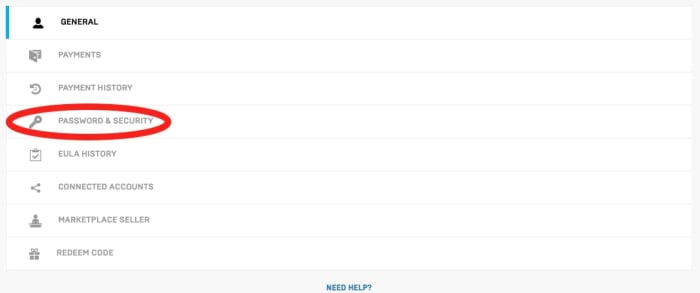
Go to “Payments” and disconnect any of the information within to prevent more transactions.
Next, go to “Payment History” to see if someone bought things without your permission using another account.
If you can’t even log into your account, go straight to “Sending an Email to Epic,” and let them know about what’s happening for further steps on verifying your identity and getting your account under control.
Account Actions
While checking your account, there are a few things you should do.
If you payed through another source (like Xbox or Playstation), go into “Connected Accounts” and removing all attached profiles – Xbox, Twitch, Switch, all of them. Epic customer service will help you remove online sessions of your account when you send an email, but it’s up to you to remove these console profiles.
Finally, once you’re sure everything’s clear, change your Epic password just in case the hacker can be shut out. You can activate 2-factor authentication now, but it will likely need to be reactivated after Epic cleans up the account.
Once that’s done, you should send Epic a message.
Sending an Email to Epic
To regain control of your Epic account, you must send an email to them.
A little honest talk before we go on: you have little to no power to fix this account issue on your own (aside from removing your payment info and console sessions). You won’t be able to send purchases back or retrieve lost items yourself, and searching through the website for an option to do so will be a pointless, stressful endeavor. But…
This system can actually makes things less worrying. Send the message and be done with it. Until they respond, take some time to clear your head and make sure your email, console profiles, and bank accounts are okay.
So, how does emailing work?
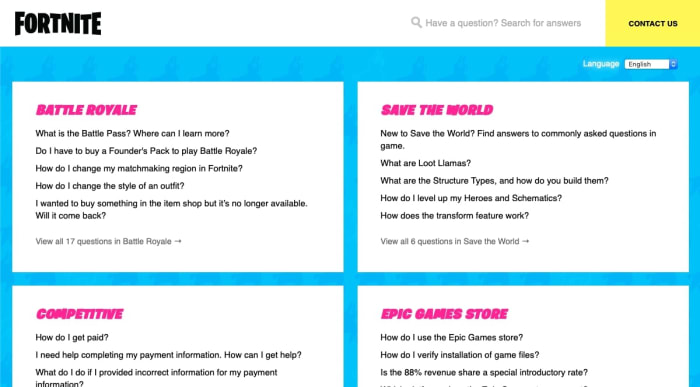
You can visit Epic’s support website, but be warned: to contact them, you’ll want to click the “Contact Us” button at the top right!
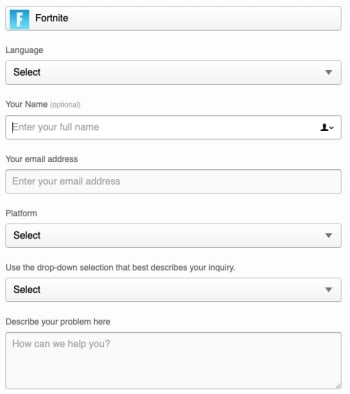
From here, you’ll encounter Epic’s friendly message creation screen:
This is where your account knowledge comes in handy: tell them what’s changed about your profile. With any luck, Epic will revert everything back to normal, V-bucks and items and payments. It may take a few days or so (no longer than a week).
We trust them to get the account issues resolved. Just remember: when Epic responds, follow the instructions they give! If you’re asked to change your password again when all account sessions are dissolved, make sure to choose a good password immediately.
For the Future
The best thing you can do for yourself is activate 2-Factor authentication from the Password and Security menu immediately.
When you enter, there’ll be two options: app authentication and email authentication. We recommend email due to the easier accessibility.
Conclusion
Loss of account security can be a horrible experience, but usually doesn’t take more than a week to fix, as long as you quickly disconnect your console profiles, remove your bank account information, and email the Customer Support department at Epic immediately. From there, remember to increase the security on all your internet accounts to ensure this doesn’t happen in the future. Soon enough, Epic will have your Fortnite account back to normal!
We hope this article helps you weather the experience with ease.
Learn more about the countries of the world with this helpful website!
Now, let’s be honest: making sure you know where North Korea is to avoid being embarrassed on a Jimmy Kimmel interview probably shouldn’t be your main reason to learn geography as an adult…
But hey, it’s a start, right?
Aside from that, there are many great benefits to knowing the world map: a higher understanding of world news stories taking place, a better developed worldview, a powerful mental map, helpful preparation for unexpected pop quizzes, and the simple joy of knowing where all Earth’s countries are (to name a few)!
If you’re ready to memorize the map, gaze at the globe, and admire the atlas, let’s talk about how to…
Welcome to Sheppard Software’s geography learning page!
Here, you can navigate your way through the world’s geographical regions one by one, and develop an understanding of the countries within. If you ever click away from this page, you should be able to find a “world” link that sends you back to the proper page:
Now, we should probably address the elephant in the room: don’t other sections of this website seem a little childish?
The simple answer is yes. But, while Shepperd Software has many games for kids – animals, Earth tips, Easter egg painting – the geography software is straightforward, robust, and challenging for people of all ages.
Don’t believe us? Let’s test it out, from the beginning: Africa!
Going deeper
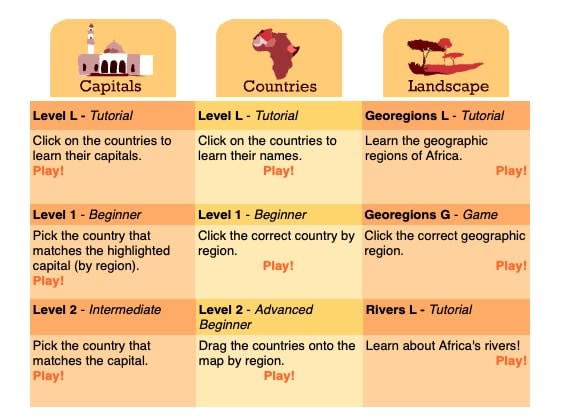
Most geographical regions feature three options: Capitals, Countries, and Landscape (for topography buffs).
Now, if you’re wondering why Capitals are first, we’re right there with you. The sections were likely meant to be in alphabetical order, but you would think one should probably learn the countries locations before the capitals, right?
Anyway, we digress.
From this screen, you can begin at any level you like! We’ll feature the main three (there are even more below the picture shown):
Level L
Ostensibly, this stands for “Level: Learning.” Here, you click on each country and the program provides the name, with information on the left.
If you have your device’s volume, you can hear it as well! Don’t let that detail slide: we think it’s pretty impressive that Sheppard’s games help you engage on multiple levels.
5 mobile apps that can actually teach you something
Within a certain area, you must click on the upcoming country. Simple as that! After the third attempt, you’re provided with the answer. We encourage you to begin here first and see whether or not you’re good enough to skip to a higher level!
Level 2
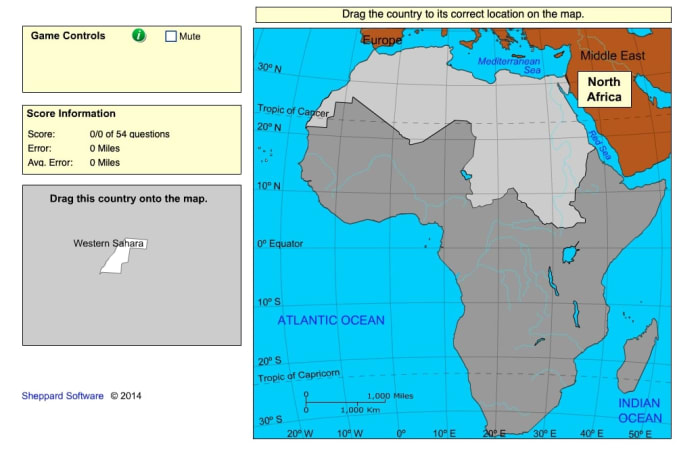
The challenge continues, with a twist: inside the same pre-defined areas, you must drag and drop the countries in place. It might sound simple, but this changes a few things!
Most importantly, we often imagine testing our geography as clicking pre-defined outlines on a map. This challenge asks you: can you mentally remember where the country lands on the map, with no guides? It may be harder than expected, even for people who can name each location…
From there
The next challenges (Levels 4-9) are variations on the two originals. At first, you lose the pre-defined areas so the entire map is up for grabs from the start. Later, you’ll be asked to rotate countries to the proper orientation and size them properly. The final challenge adds everything together for the “Cartographer” quiz!
Final suggestions
So, how far do you go?
Frankly, you may not care to have intricately detailed knowledge of an unmarked map. We simply want to reliably know the location of a place when it’s mentioned: whether that’s the Czech Republic, Tunisia, or the Virgin Islands. It all depends on what’s good enough for you; if you want to go all the way and know every location along with its capital and major bodies of water nearby, go for it!
The point is… learn as much as you want and don’t pressure yourself to go further. Just remember that Sheppard Software is there to help you reach the level of your choosing!
Conclusion
We want a better understanding of our world, which begins with a solid grasp of where countries are located. Hopefully, you share that desire and can use this program to learn geography more easily!
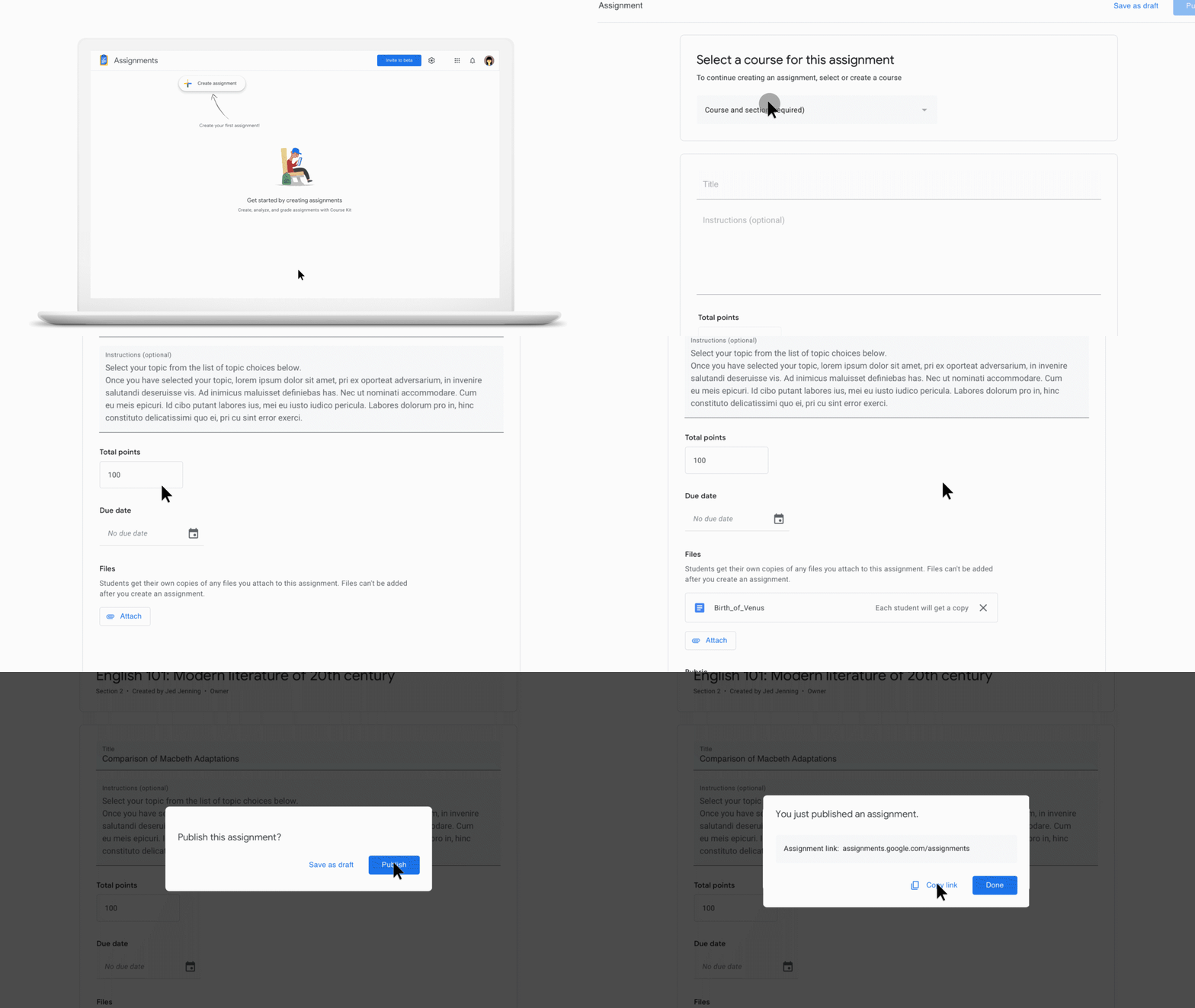
Grade papers quicker and more efficiently with Google Assignments!
If you have any friends or relatives that are teachers, they’ll tell you that easily the most grueling part of the job is grading papers. If you’re an English or composition teacher, reading 20+ papers on the same material gets old fast.
These tools can also help make sure that the work you are receiving from students isn’t plagiarized, and it will also provide feedback to your students. It does this by using technology from Google Drive, Docs, and Search.
You can sign up for the Google Assignments beta. However, in order to integrate with your school’s learning management system, you must sign up using your school-issued Google account.
Assignments is also part of G Suite for Education. If you have an account there, no setup is required.
Once you’re all signed up, you can get started! This can be a very valuable tool and a lifesaver for teachers around finals. Talk to the head of your department and see if your school can get started with Google Assignments!
Need something to watch or listen to? Try TasteDive!
There are almost too many shows and movies out there right now — making it too difficult to make a decision about what kind of media to consume. That’s before you factor in all of the great music, podcasts, and books, too.
The recommendation engine works a lot like the old school Netflix rating system. Users rate the movies they’ve watched and the algorithm makes recommendations based on your preferences.
Today’s Netflix recommendations are based on finding a common thread between what you’ve watched. Netflix is assuming that you’re using the tool to watch the latest releases like the new “Sabrina” episodes or catching Miley Cyrus in “Black Mirror.” However, you’re mainly watching “The Office” for the millionth time. Because of this, Netflix’s recommendations likely aren’t going to feel all that personal.
So, back to TasteDive. The site keeps things simple. Liked “Stranger Things?” Great, they’ll tell you what to watch next. How does it work? Let’s take a look.
Getting started
Signing up is literally as simple as creating an account using Google or Facebook.
Once you’re in, TasteDive will prompt you to fill out some profile details, but this is optional and likely won’t have much of an impact on recommendations. On the contrary, it looks like they’re attempting to add some kind of social element to the mix.
Once you’ve created an account and/or profile, you can start browsing, liking, and disliking to your heart’s content.
Find the perfect streaming recommendation with the Dinggo app
The site’s home page features user lists that you can use as a starting point. People create lists that range from books they hope to read at some point, to top animes, to favorite comedies.
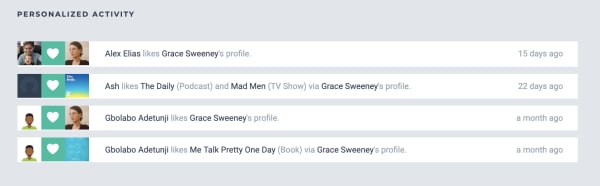
You’ll see notifications on your account if someone likes a show or movie through your profile, or if they just like your profile in general.
Browse and ‘Like’
You can navigate to one of the site’s categories: music, movies, TV, books, authors, games, or podcasts. You can start your search by typing in something you already like.
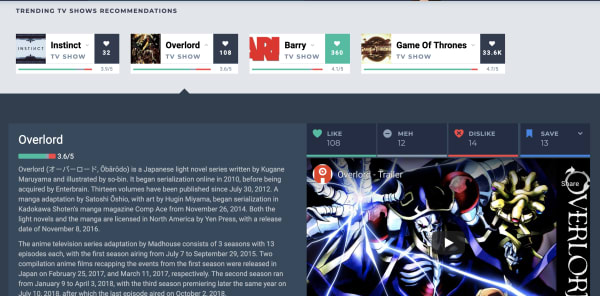
Navigate over to TV shows and you’ll see a list of trending shows. Check the ones that you like by clicking on the little heart on the right side of each entry:
As you scroll down the list, recommendations are displayed in the same feed. More appear each time you add a heart to any of the entries.
We just signed up for an account and tried browsing through the TV category. Initially, we liked some of the popular options from their “trending” list including; “Barry,” “The Chilling Adventures of Sabrina,” “Sharp Objects,” “Succession,” and “Fleabag.”
The recommendations listed after “hearting” these selections were kind of all over the place. TasteDive recommended other Netflix hits like “Russian Doll” and “Glow,” but also things like “Digimon,” “House,” and “Planet Earth.”
You can dislike any of the recommendations as well, simply click on one of these cards and like, dislike, or give it a “meh.”
Podcasts and books — Not so hot
Podcasting isn’t quite as popular as movies, music, or television at this point, so we’re not surprised that this area doesn’t have many suggestions.
Still, it was a bit disappointing that it hadn’t heard of many podcasts outside of those that have topped the charts for years. You’ll see hits like “Marc Maron’s WTF,” “This American Life,” “My Favorite Murder,” “Comedy Bang Bang,” and “Serial,” but none of your favorite hidden gems.
We tried typing in a few other popular podcasts like “True Crime Garage” and “Beautiful Anonymous” and the engine hadn’t heard of those. Others like “Crime Junkie” and “Slow Burn” had one or two likes a pop, but no associated recommendations.
As far as books go, the bulk of the existing entries are books that have been made into movies or TV shows. We saw “Sharp Objects,” “A Song of Ice and Fire,” “Lord of the Rings,” plus a couple of David Sedaris books and Agatha Christie novels. Not exactly a whole library’s worth of recommendations.
The problem is, it doesn’t seem like enough people use the platform for it to generate truly tailored content recommendations.
Qloo acquisition could give Tastedive a boost
Back in February, cultural AI platform Qloo announced that they acquired Tastedive. Qloo cited that both platforms were interested in understanding what drives consumer tastes and helping them discover new shows, music, and movies.
We bring this up because, while Qloo took ownership of the recommendation engine months ago, we’re likely to start seeing a smarter, more responsive version of Tastedive sometime in the near future.
That said, Qloo’s real motive is understanding patterns in consumer tastes, and selling those AI-mined insights to advertisers. Which… well, we all know the drill.
Here’s a shot from the Qloo website, which shows just how much data the AI company has collected already:
For now, users should stick with ‘popular’ categories
Overall, if you’re going to use TasteDive, stick to the Movies and TV sections. What’s nice about these recommendation sections is that you’ll quickly get a list of ideas without having to sort through a bunch of reviews and blog posts to find what you’re looking for.
That said, it’s hard to get a sense of whether you’d actually like something based on what you’ve told the tool that you like or dislike, but it should get “smarter” the longer you use it.
TeamViewer allows you to control computers remotely. Here’s why you should give it a try!
Have you ever asked your IT department for support and have them request your Teamviewer details? Teamviewer is remote access software for Mac, Windows, iOS, and Android devices. Teamviewer is a fast and secure way of remotely gaining access to another computer or device. Teamviewer has a wide range of features that make it an ideal solution for remote control, meetings, and maintaining a cloud-based service desk.
In this guide, we’ll be covering what Teamviewer is, what it’s used for, and how to download and start using the program.
What Is Teamviewer?
Teamviewer is a remote access software program. But what does that mean? In short, Teamviewer allows a user to gain access to another computer or device that also has the software installed. Once the access is granted, you can remotely work on the computer through the software. This means you can install files, make changes, and even troubleshoot issues.
What Is Teamviewer Used For?
Teamviewer is used for a range of tasks. It is widely known as an all-in-one solution for remote support, remote access, and online meetings. You will often find Teamviewer used by IT departments and any other companies that need to provide computer support. The reason for this is that it gives the user access and control over a device remotely. This is ideal because it means problems can be resolved faster and more efficiently. No more waiting for someone from the IT department to come to your office to fix the problem.
This is just one aspect of what Teamviewer is used for. This software can also be a great tool for hosting online meetings, sharing your desktop with others, and sharing files with colleagues and other team members.
Is TeamViewer safe?
Yes. You can only use TeamViewer to connect to devices you pair it with, and that access is both device agnostic and completely secure. TeamViewer has powerful security measures in place, such as end-to-end encryption which prevents man-in-the-middle attacks or anti-brute-force means.
How to Download the App
Downloading and installing the software is easy enough. Teamviewer is available for Mac, Windows, Android, and iOS. Now let’s take a look at how to download the app for the various platforms so that you can start using the tool.
Android and iOS
One of the best things about TeamViewer is that it’s not restricted to desktop or macOS. You can run it on Android or iOS devices just as easily, which means you can now remotely view what’s on your iPhone or iPad.
TeamViewer is the world’s first remote support technology to allow screen sharing on iOS devices from any desktop or mobile device, and Android is an especially good platform if you’re trying to support multiple employees who use their own personal devices.
Windows and Mac
Teamviewer was first designed to be used on computer desktops. It is a very easy and intuitive program to use. Teamviewer is also one of the very few programs that allow access between different operating systems. This means you can access a Mac computer from a Windows computer through Teamviewer.
You can download Teamviewer from a reputable source or directly from the Teamviewer website. All you do is click on the download version for your operating system, and the install files will be downloaded to your computer or smartphone.
What Is Teamviewer QuickSupport?
Teamviewer QuickSupport is just that: quick support. With this feature enabled, you can get the assistance of a computer technician easily and quickly without having to wait around for hours. The support offered is safe and secure as you need to allow access to anyone wishing to use Teamviewer on your device.
Still, it means that you have the comfort of knowing that if any issues pop up on your computer or device, you’ll have fast and easy access to trained technicians to assist you.
How to Use Teamviewer
Teamviewer is a very simple program to use and an easy one to master. It was designed to be intuitive and user-friendly, and it meets these goals perfectly. Let’s take a look at how to use Teamviewer.
How to Set Up Teamviewer
To set up Teamviewer, you have to start by installing the program from the files you downloaded. Once the program has been installed on your computer or smartphone, you can open the app and set up your account. Remember these details as you’ll need them to access your account in the future. We recommend setting up ‘Easy Access’ from the ‘Remote Control’ tab to make any future setup even easier. We also recommend activating the two-factor authentication from within your profile as an added layer of security.
File transfer
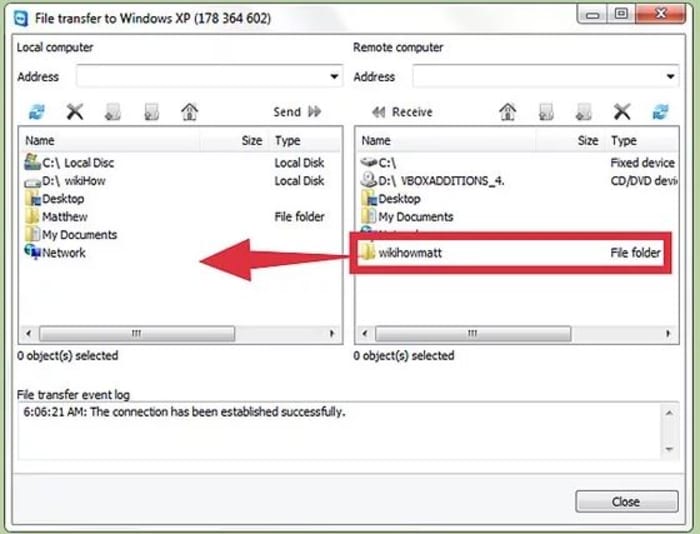
You can log on to TeamViewer to remote access and transfer files, folders, screenshots, text, and images to and from any computer or mobile device you’re connected with. This is done in two different ways.
Option one is to use a regular clipboard function (Ctrl+C, Ctrl+V) to simply transfer from an online storage cloud like Google Drive, OneDrive or Box.
Option two is to use the integrated file transfer tool shown below.
How it works
TeamViewer works by providing a unique 9-digit ID number tied to a particular computer. This is known as your TeamViewer ID. Even if you update or reinstall your TeamViewer account this specific number won’t change. You share that ID number with a TeamViewer user (or another device that you own) and they’ll be able to access your partner ID via remote desktop.
Collaboration and support at their best
When it comes to teamwork or IT support, it’s a necessary evil to let others have remote access to your desktop. You’re only a few steps away from seeing for yourself how TeamViewer works. We hope it assists with any issues you may have or enhances communication for your project.
Follow these tips to dominate this week’s challenges!
We’re getting another Season 5 throwback with this week’s set of challenges, dubbed “Worlds Collide.” You’ll be hanging around in the deserts and messing with rifts this week, with a few damage-dealing challenges and other tasks tossed in for good measure. Read on for our guide to both the regular and prestige challenge sets for Week 3.
Fortnite Season 10 Week 3: Worlds Collide Challenge Guide
Use a Rift
Image courtesy Epic Games
This week’s first challenge should be pretty simple. Rifts (pictured above) look like glowing blue cracks in the sky, and were originally plentiful in Season 5. Now, however, they’re clustered around very particular locations. You can reliably find them near the Durrr Burger head on the outskirts of Pleasant Park and near the stagecoach outside of Paradise Palms. Simply walk into one to complete the challenge.
Visit a Rift Zone
Image courtesy Epic Games
Rift Zones are new this season, and are letting us step back into the past with some of our favorite locations. We’ve already seen Tilted get a Wild West-themed makeover, and this week Mega Mall has been replaced by Retail Row. Rift Zones are easy to spot from the Battle Bus. As shown in the image above, they’re surrounded by a glowing blue aura. Head to either one and step inside to complete this challenge.
Deal damage to opponents at a mountain top Viking Village or Loot Lake (200)
These two locations were central to Season 5. Of the two, you’re probably more likely to encounter enemies at Loot Lake, as it’s a more central and higher traffic location. You don’t have to get eliminations for this one: all you have to do is hit opponents for 200 points of damage.
Visit a memorial to a Cube in a desert or by a lake
Image courtesy Epic Games
Oh, Kevin. How we miss you. Two new memorials for our dearly departed Cube friends have been added to the map, and you’ll be paying them a visit for this challenge. One is located on the desert mesa where Kevin the Cube originally appeared on the map. The second is located on the southern edge of Loot Lake, where Kevin took his final bow. Head to either one to finish the challenge. Check out the map below for their exact locations.
Image courtesy Epic Games
Eliminate opponents in the desert (3)
The desert area is vast, and it doesn’t matter where you end up taking out the required 3 opponents for this challenge. Paradise Palms is likely your best bet, and we also recommend Team Rumble for this one. If you luck out, the storm will close in around the desert area, making these eliminations easy to get.
Search chests at Loot Lake (3)
Time to get hunting. Pop open three chests at Loot Lake and nab yourself some easy rewards.
Consume foraged mushrooms (10)
Under normal circumstances, we’d recommend shying away from eating strange glowing mushrooms, but this time we’ll make an exception. You’ve probably seen these consumables spawning in clusters around the map; eating them will give you a small shield boost. Find and eat 10 of them to finish the challenge.
For this week’s Prestige challenges, your quotas are being up. Find and use four Rifts to finish this one. Again, we recommend visiting the clusters mentioned above.
Visit Rift Zones (5)
This challenge is going to take a bit to complete, namely because five Rift Zones haven’t appeared on the map yet. So far, we’ve got two, so you can start off by heading to those. Keep an eye out for others as they appear in the coming weeks.
Eliminate opponents at a mountain top Viking Village or Loot Lake (3)
Instead of damage, you’re now tasked with eliminating opponents at the above locations. The same tip holds true: you’ll probably have better luck at Loot Lake, and you may want to consider taking this one on in a Team Rumble gametype.
Visit Cube memorials in a desert and by a Lake
One memorial won’t cut it this time around. You’ll need to pay a visit to both. Refer to the map above to narrow down their exact locations.
Eliminate opponents at Paradise Palms or Fatal Fields (4)
This elimination challenge tasks you with taking down opponents in either one of the above locations. Both tend to be fairly high-traffic, so either one is a good bet for tracking down the required number of opponents.
Search chests at Loot Lake or Lucky Landing (7)
It’s chests galore for this one. Of the two, Lucky Landing is probably the easier location to polish this one off. It tends to be a bit quieter, so you’ll probably be able to find the required 7 chests in a single go.
Consume foraged mushrooms in a single match (5)
You don’t have to consume as many mushrooms for this prestige challenge, but the catch is that you’ll have to consume them all in one go. Fear not: mushrooms tend to appear in clusters, and where you find one you’ll definitely find more. The trick is making sure your shields are low enough to allow you to consume all five. Make sure you leave space for 25 points of shield and you should be golden.
Discover how role-playing games are helping kids fight mental illness.
When you’re a kid, it’s hard to save the world. You’ve got grades to keep up, sports teams and school plays to try out for, friends to make, and parents to please. It’s even harder to save the world when you’re a teenager with depression, social anxiety, or Autism. Saving the world is only possible if you can first save yourself, and a company called Game to Grow is helping kids do both.
Rebecca might be shy, but her level 9 paladin can inspire her allies through the darkness.
Founded in 2017, Game to Grow is a non-profit organization that uses tabletop gaming to improve people’s lives – specifically Dungeons & Dragons.
What makes DnD such a good choice right off the bat is that it’s a role-playing game. If you can immerse yourself in a fantasy world and invest in the zany exploits of your character, suddenly you’re not a little boy who had a bad day at school, or a teenager who just had a fight with her parents. Movies, books, and video games are all escapist fun, but tabletop gaming does two things that no other medium can match:
First, the heart and soul of the character is up to you. Dungeons & Dragons goes much deeper than vicariously living through a Marvel hero, or poking and prodding a character creation menu in a video game. There’s no Mass Effect dialogue wheel in DnD; you say whatever you want. There are no invisible walls either; you can go where you want.
Victims of depression often describe themselves as feeling trapped, like their course is set and they have no control over their own lives. Dungeons and Dragons puts you in the shoes of an altogether different character, charting an altogether different path. With that agency comes a rare liberation – what you do matters, and more importantly who you are matters!
Second, and just as important, is that with tabletop gaming you’re with a group. You’re sharing space, making conversation, and working together to complete an objective. It’s a hands-on experience that gently nudges players towards a collaborative effort and achieving something that they could not do alone.
A DM (who serves as the game’s moderator) sets the stage and it’s up to you how you want your character to tackle the obstacles. These obstacles could be clearing a dungeon or slaying a monster, but could just as easily be negotiating with townspeople, attending a costume ball, or interfering with kingdom politics. Maybe you’re afraid to embark on such a daunting task … but your character isn’t!
No matter what the quest of the week happens to be, Game to Grow has a bigger mission they’re weaving into the plot: Targeting your own personal issues, and empowering you to conquer them.
“Part of what we do is we say you are yourself and that is OK,” says company founder Adam Davis. “You can participate and we can celebrate your uniqueness and your unique skill set.” He and co-founder Adam Johns have been using this formula for over eight years. Today they see over 50 kids a week, many of whom are on the Autism spectrum, and the result is a system that’s just as – if not more – effective than official therapy or psychiatry.
Adam Johns considers the company “agnostic to diagnosis,” explaining that “even when kids report that they’re doing fine, a lot of times that’s because they’ve never had an opportunity to know what it is to have a friend and know what it is to feel connected. When they come to our groups they build that connectedness, they build that opportunity for relationship with other kids.”
The Game to Grow founders have been teaching kids to fight the good fight for almost a decade
Game to Grow has since expanded the company, training teachers, librarians, community leaders, and even therapists in their methodology.
“We know we’re never gonna run groups across the world,” admits Adam Johns. “Instead, we’d rather train other people to get their own group started.” Kids or parents who fear the social stigma of therapy are more willing to say “I’m going to DnD tonight” over “I’m seeing my therapist.” As such, Game to Grow has a 94% retention rate, and kids are excited to come back for the next adventure.
“We see kids that are burned out on therapy,” says Johns, “but they come to our group, week after week. It’s the one thing they don’t want to miss.”
Friends who slay dragons together stay together
It’s awesome to see tabletop gaming being used as a medium to help people overcome their anxiety, and we hope to see that same creative initiative catch on and become more mainstream in today’s society, one dungeon at a time!













 Uh-oh.


 Go to “Payments” and disconnect any of the information within to prevent more transactions.

 From here, you’ll encounter Epic’s friendly message creation screen:
 This is where your account knowledge comes in handy: tell them what’s changed about your profile. With any luck, Epic will revert everything back to normal, V-bucks and items and payments. It may take a few days or so (no longer than a week).
 The best thing you can do for yourself is activate 2-Factor authentication from the Password and Security menu immediately.



 Welcome to Sheppard Software’s geography learning page!

 Now, if you’re wondering why Capitals are first, we’re right there with you. The sections were likely meant to be in alphabetical order, but you would think one should probably learn the countries locations before the capitals, right?



 The challenge continues, with a twist: inside the same pre-defined areas, you must drag and drop the countries in place. It might sound simple, but this changes a few things!