New “WhatsApp from Facebook” tab has been spotted in advanced WhatsApp beta code
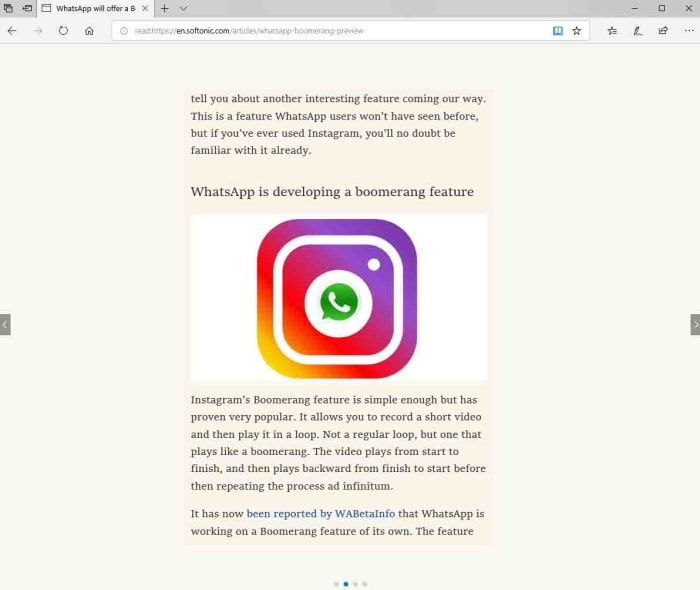
A lot has been made in recent weeks about the integration that is going on between Facebook, Instagram, and WhatsApp. This goes way beyond the borrowing of app features between the three, like the recent news about a Boomerang feature coming to WhatsApp, which has been going on for years.
The big news is that behind the scenes, Facebook is working on integrating the code of all three apps so that users of each app can interact with each other, even if they don’t have an account on all three apps. Theoretically, when these big changes take place, a WhatsApp user will be able to send a message to an Instagram user from her WhatsApp account.
Take an early look at WhatsApp’s brand-new dark mode
Obviously, this isn’t going to be the only major change and it has been becoming more and more apparent that Facebook plans to introduce these changes in a drip like fashion. We’ve already seen the share to Facebook feature land on the WhatsApp beta and now we have another little change coming in, designed to highlight how all three of these massive apps are linked.
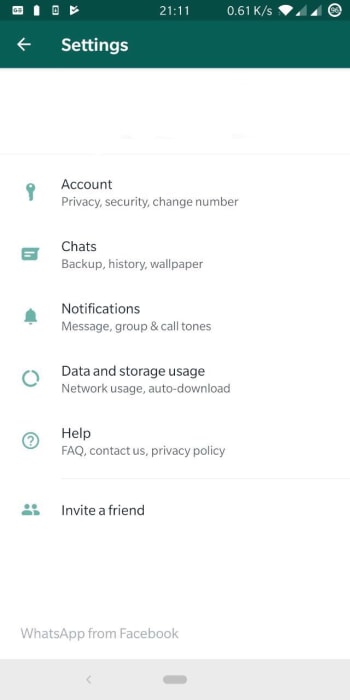
New “WhatsApp from Facebook” tab has been spotted in advanced WhatsApp beta code
It wasn’t too long ago that serial tech tipster Jane Manchum Wong tweeted about an interesting little snippet she’d found in some Instagram code. Tucked away at the bottom of the settings menu were the words, “Instagram from Facebook”. It had been widely remarked at the time that Facebook had been exerting much more control over Instagram and the subtle new branding confirmed it.
Well, in a worrying development for all WhatsApp fans, that very same branding has been spotted by the guys at WABetaInfo at the bottom of the settings menu. With everything else that has been going on, it would be naïve to expect that this is simply just a few hidden words and not a part of some bigger structural changes going on behind the scenes.
WhatsApp is for adults only
In other WhatsApp news, it also looks like WhatsApp is upgrading its terms of service to target underage users of the messaging app. The new terms of service target users in the European Union who are under 16 years of age and users everywhere else who are under 13 years of age. Once WhatsApp starts enforcing this change, it’ll be an adults only app in the EU and a teens and above app everywhere else.
Age. If you live in a country in the European Region, you must be at least 16 years old to use our Services…. If you live in any other country except those in the European Region, you must be at least 13 years old to use …
Also, with the roll-out of the latest WhatsApp beta version 2.19.222, it is becoming clear that the Facebook-owned app is in fact working on a feature that will enforce the new terms of service and ban underage users. If you’re a WhatsApp user in the EU and you’re not yet 16, or anywhere else in the world and you’re not yet 13, it looks like your days on the app could be numbered.
According to Google over 80,000 people ignored breach alerts about their passwords
If you think you’re a security conscious individual when it comes to being online, we have some news that may shock you. Even if you don’t think about yourself that way this is still going to be pretty shocking. New research by Google shows that a lot of us have a pretty lax attitude to password safety.
Many of us use passwords that have already been breached and, even worse, a lot of us continue to use breached passwords after we’ve been told they have been compromised. What are we thinking people? Maybe, we should look at these numbers in a little more detail.
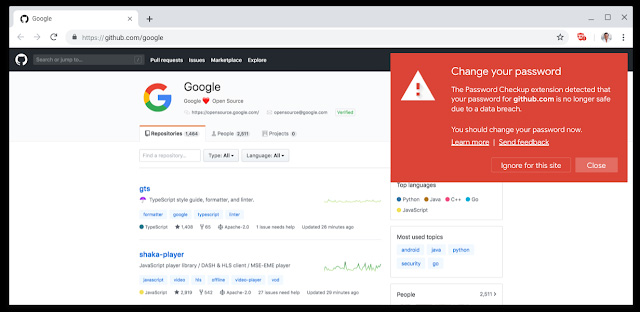
According to Google over 80,000 people ignored breach alerts about their passwords
Google has been looking into its Password Checkup extension for Google Chrome to try and learn a little about our attitudes to our online safety. Password Checkup scans all of your login credentials when signing into your online accounts and then checks them against all the known sets of login credentials that have been affected by data breaches. In essence it tells you, if your password has fallen into the hands of hackers or not. The results of Google’s study have been a little surprising to say the least.
Since it was first launched, the password checkup extension has been downloaded over 650,000 times. If you think about how many different web accounts each of those users has, you’ll know that that number gives the extension access to a lot of usernames and passwords. Of those, Google looked at 21,000,0000 and found that over 316,000 of them were unsafe. This works out at about 1.5%, which isn’t much at all but makes sense when you consider that the people who will have downloaded Password Checkup in the first place will have been security minded individuals. What comes next though, does not make sense at all.
When Password Checkup alerted these users to their breaches, the numbers weren’t as impressive. The report says that 26% of users changed to new passwords and 94% of these new passwords were at least as secure as the old ones. The weird thing though, is that 25.7% of the people warned that their passwords had been breached ignored the warnings. A massive 81,368 people were told their usernames and passwords had been leaked in a data breach and did absolutely nothing about it.
Something to think about
It is very important that you use unique login details for all of your online accounts and change them as soon as you hear they’ve been caught up in a breach. If you have unique credentials, you’ll only have to do this once. If you don’t, you’ll have to do this for every account you have with the same details as the people who bother to steal passwords in the first place will also bother to check them against every account you have.
In this regard, we can’t recommend using a password manager like LastPass highly enough. Password managers generate strong passwords automatically and will also let you know, if you are using the same security credentials on more than one account. It is likely that the people who ignored the breaches couldn’t be bothered making the changes because they’d have to change a lot of details for it to make a difference. A password manager like Last Pass does all of this hard work for you so if you have been breached but couldn’t be bothered to make any changes, download Last Pass and let it do the work for you.
Twitter is preparing to test a new Direct Message inbox filter that will cut out spam and abuse
Twitter certainly has its uses, but it isn’t exactly the most wholesome place. Many users have to deal with constant abuse and if a user has their Direct Messaging inbox set to open, anybody is free to send them whatever they want. It shouldn’t fall to individual users to close off their inboxes to protect themselves from abuse and spam. It now looks like Twitter is moving to protect this notion with the introduction of a new filter.
Twitter is preparing to test a new Direct Message inbox filter that will cut out spam and abuse
For too long, Twitter has thrown all inbound direct messages into a single inbox. This means that whether you’ve received messages from a friend, somebody you follow, or a stranger, somebody you don’t, they’ve all shown up together. When you think about how big the internet is, this concept alone is almost ridiculous. Add to this the fact that trolls exist, and the internet is full of not very nice people, and this clearly becomes a recipe for disaster.
Unwanted messages aren’t fun. So we’re testing a filter in your DM requests to keep those out of sight, out of mind. pic.twitter.com/Sg5idjdeVv
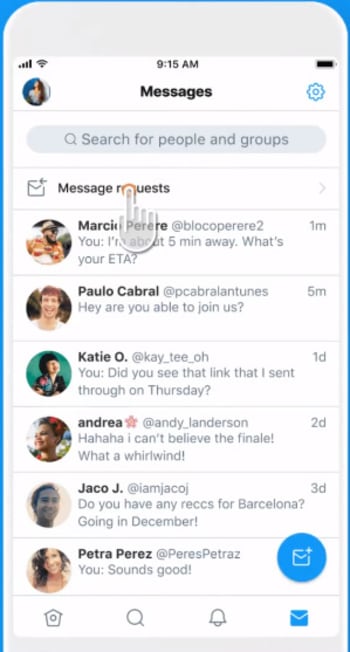
Now, following a tweet from twitter, this situation finally looks set to change. Twitter is adding a new button to your Direct Message inbox called Message Requests. This is where you’ll find all the messages you receive from people who you don’t follow.
Furthermore, the new Message Requests section of your inbox also comes bundled in with new filters. These filters should catch all unwanted material and hide it behind a new Show button. This means that whenever you read a message from somebody you don’t know, that has been caught up in the filters, you won’t have to view the message unless you tell Twitter you want to see it. It gets better because if Twitter thinks the message has potentially harmful content, it won’t show any preview of the message. You’ll be able to delete any messages you receive from people you’re not sure about, without even having to read the first few words.
This move from Twitter mirrors how Facebook Messenger handles inbound messages from strangers. They’re hidden away and need to be sought out, before they can be viewed. Personally, this means that I’ve stumbled across messages I received years ago, that I never even knew about.
All in all, though, this is a very positive move from Twitter and one that should be applauded. It is an unfortunate truth that many people have to close their Twitter Direct Message inboxes because of the abuse they receive. This move potentially makes Direct Messages a much more useful tool. More of us will set our inboxes to open, if we can be certain that having open Direct Message inboxes isn’t going to leave us vulnerable to torrents of abuse. Quite frankly, it is about time Twitter did this.
WhatsApp Web is a great way of staying in touch with your friends and family while using your computer. You open it up, zap the QR code with your phone, and then you’re away. I’ve a WhatsApp Web window open right now and I’m pretty sure, if you’re reading this article on your laptop or desktop PC, you do too.
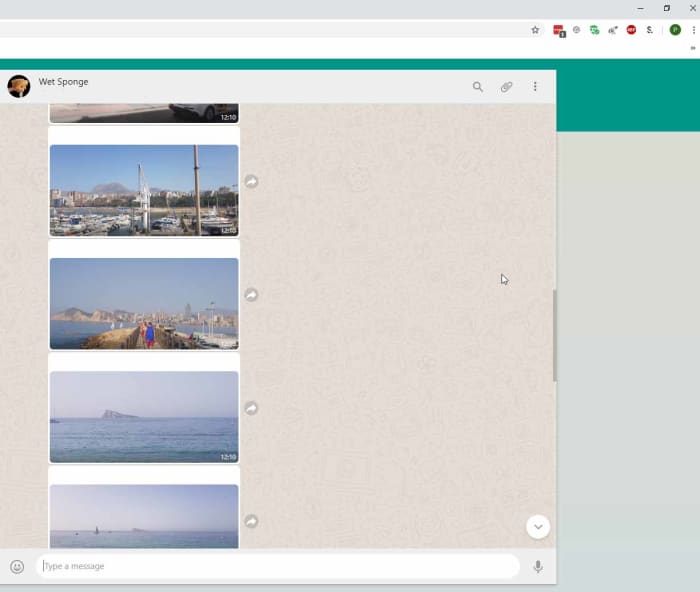
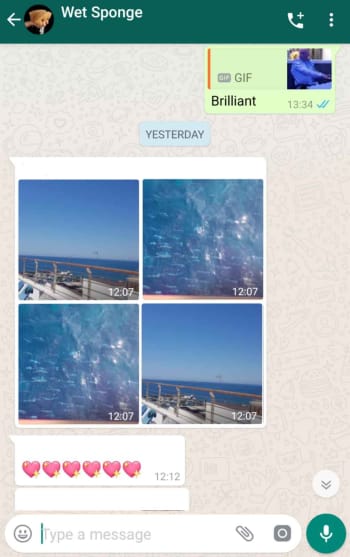
The only thing with WhatsApp Web though, is that isn’t as fully featured as the mobile app. I’m not going to get into the fact you need your phone to be on to use it; which rumor has it, WhatsApp is working to fix, I’m talking more here about viewing images on WhatsApp Web. When you receive a big batch of images all at once you can view them as an album on your mobile, but when you go to WhatsApp Web all you see is a stream of single images. This looks set to change.
There are two main problems with receiving a lot of photos at once and only being able to look at them one at a time. The first, is that it breaks up the chat. If you’re chatting to somebody about their holiday and they send you 57 holiday snaps with them all showing up individually, you’re going to have to do a lot of scrolling in between what was said before they were sent and what was sent afterwards. On mobile, this isn’t an issue as all those photos get grouped into an Album and you can see what was said before and after right there on the same screen.
This is annoying
The other main problem is downloading or sharing the images. If somebody has sent you a group of photos and you decide you want to keep or share them, it can be a painstaking process going through each of them and hitting the download or share button individually. Again, on mobile, this isn’t an issue and one click will download and share them all.
This is less annoying
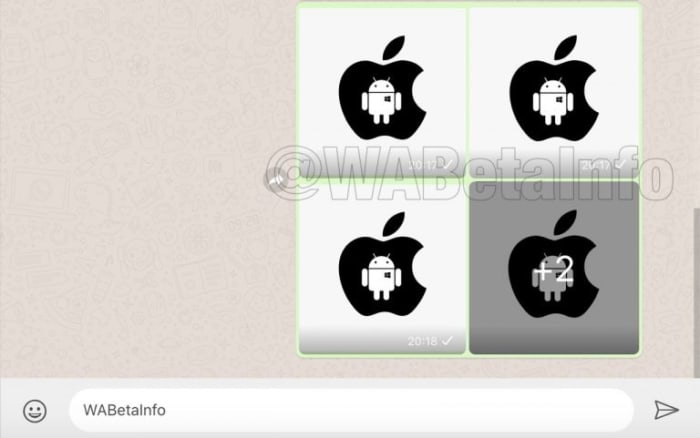
This is why it is good news that WhatsApp is developing an Albums feature for WhatsApp Web. Although not yet even available in the beta version of WhatsApp it has been spotted in some advance code by the team at WABetaInfo.
The advance Albums feature for WhatsApp Web will work just like the Albums feature on WhatsApp for mobile. Whenever you receive multiple items at once, they’ll automatically be grouped together into an Album. Furthermore, you’ll also be able to share and download Albums entirely from WhatsApp Web, just like you can on mobile.
This is still a very advanced feature, however, that still has a lot of development ahead of it before it’ll get a general roll-out.
Microsoft Edge’s read aloud mode is getting much more natural sounding voices
Microsoft Edge has had a tumultuous existence since it first launched. It has rightly been lauded by critics and supporters but struggled to make a dent in Chrome’s dominance of the market. Microsoft Edge has now migrated to the Chromium ecosphere, which means some people claim it is no more than a different version of Google Chrome. The move has done Edge well though and moving closer to Chrome has actually given it the room it needed to gain traction for the key features that set it apart from the Google web browser offering.
The idea of Microsoft Edge is to be as fast, clean, and lightweight as possible to cope with the demands of different devices, whether it be a PC, tablet or phone.
One of those key differentiating features has been the reading mode and the connected read aloud mode. Chrome has a rudimentary reading mode buried deep within its code, but it is nowhere near as good as the reading mode on Edge, which can present crisp and clear text for any page of the internet. The Edge read aloud mode goes one further and actually reads out all the text, saving you the eye strain.
Edge’s Reading Mode is very clear and far superior to Google Chrome’s
Read aloud has been far from a perfect feature though, and Microsoft has received a lot of feedback about how it could be improved. Feedback it is now clear that the software giant has been listening to.
Microsoft Edge’s read aloud mode is getting much more natural sounding voices
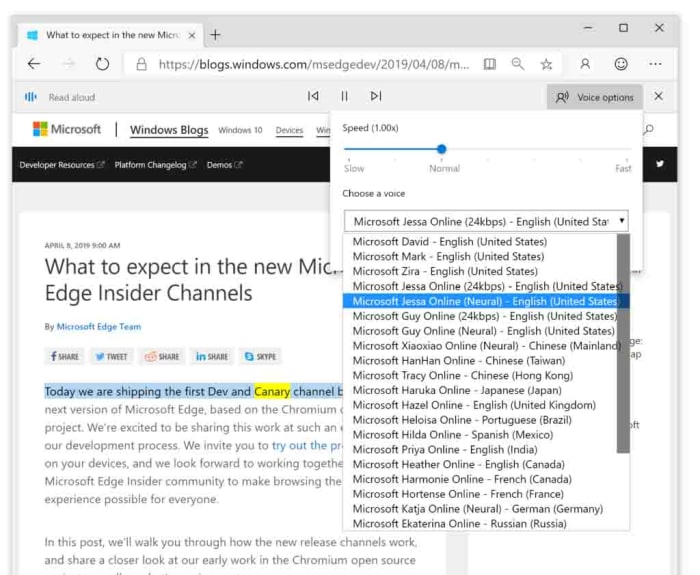
The key feedback Microsoft has been receiving on the feature is that voices doing the reading sound unnatural and robotic. Microsoft has released a blog post outlining how it plans to use “cloud powered voices” to deal with these complaints, including two new styles of voice that will be available to Edge users; Neural voices and Standard 24kbps voices.
The post describes Neural voices as, “Powered by deep neural networks…” and claims that, “these voices are the most natural sounding voices available today.” The Standard voices are described as being similar to the voices that are available already, but they’ll sound clearer due to an increased bitrate of 24kbps.
How to use the Microsoft Edge Read Aloud features
Image via: Microsoft blog
Microsoft has also endeavored to make these new read aloud voices as accessible as possible. If you’re a Microsoft Edge user and you’d like to try out the new features, it couldn’t be simpler. All you have to do is open Microsoft Edge and navigate to the page you want Edge to read. Then, you simply highlight the text you want reading aloud, right-click, and then select Read aloud section. This will start the Read Aloud feature and will also open the Read Aloud menu, which will give you the option of selecting the type of voice you want to hear.
So, with new neural voices sounding more natural than ever, would you consider letting the Microsoft Edge browser read you a bedtime story to help you get to sleep at night?
Sometimes even Microsoft needs to use Google Chrome
Facebook Group privacy settings are now much clearer and easier to control
Facebook and privacy aren’t exactly synonymous with each other. When Mark Zuckerberg first burst onto the scene out of his Harvard dorm room he quickly declared personal privacy to be dead. Since then he’s waged a long, slow, and hard war on the things we hold dearly and, more importantly, privately to ourselves. He knows everything about us, and even knows plenty about people who don’t even use Facebook.
It could be that these seemingly never-ending scandals are behind Facebook’s latest moves to beef up the privacy settings for Facebook groups. Let’s take a look.
Facebook Group privacy settings are now much clearer and easier to control
A recent Facebook blog post announced some changes to Group Privacy settings. The idea behind the changes is to make it much easier to control who sees what is going on in the groups you’re an admin of. You could see this a tacit admission that the old system was deliberately designed to be too complicated, but let’s not go there.
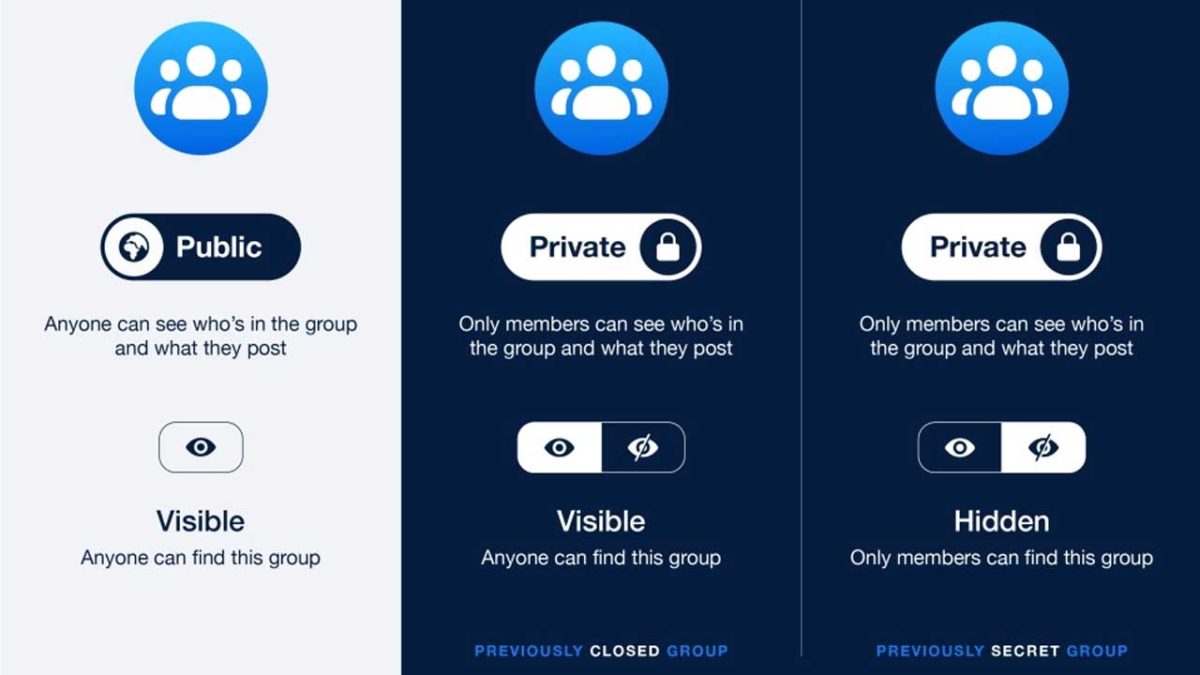
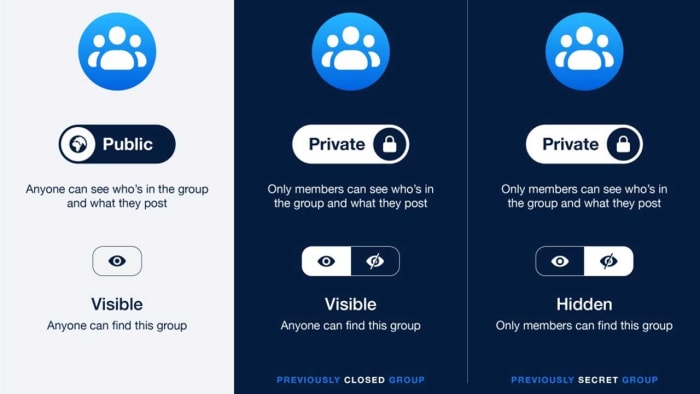
The post reads, “With two clear options, this new privacy model is much more intuitive. Public groups allow anyone to see who’s in the group and everything that’s shared there. With private groups, only members can see who else is in the group and what they’ve posted.” This means that if you post anything in a private group, only the registered members of the group will be able to see it. There is another setting, however, that Facebook has added.
Not all Private groups want to be hidden. Sure, the content of the group might contain sensitive information but that doesn’t mean that the group doesn’t want to be discoverable to new members. For these types of groups, admins will be able to set their private groups to “Visible”, if they so wish. This will make the group discoverable by anyone, while the “Hidden” setting will make it only possible for members of the group to find it. Public groups will always remain visible to everybody.
This is only a simple change, but the new Facebook groups privacy model is much clearer. The new options are presented in clear panels with simple switches being used to toggle groups between being public and private, and then with a further switch toggling private groups between being visible and hidden. These new features should be live now. If only things had been so simple from the start.
Disney is joining up with Charter to try and target users who might be using friends and family passwords
Netflix is such a big company and makes so much money that it is hard to think that a lot of people actually use the account details of their friends and family and so don’t pay for their subscription. There’s no need start shifting in your chair, a lot of people do it and in fact, Netflix actually builds account sharing into its subscription plans. You can pick a Netflix account based on how many screens can view Netflix at any one time meaning you could be watching Stranger Things in your house while your nerdy brother watches Daredevil in his.
Now Netflix might be the largest streaming service but there is some serious competition on the horizon in the form of Disney+. Disney owns a lot of shows and movies including the likes of The Simpsons, the Marvel Universe, Star Wars, and yep, Disney owns all those Disney movies too.
We’ve put together a full preview of Disney + here, but at $6.99 it is fair to say that a lot of people will be tempted by a Disney+ subscription. It has come to light, however, that account sharing won’t be as easy on Disney+ as it is on Netflix.
Disney is joining up with Charter to try and target users who might be using friends and family passwords
Disney wants to stamp out password sharing
We told you last week about the new Disney +, Hulu, and ESPN + bundle that will cost $13 a month. Disney obviously thinks that the price is fair on a per person business as the Hollywood juggernaut is teaming up with the US cable giant Charter to try and protect individual subscriptions. This will make it much harder to share passwords among family and friends.
The plan, according to a joint press release, involves cracking down on what both companies call piracy mitigation. The press release notes, “The two companies will work together to implement business rules and techniques to address such issues as unauthorized access and password sharing.” Yep, they called it out specifically.
The only silver lining that this ominous storm cloud has is that the press release doesn’t really go into much detail about how Disney and Charter plan on cracking down on password sharers. Wired has hypothesized how it could happen though, with one possibility being that Charter could, “could monitor usage of its broadband network to help Disney fight account sharing. For example, Disney could track the IP addresses of users signing into its services, and Charter could match those IP addresses to those of its broadband customers.” This is a complicated way to do things, and a VPN could sidestep it, but the serious nature of the joint press release indicates all options are on the table.
If you’re a password sharer on Netflix then and you were thinking you might do the same on Disney+, don’t expect it to be so easy. Two media giants have effectively just declared war on you.
Never miss an assignment or forget a permission slip with Remind!
With the final days of summer dwindling down, it’s time to get focused on going back to school. Whether you are still in school yourself, or if you’re a parent who needs to keep track of their kids’ education, you need all the help you can get. In the age of smartphones, there is a laundry list of apps out there that can help you out. However, Remind is the best one out there by a mile.
Remind: School Communication gives students, parents, and teachers tools for communication. Now, you no longer have to worry about missing an assignment or getting in contact with your teacher to ask them a question.
Remind: School Communication is changing the education game
Keep students up to date
Teachers can use remind to send notifications to students about things going on in class. For example, if your teacher is missing class because they are sick, they can let you know that class is either canceled or that there will be a sub.
Also, if permission slips are due for a field trip, teachers can send students a reminder that the due date to turn them in is approaching.
If you’re a parent, Remind is an invaluable app for you. You can stay on top of your kid’s assignments, and never miss signing another permission slip.
One of the best parts of the app is that you won’t have to wait until parent-teacher conferences to hear from your child’s teachers.
At first glance, this app may seem a bit sketchy. Private messaging between young children and their adult teachers at any hour of the day sounds like a recipe for disaster. Also, there are tools for sending money such money for field trips, so that also opens another ethical can of worms. However, Remind has plenty of tools to help keep users safe.
If your school does not have an account with Remind, then it can’t help you. However, if you’re a teacher, you can set up a free account yourself! You can register up to 10 classes on Remind so all of your students will be kept in the loop!
Looking to jump into anime? Here are the 10 best you can watch on Netflix.
Though there are certainly some more dedicated anime streaming sites out there, most folks don’t have to look too far to find some quality anime to binge. Whether you prefer fast-paced action, slapstick comedy, or something a little more introspective, here’s a list of 10 quality anime series available to anybody with access to a Netflix account.
This classic anime movie from the ’70s has withstood the test of time. This heist film was one of anime legend Hayao Miyazaki’s first films, and though it doesn’t bear the Studio Ghibli name, his influence still shows.
The tale follows a gentleman thief, Lupin, in the aftermath of a spectacular heist. He soon finds that the piles of cash that he made off with are actually counterfeit, and tracks the forgeries to the mysterious Castle of Cagliostro.
However, there’s more going on than meets the eye, including a trapped princess and secret treasure. This is a classic adventure that will appeal to any Miyazaki fan.
Is there anything more anime than giant robots? In Gurenn Lagann, they’re just another part of the landscape. Set in a future where the evil King Lordgenome has forced humans to live in settlements beneath the planet’s surface, teens Simon and Kamina dream of going topside. Soon enough they find themselves wrapped up in the rebellion against the king, fighting alongside the forces of humanity.
Though the series has plenty of action, at its heart it’s a tale about perseverance, growth, and the power of the human spirit.
Kill la Kill is over-the-top in all the best ways. No-nonsense protagonist Ryuko Matoi arrives at the prestigious Honnoji Academy on a quest to find the person who murdered her father. That hunt continues as she uses a powerful Scissor Blade and a talking combat suit to quite literally battle her way through high school cliques and some more sinister enemies behind the scenes.
Behind the breakneck pacing, action, and laughs, Trigger actually has quite a lot to say about superficial fashion, peer pressure, and the expectations society places on our appearance. Be warned: this anime is extremely addicting, and once you start you may not want to stop.
A far cry from the fast-paced world of Kill la Kill, Violet Evergarden is a more introspective tale.
The show focuses on the titular character, Violet, a former child soldier. After the war comes to a close, she struggles to find a place for herself in the peacetime world, and eventually finds work as a writer, drafting letters of all kinds for all manner of different people. As she does, she comes to learn more about herself and what it means to connect with others.
It’s a story that’s at times heartwarming, heartwrenching, and definitely worth watching.
Attempting to explain Jojo’s Bizarre Adventure in just a few sentences is no easy feat. The series follows several generations of the Joestar family, a powerful clan of psychic warriors. As the series jumps across time, the audience follows the Joestars on a whole host of crazy and madcap adventures.
Though that’s probably the best way to describe Jojo in a nutshell, it doesn’t do justice to the sheer insanity of the series itself. It’s utterly ridiculous in the best way. Anybody watching should prepare for a hefty dose of weirdness and be ready to laugh to the point of tears.
Fate/Zero is just one of several Fate anime series available on Netflix, but we think it’s one of the best of the crowd.
Each anime in the Fate series is based around the same central premise: the show follows secret societies and power players as they engage in a covert war to gain possession of the legendary Holy Grail. To fight this war, participants adhere to a strict set of rules and battle using legendary warriors summoned from throughout history. King Arthur, Alexander the Great, and Gilgamesh all put in appearances, and one of the best parts of the show is seeing its unique spin on these mythical historical figures.
First things first: put that horrible live-action English adaptation out of your head. Though the live-action version may have been a travesty, its anime source material isn’t.
Teenager Light Yagami comes into possession of a mysterious notebook with a sinister power: anybody who’s name is written in the book dies instantly. Light embraces this newfound power and embarks on a crusade to eliminate evil… but as they say, power corrupts.
The famous detective L, a sort of modern-day Sherlock Holmes, sets out to track down Light and put an end to his killing spree. Death Note is a crime thriller with a dose of supernatural horror thrown in; think “Se7en” meets “Final Destination.”
We’ve got more giant robots for you, but Neon Genesis Evangelion takes a drastically different tone as opposed to “Gurenn Lagann.” After humanity is nearly wiped out by a cataclysmic event, extraterrestrial beings dubbed Angels appear to threaten the survivors. A top-secret organization known as NERV makes use of highly advanced mechs, EVAs, to combat the threat.
The series focuses on the young EVA pilots, namely Shinji Ikari. Sure, you’ve got giant robots fighting alien monsters… but underneath that, Neon Genesis Evangelion takes a hard and sometimes uncomfortable look at the nature of human connection, pain, loneliness, and the possibility for growth.
The questions that Evangelion poses will linger with you long after the credits roll… and on that note, be sure to check out the companion movie, “End of Evangelion,” after the finale.
From the same studio that created “Kill la Kill,” Little Witch Academia is basically Harry Potter if it were set in an all-girls school. The show is a breath of fresh air compared to some of the darker selections on this list.
Atsuko Kagari is our protagonist, a young aspiring witch who can’t quite seem to get the hang of her powers. After arriving at the academy, she meets the kind-hearted Lotte Jannsson and the delightfully dark Sucy Manbavaran, and the trio find themselves stumbling into all sorts of trouble.
The colorful cast of characters makes this show unforgettable, from the ambitious and arrogant Diana Cavendish to the rebellious tomboy Amanda O’Neill. Honestly… we think that Little Witch Academia might actually be better than Harry Potter.
FMA: Brotherhood is actually one of two Full Metal Alchemist series on Netflix. Brotherhood is essentially a reboot of the original series, with improved animation and a few different plot lines. The show’s core remains the same though, combining strong characters with a tense and suspenseful plot that give us a bit of a “Game of Thrones” vibe.
The show follows brothers Edward and Alphonse Elric, two military alchemists that stumble upon a conspiracy that may put the entire nation at risk. Together with their friends, Ed and Alphonse fight to discover the truth behind the mystery while at the same time trying to find a way to return Alphonse to his true body. As a note: this is perhaps the only time we’re going to recommend watching the English dub over the original Japanese. The translation and adaptation is superb, and the stellar voice cast includes the likes of Travis Willingham and Laura Bailey.
Before you plop down on the couch to binge that next anime, we want to make clear that this is only a handful of titles from the huge library of anime available on Netflix. If you don’t see anything on this list that quite catches your interest, Netflix has plenty of other options to choose from. We’ll also be updating this list as Netflix adds new selections to its library, so be sure to check back regularly for the latest additions!
Become a master of cryptocurrency with Binance Exchange!
Our team is always looking for things we think our readers will value. If we make a content partnership like the one featured in this article, then we may receive compensation for publishing.
After a year-long downturn, cryptocurrencies are having a resurgent 2019, increasing in popularity, usability, and value.
As CoinDesk reported in early June, Bitcoin’s 2019 increases are predicated on actual transaction growth, and, collectively, cryptocurrencies surged nearly 150% this year as institutional and individual investors come together to push their prices higher.
In 2019, the crypto rally is outperforming many traditional investment vehicles, including stocks, bonds, gold, and oil.
In many ways, it’s representative of crypto’s first decade, offering both volatility and high rewards for willing investors.
The renewed interest in cryptocurrencies is bringing a surge of new users to prominent crypto exchanges like Binance, which boasts the biggest crypto exchange activity by volume, and it’s one that offers more than a hundred digital currencies on its platform.
Comprised of an incubation lab, research programs, charity projects, and its popular cryptocurrency exchange, Binance is helping lead the charge for higher levels of crypto adoption.
That’s becoming increasingly apparent this year.
In a May 22nd tweet, Binance CEO Changpeng Zhao, CZ, noted the exchange’s increased trading volumes, explaining, “We are seeing much higher order volumes (number of orders) than Dec 2017/Janu 2018 (the peak).”
We are seeing much higher order volumes (number of orders) than Dec 2017/Jan 2018 (the peak).
Trade (not order) volume in USD is 1/3 of the peak, but BTC price is 1/3 and ETH price is only 1/5 of the last peak, most other main alt prices are even lower. https://t.co/e9M20gqnm0
Consequently, now is the time to take a look at Binance and to understand the functionality that makes it so popular.
Understanding Binance exchange
Initially founded by CZ in Hong Kong in 2017, Binance has quickly become one of the most lauded and well-recognized exchanges by crypto community members.
Binance is known for its competitive rates and expansive token offerings, and it’s often the go-to platform for both new and experienced crypto traders alike.
The exchange charges a flat fee of 0.1%, and users receive a discount when they use Binance’s native BNB token to make purchases on the exchange. Originally, the BNB token was an ERC-20 token hosted on Ethereum. However, with the launch of Binance Chain, the token is available and exchangeable directly with the platform.
Crypto traders can engage with several markets including BNB, BTC, ETH, and Stablecoins, which are presented in an aesthetically-appealing and easy-to-understand format.
In July, Binance introduced margin trading, a risky trading strategy that allows users to invest borrowed funds in crypto assets. Before users can engage in these trades, Binance provides a risk reminder, ensuring that investors are well-versed in this functionality before participating.
How to use Binance
Binance is defined by a combination of simplicity, and the startup process is incredibly simple and secure. It’s one reason that the amateur and experienced traders prioritize it over other exchanges.
Step #1: Create an account
Binance requires users to create an account, and it offers different verification levels with corresponding features for each level.
For example, level 1 does not require account verification, but it limits withdraws to 2 BTC a day. For users looking for higher withdraw levels, they can complete a level 2 verification, which includes an uploaded photo ID that is approved by the platform. Level 2 users can withdraw as many as 100 BTC per day.
Users will need to schedule a verification meeting, so anyone looking for immediate level 2 access will need to plan ahead when creating an account.
With an emphasis on security, Binance encourages users to enable two-factor authentication to protect their digital assets.
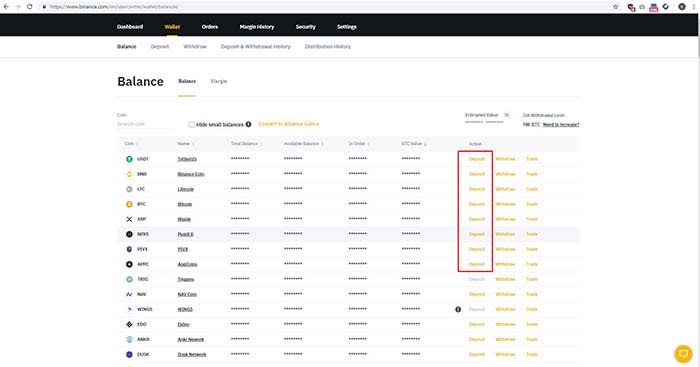
Step #2: Deposit / Buy
After creating an account, users can transfer cryptocurrencies into their accounts.
To fund an account, click “Funds” > “Deposits / Withdraws” > “Deposit.” After choosing “Deposit,” users are provided with a Binance wallet address where they send the tokens.
Once funds are deposited, users can begin trading on Binance, although some tokens take longer than others to settle.
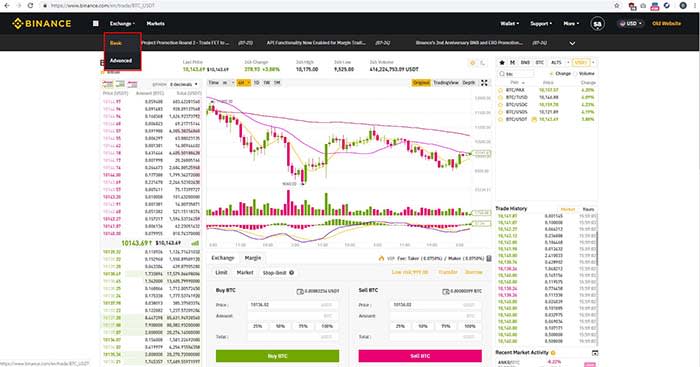
Once an account is funded, Binance users can immediately begin trading. The platform offers a basic and advanced trading screen. First time traders will benefit from the ease-of-use of the basic format while more experienced investors will find value in the more meticulous metrics provided in the advanced screen.
Choose a trading pair by selecting digital tokens on the right side of the screen. Clicking on a digital token provides charts and metrics on the left side of the screen. When you’re ready to place an order, you can choose between timing the market with a “Limit” order, order buying immediately via a Market order. When you choose one of the options, click on the “Buy” or “Sell” buttons at the bottom of the screen to execute a trade.
Users can choose to buy a unique portion of a token, to spend a specific amount on a token, or they can allocate a percentage of their buying power to buy a token.
Conclusion
As cryptocurrencies continue to grow in popularity and value, new users are presented with a deluge of exchange options that can often be as complicated as the platforms themselves.
In contrast, Binance offers a simple value proposition as it combines powerful investing tools with a secure interface that can allow anyone to participate in this burgeoning ecosystem. By balancing this dichotomy, Binance stands out as a platform that isn’t just indelibly popular but as one that is undoubtedly capable of bringing crypto to the masses.
 A lot has been made in recent weeks about the integration that is going on between Facebook, Instagram, and WhatsApp. This goes way beyond the borrowing of app features between the three, like the recent news about a Boomerang feature coming to WhatsApp, which has been going on for years.