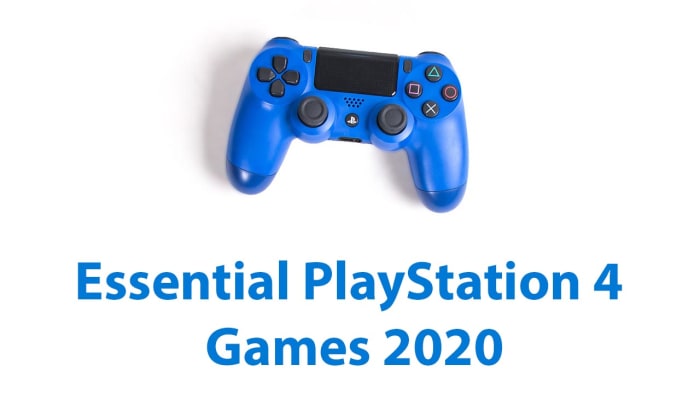
New year, new PS4? You need these essential games for 2020

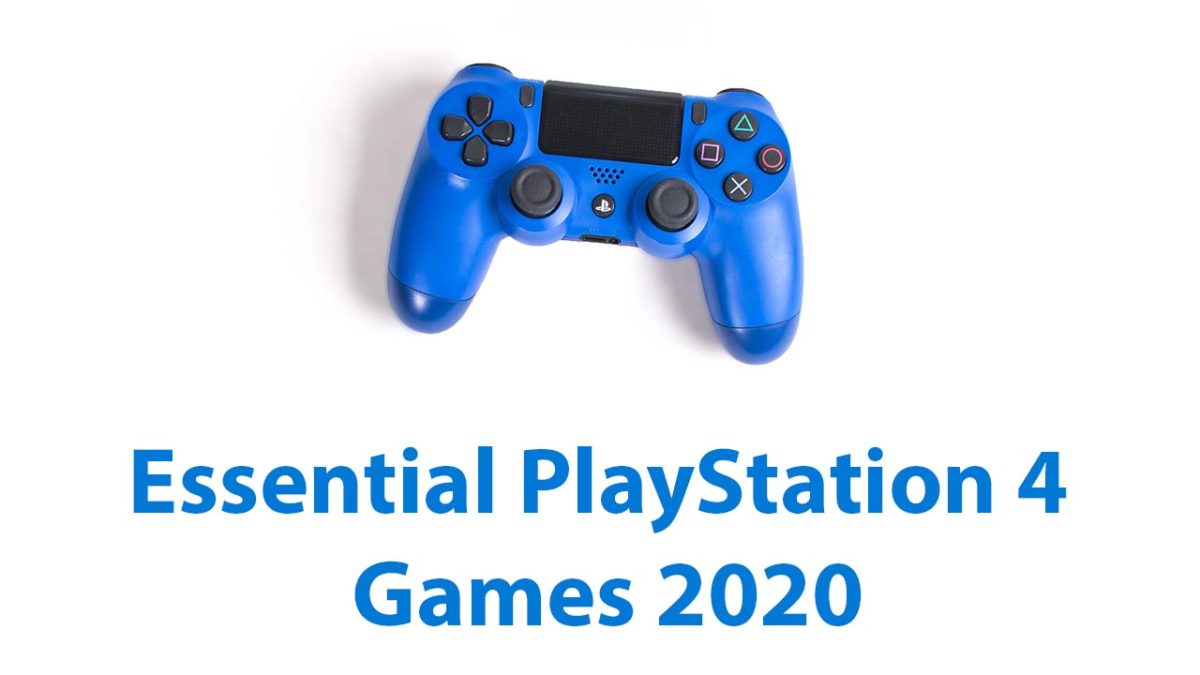
Check out all the must have essential games you need for PS4.

must have Sony PlayStation 4 games for 2020

The PS4 and PS4 Pro are amazing games consoles. Graphics are so good now and games so massive that you can easily lose yourself in hundreds of hours of play per game. That’s just it though, at the end of the day all those graphics chips and processors, and all that system memory is nothing without the games. If all you have is the PS4, you don’t actually have anything at all.

Today, we’re going to walk you through all the must have PS4 games you need to get your hands on. We’ve action, strategy, sports, and many other types of adrenaline fueled and cranium stimulating interactive entertainment. These are the games you need, if you’re to let your new PlayStation 4 reach its true potential.

Best PS4 games 2020

Marvel’s Spider-Man

Marvel's Spiderman

The first game in our list is a superhero game because, well, that’s just the world we live in now. Marvel’s Spiderman is the best Spiderman game to come out since Spider-Man 2 on that most classic of Nintendo consoles, the GameCube. This game really gives you a great idea of what it would be like to swing through New York as Peter Parker’s alter ego and, let’s face it, that should be what all Spiderman games are about. On top of that, the fighting mechanics are lots of fun, a bit similar to those of the Batman Arkham series, and the slow burner of a story really does end with a bang. Do yourself a favor and get this game.

Red Dead Redemption 2

Rockstar don’t make many games these days. The games they do make, however, take the world by storm, which is exactly what Red Dead Redemption 2 did in 2018 and is still doing now. The open world RPG Wild West action looks beautiful and sees you riding with a gang of outlaws as the world of the old West falls apart around you. RDR2 is a truly beautiful game and at times feels more like a movie than a game. There is now a vibrant multiplayer world to explore too. In other words, it’s an absolute treat.

GTA V

We really don’t have to say too much about Grand Theft Auto V. If you have a PS4, you probably already know all about, what could possibly be, the biggest video game of all time. The fifth game in the GTA series sees you playing as three different characters as you drive, steel, and fight your way to the top of the Los Santos underworld. This game has it all so if you want it all, get this game.

God of War
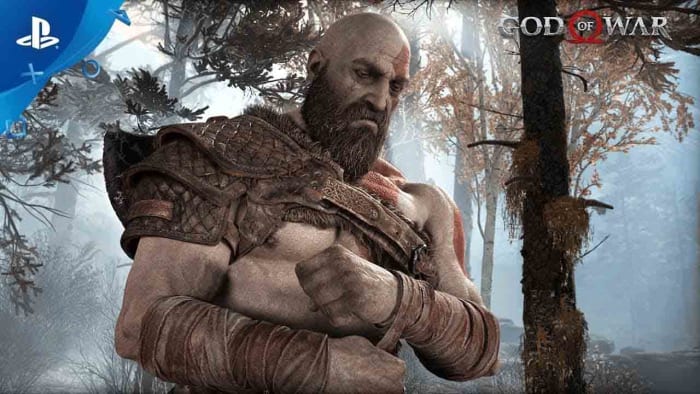
God of War for PS4

Sony’s God of War series has spanned three different generations of PlayStation console and the latest installment almost feels like a new approach to the established way God of War has always done things. Even though Kratos is still the angry brute you’d expect him to be, there is a much more cerebral feel to the game with challenging puzzles always testing you and smart dialogue betraying a brain behind the brawn. God of War is a PS4 exclusive and looks stunning too, which is just two more reasons why you need it.

Call of Duty: Modern Warfare (2019)

Call of Duty: Modern Warfare

Call of Duty could be described as the definitive first-person shooter franchise. It has been around for years and when the original Modern Warfare first burst onto the scene it was indisputably the best FPS action game around. A rough patch from the series, however, and a resurgence of the impressive Battlefield franchise saw this position threatened, but last year’s Modern Warfare reboot really did mark a return to form.

FIFA 20

FIFA 20

There used to be a time when FIFA wasn’t the dominant soccer game on the planet and Konami’s Pro Evolution Soccer series reigned supreme. That time is no more, and FIFA 20 is the latest in a long line of soccer games that have been the best in the world. FIFA 20 looks amazing, is lots of fun to play, and has some fantastic game modes to draw you in beyond the basic match day simulator.

Horizon Zero Dawn

horizon zero dawn

Another game that looks incredible is Guerilla Game’s Horizon Zero Dawn, which is bit like a mix between Jurassic Park and Transformers. I have to say though, that my rather crude description of this game doesn’t do it justice. This adventure game is massive, and its game world is rich with challenges to master and side quests to experience. Horizon Zero Dawn is essential because simply put, it is one of the best games ever made.

Shadow of the Colossus

Shadow of the Colossus is a remastered PS2 game that now packs a HDR supported 4K punch. In short, it looks truly beautiful and brings with it a unique gameplay experience that can’t be replicated in any other game or on any other console. That’s what makes Shadow of the Colossus a must-have game. It will take you to places other games can’t and will stay with you long after you’ve stopped playing.

Titanfall 2

Titanfall 2 is the sequel to a game that was never actually released on the PlayStation. The good news for all PS4 owners, however, is that the sequel is better than the original in almost every conceivable way. The FPS action Titanfall 2 offers is some of the best that’s ever been created and the mech-like Titans that you pilot, as well as fighting on foot, bring something fresh to the experience too. On top of that, the Titanfall 2 single player campaign is one of the best we’ve ever played.

What Remains of Edith Finch
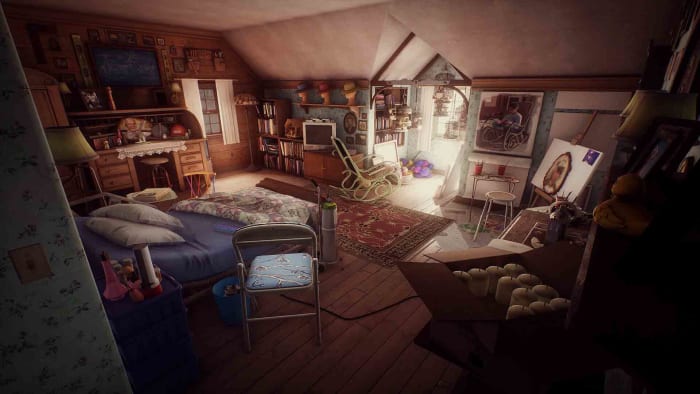
What remains of Edith Finch on PlayStation

The final game to make our list of essential PlayStation 4 games is about emotion. What Remains of Edith Finch is a powerful game that sees you exploring the main character’s family home and unlocking her family’s history. Every new discovery will have you feeling something different and by the end you’ll be completely refreshed and feel truly exhilarated. This is a magical game that you really shouldn’t miss.

Wrapping up

OK, so this list has missed out a few classics like Metal Gear Solid, Resident Evil 7, Uncharted 4: A Thief’s End, Bloodborne, Dark Souls, Nier: Automata, and The Last of Us; but we feel that a list of essential games needs to have its limits. The games we’ve laid out above will leave you feeling fulfilled by your PlayStation yet hungry for more.
All you need to know about Tik Tok

TikTok is a Chinese video sharing and lip-syncing app

The Tik Tok Guide

TikTok has quickly risen to become the hottest trending social media app on iOS iPhone, and Google Android phones. This puts it ahead of other social media platforms like Twitter, YouTube, and even Facebook and Instagram. TikTok has been downloaded millions of times in the U.S.  ABC News in Australia calls it, “the app your kids love, but you’ve never heard of” which ultimately begs the question; what is TikTok?

What is TikTok?

The TikTok app, like Snapchat and a whole host of new apps these days can appear baffling to anybody born before the turn of the millennium. Users can create 15-second comedy skits using a variety of tools including lip-syncing, animations, special effects, and also beat matching popular songs to filmed footage. These all add up to create a tool that can give even the freshest and most inexperienced of movie-makers the ability to create videos that look polished and well made. Videos can they promote across the networks using tools like hashtags. Tik Tok is making people famous.

TikTok was formerly called Musical.ly, but now has a fresh look and new name. It was taken over by the Chinese firm Bytedance in 2017 and has since gone on to reach hundreds of millions of monthly users in over 150 countries.

9

TikTok’s success in the US has been helped along by late-night talk show host Jimmy Fallon. Fallon has not only encouraged his viewers to use the app, he has also offered an excellent introduction to what it is about: “What it is, is you post short videos of you doing fun stuff like lip-syncing to a song or a movie clip or acting out a silly scene with your friends, or even your pets” Another Fallon feature invites users to roll around the ground like tumbleweeds, using TikTok to overlay old western music on top of the video.

TikTok is a fun-to-use app that invites users to create funny, silly, and hopefully engaging videos that they can then share on the app. Let’s have a look then at some tips on how to use Tik Tok.

Top TikTok tips

Tip #1 The TikTok Share button does a lot

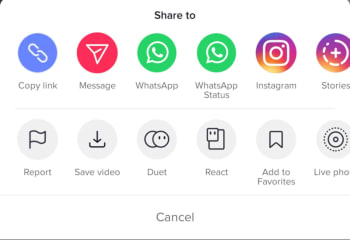
You’ll find Share buttons on almost all social networks and apps. You click share if you want your friends to see something you like or maybe hate. The Share button on Tik Tok, however, does a lot more than just sharing Tik Tok videos. First up, it’ll give you the option to download a video so that you can watch it later when you’re offline. Another cool thing you can do when hitting the Share icon on Tik Tok is saving the video as a GIF. This is a great option as many of the short Tik Tok videos look fantastic when played over and over again as GIFs. You can also make Live Photos out of Tik Tok videos.

The final cool feature found in the Tik Tok Share menu is the duet option. If you find a video you like, you can perform a duet with the performance in that video. Click here for our guide to Tik Tok duets.

Tip #2 TikTok Quick Actions

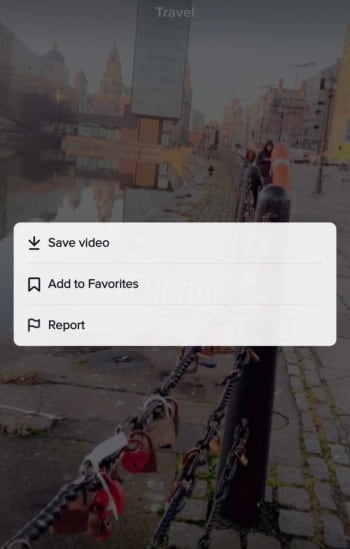
You can actually access some core Tik Tok features without having to go into any menus. When watching a Tik Tok video all you need to do is hold your finger down anywhere on the screen to open up the Quick Actions screen. This will enable you to quickly Save videoAdd to Favorites, or tell Tik Tok you’re Not Interested in this type of content, so it won’t show up in your Home tab.

Tik Tok Quick Actions

Tip #3 Use TikCodes to connect with other users

Tik Tok has its own cool version of QR codes that you can use to connect with other Tik Tok users. Your TikCode will look like a circular QR code that is wrapped around your profile picture. To create your own TikCode go to your profile page and hit the code button, which is above and to the right of your profile picture. This will show you your code, which you can either show to another user directly or save and share across your social networks and messaging apps. If somebody else shows you their code and you want to scan it, you need to tap the Scan button at the bottom of your TikCode screen. Once you’ve scanned the other person’s code, you’ll be taken to their profile page.

Tip #4 Privacy Settings are important

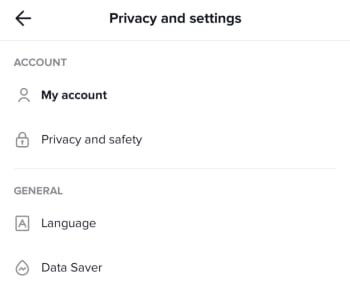
You need to consider your own safety when uploading videos of yourself to the internet. This means thinking about your privacy and who can have access to your videos, who can download them, and who can perform duets with them. To access your Tik Tok Account Privacy and Safety menu you need to open your Profile page and then tap the Ellipsis (three dots) menu icon in the top-right corner of the screen. This will open the Privacy and Settings menu, where you’ll find the Privacy and Safety menu as the second option in the Account section. This is where you’ll be able to control all of your privacy settings and keep yourself as safe as possible when using Tik Tok.

Tip #5 Handsfree makes anything possible

You want your Tik Tok videos to shine. That means doing a little bit more than simply hitting record and capturing whatever it is you’re doing at any particular moment. This means taking the time to plan out what will happen in your new video. You could practice a dance routine, go through your lines for a lip-sync masterpiece, or even draw up a script for a little 15-second movie. Once you’ve done all that though, you’re going to need to freedom to pull it all off without having to hold down the record button. To use Tik Tok’s timer feature go to the video capture screen and look for the small clock icon. Select how long you want the timer to wait before it begins recording, and then hit Start Countdown. Click here for our guide to help you become Tik Tok Famous.

The most popular TikTok memes

You’ll love these. They’are all the best Tik Toks we could find on the internet.

The most popular Tik Tok Memes

Is Tik Tok, the app formally known as musical.ly, better than Vine? We’re not quite equipped to get into such a deep philosophical debate right now. Honestly, we’d be here for hours and we probably wouldn’t even say that much. Suffice to say, when Vine shut down, we were devastated until Tik Tok burst onto the scene. The Tik Tok video app is glorious, with some crack TikTok user accounts never failing to have us rolling around laughing our heads off. Tik Tok videos might make you cringe, but they’ll definitely make you laugh.

That’s what we’re here for today. We’re here to celebrate Tik Tok in all its scripted, epic comedy, lip-sync music video goodness and go through some of the best Tik Tok videos ever. Quick note, these articles always take me longer than they should do as it is impossible to not get sucked in and just watch video after video. Buckle up, these are the funniest Tik Toks.

9

Funny Tik Tok memes

Second quick note; many of these will be in the form of tweets and Instagram posts. They all originated on Tik Tok, however, we guarantee it. Tik Tok users are like the new YouTubers and people will share their content across multiple platforms. You can even find Tik Tok videos shared on platforms like Snapchat and Google.

Scary cat

Tik Tok lets users add music clips to their videos. The clips can be used to create amazing lip-synced tributes to the biggest pop acts on the planet, but they can also help build tension for a jump scare payoff. Not bad at all when you only have 15 seconds to play around with.

Yeah, you’d better run

This is great. The music helps build the video up towards its epic payoff just like in the scary cat video above. Let’s face it, we all know how disgusting roaches are and we definitely don’t want them anywhere near us.

Risky business

What can you do with 15 seconds? Well, as this video proves quite a lot, actually. Filming is about getting the shot, no matter what. Use what you can to get the effect you’re looking for. This could be a helicopter, drone, multi-million-dollar special effects studio, or the ceiling fan in your living room. Oh yeah, don’t forget a backing track that will make your hairs stand on end.

Dead on

Apart from the odd social media manager or TV star, Tik Tok is the domain of Gen Z. If nothing else, this gives us hope for the future as they’ve been making us laugh for nearly two years now. They’re even better when they’re skewering themselves like in this classic Tik Tok.

No Steve, no

This classic Tik Tok meme has been painstakingly recreated with everything from gummy bears to wine bottle corks. That’s the great thing about Tik Tok, people reuse audio to make their own versions of popular memes. This video has an added extra treat at the end though, that will have you in stitches.

Hit or miss

Another big Tik Tok meme that has been rippling across the app and reaching out into the real world is Hit or miss. If you’ve ever heard this shouted out in public, you’ve found yourself right in the middle of the meme. Tik Tok users shout it out to see if there are any other Tik Tok fans around.

That’s not a knife, THIS is a knife

As we’ve already mentioned, you’ll often find a bit of star power mixed in between all the comedy gold coming straight from the youth of today. This video of Arnold Schwarzenegger laughing at the size of Sylvester Stallone’s knife fits in nicely. It might not have the production value of some of the other videos we’re featuring but it deserves its slot.

Full power wholesomeness

This video is simple. It includes a very happy dog, video game sound effects, and a charging cable. Enjoy.

The Bollywood cat

Duets are a big thing on Tik Tok. The idea is that you both video yourself in portrait mode singing/lip-syncing together and then play the videos along together. When done well they can look great. Not as great as this though. A Bollywood style dance duet between a man and a cat.

Dog the head banger

This dog needs no dance partner. This dog doesn’t even need to get up. This dog can do it all on its own while lying on the floor. We wish we could do what this dog does so effortlessly.

Just good content

@alainahatsuneI will never be the same ?? #thisismyvoice #girlsarentfunny #dank #ironic #meme #anime #cringe♬ original sound – alainahatsune

Like we’ve already mentioned, memes are often repeated across Tik Tok with different users adding their own spin to an already well-worn concept and idea. Here we’ve two excellent examples of the This is my voice… meme that sees users showcasing the changes they go through when they become members of a new digital tribe. Check out first what happens when you start watching Dora the Explorer and then afterwards what happens when you start watching anime. Both are great.

Cat cruelty

Animals are a big deal on the internet. We’re not going to get involved in the whole cats vs dogs debate. We love them both. We do, however, know that cats have a certain diabolical nature to them while dogs have more of a loveable gullible way of seeing the world. This Tik Tok illustrates these truths brilliantly and proves that you don’t need some incredible performing pet to make them internet video stars.

TikTok: Where to listen to the most popular songs of 2019

Check out our playlist of ten of the most popular hit songs that have taken Tik Tok by storm.

Tik Tok music hits

Tik Tok. It is definitely a global phenomenon but there are still people out there who think it is just a flash in the pan. No matter what side of that debate you fall on, you have to say that the lip-syncing music video app that came from musical.ly is lots of fun. TikTok users take music clips and then build their own fifteen-second videos out of them. People can then reuse the same audio clips making music memeable.

Tik Tok is so successful that it is easy to lose yourself to a couple of hours watching short videos and then come out the other side humming along to songs in your head that you’ve never even heard before. Yep, Tik Tok is now one of the best places to hear new music as there will always be somebody out there who is cooler than you, who’s listened to a new hit song you haven’t heard yet, and then turned it into a catchy Tik Tok video. From hip-hop rappers to Spotify heroes and Billboard dominators and influencers like Ariana Grande, Tik Tok has them all. These days, popular songs aren’t measured by views or listens, instead, they’re measured by how many videos have been made using their best bits. In no particular order then, let’s look at some of the most popular songs on Tik Tok from 2019.

9

Famous Tik Tok songs 2019

Lil Nas X Old Town Road – 2.6 million videos

Listen to it on:

YouTube video

Spotify

Deezer

Absofacto Dissolve – 1.1 million videos

Listen to it on:

YouTube video

Spotify

Deezer

DJ Snake Taki Taki Feat. Selena Gomez, Ozuna, & Cardi B – 1.1 million videos

Listen to it on:

YouTube video

Spotify

Deezer

Charlie Puth Betty Boop – 1.6 million videos

YouTube video

Imagine Dragons Believer – 1.7 million videos

Listen to it on:

YouTube video

Spotify

Deezer

Avril Lavigne Hello Kitty (Illusion Remix) 1.3 million videos


YouTube video

Spotify

Deezer

Avicii The Nights 1.4 million videos

Listen to it on:

YouTube video

Spotify

Deezer

Ariana Grande Thank U, next 1.5 million videos

Listen to it on:

YouTube video

Spotify

Deezer

Why Mona Wannabe 9.4 million videos

Listen to it on:

YouTube video

Spotify

Deezer

Billie Eilish Bad Guy 1.1 million videos

Listen to it on:

YouTube video

Spotify

Deezer

How to control Google Earth Flight Simulator

How to control the Google Earth Flight Simulator

Google Maps and Google Earth are edging closer and closer to becoming the same app. There is still a huge Google Earth feature missing from Google Maps though. One of the more lesser-known features of Google Earth Pro is the in-built hidden Flight Simulator. Accessible via the Tools Menu, the Flight Sim allows you to fly around the globe from a selected number of airports around the world.

This makes traveling the world using Google Earth a bit more interesting and fun than just panning it over with your mouse.

Google Earth Download
7

How to control Google Earth Flight Simulator

Step 1

To access the Google flight simulator mode, go to the Tools menu and look for Enter Flight Simulator…

Step 2

You can then choose between two types of planes. Also, you can choose whether to fly from your current position in Google Earth or take-off from a selection of different airports.

Flight Simulator

Step 3

The controls for Google Earth Flight Simulator aren’t very clear. It isn’t as simple as pressing a start flight button. There is joystick support so you can use a Joystick if you’ve got one but if not, you’ll need to refer to this list of flight simulator keyboard controls. These keyboard shortcuts include the arrow keys, page up, ctrl, alt+a, and all manner of complicated keystroke and mouse controls. Note that they are different for Windows/Linux and Mac.

Google Earth Flight Simulator keyboard shortcuts

Step 4

The Head-Up Display is a standard basic HUD that displays altitude, heading, throttle, etc.

Google Flight Simulator

Step 5

It takes a while to master the basics, especially controlling thrust and altitude to prevent crashing. Once you have, it’s fun flying around and clicking on points of interest as if you were browsing Google Earth normally. You can even land your plane by throttling down when you approach an airport and pressing G to extend the landing gear. It’s quite hard as you need to control your flaps as well as hitting both “.” and “,” to break the left and right wheels.

Best Winamp skins

These are the best Winamp Skins

All the best Winamp skins

Nullsoft’s Winamp has been around forever. Back when you started downloading songs from Napster, Winamp was the best program to listen to them with. As other programs have come and gone, and the likes of the iPod, iPhone, and now Spotify have revolutionized the way we listen to music, it bears remembering that Winamp is still here and it is still going strong.

As well as Winamp’s ability to play many different types of audio files like MS-Audio, WAV, MP3, and AAC, one of the big stand out features for Winamp has always been its skins. Winamp skins have long given users a fun way to make their digital music player their own. Through the years there has been all manner of Winamp skin landing on the internet from classic Winamp 2 and Winamp 5 skins to skins of your favorite movies and shows. Let’s have a look then at some of the best Winamp skins you can download right now.

Winamp skins collection

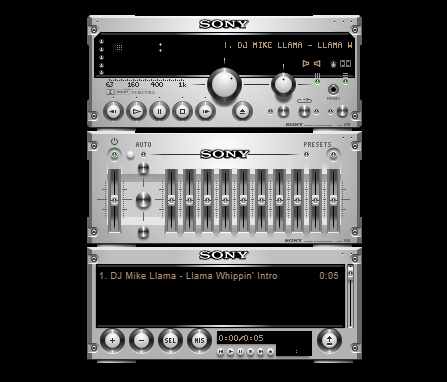
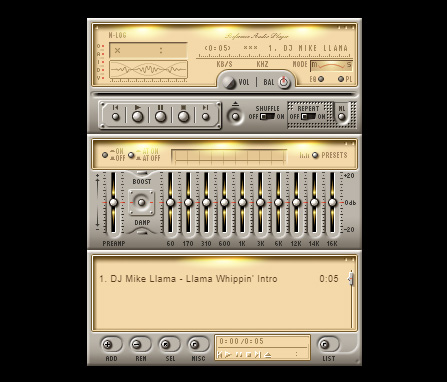
Expensive Hi Fi Skin

Expensive Hi Fi

Although a modern skin, the Expensive Hi-Fi Skin is an absolute classic for Winamp. The premise is simple, you make Winamp look a high-end separates stereo with each part of the Winamp console, including the main window and the playlist section, being a separate stereo module. There are lots of these to choose from. But this one stood out for us as the equalizer looks so good.

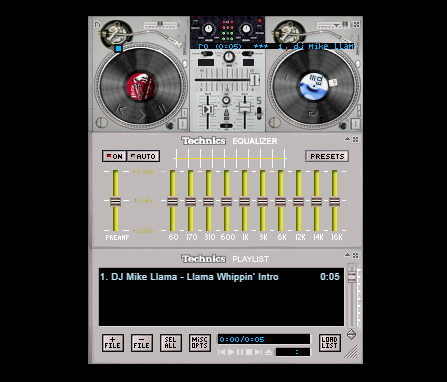
Technics 1210 Skin

Technics 1210

Most DJs simply mix with their laptops these days, but any DJ worth their salt learned their trade on a pair of Technics 1210s. These things were built like tanks and this skin does a fairly good job of recreating the old beasts with a decent mixer and equalizer to go with them too.

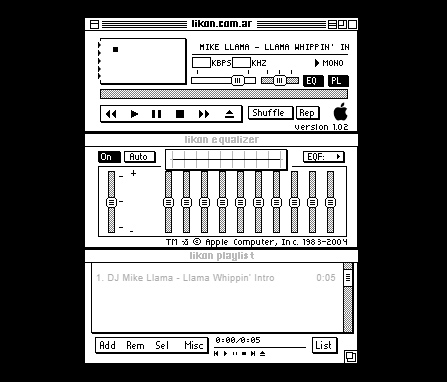
Old Mac OS Skin

Old MacOS

These days Winamp has quite a bit of nostalgic value to it. Like we’ve already said, there are now many other options out there for listening to music in many different formats. We don’t even have to download music onto our devices anymore. We still use Winamp though, for one reason or the other, with it definitely having a nostalgic feeling to add to it too. Well, how about this black and white original Mac-style Winamp skin to add to that nostalgic feeling?

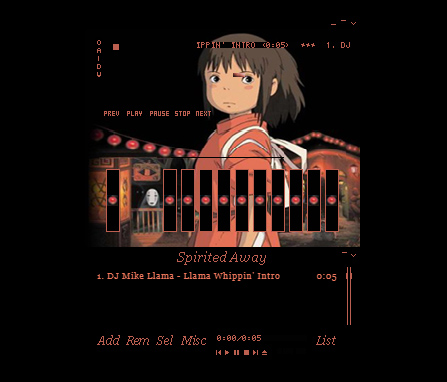
Anime Winamp Skin

There are a lot of different Anime themed Winamp skins out there. This one from the classic movie Spirited Away. It is sleek and simple with a bold red on a black color scheme and a cool image to go with it.

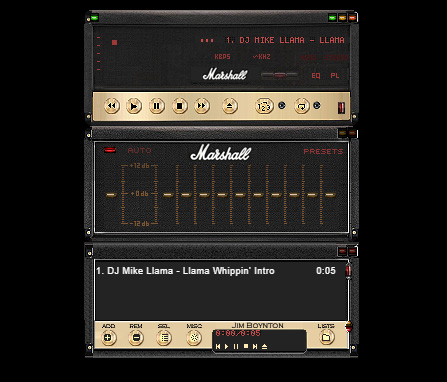
Marshall Skin

Marshall skin

This Winamp skin is so cool. It basically turns your Winamp controller into an epic Marshall amp, just like you’ve seen on stage at some of the world’s biggest rock concerts. If you’re listening to anything with a guitar solo of more than a minute, this is the skin you need.

Commodore 64 Skin

Commodore 64 skin

This 64-bit skin is one of our favorites. It takes us back to the days when video games came on cassette tapes and you’d have to turn the tape over halfway through a load screen. This is nostalgic to the max and, with cyberpunk minimalism being very much on-trend, it looks great too and will definitely get people’s attention.

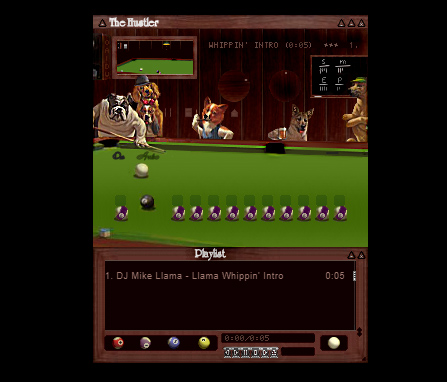
The Hustler Skin

The Hustler

This Winamp skin is just funny. It takes that classic image of the dog’s playing pool and turns it into a Winamp skin complete with pool balls as equalizer knobs so you can rearrange how the game is going by playing with the levels.

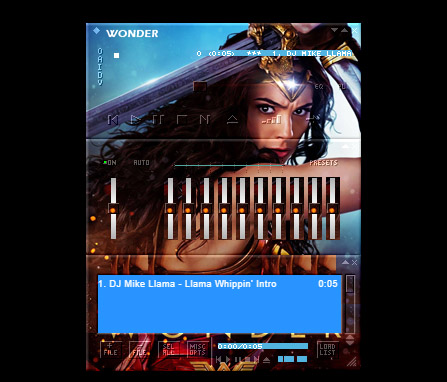
Wonder Woman Skin

Wonder Woman

Some people turn Winamp into what is essentially a poster that plays music. There are plenty of movie posters out there that people have turned into Winamp skins, but we’ve seen more Wonder Woman skins than any other movie. This is our favorite.

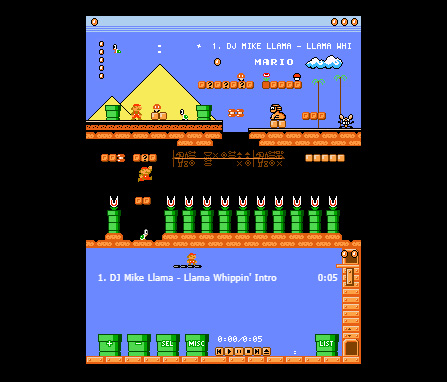
Super Mario Land Skin

Super Mario Land

This Super Mario Land skin is very cool indeed and is more than just a flat image. It depicts a number of different game worlds and houses the control buttons in the question mark chance cubes you find all over Super Mario World. The coolest bit, however, is the equalizer, which is series of Mario’s famous pipes with Piranha Plants sticking out. You mess around with them to change the levels of your music. It looks great.

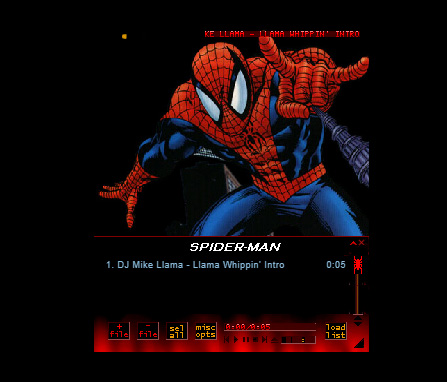
Spiderman Skin

Spiderman skin

Another poster skin here. Although this is a basic skin with only minor button design, a main image, and a color scheme we still love it. The Spiderman image is as cool as they come. It’s almost like Winamp keeps pulling you back in with Spidey’s web. Just listen to one more tune…

Nucleo Skin

Nucleo Skin

If you’ve ever seen or used an old school HAM radio, you’ll be familiar with the retro stylings of the Nucleo Winamp skin. Waveforms, KHZ, and analog buttons really make this skin stand out as a sleek and light offering.

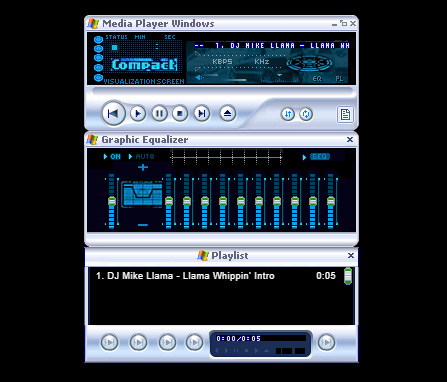
Windows Media Player Skin

Windows Media Player skin

The old Windows Media Player was likely what you used to listen to your tunes on before you downloaded Winamp, which was able to play a lot more file types than Windows Media Player could handle. If the old girl had a style you liked though, don’t worry. You can simply download this skin, which will make Winamp look like Windows Media Player.

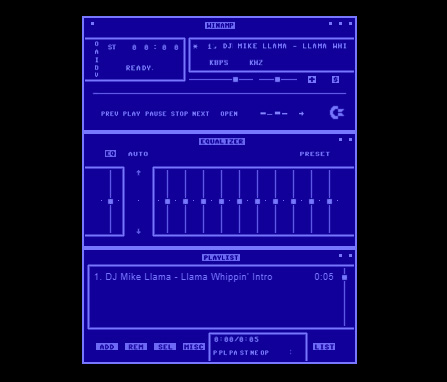
Windows Classic Skin

Windows Classic skin

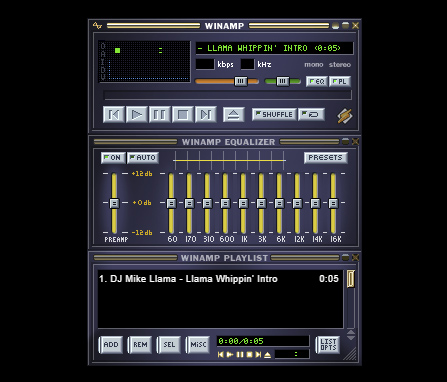
You wouldn’t believe how popular Windows 95 was. Back when Minesweeper and Solitaire were the only games you had on your PC was a happier time for many people as Windows 95 nostalgia is a real thing. This Winamp skin looks like a classic Windows from back in the day, complete with the solid greys and blues that made Windows 95 what it was.

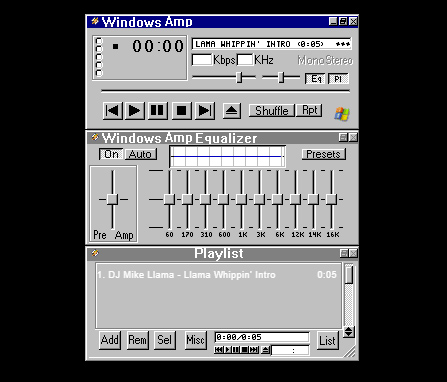
Winamp Classic Skin

Winamp classic

Why mess with perfection? The classic Winamp skin is pretty good, which means there isn’t really any need to change it in the first place. This is all about personal choice and tastes so have at it, if you wish.

Best Audacity plugins

Check out our list of the best Audacity plugins.

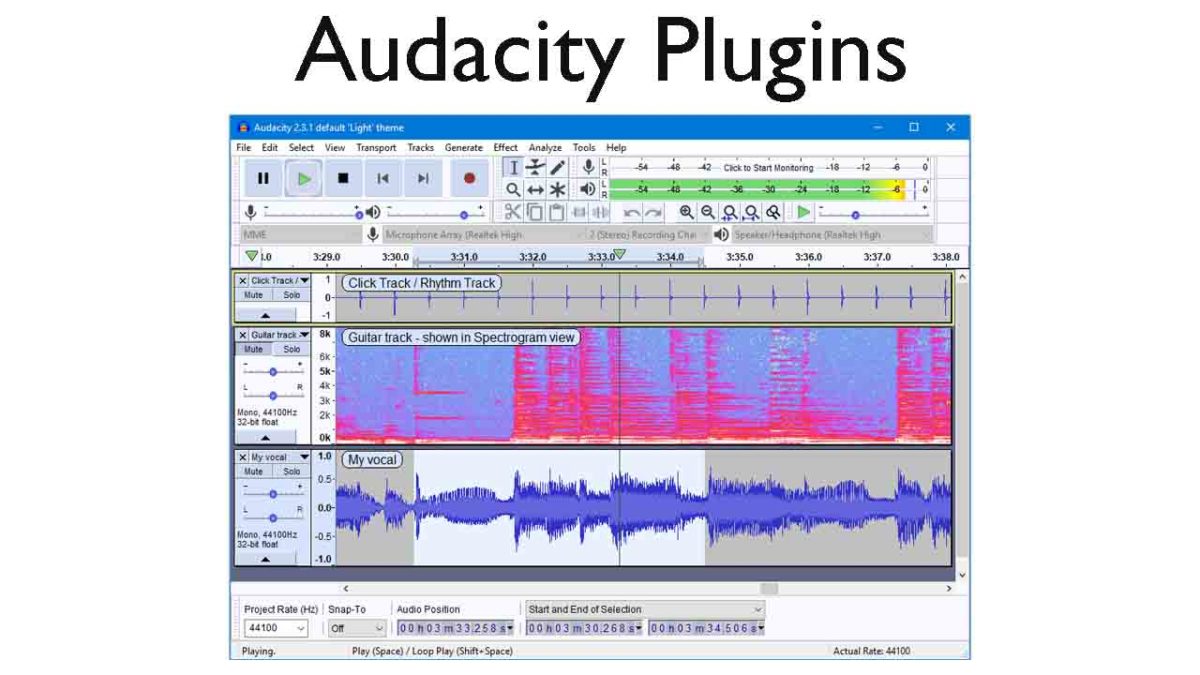
The best audacity plugins

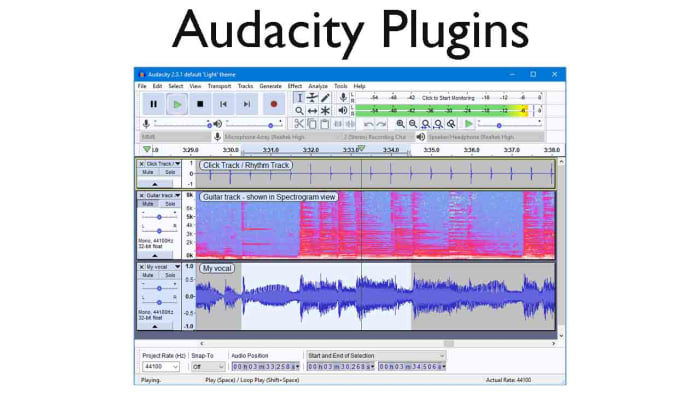
Audacity on Windows, Linux, and Mac OS X operating systems is an excellent open-source audio editor for anybody who needs to do pretty much any task relating to the audio. Audacity puts the power of a music producer recording studio right there in your bedroom and it is fair to say that many of the biggest tracks have been produced in bedrooms by aspiring producers and DJs just like you.

Audacity is a very well-made piece of music software that has been developed by and continues to be maintained by the audacity team, which is a group of volunteer developers all over the world. The nature of the Audacity software is why we’re here today. Its core functions mean it can help you create podcasts or produce tracks that can hit the top of the charts, it is that good. On its own, however, it can be and feel a little limited. This is OK though, as because it does the basics so well, other developers can build their own plugins that augment the music production process. This is what we’re going to look at today, an Audacity-files plug-in directory. These are the best Audacity plugins.

7

Best free plugins for Audacity

Audacity VST Enabler

VST effect plugins. This is where all Audacity plugin guides should start. The Audacity VST Enabler plugin manager allows users to take advantage of high-quality Visual Studio Technology (VST). Using VST plugins will give you the ability add all sorts of different recording studio like features to your setup. Think pianos, synthesizers, oscillators, and even guitar rigs or classical instrument inputs and samples and you’ll start to see just how much is possible with VST plugins for Audacity.

There is good news and bad news, however, when it comes to the Audacity VST Enabler. The bad news is that it has been removed from the official Audacity website. The good news is that it has been built-into Audacity itself. If you’ve recently installed Audacity, you already have it and can begin downloading VST plugins. If you installed Audacity a while ago or have an older version like v. 1.3, update Audacity and you’ll be ready to install VST plugins.

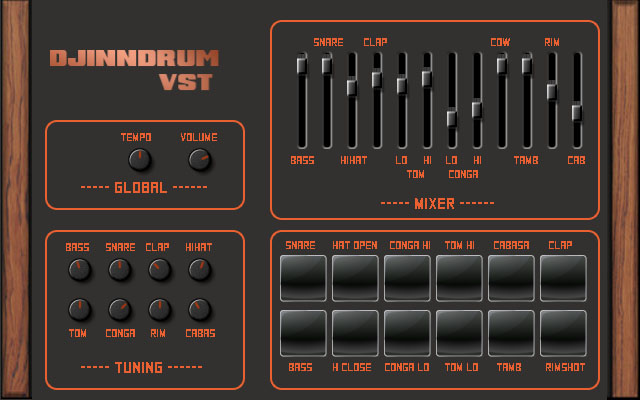
Djindrumm LM-1

Djinndrum

Now that we’ve cleared all that up, let’s get into some of the best VST plugins you can add to Audacity. Let’s go through VSTs that’ll help you create and enhance all the sounds you’d get from a band then add some creative powers to your setup too.

First off then, is the Djindrumm VST. The Djindrumm is a digital re-creation of the classic Linn LM-1 drum machine. The Linn has been a stalwart of rock and pop gods for years. Michael Jackson used one and so did Prince. Enough said. You can get the tools they used to make their hits with this free VST plugin for Audacity, which you also got for free. It really is a mad and crazy world we live in.

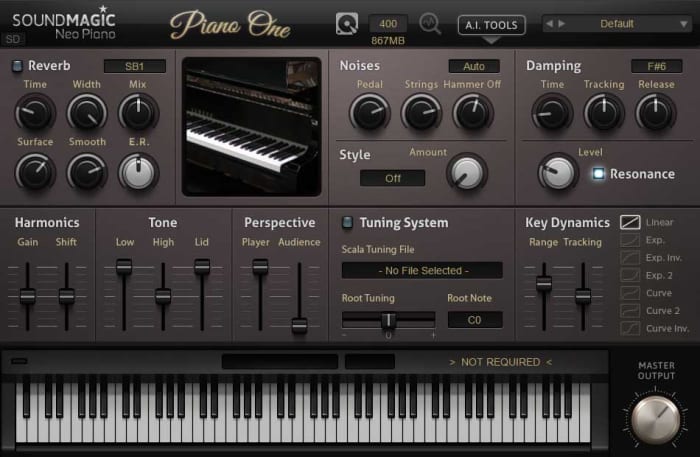
Piano One

Piano One

Many people think that Piano One is the best free acoustic piano VST plugin you can get your hands on. One of the main reasons for this is because the samples came from a Yamaha C7 Grand Piano, which would set you back about $75,000, if you bought one today. Yep, that’s right, you can get a free acoustic piano that sounds like a $75,000 piano. The free version of this VST isn’t feature rich, but it sounds incredible.

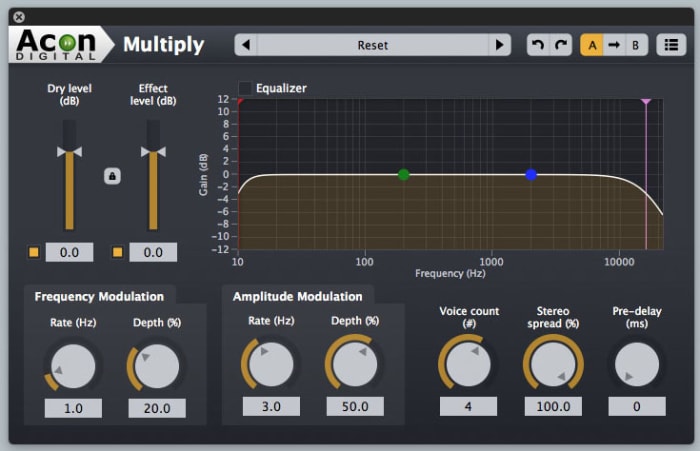
Acon Digital Multiply Chorus

Acon Chorus Multiplier

The Acon Digital Multiply Chorus plugin is great if you want to thicken out your sound and add a bit of depth to your tracks. It offers control over frequency and amplitude modulation and can add minute delays to your vocals. This effects VST is excellent if you’ve already laid down your track and you’re looking to add a little atmosphere and emotion to the sound. It is only a small console, but it can bring so much to your music.

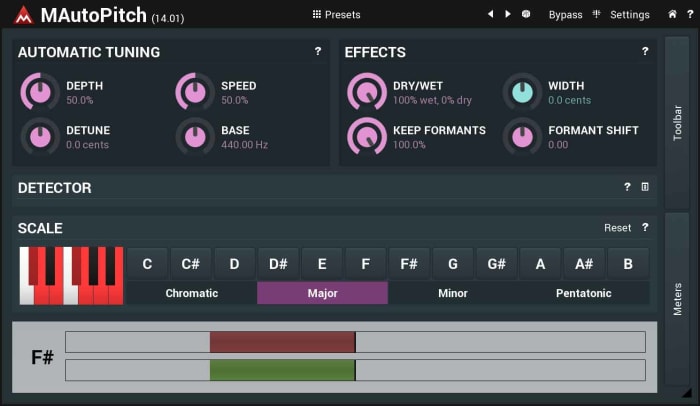
Melda MAutoPitch Auto-Tune

Melada AutoTune

Auto-Tune processes sound and then shifts the pitch to the nearest true semitone. This makes it an invaluable tool for any vocal mixer. If you’re laying down vocals on your track, you need to an Auto-Tune plugin, and the Melda MAutoPitch is one of the best you can get for free. It will fix the pitch in your tracks, correct all the notes that aren’t quite right, and also give you the ability to distort the vocal tracks you’re putting into your songs.

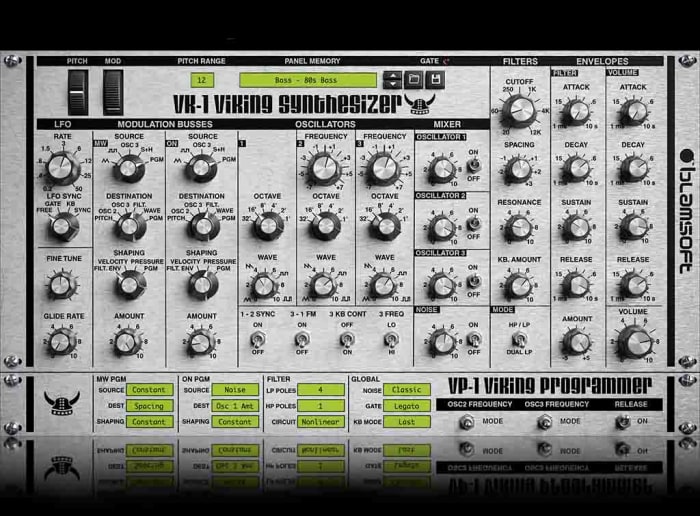
VK-1 Viking Synthesizer

Viking VK-1

If you’re looking to bring some retro electronica into your music, you’re going to want a synthesizer. The VK-1 is a VST plugin emulation of an analog mono synthesizer that’ll bring some real power to your Audacity setup. It comes with oscillators, dual modulation channels and an all-round accurate recreation of a very retro sound. What’s even better about the VK-1 Viking is that it is paid as you like. If you’re just getting started and don’t have much money to invest in your setup you can get this for free or very little.

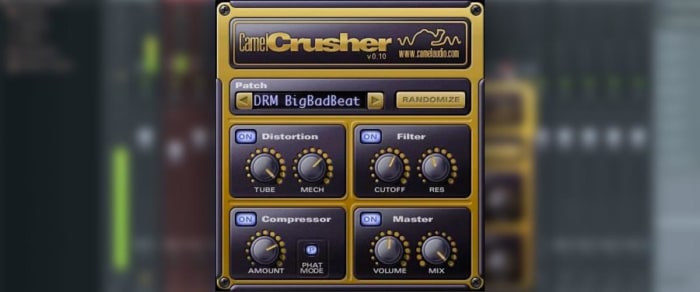
CamelCrusher

CamelCrusher

CamelCrusher adds distortion control, reverb, compression, and filtering to your Audacity toolkit, giving you powerful control over the sounds and beats you add to your tracks. As well as giving you the control, CamelCrusher also gives you a number of presets to add some instant oomph to your output while also giving you an idea of what the plugin is capable of. The CamelCrusher plugin is so good that Apple decided to acquire the developers that built it. Don’t worry though, you can still download CamelCrusher for free.

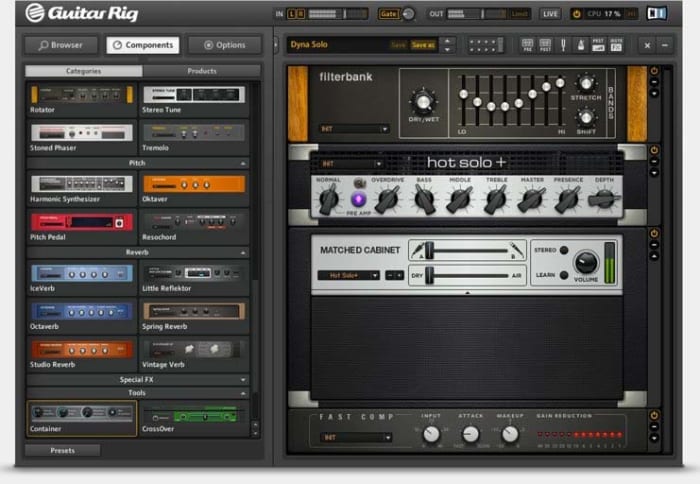
Guitar Rig 5

Guitar Rig

Guitar Rig from Native Instruments brings the power of the most epic of rock god recording studios right into your bedroom. With 17 different amps to choose from, 27 cabinets, and 54 effects this VST plugin gives you the power to really take control of the guitar tracks in your audio files. It can even manage effects like tone shaping, different mics, and even the positioning of your setup. This really is some next-level gear.

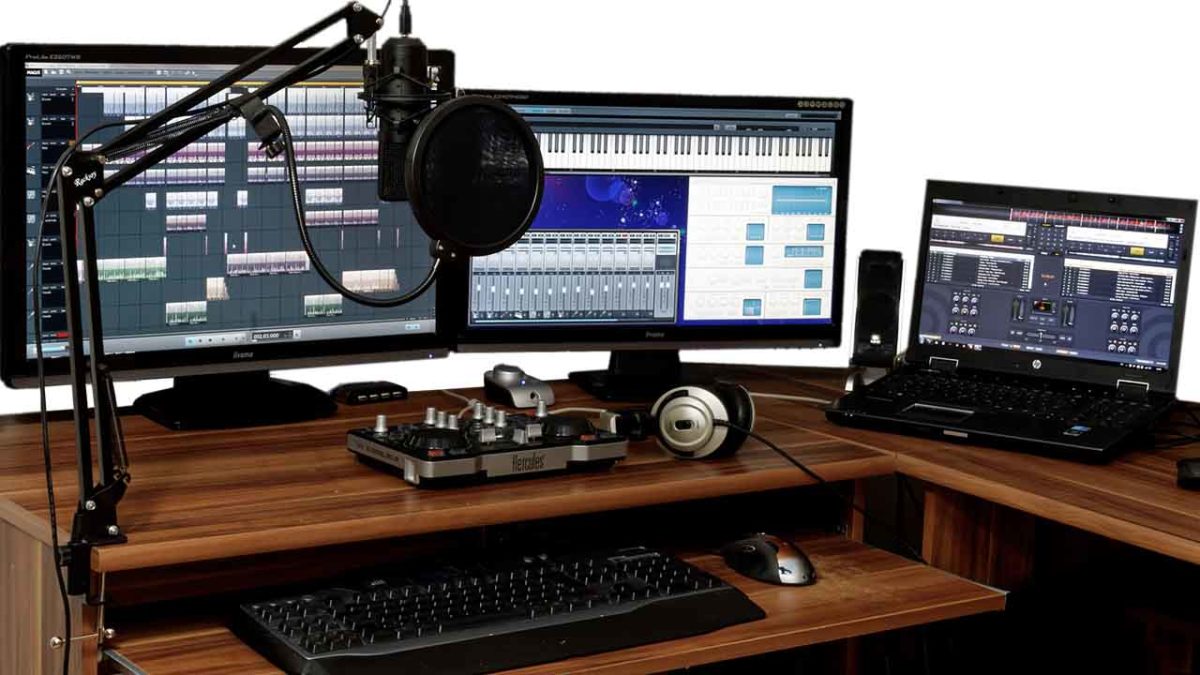
The best free music production software

These are all the essential programs a DJ needs to produce and play music.

Best audio editing software

These days your laptop can turn you into a superstar. There are people out there who travel the world with nothing but their laptops, plug them into the sound systems wherever they end up, and then blast out concerts to thousands of fans. I am of course talking about superstar DJs.

The best DJs hunt out all the best music and then play right tracks at the exact right moment for the crowd to hear them . It sounds like an easy job, but it’s not. On top of that, if you want to become a superstar DJ who tours the world, there is something else you’ll have to master; music production. Unsurprisingly, a LOT of people want to be superstar DJs, which makes it very hard to stand out the crowd. The best way you prove yourself to be special, however, is by making your own songs to play in your own sets and for other DJs to play in theirs. Yep, music production is an integral part of the journey you take towards becoming an international superstar DJ. It’s time to become a music maker.

Music production software can come with a hefty price tag though, and if you’re just starting out, you might well baulk at the cost. This is where Softonic comes in. We’re here to start you on your path to stardom by walking you through some of the best free music production software options.

Free music making software

Audacity

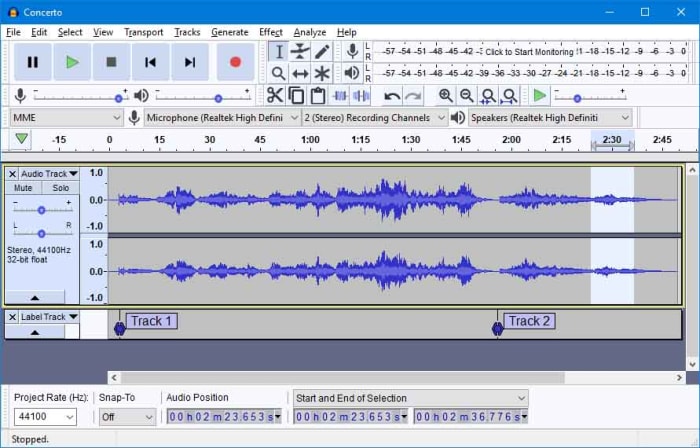
Audacity

Audacity works on Windows, MacOS, and GNU/Linux and is a marvel of free music software. Like all the best pro-grade free programs, such as the image editor GIMP, Audacity is open source software, which means users and developers can add features to the main product or iron out any bugs they find.

Audacity has a lot of features that put it alongside some of the more expensive premium options out there. With Audacity you can easily perform live audio recording, record sounds coming from your PC, convert music, edit, cut, copy, and splice tracks of many different audio formats, and download and install plugins to add new features as and when you realize you need them. Audacity offers advanced audio editing software while, somewhat surprisingly, remaining very simple to use.

7

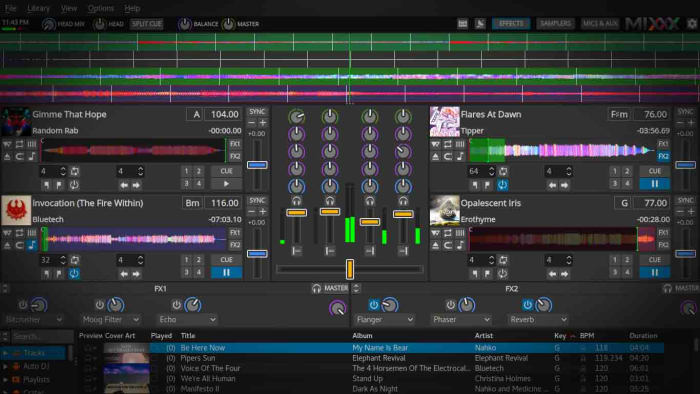
Mixxx

Mixxx

Mixxx is a fantastic piece of free software for all budding DJs. As the name suggests it is more for DJing and mixing than it is for producing music but it still an important tool for any new DJ to have. Another free and Open Source program, Mixxx is available on Windows and Mac OS X and has quite a few features that’ll make DJs happy. It integrates well with external DJ controller decks offering a complete digital audio workstation, has beats per minute (BPM) detection and auto-sync, and will even integrate with iTunes. You can broadcast your mixes live, save them as a variety audio formats or simply blast them out of your speakers for people to dance to. Mixxx is a lot of fun.

Mixxx Download now
8

LMMS

LMMS

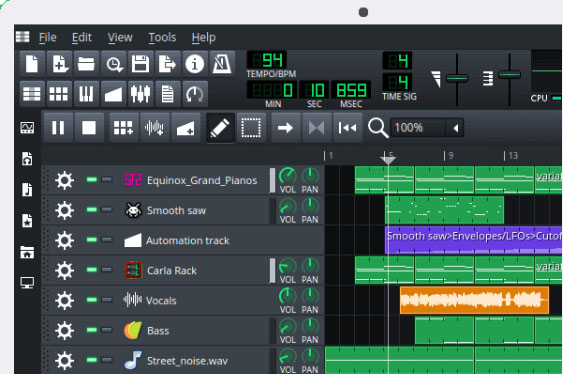
Another advanced, cross-platform, and free open-source audio production suite you can download on Windows, Mac, or Linux is LMMS. It comes with a lot of cool features that will have you creating beats in no time like a built-in Piano roll that you can connect to a MIDI controller, 64 FX mixing channels, and a specific beat and bassline editor.

LMMS loosely stands for Let’s Make Music and that is exactly what the program is designed to do, help you make music. The program works well with external instruments and samples, and, like Audacity, has a lot of plugins you can use to augment your music production experience. You won’t be able to believe that this program is free when you download it.

7

MuLab DAW

MuLab

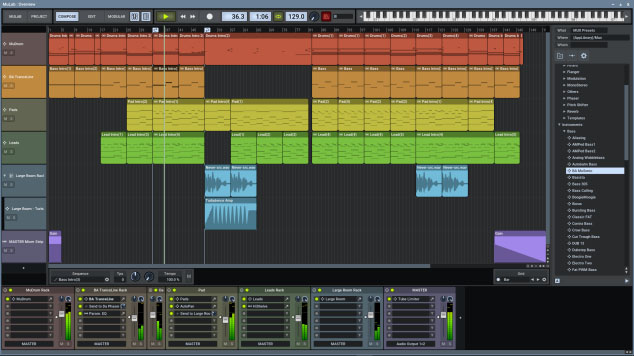
MuLab is chock full of high-end audio production and editing tools that will help you get that song you’re coming up with out of your head and into your speakers. Looking at a bit like Ableton Live and available on Windows and Mac, Mulab is a fantastic music creation program. It has over 300 selected waveforms with its superfast oscillators, multi-track support, flexible track and sub-track support, an easy to use and understand modular architecture, and automatic mono/stereo handling.

The features we’ve outlined above only cover a small portion of those offered by the free version of Mulab, which will give users access to professional-level music production facilities. With lots more features like synthesizer support, MIDI player plugin support, and even a synth effect builder this program has it all. Download it now to see just how much it has to offer.

MuLab Download now
8

GarageBand

GarageBand

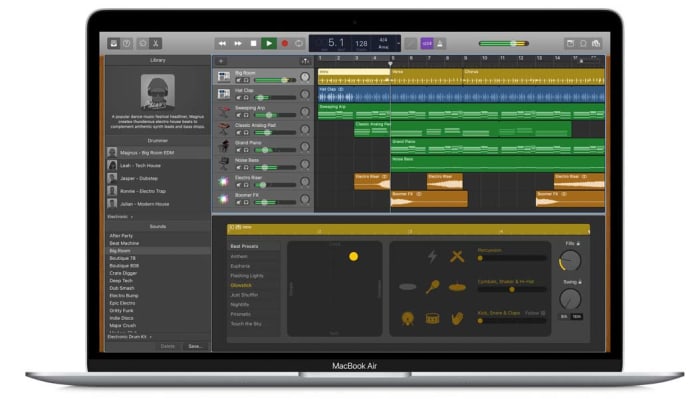
GarageBand for Mac has some really incredible pro tools that you just wouldn’t expect a corporate giant like Apple to give away for free. Many famous artists like Rihanna and Justice have created massive global hits using GarageBand, so if you have a Mac, this could be the best option for you.

GarageBand gives you the ability to create songs with up to 255 audio tracks and offers very well produced drum machine grooves to add to your songs and give them a beat. Other cool features include multi-take recording so that you always end up saving your best take and Multi-Touch support on iPad, which makes it possible to wirelessly play GarageBand virtual instruments on your Mac. This is the most user-friendly app on our list too.

GarageBand Download now
7
Wrapping up

We’ve brought you five essential apps for all budding young DJs and music producers. If you want to make a name for yourself, you’re going to have to make yourself stand out and there is no better way to do that than making your own music and having other DJs play it at their parties.

All of the programs we’ve featured today offer complete experiences that rival that offered by the premium music production apps that cost many hundreds of dollars each. With most of these apps, however, there is a steep learning curve so you should take that into account if you’re just getting started. There’s no point having massive and fully-featured music production suites on your PC, Mac, or Linux, if you don’t know how to use them. Many of these apps come with extensive online forum support so check out the forums for user guides. You’ll also be able to find extensive support on YouTube too.

The best free video editing software of 2019

These are the five best free video editors available on the internet today. Check them out now.

Best free video editors

There are a lot of amazing video sharing platforms these days. Beyond the obvious ones like YouTube and Facebook, you have smartphone specific apps like Tik Tok and IGTV. This being the case, we’re not surprised you’re looking for some top-quality video editing programs. Simply filming the best video isn’t enough these days. You need to know how to edit videos too. If you want to stand out from the crowd, you need to edit your video files, make them look as professional as possible, and then make them available cross-platform to Windows, Android, or Apple Mac OS, iPhone, and iPad so that as many people as possible can see them .

As if editing video clips wasn’t hard enough already, getting your hands on a decent video editor can end up costing an arm and a leg. Therefore, we’re bringing you a list of all the best FREE video editors.

Best free video editing software

HitFilm Express

As you’ll probably imagine, a lot of the free video editing programs we’re going to include in this list will be related to more fully featured, yet paid for, versions of the same program. HitFilm Express is one such video editing tool that offers an impressive Pro version of the software for $299. The great thing about the latest free version of HitFilm Express, however, is that it has a lot of features that have come from past Pro versions. Let’s take a closer look.

HitFilm Express

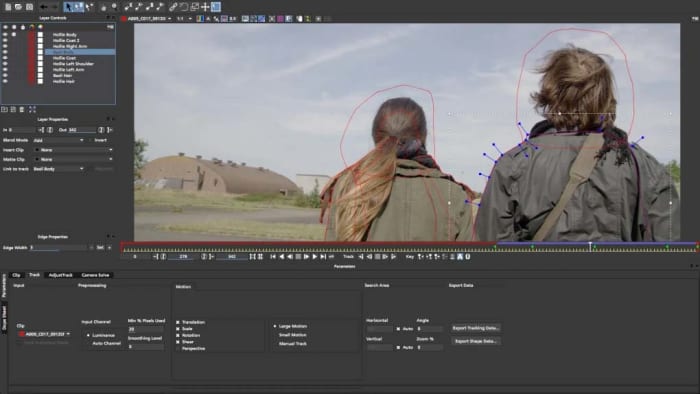
HitFilm Express uses a timeline editor interface and offers some user-friendly playback options that will help you out when you’re trying to edit your professional video. Impressively, a recent update also added the ability to edit 4K (4096 X 2160) footage, and even the ability to use the power of your GPU, with Nvidia and Intel support, to help with decoding. Other key features include 360 degree editing, special effects, video effects, multicam support, 3D effects, and GoPro support to name but a few. You’ll also be able to publish your videos into multiple output formats.

There are trade-offs, however. For a start, although you don’t have to pay for the free version you will have to ‘earn’ it. You’ll have to mention the developers on social media before they’ll give you access. On top of that, there are also some add-on features like animated text that you’ll have to pay for.

HitFilm Express Download now
8

VSDC Free Video Editor

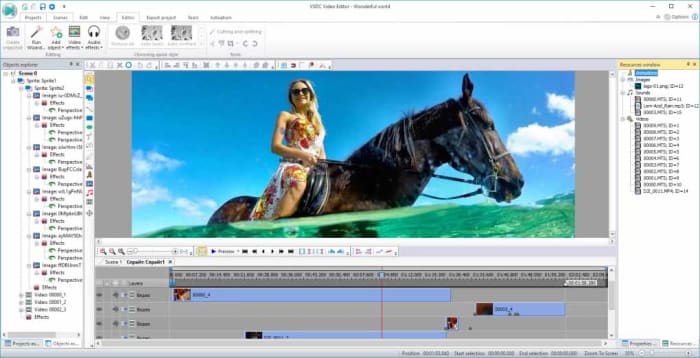
VSDC free editor

There is an awful lot you can do with the free version of VSDC Video Editor. There are many audio editing features, sound effects, and visual effects available for you to play around with. VSDC also offers green screen capabilities and there are a lot of cool Instagram-like filters that you can use to enhance your footage.

The downsides related to VSDC are mostly related to its interface. Its enhanced feature set make its interface rather complicated and a little daunting for beginners. There is a lot going on here. Fortunately, however, VSDC has a comprehensive YouTube channel filled with video tutorials for all the main features. There is also a paid real-time support service for free users that starts at $10. There is, however, a premium version of VSDC available, which is much cheaper than some of the other premium versions we’ve featured on this list.

VSDC Free Video Editor Download VSDC
7

Lightworks

Want to make or share a great video? - Lightworks

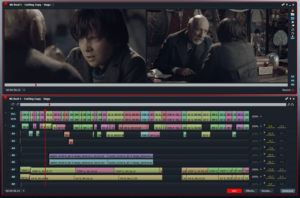
Lightworks is a well-known video editor that offers comprehensive control over all the snips and cuts you’ll need to turn your home movies into Hollywood style blockbusters. Lightworks has been used to edit Hollywood movies including Martin Scorsese’s movie The Wolf of Wall Street.

Obviously, the free version isn’t as fully featured as the pro version, which costs $24.99 a month or $437.99 outright. With the free version you’ll only be able to export your movies to YouTube or Vimeo and only with a maximum resolution of 720p. You will, however, be able to import all video formats and use a wide range of the pro features, you’ll just be heavily limited in your video export file format options.

Lightworks Download Lightworks
7

Want to learn how to use VLC as video converter?

Blender

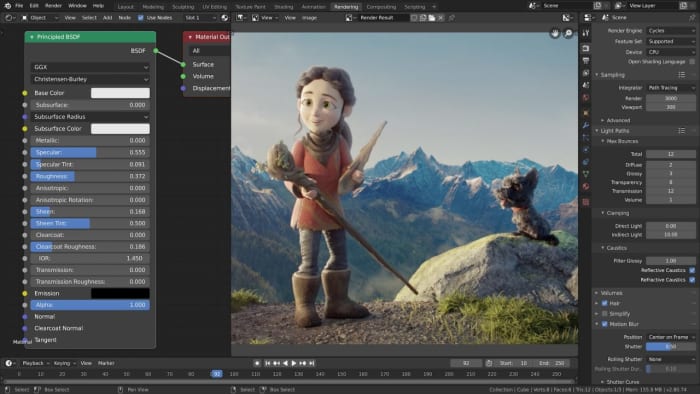
Blender is a rare thing of beauty among free video editing programs. Rather being a free version of a pro product, Blender is a completely free piece of software as it is open source. That means Blender is a community developed product that has been put together by developers all over the world. This isn’t just good because it means the software is free, it also means that new advanced features often come from video editors themselves who’ve noticed a shortcoming in the software’s capabilities.

Blender interace

Cool features that come as standard with Blender include being able to Live Preview your work, which could be made of up to 32 separate tracks each capable of holding video, images, masks, effects, and audio tracks. Other key features include transitions, filters, and speed control.

As you’d expect from a community led program, however, Blender can be a little hard to take in at times and has quite the steep learning curve. There is no set manual explaining how everything works and you won’t be able to rely on official support channels. If you look hard enough though, you should be able to find all the help you need on the online Blender forums or YouTube.

Blender Download now
8

DaVinci Resolve

DaVinci Resolve

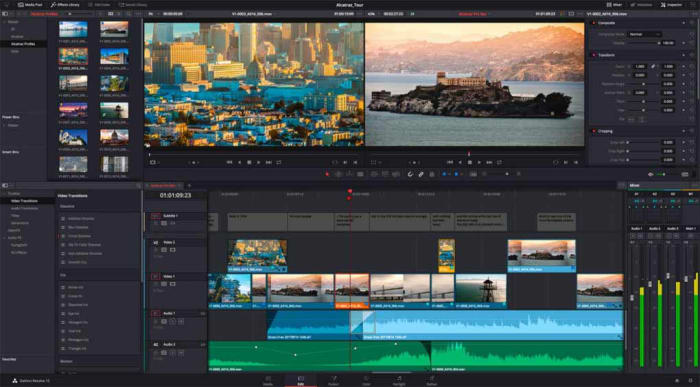
Like HitFilm Express, DaVinci Resolve has a premium version that comes in a $299. The free version of DaVinci Resolve, however, has some very capable features and should be more than enough for all amateur film makers.

DaVinci Resolve has a fully featured editing suite and offers high-resolution editing all the way up to Ultra HD and at an impressive 60 frames per second. Furthermore, it is much easier to use and has a more intuitive interface than the likes of VSDC. DaVinci also offers faster rendering times than the free version of HitFilm Express, which could give this the edge when you’re looking for a free video editing suite.

DaVinci Resolve Download now
8

We’ve outlined five of the best free video editors for you to download for free. Each represent a high level of editing features and could see you producing very professional looking results. We have assumed a certain level of video-editing ability here, with each program catering to video editors who already know what they’re doing. We’ve also not spoken about editing apps like Adobe Premiere Pro and Final Cut Pro, which target professionals.

If you’re just getting started with your new hobby and you’re just looking to make a few YouTube videos, we recommend looking for more beginner friendly programs like iMovie or Movie Maker. It is worth pointing out again though, that many of the programs we’ve listed do have online technical support channels, extensive YouTube tutorials, or community-based forums all designed to help you learn how to use your new tools.

VLC: All you can do besides play videos

Check out some of the best hidden features of VLC. Learn how to record audio, video, and your desktop and may other great features too.

VLC Media Player by VideoLAN is an absolute behemoth open-source digital media and video player. It is quite comfortably able to play almost all types of codecs, file formats, and media from MP3 files to MP4 and a whole host of other video format playlists. This is the thing though, whereas it is definitely important for a media player to be able to play video file types like MKV, MOV, and AVI; VLC Media Player can actually do so much more.
That’s why we’ve decided to put together a list of the 5 best hidden features of VLC. After reading our guide not only will you know about the best VLC features, you’ll also know how to use them. Let’s get started:

VLC media player download free ►
8

5 of the best hidden VLC tricks and features

How to use VLC to convert audio and video files

VLC Player offers a very competent option for anybody who needs to convert a media file from one format to another. If you’ve VLC Player installed on your Windows PC or Mac, you won’t need to purchase, download, or install any third-party software so that you can convert your media files. It doesn’t even require a special plugin. No more searching for solutions on Google, this is how to convert video.

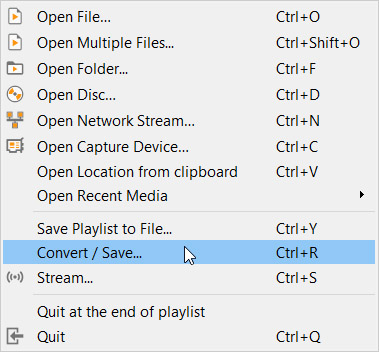
VLC media menu

First you need to open VLC, then click on the Media dropdown menu, and finally hit Convert/Save. You’ll then need to select the videos or audio files you want to convert using the Add button. Then in the Destination file box put the folder you want your converted files to save to and what you want the files to be called. After that you choose the VLC file type by clicking on the spanner button and selecting from the dropdown menu. Once you’ve followed the above instructions all you need to do is hit the Start button to begin. There are also some advanced features you can take advantage of, and you can find out all about the advanced VLC file conversion features here.
How to use VLC to record video and audio

If you have a Windows 10 PC or a Mac, you will have a native camera app and sound recorder for taking photos and videos using your webcam and recording sounds using your microphone. That’s all well and good but you can do both on just one app; VLC. Furthermore, as we’ve just seen, VLC can also convert audio and video files easily meaning you can quickly and simply take your recordings and convert them into any video output or file type. These will then be good for use on all your devices from Android smartphones and tablets to Apple iPhones and iPods.

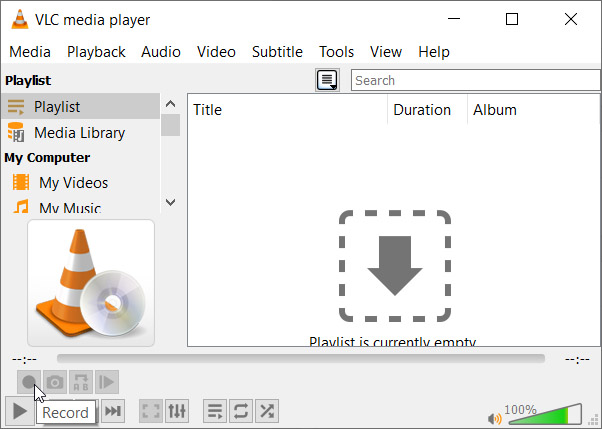
Advanced controls on VLC

To record audio on VLC you need to activate Advanced Controls by clicking View in the top menu and then selecting Advanced Controls. This will display new controls in the bottom-left of VLC above the play button. To start recording sound all you need to do is press the Record button. To stop recording and save your file, simply press the Record button again.

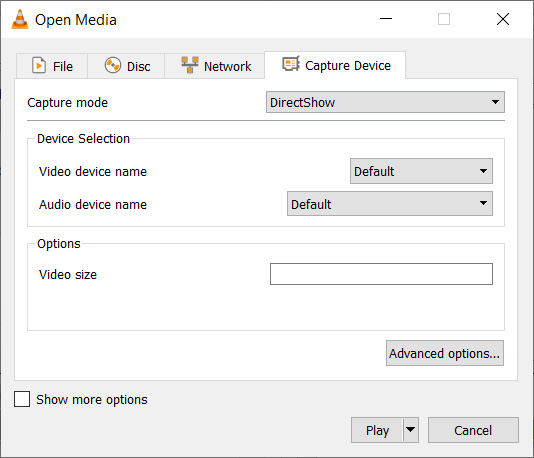
Open Media on VLC

To record video on VLC using your webcam you need to go to Media then Open Capture Device. You now need to set Capture Mode to Direct Show and you’ll need to select your webcam from the options in the Video device name menu. If you want to record sound with your video, you’ll need to select your microphone from the Audio device name menu.

How to use VLC to record your desktop

Screenshots are an important part of the modern digital life we’re all living. Yes, you guessed it VLC does screenshots too, but we’ll get to that in a minute. VLC also offers the chance to record everything that is happening on your desktop rather than simply catching an instant.

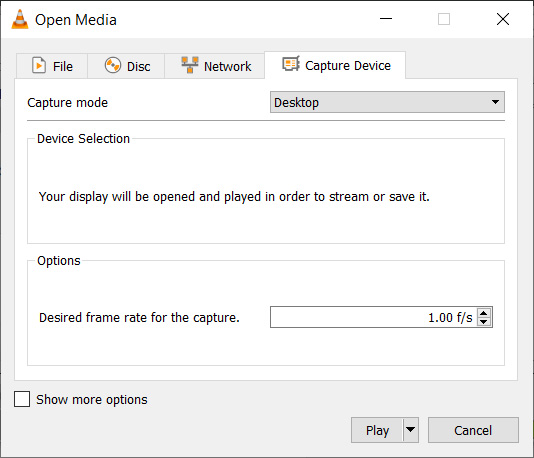
Record desktop on VLC

To record your desktop open VLC, hit Media in the top menu and then click Open Capture Device. You now need to change the Capture mode setting to Desktop and then select the framerate you want for your recording.  After that hit Convert so that you can select the file type your recording will save as and hit Start to begin. When you’re done recording your desktop hit Stop to save it.

How to screenshot on VLC

There are two ways to snap screenshots of videos using VLC. The first is to right-click and then select Video in the dropdown menu and select Take Snapshot. The other way to take a screenshot using VLC is to use the keyboard shortcut. On Windows or Linux press Shift + S and on Mac OS press CMD + ALT + S.

How to use VLC to rip DVDs onto your PC

DVDs used to be everything. When they first replaced VHS tapes their superior quality and sleek smaller form factor made them perfect for collections. If you’ve a huge DVD collection and want to save the movies and shows on your PC in case something happens to them or just because you never watch DVDs anymore, VLC can help you out.

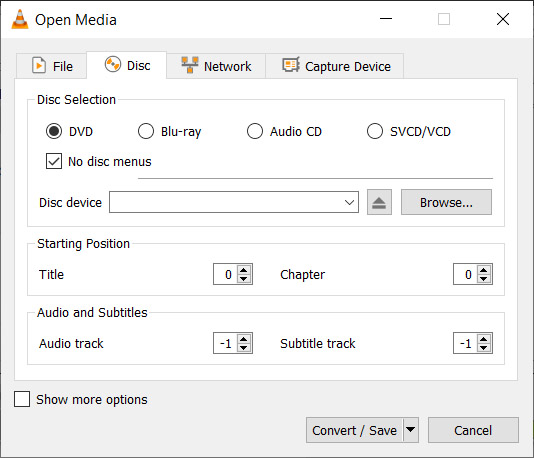
Rip DVD on VLC

To rip a DVD using VLC insert the disc and then go to Media and then hit Convert/Save. Open the Disc tab and then choose the type of disc you’re ripping, which in this case is DVD. After that, check the No disc menus button and choose the desired Disc device where you want to save your DVD. Then hit the Convert/Save button and choose the file type you want to save your DVD as and then hit Start to begin the process.

Wrapping up

So, there you have five hidden VLC features that go beyond just playing media files. Now you know how to take advantage of some of the best VLC features. If you’d like to know more cool hidden VLC features, you’ll be glad to know that we’ve put together another guide to some of the best hidden VLC features, which you can read here. This guide includes how to listen to internet radio and podcasts using VLC and even gets into video effects.

VLC isn’t just great because it is a free open-source piece of software. It puts a lot of very powerful tools at your fingertips. We hope you enjoy using the tools we’ve highlighted in this guide.