
Best mobile and desktop musical instrument apps

These apps and programs for mobile and desktop will give you access to all the virtual instruments you’ll need to start your very own virtual band.

Best virtual instruments

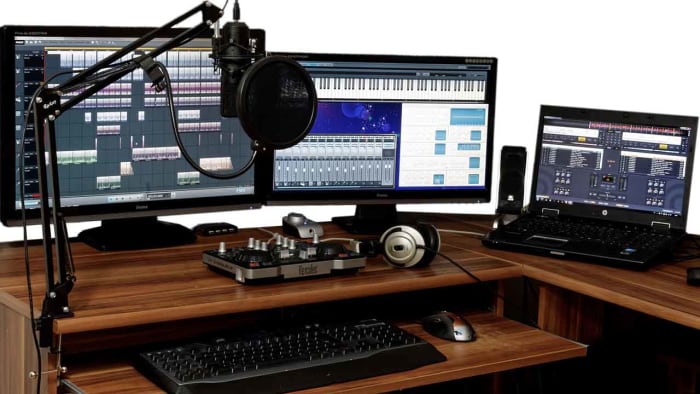
Today’s look into all the best apps and programs available to help you get into all things music is focusing on virtual musical instruments. After looking at DJ tutorials on YouTube and the best karaoke apps for iPhone and Android devices, we’re going to complete your musical line-up showing you how to source instruments for your musical project. After you’ve been through today’s guide, you’ll have everything you need to produce tracks that wouldn’t sound out of place at the top of the charts.

You’ll be surprised at how innovative app developers and musicians have been in coming up with virtual instruments. Thanks to touchscreens and other new control features, virtual instruments now have a new and improved tactile element to them that genuinely makes them feel a lot like playing actual instruments. Let’s go through some of the best virtual instruments for mobile and desktop devices.

Musical instrument apps

Check out our favorite musical instrument apps below. You’ll be able to use these to create a virtual band all on your own or to create music with your friends even while you’re all stuck in your homes.

GarageBand
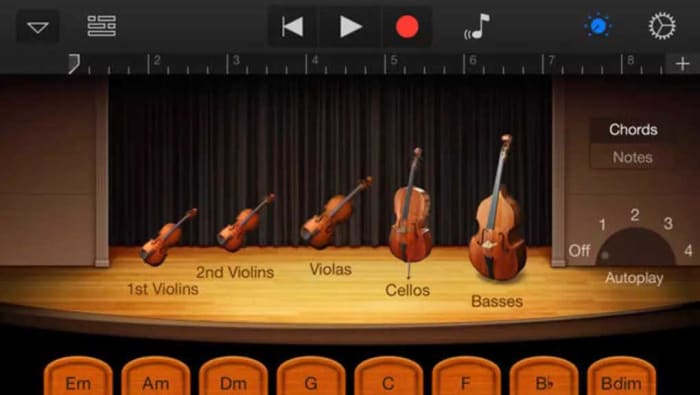
Apple’s GarageBand is the all-time classic virtual instrument program. The music production software gives you everything you need to start a band on your own by giving you access to many different virtual instruments including guitars, pianos, drums, and more. The program also works as a fantastic track producer for complete bands by giving you the ability to manage tracks from real instruments too.

Impressively, GarageBand works on MacBook but is also available for on iOS for iPhones and iPads too. If you know a thing or two about music and have the patience to stick with a project and go through tasks systematically, GarageBand will give you everything you need to create music of almost any genre.

GarageBand Download now
8

Virtuoso Piano Free 3

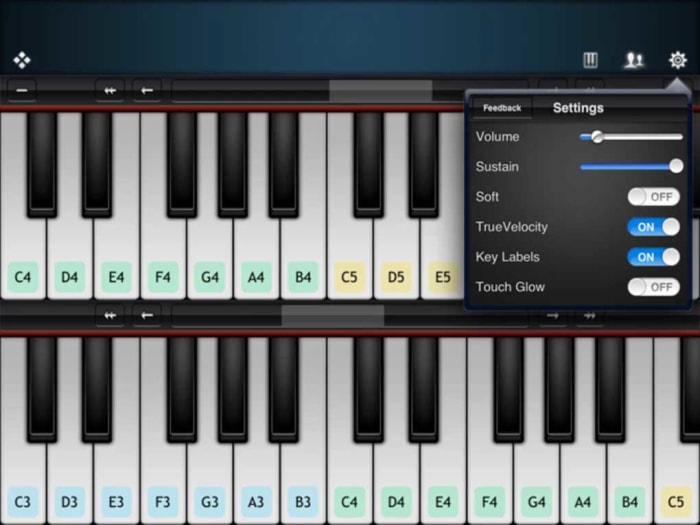
The Virtuoso Piano app is so innovative and well-made that you won’t be able to help yourself but be impressed, should you decide to download it. The app turns your phone’s touchscreen into a keyboard but being a screen, it also comes with a plethora of other neat features such as being able to label the keys with their subsequent notes.

The free version of the Virtuoso Piano app puts a complete piano to play although you’ll have to scroll through various sections of your piano to get through all the different octaves. Admittedly, this makes it challenging, if not impossible, to play any sort of complex composition yet the app is impressive, nonetheless. Another key consideration here is that the app works best when used with headphones as your phone’s speakers won’t do your playing justice on their own.
Virtuoso Piano 3 Download now
10

Real Guitar Free

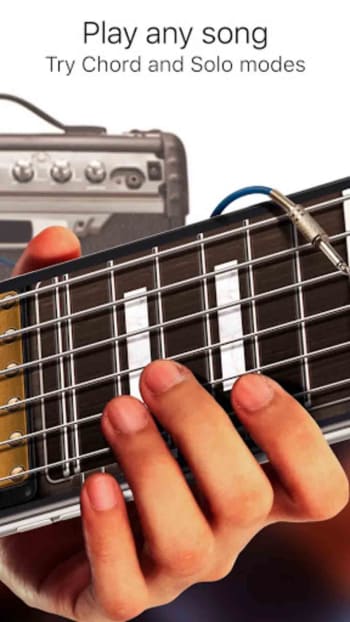
Here we have another innovative and impressive app that makes the most of the touchscreen technology that comes standard with all modern Android smartphones. Not only does the app make it possible to practice playing guitar without actually having one it will also teach you how to play the guitar too, showing you all the common chords and also having comprehensive lessons for many popular songs.

The app works by showing guitar strings on your phone’s screen and allowing you to practice both strumming and fingering in order to produce the sounds you’re after. The reproduced sounds are of a very high standard and the app also comes loaded with different effects including acoustic guitars, electric guitars, classic variations and even a 12-string variation too. Real Guitar Free also comes loaded with practice modes, chord recital modes, and even music theory. There is an impressive depth of content here that deserves checking out.
Real Guitar Download now
9

Drums

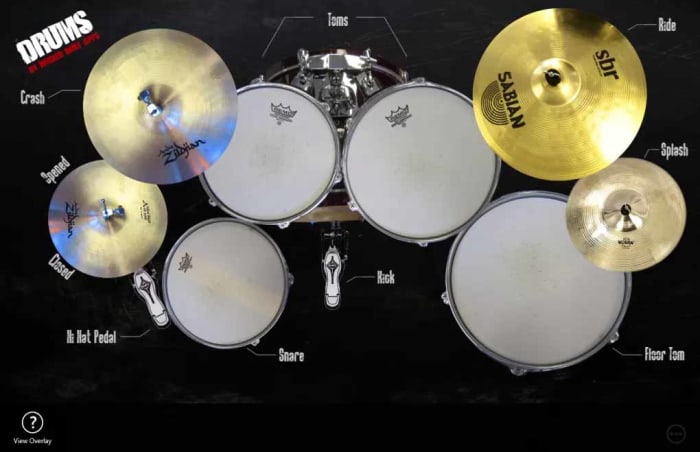
The Drums app for Windows 10 doesn’t over complicate things but does what does it does very well. If you have a touchscreen device this app basically gives you access to an epic, fully loaded drum kit complete Kick Pedals, Snares, Toms, Hi-Hats, and more. You can use this app on Windows 10 devices that don’t have touch support as the app works with a mouse, but in reality, you won’t be able to get anything more complicated than a simple beat out of this app if you’re using a mouse.

The way Drums works is to show you a bird’s eye view photo of a complete drum kit, with each drum having interactive elements built into the image. When you hit the picture of an individual drum it will play the corresponding sound. Et voila, you have a complete virtual drum kit that you can use to create the beats and set the pace for your virtual band’s songs and tracks. This app works really well too when used with touchscreen support and you’ll be surprised at just how well you’ll be able to create drum tracks for your tunes.

Drums Download now
8

Voice Training

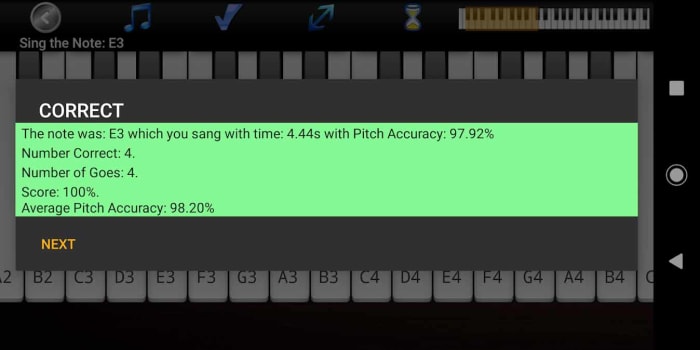
OK, so you’ve got your hands on all the virtual instruments your virtual band could ever need. There’s still something missing though, and that is a powerful, yet soulful lead singer who can connect with your audience and tug on their heartstrings. You’re going to need an emotional connection with your fans if you’re going to succeed and for that, you’re going to need to be able to sing. There’s no virtual instrument for this one though, but what we have got is a virtual voice coach that will help you develop your singing skills until you can hold a note with the best of them.

This app will help you simulate real-life singing lessons, track your progress, and also introduce interactive teaching elements such as singing games and vocal range examinations. If you’re looking to improve your singing, you need this app.

Voice Coach Download now
10

The best free music production software

These are all the essential programs a DJ needs to produce and play music.

Best audio editing software

These days your laptop can turn you into a superstar. There are people out there who travel the world with nothing but their laptops, plug them into the sound systems wherever they end up, and then blast out concerts to thousands of fans. I am of course talking about superstar DJs.

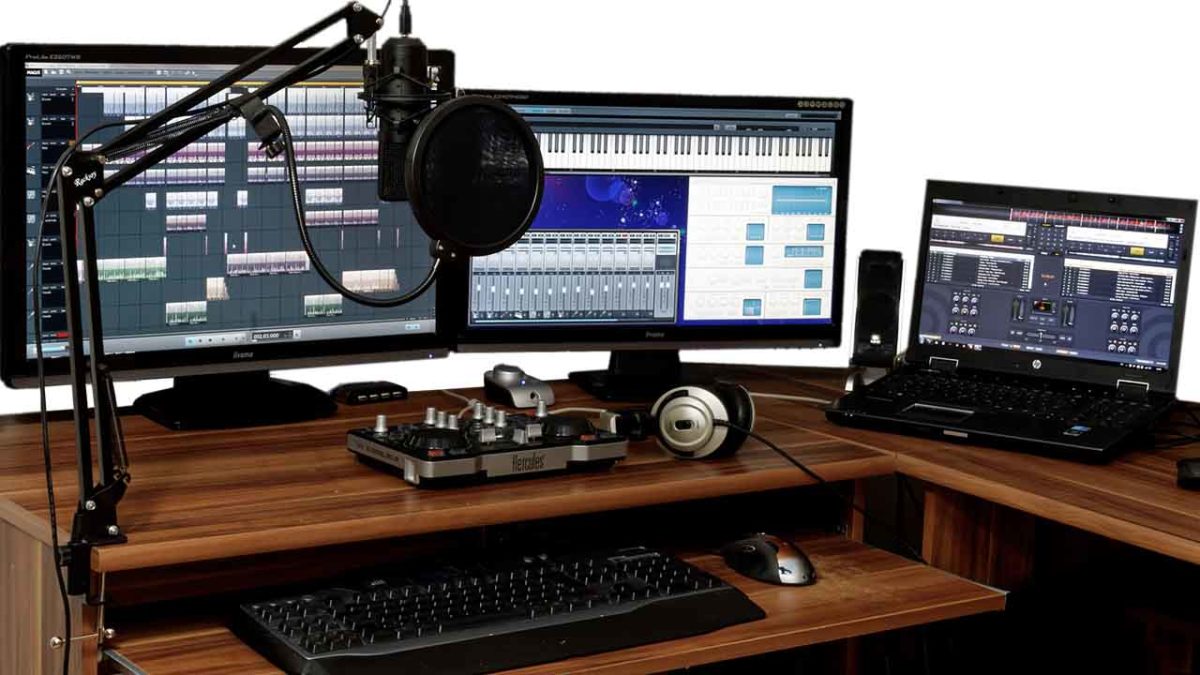
The best DJs hunt out all the best music and then play right tracks at the exact right moment for the crowd to hear them . It sounds like an easy job, but it’s not. On top of that, if you want to become a superstar DJ who tours the world, there is something else you’ll have to master; music production. Unsurprisingly, a LOT of people want to be superstar DJs, which makes it very hard to stand out the crowd. The best way you prove yourself to be special, however, is by making your own songs to play in your own sets and for other DJs to play in theirs. Yep, music production is an integral part of the journey you take towards becoming an international superstar DJ. It’s time to become a music maker.

Music production software can come with a hefty price tag though, and if you’re just starting out, you might well baulk at the cost. This is where Softonic comes in. We’re here to start you on your path to stardom by walking you through some of the best free music production software options.

Free music making software

Audacity

Audacity

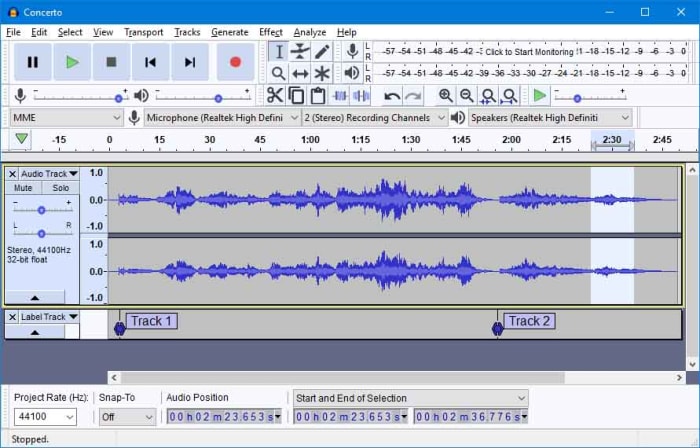
Audacity works on Windows, MacOS, and GNU/Linux and is a marvel of free music software. Like all the best pro-grade free programs, such as the image editor GIMP, Audacity is open source software, which means users and developers can add features to the main product or iron out any bugs they find.

Audacity has a lot of features that put it alongside some of the more expensive premium options out there. With Audacity you can easily perform live audio recording, record sounds coming from your PC, convert music, edit, cut, copy, and splice tracks of many different audio formats, and download and install plugins to add new features as and when you realize you need them. Audacity offers advanced audio editing software while, somewhat surprisingly, remaining very simple to use.

7

Mixxx

Mixxx

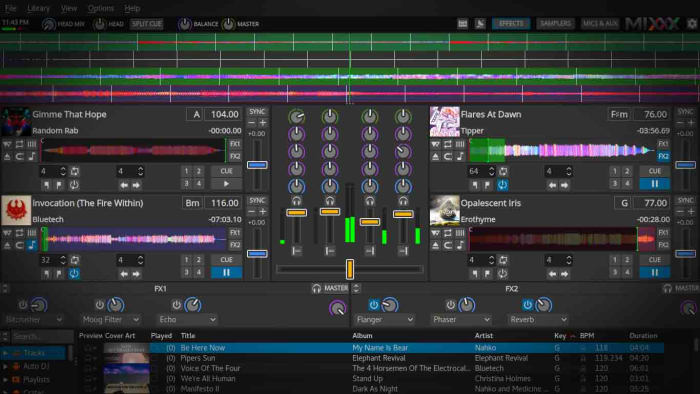
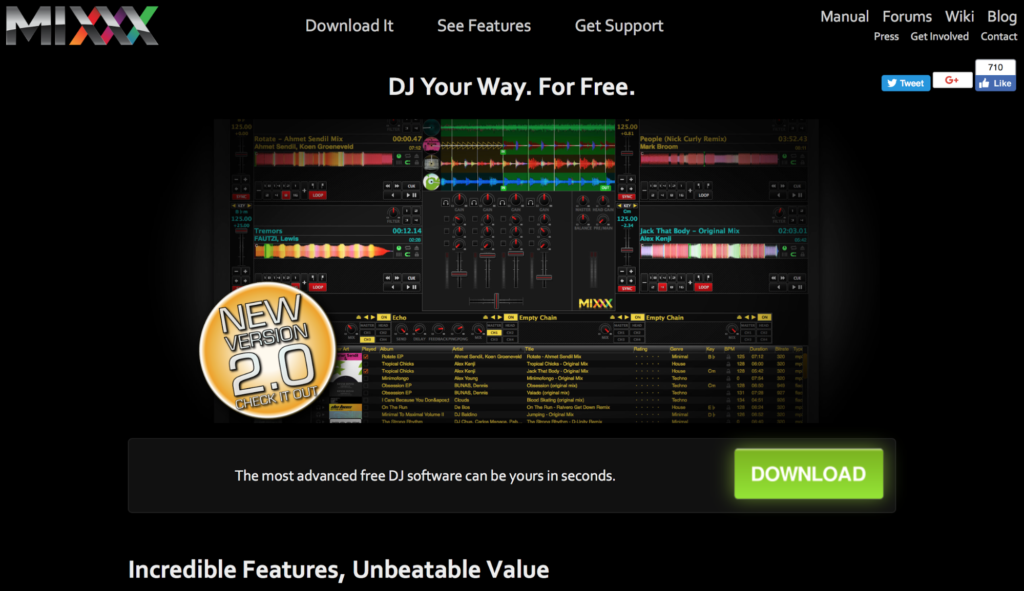
Mixxx is a fantastic piece of free software for all budding DJs. As the name suggests it is more for DJing and mixing than it is for producing music but it still an important tool for any new DJ to have. Another free and Open Source program, Mixxx is available on Windows and Mac OS X and has quite a few features that’ll make DJs happy. It integrates well with external DJ controller decks offering a complete digital audio workstation, has beats per minute (BPM) detection and auto-sync, and will even integrate with iTunes. You can broadcast your mixes live, save them as a variety audio formats or simply blast them out of your speakers for people to dance to. Mixxx is a lot of fun.

Mixxx Download now
8

LMMS

LMMS

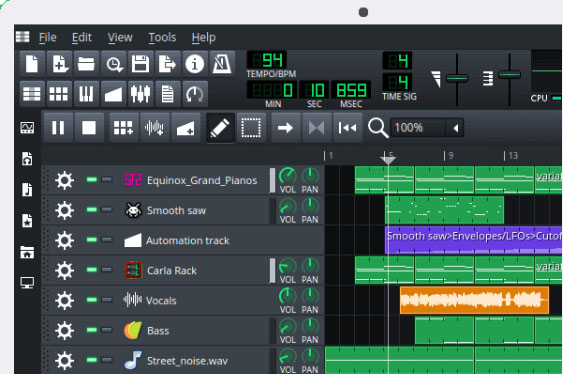
Another advanced, cross-platform, and free open-source audio production suite you can download on Windows, Mac, or Linux is LMMS. It comes with a lot of cool features that will have you creating beats in no time like a built-in Piano roll that you can connect to a MIDI controller, 64 FX mixing channels, and a specific beat and bassline editor.

LMMS loosely stands for Let’s Make Music and that is exactly what the program is designed to do, help you make music. The program works well with external instruments and samples, and, like Audacity, has a lot of plugins you can use to augment your music production experience. You won’t be able to believe that this program is free when you download it.

7

MuLab DAW

MuLab

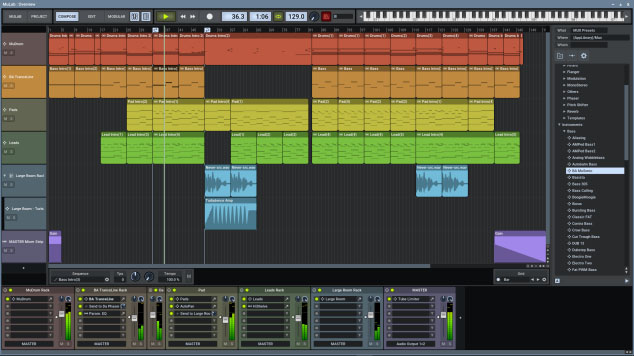
MuLab is chock full of high-end audio production and editing tools that will help you get that song you’re coming up with out of your head and into your speakers. Looking at a bit like Ableton Live and available on Windows and Mac, Mulab is a fantastic music creation program. It has over 300 selected waveforms with its superfast oscillators, multi-track support, flexible track and sub-track support, an easy to use and understand modular architecture, and automatic mono/stereo handling.

The features we’ve outlined above only cover a small portion of those offered by the free version of Mulab, which will give users access to professional-level music production facilities. With lots more features like synthesizer support, MIDI player plugin support, and even a synth effect builder this program has it all. Download it now to see just how much it has to offer.

MuLab Download now
8

GarageBand

GarageBand

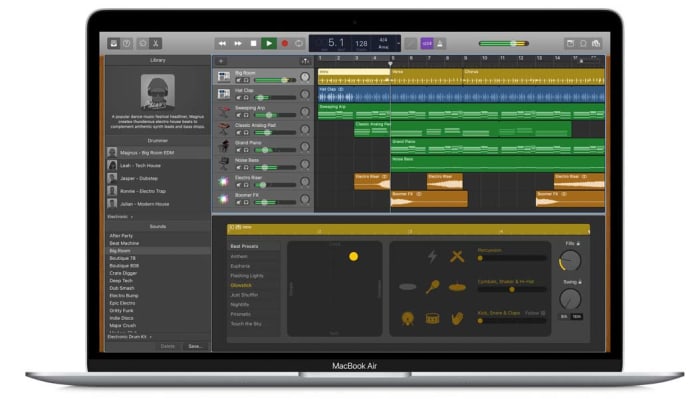
GarageBand for Mac has some really incredible pro tools that you just wouldn’t expect a corporate giant like Apple to give away for free. Many famous artists like Rihanna and Justice have created massive global hits using GarageBand, so if you have a Mac, this could be the best option for you.

GarageBand gives you the ability to create songs with up to 255 audio tracks and offers very well produced drum machine grooves to add to your songs and give them a beat. Other cool features include multi-take recording so that you always end up saving your best take and Multi-Touch support on iPad, which makes it possible to wirelessly play GarageBand virtual instruments on your Mac. This is the most user-friendly app on our list too.

GarageBand Download now
7
Wrapping up

We’ve brought you five essential apps for all budding young DJs and music producers. If you want to make a name for yourself, you’re going to have to make yourself stand out and there is no better way to do that than making your own music and having other DJs play it at their parties.

All of the programs we’ve featured today offer complete experiences that rival that offered by the premium music production apps that cost many hundreds of dollars each. With most of these apps, however, there is a steep learning curve so you should take that into account if you’re just getting started. There’s no point having massive and fully-featured music production suites on your PC, Mac, or Linux, if you don’t know how to use them. Many of these apps come with extensive online forum support so check out the forums for user guides. You’ll also be able to find extensive support on YouTube too.

The top 8 DJ software applications available today

Feel the beat with some of the best DJ software out there!

DJ

When it comes to DJ software, your choices include household names, underground favorites, and open-source extravaganzas. With all this variety, it can be difficult to tell which is the right software for you. You’ll hear terms like ‘session view’ and ‘sampler’ tossed around and it can make the whole process seem daunting.

But with a little research, there’s no reason why you can’t start mixing the tracks of your dreams today. Whether you’re a beginner or a seasoned veteran, we’re here to help you find the package that’s right for you. Take a look at the best DJ software available today.

The top 8 DJ software applications available today

1. Native Instruments Traktor Pro

native instrument dj

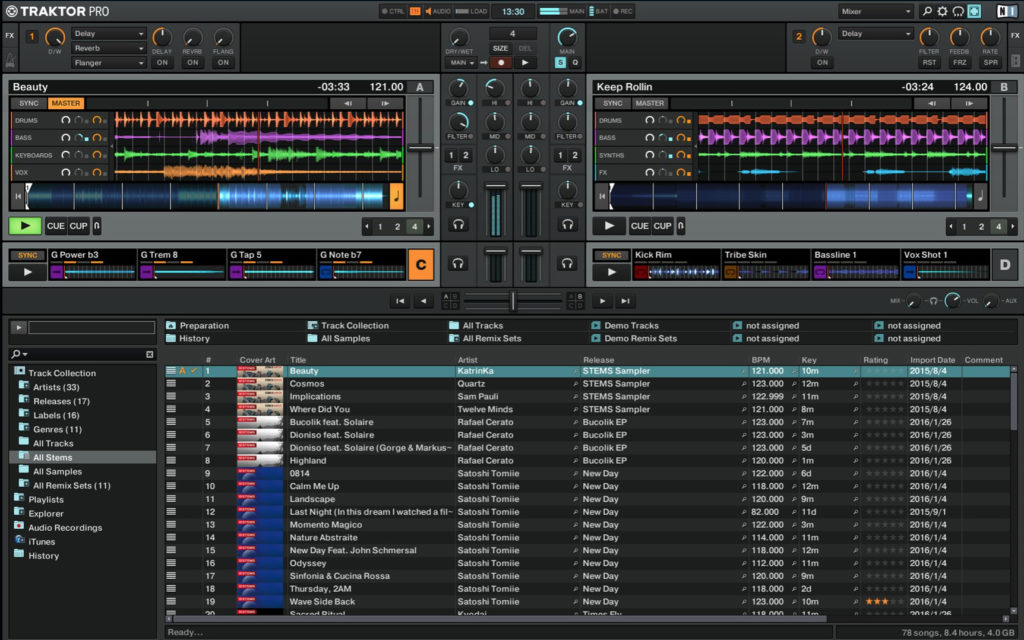
If you’re looking for a safe pair of hands in the world of DJing, there’s no program like Native Instruments Traktor Pro. With more than 10 years in the game, this platform has risen to popularity because of its reliability and ability to create a diverse range of music. Amateur and professional users will be pleasantly surprised by the versatility of the onboard Sample and Remix Decks.

There’s also a state-of-the-art analytical tool that breaks down the key and beat of your music. One particularly nice touch is the colored waveforms feature, which allows the user to differentiate between high and low frequencies through a jazzy visual color display (Which makes life easier when mixing complex tracks). Native Instruments is currently available for $99.

Traktor Pro Download Now ►
7

2. Pioneer DJ Rekordbox

pioneer dj

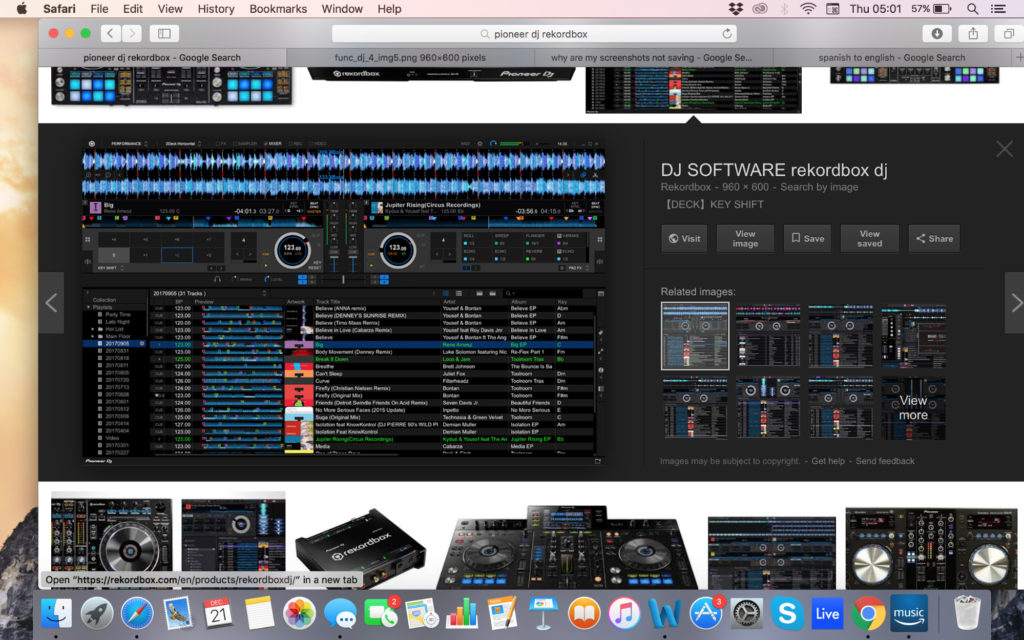
In the world of DJing, few companies are more famous than Pioneer. Originally Rekordbox was designed to use with Pioneer music players but it’s now morphed into a full-blown mixing and sampling suite. The program boasts a respectable four decks, supported by master effects, an eight-part sampler, and a beat slicer. The visual pads are easy to use and add a lot to the overall feel of mixing.

If you’re lucky enough to have an extra monitor you can even move your library to one screen. That said, the preferences screen can be very confusing to navigate at times and you’ll need a glass of water to cool down if you’re tweaking them for a while. Dj Rekorbox can be yours for $129.

Rekordbox Download Now ►
9

3. Ableton Live

ableton

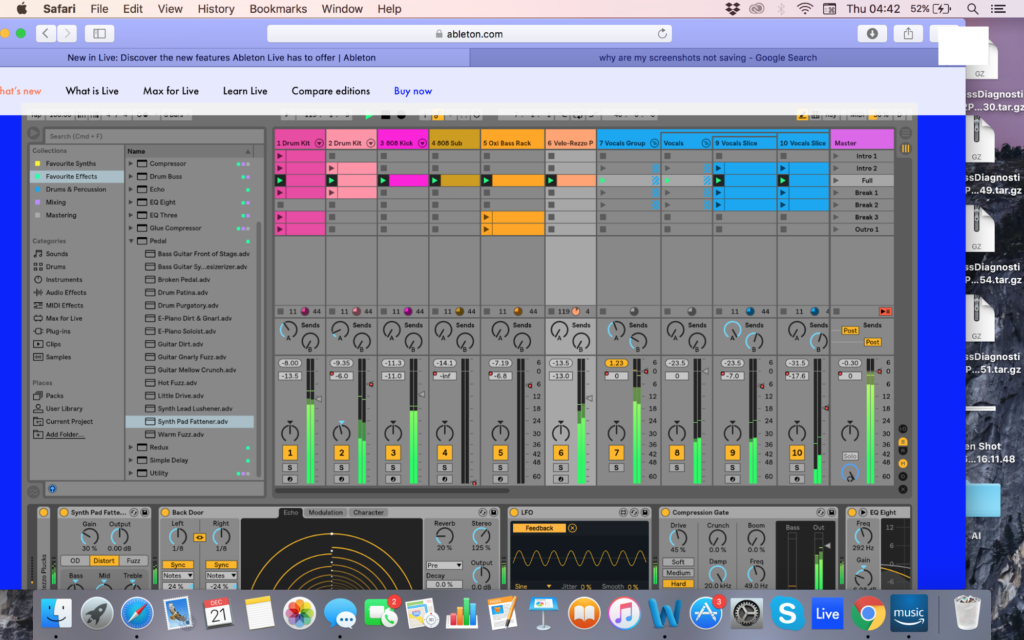
Whilst Ableton Live not a pure DJ software platform, Ableton has certainly developed a reputation as one. DJs across the world have been using Ableton’s Session View to create blistering live sets. The user interface makes it easy to launch audio samples in sync as well as muting unwanted sections on the go. Likewise, the program’s versatility as DAW can add an extra layer of production to supplement your live sets.

There are hundreds of effects in the standard version (Thousands if you opt for the suite) and packs are regularly released so that you can tweak your tracks with new tools. While there is certainly a learning curve with Ableton, you’ll reap the rewards once you master how to navigate the session view effectively. Ableton Live starts at $99.

4. Serato DJ

Serato

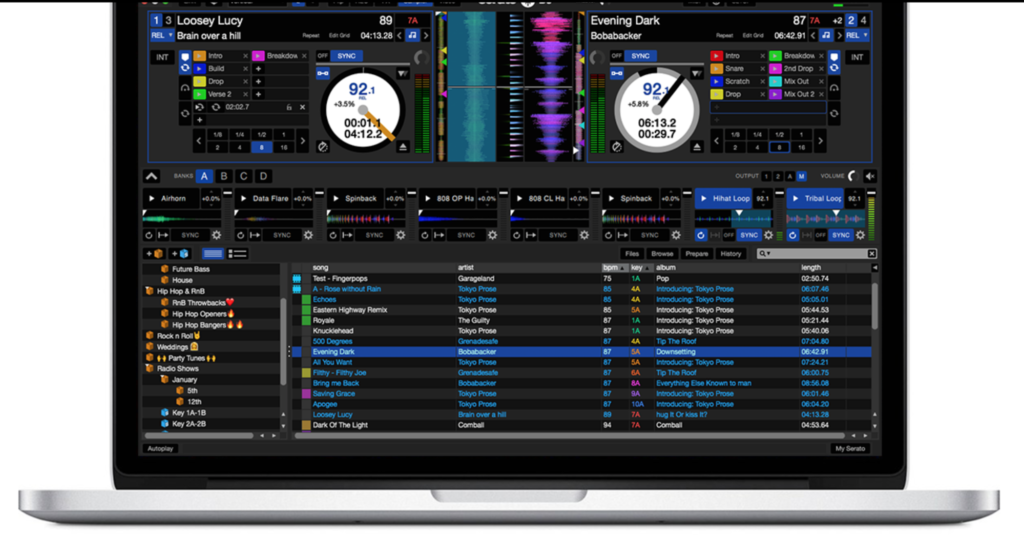
While not as famous as Pioneer, Serato DJ is one of the leading DJ software packages on the market today. On the main screen, you’ll have all the basic info you need, with your decks, BPM, time scales, pitch, and track progress all kept in clear view. You can also switch between mixing on two or four decks. One of the biggest advantages of Serato is its massive onboard library (which dwarfs every other provider on this list!).

In terms of MIDI, users have access to a clear virtual panel so that they can interact directly with the program and create their own music. DJs looking to be extra strict with their timing can also make use of Quantize Mode to ensure that each segment begins right on the beat. Serato is available for a respectable $99.

Serato DJ Download Now ►
8

5. Mixxx

Mixxx

If you’re looking to dabble in the DJ world but you don’t have the budget to spend on an expensive suite, Mixxx is the product for you. This free open-source DJ software allows users to crossfade tracks, detect BPM, run loops and adjust the overall EQ. In other words, everything an amateur DJ could need to hit the ground running.

This nifty open-source program is also available to Windows and Mac users as well. Mixxxx now has five main effects: Flanger, Filter, Echo, Reverb, and Bitcrusher. Just be aware that the mix does not have the quality or nuance to it that many other DJ software packages have on this list.

6. Magix Digital DJ 2

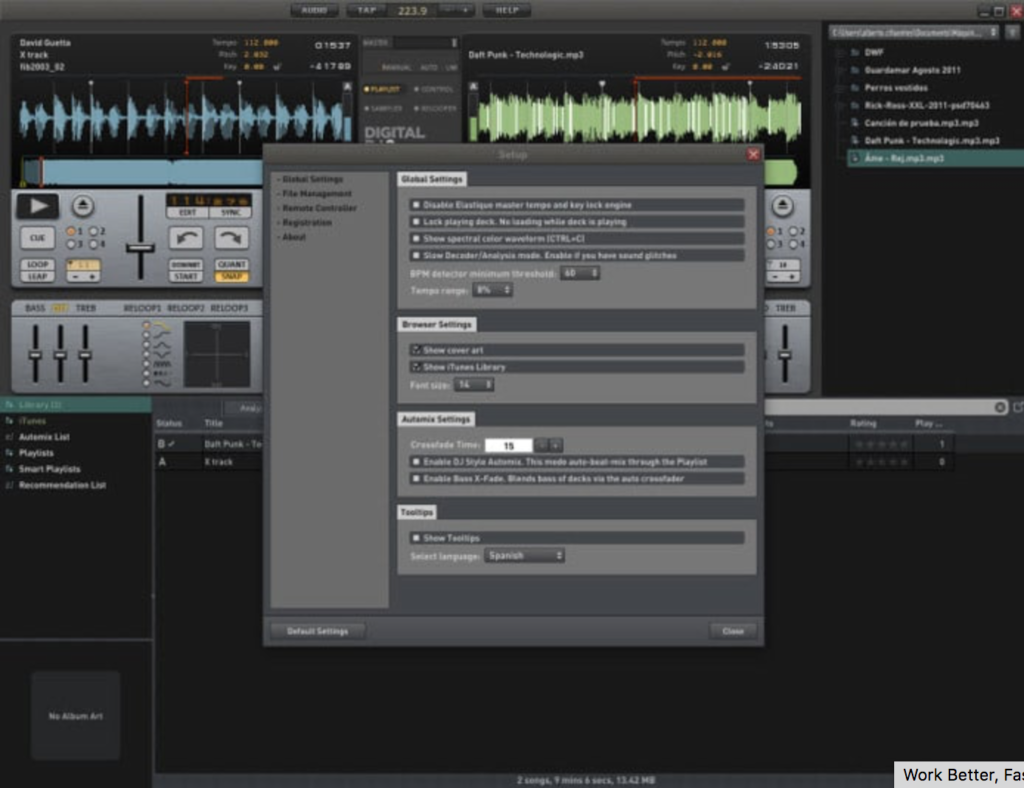
Digital DJ

The user interface is simple to use, and you can drag and drop tracks into the main screen to start mixing. To assist your mixing journey, the onboard app will suggest similar-sounding tracks to the one your playing. The song manager interacts with your iTunes library (if you have one) to search through your tracks for similar songs.

The song manager makes it much easier for beginners to navigate the software and start playing their favorite tracks without too much of a learning curve. While it lacks the advanced depth of some of the other competitors on this list, it’s a good entry-level platform into the world of music sampling.

Magix Digital DJ 2 Download Now ►
7

7. Virtual DJ Pro

virtual dj pro

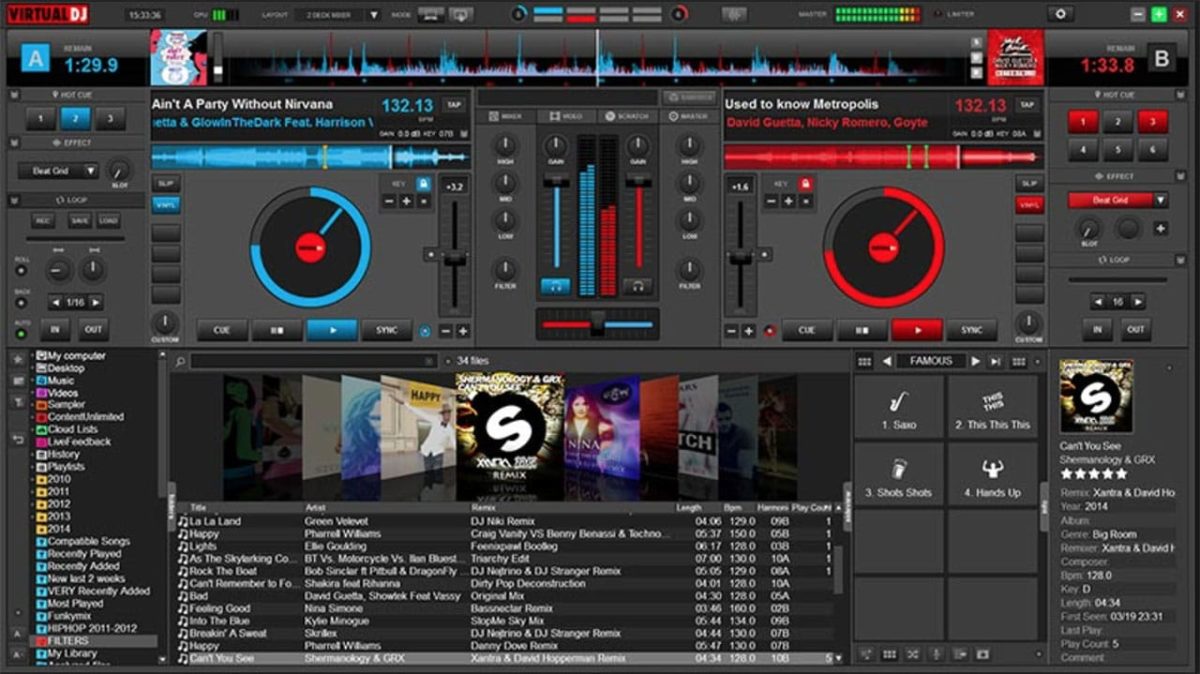
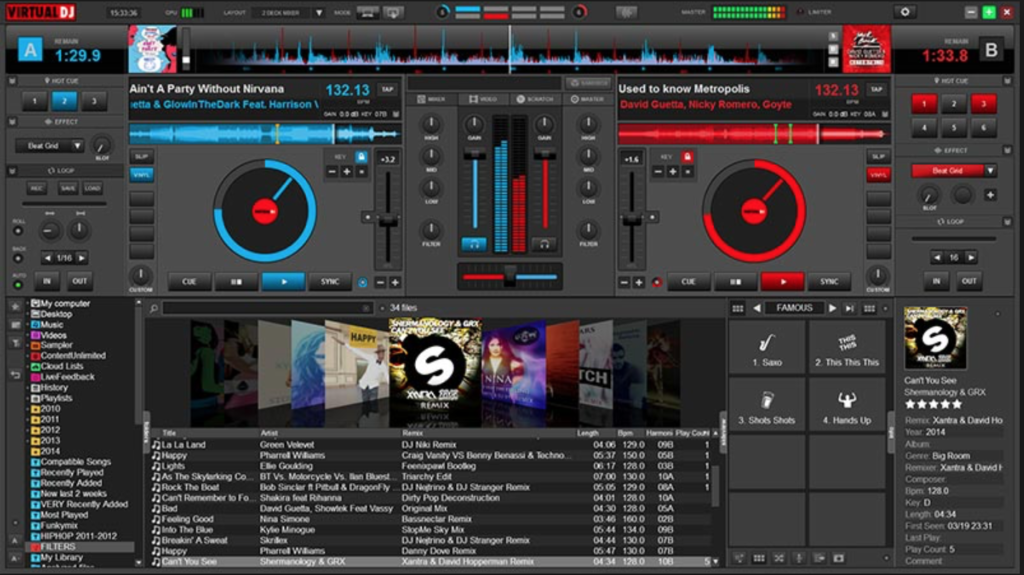
Virtual DJ has caught a lot of flak for being a light option with a poor user interface and overall feeling of clunkiness. However, Virtual DJ 8 looks fluid and contemporary. (And it now supports retina displays, unlike most other competitors!) On the main screen, you’ll have both your decks, with an EQ section in the middle and the crossfader located below.

All you need to do to start mixing is drag and drop. If you want to go old school, you can open up the scratch window to view your waveforms and get that distinct scratch sound. Virtual DJ is compatible with most hardware, making it one of the most versatile software packages on this list. Virtual DJ Pro can be downloaded here for $299 or $19 a month.

Virtual DJ Download Now ►
8

8. MixVibes Cross DJ

dJ

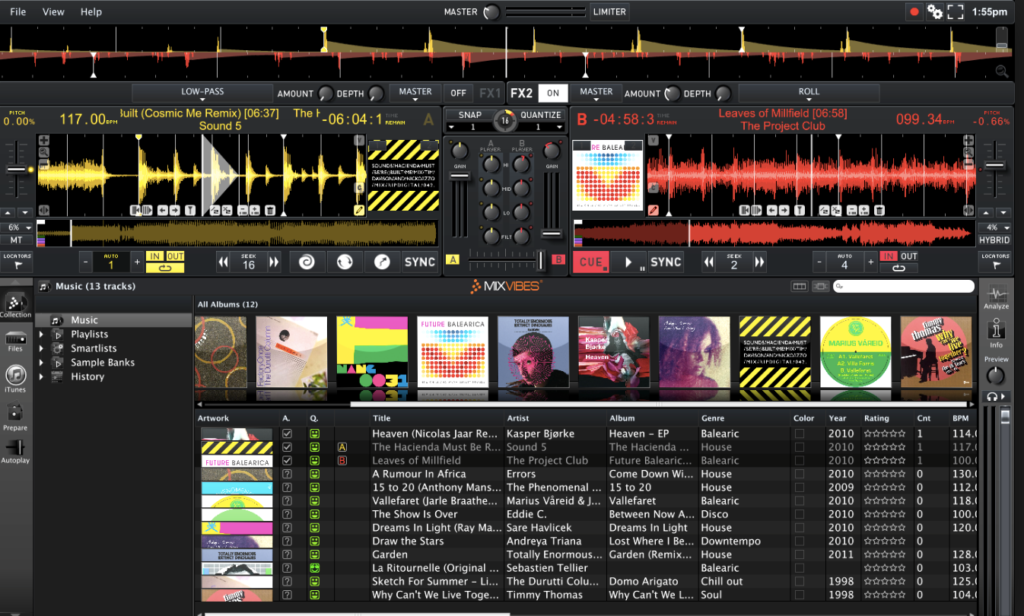
MixVibes Cross DJ make not have the same recognition as Pioneer but it’s been making waves in the DJ community. In terms of core layout, you can choose between 2 or 4 decks, with a selection of different players and samples to choose from as well. There are two main FX units and you can choose between 14 different effects.

One of the biggest advantages of MixVibes is the excellent BeatGrid Editor which helps to resolve any issues with BPM. You can also import from iTunes and connect a SoundCloud account to load up some of your own tracks. MixVibes is also much cheaper than many of its competitors but it still holds its own phenomenally well. MixVibes Cross DJ can be picked up for €49 (about $60 at the time of publication).

Cross DJ Pro Download Now ►
9

Could this cool new YouTube Music feature tempt you away from Spotify?

YouTube Music listeners can now switch between audio and music videos instantaneously.

Spotify is the king of all music services. Sure, there are other options like Deezer, but whenever somebody sends you a song, playlist, or album nine times out of ten, it’ll be a Spotify link that they send. The other streaming services are good, some are even popular, but none have enjoyed the levels of success that Spotify has.

One such streaming service that is playing for second is YouTube Music. Now, clearly, YouTube has a few aces up its sleeve when it comes to music thanks to the seemingly limitless selection of music videos it houses on its main site. In a bid to try and capitalize on this advantage and possibly close the gap on Spotify a little, YouTube Music has added a very cool new feature indeed.

YouTube Music listeners can now switch between audio and music videos instantaneously

YouTube Music header

YouTube Music Download Free ►
8

YouTube Music Premium and YouTube Premium users now have access to an interesting new feature. Now whenever they’re listening to a track on the Android or iOS versions of the YouTube Music app, they might notice a new button for some of the songs in the YouTube library. According to the YouTube blog post announcing this new feature, clicking this button will allow users to, “make a seamless transition between a song and its music video for uninterrupted listening and watching… with a simple tap, they can instantly start watching the music video or flip back to the audio at the same point in the track.”

Via: YouTube Google Blog

Although this feature won’t work for every song, the post goes on to say that if the song has a video, YouTube Music will offer the new switching button. This is made possible by the fact that the YouTube Music team has, “perfectly time-matched over 5 million official music videos to their respective audio tracks.” Five million is such a big number, it’ll likely be more difficult to find a track that doesn’t have the new feature than to find one that does.

If you’re reading this and instinctively becoming worried about your data allowance, YouTube has you covered. You can opt out of the new data heavy feature by going to the YouTube Music settings menu and turning the “Don’t play music videos” option on.

As you’d expect with a quirky and exclusive feature like this, it is only available to premium users meaning you won’t be able to try it out unless you sign up for a paid version of YouTube Music. At the moment, this will cost you $9.99 a month although there is a discounted rate for students.

If you’re dying to check out this new feature, however, but don’t want to pay, YouTube is also offering a one month free trial of all YouTube Music Premium features, which you can sign up for here.

Spotify update highlights Disney music

Everybody has a favorite Disney song!

Spotify Disney hub

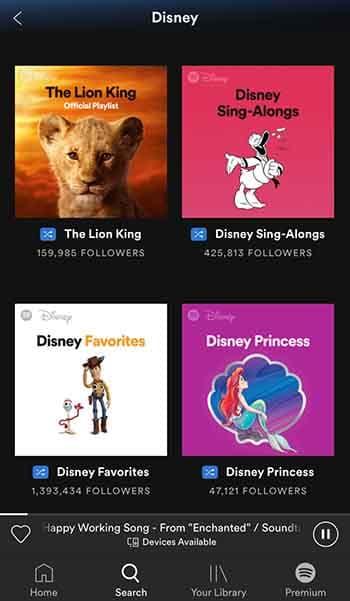
Great news for Disney fans: Spotify just announced that it is teaming up with the movie studio powerhouse to create a brand-new Disney hub. The new hub will be a place where Spotify users can find all the songs from their favorite Disney movies. The new hub will include Disney songs as well as music and soundtracks from Pixar, Marvel and Star Wars movies. Yes, that means all the John Williams instrumentals will be there, too.

8

The Spotify blog post announcing the new Disney hub said, “Starting July 17, users… can search “Disney” on Spotify to find a designated hub for the music behind some of their favorite Disney movies and TV shows. Stream playlists full of everything from The Little Mermaid to modern favorites like Frozen.” The service will also include playlists curated for all times of the day and many different activities. No matter if you’re in the shower, on the road, or trying to get some sleep you can now find a Disney playlist on Spotify for your exact situation.

The move seems to make Spotify a much more family-oriented platform and could see a spate of family-based subscriptions taken out over the summer. A premium membership costs $9.99 in the U.S., but a family membership, which gives up to six people access to Spotify’s premium features costs $14.99.

The Spotify family account offers individual accounts for up to six people

One of Spotify’s best features is its Discover Weekly feature, which serves up recommended songs based on what you’ve been listening to. This means the new Disney hub could put pressure on mom and dad to get the kids a profile of their own if they don’t want songs from “The Little Mermaid” skewing their personal algorithm.

Everybody has a favorite Disney song!

Spotify’s new Disney hub is now available to users in the U.S., UK, Ireland, South Africa, Canada, Australia, and New Zealand. You can find it simply by typing “Disney” into the Spotify search bar. Here’s what comes up when you do:

Disney Spotify hub

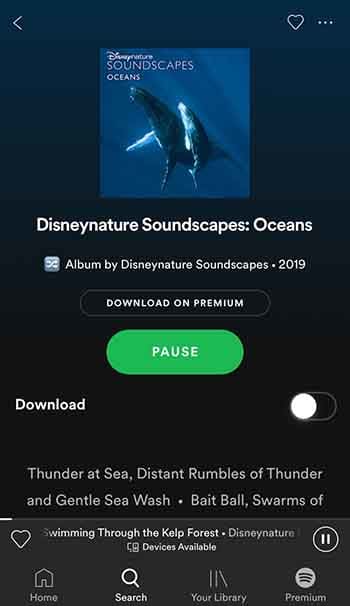
Scroll down a bit, and you’ll even find a playlist called “Disneynature Soundscapes: Oceans,” which provides some super-relaxing white noise to help you unwind.

Disneynature Soundscapes: OceanTo see some other playlist examples, you can check out the Spotify press release announcing the feature here. As well as everything you can see there now, Disney promises to keep adding to the hub throughout the summer and beyond. With big some big Disney hitters like “The Lion King” and “Frozen 2” on the way, that is not to be sniffed at.

This is big news for our family as we’ve developed a bit of a Christmas tradition involving Disney songs and lots of singing along. It isn’t just drunken karaoke Disney Princess wannabes though, who’ll be happy about this move. Anybody who has ever watched a Disney movie will love it because the music is half of the magic when it comes to Disney movies, and it’s magic we’ve all grown up with.

11 hidden Spotify tips and tricks

Make Spotify even better with these 11 features!

Spotify

Having a hard time requesting a song while driving? Or maybe you want to preview a song without playing the whole thing? What about when you can’t find a particular song? Spotify is an awesome for listening to (and for teaching) music, and while it doesn’t take a music degree to create a new playlist or put your library on shuffle, there are some handy tricks to the app that are a little more under the radar. Check out these 11 tips that will add utility and ease to the software:

8

1. Quality vs Data

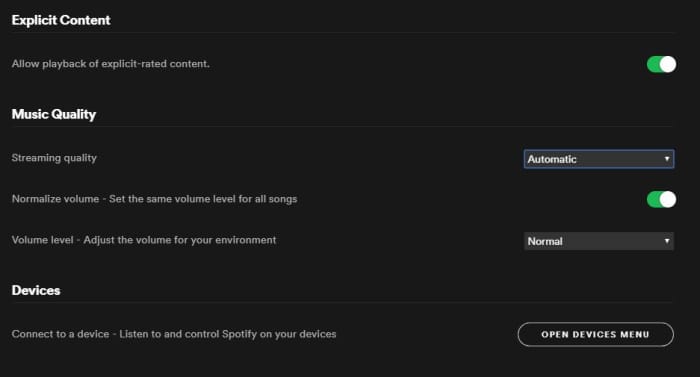
On both desktop and mobile you’ve got the option to either stream or download music on Spotify. By default, this process strikes a balance between fidelity and data, but through the Settings menu you can actually tweak which gets priority.

To do so (on Desktop) open the Settings menu from the drop-down under your profile picture. Scroll down until you see Music Quality. Use the ‘streaming quality’ drop-down to manually select either normal, high, or very high quality for your streaming.

You can use this function via mobile, too; just open Settings from Your Library and find it under Music Quality. On iOS specifically, you can find it under the Streaming Quality menu.

Spotify Settings menu Music Quality

2. Keep tabs with Last.fm

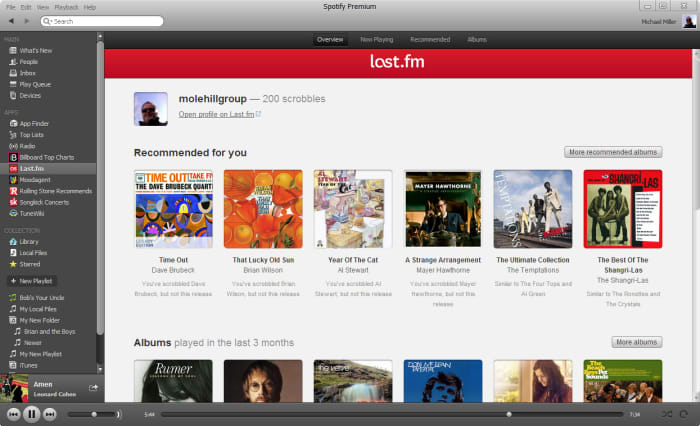
Spotify is integrated with Last.fm, a service that lets you track and discover new music. If you make an account with Last.fm (which you can do right here) it can connect directly to Spotify and you’ll be able to browse through the records it keeps of all the tracks you’ve been listening to on any of your devices. It’s even free!

Spotify Last.fm integration

3. Sing along with the lyrics

How does the second verse to “Tiny Dancer” go? Whether it’s because you’re trying to sing the song on the fly, or simply because not knowing what the singer is saying has always bothered you, it helps to have the lyric sheet handy.

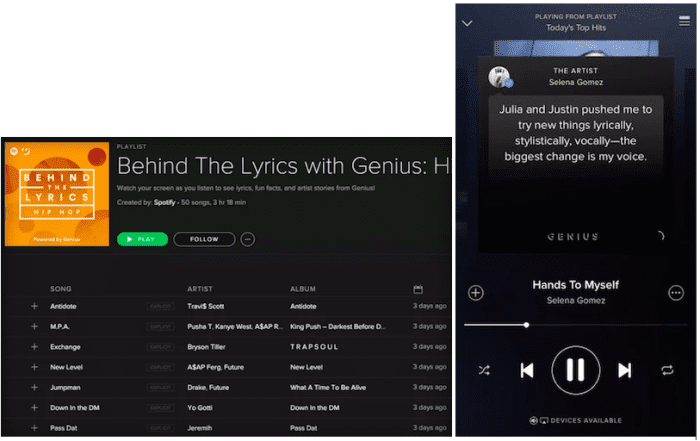
Spotify might have the lyrics up for you already – all you have to do is tap on the album picture while the track is playing. Spotify is partnered with Genius and certain songs have the lyrics integrated right in. Alternatively, you can switch this feature to “Behind the Lyrics” mode which tells information about the song alongside its lyrics.

Spotify Genius lyrics

4. Set up the queue

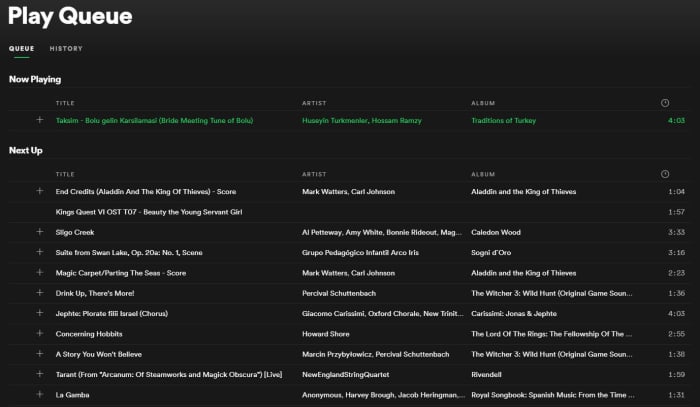
One of our favorite features for Spotify is that you can set multiple tracks in a queue, and they’ll play one after another. Doing so is very easy; on mobile all you need to do is select the song and press the ellipsis. From here you can do all sorts of things (view the album, check out the artist, add it to a playlist, or go to the radio), one of which is “add to queue.”

Once the current song is finished playing, it’ll start the next one in your queue, and then afterwards it’ll go right back into whatever playlist you were in before. It’s especially useful when you’re in something like a “classic rock” playlist but are hankering to hear one specific jazz tune before resuming.

Spotify Queue menu

You can also view the default queue of songs as well as your song history at any time by pressing the “queue” button on the bottom right (on desktop) or by looking through the queue menu on mobile.

5. Preview a track

If you’re a fan of instrumental music, you might not recognize a song by its title (since there are no lyrics to go by). Or maybe you just can’t remember how a song starts.

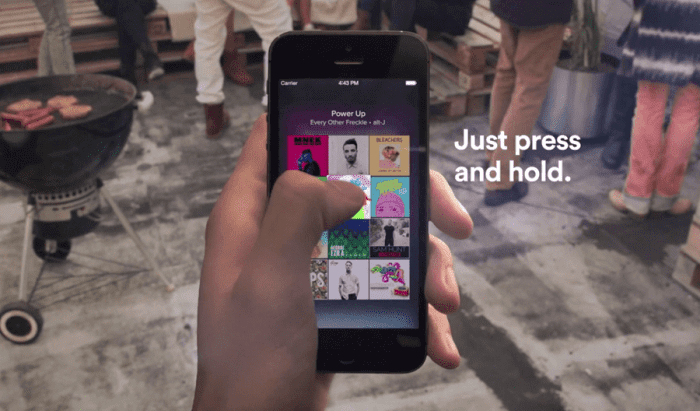
A neat trick on mobile is to press and hold the song title for a quick preview. That way you can navigate away from the page, check out other music, or show your friend a quick sample without committing to the whole track.

Spotify preview track mobile

6. Follow artists

It’s always exciting to find a new artist you like, and Spotify makes it very easy to look up more tunes, more information, or even upcoming concerts from artists in its huge roster.

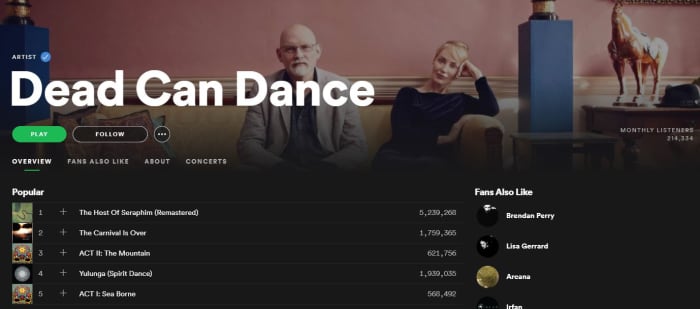
Next time you’re listening to a song on Spotify, click on the artist’s name (or find it via pressing the ellipsis on mobile) and it’ll take you right to their page. Here you’ll see their most popular tracks, albums they’ve put out, and even recommendations for other similar artists.

Spotify artist page

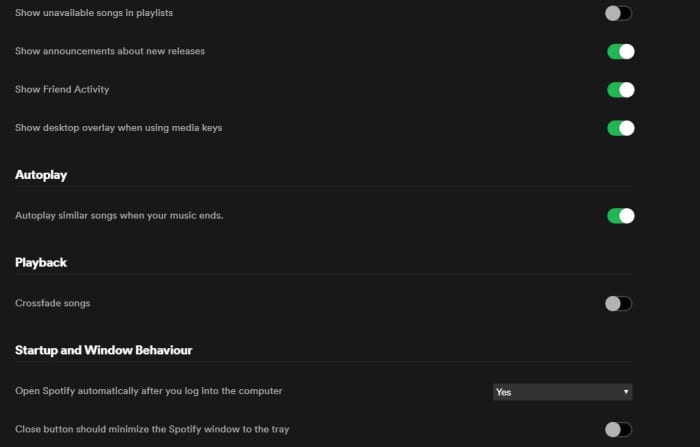
7. Crossfade tracks

If you want your Spotify experience to sound extra fancy, you can set it to seamlessly blend from song to song using crossfades between tracks.

To engage this just go back into your Settings menu and look for “Playback.” Enabling the crossfade feature is the only option here; just toggle it on.

If you’re on desktop you might find this option under “Advanced Settings” instead. Just scroll down and you’ll see a button for it.

Spotify Settings Playback crossfade

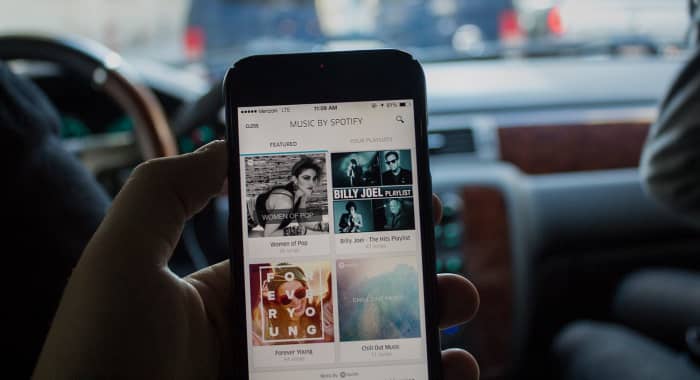
8. Request tracks via voice command

Texting and driving is a terrible idea, and that’s why it’s illegal. If you use Spotify on mobile, there’s a good chance you listen to it while driving, too. Sometimes, there’s a song we really want to hear and it’s tempting to scramble during a red light to try and put it in queue – but there’s actually a much safer, more convenient way.

Spotify can recognize voice commands, so just hit the mic button on your smartphone and tell it the song you want to hear. Tap it and it’ll start to play immediately. It’s faster and nearly hands-free!

Spotify mobile driving voice command

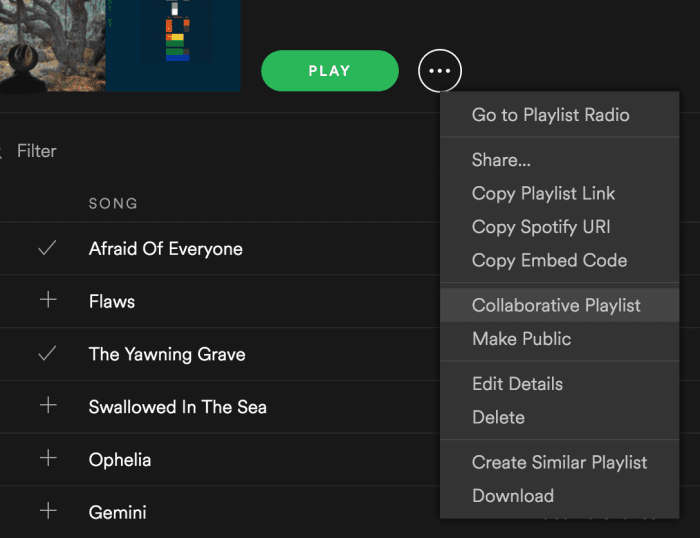
9. Make a collaborative playlist

Planning a road trip with friends? Maybe trying to organize a list of songs for your band to cover? Maybe your friend’s getting married and you and the other bridesmaids are in charge of making a playlist.

Start making a new playlist and then right-click on it. In the drop-down you’ll see an option to “make it collaborative.” Select this and then select any friends with whom you’d like to share the monumental task of picking the most appropriate music.

Good luck with that.

Spotify drop-down collaborative playlist

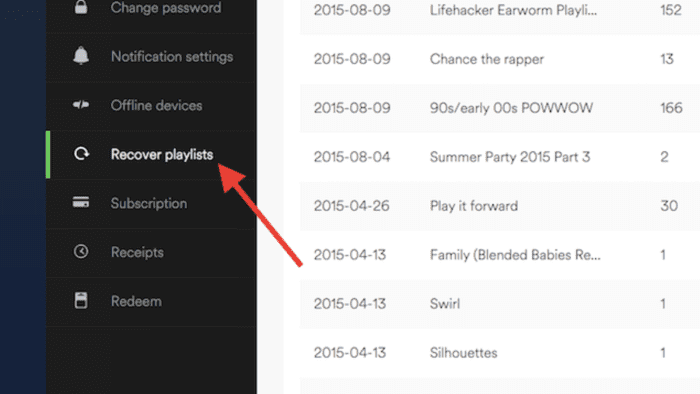
10. Recover deleted playlists

There’s definitely a moment of panic when you think you’ve accidentally deleted an entire playlist. Fear not; there’s a way to fix it.

Go to Spotify’s website right here, log in to your profile, and there’s a Recover Playlist option right there. You’re welcome!

Spotify website recover deleted playlist

11. Add music that isn’t on Spotify

Spotify’s got thousands of tracks out there, but there’s still the odd outlier that you can’t find in their massive library. If you’re willing to take a few minutes, there’s a way you can add your own local MP3s to your playlist.

All you have to do is access your Local Files via the Settings menu, add a source (giving Spotify the path through your File Explorer), and then sync it up with whatever playlist you like. Check out our full walkthrough of the process for details!

We hope these tips and tricks will make using Spotify easier and allow you to use it more effectively.

Let us know in the comments below if there’s one that we missed, and stay tuned with Softonic for more Spotify news and info!

Learn to play the piano online for free

Want to become an expert pianist? These resources can help!

PLaying piano

If you’re like most people who own a piano, all it really does is serve as a place to put your family photos. It’s a nice piece of furniture, but it would be nice to use it for its intended purpose.

If you have always wanted to learn how to play the piano, the internet has plenty of tools to learn how to play. We compiled some of the best we could find and put them in the list below. If you always wanted to learn how to play the guitar, don’t worry, we’ve got that covered also.

Learn to play the piano online

Check out some YouTube tutorials

Pretty much your best friend for learning how to play the piano online is through YouTube videos. 

You’ll find videos that teach beginner’s tips, and even how to play specific songs.

We especially enjoyed this video that taught us how to play “Imagine” by John Lennon. We never would have guessed that such a profound and popular song would be so easy to play.

If you’re just starting to learn how to play, we thought these were some of the best videos for beginners:

There are a lot of songs that you can play key by key, but in order to truly become a master, you’ll need to learn how to play chords. This video does a good job of teaching you some of the most common chords you will use. Once you’re done, the follow-up video will teach you accompaniment

If you want to learn how to do a fast piano run, this video is a good teacher. Piano runs look complicated, but they also look impressive and really cool. They’re definitely a must-know trick for up-and-coming pianists.

If you truly want to be a pianist, then you need to know what can prevent you from becoming one. The following video was created by a pro. How good is he? He created the last two videos we showed you. In the video, he goes over the most common pitfalls for becoming a pianist, including not maintaining a schedule and setting unrealistic expectations for yourself.

8

Practice on your computer or smartphone

It can be hard to find time to practice. Luckily, there are electronic solutions for you to practice the piano on both your computer or smartphone.

For Windows users, Electric Piano is one of the best apps for playing the piano. Basically, you can turn your keyboard keys into piano keys. You can even add different playing modes to make the piano sound like a different instrument like a harp or cello. Basically, it’s like having an actual electric keyboard but on your computer.

Electric Piano Download Free ►
7

If you want to practice the piano on your smartphone, My Piano for Android is a solid pick. You don’t get all of the same bells and whistles you get from Electric Piano, but that’s to be expected. (Come on, you’re playing the piano on a smartphone.) You are essentially getting a basic piano playing experience, but it’s still nice to have the option to practice.

7

Learn with Flowkey

Flowkey

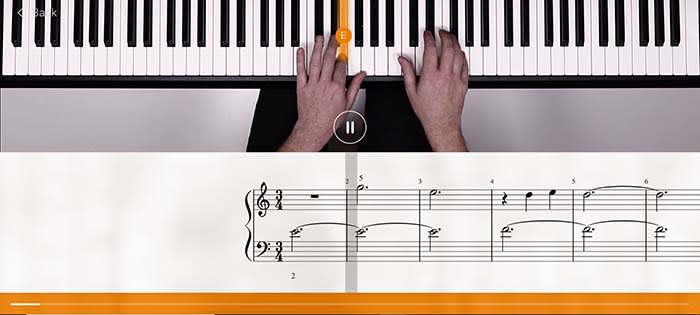
Quite possibly the best online teacher for learning piano is Flowkey. Flowkey has songs that you can play along with, and a microphone tool that listens in to make sure you are keeping up. To make things even better, Flowkey is completely free!

There are courses that you can take that range from beginner to pro. So even after you become a master pianist, Flowkey still has tools to help you hone your craft.

One of our favorite tools is the one that repeats a section. If you’re learning a new song, sometimes a single part of that song will give you a lot of trouble. Flowkey has a tool that will repeat that part of the song over and over again until you have it down pat.

Along with its stellar website, there is also an app for Android and iOS. The app is also free to use.

9

Wrapping up

The main thing you are going to need in order to become an expert pianist is discipline. You need to set realistic expectations for yourself and make sure you are devoting as much time as you can to practice.

As long as you do that, you are well on your way.

How to learn to play guitar online for free

Want to be a rock god? Follow these tips to help get you there!

Learning to play guitar

We’ve all fantasized about being a rock star with droves of fans who worship us. There seems to only be one thing that stands in our way: actually learning how to play the guitar.

Between work, school, and our social lives, it is hard to find time to take lessons, let alone the money. However, if you are serious about learning to play the guitar, these helpful tips and tricks can potentially make you go from a novice to a master.

Who knows, if you get good enough maybe Dave Grohl will call you out onstage to play “Monkey Wrench!”

I mean it probably won’t happen, but you never know!

Starting off

Buy your guitar wisely

Even if you are serious about learning how to play the guitar, we highly advise buying an expensive first guitar. You can avoid the $5,000 Gibson and settle for the $85 starter package you can buy on Amazon. Most places that sell guitars offer a guitar, amp, picks, case, strap and a tuner for less than $100, so shop smart!

You do this for the same reason you don’t get a teen a Lamborghini for their first car: wear and tear. You simply don’t know how to properly care for your new axe yet, so it’s best to start off as cheap as possible so you’re not making an expensive mistake. Also, if you give up halfway, that $5,000 guitar is suddenly a very expensive conversation piece.

What you need to buy

If you’re just starting off, there’s a bunch of things you will need to get going. However, don’t get suckered into buying a bunch of junk that will just take up space, or stuff that’s overpriced.

What you need:

  • Picks: If you’re spending more than 50 cents per pick, you’re being ripped off. Also, just because a pick looks cool doesn’t mean you should buy it. Think about it: your pick is sandwiched between your fingers and is hidden behind your palm when you’re playing. Who is even gonna see it?
  • A strap: If you want to ever perform for people, you are going to do it while standing up. If you try to play standing up without a strap, you are going to drop your guitar and potentially ruin it. Get yourself a simple strap that doesn’t look too complicated. Remember, if you can’t figure out how to put the strap on then you can’t keep your guitar safe. This should cost about $5 for your basic strap, but no more expensive than $20 if you want something a bit more stylish.
  • Amp/chords: You should buy a package that includes an amp with your guitar. However, if you want something that’s a bit nicer, you can get a decent amp that won’t break the bank. For your first amp, don’t spend more than $100. Also, make sure whatever you buy comes with an amp chord and overdrive settings. Overdrive is basically a distorted tone you hear in some songs. Later on, you can buy pedals that will give your guitar more unique sounds, but don’t worry about those in the beginning stage.
  • Strings: The first thing you should do when you get your new guitar is to buy new strings. Often, guitar manufacturers will slap cheap strings on mass-produced guitars that will break almost immediately. Also, if you bought your guitar off the showroom floor at a guitar store, there’s a good chance that many other people played on those strings. Strings shouldn’t cost more than $10-$15 and should be replaced every few months or as needed.
  • A capo: A capo holds down an entire fret for you. Basically, if a song is basically a series of the same barre chord, or if you need to play the whole song an octave higher, a capo really comes in handy. Again, you should only pay about $10 for this one.
  • A case: First off, always buy your guitar case from the same place you bought your guitar. If you don’t then you will have no idea whether or not your guitar will fit inside. You can always try to wing it and buy a one-size-fits-all case, but you may end up buying something overly baggy that won’t protect your guitar.  Get yourself a canvas case with a strap so you can easily throw it on your back. Expect to pay around $20.
  • A stand: You can’t just let your guitar lean up against the wall; that’s how they fall and snap their necks. Dish out the extra $10 and buy a stand to keep it safe. 
  • A tuner: Even the most experienced musicians have trouble tuning by ear, so don’t think you can do it right out of the gate. Instead, you need to get yourself a tuner. However, here you have the option of getting one for free! Download our free guitar tuner app below!
Free Guitar Tuner Download Free ►
7

Have an idea of what you want to play

Finally, you need to ask yourself what kind of music you want to play. This can help you decide what kind of guitar you should eventually buy, what kind of pedals, what kind of amp, and also what songs you should learn to play.

You don’t need to buy yourself a “My First Guitar” songbook. There are plenty of hit songs that you can learn online for free that are easy to learn.

Ask yourself, would you rather jam out to “Stairway to Heaven” or “The Grumpy Snail?”

How to learn to play guitar online for free

Tutorial videos

Online guitar lessons

Sure, there are online lessons you can pay to view, but there are also a ton of free options on YouTube.

From learning to play chords, learning how to change strings, to learning how to play a few easy songs, there’s a lot of resources.

8

Videos you should watch

Just to get you started, the following videos are ones you should watch when first learning how to play guitar.

Your first chords

This video does a good job of teaching you a few starting chords before you start to learn full songs. Once you master these few chords, you are then ready to start moving on to some more intermediate ones.

Learn to play House of the Rising Sun

Weirdly enough, “House of the Rising Sun” by The Animals is an extremely popular first guitar song. It’s a very easy-to-play song with basic chords, so you don’t have to worry about anything too intermediate. Master this song and you’ll soon be the envy of the block.

Play with songs playlists

If you ever want to play in a band, you need to learn how to keep up with others. Luckily, there’s a YouTube playlist that has songs with a wide range of difficulty and with guitar chords scrolling across the screen! Now, you can play along with the studio recording of your favorite songs! As an added bonus, this will make you feel like a real star as you play along with legends like Neil Young and Lionel Richie!

Learning tabs

Guitar tabs

If you want to learn a specific song, Ultimate Guitar has more than one million songs tabbed out for you. There are premium options that cost money, but many songs do have user-submitted tabs that can be viewed for free. Ultimate Guitar also has an app, but it does cost money.

Ultimate Guitar Tab & Chords Download now ►
7

If you don’t want to sift through the premium and non-premium options, Guitar Tab Universe is completely free. The catalog of songs is not as extensive as Ultimate Guitar’s, but it is still extensive.

Wrapping up

Chances are you’re not going to be the next Jimi Hendrix. However, learning to play the guitar is very rewarding and can lead to you making strong friendships. Who knows, maybe you will end up forming a band and playing on stage! Regardless of where this journey takes you, these tips can help get you where you need to be.

Spotify testing Instagram-like stories feature

Spotify’s new Storyline feature allows artists to share both insight and their creative process.

Spotify feature

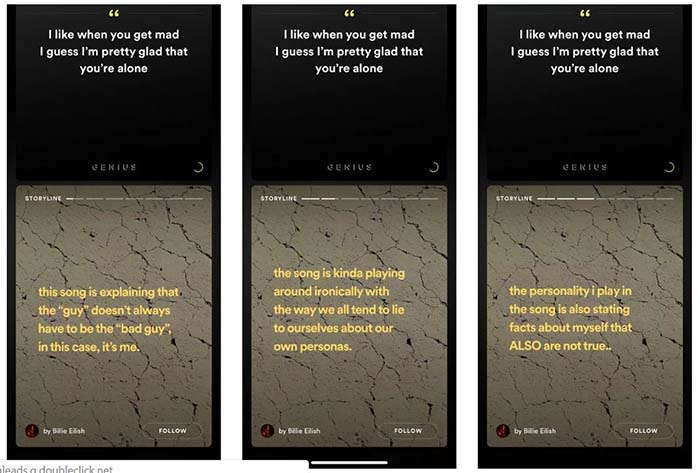
Spotify is testing a new feature similar to Instagram’s “Stories” feature, according to an article from TechCrunch.

The new feature, called “Storyline,” will allow artists to share their insights into the creative process of their music.

Spotify Storyline
Source: Thomas Ricker / The Verge

For example, if T-Pain releases a new album, he can go into the deeper meaning behind his songs in Storyline. Users could sift from segment to segment in Storyline to the parts they want to see. Each part of the Storyline would be static text and video.

8

“We are always testing new ways to create better experiences for more users,” a spokesperson said in a statement to TechCrunch. The spokesperson confirmed that Storyline is being tested.

Spotify does already have a feature that shows the lyrics of a song, and some of the insight behind them. 

However, the feature was known to be incorrect at times. In one case, Hayley Williams from Paramore tweeted at Spotify to correct “outdated facts” in one of her band’s songs.

Right now, there is no set release date. Also, none of the testers are in the U.S. However, the new feature would give Spotify original content, which users have noted is lacking on the app. Reddit users have spotted the feature on songs from the Jonas Brothers and Billie Elish. 
Apple Music: pros and cons

Is Apple Music worth the price, or should you give it a hard pass

Apple MusicAfter reaching 40 million downloads for Android users, Apple Music is not slowing down. The app serves up a library of 50 million songs, along with music videos and news.

We have a plethora of music-streaming apps to choose from, each with varying prices and features. So is Apple Music worth your hard-earned dollar? We collected the main pros and cons of Apple Music so you can decide whether or not it deserves a home on your device.

Pros and cons of Apple Music

Pro: It has a 90-day free trial

Apple Music Free Trial

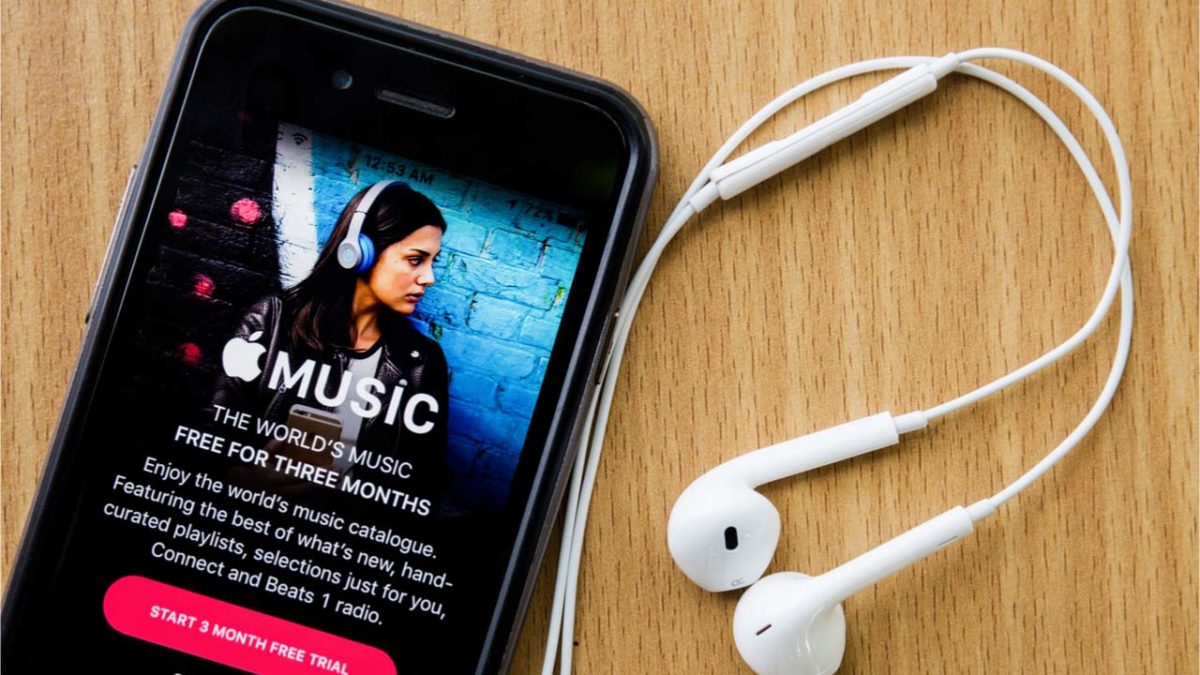
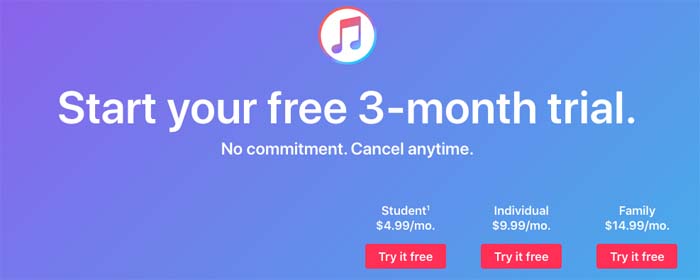
Surpassing Spotify Premium by a full month, Apple Music offers users a free three-month trial to first-time users. You get to use the app in its entirety during your free trial, so you can be sure you are getting the full experience.

Apple Music Download Now ►
7

Con: The white screen of death

Apple Music on phone

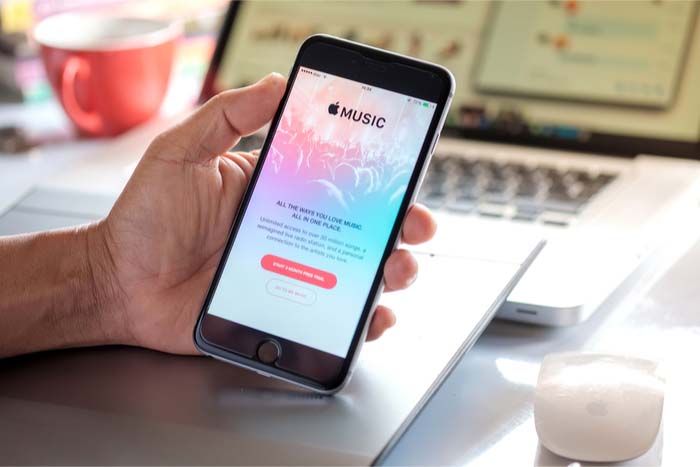
With most new apps, there tend to be a few hiccups that come to light soon after launch. Since Apple Music has been around since 2015, it’s odd that issues still remain. Users often find themselves staring at a stale, white screen as the app stops working. To make matters worse, troubleshooting hasn’t been fixing the issue. The app is in desperate need of an update to fix these issues, or, at least, to improve the troubleshooting.

Pro: It is reasonably priced, and has a student plan

Apple Music payment plans

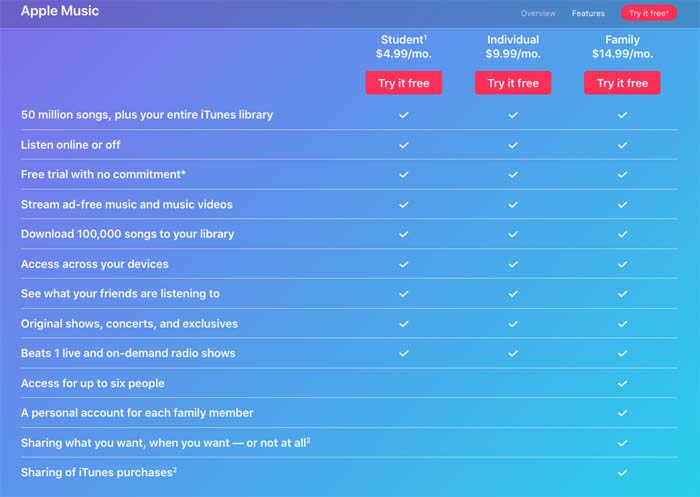
Most music-streaming services hover around the $9.99 to $12.99 per month price range. Apple Music charges $9.99 per month for its ad-free services, and also offers a student plan, which costs only $4.99 per month.

Con: You can’t listen to podcasts

Podcast symbol on phone

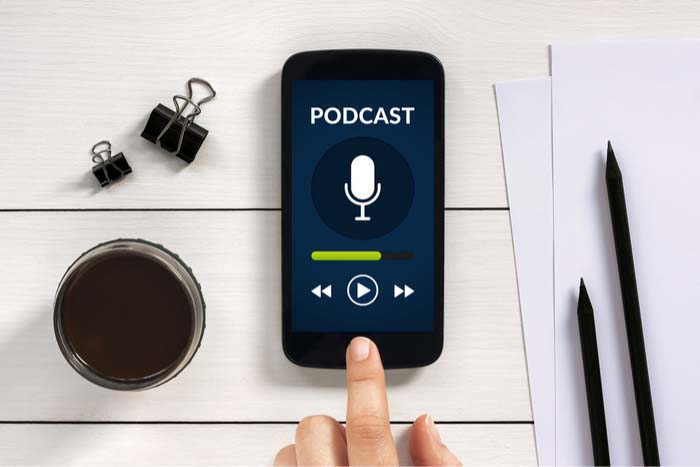
Whether you are listening to “My Favorite Murder” during your morning commute or tuning into “Stuff You Should Know” while at the gym, podcasts have become part of our daily routines. Unfortunately, Apple Music has not gotten that memo as we are not able to stream our favorite podcasts through the app. We can listen to podcasts via iTunes, but the fact that this service isn’t streamlined into a single app like Spotify is a bit absurd.
8

Pro: You can avoid burning data

Burning data

If you stream music daily as many of us do, you can burn through about half a gig in a day pretty easily. As this adds up over time along with everything else you do with your phone or smart device, the ability to listen to music offline is necessary. Apple Music offers a feature where you can download music while online for no additional cost, and then listen to tracks while offline. You can also create playlists with your downloaded tracks while offline.

Downloading tracks takes a matter of seconds, so you can easily spend a few minutes downloading songs, and then spend the rest of the day listening to music while offline.

Con: Hazardous updates

Phone frustration

Snapchat is a prime example of how one bad update can make many of your users uninstall the app. Apple Music has done this numerous times with updates that removed beloved features such as the “play later” feature, and updates that consequently made the app more laggy, or just not work altogether.
8