
Instagram tests new anti-bullying features

Instagram now asks bullies if they’re sure they want to post harmful content and offers new “Restrict” capabilities to users!

Cyber bullying

In a recent blog post, Instagram reaffirmed its commitment to lead the fight against online bullying. This isn’t the first time we’ve covered Instagram’s efforts and it is good to see the most aesthetically-minded of all the social networks taking efforts to protect its users against online abuse. Mental health is fragile on social media and Instagram users can often castigate themselves even before the bullies get a chance to.

This is why it was refreshing to see Instagram remove the “like” counter on posts, which itself continued on from anti-bullying action it took back in October. This action included introducing an AI algorithm that hunts out bullying sentiment and the promotion of anti-bullying campaigns across the network. So, with Instagram reaffirming this mission, let’s have a look at the new actions the social network is promoting.

Instagram Download Now ►
7

Instagram’s anti-bullying efforts

The first major feature uses the anti-bullying AI we mentioned earlier, and forces bullies to reconsider their potentially harmful actions. Whenever an Instagram user moves to post content that the AI flags as potentially offensive, Instagram will let them know and ask them if they’re sure they want to post it.
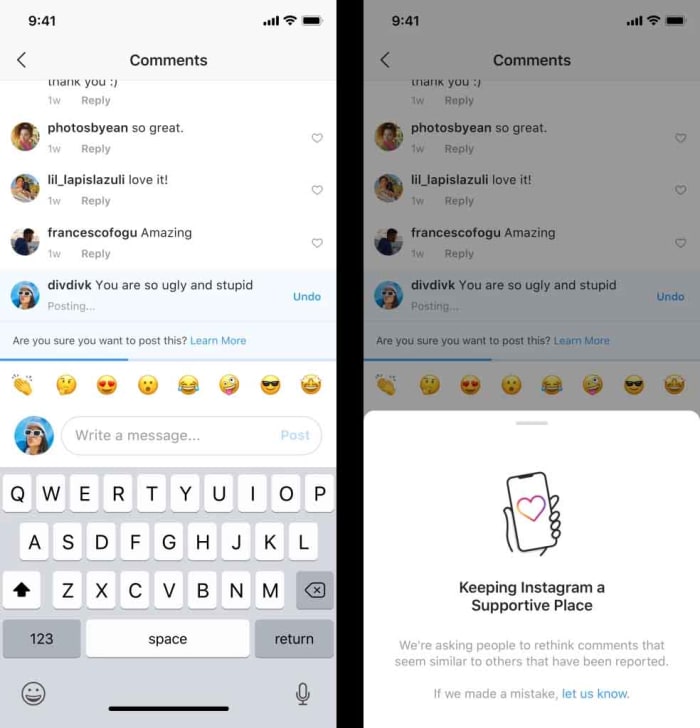
Instagram screenshots

Instagram claims that early tests of this feature, “… have found that it encourages some people to undo their comment and share something less hurtful once they have had a chance to reflect.”

Although this action might not sound like much, it is worth noting at this point that some bullies won’t consider themselves to be bullies and might not even be aware that the comments they’re making could be harmful to the person who is on the receiving end.

The second action Instagram has taken is a move to protect the victims of online bullying.

“Restrict” gives users the chance to control the comments and posts that they have to interact with on Instagram without notifying any users whose content might fall under the limits of the new feature. This feature comes directly from feedback the social network has received from users, who’ve said, “… they’re reluctant to block, unfollow, or report their bully because it could escalate the situation, especially if they interact with their bully in real life.”
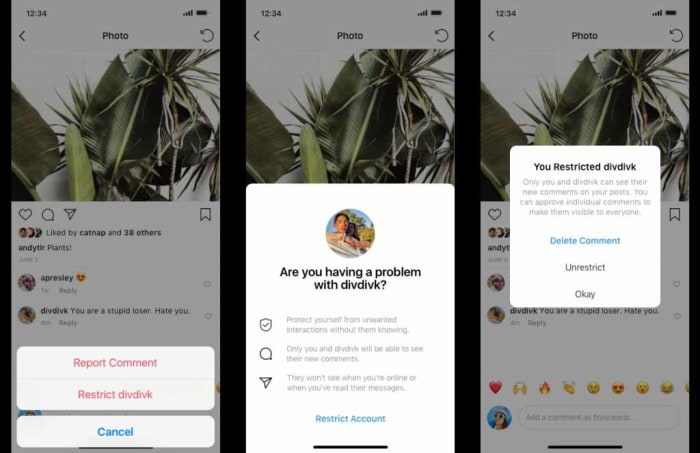
anti-bullying screenshots

Whenever a user restricts another user, their comments will remain visible to them as they always have done but the restrictor, or anybody else viewing the original post, will not be able to see them. The feature also gives the restrictor the power to make the restricted comments visible, should they be suitable. Another cool feature is that all users you’ve restricted won’t know when you’re online or be able to see, if you’ve read their direct messages.

Wrapping up

Both of these features mark positive tools for Instagram users falling on both sides of the bullying relationship. Hopefully, over time their positive effect will become well-known with bullies making less hurtful comments and victims being able to control who sees anything negative said about them on any of their posts.
Instagram’s bot problem is getting worse

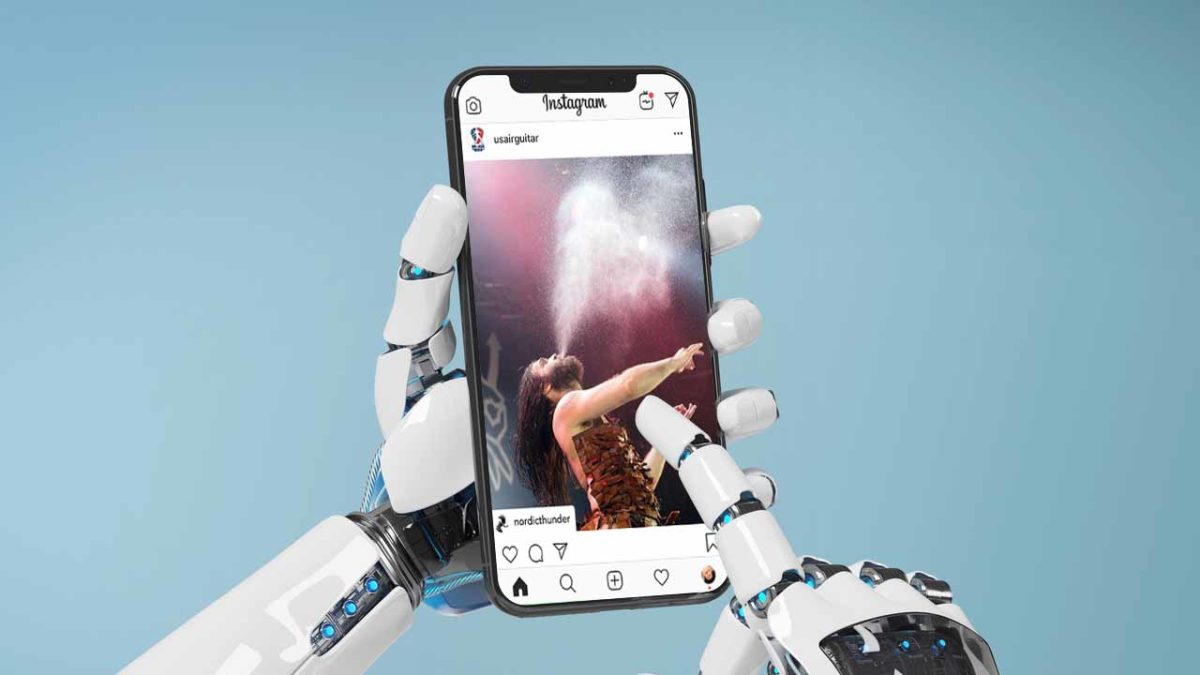
Instagram bots aren’t only annoying, but they also represent a much bigger problem.

Instagram robot

Late last fall, Instagram announced a crackdown on the fakers, frauds, and robots ruining the space for everyone else.

It seems that Instagram’s harassment problems are on the rise, despite the fact that the social media platform has made a concerted effort to fight back. However, the automated apps people use to increase likes, comments, and follows still have the upper hand.

Facebook has also sued a New Zealand company for selling fake engagement metrics on Instagram after issuing repeated warnings and suspensions on the associated accounts.

Despite their efforts, it seems that 2019 is a great year for bots. Here’s a quick look at what’s going on.

Instagram Download Now ►
7

NSFW bots

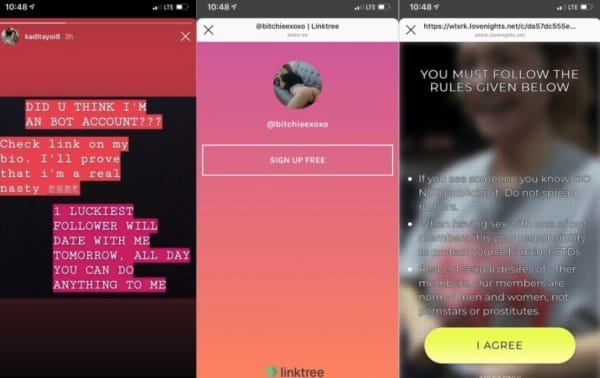
Sure, Instagram has a pretty firm no-nudity stance. Unfortunately, that hasn’t stopped an influx of bots using explicit content to deceive users.

According to Engadget, there’s been a rise in these spammy profiles containing videos of naked or semi-naked women. These profiles are designed to get users to look at their accounts, then sign-up for pornographic subscriptions.

spam bots

Somehow, when these bots comment, they get a ton of likes, which makes them show up in a more prominent location on others’ profiles. These porn-promoter types are more embarrassing than anything, unless you click on them, that is.

Vice wrote a whole piece that dove into the world of NSFW bots and found that many of them are part of these affiliate schemes that rely on intermediary landing pages to collect leads.

It’s the same technique shady marketers have long been using to sell male enhancement products and face creams on Facebook, only to loop them into a monthly subscription scam.

There’s a whole section dedicated to using these fake accounts to generate clicks on Black Hat World. Black Hat World is an SEO forum where people share tips for “cheating” the system.

Black hat forum instagram spam

We’ve all seen these bots, as well as other fake followers. And while most of us simply block them and move on, fake accounts can undermine your security. Bots may be friending you so that they can hit you with a phishing attack via DM.

Follower fakery

Follower counts on Instagram have become a measure of success, a badge signifying popularity, that even those with as few as 1,000 followers have the potential to monetize.

Because brands are capitalizing on the power of leveled-up word-of-mouth, many users have turned toward automation apps. These apps like InstarocketProX and Boostio to help increase follower counts.

These apps often require the user to hand over their account credentials, a monthly fee, and in exchange, they’ll like, comment, and follow on your behalf.

Instagram has started cracking down on this activity. Popular apps like Intagress and Hashtagpirate have been shut down.

Commenting bots deliver embarrassing or inappropriate messages more often than not. An influx of inauthentic likes or follows water down the platform’s value — if you never know if anything is real, what’s the point, right?

Toxic content and misinformation

Woman surprised by phone

Toxic content problems exists on Instagram, too. Instagram may well be the new breeding ground for the spread of misinformation, especially for our youngest conspiracy theorists.

The above article looks at the recent influx in far-right influencer content like the American Identity Movement. They are a white supremacist movement that posts “relatable content” on Instagram through the same tactics as your typical fashion and beauty influencers use to connect with fans.

While the posters behind these accounts are not bots themselves, bots are doing a lot of the heavy lifting when it comes to spreading false information.

What’s Instagram doing about this?

Instagram

Between the NSFW spammers and the AI-driven “talent scouts,” Instagram has a few problems to work out. While they might not be on the scale of say, Facebook or YouTube’s, something still needs to be done.

While the platform has done a better job than Facebook, cracking down on harmful content, wrangling all the spammers, trolls, and other bad actors are no small feat.

Instagram’s new policy explicitly bans inauthentic content. This means that they’ll strip accounts with fake followers, likes, and comments using AI-backed moderation tools (bots against bots).

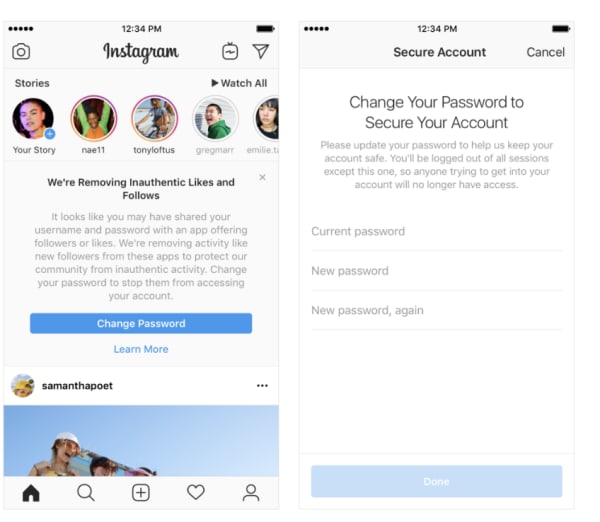
Any accounts found to be using third-party apps to fudge their engagement numbers will see fake likes and followers removed and be prompted to reset their password. Third-party apps often hold the profile owner’s credentials.

Because Instagram has become a major source of income for brands and influencers alike, more accounts will inevitably turn to third-party apps to artificially boost the popularity of posts.

Inauthentic activity warning on Instagram

How to get rid of bot problems on your own

If you use your Instagram account for marketing purposes or you have a sizable following, bots can do some harm to your reputation. On a broader scale, they can inflate marketing costs.

First, check the followers to posts ratio. Accounts with thousands of followers but no content likely aren’t real.

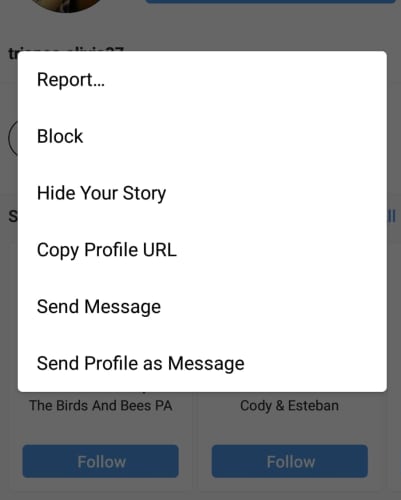
You can block bot accounts by clicking on the profile, then selecting “block from the three-dot drop-down in the right corner of the screen.

how to block instagram botIf the bot is of the malicious or pornographic variety, then you may want to report the account to Instagram for further investigation. If they find that the bot that violates its community guidelines, they’ll let you know.

In the meantime, whatever you do, don’t give your credit card information to those porn bots.

Doctor forms team to stop spread of fake medical news

One doctor is leading the charge against fake medical news on social media.

fake drugs

If you’re a frequent social media user, you’ve probably encountered posts spreading misinformation about medical topics like vaccinations. According to a study published in ScienceDirect, top posts on social media relating to common diseases contained misinformation 40% of the time.

It’s easy to see why people turn to fake medical news. These posts often promise cheap, powerful miracle cures to common ailments. Factual medical information, on the other hand, is significantly less flashy and optimistic, often only promising moderate success. It’s completely understandable that a person who has a disease that makes their life miserable would skip over all of the pessimistic posts regarding realistic treatment in favor of fantastical stories about miracle recoveries. However, this creates false hope and can discourage patients from seeking legitimate treatment.

No one knows the harm that fake medical news can cause more than Dr. Austin Chiang. An internet-savvy, Harvard-educated gastroenterologist, Dr. Chiang has over 20,000 followers on social media. Dr. Chiang uses his online platform to spread factual but digestible medical advice. Whereas most doctors on Instagram are hopelessly drab, Dr. Chiang presents himself as relatable yet knowledgeable.

View this post on Instagram

Diagnosing cancer (or pre-cancerous) lesions often isn’t black of white. ? It’s like piecing a puzzle of information together between appearance on different imaging modalities (CT, MRI, EUS) + needle sampling + medical history + clinical picture. ? . ❗️Nowadays, only 200 microliters of pancreatic cyst fluid is required to test for some tumor markers like carcinogenic embryonic antigen (CEA) and DNA mutations. ?Also included in the analysis is detection of KRAS and GNAS mutations, which might indicate certain types of mucinous cysts…some of which could become cancer one day. ? . . . #cancer #diagnosis #science #biology #doctor #cancersucks #pancreaticcancer #cyst #meded #puzzle #mystery #usmle #medico #醫生 #癌 #健康 #hospital #health

A post shared by Austin C. MD MPH 。 GI Doctor (@austinchiangmd) on

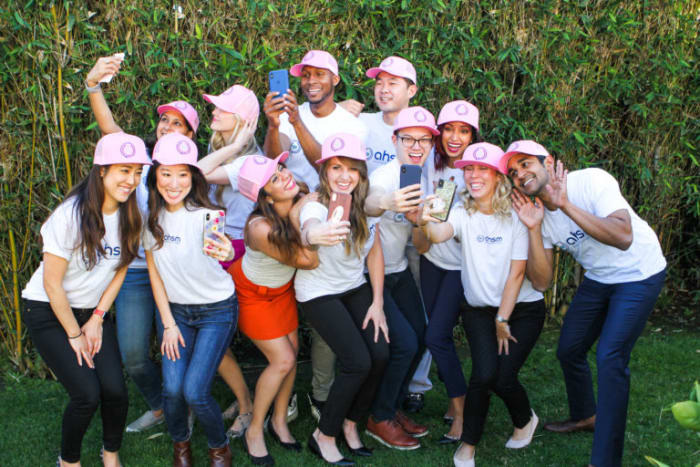
While Dr. Chiang’s charming social media posts have gotten him a sizeable audience, his follower count pales in comparison to that of big anti-vax and alternative medicine accounts. He called this massive social media presence “the greatest health crisis of our time.” Realizing he can’t combat these campaigns on his own, Dr. Chiang set out to assemble a team of like-minded healthcare professionals to fight misinformation, forming the Association for Healthcare Social Media (AHSM)

Dr. Chiang is using his position as Chief Medical Social Media Officer of Jefferson Health to recruit other savvy professionals. Dr. Chiang and his team are well aware that the public does not salivate over professional medical journals and press releases, and his team is hard at work packaging medical information for the social media age. The AHSM knows that scare tactics and emotional manipulation are what spreads in the medical social media sphere, and they use the opposite approach of easily understandable language and concise information told in a non-condescending manner.

With platforms like Instagram and Facebook facing huge issues with anti-vax accounts and other fake medical news spam, doctors taking to social media is the antidote we need moving forward. By combining legit medical knowledge with the hugely popular inspirational lifestyle aesthetic, medical professionals can build up huge followings to fight harmful medical advice.

Google Maps feature helps find the best food on the menu

Need help picking out what to eat at a restaurant? Google can help!

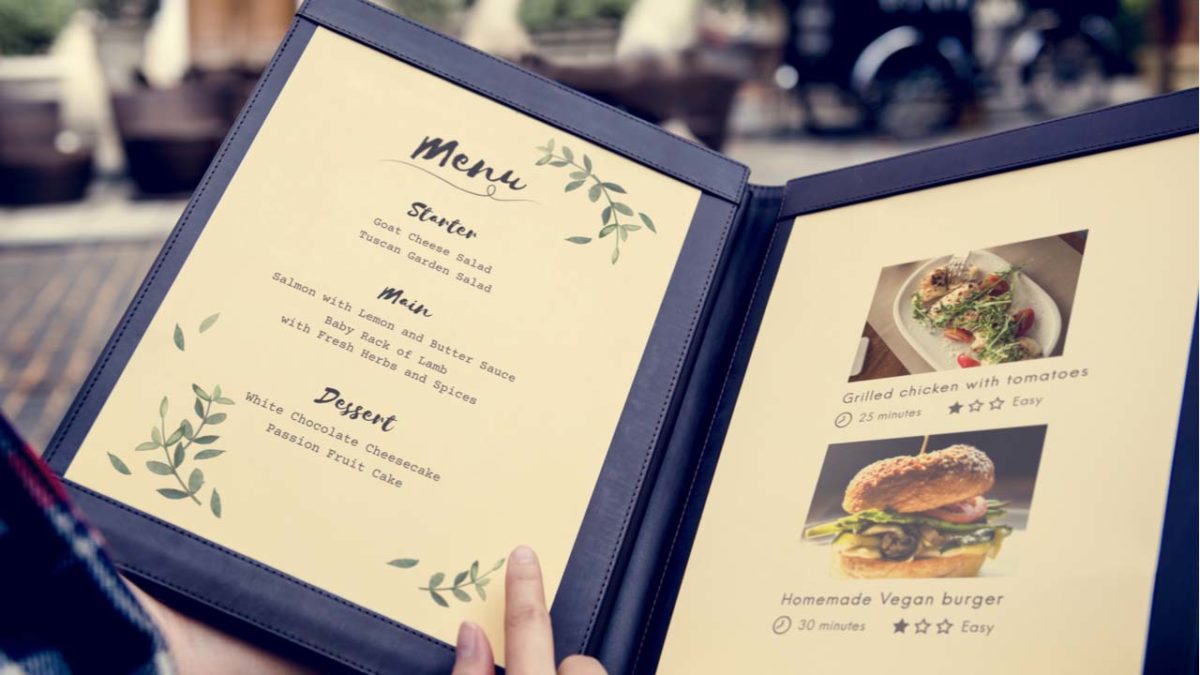
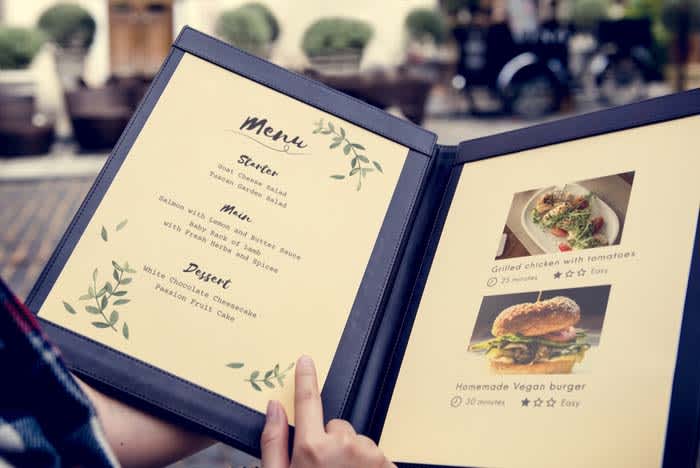
Restaurant menu

For quite some time now, Google has been trying to turn Google Maps into more than it is. Yes, Maps is a great navigation tool and Google continues to add new features to help it do this job better. Google, however, is also trying to turn Maps into an interactive business directory. It’s now the place you go when you’re thinking of trying a new restaurant or need a particular company that will provide a particular service.

Google Maps Download Now ►
7

In this respect, we’ve recently seen Google adding hashtags to user reviews to help you find the types of company you’re looking for more easily. They’ve also added messaging to help you talk to the companies once you’ve found them. Google is now adding another restaurant-focused feature to Maps that will help you decide which restaurant you’ll end up eating.

Google Maps will now show a restaurant’s most popular dishes

Maps app

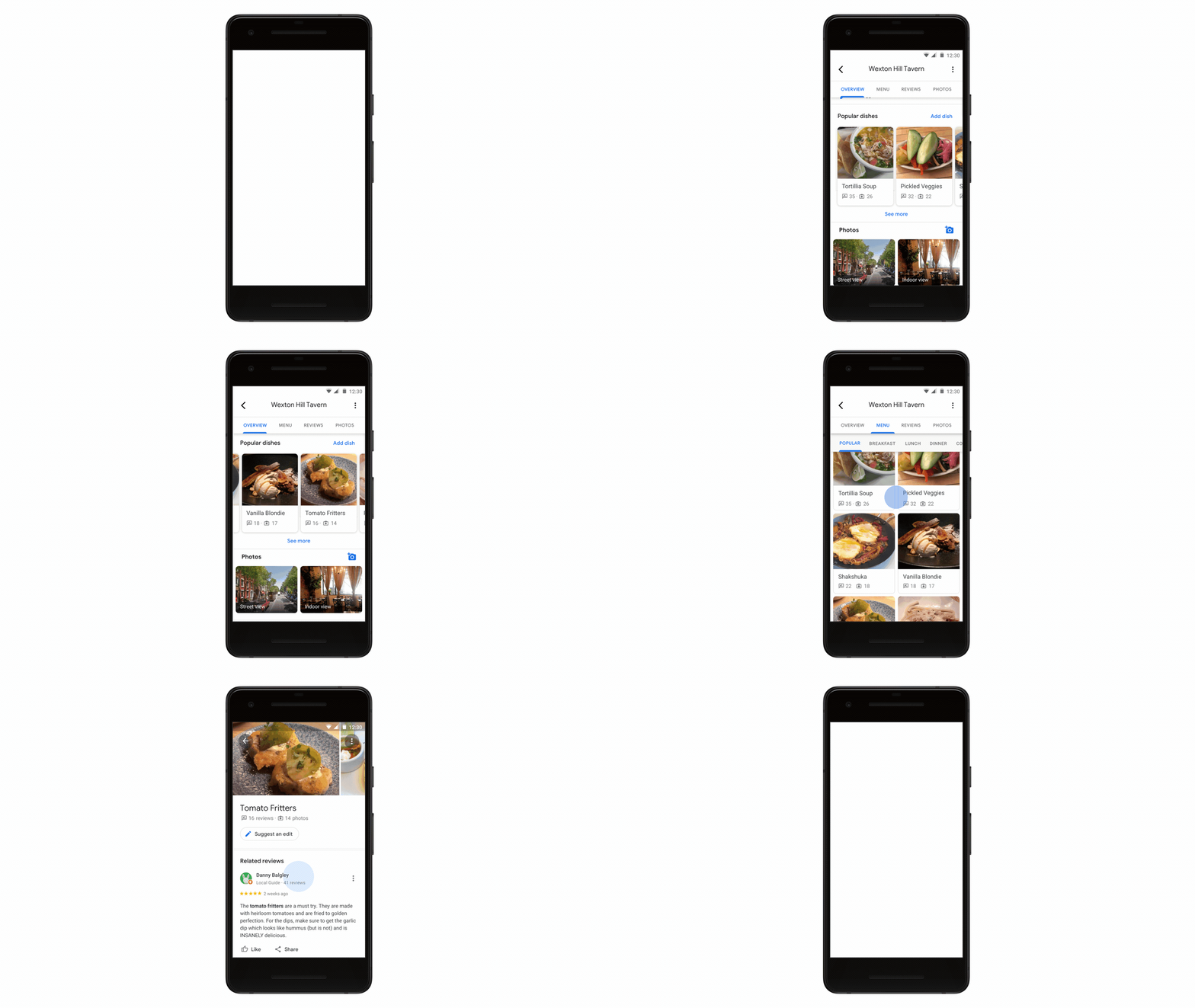
The new popular dishes feature coming to Google Maps is powered by Google’s machine learning algorithms. It is very similar to a new feature that has just landed on Google Lens, too. The algorithm will match user reviews and photographs on a per restaurant basis.

Google Lens Download Now ►
7

This means that whenever you tap a restaurant in Google Maps, you’ll be able to see which dishes are most popular with other Google users. You’ll even get to see what they look like if other users have posted photos. There’ll also be quick one-tap access to user reviews for the dishes you’re thinking about ordering.

Google Maps
Source: Google

How does it work?

As with a lot of Google features, however, this wouldn’t be possible without user participation. Google was keen to point this out in the blog post published to announce its new dish-cover feature.

“At the end of the day, this feature is made possible because of contributions from people around the world who want to help others using Google Maps. So, if you want to pay it forward to the next diner, simply take a photo of your meal (before you’ve scarfed it down!) and add a dish name so others can know what’s good on the menu,” according to the article.

If Google can persuade more users to upload their food photos to Maps rather than Instagram, it’d go a long way to establishing Maps as the go-to business directory Google wants it to be. This would leave apps like Yelp in the dust.

Google points out that the new popular dishes feature is rolling out to Google Maps users on Android right now and will be coming to iOS users in the coming months.

How to write in different fonts on social media

Want to impress your friends on social media with mad font skills? Here’s how!

Facebook font

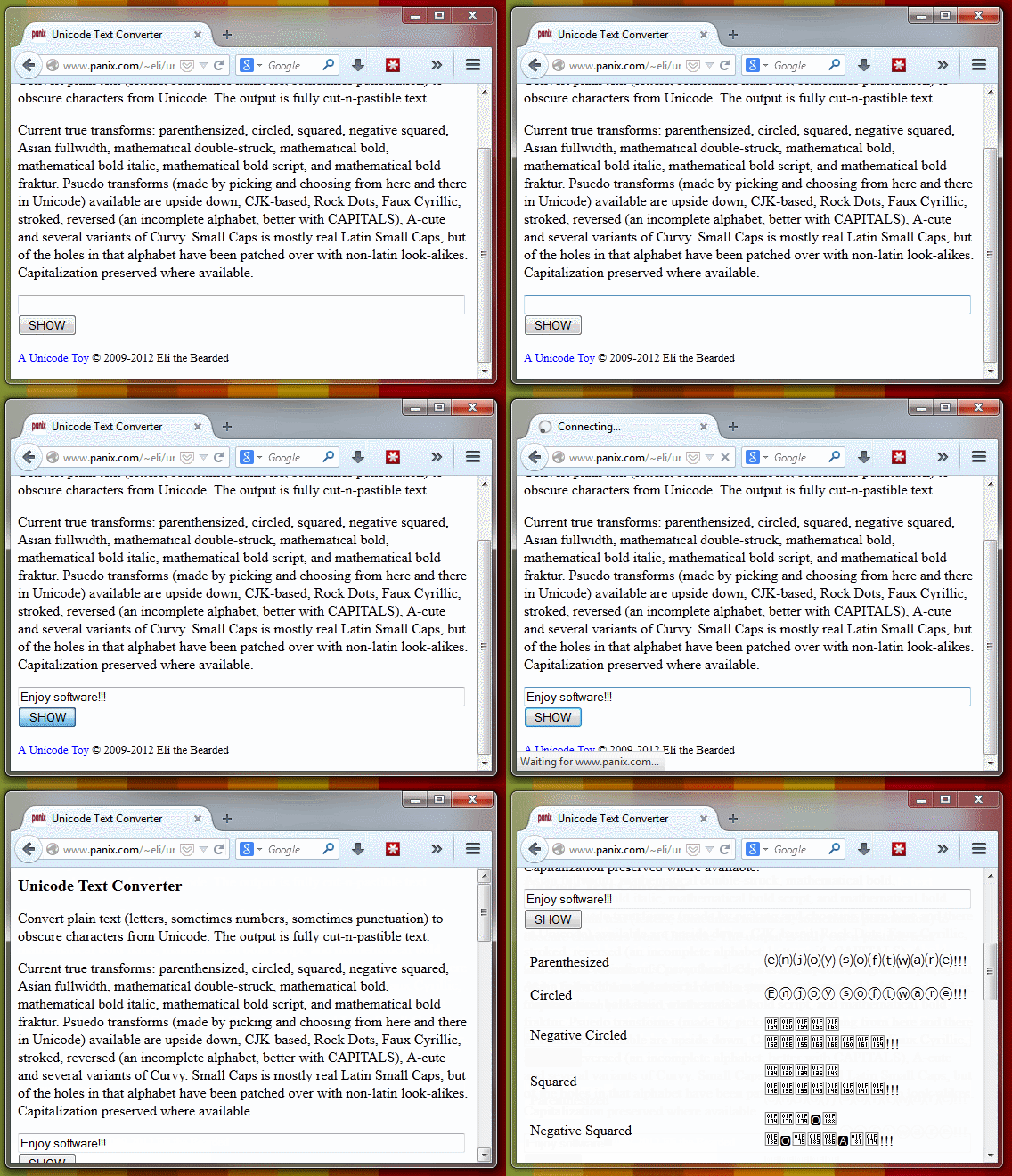
Did you know that you can write on Facebook, Twitter or YouTube using different fonts? All it takes is a simple trick!

When you write on Facebook and Twitter, there is only the default font. The text always looks really boring.

However, writing in another font is possible. To make things better, you don’t need to be a computer whiz to figure it out! Just look at what you can get!

Text converter

Do you want to use these fonts too? Then follow the steps:

How to write in different fonts on social media

1. Go to Unicode Text Converter

Yeah, we’re sure there might be other methods for changing the font, but why not just go with the easiest?

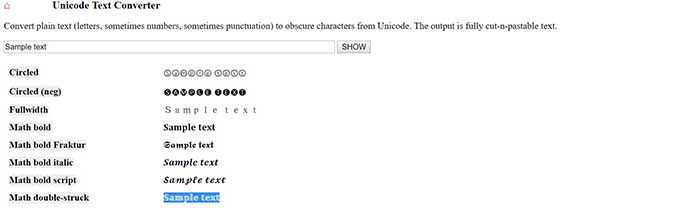
2. Write the text you want to convert

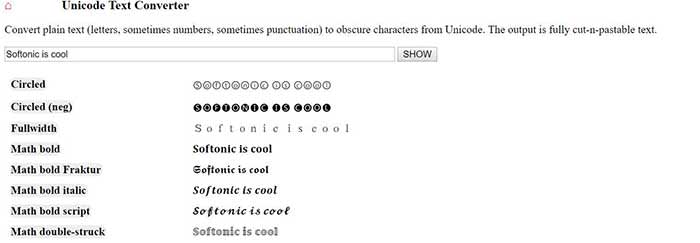
When you’re ready, take the text you want to post on social media, and throw it into the provided space. When you’re done, hit “Show,” and the text will be shown in the newly available fonts.

Text converter

3. Copy the transformed text

Unicode sample text

Once you find your favorite font, copy it.

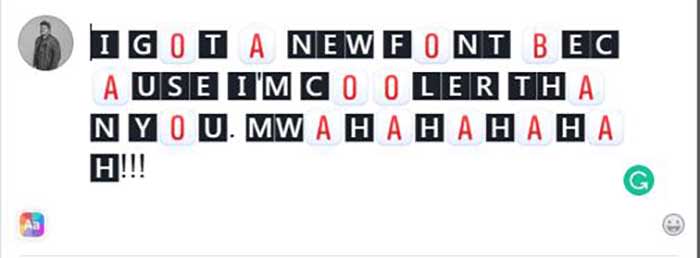
4. Paste the text and publish

New font in Facebook

Now you just have to go to Facebook, Twitter or any other web page and paste the text. One click on the publish button and … magic!


You can also use BabelPad

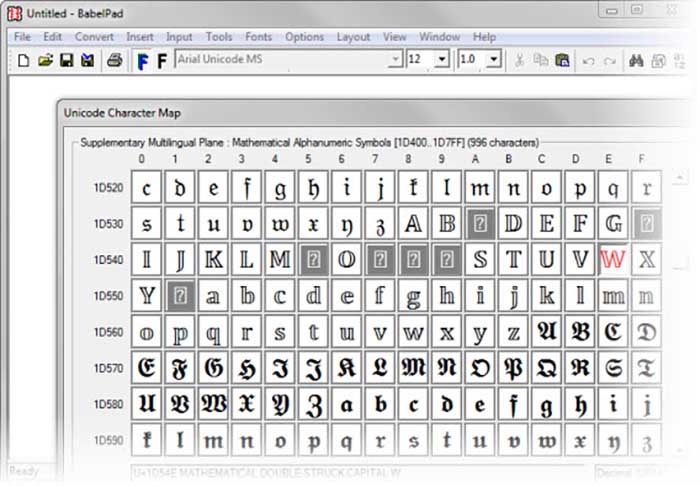
BabelPad is a free alternative to Windows Notepad that has support for the characters you just saw. These characters are not available from the Character Map; that’s why BabelPad can be very useful.

BabelPad Download now ►
7

To access special characters, go to Input> Unicode and then go to Tools> Unicode Character Map. Your list of choices is massive.

BabelPad
With BabelPad you can access hidden Unicode blocks

It is much easier to use the online converter, but it might not last forever. To be fair, Facebook and Twitter might wise up and stop users from using the site. BabelPad will always be there to help you express yourself with different fonts and symbols.

6 ways to level up your Instagram captions

Become an insta-sensation with these tips and tricks!

Instagram post

Sure, Instagram’s bread and butter is its focus on pretty pictures. It has been the case since 2010 when the app still had a reverse chronological timeline, well before Facebook entered the mix.

Initially, Instagram was designed as a platform for pics and pics alone. However, the founders quickly realized that something was missing… Enter the likes, comments, and yes, captions.

Instagram Download Now ►
7

Compelling captions do a lot for a post. They tell people what your photo is all about, prompt them to take action, and make sharing worthwhile.

Still, it’s hard to come up with the perfect combination of funny and thoughtful. How do you be descriptive but not too long? How many emoji should you use? What about hashtags? How many is too many?

Don’t make yourself crazy over captions. Here are some ways to drum up that coveted follower engagement without driving yourself nuts:

6 ways to level up your Instagram captions

1. Consider who you’re writing to… and why

Thinking before posting

First things first. Let’s talk goals.

Who are your followers? How old are they? If you add a reference will they get it?

Instagram has an inherently lighthearted tone. Think about it, you’ve got your pink walls and latte art, inspirational quotes, sunsets, and self-care. On a general level, you’ll likely see the best results from keeping things light.

Beyond understanding the platform, you do want to be in touch with the audience. Ask yourself what kind of language do they use?

2. Lead with the best stuff

Cool Instagram post

This is the Instagram equivalent of “above the fold.” Captions are cut off after a few lines of text. So, if you want to attract interest, you need to front load the information so that people might happen upon it while scanning through their feed.

Sure, you have 2,200 characters to say your peace. However, if you’re looking to max out your space you’ll want to treat the first part of your caption like a headline. After that, you can then dive into the rest for those care to click.

A note about caption length: The common wisdom is that shorter tends to be better, but it kind of depends on your profile personality. Some users approach their Instagram account as if it were a mini-blog while others go for brevity. They relish that expertly-selected emoji or slick one-liner. It’s all about finding what’s best for you.

3. Ask a question, make a call for action

Call to action

If you are a brand or you just work for one, you know better than to leave a social media post without listing a “next step” for your reader. The next step, otherwise known as your “call-to-action” or CTA for short invites readers to go, “Hey, I will click over to that website” or “check out that shop.”

Again, this brings us back to this idea of setting a goal. Think about what you want your post to accomplish — comments, likes, engagement, or website visits.

If you’re a typical user that just wants more engagement, try asking a question to get more people to comment. It doesn’t need to be complicated. You can ask people what they think about a new look or invite them to comment on a personal experience.

4. Formatting matters here

Yes, formatting counts when it comes to crafting the perfect post. Spaced out sentences are much easier to read than a big old wall of text. That’s blogging 101. However, you might not realize that avoiding the old text wall translates to social, too.

See this post from The Instagram Expert’s account


View this post on Instagram


– WHAT A DIFFERENCE 365 DAYS CAN MAKE IN YOUR BUSINESS (GO AHEAD, DREAM A LITTLE BIT) ⏡⏡ Meet @shannonleestrategy she has been a small business owner, like many of you, for the past 20 yrs. Shannon had been using online marketing for a while but she told me she felt like she was running on 1 cylinder when she wanted so badly to be at full throttle. Can you relate? – Because she knew she was missing something in her business, she joined Marie Forleo’s B-School last year. Shannon wanted to understand the FOUNDATION of what it takes to build a business online today using modern marketing. – After she took her leap into B-School and invested in her business she’s done some pretty tough work and she’s seen impressive results in her biz. ⠀⠀⠀⠀⠀⠀⠀⠀⠀ Including… ⠀⠀⠀⠀⠀⠀⠀⠀⠀ – How to tell stories on social and in her emails that emotionally connected to her ideal clients – She learned how to focus on always leading with giving value to her clients – She rebranded in a way that aligns with her marketing message – She started on Instagram with 300 followers and after going thru B-School and incorporating what she learned from my Instagram tactics in Ready Set Gram she now how 1,044 highly targeted followers -Since B-School & our in person B-School retreat in Boston, Shannon has… ✔️Gained confidence ✔️Made a mindset shift ✔️:Got Laser focused in her niche ✔️Has clear content that attracts her paying customer ✔️Has grown her email list from 0 to 200 ✔️Launched a website that converts to clients. Resulting in 1K views and several leads a week for her strategy and coaching business – She works less hours because of her systems in place and uses automation to work smarter. Her business has increased 800% giving her thousands and thousands of dollars a month to her household. Annnnnd this only took 1 year! 365 days! – Imagine where you could be one year from now if you invested in your business from someone Who has the step-by-step process to do what you need it?

A post shared by Sue B. Zimmerman IG Educator (@theinstagramexpert) on Feb 13, 2019 at 5:45pm PST

It’s crazy long, but she’s done a nice job making this approachable through the power of white space.

5. Include some emoji

Thinking Emoji

Well-crafted emoji captions are a real treat, and they’re more versatile than you think. These days even more serious brands are getting in on the action.

You can use emojis in a few different ways. For example, you can use them at the beginning of a post to catch people’s eye.

Or, make like Starbucks and tie your emoji back to the focal point in your photo.

Another idea is to use the “eyes” or the “finger pointing” emoji to draw the eye toward your link or CTA. It’s a nice visual trick for breaking up space, and it serves a practical purpose.

6. Hashtags

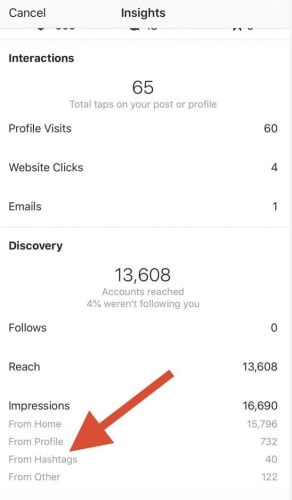
Hashtags exist as a means for classifying photos, but they also help you cast a wider net. They help you reach people who might never come into contact with your page. This Hootsuite report breaks down the stats:


Hashtag analytics

For best results, the goal is to keep your hashtags relevant first. The purpose is to help other users find content that corresponds with their interests. Essentially, save the jokes, memes, and emoji for the body of the caption.

7. Keep captions consistent

Finally, consistency is the backbone of branding whether you’re trying to build a business or turn yourself into an influencer.

In either case, people will remember your account when you deliver a high-end experience day in and day out.

Wrapping up

Instagram can be a great tool for building your own brand or your business’s brand. With these tips, you can turn the ordinary into the extraordinary.

Top online services for influencers

These influencer tools can help you get the products you love in front of your audience!

Influencer

What does the term “influencer” make you think of?

Technically, influencers are those who convince others to try a product by voicing their opinion.

However, modern social media influencers go above and beyond by putting the definition into action. They use an online presence to guide followers with product and service reviews while businesses offer free products as a marketing tactic. It’s a potential win-win-win situation.

If you’re trying to break into the world of influence and discover your crowd, or if you already have the platform and want to extend your reach, we have a few tools that might help!

They are our…

Top influencer services

Rep

Rep

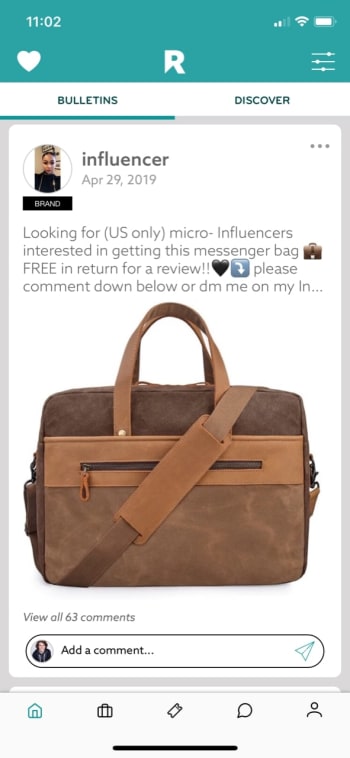
Rep, an iOS exclusive, performs exactly what one might expect from an influencer app. It helps users connect with brands and other influencers for collaboration.

The app works directly with Instagram, so be prepared to sign in with your information and link an account. From there, you can choose your main area of expertise, whether that be fashion, gaming, pets, etc.

Instagram Download Now ►
7

After that, scroll through the main page (which is designed like Instagram’s interface for ease of use) and check out the offers.

Rep Offer

The downside? Rep users generally have a large number of subscribers, often upwards of 10k. If you’re starting out, you may have a difficult time connecting with brands. However, there’s no reason to shy away from contacting other users. You may find a few friends!

CreatorDen

CreatorDen

CreatorDen works much the same way as Rep. In fact, it’s simpler. The navigation menu only has four links: profile, projects, proposals, and notifications. It’s much simpler to find brands and make offers. 

CreatorDen is not an app, but an online service. Its headquarters is in Istanbul, and their English support services are limited compared to some of the other options.

There is a unique issue: whereas Rep allows all users to join immediately, CreatorDen requires any social media account to have 3k subscribers before signing on. Budding influencers beware!

On the plus side, CreatorDen works with Instagram, Facebook, Twitter, and YouTube. So, if you have 3k followers on any account, you will get in the game!

Collabor8

Collabor8

Collabor8 focuses on connecting influencers directly to brands, easy and simple.

Collabor8 will help you create a profile, connect social media accounts, and choose your area of influence to begin working with brands.

The app looks great! Just remember when going in that there’s no way to scroll vertically. If you’re prepared for that, you’ll be fine!

Ripl

Ripl

Ripl begins our section on auxiliary apps. It doesn’t connect influencers, but it does provide something they can use: great video editing!

Let’s be honest, photos are easier to work with because you can take 1,000, pick the perfect one, and then edit it to stellar quality. Videos, in comparison, are time-consuming and difficult to manage.

If you’re looking to develop video content (a makeup tutorial or tech review, perhaps), Ripl helps create flashy videos tailored to your needs. It also supplies you with editing tools, designer templates, and multi-platform sharing functions.  Take it above and beyond with scheduled posting and improved designs with their Pro account, which costs $15 monthly or $120 per year.

You never know; it may be worth the price.

Buffer

Buffer

Buffer helps with social media management in a unique way, which probably won’t be for everyone but will be a game changer for some.

The idea: why not control all social media accounts with one app?

Create content, choose platforms for the post, and schedule your updates ahead of time for consistent messages to your followers. After, use a tried-and-tested analytics system to gauge the success of your posts.

Oh, and if that sounds like business, you’re right; Buffer tailors itself to users with multiple, monetized accounts across Twitter, Facebook, Instagram, LinkedIn, and Pinterest. In fact, it requires business accounts and costs $15 dollars a month for their Pro subscription.

But again, if you’re looking for a central social media hub for organization purposes, this may be a game changer.

8

Bonus: Influenster

Influenster

Influenster suggests products and offers a large number of reviews, acting as an informative middle man for purchases. Essentially, the app tries to fulfill the role of an influencer itself!

This is why we included it as a bonus.

If you’re looking for brands to review when starting out, this app may give you an idea of what’s new and “happening.” It has suggestions and reviews for products ranging from cosmetics to dog toys, along with articles for each category.

If not directly applicable, it may be a great source of information!

Influenster Download Now ►
9

Conclusion

Becoming an influencer requires work and dedication, but may result in business opportunity and the chance to change lives recommending useful products to followers. We hope these apps are useful on your journey and we wish you the best of luck!

Instagram hit by a massive data leak

Contact data for over 49 million Instagram users has been exposed online

Instagram wants to be known as the beautiful social network. Instagram feeds all over the world are filled with post after post from seemingly perfect users, celebrities, and so-called influencers. There are literally millions of these types of user on Instagram and it looks like a lot of contact data relating to this exact subset of Instagram user has just been leaked.

Contact data for over 49 million Instagram users has been exposed online

Lots of Instagrams

A report by TechCrunch shows that an unprotected database of well-known and high-profile Instagram accounts has been leaked online. The database was hosted by Amazon Web Services and included private and personal data including email addresses and even phone numbers.

The interesting thing about all this is that the leaked database does not actually come from inside Instagram. The open database was discovered by a security researcher called Anurag Sen who then told TechCrunch about his discovery. After a bit of digging, the media outlet then traced it back to Chtrbox, a marketing company in Mumbai.

Chtrbox is one of the many companies around the world that pays Instagram influencers to publish sponsored posts for their followers to see. As well as containing email addresses and phone numbers, the database also included information about the users’ Instagram accounts, including number of followers and the overall reach of their account. Chtrbox had also given each account a monetary value, showing how much they were worth in marketing terms. The firm will no doubt have used this information to decide how much to pay an influencer for a certain campaign.

According to Instagram HQ, this type of datamining is prohibited on the network. Speaking to TechCrunch, a spokesperson for the Facebook-owned app said, “We’re looking into the issue to understand if the data described – including email and phone numbers – was from Instagram or from other sources… We’re also inquiring with Chtrbox to understand where this data came from and how it became publicly available.” The app is clearly trying to distance itself from culpability on this one.

password lock
This isn’t the first time sensitive Instagram user information has leaked online

This isn’t the first time, however, that Instagram or Facebook has been exposed by leaks like this one. A couple of years ago, Instagram was hit by a similar data scraping issue when details from over six million accounts were leaked online. Recently, it was just a couple of months ago when hundreds of millions of passwords were found unencrypted on an internal server at Facebook. When news of the recent breach first broke Facebook originally claimed that it was only a few thousand Instagram passwords that had leaked. It later had to confirm, however, that the true number was actually in the millions.

Grumpy Cat dies

Owners confirm that the viral sensation has passed at the age of 7.

Grumpy Cat

The viral sensation Grumpy Cat died of a urinary tract infection at the age of 7.

Her owners confirmed the kitty’s passing on her Instagram page, which has 2.5 million followers.


View this post on Instagram


Some days are grumpier than others…

A post shared by Grumpy Cat (@realgrumpycat) on May 17, 2019 at 2:01am PDT

Grumpy Cat, whose real name is Tardar Sauce, made her first viral appearances in 2012 when she was still a kitten. Since then, Grumpy Cat has been in ads for pet food brands, ads for breakfast cereals, and even her own Lifetime Christmas movie: 

When she first hit the internet, disbelievers were convinced that the pictures of her were Photoshopped. When more memes and videos hit the scene, we were all convinced.

We’re going to miss you Grumpy Cat. This one goes out to you. Thank you for the laughs:

Your guide to Instagram automation

What is Instagram automation, and should I use it?

Instagram

Once you’re up to your eyeballs in scheduling, responding, and #engaging obligations, Instagram isn’t quite as fun as it used to be.

If you care about engagement, you A: need to post regularly. And B: need to post at the right times.

It’s no wonder that there are countless tools on the market for automating everything from following other users to scheduling posts. There are even tools for commenting on your behalf.

But when does automation veer into the danger zone? It’s hard to say. Here, we’ll look at some of the platforms available ranging from the legit to the not-so-much.

Instagram Download Now ►
7

What is Instagram automation?

There are countless Instagram automation tools that claim to save you time, energy, and make you more popular in the process. But, they all offer a slightly different feature lineup. Some are paid, others, like Bot4Gram, are free.

The simplest way to define Instagram automation apps is that these are tools that take care of your in-app busy work for you. There’s a varying range OF price points, features, and customization settings. It’s a matter of “you get what you pay for” in a lot of cases.

For example, the now-defunct Instagress was designed to comment on your behalf. A HootSuite blogger shared their experience with the tool. The blogger mentions that you’d choose a set of comments that a bot could use to “engage” with other users.

Postable is another option, and it is still around. However, it is still in beta. This tool allows users to pre-schedule posts, connect your account to DropBox, Google Drive, and other cloud-based storage tools, and automate engagement. Postable does manage follows and unfollows, as well as giveaways, but they don’t comment for you or dig into the DMs.

Postable costs a few bucks per month, but they aren’t a bad option if you need a helping hand.

Instagram schedulers are NOT the same as automation bots

Instagram photo

There are Instagram scheduling apps like Buffer and Sprout Social that “automate” when posts go out, so you can set it and forget it, then review the analytics down the road.

Then you have Later, an Instagram scheduler with additional features. There’s Plann, too. This is the app that helps you arrange and preschedule posts, though you’re the architect in control here.

It’s important to understand that there’s a big difference between apps that automate scheduling posts and apps that have a bot component.

Most marketing blogs have arrived at a common consensus. Brands should not automate IG comments or DMs.

It’s also worth pointing out that any user who is caught trying to cheat the system is in violation of Instagram’s terms of service so you might get booted from the app.

Automating likes vs. automating comments and DMs

Instagram automation works by outsourcing specific tasks to bots. So, you might automate comments, likes, and following and unfollowing accounts.

Automating likes is basically the equivalent of paying Instagram for a sponsored ad. It’s an opportunity to be seen by hundreds of people who otherwise wouldn’t find you.
Marketers are getting wise to the idea that people are gaming the system. Bots can search for users in your niche and follow them, as well as follow people who have followed you.
You can also automatically unfollow people who haven’t engaged with your site in a while — you know, the ones dragging down your engagement rates.

Can you automate Instagram without it being scammy?

Instagram user

Okay, it’s honestly hard to tell. Services like Postable and Social Captain are paid services. They offer as much functionality as the type of tools that an SEO pro might use to look up keywords. They also offer what a PR expert might use to identify influencers and publications to partner with.

Features like automated follows and unfollows are unlikely to cause too many problems down the line, but they do violate Instagram’s ToS.

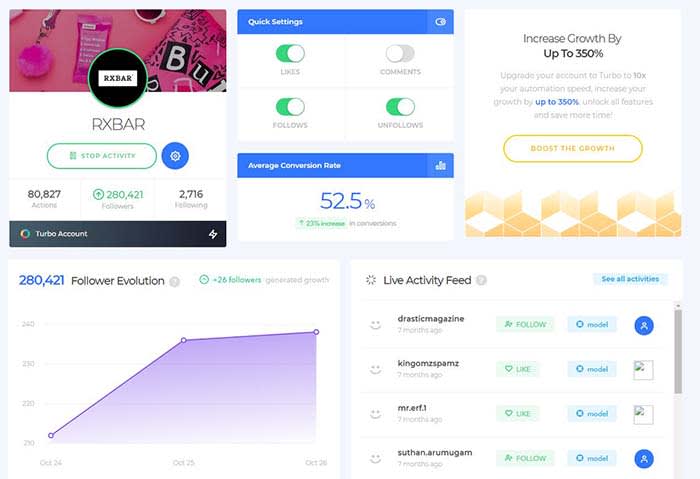
Social Captain, for example, offers a set of automation settings you can set and forget:

RX Bar social captain

However, automation is one of those things that, in moderation, delivers some benefits like growth and convenience. Also, Instagram is none the wiser.

That said, if you’re not careful about follow limits or you’re using shady automation features like DM-ing strangers with a bot, Instagram might issue a temporary ban.

Wrapping up

Sure, this type of automation isn’t the same thing as buying another user account or buying followers and likes. However, Instagram still considers it cheating.

Without a strategic approach to automation, you could do more harm than good. Long story short, keep bots out of your comments and DMs — at least until they know how to behave.