Instagram might soon be much more interactive

We recently reported that Facebook will start adding interactive elements to video content, and it seems that Instagram is also going to start doing something similar. Passively consuming content from social media can have an adverse effect on a person’s wellbeing, so Facebook believes drawing users in and making them active participants in the content will have a positive impact.

Instagram has seen a lot of innovation recently

Android Police reports that the interactive elements will come via a new questions feature in Instagram Stories. Yes/no polls have been a part of Instagram Stories for some time now, but according to the report Instagram is testing open ended-questions. Rather than just clicking to answer, users will be able to type out custom responses to the questions posed.

Image via: Android Police

Instagram has recently rolled out a brand new app, IGTV, for long-form video content, and Instagram Lite for use on older or slower smartphones. That isn’t all, the Stories feature also received a pretty massive update with the addition of music stickers that play officially licensed music from the world’s top acts. This newest addition would fit into a recent trend of Instagram innovation that has seen the app break through 1 billion active monthly users.

These interactive questions are still very much in a test phase, and Instagram is yet to comment officially on their implementation. They haven’t rolled out around the world yet, and they may see some changes before they’re released to a wider audience. We’ll just have to wait and see.


Tricks for staying offline on WhatsApp

Image via: Pixabay

Privacy on WhatsApp is a serious matter. But anybody can add an extra security layer to their profile by taking a few steps. If you would like to hide your personal data and avoid being exposed to other users, we’ll help you out with a few tricks for staying offline on WhatsApp.

WhatsApp Messenger Download WhatsApp
8

Get rid of the “last seen” and blue check

The first trick to be less trackable on WhatsApp is the simplest: get rid of the “last seen” timestamp and blue checkmark read receipt. To do this, go to WhatsApp and open the Settings section. Of all the boxes available, the only one we want is “Account,” so go there and then “Privacy.”

Once inside, click on the first field: “Last seen.” Here you can confirm who can see your “last seen” connection time. If you select “Nobody” as a default, say goodbye to seeing the “last seen” connection for your own WhatsApp contacts. Likewise, if you scroll down, you’ll see the box “Read receipts.” By unchecking it, WhatsApp won’t use the famous blue checkmark if that person has read your message. Is that a problem for you? The feature goes both ways: it’s either enabled for both or disabled for both, but nothing in between.

Airplane mode

We always say airplane mode for smartphones is extremely underrated. It’s not just for air travel. This feature is useful for our everyday lives.

If you enable airplane mode, your data connection is completely cut off. So the person sending you a WhatsApp message will only see one checkmark in their app (the sent receipt). Until you turn off airplane mode, the tool won’t work, so you can read your messages up to that point.

Pop-up notifications

The last way to read messages from somebody without going online has to do with pop-up notifications. This WhatsApp feature was introduced relatively recently, but more and more people are making the most of this gem. To enable them, go to “Settings,” click on “Notifications” and enable “Pop-up notifications.” Several options will appear, though what you need to stay offline is “Always show pop-up notifications.”

From now on, all messages you receive on your cell phone will also appear as pop-ups, without needing to go to WhatsApp to check them. You can read, view or listen to them all “from the shadows,” which gives you an extra level of privacy. And of course, secrecy. We won’t deny it.

WhatsApp Messenger Download WhatsApp
8

Dios Mio! Messenger can now automatically translate conversations in Spanish and English

Facebook has been trumpeting M, the Messenger AI bot, for some time now. M is now able to offer users auto-fill suggestions for messages, quick and easy polls, and various other conversation starters. M is there to ease communication between Messenger users. To this end Facebook has been working on a rather impressive feature for M, that’ll help people of different cultures and different languages communicate more easily. M can now help Spanish and English speakers converse by translating each other’s conversations automatically.

Messenger Download Messenger
7

Tech website wersm.com reported on Sunday that Facebook has started to make good on the translation promise it made at this year’s f8 conference. According to the report, M can distinguish whether the language being used is the same as the default language on the device of the recipient:

“It understands when a message is written in a language which is not the recipient’s default app language and offers to translate it. M will then show a pop-up that offers to immediately translate all messages from that specific recipient.”

This new feature is already available to Messenger users in the U.S. and Mexico. Although for now, it is only Spanish and English that M’s translations are working with, Facebook says new languages will be coming soon.

We think is an exciting announcement from Facebook, and we’d love to hear your thoughts, too.

Image via: pxhere


Look out! Autoplay video ads are coming to private conversations on Messenger

It wasn’t too long ago that Facebook videos started blasting out autoplay ads. Now it seems Facebook wants to take that ridiculously annoying reality and crowbar it into your personal conversations on Messenger too. Messenger is the third most popular messaging service in the U.S., so it represents a massive potential future revenue stream for Facebook.

video ads in Messenger
Autoplay video ads will now invade your private conversations on Messenger

Although Messenger is a much cleaner experience than Facebook, users’ private messages have seen ads for over a year. Now, according to a report by Recode, autoplay videos have started popping up in people’s private conversations. Seemingly, they started rolling out on Monday.

Recode reports, Facebook is aware of the new ads and is actively monitoring user response. There is a good chance that autoplay videos could be seen as too annoying if you’re simply trying to have a conversation with a friend or loved one; obnoxious even. At the Cannes Lions advertising festival Stefanos Loukakos, manage or Messenger’s ad business said:

“…we don’t know yet [if these will work]. However, signs until now, when we tested basic ads, didn’t show any changes with how people used the platform or how many messages they send… Video might be a bit different, but we don’t believe so.”

Messenger Download Messenger
7

Gizmodo smartly pointed out that the Cambridge Analytica scandal is limiting Facebook’s ability to move into new spheres of influence. In particular, the massive data leak has dented public trust meaning we likely won’t be seeing an all-hearing Facebook smart speaker any time soon. This means that if Facebook is to keep growing it needs to find more places in its current products for ads.

Facebook continues to monetize Instagram, and the launch of IGTV offers a new revenue stream for the photo, and now video, sharing social network. Messenger now has autoplay video ads, but WhatsApp is yet to make any real money for Facebook.

Does this mean we could start seeing video ads in out private conversations on WhatsApp too? Only time will tell.

How do you feel about autoplay videos popping up in your private conversations on Messenger?

Is WhatsApp helping the spread of fake news?

Disturbing stories are coming in from around the world about crimes being carried out due to misinformation spread via WhatsApp. The Guardian reports that Indian police have linked dozens of murders and serious assaults to WhatsApp rumors. One incident, in particular, saw two men, who were returning from a trip to a waterfall, dragged from their car and beaten to death:

“The villagers got suspicious of the strangers as for the last three or four days messages were going around on WhatsApp, as well as through word of mouth, about child lifters roaming the area,”

Other incidents include a yellow fever outbreak taking hold in Brazil after WhatsApp was used to spread anti-vaccine videos and audio messages, politically motivated fake news spread in Kenya, and fake news about the divorce of David and Victoria Beckham distributed in the UK.

WhatsApp has over 1.5 billion users worldwide and its lauded end-to-end encryption means it is almost impossible for the content of messages sent across the messaging service to be monitored. Everything sent across WhatsApp is private and arrives at its destination precisely as it was sent. There isn’t any sort of algorithmic interference ranking content based on the supposed interests of the recipient or the factual accuracy of the content. This means that big companies like Cambridge Analytica can’t pay to manipulate what users are seeing, but it also means that false information can quickly spread across the messaging service.

According to a report by the University of Oxford’s Reuters Institute, more and more people are turning to WhatsApp for news, as the credibility of other more public social networks has been drawn into question. The nature of the messaging service, however, means that it acts more as a conduit for gossip than a reliable newswire. The idea of being in on a secret is just too alluring for some to bother checking the news they’ve received before they send it on again.

Does WhatsApp spread fake news?
WhatsApp knows it has a fake news problem.

A WhatsApp spokesman has said that the company is aware of the problem and that they’re working to prevent the spread of fake news:

“We’ve made it easy to block a phone number with just one tap – and are constantly evolving our tools to block automated content. We’re working to give people more control over private groups, which remain strictly limited in size. We’re also stepping up our education efforts so that people know about our safety features, as well as how to spot fake news and hoaxes.”

A recent update, highlighting forwarded messages, does make it easier to see if you’re receiving fraudulent messages. With robust encryption meaning there is no way for fact checkers to verify information sent across WhatsApp, there is still a lot more work for the messaging service to do if it is going to help prevent the spread of fake news. As Nic Newman, who co-authored the Oxford University report, says on WhatsApp’s fake news story:

“It’s very early days but I’ve got a hunch this is going to become a much bigger story.”

Do you ever receive news stories via WhatsApp? We’d love to hear from you if you have.


How to find out what data Windows 10 is storing about you

Have you ever wondered what data Windows 10 stores about you? Especially since Facebook’s data shenanigans came to light, data privacy is at the top of our minds. If you’re a Windows 10 user, here’s how to know what Microsoft is monitoring.

Windows 10 Download Windows 10
8
The latest and greatest version of Microsoft's operating system.

Diagnostic Data Viewer

Windows 10 has many different apps for getting the most out of the operating system. One of them is Diagnostic Data Viewer, which basically analyzes all the info the firmware has. This info is sent to Microsoft so it knows what’s going on.

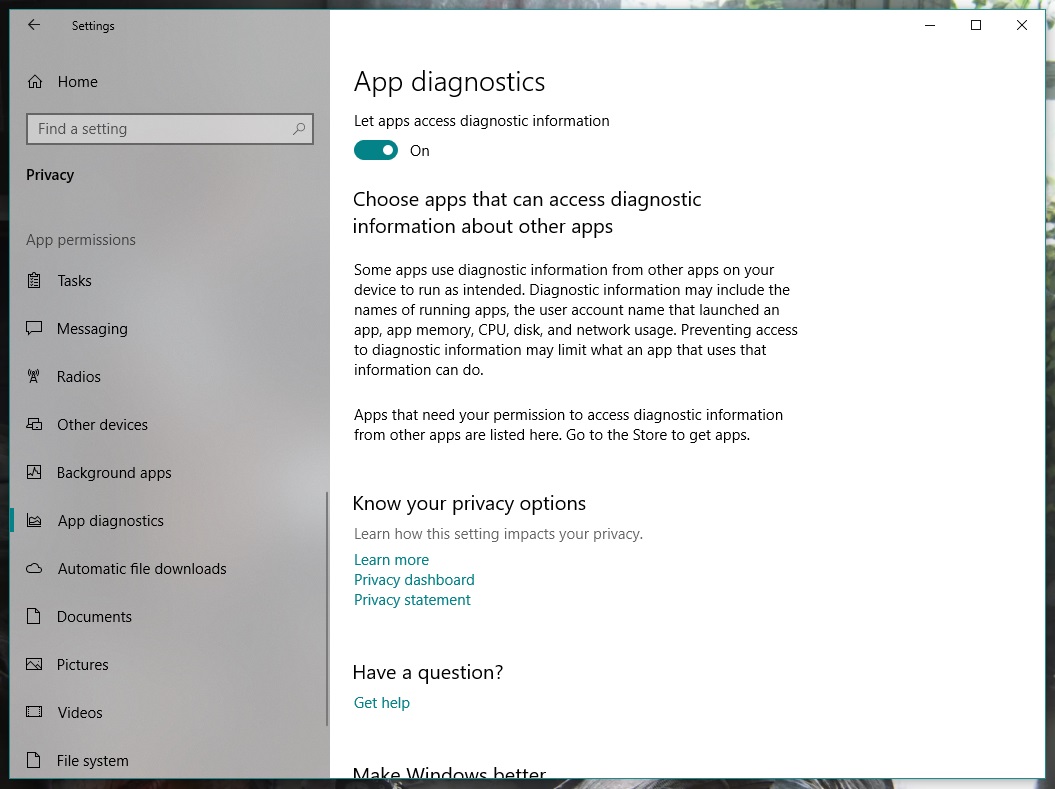
Before downloading it, enable the corresponding button. To do this, go to “Settings” and click on “Privacy.” From the different categories that appear on the left, go all the way down to one called “App diagnostics.” Make sure it’s set to “On.”

Once that’s done, now it’s time to download the Diagnostic Data Viewer. It’s a free tool from the Microsoft store. Here’s a direct link. 

Now for the important part. When you open the app for the first time, look for the bar on the left. These “events” or “processes” are collecting all the data that is sent to Microsoft. Using the search bar, you can find the programs that most interest you. Once you’ve got one, click on “Export Data” and a CSV file will be downloaded with all the relevant info.

If you don’t like the info that Microsoft is storing about you, you can delete it. Seriously. Just click on the button “Delete” on the “Settings” pageand say goodbye the problem.

9 out-of-this-world features on your favorite apps that NOBODY knows about

Our favorite apps are updated almost every week. The bad news is that these updates usually go unnoticed. Did you know that Facebook helps you look for public Wi-Fi? Or that Gmail can write your emails for you? So you don’t miss out on the best new features on your favorite apps, we’ve compiled the best updates in recent months. 

1. Gmail writes your emails for you

Gmail offers an option called “Canned Responses.” This feature saves messages or phrases that you use most often and suggests them when you draft an email, saving you time.

Want to enable this option? You have to go to the settings section in Gmail called Labs. Gmail Labs is a testing center with “far-fetched” experiments (according to Google) of all kinds. You can access Gmail Labs here.

The feature you’re looking for is called “Canned Responses” and all you have to do is click on “Enable” and then “Save Changes” at the bottom of the page. 

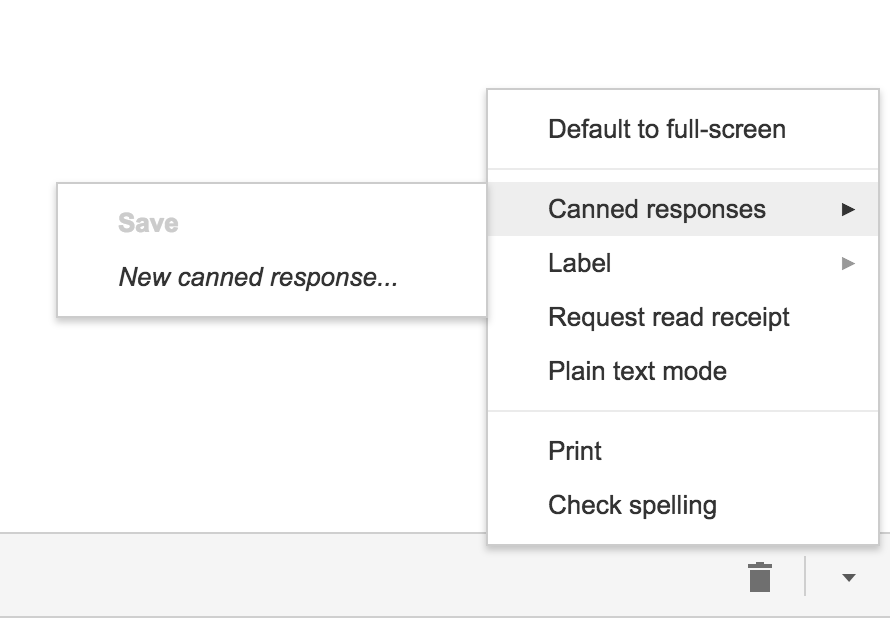
Next time you compose an email you’d like to save as a canned response, click the little triangle on the lower right-hand side of the screen. That opens a menu with an option for “Canned responses.” Just move over and click “Save” if you’d like to save that email so you can fire it off again someday.
You may have noticed a basic AI version of this at the bottom of messages you read on the Gmail app on your phone. They look like this:

2. Gmail’s most invisible feature

It’s unlikely that you’ve noticed this Gmail update because it’s designed to go unseen.

Haven’t you noticed lately that you’ve received fewer spam emails with suspicious links? Gmail has enhanced its ability to detect and delete this type of email even before it reaches your inbox. It’s not yet 100 percent foolproof, but it’ll keep you safer than before.

3. Make wish lists on Google Maps

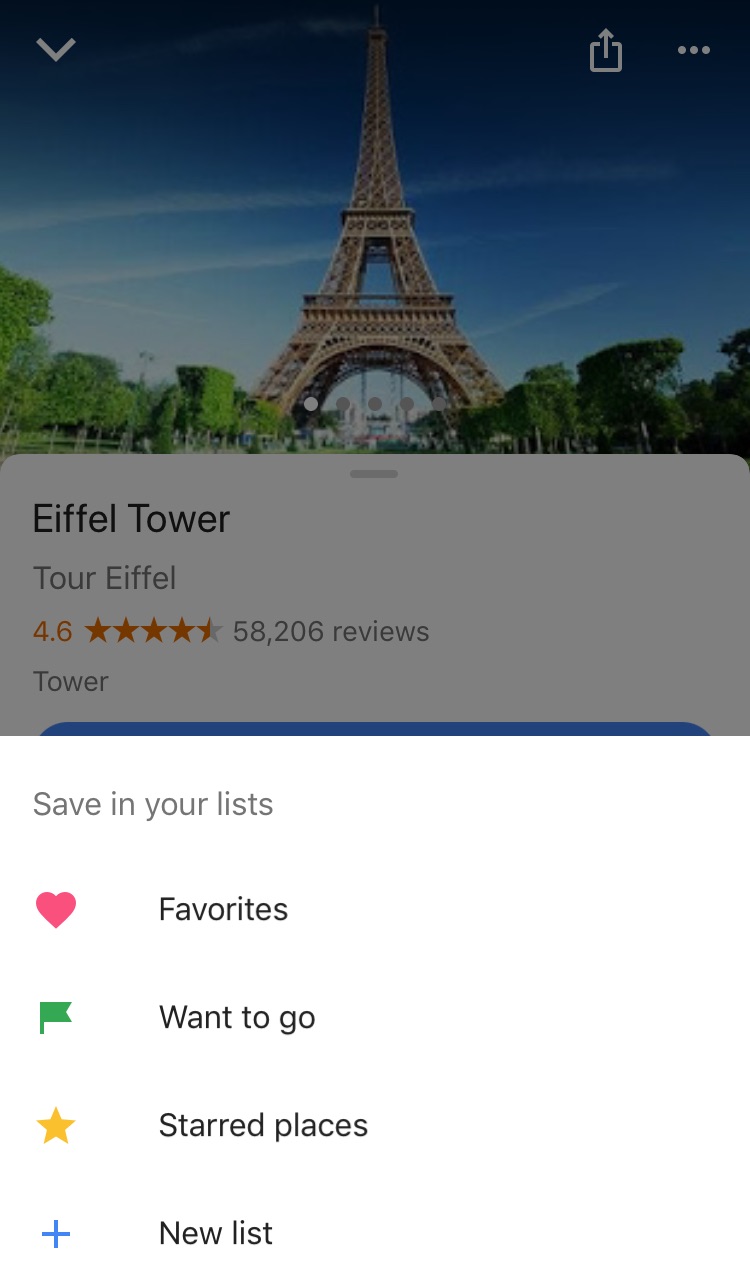
Google Maps lets you make lists of places you’d like to visit. Imagine that you’re planning a vacation to Paris. You can make a list of those museums, restaurants, and attractions that you’d like to visit. And you can share the list with those you’re traveling with. Or with anybody, for that matter!

Google Maps users are making the most of this feature to share recommended places or themed attractions. To use this feature, it’s as easy as pinpointing a place in the app, clicking “Save” and choosing the list with the green label that says “Want to go.”
4. Share anything with WhatsApp

WhatsApp lets you share any file type (mp3, videos…) between contacts provided that these files do not exceed 100MB in size. Instead of sending 100 photos one-by-one, why don’t you send them as a .zip file, for example?

5. WhatsApp gets their act together…kind of

It’s taken a while, but WhatsApp now has filters, like Instagram and the rest! At the time of writing this article, there are just five filters and they’re only available on iOS; no news on when they’ll arrive on Android.

6. Facebook helps you find Wi-Fi

Facebook has a relatively new feature called “Find Wi-Fi.” It’s a little bit hidden. First you have to click on the three horizontal lines on the lower menu bar. Click on “See More.” There you’ll find it and you can enable “Find Wi-Fi.”

After enabling it, Facebook will show you a map with the closest Wi-Fi hotspots as well as details about these hotspots, like which businesses they belong to.

7. Download movies and TV series from Netflix

Taking a plane somewhere? Bring your tablet packed with your favorite Netflix movies and shows! Not all Netflix offerings are available: pay attention to the download icon that appears on the TV series or movie listing. Amazon Prime also offers this feature.

8. Spotify Codes

Spotify has a feature called Spotify Codes. Have you noticed that below songs, playlists, and albums, there is a barcode in the shape of a sound wave? If you don’t see it, click on the three dots to access Spotify’s advanced options.

You can exchange these sound codes with your friends and they only have to open the Camera feature within Spotify for apps to scan them.

Also, Spotify Codes are an excellent way for artists to become known, as they can insert their codes on social media so the rest of the world can quickly access their songs.

9. Muting on Twitter

Got some people on Twitter who won’t stop spoiling your favorite TV series or spewing goofy conspiracy theories? Don’t want to block them because sometimes you talk to them and some of their Tweets are interesting?

Twitter now lets you mute whoever you want. Muting means that their messages will not appear on your feed, all without their knowledge. You’ll receive notifications if they mention you in a Tweet or if you receive direct messages from them. And you can check their Tweets when you feel like it.

Muting is as easy as clicking on the “down arrow” on one of their Tweets. You’ll see this option, among others.

Have you found any hidden features you’d like to share? Let us know in the comments!


 

WhatsApp will now notify you when you receive potentially dangerous messages

The latest version of the WhatsApp beta has something new: a feature that will alert you when you receive a message forwarded from another chat. This will make it much easier for you to spot spam messages and potential scams.

Specifically, the notice will appear at the top of the message, with a little arrow pointing it out:

If you use WhatsApp often, you will no doubt be familiar with messages advising you to click a link unless you want to start paying for WhatsApp. Or messages that offer free trials of Netflix if you click a link and input your data.

All these messages are traps designed to steal your info. The new warning will show that these messages are a part of a chain, alerting you to the potential scam. The notification will simply highlight that message has been forwarded so you might also see it if somebody passes you a funny meme, highlights a news story, or is spreading the latest viral phenomenon.

WhatsApp Messenger Download WhatsApp
8

For now, this feature is only available in the beta version of WhatsApp, but it is expected to get a wider roll out soon.


Why Snapchat’s latest update is making fans angry

When it comes to updates, things go one of two ways. Either everything goes live and users sing your praises, or users hate the changes and will crucify you on social media (hello, automatic U2 album download).

So, when Snapchat released their newest update back in January, like anyone with the best intentions, they were probably hoping for praise. But what they got instead was a bucketload of grief.

Giving their thoughts on the upcoming changes, the company wrote:

“Until now, social media has mixed photos and videos from your friends with content from publishers and creators. While blurring these lines has been an interesting experiment, it has also produced strange side-effects (such as fake news) and made us feel like we have to perform for our friends, rather than just express ourselves.”

Snapchat Download Free
8

After the update was released in January, it became clear users were unhappy. In fact, the update has gone down like a lead balloon tied to a piece of concrete. Users aren’t keeping quiet about their displeasure either. There is currently a Change.org petition with 1,253,605 signatures at the time of writing, asking for Snapchat to rollback the design of the app.

So, to help you through the pain of the update, we’re going to take you through everything that’s changed.

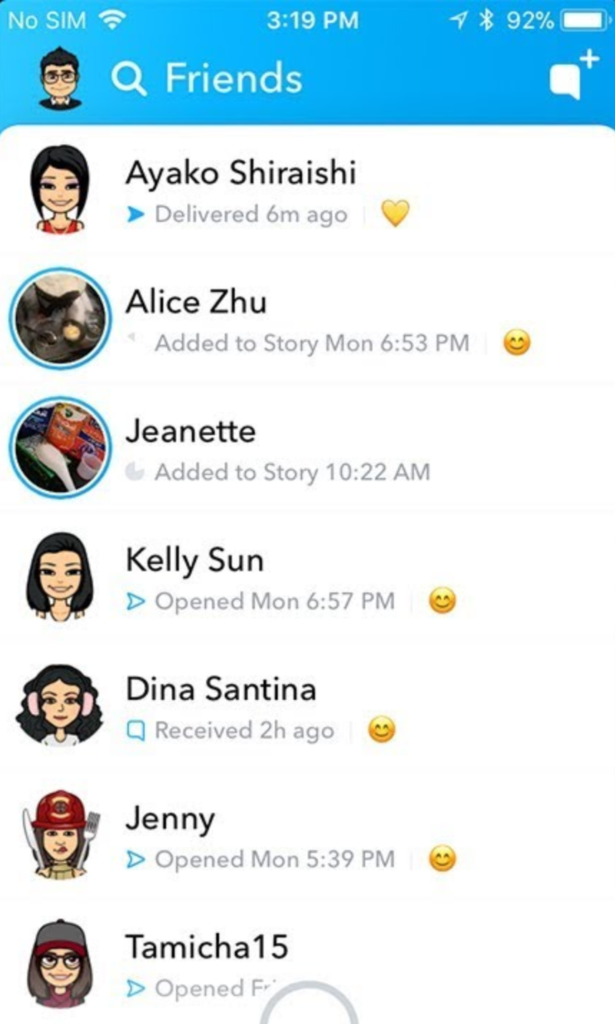
Swipe left – Friends

Everything to do with friends is now in one place.

Where stories used to be viewed by swiping right – and more on that later – now friends, messages, and stories are all combined in one place. It’s a bit messy. If a friend posts a story, you’ll see a preview picture. Click on their profile pic to be taken to the story.

You can only see recent contacts’ stories now, so if you haven’t ever messaged someone, you’ll need to make contact with them before you can see their stories.

Swipe right – Discover

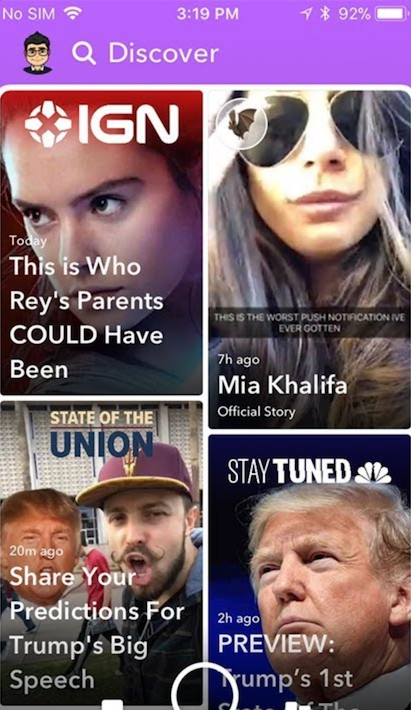
Another big change: swiping right no longer takes you to the stories page. Instead, you’ll see influencer content, paid-for ads, and friends’ stories appearing together in the new Discover feed.

There’s very little information about how Snapchat chooses what to show you, and a lot of people are annoyed about seeing lots of content they have no interest in at all.

If you want to see less from a particular source, long-press on a tile, and select “see less of this”.

Other changes

While the biggest changes are to the Friends and Discover tabs, there are a few other features worth mentioning.

  • No easy way to mass clear conversations. You can’t clear all from settings anymore, and have to long-press on each conversation, then select settings > clear.
  • No easy way to see the number of views on your posted stories, now you have to view these within your profile page.
  • No more animated profile pictures. Instead, Snapchat replaced these with Bitmoji Deluxe.
  • Our Story now makes you disclose your location by default.

Do we think Snapchat will change anything back? They did respond to the Change.org petition on the February 20, telling users:

“In the coming weeks, we are introducing tabs in Friends, and Discover, which will make it easier to find the Stories that you want, when you want them … You’ll be able to sort things like Stories, Group Chats, and Subscriptions, allowing you to further customize your own experience on the app.”

So, clearly, they know that something needs to change, and it’s hard to argue with a petition with over a million signatures and plummeting scores on app stores. But, will those people get what they want? We’ll see.

How to read messages on Facebook Messenger without the sender knowing

Messaging services have spurred new ways of communicating around the world. That blue checkmark is a confirmation that your message has arrived and been read. You know it. The recipient knows it.  And that can be awkward at times.

In the case of WhatsApp, you can disable the message confirmation, but with Facebook Messenger it’s not so easy… or maybe it is. We’ll show you how to read messages on Facebook Messenger without the sender knowing.

On your cell phone

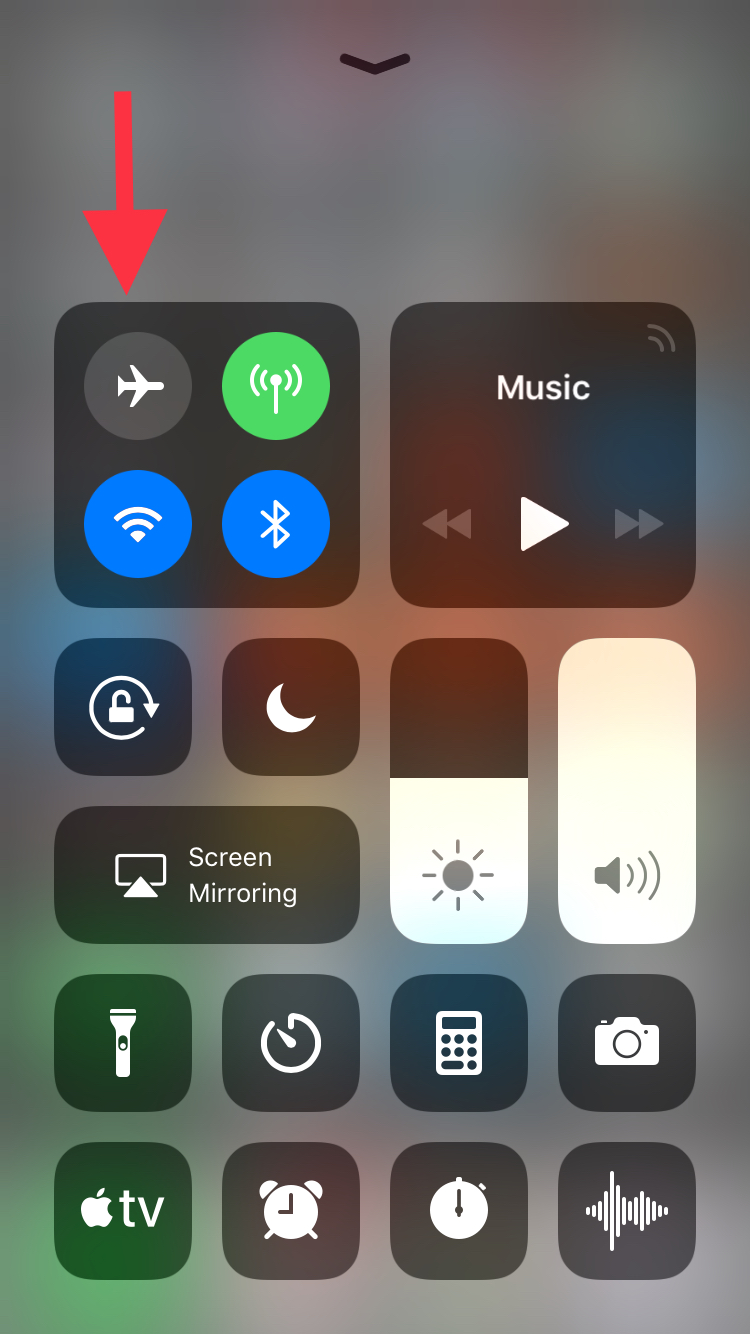
Let’s start this guide with your smartphone, where this app is most used. In the case of mobile devices, making it so Facebook Messenger doesn’t detect your view is so easy it might scare you: simply put it on Airplane Mode. Yup, that’s the big reveal. If you put it on this mode, your messages on Facebook Messenger won’t appear as seen.

This happens because the app downloads all the messages going to your phone, regardless of whether they are read or not. However, if you enable Airplane Mode and then go into the messaging app, without internet there won’t be any read receipt or even the possibility of responding. It’s the modern day equivalent of “driving into a tunnel.”

On your PC

We already mentioned that it’s pretty easy to get this unseen message with your smartphone and it’s just as straightforward with your PC, though there are a few additional steps.

If you use Google Chrome, what you should do is install the extension Unseen. The name is straightforward. It blocks received messages so they don’t appear as read when you go into the app.

FB Unseen Download Free
7

If you use Mozilla Firefox, there are several extensions like this, though our advice is to go for Message Seen Disable. It works pretty well and doesn’t give you any trouble with browsing or using Facebook Messenger, so it’s one of the best options.

Now that you know how to read messages without them appearing as seen, you just have to choose how to do it. We like the smartphone method best, which takes a matter of seconds (literally) to complete the process. It’s up to you.