How to know if WhatsApp is down and what to do

If you’re WhatsApp isn’t working, try these steps to get it working properly again.

There is an old adage that goes something like, “You never know how much you need something until it’s gone.” This certainly rings true for the WhatsApp messaging app. It is oh so easy to take the Facebook-owned messaging service for granted. It is free, it is always on, and it makes talking to anybody anywhere incredibly easy. The trouble is though, sometimes it doesn’t. In fact, WhatsApp goes down quite often just like other social media sites, like Facebook, Facebook Messenger, and Instagram. Furthermore, when it doesn’t work you don’t get a message explaining what is going on, it just doesn’t work.

If WhatsApp is not working on your smartphone, you’re likely confused. Is the problem local to your mobile app, is it a wider WhatsApp outage, or is it something to do with the service provider? These are the questions that’ll usually send iPhone and Android users to Google but worry not because Softonic is here to help. This is how to figure out why WhatsApp isn’t working on your iOS or Android device and how to fix it.

Why isn’t WhatsApp working?

Is WhatsApp down?

WhatsApp is a ridiculously popular program. It has over 1.5 billion users, which means there are quite a few different sites you can visit to find out whether you have a local WhatsApp problem or if WhatsApp itself is experiencing a more general problem. These sites include Is The Service DownIs It Down Right NowOutage Report, and Down Detector. If your WhatsApp isn’t working, these sites should be your first ports of call. If the problem is affecting the network, then these sites will let you know. You’ll get outage maps and up to date graphs showing reported problems.
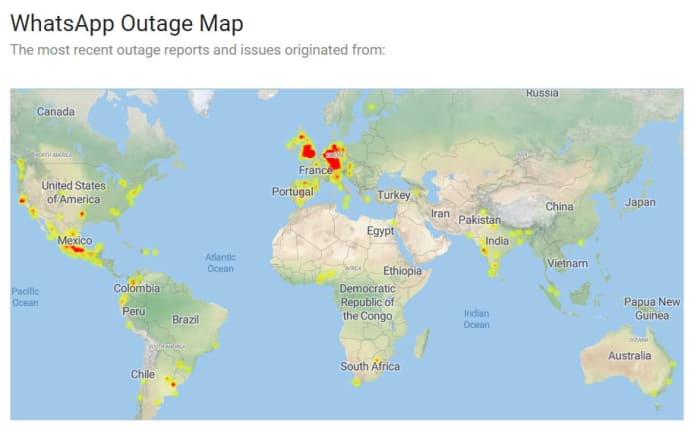
WhatsApp outage map
Image via: Is The Service Down?

Unfortunately, however, if the problem is a wider WhatsApp outage, there is nothing you can do. You simply have to wait until WhatsApp is up and running again. Fortunately, however, when these massive issues arise the teams at WhatsApp HQ don’t usually take too long to resolve them. You can check out a list of historical problems that have affected the WhatsApp network here.

What if WhatsApp isn’t down?

If the above sites show that WhatsApp is working perfectly in your country or local area, then you’ll need to start looking into potential local problems that could be stopping your WhatsApp messages coming through. The first thing you should look into is your active internet connection. You can do this by checking your Wi-Fi and mobile data connectivity using your phone’s network and connectivity settings menu. If both of these are switched on but WhatsApp still isn’t working, you should try and see if the internet works for another app like Google Chrome or YouTube.
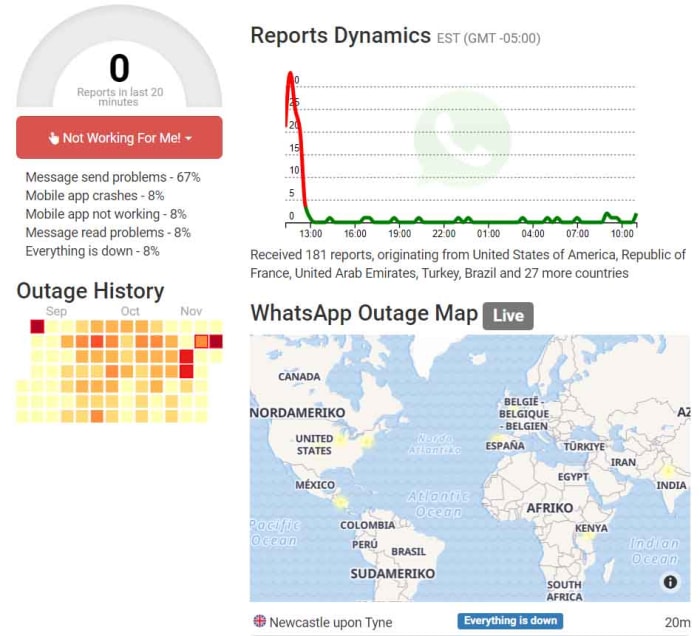
WhatsApp outage report
Image via: Outage Report

Switch it on and off again

If WhatsApp isn’t working but other apps like YouTube or Google Chrome are then there is a problem within the app itself. The first step you should take, should this be the case, is stopping the app completely. To do this you need to go to the Apps settings menu on your Android or iPhone, select WhatsApp, and then hit Force Stop.

Forcing WhatsApp to stop will then make it possible for you to clear the WhatsApp cache, which may contain the bug that is stopping WhatsApp from connecting to the internet. To clear the WhatsApp cache, scroll down to the Storage & cache option in the WhatsApp App info page. Once you click that, you’ll see the option to Clear cache. After you’ve done that turn your phone off and then on again, and then launch WhatsApp to see if you’ve resolved the issue.
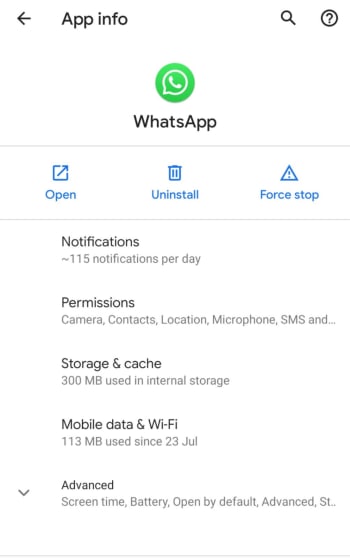
WhatsApp app info on Android

Update WhatsApp

If you’ve got this far and WhatsApp still isn’t working, you’re going to have to start taking more drastic actions. First, though, you should check you are running the latest version of WhatsApp by going to the Apple App Store or the Google Play Store. You need to find the list of all the apps you’ve bought and installed on your phone. When you’ve found it, scroll down until you find WhatsApp, and then select it. You should then see the version you are running and whether there is an update available.

If you are running the latest version of WhatsApp or if you update WhatsApp and it still doesn’t work, the next thing you can try is uninstalling the app and then reinstalling it. To do this, go to the WhatsApp App info page on your phone, using the method outlined above, and hit Uninstall. If you don’t want to lose all your app data including your chats and downloaded images etc. tick the box that says Keep app data before confirming the uninstall. Then, head over to the Google Play Store or Apple App Store and reinstall WhatsApp. This should install a clean and up to date version of WhatsApp.

Wrapping up

When WhatsApp goes down it can feel like you’re cut off from everyone and everything. We’ve walked you through all the steps you need to follow, should it happen to you. The key is finding out whether the problem is on your phone or whether there are actual WhatsApp servers down causing problems for millions of WhatsApp users at the same time. The sites listed above will show you about potential outages and will offer real-time maps showing all the different WhatsApp problems being reported at the same time as well as historical data.

If the problem is a local one, however, one of the other steps we’ve laid out for you should see you have WhatsApp working normally again. Hopefully, you won’t have to uninstall WhatsApp and reinstall it to resolve your issues, but you can always take the nuclear option should you need to. Just remember to save your app data, if you don’t want to lose all your chats.


Top free online games

These are the best free online games you can play right now.

BEst online games for free

The internet. A modern technical marvel that has truly revolutionized the human experience. We’re now constantly connected to almost all human knowledge that has ever existed, we can talk to people on the other side of the world for free whenever we want, and we’re able to watch almost any movie or TV show and listen any song or album at any moment of any day. The internet is amazing and has gifted us some truly marvelous things.

No list of the internet’s greatest hits, however, would be complete without games. Not just any games, though. Free games. Yep, since the dawn of the internet we’ve been coming up with better and more beautiful ways to kill our time and free online games stand at the pinnacle of our achievements. So, without further ado, let’s have a look at the best free online games to play on the internet. We’ll start off with a couple of the biggest free games ever, but then we’ll move on to free online games you don’t even need to download. Free games you can play in your browser.

The best free online games

Fortnite: Battle Royale

Fortnite is the biggest multiplayer game in the world right now and could, quite possibly, be the biggest game ever. Each new game of Fortnite will see you battle against 99 other players in a cartoon-like wonderland. The Fortnite map is split into separate areas based on different climates and environments and you’re free to travel through all of them once you’ve parachuted in off a flying school bus. Fortnite: Battle Royale is a lot of fun to play. So much so, that an almost unbelievable 250 million people play it.

Fortnite: Battle Royale Download Fortnite: Battle Royale ►
10

Dota 2

Following Fortnite: Battle Royale with Dota 2 in a list of free online games illustrates perfectly that today, free doesn’t have to mean limited. Both games offer vast experiences that could warrant large price tags. Dota 2 is a MOBA game, which means the strategy game action takes place in a Multiplayer Online Battle Arena. This genre is incredibly popular and Dota 2 is one of the original MOBA big hitters. In Dota 2 teams square up against each other, set up their defenses, and then try to take each other out. The action is fast and addictive.

8

The best free online games you don’t need to download

Mahjongg Candy

Mahjongg Candy

Mahjongg Candy is an addictive game you can play online without having to download anything at all. You simply head over to the Mahjongg Candy site and hit the play button. The game sets up like traditional Mahjong, with the main difference being that that the Mahjongg symbols on each tile have been replaced with different pieces of candy. Match the tiles to clear the board. It really is that simple. Mahjongg Candy is also available on iOS iPhones and iPads, and Android smartphones and tablets.

Daily SuDoku

Daily Sudoku

Sudokus are the classic puzzle game where you have to fill nine square blocks, each split into nine separate tiles with the numbers one to nine. The Daily SuDoku website gives you a brand new sudoku puzzle to do for free every day. If you’re looking for a great puzzle game, this is it. There’s also Daily Solitaire and Daily Word Search.

8 ball pool

8 ball pool

8 ball pool is an excellent free multiplayer game. This fun game is simple enough. You head over to the site, hit play, and the game will match you up with another player somewhere around the world. You can either play as a guest or create a game ID to use every time you play. This simple pool simulator doesn’t have complex actions like putting a spin on the cue ball, but it is lots of fun.

Bubble shooter

Bubble Shooter

Bubble shooter is an absolute classic shooter game. You sit at the bottom of the screen with your bubble cannon and above you sits an army of bubbles slowly coming to get you. You need to fire your bubble in the hopes of matching up with other bubbles of the same color. If you match up more than three bubbles of the same color, they’ll pop. It’s as simple as that, pop all the bubbles before they get to the bottom of the screen.

MOTO X3M

Moto X3M

Now, this is a fast action game. Using the arrow keys on your keyboard you fly through the 2D course on a motocross bike. You’ll need to jump and flip your way through all the life-threatening obstacles you come up against. This game is fun and frustrating in equal measure. You’ll love this racing game.

Outspell

Outspell

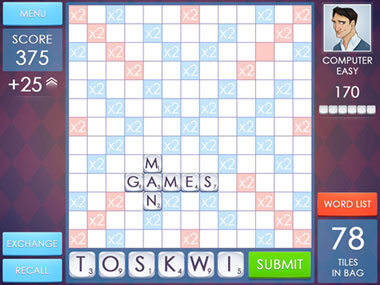
If Daily SuDoku is your number puzzle game then Outspell is your word game. The game is a copy of the classic board game Scrabble. You get six tiles, each with a letter and with a corresponding number of points you’ll score if you can use that letter to spell a word using the tiles already placed on the board. You play against the computer.

Jigsaws

Jigsaws

Another classic board game style puzzle you can play online for free is a good old jigsaw. You can find plenty of free jigsaw puzzles online. You can even set the difficulty by selecting the image of the puzzle and how many pieces it will have.

Blackjack

Blackjack

There are many classic card games you can play for free online. Perhaps the most popular of all is Blackjack. We’re not talking about gambling here, just some honest, fun, and free card play. What’s great about this free online version of Blackjack is that it’ll give you tactical and strategic tips as you’re playing, to help you develop your game.

Wrapping up

So, there you have ten free online games. We’ve tried to look deeper than the likes of Klondike Solitaire and Freecell to bring you a broad mix of games for you to play. Remember too, that the first two games we mentioned are completely free-to-play. The only thing that sets them apart from the rest of the list is that you need to download them first.

Best Chrome VPN extensions

Check out the best free and premium VPN extensions for Google Chrome

Chrome VPN extensions

More and more, VPNs are becoming essential pieces of kit for the modern internet user. Virtual Private Networks encrypt your web traffic and then route it through secure servers dotted all around the world. In this way they can keep all your most private details secret and also give you the ability to mask your geographic location. VPNs keep you safe when surfing the web via public Wi-Fi and can keep you in touch with what is going on at home, even when you’re abroad. VPNs can even help you access restricted parts of the internet when you’re in oppressive countries that censor the web.

You don’t need to install a full VPN program, however, to protect your web usage. You can get decent VPN coverage with a simple browser extension. If you’re using the Google Chrome browser to surf the internet, you can download and install a Chrome VPN that will protect everything you do on your web browser. These are the best VPN extensions for Chrome.

Chrome VPN extensions

NordVPN Chrome extension

NordVPN multi device

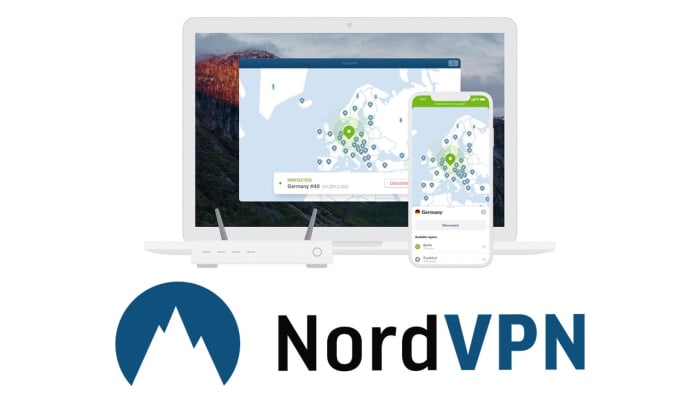
NordVPN is based out of Panama and offers users very strong privacy-protecting credentials. Nord doesn’t log user behavior meaning no personal information is kept from the sites you visit when you’re securely surfing the web via a NordVPN server. Furthermore, NordVPN has almost 5,000 VPN server locations all over the world, meaning you can easily mask your IP address to access content that is limited to the US, UK and Ireland, Australia and more with fast speeds. All this comes at a premium, however, with NordVPN having a number of different payment options with the cheapest requiring a three-year subscription paying for upfront.

NordVPN Download Now
8

Hola VPN extension for Chrome

Hola VPN Chrome extension

The Hola VPN extension for Chrome is an effective and free Chrome VPN to help anonymize your internet usage. The Hola VPN service is used primarily to unblock geo-restricted content without having to pay for an option like NordVPN. Being free, however, means that Hola logs some of your data and then sells it to third parties. Also, Hola isn’t as reliable as NordVPN so there is a good chance that that movie you wanted to watch on the US Netflix or that TV show on BBC iPlayer might still be out of reach if you’re using this extension.

Hola Unlimited Free VPN Download now
7

ExpressVPN Chrome extension

ExpressVPN Chrome extension

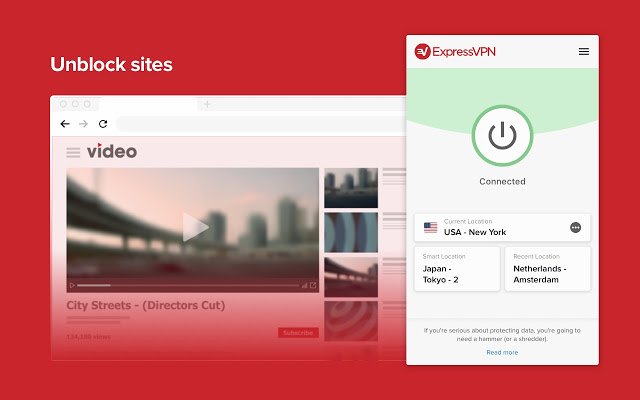
ExpressVPN is another premium option like NordVPN. Again though, the premium option offers solid reliability just like the Nord offering does. In fact, ExpressVPN is regularly voted as the best VPN available today, which makes this one of the best VPN extensions available on the Chrome Web Store. The ExpressVPN Chrome extension is built with simplicity in mind too. One click is all that is needed to start browsing the internet safely and securely through one of over 3,000 servers in 160 locations spread across 94 countries around the world.

ExpressVPN Download now
8

Browsec VPN Chrome extension

Browsec VPN extension

The Browsec VPN Chrome plugin is also available on Android. It offers free and unlimited secure browsing, which means there won’t be a data cap when using the VPN like there often is on free VPN proxy programs. The extension is easy to use and offers fast browsing speeds. This could be why Browsec has accumulated over 8,000,000 users with almost 25,000 of them leaving positive reviews on the Chrome store. It isn’t the most private VPN, however, with its Russian HQ creating several privacy-related issues should the Russian government decides to request information. Browsec also logs user data too.

Browsec VPN Download now
9

CyberGhost VPN Chrome extension

CyberGhost VPN Chrome extension

CyberGhost is another free VPN Chrome extension that offers free one-click access to its secure servers. It does, however, have a paid version too. Like with the other free VPN extensions on this list, CyberGhost doesn’t offer reliable connections as you’d get with NordVPN or ExpressVPN. It also falls short on privacy matters too. Also, the free version could see you having to queue for servers, which are only available in 15 countries. It does offer fast speeds when you do connect, but you can also expect to see plenty of ads for CyberGhost premium and you’ll disconnect every three hours meaning you’ll have to manually reconnect.

CyberGhost Download now
7

PureVPN Chrome extension

PureVPN Chrome extension

PureVPN will offer you reliable connections via its secure servers, which is why we’ve included it in our list. Another good point attached to PureVPN is that the service comes with Live Chat customer support service that should help you deal with any problems you come up against. If you’re in the least bit bothered about privacy, however, it might not be the best VPN plugin for you. There have been quite a few reported data leaks from the PureVPN servers. Another con to consider is that although PureVPN connections may be reliable, they won’t be as fast as the speeds you’ll find on some of the other extensions in our list.

PureVPN Download now
7

DotVPN

DotVPN Chrome extension

DotVPN offers unlimited bandwidth through over 1,00 servers located in different countries around the world. It offers robust encryption to protect what you’re doing online from prying eyes and is available across a variety of platforms including Windows and Mac, Firefox, Android, and iOS devices like iPhone and iPad. DotVPN offers limited service for free users, which still has unlimited data usage but unfortunately doesn’t support video or audio streaming. If, for example, you want to access Netflix using DotVPN, you’re going to have to pay for a premium subscription, which costs $4.99 a month or $2.99 a month, if you pay for a full year’s subscription at once.

DotVPN Download now
9
Wrapping up

We’ve walked you through some of the best VPN extensions available for Google Chrome. Some offer free services while others ask for a paid subscription. It obviously depends on what you want to use your VPN for, but in our experience, we recommend the paid VPN extensions like NordVPN and ExpressVPN. Whereas free VPNs can work sometimes, they’re not as reliable as the two options we’ve just mentioned and can prove to be quite frustrating. If you add to that the privacy issues that are attached to all the free VPNs we’ve mentioned, we believe the case is there to pay for a strong, reliable, and secure VPN.

The best servers for Minecraft

There are thousands of Minecraft servers for you to play around in. Each offers its own unique experience. This is a list of all the best Minecraft servers.

The best Minecraft Servers

Minecraft servers are a little like alternative dimensions. Mojang hasn’t just created a world, Mojang has created a universe. Multiplayer worlds you can pass between that offer distinct experiences from one another. There are literally thousands of top Minecraft servers available each with their own design style, layout, gameplay dynamics, and online communities. Some servers have even spawned their own apps and games like Eggwars.

Joining Minecraft servers isn’t too complicated, which means all these different worlds are relatively easy to travel between. Had enough of the Minecraft version of Grand Theft Auto? No problem, you can just cross over into Minecraft Middle Earth, Westeros, or even a Minecraft version of The Walking Dead whenever you want. Sound good? Great, well let’s look at how to join a Minecraft server and then go through some of the best Minecraft servers for you to check out.

Minecraft Download now ►
7
How to join a Minecraft server

All you have to do to join a Minecraft server is open Minecraft and then go to Multiplayer. You then click Add a server. Now name the server whatever you want and add the IP address into the text box and hit Save. After that you click Play and you’re playing Minecraft in the server of your choice.

Best Minecraft servers 2019

Mineplex

Mineplex

IP Address

us.mineplex.com or eu.mineplex.com

Mineplex is the biggest Minecraft server around. It is huge and contains many different types of minigames, areas, and zones, all filled with different types of games for you to play. Think of Mineplex as a giant Minecraft theme park with different rides and attractions all vying for your attention. Highlights include a pretty complete Minecraft version of Mario Kart, complete with chance cube power-ups. You can check out a list of Mineplex games here.

Another bonus is that Mineplex is well managed by a dedicated volunteer army of mods and  and even paid staff. In terms of player numbers, at any one time there will likely be thousands of other Minecraft players on the Mineplex server.

PirateCraft

PirateCraft

IP Address

mc.piratemc.com

How about life on the open sea? PirateCraft is like an RPG that tries to offer Minecraft players a taste of the pirate life by incorporating many ambitious pvp features like the opportunity to go into battle against and even plunder from ships and island communities, before using their spoils to participate in a fully functioning economy.

Players can also build their own lairs for storing all their ill-gotten gains securely and planning future, daring raids. As you’d expect, however, the waters of PirateCraft aren’t safe and players need to know that their lairs can come under siege and their ships can even be stolen. If this doesn’t put you off, check out PirateCraft now.

WesterosCraft

WesterosCraft

IP Address

mc.westeroscraft.com

Many Minecraft servers don’t offer games or activities, many are simply beautiful worlds there to be explored. WesterosCraft is one such server giving players the chance to explore the world of fantasy epic, Game of Thrones. Although the world still isn’t finished, WesterosCraft offers plenty for fantasy fans to sink their teeth into.

The locations you can visit have mostly been based upon the HBO series but obviously, there is still plenty here for book fans too.

Minecraft Middle Earth

Minecraft Middle Earth

IP Address

build.mcmiddleearth.com

If you like your fantasy epics a little more classical, then you might be more interested in the Minecraft recreation of Tolkien’s Middle Earth. All Lord of the Rings and The Hobbit fans will have plenty to seek out on this server with many breath-taking block form recreations of the big screen versions of Middle-Earth. Like with WesterosCraft, however, Minecraft Middle Earth is still a work in progress so not all locations are complete.

The Mining Dead

The Mining Dead

IP Address

mc.havocmc.net

The Mining Dead has a huge map that recreates some of the most memorable locations of the AMC hit show like the Prison and Alexandria. As well as looking the part, The Mining Dead packs a fairly exhilarating punch too, with an army of undead to fight off as you scramble around looking for weapons and ammo. This server is lots of fun but not for the faint hearted.

Grand Theft Minecart

Grand Theft Minecart

IP Address

mc-gtm.net

As we’re sure you’ve already guessed, Grand Theft Minecart is a huge Minecraft version of Grand Theft Auto. Just like in the Rockstar original, there is a lot to do in the world of Grand Theft Minecart. You can get your hands on some pretty heavy weaponry and blast your way around town as you build up a criminal empire complete with cars, planes, and properties. This is Minecraft though, and not GTA, so you won’t be able to go around killing people indiscriminately. You will, however, have to keep out of the way of the police who will take you down, if needs be.

Extreme Craft

Extreme Craft

IP Address

play.extremecraft.net

After going through a number of speciality servers we thought we’d finish another multi-mode beast a la Mineplex, which we mentioned earlier. Extreme Craft is a very popular Minecraft server that has many different game modes for Minecraft players to try their hand at. Logging into Minecraft will find you survival games, a roleplaying mode,hunger games, and a mode for creatives among many other different games for you to get into.

Also, like Mineplex, Extreme Craft has a thriving online community and is an extremely well-organized server with a reliable set of well enforced rules.

Wrapping up

That last point about Extreme Craft’s well enforced rules shouldn’t be taken for granted. We’ve shown you some of the best Minecraft servers and some of our favorite servers too. We’ve tried to stick with servers, however, that aren’t overrun by cheats and unscrupulous players. There are plenty such servers about and you’ll no doubt stumble upon them, if you cast your net wider than the ones we’ve recommended today. Beware though, these unruly servers can prove more frustrating than fun.

With our recommendations today we’ve tried to stick to a doctrine of fun and awe. In each of the servers we’ve recommended today you’ll find either fun or awe, or a combination of both. Other fun servers that fit with this philosophy and are worth checking out are PixelmonCraft, which is our favorite Pokemon server, the pve server skyblock and the pvp version skywars,  hypixel at mc.hypixel.net, and Manacube.

How to turn on tracking prevention on Microsoft Edge

This is how to block trackers on Microsoft Edge

There ain’t no such thing as a free lunch, or at least so they say.

When we’re browsing free websites on free web browsers it is easy to think that the old adage doesn’t apply to you, when deep down you know that it most certainly does. The common form of payment we make is by seeing advertisements placed on the websites we visit. These subliminal payments are much more valuable to the “free” sites we browse, if they are more relevant to us. The companies make these ads more relevant to us by tracking our web behavior to learn more about who we really are.

Data is the new oil, is another one they say.

Not only is the lunch not free, you’re paying for it with something that is extremely valuable.  This new truth has led to a growing number of people wanting to block trackers when they’re surfing the internet. Recent revelations about Google Chrome showed a shockingly high number of trackers active on the browser.

6
The idea of Microsoft Edge is to be as fast, clean, and lightweight as possible to cope with the demands of different devices, whether it be a PC, tablet or phone.

Trackers are active on all browsers too, and now Microsoft has decided it wants to give Edge users a chance to disable trackers, so they browse the web without paying the heavy fee.

The Edge tracker prevention feature is still in testing, but let’s have a look at how you can activate it.

This is how to block trackers on Microsoft Edge

  1. For now, tracking prevention is only available on preview builds of Microsoft Edge. To use tracking prevention, you’ll need to download and install the Microsoft Edge Insider build version 77.0.203.0 or later.
  2. Open the Microsoft Edge Insider Build.
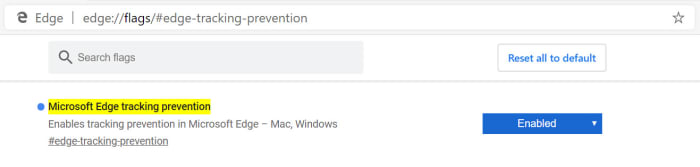
  3. Copy edge://flags#edge-tracking-prevention, paste it into the Microsoft Edge address bar, and hit enter.Microsoft Edge tracker prevention
  4. In the dropdown menu select Enabled and then click Relaunch Now.

Once you’ve followed the above instructions, you’ll tracking prevention enable on a special preview version of Microsoft Edge.

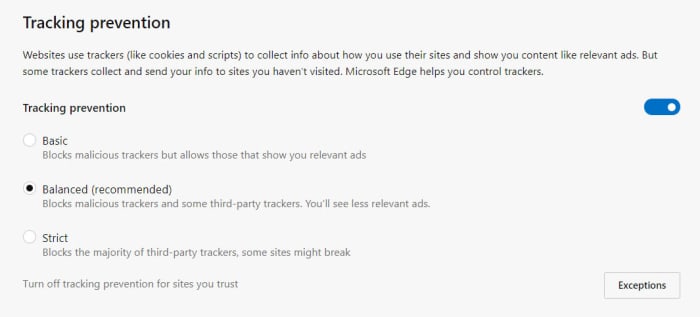
You can then adjust your privacy settings by copying edge://settings/privacy and pasting it into the Edge address bar.

turn off trackingon Microsoft Edge

These preview versions are the first to receive new features as this is where Microsoft test new features before releasing them to the general population. This means that the browser might not be as stable as your regular version of Microsoft Edge.

These Insider builds are not just a good way for developers to test new features. They also offer a great way for you to test out experimental new features without having to mess around with the settings for your main browser.

Whether you want to allow websites to track your online behavior is up to you. Microsoft is testing out this new feature and is committed to bringing it to the full version of Microsoft Edge. If you’re unsure about whether you’d like to use it or not, why not take this opportunity to test out the new feature before it lands on the main app.

Ransomware hackers have found a new type of institution to target

Hundreds of dentist offices all over the US have been hit by ransomware attacks

phishing scams

Of all the types of malware, ransomware is definitely the most Hollywood. We’ve commented before on the showy nature of its name and how it invokes ideas of Hollywood style face-offs between hostage takers and negotiators. Even in real life though, ransomware certainly knows how to grab the headlines. The nature of the threat sees it targeting large institutions rather than private individuals and this has led to some big targets and even bigger ransom payments.

We’ve seen hospital networks targeted, schools, and recently we’ve even had to deal with whole cities being crippled by ransomware attacks, with two cities in Florida being forced to stump up over $1 million in ransom between them. It seems that even moving on to smart devices like Wi-Fi connected cameras isn’t enough either, as ransomware hackers have found a brand-new type of institution to target. If you’re afraid of going to the dentist, look away now.

Hundreds of dentist offices all over the US have been hit by ransomware attacks

According to a report by ZDNet, two Wisconsin-based software providers, The Digital Dental Record and PerCSoft, were recently compromised by a ransomware gang. The gang was able to initiate a REvil (Sodinokibi) ransomware attack across the company’s customers’ systems, which total hundreds of dentists’ offices across the US.

a dentist
Time to be afraid

The breach occurred over last weekend but then only came to light on Monday morning when Dentists up and down the country found that they couldn’t log on to their systems when they returned to work. The ZDNet report goes on to say that the Wisconsin-based companies decided to pay the ransom and have since been sharing a decrypter with all of the effected dentists, which should help them recover their lost files. There is no mention, however, of how large or small the ransom was that they paid.

This isn’t the first time that this particular type of ransomware attack has been launched by a ransomware gang. A recent report listed the REvil (Sodinokibi) attack as one of the most prevalent types of ransomware attack out there. With this attack on nationwide dentist offices being the third time a major service provider has been targeted using this type of attack, it puts it as the fourth most popular type of ransomware attack out there.

Ransomware attacks usually encrypt or steal data from the victim’s database. The data is then held ransom, with the victim having to pay to recover it. As the attack requires a lot of work, it makes sense to target larger organizations rather than individuals. It also applies more pressure as the data that is held ransom usually plays a key role in the running of the victim organization and immediately starts applying financial pressure. This means you’re not likely to be targeted yourself by a ransomware attack, but there is every chance an organization you’re connected to could be.

Will this Google proposal make the internet more secure?

Why does it matter how long SSL certificates last and websites have a HTTPS classification?

A webpage on a laptop

HTTPS is the go-to security standard for websites. It has become so ubiquitous that most major web browsers, including Google Chrome and Mozilla Firefox, label a website as “not secure”, if it isn’t HTTPS. For a website to receive a HTTPS classification it needs to have been granted an SSL security certificate by members of the CA/B Forum. This is a group made up of certificate authorities and web browser developers that have been authorized to hand them out.

At the moment, when a website receives an SSL certificate it lasts for 825 days. This means the website will be HTTPS and not labeled as not secure for 825 days. It seems that Google thinks this is far too long because at a recent meeting of the CA/B Forum in Greece, the web giant proposed that certificates only be valid for 397 days. This would cut their duration from around two years and three months to just over one year and one month.

Why does it matter how long SSL certificates last?

There are two distinct camps to note in discussions on SSL certificates and HTTPS classification. The first camp is the browser makers, of which Google is the most prominent of all. Most browser developers expressed support for Google’s proposal for SSL certificates having shorter durations. In fact, they’ve all been pushing for shorter length certificates for years. It was only last year when they tried to cut the amount of time an SSL certificate was valid from three years to one before eventually compromising on just over two.

The people they compromised with, the other distinct camp in all of this, is the CAs or certificate authorities as they’re known. To them shorter durations means more certificates, which translates into more cost for the industry. The CAs have seen the duration of SSL certificate validation cut from eight years to five, then again to three, before only last year being cut again to just over two years.

What difference does it all make?

If this all sounds like a bit of a soap opera, you’d be right. There are a number of security related issues related to the proposed change from Google. These include SSL certificates being given out in error and even the revocation process not being effective. When malware filled sites or pages displaying phishing scams are discovered to have an SSL certificate and HTTPS classification, it can’t be guaranteed that revoking that certificate will effectively reclassify the site as just HTTP and consequently not secure. Shorter certificates mean this problem would take care itself more quickly.

There is something else to it though, and that is about who is in control of HTTPS. There is a train of thought being laid out by internet security experts Hashed Out, that says it is all a power play from the browser makers. They simply want to exert dominance over the CA/B forum and show them who is boss.

If the above is true then, it would seem to indicate that whether or not this proposed change form Google will make the internet more secure or not is an entirely subjective matter. It could be more effective to fix the bad certificate revocation process rather than shortening the length of time SSL certificates remain valid.

The one thing we do know, however, is that there wasn’t a vote on the proposed change that Google would like to see come into play in March next year. This means we’ll all be on the edge of our seats until the CA/B Forum next gets together and thrashes something out.

Google research suggests you’re not as security conscious as you think you are

According to Google over 80,000 people ignored breach alerts about their passwords

If you think you’re a security conscious individual when it comes to being online, we have some news that may shock you. Even if you don’t think about yourself that way this is still going to be pretty shocking. New research by Google shows that a lot of us have a pretty lax attitude to password safety.

Many of us use passwords that have already been breached and, even worse, a lot of us continue to use breached passwords after we’ve been told they have been compromised. What are we thinking people? Maybe, we should look at these numbers in a little more detail.

According to Google over 80,000 people ignored breach alerts about their passwords

username and password

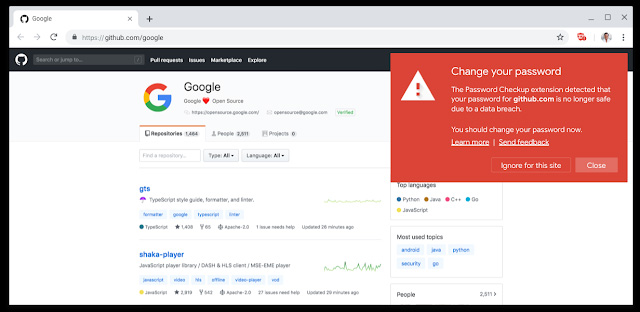
Google has been looking into its Password Checkup extension for Google Chrome to try and learn a little about our attitudes to our online safety. Password Checkup scans all of your login credentials when signing into your online accounts and then checks them against all the known sets of login credentials that have been affected by data breaches. In essence it tells you, if your password has fallen into the hands of hackers or not. The results of Google’s study have been a little surprising to say the least.

Since it was first launched, the password checkup extension has been downloaded over 650,000 times. If you think about how many different web accounts each of those users has, you’ll know that that number gives the extension access to a lot of usernames and passwords. Of those, Google looked at  21,000,0000 and found that over 316,000 of them were unsafe. This works out at about 1.5%, which isn’t much at all but makes sense when you consider that the people who will have downloaded Password Checkup in the first place will have been security minded individuals. What comes next though, does not make sense at all.

pasword checkup notification
Image via: Google Blog

When Password Checkup alerted these users to their breaches, the numbers weren’t as impressive. The report says that 26% of users changed to new passwords and 94% of these new passwords were at least as secure as the old ones. The weird thing though, is that 25.7% of the people warned that their passwords had been breached ignored the warnings. A massive 81,368 people were told their usernames and passwords had been leaked in a data breach and did absolutely nothing about it.

Something to think about

It is very important that you use unique login details for all of your online accounts and change them as soon as you hear they’ve been caught up in a breach. If you have unique credentials, you’ll only have to do this once. If you don’t, you’ll have to do this for every account you have with the same details as the people who bother to steal passwords in the first place will also bother to check them against every account you have.

8

In this regard, we can’t recommend using a password manager like LastPass highly enough. Password managers generate strong passwords automatically and will also let you know, if you are using the same security credentials on more than one account. It is likely that the people who ignored the breaches couldn’t be bothered making the changes because they’d have to change a lot of details for it to make a difference. A password manager like Last Pass does all of this hard work for you so if you have been breached but couldn’t be bothered to make any changes, download Last Pass and let it do the work for you.

On top of this, you should also be pleased to know that Google is working on integrating the Checkup Extension into Chrome directly so soon all Chrome users will be notified, if their login details have been compromised.

Microsoft Edge update will make it perfect for bedtime stories

Microsoft Edge’s read aloud mode is getting much more natural sounding voices

Microsoft Edge has had a tumultuous existence since it first launched. It has rightly been lauded by critics and supporters but struggled to make a dent in Chrome’s dominance of the market. Microsoft Edge has now migrated to the Chromium ecosphere, which means some people claim it is no more than a different version of Google Chrome. The move has done Edge well though and moving closer to Chrome has actually given it the room it needed to gain traction for the key features that set it apart from the Google web browser offering.

6
The idea of Microsoft Edge is to be as fast, clean, and lightweight as possible to cope with the demands of different devices, whether it be a PC, tablet or phone.

One of those key differentiating features has been the reading mode and the connected read aloud mode. Chrome has a rudimentary reading mode buried deep within its code, but it is nowhere near as good as the reading mode on Edge, which can present crisp and clear text for any page of the internet. The Edge read aloud mode goes one further and actually reads out all the text, saving you the eye strain.

Edge's clear reading mode
Edge’s Reading Mode is very clear and far superior to Google Chrome’s

Read aloud has been far from a perfect feature though, and Microsoft has received a lot of feedback about how it could be improved. Feedback it is now clear that the software giant has been listening to.

Microsoft Edge’s read aloud mode is getting much more natural sounding voices

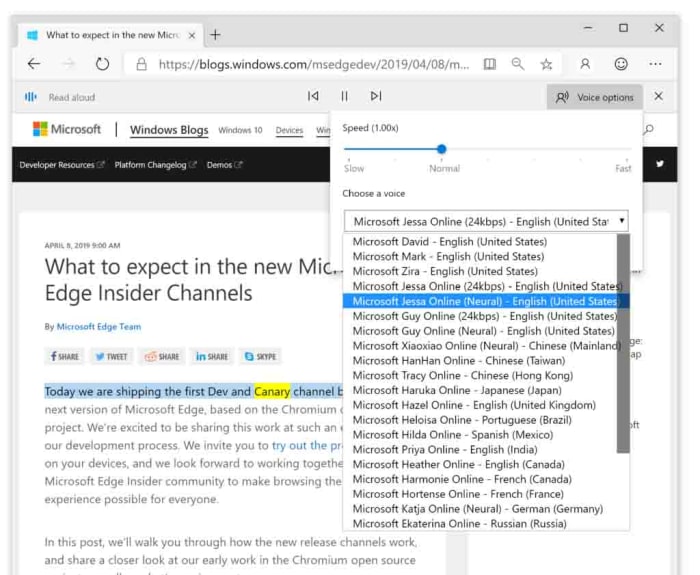
The key feedback Microsoft has been receiving on the feature is that voices doing the reading sound unnatural and robotic. Microsoft has released a blog post outlining how it plans to use “cloud powered voices” to deal with these complaints, including two new styles of voice that will be available to Edge users; Neural voices and Standard 24kbps voices.

The post describes Neural voices as, “Powered by deep neural networks…” and claims that, “these voices are the most natural sounding voices available today.” The Standard voices are described as being similar to the voices that are available already, but they’ll sound clearer due to an increased bitrate of 24kbps.

How to use the Microsoft Edge Read Aloud features

Microsoft Edge Nureal voice read aloud
Image via: Microsoft blog

Microsoft has also endeavored to make these new read aloud voices as accessible as possible. If you’re a Microsoft Edge user and you’d like to try out the new features, it couldn’t be simpler. All you have to do is open Microsoft Edge and navigate to the page you want Edge to read. Then, you simply highlight the text you want reading aloud, right-click, and then select Read aloud section. This will start the Read Aloud feature and will also open the Read Aloud menu, which will give you the option of selecting the type of voice you want to hear.

So, with new neural voices sounding more natural than ever, would you consider letting the Microsoft Edge browser read you a bedtime story to help you get to sleep at night?

Chrome’s new and improved Incognito mode is not as good as Google is making out

Researchers have discovered two tricks that make it possible for websites to detect when users are visiting in Incognito mode

With recent stories rolling out about the amount of tracking cookies Chrome has hunting you down and the move to block ad-blockers unless you pay Google, Chrome’s reputation has taken a bit of a beating recently. It has also been a somewhat badly kept secret for years now that Google Chrome’s Incognito mode is not as private as you would think it is.

Last month, Google moved to address this final point in what must have seemed like a desperate attempt to restore Chrome’s beleaguered reputation. The internet giant moved to close off a loophole that allowed web developers and sites to detect users who were visiting their pages while in Incognito mode.

The move was met with plaudits too, as it appeared to work. Unfortunately for Google, that apparent truth has evaporated as researchers claim to have discovered a way around it.

Researchers have discovered two tricks that make it possible for websites to detect when users are visiting in Incognito mode

Incognito chrome

A successful Incognito mode can be bad for websites in a number of ways. The clearest one relates to ad revenue. When websites can track your online activity, they can serve you up more personalized ads, which in turn generate more revenue.

The other big one though, relates to media outlets offering a certain number of free page views before you have to pay. If you’ve ever seen a banner ad saying you’ve only three free articles left this month, then you’ve come up against this. A genuinely “incognito” mode stops these sites from knowing how many of your free articles you’ve read.

This all means that there is a real financial incentive to breaking through an Incognito Mode and it looks like it hasn’t taken long for researchers to bust through Google’s new and improved Incognito mode. Google announced that it had closed the previous loophole on July 18 and since then two security researchers have published ways for websites to detect somebody in Incognito mode.

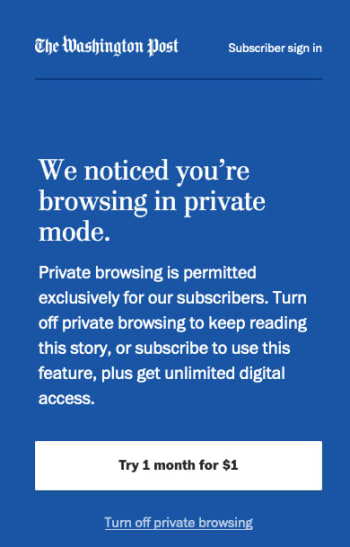
wapo incognito mode screenshot

The first researcher, Vikas Mishra, noticed a painfully simple way to bypass the new and improved Incognito mode. He realized that Chrome caps incognito windows memory usage at 120mb while normal windows running normal web pages use a lot more memory than this. This means that any window that has a 120mb memory limit is likely to be in Incognito mode. Mishra even wrote a script that exploits this vulnerability.

The second researcher, Jesse Li, used a slightly more complicated measure. Li measured the different speeds of writing data to memory rather than disk using the two different browser modes and discovered a discrepancy that gives the game away.

When it comes down to it, Mishra’s breach is easily fixed by tweaking the amount of memory Incognito pages have access to and Li’s isn’t the easiest to implement. Whereas both researchers will likely be working at Google themselves sooner rather than later as a result of their discoveries they may not actually change too much stuff in the short to medium-term.

Google is already working on a fix to the problem, although, it has already noted that The New York Times is already exploiting one of the bugs, to detect people reading its articles in Incognito mode.

The problem in all of this, however, is that financial incentive we mentioned earlier. As long as invading your privacy will make companies money, they’ll keep trying to do it. In the long term this is a problem that isn’t going to go away until that fundamental issue is addressed.