Can I watch the Super Bowl completely through streaming? It seems not

Super Bowl on streaming? NFL Commissioner Roger Goodell just gave a very interesting response to a question about what the NFL thinks…

As you know, very soon the most important sports moment in the world will take place: the Super Bowl. This edition, which will be the 58th, will be played at the Allegiant Stadium in Las Vegas, Nevada, on Sunday, February 11, 2024, in US time.

AppleTV+ DOWNLOAD

And the question is: Streaming the Super Bowl? The NFL commissioner, Roger Goodell, has just given a very interesting answer to a question about what the NFL thinks of streaming. He gives a lot of credit to Peacock, YouTube, and others, but ultimately: “We are really committed to free-to-air television.”

Published by @awful_announcing
View on Threads

And when asked if a fully streaming Super Bowl could happen, Goodell was quite clear: “Not in my time.” It’s worth watching, you have the exact moment of the interview above these lines.

So, you know, if you want to watch the Super Bowl between the Kansas City Chiefs and the San Francisco 49ers, you’ll have to watch it on free-to-air television. If you’re in Europe and want to watch it through CBS, try our VPNs and connect to American television.

AppleTV+ DOWNLOAD

By the way, it is the first time in NFL history that the Super Bowl will be broadcast in two different formats: CBS will broadcast the traditional game and Nickelodeon will air an exclusive broadcast for children and families. The CBS broadcast can be streamed through Paramount+.

The Pokémon Horizons anime has a release date on Netflix

The Pokémon Horizons anime has a release date on Netflix, with just under a month left before we can see the adventures of Ash’s successors.

Many people thought that when Ash Ketchum finally won the Pokémon League, the Pokémon anime would end. Of course, that’s not what happened. Ash Ketchum can finally retire from competitive raising of adorable monsters at the age of 12, with 25 years of experience, but that doesn’t mean that the Pokémon universe is limited to its most well-known character. Because the world doesn’t end with Pikachu.

Netflix DOWNLOAD

That’s why Netflix has finally released the trailer for the next series in the franchise: Pokémon Horizons: The Series. Although it was originally scheduled to premiere on February 23rd, it will finally be released a few days later, arriving on the streaming platform on February 23rd.

Pokémon Horizons: The Series follows a new duo of protagonists, Liko and Roy, who explore the Paldea region in search of one of the legendary Pokémon, Rayquaza. But they don’t do it alone. To help them, they have a Pokémon professor, Friede, and his partner, Captain Pikachu. As for our protagonists, since they are inspired by the Scarlet and Purple video games, their Pokémon are the three starter Pokémon: Spirigatito, Fuecoco, and Quaxly.

While it is now reaching the West via Netflix, in Japan they have been enjoying the series for a little longer. Released in April 2023, they are already on their second arc, which premiered on October 27th, so we have plenty of Pokémon Horizons to catch up on.

But this is not something new. The Pokémon anime has always arrived much later to us than the original premiere in Japan. And now we will only have to wait a little over a month to finally catch up and meet the successors of Ash Ketchum, less interested in competition, and more in exploring and getting to know the world of Pokémon. Not without some familiar faces, although they have now taken on different forms.

Netflix DOWNLOAD

From Ted Lasso to The Morning Show: Ranking the Most Popular Programs on Apple TV+

On Apple TV+, quality prevails over quantity, and this is proven by this top 10 of the most watched series on the platform.

Apple’s streaming platform, Apple TV+, has managed to win over a large number of fans around the world since its debut in 2019. One of the platform’s biggest hits has been the Ted Lasso series, which has become the most popular of all those available on the platform.

Continue reading “From Ted Lasso to The Morning Show: Ranking the Most Popular Programs on Apple TV+”

How to use VLC

VLC is the premier free tool for all of your audio and video files! Here’s how to use it!

VLC

No, that traffic cone on your buddy’s desktop doesn’t mean his computer is under construction.

It means that your friend is using VLC, the best free tool for playing and capturing video! 

VLC plays most media files as well as DVDs, CDs, VCDs, and many streaming protocols. This tool really comes in handy. More often than naught, your device’s default video player is less than optimal. Once the program finally opens, you have to wait for it to load the video, and then play it. This only works if your video player can even play video in that format in the first place. VLC can play just about anything, and it does so quicker than most other apps. 

VLC for mobile Download now ►
8

How to use VLC

Use VLC to play audio/video files

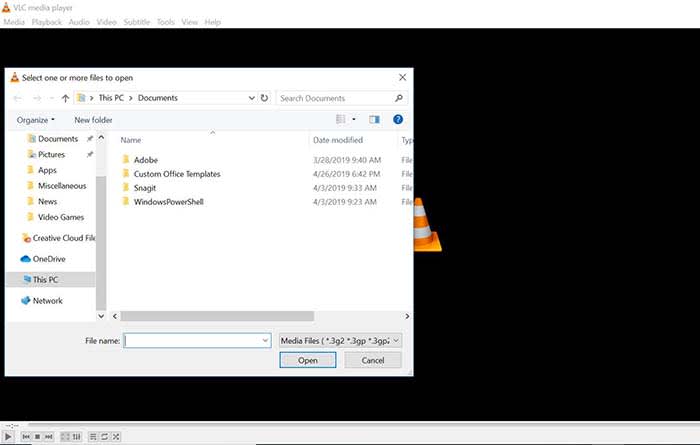
VLC open file

Playing a file with VLC is a lot like opening a photo in Photoshop. Either manually open the file by going to Media, and clicking Open File, or drag just drag the file onto the VLC window.

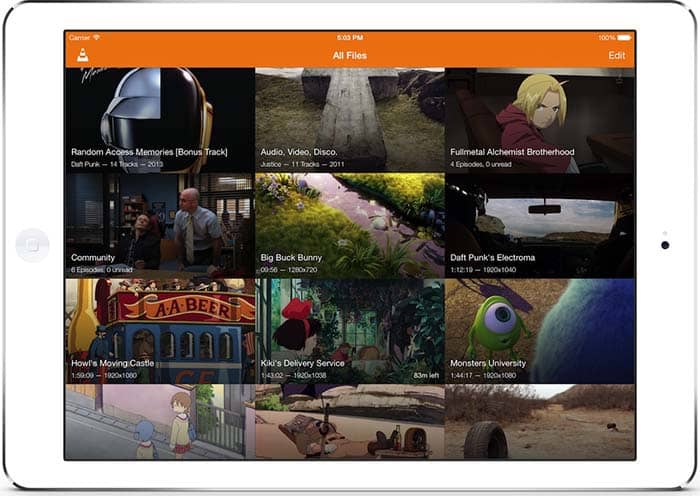
Keep a library of videos

VLC
Image courtesy of VLC

If you watch multiple videos on VLC, you have the option to keep a library of them to finger through at your leisure. Once you have several files loaded into VLC, you can organize them under All Files. Do you have a huge collection of anime? Organize them with VLC! Do you have a digital version of every movie in the MCU? Create a specialized folder for them!

Stream yourself

If you want to take a picture of yourself or record a video of yourself with a webcam, your device probably already has some built-in tools. However, it probably doesn’t have tools that help you stream yourself.

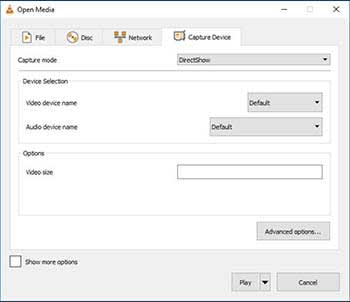
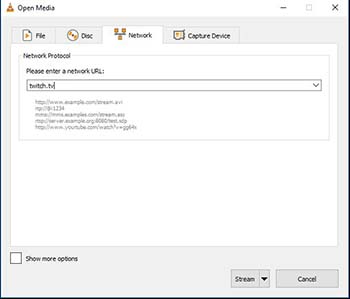
Go to Media and click Open Capture Device. Choose your preferred settings from here, and click the play button to start recording yourself. If you want to stream yourself, Go to Media and click Stream. A new window will pop up with streaming options.

VLC stream

You can even throw in a URL to the website you will be streaming to.

VLC stream

Record your desktop

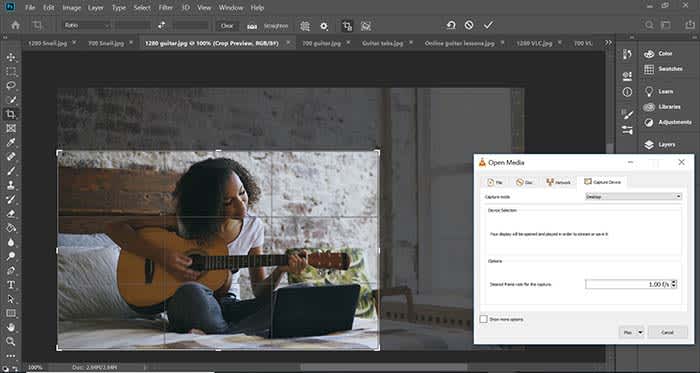
Capture photoshop tutorialLet’s say you’re a content creator and you need to record your desktop. VLC has the answer. Go to Media and click Open Capture Device. Now you can record your desktop and do it in whatever FPS rate your computer can muster.
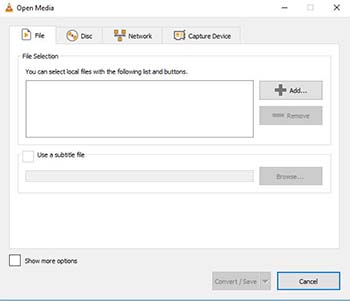

All of a sudden, you have an option for recording your next “let’s play” or that Photoshop tutorial you were making for your YouTube channel.

Convert files

VLC convert

If you have an old video or music file that is in some weird format, you can actually change the format with VLC. Click on Media and choose Convert/Save. From here, you can add files and change their format with the option at the bottom of the window. Finally, those weird videos from high school that you recorded with an off-brand video recorder can be converted to MP4. Sure, you might’ve wanted that cringey video you made for a class to die, but now you can share the video with them on Facebook!

Edit audio/video files

VLC edit

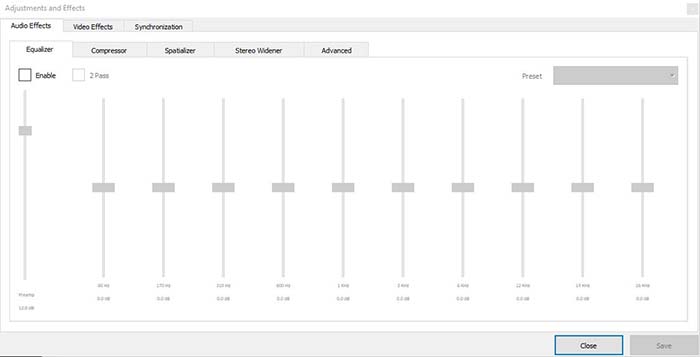
Ever take notes in class, but you can’t hear them because of background noise? Have you ever recorded a video of your friend, but it turned out too dark? VLC has tools to fix these issues and more! Go to Tools, and from there click on Effects and Filters. Here, you can edit audio and video files to make them as you see fit.

A quick note on the legality

VLC is meant to be used for audio and video files you legally own. It is not meant to be used for movies you illegally download or torrent from piracy sites. Also, the capture mode should not be used to rip videos from other sites.

Wrapping up

If you have a huge collection of video files that you want to watch/catalog, VLC is your best option. If you are looking for an easy to use program for streaming yourself, and recording your desktop, VLC is your best option yet again! It’s free to use, and a quick download. Basically, there’s no reason why you shouldn’t download it!

VLC for mobile Download now ►
8

These are the 10 best anime on Netflix

Looking to jump into anime? Here are the 10 best you can watch on Netflix.

Though there are certainly some more dedicated anime streaming sites out there, most folks don’t have to look too far to find some quality anime to binge. Whether you prefer fast-paced action, slapstick comedy, or something a little more introspective, here’s a list of 10 quality anime series available to anybody with access to a Netflix account.

The 10 best anime on Netflix

10. Lupin the Third: Castle of Cagliostro

lupin the third castle of cagliostro
Image courtesy Tokyo Movie Shinsa

This classic anime movie from the ’70s has withstood the test of time. This heist film was one of anime legend Hayao Miyazaki’s first films, and though it doesn’t bear the Studio Ghibli name, his influence still shows.

The tale follows a gentleman thief, Lupin, in the aftermath of a spectacular heist. He soon finds that the piles of cash that he made off with are actually counterfeit, and tracks the forgeries to the mysterious Castle of Cagliostro.

However, there’s more going on than meets the eye, including a trapped princess and secret treasure. This is a classic adventure that will appeal to any Miyazaki fan.

8

9.Gurenn Lagann

gurrenn lagann
Image courtesy Gainax

Is there anything more anime than giant robots? In Gurenn Lagann, they’re just another part of the landscape. Set in a future where the evil King Lordgenome has forced humans to live in settlements beneath the planet’s surface, teens Simon and Kamina dream of going topside. Soon enough they find themselves wrapped up in the rebellion against the king, fighting alongside the forces of humanity.

Though the series has plenty of action, at its heart it’s a tale about perseverance, growth, and the power of the human spirit.

8. Kill la Kill

kill la kill
Image courtesy Studio Trigger

Kill la Kill is over-the-top in all the best ways. No-nonsense protagonist Ryuko Matoi arrives at the prestigious Honnoji Academy on a quest to find the person who murdered her father. That hunt continues as she uses a powerful Scissor Blade and a talking combat suit to quite literally battle her way through high school cliques and some more sinister enemies behind the scenes.

Behind the breakneck pacing, action, and laughs, Trigger actually has quite a lot to say about superficial fashion, peer pressure, and the expectations society places on our appearance. Be warned: this anime is extremely addicting, and once you start you may not want to stop.

7. Violet Evergarden

violet evergarden
Image courtesy Kyoto Animation

A far cry from the fast-paced world of Kill la Kill, Violet Evergarden is a more introspective tale.

The show focuses on the titular character, Violet, a former child soldier. After the war comes to a close, she struggles to find a place for herself in the peacetime world, and eventually finds work as a writer, drafting letters of all kinds for all manner of different people. As she does, she comes to learn more about herself and what it means to connect with others.

It’s a story that’s at times heartwarming, heartwrenching, and definitely worth watching.

6. Jojo’s Bizarre Adventure

jojo's bizarre adventure
Image courtesy Shueisha/Viz Media

Attempting to explain Jojo’s Bizarre Adventure in just a few sentences is no easy feat. The series follows several generations of the Joestar family, a powerful clan of psychic warriors. As the series jumps across time, the audience follows the Joestars on a whole host of crazy and madcap adventures.

Though that’s probably the best way to describe Jojo in a nutshell, it doesn’t do justice to the sheer insanity of the series itself. It’s utterly ridiculous in the best way. Anybody watching should prepare for a hefty dose of weirdness and be ready to laugh to the point of tears.

5. Fate/Zero

fate zero
Image courtesy Ufotable

Fate/Zero is just one of several Fate anime series available on Netflix, but we think it’s one of the best of the crowd.

Each anime in the Fate series is based around the same central premise: the show follows secret societies and power players as they engage in a covert war to gain possession of the legendary Holy Grail. To fight this war, participants adhere to a strict set of rules and battle using legendary warriors summoned from throughout history. King Arthur, Alexander the Great, and Gilgamesh all put in appearances, and one of the best parts of the show is seeing its unique spin on these mythical historical figures.

4. Death Note

death note
Image courtesy Madhouse

First things first: put that horrible live-action English adaptation out of your head. Though the live-action version may have been a travesty, its anime source material isn’t.

Teenager Light Yagami comes into possession of a mysterious notebook with a sinister power: anybody who’s name is written in the book dies instantly. Light embraces this newfound power and embarks on a crusade to eliminate evil… but as they say, power corrupts.

The famous detective L, a sort of modern-day Sherlock Holmes, sets out to track down Light and put an end to his killing spree. Death Note is a crime thriller with a dose of supernatural horror thrown in; think “Se7en” meets “Final Destination.”

3. Neon Genesis Evangelion

neon genesis evangelion
Image courtesy Gainax

We’ve got more giant robots for you, but Neon Genesis Evangelion takes a drastically different tone as opposed to “Gurenn Lagann.” After humanity is nearly wiped out by a cataclysmic event, extraterrestrial beings dubbed Angels appear to threaten the survivors. A top-secret organization known as NERV makes use of highly advanced mechs, EVAs, to combat the threat.

The series focuses on the young EVA pilots, namely Shinji Ikari. Sure, you’ve got giant robots fighting alien monsters… but underneath that, Neon Genesis Evangelion takes a hard and sometimes uncomfortable look at the nature of human connection, pain, loneliness, and the possibility for growth.

The questions that Evangelion poses will linger with you long after the credits roll… and on that note, be sure to check out the companion movie, “End of Evangelion,” after the finale.

2. Little Witch Academia

little witch academia
Image courtesy Studio Trigger

From the same studio that created “Kill la Kill,” Little Witch Academia is basically Harry Potter if it were set in an all-girls school. The show is a breath of fresh air compared to some of the darker selections on this list.

Atsuko Kagari is our protagonist, a young aspiring witch who can’t quite seem to get the hang of her powers. After arriving at the academy, she meets the kind-hearted Lotte Jannsson and the delightfully dark Sucy Manbavaran, and the trio find themselves stumbling into all sorts of trouble.

The colorful cast of characters makes this show unforgettable, from the ambitious and arrogant Diana Cavendish to the rebellious tomboy Amanda O’Neill. Honestly… we think that Little Witch Academia might actually be better than Harry Potter.

1. Full Metal Alchemist: Brotherhood

full metal alchemist brotherhood
Image courtesy Bones

FMA: Brotherhood is actually one of two Full Metal Alchemist series on Netflix. Brotherhood is essentially a reboot of the original series, with improved animation and a few different plot lines. The show’s core remains the same though, combining strong characters with a tense and suspenseful plot that give us a bit of a “Game of Thrones” vibe.

The show follows brothers Edward and Alphonse Elric, two military alchemists that stumble upon a conspiracy that may put the entire nation at risk. Together with their friends, Ed and Alphonse fight to discover the truth behind the mystery while at the same time trying to find a way to return Alphonse to his true body. As a note: this is perhaps the only time we’re going to recommend watching the English dub over the original Japanese. The translation and adaptation is superb, and the stellar voice cast includes the likes of Travis Willingham and Laura Bailey.

Before you plop down on the couch to binge that next anime, we want to make clear that this is only a handful of titles from the huge library of anime available on Netflix. If you don’t see anything on this list that quite catches your interest, Netflix has plenty of other options to choose from. We’ll also be updating this list as Netflix adds new selections to its library, so be sure to check back regularly for the latest additions!

Get movie, TV, and music recommendations with TasteDive

Need something to watch or listen to? Try TasteDive!

TasteDive

There are almost too many shows and movies out there right now — making it too difficult to make a decision about what kind of media to consume. That’s before you factor in all of the great music, podcasts, and books, too.

That’s where TasteDive comes in.

The recommendation engine works a lot like the old school Netflix rating system. Users rate the movies they’ve watched and the algorithm makes recommendations based on your preferences.

Today’s Netflix recommendations are based on finding a common thread between what you’ve watched. Netflix is assuming that you’re using the tool to watch the latest releases like the new “Sabrina” episodes or catching Miley Cyrus in “Black Mirror.” However, you’re mainly watching “The Office” for the millionth time. Because of this, Netflix’s recommendations likely aren’t going to feel all that personal.

So, back to TasteDive. The site keeps things simple. Liked “Stranger Things?” Great, they’ll tell you what to watch next. How does it work? Let’s take a look.

Getting started

Signing up is literally as simple as creating an account using Google or Facebook.

Once you’re in, TasteDive will prompt you to fill out some profile details, but this is optional and likely won’t have much of an impact on recommendations. On the contrary, it looks like they’re attempting to add some kind of social element to the mix.

Once you’ve created an account and/or profile, you can start browsing, liking, and disliking to your heart’s content.

User Lists

The site’s home page features user lists that you can use as a starting point. People create lists that range from books they hope to read at some point, to top animes, to favorite comedies.

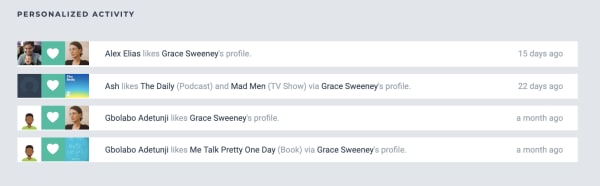
You’ll see notifications on your account if someone likes a show or movie through your profile, or if they just like your profile in general.

tastedive user activity

Browse and ‘Like’

You can navigate to one of the site’s categories: music, movies, TV, books, authors, games, or podcasts. You can start your search by typing in something you already like.

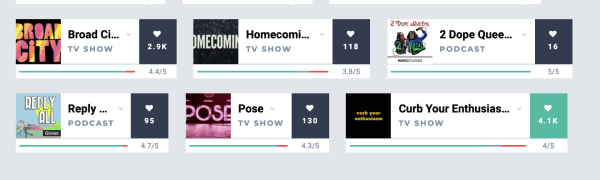
Navigate over to TV shows and you’ll see a list of trending shows. Check the ones that you like by clicking on the little heart on the right side of each entry:

rating recommendations tastedive

As you scroll down the list, recommendations are displayed in the same feed. More appear each time you add a heart to any of the entries.

We just signed up for an account and tried browsing through the TV category. Initially, we liked some of the popular options from their “trending” list including; “Barry,” “The Chilling Adventures of Sabrina,” “Sharp Objects,” “Succession,” and “Fleabag.”

The recommendations listed after “hearting” these selections were kind of all over the place. TasteDive recommended other Netflix hits like “Russian Doll” and “Glow,” but also things like “Digimon,” “House,” and “Planet Earth.”

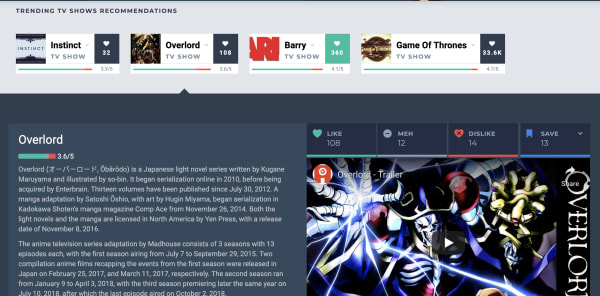
You can dislike any of the recommendations as well, simply click on one of these cards and like, dislike, or give it a “meh.”

tastedive description

Podcasts and books — Not so hot

Podcasting isn’t quite as popular as movies, music, or television at this point, so we’re not surprised that this area doesn’t have many suggestions.

Still, it was a bit disappointing that it hadn’t heard of many podcasts outside of those that have topped the charts for years. You’ll see hits like “Marc Maron’s WTF,” “This American Life,” “My Favorite Murder,” “Comedy Bang Bang,” and “Serial,” but none of your favorite hidden gems.

We tried typing in a few other popular podcasts like “True Crime Garage” and “Beautiful Anonymous” and the engine hadn’t heard of those. Others like “Crime Junkie” and “Slow Burn” had one or two likes a pop, but no associated recommendations.

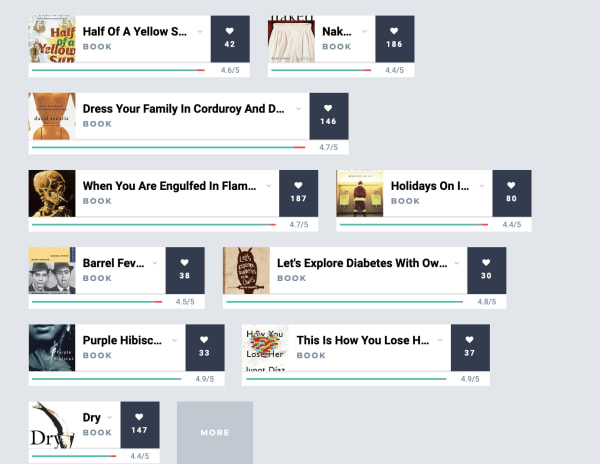
As far as books go, the bulk of the existing entries are books that have been made into movies or TV shows. We saw “Sharp Objects,” “A Song of Ice and Fire,” “Lord of the Rings,” plus a couple of David Sedaris books and Agatha Christie novels. Not exactly a whole library’s worth of recommendations.

tastedive app book recommendations

The problem is, it doesn’t seem like enough people use the platform for it to generate truly tailored content recommendations.

Qloo acquisition could give Tastedive a boost

Back in February, cultural AI platform Qloo announced that they acquired Tastedive. Qloo cited that both platforms were interested in understanding what drives consumer tastes and helping them discover new shows, music, and movies.

We bring this up because, while Qloo took ownership of the recommendation engine months ago, we’re likely to start seeing a smarter, more responsive version of Tastedive sometime in the near future.

That said, Qloo’s real motive is understanding patterns in consumer tastes, and selling those AI-mined insights to advertisers. Which… well, we all know the drill.

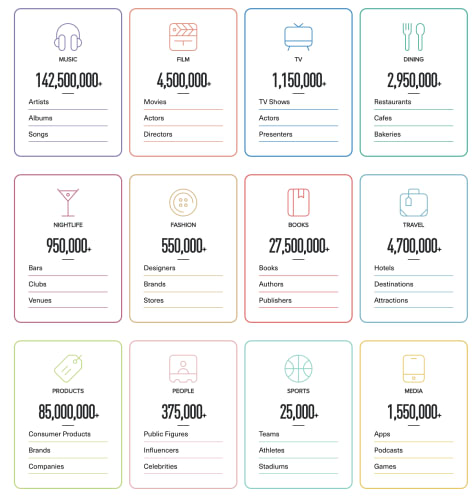
Here’s a shot from the Qloo website, which shows just how much data the AI company has collected already:

qloo data

For now, users should stick with ‘popular’ categories

Overall, if you’re going to use TasteDive, stick to the Movies and TV sections. What’s nice about these recommendation sections is that you’ll quickly get a list of ideas without having to sort through a bunch of reviews and blog posts to find what you’re looking for.

That said, it’s hard to get a sense of whether you’d actually like something based on what you’ve told the tool that you like or dislike, but it should get “smarter” the longer you use it.

Twitch: How to make money as an affiliate

Becoming a Twitch affiliate might seem like a pipe dream, but this guide can make your dream come true!

Twitch

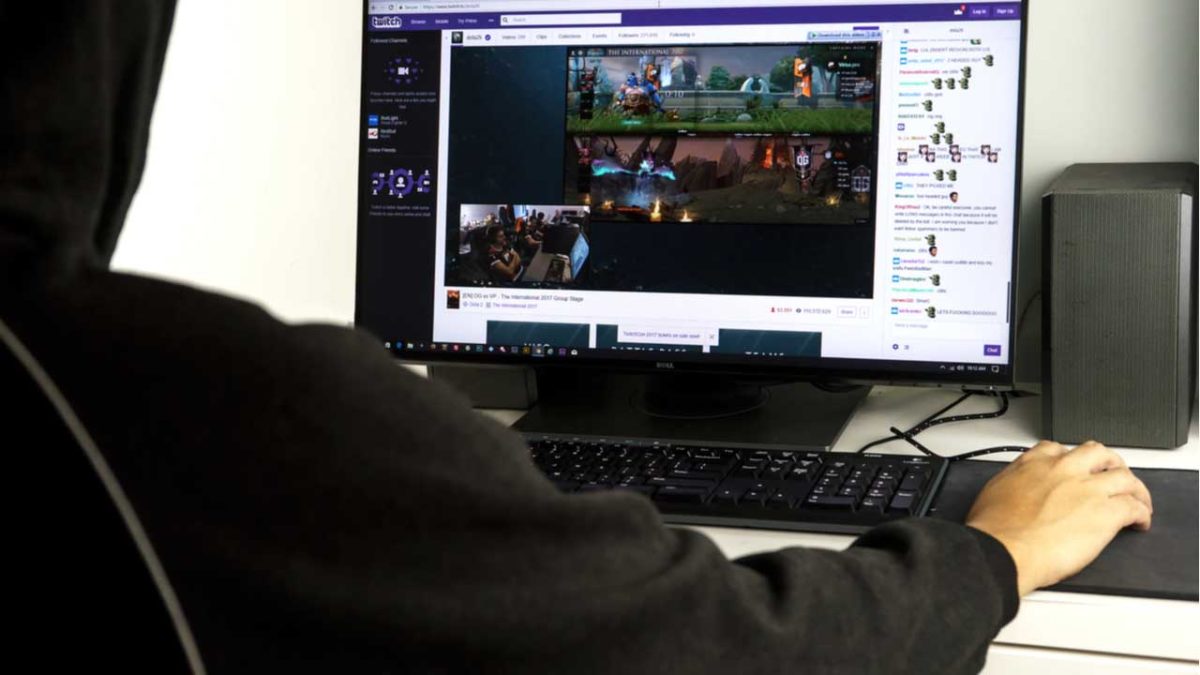
If you’re a gamer, you’ve probably had the fantasy of quitting your job to pursue a career of streaming video games on Twitch. However, an endeavor like that sounds too good to be true. Also, learning how to record and stream live gameplay sounds like a daunting task. On top of all of that, you need to not only figure out how to become a Twitch affiliate, but also if you can realistically support yourself through this new career path. Not every Twitch streamer is going to make $3 million playing Fortnite. 

Despite whatever qualms you may have, Twitch’s affiliate program is one of the top-ranking affiliate programs you can join. If you’re curious about how to get started, we’ve got the guide for you!

Twitch: How to make money as an affiliate

Starting off

You need to set realistic expectations for yourself as a streamer. You’re probably not going to be the next Ninja, but you can still make a name for yourself.

The first thing you need to do is to decide what games you’d like to stream. Weigh how popular a game against how much you enjoy playing it. Sure, games like Fortnite are really popular, but if you don’t find the game fun, nobody will want to watch you.

Also, don’t become a streamer just because you like to play video games. A lot of people like to play video games, but they don’t make money from it.

Become a Twitch affiliate because you like the idea of interacting with a community of gamers that you will gather.
We would recommend watching popular streamers to get ideas for your own stream. You shouldn’t copy another popular streamer entirely, but you can learn how to set up your streams, how to engage with your community, and how to stay interesting to your audience.
Eligibility

In order to be eligible as a Twitch partner, you need to stream 500 minutes of content every 30 days. That boils down to a little bit more than one eight-hour shift. You also need to stream seven times every 30 days. If you stream for an hour every Friday, Saturday, and Sunday, you’ll knock that out easily.

You might think that you need thousands of followers in order to qualify to be a Twitch affiliate, but you don’t.

In order to be eligible, you just need three concurrent viewers for your streams over the past 30 days. Finally, you need at least a total of 50 followers altogether. This means that you probably can’t just have all of your buddies follow you on Twitch, but you still don’t have an unobtainable goal in front of you.

Create the perfect streaming setup

streaming

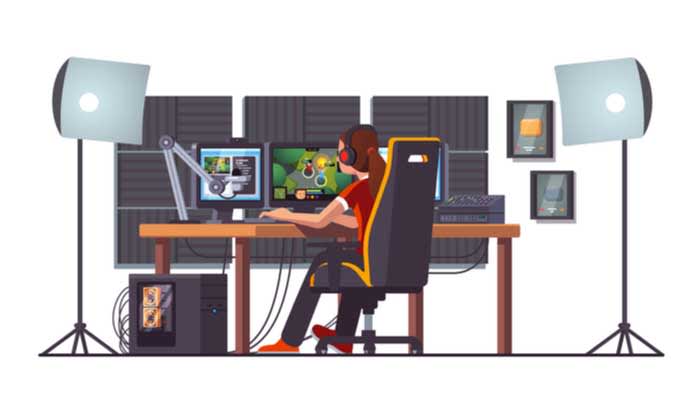
Aside from the money you’ll need to spend on consoles, games, controllers, and other gaming peripherals, there are a few things you are going to need to buy. Luckily, we have included links to some of the best products you can buy to create the perfect streaming setup.

This stuff can get pretty expensive, so don’t feel like you need to buy it all at once. However, if you want to really make it big in the world of streaming, these are all necessary and are used by the top dogs in the world of streaming.

Consider these things an investment into your future on Twitch. They can up the quality of your streams which means you can potentially gain more subscribers which means more money. The amount of money, time, and effort you put into your stream will determine what you get out of it.

How do Twitch affiliates make money?

Twitch affiliates basically have four ways of making money on Twitch:

  • Ad revenue
  • Paid subscriptions
  • Donations from fans
  • Sponsorships

Ad revenue

Twitch streamers make money from the pre-rolled ads run before their streams. Also, streamers can choose to run ads during their streams, which they also profit from. However, Twitch Turbo members and grandfathered-in Twitch Prime members won’t see these ads after a Twitch Prime change last year. 

Basically, you can’t quite rely on ad revenue to bring home the bacon.

Paid subscriptions

10K subs

If you want to subscribe to a streamer on Twitch, it costs $4.99. The good news is that Twitch streamers do get a cut of that money. Basically, if you have a few hundred subscribers that resubscribe every month, you got quite a chunk of change coming your way.

Twitch takes 50% off the top for paid subscriptions. However, if you average about 10,000 viewers per stream, Twitch only takes 30%, according to an article from Tubefilter. That extra 20% is a great incentive to try and grow your viewership.

You need to create incentives for your viewers to want to subscribe to you. A common thing streamers will do is to create custom emoticons that your subs will be able to use in the Twitch chat. These custom emoticons typically are related to your content or your personality.

You can hire someone to illustrate some emotes for your channel. Fun emotes can attract other viewers to your channel, which means more subscribers.

Donations from fans

It isn’t uncommon to make money on Twitch by receiving donations from fans. However, you shouldn’t base your entire Twitch revenue stream on hoping that you’ll receive donations from fans.

Create a link on your channel to for your viewers to donate money. Affiliates typically label this button as either “Donate” or “Send a tip.”

If you’re a Twitch affiliate, you can also receive donations by getting bits. Bits are sort of like Twitch currency (you know, aside from the actual real-world money on the site). Prices sometimes vary, but 100 bits typically costs $1.40. However, first-time bit buyers get a discount, and you get a discount the more bits you buy. If a viewer donates bits to you, you do get a cut of the profits. 

You can also receive donations via PayPal.

Sponsorships

Sponsorships are a great way to make money as a Twitch streamer. The way they work is that you’ll apply to be a sponsor of a company that’s typically gaming related. If you’re a big-shot streamer, companies might reach out to you, but, more often than naught, you’ll need to do the hustling yourself. If you’re accepted after applying, the company will send you instructions as to how your viewers can buy their products while you make a cut of the profits.

Typically, you’ll be sent a coupon code that your viewers can apply at checkout on the company’s website. For example, if your Twitch name is “GamerBoiJakeyyyy” they’d enter coupon code “Jakeyyyy” to get a discount on your sponsor’s product. Every time someone enters that coupon code, you’d get a cut of the sale. 

A great company to try and partner with is G FUEL. G FUEL is an energy powder you mix in with your drinks to keep you energized while gaming with no threat of crashing (allegedly). Also, they sponsor with loads of smaller streamers so they’re a great one to partner with if you’re on the smaller end.

Altogether, how much money you make as a streamer depends on the amount of time and energy you invest in your work.

Payout and payout schedule

Twitch has a $100 threshold in order to be paid out. Also, payouts take place around the 15th of every month.

This might be a bit of an issue for some potential affiliates. If you earned $75, you not only can’t access that money until the middle of the month, but you can’t get it unless you earn at least $25 more. If you need some money for groceries or another expense, you’re out of luck. You can receive money through checks or through PayPal.

If you have any other questions about Twitch payouts, check out their FAQ for more info. 

Consider other options

money

If you want to earn some extra money from your gaming content, there are other websites you should consider. For example, you can take your Twitch streams and upload them to a YouTube channel. That way, your fans can watch older streams of yours. If they’re YouTube Premium members, they won’t even have to sit through ads!

An added benefit is that if they see you interacting with your subscribers in the chat, it might inspire them to want to subscribe to you on Twitch.

You should also consider creating a Patreon page. Patreon is a great way to offer incentives to your fans in return for monthly donations to you.

Wrapping up

Working as a Twitch Affiliate full-time is not easy off the bat. If you have pressing bills to pay, you might want to consider another source of income before devoting all of your time and energy into working as a full-time streamer.

How to watch free TV and movies with Tubi

Tubi TV is the free streaming service that might be your escape from Netflix!

Tubi

In the world of streaming services, there are naturally some big winners in the space. Netflix, Hulu, HBO, Amazon. You know, the titans of big tech.

In an increasingly fragmented, weirdly transitional era, we’re linking more and more subscriptions to our bank accounts to keep up with all of our favorite programs.

Given the current state of things, it seems that Tubi’s promise of free and legal streaming is at least worth a shot. Heck, you don’t even have to register for an account.

In this article, we’ll take a look under the hood to see what Tubi TV has to offer and whether it’s a worthy replacement for any of the big guys.

What is Tubi TV?

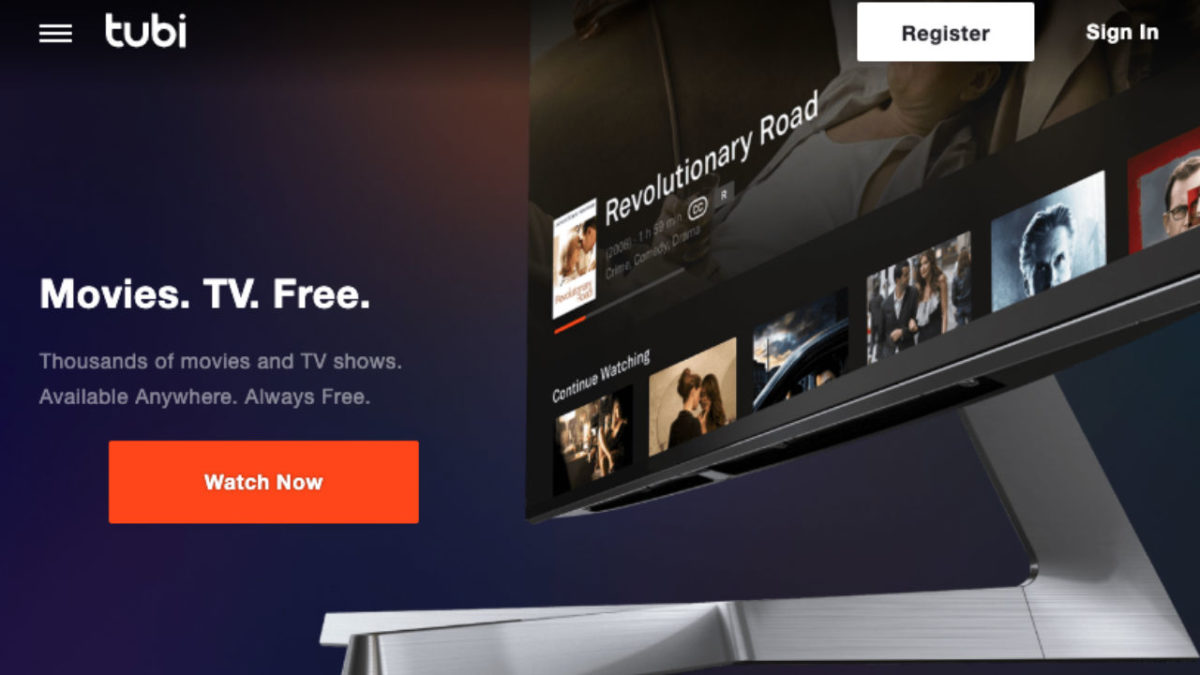
Tubi is a video streaming tool that presents itself as a free Netflix alternative somewhat similar to Sony’s Crackle TV or the Hulu of yesteryear. Remember when you could watch “Parks & Rec” and “The Office” for free? Man, that was nice.

The platform is supported by in-stream ads. Also, you don’t even need to sign up for an account to access their library. This means there are no annoying emails, no subscription fee, just unlimited streaming.

10

What’s the deal with Tubi TV sign up?

What’s a little confusing here is, while ads are part of the deal, Tubi’s help section states that “all content on Tubi is free to watch — we don’t offer a subscription service to watch ad-free.”

What that means is, Tubi plays commercials pre-roll, mid-roll, and post-roll — breaking up your video with ads.

You don’t have to subscribe to any services, but you do need to watch commercials. Those commercials might not align with your interests like they might on Facebook or YouTube. (In this way, Tubi is very much like Pluto.)

Tubi’s ads are targeted using generic criteria. This means that advertisers are going to run really general campaigns to create brand awareness.

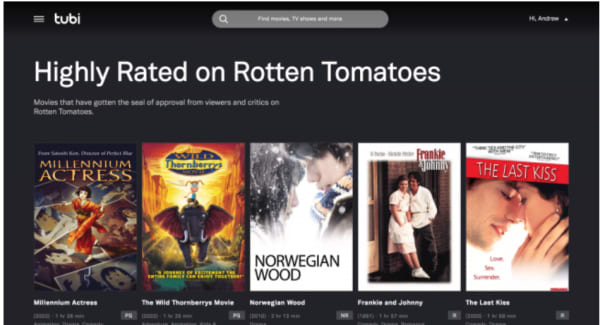
Still, if you don’t care about ads, there’s nothing to lose from giving Tubi a shot. Your Tubi TV signup comes with a few perks, including the ability to pause movies and return later (wild, right?). You’ll also gain access to movie recommendations and lists like this Rotten Tomatoes roundup below:

Tubi TV recommendations

Thousands of titles, but Tubi makes you dig for the gems.

Tubi is free, legal, and totally legit — but, at a glance, it’s not necessarily going to replace your favorite paid streaming services.

There’s no original content like “Stranger Things “or “The Handmaid’s Tale.”

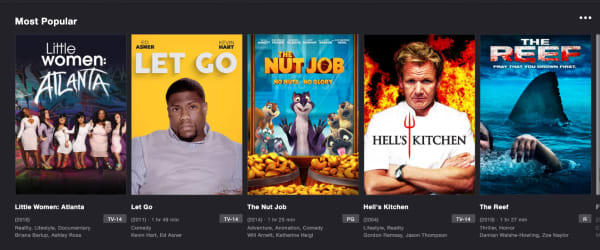
Rather, there’s a TON of reruns like “Little Women of Atlanta” and “Hell’s Kitchen,” plus some truly heinous-looking kids content we have never heard of (seriously, what on God’s green Earth is Fred and why does he have so many movies?).

tubi tv options

That said, there’s some good stuff in there, too, you’ll just need to do some digging. Look in the New Releases tab and you’ll find some award winners in the mix — “Spotlight,” “Memento,” “Short Term 12.”

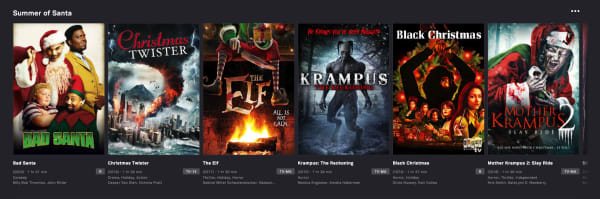
There are throwback cult classics like “Saved!” and “Donny Darko.” There is also a whole section devoted to Christmas horror films — which let’s be honest, look like a real treat.

tubi xmas movies

Where Tubi really shines is that it’s the home for all of your guilty pleasure watches. Whether that means scary Christmas movies or rewatching the “Forensic Files” episodes you’ve only experienced in hotel rooms.

You can watch “Quantum Leap,” and it’ll feel like that first year Netflix streaming was available. And, if you’re a big Lifetime or A&E fan, Tubi means you can finally cut the cord.

Is Tubi available on all devices?

Tubi TV is free to download on iOS, Android, Apple TV, Amazon Fire TV, Roku, Xfinity X1, Xbox, Sony and Samsung Smart TVs, and PlayStation. You can also watch from your browser, no download required.

As it stands, the streaming service is not available in Europe, due to changes in EU law thanks to the rollout of the GDPR.

Tubi does plan on relaunching in European countries, but they need to work out some compliance details first.

8

So, what’s the final word on Tubi?

It’s free… so that’s something.

But seriously, if you’re looking for one of the best free TV apps, this is a solid option.

There are a couple of notable “cons” associated with Tubi TV. First, you need to do some research to find Oscar winners and underrated indie flicks.

Second, this isn’t the best choice for TV. If you’re a fan of “Hoarders” and “Duck Dynasty,” you’re in luck. However, Tubi TV isn’t really the place for beloved comedies or prestige dramas.

How to stream to Discord Community in 5 easy steps

Soon you will be able to stream games on Discord, but there’s a catch!

Discord is software that allows many people to talk to each other for an unlimited amount of time. You can use it to create channels and servers to interact with friends, colleagues, or groups of family members in visual, audio, or text formats. It doesn’t matter if you do so casually or in a formal business context. The result is still excellent communication about anything.

The app was originally designed for gamers to get together online and chat about games and gaming. But before too long, the players wanted a more inclusive communication platform for social groups, businesses, schools, clubs, and more. That led to Discord opening up to other uses, including streaming. Here’s a look at how to stream on Discord.

Discord FREE DOWNLOAD
9

Accessing Discord

The app is available for Windows (11, 10, 8.1, 8, 7), iOS, Mac, Linux, and Android.

 Once you’ve downloaded it onto your device, you can start communicating with whoever you want or streaming content. An increasing number of people are live streaming videos of themselves playing games while giving commentary. You, too, can build your own community and stream games or whatever else you like to people on your channels.

How to stream on Discord

Discord has a live chat feature that allows subscribers and streamers to interact in the same room. Therefore, streamers have many opportunities to interact with their viewers and build their communities to include as many people as possible who want to hear or see what they are offering. You need a server as well as a voice channel to stream. Here’s how to do it

  1. Download and install Discord

    How to stream to Discord Community

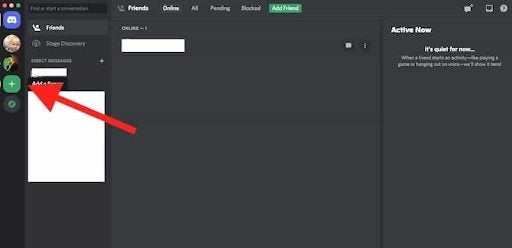
    Go to the Discord download page. Click on Download for Mac/Windows. Then install the software on your device. Open the app, register, and log in. You’ll see an invitation to go into public servers on the screen. There’s a plus icon that allows you to create your own servers. Once you’ve done so, a list of your servers will appear.

  2. Create a server

    How to stream to Discord Community

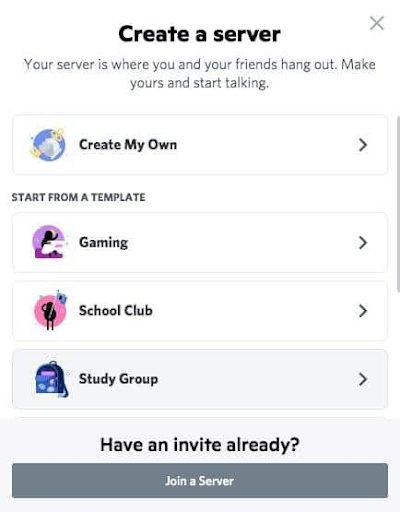
    Clicking on the Plus icon will take you to a screen where you’ll see templates for different categories of servers and an option to create your own. Once you have done so, give your server a name and an icon.

  3. Create channels

    How to stream to Discord Community

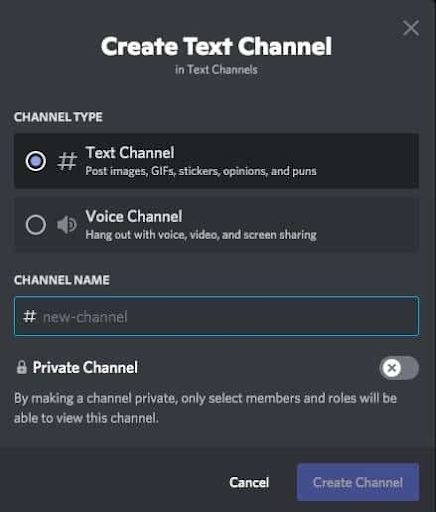
    Now you can set up different channels in your server for different topics, invite friends and contacts and start communicating. There are Voice or Text channels. To create a new channel, click the small plus icon. Pick the channel type, name your channel, and click on Create Channel. Now you can start streaming on any of your channels.

  4. Start streaming

    How to stream to Discord Community

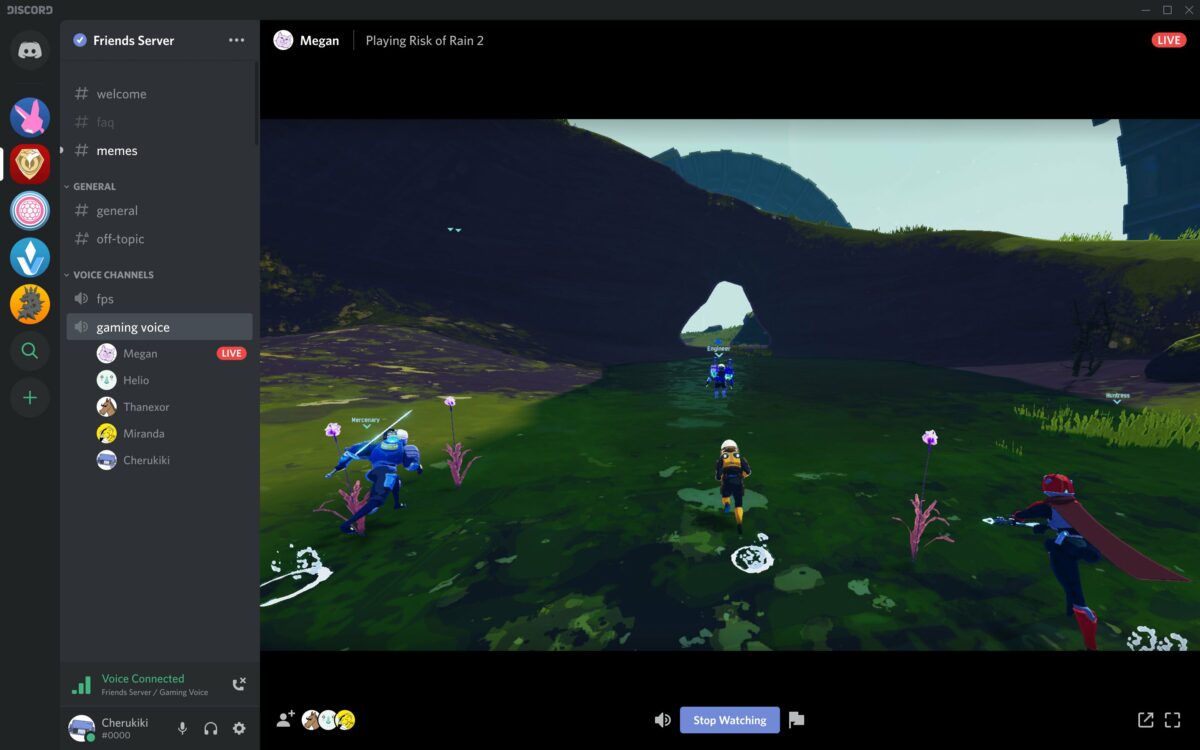
    You can only stream on Mac or Windows, and audio sharing is only available on Windows 10 or macOS version 10.13 or later. Here’s how: Open Discord and get onto a voice channel on one of your servers. Look for the option to turn on your video. Click on the Video button to make the camera appear. You’ll then be visible on the screen, and conversation mode will be on.

  5. Share your screen

    How to stream to Discord Community

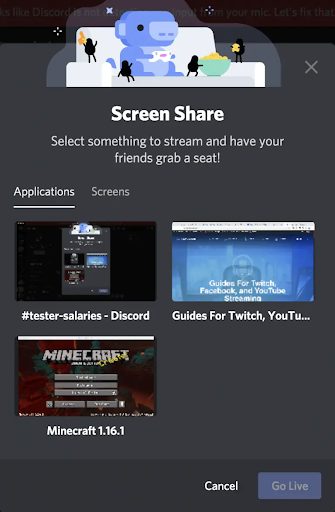
    Click on the Screen icon. A pop-up window will appear where you can choose how to share (a screen on your system or the whole screen). Then click on the Go Live button to share your screen with viewers. And you’ll be streaming!

    You can invite people to join you on our server. Click on the Invite button or send a server invite link. You can end your stream by clicking on the red Disconnect button on your Discord screen.

Watching a Stream

If you’re on a server where someone is live streaming, you can join the stream with a click.

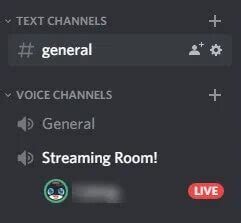
 You can see if someone is streaming because there’ll be a Live button on the screen. Click on the server’s name in the voice channel, and a window will pop up. Click on Join Stream to watch it.

Should you stream on Discord?

Streaming is a wonderful way to reach many people live on a Discord channel. You can stream so many different things, including games, the original reason for the introduction of streaming, cooking or gardening demonstrations, music, music videos, and movies, to name a few. The best thing about streaming is that you can find new Discord friends while you’re doing so. 

You can see their messages and replies in real-time, and you can reply to them in the same way. Engaging them while streaming is a good way to get them interested in your content so that they can spread the word about your stream. If you’d like to learn more, check out our guide on what Discord is and how it works.

What is Soundcloud, how does it work and how to use it

Spotify may be the big dog when it comes to music streaming, but there’s a lot to like about SoundCloud!

SoundCloud is a free website and app that lets users share, collect and discover music and podcasts. It is the ideal platform to share your own musical creations and mixes with the world. All the music you upload to SoundCloud is streamable. The artist can even make the songs or playlists downloadable or redirect interested parties to a website where they can purchase the songs/albums.

The app is a great platform for discovering new artists or sharing their music with a new audience, thus growing their following. SoundCloud has a desktop version for Mac as well as mobile apps for iPhone and Android. In this SoundCloud guide, we will cover what SoundCloud is, how it works and how to start using it.

What Is SoundCloud?

SoundCloud is known as an online audio distribution platform, which simply means it is a platform where users can share music. SoundCloud was founded in 2007 and remains one of the premier artist-first platforms that is driven by a community of artists and listeners.

While SoundCloud is free to use for artists and listeners alike, a subscription version is available. If you want more freedom, you can consider SoundCloud Go. What is SoundCloud Go? SoundCloud Go is the first tier in the SoundCloud subscription and costs $4.99/month. The subscription version doesn’t contain any ads and offers offline listening options as well. 

If you are an artist, SoundCloud is a great platform to get your music out into the world and start building a global following. If you are a music enthusiast that loves staying on top of the hottest music trends, SoundCloud is a great space to find new talent.

Soundcloud

How Does SoundCloud Work?

To start using SoundCloud, you’ll have to create an account first. This can be done through the Mac desktop client directly or via the app. Once you’ve created your account, you can start listening to music or uploading your own. Anyone can start using SoundCloud to listen to music or start uploading music for free.

If you are an artist, there are also subscriptions available specifically for music creators. These subscriptions include more insights and stats, support and other opportunities. This is perfect once you’ve established your profile and are starting to grow a following.

It is important to note that you can only upload music you have rights to on the platform. This means you cannot just upload your favorite artists’ songs. The creators who hold the rights to those have to upload them.

What Is the SoundCloud App?

The SoundCloud app is a convenient way to take all your music, playlist and likes with you wherever you go. The SoundCloud app is available on both Android and iOS devices. Once you have the app installed on your phone and logged in with your account, you can take your music with you wherever you go.

How to Use SoundCloud?

To start using SoundCloud, the first thing you’ll need to do is create your account. You can do this easily through the SoundCloud website, the app or the Mac desktop client. Once logged in, you can customize your profile by clicking on your display name at the top right of the screen and then selecting ‘Profile’. Once all the basics are in place, you can use the below SoundCloud tips to get started.

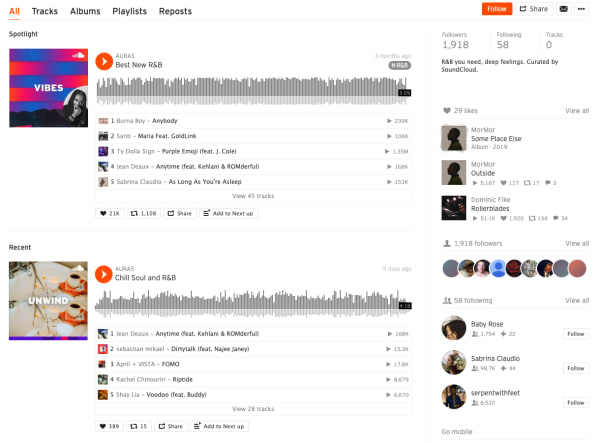
Discover new music on SoundCloud

soundcloud feed

Everything is taggable, and it’s easy to bump into music similar to or related to the music you like.

Here are some of the new features included in the SoundCloud app this year:

  • Personalized recommendations
  • “The Feed” is a feature that curates an artists’ likes, follows and reposts on the platform. The idea is, it helps foster a connection between artists and listeners, giving artists a chance to share recommendations.
  • New playlists: The Morning Mourning, Drippin (new rap), and Speed Bumps (new electro), and more.
  • Communities: Genre-based pages designed to help you find new music, in a way that feels different than the Netflix or Spotify approach.

Many of the newer features aim to give users a sense of community, which certainly isn’t unique to the SoundCloud website.

Find your community

SoundCloud is aiming to position itself as a digital community. As such, they’ve introduced community profile pages, which work just like any of the other pages on the SoundCloud website. However, it aims to bring together “authentic” communities (their words).

What these community pages look like out in the wild represents something a bit different than what you’ll get from your average profile page on social media.

Instead, you can follow any of the following communities:

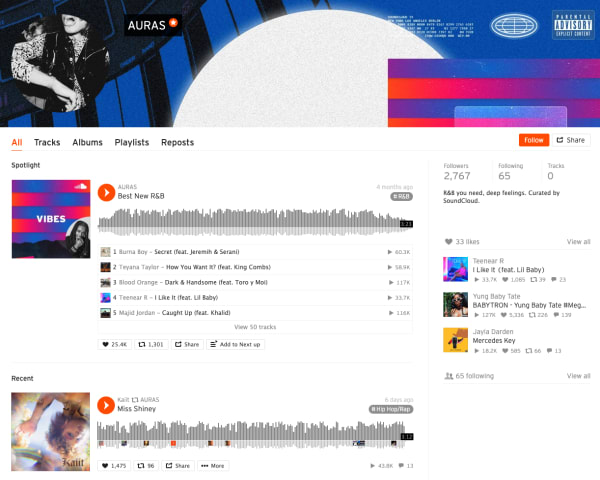
Here’s what AURAS looks like:

Soundcloud communities

As you can see, you’ll get a round-up of different playlists based on your favorite types of music.

While initially, we were a bit confused about how this feature differs from say, following Spotify playlists, it turns out that Communities are a cool way to discover new music. It is not some shoddy attempt at turning SoundCloud into, say, Facebook for music.

The community building part comes in here. Fans and creators can connect with other people who share similar tastes. Join Scenes if you’re looking for some low-key relaxation vibes.

Follow Hustle for the latest in hip hop. AURAS is all about R&B, while Circuits represents the electronic underground.

How to download from SoundCloud

Not every track on SoundCloud is downloadable. To figure out if a track is downloadable, first, find a track on SoundCloud that you’d like to download. Click the More button, and look for the Download file option. If you don’t see one, that means that the creator of the track did not want the track to be downloaded.

SoundCloud
Source: SoundCloud

If it is there, you are in luck, and you can commence with your download! Just make sure you have a decent app for listening to the track.

VLC media player Download free ►
8

How to upload to SoundCloud

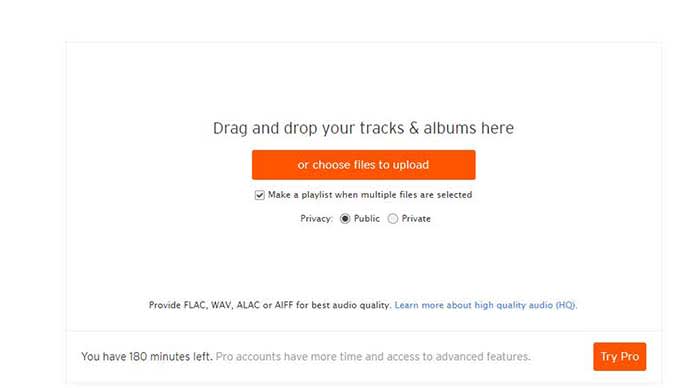
Uploading tracks to SoundCloud is a pretty quick and painless process. First off, in order to upload anything to SoundCloud, you need to sign in. Once you’re signed in, go to the Upload page. From there, you’ll see a page that looks like the one below:

SoundCloud

You can either drag and drop tracks and albums onto the page, or you can use their file uploader. Check the box on whether you want to share your tracks publicly or privately.

Please note that if you don’t have a Pro account, you have three hours worth of content that you can upload. If you only have a few singles you want to share, that should be enough for you. However, if you also have several diss tracks, love ballads, a swan song, and a comeback album, you may want to consider upgrading to pro. 

Once you choose the tracks you want to upload, click the button to begin uploading. Once you’re done, you can fill out the track names, the genre, and add whatever tags you’d like. After that, you’re all done! Make sure you give yourself a cool artist name and tweet out to all your friends so you can share your tracks with them!

Promoting your music on SoundCloud

Not just a listener? SoundCloud is one of the few accessible forms of DIY distribution and marketing for independent artists.

While podcasters have tools like Stitcher, Anchor, Apple, and Google, there are few places for aspiring artists to connect with their fans.

Spotify and Stem recently discontinued their music distribution offerings. Stem announced it would be dropping tens of thousands of artists, while Spotify called it quits on their self-upload beta program.

Music

It may be in your best interest to create a page or a site to help promote your work. WordPress has great tools for making a free website, or a cheap website if you want access to more customization.

Wordpress Download now ►
7

However, one of the best tools for promoting your work is Tumblr. Although posting on all your social networks can help, Tumblr is a cut above the rest.

If you make a Tumblr post, you can copy your track or playlist’s URL and paste it into the Audio section of a post. Tumblr allows users to use tags to help discover new tracks. If you include the genre, your name, and the themes of your music, Tumblr users can start finding you. For example, if you write a break-up song, include “break-up” in your tags so all of the lonely hearts out there can find it!

SoundCloud recently announced that it is adding distribution to its self-monetization Premier program.

Eligible creators now have access to an open beta where they can upload songs, monetize, and publish to external streaming platforms like Apple Music and Spotify.

What’s more, SoundCloud says those who use its distribution service will keep ALL royalties obtained from third-party services.

How to Embed

This is just a quick little note for promoting, but if you want to embed a track, click the Share button next to the track and then on the Embed tab. From there, you will get an embed code that you can copy and paste to your heart’s desire.

SoundCloud vs. Spotify

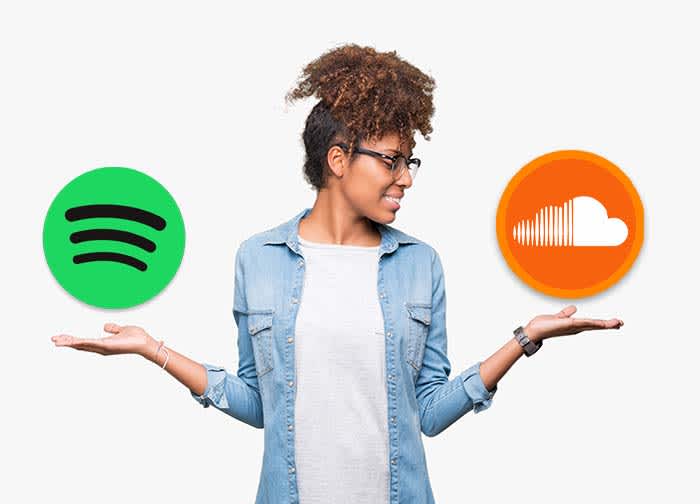
From a user standpoint, SoundCloud and Spotify bring very different experiences to the table. While it’s almost not really a matter of SoundCloud vs. Spotify, here’s a quick look at some of the pros and cons associated with each platform. You’ll see that there’s plenty of reason why you should get a SoundCloud account.

Spotify vs SoundCloud
8

Spotify

Pros

  • Spotify is more polished. The user interface is super easy to use. You can search for artists, follow playlists, and browse through recommendations without any onboarding tutorials.
  • Spotify allows for offline use. You can download as many songs and podcasts as your phone storage allows. No need to worry about usage caps or dead spots.
  • Spotify has established artists are on the platform. From indie bands to pop stars, most artists that you can name can be found here. It’s the leading streaming platform, so you’ll generally find what you’re looking for.

Cons

  • The free version is super limited. Unless you love hearing ads after every other song, regular listeners should invest the $10/month for an upgrade.
  • It’s not great for finding underground artists and hidden gems. Spotify hosts a ton of music, but mainly from established artists. If you’re all about the “obscure” Spotify won’t cover all of your bases.
  • It’s missing some big names, too. From time to time, an artist might feud with Spotify and pull their music. There’s no guarantee every song you want will be on the platform.

SoundCloud

Pros

  • It’s great for finding independent artists. SoundCloud hosts known artists alongside those still grinding it out from home. The platform provides a great way to find hidden gems from total unknowns. “Old Town Road” and “The Git Up” are recent songs that exploded from SoundCloud.
  • Discovery feels less “algorithm-driven.” While personalized recommendations are a core feature, it’s easier to break out of the recommendation loops you’ll find on Spotify.
  • Stream provides a unique way to get updates. Users can follow artists and playlists they like to receive updates and keep track of their favorite tunes. They can also share tracks with the community, almost like retweeting on Twitter.
  • SoundCloud has private sharing. You can use the share button to privately embed and share artists and tracks.

Cons

  • It does not have the best sound quality. Spotify has SoundCloud beat when it comes to audio. We’re talking 320 kbps vs. 128 kbps. You’ll notice the difference.
  • The user-experience can be confusing. While the design is attractive in a lot of ways, SoundCloud is somewhat hard to figure out.
  • There is no offline support. You’ll need to signup for SoundCloud Go to download songs to your device.

Wrapping up

There’s a lot to take in when it comes to breaking down the SoundCloud experience. For creators and listeners alike, the platform remains a solid choice for anyone who wants to discover new content and break away from the algorithmic rut that sometimes happens when you depend on Spotify or Pandora for recommendations.

Ultimately, the SoundCloud app has some limitations. Again, the usability and sound quality could be better, but it’s also one of the few places online where not everything is super polished, commercial, and on everyone’s radar.