Best apps for finding new things to do

Whether you’re new in town or visiting a city for the first time, bored at home or looking for something a little different, finding things to do IRL isn’t always easy.

After all, there’s no guarantee that whatever you decide on doesn’t end up being totally lame.

Here, we’ve rounded up a handful of apps that will help you find something to do–whether it’s a concert, a sports game, or whatever else captures your interest.

Meetup
meetup local events

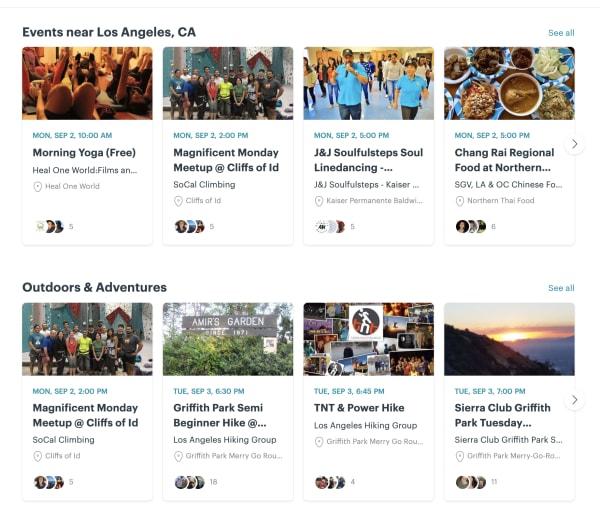
Okay, duh, we get it. Meetup is the most obvious choice, here, but it’s a good, low-stakes way to broaden your horizons. Activities will vary based on where you live, but at least in Los Angeles, you can use the app to find networking groups, people to hike with, book clubs, and so on.

There are groups for gamers—board and video—as well as people who like concerts, sports, or whatever else you’re into. The best part? You can join events someone else has already planned.

Meetup Download Free
9

Nearify

nearify event app

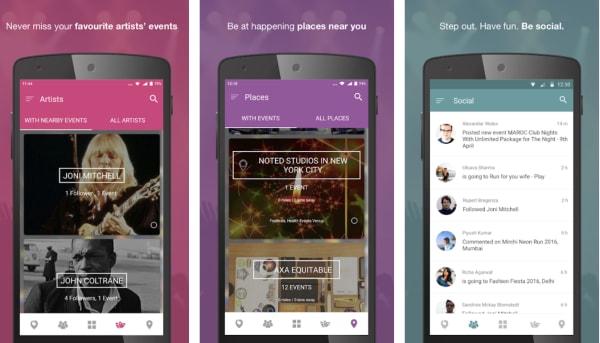
Nearify is an app for iOS, Android, and the web, that lets you know about all events happening near you—be it a concert, a music festival, a play, or a movie screening.

The app standout in this category due to a few unique features. There’s built-in AI that tracks your preferences over time and makes recommendations based on the bands you like, your favorite activities, and more. You can follow favorite artists and buy event tickets through the app, and it even helps you find stuff to do while traveling.

Eventbrite
find events eventbrite app

Eventbrite may be best known as an app for event planners, that helps its users plan and promote their events.

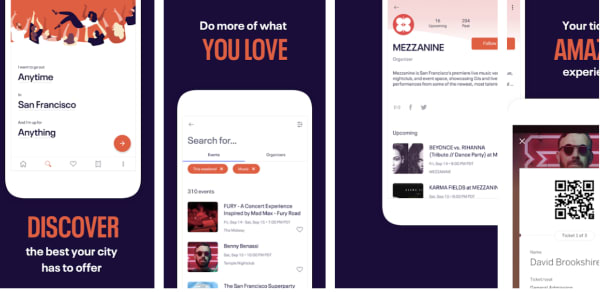
But, they also provide a mobile app that anyone can use, regardless of professional planning status. The free mobile mobile app is a discovery engine that helps users find events in their communities. Inside you’ll find different categories like Editor’s Picks, Popular Events, and more.

Use it to discover popular events around you, see what your friends are doing, get recommendations, register for events, as well as pay for events and keep track of tickets.

Eventbrite Download Free
7

Facebook Local

Facebook Local App

Chances are, you’ve been using Facebook forever, but there’s a good chance that you’ve missed a useful feature that’s been around the entire time.

Facebook Local is an event-finding app that, as you might guess, helps users find new things to do.

The app allows you to search for events, places, and nearby by activities–including things like concerts and local happenings, as well as events your friends posted.

The Local app is broken up into three sections. There’s a home screen that allows you to search for a restaurant or coffee shop and keeps track of event suggestions in your area.

There’s also a section that’s kind of like Yelp in that, users can search for places that are “open now” or you can browse by category. And then, you’ll have a calendar app which features all of the events you’ve RSVP’d to, along with other calendars that you connect to your account. The idea is, you’ll have all of your social activities stored in one place.

Check out events in the main app or website, or download the standalone Facebook Local app.

Facebook Local Download Free
9

Gravy Events

gravy event finder app

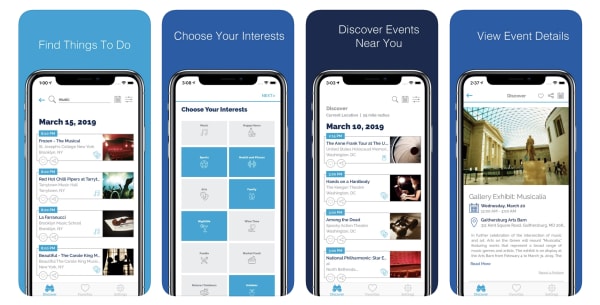
Gravy Events is another app built to help you find fun things to do near you. The app uses location data to find matches, all of which are available within walking distance unless you change the settings.

The app is available for free on both Android and iOS and is similar to other entries on this list, like Nearify and Facebook Local.

There’s a built-in calendar, the ability to search based on interests, and access to local recommendations. It also recommends related events and covers everything from museum exhibits to meetups for connecting with new people.

Sporty

sporty local sports activity app

For people looking for others to move around with, Sporty makes it easy to discover ongoing sports activities happening nearby.

The idea is, you can find people up for a game of tennis or catching a few waves. You might signup for a pick-up soccer game, an amateur baseball league, or whatever your activity of choice.
Get movie, TV, and music recommendations with TasteDive

Need something to watch or listen to? Try TasteDive!

TasteDive

There are almost too many shows and movies out there right now — making it too difficult to make a decision about what kind of media to consume. That’s before you factor in all of the great music, podcasts, and books, too.

That’s where TasteDive comes in.

The recommendation engine works a lot like the old school Netflix rating system. Users rate the movies they’ve watched and the algorithm makes recommendations based on your preferences.

Today’s Netflix recommendations are based on finding a common thread between what you’ve watched. Netflix is assuming that you’re using the tool to watch the latest releases like the new “Sabrina” episodes or catching Miley Cyrus in “Black Mirror.” However, you’re mainly watching “The Office” for the millionth time. Because of this, Netflix’s recommendations likely aren’t going to feel all that personal.

So, back to TasteDive. The site keeps things simple. Liked “Stranger Things?” Great, they’ll tell you what to watch next. How does it work? Let’s take a look.

Getting started

Signing up is literally as simple as creating an account using Google or Facebook.

Once you’re in, TasteDive will prompt you to fill out some profile details, but this is optional and likely won’t have much of an impact on recommendations. On the contrary, it looks like they’re attempting to add some kind of social element to the mix.

Once you’ve created an account and/or profile, you can start browsing, liking, and disliking to your heart’s content.

User Lists

The site’s home page features user lists that you can use as a starting point. People create lists that range from books they hope to read at some point, to top animes, to favorite comedies.

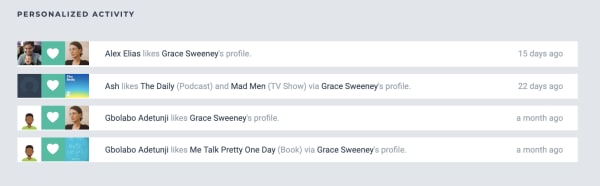
You’ll see notifications on your account if someone likes a show or movie through your profile, or if they just like your profile in general.

tastedive user activity

Browse and ‘Like’

You can navigate to one of the site’s categories: music, movies, TV, books, authors, games, or podcasts. You can start your search by typing in something you already like.

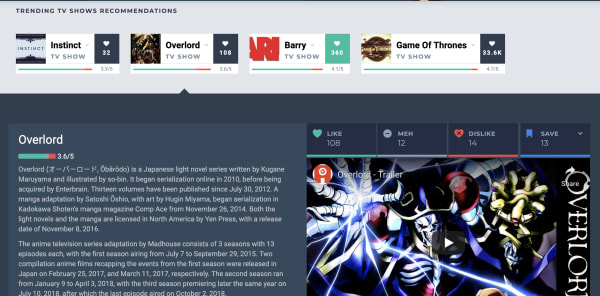
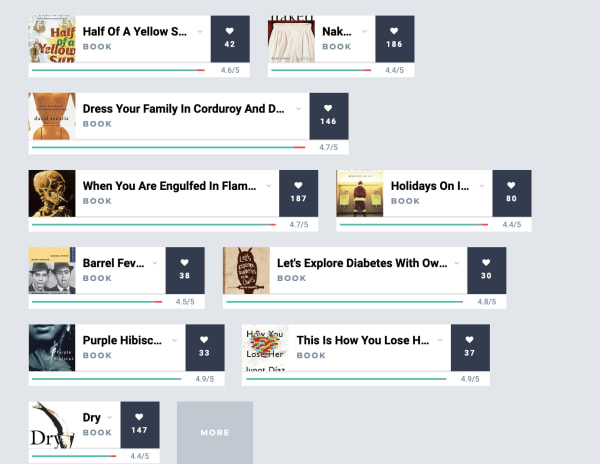
Navigate over to TV shows and you’ll see a list of trending shows. Check the ones that you like by clicking on the little heart on the right side of each entry:

rating recommendations tastedive

As you scroll down the list, recommendations are displayed in the same feed. More appear each time you add a heart to any of the entries.

We just signed up for an account and tried browsing through the TV category. Initially, we liked some of the popular options from their “trending” list including; “Barry,” “The Chilling Adventures of Sabrina,” “Sharp Objects,” “Succession,” and “Fleabag.”

The recommendations listed after “hearting” these selections were kind of all over the place. TasteDive recommended other Netflix hits like “Russian Doll” and “Glow,” but also things like “Digimon,” “House,” and “Planet Earth.”

You can dislike any of the recommendations as well, simply click on one of these cards and like, dislike, or give it a “meh.”

tastedive description

Podcasts and books — Not so hot

Podcasting isn’t quite as popular as movies, music, or television at this point, so we’re not surprised that this area doesn’t have many suggestions.

Still, it was a bit disappointing that it hadn’t heard of many podcasts outside of those that have topped the charts for years. You’ll see hits like “Marc Maron’s WTF,” “This American Life,” “My Favorite Murder,” “Comedy Bang Bang,” and “Serial,” but none of your favorite hidden gems.

We tried typing in a few other popular podcasts like “True Crime Garage” and “Beautiful Anonymous” and the engine hadn’t heard of those. Others like “Crime Junkie” and “Slow Burn” had one or two likes a pop, but no associated recommendations.

As far as books go, the bulk of the existing entries are books that have been made into movies or TV shows. We saw “Sharp Objects,” “A Song of Ice and Fire,” “Lord of the Rings,” plus a couple of David Sedaris books and Agatha Christie novels. Not exactly a whole library’s worth of recommendations.

tastedive app book recommendations

The problem is, it doesn’t seem like enough people use the platform for it to generate truly tailored content recommendations.

Qloo acquisition could give Tastedive a boost

Back in February, cultural AI platform Qloo announced that they acquired Tastedive. Qloo cited that both platforms were interested in understanding what drives consumer tastes and helping them discover new shows, music, and movies.

We bring this up because, while Qloo took ownership of the recommendation engine months ago, we’re likely to start seeing a smarter, more responsive version of Tastedive sometime in the near future.

That said, Qloo’s real motive is understanding patterns in consumer tastes, and selling those AI-mined insights to advertisers. Which… well, we all know the drill.

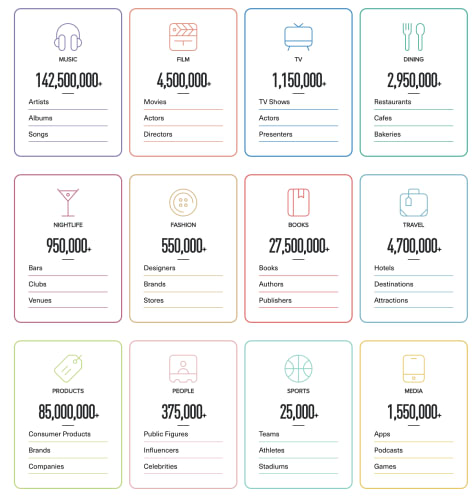
Here’s a shot from the Qloo website, which shows just how much data the AI company has collected already:

qloo data

For now, users should stick with ‘popular’ categories

Overall, if you’re going to use TasteDive, stick to the Movies and TV sections. What’s nice about these recommendation sections is that you’ll quickly get a list of ideas without having to sort through a bunch of reviews and blog posts to find what you’re looking for.

That said, it’s hard to get a sense of whether you’d actually like something based on what you’ve told the tool that you like or dislike, but it should get “smarter” the longer you use it.

How to watch free TV and movies with Tubi

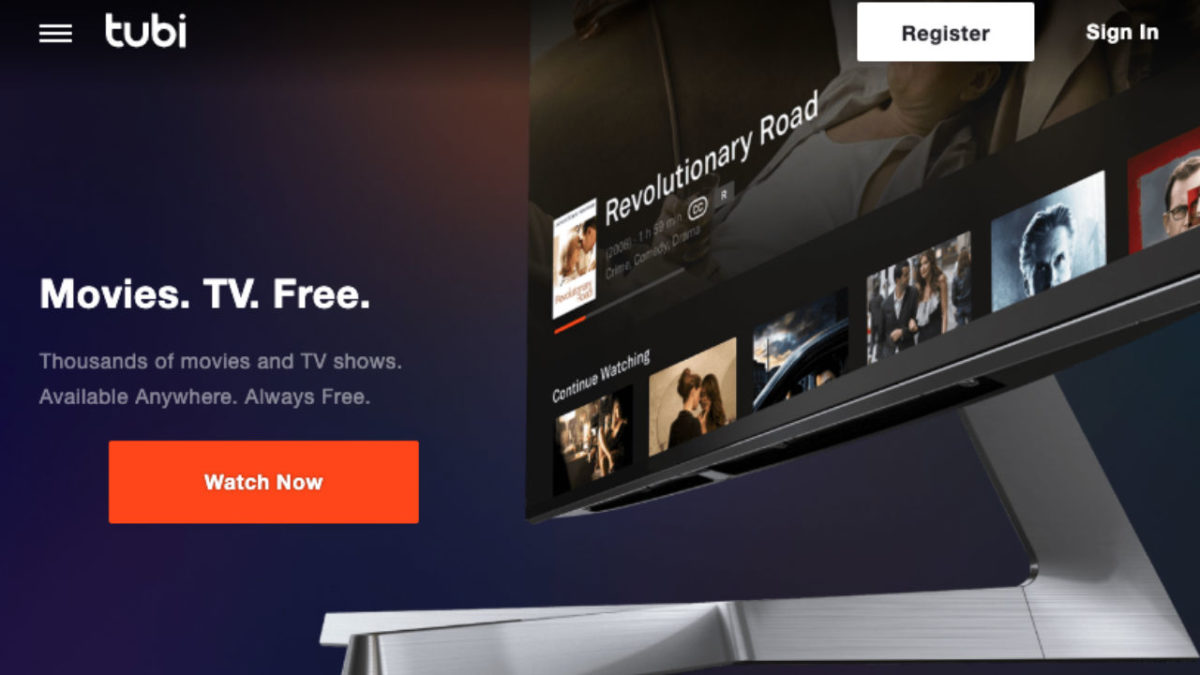
Tubi TV is the free streaming service that might be your escape from Netflix!

Tubi

In the world of streaming services, there are naturally some big winners in the space. Netflix, Hulu, HBO, Amazon. You know, the titans of big tech.

In an increasingly fragmented, weirdly transitional era, we’re linking more and more subscriptions to our bank accounts to keep up with all of our favorite programs.

Given the current state of things, it seems that Tubi’s promise of free and legal streaming is at least worth a shot. Heck, you don’t even have to register for an account.

In this article, we’ll take a look under the hood to see what Tubi TV has to offer and whether it’s a worthy replacement for any of the big guys.

What is Tubi TV?

Tubi is a video streaming tool that presents itself as a free Netflix alternative somewhat similar to Sony’s Crackle TV or the Hulu of yesteryear. Remember when you could watch “Parks & Rec” and “The Office” for free? Man, that was nice.

The platform is supported by in-stream ads. Also, you don’t even need to sign up for an account to access their library. This means there are no annoying emails, no subscription fee, just unlimited streaming.

10

What’s the deal with Tubi TV sign up?

What’s a little confusing here is, while ads are part of the deal, Tubi’s help section states that “all content on Tubi is free to watch — we don’t offer a subscription service to watch ad-free.”

What that means is, Tubi plays commercials pre-roll, mid-roll, and post-roll — breaking up your video with ads.

You don’t have to subscribe to any services, but you do need to watch commercials. Those commercials might not align with your interests like they might on Facebook or YouTube. (In this way, Tubi is very much like Pluto.)

Tubi’s ads are targeted using generic criteria. This means that advertisers are going to run really general campaigns to create brand awareness.

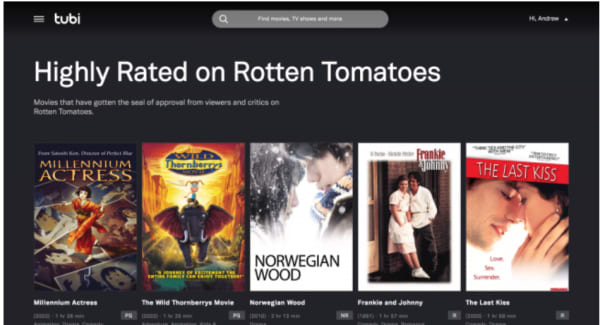
Still, if you don’t care about ads, there’s nothing to lose from giving Tubi a shot. Your Tubi TV signup comes with a few perks, including the ability to pause movies and return later (wild, right?). You’ll also gain access to movie recommendations and lists like this Rotten Tomatoes roundup below:

Tubi TV recommendations

Thousands of titles, but Tubi makes you dig for the gems.

Tubi is free, legal, and totally legit — but, at a glance, it’s not necessarily going to replace your favorite paid streaming services.

There’s no original content like “Stranger Things “or “The Handmaid’s Tale.”

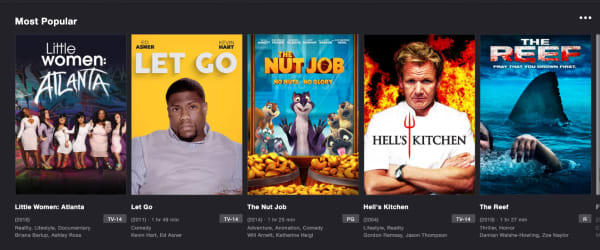
Rather, there’s a TON of reruns like “Little Women of Atlanta” and “Hell’s Kitchen,” plus some truly heinous-looking kids content we have never heard of (seriously, what on God’s green Earth is Fred and why does he have so many movies?).

tubi tv options

That said, there’s some good stuff in there, too, you’ll just need to do some digging. Look in the New Releases tab and you’ll find some award winners in the mix — “Spotlight,” “Memento,” “Short Term 12.”

There are throwback cult classics like “Saved!” and “Donny Darko.” There is also a whole section devoted to Christmas horror films — which let’s be honest, look like a real treat.

tubi xmas movies

Where Tubi really shines is that it’s the home for all of your guilty pleasure watches. Whether that means scary Christmas movies or rewatching the “Forensic Files” episodes you’ve only experienced in hotel rooms.

You can watch “Quantum Leap,” and it’ll feel like that first year Netflix streaming was available. And, if you’re a big Lifetime or A&E fan, Tubi means you can finally cut the cord.

Is Tubi available on all devices?

Tubi TV is free to download on iOS, Android, Apple TV, Amazon Fire TV, Roku, Xfinity X1, Xbox, Sony and Samsung Smart TVs, and PlayStation. You can also watch from your browser, no download required.

As it stands, the streaming service is not available in Europe, due to changes in EU law thanks to the rollout of the GDPR.

Tubi does plan on relaunching in European countries, but they need to work out some compliance details first.

8

So, what’s the final word on Tubi?

It’s free… so that’s something.

But seriously, if you’re looking for one of the best free TV apps, this is a solid option.

There are a couple of notable “cons” associated with Tubi TV. First, you need to do some research to find Oscar winners and underrated indie flicks.

Second, this isn’t the best choice for TV. If you’re a fan of “Hoarders” and “Duck Dynasty,” you’re in luck. However, Tubi TV isn’t really the place for beloved comedies or prestige dramas.

The Facebook groups where people ask for money

Blessing groups help Facebook users in need ask for financial aid, but are they safe?

Facebook money

It was only a matter of time. Facebook Messenger now makes it easy to send and receive money for free.

A recent piece from The Atlantic brought attention to a new trend on Facebook: asking for money in groups known as “blessings groups.”

While initially, we expected something akin to random Venmo requests, these Facebook groups appear to be a lifeline for needy users. They are also a way for good samaritans to give directly to those in need — in this case, mostly low-income moms who need some help getting by.

Here’s a look at what we learned about this social lifeline:

Messenger Download free ►
7

What are blessings groups and who is using them?

The concept is simple, blessings groups are similar to crowdfunding sites but less formal. Posters often request small amounts to cover basic living costs like gas money to get to work or a few extra dollars for food until that next paycheck comes in.

The key difference between blessings groups and a site like GoFundMe is that the latter is used for large expenses like medical bills, charity runs, or launching a new business. The groups offer smaller amounts and many cap funding at $500 per post.

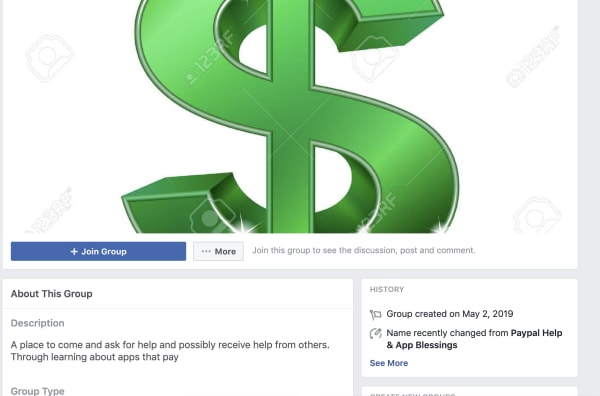
Most groups have names like App Blessings or Give Me Some $$$. Yeah, they get straight to the point.

facebook groups donate

How it works is like this: people share how much they need, along with some logistical details like preferred method of payment, photos, and some sort of assurance that they’re a “real person” not some kind of a scammer.

From there, the community can respond by asking questions about the request in the comments section. Often, funders upload receipts as a way to add some transparency to the process.

Are these Facebook Groups regulated?

The bulk of the Facebook blessings groups we found were closed groups, operating according to a similar set of rules.

  • No promotional content or live-selling
  • No hate speech or violence
  • You need to have a profile picture that shows your face
  • No referral links to sites like GoFundMe

So, while there are no formal regulations in place, the platform seems to focus on enforcing some basic guidelines. People must be respectful and transparent about why they need the money, how much they’ve received, and so on.

What’s worth pointing out is that this is one of the few places, short of walking up to a person on the street where you can donate directly to an individual case.

Additionally, crowdfunding on Facebook is less polished than the GoFundMe and IndieGoGo campaigns where success often hinges on marketing savvy and attractiveness.

Another thing worth mentioning is that Facebook does offer some guidance for personal and non-profit fundraising. However, it’s unclear whether this approach is included in the rules.

Facebook crowdfunding offers an alternative

If you look at GoFundMe’s FAQ page, it does look like users do have the option to raise money for themselves and the site doesn’t take a cut. However, funds may take a few days to go through. According to the site, it could be up to five business days.

The other thing to consider is that a GoFundMe page might receive more criticism from their community than they would request money in this less formal setting.

Facebook payments are also sent through Messenger, Cash, PayPal, or Venmo, so people get paid immediately. This is huge,  as The Atlantic notes, users seek help on these platforms because they need to pay their gas bill that day or feed their kids.

One group, Give Me Some $$$ (strangers helping strangers and paying it forward), allows people to sign up for VIP membership.  It’s a $10 fee, which goes toward supporting the neediest users.

Bottom line: Facebook fundraising might be the new safety net

Panhandling

While there’s no guarantee that your donations aren’t going to someone lying about their situation for extra cash, Facebook users seem to do a pretty good job sussing out a scammer.

And, what’s more, like traditional crowdfunding, not everyone in need receives funding. That could be due to their conduct online or a case that’s less than glamorous.

Best macOS desktop apps in 2019

These apps will supercharge your Mac!

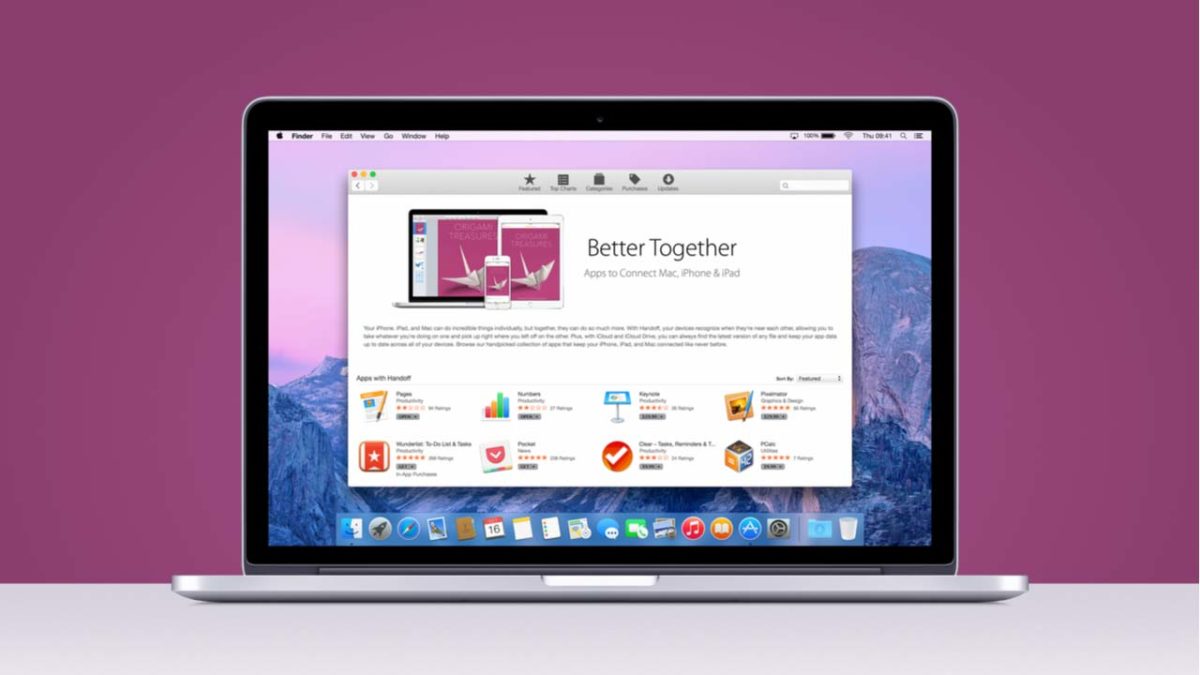
Mac with apps

If you’re going to spend over $1,000 for a computer, you might as well load it up.

Newer MacBooks come equipped with an out-of-the-box app stack that should have you covered. 

Sure, TextEdit won’t meet your word-processing needs, but Apple News, Notes, Tasks, and more all come preloaded in your dashboard. However, it’s easy to forget that there’s a lot you can do to sweeten your setup. 

The macOS library hosts a whole lot of gems, from the tools that help you focus to those that lend a helping hand in the kitchen.

MacOS Apps to supercharge your desktop

Alfred

alfred app mac os desktop

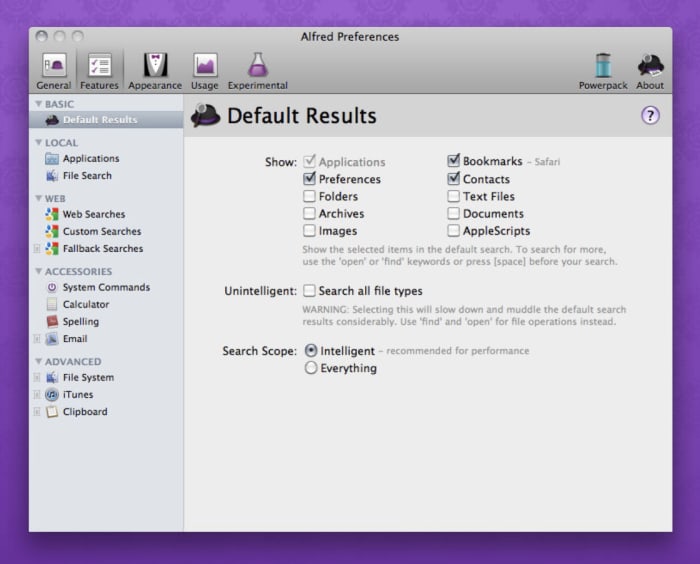
Alfred is a shortcuts app that lets you use quick keyboard commands to launch your apps, locate files, or surf the web. Use the desktop app to create your own extensions or use creations shared by the community of Alfred users.

We’ll offer a word of warning — Alfred is not an easy tool for beginners. It also isn’t for everyone. For those who thrive on shaving seconds off of tedious busywork, the upfront investment will pay off in spades. You can build workflows that automate manual tasks, control your music, link up with 1Password, and search for emails through the tool.

Alfred Download Free
8

MacPaw

If you really want to make your computer run faster, we would recommend MacPaw. Don’t be fooled by the name, MacPaw products are available for both Mac and PC. 

Amphetamine

amphetamine mac app

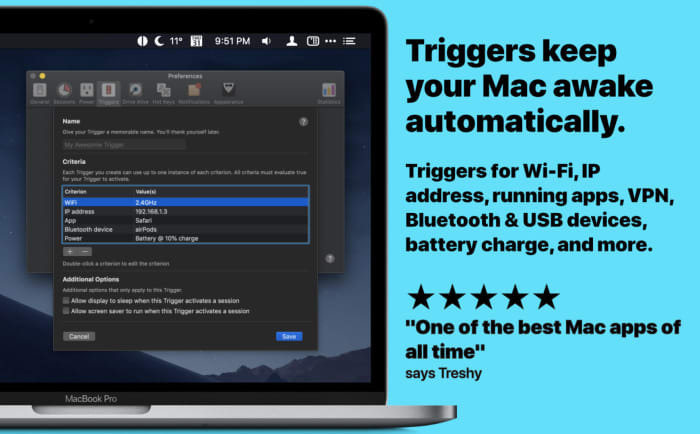
If you’re sick of adjusting the Energy Saver to keep your Mac from sleeping, Amphetamine steps in to keep your laptop awake. Install the app— and access by right-clicking the menu bar icon to turn it on. Once activated, Amphetamine keeps your Mac awake until you turn it off. 

That’s not all, though. Amphetamine settings can be updated so that it keeps your Mac awake during specific tasks or when it’s connected to a certain Wi-Fi network.

Amphetamine Download Free ►
7

Bear Notes

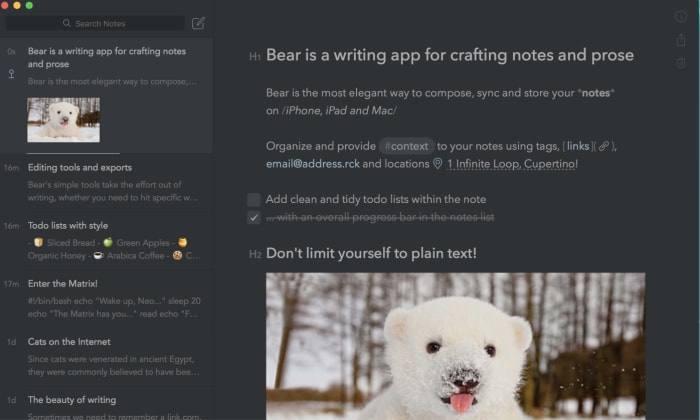
bear notes app

Bear Notes isn’t just another Notes app. We know, the App Store is loaded with all kinds of tools that promise to help you keep track of everything. But, if you’re naturally disorganized, even the best-designed apps can devolve into another digital trash heap. 

Bear Notes is something of an upgrade from the Notes app that comes standard with your Mac. It adds word count, read-time, paragraph count and other stats. You’ll have the option to export your notes in seven different ways including Markdown. It’s ready for WordPress, Medium, or wherever your content’s final destination happens to be.

Bear Notes Download Free ►
8

Paprika 3

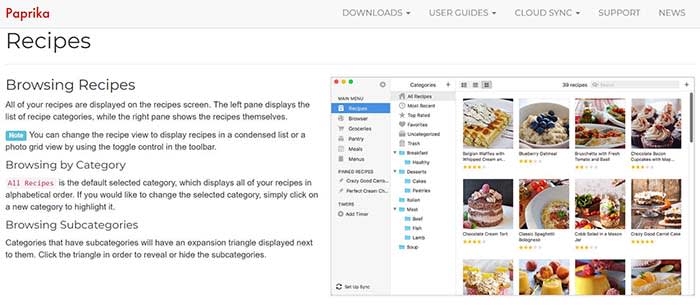
Paprika app

If you’re into cooking but prefer digital recipes to cookbooks, Paprika 3 is the app for you.

It costs $30 in the App Store, which seems like a lot for a tool that doesn’t promise to make you more productive or professionally edit your media. However, Paprika actually proves its worth pretty quickly.

You can download any recipe you find online and the app formats it in a way that is easy to read and easy to find. You can also create meal plans that sync up to the recipes you collect and keep track of your ingredients.

Paprika 3 Download Free ►
9

Slack

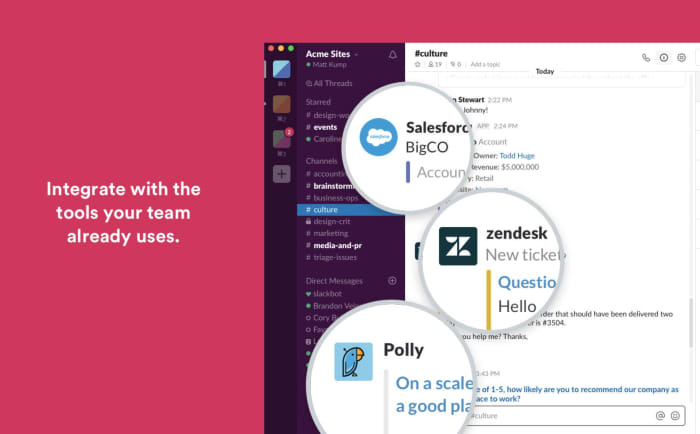
slack desktop app mac

The reason we include Slack isn’t because we love the tool so much. Rather, the app is something of a revelation for those who have been using the iOS version or chatting within the web browser. 

If you love Slack or have to use it for work, download the app. It’s free and easier to keep up with alerts from your desktop rather than trying to find the correct flashing tab in a sea of chatbots.

Franz

Franz All-in-One Messaging

Speaking of chat apps, Franz is a tool that promises to make life a little easier if you’re a social butterfly spread across several applications. The platform brings your accounts together — Slack, WhatsApp, Facebook Messenger, and more. It brings everything together so you can respond from one place.
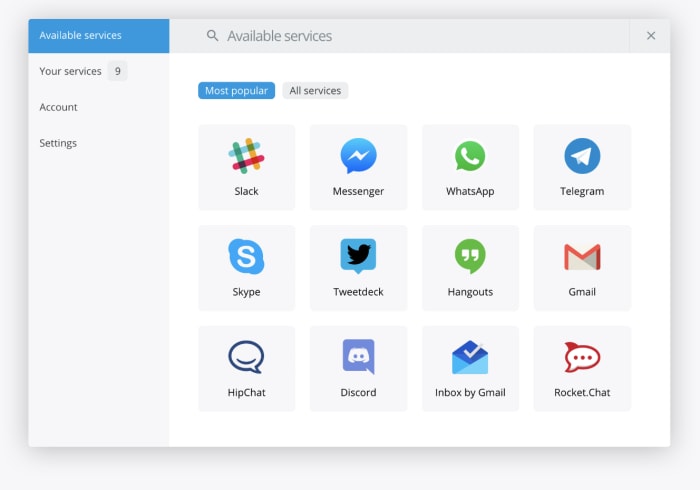
There’s no limit on how many accounts you can add. So, it doesn’t matter if you’re juggling multiple Facebooks or WhatsApps. 

Make it yours

Apple’s mission statement says that the Mac is the greatest personal computer in the world. Whether or not you believe Apple is up to you. However, if you’re going to spend $1,300 on a new computer that proclaims itself to be the best, you better customize it to have exactly what you want.

Try a VPN!

If you’re looking for a decent VPN service to try out on your computer, we would recommend Express VPN. By clicking this link, you can get 15 months of Express VPN for the price of 12!

Instagram’s bot problem is getting worse

Instagram bots aren’t only annoying, but they also represent a much bigger problem.

Instagram robot

Late last fall, Instagram announced a crackdown on the fakers, frauds, and robots ruining the space for everyone else.

It seems that Instagram’s harassment problems are on the rise, despite the fact that the social media platform has made a concerted effort to fight back. However, the automated apps people use to increase likes, comments, and follows still have the upper hand.

Facebook has also sued a New Zealand company for selling fake engagement metrics on Instagram after issuing repeated warnings and suspensions on the associated accounts.

Despite their efforts, it seems that 2019 is a great year for bots. Here’s a quick look at what’s going on.

Instagram Download Now ►
7

NSFW bots

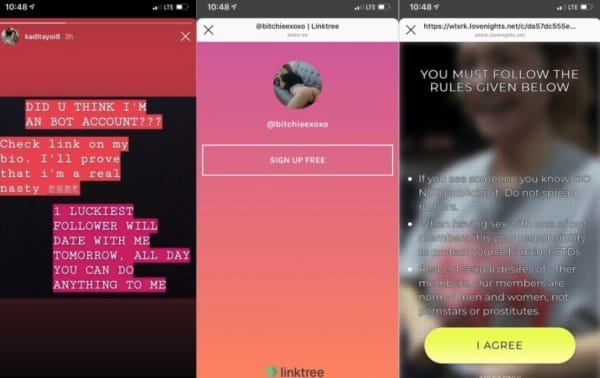
Sure, Instagram has a pretty firm no-nudity stance. Unfortunately, that hasn’t stopped an influx of bots using explicit content to deceive users.

According to Engadget, there’s been a rise in these spammy profiles containing videos of naked or semi-naked women. These profiles are designed to get users to look at their accounts, then sign-up for pornographic subscriptions.

spam bots

Somehow, when these bots comment, they get a ton of likes, which makes them show up in a more prominent location on others’ profiles. These porn-promoter types are more embarrassing than anything, unless you click on them, that is.

Vice wrote a whole piece that dove into the world of NSFW bots and found that many of them are part of these affiliate schemes that rely on intermediary landing pages to collect leads.

It’s the same technique shady marketers have long been using to sell male enhancement products and face creams on Facebook, only to loop them into a monthly subscription scam.

There’s a whole section dedicated to using these fake accounts to generate clicks on Black Hat World. Black Hat World is an SEO forum where people share tips for “cheating” the system.

Black hat forum instagram spam

We’ve all seen these bots, as well as other fake followers. And while most of us simply block them and move on, fake accounts can undermine your security. Bots may be friending you so that they can hit you with a phishing attack via DM.

Follower fakery

Follower counts on Instagram have become a measure of success, a badge signifying popularity, that even those with as few as 1,000 followers have the potential to monetize.

Because brands are capitalizing on the power of leveled-up word-of-mouth, many users have turned toward automation apps. These apps like InstarocketProX and Boostio to help increase follower counts.

These apps often require the user to hand over their account credentials, a monthly fee, and in exchange, they’ll like, comment, and follow on your behalf.

Instagram has started cracking down on this activity. Popular apps like Intagress and Hashtagpirate have been shut down.

Commenting bots deliver embarrassing or inappropriate messages more often than not. An influx of inauthentic likes or follows water down the platform’s value — if you never know if anything is real, what’s the point, right?

Toxic content and misinformation

Woman surprised by phone

Toxic content problems exists on Instagram, too. Instagram may well be the new breeding ground for the spread of misinformation, especially for our youngest conspiracy theorists.

The above article looks at the recent influx in far-right influencer content like the American Identity Movement. They are a white supremacist movement that posts “relatable content” on Instagram through the same tactics as your typical fashion and beauty influencers use to connect with fans.

While the posters behind these accounts are not bots themselves, bots are doing a lot of the heavy lifting when it comes to spreading false information.

What’s Instagram doing about this?

Instagram

Between the NSFW spammers and the AI-driven “talent scouts,” Instagram has a few problems to work out. While they might not be on the scale of say, Facebook or YouTube’s, something still needs to be done.

While the platform has done a better job than Facebook, cracking down on harmful content, wrangling all the spammers, trolls, and other bad actors are no small feat.

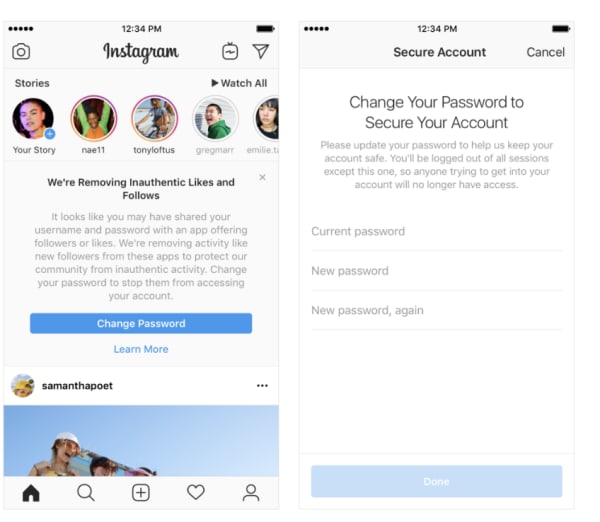
Instagram’s new policy explicitly bans inauthentic content. This means that they’ll strip accounts with fake followers, likes, and comments using AI-backed moderation tools (bots against bots).

Any accounts found to be using third-party apps to fudge their engagement numbers will see fake likes and followers removed and be prompted to reset their password. Third-party apps often hold the profile owner’s credentials.

Because Instagram has become a major source of income for brands and influencers alike, more accounts will inevitably turn to third-party apps to artificially boost the popularity of posts.

Inauthentic activity warning on Instagram

How to get rid of bot problems on your own

If you use your Instagram account for marketing purposes or you have a sizable following, bots can do some harm to your reputation. On a broader scale, they can inflate marketing costs.

First, check the followers to posts ratio. Accounts with thousands of followers but no content likely aren’t real.

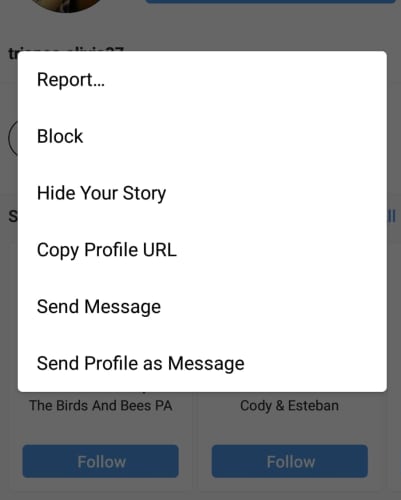
You can block bot accounts by clicking on the profile, then selecting “block from the three-dot drop-down in the right corner of the screen.

how to block instagram botIf the bot is of the malicious or pornographic variety, then you may want to report the account to Instagram for further investigation. If they find that the bot that violates its community guidelines, they’ll let you know.

In the meantime, whatever you do, don’t give your credit card information to those porn bots.

How to stay positive when social media brings you down

Depressed on social media? You’re not alone. Here’s how to stay afloat.

Wedding selfie

The rise of social media means we’re more connected than ever before. And with the constant connectivity comes a whole lot of worry. Between cyberbullying and the welfare of our latest batch of teens, to the unknown effects of hours spent scrolling through a stranger’s Instagram, there’s a lot to chew on.

Facebook executives have admitted that the platform might come with some adverse effects. And, there’s no shortage of think-pieces covering the effects of filtered influencers and their effect on our self-image.

Some studies have looked at social media use in connection with depression, low self-esteem, and anxiety. Others have found notable positives associated with connecting through these digital channels.

Here, we’ll look at the root of the negativity as well as some ways you can make sure you’re approaching your social feeds in a healthy way.

Comparisons make for bad friends

Social media can make us feel socially isolated because we’re comparing our reality to the curated highlights from other peoples’ lives. You don’t know how long it took to get that selfie, just-so, so try not to sweat it.

As we scroll through our feeds, we tend to pass judgments on both ourselves and others, in an attempt to understand how we rank against our peers. While there’s a biological reason for envy — it’s a motivator, it’s easy to get consumed with these negative feelings.

This study looked at how we compare upwards and downwards to determine if we’re better or worse than our friends. Generally speaking, we only feel bad when making upward comparisons, but downward ones can be toxic, too.

How to fight the envy?

Well, it’s important to take a step back and remember that most of this content isn’t real.

How to have a healthy relationship with social media

There are, of course, some positive things about social networking. People naturally crave socialization, and social media can provide a way for people with social anxiety or less-developed social skills to make connections in a “safe” space.

Additionally, teens in marginalized groups can find support online. LGBT teens and those struggling with depression often find support through social channels they don’t get at school.

So, how does one seek out the good stuff, only? Well, there are a few things you can do.

Limit your usage

The more time people spend on social media at a time, the more likely you’ll feel isolated. Check in here and there, but make sure you’re not spending hours at a time scrolling and scrolling.

Additionally, it’s smart to quit the habit of checking your accounts first thing in the AM.

Pay attention to your loved ones IRL

There’s no doubt that talking to a friend with their phone out is frustrating. Make an effort to stop doing this and ask your partner and friends to do the same.

Try using different platforms

Facebook and Instagram rely heavily on these curated images. Make connections online through other channels. Reddit, for example, allows you to have discussions sans photos.

Or, Amino—a niche social network that prizes anonymity. This app is lesser known, but users post anonymously about their shared interests.

Unfollow those who don’t make you happy

social media addiction

We’ve all seen examples of bad “friends.” There are the people who can’t stop bragging about their perfect lives or their globe-trotting lifestyle. The downers who complain about their jobs or vague updates about how “a certain person” did them wrong. Then there’s the political stuff, offensive jokes, the list goes on.

Whatever the case, if you don’t want to see it, you don’t have to. Curation is going to be the secret ingredient for happiness. Unfollow the people that suck the joy out of the experience and simply mute those you “can’t” unfollow without hurting some feelings.

On your end, keep things positive

As you can imagine, negative remarks, sadness, aggression, and so on, don’t make friends online. That’s not to say that you need to be fake, it’s just that these platforms aren’t exactly the place for airing out every grievance that passes through your mind. Keep your dirty laundry to yourself and vent to a trusted friend, family member, or therapist.

Researchers from the University of Missouri found that Facebook use was linked to depression when it triggered envy.  

That same study found when people used FB solely to connect with people, the social network had a positive impact on their wellbeing. Take that as an incentive to quit stalking your ex’s new mate.

Beyond steering clear of broadcasting your negative vibes, make sure you fact-check any links to articles. And, avoid posting inflammatory political content.

Follow the same values you use IRL

While some channels like Reddit let you post anonymously, people forget that even Facebook and Instagram posts aren’t a digital barrier to hide behind.

Instead, be the same person on the internet that you are in person. Be kind and don’t say anything you’d feel uncomfortable saying in real life.

Conclusion

Unfortunately, the jury is still out on social media and how it impacts our lives in the long-term.   There’s a lot of information out there covering the risks of social media. No matter how you slice it, using the networks affect everyone in a different way.

If you can’t help but compare yourself to others, consider taking a little Facebook vacation.

How to edit PDFs for free

If you’ve ever had the uniquely irritating experience of trying to open a file in your Google Docs, only to be redirected to a set of apps you can download, you’re certainly not alone.

Unlike, oh, just about any other type of file, PDFs require a dedicated tool to edit — and many require a paid subscription. In the past, Adobe Acrobat was often the best choice for individuals and businesses, but these days, there are plenty of solid options to choose from.

Still, free PDF editors aren’t always easy to find. Some are okay, others feel downright scammy or have limited features and confusing terms of service.

Here, we’ll give you a few options you can turn to next time you need to edit a document.

Why are PDFs so hard to edit anyway?

So, here’s the thing. PDFs are a proprietary file type that was initially owned by good old Adobe.

The reason they exist is, they look and act the same way no matter what device they’re on. Thus, making it easy to share content.

What to look for in a free PDF editor?

  • Content editing
  • Add annotations
  • Security settings
  • Mobile support

What do you need to accomplish?

This might seem like a dumb question, but there are several reasons why one might want to edit a PDF.

  • Do you want to switch formats?
  • Update a photo?
  • Sign a form?
  • Move pages around?
  • Extract individual pages?

Not all PDF editors are created equal. Some support digital signing and text editing, while others add watermarks and limit features.

A note about conversions: If you need to mess around with the formatting, Acrobat might be your best bet, as it tends to be more accurate than the free tools on the market.

Free PDF editors worth checking out

Smallpdf

smallpdf screen shot

Smallpdf is a free online tool designed to help you add text, images, or a signature to a PDF.

What’s nice about this option is, they don’t force you to sign up for an account or pay to remove a watermark and security is a core part of their platform, for free users and paid subscribers alike.

Key features

  • Add text to PDFs
  • Load and save from multiple sources
  • Access from anywhere
  • Secure editing
  • Converts documents to Word

That said, if you edit more than two PDFs in an hour’s time, you’ll need to pay to upgrade to a paid account.

This option is best for people who want to quickly edit forms like W9s or sign a contract here and there. Since you can’t edit existing text, it’s not the best option for anyone who needs to make significant changes to a document.

If that’s you, you might want to upgrade to a paid account, which comes with a whole host of features for $6 a month. What we’re not wild about is, while everything about the features is pretty straightfoward, it’s not clear where Smallpdf draws the line between what’s free and what requires a subscription.

FormSwift

formswift pdf editor

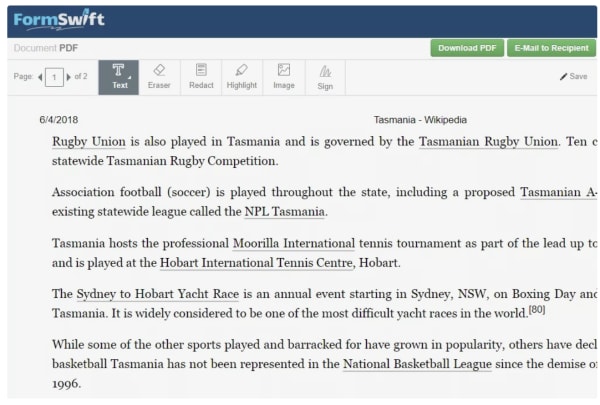
FormSwift’s Free PDF Editor is a simple PDF editor that like Smallpdf’s option, allows you to start editing documents without an account.

The editing process is simple. All you need to do is add the PDF file to the website and select one of the editing functions from the drop-down menu at the top of the page.

Some of the key features you’ll find in Form Swift’s editor:

  • Redact text with a black bar
  • Erase text
  • Insert images
  • Highlight anything on the page
  • Edit images and Word documents (as opposed to a PDF file)
  • Add checkmarks, Xs, or circles

Once you’re satisfied with your handiwork, you can download the file or print it. You can also save it as a Word document, which comes in handy if you need to edit something like an article.

While you can’t edit the text directly, the Word conversion feature is a good workaround for this issue — simply edit the document in Word and convert it back to a PDF when you’re done. Simple.

PDFsam

pdfsam split and merge

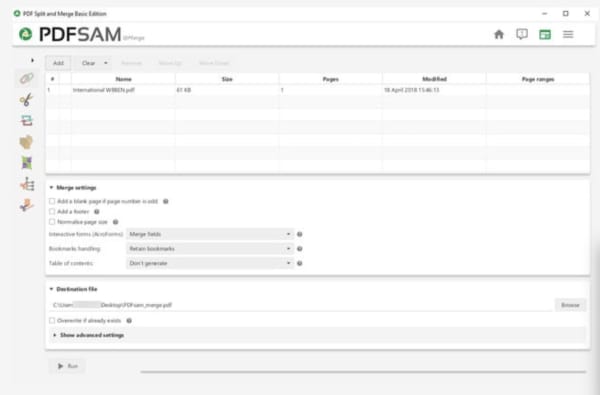
If you need a tool that lets you rearrange the contents of an existing document, PDFsam is one of the best options around. The “sam” part of the name actually stands for “split and merge,” which means that you can slice, dice, and rearrange PDFs as you see fit in order to build the document you need.

When you sign up for a PDFsam account, you’ll gain access to their free trial offer, which gives you a taste of the full set of tools included in the lineup. Here, you’ll find a full set of editing tools, plus OCR, secure signing, and more.

The free version does not come with any tools that allow you to alter the content of the document and what your left with is a page management solution.

Key features:

  • Page rotation
  • Extracting individual pages
  • Cut large files into smaller documents
  • Rearranging pages

Okay, if you’re thinking, PDFsam doesn’t perform the same basic tasks you’ll find with the others on this list, that’s totally fair. On its own, we probably wouldn’t recommend PDFsam unless you were planning on using the paid plan.

The benefit of this free version is, this one functionality doesn’t come standard in other free PDF editors so it may be worth stacking with another that allows you to sign documents and edit text.

Sejda

sejda free pdf editor

Sejda PDF Editor is a simple PDF editor that allows you to sign PDFs and edit existing texting, without adding in a watermark. The editing tool offers a free plan with some limitations based on time and volume, but it seems to offer more features than some of the other free plans we’ve mentioned above.

Key features:

  • Load PDFs from other sites
  • Allows you to add hyperlinks to documents
  • Supports e-signing
  • Doesn’t add a watermark
  • Remove pages
  • Rearrange pages
  • Insert shapes and images

PDFelement Pro

pdfelementpro editing view

PDFelement Pro is a free PDF editor that does allow you to edit the text in any PDF, but it will slap a watermark on every single page. The watermark doesn’t take up much space, so if that’s not a deal-breaker, you’ll have access to some pretty great editing tools free of charge.

Key Features:

  • Crop document pages
  • Rotate, insert, extract, delete, and rearrange pages
  • Add a password to the PDF
  • Edit the background of any page
  • Include headers and footers
  • Add images and links
  • Add custom watermarks
  • Edit text
  • Merge multiple files

In many cases, the watermark feature is a deal-breaker. We can’t imagine sending out a contract or a proposal to a new client with the watermark, as it doesn’t give off a super professional vibe. That said, if you need to sign something or edit a one-off doc and there’s no need to make that “first impression,” this PDF editor offers more features for free than most of its competitors.

Wrapping up

 As you can see, there are several options for editing PDF files without paying for an Adobe Acrobat subscription. But, all have some limitations in place as just about every tool out there wants to get more people to sign up for their paid subscriptions.
That said, something like Sejda is only about $7 a month, so those who need more features or do a whole lot of editing may find that a few extra bucks is a small investment for more convenient PDF editing.
Where free editors come in handy is, they can be a real lifesaver for situations where you need to sign a contract – -fast. Or, you need to create a PDF file on a rare occasion. Again, high-volume PDF pros probably need a more robust solution.

The 7 best Shopify Apps of 2019

These apps can help you make the most out of your experience with Shopify!

SHopify

Shopify makes it so easy to launch a store, automate sales, shipping, and marketing like it’s no big deal.

However, once you’ve got your store set up, you may be wondering how to make the most out of your brand-new business.

Shopify’s App Store boasts literally thousands of apps — so whether you’re a drop-shipper, super-niche e-commerce store, an online coach, or whatever else, there’s an app (or 20) for you.

9

The 7 best Shopify Apps of 2019

1. Bold Upsell

bold upsell shopify app

Want to make more on each sale? We’re going to go ahead and assume that the answer is probably “yes.” Bold Upsell is a Shopify app designed to help you increase your average sale size by going after the low-hanging fruit—upsells and cross-sells.

The add-on allows users to run BOGO or free gift campaigns. You can trigger offers based on whether a customer accepts or declines an offer, and push out one-click offers customers can add to their cart just like that.

Key Features:

  • Smart upset funnels
  • Upsells
  • Cross-sells
  • BOGO/free gift campaigns
  • Post-checkout upsells
  • Integrates with Google Analytics
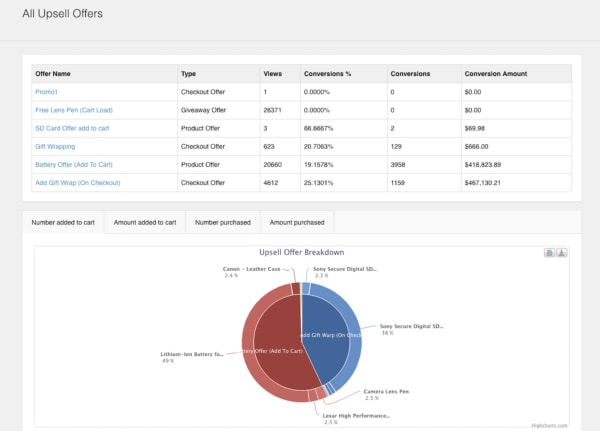
  • Dashboard view of upsell performance

2. Sumo

sumo app

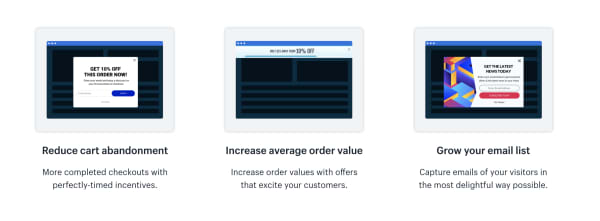
Sumo’s Shopify app integrates with your e-commerce store and helps users reduce cart abandonment, increase average order size, and collect more subscribers.

Sumo makes it easy to automate the little things that add up to better retention and more sales.

Key Features:

  • Reduce shopping cart abandonment
  • Increase order size
  • Grow your email list
  • Offer unique discount codes
  • Send automated follow-ups to shoppers who leave without purchasing
  • Easy-to-use reporting tools

Sumo offers a free plan and a pro plan. The free plan allows for unlimited subscribers and you can send up to 10,000 emails a month, customize forms, and use the system’s targeting tools. That said, the app is free until you’ve hit $500 in Sumo-generated revenue. While we’re not totally sure what Sumo takes credit for, you’ll likely burn through that $500 pretty quickly.

The Pro plan is $49 per month or $468 per year. Here, there are no caps on Sumo-driven revenue and you’ll now have access to advanced targeting and unlimited emails.

3. Smile.io

smile.io for shopify

To any online seller, customer loyalty is the gold standard when it comes to setting the tone for long-term success.

Loyalty programs give brands a chance to strengthen their relationship with their customers, driving more sales, and increasing brand awareness.

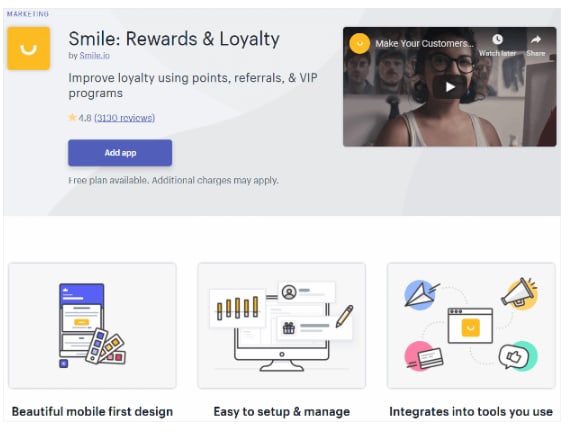
Smile.io is an app that allows you to offer personalized rewards to your customers (by the way, customers LOVE personalization).

Offer your visitors points when they join an email list, spend a certain amount, refer a friend, and more.

Key Features:

  • Offer multiple rewards programs at once.
  • Engage top customers with VIP status rewards.
  • Points system allows you to reward customers for a range of actions from social shares to account creation, purchases, and more.
  • Users can customize programs and associated branding — add a logo, update colors, etc.

Smile.io is free for Shopify owners with up to 500 loyalty members. After you’ve hit that threshold, plans start at $59 a month. What’s nice about their pricing system is that it gives new shop owners the chance to build up their program before investing in a new tool.

4. Oberlo

oberlo app

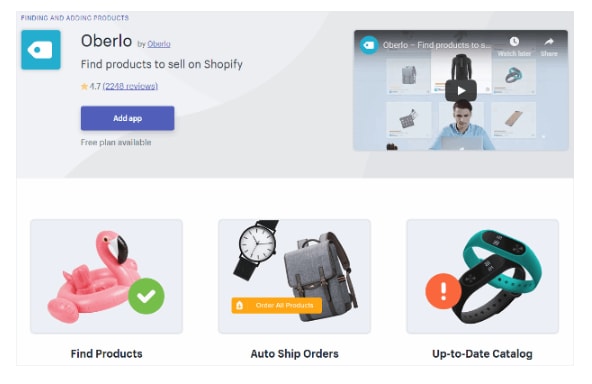
Oberlo is a drop shipper’s dream. The Shopify app allows you to find new products to add to your store and helps you find a supplier, calculate your profit.

You’ll connect Oberlo to your Shopify store (as a quick point of reference, Oberlo only works with Shopify stores not BigCommerce or Squarespace) and browse through their product marketplace.

Add products to your store and choose a supplier. The benefit for drop shippers is that Shopify orders are sent directly to Oberlo and your suppliers will fulfill them for you. It will then ship directly to your customers.

All you need to do is promote the store — and well, be good at identifying the types of products people actually want.

Key features:

  • Product page customization
  • Track orders and sales
  • Set pricing automations
  • Change suppliers
  • Identify suppliers with the fastest shipping times

5. Kit

kit shopify ai

Kit positions itself as your Shopify store’s very first employee whose job is to increase traffic, and, by extension, boost your conversion rate.

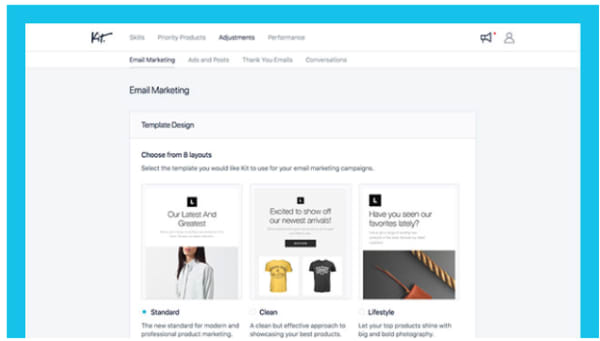
Where Kit shines is in its ability to offload some of the digital marketing tasks that e-commerce sellers need, but may not have time to obtain. Kit will help out with Facebook and Instagram ads, send emails to your customers, make “expert recommendations,” and use your other apps so you don’t have to.

Kit is powered by AI and knows just when to send out targeted social media campaigns or say thank you to a customer.

Key Features:

  • Automate Facebook and Instagram ad creation
  • Sets up pixels for retargeting
  • Sends email marketing campaigns
  • Integrates with other apps and “uses” them for you
  • Set goals
  • AI-based recommendations

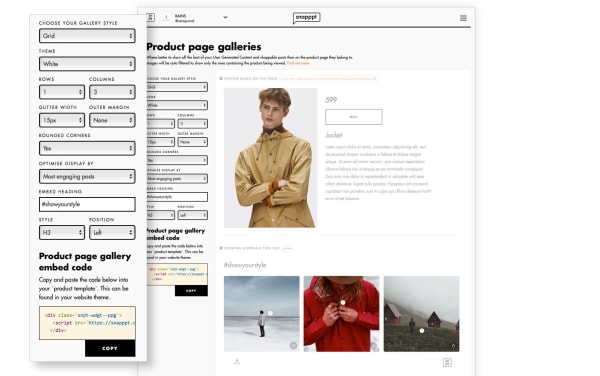
6. Snapppt

snapppt for shopify

Something like 65% of Instagram users head toward their feed to find new products and discover brands they never knew existed. Meaning, if you’re a retailer, you need to get busy when it comes to managing your Instagram presence.

Snapppt helps Shopify users capitalize on Instagram’s natural connection with shopping by turning your link in bio into a shoppable product feed.

Add product links to Instagram posts so shoppers can click on the items they like, on the spot. No need to dig around the web trying to find an item they love.

Snapppt also works in reverse — you can embed your feed on any page in your Shopify store, encouraging shoppers to follow your account and keep track of new products.

Key Features:

  • Show off user-generated content
  • Visual marketing analytics
  • Turn your Instagram feed into a shop
  • Embed feed into website pages
  • Connect with Influencers

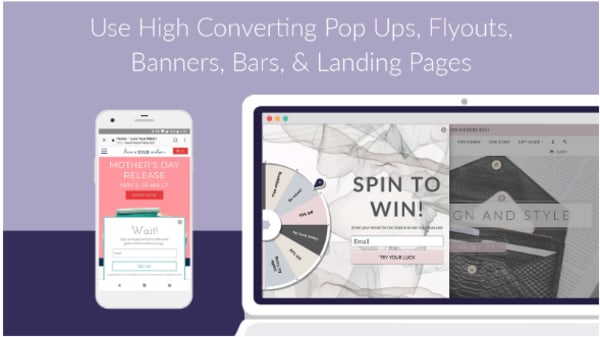
7. Privy

privy app popup tool

Privy is the perfect tool for Shopify owners who use email marketing to keep in touch with their customers.

This app helps users grow their subscriber list with perfectly-timed pop-ups, automates email marketing, and capture users on their way off of the page with exit-intent pop-ups.

Privy comes with a straightforward drag-and-drop editor that makes it easy to design high-converting landing pages, overlays, pop-ups, and other methods of capturing emails and driving more sales.

What’s more, you can connect Privy with your email service provider and existing marketing tools for complete visibility into your store’s performance. This includes the factors influencing sales.

Key Features:

  • Create custom discounts and offers
  • Design landing pages, pop-ups, bars, banners, and fly-outs
  • Automate email marketing
  • Send abandoned cart recovery emails
  • Add free shipping bars to any page
  • Target campaigns based on timer, location, referral site, and more
  • Real-time reporting
  • Integrates with Klaviyo, MailChimp, Bronto, Smile.io, dotmailer, plus 50+ marketing tools

Wrapping up

Did we miss your favorite Shopify app? Let us know about it in the comments below!

5 best online savings accounts

Are you looking to find a new online bank? We’ve got the best of the best for you!

Online banking

Choosing a savings account might not be as fun as spending money on your next trip, a new computer, or a bunch of new clothes. However, picking the right one can net you some extra money in the bank — literally.

Not only that, but the right savings account also provides some protections that a basic checking account can’t give you.

Not all savings accounts are the same, and online versions often offer better features than their brick-and-mortar counterparts.

Things to look for in an online savings account

Online banking

The best savings accounts offer easy access to funds, reliable customer service, and seamless online experience.

Beyond that, and perhaps more importantly, they should offer low monthly fees and higher-than-average interest rates. These help you grow your nest egg into something bigger.

Interest rates

Most of the options we’ll list below come with interest rates higher than 2%.

By contrast, Bank of America accounts only offer savers a 0.3% interest rate, meaning you likely won’t notice your savings growing beyond what you put into your account.

Easy withdrawals

Withdrawal

What happens if you need quick access to funds? While the purpose of savings accounts is saving not spending, you’ll want to make sure that you can access your money in case of an emergency.

That said, don’t treat your savings account like a checking account. Federal regulations dictate that you can’t make more than six withdrawals in a month. If you do, your bank will charge you a fee.

Opening deposit

Some banks require an initial deposit. This amount varies considerably, but often it’s a smaller amount like $25 or $50. This isn’t a huge deal, as the whole point of opening a savings account is to, well, save some money.

In other cases, you’ll see higher minimum deposits, which may be a barrier to entry if you’re just starting to save money. Obviously, not all of us can front multiple thousands of dollars.

That said, many online banks offer access to low- or no-minimum accounts. Just make sure that you review any associated fees before you sign up.

5 best online savings accounts

1. HSBC

online savings HSBC

The global banking giant offers an online savings account that blows its traditional savings accounts out of the water.

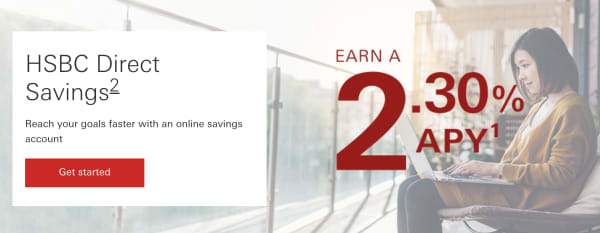
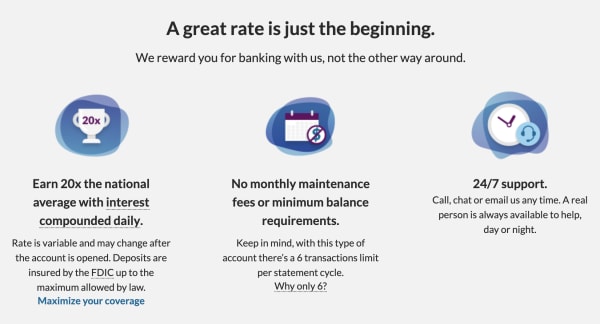
The minimum opening deposit is $1, and from there; you’ll get started earning interest at a 2.30% APY. There’s no monthly fee, but the bank will charge you a $25 cancellation fee if you close the account within six months of opening.

What’s neat about HSBC is that it offers a budgeting tool to help you set goals and visualize your financial progress. You can also deposit checks electronically through the mobile app. Howeverm some users have reported that mobile functionality is a bit clunky and could use some work.

2. Ally

ally banking online

Ally is a bank that doesn’t have any branches, and consistently pays high-interest rates for savers; we’re talking 2.20%.

There’s no minimum balance requirement, and you can open a free checking account, too. The benefit of opening a checking account with Ally is, you’ll get 1% cash back on purchases and can connect your accounts. This makes it easy to transfer money into your savings account.

3. Citizens Access

citizens access banking online

Citizens Access is an online-only extension of East Coast brick-and-mortar Citizens Bank. Their online savings account provides one of the highest interest rates we’ve seen at a whopping 2.35% APY. You also won’t pay any account fees.

The catch is that there’s a $5,000 minimum deposit, which may be a bit steep for some consumers. It’s also important to note that if your balance drops below the $5,000 mark, the APY drops along with it.

Still, Citizens Access is one of the best options around. The website is easy to use and supports electronic deposits, and all deposits are FDIC-insured.

4. American Express (Amex)

American Express savings account

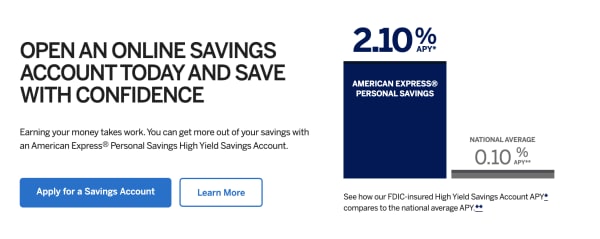
American Express does more than just credit cards. They also offer a high-yield savings account with a 2.10% interest rate.

Heck, they’re even endorsed by the 1989 Cleveland Indians: 

What’s more, this option is accessible to anyone. Unlike Citizen’s $5,000 entry deposit, Amex has no minimum deposit, no monthly fee, and FDIC-insured deposits up to $250,000.

That said, they do require that all account holders fund their account within 60 days of applying.

Overall, American Express offers a flexible savings account that gives you the ability to earn interest while still allowing you to access funds if needed.

Unfortunately, the account is not set up to support daily transactions. That means no mobile apps (AE only offers an app for credit card accounts), no checks, and deposits needed to be mailed, physically.

5. Barclays

barclays high yield banking

Barclays has a 300+ year history in the UK, though it has yet to make it big stateside. However, the bank’s online savings accounts come with competitive interest rates (2.20%APY), no monthly maintenance fees, and doesn’t require any minimum balance to open an account. Your deposits are FDIC insured up to the legal limit.

What’s more, you can quickly transfer money back and forth between your Barclays account and your checking account or other savings accounts with other banks. Barclays also supports electronic deposits through its mobile app.

Barclays Download now ►
8

Wrapping up

Selecting the right savings account is a significant first step toward getting your finances on track, and a high-yield account is a long term investment. However, it can add up to thousands of extra bucks in interest down the road.