How to turn off read receipts in Facebook Messenger

Reclaim your privacy with these simple steps.

Install Facebook Messenger

Read receipts aren’t exactly popular.

They’re a great way to stir up a little drama among friends. They can also generate a ton of anxiety when you’re trying to figure out if that new guy you’ve been dating is serious or not.

Nothing is worse than knowing someone read your message and just didn’t respond.

There’s literally no benefit to this FB-sanctioned stalking tool. It’s just an added pressure designed, in Facebook terms, to add a conversational cadence to our online chat.

So, can you turn off Messenger’s read receipts?

The short answer is, no. Facebook doesn’t make it easy by allowing you to turn this setting off through your account.

That said, you do have some options.

How do you read a Facebook message without the sender knowing?

Facebook Messenger relies on a system of circles to show the status of each message you send. You’re probably familiar with the setup, but it looks like this:
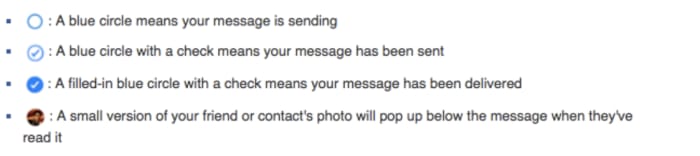
Read receipt in Facebook messenger

We all know it’s a pain when you get a message, but don’t want to respond immediately. You could ignore the message, but, come on, that’s not entirely realistic.

There are a few workarounds to use here:

Turn on the airplane mode

One of the easiest ways to check your messages incognito is to prevent the internet from reaching your app.

Turn your phone on airplane mode, then open your app and read your messages.

Use the notifications screen

The other quick fix? Not opening the app at all. Instead, view your messages through your phone’s notification screen to avoid detection.

Just be careful you don’t accidentally open the app. This workaround is best used to quickly check if any notifications demand an immediate response.

Embrace the extensions

As with the mobile app, Facebook doesn’t provide an easy way to hide from your friends and family.

Chrome has a workaround, aptly named, Unseen, that you can add to your browser. You can start reading messages without feeling like you’re being watched.
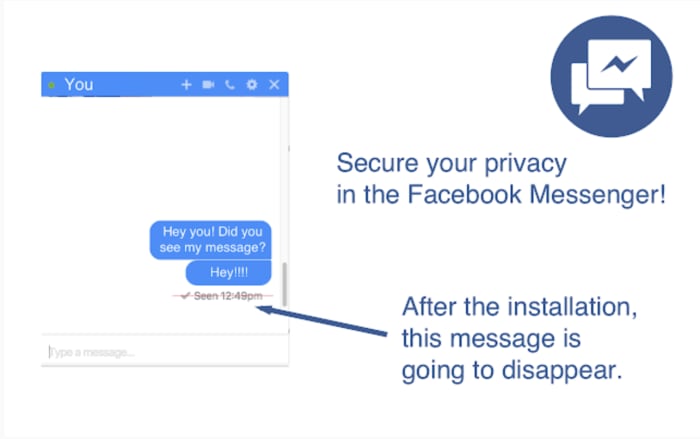
Google Chrome Unseen feature

If you’re a Firefox fan, Message Seen Disable does the same thing.

Both browser extensions allow you to open the app and read your messages. However, that little ball with your profile picture won’t drop unless you turn off the extension.

Also, both apps are free and require no actual tech savvy. If read receipts are the bane of your existence, this is your best option.

FB Unseen Download Free
8

Read receipt drama is real — science confirms

For a deep dive into this subject matter, we recommend checking out an episode of the “Why’d You Push That Button” podcast. They interview researcher Lujayn Alhddad who literally wrote a paper on the topic.

The paper looks at the difference between how people feel about read receipts depending on whether they’re the sender or the recipient. Unsurprisingly, most people wanted to see when someone got their message but didn’t like the idea that someone might be tracking their behavior.

Alhddad brings up the real issue of social pressure associated with read receipts.

She says they serve as a reminder that we “need” to respond immediately. Otherwise, the sender will assume the recipient is not interested in what they have to say.

Another expert, Dr. Tony D. Sampson, of the University of East London has another thought. He says that apps like Facebook, iMessage, and WhatsApp are designed to “trigger negative emotions linked to compulsive behavior.”

This, admittedly, sounds troubling. Sampson says that unhealthy habits like compulsively checking read receipt time stamps keep us tuned in. This means we’re continuing to supply platforms with our data.

Next time you leave someone on “read,” give a thought to their mental state.

Study shows social media impacts children’s diets

Learn how social media is impacting kids’ diets.

Kids social media

Social media is taking its toll on our mental health. That toll can come in the form of selfie dysmorphia, Instagram-fueled depression, or an increase in eating disorders. Study after study is discovering more ways social media can cause mental and physical harm. If you don’t believe us, even Oprah and Prince Harry are tackling these issues.

The latest discovery comes by way of a recent study published in “Pediatrics.” Social media (particularly channels like YouTube and Instagram) may have a negative impact on what kids choose to eat.

The findings revealed that social media influencers could inspire children to eat junk food like cookies and candy, but those powers did not extend to getting kids excited about eating more vegetables.

What was measured?

Anna Coates, a Ph.D. student at the School of Psychology at the University of Liverpool, was interviewed by NPR. She and her colleagues wanted to know how much children’s diets were influenced by the accounts they followed on social media.

The study involved 176 children between the ages of nine and 11. They were divided into three groups so researchers could see how social media influences junk food cravings.

The kids who saw the junk food versions of photos were more likely to snack on cookies and candy. Their peers who saw healthy food images were less likely. According to the researchers, the extra snacking meant that the students in the junk food group consumed, on average, up to 90 calories more than their peers.

Junk food

While that doesn’t sound like much, American Academy of Pediatrics spokesperson Natalie Digate Muth says otherwise. She said that just an extra 70 or 80 calories a day can make a difference. She also said that a small increase can cause a healthy child to become overweight.

Unfortunately, it doesn’t seem like that influence works the other way. Those kids who saw the healthy food-focused images did not eat any more carrots or grapes than the other groups.

Just the latest in fast-food marketing to youth

We’ve long known that junk food ads have influenced what kids want to eat. Think about the items that were in your lunchbox growing up. We remember the Dunkaroos, Capri Suns, Oreos, and Doritos. Carrots aren’t in our highlight reel.

It seems that social media is making things worse. The WHO reported that platforms use kids’ data to push out targeted ads. That’s just ads; influencers muddy the waters.

Influencers are so effective because they feel familiar to us.  Recommendations coming from these social media users feel authentic, like a recommendation coming from a friend.

Of course, parents should talk to their children about influencers and how advertising works. Kids (and all of us) are more susceptible to influencer ads and product placement more than traditional ads.

Is regulation a possibility?

There’s little in the way of regulation when it comes to how we handle ads promoting junk food. In general, the FTC does have social media regulations in place. They require that influencers disclose when a post is sponsored.

However, it’s not exactly realistic for the organization to monitor every incoming post for potentially harmful content. There are millions of influencers all posting regularly.

Influencers complicate junk food marketing

Ronald McDonald

The study recommends tighter restrictions on marketing junk food. The digital marketing landscape is much more complicated than it was in the days where TV was the main concern.

Sure, we don’t have tobacco-sponsored cartoon characters targeting today’s youth, but advertising has changed a ton. Seriously though, that happened:

Influencer culture has made it cool to participate in advertising. So, chances are, popular influencers have tremendous power over the kids that follow them.

In this day and age, where teens are creating fake sponsored content for real brands, what is the widespread impact of online advertising on children?

How do I break my social media addiction?

Do you find yourself reaching for your phone to check apps like Facebook? We can help break your addiction.

Smartphone addict

Social media connects us to new people and ideas — for better or worse. It’s also a massive time suck that can wipe out a whole day and get in the way of accomplishing goals.

The word “addiction” brings to mind drugs and alcohol. It might seem too strong a word to apply to something like social media, right?

Well, not exactly. Though social media addiction has yet to secure an official spot in the DSM, it’s already become quite prevalent in the U.S. and Europe. It is affecting up to 8.2% of the general population.

How often are you on track, knocking tasks off your to-do list when a friend request or Instagram comment derails your progress? One second you’re typing up an email, and the next, you’re deep into some acquaintance’s 2016 vacation pics.

All of us are susceptible to succumbing to these distractions, but there are some things you can do to fight full-blown social media addiction.

Here are some tips you can use to regain control:

Learn why you’re addicted to social media

Facebook addict

What is it you hope to gain from opening social media? Uncovering the “why” behind your bad habit does require some introspection.

You might not have a good reason for your endless scrolling. If that’s the case, take a closer look at your motive. Do you hit the ‘gram when you’re stressed or overwhelmed? Or, is it when you’re trying to put off a project you don’t want to start?

Perhaps, you’re seeking connections with the outside world or accessing new information.

In any case, we tend to lean on social media to fill a void. Psychology Today describes this endless scroll as this “wanting activity.” Meaning, we tend to keep looking at our feeds because we’re anticipating some reward.

It’s also a lot easier to veg out in front of your feed than picking up a book or phoning a friend. This just adds to the temptation.

Reset

Going on a hike

One way to fight social media addiction is by taking a day off. Consider taking a day each week where you avoid using the phone or your computer.

This gives you some space to schedule some in-person social time. Do some analog reading, or you know, go outside.

That said, a full day of no socializing might add to your anxiety for a lot of people. If that’s you, aim for a couple of hours at a time.

Set ‘micro-boundaries’

Micro-boundaries is a concept developed by University College London researchers. It refers to a handful of ways to set distance between you and your bad social media habits.

The researchers say there are four types of micro-boundaries.

  • Digital: Separating accounts or using apps that block out certain websites
  • Physical: Choosing to leave a device at home or keeping it in a drawer at work
  • Social: Turning your phone on airplane mode or do-not-disturb during social situations
  • Temporal: Turning alerts off or setting the phone to do-not-disturb for specific hours

The UCL paper does acknowledge that you may need to let others know about these digital boundaries. If you’re a quick responder, then you might need to give people a heads-up.

Focus on what you can add to your life

Woman meditatingLike going on a diet, prohibiting the use of social media isn’t sustainable for the long-term. Instead, you should try setting achievable goals. Habit formation depends on training the brain to get that reward satisfaction from a healthier source.



Plan a cell phone-free dinner once a week, get into hiking, biking, or exploring your neighborhood.

Disable your alerts

Alerts play into our brain’s reward center, providing a rush of dopamine when we hear those familiar sounds.

According to Harvard researchers, Instagram likes, and text messages activate the same release of dopamine you’d receive from completing a “successful social interaction.” The article also notes that dopamine paths are often dysfunctional in people will any type of addiction, be it substance abuse, gambling, or Facebook.

The thing about disabling notifications is, you still have access to everything you want from your phone/computer. However, it provides a level of separation between you and your apps.

Wrapping up

Women socializing

Most of the notifications you receive don’t contain critical time-sensitive information. But for a lot of people, opting out of push notifications can present interpersonal challenges. Your mom or your partner might get annoyed when you don’t respond ASAP.

This study, aptly named The Do Not Disturb Challenge had interesting results. They found that while participants felt more productive after turning off their notifications, they also felt anxious about not being as responsive as expected.

So, again, success may depend on convincing your colleagues and text-happy friends to take a more moderate approach to social media.

Which apps are secretly recording your phone screen?

Big name apps are secretly recording your phone screen, but should you be worried?

Phone recording

A recent TechCrunch investigation revealed several mobile apps were recording in-app activity. To make matters worse, they were doing it without users’ knowledge.

Major companies such as Abercrombie and Fitch, Air Canada, and Expedia were found to be working with a third-party analytics firm. The firm secretly records users’ swipes, taps, and shopping activity to learn more about “customer habits.”

This revelation is just one of many stories revealing just how pervasive data collection has become.

According to the report, none of the apps they looked at told users that they were recording their screens. They also didn’t specify that they were sending data back to Glassbox Analytics, their third-party insights provider.

Wait, it’s not just a case of people failing to read the privacy policies?

Terms and Conditions

Apps are required to disclose any tracking or data harvesting methods in their terms of service agreements. However, Glassbox’s offering provided a workaround of sorts to its customers.

Glassbox Analytics provides an API that allows them to collect information about their customers. The API masks sensitive information like credit card or passport numbers. Glassbox says that they just provide the technology; they’re not there to enforce disclosure on behalf of their customers.

According to Glassbox CEO Yaron Morgenstern, the tool is primarily used to spot issues within the app like bugs.

According to a follow-up story from The Atlantic, those insights are then used to deliver a better customer journey. This means that marketers make changes that allow them to gently nudge customers toward the desired action.

These apps — which include financial institutions like Bank of America and Wells Fargo — are taking consent out of the equation.

Following this revelation, Apple announced a plan to crack down on the apps secretly recording your screen. App Store guidelines explicitly state that any logging, tracking, or recording, must be included in the terms of service. If a company fails to inform the consumer, then they violate Apple’s regulations and will be pulled from the App Store.
No guarantee that sensitive info is protected

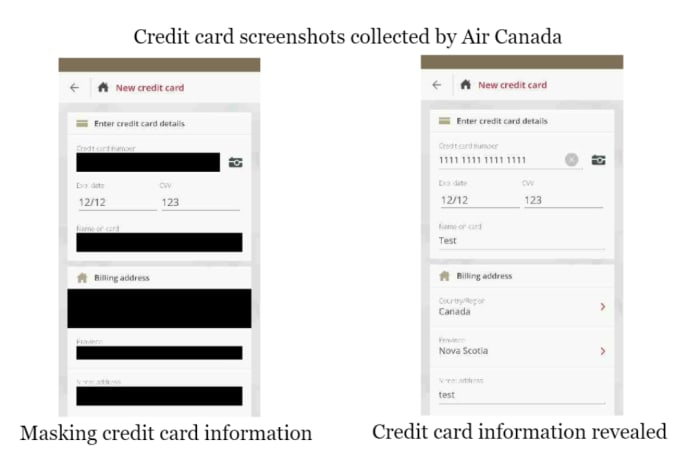
Not every company involved with this process successfully secured customer data. The App Analyst took a closer look at AirCanada’s attempt to mask user data — and, let’s just say, they did not do a great job.
The airline experienced a data breach back in August 2018. What’s important to note here is that the company was not masking their data. Instead, they were screenshotting users’ passwords.

AirCanada mishandling consumer data

So while Glassbox might not support this kind of violation, whether their clients can mishandle data is outside of their control.

Should we be worried?

As Morgenstern says, the technology isn’t meant to record your activity; rather it tracks your habits as you move through the site.

So, if you’re casually shopping around on Hollister’s native app, the company can see that you’ve put some items in your bag but didn’t complete the checkout. Or, they might see that you went straight for the clearance section, which might prompt them to alert you next time there’s a sale.

This is basically what all websites do these days. They track activity so they can ID problems and present recommendations you actually want. Except, just about every website gives you that little cookies pop-up, letting you know it’s “designed to give you a better experience.”

Apple says customers should be aware of how companies collect data. This way they can choose whether they want to proceed with the download. It’s a consent issue.

Obviously, all brands collect data in one way or another, Apple included. The only real news is the lack of transparency. In no way is this surprising.

The fact that such a workaround exists means that there’s the possibility other branded apps are pulling a similar one over on their audience.

Google Cardboard VR apps to download ASAP

Looking for something to do with that VR headset? Check these out!

Google Cardboard

Virtual reality is everywhere these days, but shelling out for an Oculus Rift might be a pricey investment if you’re a VR novice. Google Cardboard, though not the flashiest headset, is the perfect entry point into 3D gaming.

Now, before you start exploring the library, you should download the actual Cardboard app:

Google Cardboard download free ►
7

The app helps you set up a viewer and get familiar with the VR landscape. Plus there are some cool experiences built right in — from a tour of the Northern Lights to an Urban Hike. This lets viewers walk around the world’s greatest cities.

If you’re looking for a cheap VR option, this can be your answer. If you’re looking for something else, we’ve still got you covered:

After you’ve learned the ropes, you’ll likely want to broaden those virtual horizons.

Below, we’ve compiled a list of the best apps you can download for Google Cardboard. Whether you’re up for a bone-chilling horror game or just chilling with friends.

Best Google Cardboard VR apps

vTime

vTime Google Cardboard

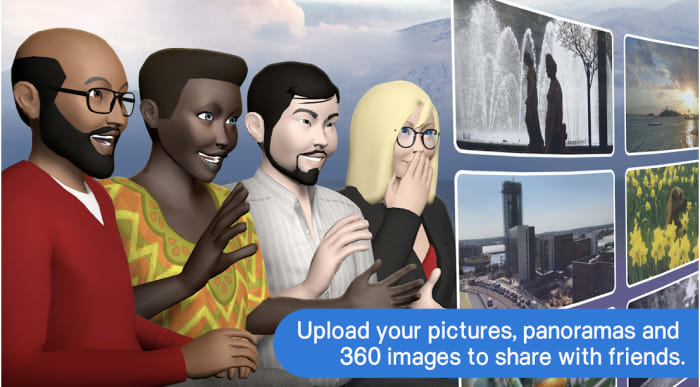
A real step up from Second Life,  vTime is a VR app designed for socializing in immersive, virtual destinations. The app is device-agnostic and has a lot in common with traditional social media apps. Users create an avatar and customize their profile. From there, you can chat with friends, family, and strangers.

While this does just look like a digital hangout — you’re dropping yourself into a video game landscape. vTime also allows you to share photos and videos from your camera roll with your digitized pals.

vTime isn’t exactly the kind of app that creates an adventure. It’s a more sedentary experience. You and your pals can hang around a campfire, on a rooftop, or on top of your photo album.

vTime XR Download now ►
7

Netflix VR

VR living room Netflix

“Netflix and chill” may have a whole new meaning.

Even though no one talks about it, Netflix has had a VR offering for quite a while now. The Netflix VR app lets users watch content through the cardboard headset through two different viewing modes.

One is a zoomed-out view of a living room and the other is just the content. The second mode takes away the living room environment and plops you right into the next episode of “Stranger Things” or “Bojack Horseman.”

Netflix has yet to release any 3D Netflix Originals, but you can watch everything in the catalog through your headset. Hopefully, we’ll see some VR content soon. In the meantime, the immersive viewing experience is still pretty cool.

Netflix VR Download Free ►
8

Sisters

Sisters app VR

Don’t play this game with a full bladder.

Sisters VR is a horror game that’s been around for a few years but still holds up as one of the best entries in the Google Play store.

The ghost story takes place in a Victorian mansion, loaded with creepy portraits, dusty furniture, and plenty of jump scares.

While Sisters is an entry-level game, it’s the perfect way to get used to Google Cardboard and get your horror fix.

10

Star Wars VR

Star Wars VR

Now you can find a wretched hive of scum and villainy in VR!

More than a game, Star Wars VR is fans’ mobile connection to the franchise.  There’s a big trivia component built-in and it’s a go-to source for announcements and new content.

This VR experience transports you to the Jakku Desert from “Star Wars: The Force Awakens” as a resistance agent. Hone your lightsaber skills in the immersive Star Wars universe, unlock 3D characters, and take selfies from inside the app.

Star Wars Download Free ►
10

CINEVR

CINEVR Google Cardboard

Why go to the movies when you can experience the theater from the comfort of home?

CINEVR aims to bring the movie-going experience to you with a realistic 3D movie theater with customizable lighting effects to boot.

You can watch movies through the app from various streaming sources and invite up to eight friends to watch with you. You can talk over the movie and send emoji reactions.

7

Minos Starfighter VR

Minos google cardboard

Minos Starfighter VR is a first-person space shooter with Android graphics that rival PlayStation quality.

Players fight off enemy ships in waves and shoot them down using a trigger button from your Bluetooth or USB controller. If you don’t have a controller, no big deal. You’ll also have the option to play using gaze navigation.

While the premise of Minos Starfighter is standard arcade fare, experiencing the flight simulation in VR breathes new life into the classic style.

Minos Starfighter Download Now ►
7

Google Expeditions

Google expedition cardboard

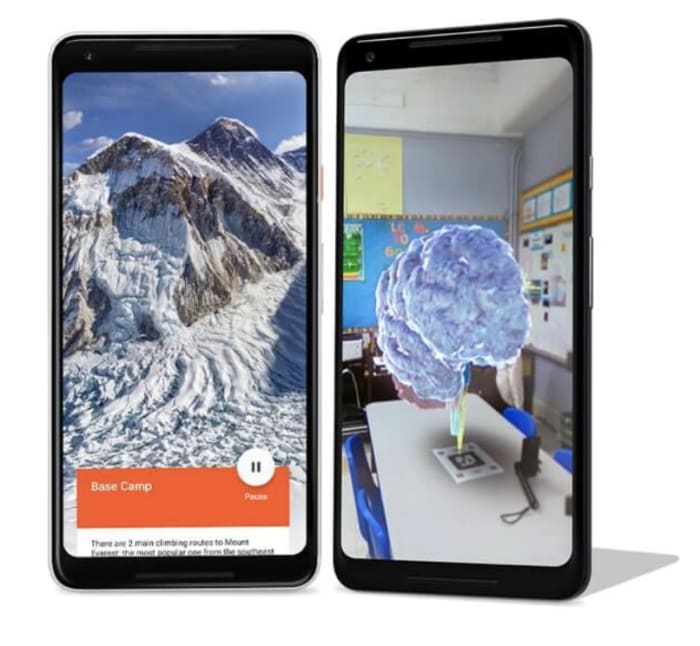
Google’s Expeditions is a VR field trip app that makes learning fun. The app used to be exclusively available to teachers and their students. However, now anyone with Cardboard (or Daydream) can sign up for the field trip, too.

Okay, it’s actually pretty cool. Adventurers can visit the International Space Station, the African Plains, the Great Barrier Reef, or another planet. You can choose to be a leader, which means you’re given information to present to a group. You can be a tour guide in a museum, or you can be an adventurer and let someone else do the talking.

The app will pair you with people on the same Wi-Fi network if you’re a solo explorer, you can just join a tour.

Google Expeditions Download Now ►
7

Wrapping up

If you haven’t tried virtual reality yet, Google Cardboard is just $15 and offers a low-stakes intro into VR. Whether you’re into exploring the world from home, hanging out with friends, or up for an adventure, Cardboard is a great way to find out if VR is up your alley. And hey, if you happen to get motion sickness, it’s no major hit to the wallet.

Facebook steals information about your menstrual cycles, home buying, more

Facebook scandal proves that no data is too private for them.

Facebook collecting info

As you may have heard, Facebook was recently found to be collecting sensitive user information from a handful of third-party apps.

We shouldn’t be surprised that Facebook is deep in our business. However, the revelation that apps like Period Tracker: Flo Health are sending user data to Facebook is just plain creepy. It might be time to switch to a different period tracking app.

Even though Facebook’s many sins keep coming to light, we still don’t know how our data is being used for profit.

Which apps were caught feeding data to Facebook?

Lady sifting through Facebook

The Wall Street Journal reported that several third-party apps were sharing data with Facebook to better target consumers. WSJ tracked 70 of the most popular iPhone apps, 11 of those shared sensitive, user-submitted data with Facebook.

Facebook Download now ►
7

According to the Journal, Facebook’s software collects data moments after the user enters information. There are no signs that the app discloses this in any noticeable way.

From there, that data is sent to Facebook’s ad-targeting tools. Those same developers can create ads targeting existing users and reach new ones. In several cases, data was transmitted to Facebook, whether or not the user logged into Facebook to verify their account. This also happened even if the user did not have a profile at all.

While the data is supposedly anonymous, these app developers are using Facebook to match data to real profiles. This is compromising the layer of anonymity built into something like a menstrual app. That’s software where users share health information, pregnancy status, and lifestyle choices.

Facebook says that it advises app developers against sharing data that could be considered sensitive. They do say that they actively delete data if they believe it is illegal.

It turns out those period trackers are pretty invasive

Menstruation calendar

Period tracking apps are among the most popular apps in the App Store. There are over 200 to choose from, but people don’t realize these apps collect a lot of personal information.

Many of these apps collect information that extends beyond whether you’re menstruating or not. Apps function as a health diary of sorts. They’ll ask whether you had sex, drank alcohol, or took any drugs.

They also ask about stool consistency and vaginal discharge. You know, things that most women feel totally cool with letting Zuckerberg and company know.

Does this impact privacy or is our anonymity at risk?

Anonymous online

When you download an app, you agree to their terms and services. Which, of course, most of us don’t read.

As we’re beginning to find out, the things we do online don’t just fall into the ether. Every OkCupid question we fill out, Facebook like, and digital store we browse adds to a growing digital footprint.

OkCupid Dating Download Now ►
9

In this latest revelation, there are some potentially harmful consequences.

Apps that are leaking your information

One of the offending apps, Instant Heart Rate: HR Monitor by Azumio,  is the most-downloaded heart rate app in the iOS store. It sent user heart rate stats right after performing a reading.

Flo Ovulation Tracker lets Facebook know when the user tells the app that they hope to get pregnant or reports that they are on their period.

Realtor.com was found to have sent Facebook prices and locations of homes viewed by their users, as well as those listings they marked as favorites. As we already know, Facebook has been under fire for how they advertise homes.

Heart rate, pregnancy, and other health stats becoming public knowledge is a scary idea.

While discrimination based on health isn’t legal, that doesn’t mean it doesn’t happen. It just means an employer, real estate company, or insurance company might look for a reason not to work with you.

If you’re curious what Facebook knows, you can always download your information. There, you’ll learn more about every ad interaction, deleted friend request, and Farmville stat from your past.

Where are the regulations?

Online restrictions

Facebook’s business model depends on a system of collecting data. We didn’t think much about this in the past.

As it stands, Facebook is in negotiations with the U.S. Federal Trade Commission over the privacy violations associated with the Cambridge Analytica scandal.

The FTC could slap the social media platform with a massive fine, but as Politico points out, the possibility of restructuring is also on the table. The article also mentions that the organization could demand that Facebook reveal how they use data to generate profits.

Still, we’ll have to wait and see.

On Flo’s end, the company says they’re revising their privacy policies to prevent this from happening again.

This incident and the countless others should serve as yet another reminder that any data you share with an app might not be private.

Complete Guide to WhatsApp in 2019

See all the great new features WhatsApp offers.

WhatsApp

WhatsApp has already been a news cycle staple in 2019, given Facebook’s recent announcement to merge the app with Messenger and Instagram. There’s also the fake news issue and the recent release of WhatsApp Business for iOS.

WhatsApp Messenger Download WhatsApp ►
8

Oh yeah, and the app just celebrated its 10th birthday in February. So far, this year has brought several new features into the mix, from playful stickers to better security protections.

Here is a look at just a few of the many new WhatsApp features to check out.

WhatsApp upgrades: 2019 Edition

Sticker integration

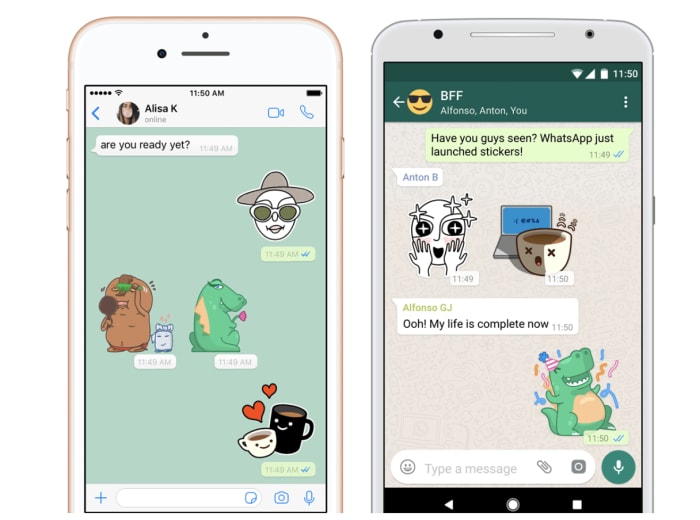
WhatsApp rang in 2019 by adding stickers to the mix. The app comes equipped with its own set of stickers, but you can also integrate third-party packs into your account for more options.

whatsapp sticker integration

Unsend messages

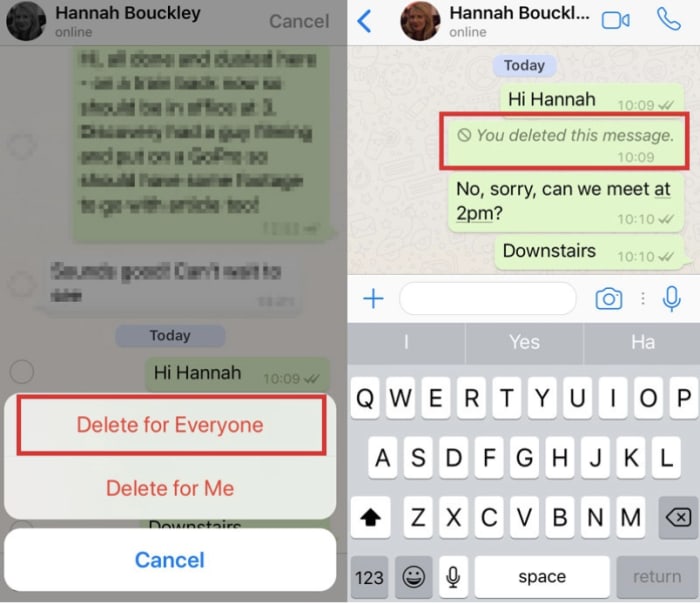
Like Facebook, WhatsApp recently debuted an unsend feature that allows you to take back that stupid thing you sent. You’ll have an hour to make up your mind and can choose to delete a message for yourself or for everyone. Like Facebook, that doesn’t mean you can prevent someone from reading the initial message, but you can remove it from their feed.

whatsapp message delete

Listen to voice messages without headphones

Okay, fine, WhatsApp has always been able to play voice messages on the loudspeaker. What’s different about this latest feature is, you now have the ability to listen to voice recordings as if it were a phone call.

All you’ll need to do is put it up to your ear and play the message. It will softly whisper the recording so no one else can hear it.

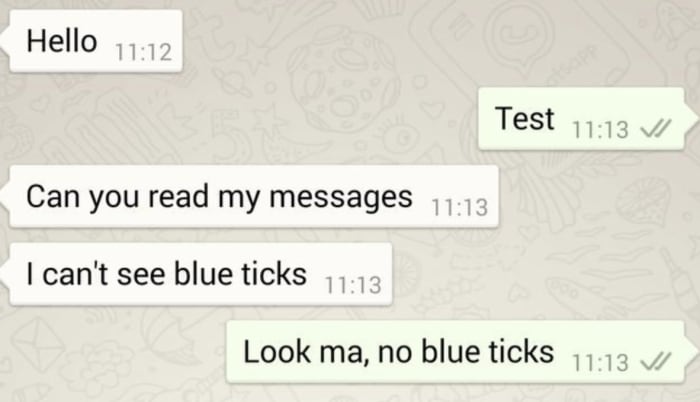
Check messages without going online

People will never know you left them on “read.”

Unlike Facebook Messenger, WhatsApp now lets you view your messages without letting the sender know that you’ve opened the message.

Alternatively, they’ve also made it easier to see who has reviewed the messages you’ve sent to others. This might not be the healthiest way to engage with your messaging system, but WhatsApp’s resolution for 2019 is choices.

whatsapp check messaging no read receipts

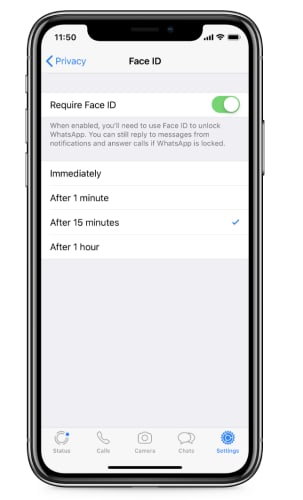
FaceID and TouchID Access

new authentication features for whatsapp

This isn’t the most exciting feature, but it is pretty heavy in demand. WhatsApp just added a new authentication feature to the stack for an extra layer of privacy.

Find it by tapping: WhatsApp Settings > Account > Privacy

It enables users to enable authentication before WhatsApp opens and shows your messages. It’s a lot like banking apps where you need to provide Touch ID or FaceID to access your account. The benefit with the new feature is that if someone gets ahold of your unlocked phone, they can’t access your chats.

How relevant this is to you depends on what you’re hoping to protect yourself from. If it’s a matter of making sure the average stranger, your kids, or a nosy partner don’t open your messages, it’s pretty useful. Although, this is all assuming they don’t know your PIN.

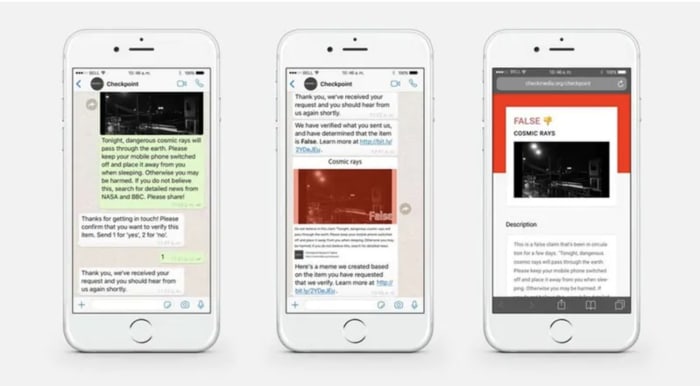
What’s new with WhatsApp’s battle against fake news?

Last year, the app faced some major challenges in India with backlash from citizens over the spread of misinformation. The problem was, WhatsApp’s encrypted messaging limited the company’s ability to track the source of the problem.

This year, WhatsApp said that it had refined its spam detection tool, making it easier to report bad actors. Still, it’s hard to say whether there’s been any impact so far.

If you look on the app’s FAQ page, WhatsApp makes some recommendations for avoiding spam and hoax messages. It states that they have the right to ban users who they believe are in violation of the app’s terms of service.

Finally, the platform rolled out the WhatsApp tip line. It is a reporting tool that allows users to report misinformation. As of now, the feature is only available to users based in India — and it’s unclear when or if this is coming to the rest of the world.

tip line for whatsapp india

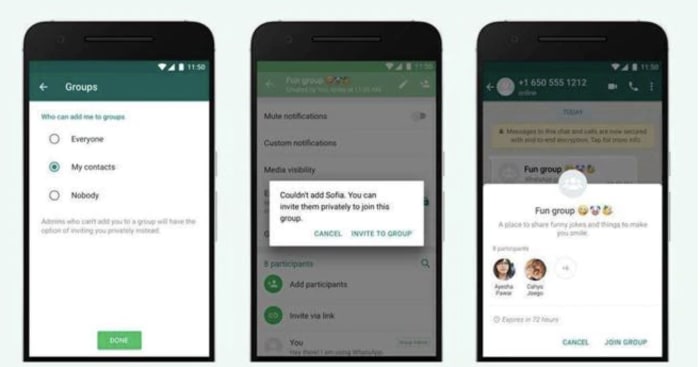
Group chats are now more secure

new options for whatsapp group chats

Another brand new feature for the platform is an additional privacy setting for group chats. Group chats now come with the following options:

  • Everyone — This setting means that the user can always be added to group chats.
  • My Contacts — This means that the user can always be added to groups if the admin is listed in their contacts. If the invite comes from someone outside of the contact list, they will receive an invitation to join.
  • Nobody — The user cannot be added to a group chat automatically. If another user wishes to add them to a thread, they will receive an invite and can choose whether to join or decline.

The new security features eliminate the issue of being added to random chats, which has increasingly become a problem for those users who just want to communicate with family and friends.

Wrapping up

We didn’t even cover every feature that WhatsApp has released in 2019. After 10 years, the private texting app has come a long way, offering cute stickers along with extra security protections.

Should we tax Facebook to support journalism?

Big tech may be able to pay the bill to help the fight against misinformation.

Journalists in the field

The journalism advocacy group Free Press recently published a proposal calling on Congress to start taxing Silicon Valley’s biggest data harvesters. The proceeds will go to the struggling journalism industry.

The organization compares the proposed tax to a carbon tax. It would transfer wealth from those companies profiting from the spread of misinformation.

Of course, the “what should we do about journalism” question has been floating around for years. The question is whether all news should take on the publicly-funded NPR/PBS model?

Or, should big tech share advertising revenue with the news media, regardless of engagement rates?

Big tech says they plan on funding journalism projects

Facebook has pledged $300 million to help fund quality journalism, following Google’s 2018 pledge for the exact same amount.

As it stands, Facebook and Google both make billions of dollars through ads. This makes it difficult for independent publishers to generate revenue through ads themselves.

Facebook has reportedly put funds aside for media projects. For example, Facebook made a $16 million grant for journalism initiatives such as Report for America and the Pulitzer Center. Apparently, the platform has some other projects in the works involving Facebook Watch. This pays news outlets like BBC, Fox, and ABC to create programming for the social platform.

Facebook Watch

Facebook also says it’s working hard to help news outlets sell subscriptions. This certainly sounds good in theory, but how many subscriptions will people realistically shell out for?

Though this is purely anecdotal, it seems that over the past few months, there has been an uptick in paywalled content.

People might pay for a handful of their favorite publications. However, adding another series of fragmented subscription services to the mix won’t cut it.

One of Mark Zuckerberg’s Facebook blogs from 2017 discusses the need for quality journalism and civil discourse. However, the platform still seems to prioritize the viral, often low-grade content that generates ad revenue.

Big tech endowments could have a negative impact

Big bag of money

There’s no doubt that the state of reporting is in crisis mode. According to a study from Nieman Labs’ site, communities that lose a local newspaper experience an increase in political polarization.

Big tech’s proposed contribution to local news outlets sounds like a potential solution. However, it might not be the best path toward balanced news.

An article from the Columbia Journalism Review has another stance. While journalism’s financial woes and big tech’s dominance are both important issues, the two shouldn’t be conflated with one another.

Yes, big tech does get the ad revenue that news outlets used to get. However, direct funding could exacerbate the spread of misinformation. Let’s face it, this has caused enough damage already.

Sure, Facebook has begun fact-checking the articles posted to the site. However, there’s still the issue that it’s in the platform’s best interest to promote the top performing content over important, unbiased news updates.

What kind of taxes does big tech pay anyway?

Differences in money

In the U.S., not much. Last year, Amazon paid exactly $0 in corporate taxes, while Facebook paid about 4%.

In the EU, things are a little better, but not by much. The European Commission reports that tech companies pay about 9% of their profits. Traditional companies pay roughly 23% in taxes.

Guardian reporter John Harris brings up a good point. He says that big tech has dramatically changed societies across the globe. However, big tech is doing little to offset the fallout caused by digital disruptions.

His piece also highlights the fact that the rationale behind corporate tax breaks doesn’t quite work with massive tech companies. This is because they’re not reinvesting their savings into hiring more people.

Could a Facebook tax actually happen?

Silicon Valley residents recently passed a bill that approved new taxes on tech companies to offset the massive income gap. The proceeds go toward fighting homelessness and increasing affordable housing, not journalism. At the end of the day, it’s one example of tech taking responsibility for its impact on the community.

There are similar efforts currently underway in Austria, Australia, and the United Kingdom. Austria is moving forward with a plan to tax tech giants that generate profits in the country.

BBC correspondent David Silleto says that extra cash from government tax breaks introduces its own set of political questions. Namely, will governments then have the power to control which stories get published? Will they suppress balanced information?

Obviously, there’s a lot to consider and a lot at stake. We’ve already seen the devastating impact on social media, digital advertising, and reliable news sources. Hopefully, we’ll find a solution sooner, rather than later.

Can I delete Facebook and still keep my Messenger account?

Tired of Facebook drama, but you want to keep Messenger? You can have your cake and eat it, too!

Facebook Messenger

According to Pew Research, just over half of Facebook users 18 and older have scaled back the amount of time spent on the platform. Maybe it’s a sign that we’re collectively growing weary of the social media giant.

Facebook Download NOW ►
7

Perhaps you’re outraged following the Cambridge Analytica scandal. Maybe you’re sick of all the notifications. Or, thanks to Facebook, you now know you come from a family of monsters with fringe political views.

Whatever the case, deleting Facebook has never looked so good.

But, one of the most powerful ways good old FB keeps users hooked is the connection to its massively popular chat app, Messenger.

Messenger Download NOW ►
7

Which brings us to this — can you delete Facebook and still keep your Messenger account? The answer is… kind of.

Best bet: Deactivate your Facebook, keep Messenger

Delete Facebook

We’ll say this outright; you need to technically keep your Facebook account if you want to continue using Messenger as is.

Deactivation is almost the same thing, except, well, Facebook still hangs onto your data. You know, for later.

To do this, head over to your account settings. From there, navigate to the section on the left labeled, “Your Facebook Information.” Click “Delete Your Account Information.”

Delete Facebook

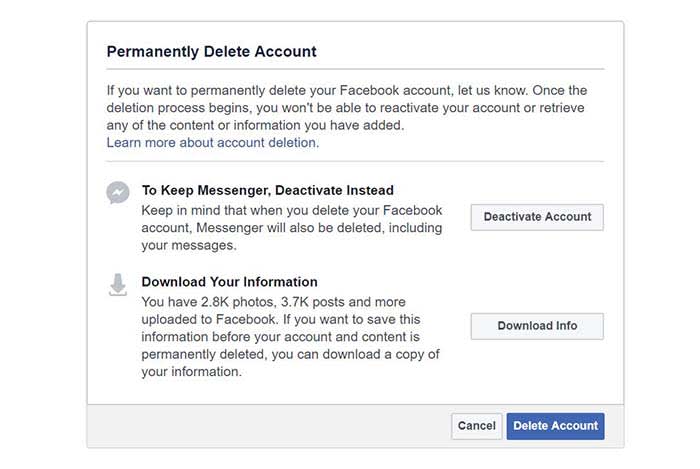
There, you’ll see two options. One is to deactivate your account and the second is to download a copy of your information before you delete your account.

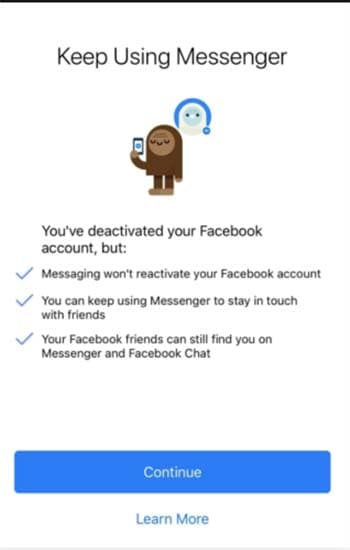
Next time you log into the app, you’ll see the following screen:

Keep Messenger

There are a couple of downsides associated with deactivating your account over deleting it. If you just don’t like the platform but want to keep using Messenger, there shouldn’t be a problem.

If privacy and data breaches are your primary motivator for getting rid of your account, deactivation isn’t a full-blown cleanse. Facebook saves all of your photos, posts, and associated data in case you decide to come back.

Photos of you that appear on other peoples’ accounts may still exist, as will any tagged comments or photos. They just won’t link to your profile anymore.

To be honest, if you want a good messaging app, you can always just download WhatsApp. 

WhatsApp Messenger Download WhatsApp ►
8

You can’t officially delete Facebook without deleting Messenger

Facebook problems

If you do decide to delete your account, Facebook will delay the actual deletion for up to 14 days. If you log in at any point during the interim, Facebook will reactivate your account.

According to the website, some data may remain in the system for up to 90 days. However, your information will not be available to other Facebook users.

As far as Messenger is concerned, Facebook is pretty clear. If you click the option to delete your account permanently, you’ll have the option to keep Messenger deactivated instead.

What’s the difference between deleting Facebook and deactivating?

Deactivate

Deactivation means you’ll disappear from the timeline and you won’t have access to the site or any built-in apps (aside from Messenger, of course).

But, as Facebook says, you can always come back.

When you delete your account, you’ll need to start from scratch if you change your mind. That said, erasing yourself from the platform means that you’ll be giving up your Messenger access.

Download your Facebook data before you go

Before you delete your account, Facebook will give you the option to download your personal data file. You may want to do this if you’ve been using Facebook to store photos or want to hang onto other information.

Downloading your data can also function as a reality check of sorts. Facebook, as well as others like Google and Apple, know a ton about you and make tons of money off of these revelations.

So, what happens to your data after you delete Facebook?

According to the Facebook help center, it could take up to 90 days to delete your entire record. After those 90 days are up, a few traces of your online past will live on.

Things like Messenger records may still exist in your friends’ accounts well after you’ve closed up shop.

Keep in mind that deleting your Facebook account doesn’t mean that your information will be pulled from elsewhere, either. FB’s business model depends on selling data to third-party vendors, so it’s possible some of your information will continue to float around the web.

You don’t need a Facebook account to use Messenger, anyway

When Facebook initially debuted Messenger, people thought that the separate app was somewhat unnecessary.

That was back in 2015. The 2016 election and subsequent privacy breaches had yet to change the public’s view of the platform.

The real benefit of the app is, you don’t need to have a Facebook account to use it at all. So, why not download the app, update your friends, and say goodbye to the Facebook scene once and for all?

Best job searching apps for iOS and Android

Finding a job can be tough, but these apps can make it easier.

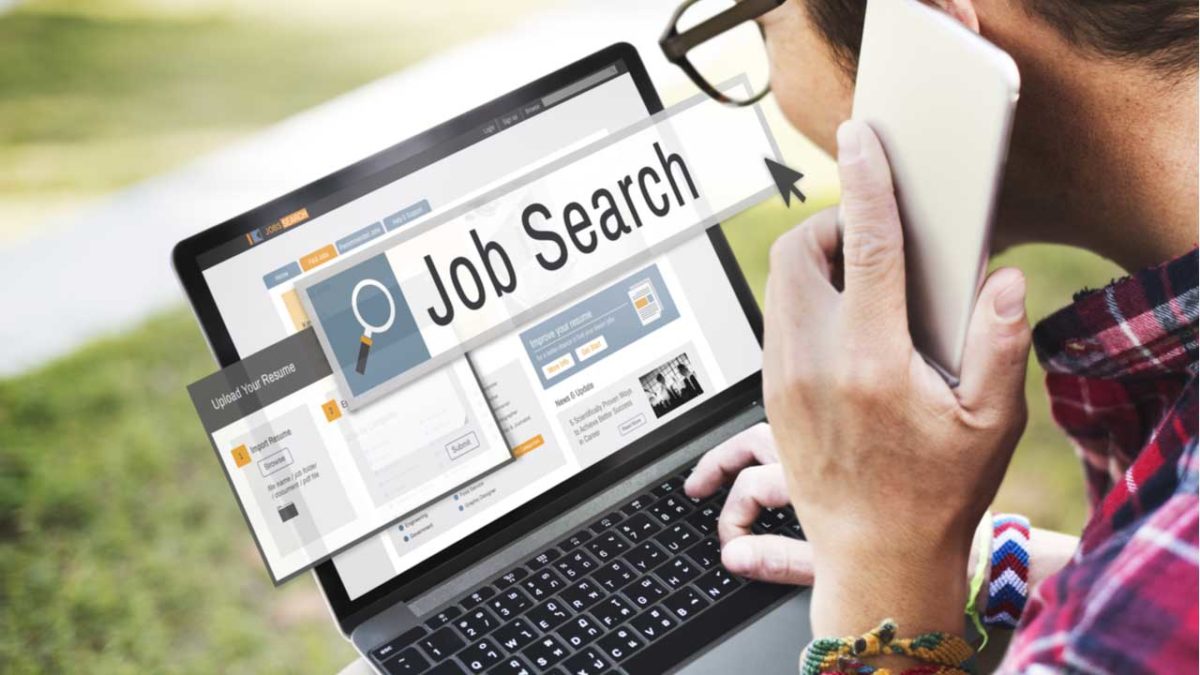
Job hunting

You can’t always make it to your laptop for a deep job-hunting sesh. Maybe you’re always scanning for greener pastures or you’re hoping to book some interviews when you’re on the clock (no judgment).

Don’t limit yourself to sites alone. Just like everything else, job-hunting can be done on the go.

Best job-hunting apps

LinkedIn Job Search

If you’re hunting for a job, you probably already have a LinkedIn profile.

And while the main social site is great for making connections that could lead to a job opportunity, LinkedIn’s Job Search allows you to cut to the chase.

You can choose to browse through opportunities, easily using your profile as a resume when you apply. Filter by job title, industry, pay, or company — and make your move.

If you prefer to take a passive approach, you can let LinkedIn know and they’ll recommend opportunities that fit your goals and skill set. What’s more, the site knows that job-hunting can be a sensitive matter when it comes to your boss. They’ll keep your hunt on the DL — no problem.

LinkedIn Job Search Download now ►
7

Facebook Jobs

facebook find a job

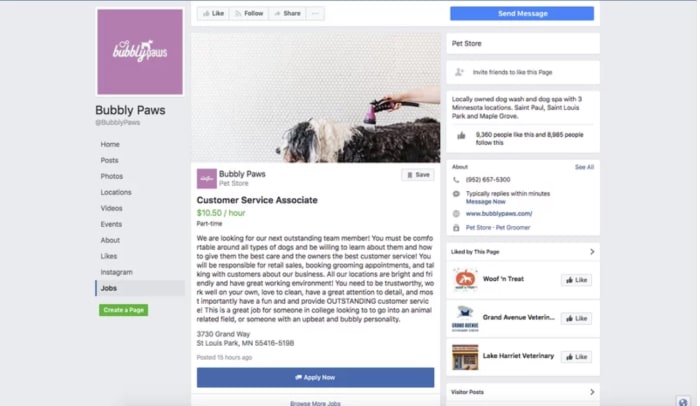
Thought Facebook was all fun and fake news? Think again! Good old FB is home to a massive job board, perfect for finding a whole host of open opportunities. You can find the Jobs section within your Facebook app — no need to download a separate application.

When a posting fits the bill, you can tap the “Apply Now” button and you’ll be redirected to the employer’s Facebook page. Then hit the button again and the application will fill in your details based on what you’ve included in your public profile. If you’re more of a private browser, you can introduce yourself in 1,000 characters instead.

Facebook Download now ►
7

Job Search Switch

switch app

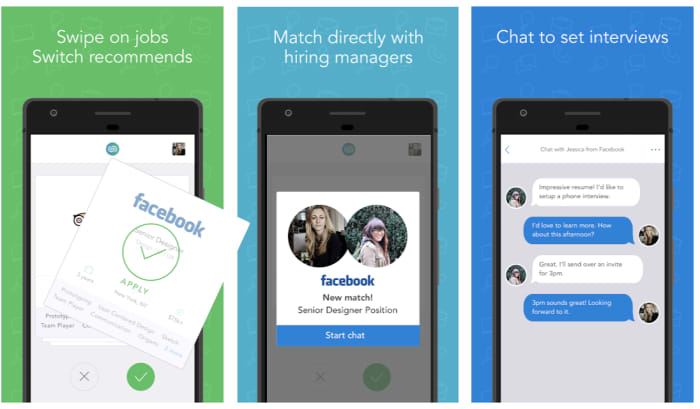
Job Search Switch, uh, switches up the job-hunting process. It’s an anonymous app that matches you with hiring managers based on credentials alone. Like Bumble and Tinder, you’ll swipe to indicate your interest in a particular opportunity.

What’s cool about this app is that your identity is revealed only when you match with an employer, which stands to make things interesting.

The only downside is that the app is relatively new. So, you’re not going to have access to the same pool of potential matches as you might on something like Indeed. Sometimes, that might not be such a bad thing. The fewer people who know about a tool, the less competition you’ll have to measure up against.

Job Search Switch Download now ►
7

Glassdoor

glassdoor job app

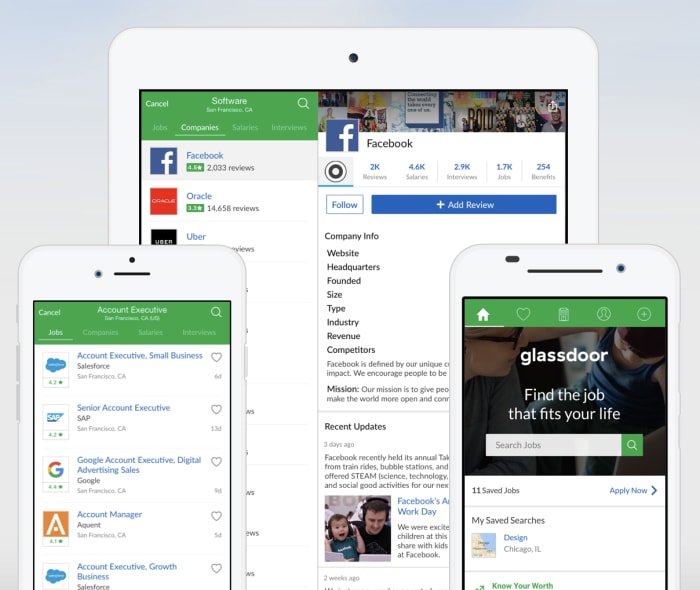
Glassdoor is one of the biggest players in the job-hunting and salary information game. The mobile app brings all the same opportunities to your phone as you’ll find on the computer. It makes it super easy to look at potential opportunities and conducting some background research beforehand.

We should warn you — Glassdoor mobile can be a little overwhelming. The app will ask you to complete applications on your phone. Unfortunately, this can be a real pain. Still, you can save jobs and look at salaries. There’s also the added joy/time waster that is reading the bad reviews former employees anonymously post.

Glassdoor Download now ►
7

Hirewire

Hirewire app

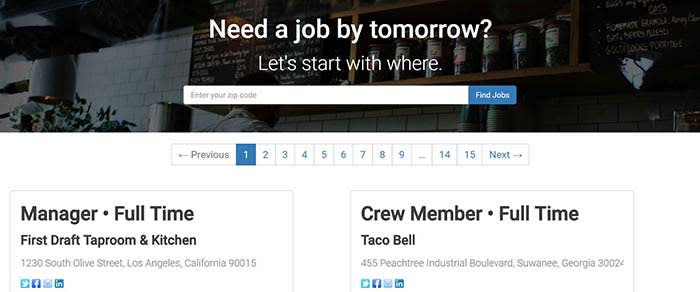
Hirewire is another interesting option for people who need to lock down a job in a crunch.

You’ll download the app, input your info, and record a video interview. Hiring managers in need of staff can use the app to book interviews and get you hired within 24 hours.

The jobs you’ll find on the app tend to fall into the serving or retail categories, which makes sense given the short time frame. If this is the kind of thing you’re after, Hirewire may be a good bet.  LinkedIn, Glassdoor, and Indeed tend to work best for people with more “office” experience, which you won’t need on Hirewire.

Hirewire Download now ►
7

Good & Co

Good & Co cultural fit

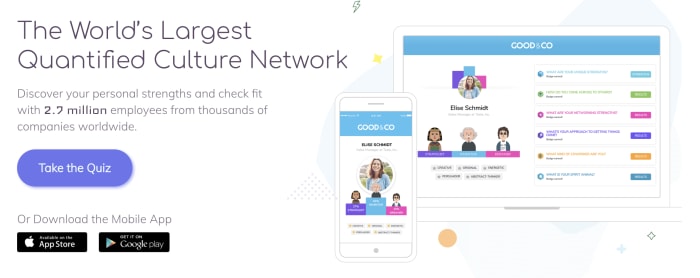
Good & Co presents another novel approach to the job hunt. The app aims to help you find a job that’s a good fit before you waste your time in interviews. This app will have you take a few personality tests that highlight your strengths, your work style, and how you’d fit in with other people.

Good & Co doesn’t allow you to apply to jobs directly, but they’ll highlight open roles and direct you to the right place to fill out an application. Naturally, this might not be the most practical approach, but anyone who loves a good personality test is bound to enjoy themselves.

Good & Co Download now ►
7