Netflix experimenting with Top 10 lists

Discover where the test will begin.

Netflix background

Netflix has quickly become an intrinsic part of modern culture. Its growth has seen the streaming platform spread around the world. On top of this, as well as offering diverse content, the streaming platform has been running a series of subscription model tests to find new ways of spreading Netflix to parts of the world that can’t really afford a full Netflix subscription.

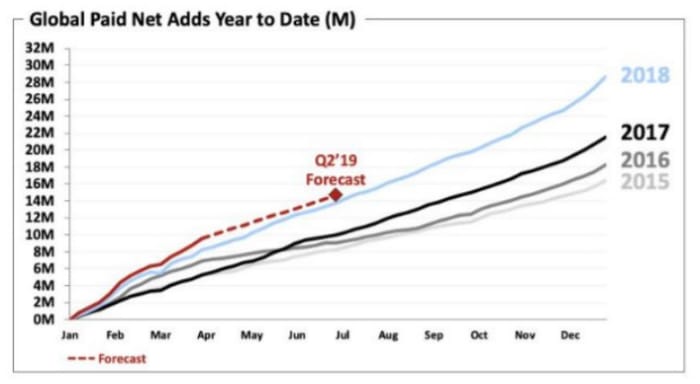
A new shareholder letter released by the streaming giant shows that this growth still continues with over 10 million new subscribers signing up between the beginning of January and the end of March this year. The letter also includes some interesting information about a new test Netflix is about to begin, which could see how you interact with it change significantly.
Netflix is going to test Top 10 lists in the UK

According to the shareholder letter, Netflix is going to begin, “running a test to improve our UK member experience by releasing weekly top 10 lists of the most popular content on our UK service across various programming categories. For those who want to watch what others are watching, this may make choosing titles even easier.” The top 10s will be based on the content’s popularity across the region you’re a part of.
Netflix shareholders meeting
A recently released shareholder’s note has uncovered some interesting information about Netflix

These top 10 lists will stand aside from what you normally see on Netflix as they won’t be affected by your own viewing habits. Well, they will but only in so much as if you watch something, it will get one vote that will add to the overall ranking. Until now, all the movies and TV shows you see when you open Netflix, are based on things you’ve already watched and how Netflix thinks that fits with its current content roster.

Netflix went on to say that the British testing of top 10 lists will go on for a few months. After the test period is over, the streaming platform will analyze the results and decide whether to simply end the test or extend it to other regions.

If you’ve ever struggled to find something to watch on Netflix, these new top 10 lists could be a good way for you to find something you know is popular with other Netflix users. If you’re the type of person who tries to avoid the mainstream, however, you might be less interested in Netflix’s latest test.
New Netflix subscribers
Netflix keeps adding new subscribers

The real interesting thing to note from the Netflix shareholder’s letter is that the streaming platform has seen subscriber numbers continue to rise, despite price hikes in a number of its key markets including the U.S., Canada, Brazil, Mexico, and parts of Europe. If we’re talking about Netflix tests, it is clear that the price hikes have returned positive results for the streaming giant. It might not be a sure thing, but at this point, it looks like there is nothing stopping Netflix from looking to price hikes to boost revenue again at some point in the future.


You can now buy movie tickets from a Google search on your phone

Google adds feature to iOS and Android that enables you to buy movie tickets directly from a search.

With the premiere of “Avengers: Endgame” now less than two weeks away, it seems the perfect time for Google to partner up with some movie ticket purchasing platforms. So that is exactly what happened. With the biggest movie of the year upon us, it has never been easier to buy tickets to the movies.

Google adds feature to iOS and Android that enables you to buy movie tickets directly from a search

Cinema tickets by Google

Google has partnered with a few movie ticket booking sites and platforms to offer you tickets from within a Google search. According to Inc42 these partners include BookMyShow, Paytm, and INOX so you can now book tickets to your local cinema as an endpoint to a number of different search queries.

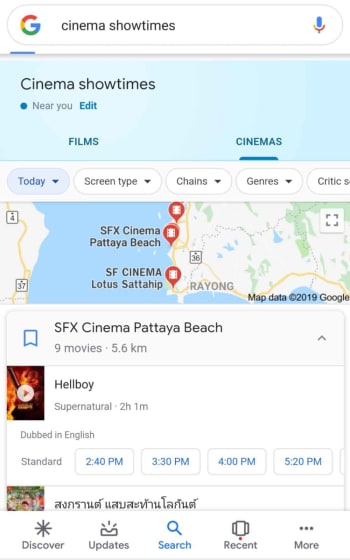
Thanks to the change, you can now make searches like “movies” or “cinema showtimes” and Google will show you a new widget. The cinema widget will show you local theaters, movies, and showtimes and you’ll be able to select the movie you want to see, the cinema where you want to go and see it, and then the showtime you’re interested in.

buy cinema tickets with google

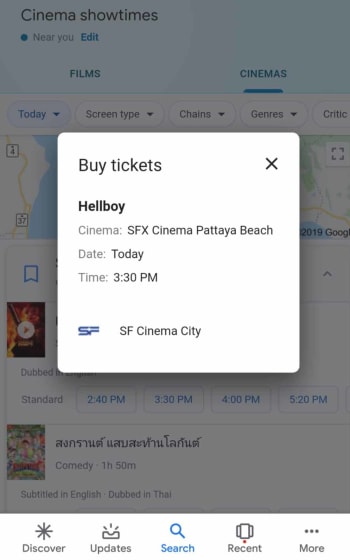
From there, you’ll be presented with the new option to buy tickets. If you’re able to buy the tickets through one of Google’s new partnerships, you’ll be able to buy the tickets directly from the widget. If not, you’ll be given the option to buy the tickets online at the cinema’s website. At the moment, it looks like users won’t have a choice when it comes to the platform they’ll buy the tickets from. Google makes that choice rather than presenting a list of possible outlets.

Google App Download Now
8

You can also access the widget by searching for particular movie titles. If, for example, you searched for “Hellboy,” you’d open the special widget for movie search results. Scrolling across and tapping Showtimes would take you to the new widget where you could buy tickets to a showing at a local cinema.

movie ticket google widget

Other cool features include a number of handy filters for narrowing down the type of movie, theater, or even screen you’re looking for. You can also search for films based on critic rating and language. A particularly useful filter, if you’re not searching for a specific movie, is the genre filter. If you’re merely looking for a chance to get down to the cinema and see something on the big screen, you can search for a particular genre of movie and then see what films are available in that genre, where they’re on, and what time they’re showing.

All in all, the new feature is a little basic, but it does make it easier for you to buy movie tickets from your phone. There still doesn’t seem to be much scope, however, for buying tickets more than a couple of days in advance. This means if you’re looking to buy your “Avengers” tickets early, this isn’t the best way to do it.

Twitter reveals the most popular Game of Thrones character in your state

This map is based on geo-tagged Twitter data and shows the most popular Game of Thrones character in every state.

Jaime Lannister

Excitement is reaching fever pitch as we are mere days away from the final season of HBO’s acclaimed “Game of Thrones” hitting our screens. Never before has the world been so excited about winter’s arrival, but here we are. Does it get any better than this?

One of the main reasons for the show’s unrivaled popularity is its expansive world and the rich list of well-developed characters. The scale of the show ensures everybody has somebody to love and somebody to hate. It also ensures that when it comes to favorite characters, everybody has one, and you won’t have to talk to many people before you find somebody who disagrees with your choice. This is why this map from the guys at Daring Planet is so interesting.

This map shows the most popular Game of Thrones character in every state

Twitter and Game of Thrones

The map takes data from geo-tagged tweets that are publicly available on Twitter. The result, after processing over 200,000 tweets, is a photo map highlighting which citizen of Westeros garners the most attention in all 50 states. The results are a little surprising.

The map uses the first-past-the-post voting system, which means it only shows the big players. First-past-the-post gives the whole state to whoever gets the most mentions. This means that even if somebody like The Hound or Davos Seaworth scores thousands of mentions across the country, their faces won’t appear on the map unless they score the most mentions in a single state. Theoretically, The Hound could have more mentions overall than Tyrion or Cersei, but it wouldn’t matter. As long as The Hound doesn’t have the most mentions in a single state his face will be nowhere to be seen on this map. Basically, it’s like the electoral college, but less depressing.

A map of GOT season 8 most talked about characters on Twitter
Image via: Daring Planet

The overall winner is somebody that you might not expect it to be. Yes, the map is dominated by Jon Snow and Daenerys Targaryen, but the character with the most states baring her face is, ironically, the now faceless Arya Stark.

According to Twitter, Arya is the most talked-about “Game of Thrones” character in a whopping 19 States across the U.S. Now whether this is because of the shocking way she ended Season 7 or because people aren’t happy with how the TV writers are treating a treasured book character remains to be seen. With the final season bearing down like a White Walker army, it will be interesting to see if this remains true once the credits roll.

Netflix is testing something very interesting in India

Netflix is testing weekly subscriptions in India.

Last November, Netflix began testing a mobile-only subscription model in Malaysia. The test model, which allows users to pay less each month, but then only access Netflix on their mobiles has since been extended to India. As well as restricting Netflix to a smartphone or tablet, the mobile-only subscription model also limited streaming to Standard Definition (SD) only. Netflix is now extending this test in India, adding an interesting new element to its subscription model tests.

Netflix is testing weekly subscriptions in India

A man is watching Netflix

The new weekly subscription model that Netflix is introducing to Indian users will offer much more flexibility. Users will be able to subscribe one week but then not the other, allowing them to cut off their connection to the Netflix library during busy weeks and then hook themselves up again when they’ve got a bit more free time on their hands. It also works for users who might struggle to afford a full month’s subscription. A week’s subscription on one of the new plans will cost Indian users as little as Rs 65, which is only about 95 cents.

8

At such a low price, it will come as no surprise that the weekly subscription comes complete with restrictions. Fortunately, the restrictions do not hold back any of the Netflix catalog. All titles will be available to weekly subscribers, but like with the original mobile only plan, they’ll only be available in SD. The other main restriction is that the Netflix subscription will be limited to one device only, which must be a smartphone or tablet.

Netflix mobile headphones
The new weekly subscriptions won’t just be on the mobile-only plan

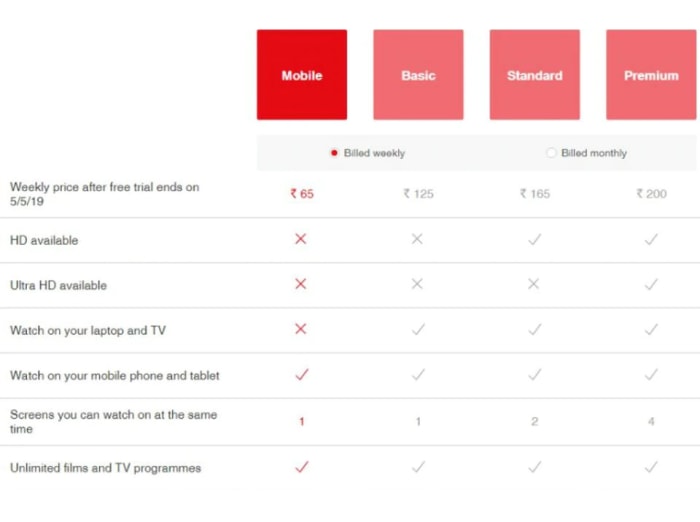
The Rs 65/week plan marks the cheapest of all the new subscription models that Netflix is testing. Prices will go up based on adding multiple devices to the basic package, the ability to watch on a laptop or TV, and also adding HD and Ultra HD to your weekly subscription. The most expensive weekly subscription, which offers Ultra HD content and allows streaming on up to four devices at the same time costs Rs 200, which is about $2.90 a week.

New weekly subscription prices for Netflix
Image via: Hindustan Times

If you’re an Indian Netflix user and you’re interested in this new weekly subscription model, you’ll be happy to know that Netflix is offering a four-week free trial to all new users. Unfortunately, however, you won’t able to take advantage of the free trial without first handing over your financial information.

U.S. Netflix users shouldn’t get too excited about a new super-cheap weekly subscription model just yet. Even if the new weekly subscription does make it over to the States, we shouldn’t expect similar pricing structure for a week’s worth of Netflix. These tests are designed to help Netflix expand into markets where people can’t really afford a full Netflix subscription, rather than as a way to make it more competitive in markets where it already competes.

Two great new and improved WhatsApp features

WhatsApp consecutive voice notes land on the beta for Android and an improved Picture-in-Picture mode is coming, too.

WhatsApp is an evolving app. Although the core feature of messaging our friends and family always stays the same, new features are being added all the time to help make the whole process easier. As well as adding new features, it is good to see the WhatsApp team working on old features to make them bigger, better, and, stronger. This is what today’s news is about, older WhatsApp features that are getting an upgrade.

WhatsApp consecutive voice notes land on the beta for Android and an improved Picture-in-Picture mode is coming, too

In December, we first brought you news of the WhatsApp consecutive voice notes feature. The new feature automatically plays voice notes one after another once you’ve hit play on the first one. The feature only works on voice notes that have been received consecutively and uninterrupted, so voice notes received later on in the conversation won’t play once the string is up. It also includes new tones that’ll let you know when a voice note has finished and also when the last voice note has finished.

WhatsApp Messenger Download WhatsApp ►
8

Back in December, it was only a bit of code that had been spotted in the WhatsApp beta. It wasn’t usable. This has now changed. The Android WhatsApp beta version 2.19.86 includes a working version of the feature. Consecutive voice notes are officially out for public testing.

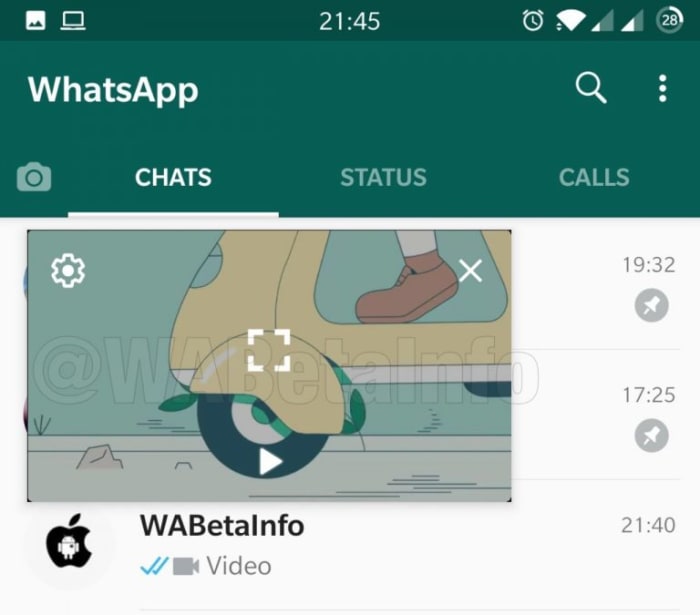
The other feature that WhatsApp is working on improving is the Picture-in-Picture mode. That allows you to watch certain types of videos that you’ve been sent in chats while you’re still chatting to your friend. The feature starts up a mini video player for videos from YouTube, Facebook, Instagram, and Streamable that hovers and plays while you’re chatting away.

WhatsApp Picture in Picture mode on the inbox
Image via: WABetaInfo

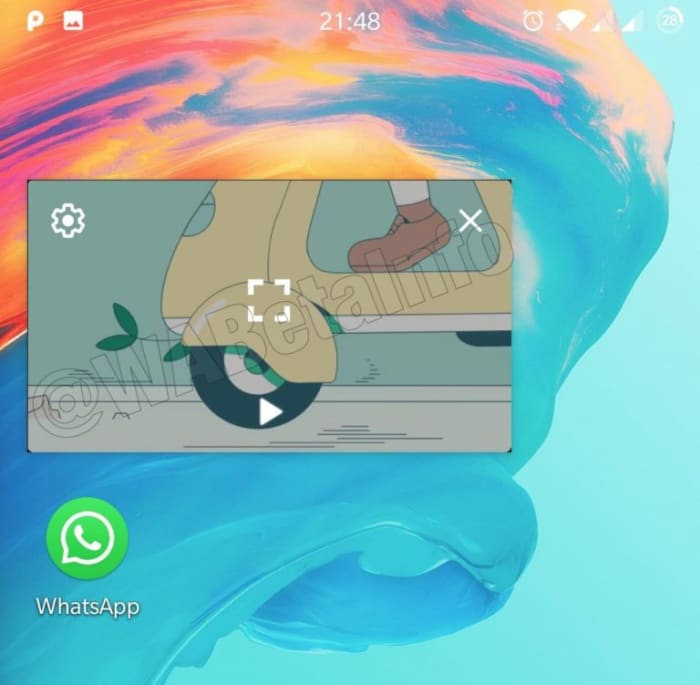
Although useful, the feature has quite a few shortcomings, but it is now clear that WhatsApp is working to give it a bit more power. The biggest frustration with Picture-in-Picture is that you still have to close the video you’re watching if you want to switch between chats. Code in the latest WhatsApp beta indicates that this problem is being fixed. Also, it looks like WhatsApp is going further and making it possible to continue watching your video even when WhatsApp has been minimized and is only running in the background. It appears like these improvements to Picture-in-Picture will be available for Android 8 and newer when it receives a wider roll-out.

Picture in Picture WhatsApp minimized
Image via: WABetaInfo

Unfortunately, with these features only making just making it into the beta version now, there is still no telling when they’ll make their way onto regular WhatsApp. Consecutive voice notes seem to be further down the development path than the improvements to Picture-in-Picture but there is still no official word about when either will be ready for general release. As soon as we know more, we’ll let you know.

10 facts about The Shawshank Redemption

Here’s what you never knew about the best prison movie ever made.

It’s approaching 25 years since Andy Dufresne crawled through a “river of sh*t and came out clean on the other side.” “The Shawshank Redemption” was released on Sept. 23, 1994 by director Frank Darabont, starring Tim Robbins as Dufresne, a wrongfully imprisoned banker, and Morgan Freeman as Red, the narrator of the film “who knows how to get things.” If you haven’t seen the film, you can watch “The Shawshank Redemption” online!

Let’s take a peek behind the scenes behind the bars.

10 facts about The Shawshank Redemption

1. Morgan Freeman hurt his arm throwing the baseball

Shawshank Redemption playing catch

Early in the film, Andy meets his soon-to-be best friend Red as he’s playing catch with some other “innocent” inmates. The scene took a lengthy nine hours to shoot, and while Freeman never complained, he did show up the following day with his arm in a sling.

2. The stream was worse than the sewers

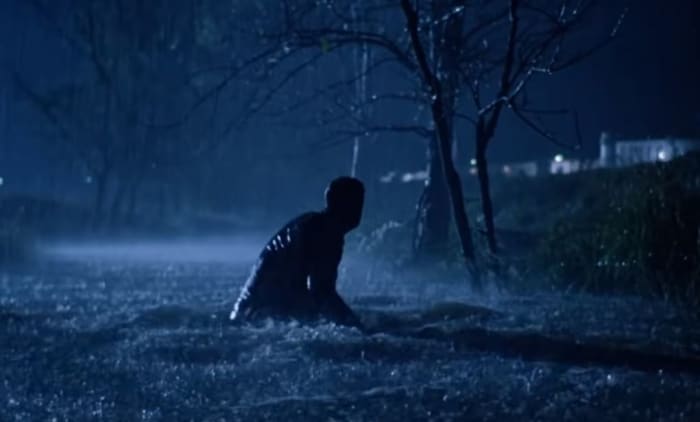
Shawshank Redemption sewer escape

In what’s probably the most famous scene in the film, Andy crawls through 500 yards of sewage before emerging a free man on the other side. “We got a local chemist to test the quality of the water,” said production designer Terence Marsh on the DVD, “and he said this water is absolutely lethal.” “It was cow country,” Robbins grimaced, “enough said.” The only reason the actor agreed to do the scene was that there was a hot shower nearby. Funnily enough, the actual ‘sewage’ was just water, sawdust and chocolate syrup.

3. Freeman’s real-life son has a cameo

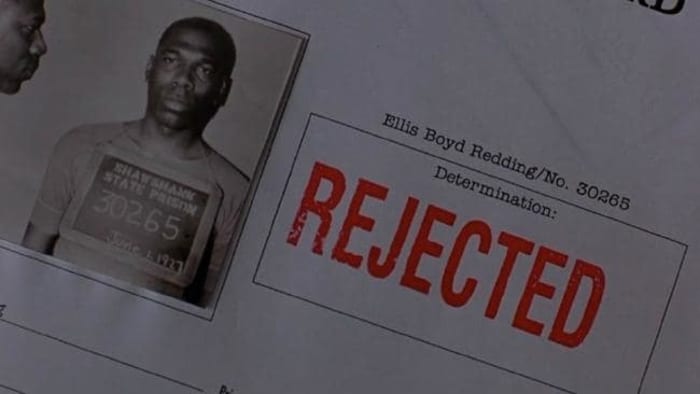
Shawshank parole card Alfonso Freeman

Red pleads for parole multiple times throughout the film, and we are shown a picture of what a young Red (and a young Morgan Freeman) might have looked like. The mugshot bears a strong resemblance for a reason: The picture on the parole papers is actually Freeman’s son, Alfonso. That’s not his only presence in the film either; he’s also a con shouting, “Fresh fish! Fresh fish today! We’re reeling ’em in!”.

4. Red and Andy don’t meet at the end

Shawshank bus original ending

Rather than the happy ending where Red and Andy reunite on the beach, Darabont wanted to end it when Red gets on a bus and goes out to look for him. In later interviews, Darabont said the ending that he’d envisioned was more open, ambiguous note. The production company, Castle Rock, pushed for the ending we got in the film.

5. Freeman was always choice #1

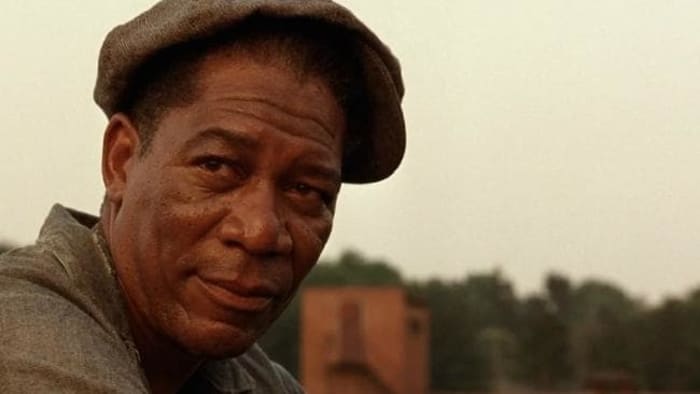
Morgan Freeman The Shawshank Redemption

A number of actors were considered to play the part of Red, including big names such as Clint Eastwood, Harrison Ford, Paul Newman and Robert Redford. In the novella, Stephen King originally wrote the part as a white Irishman. Before the film’s production, however, Darabont already knew he wanted Morgan Freeman.

6. Cruelty to maggots

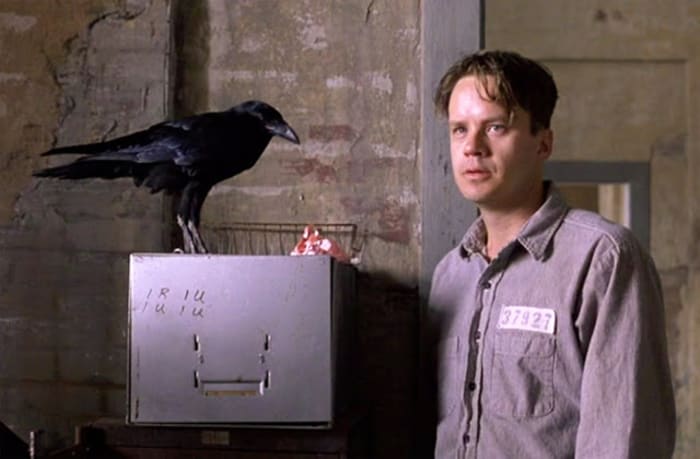
Shawshank Redemption crow

For scenes involving Brooks crow, the American Humane Association was brought in to monitor the scene. Ironically enough, it wasn’t the crow they ended up having issues with. Instead, the AHA objected to the use of a live maggot during a scene where Brooks feeds the bird, citing that it was cruel to kill it. The maggot that made it into the film was already dead of natural causes.

7. The 40 minutes that took 3 weeks

Morgan Freeman recorded the complete voice-over for “The Shawshank Redemption” before filming even began. This was used as a guide track to establish the rhythm of each scene. There was a slight hiss on the track, however, and the sound engineers were unable to remove it. Instead, they had to re-record the entire thing – and this time it took three weeks.

8. Solitary Refinement

Shawshank Redemption solitary confinement

It’s hard to feel in-character when you’re playing an inmate if you’ve never been convicted. For some pretty hardcore method acting, Tim Robbins requested time in solitary confinement to better get a feeling of what the experience is like. “I wanted to go in for a day or two,” Robbins said in an interview, “but they wouldn’t let me for security reasons.” He was in solitary for a couple of hours.

9. That voice

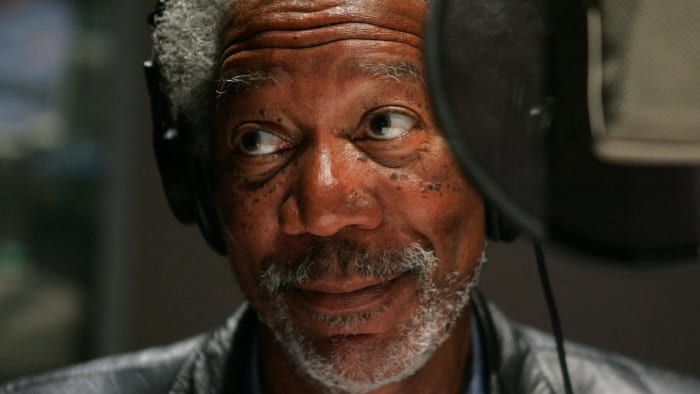
Morgan Freeman sound booth

Morgan Freeman has graced many films with his famous voice, from The Lego Movie to March of the Penguins. “The Shawshank Redemption” was actually his first time narrating. “He’s got the muse in him,” said Robbins. Apparently the experience came very naturally to him!

10. The sound of retribution

Shawshank Warden

The sound effect used towards the end of the film when the corrupt Warden shoots himself is actually the same sound effect as the man stamping ‘approved’ on Red’s paper during his parole hearing. Now that’s the sound of justice being served!

Hopefully these facts will make you enjoy your next viewing even more! Let us know your favorite scene in the comments below, and get busy living!

10 inconceivable facts about The Princess Bride

Discover what you never knew about the action-fantasy-romance-comedy classic.

The Princess BrideFrom swashbuckling to romance to miracles, “The Princess Bride” has something for everybody. There’s a dashing masked hero who’s out to save the princess, an evil hunter vying for the throne, a master swordsman seeking to avenge his father – but there was a lot going on behind the scenes that most viewers wouldn’t know. If you haven’t seen “The Princess Bride,” wake up and smell the iocane powder (or can you? It’s scentless … right?) and watch “The Princess Bride online!”

But let’s not waste any more time. After all, some of you have your country’s 500th anniversary to plan, a wedding to arrange, a wife to murder, and Guilder to frame for it. You’re swamped! So without further ado, here are 10 things you might not have known about this cult classic!

10 inconceivable facts about The Princess Bride

1. Rob Reiner wasn’t the first director to pitch the adaptation

Rob Reiner
William Goldman saw Reiner’s “This is Spinal Tap” and immediately wanted him as director for “The Princess Bride.”

Early in his career, Rob Reiner got the notion to turn William Goldman’s “The Princess Bride” into a film. “It’s a brilliant story by one of America’s greatest writers,” wrote Reiner. “Why wouldn’t everyone just jump at this idea? Little did I know that for 15 years it had been the story that no studio would touch.”

2. The actors learned to swordfight for real

Princess Bride Inigo Westley sword fight
“Why are you smiling?”

During the filming of the sword fight, Reiner wanted full-body shots, as opposed to the typical camera angle from the actor’s point of view. That meant that Elwes and Patinkin had to learn the entire fight choreography for real – no stunt doubles, and both left and right-handed. “My greatest memory and pleasure,” said Patinkin in Elwes’ book about the filming process, “was that we had become proficient enough to improvise on a dime.”

3. The idea came from Goldman’s daughters

William Goldman Oscar
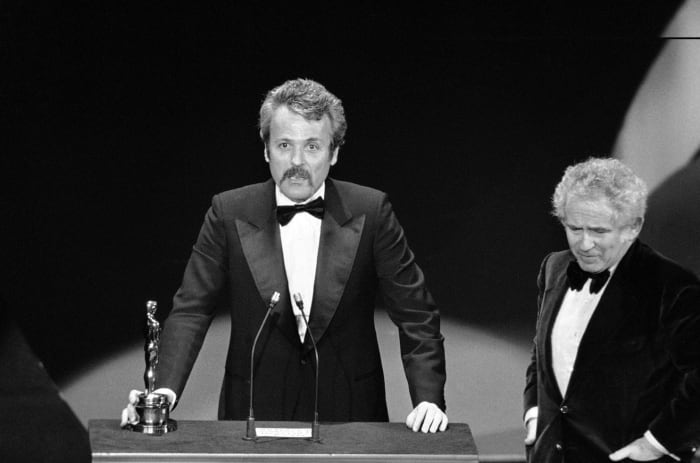
Norman Mailer presents an Academy Award to William Goldman in 1977

Goldman wrote “The Princess Bride” in 1973. He later told Entertainment Weekly that he “had two little daughters, I think they were 7 and 4 at the time, and I said, ‘I’ll write you a story. What do you want it to be about?’ One of them said ‘a princess’ and the other one said ‘a bride.’ I said, ‘That’ll be the title.'”
4. Patinkin took Inigo’s revenge quest personally

Inigo Montoya
Christopher Guest said that during his fight scene he was seriously trying to defend himself from the enthusiastic Patinkin.

“I had lost my own father [to] pancreatic cancer in 1972,” said Patinkin, who was offered any role in the film that he wanted. He felt a very personal connection to the character of Inigo. “I didn’t think about it consciously, but I think that there was a part of me that thought, if I get that man in black, my father will come back. I talked to my dad all the time during filming, and it was very healing for me.”

5. André the Giant learned his lines from a cassette

Princess Bride, Westley, Fezzik
André the Giant’s hand was big enough to fit over Claire Underwood’s entire head.

André the Giant was born in France, and English was never his strong suit. “André read this three-page scene, and I couldn’t understand one word he said,” Reiner recalled. Despite the initial difficulties, Reiner was excited to have him in the cast, saying that he was perfect physically for the part. “So I recorded his entire part on tape, exactly how I wanted him to do it, and he studied the tape. He got pretty good!”

6. The crew had to get an R.O.U.S. out of jail

Princess Bride R.O.U.S.
“Rodents of Unusual Size? They don’t exist.”

The Rodents of Unusual Size were played by men in rat suits, one of whom got into a fight with his wife during the filming, and promptly burned down the kennel that they owned. In order to shoot the scene with him, the crew had to bail him out of jail.

7. “You’re no match for my brains.”

 Princess Bride Vizzini picnic
“Where was I?” “Australia.”

Wallace Shawn, who played Vizzini the Sicilian, held a history degree from Harvard and studied philosophy and economics at Oxford. Despite that, he was very insecure during casting, constantly comparing himself to Danny DeVito, who Reiner originally wanted for the part.

8. Westley actually did fall unconscious

Princess Bride Count Rugen
The infamous six-fingered man.

During the scene in the woods when Westley is captured by Count Rugen (Christopher Guest), the scene is supposed to end with Rugen knocking Westley unconscious with the hilt of his sword. After several unconvincing takes, Elwes told Guest to just go for it and tap him on the head to get the reaction right. Guest tapped a little too hard, and Elwes was actually knocked out! He later woke up in the hospital, and the take made it into the film.

9. Mandy Patinkin only suffered one real injury on set

Princess Bride Miracle Max
William Goldman had to be taken off-set during this scene; he couldn’t stop laughing.

If you assume that injury was during the sword fight, you’d be wrong. The only time Patinkin ever really got hurt was bruising the muscles on one side of his rib cage from holding in his laughter while they were filming Crystal’s scene.

10. Vizzini’s intellect wasn’t the only dizzying thing

Princess Bride Vizzini Buttercup Fezzik
By the end of production, André’s back injuries were severe enough that he couldn’t carry Claire anymore.

Wallace Shawn was deathly afraid of heights, and the most difficult scene for him to film was when Fezzik carried Vizzini and Inigo up the Cliffs of Insanity. To assuage him, André gently patted Shawn’s back and said “I’ll take care of you.”

Hopefully these facts will make your next viewing even more enjoyable. Until then, have fun storming the castle!

If you hate annoying autoplay videos, you need to see this

Firefox update will block autoplay videos with sound and stop slow loading ads

Good old Mozilla. The Mozilla Foundation has built itself a solid reputation for protecting user privacy while offering top-notch web services. We recently saw the introduction of Firefox Send, which offers a free and easy way to send huge files to whoever you want. Firefox though, Mozilla’s ever-present web browser is the not-for-profit foundation’s jewel in the crown. The browser is Google Chrome’s biggest competitor and Mozilla keeps working hard to give it the latest features.

Mozilla Firefox Free Download
7
Mozilla Firefox is a free, open-source web browser. Now with new features, faster and more secure.

Firefox update will block autoplay videos with sound and stop slow loading ads

new Firefox update
Image via: Mozilla

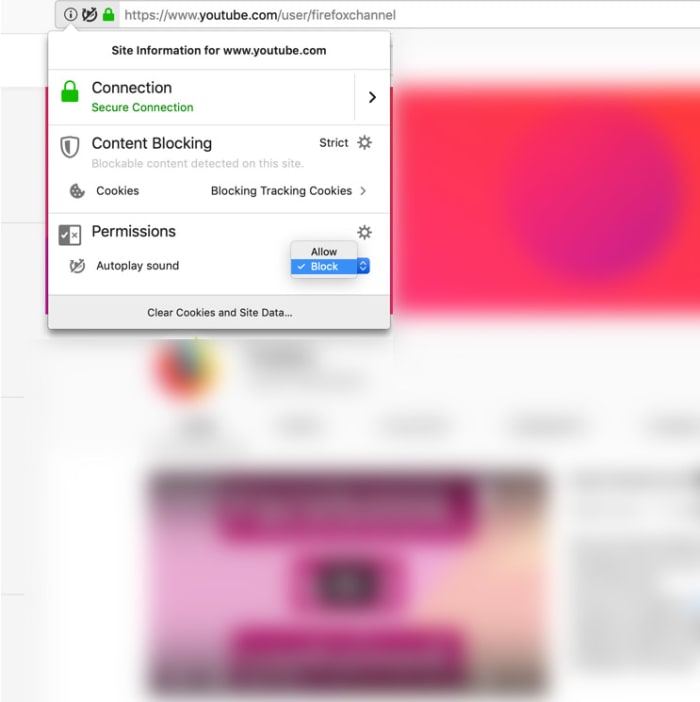
This is now a standard feature – blocking all autoplay videos you come across that play with sound. Videos that autoplay without sound, however, will not be blocked. This means videos that play in your Facebook feed or Twitter feeds will make it through the blockade. This will either be good news or bad news for you, depending on your social media habits.

The new feature was announced in the release notes for the latest Firefox update, Firefox 66, with a couple of scenarios fleshed out. If you think autoplay videos with sound are annoying or if you usually browse the internet in environments were silence is paramount, you’ll be interested in the first scenario.

“Scenario #1 – For anyone who wants peace and quiet on the web:  Go to a site that plays videos or audio, it could be a news site or site known for hosting movies and television shows, the Block Autoplay feature will stop the audio and video from automatically playing. If you want to view the video, simply click on the play button to watch it.”

The second scenario Mozilla highlighted speaks to all you binge watchers out there. Should you be watching your favorite TV shows on Netflix, Hulu, or YouTube (autoplay videos with sound) the new feature won’t block them from playing so you still won’t have to budge from the couch.

block autoplay videos with sound on Firefox
Image via: Mozilla

Google Chrome has had a similar feature for almost a year now, but the feature is limited in scope and a bit tricky. Whereas the new Firefox solution blocks autoplay videos with sound automatically, you have to do a lot of messing around to get it set up on Chrome. Chrome allows autoplay videos with sound from 1,000 popular sites and blocks the rest. To block those 1,00 sites, though, you need to fiddle around with bits of code in the address bar. If you’d like a full tutorial on this, hit us up in the comments.

The Firefox solution works the opposite way to Chrome. By default, all sites are blocked from auto-playing videos with sound, and the onus is on you to allow videos through the default block or turn the block off altogether. You’ll find full instructions on how to do both here.

Mozilla Firefox Free Download
7
Mozilla Firefox is a free, open-source web browser. Now with new features, faster and more secure.

How much data does Netflix use?

Discover how much data Netflix uses and how you can use less.

Netflix is a treat.

More quality TV shows and movies than you could watch in a lifetime, or at least, so it seems. The roster is always changing, which means unless you seriously watch too much TV there will always be something new to watch on Netflix (or something you love so much, you’re happy to watch it again). There is a catch in all this though, and that is data. Consuming video content online uses a lot of data. Let’s a have a little look at just how much data Netflix consumes.

This is how much data Netflix uses

This is how much data Netflix uses

Over on the Netflix Help Page, there is a pretty solid break down of just how much data you use when you’re watching your favorite shows or movies on Netflix. The basic information looks like this:

  • Watching shows or movies on Netflix in standard definition will consume about 1 GB of data for every hour of video you watch.
  • Watching shows or movies on Netflix in High Definition will consume about 3 GB of data for every hour of video you watch.

It is also interesting to note at this point that Netflix points out that streaming and downloading Netflix video consumes about the same amount of data. If you’re outside the house but think you might watch that episode of Kimmy Schmidt more than once, download it.

A deeper look at Netflix data usage

Of course, Netflix offers more than two viewing options. For a start, there is Netflix’s premier subscription package, which includes Ultra HD. If you watch your Netflix videos in Ultra HD, you will consume around 7GB of data for every hour you watch.

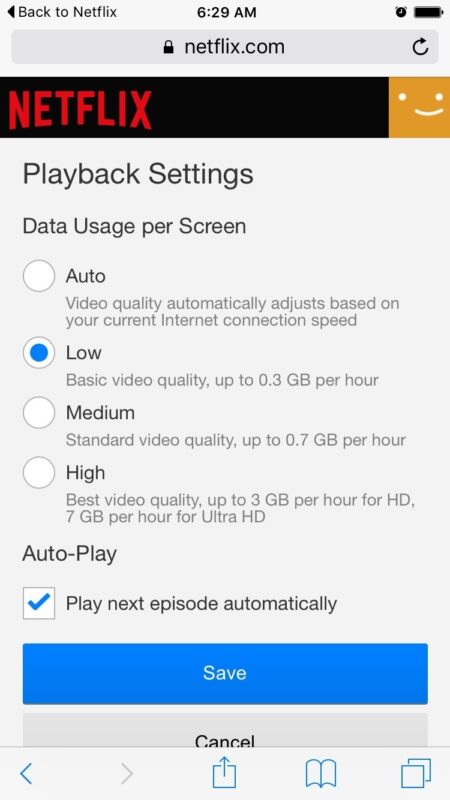
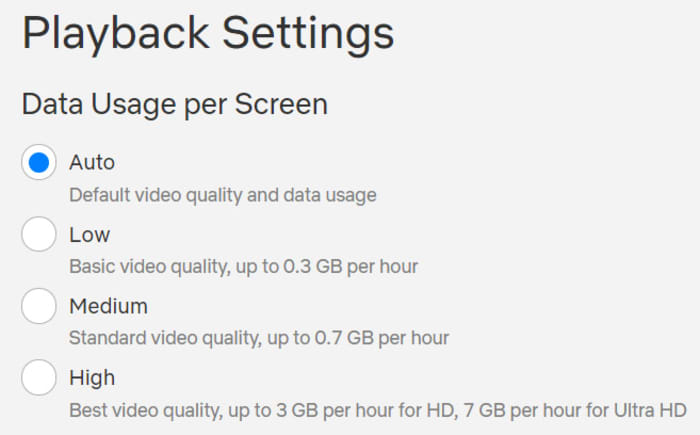
There is still more though, as Netflix also offers users the ability to limit their data usage at home or on a desktop or laptop PC to one of four pre-defined settings. These are:

  • Low – 0.3 GB per hour per device.
  • Medium – SD: 0.7 GB per hour per device.
  • High – Best video quality, up to 3 GB per hour per device for HD, and 7 GB per hour per device for Ultra HD.
  • Auto – Adjusts automatically to deliver the highest possible quality, based on your current internet connection speed.
How to use Netflix’s data limit settings at home

Netflix data usage screen

To enable one of Netflix’s data limiting settings all you have to do is head to Netflix and sign in. Then select the profile you’d like to change your data usage settings for. Once in click Account, then go to My Profile and hit Playback Settings. From there you select the setting you want and hit Save.

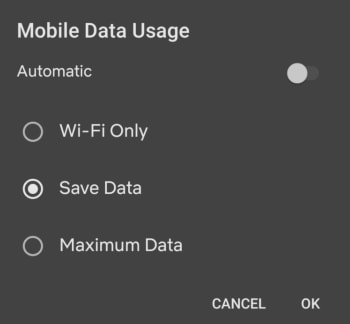
Netflix also offers details on mobile data usage settings that help you change how much data you consume when watching Netflix on a mobile device. These are as follows:

  • Automatic – Netflix will select a data usage setting that balances data usage with good video quality. Currently this will allow you to watch about 4 hours per GB of data.
  • Wi-Fi Only – You will only be able to stream on the device while connected to Wi-Fi.
  • Save Data – Watch about 6 hours per GB of data.
  • Maximum Data – Recommended only if you have an unlimited data plan. This setting will stream at the highest possible quality for your device and the content you are viewing. This may use 1 GB per 20 minutes or more depending on your device and network speeds.
How to use Netflix’s mobile data limit settings

Mobile Netflix data usage screen

To enable one of Netflix’s mobile data settings, open the Netflix app and hit the Menu icon. You then need to tap App Settings, and after that Cellular Data Usage. From there you simply select which of the above settings you want to enable.

All this shows that Netflix gives you quite a bit of control over how much data you will consume when you’re watching your favorite shows and movies with the streaming service. The rule of thumb is 1 GB of data per hour of SD video and 3 GB of data per hour of HD video. There is, however, a lot you can do to alter how much data you use with Netflix and we hope we’ve helped you get to the bottom of it with this guide.

5 Netflix alternatives for streaming movies

Tired of Netflix, Amazon, and Hulu? Try these alternatives to expand your entertainment options.

We’re all well aware of the big names in video streaming: Netflix, Hulu, Amazon. But Netflix is upping its prices. And traditional cable feels like a scam — add in a few additional services and you’re racking up a pretty big entertainment bill before you know it. If you’re looking to watch movies online, there are all kinds of options available to you.

Below, we’ve compiled five solid options for expanding your media library without expanding your budget.

5 great Netflix alternatives for streaming movies

1. TeaTV

TeaTv app

One of the best free movie apps for Firestick, TeaTV operates on the BitTorrent protocol and is a solid alternative to apps like Terrarium TV.

Since the original Terrarium is gone, TeaTV presents a solid alternative for fans of the bygone app.

TeaTV is a movie streaming app that offers users access to thousands of movies and TV episodes at up to 1080p quality. The app is available for Android and may be installed on a jailbroken Firestick for big screen viewing.

Keep in mind, however, TeaTV lives in some murky legal territory. You may want to use a VPN to protect your security and identity when streaming on TeaTV or similar apps.

2. Pluto TV

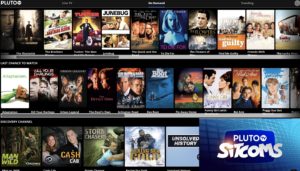
PlutoTV menu

Pluto TV is a live TV-streaming service, similar to apps like Playstation Vue, Vizio’s WatchFree, and Rabbit TV. The app, designed for the cord-cutting crowd is available on just about any device: Android, iOS, web, Firestick, Apple TV, Roku, the list goes on.

Pluto TV’s content lineup consists of a blend of live TV channels, on-demand movies, and weirdly, reruns of “sick day” faves like “Maury” and “Jerry Springer.”

As far as movies go, however, there are some gems in there. Indie flicks like “Adaptation” and cult favorites like “Cube” are nestled among “Hell’s Kitchen” repeats and “Dog the Bounty Hunter.”

So, yes, while Pluto TV is a bit all over the place, it’s worth a look because A: it’s free. And B: it’s a straightforward download: 100 percent legal, no need for a VPN or roundabout pirating process.

3. SnagFilms

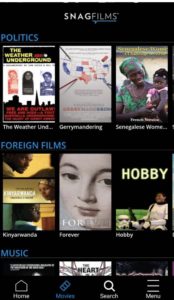
snag films free documentaries

Snagfilms is one of the best movie streaming apps around if you’re interested in documentaries and foreign films. The free app is completely legal and provides the option to download movies for offline viewing or stream directly.

You might be a bit disappointed if you’re hoping to watch new content like the latest TV episodes or newly released movies. That said, the app has the cult classics, festival faves, and climate change documentaries on lock. Worth checking out if you need a break from the Netflix algorithm.

4. Flipps HD

Flipps movies

Flipps HD is a free movie streaming app for Android, Apple TV, Chromecast, and smart TVs like Samsung, LG, and Sony. Like Pluto TV, Flipps comes with access to 100+ channels, a long list of movies, music videos, and YouTube.

What’s cool about Flipps is, the app turns your phone into a remote control. You’ll make your selection on the phone, then tap to stream the content to your connected TV.

5. Kodi

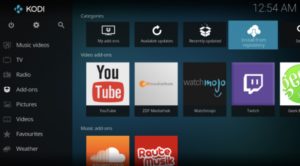
Kodi interface

Kodi, formerly known as XBMC is a streaming platform for all types of content — from illegal cam versions of new releases to TV episodes, music and more. What it is, is an open-sourced media platform that allows users to upload their own media collections — BluRay, DVD, and downloaded files from personal hard drives.

Kodi offers a lot of the same features found in Terrarium TV, provided you download the right plug-ins. Kodi plugins range from the perfectly legal — use it to watch videos on YouTube and Vivo — to the illegal — torrent services and unpaid access to paywall content.

If you do choose to use Kodi for torrenting, you’ll want to invest in a VPN. Check our VPN articles if you’re not sure where to start the hunt.

Wait, what about sites like 123Movies?

123Movies reportedly shut down last year. But, these illegal sites always have a way of bouncing back, and they’re definitely out there. There’s also GoStream and several others. Unfortunately, these apps do present some risks. Aside from the potential legal risks, these apps and sites are hotbeds for malware. Unless you have some crazy virus protection in place, steer clear.

In the end, you can cobble together a diverse range of viewing options by exploring the wide array of free streaming services. Tread carefully with Kodi or TeaTV, though and invest in a VPN before catching up on those blockbusters.