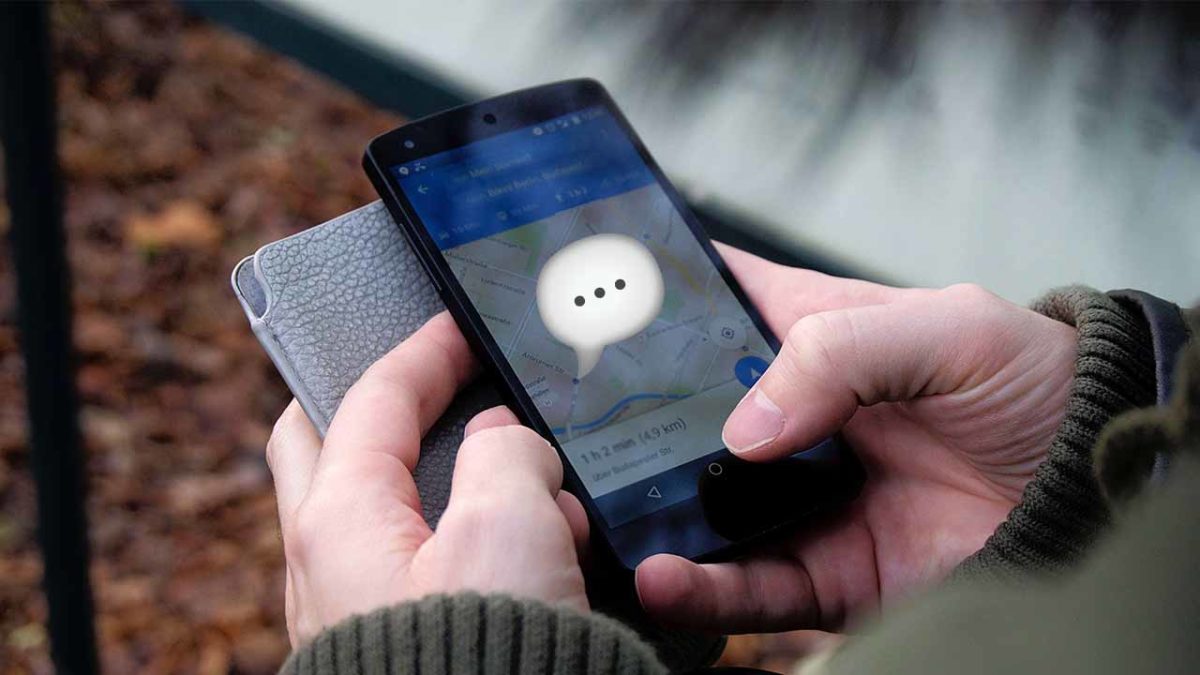
Google Maps update will help you get to work on time

Accident and incident reporting coming to Google Maps.

The team behind Google Maps seems to have been working overtime in recent months. We’ve seen a handful of updates that have turned Maps into a great app for searching for businesses in your area and then communicating with them once you’ve found what you are looking for. We’ve also seen updates that have improved the driving experience for people using Google Maps as their navigation app. Today we can tell you about a new feature update that falls into the second category.

Google Maps Download Google Maps
7

Accident and incident reporting coming to Google Maps

Like Facebook, which owns many different social networks and messaging apps, like Instagram and WhatsApp, Google owns more than one navigation app to help users get where they are going. As well as the famous Google Maps, the other major navigation product owned by Google is Waze. The key feature that distinguishes Waze from Google Maps is its crowdsourced incident reporting, which allows it to offer up to date news on all the traffic incidents users might run into as they attempt to get from A to B.

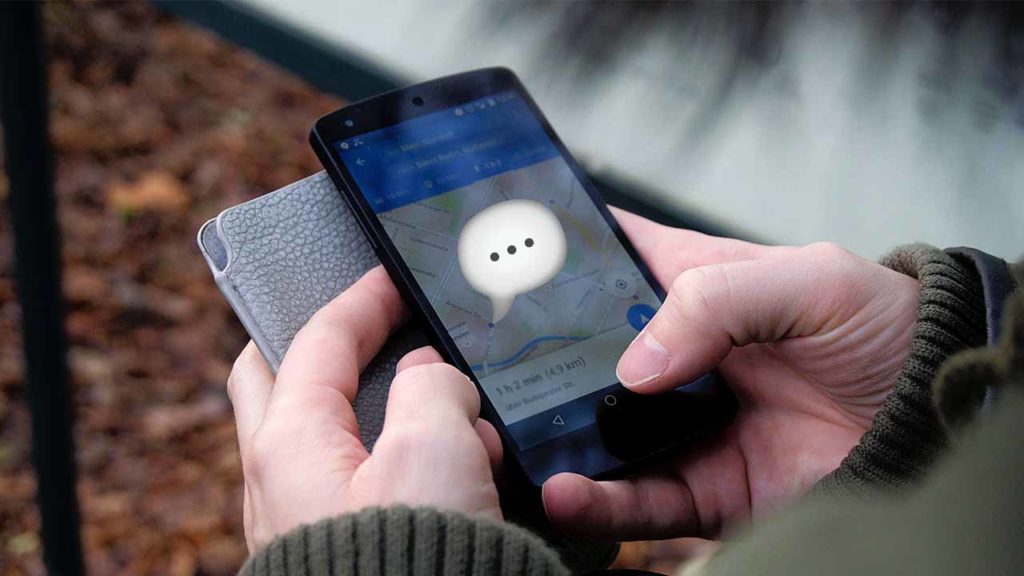
According to Android Police and BGR, Google is working on bringing this Waze feature to Google Maps. Screenshots published by Android Police show a new button, found when using Google Maps Navigation. Just below the volume button for navigation voice commands, you’ll soon be able to find the new speech bubble with a plus sign button, which will take you to the Add a report menu. From here you’ll be able to file an incident report about any traffic-related issues you encounter on your route.
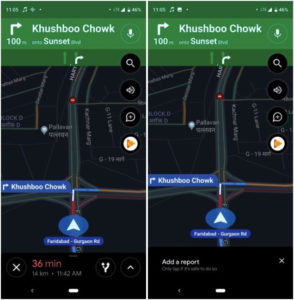
new accident reporting for Google Maps

For now, this feature remains inactive, but Android Police report that it is showing up in a number of countries around the world. Although it does appear, it doesn’t work. There could be several reasons for this type of limited roll-out; it may be that Google has been running tests on the new feature. It could turn out that the roll-out was accidental during a testing phase.

It has long been rumored that Google has been working on an incident reporting feature for Google Maps. Waze users are able to report both accidents and speed traps and leaks in the past have indicated that Google wanted to bring the functionality to Google Maps, too. With a lot of new features arriving on Google Maps in the last few months, and this latest leak, it seems that Google has finally decided to pull the trigger on this Waze-like feature.

When we hear more about a wider roll-out of a fully functional incident reporting feature for Google Maps, we’ll let you know.
What to do if Google Maps says you’ve won a prize and asks for your location

Google Maps spam notifications asking for your location need to be ignored

spam location requests on google maps

At Softonic, we keep you up to date about all the latest digital threats. We want to help you use your PCs, smartphones, and tablets safely by staying one step ahead of the people who are trying to undermine you.

One particular method that the hackers out there have in their arsenal is the phishing scam, which sees them trying to trick you into believing a fake site, email, link etc. is legitimate. If they can do this, they may be able to install malware on your device, steal your personal information, or worse. The trick with phishing scams is to make the fake offering look as realistic as possible and a new strange phishing scam has been turning up on Google Maps that could have some worrying implications for the future.

Google Maps spam notifications asking for your location need to be ignored

Users on Reddit have been talking about strange messages they’ve been receiving on Google Maps. The notifications tell the user they’ve won a prize. They say things like “You Have Received a Free Prize from Google,” “You Have Received a Free Prize,”  “Congratulations for Winning Pixel.” When users then click on the links, they are asked to share their location.

The problem with this is that normally only people who you have previously shared your location with can ask for your location. Something is not right.

These requests are strange as they don’t seem to offer a backdoor into the users’ devices. There are clear security issues involved, however, in criminals knowing your whereabouts. If hackers are working on ways to bypass location sharing security protocols, we could see some serious security issues arising in the future.

The other puzzling issue about these Google Maps spam location requests is that nobody can figure out how they are being generated. Several users have hypothesized that it could be related to the Nearby me feature, but nobody knows for sure. One user investigated the included link and followed it to three domains. After sharing screenshots of his investigation with Google, however, he never heard back.

With Google clearly trying to turn Google Maps into a business directory, with increased features, these types of scam will not be welcome on the app. It is strange that Google hasn’t taken affirmative action against this type of activity. If these types of messages continue or become more prevalent, we should expect to see Google take action.

In the meantime, if you are worried about your online security, check our guide below, which will show you how to keep yourself safe online.

Google Maps update helps drivers

Google Maps and Google Assistant are teaming with a navigation specific update

update for drivers on google maps

Recently we’ve seen a flurry of updates to both Google Maps and Google Assistant. The Maps updates have been adding more and more features that don’t actually have anything to do with Maps. A new messaging feature and the ability to add hashtags to businesses have turned Maps into a formidable business directory. For Assistant, the updates have been spread across a variety of areas, as you’d expect from a product that is supposed to be generally intelligent rather than specialize in one particular area.

There is a core part of both apps, however, that that make them perfect teammates. Navigation is now a key part of Google Maps and voice control is such an important of Google Assistant that it is taken for granted. With Assistant being able to easily respond to voice queries, it offers a great way for you to get the information you need, or open up a particular app while you are driving. This raises a few issues, however, but Google is trying to address them in a new update for Google Maps.

Google Assistant on an Android smartphone has its own visual signature. When you call out “Hey, Google…” it opens up a dialog box where you can talk to Assistant and it can display the results to your queries. Even on its own this could be distracting to somebody who is driving a car but if you add the fact that this could also interrupt the navigation instructions that Google Maps is displaying, the problem grows. Even a handsfree experience can still cause dangerous problems for a driver.

Google Maps and Google Assistant are teaming with a navigation specific update

To address the fact that Maps and Assistant could work so well together yet could also cause dangerous distractions for drivers, Google has released a new update for Google Maps. The feature was first mentioned at Google’s I/O conference back in May, when Google said it would have a “lower visual profile” that wouldn’t distract drivers. The update is now live, and users have been taking to social media to describe an experience that fits with Google’s early description.

All Assistant commands now run in the background and the user always stays in Google Maps. You can now ask Google Assistant to send a text message, play music, and even call people without having to leave Google Maps or take your eyes off the road. According to one user on Reddit, calls happen seamlessly without the Phone app opening up on the screen. To initiate these commands all you have to do is say the Google command words or hit the multi-colored microphone found in the top-right of the screen when navigation is running.

This update makes Google Maps navigation a much richer and safer app. Download the latest update to Google Maps to give it a try.

Google Maps: Look out for this scam targeting your bank

Hackers are changing the contact details of banks on Google Maps to try and catch you out

Scammers targeting banks on google maps

We recently learned exciting news about a Google Maps update that makes it easier for you to contact the businesses you need to use from inside the Google Maps app. Messages is a brand new feature that opens up a whole new world of functionality to Google Maps and pits it against other big apps like Facebook Messenger and the fairly new WhatsApp Business. Now we have to bring you news of new way that scammers are targeting banks on Google Maps

Google Maps Download Google Maps
7

Hackers are changing the contact details of banks on Google Maps to try and trip you up

Google Maps allows users to submit changes and corrections to listings on the navigation app. This allows fraudsters to change the contact details of financial institutions like banks so that when customers try to call or message their banks the fraudsters can intercept the correspondence. With the first interactions with financial institutions always being confirming security details on the account, this leaves customers very vulnerable to having their accounts compromised.

This scam was first reported in India and picked by local newspaper The Hindu. After receiving more than three complaints from the Bank of India, Police in the state of Maharashtra notified Google and put out a local warning relating to the scam. There is nothing stopping scammers in other parts of the world from trying the scam in their area.

In the story reported by The Hindu, Google acknowledged the problem but didn’t mention any specific fix. A Google spokesperson said, “Overall, allowing users to suggest edits provides comprehensive and up-to-date info, but we recognise there may be occasional inaccuracies or bad edits suggested by them. When this happens, we do our best to address the issue as quickly as possible. The Google Safety Center outlines tips to help consumers stay safe online.”

There doesn’t seem to be any sort of automatic defense against this problem in development, but Google will act quickly whenever an incident comes to its attention.

How to stay safe

This all means then that we need to be extra careful when we’re searching online for contact details to financial institutions like banks. If you do find yourself looking for a phone number online, don’t trust it unless the number is also listed on the bank’s official website. Should you come across the number through Google Maps or some other third-party website, a simple Google search including the number and the name of the financial institution in question should yield the contact page on the official website. If it doesn’t, you should suspect the number in question and think about reporting it.

For more tips on consumer safety online, check out the Google Safety Center here.

Google Maps copies Instagram with this useful update

You can now include hashtags in your Google Maps business reviews

Google Maps

Google has been working hard on updating Maps recently. Most recently we’ve seen an update to Maps’ Estimated Time of Arrival feature and a new messaging feature for contacting businesses from within the Maps app. It now seems that Google has rolled a new update for Maps that will make it easier for users to find businesses that other people have recommended.

Google Maps Download Google Maps
7

You can now include hashtags in your Google Maps business reviews

According to a report by TechCrunch, Google has confirmed that support for hashtags in Google Maps reviews rolled out to Android devices over a week ago.

The search giant recommends that users add up to five hashtags per review and put them after the text to make the reviews easier to read. The feature had previously only been released to members of Google Maps’ Local Guides program, which offers bonuses and rewards to people who share images and information about the places they visit and the businesses they use. As well as including hashtags in new reviews, Guides have been told that they can go back and add hashtags to the old reviews they made in the past.

The obvious contender for hashtags here is for restaurant reviews. Users will be able to let other users know certain aspects about the food and services certain places can offer, like if they are #vegetarian friendly or serve #greatburgers. Obviously, however, there is much further scope for adding useful hashtags to certain businesses. Wheelchair friendly would be an excellent hashtag and Google recommended #goodforselfies or #sunsetviews as good examples of what they might be used for. Google was keen to point out to Tech Crunch though, that the hashtags should be specific and useful. Generic terms like #love won’t offer anything to other users and so should be avoided.

You should start seeing hashtags in reviews as more and more users start to use the new feature. They’ll appear in blue and will be clickable links. Clicking on a hashtag will take you to a list of other nearby places that share the same hashtag. This way, Google Maps will now work as a discovery platform as well as a place for finding recommendations for other like-minded people.

This extension into more typical social network territory adds another notch to Google Maps’ belt as it moves to take on the likes of the new WhatsApp Business app, and Facebook Pages and Messenger. Add to this the new Messages tab and it is plain to see just how far Google Maps has come over the last few weeks and months.

Did Google Maps just become a messaging app?

Google Maps will soon have a “Messages tab” for contacting businesses

Message businesses from Google Maps

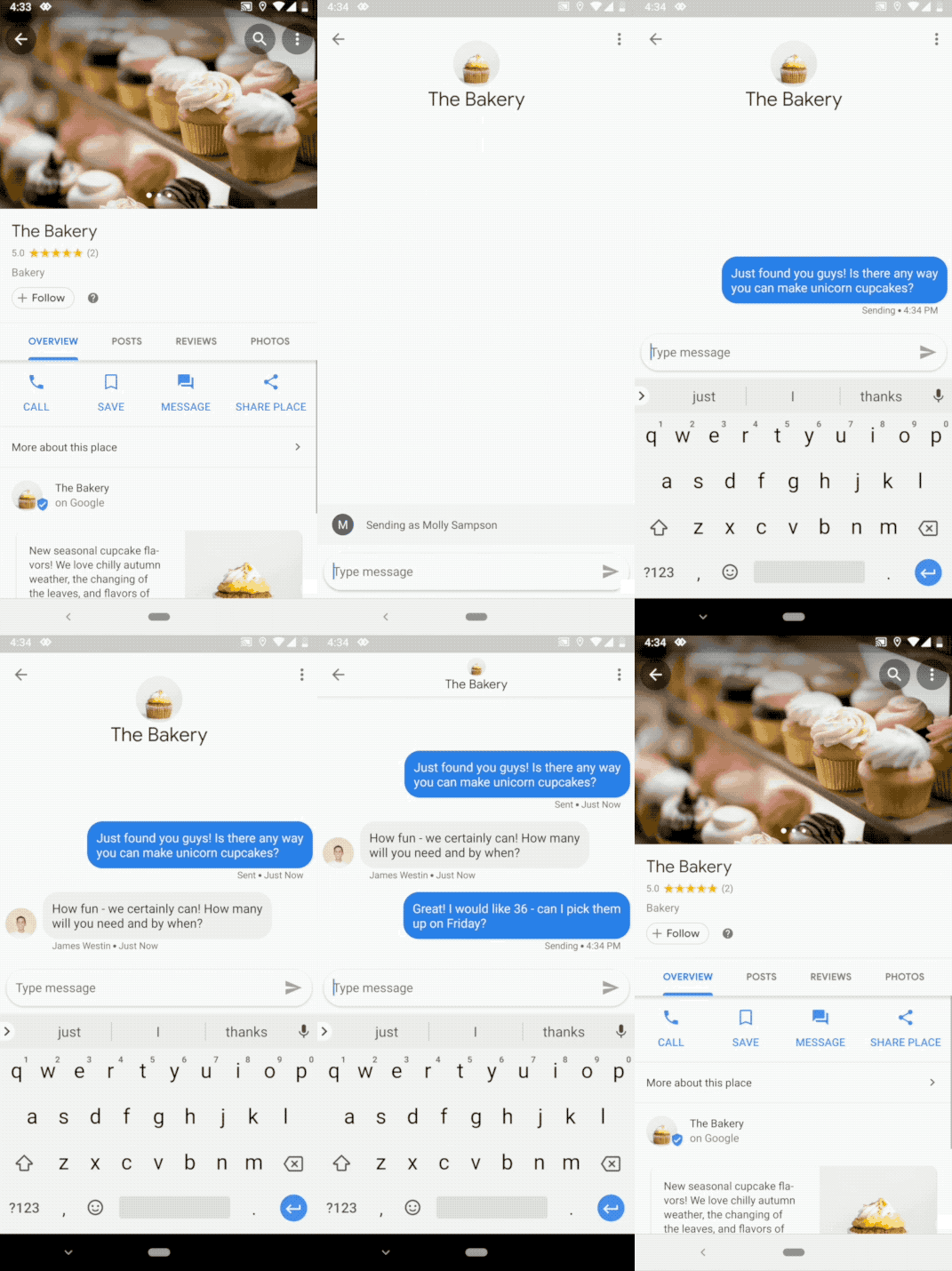
Google Maps is a great way to find businesses, shops, and services that you may need to use for whatever reason. All you have to do is search for something like a bakery and then Maps will show you pins indicating all of the bakeries found in the area of the map you are looking at. These pins contain a lot of relevant information and even contact details, but now Google wants to open up a new and easier pathway to connect with the businesses you need right there in the Google Maps app.

Google Maps Download Free ►
7

Google Maps will soon have a “Messages tab” for contacting businesses

Until now, if the business had registered a phone number on the internet, Google would offer the chance to call the business from within Google Maps. All this does is open up your caller app and enter the phone number into it. You still have to place the call yourself and need to use minutes from your cell plan to pay for it. When the new Google Maps update rolls out, this will no longer be the case. You’ll still be able to make calls that way, but there’ll be an easier solution available.

Once you receive the update on your phone, you’ll see a message button on every business that has enabled messages. Tapping this button will open a chat and then you’ll be able to chat with them as you would on any other messaging app.

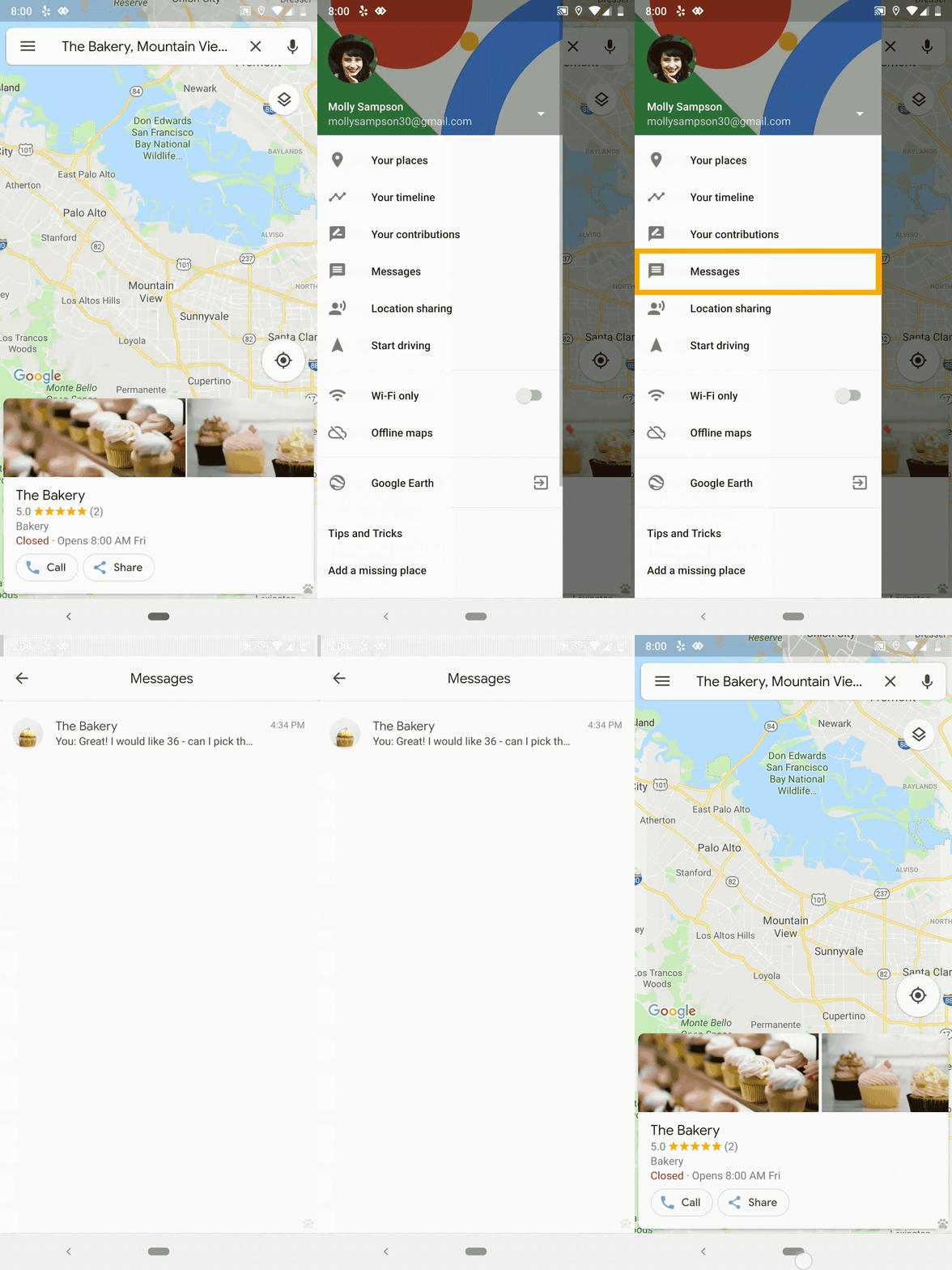
Once you’ve started messaging businesses from Google Maps, you’ll see a brand new tab when you open up the Google Maps settings menu. Fourth down in the list, just below Your contributions, you’ll see the Messages button. Unsurprisingly, this is where you will find all of the correspondence you’ve been keeping with businesses through Google Maps.

This is a big announcement for Google Maps that puts it in clear competition with WhatsApp’s new app, WhatsApp Business. WhatsApp Business is the latest way that WhatsApp is trying to capitalize on its massive user base.

WhatsApp Business Download Free ►
8

Although it offers an effective way to communicate with customers, it charges business users rates that are comparable to regular SMS charges to contact them. As well as offering a comprehensive maps service to allow people to visualize each business location, there is no mention of a charge for businesses to use the service. This competition between WhatsApp and Google Maps could get interesting.

Business owners looking to take advantage of the Google Maps business messaging service should download the new Google My Business app.


Google brings Android to cars

Are you ready for Android to be built into your car? Google is making its move.

If you’re an Android user who spends a lot of time in your car and on your phone, we have great news for you. On September 19, Google announced a partnership with auto manufacturers Renault, Nissan and Mitsubishi to install Google Maps, Google Play Store, and Google Assistant in cars.

Rolling out in 2021, you’ll be able to access these apps on the road, and other apps already on your Android device. This makes things a lot easier for people who drive a lot for work. With Google Assistant, you can stay in the loop with breaking news and developments, make calls, and send texts hands-free.

Google Maps Download Google Maps
7

The auto industry has struggled with whether or not they should hand over the keys to their tech rivals over concerns about the likelihood of digital dashboards and complex car systems becoming buggy. If our phones get glitchy, most times it’s an easy fix, but if a car’s GPS or speedometer has issues it poses a bigger risk.

Another worry was exactly how much control Google would have once given access to cars. To curb the fears, Google offered their services for free.  As for the question of the safety of personal data collected from the apps you access, Google will ask your permission first before using or storing the data.

Google Assistant Download now
8

In the golden age of technology, most people expect our modern devices to come with the ability to keep us connected. With the launch of this partnership, Google is happy to meet the demand.


Yes, Google Maps is sending you notifications on your PC

Google Maps on desktop now offers real-time notifications when it is time to leave for your appointments.

Google is good at connecting dots. The dots Google connects are all of the snippets of information about your life that build up across Google products. The big G can take info including your daily schedule from Google calendar, appointments from Gmail, and whatever else it can get its hands on. Google also likes to use environmental information like weather and traffic and connect that up with your private data so it can give you better recommendations and notifications.

Google Maps desktop time to leave notifications
Google Maps on desktop can now tell you when you need to leave to arrive at your appointments on time

Last week, we saw an update to Google Assistant, which puts all these connected dots together in a more visual manner. Now we’re seeing an update to Google Maps on desktop that allows Maps to update you on where you’re supposed to be and how you’re supposed to get there. Google maps will now send you notifications to tell you when you need to leave to make your appointments.

Google Maps Download Google Maps
7

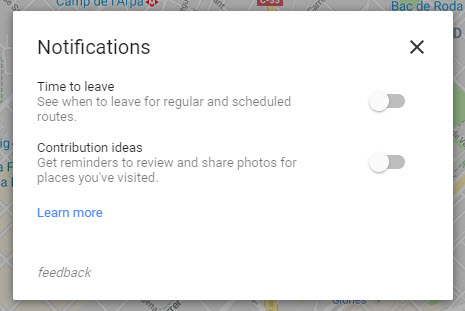
The new update to Google Maps allows it to check your location against events in your calendar. If the events have a location included then maps will look at traffic information, calculate how long it will take you to arrive and then send you a notification when it is time to leave. This notification will also include a link to directions. The notification will then remain active until you disable it.

To activate the new Time to leave notifications for Google Maps on desktop you need to click on the settings icon in the top left-hand side of the Google Maps page. From there go to Notifications and toggle Time to leave to On. You may also have to make some changes to your Web & App Activity and Location History settings to use the new feature. If you do, Google will take you to them once you turn on Time to leave.

9 out-of-this-world features on your favorite apps that NOBODY knows about

Our favorite apps are updated almost every week. The bad news is that these updates usually go unnoticed. Did you know that Facebook helps you look for public Wi-Fi? Or that Gmail can write your emails for you? So you don’t miss out on the best new features on your favorite apps, we’ve compiled the best updates in recent months. 

1. Gmail writes your emails for you

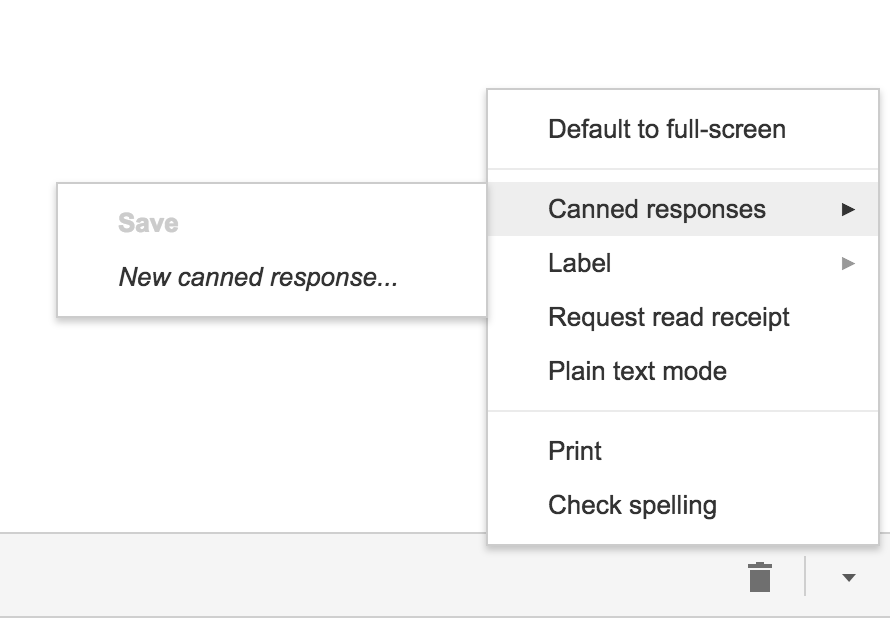
Gmail offers an option called “Canned Responses.” This feature saves messages or phrases that you use most often and suggests them when you draft an email, saving you time.

Want to enable this option? You have to go to the settings section in Gmail called Labs. Gmail Labs is a testing center with “far-fetched” experiments (according to Google) of all kinds. You can access Gmail Labs here.

The feature you’re looking for is called “Canned Responses” and all you have to do is click on “Enable” and then “Save Changes” at the bottom of the page. 

Next time you compose an email you’d like to save as a canned response, click the little triangle on the lower right-hand side of the screen. That opens a menu with an option for “Canned responses.” Just move over and click “Save” if you’d like to save that email so you can fire it off again someday.

You may have noticed a basic AI version of this at the bottom of messages you read on the Gmail app on your phone. They look like this:

2. Gmail’s most invisible feature

It’s unlikely that you’ve noticed this Gmail update because it’s designed to go unseen.

Haven’t you noticed lately that you’ve received fewer spam emails with suspicious links? Gmail has enhanced its ability to detect and delete this type of email even before it reaches your inbox. It’s not yet 100 percent foolproof, but it’ll keep you safer than before.

3. Make wish lists on Google Maps

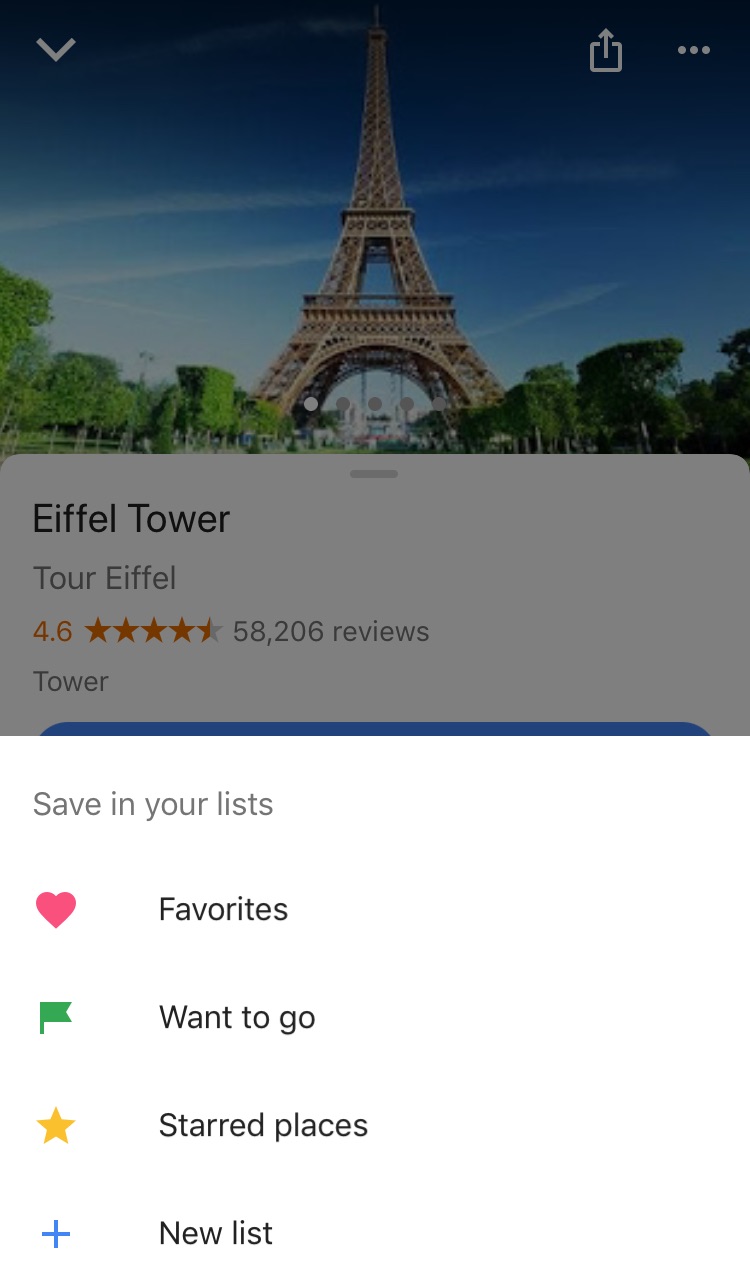
Google Maps lets you make lists of places you’d like to visit. Imagine that you’re planning a vacation to Paris. You can make a list of those museums, restaurants, and attractions that you’d like to visit. And you can share the list with those you’re traveling with. Or with anybody, for that matter!

Google Maps users are making the most of this feature to share recommended places or themed attractions. To use this feature, it’s as easy as pinpointing a place in the app, clicking “Save” and choosing the list with the green label that says “Want to go.”

4. Share anything with WhatsApp

WhatsApp lets you share any file type (mp3, videos…) between contacts provided that these files do not exceed 100MB in size. Instead of sending 100 photos one-by-one, why don’t you send them as a .zip file, for example?

5. WhatsApp gets their act together…kind of

It’s taken a while, but WhatsApp now has filters, like Instagram and the rest! At the time of writing this article, there are just five filters and they’re only available on iOS; no news on when they’ll arrive on Android.

6. Facebook helps you find Wi-Fi

Facebook has a relatively new feature called “Find Wi-Fi.” It’s a little bit hidden. First you have to click on the three horizontal lines on the lower menu bar. Click on “See More.” There you’ll find it and you can enable “Find Wi-Fi.”

After enabling it, Facebook will show you a map with the closest Wi-Fi hotspots as well as details about these hotspots, like which businesses they belong to.

7. Download movies and TV series from Netflix

Taking a plane somewhere? Bring your tablet packed with your favorite Netflix movies and shows! Not all Netflix offerings are available: pay attention to the download icon that appears on the TV series or movie listing. Amazon Prime also offers this feature.

8. Spotify Codes

Spotify has a feature called Spotify Codes. Have you noticed that below songs, playlists, and albums, there is a barcode in the shape of a sound wave? If you don’t see it, click on the three dots to access Spotify’s advanced options.

You can exchange these sound codes with your friends and they only have to open the Camera feature within Spotify for apps to scan them.

Also, Spotify Codes are an excellent way for artists to become known, as they can insert their codes on social media so the rest of the world can quickly access their songs.

9. Muting on Twitter

Got some people on Twitter who won’t stop spoiling your favorite TV series or spewing goofy conspiracy theories? Don’t want to block them because sometimes you talk to them and some of their Tweets are interesting?

Twitter now lets you mute whoever you want. Muting means that their messages will not appear on your feed, all without their knowledge. You’ll receive notifications if they mention you in a Tweet or if you receive direct messages from them. And you can check their Tweets when you feel like it.

Muting is as easy as clicking on the “down arrow” on one of their Tweets. You’ll see this option, among others.

Have you found any hidden features you’d like to share? Let us know in the comments!


Google Maps on iOS now looks a little friendlier

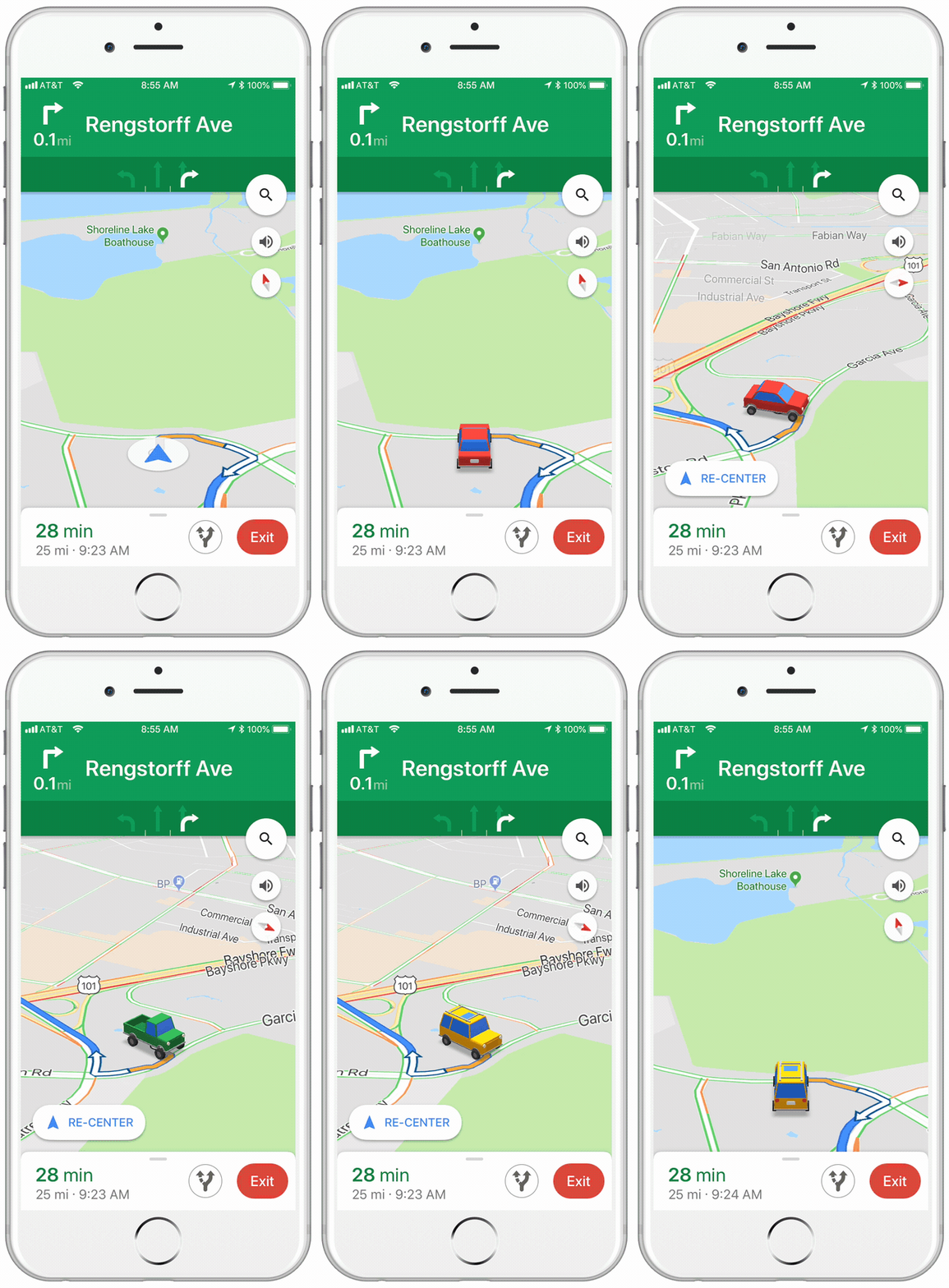
If you have an iPhone, this tiny little update to the iOS version of Google Maps, might just make your next car journey a little cheerier. Instead of the cold blue arrow that usually represents you on the map, when you’re receiving turn by turn directions, you can choose a car instead.

Image via: Google Keyword

The icons are a little cartoony, and there are only three options to choose from, but it makes a welcome change. You can choose from a sedan, a pickup truck, or an SUV.

All you have to do to select your vehicle is tap on the blue arrow, next time you’re in navigation mode.

Google Maps Download Google Maps
7

It wasn’t too long ago that Google allowed to drive around Google Maps as Super Mario in his Go Kart. That change was temporary, however, whereas this new one seems to be a more permanent addition to Google Maps. There is no word from Google about whether this feature will come to the Android version of the app.