
The next-gen feature that makes Windows Defender Antivirus even stronger

Microsoft Windows Defender Antivirus can now run in a sandbox, but what does that actually mean?

Why is it important that Windows Defender Antivirus can run in a sandbox?

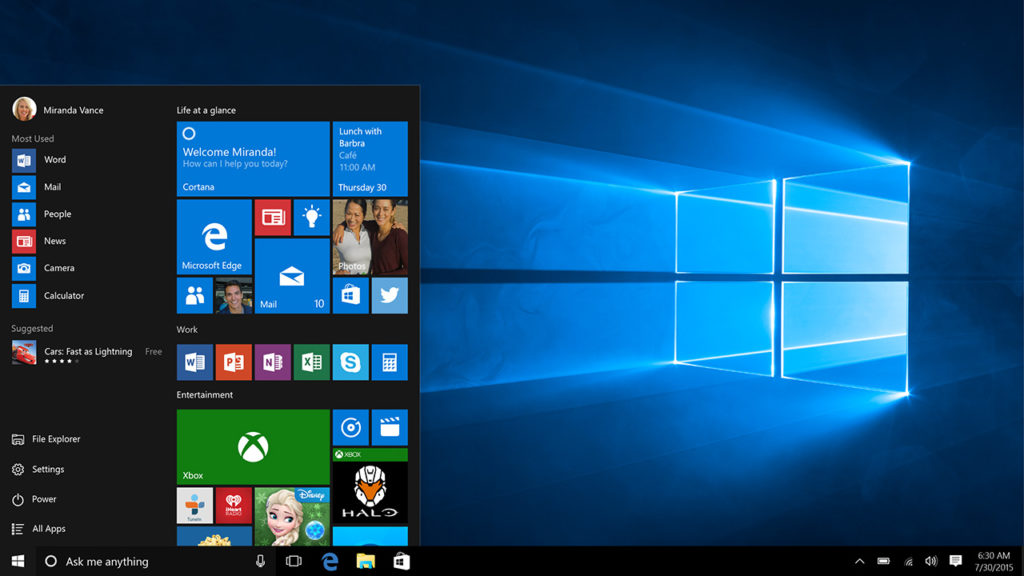
Microsoft has really done an excellent job with the security features it has built into Windows 10. Windows Defender is now so well regarded that some experts say you don’t need a premium antivirus to protect your device, Defender is enough. Over the last few days, this claim has gained even more credibility as Microsoft has announced the introduction of a sandbox mode to Windows Defender Antivirus. Let’s take a look at what this actually means.
Windows Defender Free Download ►
7

What is a sandbox in an antivirus program?

A sandbox is a simpler way of saying a restrictive process environment. This means that Windows Defender can run itself separate from the rest of Windows. As antivirus programs often have high levels of permission on devices and access to key systems they themselves can end up being high value targets for hackers and thieves. Running separate from the rest of Windows provides an added layer of security as it means any successful attempt to compromise Windows Defender Antivirus does not put the rest of the system at risk.

According to Microsoft, the addition of a sandbox to Windows Defender comes from consultation with industry experts and wasn’t easy to achieve.  “Putting Windows Defender Antivirus in a restrictive process execution environment is a direct result of feedback that we received from the security industry and the research community. It was a complex undertaking: we had to carefully study the implications of such an enhancement on performance and functionality.” Although there have been no reported incidents of malicious code taking advantage of Defender’s high system privileges, Microsoft believed the possibility, as raised by the research community, was enough to warrant action.

The addition of a sandbox sets Windows Defender Antivirus apart from all other free antivirus programs. Microsoft claims Defender is the first complete antivirus solution.

For now, though, this new powerful feature is only available for members of Microsoft’s Insider Program, which is Microsoft’s beta testing community for new Windows 10 features. You may remember that it was members of the Insider Program who Microsoft ignored when they pushed out the recent October 2018 update that ended up deleting user’s files.

With a lot of bad stories relating to Microsoft hitting the news recently, like the recent Windows 10 update scandal, it is good to see Microsoft moving forward positively on a user protection issue. Not only is it good for the company’s image, ultimately, this is great news for all Windows 10 users who now have less of a security headache to deal with. As Windows Defender Antivirus moves towards being the complete antivirus solution some people have been calling it for some time now, users can breathe easier knowing their systems will be safe thanks to Microsoft’s efforts and a bit of a personal common sense.
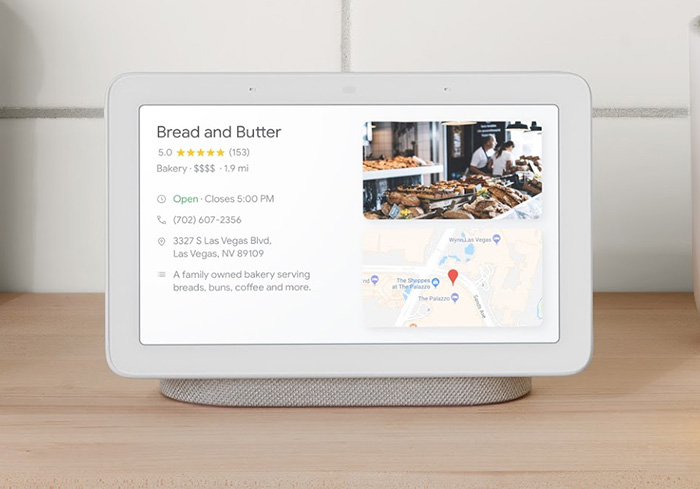
How secure is the Google Home Hub?

Is the Google Home Hub a secure product?

Google Home Hub security update

The Home Hub is Google’s first smart speaker to come with a screen. It works seamlessly with Google’s other products, which means it has some very interesting features. This has impressed almost everybody who has had a chance to play around with it and the Home Hub has subsequently been getting rave reviews across the internet. One person who hasn’t been impressed, however, is security advocate Jerry Gamblin. In a blog post, Gamblin has raised a rather serious security issue with the Google Home Hub so we thought we’d take a look at how secure Google’s latest product really is.

Is the Google Home Hub a secure product?

Surprisingly, the Google Home Hub doesn’t run on Android. Instead, the Home Hub runs on a version of the Google Cast software the company developed for use with its Chromecast products. According to Gamblin, this decision has led to a product that is “beyond dismal” at protecting user privacy and that is vulnerable to third-parties taking “near full remote unauthenticated control.”

In Gamblin’s very technical blog post he showed that he was able to reboot the device remotely, delete the saved Wi-Fi networks, and disable all notifications. If done correctly, he believes these vulnerabilities could be used to commandeer the device, turning it into a potential listening device and putting all user information at great risk. Gamblin’s research also discovered that Google has known about these vulnerabilities for a long time and still not acted on them. This last point is why he, as an independent security researcher, decided to go public with his discoveries rather than contact Google about the potential holes in their security.

Since Gamblin released all of his findings, many news outlets picked up the story that Google’s Home hub is an unsecured device. This has caused Google to react quickly and refute the claims. In a statement to Android Authority, Google said:

“All Google Home devices are designed with user security and privacy top of mind and use a hardware-protected boot mechanism to ensure that only Google-authenticated code is used on the device. In addition, any communication carrying user information is authenticated and encrypted. A recent claim about security on Google Home Hub is inaccurate. The APIs mentioned in this claim are used by mobile apps to configure the device and are only accessible when those apps and the Google Home device are on the same Wi-Fi network. Despite what’s been claimed, there is no evidence that user information is at risk.”

Google is saying that what Gamblin has discovered is true, but that he has missed one small point. As the Home Hub is supposed to be a control and display unit it needs to communicate with other smart objects connected to the Wi-Fi network. Gamblin was able to execute several worrying commands but only because his computer had been authorized to work on the same Wi-Fi network as his Google Home Hub. A hacker would not be able to execute the same commands unless he already had access to the home Wi-Fi network. This would explain why Google hasn’t acted on the issues Gamblin highlighted.

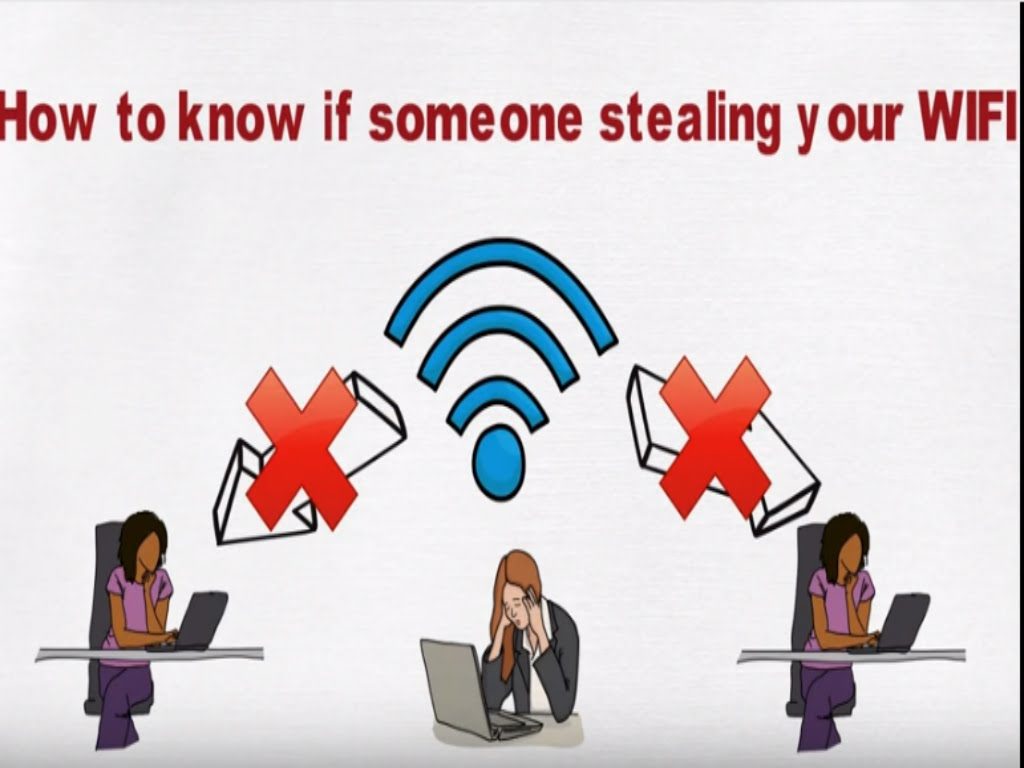
In answer to the original question then, the Google Home Hub is as secure as your home Wi-Fi network. For tips on how to boost your home Wi-Fi network security, check out our guide below.

Hackers find a scary new way to target new Windows 10 users

The Bing search engine is showing up malicious and dangerous ads for search terms like “download chrome”

Microsoft Edge is a good browser. It is miles ahead of the Internet Explorer it replaced and Edge even does well when compared against modern browsers like Google Chrome or Mozilla Firefox. For many users though, this won’t matter.  Years of familiarity with their browser of choice means they’re unlikely to change to a browser like Edge, which was quite late to the game. This means that whenever they buy a new PC or laptop, or update their operating system to Windows 10, the default Edge web browser has one task: to download Chrome. This is a problem.

The Bing search engine is showing up malicious and dangerous ads for search terms like “download chrome”

Windows 10 bug Microsoft Edge Google Chrome Download
Be careful if you’re going to use Microsoft Edge to download Google Chrome

The issue arises because we’ve all become accustomed to typing basic phrases into the address bar when we want something rather than typing in complete domain names. Hackers know that we’re like this and they set up traps accordingly. They can set up fake sites on authentic sounding domains like GoogleOnline2018.com and place legitimate sounding download files like ChromeSetup.exe. It all looks and feels fine until your PC falls victim to the malware these fake domains and files contain.

For more tips on avoiding phishing scams like this one check out our infographic below:

This exact scam is what almost tripped up Gabriel Landau. He bought a new laptop and opened up Microsoft Edge so that he could download Google Chrome. Fortunately, he stopped himself from downloading the fake ChromeSetup extension when he noticed that the digital signature was linked to Alpha Criteria Ltd. and not Google.

The real issue here is that this is a problem that Chrome and Firefox deal with automatically. The fake phishing sites, which show as normal on Edge, show warnings on both the Google and Mozilla browsers. Even worse for Microsoft is that this is not a new problem.

According to a How-to-Geek report, a similar issue on the Bing search engine was reported way back in April. Microsoft removed that ad, but the fact that an almost identical ad appeared over six months later means it hasn’t addressed the underlying issue. This lack of action is putting Bing users who are looking for Google Chrome at risk. Could it be spite?

In the same report, Microsoft responded to say, “Protecting customers from malicious content is a top priority, and we have removed the ads from Bing and banned the associated account. We encourage users to continue to report this type of content so we can take appropriate action.” This almost feels like an abdication of responsibility as it puts the emphasis on users to report false ads rather than on Microsoft itself to filter them out.

This is just one more issue in a long list of problems Microsoft faces at the moment. It is also likely to hit the credibility of Edge that, default search engine aside, is an otherwise capable web browser.

To protect yourself against this particular threat you are going to have to take action that Microsoft isn’t going to like. To download Google Chrome or Mozilla Firefox, click either of the two download buttons below.

7
7

If you do want to continue using Microsoft Edge, however, we recommend changing the default search engine from Bing immediately. Google is an obvious choice but there are plenty of other options out there.

How to block cookies on Google (and why you may not want to)

Cookies could be taking a bite out of your privacy. Find out how to protect yourself.

web security

Fellow Google users! If you haven’t heard, cookies are pieces of data that track your activity while you surf the internet. They save your searches, record your interests, and even file your forms.

If that sounds scary to you… DON’T PANIC!

There’s a simple solution provided by Google itself. We’ll take you through the steps so you can stay safe once again. Although…

As our title suggests, there are a number of reasons you may not want to delete cookies! We’ll go through these so you can see if any apply to you, and the measures everyone should take to remain safe, regardless.

How to block cookies on Google (and why you may not want to)

How to block cookies

There are two paths here: General, a comprehensive course in cookie blocking; and Wi-fi Hotspots, short advice for staying safe on the go.

General

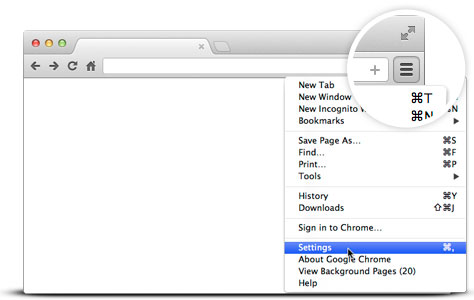
To reach Google’s cookie settings, open the Google Chrome settings icon at the top left:

Google

Our icon appears like three stacked dots. Yours may be the same:

Whatever the icon looks like, its location should be the same! Once you reach the settings menu, head down to the “Advanced” menu:
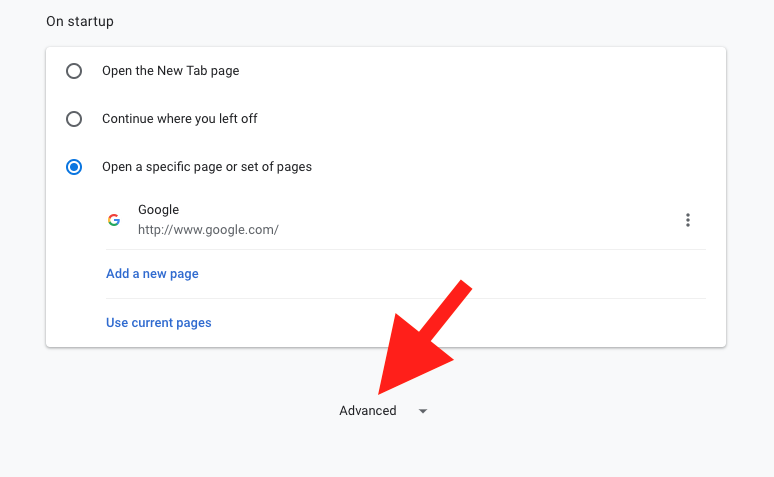


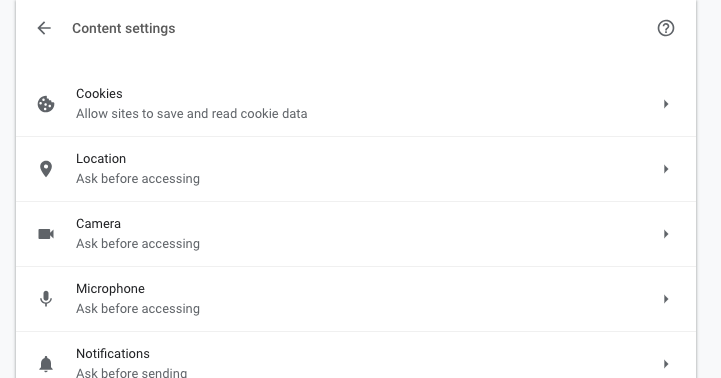
Within the advanced menu, find the “Privacy and Security” section. Near the bottom, you want to find “Content Settings.”

Keep scrolling down…
There it is!

Content Settings has a number of great tools, but cookie controls tops the list:

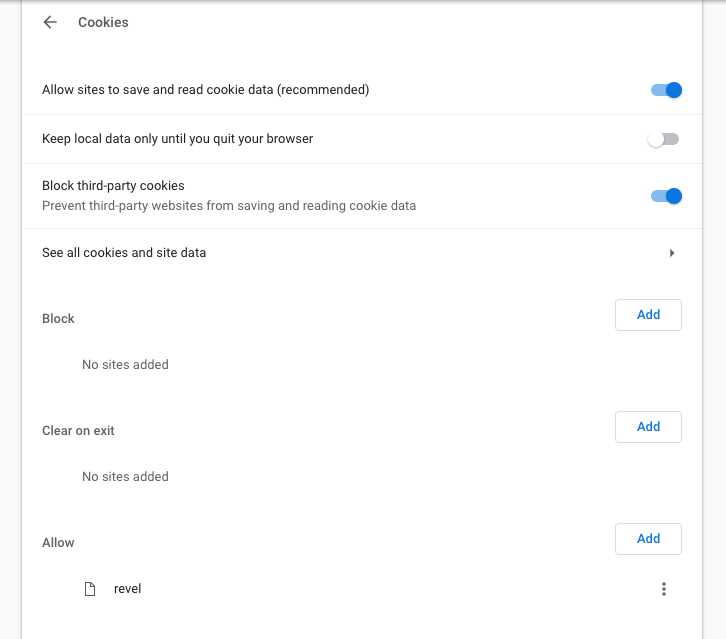
Open the cookies menu. You’re here!

Let’s go down the list, step by step:

1. Allow Sites to Save and Read Cookie Data: turn this off if you want to block cookies altogether. We recommend this only if you greatly wish to protect your information from the potential of data hacks. Remember to read our section “Why you may not want to” before taking this step!

2. Keep Local Data Only Until You Quit Your Browser: remember that cookies are pieces of data sent to your computer (you don’t really visit websites, they visit you). Some cookies can still track you offline.

3. Block Third Party Cookies: we recommend that everyone use this all the time. Third party cookies are non-essential cookies that track your web history over long periods of time, often by large corporations. If the cookies don’t give you any added functionality, why keep them around?

4. See all cookies and site data: section that shows all cookies on your computer and the info they contain. If you’re like us, there are just too many cookies to sort through manually!

5, 6, and 7. Block, Clear On Exit, and Allow: you may notice that these are copies of the original three options. Rather than setting overall guides for Google, you can block, clear info, and allow cookies for specific sites. For example, we allow cookies on Revel, an academic site necessary for some college courses.

Wi-Fi Hotspots

While using public Wi-Fi sources, your cookies can be read by the Wi-Fi providers! Unsecured hotspots like “FreeCafeWifi” may not be safe…

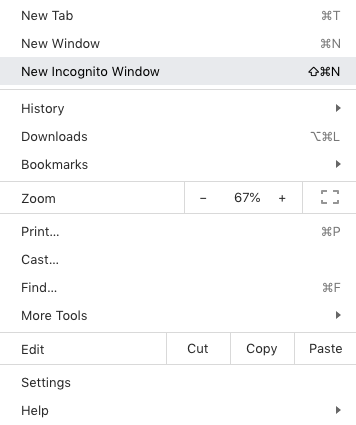
So if you do, use incognito mode to make sure the Wi-Fi provider – malicious or not – can’t be able to track your information. Select “New Incognito Window” from the settings menu. Use this for web surfing!

Why you may not want to

As promised: there are a number of reasons to keep cookies around. Here are a few:

Preferences

Simply put: many cookies make life easier.

Oftentimes, companies use cookies to find the things you enjoy, and make sure to provide more related items. For example, online music sources like 8tracks, Pandora, and Spotify often use browsing history to find new music based on your previous interests. In our opinion, there’s nothing wrong with being introduced to new, great tunes!

Of course, there are more examples: everything from shopping assistance to quick passcodes. If you enjoy these benefits, consider allowing cookies on first-party sites.

Functionality

Put simply: some things don’t work without cookies.

As aforementioned, we allow Revel (by Pearson) to use cookies on our computer. Revel needs cookies to track internet usage during college exams tests. In this way, professors can ensure the computer didn’t venture to other sites, thereby deterring (though not eliminating) cheating.

Aside from Revel, there are many programs that won’t function without the use of cookies, with good reason. Remember: if you’re still worried about cookies in general, you can green-light specific programs in the Chrome security settings.

Conclusion

The internet, like many things, balances risk and freedom. Cookies provide benefits that accumulate into easier, personalized internet usage (barring nonessential third-party cookies and Wi-Fi sources), but keep your data stored where others could potentially find it. Make sure to select which settings work best for your preferences.

We hope this guide helps you understand cookies a little more!

Helm, the private email server from your home

This gadget provides the best email security we’ve seen so far.

Helm

As technology and the web become more advanced, the main concern we all have is privacy. We use the internet for everything now, and we have access to it across a ton of devices: our phones, computer, televisions, game consoles, and even the security systems for our homes. On those devices we have pictures, videos, login information and passwords for the most personal and crucial accounts for things like banking and health. Nearly every service we sign up for, whether it’s for entertainment or business, requires us to do so using our email address and some of those services allow third parties to access that information.

Even though a website has that little padlock symbol in the address bar and a company tells us that our passwords are encrypted, is our data really safe? Big companies like Facebook and Google have both admitted to privacy breaches this year, and many people closing down their accounts.

Helm is looking to put users’ minds at ease.

helm screenshot

Helm is a personal email server that you can have with you at all times. It’s small enough to be portable but only you and the people you trust have access to it.

In a letter from the founders, they detail exactly why Helm was created:

“We the people have a right to live on our own terms. To know where our data is stored and to have control over it at all times. To protect our families from unwanted intrusion. To be secure on our phones and computers wherever we are….to keep all our information under one roof, where it’s safest – with us.”

Once you start your Helm subscription, you’re able to register for your own domain and then everything you’d like to add is up to you and totally private:

  • Email, calendar and contacts
  • Custom domain registration with DNS records management
  • Unlimited email accounts and aliases
  • Feature and security updates

Helm is constantly updating its services and soon you can have file sharing and sync, password management, and family chat and messaging.

If you’re ready to jump in, a one time fee for the hardware itself will run you $499 and a yearly subscription is $99, but Helm will waive the first year’s subscription fee. Knowing that you’re the only person who will see everything in your Helm device could really be worth the cost.

WhatsApp users beware this new hacker trick

Your phone number could leave you vulnerable.

Security researchers at Sophos have discovered a startling new WhatsApp vulnerability. The trick can be used to exploit anybody who hasn’t changed a certain default setting and can crack a WhatsApp account wide open.

New WhatsApp vulnerability can give complete control of your WhatsApp account to anybody who knows your phone number

Hackers can take control of your WhatsApp account
You need to activate two-factor authentication to protect yourself

The trick comes via a WhatsApp video or voice call as the vulnerability is found in RTP (Real Time Protocol). RTP is used by many online calling apps. In the name of efficiency, RTP doesn’t check to see if data that has been transmitted has arrived, and packets of data might not arrive in the same order they were sent. This allows the online calling apps using RTP to deliver the speech and video present in the data, and only cut out the speech and video from lost packets rather than lose the whole conversation.

Another key step in the complicated process required to perform an online voice or video call is squeezing all of the data into small binary packets and then unraveling them all again when they’ve arrived. This process, if not done correctly, can lead to data being moved where it shouldn’t be and left unprotected.

The trick that Sophos uncovered exploits these two minor vulnerabilities and enables hackers to take control of any WhatsApp account they can call. If a hacker calls you on WhatsApp who knows the trick, and you answer, they can take control of your account.

There is good news, however. The flaw was reported and there does seem to be a patch available in the latest update.

WhatsApp Messenger Update WhatsApp ►
8

Unfortunately, as pointed out by the guys at Sophos, there is a slight discrepancy between the date the trick was closed and the date the patch was released. This means there are two things you need to do to protect your WhatsApp account against this trick.

How to protect your WhatsApp account

1. Ensure your apps are updated regularly. If you set your apps to update automatically, they’ll always have the latest security patches that have been built to close off known vulnerabilities.

2. Turn on two-factor authentication by going to Settings, then Account, and opening Two-step verification. Hit Enable and you’re done.

Two-factor authentication means you will need to confirm whenever you log into WhatsApp via a new device using a second login credential of your choosing. As this information isn’t available via the trick Sophos have highlighted, it’ll block the hackers from using the information they can steal via a video or voice call with your account from taking it over. It is highly recommended that you activate two-factor authentication across your other apps and social accounts wherever possible.

Google admits to altering settings remotely on Android phones

Google may have been tinkering with your phone without your knowledge. Here’s why

Recently, Android users running 9.0 Pie have noticed that even though they had switched off the battery-saving function that it was back up and running, seemingly on its own. Most noted that on top of the feature running on its own, the phones were even at full power. Google hadn’t notified users of any changes due to occur, so what happened exactly?

Google admits fault

According to an answer by Google’s Pixel team on a Reddit post, it was caused by an internal experiment. Google was testing battery-saving features and accidentally turned it on for quite a few more users than they had intended. Google said that they had reversed the action and that users were again able to reconfigure their phones to the previous settings.

Reddit: The Official App Download Now
8

Pandora’s box

Even with the problem apparently solved, many Android users were still concerned about the incident, with a lot of people asking the big question; if Google is able to access battery power remotely, what else do they have access to? Is there reason to worry about the privacy of other information stored on mobile devices?

On a support page for updating Android apps, it says: “If Google determines an app update will fix a critical security vulnerability, we may make certain app updates regardless of update settings in the app or on your device”. Google then goes on by including that, relating to Google Play, if you agree to the terms of service you are also agreeing to receive updates automatically. They don’t specify what those updates are outside of bug fixes, enhanced functions, and new versions of some apps; only that some of them are necessary in order to continue to run apps smoothly and download new content.

Well, at least the battery-saving problem has been solved.


Popular Facebook app hacked. Millions of users affected

The popular Facebook app Timehop, which highlights users’ old Facebook content has been hacked. The attack took place on the July 4 and resulted in the data of over 21 million users ending up in the hands of hackers.

The popular Facebook app Timehop, which highlights users’ old social media content has been hacked. The attack took place on the July 4 and resulted in the data of over 21 million users ending up in the hands of hackers. Due to the breach, Timehop has suspended all the social media permissions it held and has begun alerting its users.

Over 21 million users have been affected by the Timehop hack

In a blog post detailing the attack, Timehop claims to have discovered the attack while it was taking place. While the company was able to interrupt the attack, some user data was still taken. This data includes names, email addresses, and about 4.7 million user phone numbers. Timehop reports that no private/direct messages, financial data, or social media or photo content, or Timehop data including streaks were affected by the attack.

Timehop users who want to continue using the service will have to re-authenticate the Timehop apps they’re interested in keeping. Until affected users do this, as the apps no longer have permission, their apps will be running dormant. Any apps that are re-authenticated will receive a secure permissions chip, replacing the compromised chips affected by the breach.

The reasoning behind the breach seems to be an issue with the security of the cloud computing service Timehop was using:

“The breach occurred because an access credential to our cloud computing environment was compromised. That cloud computing account had not been protected by multifactor authentication…”

Timehop hasn’t released the specific details of the breach, but the lack of two-factor authorization means a hacker only needed to guess the password of the account to access all of the data.

Timehopp data breach 21 million users affected
Users will have to re-authenticate Timehop apps

This breach only highlights further the importance of taking adequate security measures to protect your data, with two-step authorization being a minimum level of security these days. Now could also be a good time to take a look at the permissions you’ve been giving to third-party apps via your social media and Google accounts. Apps like Timehop take our details and then we don’t even use them that often, while our details remain part of a database that is attractive to thieves and scammers. For information on how to secure your data, check out any of the Softonic tutorials below.


WhatsApp takes steps to prevent the spread of fake news

WhatsApp is testing out a new feature that could help solve the huge fake news problem that is spreading across the platform. Although still in its early stages this new feature could make a real difference and is a positive step from the Facebook-owned company.

WhatsApp found itself in hot water recently due to the spread of fake news across its messaging platform. The problem became so acute, that the Indian government called out the Facebook-owned company. Many Indians have died due to fake news reports sent via WhatsApp, and the government had had enough. WhatsApp responded that it has been working on halting the problem, but it has come to light that it is currently working on a new feature to address the issue.

WhatsApp Messenger Download WhatsApp
8

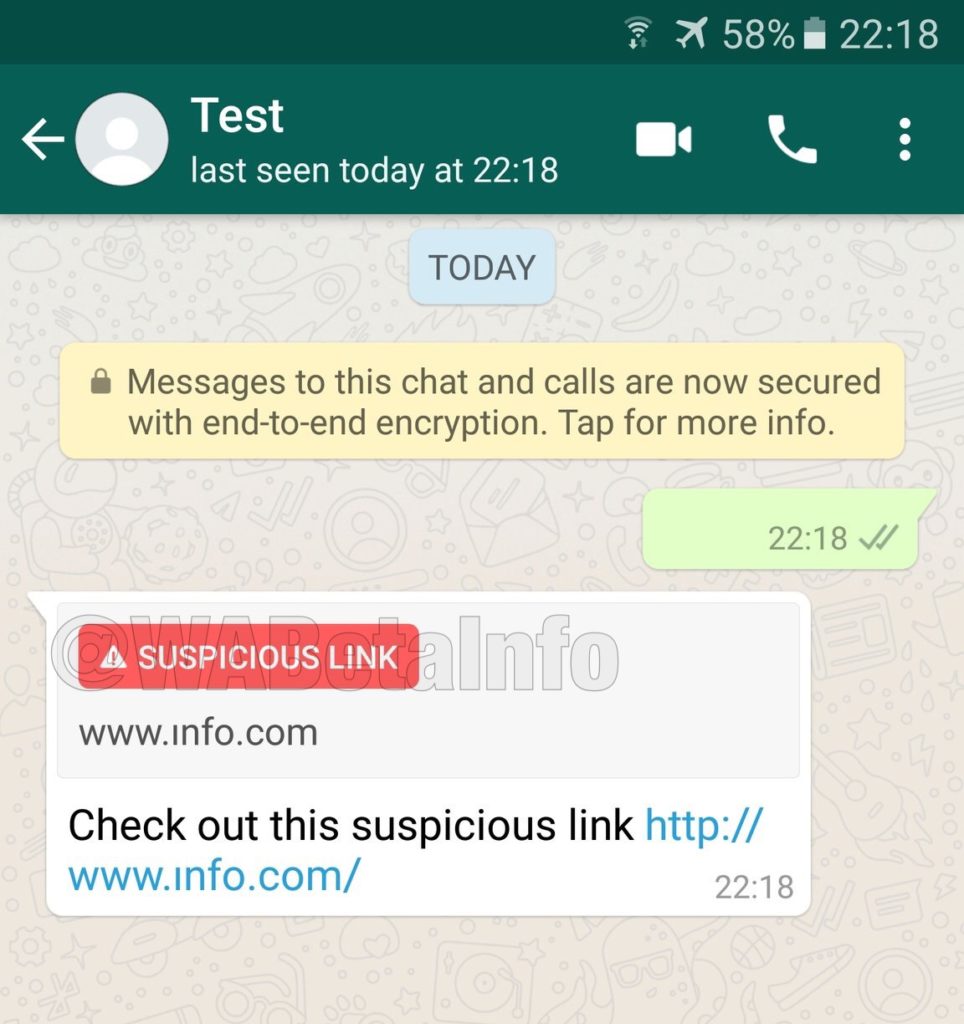
According to WhatsApp experts, WABetaInfo, WhatsApp is testing a new feature that will highlight suspicious links. The latest beta version of the app, submitted to the Google Play Beta Program, is very similar to older versions, with the only real difference being the new suspicious link detection feature.

Image via: WABetaInfo – WhatsApp is testing a Suspicious Link flagging feature

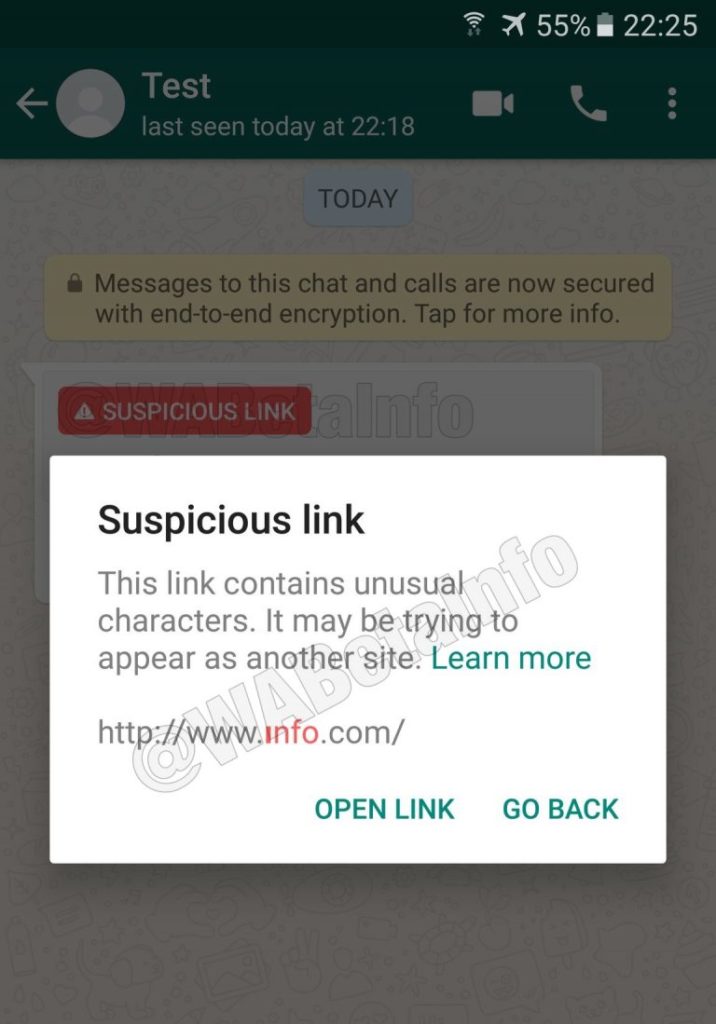
The feature isn’t too complicated, but it could make a difference. WhatsApp will run background checks on all links shared across the platform. The check will determine whether the information contained in the link is accurate or not. Any link failing the WhatsApp verification test will receive a Suspicious Link flag. A second warning will flash up for anybody who decides to ignore the first flag and clicks the link anyway. According to WABetaInfo, the checks will be carried out on individual devices so they won’t consume extra user data.

Image via: WABetaInfo – Users will who ignore the first warning and click a suspicious link will receive a second warning before the link opens

For now, this new feature is still a long way from a broader rollout to all users. It still has a lot of development ahead of it before it‘ll be stable enough to come to the primary version of the app. This shows, however, that WhatsApp is taking its fake news problem seriously and is actively searching for solutions.


Your kids shouldn’t have these programs installed

Kids are using technology earlier and earlier, and it’s not a problem… if there’s parental supervision. It’s important to know what your youngsters are up to, what content they consume, web pages they access, video games they play, etc. And some apps could get your kids in trouble. These are the programs your kids shouldn’t have installed.

(But because we want you parents to know what you might be up against, it could be worth downloading them to see the pitfalls, so we’ve included links to try them out.)

Kik Messenger

It’s important to monitor your kids if they use social media or a messaging app, but even more so if the system hides the sender’s identity. A good example of this is Kik Messenger, a completely anonymous messaging app, which means anything said or received can’t be tracked. 

Poof

This is one of the biggest headaches for parents: Poof. With this app, users can hide their cell phone’s location. This way, kids can lie about where they are at the moment, even if parents ask them to share their location.

YouNow

There are dozens of apps that live broadcast everything going on. However, for young people, there’s one app above the rest: YouNow. This tool is the favorite for young teens filming their daily activities. Basically, it’s like Periscope, but its boom with young people has given it skyrocketing popularity. Do you really want your kid broadcasting to the world?

Vaulty

If your kids are hiding something, you can bet they know it’s not something to be proud of. If your kids have Vaulty installed, you should be concerned. With this app, you can add a password to any photo or video on your cell phone. It encrypts your audiovisual content so nobody can access it. Yep, that includes you, Mom and Dad.

Also, it has an intrusive feature: if the password fails, the camera is activated and it takes a photo automatically. Make sure that doesn’t happen…

Vaulty download free
7

Whisper

Exchanging information anonymously is always dangerous. Many terrorist organizations use these tools to send and receive data without anybody knowing the origin or destination. Dozen of apps fall into this category, but for teenagers, there’s one that tops them all: Whisper.

This app has gained popularity with young people due to the ease of exchanging information. It can spread rumors, hoaxes, fake news and much more with a few clicks. Most of all: it’s a hub for school bullying, so tread carefully if you see it installed.

Whisper download free
8