These influencer tools can help you get the products you love in front of your audience!
What does the term “influencer” make you think of?
Technically, influencers are those who convince others to try a product by voicing their opinion.
However, modern social media influencers go above and beyond by putting the definition into action. They use an online presence to guide followers with product and service reviews while businesses offer free products as a marketing tactic. It’s a potential win-win-win situation.
If you’re trying to break into the world of influence and discover your crowd, or if you already have the platform and want to extend your reach, we have a few tools that might help!
They are our…
Top influencer services
Rep
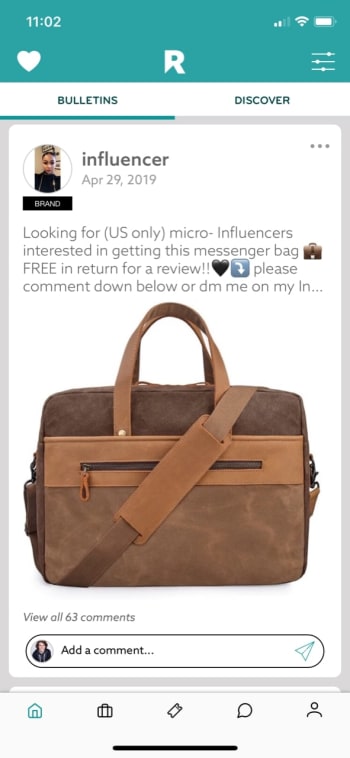
Rep, an iOS exclusive, performs exactly what one might expect from an influencer app. It helps users connect with brands and other influencers for collaboration.
The app works directly with Instagram, so be prepared to sign in with your information and link an account. From there, you can choose your main area of expertise, whether that be fashion, gaming, pets, etc.
After that, scroll through the main page (which is designed like Instagram’s interface for ease of use) and check out the offers.
The downside? Rep users generally have a large number of subscribers, often upwards of 10k. If you’re starting out, you may have a difficult time connecting with brands. However, there’s no reason to shy away from contacting other users. You may find a few friends!
CreatorDen works much the same way as Rep. In fact, it’s simpler. The navigation menu only has four links: profile, projects, proposals, and notifications. It’s much simpler to find brands and make offers.
CreatorDen is not an app, but an online service. Its headquarters is in Istanbul, and their English support services are limited compared to some of the other options.
There is a unique issue: whereas Rep allows all users to join immediately, CreatorDen requires any social media account to have 3k subscribers before signing on. Budding influencers beware!
On the plus side, CreatorDen works with Instagram, Facebook, Twitter, and YouTube. So, if you have 3k followers on any account, you will get in the game!
Collabor8 focuses on connecting influencers directly to brands, easy and simple.
Collabor8 will help you create a profile, connect social media accounts, and choose your area of influence to begin working with brands.
The app looks great! Just remember when going in that there’s no way to scroll vertically. If you’re prepared for that, you’ll be fine!
Ripl
Ripl begins our section on auxiliary apps. It doesn’t connect influencers, but it does provide something they can use: great video editing!
Let’s be honest, photos are easier to work with because you can take 1,000, pick the perfect one, and then edit it to stellar quality. Videos, in comparison, are time-consuming and difficult to manage.
Say goodbye to Photoshop: Meet the 5 best online photo editing alternative
If you’re looking to develop video content (a makeup tutorial or tech review, perhaps), Ripl helps create flashy videos tailored to your needs. It also supplies you with editing tools, designer templates, and multi-platform sharing functions. Take it above and beyond with scheduled posting and improved designs with their Pro account, which costs $15 monthly or $120 per year.
Buffer helps with social media management in a unique way, which probably won’t be for everyone but will be a game changer for some.
The idea: why not control all social media accounts with one app?
Create content, choose platforms for the post, and schedule your updates ahead of time for consistent messages to your followers. After, use a tried-and-tested analytics system to gauge the success of your posts.
Oh, and if that sounds like business, you’re right; Buffer tailors itself to users with multiple, monetized accounts across Twitter, Facebook, Instagram, LinkedIn, and Pinterest. In fact, it requires business accounts and costs $15 dollars a month for their Pro subscription.
But again, if you’re looking for a central social media hub for organization purposes, this may be a game changer.
Influenster suggests products and offers a large number of reviews, acting as an informative middle man for purchases. Essentially, the app tries to fulfill the role of an influencer itself!
This is why we included it as a bonus.
If you’re looking for brands to review when starting out, this app may give you an idea of what’s new and “happening.” It has suggestions and reviews for products ranging from cosmetics to dog toys, along with articles for each category.
If not directly applicable, it may be a great source of information!
Becoming an influencer requires work and dedication, but may result in business opportunity and the chance to change lives recommending useful products to followers. We hope these apps are useful on your journey and we wish you the best of luck!
Contact data for over 49 million Instagram users has been exposed online
Instagram wants to be known as the beautiful social network. Instagram feeds all over the world are filled with post after post from seemingly perfect users, celebrities, and so-called influencers. There are literally millions of these types of user on Instagram and it looks like a lot of contact data relating to this exact subset of Instagram user has just been leaked.
Contact data for over 49 million Instagram users has been exposed online
A report by TechCrunch shows that an unprotected database of well-known and high-profile Instagram accounts has been leaked online. The database was hosted by Amazon Web Services and included private and personal data including email addresses and even phone numbers.
The interesting thing about all this is that the leaked database does not actually come from inside Instagram. The open database was discovered by a security researcher called Anurag Sen who then told TechCrunch about his discovery. After a bit of digging, the media outlet then traced it back to Chtrbox, a marketing company in Mumbai.
Chtrbox is one of the many companies around the world that pays Instagram influencers to publish sponsored posts for their followers to see. As well as containing email addresses and phone numbers, the database also included information about the users’ Instagram accounts, including number of followers and the overall reach of their account. Chtrbox had also given each account a monetary value, showing how much they were worth in marketing terms. The firm will no doubt have used this information to decide how much to pay an influencer for a certain campaign.
According to Instagram HQ, this type of datamining is prohibited on the network. Speaking to TechCrunch, a spokesperson for the Facebook-owned app said, “We’re looking into the issue to understand if the data described – including email and phone numbers – was from Instagram or from other sources… We’re also inquiring with Chtrbox to understand where this data came from and how it became publicly available.” The app is clearly trying to distance itself from culpability on this one.
This isn’t the first time sensitive Instagram user information has leaked online
What is Instagram automation, and should I use it?
Once you’re up to your eyeballs in scheduling, responding, and #engaging obligations, Instagram isn’t quite as fun as it used to be.
If you care about engagement, you A: need to post regularly. And B: need to post at the right times.
It’s no wonder that there are countless tools on the market for automating everything from following other users to scheduling posts. There are even tools for commenting on your behalf.
But when does automation veer into the danger zone? It’s hard to say. Here, we’ll look at some of the platforms available ranging from the legit to the not-so-much.
There are countless Instagram automation tools that claim to save you time, energy, and make you more popular in the process. But, they all offer a slightly different feature lineup. Some are paid, others, like Bot4Gram, are free.
The simplest way to define Instagram automation apps is that these are tools that take care of your in-app busy work for you. There’s a varying range OF price points, features, and customization settings. It’s a matter of “you get what you pay for” in a lot of cases.
For example, the now-defunct Instagress was designed to comment on your behalf. A HootSuite blogger shared their experience with the tool. The blogger mentions that you’d choose a set of comments that a bot could use to “engage” with other users.
Sad news to all of you who fell in love with Instagress: by request of Instagram we’ve closed our web-service that helped you so much. pic.twitter.com/sIRYfFVywX
Postable is another option, and it is still around. However, it is still in beta. This tool allows users to pre-schedule posts, connect your account to DropBox, Google Drive, and other cloud-based storage tools, and automate engagement. Postable does manage follows and unfollows, as well as giveaways, but they don’t comment for you or dig into the DMs.
Postable costs a few bucks per month, but they aren’t a bad option if you need a helping hand.
Instagram schedulers are NOT the same as automation bots
There are Instagram scheduling apps like Buffer and Sprout Social that “automate” when posts go out, so you can set it and forget it, then review the analytics down the road.
Then you have Later, an Instagram scheduler with additional features. There’s Plann, too. This is the app that helps you arrange and preschedule posts, though you’re the architect in control here.
It’s important to understand that there’s a big difference between apps that automate scheduling posts and apps that have a bot component.
Most marketing blogs have arrived at a common consensus. Brands should not automate IG comments or DMs.
It’s also worth pointing out that any user who is caught trying to cheat the system is in violation of Instagram’s terms of service so you might get booted from the app.
7 underrated Instagram apps you need to know about
Instagram automation works by outsourcing specific tasks to bots. So, you might automate comments, likes, and following and unfollowing accounts.
Automating likes is basically the equivalent of paying Instagram for a sponsored ad. It’s an opportunity to be seen by hundreds of people who otherwise wouldn’t find you.
Marketers are getting wise to the idea that people are gaming the system. Bots can search for users in your niche and follow them, as well as follow people who have followed you.
You can also automatically unfollow people who haven’t engaged with your site in a while — you know, the ones dragging down your engagement rates.
Can you automate Instagram without it being scammy?
Okay, it’s honestly hard to tell. Services like Postable and Social Captain are paid services. They offer as much functionality as the type of tools that an SEO pro might use to look up keywords. They also offer what a PR expert might use to identify influencers and publications to partner with.
Features like automated follows and unfollows are unlikely to cause too many problems down the line, but they do violate Instagram’s ToS.
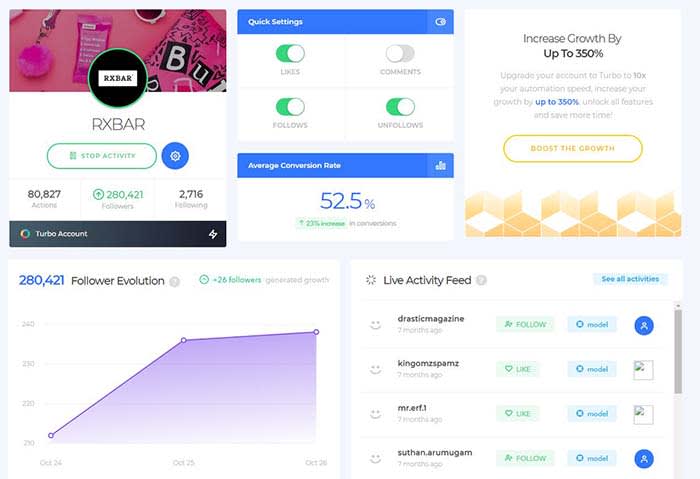
Social Captain, for example, offers a set of automation settings you can set and forget:
However, automation is one of those things that, in moderation, delivers some benefits like growth and convenience. Also, Instagram is none the wiser.
That said, if you’re not careful about follow limits or you’re using shady automation features like DM-ing strangers with a bot, Instagram might issue a temporary ban.
Wrapping up
Sure, this type of automation isn’t the same thing as buying another user account or buying followers and likes. However, Instagram still considers it cheating.
Without a strategic approach to automation, you could do more harm than good. Long story short, keep bots out of your comments and DMs — at least until they know how to behave.
These apps can make your Instagram posts sizzle and pop off the screen.
Facetune and VSCO are great and all, but today’s Instagram feed needs something a little more out of the box. You need more if you’re hoping to stand out in a sea of pitch-perfect pics and color-coordinated feeds.
Scroll through your profile for a few seconds and you’ll likely see a repeating stream of photos that feel eerily familiar.
Break the mold by downloading some new apps. From the artistic to the just plain rad — here are some under-the-radar app recommendations perfect for livening up your tired old feed:
7 underrated Instagram apps you need to know about
1. Enlight
Enlight is a $4 iOS app made by the fine people who brought us Facetune. The app does way more than dress up your photos with stickers and overlays or just apply filters. Enlight exists to help you make capital-A Art. The app brings painting, sketch, and mixer effects to your smartphone — plus the usual presets and adjustment tools.
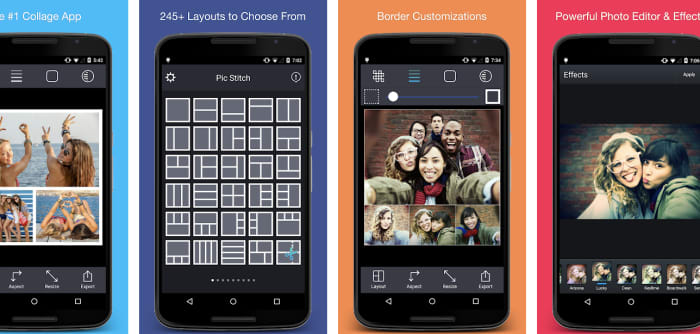
Pic Stitch is a layout app that comes with more than 200 layouts and a built-in photo editor. The idea is these collage layouts give you space to carefully consider how each photo fits into your feed. Gone are the days of amateurishly posting a bunch of pics from the same outing. Instead, Pic Stitch is an opportunity to organize your images in a way that’s both calculated and cohesive.
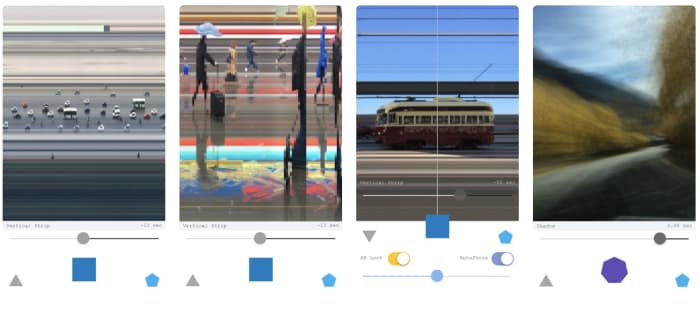
Artgram is a weird, experimental lo-fi app. It also makes some really cool-looking photos. Something of an art project, Artgram is a free download — available in the App Store alongside your usual sticker packs and face-editing tools. The app allows you to create these fragmented shots — streaked with lines or abstracted in some way or another.
This one has been around for a few years — being named App of the Year by Google and Apple in 2016. However, it’s still a bit underrated in our opinion.
Prisma is a photo-editing tool that works to turn your photographs into paintings. Well, it sort of does that. The app comes with 300+ filters inspired by art movements and artists transforming your photos through a powerful AI.
Art-inspired filters kinda sound like the domain of Mac Photo Booth selfies. However, there’s a lot more to Prisma than turning yourself into a comic book drawing. Sharpen, crop, edit, and fine-tune your creations for photos that are less gimmick and more creative expression. Postmodernism at its finest, right?
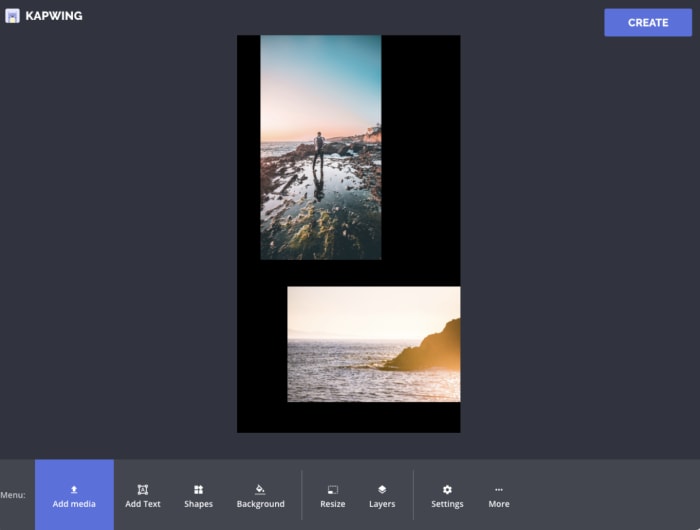
Kapwing is a hand-curated selection of templates you can use to level up your Instagram Stories. The app is only available on iPhone and even then, it doesn’t feature the editing tools. Those tools are only available on the website. The templates are super simple — you’re not going to find complex story editing tools that you might find in tools like Over or Canva.
The idea is to give Stories users a framework for combining multiple images together within a single story. So, you might use this to create a slide-show style story, put together collages, or make memes.
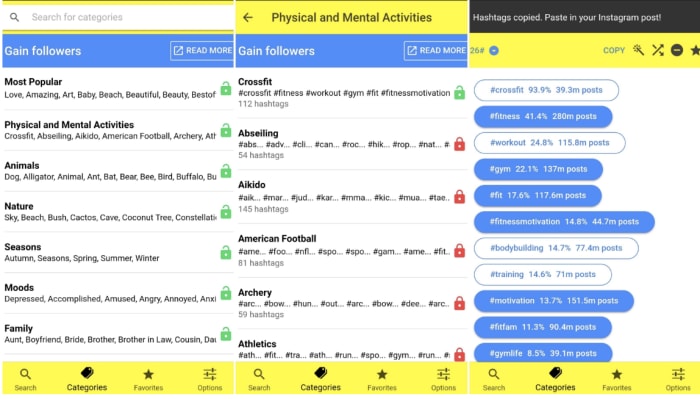
Leetags is an Instagram app that helps you find hashtags, an important component of growing your following. Finding hashtags can be a tedious, overwhelming process if you don’t exactly know what you’re doing. Sort through hashtags by searching various themes: animals, nature, food, drinks, and so on.
Users might feel that the categories are fairly broad. And, that’s certainly true. However, when you’re searching for inspiration, this approach can help you generate ideas. That’s much easier than heading over to Google Trends with no idea what to post.
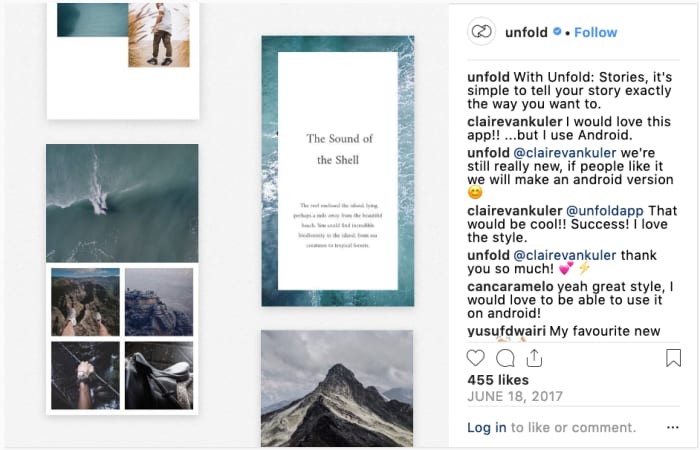
Add in text and export videos in hi-res. Unfold doesn’t come with a million features. However, you’ll have exactly what you need to create a beautiful collection of stories with an understated, artistic flair.
These apps can help turn the ordinary into the extraordinary. Sometimes the tools in the Instagram app just don’t have the tools you need to fully express your creativity. Hopefully, these apps gave you the resources you need to turn your posts into showstoppers.
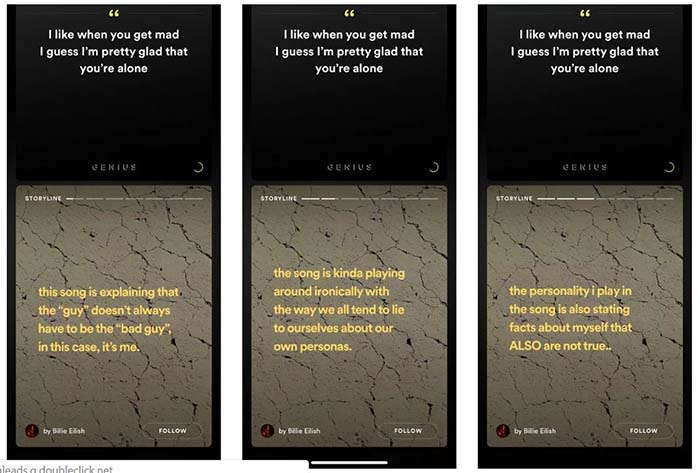
The new feature, called “Storyline,” will allow artists to share their insights into the creative process of their music.
Source: Thomas Ricker / The Verge
For example, if T-Pain releases a new album, he can go into the deeper meaning behind his songs in Storyline. Users could sift from segment to segment in Storyline to the parts they want to see. Each part of the Storyline would be static text and video.
“We are always testing new ways to create better experiences for more users,” a spokesperson said in a statement to TechCrunch. The spokesperson confirmed that Storyline is being tested.
However, the feature was known to be incorrect at times. In one case, Hayley Williams from Paramore tweeted at Spotify to correct “outdated facts” in one of her band’s songs.
@spotify hi. for about a yr now my band’s mgmt has tried get yall to take down some… outdated… facts on behind the lyrics for our song “Hard Times”.
the facts are: it’s all embarrassing & there was no “bright side”… hence the title, Hard Times.
thank you & goodnight.
Right now, there is no set release date. Also, none of the testers are in the U.S. However, the new feature would give Spotify original content, which users have noted is lacking on the app. Reddit users have spotted the feature on songs from the Jonas Brothers and Billie Elish.
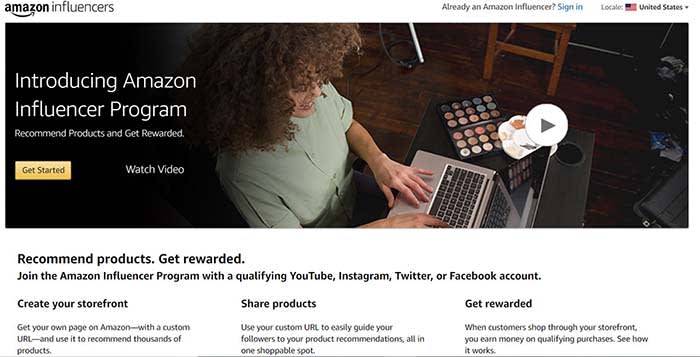
Amazon’s Influencer Program hasn’t made much of a splash yet, but the potential for growth is there.
Back in 2017, Amazon quietly debuted its Influencer Program as an experiment of sorts. Big influencers like Jillian Michaels and Mark Cuban were invited to promote curated product collections.
Over the past few months, it came out that Amazon is amping up the program. This includes opening access to the more “engagement-friendly” micro-influencer set. The program also offers big commissions to influencers.
As customers grow increasingly wary of big brands, micro-influencers have been huge for brands. They have proven to be a cost-effective way to establish trust with consumers. So naturally, Amazon wants a piece of the action.
Here’s a look at the program and how it works:
What is Amazon’s Influencer Program?
Amazon’s Influencer Program is a platform designed for digital content creators from YouTube and Instagram. It also includes less “influence-y” socials like Twitter and Facebook. Influencers receive a commission on Amazon items purchased by their followers.
If you’re thinking, oh, wow, that sounds an awful lot like their Associate Program, you’re definitely not wrong. Amazon says that this program is “an extension” of the Associate Program.
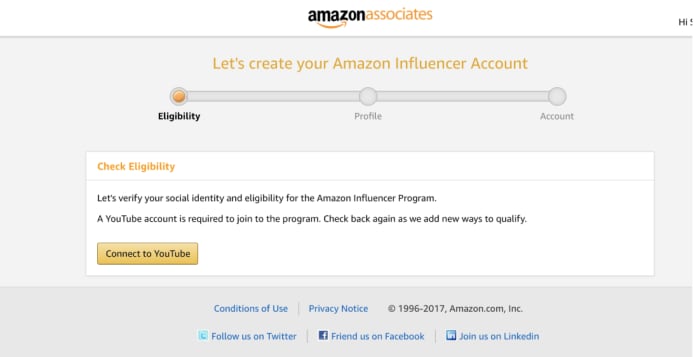
To qualify, you’ll need to submit your social media accounts and Amazon will look closely at your number of followers. They will also look at other engagement metrics before extending an invitation.
Still, the only real difference between the two programs is that influencers get to create custom shops and their own vanity URL.
Here is a look at Mark Cuban’s shop, which is basically a compilation of nut butters, his books, and energy bars.
Associates, by contrast, don’t get their own shops on Amazon. Instead, they’d feature their recommendations as trackable links on social channels or a personal blog.
How much do Amazon influencers make?
Like Amazon Associates, Amazon’s influencers earn based on how many sales are made through their custom storefront.
The commission structure is similar to the Associate Program as well. Amazon’s private label clothing will net influencers 10% of the sale, while video games will yield only one percent per referral.
What makes Amazon’s program different than other arrangements is the payout is coupled with the value influencers give back to the brand.
For example, every time someone purchases a belt hanger (that’s a thing???) from WhatsUpMoms’ shop, they earn a percentage of that sale.
By contrast, if you want an Instagram model to promote the latest FitTea-type product or Fashion Nova outfit, you’d pay a fixed fee. The fee is based on the influencer’s past performance. It’s more like paying a blogger for a project vs. affiliate commissions.
What’s also interesting is that this commission-based payout is something just about any brand can leverage. It also might be an effective way to work with micro-influencers. Now, advertisers can spend less time and money on reaching out to individual influencers and invite them to apply to their program.
That said, Amazon has a massive catalog. Facebook and Instagram can’t offer that same direct line to making a purchase, nor can most other retailers.
So, how do I become an Amazon influencer?
Amazon has been reaching out to micro-influencers, inviting them to join.
Potential influencers can apply to the program. However, they’ll need to prove that they’ve got the numbers and the engagement deserving of their very own vanity URL.
In order to qualify as an official Influencer, you’ll need to submit your social media accounts. Amazon will look closely at the number of followers, as well as other engagement metrics before opening access.
What we think is kind of cool about the program, as well as Amazon’s Affiliate Program is you can sell through multiple platforms. The custom URL makes it easier to promote a link where it might not be possible.
Influencers can easily add items to their shop as easily as they could create an Amazon wishlist or a registry. They can choose to promote an individual item or direct followers to check out their recommendations.
Could Amazon shake up the influencer model?
Amazon’s Influencer Program hasn’t made many waves in the two years it’s been around.
However, change could be on the horizon. The affiliate structure payout only rewards those sellers who actually make a sale. This presents a potential solution for brands who pay upfront without an easy way to measure their return on investment.
On the influencer side, Amazon offers some creative freedom in exchange for adopting the new payout model. Amazon just asks that you stick to the ad disclosure rules and that’s about it.
Spice up your Instagram story with these tips and tools.
Instagram has been around for quite a while. It has also grown into one of the most popular social media platforms in the world. According to most recent statistics, Instagram is just slightly behind Facebook and YouTube regarding the number of active users on the platform.
You may be wondering, “What is my story on Instagram?” If that’s the case, don’t worry, we have created this guide to get you using Instagram Stories like a pro. Whether you’re a business owner, influencer, or just enjoy the Instagram platform, Stories has something for everyone to enjoy.
What Are Instagram Stories?
Now, back to your original question, “What is my story on Instagram?” Simply put, Instagram’s Stories work similarly to Snapchat or statuses in WhatsApp. When you upload photos to your Story on Instagram, it will vanish after 24 hours. Instagram Stories are also published separately from your photos and videos on your main feed.
Instagram Stories can be up to 15 seconds long. They are also displayed at the top of the active users’ app and need to be tapped on to be viewed. Once you’ve viewed one user’s Stories, the app will automatically start playing the next user’s Stories.
Why tell your Story?
Apparently, Instagram Stories drive a ton of engagement. We mentioned the authenticity factor, but Stories are essentially a secondary feed that’s a bit more exclusive than your main feed.
How long are Instagram Stories?
Each video has a maximum length of 15 seconds. If you add a video from your phone, it will only play for 15 seconds, no matter how long the original video was.
If you’re posting a live video, then you’ll have 60 seconds. Anything longer than that, you’ll need to get some help from a third-party app like CutStory. The app lets you import videos of any length to your camera roll in 15-second segments. This way, you can post longer content as a series of videos.
How to get started with Instagram Stories:
Okay, here is the basic rundown for setting up your first Instagram story:
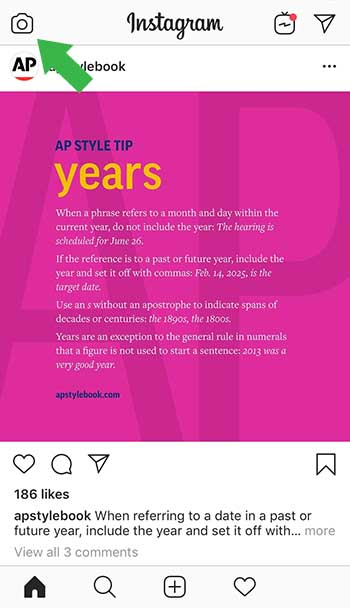
First, open Instagram and hit the camera icon in the left-hand corner of the app.
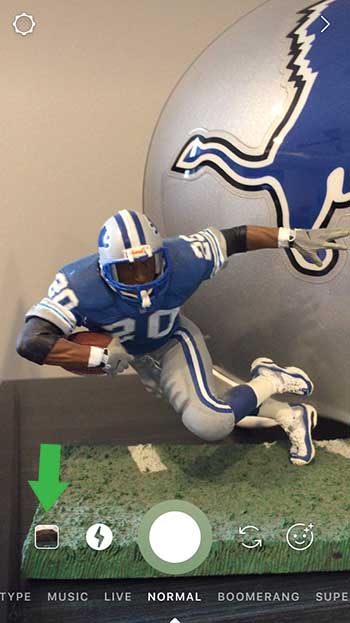
Upload a photo or video from your camera roll by clicking that little icon to the far left. You can also swipe up on the screen to access your gallery.
You can also create something new by clicking the big circle in the middle.
If you choose to record within the app, you’ll have a few options:
Normal
This will take a regular-looking photo, much like one you’d shoot from your phone. Just like your “normal” Instagram posts, you can choose to use one of the app’s built-in filters, or skip that part and edit elsewhere.
Boomerang
Boomerang allows you to create a GIF-style video that loops on repeat. While most features allow you to create a 15-second video, boomerangs only last a few seconds. Let Jimmy Fallon and Zendaya show you how this can work:
Superzoom
Superzoom allows you to take a video that automatically zooms in on your subject and automatically plays a dramatic sound. To use this feature, you’ll tap an area of the screen to zoom in on, then tap the circle at the bottom of the screen to start recording.
Rewind
Rewind looks just like your default videos, the only difference is (you guessed it), it plays back in reverse.
Hands-Free
Hands-free also allows you to record a 15-second video, but you don’t need to keep holding down the button. All you do is tap it once, and the camera rolls until the time runs out.
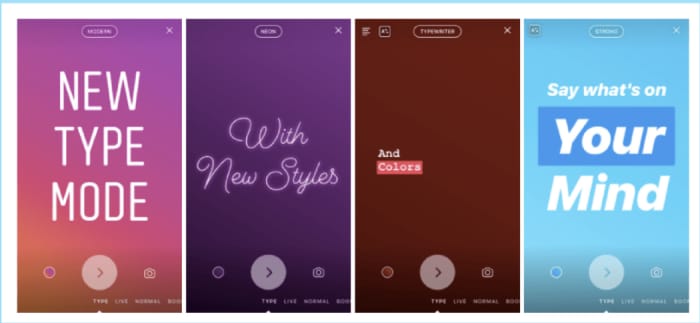
Type Mode
Type Mode is the feature for those who want to share what’s on their mind without posting a photo or video. To access Type, hit the Type button and add your caption.
Instagram Live
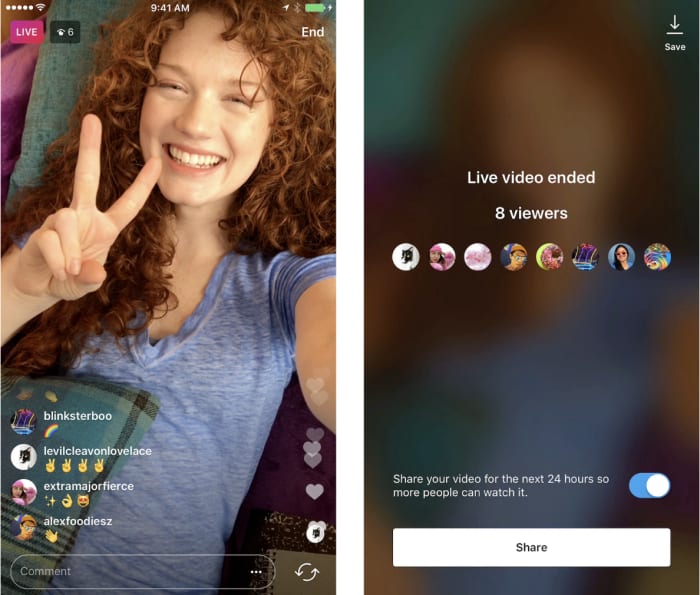
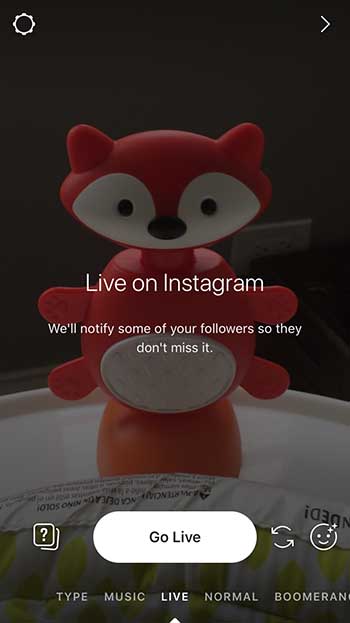
Instagram Live is a feature that lives inside Stories, allowing users to share live videos with the users. One of the perks of “going live” is that you’ll immediately be shown at the top of your followers’ feeds. It stands to earn you some engagement points if you care about that sort of thing.
Keep in mind, you’re sharing live videos in real-time, so you might want to get used to the rest of the features before diving into the deep end.
To start a live video:
Tap the camera icon in the top left corner.
Tap Live at the bottom of the screen, then hit Go Live.
From there, you’re on the air. Click “comment” to add a comment or tap a user’s comment and select “pin comment to the top” so other viewers can see it.
You can also choose to turn off comments.
When you’re done, tap “end” in the top right corner.
Just like your pre-recorded Stories, Live Stories are available to your followers for 24 hours before they disappear.
How to edit Instagram Stories
Inside the app:
According to Instagram’s help section, swipe left or right to add a filter. You can access your editing features by the “creative tools” at the top of the screen.
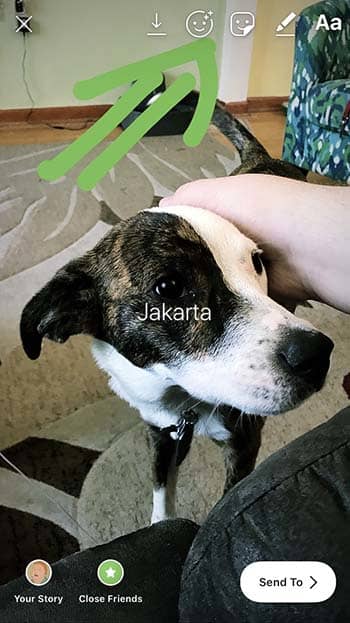
Creative tools are relatively limited. There’s the “draw” (the pencil icon) option or text (the Aa). Within the text setting, you’ll handle emojis, mentions, and hashtags.
The draw feature is pretty standard. It allows you to draw on top of the photo, and you can choose the color and line thickness.
There’s also the sticker option which allows you to add stickers over your Stories for a little dose of whimsy. You can choose from a lineup of items like emojis, as well as cute little watermelons and pool toys.
Third-party apps
Just like with Instagram photos, there’s only so much you can do if you stick to the stock features. While the Stories feature was initially designed with on-the-fly spontaneity in mind, it didn’t take long for third-party tools to fill the void.
If you’re not stoked about Instagram’s built-in editing tools, here are a few recommendations for upping your filmmaking game:
Unfold
Unfold is a free app you can upgrade with in-app purchases. It’s an influencer fave, and it allows you to create collages within your Instagram Stories. You can also add professional-looking boxed text to Stories that put Instagram’s features to shame.
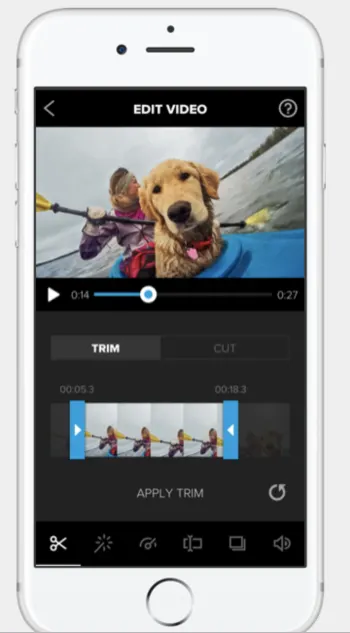
Splice is a video-editing app that allows you to make changes without switching over to the big screen. The app is made by the people behind GoPro, and it’s a solid video editor. It also allows you to add in sound effects and music for that added cinematic flair.
Additionally, you can crop, trim, and add effects and transitions. While it might be a little more difficult to learn than Instagram’s built-in tools, Splice is a sophisticated editing app you can download free.
This one is for all the typography nerds out there.
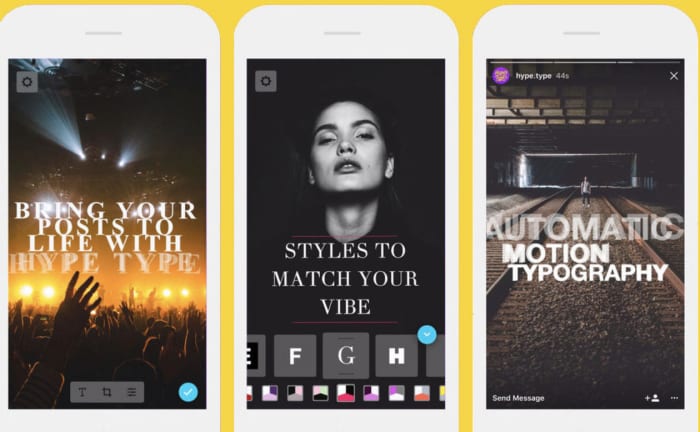
Hype Type is an app that’s all about bumping up your story-telling game with animated text, or “motion typography.”
While the idea of an editing app solely dedicated to typeface initially seemed a little extraneous — Hype Type really kicks your Stories up a few notches.
The app is free, but there are some in-app purchases that dramatically improve your output. It’s $2.99 to remove the Hype Type watermark and unlock all the full range of fonts.
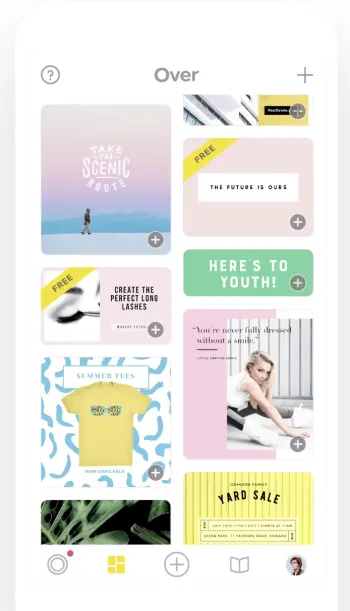
Over dubs itself a social media branding tool, poster maker, and photo editor. It’s also a killer app for making your Instagram Stories a little more exciting. The app is free, but there are tons and tons of in-app purchases.
The tool gives you access to thousands of templates, fonts, and graphics that can dress up your Stories with pro-grade design flourishes.
We’re sure you have plenty of queries related to how Instagram Stories work. Let’s take a look at the more popular ones.
Can you see who views your Instagram Story?
Yes. To see a list of people who have seen your story, open the story, swipe up, and you’ll get a list of your viewers’ usernames.
Does Instagram notify when you screenshot a Story?
Not anymore! Last year, Instagram changed its rules, so now, you can screenshot to your heart’s content (and others can do it to you) without the risk the creator will find out.
Who gets to see your Instagram Story?
For public account holders, all followers can see your Instagram story. With private accounts, only approved followers can watch your stories. But that’s just the default setting.
If you’d rather send a story to a select group of people, you can easily update this in the settings. Per Instagram, you can hide your story from specific people by following the directions below:
Go to your profile and tap the settings icon.
Tap Privacy and Security > Story Controls.
Tap Hide Story From.
Select the people you’d like to hide your story from, then click the check box to unselect them.
Can you edit an Instagram story after posting?
Kind of…
You can’t edit a published post within the feed, story, or standard post.
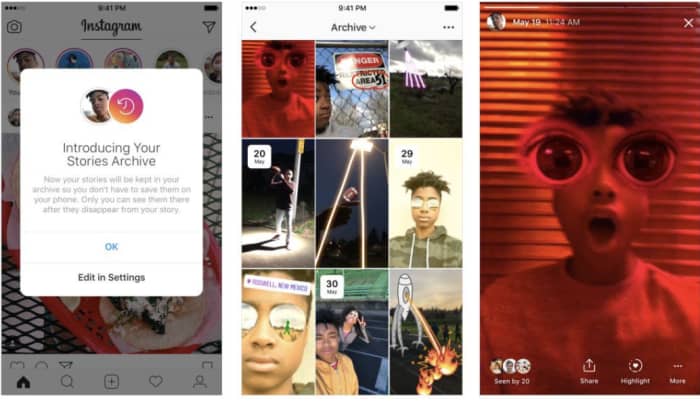
However, the app automatically archives your Stories after they’ve expired from public view. From there, you can edit and reshare these posts as highlights on your main profile.
Highlights are permanently displayed in your feed, and you can organize them as collections. For example, you can organize posts from a wedding into a collection.
How to repost an Instagram story?
As we mentioned, you can reshare all or part of your story as a highlight. You can also share your past stories as posts. All you’ll need to do is tap the “…” button and then “share as post.”
How to Add Multiple Pictures to IG Story?
To add multiple pictures to your Instagram Stories, tap on the box with the ‘+’ sign to create a Story. Next, tap on the camera roll icon showing an image from your camera roll (found at the bottom left of the screen) to start adding images to your Story. Tap on the photo icon and then select the ‘Multiple Photo’ icon above your gallery. Now you can tap on the photos in the order that you want them to appear in your Story.
How to Add Video to Instagram Story?
Before you can add a video to Instagram Story, the video has to be in your camera roll on your device. If that is the case, all you do is start creating a new Story, click on your camera roll, and then choose the video you want to upload.
How Does Instagram Story Views Work?
Instagram Story views are determined by quite a complex process. When you tap on your Story to see who has viewed it, you will see that Instagram arranges the views in a particular order. For a long time, people believed that those closest to the top are your followers that interact and view your Stories and posts the most. That is not actually true. It may be the other way around, and Instagram will show you the users you interact with the most first as they believe that information will be more important to you.
How to Play Video on Instagram Story?
Videos posted to Instagram Stories usually start playing automatically. However, a few things can cause an image not to play, such as the length of the video or your internet connection.
How to Add YouTube Video to Instagram Story?
It is easy to add a YouTube video to your Instagram Story. To do this, tap to create a new story. Next, tap on the chain icon at the top of the app. Tap on the URL option, paste the link to the YouTube video and tap on ‘Done.
How to Add Location On Instagram Story?
To add your location to your Instagram Story, tap to create a new story. Add your images to your Story, and then tap on the smiley face icon at the top of the screen. This will open up more options. From this menu, you can tap on ‘Location’ to add your location to your Story.
How to Add Music to Multiple Instagram Stories?
You can easily add music to multiple Instagram Stories from Apple Music, Spotify, or SoundCloud. All you do is open your favorite music app, select the song you want to share and then tap on the three vertical dots to open the menu. Now you can tap on ‘Share’ and then wait for Instagram Stories to come up and tap on it.
More Helpful Guides to Using Instagram
If you want to make the most of your Instagram, here are some more helpful guides to get you using this popular social media platform like a pro.
Nobody wants to be that guy who posts an entire concert with distorted audio into their Instagram story. We have so many tools that allow us to post better, more engaging content.
Use the tools we provided to engage your audience, and go beyond the typical.
Facebook has had its eye on their own cryptocurrency for more than a year now, and is navigating through the footsteps of other tech giants like Amazon and Apple. Apple announced the new Apple Card back in March, also seeking to change and improve the digital transaction game. The goal of Facebook’s code-named Project Libra is to create a digital coin that Facebook users can use to make purchases on the social media site, as well as anywhere else across the internet.
The process is an arduous one, but would be a huge step for Facebook, utilizing investments from financial firms and online merchants. Additionally, there’s the project’s promising potential to reward users for their activity on the platform. “Like many other companies, Facebook is exploring ways to leverage the power of blockchain technology,” a Facebook spokesperson explained in an email.
User rewards
Rewarding users for viewing ads is a growing trend (the Brave browser’s Basic Attention Token seeks to do this as well), and it works similarly to accruing loyalty points at your chosen retailer – eventually those digital points can be put towards user rewards, such as improved ad targeting, or even access to premium content.
While inclusion of this facet is still speculation, it certainly meshes well with the user-publisher relationship that Facebook claims to encourage. It would be a welcome change from the flame wars, hate speech, political rants, and bot-created garbage that’s weighing more and more on the increasingly disgruntled Facebook community. It may even waive some of the condemnation that the organization has received of late for making money by invading user privacy.
Facebook Rewards prove the company is familiar with this type of user transaction.
As you might expect, Libra’s progress has been slow-going thus far. The cryptocurrency system that currently exists is beset by roadblocks both technological and political, with entrenched interests and stubborn affiliates refusing to budge. Despite its tumultuous 2018, Facebook is still trying to brave the waters of a new business outlet – one that, if successful, could threaten the card networks’ dominance over global payments, and arm 1.5 billion users with a new tool to use in online commerce.
Will Project Libra usher in a new mainstream application of cryptocurrency, and dethrone the traditional online payment system? A third of the world’s population logs on to Facebook monthly, and we all need to buy things. Is that enough? Let us know your thoughts in the comments below, and stay tuned for more details as they are made available.
Twitter has announced that users can now Retweet with GIFs, photos, and videos.
Exciting news: Today we are launching the ability to Retweet with GIF, photos, and video!
We find solutions to many challenges as we build for a global, vocal audience. Here is a glimpse into our process as we worked on this feature. https://t.co/PUMr9DRQ0K
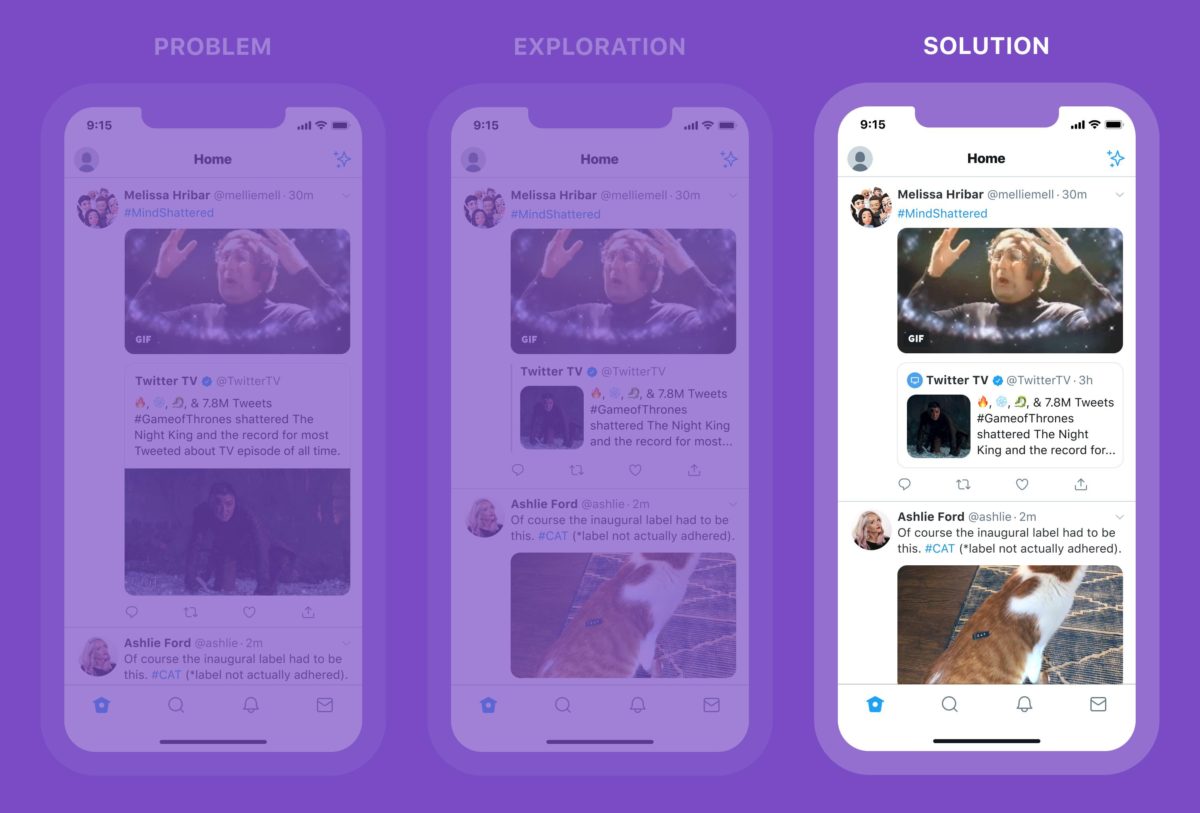
According to Twitter, the new feature will include the following:
Clearer visual hierarchy with a condensed inner Tweet
Including an avatar in the inner Tweet to give more context helping you quickly see who’s talking
Simple box container for easier interacting
Twitter also announced plans for more retweeting options. Though the message was cryptic, we look forward to seeing the update:
“Another update is coming soon to make Retweets with media more interactive and easier to read … we’re also exploring more ways to help people express themselves,” according to Twitter.
Byte has sent out 100 beta invites and people are already sharing videos across the new platform.
The internet lost something truly entertaining and fun when Vine stopped publishing user-generated six-second videos back in 2016. Vine’s short video loops took the internet by storm when it first started up in 2012 and the app rose to prominence quickly until Twitter bought it and then, ultimately, pulled the plug.
It was good news for every internet user who has a funny bone when one of the Vine co-founders announced in November that he was working on a reboot. Dom Hoffman said he was working on a new Vine app called Byte, that would launch in Spring 2019. Best of all, the app would have nothing to do with Twitter. Today, it seems Hoffman is making good on that promise.
Byte has sent out 100 beta invites and people are already sharing videos across the new platform
Byte will allow users to make their own short videos that can be uploaded to the platform. The videos will be vertical only and can be looped. Overnight, the first 100 beta users set about doing just that and there is already a stream of videos on the app. According to a Tweet put out by Hoffman, that shows the Byte feed, posts will appear in reverse chronological order with videos scrolling up to the top of the screen.
the byte beta we’ve been running with friends and family *feels* exactly like the vine friends and family beta, down to the weird but appealing randomness of the videos. that’ll change as we expand, but it’s a pretty good sign pic.twitter.com/rBbQrNtTJ7
So far, it looks like the Byte team is happy with the content that the beta community has been uploading. The content seems random and off-the-cuff, and fits with the type of content that was regularly being posted on Vine, helping the app carve a space for itself on the modern internet.
The current state of the Byte beta is still pretty basic, however. The app only allows for direct camera recordings and there is no upload feature. Also, although the feed does allow users to post videos and have other users comment on them and like them, at the moment, there is no facility for users to follow their favorite accounts.
Speaking to TechCrunch, Hoffman has said that getting the content right is the top priority for Byte. This means that he is determined to create an attractive space for content creators that works well for them. As the beta test continues, the team will add and remove new features to the basic set described above, and see how the community responds to them.
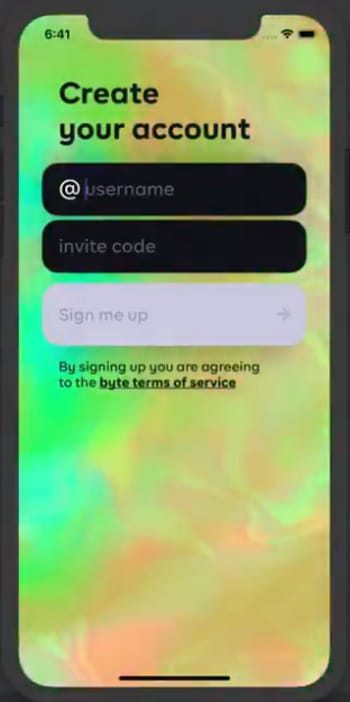
Hoffman has also promised to expand to the testing pool, too, so more testers will be receiving invites soon. If you’re one of the lucky ones, you’ll find yourself at the new Byte sign up screen, which Hoffman recently shared on Twitter.
It is good to see a new and updated version of Vine coming back to the internet. As with everything these days, however, the world moves quickly and there is no guarantee that emulating a once successful app will guarantee success. With TikTok, a notable successor to Vine, having over 500 million active monthly users, this beta testing stage is more important than ever. We’ll be watching this one intently.