Which ‘Stranger Things’ character are you? (Quiz)

Are you a Hopper? Maybe you’re like Nancy! Find out with this quiz!

Stranger Things

If you are a fan of “Stranger Things,” you are probably enamored by the wonderful cast of characters. You probably even see yourself and your friends in many of their actions.

Take this quiz to find out which character you identify with the most!

(function(d,s,id){var js,fjs=d.getElementsByTagName(s)[0];if(d.getElementById(id))return;js=d.createElement(s);js.id=id;js.src=’https://embed.playbuzz.com/sdk.js’;fjs.parentNode.insertBefore(js,fjs);}(document,’script’,’playbuzz-sdk’));

Did you like your results? Let us know who you got in the comments below! Also, check out this story about what you might have missed in “Stranger Things 3!”

Stranger Things 3: What you might have missed

“Stranger Things 3” brings back a classic ’80s actor, hints at the return of old characters!

11

SPOILERS AHEAD!

As the dust settles (and the interdimensional monster goop) “Stranger Things 3” left us with a lot to process.

From new characters, new threats, old enemies, and old friends there’s a lot to talk about, and plenty that you might have missed. From start to finish, here are explanations and things you might have missed from “Stranger Things 3.”

“Stranger Things 3” what you might have missed

The Russians are coming!

Russia
Gorbachev reference

“Stranger Things 3” takes place in 1985. You can tell because they show “Back to the Future” at the movies, which came out in 1985.

Russia and Russian invaders were a huge concern in the U.S. in the ’80s, and especially in 1985. This was the year that Soviet general turned president Mikhail Gorbachev first began to rise to power, as well as the beginning of another Cold War era. From a child’s standpoint, movies with Russian threats like “WarGames,” “Rocky IV,” and “Red Dawn” were still fresh in their minds.

Capitalizing on the era, the show’s creators, the Duffer brothers, make the Russians the new villains. The Russians are following in the footsteps of Matthew Modine’s character Martin Brenner from the first season, and the work of Hawkins Lab from seasons one and two.

The Russians are trying to reopen the Gate that Eleven closed at the end of season two. Like Hawkins Lab, the Russians appear to be looking to gain a military advantage by opening the gate and researching the Upside Down. Reopening the Gate results in the Mind Flayer, the main antagonist of season two, to reemerge and continue his rampage on Hawkins.

The most fearsome soldier that the Russians have at their disposal is Grigori, a hitman who looks like what would happen if Arnold Schwarzenegger and Dolph Lundgren had a kid. 

Stranger Things Grigori
“I must break you”

Grigori is an emotionless murderer who kills in cold blood. He seems to have it out for Hopper and Joyce since they keep getting away from him. Every move he makes reminds us of scenes from “Terminator” or “Die Hard.” Heck, he and Hopper directly reference a scene “Die Hard” in “Chapter Five: The Flayed.”

Stranger Things Die HArd
Grigori: You are a policeman. Policemen have rules                                                                                  Hopper: Oh yeah, you want to test that theory?

Although not word for word, the Duffer brothers were clearly paying homage to the ’80s classic.

What happened to Hop?

Stranger Things Hopper

After Joyce destroyed the key to the Gate, she looks to see if she can spot Hopper in the carnage, but only smoke remains. Although all signs point to him being dead, there is still a chance that our favorite Hawkins police chief is still alive!

Stranger Things end credits

In a post-credit scene, we are shown a secret base in the heart of Russia. The Russians have captured a Demogorgon, and they are feeding prisoners to it. Before choosing the Demogorgon’s next meal, a prison guard is about to open a cell, but he is instructed to not open the one containing “the American.”

We have three theories of who this could be: ranging from the likely to way out there.

It’s Hopper

Yeah, yeah, yeah. It’s the most obvious. After the battle of Starcourt Mall, the Russians made a quick and quiet getaway. There’s a good chance that they caught Hop and are bringing him home to mother Russia.

It’s Brenner

Brenner

Brenner’s fate from the first season has yet to be revealed. Some speculate that he died when the Demogorgon attacked in the season one finale. Others believe that he is out in the world in hiding. It could be that the Russians captured him and are extracting information from him about the Upside Down, Hawkins, and the Gate. Given that there is a lot more reason for the Russians to keep Brenner alive than Hopper, it makes perfect sense.

It’s Dustin’s dad

Dustin

Here us out on this…

We have yet to see Dustin’s dad in the show, and we don’t know whether or not he is alive or dead. However, we do know that the Russians know where Dustin lives because Steve blabbed. While retreating from Hawkins, the band of Russians could’ve swung by Dustin’s place to get information from him only to discover his father, and mistaken him for Dustin instead.

This theory is a bit of a shot in the dark, but it would be cool to finally learn Dustin’s dad’s fate.

Eleven lost her powers… for now

Stranger Things 11

We do not have 100% clarification about how Eleven gained her powers. We know that they came from tests done by Brenner at Hawkins Lab and that they are associated with the Upside Down. They are also the strongest weapon against the forces of evil from the Upside Down. Unfortunately, that weapon is no longer available as Eleven appears to have lost her powers.

However, we expect that they will be returning in one of two ways:

Brenner’s return

All signs point back to Brenner. In the next season of “Stranger Things,” we expect that Brenner will make his dramatic return, and possibly join the side of good. It might be up to him to help Eleven regain her powers in order to face a new threat.

Will Byers charges her batteries

Although Will is no longer in the Upside Down, his prolonged exposure appear to have had permanent effects. Now that Eleven lives with the Byers family, we are guessing that being around Will will make her powers return, and probably make Mike super jealous.

Cary Elwes makes an appearance

Stranger Things Cary Elwes

One of the new characters in “Stranger Things 3” is Larry Kline, the scumbag mayor of Hawkins. If he looks familiar to you, it’s because that’s Cary Elwes, the actor who played Wesley in “The Princess Bride” and Robin Hood in “Robin Hood: Men in Tights.”

The Duffer brothers are known for bringing in actors and actresses from classic ’80s movies like Winona Ryder and Sean Astin, so it’s cool to see another one join the mix!

Wrapping up

We binged the third season over the course of a single weekend, and we expect most of you did the same. Now, we that we have to wait for the fourth season to grace our screens, all we can do is speculate. Make sure you tell us in the comments below what your fan theories might be and take our quiz to determine which “Stranger Things” character you are!

(function(d,s,id){var js,fjs=d.getElementsByTagName(s)[0];if(d.getElementById(id))return;js=d.createElement(s);js.id=id;js.src=’https://embed.playbuzz.com/sdk.js’;fjs.parentNode.insertBefore(js,fjs);}(document,’script’,’playbuzz-sdk’));

8 best T-shirt sites for geeks like us

Show off your fashion sense with these graphic T-shirts!

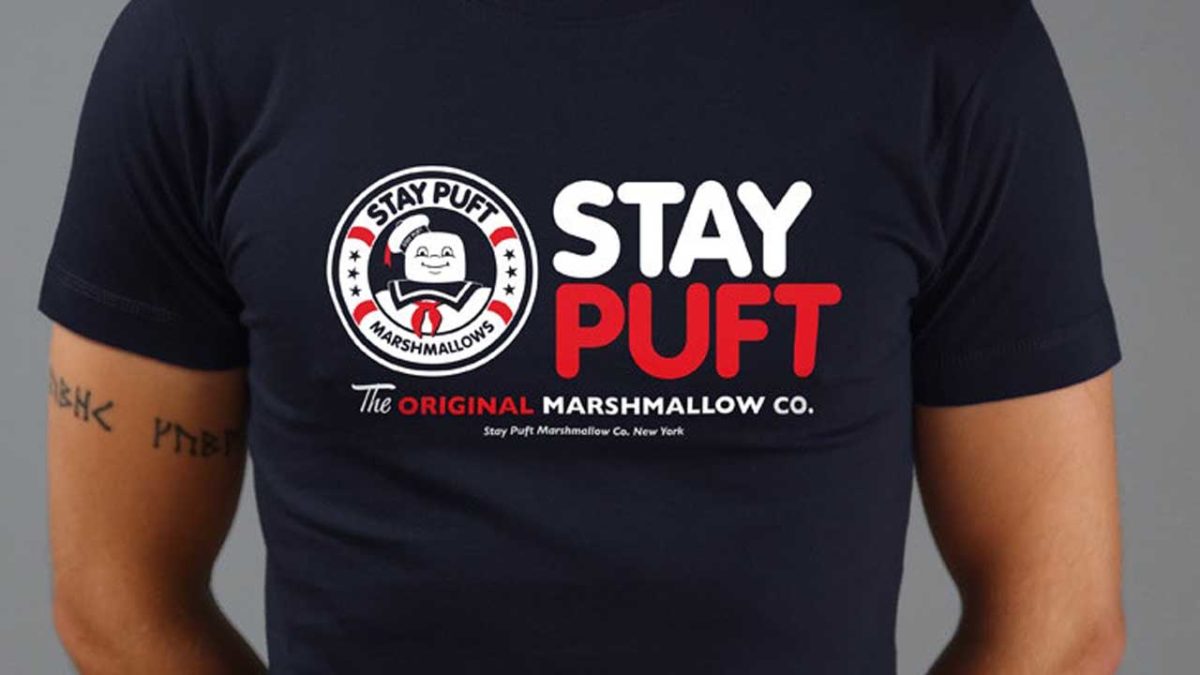
Ghostbusters T-shirt

A bold T-shirt design is a bold statement on style. Many people are surprisingly afraid of this and settle for plain colors and simple designs. But not us!

You want to wear a shirt that has crazy moon slices!

Moon Slices
Source: DesignByHumans

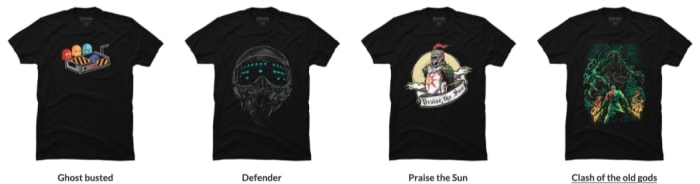
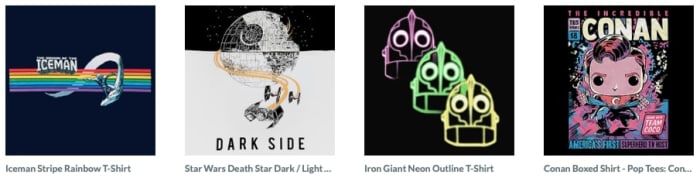
Alright, sometimes it’s not fruity moons. It’s Halo, Legend of Zelda, Call of Duty, C’thulu, Japanese chibi artwork, horror movies, Marvel, or perhaps just a singular, mind-bending design. If you’re looking for an unusual shirt that connects with your interests, helps you start a conversation, or generally just look awesome, check out our:

7 Best T-shirt sites for geeks like us!

Design by Humans

Designbyhumans

If you’re looking for great designs inspired by a fandom, along with original artwork you’ve never seen before, Design by Humans is the place to visit!

When you step onto the website, you’ll discover their hipster logo is complemented by a similarly well-designed, modern website with excellent panels to direct you down your next T-shirt shopping rabbit hole. Come along, it’s going to be a good time!

Options

One of the things we love most is the “Discover Art” section. We recommend trying it out! While their “Gaming” area will have tees related to Mass Effect, Galaga, Spider-Man, Mario, and beyond, Design by Humans grants a huge platform to original artists doing their own thing.

Or just stick with gaming!

Shirts DBH

ForFansByFans

FFBF

ForFansbyFans.com, which also goes by the title “welovefine.com” acts as a pipeline between artists who love movies, video games, TV shows, and the rest of us who want to buy their designs!

Fandoms

Unlike Design by Human, ForFansByFans focuses on a smaller number of categories. Make sure to check out their entire fandom page to see whether your favorite title can be found inside! If you’re lucky, there will be a “Fan Forge” of artists hard at work making great apparel and accessories.

Shirts WLF

ThinkGeek

ThinkGeek

ThinkGeek works like ForFansByFans, in that it excels in a number of fandoms and offers a range of new products. Unlike the others, it also offers a relatively gigantic range of collectibles.

Fandoms TG

Shirts TG

While not our personal favorite, ThinkGeek holds top-tier workmanship for some of the best pop culture sensations ever released. Sure, it may lack the somewhat grassroots feel of the others, but the “geek’s warehouse” vibe might be up your alley!

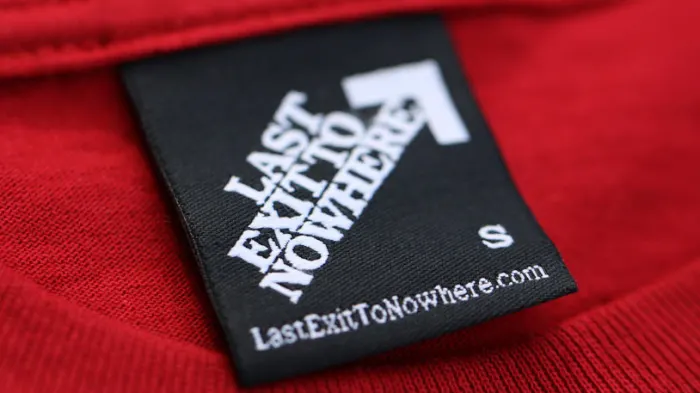
Last Exit to Nowhere

Last Exit to NowhereSometimes, you want to share your fandom but you only want the cool kids to be able to identify the reference. That’s where Last Exit to Nowhere excels. Their designs are subtle and cool, and unless you’re sitting across from a big fan, it’s possible you might go the whole day with your geek pride undetected except by the biggest fans.

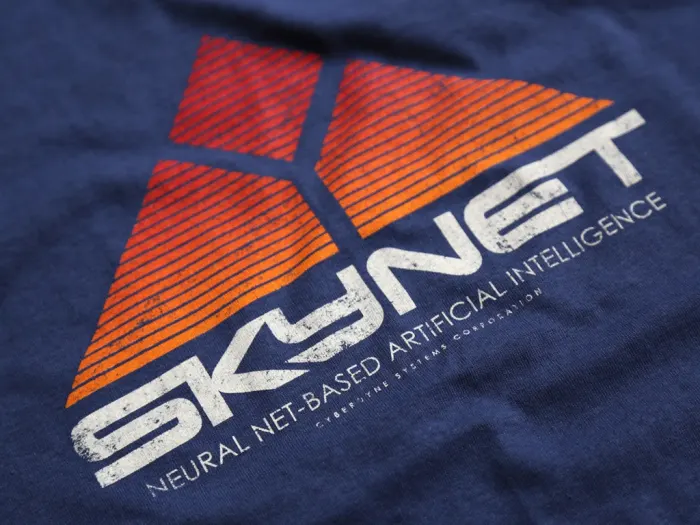
Skynet T-shirt
Alert any Terminator robots you’re on their side with this Skynet shirt.
Nakatomi T-shirt
Only true “Die Hard” fans will recognize that this tasteful design commemorates the Nakatomi plaza, which was home to a pretty rough Christmas party back in 1988.
There Will Be Blood T-shirt
If you recognized this design as a reference to “There Will Be Blood,” Daniel Day-Lewis would give you a high five.

One downside to this great site is that you’ll have to have everything shipped from England, and with the exchange rate, that means prices will be on the high side. Get some friends together and buy in bulk to cut down on the shipping costs.

Etsy

Etsy

Admittedly, if you’re going to Etsy, you might be grasping at straws. On the other hand, the Etsy website was intended to help individual creators sell well-made and highly-specialized crafts projects, which fits perfectly with what we’ve seen so far!

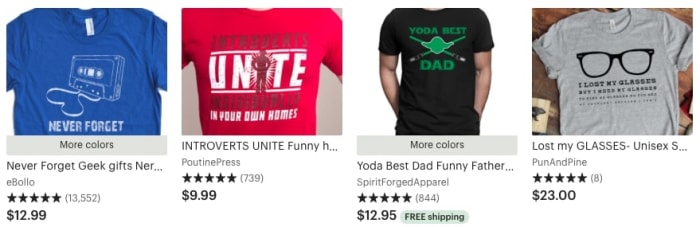
As you might expect, Etsy has a nice t-shirt section. Search “Nerdy” or “Geeky” and see what comes up, or directly check for your game/movie/TV show of choice:

Shirts by Etsy

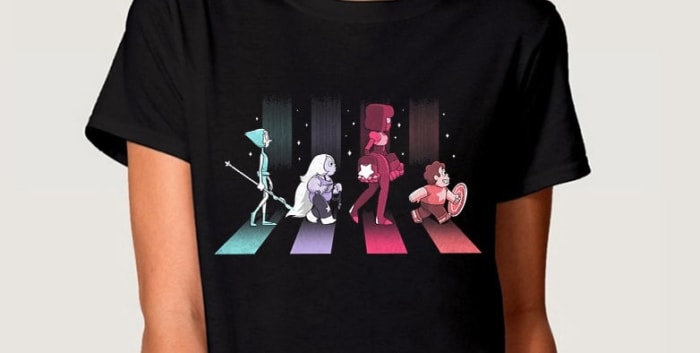
Steven Universe Etsy

Zazzle

Zazzle

“Geek” and “nerd” are often used interchangeably by some, but to others can mean greatly different things.

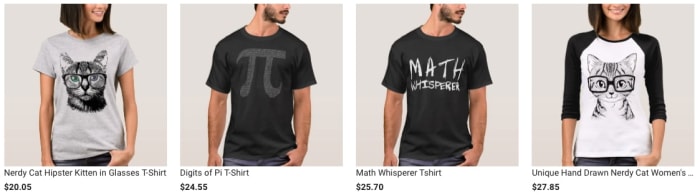
Zazzle offers “nerdy” outfits, but not in the gaming, anime, and cartoon sense. These clothes are designed for people who love science, mathematics, and other intellectual pursuits!

Shirts by Zazzle

ZazzleOptions!

Being fully aware that this version of nerdiness isn’t mutually exclusive with geekiness, we said “heck it” and included Zazzle for your viewing pleasure! No need to say thanks; you’re welcome.

Custom Ink

CustomInk

Yep: this is one of the best websites for custom t-shirts. And that’s totally not cheating! Do you think it’s cheating? We don’t think it’s cheating…

Because sometimes you just can’t find the perfect shirt on any site. Sometimes, the exact design you’ve been searching for is in your own heart and needs to come out on ProCreate, Gimp, or Adobe Illustrator! After that, you can try to sell it on the other t-shirt websites and become a creator yourself, or print off the design right here.

CustomInk has great tools for downloading artwork, bringing a design together, and printing on good materials with timely shipping. We haven’t been disappointed by them yet, and believe you won’t be either!

Conclusion

We hope you find your next favorite shirt on one of these sites! Personally, we’ve had a hankering for something space-related recently. Maybe a Halo, Steven Universe, or Interstellar-themed design? Who knows! The possibilities are truly endless.

Tetris gets a battle royale mode for some reason

Tetris 99 is being adapted into Tetris Royale for mobile and it is going to be crazy!

Tetris Battle Royale

As the likes of Apex Legends and Fortnite: Battle Royale continue to take the world by storm it is clear that the battle royale formula is here to stay. It seems there is just something about squaring up against players all over the world that is attractive to us gamers.

It doesn’t all have to be guns, bombs, and explosives though. Battle royale games don’t have to be about fights to the death. Yes, it is all about the last gamer standing, but that doesn’t mean everybody else has to be dead, they could simply be eliminated. When you think about it like this, there are many more titles out there that could get the battle royale treatment.

Fortnite: Battle Royale Download Fortnite: Battle Royale ►
10

We recently covered an unofficial Super Mario battle royale game, which pitched players against each other in a race to the end of a level from Super Mario Bros. Unfortunately, with Nintendo being Nintendo, this game has already been taken down, but we have some news of an official battle royale game, based on an old Nintendo classic, that is coming to mobile soon.

Tetris 99 is being adapted into Tetris Royale for mobile

When the Nintendo Switch launched the world was blown away by how much power was packed into Nintendo’s little touchscreen device. Despite all that power though, and a plethora of impressive Switch games, one of the most fun and addictive games to hit the latest Nintendo handheld has been Tetris 99. For those that haven’t played it, it’s a manic and modern update on the classic Tetris formula.

Tetris 99 pits you against 99 other Tetris players in a battle to be the last player standing. The dynamics of the war come from sending garbage blocks to your various opponents whenever you clear multiple lines at once. You also have to deal with similar attacks coming your way from all the other players around you. The action is fast, the action is crazy, and the action is coming to your mobile.

Tetris Royale is the mobile port of Tetris 99 that is coming to both Android and iOS soon. As well as the standard 100 player mode from Tetris 99, Tetris Royale is also getting a few other game modes and features to keep mobile players satisfied. These include daily challenges, power-ups, customization options, and the chance to earn and use special boosters in battles.

Wrapping up

There is no word about pricing or when Tetris Royale will hit the Play Store and App Store. However, according to a press release from games company N3twork, who’ve teamed up with The Tetris Company to develop Tetris Royale, the game will go into beta testing this year. This means that we have a maximum of six months to wait before the crazy fun of Tetris 99 hits our mobiles in one form or another. Beware though, this one could be extremely addictive.

Microsoft Edge gets a privacy boost

The next Microsoft Edge update will include tracking prevention

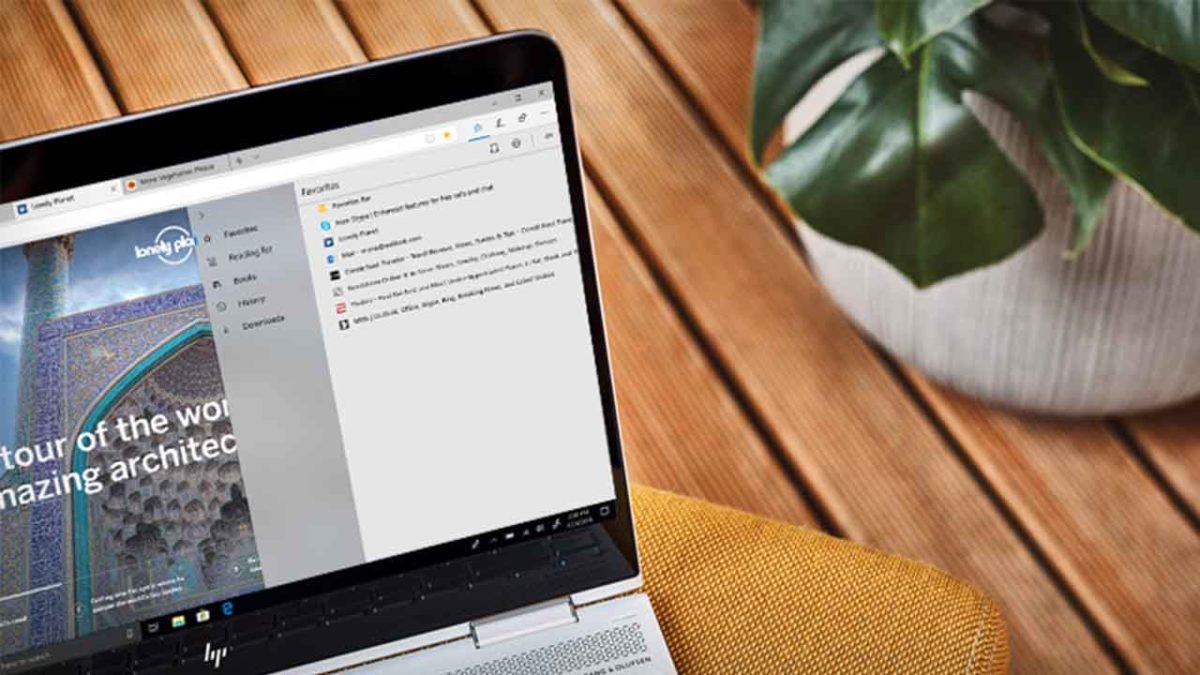
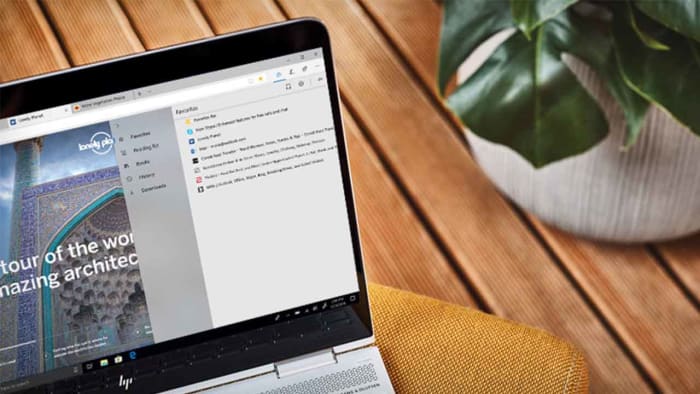
Edge browser on a HP laptop

Microsoft knows only too well about Google Chrome’s dominance in the web browser world. Just look at what happened to Microsoft’s more than competent web browser, Edge, that came packed with Windows 10. Despite being a capable browser, complete with unique features and handy loading speeds it barely made a dent into Chrome’s market share.

We recently commented on how Chrome coming pre-loaded on Android devices helped it notch up 5 billion downloads and assert market dominance. If only the same could be said for Microsoft Edge on Windows 10 devices. It got so bad that scammers were hijacking Bing search results for Google Chrome as the only time people were using Edge was to download the Google browser. This then led to Microsoft pulling the plug on a fully autonomous Edge browser and instead carrying  it over to the open source Chromium software that sits at the heart of Google Chrome. That’s right, Microsoft Edge is now built out of the same code that built Google Chrome.

Whereas this could sound like defeat for Microsoft it has made Edge a more competitive browser thanks to its compatibility with Chrome add-ons. Another factor is the familiarity to the Chrome experience. We often turn to other browsers but then find ourselves going back to Chrome in search of that warm feeling we get from something we’re extremely comfortable working with. In many ways this new similarity to Chrome allows more new Edge users to experience the different features that might give Microsoft’s web browser, well, an edge over Chrome.

The next Microsoft Edge update will include tracking prevention

Chrome has given its rivals a little room to maneuver against it recently. The move to ban ad blockers has caused a lot of unrest among the Chrome user base and a clear path for its competitors to offer something different to Google’s offering. The other big thing recently, however, is privacy with it coming to light that there are thousands of cookies active on Chrome, tracking every click you make and site you visit. You can disable tracking on Chrome, but trust has certainly been affected.

Most of the tracking is done for advertising purposes. It is why you always see ads that are based on sites you’ve visited recently. Some people think this is useful and that is how the tech giants try to sell it to us. They tell us to allow them to track our web behavior so that we’ll only see ads that are relevant to us rather just the random ads we’d see, if we stop them from tracking us.

Man spying on the world
Most websites will track your online behavior

There are many reasons people could be against having their web activity tracked, not least because big companies are hacked, and data is leaked all the time. It is these privacy focused users that Microsoft is targeting with the latest Edge update. Edge is getting new privacy protecting tools that will turn off trackers and, “When tracking resources don’t add meaningful functionality to the page, we may even block them entirely.” This could mean that certain tracking elements could be blocked by default as Mozilla is doing with its latest Firefox Preview browser.

Increased privacy could become a key battleground in the battle of the modern web browsers. Chrome has done a lot to annoy its user base recently so through offering something unique even while feeling similar to the Google browser, Microsoft might finally see Edge get the user numbers it always dreamt of. It might be time for Edge to do more than download Chrome.

Ransomware scams hold cities hostage

Two cities in Florida have been forced to pay a small fortune to regain access to their files!

a hacker for bitcoin

Ransomware stole all the headlines in 2016 as the particularly nasty malware variant began rearing its ugly head around the world. As if viruses and malware weren’t already bad enough, ransomware added to the misery by holding all the data stored on a particular device hostage. Later, hackers then demanded ransom for its safe return. Yep, 2016 was the year we all had to start worrying about being blackmailed whenever we were on the internet.

Things seemed to quiet down after the original big scores had come and gone, but the threat has always lingered. It was big organizations that were always the most vulnerable. Think hospitals and schools and you’ll have a good idea about what the early victims were like. Unfortunately, ransomware is back in the headlines as it seems another type of major organization is susceptible to ransomware attack: cities.

Florida cities held hostage

It is easy to think of ransomware being some Hollywood type event from something like Netflix’s “Black Mirror.” We do something embarrassing online (or in the episode “Shut Up and Dance,” illegal and morally deplorable) and then the hacker uses that against us to force us to pay money or do something else illegal.

In reality, ransomware is much more benign. There is little worth in targeting individuals with ransomware as A) we don’t have much money and B) most of us don’t have much on our hard drive we’d pay to get back.

Black Mirror ransomware attack
In Black Mirror an individual was targeted by ransomware. This does happen in real life, but it is more usual for large organizations to fall victim to ransomware attacks.

This is why larger systems like schools, hospitals, or now even cities make better targets for ransomware hackers. By blocking access to data on large systems immediately, the hackers put immense pressure on the organization. If a hospital can’t access its admin system, people could die. A school can’t run properly when its systems are down. A city won’t know who is who until it can check its databases.

This final reason is why officials in Lake City, Fla. have just joined officials from Riviera Beach, Florida in handing over a small fortune in Bitcoin to an unknown hacker or group of hackers. They paid $500,000 and $600,000 respectively. The Lake City computer systems were down for two weeks before the officials buckled. While they were down, citizens were unable to make municipal payments online and city employees couldn’t access their email accounts.

If Bitcoin ransoms don’t sound like something taxpayer money should pay for, fear not. According to the Lake City mayor, the city is covered by insurance, which will pay all but $10,000 of the $500,000 ransom.  If you don’t think the city should bow to the will of criminals, you should spare a second to think about Baltimore. Recently, the mayor of Baltimore refused to pay a ransom of around $76,000 and estimates suggest the stance cost the taxpayer around $18 million.

Wrapping up

Ransomware is here now and the cities we live in all have a target on their backs. Welcome to 2019, people. This just got real.

How to speed up uTorrent

Speed up your downloads with this simple guide!

You finally find the free and safe torrent you’ve been dying to download, but the download is taking hours or even days. The frustration can cause severe damage to your laptop screen. There must be a better way, right? Yes! There’s a better way. 

Before you pounce your device with a coffee mug: there are some tweaks and tips to help you get faster uTorrent downloads. Read on to find other options for downloading torrents, audiobook torrents, and tv torrents. 

  1. Increase the number of seeders and peers

    One of the first and fastest things you can do is check the number of peers and seeders for the specific file. Typically, the download will be more immediate if more people share the file after they’ve downloaded it. When downloading torrent files with thousands of seeders and peers, the golden rule is only to use reputable sources.

    You can quickly increase the number of contributors as follows:

    • Open the torrent with uTorrent and start the download.
    • Navigate to the torrent you’re downloading and right-click on it.
    • From the drop-down menu, choose ‘Properties.’
    • Copy the trackers on uTorrent and paste them into the ‘Trackers’ tab.
    • You’ll see the number of seeders and peers increase and typically your download speed too.
  2. Increase the file-specific bandwidth

    When you’re downloading multiple torrents simultaneously, you can allot more bandwidth to the one you want to finish faster. 

    – Right-click on the file that you want to download first.
    –
    Hover the mouse pointer over the selection “Bandwidth Allocation.”
    – On the side menu, choose the option “High.”
    – Now, go through this process with the other torrents that are downloading. Change those to “Low” instead of “High.”

  3. Change more bandwidth settings

    You can also increase uTorrent download speeds by using the bandwidth settings. 

    – choose the selection named “Options.”
    –
    Click on “Preferences.”
    – Find the tab marked “Bandwidth.” Use these parameters:
    Set the maximum upload rate to 14.
    Set the maximum download rate to 1800.
    Set the global maximum number of connections to 2329.
    Set the maximum number of connected peers per torrent to 257.
    Set the number of upload slots per torrent to 14.

  4. Connect directly to the seeds

    The seeder’s firewall settings can often inhibit the seeding process, meaning you aren’t getting any download data on some seeders. It isn’t necessary to reconfigure the seeder’s firewall settings, however. What you can do instead is to allow your uTorrent client to receive the data directly with no firewalls to interfere.

    – Select “Options” and then choose “Preferences.”
    –
    Go to the option marked “Connections” and check to see that the option “Enable UPnP Port Mapping” is checked.
    – This option allows you to avoid the firewall and connect directly with the seeder, speeding up the download process.

  5. Download via a direct, wired Internet connection

    We’ve all become used to the convenience of Wi-Fi, but a wireless connection can be dramatically slower than a direct or wired ethernet connection. If you have the option, plug your computer directly into your modem or router with an ethernet cable to get the fasted possible download speed.

Don’t queue up too many torrents at once

Sometimes downloading torrents can feel like being a kid in a candy shop. Everything looks terrific, and you want to grab it all. However, loading up too many items into your download queue at once will slow all of them down. You can manage the number of active downloads in the queue section of your preferences and set it to “1” to force one-by-one downloading of your torrents.

Of course, your internet speed is also a contributing factor to how quickly you can download torrent files. If your speeds are prolonged, talk to your internet provider about a faster service package. You can test your internet speed here.

How to Monitor your Mobile App Campaign Using Deeplinks

Do you have an app you’re ready to launch? Deep linking can help!

Our team is always looking for things we think our readers will value. If we make a content partnership like the one featured in this article, then we may receive compensation for publishing.

What’s the most important component of a mobile app? The user experience.

Optimizing how users interact with your app will improve how often they use it and remain active.

On the flip side, poorly optimized apps will experience higher churn rates. In fact, the average mobile app loses 77% of users within three days of it being downloaded.

How can you get around this? Through mobile deep linking.

This is the process of sending users directly to a specific page within an app versus the welcome screen. Users get where they want to be faster and ultimately have a more pleasant experience.

Deep linking also allows you to collect information to refine the user experience, discover trends, and understand your users on a deeper level.

Sounds like something you’d like to experience? Great, because ahead we’ll be teaching you how to use Appsflyer to integrate deep linking and measure mobile app campaigns.

How to use Appsflyer to measure mobile campaigns

AppsFlyer uses the OneLink system that makes deep linking easier and quicker than ever. The system looks like this:
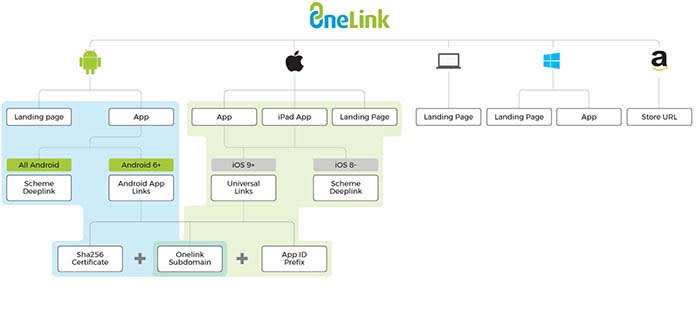
OneLink

OneLink compiles data by acting as a bridge between mobile apps and advertising campaigns. It will help you personalize the user experience while also being able to retarget users.

Seeing as retargeting can boost ad response by 400%, mobile app companies could be drastically improving campaign performance with deep linking.

First, you need to understand the different types of mobile deep links before implementing them.

The two types of deep links

The first type of mobile deep links is called standard deep linking. It allows you to personalize the app journey for devices with the app already installed.

The second type, deferred deep linking, serves personalized content to users. They will be forwarded to the app installation page first if it isn’t found on their device.

The two processes look like this:
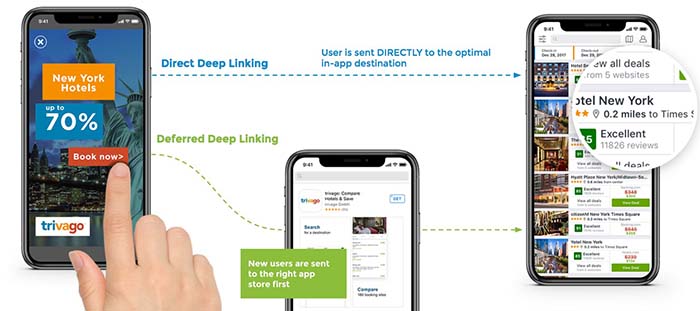
Direct Deep Link

No matter if they have the app installed or download it afterward, they will be automatically forwarded to the page they intended to visit.

For example, if a user clicked on a product page found on Google, it would open the app and place them on that page.

Since apps are typically more optimized for mobile devices than browsers, sales funnels and pages will be more effective.

OneLink deep linking steps

Now that you understand how deep links work, follow the below steps to configure it correctly for the device.

URI schemes

URI stands for uniform resource identifier and is similar to the URL of a website. URIs allow developers to link to deeper activities within an app, such as a specific page or feature.

URI schemes are specific to Android, and automatically launch an app to the desired location when a user navigates to a URL with the app installed.

The first step to adding a deep link via a URI scheme is by adding an intent filter in your Android app’s manifest.xml file like so:
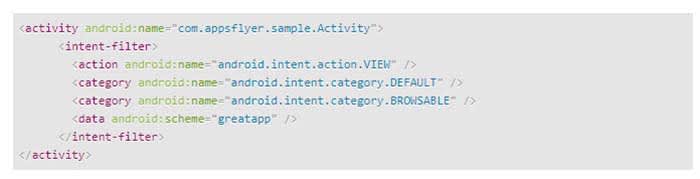
Code

You can then add a deep link to each individual activity you would like to deep link into. Here’s an example:
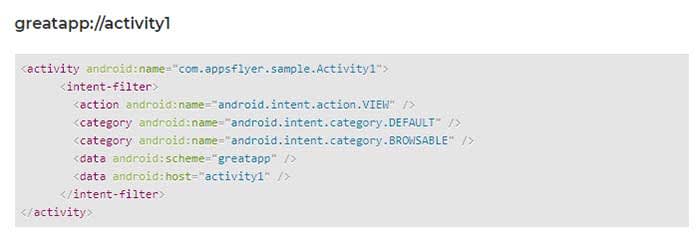
GreatApp Code

Universal links

Universal links are links between an iOS mobile app and an associated website or domain.

The first step to deep linking in iOS apps is to acquire the app’s prefix ID via your Apple Developer account. You can find it by following these steps:

  1. Select the “Certificates, Identifiers & Profiles” menu once you’re logged in
  2. Click “App IDs” under the “Identifiers” sidebar menu
  3. Choose the app you’re developing
  4. Copy the Prefix code and ID. This needs to be added to a OneLink template by your marketing department
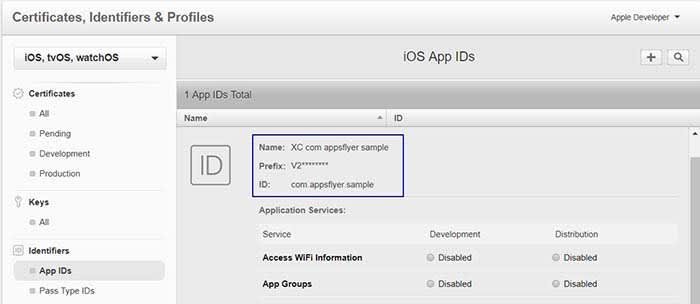
iOS

Next, navigate to the “Application Services” section of your Apple Developer account to enable associated domains.
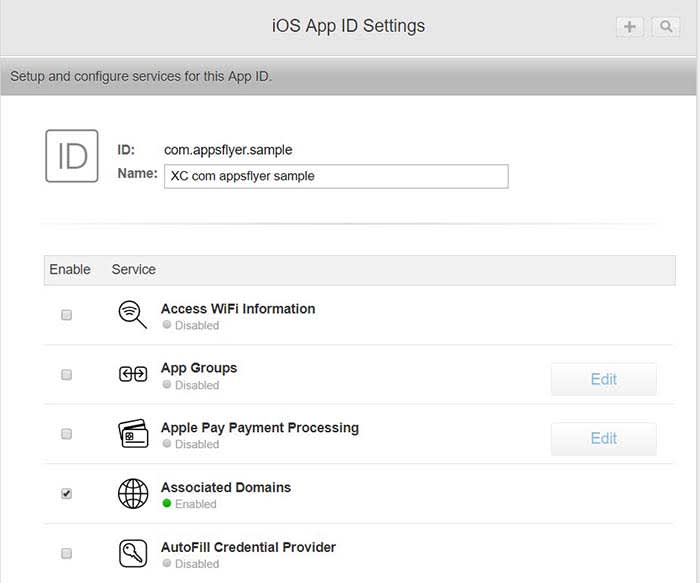
App ID

The last step is to generate a OneLink subdomain and include it within the “Associated Domains” section of Xcode.
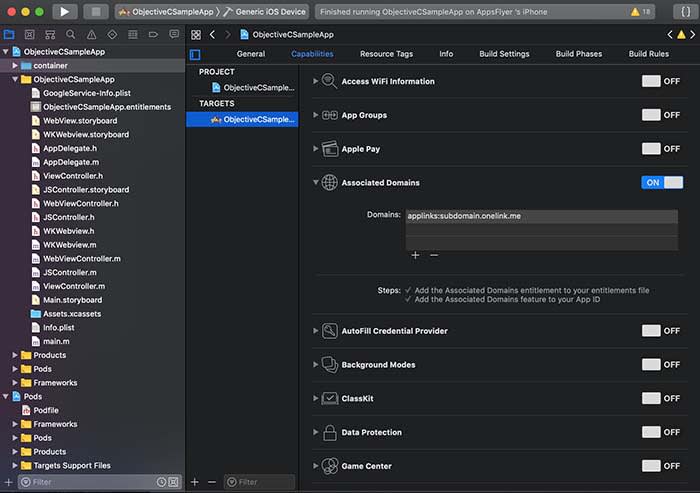
Apple ID

Once you have completed these steps, Apple devices will automatically launch the associated app when a user navigates to the domain(s) you set up.

Android app links

Google introduced its own version of universal linking with Android 6.0 if you wish to take that approach to deep links within a mobile app.

The first step is to generate a SHA256 fingerprint to enter during the OneLink setup. This begins by navigating to the app’s keystore which can be found on:

  • Windows: C:\Users\USERNAME\.android\debug.keystore
  • Linux/Mac: ~/.android/debug.keystore

Once you have located the keystore destination, run the following command:

  • keytool -list -v -keystore apk-key.keystore

If it asks for a password, the default is typical “android”

The output will look like this:
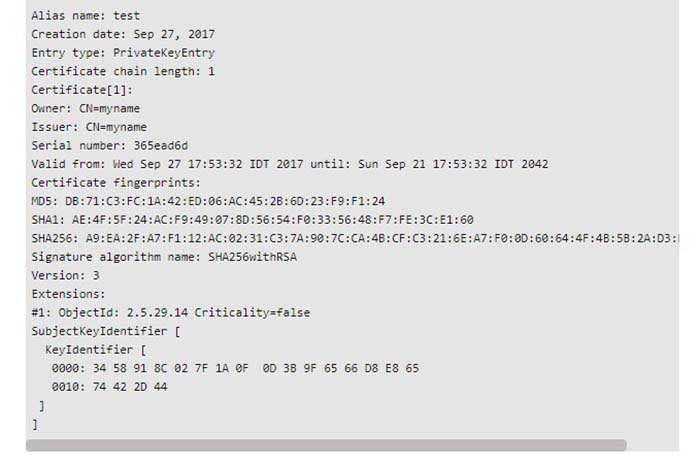
Android code

An individual in your marketing department will need to create an intent snippet through OneLink by adding the SHA256 fingerprint you generated.
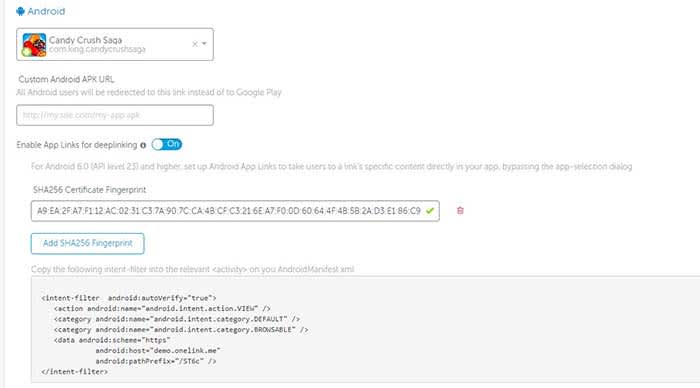
Android Code

This snippet can then be pasted directly in the AndroidManifest.xml file of your Android app where you wish to deep link into.

Tracking data with AppsFlyer

Once you have successfully enabled deep linking for your app and its appropriate OS, you can begin measuring two types of data:

  • Conversion data for new users
  • Re-engagement data for existing users

Accessing conversion data via deferred linking can be done directly through OneLink’s system as attribution data is sent directly to the app upon use.

Re-engagement data, however, involves the following flow:
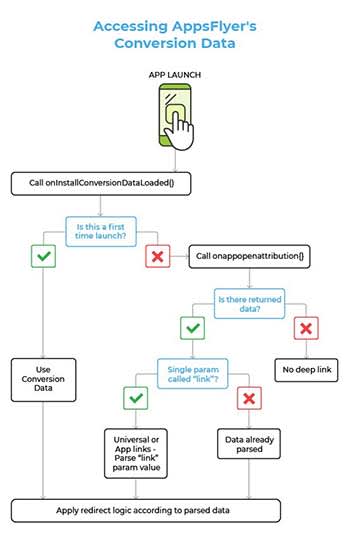
AppsFlyer

Developers can use the onAppOpenAttribution SDK function to access all of the re-engagement data parsed through the app. This function returns the data via “NSDictionary <key, value>” objects on iOS and “Map <key, value” objects on Android.

Wrapping up mobile app deep linking

Optimizing the user experience and reducing churn rate are common priorities for mobile app developers. Mobile deep linking is one way to work on both of these aspects in one fell swoop.

Deep links forward users to deeper pages within an app, making their experience more enjoyable and productive. This has been shown to increase conversion rates and increase retention at the same time.

Developers can implement deep links through URI schemes or universal links depending on the operating system.

Standard deep linking works for users with an app already installed, while deferred deep linking has the user install it first if it isn’t found on their device.

This means that deep linking also helps developers acquire more users. Furthermore, deep linking collects data on users that can be used to refine the app and its marketing.

So, what are you waiting for? Try adding deep links to your mobile app today to measure and optimize your campaign.

Facebook takes aim at misleading health products

Facebook reducing the spread of fake “miracle medicine” from the platform.

Instant Weight LossWe’ve all seen them: ads on Facebook promising a miracle cure that’s too good to be true.

These snake oil products say things like, “These pills will make you lose weight, grow your hair back, get rid of those stretch marks, make you live to be 100, and vanquish your enemies!”

As this misinformation about these miracle products counts as fake news, Facebook is making the effort to stop them. 

8

In a recent blog post, Facebook announced that they are reducing the following types of health-related posts:

  • Posts with exaggerated or sensational health claims
  • Posts attempting to sell products or services with health-related claims

Basically, if a pill claims that it can reduce belly-fat without changes to diet and exercise, Facebook will determine whether or not it should be hidden from viewers.

How big is this problem?

Essential oil

You might think that you’re savvy enough to realize when a product is too good to be true, but there are several that continue to dupe people.

For example, Essential Oils are making billions of dollars. Many people buy the product as they think it can treat their symptoms, but there are no studies that show that Essential Oils have any physical effect on the human body. Despite the fact that there is no research that says Essential Oils can treat your symptoms, they are still marketed as being something that can treat diseases like autism. 

Will this affect my page?

Unless you’re trying to hawk some “miracle pills” on your Facebook page, you won’t be affected. However, some pages you might be following will. Facebook said they will be handling the situation the same way they handle clickbait, which means they will be looking for key phrases commonly used in these snake oil sales pitches.

“Posts with sensational health claims or solicitation using health-related claims will have reduced distribution,” Facebook wrote. “Pages should avoid posts about health that exaggerate or mislead people and posts that try to sell products using health-related claims. If a Page stops posting this content, their posts will no longer be affected by this change.”

Keeping on the theme of Essential Oils, let’s take a look at a major Essential Oils Facebook page. Young Living Essential Oils has about 1.5 million likes. The page posts information about Essential Oils and links to buy their products. If they advertise that they can make your stinky apartment smell better, the post should remain on the page. However, if they advertise that the product will help reduce your child’s ADHD symptoms, they should be blocked according to this new policy from Facebook.

Wrapping up

It’s great that Facebook is taking steps to ensure that you won’t see these snake oil pitches. However, we need to stay educated about the misinformation these products spread across the web. Before making a purchase, do some research to determine whether or not the product is proven to work. Also, always consult your doctor before taking a new medication.  

11 hidden Spotify tips and tricks

Make Spotify even better with these 11 features!

Spotify

Having a hard time requesting a song while driving? Or maybe you want to preview a song without playing the whole thing? What about when you can’t find a particular song? Spotify is an awesome for listening to (and for teaching) music, and while it doesn’t take a music degree to create a new playlist or put your library on shuffle, there are some handy tricks to the app that are a little more under the radar. Check out these 11 tips that will add utility and ease to the software:

8

1. Quality vs Data

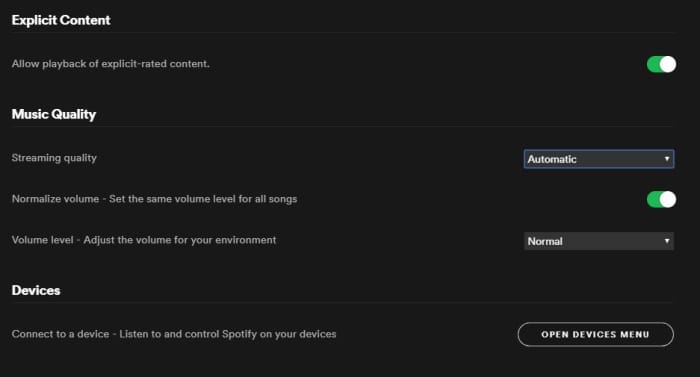
On both desktop and mobile you’ve got the option to either stream or download music on Spotify. By default, this process strikes a balance between fidelity and data, but through the Settings menu you can actually tweak which gets priority.

To do so (on Desktop) open the Settings menu from the drop-down under your profile picture. Scroll down until you see Music Quality. Use the ‘streaming quality’ drop-down to manually select either normal, high, or very high quality for your streaming.

You can use this function via mobile, too; just open Settings from Your Library and find it under Music Quality. On iOS specifically, you can find it under the Streaming Quality menu.

Spotify Settings menu Music Quality

2. Keep tabs with Last.fm

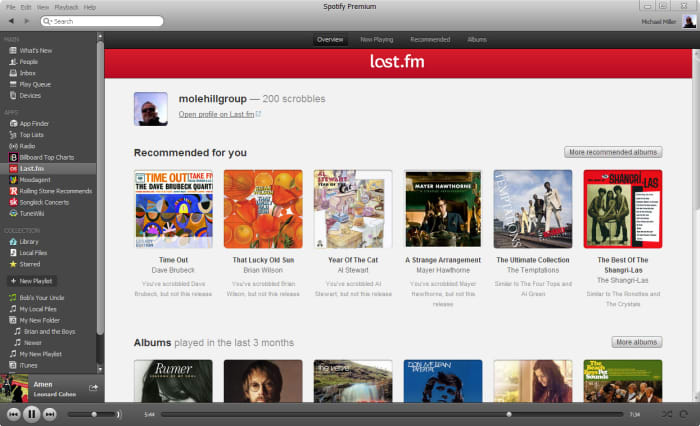
Spotify is integrated with Last.fm, a service that lets you track and discover new music. If you make an account with Last.fm (which you can do right here) it can connect directly to Spotify and you’ll be able to browse through the records it keeps of all the tracks you’ve been listening to on any of your devices. It’s even free!

Spotify Last.fm integration

3. Sing along with the lyrics

How does the second verse to “Tiny Dancer” go? Whether it’s because you’re trying to sing the song on the fly, or simply because not knowing what the singer is saying has always bothered you, it helps to have the lyric sheet handy.

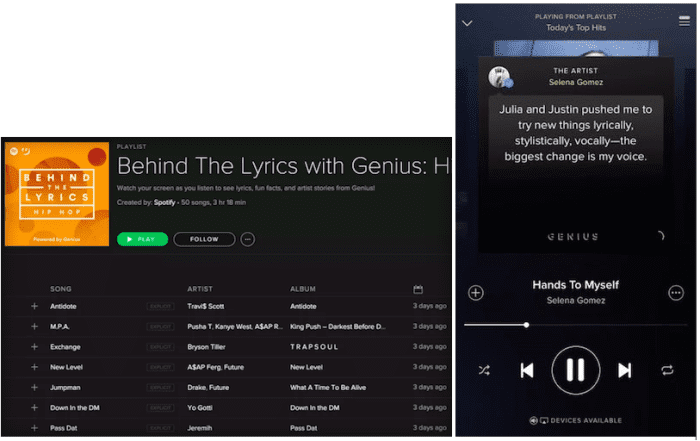
Spotify might have the lyrics up for you already – all you have to do is tap on the album picture while the track is playing. Spotify is partnered with Genius and certain songs have the lyrics integrated right in. Alternatively, you can switch this feature to “Behind the Lyrics” mode which tells information about the song alongside its lyrics.

Spotify Genius lyrics

4. Set up the queue

One of our favorite features for Spotify is that you can set multiple tracks in a queue, and they’ll play one after another. Doing so is very easy; on mobile all you need to do is select the song and press the ellipsis. From here you can do all sorts of things (view the album, check out the artist, add it to a playlist, or go to the radio), one of which is “add to queue.”

Once the current song is finished playing, it’ll start the next one in your queue, and then afterwards it’ll go right back into whatever playlist you were in before. It’s especially useful when you’re in something like a “classic rock” playlist but are hankering to hear one specific jazz tune before resuming.

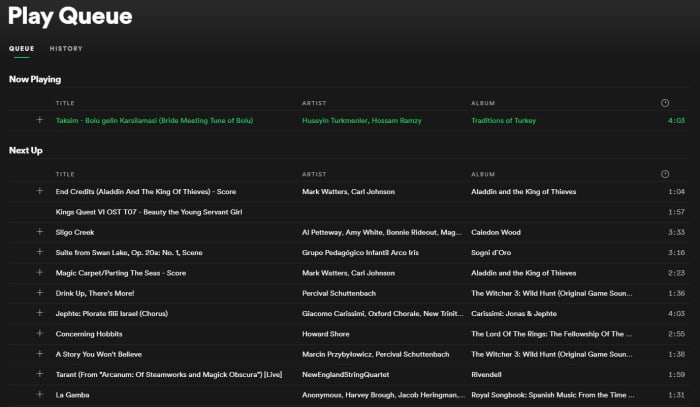
Spotify Queue menu

You can also view the default queue of songs as well as your song history at any time by pressing the “queue” button on the bottom right (on desktop) or by looking through the queue menu on mobile.

5. Preview a track

If you’re a fan of instrumental music, you might not recognize a song by its title (since there are no lyrics to go by). Or maybe you just can’t remember how a song starts.

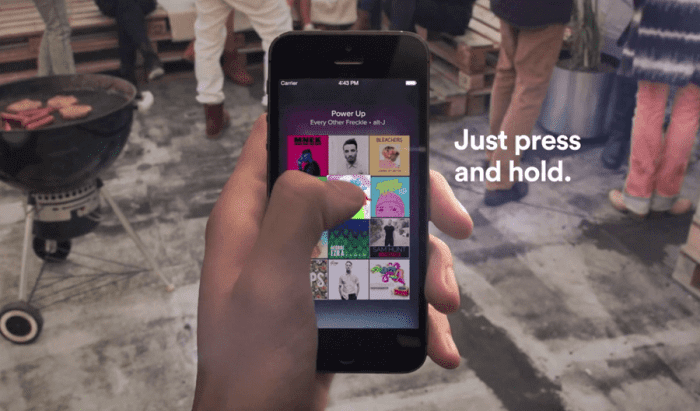
A neat trick on mobile is to press and hold the song title for a quick preview. That way you can navigate away from the page, check out other music, or show your friend a quick sample without committing to the whole track.

Spotify preview track mobile

6. Follow artists

It’s always exciting to find a new artist you like, and Spotify makes it very easy to look up more tunes, more information, or even upcoming concerts from artists in its huge roster.

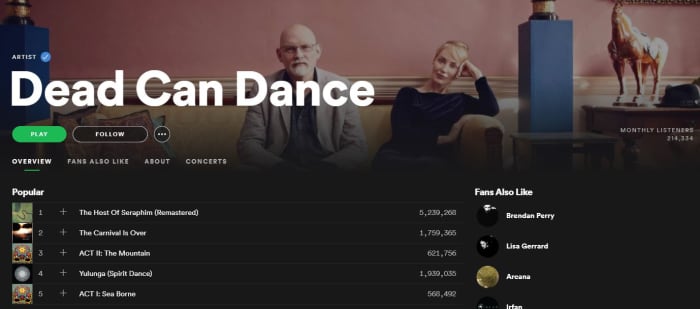
Next time you’re listening to a song on Spotify, click on the artist’s name (or find it via pressing the ellipsis on mobile) and it’ll take you right to their page. Here you’ll see their most popular tracks, albums they’ve put out, and even recommendations for other similar artists.

Spotify artist page

7. Crossfade tracks

If you want your Spotify experience to sound extra fancy, you can set it to seamlessly blend from song to song using crossfades between tracks.

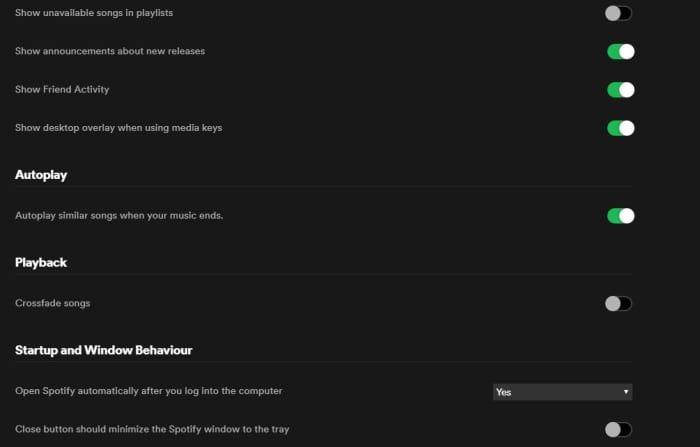
To engage this just go back into your Settings menu and look for “Playback.” Enabling the crossfade feature is the only option here; just toggle it on.

If you’re on desktop you might find this option under “Advanced Settings” instead. Just scroll down and you’ll see a button for it.

Spotify Settings Playback crossfade

8. Request tracks via voice command

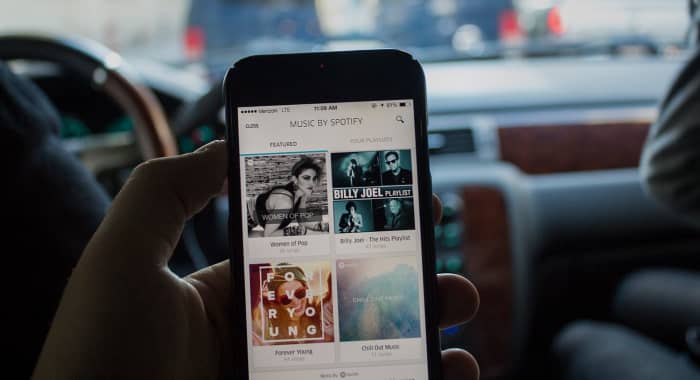
Texting and driving is a terrible idea, and that’s why it’s illegal. If you use Spotify on mobile, there’s a good chance you listen to it while driving, too. Sometimes, there’s a song we really want to hear and it’s tempting to scramble during a red light to try and put it in queue – but there’s actually a much safer, more convenient way.

Spotify can recognize voice commands, so just hit the mic button on your smartphone and tell it the song you want to hear. Tap it and it’ll start to play immediately. It’s faster and nearly hands-free!

Spotify mobile driving voice command

9. Make a collaborative playlist

Planning a road trip with friends? Maybe trying to organize a list of songs for your band to cover? Maybe your friend’s getting married and you and the other bridesmaids are in charge of making a playlist.

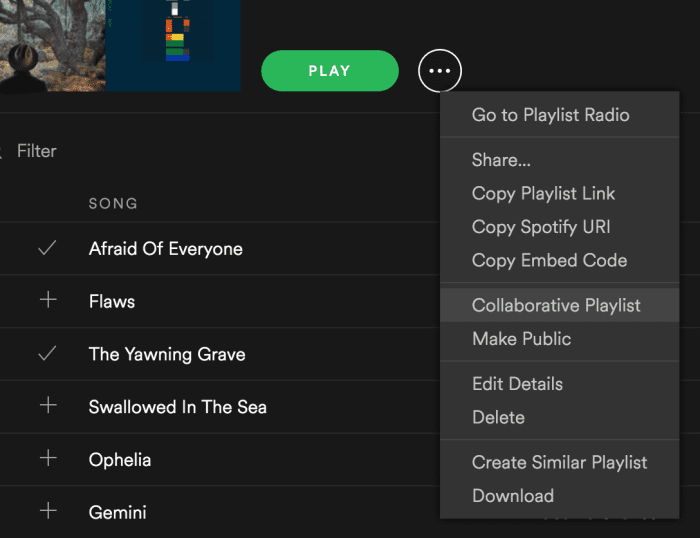
Start making a new playlist and then right-click on it. In the drop-down you’ll see an option to “make it collaborative.” Select this and then select any friends with whom you’d like to share the monumental task of picking the most appropriate music.

Good luck with that.

Spotify drop-down collaborative playlist

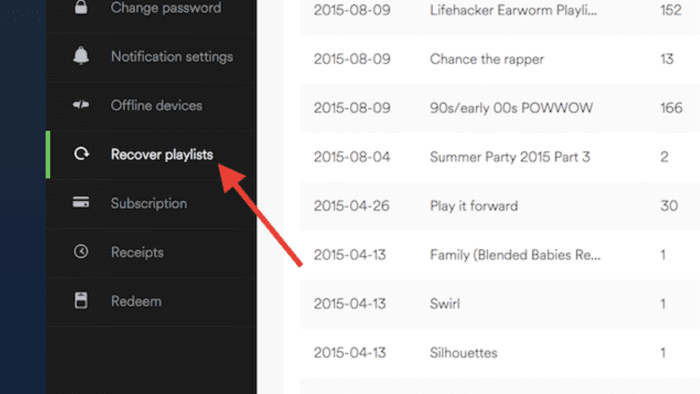
10. Recover deleted playlists

There’s definitely a moment of panic when you think you’ve accidentally deleted an entire playlist. Fear not; there’s a way to fix it.

Go to Spotify’s website right here, log in to your profile, and there’s a Recover Playlist option right there. You’re welcome!

Spotify website recover deleted playlist

11. Add music that isn’t on Spotify

Spotify’s got thousands of tracks out there, but there’s still the odd outlier that you can’t find in their massive library. If you’re willing to take a few minutes, there’s a way you can add your own local MP3s to your playlist.

All you have to do is access your Local Files via the Settings menu, add a source (giving Spotify the path through your File Explorer), and then sync it up with whatever playlist you like. Check out our full walkthrough of the process for details!

We hope these tips and tricks will make using Spotify easier and allow you to use it more effectively.

Let us know in the comments below if there’s one that we missed, and stay tuned with Softonic for more Spotify news and info!