The new bundle sounds great to us, but it might be a death sentence for Netflix!
For just $13 a month, you can have a subscription to Disney+, Hulu, and ESPN+. That’s the same as a standard subscription to Netflix.
Both Hulu and ESPN are owned by Disney. Those of us who have been at the edge of our seats waiting to get Disney+ have been anxious to hear about a potential bundle announcement. Now that we have one, it almost seems too good to be true.
ESPN+ costs $5 per month and Hulu costs $6 per month. Add those to the $7 per month Disney+ would cost on its own, that’s an $18 value for only $13.
With Disney+, we already know we are getting Disney animated movies, Star Wars movies and shows, and all of the exclusive MCU Phase Four shows. The fact that we are going to get all of that along with Hulu and ESPN Plus for the same price as a standard Netflix subscription makes Netflix look overpriced.
However, there is a bit of a concern as Disney enters the streaming business. If Disney+ runs Netflix out of business with their low prices, they could run prices up once Netflix is gone. Basically, these low prices for the bundle might only be available for a short time.
If you want Hulu and ESPN+ along with Disney+, we really can’t dissuade you from not taking advantage of this great value. However, you might want to consider holding onto Netflix so that Disney doesn’t get a full monopoly on the streaming market.
Check out these 10 amazing games available on PlayStation Now!
Imagine Netflix, but for video games. Seems too good to be true, right? Actually, this fantasy is a reality. PlayStation Now offers instant access to more than 700 PlayStation 2, PlayStation 3, and PlayStation 4 titles, all available to stream instantly to your PS4 or computer.
With such a massive library of games, it can be tough to decide where to jump in. Fear not, because we’ve compiled a list of the 10 best games on PlayStation Now:
If you’re a Mortal Kombat fan – and even if you’re not – you’re guaranteed to have a white-knuckle, knockdown, drag-em-out punch-fest featuring classic MK characters like Sub-Zero, Jax, Kitana, Ermac, Sonya Blade, Johnny Cage, Liu Kang, Reptile, Scorpion, and a bunch more.
With a surprisingly compelling (though quite cheesy) plot and a crazy long challenge ladder mode, you’ll have plenty to do in the game’s single-player. But that’s why you buy MKX – this is one of the best 2-player games out there, whether you’re online or in the basement couch, doing a tag ladder or bashing each other in the face with brutal X-Ray attacks and fatalities.
If you haven’t had enough fighting games with MK9, then step into the ring with one of the best wrestling video games of all time. Developed in a collaboration between Yuke’s and Visual Concepts, WWE 2K16 has more than 120 unique playable characters, five game modes, and much-improved gameplay from its predecessors. Advanced holds, tornado tag-team, smoother animations, and all-around superior visuals and audio, this is definitely one every fighting game fan needs in their library!
Take Bioshock to the skies as you and Elizabeth uncover the secrets of Columbia.
Bioshock’s third entry puts you in the boots of Booker DeWitt, a detective hired to retrieve a girl, Elizabeth, from the flying city of Columbia. This game perfects the gameplay of the first two entries in the series, but Infinite’s story is what really sets it apart. The shocking twist ending inspired endless discussion, speculation, and philosophical musings across the internet and beyond are phenomenal. If you haven’t had it spoiled yet, we highly recommend experiencing it for yourself. If you’re looking for the classic Bioshock experience, however, fear not: the firsttwo entries in the Bioshock series are also available on PlayStation Now.
Even though it came out over two years ago, Sniper Elite 4 is one of the most tactical shooters on the market. The game will put you in 1943 Italy as an expert marksman behind enemy lines. You’ll be setting up traps, lining up shots, gunning for high-ranking officers, and – if things get dicey – running for your life. The game has smarter AI than the previous games, a grittier plot involving a new Nazi weapon, and night missions during which the player can eliminate light sources to mask their presence. A lot of things happen at once in SE4, and like the trailer says “timing is everything.”
Explore deep chasms, high mountains, vast deserts. Adapt to survive.
When you strap in for an action-adventure game by Naughty Dog, odds are you already know what you’re in for. One of the best-reviewed games of 2011, in Uncharted 3 you play as explorer Nathan Drake as he searches the Rub’al Khali desert for the lost city Iram of the Pillars. Leap, run, scale, swim, and navigate narrow ledges, sheer drops, and vast terrains as you search high and low. New fight mechanics include hand-to-hand combat against multiple opponents, contextual melee attacks, and a potpourri of new stealth options.
Every boss encounter is unique, every fight memorable.
An instant classic first introduced on the PlayStation 2, Shadow of the Colossus is a truly gorgeous game. As the player character, you travel to a mysterious land and fight a series of massive Colossus creatures in order to bring your true love back from the dead. The game is essentially an endless series of boss battles, with each Colossus bringing its own unique twist that makes every encounter as much of a puzzle as it is a fight. The graphics are gorgeous, and the breathtaking vistas are a huge part of what makes this game such an incredible experience.
Set in a brutal nightmarish world, your gaming skills will be tested to their limits.
Bloodborne is a world created by your fears. Your goal is to meet those fears head-on and conquer them in a world rife with danger and risk, where death and insanity lurk around every corner. The title is reminiscent of Dark Souls, with its death and save mechanics seamlessly intertwined with gameplay, making for a harrowing experience for even the most well-versed gamers. Combat is quick and demands a strong offensive, while you need to equally keep up your defenses against hordes of nightmarish enemies and merciless bosses.
When being shot in the head and left for dead in a ditch somewhere in the wasteland only makes you angry, you know you’re in for a fun ride. Fallout: 4 does everything that a Fallout game can do right: Massive world, strong RPG elements, factions to join or fight, a good crafting system, and a post-nuclear apocalyptic world swarming with mutated creatures. The game also improves upon several core features of previous Fallout titles, including combat, kill animations, easier character customization, and a modified perk system. Oh, and Dogmeat is still such a good boy.
Immerse yourself in a gripping narrative of two people struggling through a post-apocalyptic world.
A true masterpiece from Naughty Dog. The Last of Us is set in the near future after a fungal plague wipes out nearly all of humanity. Grizzled smuggler Joel agrees to escort a young girl, Ellie, on a dangerous cross-country journey in the hopes of finding a cure for the infection.
The story and performances of this game are what make it stand out. The emotional plot pairs well with stealth heavy survival gameplay, making each encounter into a uniquely satisfying challenge. The game’s Left Behind DLC is also available on PlayStation Now, and though short, is just as emotional and powerful as the main game. With the Last of Us 2 on the horizon, now is the perfect time to get caught up.
Red Dead is the most popular game on PlayStation Now for good reason, and with Red Dead Redemption 2 now available, there’s no better time to play the original. The Rockstar title puts players in the shoes of outlaw John Marston in the waning days of the Old West.
Players can explore a sprawling map featuring seemingly endless side quests and locations, customize their character, try their luck at gambling, enter horse races, and more. Think of it as a sort of Wild West version of Grand Theft Auto… except instead of cars, you’ll be hijacking horses.
There is a bit of a concern over whether or not you truly “own” your PlayStation Now games. However, there is a simple answer.
If you buy a game on PlayStation Now, the game is yours for as long as you keep your subscription. However, if you stop paying for your subscription, you cannot play any of your games or any of its DLC. If you renew your subscription, you will be able to play all of your games and DLC once again.
Wrapping up
New users can get a free 7-day trial before signing up. From that point, you can decide between a one-month subscription ($19.99), a three-month ($44.99) or a full year for $99.99. Get one today and we’ll see you online!
Since Marvel Ultimate Alliance 3 hit the shelves last month, we’ve barely seen the sun. It’s been a decade since Ultimate Alliance 2, so we were understandably thrilled when we heard the title was making a comeback, and that Koei Tecmo’s Team Ninja was at the helm, and the game was being published by Nintendo.
This time the story kicks off with the Guardians of the Galaxy!
While the game is fairly intuitive (especially if you played the earlier games in the series) there are still a number of things we wished we’d known going in, like the best way to prioritize leveling up characters, manage the complex ISO-8 system, or minimize grinding before tackling the game’s tougher encounters. There are definitely a couple of spikes in difficulty, so we put together a list of 10 tips to help get you started off on the right foot. If you don’t own the game yet, you can buy it here.
1. Adjust the camera and controls
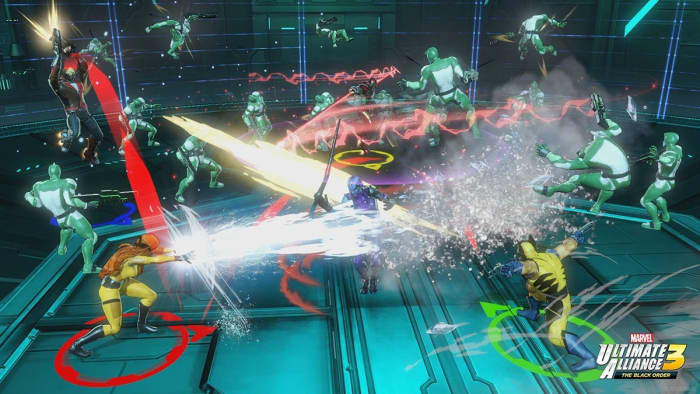
First things first, the game’s an isometric top-down hack n’ slash. You’re going to spend a lot of time trying to keep track of the character you’re currently playing amidst a screen full of enemies, colorful explosions, and walls and objects that the camera likes to get stuck behind. Needless to say, navigation is difficult. Angry Joe explains it best in the vid below (and he explains angrily, so NSFW warning):
If you’re playing couch co-op with your friends you’re going to be fighting over control of the camera often; it’s inevitable (cue Thanos’ “I am inevitable”).
There are two things that can help: If you’re playing the game by yourself you can switch over to “heroic camera,” which keeps closer to the character you’re playing instead of hovering in top-down. The second thing you can do is play the game online, since that allows you and the other players to move further apart before the camera gets confused.
Wait, where’d my character go?
If you’re new to the Nintendo Switch, there might also be a learning curve for using the controls. The Options menu has three different configurations you can cycle between, though, so at the start of the game find the one that feels most intuitive.
2. Use multiple save slots
This is a really general video game tip, but it’s one that bears repeating here: There are five save slots available in Ultimate Alliance 3, and you should be cycling between at least two of them.
“But the game auto-saves, like, all the time,” you might say. This is true, but it might also auto-save after you’ve made a really, really bad decision. Trust us, you don’t want to be stuck with a save where you accidentally deconstructed the wrong ISO-8 crystals or spent your limited resources on the wrong upgrades or characters.
Additional save slots provide you with the opportunity to experiment. Is it worth enhancing this ISO-8 crystal? Will giving Wolverine ALL of our XP cubes really get us through this harder fight? If it wasn’t worth it, this way you’re not 100% committed to risky decisions.
You’ll thank us later.
3. Use synergies. Like, a lot.
Right after the prologue mission, the game teaches you about using synergies, Ultimate Alliance 3’s take on the fusion system introduced in Ultimate Alliance 2. Essentially this involves two characters using their abilities in tandem to enhance the damage, increase the effective radius, and/or reduce the cost of their abilities.
As you unlock more abilities, you character can perform more synergies off of more teammates.
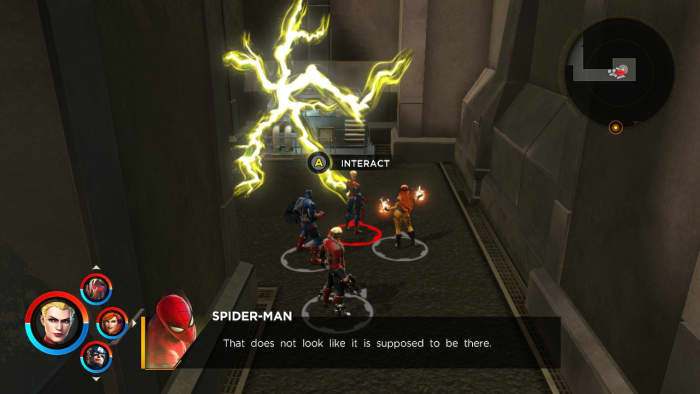
You can activate these abilities in two ways. You either initiate (by performing an ability with ZR instead of R) and the AI joins you, or you can respond to a synergy request by pressing B when the option arises (it’ll cue you in with a flashing button, visual, and a sound effect). Synergies fill up the extreme meter quicker, deal more damage, and stagger larger targets more effectively, so don’t be shy to use them often. Characters can also use synergies to open certain blocked paths or secret doors, so keep your eyes peeled.
Like synergies? Play the game that introduced them!
4. Beating the stagger meter
One of the new features implemented in the series is the stagger meter – that purple bar under a boss or mini-boss’s health meter. You can do damage to the boss even if they aren’t staggered, but you’ll do way more if they are. Take down that purple bar and then hit ’em with the best stuff you’ve got to drop them more efficiently.
You can still hurt bosses even if their stagger meter is full; it’ll just damage them less.
While the most intuitive tactic is to use your synergies or extreme attacks when the meter is down, you might actually be better off using them just before the stagger bar depletes. Some bosses regen their stagger meter really quickly, so in order to maximize damage and hit them before they can escape, trigger these moves just a hair early. Later on in the game, you might also find ISO-8 that does extra damage to this meter, so outfit your team with that in mind.
Guide to Marvel Phase 4: Everything you need to know
While we’re on the topic of beating the stagger meter, nothing does the job quite like a forklift thrown at the bad guy’s head. For whatever reason, thrown objects dish out a ton of damage to enemies, especially to their stagger gauge. If you spot an object you can throw, it’s there for a reason.
6. Time your extreme attacks
Extreme attacks are the strongest move in your character’s bag of tricks, and they can only be done once your attack momentum reaches a peak threshold. It may be tempting to use it right away, but the smart move might be to save it for when you really need it (like that boss fight around the corner).
Ultimate alliance extremes are the most powerful tools in your arsenal
Extreme attacks (even when just one character does it) are usually enough to topple the stagger meters of a crowd of mini-bosses, so don’t spend all four needlessly (unless you’re trying to maximize your damage for a rift challenge or something). Maybe try one or two at a time and see how much damage you can dish out. The only time you’ll really need all four is when you’re up against a tough boss. Then every bit of damage counts.
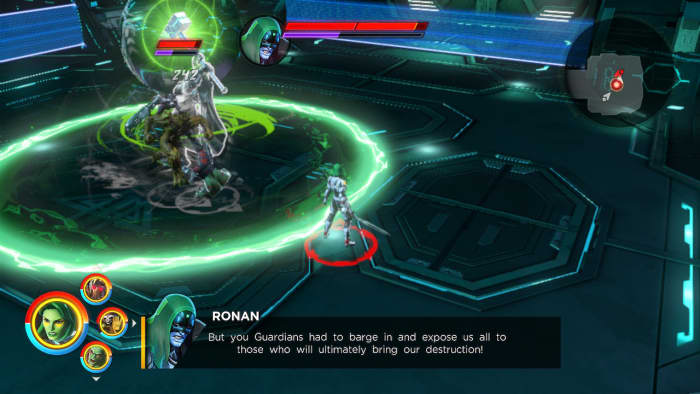
Lastly, boss fights are often split into multiple stages. If you look carefully at an enemy’s health bar you can see where the partition hits. Don’t perform your extreme attacks if they’re about to bump to the next stage of the fight; all that damage will be wasted.
See the partition in Ronan’s health bar? Wait until phase 2 before you hit him with the best stuff!
7. Manage your team bonuses
Earlier games in the series would put in fun names for specific teams of four (‘bruiser brigade,’ ‘energy corps,’ ‘femmes fatales,’ or ‘classic avengers.’). Ultimate Alliance 3 altered the formula a bit and made it both more flexible and more approachable.
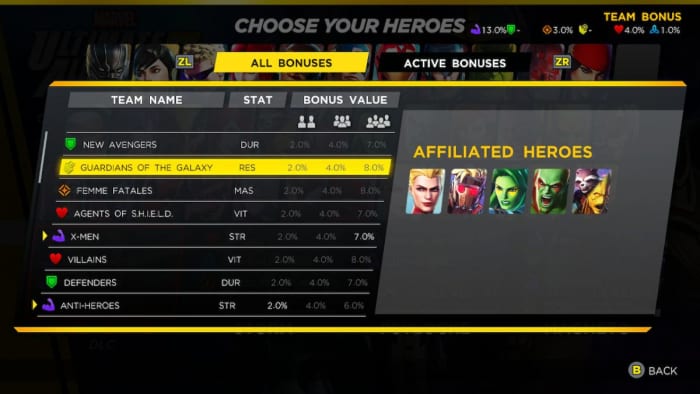
First off, now it only takes two characters with matching affiliations to provide a bonus for your team, and the specific percentage increase it rewards is displayed at the top of the screen.
Second, you can press L to see the affiliations every character has on the hero selection screen. That way you can stack your bonuses more efficiently.
See which heroes are in which teams. Stack your bonuses accordingly.
This opens up two avenues of play: You can either put together a team that’s weak in one area, but stack them with team bonuses to make up the difference; or you can stack one specific bonus really high, providing a really noticeable change to, say, your energy output or your durability. Don’t forget ISO-8 bonuses stack on top of that!
8. Use the Lab
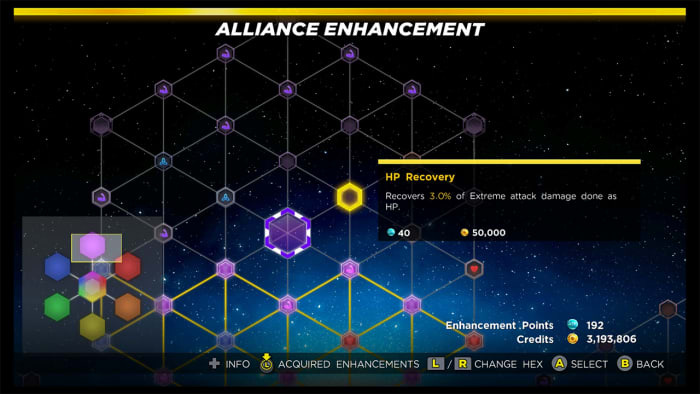
A lot of your team’s success will take place behind the scenes. The Alliance Enhancement network and ISO-8 management are key components towards buffing your characters, negating weaknesses, and even unlocking entirely new facets to your game, like extra revives, faster XP gain, or health regen.
ISO-8 can add wholly new effects to your character
If you’re finding a particular juncture of the story is suddenly way harder than expected, it’s probably time to check out the lab (accessible from a SHIELD point once the feature is unlocked) and pick some upgrades. Once you’ve stretched the first portion of the Alliance Enhancement network out to the edges of the shape, it’ll unlock entire new sections to explore, each one with a focus towards one attribute (strength, mastery, durability, energy, health, and resilience). Max out a section and you’ll unlock a powerful unique bonus.
Every section caps out with a special shared bonus. Decide which ones to prioritize.
9. Manage your ISO-8
ISO-8 is probably the most complex part of this game, so we’ll spare you the nitty gritty details. If that’s what you’re after, check out this in-depth video.
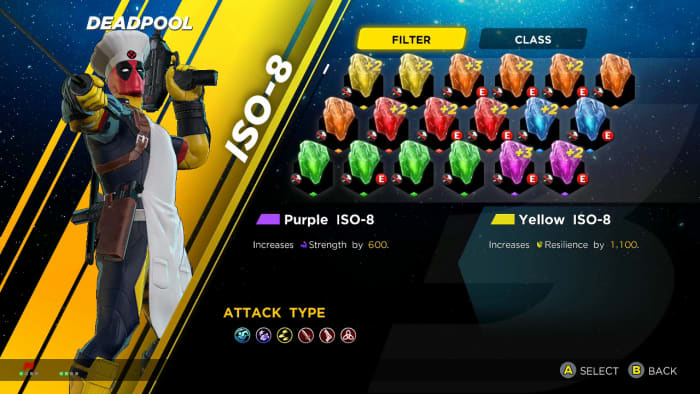
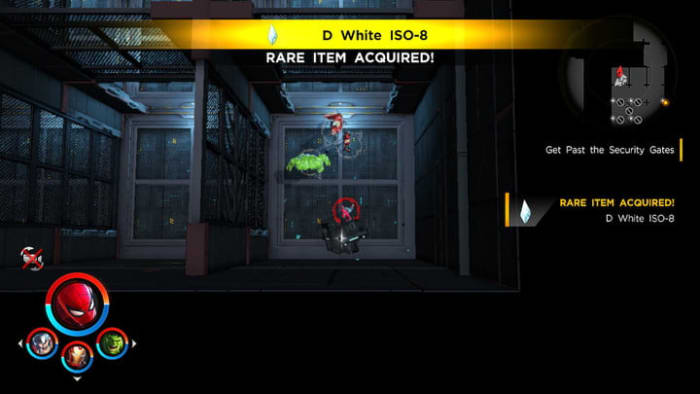
Fundamentally, these are crystals of varying rank and color, and they can be slotted into your characters on the Team menu (accessible via SHIELD access point or even just the base game menu). As you level up you’ll unlock more ISO-8 slots per character, and the fourth slot is unlocked by filling out all of the 100,000-cost ticks in the Alliance Enhancement menu, which will probably take a few playthroughs.
D level ISO-8 is probably better off deconstructed than equipped.
What’s important to know right up front is that you can swap ISO-8 between team members any time you like, so we recommend giving your team a once-over every time you bring out new characters. This also means you can keep swapping them between characters whenever you switch up your squad.
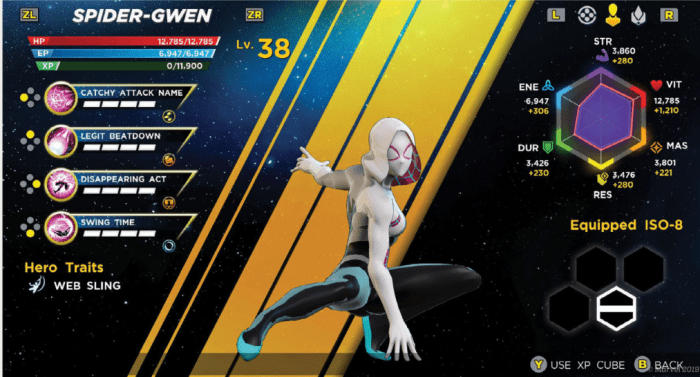
When it comes to deciding which ISO-8 to give to which team member, check out specific strengths and weaknesses on their character screen. Does this character use mostly strength-based attacks? Then give them a purple strength ISO-8 to boost their damage. Does this character have health regen? Then give them a red ISO-8 to synergize with that trait so they passively heal even faster.
Look carefully at a characters’s stats before you decide which ISO-8 is best for them.
Lastly, we recommend deconstructing any ISO-8 below C grade. It takes a LOT of ISO-8 to build a crystal towards any noticeable bonuses, so these weaker crystals are better ground up and fused with crystals that are already powerful.
Keeping your characters at a comfortable level is one of the most challenging aspects of the game, and it can be discouraging when the game hands you a new level 30 character that blows your current team of level 14 characters out the window. There are a few things you can do to keep your team strong enough to tackle the game’s increasingly difficult scenarios.
Infinity Rifts are challenging, but optional
Rifts can be grindy, but there’s no better place to level up your characters, especially in Wave modes. The caveat is that you have to beat the challenge for the rewarded levels to stick, so be sure you don’t bite off more than you can chew. Rifts are also great places to find the second best way to level up quickly – XP cubes.
Complete Infinity Rifts to level up, earn XP cubes, costumes, and even new characters.
XP cubes can be found in scattered boxes throughout the game (usually hidden behind breakable synergy walls or secret panels), but they’re more frequently obtained through rift challenges – especially the harder ones. One trick we found was to take a powerful team (comprised of the higher-level characters the game rewards you with around mid-game) and sending them to complete the harder challenges in the first rift. Then we went back and distributed all the XP cubes to our weaker characters to balance out our team.
We hope these tips help you get a strong start in Marvel Ultimate Alliance 3. Let us know if there are any other strategies you’ve found, and stick with Softonic for the latest in tactics, guides, and upcoming DLC for the game!
Marvel Munchkin is the card game every superhero fan needs
Take your Instagram page to the next level with Linktree!
If you’ve been around Instagram for a while, you may have noticed some users create “link trees.” These are a single link (the trunk) that takes users to even more links (the branches), which can direct them to Facebook, Patreon, a personal website and more!
More likely than not, they achieved this with Linktree!
We’ll be honest: Linktree’s applications aren’t limited to Instagram alone. However, it’s become well known on Instagram because the app only allows one web address in their designated slot. It’s the perfect location for a customizable directory!
If you’re ready to fire it up, let’s talk about how to…
First off, in order to get Linktree, you have to sign up for it on their website.
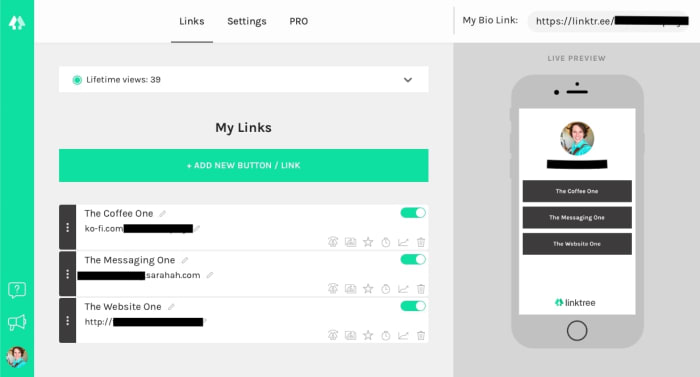
You’ll want to sign in with Instagram or create a new account. Once that’s finished, you’ll have a dashboard that looks something like the picture above! There are a few items to note:
The Links, Settings, and Pro menus all have important duties. The first manages links, the second changes the color users will see, and Pro displays the many features of their premium account.
And, of course, at the top right you’ll be given the link itself. Place this in your Instagram account or profile of choice at any time: it’ll auto-update whenever you make changes on the Linktree dashboard.
In an Instagram account, it’ll probably look something like this:
Step 2: Add links
When you hit “Add new button/link”, you get the new tab shown in the picture above. Add a title for others to see, then post the link in directly below.
Yeah, it’s pretty much that simple.
Once the information finishes updating, the yellow slider on the right will turn green. At that time, you may activate or deactivate the entry at any time without actually deleting the link to “remove” it. Nifty!
Holding your cursor over the triple-dot grip on the left allows you to drag and drop each link with ease. If you have one that’s more important than the others or want them in alphabetical order, it’s a cinch to arrange them as you wish.
Finally, the icons at the bottom right are for Pro users only. Should you accept the cost, they’ll help you create a thumbnail picture, highlight certain links, schedule times for links to appear/disappear, and more!
3. Personalize
Recap: you added the links to your link tree, you named each of the addresses, and you placed the URL in your Instagram account. Now, what’s left but altering how the tree itself looks?
Head over to Settings!
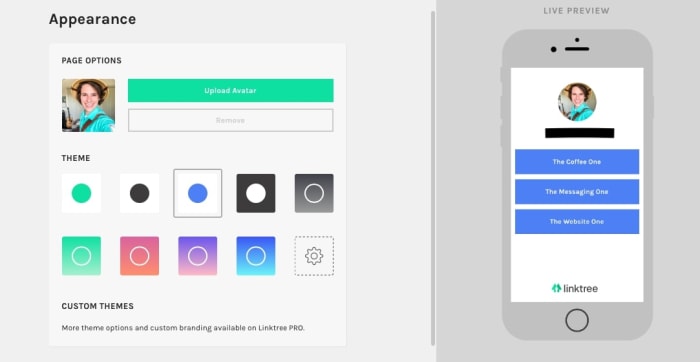
Color options take up most of the space here: you can choose what the buttons and backgrounds look like with the click of a button. You don’t even need to save because everything is automatically updated!
Without a Pro account, be prepared to choose one of nine options. We recommend clicking through each to find what sticks out to you. Don’t worry, they’re all clean and professional! You may find that the lack of options makes the decision refreshingly simple and straightforward.
You can also change your avatar from here. By default, it will be your Instagram profile picture. However, you can upload a specific picture if you want. Anyone that visits the link will see the set graphic instead!
Conclusion
Linktree makes connecting multiple accounts and websites from your Instagram profile easy. With two clicks, followers can be directed almost anywhere across the worldwide web. We hope you enjoyed this quick introduction; we highly recommend giving the program a try!
The Indian government wants WhatsApp messages to be linked to users.
If you’re a WhatsApp user in India, your messages might be compromised.
Two petitioners have requested India’s high court to link WhatsApp users’ accounts with their Aadhaar. Aadhaar is a 12-digit unique biometric identity number that everyone in India has to identify them. Aadhaar is pretty controversial in India as some believe it allows the government to track their every move.
The petitioners want WhatsApp users linked to their Aadhaar so that users who cyberbully or defame other users can be held accountable. Linking users to their Aadhaar would significantly weaken WhatsApp’s encryption.
Users are worried that weakening WhatsApp’s encryption would cause a domino effect that would extend to other apps as well. The mindset is if this can happen to WhatsApp, one of the most popular apps in the country, it can happen to any app.
WhatsApp is supposed to be a place for private conversations, but adding this link would mean that every message has a record associated with you and your phone number.
Why is this happening and what is WhatsApp doing?
The problem is that the petitioners aren’t the only ones fighting for this change in WhatsApp, the government of India is trying to weaken its encryption as well.
India’s IT minister Ravi Shankar Prasad said that traceability will be WhatsApp’s job. The government has tried to get WhatsApp to allow messages to get traced back to users, but has been denied each time. With the support of the petitioners, this time the Indian government might be too loud for WhatsApp to ignore.
Much of this was sparked by an event last year when a hoax was spread through WhatsApp about child abductors running rampant in India. This lead to several people being lynched in the chaos. People who helped spread the hoax could have potentially been tracked down and prosecuted if they were linked to their Aadhaar.
WhatsApp has responded to the issue and is working to fight misinformation from spreading throughout the app. Recently, they unveiled a feature that would tell users if a message was forwarded more than five times. The idea is that if a message was forwarded more than five times, it is probably being sent on a massive scale, and maybe with malicious intent.
First off, it is important to note that this is not necessarily an India-only issue. Weakening WhatsApp’s encryption could potentially have consequences for users in other countries.
WhatsApp has to take every user in every country into consideration before making this decision. They also have to consider the users in India that don’t want them to make this change. Whether WhatsApp and the Indian government reach a compromise is something we will have to wait to see. Until then, if you’re a WhatsApp user, continue to report users that spread misinformation on the app.
Excel isn’t your only option; check out these alternatives!
Microsoft Office has been a business standard for a long time now. Despite how common it is, using it over and over again can get very dry. Also, if you have to pay for it yourself, Microsoft Office can be a little expensive. Because of this, many people have been looking for alternative options for both their business and personal use. Excel is one of the more complicated programs offered by Microsoft Office, so finding an alternative can be a difficult task. Thankfully, there are plenty of free and cheap options.
While LibreOffice lacks a few formatting options when compared to Excel, it is offered as a free alternative to all Microsoft Office products. Since LibreOffice only offers the basic functionality of Excel, it isn’t often that you’ll see this program in a business setting, but it can make for a free program to use at home.
If you need something to help keep organized or to help with some basic number balancing, it’s a good option. LibreOffice is available for both Mac and PC.
Another option available on both Mac and PC, WPS Office is not only a good alternative to Excel but Word as well!
Most free spreadsheet programs will struggle to have complex programs but provide simple features that can be nice for smaller data management. WPS Office is the middle ground between most free programs and more powerful ones like Excel.
While it won’t be able to perform as complex features like Excel, it is generally a more user-friendly program. That being said, if you choose to pay for it, you will be able to get most of the complex features that Excel itself has.
This may seem like an obvious choice, but the Google Suite provides completely free alternatives to all Microsoft Office products. That being said, Google Sheets has the added bonus over Excel that you are able to use it as part of a browser. Additionally, Google Sheets allows for real-time collaboration. All you have to do is invite other Gmail users to edit your work and they’ll be able to start on it with you right away. Once again, this is available on both Mac and PC.
This one is Mac exclusive, but it is super helpful.
As with most Apple products, their spreadsheet program is well-known for being one of the most user-friendly and aesthetically pleasing spreadsheet programs out there. Workbooks are able to be saved and worked on in a variety of formats, allowing you to use practically any spreadsheet with Numbers. It also has many helpful and easy-to-use templates for those who may not be the most familiar with these types of programs.
Thinkfree
Thinkfree Office is often compared to Google Suite applications, as they are both provide free alternatives to Microsoft Office. Thinkfree’s spreadsheet application is much easier to learn than similar programs, like Excel, which makes it useful for those who are less tech-savvy. Unlike LibreOffice, it also provides a variety of formatting options, making it easily compatible with Excel itself.
Although Thinkfree is available for both Mac and PC, most online tutorials you will find online are in Spanish. If that proves to be a language barrier for you, this might not be your best option.
Gnumeric is an open-source spreadsheet program that can be used for easy and simple data management. However, since it is an open-source program, it can be customized to do practically anything. While it will start as one of the less complex spreadsheet programs, it can become one of the most powerful ones. It is great for both beginners and experts; however, it is not available for Mac.
If you’re a beginner with spreadsheet programs, you may also want to check out our Softonic Solutions’ Best Excel Tutorials to get some help on getting started. Many of these programs can be a bit complex. Let us know in the comments below about which program worked best for you!
Sony is mostly known for their electronics, entertainment, and their weird mutual contract with Marvel regarding the rights to Spider-Man. We’ll be honest, we weren’t expecting a heatwave solution to come from them, but we got one, in the form of a wearable air condition chip. That’s right – this techwear slips right into your clothing and lets you cool yourself off on the fly. (It heats up during winter, too!)
The device is called the Reon Pocket and astonishingly has already succeeded in its crowd-funding campaign (probably thanks to this summer’s record temperatures). It’s a lightweight gadget about the size of a credit card and it slips right beneath the collar of your shirt.
From there it’s controlled via an app on your smartphone, and can reportedly lower body temperatures by 30 degrees. Even better, Sony alleges that the Reon Pocket will be sold for about $117, a price we’d be more than happy to pay if the thing works as well as they claim.
Slip the device right into the back of your shirt. Control it with an app.
If you’re already getting out your wallet, let us stop you real quick; it’s time for the bad news. To start, the device isn’t available just yet, and likely won’t drop until 2020.
Sony also plans to first launch the product in Japan, so unless you’re planning to get one imported (or you happen to live in Japan!) you’ll have to wait even longer.
Fight back against climate change by switching your search engine
There are also some questions regarding battery life (the Reon Pocket is estimated to last just under two hours), so there are still some kinks to work out before we give the device our recommendation.
Still, the thought of walking outside and being able to adjust how hot it feels on the fly sounds awfully enticing. These days it’s a borderline super power.
For those of us braving the heat every day, 2020 is still a long ways off, but we’ll be keeping tabs on the Reon Pocket so that you don’t have to! Stay cool and stick with Softonic!
Start ordering food now with Swiggy Food Order Delivery!
Swiggy Food Order Delivery is one of the top food delivery apps that’s been feeding the people of India for years. If you haven’t downloaded it yet, make sure you check it out!
As we said, Swiggy is very popular in India. Unfortunately, you can’t use the app in the U.S. For that, you’ll need to stick with apps like Grubhub.
Speaking of Grubhub, Swiggy is a lot like it if you’re familiar with it. Like Grubhub, Swiggy finds restaurants in your area and will have food from there delivered to you for a small fee.
When you place your first order on Swiggy, you get a 50% off discount, so make sure you take advantage of that.
There are plenty of deals like this that pop-up, so make sure you keep your eyes peeled. There’s no reason why you should pay more than you have to for good butter chicken.
Once you fill your cart with the food you like, enter your address, payment information, and the necessary delivery instructions. Delivery instructions typically include if you need the driver to bring plastic utensils, napkins, or if you need them to call upon arriving. Once your food arrives, it is time to chow down.
If you’re familiar with the clothing app Myntra, Swiggy is to food what Myntra is to clothing.
If you make a profile with Swiggy, you can store your address and payment information so you don’t need to enter it every single time you place an order.
Hopefully, Swiggy will help you find the best food around. Make sure you let us know what you got for your first order and how it tasted!
Are some of your apps running slow, or are they behaving weirdly? Clearing the cache can help!
Though it may sound a bit drastic, clearing your phone’s cache might be a good idea for a few reasons. The cache is where your phone stores data associated with the applications that you have installed, such as images, so you don’t need to wait as long for the app to load when you open it.
That said, if an app starts behaving strangely, clearing the cache might be one way to get things back to normal. You may also want to clear your cache to free up some more memory on your phone. Whatever the reason may be, here’s how to clear your Android phone’s cache in a few quick and easy steps.
How to clear your cache on Android
First off, there are apps that you can download to clear your cache for you. You can download one of the best ones for the job below. However, you can also do it manually yourself, so we also have the following step-by-step instructions.
From your phone’s home screen, head over to the Settings menu. This usually appears as a small gear icon in the top right corner of your phone’s dashboard, and can also be accessed via an icon in the app menu.
2. Open the Storage menu
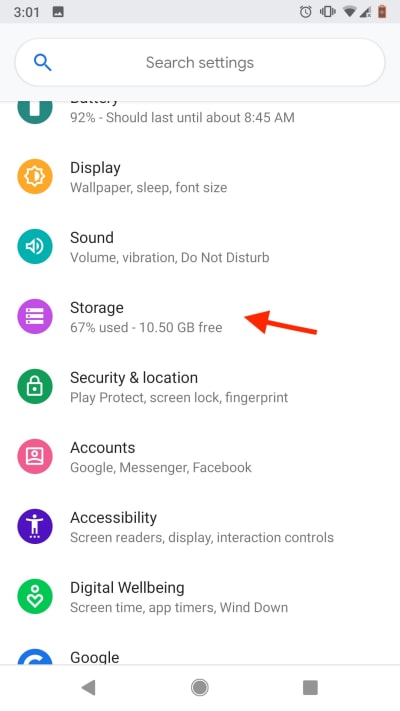
Once in the Settings menu, you’ll see a variety of options.
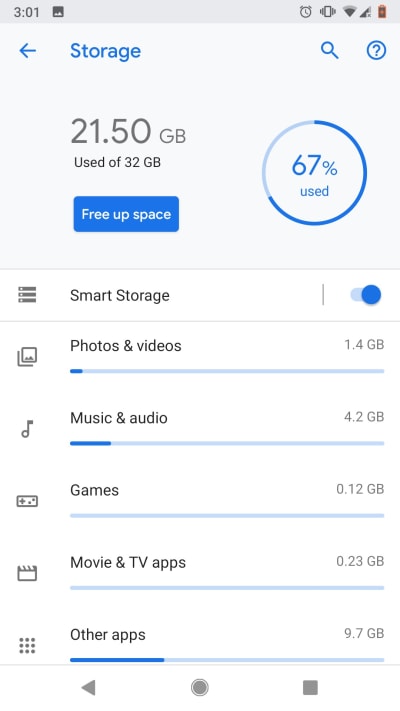
Scroll until you see the Storage menu, then tap it to access it. Here, you’ll see a detailed breakdown of exactly how your phone’s data is allocated. You’ll also see your installed apps broken down into different categories based on their function, such as “Games,” “Movie and TV,” or “Other apps.”
From this top menu, you’ll also see a shortcut labeled “Free up space.” If you want to quickly free up some of your phone’s memory, tapping this key will automatically purge any cache data that your phone considers to be unnecessary.
This can be a great option if you’ve noticed that your phone’s acting a little sluggish or if you just need to make a bit more space. If you’re having problems with a specific app or you want to have some more control over what data gets cleared, head to Step 3.
3. Choose your category
As stated above, all your apps are subdivided into certain categories. In general, most apps can be found in the “Other apps” tab. Click through the different categories until you find the app that you want to clear, then select it.
4. Choose how much data you want to clear
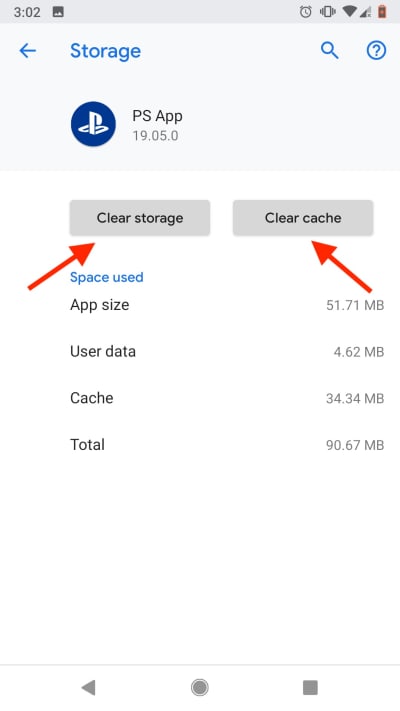
Once you’ve selected the specific app, a new menu will open displaying cache data pertaining to the app you’ve selected. At the top of the menu, you’ll see two buttons: “Clear Storage” and “Clear Cache.”
Tapping “Clear Cache” will get rid of any cache data associated with the app. This includes images and other saved content, meaning that the next time you use the app, it will need to connect to the internet to re-download any content it needs to function.
Usually, clearing the cache and re-downloading data like this will solve any problems if you notice an app behaving strangely.
“Clear Storage” will get rid of any and all data associated with the app, including data such as saved passwords or, in the case of mobile games, save data. If you have dozens of things unlocked in a game like Knife Hit, this probably isn’t the best option.
Wrapping up
Whatever the reason may be, clearing your cache is easier than it sounds. Whether you’re trying to clear space or fix a problem app, following these quick steps should clear things up in no time.
Now you can watch Netflix on your Nintendo Switch!
Developers at XDA have brought the console to new levels of awesomeness by (unofficially) integrating Android 8.1, which offers a host of features that can now be accessed right on the portable gaming platform, including Netflix, streaming, and emulators to play games that otherwise cannot be played on Switch. Examples include Minecraft, Portal 2, The Simpsons Hit and Run, Pokemon Platinum, and CSR 2.
If you’re worried about Android monopolizing your device, don’t fret; you can seamlessly dual boot between the Switch’s OS and Android at any time, so there’s really no reason why you wouldn’t want to install it – except perhaps due to the bugs.
Play all the non-Switch games you couldn’t before!
By bugs we’re referring to how you can’t take proper screenshots, the Tegra X1 not being the greatest of chip sets, and some spotty issues regarding Wi-Fi and charging detecting (the Switch is probably charging fine even if it’s reading otherwise).
Lastly, the Switch still doesn’t have any kind of mic or camera, so any Android apps that rely on them will obviously have some issues. Again, this integration is unofficial, so some drawbacks are to be expected. If Nintendo seeks to legitimize this neat feature we can expect both a ton of fixes and ton of new utility out of the console.
Stay updated with Softonic to find out if they make it official!