This bug can allow hackers access to all of your personal data just by receiving an iMessage!
We’ve all had close calls when it comes to getting our phones hacked.
Sometimes we click on a malicious link while browsing the internet. Sometimes we download a shady app that is sending data in the background. All of these things typically boil down to our own human error whether it be from lack of knowledge, or taking a chance on a shady app. However, it was recently discovered that an iPhone can be hacked simply by receiving an iMessage. This has brought more attention to a relatively new type of hacking tool known as “interaction-less” bugs.
The bugs were found by looking for flaws while reverse engineering iMessage. The researcher, Natalie Silvanovich, did not find any similar bugs in Android phones. However, throughout the years, she and her team have found similar bugs in apps like WhatsApp and FaceTime.
The best thing you can do is to make sure you are updating your phone whenever you can. According to Silvanovich, Apple has already patched six of these bugs in updates.
You should also run regular virus scans on your phone to make sure that you are virus-free. We highly recommend using Malwarebytes since it is both free and efficient.
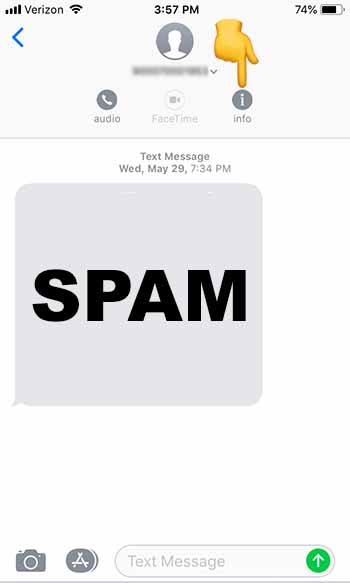
You can also block texts from unknown numbers so that you won’t hear from them again. To do this, follow these steps:
1. Go to the Messages app
2. Tap on the spam message you received to open it
3. Tap at the top of your phone until the “Info” button appears.” Tap “Info”
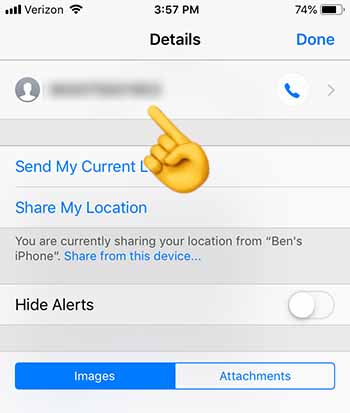
4. Tap on the number at the top of the screen
5. Scroll down to the bottom, and tap “Block this Caller”
6. You should stop receiving texts from this number altogether
If you do receive a shady text from an unknown number, you should block the caller, and then run Malwarebytes. Once you’re done, check and make sure that your phone is up to date.
Wrapping up
Although there is virtually no chance that your up-to-date iPhone will be hacked through this method, the question now remains: “How did Apple leave this vulnerability in the first place?” If you’re spending hundreds of dollars on an iPhone, you should rest assured that it won’t be easy for a hacker to access your personal data. Just recognize that your security depends on your vigilence.
One of the biggest stars in the video game world turns his back on the streaming platform that made him a star.
Anybody who has even a basic familiarity with the world of the popular battle royale game Fortnite has likely heard the name Ninja.
Tyler “Ninja” Blevins is one of the game’s most popular and celebrated players, boasting a streaming following numbering in the millions. Until recently, Ninja was a fixture on Amazon’s popular streaming platform Twitch. However, Ninja recently shocked the world of Fortnite with the surprising announcement that he would be leaving Twitch in favor of Microsoft’s rival platform, Mixer.
Fortnite streamer Ninja abandons Twitch
Ninja made his surprise announcement simultaneously on his YouTube and Twitter accounts. In the Youtube announcement video, Ninja stated that he had been holding onto the news for some time, and was excited to “get back to his streaming roots.”
The actual details and rationale behind the decision are unclear, but the move is doubtless a major coup for the Mixer platform.
Owned by Microsoft, Mixer has struggled to compete with rivals like Twitch and YouTube. Despite having been on the scene since 2016, Mixer has largely failed to find a foothold, and even underwent a complete rebrand in 2017. Ninja’s exclusivity agreement already appears to be bearing fruit: his Mixer stream already boasts one million followers a mere five days after arriving on the platform.
Image courtesy Epic Games
That said, the worry remains that this sudden uptick in popularity could simply be a flash in the pan for Mixer. Currently, fans enjoy a free trial promotion that will expire in two months, leaving subscribers to incur a monthly fee or lose out on certain subscriber perks. Concern remains that after the initial hype expires, Mixer’s popularity will once again dwindle.
Despite the murky future for Ninja’s Mixer channel, Twitch has taken Ninja’s loss in stride. At one time, Ninja was the most popular streamer on the platform, and remained among the top streamers until his recent departure. Twitch issued the following statement concerning Ninja’s move:
“We’ve loved watching Ninja on Twitch over the years and are proud of all that he’s accomplished for himself and his family, and the gaming community. We wish him the best of luck in his future endeavors.”
Whatever his streaming future, it’s clear that Ninja’s popularity isn’t going to decline anytime soon. His YouTube channel still boasts an impressive 22 million subscribers and the Fortnite pro made a recent appearance at the Fortnite World Cup in New York. There, he both competed in and served as a commentator for the event.
New tool exploits vulnerability in WhatsApp to allow third parties to manipulate your chats and talk on your behalf.
WhatsApp’s popularity is unquestionable. With over 1.6 billion monthly active users it is the most popular messaging app on the planet by quite a margin. This is great because it means most, if not all, of your friends and family are on WhatsApp, too. But there’s a problem: such a huge user base is also going to attract hackers and cyber-criminals.
Speaking to the BBC, Check Point researcher, Oded Vanunu said, “It’s a vulnerability that allows a malicious user to create fake news and create fraud… You can completely change what someone says… You can completely manipulate every character in the quote.”
Vanunu also indicated that the tool can change the name of the sender who the quote is attributed to. This means a hacker could completely make up a quote and then put your name, or the name of another WhatsApp user, next to it.
On its own this thought is frightening enough. Somebody could do some real damage to your reputation and personal relationships, if they were able to accredit false quotes to your name. The potential problem is magnified, however, when you think of all the problems fake news has been causing on WhatsApp.
The good news, however, is that the vulnerability the tool exploits is now common knowledge so, hopefully, WhatsApp will already be working to close it. This is all another reminder of how precarious our digital security is and just how serious things can get, if we don’t stay vigilant when we’re online.
Contractors working for Microsoft are allowed to listen to some Skype calls that use Skype’s translation feature
Privacy! What ever happened to that age old tradition of being able to reasonably expect all of your personal affairs to stay private? Ever since that first birthday reminder Facebook sent you, you’ve been fighting a losing battle to keep yourself to yourself. As well as social media, website cookies, app permissions, and small print that would literally take weeks to read, we’ve recently found out that human beings working at companies like Google, Amazon, and Apple have been listening to recordings we previously thought were only being analyzed by machines.
Yep, three out of the big four tech companies have been lying to us about who listens to the voice recordings we share with them. As is always the case, however, with privacy invasion stories in the modern ad-tech era, it gets worse. Humans at Microsoft, the fourth of the big four tech companies have also been playing our private conversations.
Contractors working for Microsoft are allowed to listen to some Skype calls that use Skype’s translation feature
A report by Motherboard claims that contractors working on Skype’s translation service have had access to personal conversations taking place across the app. Citing a “cache of internal documents, screenshots, and audio recordings,” the report says that the contractors had access to intimate conversations between lovers, fraught conversations discussing relationship issues and problems, and recordings of people talking about sensitive and personal issues like weight loss.
Voice commands given to Microsoft’s virtual assistant, Cortana were also accessible to the contractors according to the report, though these won’t have included such intimate information like that being shared in Skype conversations.
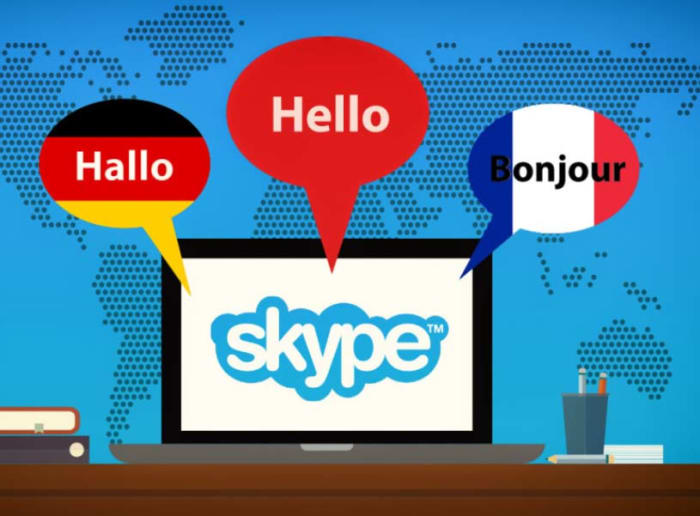
It has to be said that Skype’s translation service, which the Microsoft-owned company launched in 2015 is impressive. It offers almost real-time translation on voice and video calls, as well as text conversations, between a number of different languages. The service is supposed to be run using AI and machine learning algorithms, but according to Motherboard’s insider much of the leg work is also being done by human contractors. These human contractors carry out the same job as the AI to help the machine learn how to do the job better itself.
This is how a lot of AI systems work. Humans teach algorithms to do a job until the algorithm can do it well enough itself and then even go on to teach itself how to improve efficiency. Not all AI training needs access to sensitive private information, however, like with the Skype translation service.
Whereas it could be expected that a translation algorithm would need human training, Microsoft hasn’t been very clear in making it clear to Skype users. Skype’s website does mention that audio clips taken from Skype calls will be analyzed but doesn’t say that some of the analysis will be done by humans. This is likely because, people would be a lot less likely to use a communications service, if they believed people were listening in.
The only good news to come out of this is that the contractors don’t have access to identifiable information about the user’s involved in the conversations they’re analyzing. In the grand scheme of things, however, that is a very small mercy. They might not know who you are, but they are still able to listen in on your most intimate conversations were you’re detailing some of your most private insecurities. Pretty creepy stuff.
Podcast episodes will only be included when you are searching for a podcast topic on Google. For example, if you Google “podcasts about cooking,” you should get podcast episodes that deal with cooking in your search results.
When you click on the podcast episode, you will be forwarded to Google Podcasts where you can start listening to the podcast right away.
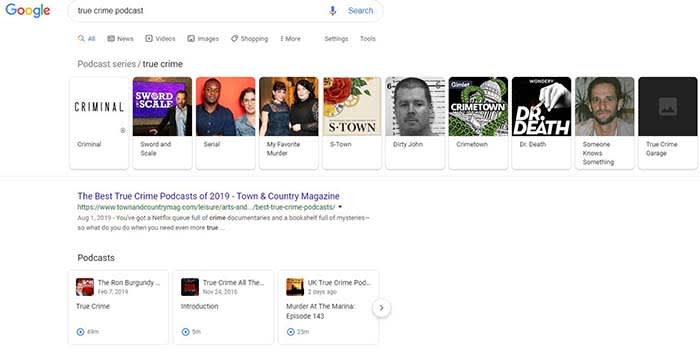
We tried it and the results were… interesting. As you can see, we typed in “true crime podcast” and got the following results.
Although the results in the top bar were ones that made sense, the podcast episodes we could actually listen to did not reflect the top results. In fact, the first episode in the list was an episode of the Ron Burgundy podcast, a comedy podcast featuring Will Ferrell voicing his iconic character from “Anchorman.” Also, the other two podcast episodes weren’t from the top results either. Needless to say, there are still a few kinks to work out in this update.
Google says the episodes are chosen based on the search engine’s “understanding of what’s being talked about on a podcast.” The fact that the Ron Burgundy Podcast episode that appeared first was literally called “true crime” probably led to it being the first result.
Google Podcasts and Google Assistant
Google is also planning to bring this new feature to Google Podcasts and Google Assistant. For Google Podcasts, you will be able to search for podcasts and podcast episodes, and listen right from your device! Also, your listening progress is synced, so you can stop and start again from the same point later!
Unfortunately, this feature is only available in English and for U.S. users as of now. However, that should change relatively soon.
As we have shown, this new feature is not perfect. We tried it a few more times and got mixed results. We tried Googling “cooking a turkey podcast” and the first option was an episode on turkey hunting.
However, when we Googled “mental health podcast” we got three episodes from the Mental Illness Happy Hour podcast, a podcast that dives into mental illness, addiction, and overall negativity. Clearly, it can work from time to time, but don’t be surprised if you have to fine-tune your searches a bit to get the best results. For example, once we Googled “murder podcast” rather than “true crime podcast,” we actually got more legit true-crime podcasts!
It might take awhile to perfect this new feature, but it is a welcome addition to our search results.
If you weren’t aware that Bucky was the Winter Soldier, or that Loki was really a frost giant, you probably went into the MCU without much prior knowledge of the comics. Say what you will about the Marvel Cinematic Universe, but it’s really good at keeping its content close to the original source material while still injecting it with a fresh spin, a clever tie-in, or a more modern re-imagining of its classic characters and story lines.
M’Baku was vastly improved in “Black Panther.” Want proof? In the comics he was ‘Man-Ape.’
The great thing about the studio’s modern cinematic approach is that even if you’re a Marvel comics guru there’s still plenty of opportunity for a movie to catch you off-guard with a sudden reveal, connection, or subverted expectation. Here’s a list of some of our favorite plot twists in the Marvel Cinematic Universe.
*SPOILER ALERT*
10. Mandarin is not Mandarin
When you watch the trailer for “Iron Man 3” it looks like Mandarin (played by Ben Kingsley) is gonna be one bad dude. At the start of the movie he’s labeled a dangerous terrorist, and he destroys Tony Stark’s house just to prove he means business. He’s set up to be the film’s baddie, so when he ends up being an out-of-work actor named Trevor Slattery, there were a lot of questions to answer.
The set-up was especially convincing to Marvel fans because Iron Man and Mandarin were infamously paired off dozens of times in the comics. Some fans were pleasantly surprised by the subverted villain, but others were upset that they never got to see the two square off on the big screen. Good news for those fans – (the real) Mandarin is set to enter the MCU with the upcoming “Shang-Chi and the Legend of the Ten Rings” which is coming out in 2021. He will be portrayed by Tony Chiu-Wai Leung.
When Peter Parker had a crush on a girl named Liz in “Spider-Man: Homecoming” Marvel fans might have predicted it to be Liz Allan, the web-head’s sometime love interest. While they may not have expected a successful budding romance, they probably didn’t expect it to go the way it did.
Plot twist! Liz is the daughter of Adrian Toomes, the film’s main villain. Poor Spidey discovers this after the two have already fought one another … and right before he and the unsuspecting Liz attend a dance together. It’s tough to be Spider-Man.
When Steve Rogers squared off against Red Skull in “Captain America: The First Avenger” it was a brief tussle on a doomed aircraft that ended with the power-hungry HYDRA leader foolishly picking up the Tesseract (later revealed to be the Space Stone in what you might call another plot twist). The Infinity Stone was too much for his mortal form to hold, let alone control, and despite his super soldier serum he ended up being zapped away like the nazis at the end of “Raiders of the Lost Ark.”
Tony Stark may have left us at the end of “Avengers: Endgame,” but his legacy was very present in “Spider-Man: Far From Home” and will likely stay present in Marvel’s upcoming Phase 4. That’s great for all the Stark Tech we get to keep seeing, but Tony Stark had his fair share of demons, and they’re still taking their toll on the post-Iron Man world. You won’t find a better example of this than Mysterio.
Spider-Man fans mostly knew that Mysterio (Quentin Beck) was a talented illusionist, and when he reveals himself to be the film’s baddie it’s not much of a twist. What was a surprise, though, was that we’d actually seen his illusion tech before – back in “Captain America: Civil War,” though we didn’t realize it at the time. Tony shunned Beck and Stark Tech shunned weapons tech specialist, William Riva. The two of them harbored grudges and it was a young Peter Parker who had to bear the burden.
We’ve read them in the comics, we’ve fought them in the video games, and when Carol Danvers was enlisted in the Kree military to fight against the creepy disguise artists we were ready to see the Secret Invasion unravel on-screen. While “Captain Marvel” featured plenty of Skrull-bashing antics, the story ended up going a very different direction.
The Skrulls aren’t so much a galactic threat. Rather, they’re a dwindling race on the run from the oppressive Kree – the same conquering empire that we saw Ronan the Accuser lead in “Guardians of the Galaxy.” Maybe we should have seen this one coming. The discovery of the Skrulls’ plea coupled with the new knowledge that the Kree were trying to hold back Carol Danvers’ powers was enough to turn the cosmic hero to the Skrull cause.
Thor’s the older brother in line for the throne, Loki’s the adopted younger son (who’d arguably be a better ruler) who seeks to depose Odin and claim the rule of Asgard for himself. That’s the story of the original “Thor“, and it’s in keeping with the comics. That’s why when it was suddenly revealed in “Thor: Ragnarok” that there was an elder sister in the mix, it came as a surprise both to Odin’s sons and to the audience.
The reveal of Odin’s incredibly powerful first-born isn’t the only facet of this twist – it’s that she’s quite a bit older than either Thor or Loki, and old enough not only to remember Odin’s aggressive conquests of yesteryear, but to have been at the helm of them herself. Hela shows Executioner (and by proxy the audience) that Asgard was not always the glorious, peaceful city we’d seen previously, but a ruthless, war-like dominion that took the nine realms by force.
4. Nick Fury is a Skrull
Remember when we said that the Skrulls were shape-shifters who infiltrated Earth in the comics? And remember when we said that the Skrull were the good guys back in “Captain Marvel?” Things got a little confusing at the end of “Spider-Man: Far From Home.” Turns out that Nick Fury – and the many scenes were saw him in – was not actually Nick Fury, but rather Talos, Carol Danvers’ Skrull friend from the ’90s.
Oh, and Maria Hill was one too.
As for what this means for movies past and present (aside from “Captain America: First Avenger” every film in the MCU has taken place after the ’90s) we’re not sure yet, but it certainly opens a whole can of green, scaly worms.
What ‘Spider-Man: Far From Home’ tells us about Marvel Phase 4
We knew that Bucky wasn’t in control of his actions when HYDRA had their hooks in him. We knew the Winter Soldier had committed his fair share of wartime atrocities and violence, but there was one that hit a little too close to home for Tony Stark – the murder of his parents.
It’s a shame because Tony and Cap were this close to making amends towards the closing of “Captain America: Civil War.” Bucky’s murder of Tony’s parents, regardless of whether he was in his right mind at the time, was the straw that broke the billionaire’s back. Once the truth was out, Helmut Zemo accomplished what he set out to do – break the Avengers right down the middle.
After the Avengers failed to stop Thanos in “Avengers: Infinity War,” our heroes were at their absolute lowest. Half of all life in the universe was simply snapped away and there was nothing they could do about it.
Perhaps no one felt as guilty about the failure as Thor, who infamously “should’ve gone for the head.” Fans everywhere were arguing and speculating as to how the Avengers could beat the Mad Titan when he was still in control of all six Infinity Stones. Odds are, not many fans anticipated what actually happened:
Thanos destroyed the stones himself. True to his word, he wanted to kill half of all life, and once it was finished his purpose was fulfilled. Rather than excessive lead up and a climactic fight for the ages, once Thor discovers there’s no hope left he simply cuts off the titan’s head. The next plot twist comes right after: The remainder of the film takes place five years later.
It’s a short scene and it’s three plot twists in one.
1. Hail Hydra
HYDRA was literally a thing of the past, a distant memory for the history books for anybody that wasn’t Steve Rogers. The entirety of “Captain America: Winter Soldier” proved just how wrong we were. We learn that not only is HYDRA is alive and well, but that they’ve infiltrated SHIELD. In a way it’s like the Skrull Invasion without the Skrull. Nick Fury is presumed dead, everyone is suspect, and suddenly no one knows who to trust.
This film is a big departure from Captain America’s first solo film in that it’s heavily intertwined with the structure and world of the current day. After the events of this film, SHIELD is no longer a thing. The eye in the sky that had the Avengers’ back is put out, and Earth just lost its best line of defense. This makes the top of our list not just because it’s unexpected and a pivotal chapter for the MCU, but because it had been in the works behind the scenes as far back as “Agents of SHIELD” with Jasper Sitwell and “Iron Man 2” with Senator Stern.
Agree with our list? Let us know your favorite MCU plot twist in the comments below, and stick with Softonic for all things Marvel!
This is a pretty intense week of challenges, in the sense that you’ll be doing quite a lot of traveling and scavenger hunting to complete them. You’ll have a much easier time tracking down all the strange locations and hidden items in this week’s challenge set with a guide handy, and lucky for you we’ve tracked down all of this week’s challenges so you don’t have to waste time wandering around aimlessly. Take a look at the tips and maps below and snag yourself some well-earned Battle Stars.
Fortnite Spray & Pray Challenge Guide
Deal damage with SMGs to opponents (500)
SMGs are taking center stage with several challenges this week; the first one is a simple damage-dealing task. Grab your SMG of choice (we’ve been really liking the Burst SMG) and start wiping out your competition. As with all combat challenges, Team Rumble gametypes are your best bet for knocking this one out quickly and easily.
Spray a Fountain, a Junkyard Crane, and a Vending Machine
The first of many scavenger hunt type challenges this week will have you heading to a few different locations around the map to tag certain items.
The Fountain
Image courtesy Epic Games
The first tagging location is this fountain, located in the parking lot surrounding Mega Mall. Use your spray of choice anywhere on the fountain the mark off this stage of the challenge.
The Crane
Image courtesy Epic Games
Stage 2 takes you to Junk Junction, where you’ll actually find two cranes like the one pictured above. You can spray either one of them to complete this stage.
The Vending Machine
The challenge’s final task is tagging a vending machine. It can be any one of the various vending machines located around the map; you’ll doubtless stumble across one in your travels. Spawns are randomized, however, so you can’t expect vending machines located in the same spot each time.
Check out the map below if you’re having trouble tracking down these locations.
Image courtesy Epic Games
Spray different Gas Stations (3)
Image courtesy Epic Games
Next up, you’ll be spraying gas stations. There are plenty of these gas stations around the map to choose from, but you’ll need to be sure you tag three different stations to complete the challenge successfully. Check out our map below for the locations of every gas station on the island.
Image courtesy Epic Games
Find lost Spray Cans (5)
Image courtesy Epic Games
This challenge is a bit tricky. Spray cans can be hard to find and harder still to track down, as they don’t really alert you to their presence. You’ll have to rely on your eyes to find the cans, such as the one pictured above. Once you’ve spotted it, search the can to “find” it. The exact locations of all 7 cans are on the map below, but you’ll only need to find 5 to finish this challenge.
Junk Junction: Located next to a junk pile at the northern end of the junkyard.
Viking Village: Located at the base of a tree at the very bottom of the frozen waterfall.
Flush Factory: Look for a tent and campfire next to the dance club. You’ll find the spray can here.
Shifty Shafts: Head into the shafts themselves to find this can in a side area next to a chest spawn.
Southeast of the Block: Located at the bottom of the so-called “Umbrella Mine”
Hero Mansion: You’ll find this can tucked under the stairs in the basement of the mansion.
Southwest of Pressure Plant: Head into the ruined tunnel at the end of the lava flow to find this can hidden behind the first supporting column in the tunnel.
South of Paradise Palms: Look for a tree and cluster of rocks at the edges of the small junkyard here to find this spray can tucked among them.
Deal damage to opponent’s structures with a minigun (3,000)
Time to best out your best Terminator impression. Grab a minigun and open fire on any structures you see. You’ll have to deal a fair bit of damage here, so don’t be shy about ammo.
Eliminate opponents with an SMG less than 15m away (3)
This next SMG challenge will have you getting up close and personal. Again, as it’s hard to judge distances in Fortnite we recommend getting as close to your opponents as you can before opening fire.
Search Chests at Tilted Town (7)
Tilted has received a rather interesting makeover as the first Rift Zone location. Check it out while you search for chests. Once you’ve opened 7, you’ll complete the set and be all set up for Prestige mode.
Fortnite Spray & Pray Prestige Challenge Guide
Eliminations with an SMG in a single match (2)
Like always, we recommend Team Rumble for this combat challenge. Since you can respawn and enemies are plentiful, it should be easy enough to knock out 2 opponents with an SMG.
Search chests inside containers with windows (5)
Image courtesy Epic Games
This one can be a bit of a head-scratcher unless you know what to look for. Keep your eyes peeled for shipping containers with a graffiti window painted on the side. Finding the containers isn’t enough, though: you’ll need to search the chests inside the containers to make progress in the challenge. Check out the map below for the locations of each container.
Image courtesy Epic Games
Spray cars or trucks in different named locations (6)
Vehicles tend to be plentiful no matter where you go on the Fortnite map, but as far as named locations are concerned, they tend to be clustered in towns. Mega Mall, Paradise Palms, Salty Springs, Lucky Landing, Happy Hamlet, and Pleasant Park are all good bets.
Visit graffiti-covered billboards in a single match (2)
Image courtesy Epic Games
The final scavenger hunt in this set will have you looking for the distinctive billboards like the one pictured above. Keep an eye out for the GG smiley tagged on the side. You have to visit two in a single match, and we’ve marked them on the map below.
Image courtesy Epic Games
The billboards are fairly close together, so once you’ve found the first it should be fairly simply to run over to the second one.
Damage opponents with a Minigun (500)
Grab that minigun again, but this time make sure you’re aiming for enemies instead of structures. You’ll need to reach 500 damage to finish the challenge.
Eliminate opponents with an SMG less than 5m away (5)
Another close range SMG challenge, this one will task you with getting even closer before pulling the trigger. Don’t be afraid to get into your opponents personal space; that just makes it harder for you to miss.
Eliminate opponents in Tilted with the Tilted Teknique outfit (5)
The final Prestige challenge requires you to first unlock the Tilted Teknique Battle Pass skin. Once you’ve got it, change into your new duds and head over to the revamped Tilted to start racking up eliminations.
Design better business cards with these alternatives to Microsoft Publisher!
Microsoft Publisher is often peoples’ go-to program when they want to create brochures and other printed presentations. Unfortunately, many users feel as though its usability could be greatly improved, particularly for beginner designers.
If you find creating printed material with Publisher a little too complex, there are alternatives available that might make your creation process a little easier.
What is Microsoft Publisher?
As the name suggests, Microsoft Publisher is a desktop program that you can use to create things that are meant to be published. Typically, you use it to make things like business cards, greeting cards, and newsletters. For these reasons, it is a better option than anything else in the Microsoft Office Suite.
Here are four great alternatives to Microsoft Publisher if you’re looking to make a switch.
PagePlus Starter Edition
PagePlus Starter Edition is a free alternative that lets you create dynamic marketing materials. It is a phenomenal desktop publishing software. You can make things like stationery, posters, brochures, flyers, newsletters and business cards. With a handy pop-up that lets you pick and choose what you want to create, PagePlus is pretty intuitive for beginners. If you don’t want to start from scratch, the program comes with a good variety of ready-made templates. Even better, PagePlus supports drag and drop design, making it a breeze to move around different content quickly during the creation process.
The Starter Edition of PagePlus is free upon registration on Serif’s website. After registering, you will be sent a product registration key via email, but remember, not all of the pay-for features will be available to you.
Scribus
If you’re looking for an open-source alternative to Microsoft Publisher, Scribusis one good option. Scribus is a free desktop publishing tool that works cross-platform. This makes it convenient for people who like to hop between multiple computers and operating systems. Scribus offers a lot of great features, such as the ability to export and import PDF documents, as well as drag and drop designs. Formatting can be a little tricky in some instances though, and some scripting knowledge is required to access a few of the features.
Apache OpenOffice
Formerly known as OpenOffice.org, Apache OpenOfficeis another open-source alternative to Publisher. Instead of one program to make your creations with, OpenOffice comes with five. You can create content as text documents, using the presentation app, or with the drawing program. OpenOffice is a really great way to explore how more than one app within an office suite can create customizable content exactly to your specifications.
Adobe InDesign
If you want every option known to man and one of the most professional publishing tools available, Adobe InDesignis unquestionably the program to go with. It is available on both Windows computers and Mac OS. It is a great design tool that is used by small businesses and even professionals in the newspaper and magazine biz. For the up-and-coming graphic designer, it’s going to be your bread and butter. It comes with extensive tutorials and documentation, as well as great integration with other Adobe products.
If you’re familiar with other Adobe apps, InDesign has a similar interface and should be relatively easy to navigate. There are a few advanced features that are a bit hard to grasp. If this is your first time using an Adobe product though, InDesign might present a rather steep learning curve. Since it’s a part of Adobe’s Creative Cloud suite, however, this professional app comes with a monthly subscription fee. Also, if you’re looking for a web-based design tool, we would recommend another Adobe product: Adobe XD.
Wrapping up
Regardless of which program you use, one of the best things you can do to improve the quality of your work is to learn design. You may just be a few quick tricks away from taking your work from the amateur level to the pro level.
Loot box rates will be disclosed in all Xbox, PlayStation, and Nintendo games from now on.
After entering my credit card info, I opened up my loot box in hopes of getting a cool, new skin for my character. After the shimmering box finally opens, a bunch of junk falls out. I then repeat the process 10 more times as my checking account dwindles and dwindles.
If this sounds familiar, you’re probably not a fan of loot boxes either.
Luckily, it seems like Nintendo, Microsoft, and Sony have gotten that memo. Starting in 2020, every game published on a Nintendo, Microsoft, or Sony console has to disclose its loot box drop rates. Now, players can at least see their actual chances of scoring decent loot before entering their credit card information.
Also, several video game publishers have agreed to disclose their loot box drop rates in all of their games regardless of the publisher. These include:
Activision Blizzard
Bandai Namco
Bethesda
Bungie
EA
Take-Two Interactive
Ubisoft
Warner Bros.
Wizards of the Coast
This has all been a part of a new initiative from the Entertainment Software Association and the Federal Trade Commission.
Back in the day, unlockables were obtained by, well, unlocking them through in-game challenges. Also, if they came out after the game’s release, you would just purchase them as DLC without having to jump through any hoops. However, it seems that nowadays,Sur the name of the game is loot boxes. Game developers have realized that instead of doing the extra work of making in-game challenges, they could make more money by making players purchase loot box after loot box.
A loot box is a relatively new mechanic in games where players spend real-world money on boxes that have the potential to give them rare items. Although there were loot-box-like features in games in the mid-2000s, the loot boxes we know today have mainly been inspired by Overwatch.
Loot boxes always drop some loot, but most of what you’ll get is junk. It’s a lot like if buying a pack of trading cards.
What are the real dangers?
Since we first saw them enter the world of gaming, loot boxes have left a bit of a sour taste in our mouth. The potential to get cool gear in our favorite games is great, but dishing out real-world money for a chance to get the better loot came has come off as gambling.
The Game Theorists also created a video discussing the science behind why buying loot boxes is so addictive. Basically, every time we invest more time and money into buying loot boxes, our brains are telling us that it would be a bigger loss to stop buying them rather than keep going. This is quite similar to what most gambling addicts suffer through.
Wrapping up
Regardless of whether you think loot boxes are good or bad for the gaming industry, the fact remains that knowing the rates of which rare items are dropped will be nice. If we see that we have a 1 in 10,000 chance to get a new skin in a $3 loot box, it’s going to be a pretty easy decision to give it a pass.
Recordinginternal sound on a Mac is problematic. Unlike Windows, you can’t simply record whatever noise is playing. If you’ve ever got stuck wondering how to capture streaming audio from a website or any other sound playing through your Mac, here’s how to do it:
How to record internal sound on a Mac
Using QuickTime Player
Although we will detail another method using Audacity and Soundflower, you can also use QuickTime Player to record audio.
Open System Preferences > Sound > Output. Now that Soundflower is installed, you’ll be able to choose it instead of the built-in output. Soundflower (2ch) is fine for most purposes. Note that once you do this you will no longer be able to hear a sound. To make a clean recording, also turn off all sound effects here in the Sound preferences.
Step 3
Open Audacity and in preferences, look under Devices and choose Soundflower (2ch) from the Recording Devices drop-down menu.
Step 4
On the top right of the Audacity interface, there is a microphone symbol with a drop-down menu next to it. Click it, and hit ‘Turn on monitoring.’ You will now see red level indicators jumping whenever a sound is made. Play the sound or stream you want to capture and adjust the microphone level-slider on the left so the red bars reach close to zero when they peak.
Step 5
You’re now ready to capture. Stop your stream, and pause it at the start. Hit the red record button in Audacity, then play your sound stream. Be aware that if you haven’t turned off any sound alerts or effects, these will also be captured in your recording. Once finished, save the project from the File menu. At this point, you can turn on the internal audio again in System Preferences. Any editing of your recording should be done now (See thispost for audio editing with Audacity).
Step 6
Again from the File menu, choose Export which allows you to convert your recording into a more useful format like MP3 or FLAC. You can now listen to your captured recording at your leisure.