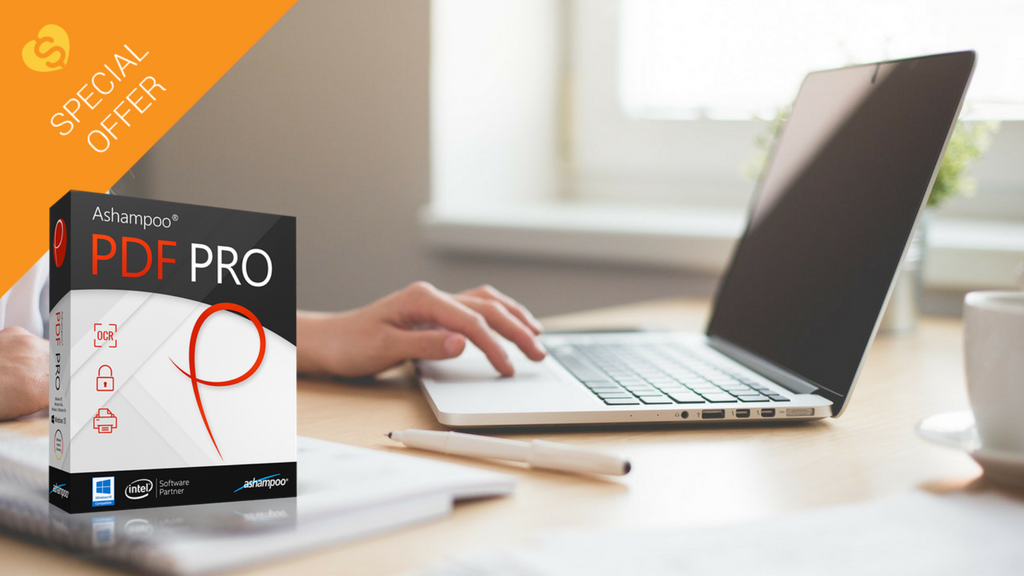
Work with PDFs? It’s time you got this software

The PDF file system is one of the simplest way to manage digital documents. Created in 1993 by the code ninjas over at Adobe, the PDF has made it super easy for everyone to view and edit documents, whether you’re a Mac or PC user. 

Today, the PDF is one of the most versatile file formats. Not only is it happy with text and images, but it supports links, multimedia, forms, and even 3D models – not bad for a file system that’s over 25 years old.

But to work with PDFs, you need a PDF program, and sadly, not all are created equal. We’ve been playing around with the best of them to find one that truly outshines the others, and we think we’ve found it in Ashampoo’s PDF Pro.

PDF Pro is an all-in-one program to view, create, edit, and convert PDF files. Let’s take a look at what it can do for you.
1. Full editorial control

PDF Pro lets you edit PDFs as easily as if they were MS Word documents. Is that a big deal? Absolutely, because most PDF programs don’t offer such flexibility without conversion or exporting to another program. This makes copyediting an article, story, magazine, or academic paper a piece of cake, and saves hours of messing around with different formats.

PDF has all the tools you’d expect of a document editor, including a spell checker, a built-in change log so you can keep track of your changes, and a find and replace tool which also has the option of changing content across multiple documents. These tools let you work on your PDF natively, without ever leaving the program.

If want to collaborate with others on your PDFs, either at work or school, PDF Pro supports annotations and comments, so you can share your opinions within the PDF rather than in a separate file. And if you’re working on a bunch of PDFs at once, PDF Pro will merge them together for you, and give you full control over page ordering and orientation. For big projects like dissertations, legal documents, or academic papers, this feature is a real time-saver.

2. Super easy file conversion

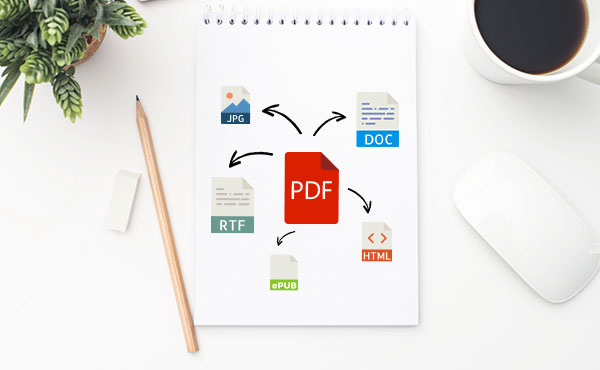
While PDFs are great, sometimes you need different output formats for specific tasks – if you’re writing an ebook, for example, or want to code a webpage. PDF Pro makes it quick and easy to convert your source PDF into different formats, including EPUB, HTML, JPEG, and RTF, without losing detail or structure.

This works the other way round, too. PDF Pro’s powerful OCR (Optical Character Recognition) engine means you can scan just about anything for fast, flexible editing using PDF Pro or your favourite office tools. 

3. Security against fraud and intellectual property theft

With so much of our work done online, it’s even more tempting for cybercriminals to steal our data. PDF Pro secures your documents with 128-bit AES encryption, the same level of security used by the US National Security Agency (NSA). You decide what your recipients see, which helps protect you against fraud, theft, and data tampering. 

Ashampoo’s PDF Pro combines everything you need to read, edit, and manage PDFs in one tidy package. For a limited time, you can enjoy the program for just $29.99 – over a 60% discount on the retail price. With that much PDF power at your fingertips, we think it’s a steal.

Gmail notifications to be more useful and less annoying

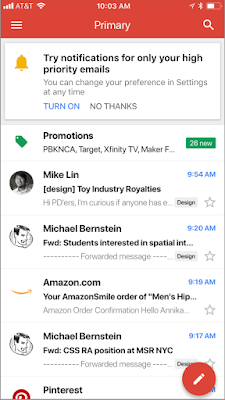
Back at Google’s big I/O conference in May, Google made a small announcement that crept under the radar due to all the other big news. The company said it was going to try and improve Gmail notifications so that you’ll only get the useful ones you need, rather than be bombarded by everything that comes into your email inbox.  Google has now announced that this change is now available on iOS and is coming to Android soon.

Gmail Access now
8

Google claims that these new notifications will use Gmail’s advanced machine learning and artificial intelligence algorithms to learn which emails you may want to read first. If you’re an iOS Gmail user, Google has laid out the following instructions for you to try out the new high priority email notification setting:

“To enable the feature, select “High priority only” from the Notifications drop-down in the settings menu of your Gmail iOS app.”

Image via: Google

For anybody who feels overrun by the constant pings coming from their phone, this will be a great feature. If Google can get this right, there will be a lot of people clicking enable. This will be tricky to get right, however, as if it filters out essential emails it will be impossible to use and next to useless. We’ll be trying this new feature out over the next few days to see how it works, and keeping an eye out for an Android release date.

Let us know your thoughts on the important notification feature for Gmail in the comments below.

Is this what the new Windows 10 version of WhatsApp will look like?

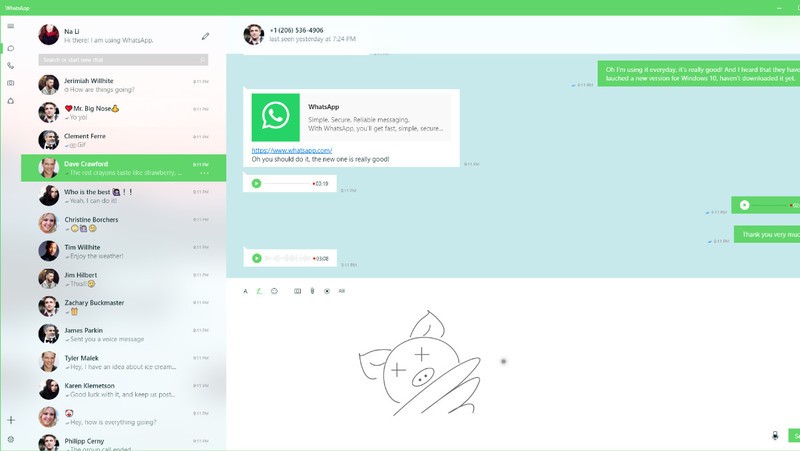
WhatsApp’s current app offering on Windows doesn’t do much. It is a port of its web app, which itself has a few shortcomings. Using the web app or the current Windows app, you can send and receive messages, images, files, voice notes, and videos but there is no voice or video calling. As WhatsApp voice and video calls have continued to improve this has become more of something WhatsApp’s desktop offerings needs to add. It now looks like WhatsApp and Microsoft are working closely on a Universal Windows Platform (UWP) version of the popular messaging service.

8

This is an important development for both Microsoft and WhatsApp, so it makes sense that we’re starting to hear about it. WhatsApp still updates its current Windows phone app, but this is a Silverlight based app, built for Windows 8.1 devices. If Microsoft were to release new mobile devices, like the rumored Andromeda (surface mini) foldable phones, users wouldn’t be able to download WhatsApp. With Windows 10 being a multi-device platform any app designed for Windows 10, will work across all devices, including both concept phones for the future, and current desktop PCs.

Image via: Windows Central

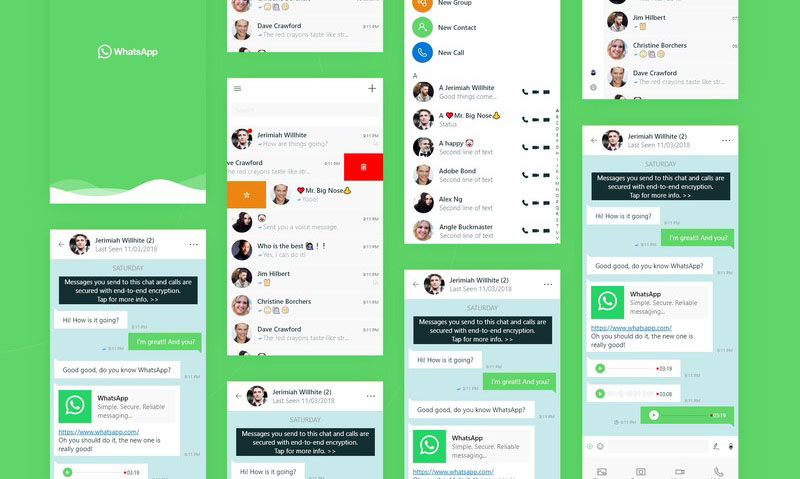
A design concept for the UWP WhatsApp project appeared on the website Behance. The design was then removed, when Windows Central approached the designer, who posted it, for comment. Windows Central did manage to get their hands on the paragraph the designer posted with the design:

“WhatsApp is a free cross-platform app owned by Facebook. You can make video calls and send text messages, voice messages, documents, and user locations. I have been supporting the team with porting WhatsApp from Silverlight to UWP. We want them to bring their app to Windows 10 desktop and integrate unique Windows 10 features like Ink and Fluent Design. The project had [a] successful result which led to WhatsApp partnering with Microsoft, and we earned high praise from the WhatsApp team.”

Image via: Windows Central

The design concept clearly shows call buttons, meaning WhatsApp on your desktop could soon be able to make audio and video calls, just like it can on your smartphone. Of course, this would make the app a direct competitor to Microsoft owned Skype, so there is a chance this functionality might be retained for hybrid devices like the Andromeda.

So far, all we have are these concept designs so we still might not be getting a new version of WhatsApp for Windows 10. These designs certainly point to an interesting future partnership between WhatsApp and Windows, but we’ll have to wait for official confirmation before we can start to get really excited about this one. Stick with us, and we’ll keep you informed as soon as we know more.


How to transfer photos from your phone to your PC wirelessly

Back in the day, transferring photos from your cell phone to your PC required cables, drivers and a ton of tedious processes. Over the years, it’s become simplified to the point that now you only have to connect a cable between your PC and your smartphone. End of story, right? Today at Softonic, we’ll take your skills to the next level and teach you how to transfer photos from your phone to your PC wirelessly. 

Windows Photos

Many people got angry when the Image Viewer on Windows was removed in favor of Windows Photos. In reality, this app works better than the previous one. Windows has actually enhanced how we see images within its operating system.

Windows 10 Download Windows 10
8
The latest and greatest version of Microsoft's operating system.

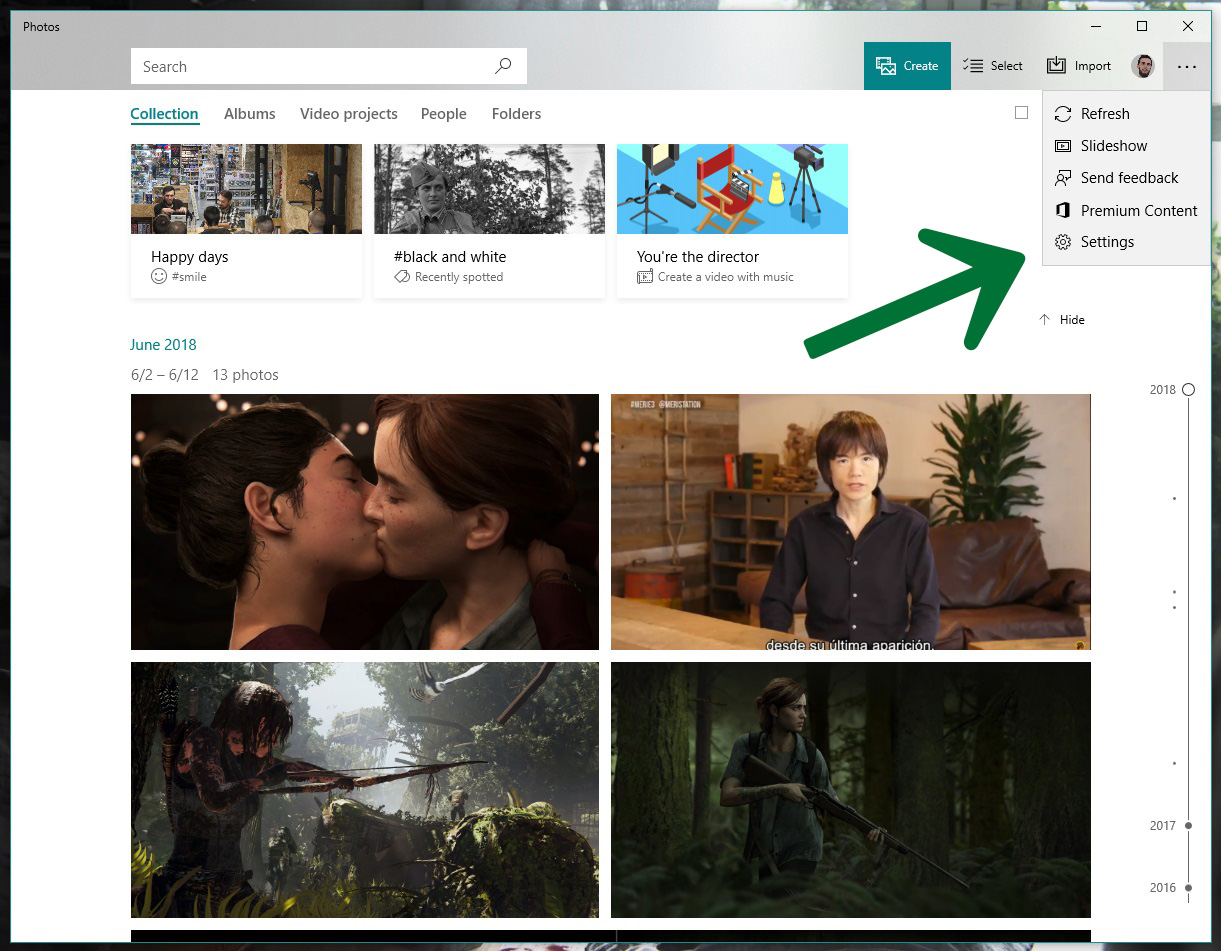
You need Windows 10 to transfer photos wirelessly. If you have it, the next step is to open it, click on the icon with the three dots on the top right and click on “Settings.”

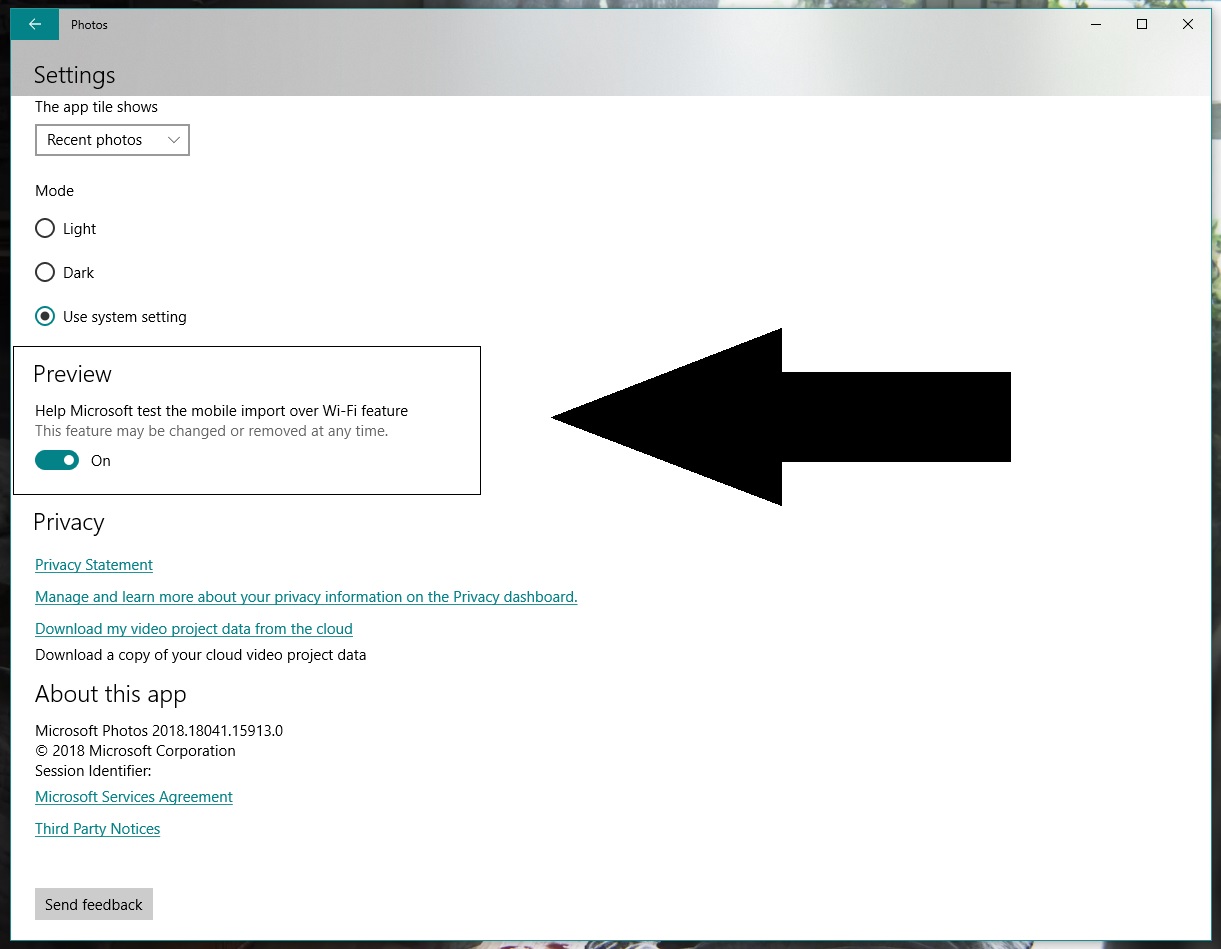
Go to the bottom and look for an option called “Preview: Help Microsoft test the mobile import over Wi-Fi feature.” Generally speaking, this button is disabled, so you should switch it on.

Let’s go to your cell phone now and download the Photos Companion app from the store. It’s available for iOS and Android.

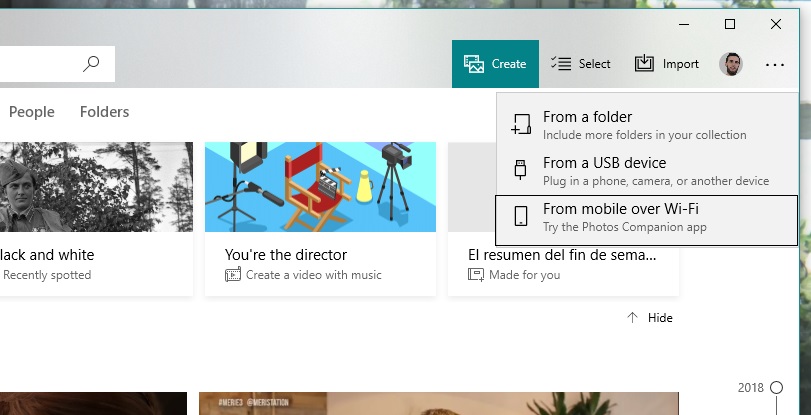
Once installed, the first thing you’ll see is “Send photos.” Do this and the camera will open to scan a QR code. Return to your PC. Once you’re inside Windows Photos, click on “Import” and now you’ll see a field called “Import from mobile over Wi-Fi.” Click on it and you’ll have the QR code it requested.

Finishing up is as easy as selecting the images you want to transfer to your PC, clicking on “Done” and the Wi-Fi connection will do the rest. As usual, the more photos you have, the longer the process will take. Things will also slow down if there are a lot of people connected to the network you’re using.

Remember that this system of transferring photos is already streamlined for the next time you use it, since you only need to directly scan the QR code and click send. Happy transferring!

How to find out what data Windows 10 is storing about you

Have you ever wondered what data Windows 10 stores about you? Especially since Facebook’s data shenanigans came to light, data privacy is at the top of our minds. If you’re a Windows 10 user, here’s how to know what Microsoft is monitoring.

Windows 10 Download Windows 10
8
The latest and greatest version of Microsoft's operating system.

Diagnostic Data Viewer

Windows 10 has many different apps for getting the most out of the operating system. One of them is Diagnostic Data Viewer, which basically analyzes all the info the firmware has. This info is sent to Microsoft so it knows what’s going on.

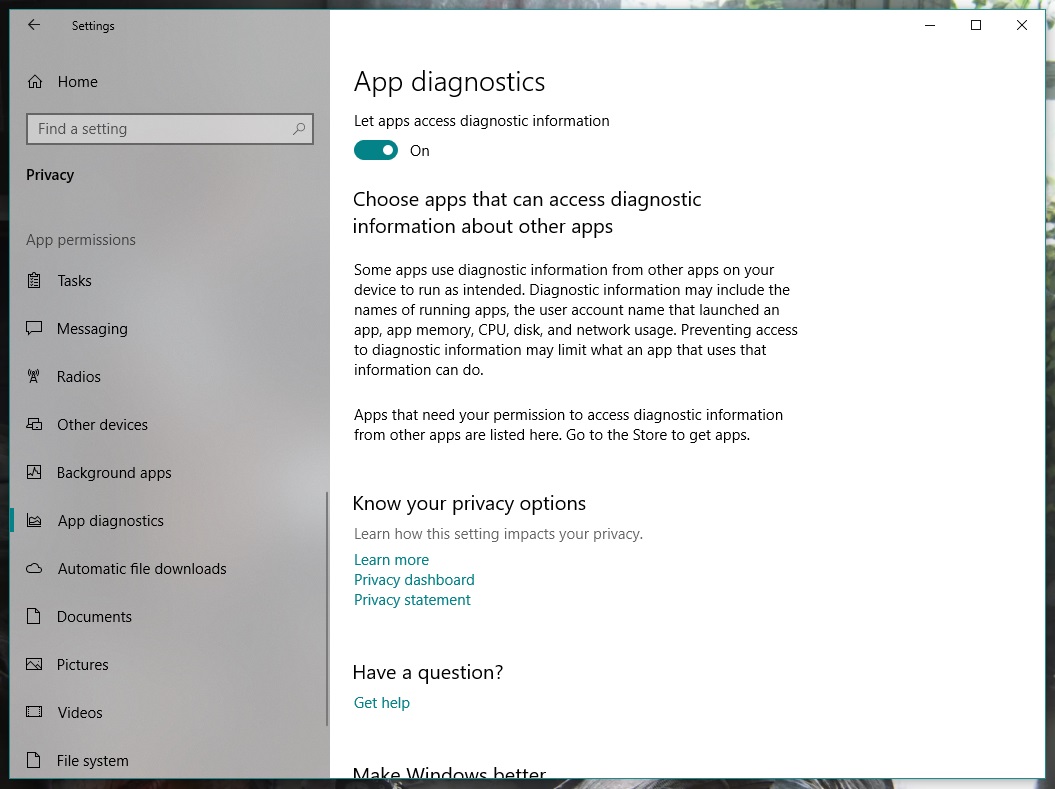
Before downloading it, enable the corresponding button. To do this, go to “Settings” and click on “Privacy.” From the different categories that appear on the left, go all the way down to one called “App diagnostics.” Make sure it’s set to “On.”

Once that’s done, now it’s time to download the Diagnostic Data Viewer. It’s a free tool from the Microsoft store. Here’s a direct link

Now for the important part. When you open the app for the first time, look for the bar on the left. These “events” or “processes” are collecting all the data that is sent to Microsoft. Using the search bar, you can find the programs that most interest you. Once you’ve got one, click on “Export Data” and a CSV file will be downloaded with all the relevant info.

If you don’t like the info that Microsoft is storing about you, you can delete it. Seriously. Just click on the button “Delete” on the “Settings” pageand say goodbye the problem.

Google Translate gets a new AI boost no matter where you are

If you use Google Translate a lot, you’ll have probably noticed that over the last couple of years the translations it offers have improved a lot. The reason Translate got better at its job is machine learning. AI algorithms, specifically named neural machine translation (NMT), have allowed Google Translate to offer much more accurate translations.

Google Translate Download now
8

For the last two years, however, there has been a catch in that the NMT has only worked when happening on Google’s hardware. In short, it only works if you’re connected to the internet when you’re using Google Translate

Google Translate offers language specific download packs. If you think you’ll be offline or if you don’t want to use international roaming you can download a language pack and use Google Translate when you’re offline. Although useful, this phrase-based machine translation (PBMT), as Google calls it, falls short of the NMT available if you can connect to Google’s servers.


On-device AI translations much better than the old PBMT but not as effective as AI translation done on Google’s servers


Google has now announced that it is bringing a version of NMT to mobile devices. You’ll be able to benefit from AI assisted translation even if you’re using a downloaded language pack and you’re not connected to Google’s servers.

Amazingly, Google Translate language packs only take up 35-45mb of space, so they’re well worth having. Google points out that the on-device version of NMT still isn’t as effective as the online version but that it is much more accurate than the previous PBMT method. Google says it will be rolling out the new On-device NMT in 59 languages in the next few days and offered these instructions to those wanting to take advantage of it:

“To try NMT offline translations, go to your Translate app on Android or iOS. If you’ve used offline translations before, you’ll see a banner on your home screen which will take you to the right place to update your offline files. If not, go to your offline translation settings and tap the arrow next to the language name to download the package for that language. Now you’ll be ready to translate text whether you’re online or not.”

Offline translation is a really useful feature. If you’re low on data, traveling abroad, or you’re simply prudent enough to want to take advantage of Wi-Fi whenever you have it these new On-device AI algorithms will make a big difference to your language translations.

A Facebook bug exposed the private posts of over 14 million users

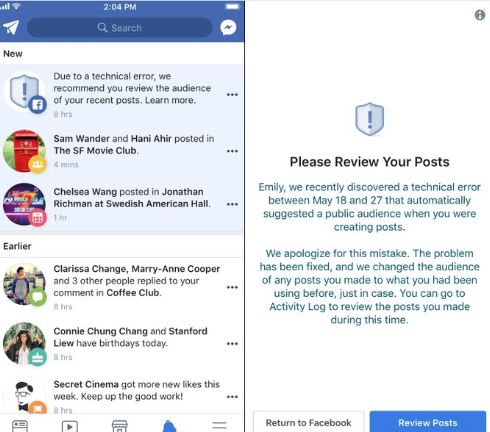
It is one thing after another with Facebook. If the big blue social network isn’t sharing your data deliberately, is sharing it accidentally. This latest error has seen 14 million users affected by a bug that shared people’s private posts. The posts of all those affected by the bug, posted between May 18 and May 24, were set to public by default. All affected posts were then not made private again until May 27.

Normally, when you post on Facebook, the privacy setting is the same as it was the last time you posted something. If you usually only post things so that just your friends can see them, then this will normally be your default setting. You can post away, knowing that only your friends will see what you’re posting. Bugs like this one change that, however, and when they strike your posts are free to be seen by anybody and everybody on Facebook. All of a sudden the world knows you had a bad day last Thursday or that you hated that movie you saw on Saturday.

Facebook Access Facebook
7

Facebook itself disclosed this leak. It added that if you are one of those affected by the bug you’ll be contacted and asked to review your recent posts. Likely to check if you’ve said anything you don’t want shared publicly.

Facebook will send you a link that will take you directly to your posts so you can easily see whether you’ve shared anything you shouldn’t have.

Facebook hasn’t given away much detail about what could have caused the problem in the first place. The social network did, however, state that this disclosure marks the beginning of a more proactive and transparent era on its part. This seems to imply that bugs like this one have occurred before but that we just never heard about them. As we’ve seen in recent weeks, Facebook as a company isn’t very good at effective communication.


How to free up 40GB on Windows 10 after the latest update

If you have Windows 10 installed on your PC, it’s fairly likely that your operating system recently got an update. The Windows 10 April Update included a large number of new features that we’ve been talking about over the last few months, but now all users should have them. If you notice that after installation, you have less storage, this article’s for you: we’ll show you how to free up 40GB on Windows 10 after the latest update.

Windows 10 Download Windows 10
8
The latest and greatest version of Microsoft's operating system.

More GBs

Though it’s hard to believe, the latest update takes up between 30 and 40 GB, which is a significant amount for any hard drive, especially if it’s an SSD. Luckily, Windows has an option to remove all this data.  

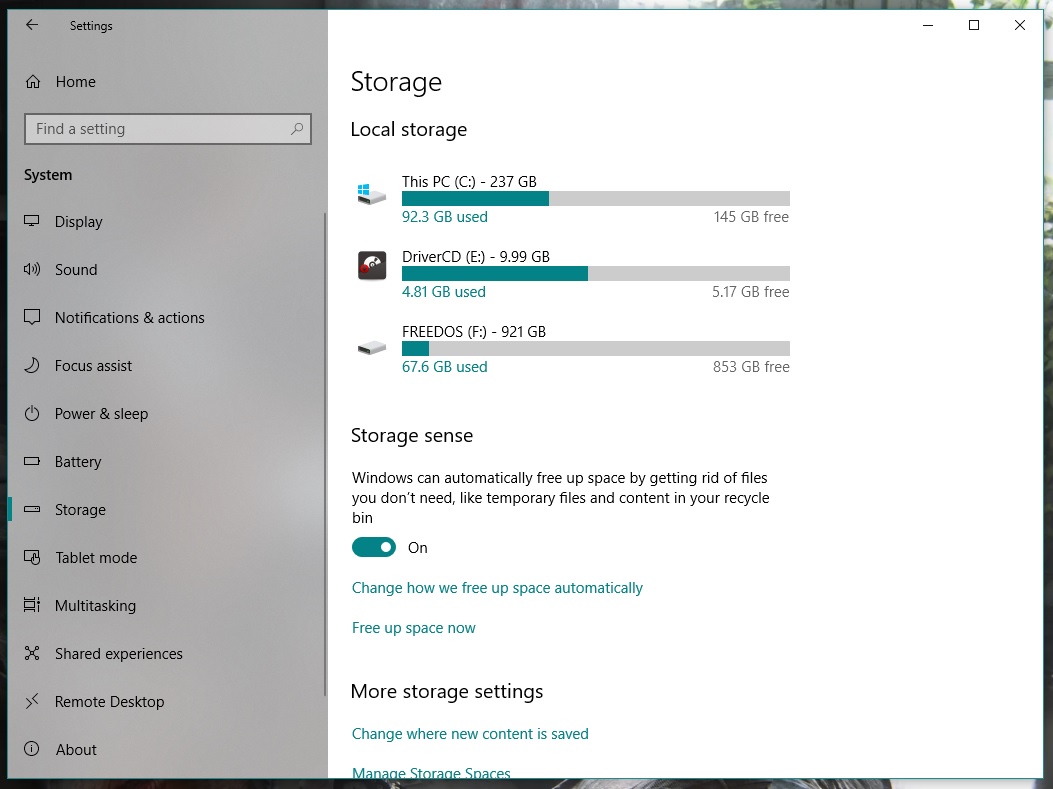
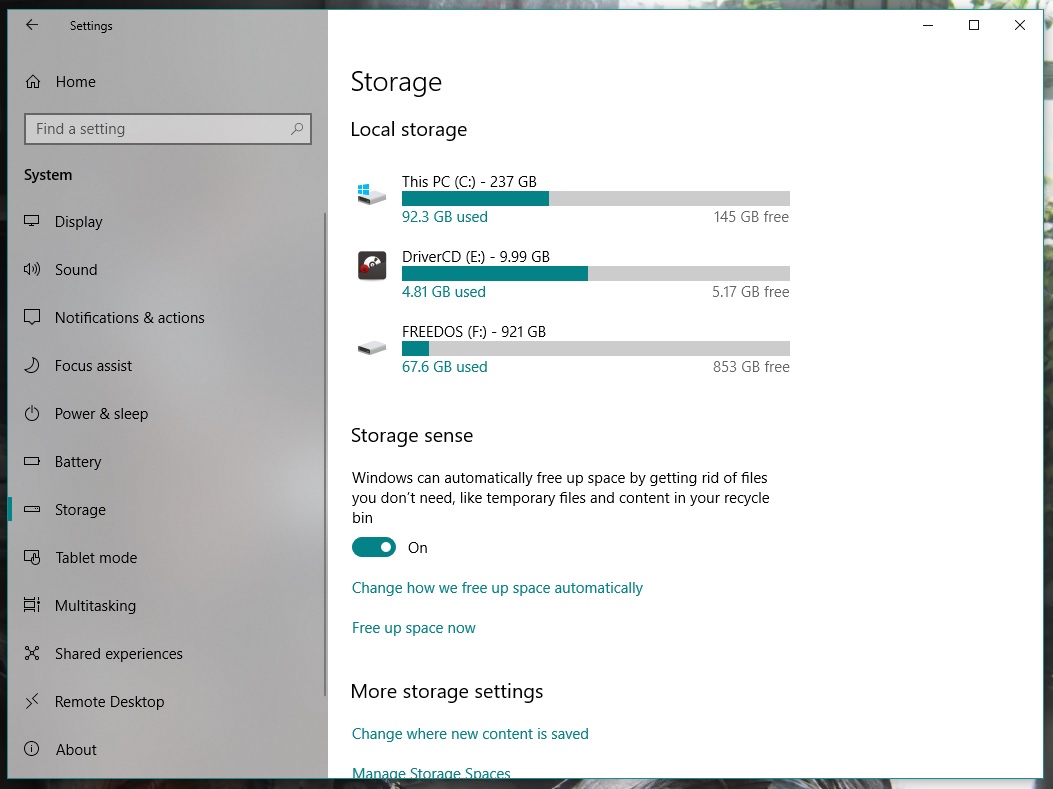
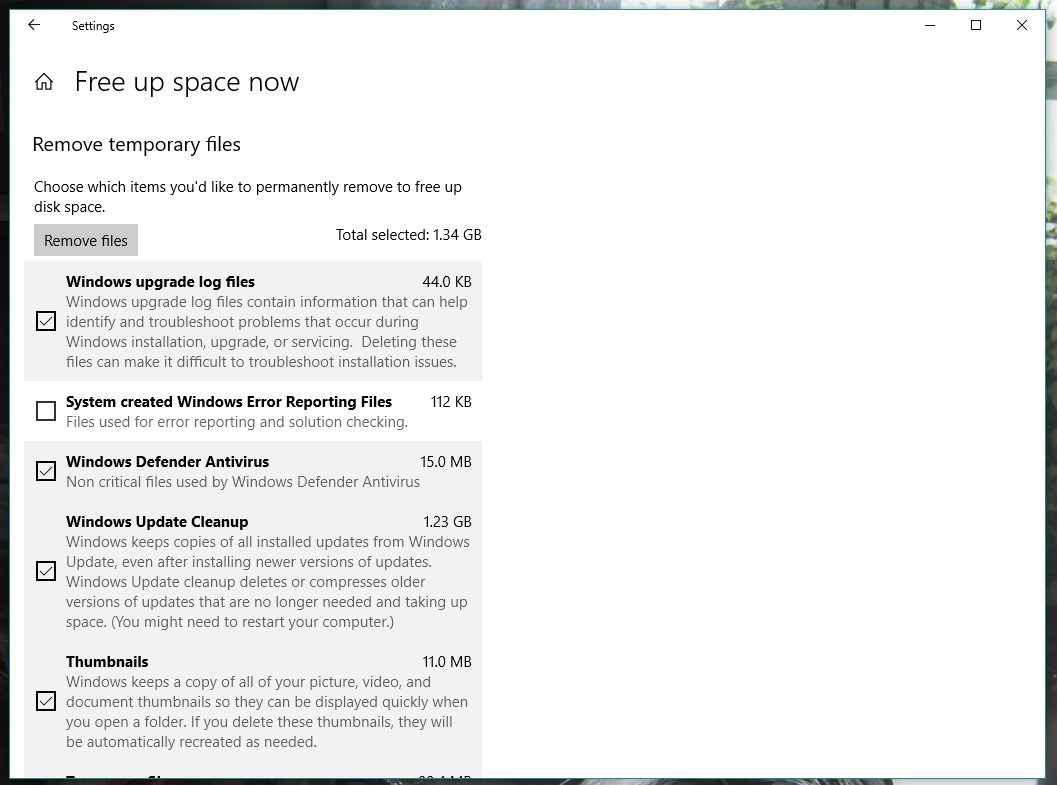
Click on the start button and go to “Settings.” From all the options that appear, click on “System” and then “Storage.” Find the option “Storage sense” and right below “Free up space now.” Go for it.

Windows will take a little time to analyze the partition where it’s installed. Once done, you might be surprised to see that not all the GBs quoted in the title free up. There’s a trick to it. Scroll down and look for the box “Previous Windows installation(s).” Surprise: there you’ll see almost 30GB of storage taken up with the option unchecked. So, check it, go back to the top and click the button “Remove files.” In a matter of seconds, you’ll have gained a large amount of storage capacity.

See how easy it was? We’ve definitely saved you a headache in the future. By the way, you can use this option frequently to get rid of files taking up space on your hard drive.

Windows 10 Download Windows 10
8
The latest and greatest version of Microsoft's operating system.

What did E3 tell us about the future of Fortnite?

Everybody knew that Fortnite would be announced for the Nintendo Switch at E3, and nobody was disappointed when it was. Fortnite on the Switch is already available as free download from the Nintendo eShop and players have already started playing the world’s most popular game.

Something else that we’ve learned over the last few days is that Fortnite now has over 125 million players. That vast number is even more incredible considering the game has only been out for less than a year. Incredibly, the free-to-play Battle Royale version of Fortnite has only been available since September.

Fortnite’s huge numbers come from the fact that it is a true free-to-play experience. Paid extras, like skins to dress up your avatar and dance moves to emote with don’t give players an unfair advantage. Another factor will be the fact that Fortnite is available on most major platforms including iOS. Fortnite’s release on the Switch means that Android owners are the only people who can’t play Fortnite. Epic Games say they are looking at a summer release for an Android version of Fortnite so we can expect to see Fortnite player numbers swell even further as, according to Google, there are over 2 billion active Android phones in the world.

Fortnite: Battle Royale Play Now
10

Some bad news for Fortnite fans, however, is that Sony has decided to block cross-platform play between PS4 and Switch. This means players won’t be able to continue their Fortnite sessions on the fly, using their Switch, if they began on the PS4. More disturbingly, Fortnite accounts, with Epic Games, linked to the PlayStation Network (PSN) can’t be accessed from the Switch. Players on the Switch won’t have access to any of the skins or emotes they’ve accrued using their PSN-linked Epic accounts. It has been confirmed though that Fortnite cross-platform play will be possible between Xbox One, Nintendo Switch, PC, and Mobile. Quite rightly, Fortnite fans aren’t happy about Sony’s position here.

The last big bit of Fortnite news from the last couple of days comes in the form the first ever Fortnite World Cup. Qualifiers will begin in the Fall, with the big competition taking place towards the end of 2019. There will be no franchises or teams for sale with the action open to anyone, which means you can enter. With a prize pool of $100 million, it could be a good time to start practicing and honing your skills. Epic said:

“What about the specifics? The $100,000,000 will be split between many events at different levels of competition around the globe. Fortnite World Cup play will focus on Solos and Duos, but there’ll be plenty of opportunities to squad-up in competition, too… Rules, Player Code of Conduct, specifics about platforms and Fall 2018 schedule are on the way. If you’re interested in learning more about Fortnite competitive play sign up…”

To sign up for the world cup, go to Epic’s blog by clicking here.

Lots of big Fortnite news then. Some good, some bad, but one thing is clear Fortnite is going to keep getting bigger and bigger for some time yet. Which story do you think is the most exciting? Let us know in the comments below.

Join the Bitdefender 2019 BETA and test the future of cybersecurity!

Softonic is one of the world’s leading download portals where you can safely download all of the best apps and programs for your PC, Mac, iOS, and Android devices. To help us do this we proudly partner with the world’s leading software developers.

One of our partners is Bitdefender. Bitdefender is a leading global cybersecurity-technology company protecting hundreds of millions of users worldwide in more than 150 countries.

Bitdefender is looking for beta-testers for the 2019 version of Total Security suite and has asked if we can relay the following message to our users.

Bitdefender is almost ready to launch a brand new series of cybersecurity products for 2019 and needs some of the world’s most rigorous BETA testers. Therefore, we’re now putting together a strong team of forward thinkers from around the world to help us deliver brilliant, flawless cybersecurity products. You are most welcome to join us!

How it will happen

Starting with June 14th, you’ll be invited to try out and give feedback on Bitdefender Total Security 2019. The new version packs significant improvements of Bitdefender’s industry-leading attack prevention technology and a new layer of ransomware protection. The product interface and interaction with 2019 version products on Windows, Mac and Android is improved, so it’s much easier to find what you need and make use of all the cybersecurity features. Parental Control has also been improved with additional functionality on mobiles.

We are looking forward to hearing what you think about it!

Apply for this challenge now!

How to apply

First, fill out this survey: https://www.bitdefender.com/site/view/beta2019.html

We will choose only 150 people to be part of the Bitdefender 2019 BETA.

Once you’re enrolled and accepted, you will receive a welcome e-mail with a download link to get you started. After the campaign begins, we will rely on your willingness to continually communicate and provide feedback to the Bitdefender team and help us improve the product which, at this stage, may have bugs.

All interactions will take place on a secure online platform, available to the testing team only. Members can participate in individual beta testing tasks as well as engage in-group discussions with other members.

Please note that the program is only available in English.

What’s in it for you?

Not only will you be the first to get the newest awesome products to come out of the Bitdefender Labs, but you’ll have the opportunity to improve them with your feedback and become one of the ”good guys” of the cyber world. We’ll be grateful to you and try to show it by throwing in some extra goodies such as Bitdefender products and Amazon vouchers as well.

But the real reward will come from the millions of future users who will be safer and better-protected thanks to your effort. So apply for this challenge now!