4 myths and facts about Wi-Fi networks

Wi-Fi networks are a key part of millions of people’s lives worldwide. They are so important to us that it’s common to get to a hotel and the first thing we’re given – besides the keys, of course – is the Wi-Fi password. Thing is, there are tons of myths about Wi-Fi, so at Softonic we’ve made a list of four myths and facts about Wi-Fi networks

Public Wi-Fi networks are unsafe

Myth or fact? Fact. Every time you connect to an open public Wi-Fi network, you have a high chance of getting your information intercepted by somebody. Remember that with this type of connection, data travels without encryption. That’s why it’s important you don’t connect to one without a password. Even if it has a password, our advice is that you try to stay away from them, barring exceptional circumstances.

We should note that when we use websites like Gmail or banking portals, their own certificates encrypt the content. But we urge you: stay away from them as much as possible. If you must use public Wi-Fi, be sure to use a VPN.

Wi-Fi networks are harmful

Myth or fact? Myth. This is one of the most widespread… and dangerous myths. We’ve heard over and over again that Wi-Fi networks can cause cancer, increase sexual dysfunction, etc. ALL of this is false.

It’s well verified that Wi-Fi networks aren’t dangerous. In fact, they’re well under the threshold set by the World Health Organization. After all, every day we receive hundreds of electromagnetic waves, both artificial (such as Wi-Fi networks) and natural (such as the planet’s electromagnetic field). Have no fear!
One Wi-Fi network can cause interference with another

Myth or fact? Fact. Though it usually doesn’t happen due to huge advances in technology, there’s a chance that your Wi-Fi network can interfere with your neighbor’s. This usually happens where there are dozens of Wi-Fi connections in a small area. It’s likely that one is intruding on your frequency and giving you problems. But there’s a solution.

If you notice this happening, our advice is that you restart your router so the connection doesn’t suffer interference. Likewise, you can add a password if you haven’t already. Never leave your Wi-Fi network unprotected.

Walls can affect Wi-Fi connection

Myth or fact? Fact. Electromagnetic waves from Wi-Fi can go through walls, of course, but their quality can be affected depending on several variables. That’s why experts advise that the router is always placed in a central location of the home, since the distribution of waves will be better.

On the other hand, we should talk about those other “variables” we mentioned earlier. It depends if you have a wall with tiles, mirrors or metals. Each kind of material affects Wi-Fi waves, not to mention any obstacles along the way.


 

Facebook unveils the first of its funded news shows

Facebook has been awash with scandal for quite some time now. From fake news to data leaks, the social network has done a lot to make the world a worse place than it was before Facebook came along. The service has even been banned by one country that wants to test the negative effects social media is having on its citizens. Facebook has been telling us that it is working to counter the many crises it faces, and one particular initiative will come to fruition this summer. In a bid to counter the spread of fake news, Facebook Watch will begin broadcasting funded news programs.

Facebook Access Facebook
7

Facebook Watch is Facebook’s video tab that has been around in the U.S. since last September. The tab offers users access to well-produced video content, and this latest announcement from Facebook means users will soon be able to tune into current event news programs also.

https://www.facebook.com/facebookwatch/videos/1691576720925605/

Facebook is creating a dedicated section for news shows that have been produced exclusively for the social network. The content will come from a host of award-winning journalists and well-known media outlets. Facebook is promising to showcase a mix of daily briefings, deep dives into important topics, and live breaking news coverage. There will be more shows announced in the run-up to launch, later this summer, but for now, Facebook has released the first batch of news shows that users will be able to tune into on Facebook Watch:

  • ABC News’ “On Location” [wt] is a daily news show with ABC News journalists from around the globe delivering on-the-ground reporting and the top headlines that are driving the day.
  • Advance Local’s “Chasing Corruption” In Alabama Media Group’s Chasing Corruption’s weekly series, host Ian Hoppe and the Reckon by AL.com team travel across the USA to meet some of America’s toughest watchdog journalists — and the stories of conspiracy, bribery, fraud and more they’ve uncovered.
  • ATTN:’s “Undivided ATTN:” is a weekly explainer show that breaks down the biggest issue of the week. In 3-5 minute episodes hosted by a rotating cast of social influencers, Undivided ATTN: will provide context on the stories everybody’s talking about.
  • CNN’s “Anderson Cooper Full Circle” is a daily global brief on the world, M-F evenings featuring Anderson Cooper and a roster of guests. The interactive program will air live from Anderson’s New York City newsroom in mobile-friendly vertical video.
  • FOX News’ “Fox News Update” will focus on up-to-the minute breaking news and the most compelling stories of the day. FNC’s chief news anchor Shepard Smith will report the latest news each weekday afternoon, with Carley Shimkus updating viewers every morning. Additionally, Abby Huntsman will provide the latest headlines once each morning throughout the weekend.
  • Mic’s “Mic Dispatch” reveals the world as we see it: complicated, diverse and full of potential. Mic correspondents on this new, twice-weekly show go beyond the headlines to profile the underrepresented, the problem-solvers and the provocateurs.”
  • Univision’s “Real America with Jorge Ramos” Award-winning journalist, anchor and author Jorge Ramos travels the country to talk to immigrants of diverse backgrounds and situations, delivering a rarely covered view of today’s America from their perspective. Univision will also cover the top stories in Spanish at noon every day on Watch with “Noticiero Univision Edición Digital.”

Facebook has also confirmed that all of the shows will be completely independent of Facebook with the creators retaining full editorial control.

(function(d,s,id){var js,fjs=d.getElementsByTagName(s)[0];if(d.getElementById(id))return;js=d.createElement(s);js.id=id;js.src=’https://embed.playbuzz.com/sdk.js’;fjs.parentNode.insertBefore(js,fjs);}(document,’script’,’playbuzz-sdk’));

From this summer on, you’ll be able to watch well-produced and independent news programs right there on Facebook. The plan is for you to be able to access news on local as well as national and international issues.

Image via: Mail&Guardian

Are you happy with this development? Do you think it will counter the spread of fake news across social networks? Let us know in the comments.

How to turn off Windows 10 notifications

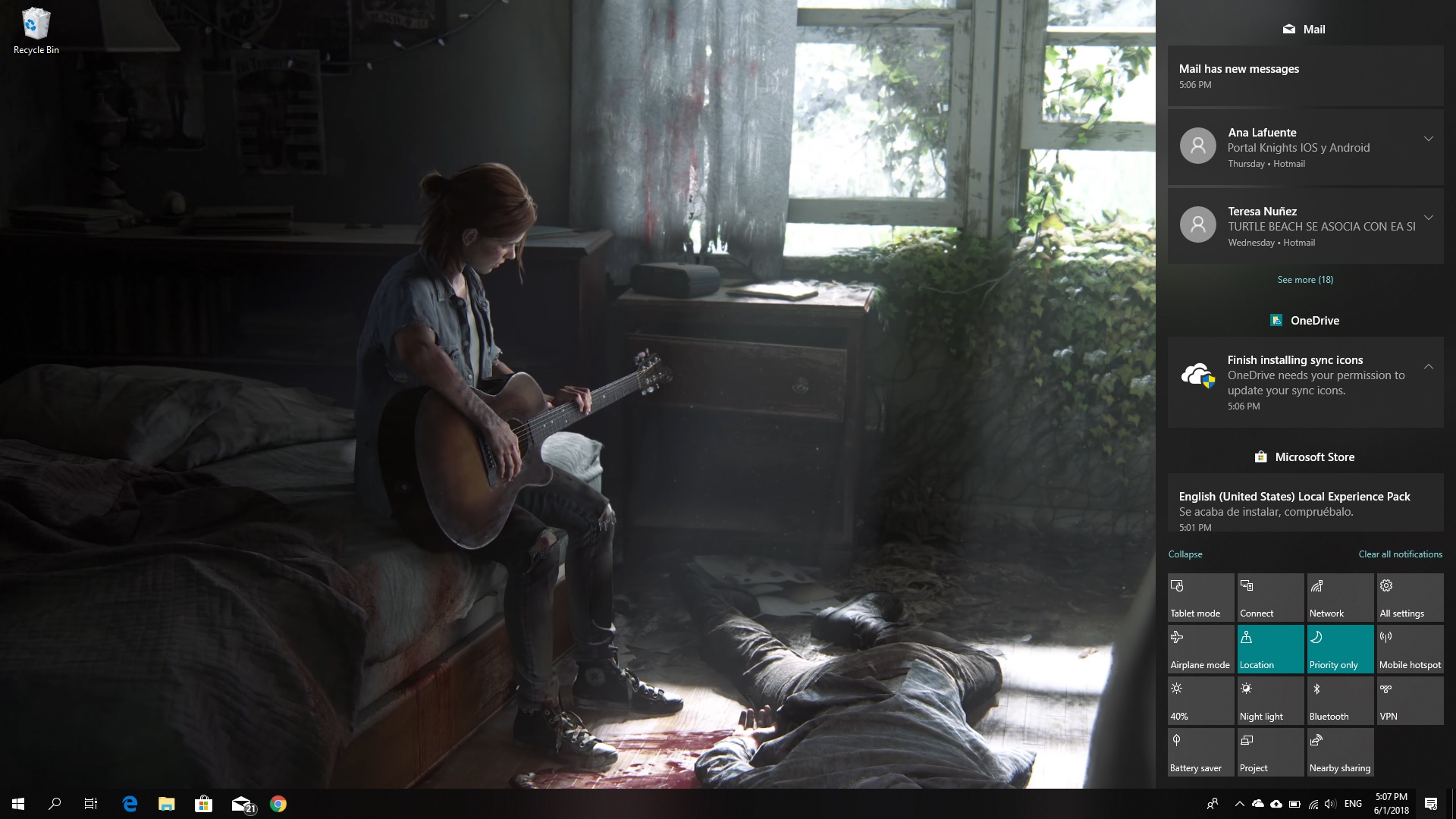
One of the best updates to Windows 10 is that it now has a powerful notification center. Like a cell phone, this operating system for PCs makes comprehensive analyses of everything on your computer. Thanks to this, you can configure basic processes every day using notifications. Now, if these messages annoy you – as in our case – we’re going to show you how to turn off Windows 10 notifications.

Simple as can be

The first thing to keep straight is that notifications are located on the lower right. If you click on the specific icon, you’ll see a menu open with a large number of available options. Using our experience as an example, we chose “Quiet hours” within the notifications. This way, we made sure there were no notifications at night. It’s like the “Night mode” that smartphones have, but for PCs.

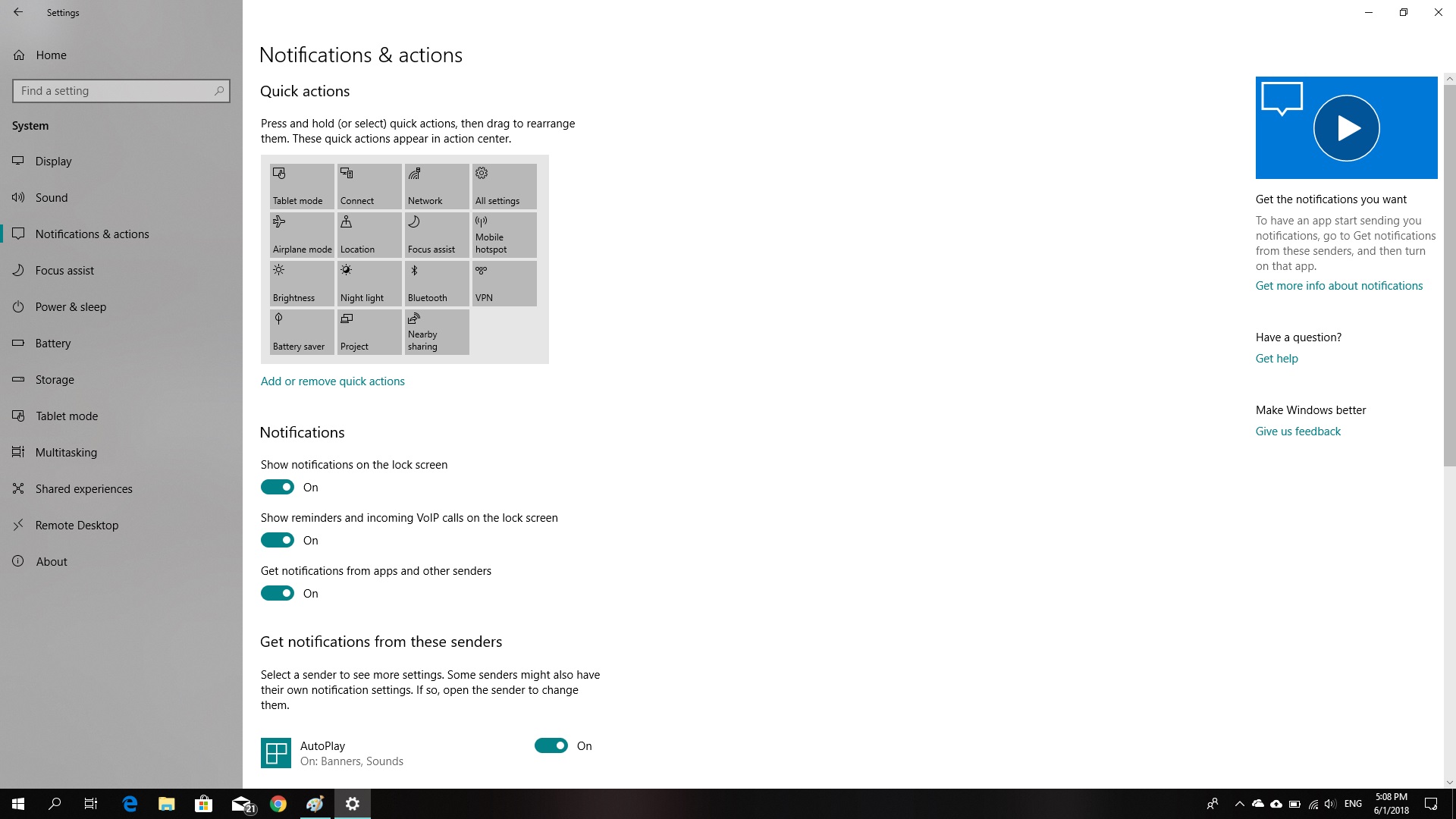
This may be the easiest way to prevent notifications; though it doesn’t turn them off, of course. If you want to do this, you have to click on the Windows key or “Start,” then “Settings,” go to “System” and click on “Notifications and actions” (Start -> Settings -> System -> Notifications and actions).

Once you’re inside Notifications, turn off those settings that annoy you (though our advice is that if you really want to get rid of them, uncheck all of them). So, uncheck the buttons “Get notifications from apps and other senders,” “Show notifications on the lock screen” and “Show reminders and incoming VoIP calls on the lock screen.” Once you’ve done this, your PC will be free from any notifications for the rest of its existence.

Remember that you decide what you want to see on your computer. Take advantage of this if you’re unsure about turning off all notifications for your PC.

Yes, Facebook did deliberately share your data with over 60 companies

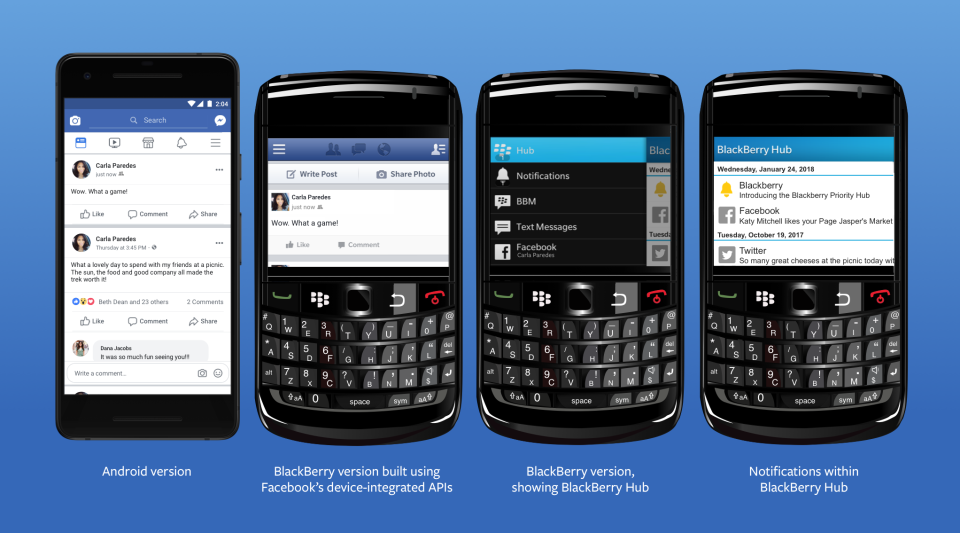
A New York Times investigation has revealed that Facebook has been purposely sharing your information. The findings, which Facebook has since confirmed in a blog post, show that Facebook reached an agreement to share user data including religion, relationship status, and political inclination with around 60 companies. These companies include the likes of Blackberry, Microsoft, Apple, and Samsung. The investigation also alleges that Facebook even gave access to user’s friends’ data, without consent.

Responding to the New York Times report, Facebook claims that the sharing of your information was legitimate and above board. According to Facebook, the agreement goes back years to a time when mobiles had app stores. Facebook agreed to share your data with third-party mobile manufacturers to facilitate the creation of bespoke Facebook experiences on their respective devices.

Image via: Facebook

Of the deal, Facebook’s VP of Product Partnerships, Ime Archibong, said:

“These partners signed agreements that prevented people’s Facebook information from being used for any other purpose than to recreate Facebook-like experiences. Partners could not integrate the user’s Facebook features with their devices without the user’s permission.”

Archibong also went on to say that Facebook is satisfied with the agreement as it has no record of any partner abusing the deal. Facebook also denied including access to friends’ data, without consent, as a part of the deal saying:

“Contrary to claims by the New York Times, friends’ information, like photos, was only accessible on devices when people made a decision to share their information with those friends.”

(function(d,s,id){var js,fjs=d.getElementsByTagName(s)[0];if(d.getElementById(id))return;js=d.createElement(s);js.id=id;js.src=’https://embed.playbuzz.com/sdk.js’;fjs.parentNode.insertBefore(js,fjs);}(document,’script’,’playbuzz-sdk’));

Although Facebook has moved to address the findings of the report, people are still angry at the revelations. It looks like Mark Zuckerberg may have lied to Congress when he said users have complete control over who sees their data. One Senator called Facebook’s response completely unacceptable. Senator Richard Blumenthal, a Connecticut Democrat and ranking member of the Senate subcommittee on consumer protection said:

“I think this explanation is completely inadequate and potentially disingenuous… I think Mark Zuckerberg’s testimony raises very serious and severe questions about Facebook’s credibility.”

The Cambridge Analytica scandal still fresh in everybody’s minds and the company has been stumbling from one crisis to another since the revelations first broke. It is almost a matter of when and not if we’ll hear about the latest way that the social network has been exploiting our private data to facilitate its bottom line.

Do you believe Facebook’ VP of Product Partnership? Are you satisfied that your data was shared with third-party companies in an appropriate manner? Let us know in the comments below.

PuBG vs Fortnite: which is better?

If you’re a gamer, you’ll know Battle Royale games have taken the world by storm.

Player Unknown’s Battlegrounds (PUBG), a game based on battle royale mods and developed by South Korean studio Bluehole, has taken the gaming world by storm. It has racked up huge sales numbers, an Xbox One port, and now a well-received mobile version.

With such success, the game was never going to be alone for long. Enter Fortnite, a rival battle royale produced by American studio Epic Games.

Both games offer the high-stakes, white-knuckle survival fix gamers know and love, but each has a slightly different approach. So, which is better? We’ll compare the major features to help you decide which is the one for you.

Playerunknown's Battlegrounds Download Now
9
Fortnite: Battle Royale Download Fortnite: Battle Royale
10

Graphics

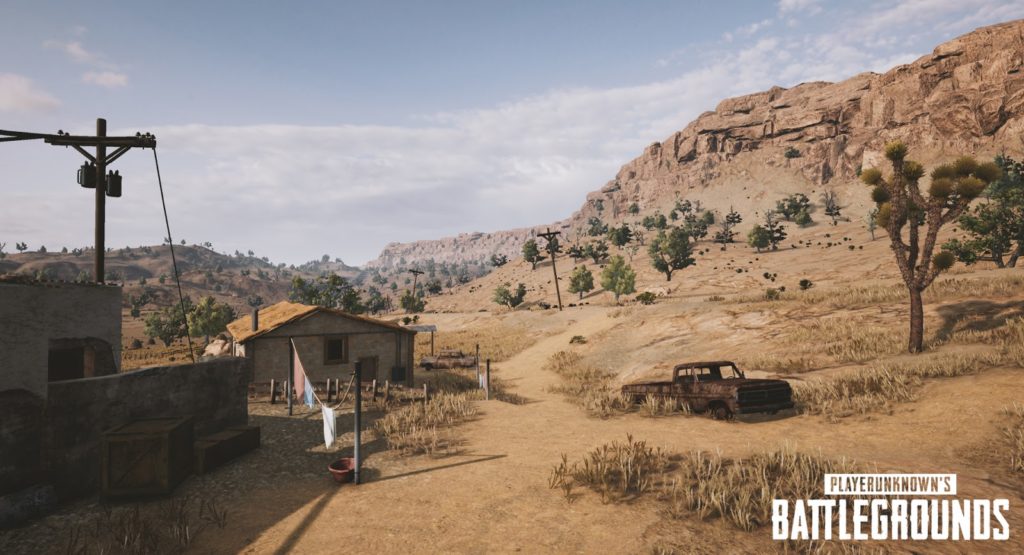
Both games offer a unique graphical style. PUBG is all about gritty, environmental realism, so the color palate is subdued and washed out. Fortnite is the complete opposite, embracing a bubblegum-bright, cartoonish style, with outlandish outfits and weapons.

PUBG environments look like they come straight out of The Walking Dead. 

While Fortnite‘s visual style is more Disney than Day Z.

PUBG has gained notoriety among PC users for bad frame-rates and stuttering, even on high-end machines. There are plenty of guides to getting the most FPS from your rig, but until Bluehole fixes the bugs, you might need to play on lower settings. Not that that’s necessarily a bad thing, if you’re a pro player.

Fortnite seems better optimized graphically, and the minimum specs are much lower than PUBG’s, so a wider variety of rigs will be able to run the game.

Gameplay

Generally speaking, the goals of each game are the same: drop in, loot, kill your enemies, and stay within boundaries that shrink as time passes. Gunplay, though, is significantly different.

PUBG boasts realistic gun handling, and you have to account for things like bullet drop. This makes fights difficult and combat tense, but also more rewarding when you win an engagement. You have to plan your moves carefully, and the game rewards patience.

In Fortnite, the style is much looser. Hit points will fly out of player’s heads as you pummel them with a mini-gun, for example. It’s a lot simpler, and easier to grasp. In general, the weapons are a lot more forgiving than those in PUBG, so Fortnite is kinder to beginners.

Tension

We play games to relax, right? Not in Battle Royale.

Clutching your mouse in a death grip while scanning for the bullet that could end it all… Both games have a very different approach to creating this atmosphere.

Broadly speaking, Fortnite is faster, tighter, and the action takes place in a smaller area. When you hear gunshots, it usually means it’s too late to defend yourself.

PUBG is the opposite. Games are about the silence between engagements, the tension drawing out until you finally have someone in your sights. Then all hell breaks loose.

Late game

The key part of any Battle Royale is the late game, and this is where PUBG and Fortnite differ the most.

Fortnite introduced a building system, so you can quickly scoot up difficult terrain using stairs and ramps. Late game encourages players to build towers that overlook rapidly shrinking maps. Then you simply pick off your opponents who didn’t plan ahead by collecting building materials as well as weapons.

PUBG’s late game can be a little frustrating. It usually ends with eight players slowly crawling through fields or holing themselves up in one location, waiting for someone else to slip up and reveal themselves. While it’s nail-biting, it can deflate some of the early game excitement.

Map

Not in Kansas anymore, Dorothy…

Another key part is the actual battleground. Currently, Fortnite has only one map, but the developers are continually adding and polishing up locations.

PUBG has two maps, selected randomly when you join a match. The original map has a bleak, Soviet bloc feel, while the second is a desert. The change of scenery definitely helps keeps things fresh.

Price

PUBG has moved out of early access, and costs $29.99 for a digital download key.

Epic chose to make Fortnite completely free. You can purchase outfits and weapon skins from their store, but there’s no pay-to-win advantages to buying an item.

Both PUBG and Fortnite are the leading lights in the newly revitalised Battle Royale genre. However, both will appeal to a slightly different kind of player. 

If you’re looking for something casual that’s easy to learn but hard to master, then Fortnite is for you. 

If you’re a fan of heart-pounding tension, steep learning curves, and big rewards, then PUBG is the way to go.


Google confirms Gmail updates will be available to everybody next month

Google has been drip-feeding us news of its big Gmail update for a while now. It has also been running an opt-in trial of the new features via its Early Adopter Program (EAP). It seems that this trial has been going well as Google has confirmed in a blog post that the new features will be receiving a general availability (GA) launch next month. That means we’ll all have access to them by the end of July 2018.

A more detailed timetable of the, as laid out in the blog post, looks like this:

“In July 2018, G Suite admins will have the following options in the Admin console:

  • Immediately transition their users to the new Gmail. For a period of time, users will still have the option to opt out.
  • Allow their users to opt in to the new Gmail at the time of their choice. For a period of time, users will still have the option to opt out.
  • Wait approximately four weeks until their users are allowed to opt in to the new Gmail. For a period of time, users will still have the option to opt out.
  • This is the default setting. During this four-week period, users will not have the option to opt into the new Gmail.”

gmail black header

This means that come August all users will be able to opt in to the new Gmail system. The blog post goes on to say:

“Approximately 12 weeks after the GA announcement in July, any users who’ve opted out of the new Gmail will be automatically migrated to the new experience, with no option to opt out. Users who’ve already transitioned to the new Gmail will lose the ability to opt out.”

Which means once October rolls around, everybody will be using the updated Gmail and nobody will be able to opt out

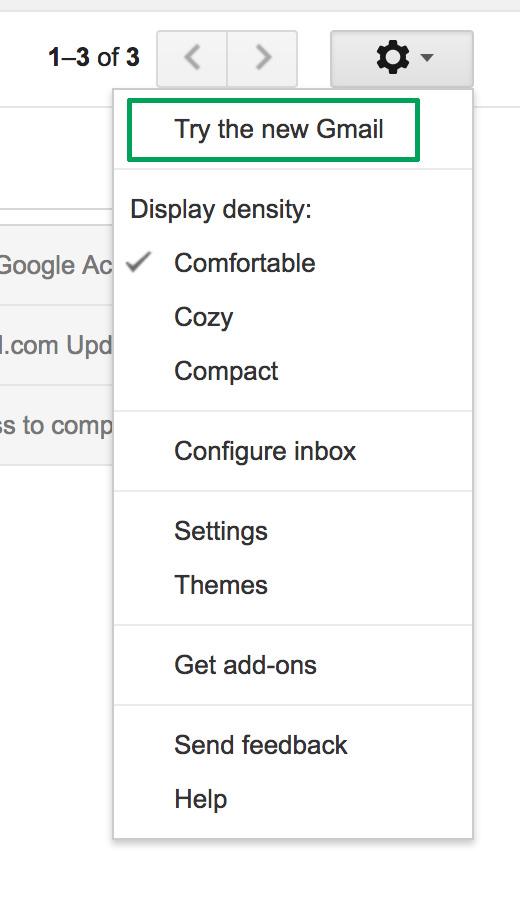
We’ve laid out all the best features of the new Gmail for you here, and even shown you how to try out the new system now. If you want to try out new email features including self-destructing emails, auto-response, reminders, and offline mode you can. All you have to do to give it a whirl is head to Gmail menu cog and click Try the new Gmail. If you don’t like it, you can go back, but make sure you pay attention to the timetable laid out above, as soon you won’t have the option.

Why Snapchat’s latest update is making fans angry

When it comes to updates, things go one of two ways. Either everything goes live and users sing your praises, or users hate the changes and will crucify you on social media (hello, automatic U2 album download).

So, when Snapchat released their newest update back in January, like anyone with the best intentions, they were probably hoping for praise. But what they got instead was a bucketload of grief.

Giving their thoughts on the upcoming changes, the company wrote:

“Until now, social media has mixed photos and videos from your friends with content from publishers and creators. While blurring these lines has been an interesting experiment, it has also produced strange side-effects (such as fake news) and made us feel like we have to perform for our friends, rather than just express ourselves.”

Snapchat Download Free
8

After the update was released in January, it became clear users were unhappy. In fact, the update has gone down like a lead balloon tied to a piece of concrete. Users aren’t keeping quiet about their displeasure either. There is currently a Change.org petition with 1,253,605 signatures at the time of writing, asking for Snapchat to rollback the design of the app.

So, to help you through the pain of the update, we’re going to take you through everything that’s changed.

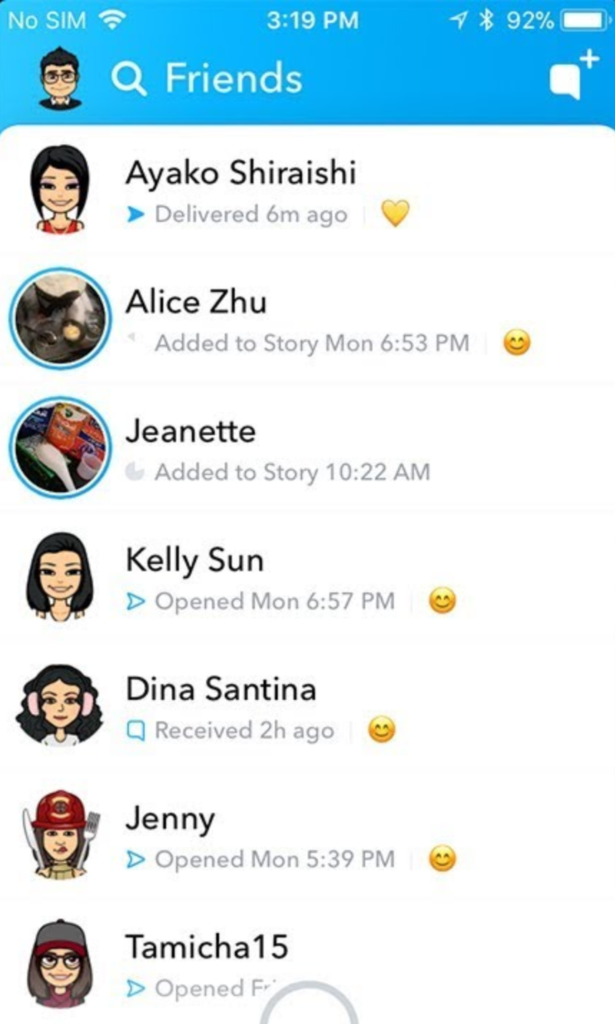
Swipe left – Friends

Everything to do with friends is now in one place.

Where stories used to be viewed by swiping right – and more on that later – now friends, messages, and stories are all combined in one place. It’s a bit messy. If a friend posts a story, you’ll see a preview picture. Click on their profile pic to be taken to the story.

You can only see recent contacts’ stories now, so if you haven’t ever messaged someone, you’ll need to make contact with them before you can see their stories.

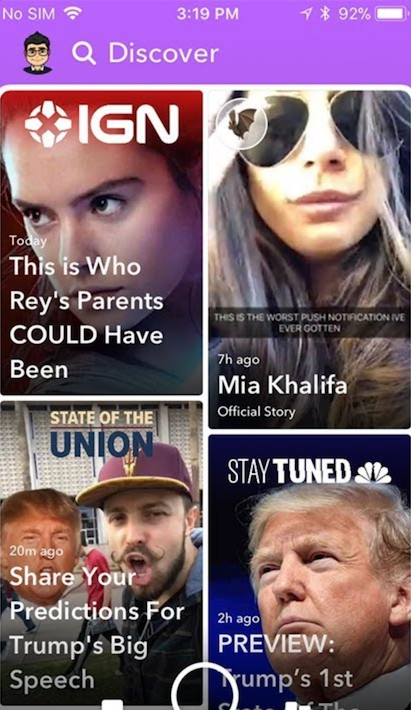
Swipe right – Discover

Another big change: swiping right no longer takes you to the stories page. Instead, you’ll see influencer content, paid-for ads, and friends’ stories appearing together in the new Discover feed.

There’s very little information about how Snapchat chooses what to show you, and a lot of people are annoyed about seeing lots of content they have no interest in at all.

If you want to see less from a particular source, long-press on a tile, and select “see less of this”.

Other changes

While the biggest changes are to the Friends and Discover tabs, there are a few other features worth mentioning.

  • No easy way to mass clear conversations. You can’t clear all from settings anymore, and have to long-press on each conversation, then select settings > clear.
  • No easy way to see the number of views on your posted stories, now you have to view these within your profile page.
  • No more animated profile pictures. Instead, Snapchat replaced these with Bitmoji Deluxe.
  • Our Story now makes you disclose your location by default.

Do we think Snapchat will change anything back? They did respond to the Change.org petition on the February 20, telling users:

“In the coming weeks, we are introducing tabs in Friends, and Discover, which will make it easier to find the Stories that you want, when you want them … You’ll be able to sort things like Stories, Group Chats, and Subscriptions, allowing you to further customize your own experience on the app.”

So, clearly, they know that something needs to change, and it’s hard to argue with a petition with over a million signatures and plummeting scores on app stores. But, will those people get what they want? We’ll see.

How to read messages on Facebook Messenger without the sender knowing

Messaging services have spurred new ways of communicating around the world. That blue checkmark is a confirmation that your message has arrived and been read. You know it. The recipient knows it.  And that can be awkward at times.

In the case of WhatsApp, you can disable the message confirmation, but with Facebook Messenger it’s not so easy… or maybe it is. We’ll show you how to read messages on Facebook Messenger without the sender knowing.

On your cell phone

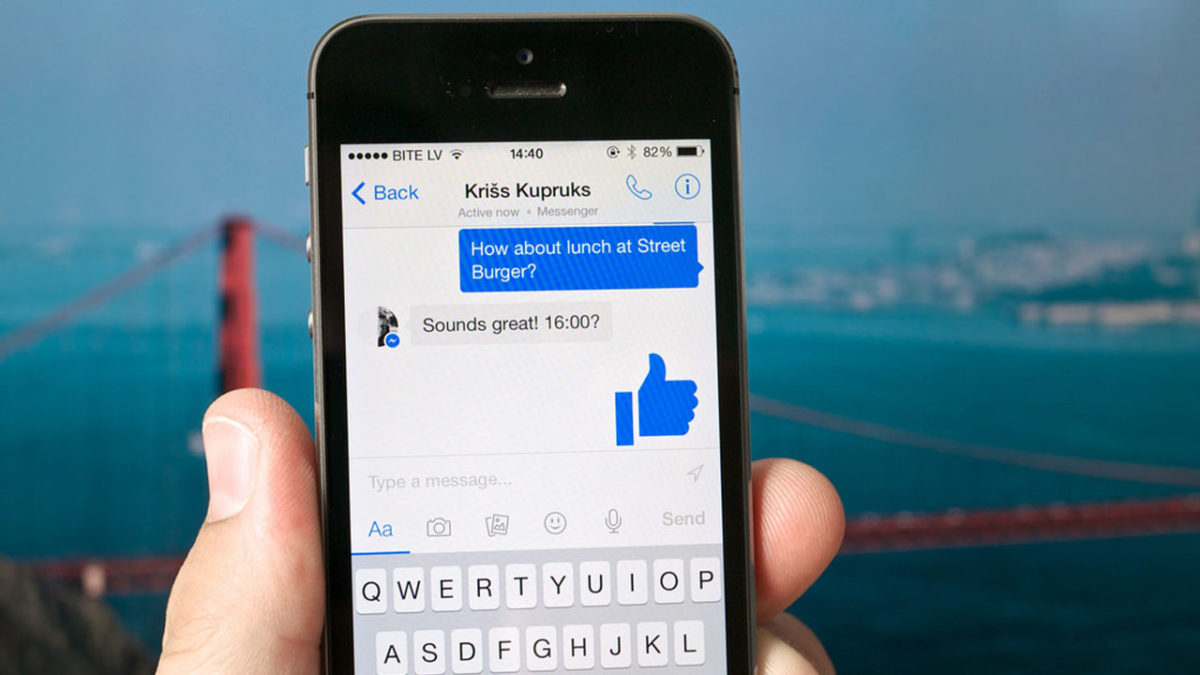
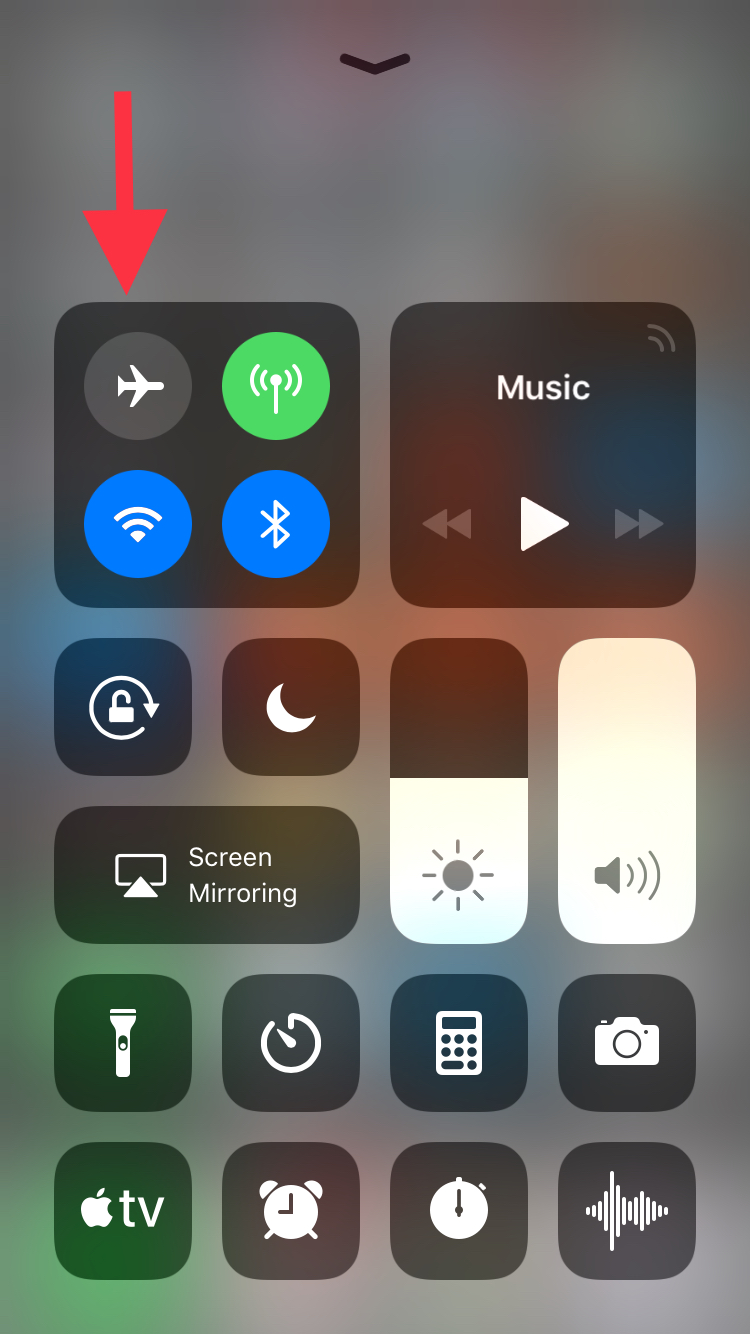
Let’s start this guide with your smartphone, where this app is most used. In the case of mobile devices, making it so Facebook Messenger doesn’t detect your view is so easy it might scare you: simply put it on Airplane Mode. Yup, that’s the big reveal. If you put it on this mode, your messages on Facebook Messenger won’t appear as seen.

This happens because the app downloads all the messages going to your phone, regardless of whether they are read or not. However, if you enable Airplane Mode and then go into the messaging app, without internet there won’t be any read receipt or even the possibility of responding. It’s the modern day equivalent of “driving into a tunnel.”

On your PC

We already mentioned that it’s pretty easy to get this unseen message with your smartphone and it’s just as straightforward with your PC, though there are a few additional steps.

If you use Google Chrome, what you should do is install the extension Unseen. The name is straightforward. It blocks received messages so they don’t appear as read when you go into the app.

FB Unseen Download Free
7

If you use Mozilla Firefox, there are several extensions like this, though our advice is to go for Message Seen Disable. It works pretty well and doesn’t give you any trouble with browsing or using Facebook Messenger, so it’s one of the best options.

Now that you know how to read messages without them appearing as seen, you just have to choose how to do it. We like the smartphone method best, which takes a matter of seconds (literally) to complete the process. It’s up to you.

Gmail’s best new features

At the end of last year, Google pledged that we would see a lot of new features for Gmail in 2018. This email service is the most popular in the world, so the Mountain View team has been working to offer new features. And now we’ve received the first of them. Here are Gmail’s best new features.

New design

Gmail has always been known for having a clumsy interface, typical of the last decade. However, we should clarify that it’s quick, easy and functional, so it’s understandable that Google doesn’t want to touch anything that works well… they just want to improve it.

Finally, the search company has added a new Gmail design. To enable it, just go to the gears icon at the top and click “Try the new Gmail.” The platform will reload after a few seconds and a short tutorial will appear explaining the new features.

Gmail now has a cleaner and more readable design, with rounded and not-so-rectangular shapes. It also added new features at the user experience level. For example, attached files in emails can be downloaded without having to open the email at hand (this is a big hit).

Offline mode

This is one of the greatest new features of this latest update, which the community has been requesting for some years now: offline mode. To get it, you must have the new Gmail design, so follow the steps in the previous point.

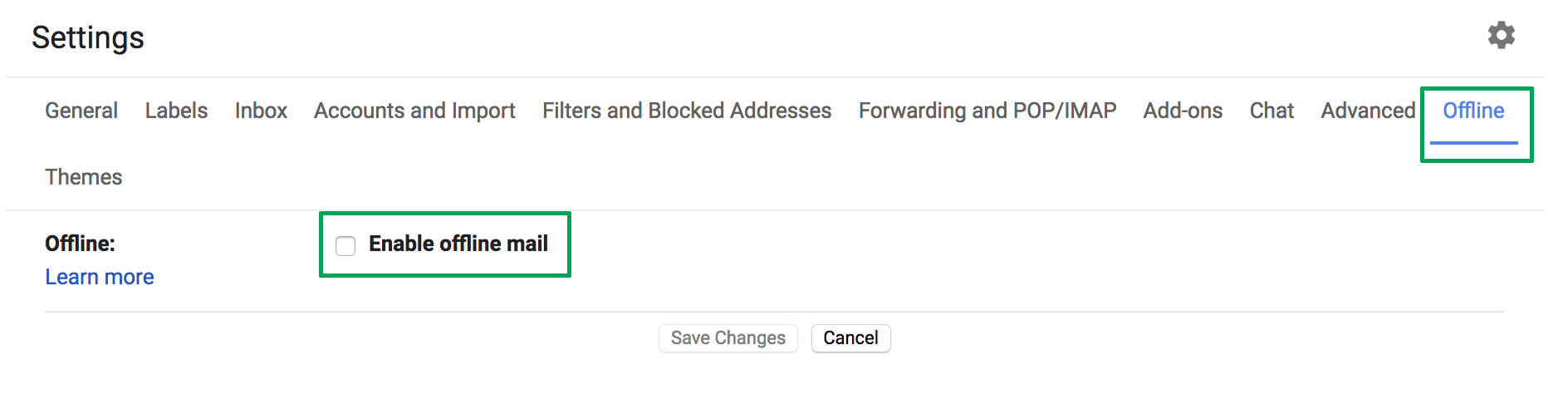
Once you’ve done that, enabling offline mode is very simple. Click on the settings icon and then the “Settings” option – redundant, we know. If you take a quick look, you’ll see a field that wasn’t there before, a box called “Offline.” Click there and enable the box “Enable offline email.” It will ask you how many days of messages you want to synchronize, so choose what’s best for you. Now you’re good to go.

Reminders

Maybe you haven’t responded to your email for a few days and have to do it. Now Google will remind you with a little yellow message. This feature even appears in emails that have already been read. The idea is that no message goes overlooked.

Auto-response

This was already introduced in past trial phase versions, but now, at last, it’s here: the auto-response. This feature involves Google’s AI suggesting what could be your short response to a message you’ve received. For this, the system displays some answers on the screen: you can then choose one and click send. Quick and easy.

Gmail Access now
8

Self-destructing emails

We’ll wrap up this list of new features with the best one for spies: self-destructing emails. Known under the name “Confidential mode,” this feature is activated once an email is sent and prevents that person from copying, pasting, resending or printing the text. Also, you can add a reading time limit. After this time, the email will no longer be available.

WhatsApp makes a big change: no more annoying photos from your contacts

Soon you’ll have the power to stop photos and videos sent by your WhatsApp contacts from appearing in your phone’s photo gallery. How many times have you opened your gallery to show a photo to a friend, only to find dozens of goofy photos or videos from those idiotic, muted group chats? Never fear. Those uncomfortable moments are at an end.

WhatsApp Messenger Download WhatsApp
8

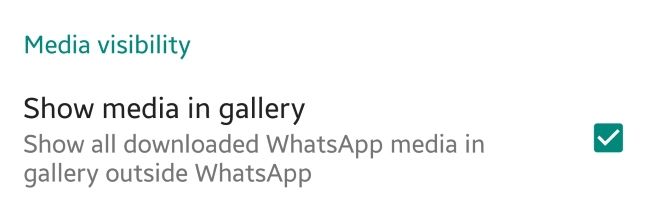
This new feature appears in the latest WhatsApp beta version. This means that soon we’ll have it available in the regular version. Once the update rolls out, just have to go to the settings section of WhatsApp and then to Data and storage. There will be a new option called “Media visibility.” Simply disable “Show media in gallery” and the problem is solved.


What do you think about this new feature? Will you use it? Leave us a comment!