WhatsApp will offer a Boomerang video feature

WhatsApp is developing a boomerang feature.

New WhatsApp features are a bit like the buses. You’re waiting for one for ages and then two come along at once. The dust has barely settled on the Fingerprint lock feature for WhatsApp on Android that we’ve just published and we’re already here again to tell you about another interesting feature coming our way. This is a feature WhatsApp users won’t have seen before, but if you’ve ever used Instagram, you’ll no doubt be familiar with it already.

WhatsApp Messenger Download Now ►
8

WhatsApp is developing a boomerang feature
WhatsApp logo inside the Instagram logo

Instagram’s Boomerang feature is simple enough but has proven very popular. It allows you to record a short video and then play it in a loop. Not a regular loop, but one that plays like a boomerang. The video plays from start to finish, and then plays backward from finish to start before then repeating the process ad infinitum.

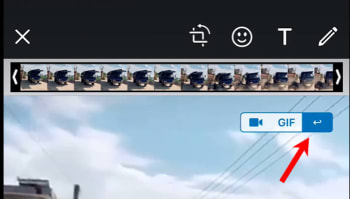
It has now been reported by WABetaInfo that WhatsApp is working on a Boomerang feature of its own. The feature will be available in the small Video Type panel that at the moment allows the choice between sending a video as a video file or first converting it into a GIF. The only caveat is that Boomerang videos will only be possible on WhatsApp if the video is less than seven seconds long.
WhatsApp gets a
The new WhatsApp Boomerang button

WhatsApp’s new Boomerang feature is still in the very early stages of development, however, so at the moment it isn’t even available to advanced users of the WhatsApp beta program. According to the WABetaInfo report, however, the WhatsApp Boomerang feature will come first to WhatsApp on iOS and will then follow on Android. Although the report does specifically say that it will come to both iOS and Android, there is no mention on when either version will see a release.

As we always like to point out when we report on these advance beta version feature releases, we can’t guarantee any sort of timeline. To give you an idea of how long these things can take, we first broke the story we’ve just published on the new Fingerprint lock for Android back in January and that only came to the beta version of WhatsApp for Android this week. This means that the general release of this feature to all versions of WhatsApp could still be a way off.

If this all sounds too tantalizing for you, and you want to try out these advanced new features as soon as is humanly possible, don’t worry. We’ve prepared a handy guide that points out how you can sign up to the WhatsApp beta program. To read it, click the link above.

If you think you’d like to try out advance features on many of the other pieces of software, apps, and programs we feature on Softonic, we’ve got you covered there, too. Check out the link below to find out how to sign up to the beta programs for many, if not all, of your favorite programs.

WhatsApp on Android gets fingerprint lock

WhatsApp has already started rolling out Fingerprint lock feature the members of the Android WhatsApp beta program

It has been a while since we’ve been able to tell you about a significant WhatsApp development. After an endless stream of incoming updates, things recently slowed down. Well, finally we can bring you news of a very interesting update, although it isn’t exactly a new one. We first told you about WhatsApp’s plans to add fingerprint identification to the Android version of the app back in January, and we can now tell you that the feature is finally about to land.

WhatsApp has already started rolling out Fingerprint lock feature the members of the Android WhatsApp beta program

Fingerprint security

Fingerprint authentication landed on the beta version of WhatsApp for iOS months ago and is now finally making the leap to Android too. Once enabled, users will be able to secure their WhatsApp chats behind fingerprint authentication. There is also an option to hide content shown in system notifications behind the fingerprint lock feature too.

WhatsApp Messenger Download Now ►
8

The feature lands for all Android beta users who’ve updated their WhatsApp to version 2.19.221. The only catch is that you’ll have to be using an Android phone running Marshmallow or later and, rather obviously, your phone will need a fingerprint sensor.

How to use the new Fingerprint lock feature on WhatsApp for Android

Once you have the latest version of WhatsApp installed on your Android smartphone, you’ll have to activate it and confirm your fingerprint before you can use it. This is what you’ll need to do to activate the WhatsApp fingerprint lock.

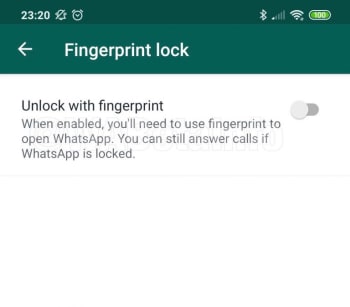
1. Open the WhatsApp Settings menu and then tap Account and then Privacy. You’ll then see the new Fingerprint lock option.
fingerpint lock whatsapp
Image via: WABetaInfo
2. Open Fingerprint lock and then enable Unlock with fingerprint.
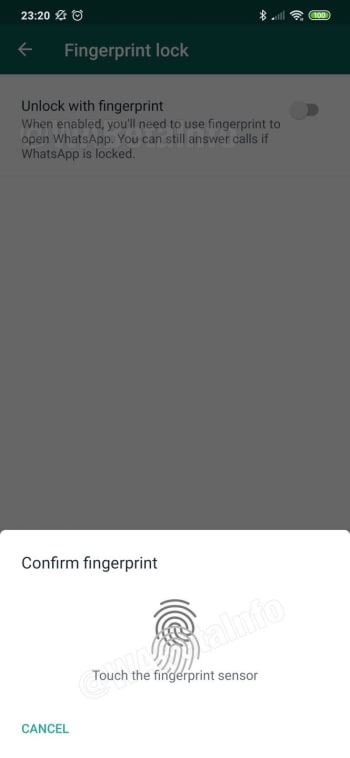
whatsapp fingerprint scanner
Image via: WABetaInfo
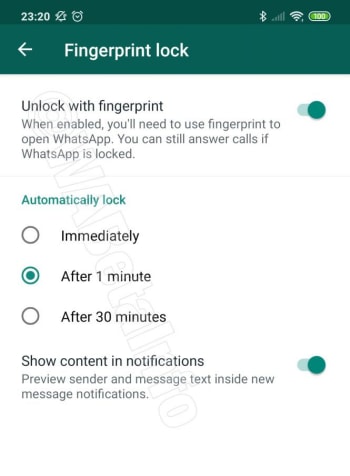
3. Confirm your fingerprint using your phone’s fingerprint sensor. This will then open up some different options for the Fingerprint lock feature including how quickly you want WhatsApp to lock after each use and whether you want WhatsApp to show message content in your system notifications.
whatsapp fingerprint options
Image via: WABetaInfo
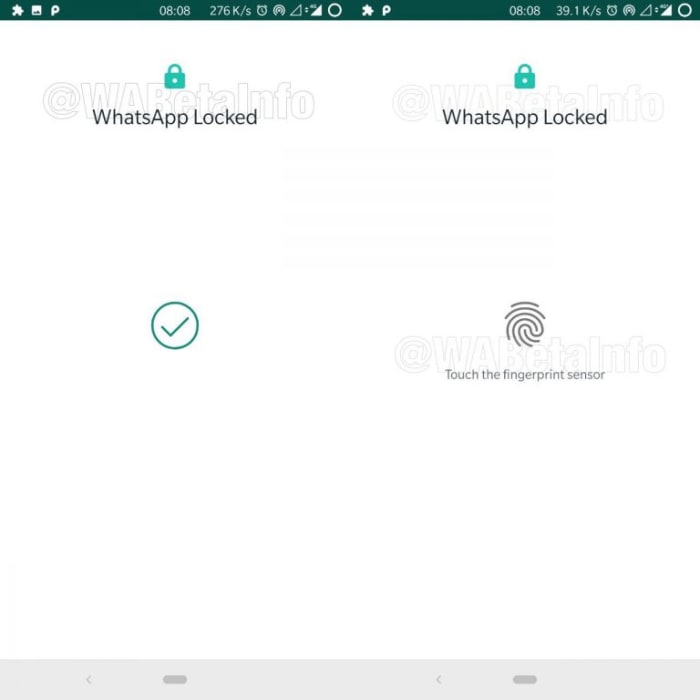
4. Configure each setting and then test the feature works by closing it.
Image via: WABetaInfo

The above steps will enable the WhatsApp Fingerprint lock when it lands on your version of WhatsApp for Android. The feature, however, doesn’t actually add an extra layer of security to your WhatsApp chats, on top of the regular lock you have protecting your phone.

The fingerprint data you use to lock your WhatsApp is actually the same fingerprint data you use to unlock your device. The WhatsApp fingerprint lock will be useful, however, if you ever pass your unlocked phone to somebody else but don’t want them to be able to read your chats or listen to your voice messages.

New WhatsApp bug could let hackers talk for you

New tool exploits vulnerability in WhatsApp to allow third parties to manipulate your chats and talk on your behalf.

People fighting over a WhatsApp account

WhatsApp’s popularity is unquestionable. With over 1.6 billion monthly active users it is the most popular messaging app on the planet by quite a margin. This is great because it means most, if not all, of your friends and family are on WhatsApp, too. But there’s a problem: such a huge user base is also going to attract hackers and cyber-criminals.

We’ve covered a plethora of WhatsApp related scams here at Softonic. From fake versions of WhatsApp to dubious links being sent out across the network promising deals and freebies that are too good to be true, we’ve seen lots of different types of WhatsApp scam. Unfortunately, however, today we have to tell you that it doesn’t look like the scammers will be running out of ideas any time soon. There is another WhatsApp that you need to be aware of.

New tool exploits vulnerability in WhatsApp to allow third parties to manipulate your chats and put words in your mouth

At a recent cyber-security conference in Las Vegas, called Black Hat, cyber-security specialists from  Check Point Software Technologies demonstrated a new tool that allows hackers to intercept and manipulate user chats on WhatsApp. The tool enables hackers to fool the WhatsApp quote tool to make it look like users have said things that they hadn’t.

Speaking to the BBC, Check Point researcher, Oded Vanunu said, “It’s a vulnerability that allows a malicious user to create fake news and create fraud… You can completely change what someone says… You can completely manipulate every character in the quote.”

Vanunu also indicated that the tool can change the name of the sender who the quote is attributed to. This means a hacker could completely make up a quote and then put your name, or the name of another WhatsApp user, next to it.

On its own this thought is frightening enough. Somebody could do some real damage to your reputation and personal relationships, if they were able to accredit false quotes to your name. The potential problem is magnified, however, when you think of all the problems fake news has been causing on WhatsApp.

Fake newspaper whatsapp
Image via: Check Point Research

We’ve seen as many fake news WhatsApp scandals as we have WhatsApp scams. From causing riots and lynching in India to pushing false narratives in Brazil that have seen a far-right candidate take the presidency, WhatsApp has been dealing with a fake news global epidemic for quite some time. The messaging giant has taken steps to halt the spread of false information, but this latest tool could make that job even harder.

The good news, however, is that the vulnerability the tool exploits is now common knowledge so, hopefully, WhatsApp will already be working to close it. This is all another reminder of how precarious our digital security is and just how serious things can get, if we don’t stay vigilant when we’re online.

How to translate instantly within WhatsApp and Facebook Messenger

Translate text instantly with WhatsApp and Google Translate!

Translate

Google has launched a brand new feature for the official Google Translate app, which enables users to translate texts from within instant messenger services such as WhatsApp and Facebook Messenger.

Google Translate Download now ►
8

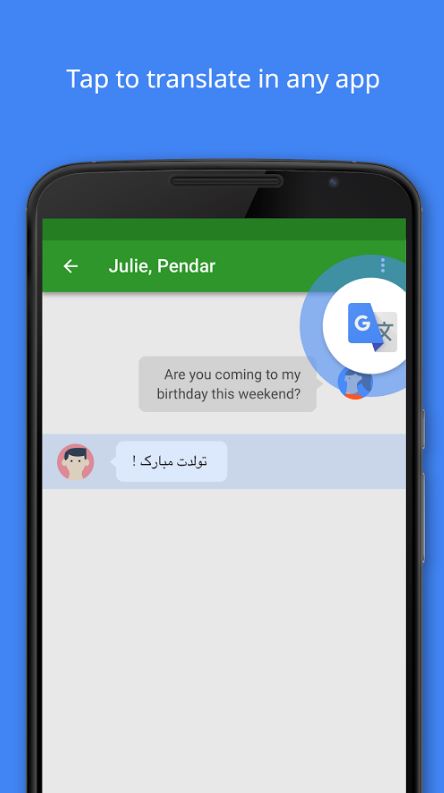
Tap to Translate is about revolutionizing the way you communicate with your friends who speak a language different to your own, and allows you to translate your messages without leaving the app you’re currently using, in record time!

Tap to translate in any app

If you’ve received messages in a different language via WhatsApp or any other messenger for that matter before, you’ll know how time-consuming it is to have to copy and paste a message into an external app to translate it (unless of course, you know the language).

WhatsApp Messenger Download Now ►
8

With Tap to Translate, all you have to do is simply tap the message you wish to translate to get it in your language, as well as tap your own message to translate it for others to understand! It’s great if you’ve got a WhatsApp group for university or work that’s full of international members who tend to switch between languages during the conversations.

As it works within most apps, you’ll never get lost in translation again!

Check out the official video below to learn how to do it!

Watch out for this WhatsApp scam offering free data

Look out for WhatsApp messages offering you 1000GB of free internet data!

A closer look at WhatsApp

Through recent months and years, we’ve seen quite a few WhatsApp scams do the rounds. We’ve seen fake links and phishing scams go viral and even fake versions of WhatsApp complete with unrealistic features.

Normally, the trick the hackers are trying to pull over us revolves around sending us to fake websites where they can infect our devices with malware and get private data out of us. They also might just bombard us with ads. An old classic.

This final one is exactly the MO of the latest WhatsApp scam that we’ve detected spreading across the network.

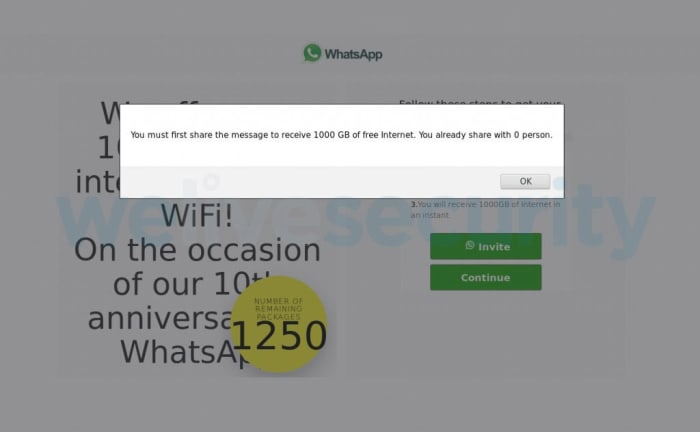
Look out for WhatsApp messages offering you 1000GB of free internet data

Fake WhatsApp message about 1000GB of free data
Image via: ESET

As is often the case with phishing scams, this latest WhatsApp scam is offering something that is too good to be true. Limited data plans are common these days, with many people falling short on their allowance before the end of the month. Being offered 1000GB of free internet is such a good offer, our better judgment might fly out the window.

The security team at We Live Security came upon such a message recently and decided to follow it to see where it would lead. The link took them to a URL that was not officially connected to WhatsApp where they were submitted to a particular type of click fraud. The We Live Security blog post describing the scam had this to say about click fraud, “[It is] a highly prevalent monetization scheme that relies on racking up bogus ad clicks that ultimately bring revenues for the operators of any given campaign.”

Basically, the site connected to this scam offers a huge reward to entice you to visit a fake website. The website is filled with questions that you need to answer if you want to collect your reward. Every time you click on the page to answer a question the fake sites generates revenue. Then, you’re asked to share the site with 30 of your friends to qualify for the prize you were first promised. In the end, you’ve spent a lot of time clicking on a fake website, spammed 30 of your friends with the false promise of a massive data allowance boost, and then you finish up with nothing for your trouble.

Fake site asking you to send it to 30 friends
Image via: ESET

The researchers at We Live Security didn’t find malware on the site, but they also pointed out that this didn’t mean there wouldn’t be any there in the future. On top of that, they also noted that the website domain connected to the scam is also being used to run multiple other click fraud scams while pretending to be other reputable brands like, “Adidas, Nestlé and Rolex, to name but a few.”

Wrapping up

The message from all of this is that if you ever see an offer pop up on WhatsApp or any other of your social channels that appears too good to be true, you should avoid it. Make sure you keep your eyes open for dodgy URLs and if something doesn’t look official, avoid it like the plague.

As we always say when reporting on scams like this, you are your own best line of defense. Stay vigilant and keep an eye out for the warning signs we’ve outlined above, if you want to have the best chance possible of staying safe when online.

WhatsApp’s desktop app won’t need your mobile phone’s connection

This new desktop version of WhatsApp will work even when your phone is off!

WhatsApp on laptop with a wavy background

There has been a desktop version of WhatsApp since 2015 when the messaging app released WhatsApp web. On its own, WhatsApp web works well as a PC version of the Facebook-owned app. It looks similar to the mobile app and has much the same feature set, although you can’t make voice or video calls from WhatsApp Web. It is so handy that, thanks to this neat Softonic tutorial, I often use WhatsApp Web as my go-to solution for sending files and photos quickly, easily, and securely from my phone to my PC and vice versa.

There is one catch, however, when it comes to WhatsApp Web and that is that it doesn’t work unless you link it to your phone. Once your phone is linked, you’ll be able to use WhatsApp Web as long as your phone is connected to the internet, even if you don’t have it with you. Without that connection though, WhatsApp Web is useless. All you’ll get is a page asking you to link your phone. It has now come out though, that this might be about to change.

WhatsApp Messenger Download Now ►
8

New WhatsApp web will work even when your phone is off

The UWP is the Universal Windows platform. When an app is developed for the UWP it will work on Windows 10, Windows Phone, Xbox, and other Microsoft platforms like HoloLens. According to the ever-reliable WhatsApp tipsters over at WABetaInfo, WhatsApp is currently working on a new UWP version of WhatsApp. This means that there might soon be a version of WhatsApp that you can download and install officially on your Xbox.

The really exciting news about this latest development, however, is relating to the app itself and not just its platforms. The leak says that the new WhatsApp UWP app will work even when the user’s phone is switched off. This means the UWP version of WhatsApp will enjoy its own independent connection to the WhatsApp servers. If you’ve had your phone die, and let’s be honest that has happened to all of us, then you’ll know just how useful this could be. At the moment, whenever your phone has battery or not, you can’t send or receive WhatsApp messages. It is as simple as that.

Wrapping up

This move pushes WhatsApp towards a more internet-focused messaging service that you can use on your phone. There are lots of questions that will need answering as the UWP app moves along the development path, including how many active connections a single account will be able to have at the same time. Scrolling down through all of the Twitter comments celebrating this latest development, however, finds another pressing question that could change WhatsApp fundamentally. When the UWP version of WhatsApp is released, will you even need a phone or phone number to use it?

WhatsApp Pay coming later this year: Finally, we have an official announcement

WhatsApp will roll-out its new payment service in India by the end of this year.

If you’re interested in WhatsApp’s long =-awaited payment and cash transfer service, you’ll know that we’ve been following this story for a long time. From when it first arrived on the beta version of WhatsApp back in the summer of 2017 to the news last week that WhatsApp was almost ready to submit its report to the financial ombudsman in India, we’ve been keeping a very close eye on this one for a very long time. Well, finally we have some official news for you rather than hearsay, rumors, and anonymous comments.

WhatsApp Messenger Download Now ►
8

WhatsApp will roll-out its new payment service in India by the end of this year

At an event in New Delhi, WhatsApp’s global head, Will Cathcart announced that, “to boost digital inclusion in India, we can launch the (Pay) service across the country later this year after meeting regulations.” The long road is finally coming to an end as WhatsApp Pay looks to have been approved for operation by the Reserve Bank of India.

After much delay then, WhatsApp Pay is finally ready to roll-out to India’s 400 million WhatsApp users. The plans for WhatsApp Pay go beyond India, however, with Reuters reporting Mark Zuckerberg as saying in a recent Facebook earnings conference call, “It’s a regulatory approval question in India at this point… We’re also working beyond India in a number of other countries and hope to have this rolled out to a large percent of the people who use WhatsApp within the next year.” It looks like WhatsApp Pay won’t only be confined to Indian WhatsApp users.

This one has been a long time brewing then, but it is clear that even though WhatsApp Pay is finally about to launch in India, there are still a lot of future developments to come with as Facebook seems to have some very grand plans for it. As soon as we learn more about a concrete launch date for WhatsApp’s latest service or about the other countries that can expect to see it, we’ll let you know. Make sure you stick with us for all the latest news and rumors about WhatsApp.

Keep your messages private for free with Signal

Concerned about data privacy? Signal is the messaging app you’ve been looking for.

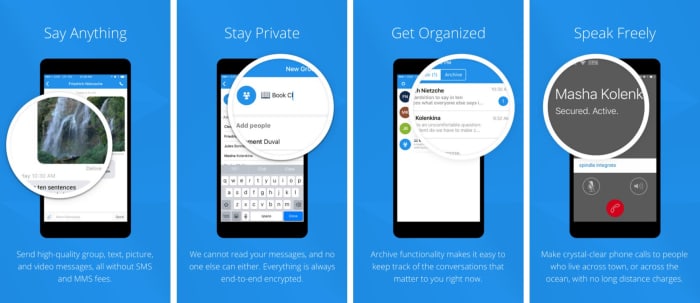
Hesitant to share your personal information over messaging or texting? You’re not paranoid – you’re probably right to be cautious. Privacy is a thing of the past. One of the best tools to keep your conversations private is a free little app called Signal.

7

What is Signal?

Signal is designed specifically for mobile devices and allows for free, worldwide, encrypted calls for your smartphone. It does so by using ZRTP for secure voice communication.

Signal helps you dodge those pesky SMS fees while communicating, and lets you share media and files as normal, and chat with groups in real-time. It requires no password, uses your existing phone number, and never accesses any of your conversations or stores any of your personal data.

Signal app functions privacy

“Long before we knew that it would be called Signal, we knew what we wanted it to be,” said the company on their blog page. “Instead of teaching the rest of the world cryptography, we wanted to see if we could develop cryptography that worked for the rest of the world. We started Signal with the idea that private communication could be simple.”

As far as simplicity goes, using the app couldn’t be any easier: Installation is free, and the download time is quick. Once it’s done, you’re in the clear. The app’s Contact Discovery immediately displays which of your contacts are reachable with Signal, so you can carry on your conversations in private.

Why you need it

“As more and more of our lives happen online, data protection and privacy are critical,” explains the company’s Executive Chairman Brian Acton. “This isn’t just important for select people in select countries. It’s important for people from all walks of life in every part of the world. Everyone deserves to be protected. We created the Signal Foundation in response to this global need. Our plan is to pioneer a new model of technology nonprofit focused on privacy and data protection for everyone, everywhere.”

True to their word, the company has kept Signal free and open source. It’s the only app of its kind, and even goes as far as sending optional push notifications to conserve your battery life and still stay responsive.

“The best way to continue to ensure the universal availability of high-security and low-cost communications services like Signal is to do so through a foundation structure that is free of the inherent limitations of a for-profit company,” says Acton. “We’ve built a service used by millions, and software used by billions.”

The latest versions of Signal are available on Android, iOS, and Desktop. It also has an integrated link preview function and browser extensions for the Desktop client. Get it free today and let us know how it helps you manage your conversations. Stick with Softonic for more tips and tricks to keep your data private and secure!

Google tests text messaging from the lock screen for Google Assistant

Google’s A/B test is looking at actually sending messages using only voice commands rather than showing an “Unlock to continue…” prompt

Hey Google, send a text to...

Modern technology poses us with many quandaries, but they usually boil down to having to give something up in order to receive some other sort of benefit. We’ve sacrificed privacy for better connectivity for example. Another little trade-off we’re constantly having to consider is ease of use versus security. The more we rely on technology, the easier it becomes for somebody to hijack our digital personas and take advantage of them.

A good example of this is voice control. When it works, being able to simply tell your phone what to do is a revelation. You can interact with the world without having to get your phone out of your pocket.

It is inherently insecure though, as our voices are easily mimicked. How do we deal with this trade-off? Is there a way to make voice activation more secure or are we just going to have to choose between easier or more secure?

Google Assistant Download now

8

Unfortunately, it looks like there is no magic wand to wave here. Google is working on a new policy feature, but it isn’t a solution to our quandary. Whereas at the moment Google is erring on the side of security, the internet giant is testing voice-to-text messaging that you can send from your lock screen using Google Assistant. This means you might soon be able to send a text message while your phone is in your pocket, but then, so will anybody else who sounds like you.

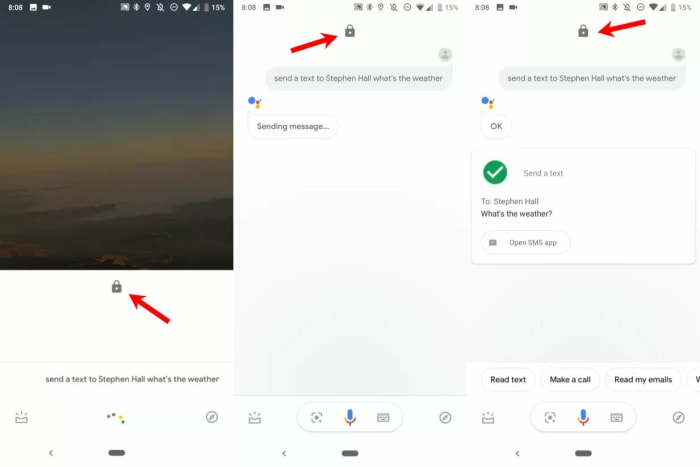
Google’s A/B test is looking at actually sending messages using only voice commands rather than showing an “Unlock to continue…” prompt

Screenshots of the new Assistant send a text from lockscreen command
Image via: 9 to 5 Google – The Padlock icon shows the phone is locked throughout the whole texting process

The new Google Assistant text from lock screen feature has been spotted by 9 to 5 Google on one of their Pixel 3 devices running Android 9 Pie. The feature works much like the current “send a text” skill. All you have to do is tell Google Assistant to send a text and specify the body of the message and the name of the recipient. The big difference now though, is that Google Assistant will actually send the message instead of prompting you to unlock your phone before doing so.

There aren’t many other reports of this and interestingly, the feature doesn’t seem to be running on devices running the Android Q beta. This indicates that Google is still A/B testing this new feature and will no doubt be collecting data on how it has been working on select devices and how users have been interacting with it.

There is no doubt that this would be a very useful addition to any phone’s set of features. Also, with Assistant being a part of the Google app, should it get through this testing phase all Android phones should get it and not just Pixel devices.

This could see people going back to their regular old SMS apps, especially considering how hard Google has worked on turning into a modern internet messaging machine to rival the likes of WhatsApp and Messenger.  The only thing to consider will be the security trade-off.

WhatsApp is testing a new voice note feature for iOS

WhatsApp notifications have been spotted in the beta, complete with a play button for incoming voice messages.

Over the last few years, WhatsApp has evolved quite a bit and added more than a few new features that make our everyday messaging experience smoother. Sure, it looks the same as it always has but little tweaks like adding stickers, voice-to-text messaging, and improved voice notes have turned WhatsApp into a messaging beast.

One such update that has really made a difference has been adding the ability to preview received messages in the notifications bar of your phone. Whenever you receive a text message on WhatsApp you can read a preview of it in your system notifications without having to open the app.

Again, it was a small change but in practice, it made a big difference. WhatsApp is now running tests on extending this feature to voice notes as well as text messages.

WhatsApp notifications have been spotted in the beta, complete with a play button for incoming voice messages

WhatsApp voice notes logo

WhatsApp voice notes have become one of WhatsApp’s most-loved features and recently we’ve seen them updated. The “Consecutive voice notes” update saw multiple voice notes playing automatically, one after the other, once the user has pressed play on the first message. Voice notes now look set to get another update, although this update will offer something different to consecutive play.

A recent tweet from WABetaInfo shows a screenshot of a WhatsApp notification that includes a play button and progress bar for a voice note. The notification is from the iOS version of WhatsApp, which means that soon we could be seeing WhatsApp voice notes we can play directly from the notification get when we receive them.

Unfortunately, beyond this leaked screenshot, information on this new feature is thin. Previews of text messages only run to a certain number of characters before being capped off with an ellipsis.
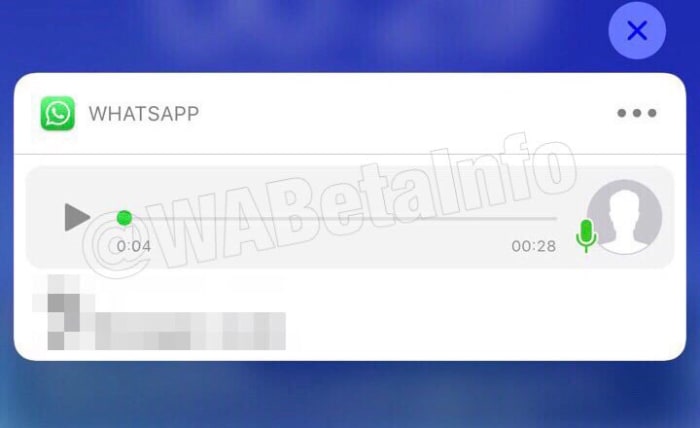
The screenshots don’t show whether something similar will happen to voice notes over a certain length. Will we only be able listen to snippets from the voice note, if it is over a certain length?

Also, there is no word on whether consecutive voice notes will work from system notifications, although an educated guess would say that this might be a bridge too far.

WhatsApp voice note in the system notfication
Image via: WABetaInfo

That’s all there is with this one for now. There is nothing on whether the feature will come to Android, too. And like with all leaks from the beta, there is no guarantee the feature will even land on iOS. This is just a very early leak on a feature that likely still has some development ahead of it before it’ll land on the regular app.

It is an interesting feature, however, which could make our lives easier should it land, and that’s why we thought you’d like to hear about it now. Stick with us for all the latest WhatsApp news and rumors.