Facebook banned: New national policy aims to limit negative effects of social’ media

The government in Papua New Guinea has decided to ban Facebook for a month. The move comes in a bid to study the effects of social media on the people of the small island nation. In addition to the study, fake users will also be targeted and eliminated from the social platform.

Papua New Guinea’s communication minister, Sam Basil, said:

“The time will allow information to be collected to identify users that hide behind fake accounts, users that upload pornographic images, users that post false and misleading information on Facebook to be filtered and removed.”

With recent scandals like the Cambridge Analytica Facebook data leak still fresh in people’s minds, Basil says that the country is acting with its citizens’ best interests at heart. There are also plans for a local social network being set up on the island, but Basil says the government will wait until the results of this study are known before action is taken.

This isn’t the first time a country has temporarily banned Facebook. Sri Lanka did the same at the beginning of the year to prevent the spread of racial hatred. Banning Facebook is no doubt a controversial option but with the social network getting in trouble in Myanmar recently for helping incite racial violence, it is clear Facebook isn’t doing enough to meet its global responsibilities.

What do you think? How would you feel if Facebook was banned in your country?

What is Windows Hello?

When Windows launched Windows 10, the company set out to make the greatest possible leap forward. After a few years of having the operating system with us, there’s no doubt that the Redmond boys have kept their word: it offers good updates, performance, progressive web apps, and another detail: Windows Hello. Today at Softonic we’ll tell you what Windows Hello is, why you should use it, and how to activate it.

What it is and what it’s for

Windows is very concerned about user security and good proof of this is that Windows 10 comes with an antivirus called Windows Defender, the first introduced in its history. However, Windows Hello looks to enhance this security from the moment the system starts up.

“Windows Hello is a more personal way to sign in to your Windows 10 devices with just a look or a touch. You’ll get enterprise-grade security without having to type in a password,” says Microsoft’s page. In other words, Windows Hello is a way to unlock your device instead of entering a classic password or pin. To do this, the system uses your face, eyes and fingerprint to establish a pattern.

At the moment, gadgets such as Surface Pro 4, Surface Book, cell phones with Windows 10, Microsoft Band and most PCs with fingerprint readers can now use Windows Hello (as long as they have Windows 10, that is). Also, gradually more devices are incorporating this feature.

How to activate it

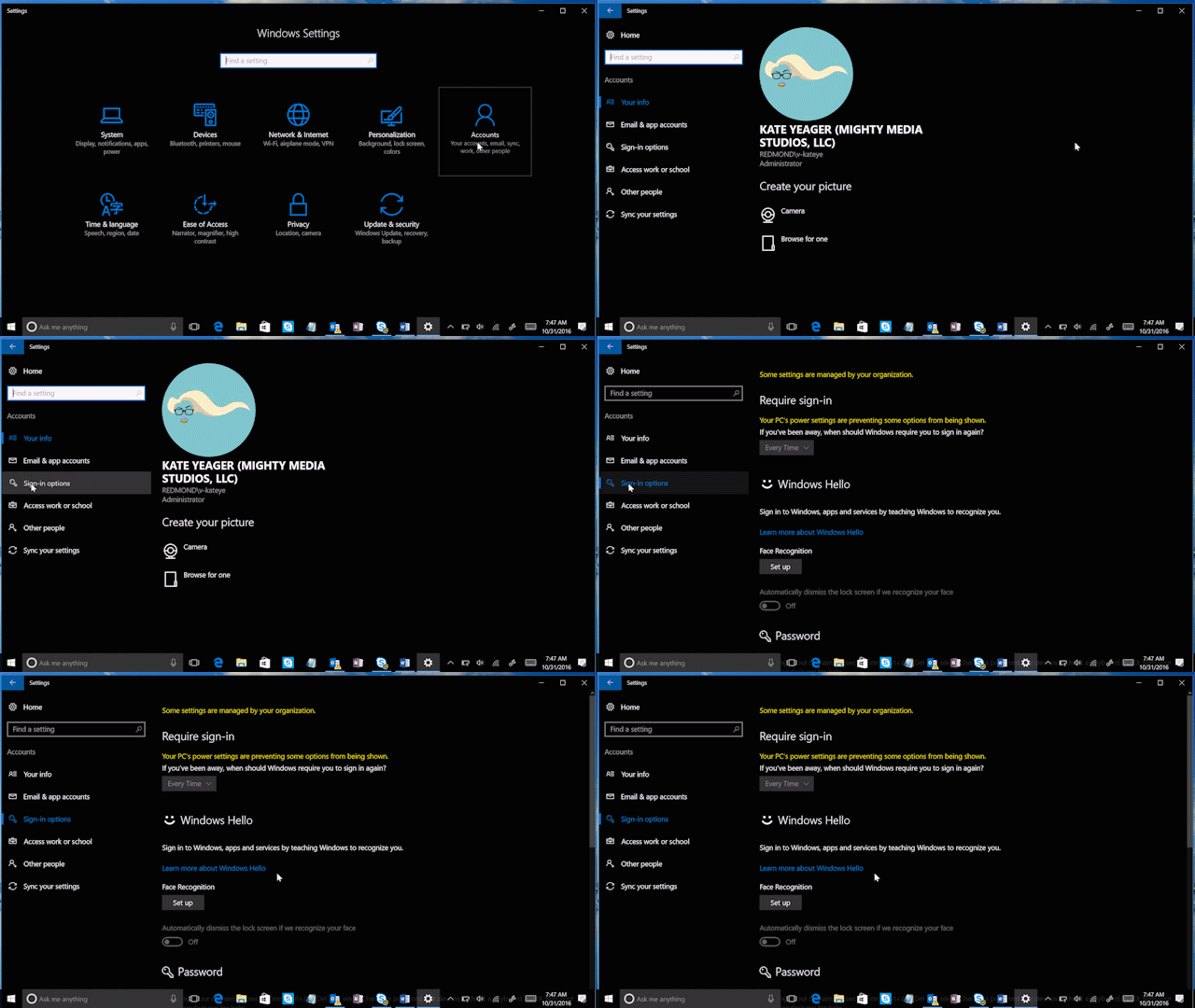
To activate Windows Hello, just click on the “Start” button (on the lower left) and go to the “Settings” icon  -> “Configuration.” When you see the corresponding screen, click on “Accounts.”

Of all the fields to choose from, go for the one that says “Sign-in options.” Click here and you’ll see that Windows Hello appears as a method to activate. Obviously, here you’ve got two possibilities: your device is compatible or it’s not. In our case, our device doesn’t have a fingerprint reader, but it does have a camera, so we can’t complete the process unless we get an external gadget for it (a little ridiculous, we think).

Check if your PC has the possibility of logging in with Windows Hello. If so, our advice is that you use it: you’ll have an extra layer of security.

6 old PC games that are still entertaining

At Softonic, we’re feeling a little nostalgic. Now that summer is here and the days are getting longer, we’ve got more leisure activities than ever, from going to the movies to playing video games. This got us thinking about old PC games that are still entertaining. Here’s a list of six titles you can’t miss.

Monkey Island

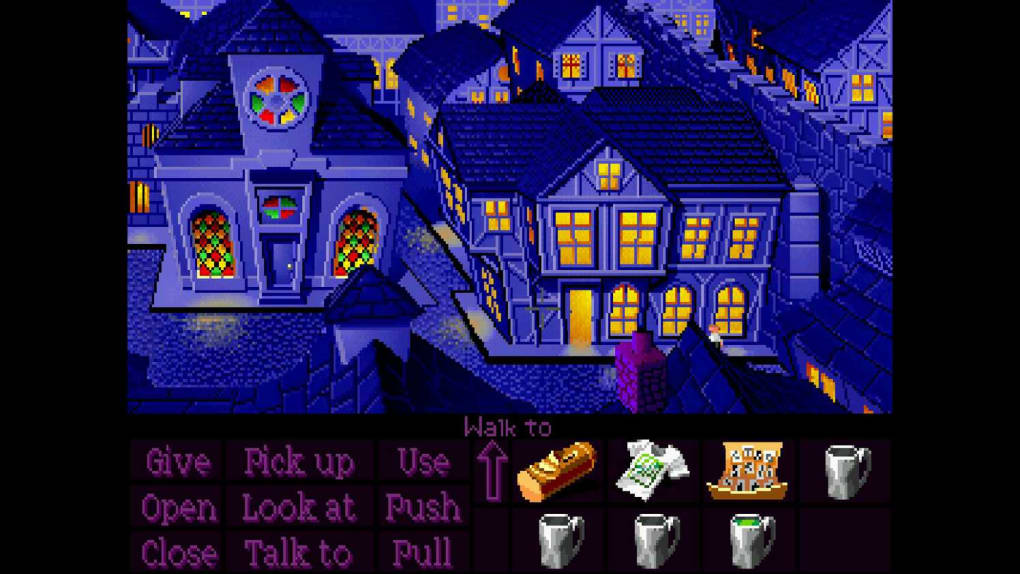
What’s there to say about the famous pirate Guybrush Threepwood that hasn’t already been said? Monkey Island completely redefined the genre of graphic adventure to such an extent that it launched LucasArts to stardom. Names like Ron Gilbert, Tim Schafer, and Dave Grossman came into the media spotlight and become famous in a hurry.

The game was released to the market in 1990, so we’re nearly celebrating its 30th anniversary of sales!

The Secret Of Monkey Island Download Now
10

Lemmings

This game has really straightforward mechanics that still make an impression on players. In Lemmings, we have to lead a group of small rodents to an end point. The key is to do it without losing them, by creating some routes and avoiding others. Launched in 1991, it had more releases later due to its success.

Lemming Download Free
7

Sim City 2000

The year 2000 is so far away, right? For many of us, the year 2000 was a far-off date that would bring flying cars and mind-blowing technology. Now that we’re in 2018, we know we might have been overly optimistic. However, the idea of Sim City 2000, launched in 1994, was to build a state-of-the-art city. Although its graphic interface shows its age, Sim City 2000 is still entertaining.

Simcity 2000 on the Internet Archive access
8

Age of Empires

In 1996, Ensemble Studios launched Age of Empires, a strategy game that didn’t have much impact during its development, but once it hit the shelves, completely took over the real-time strategy game genre. The title was a huge success and still has thousands and thousands of active fans (of the original game, no joke). Its success has been so enduring, a 2018 remake of the original was launched with a new aesthetic look.

Age of Empires: Definitive Edition Download Free
8

Wolfenstein 3D

The saga is more alive than ever thanks to new versions of Machine Games, and this is largely because of how well it maintains the essence of the original 3D Wolfenstein. Created by id Software in 1992, the adventure puts us in the shoes of Lieutenant Blazkowicz. The goal: to put an end to the Nazis and the experiments they’re carrying out in a mysterious castle.

Wolfenstein 3D Download Now
8

Half Life

It couldn’t be any other way: our list ends with Half Life. This year celebrates the 20th anniversary of the first release, a milestone in first-person video games. Today, the development of a third part is still being requested. What if they surprise us at E3 this year? One can always dream…

Half-Life 2 download demo
8

The 7 best VPN of 2018

VPNs have become a must-have for browsing the internet: they make you more secure while visiting websites and they get rid of all kinds of restrictions.

Today at Softonic we’re bringing you our top 7 VPNs, a list where you can get to know the best VPNs on the market. All of them have versions for different devices (Windows, Mac, iOS and Android) and in the description of each one, we’ve discussed some of their features.

HMA! Pro VPN

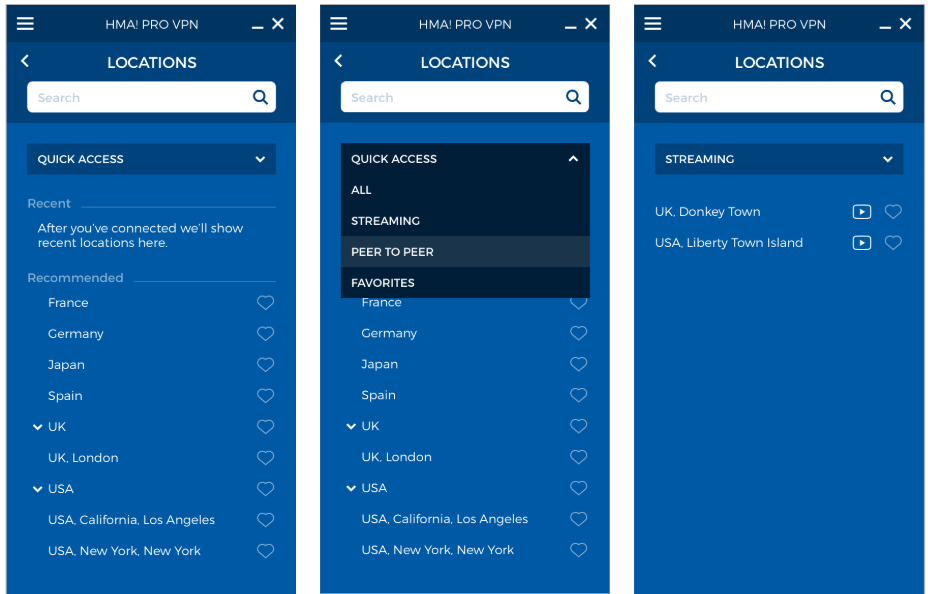
Hide My Ass! Pro VPN is a fantastic VPN app that has earned a good reputation thanks to the myriad of options available: speed, broadband and unlimited server changes; the most secure protocols, compatibility with any service (including Netflix) and up to 5 connections per license.

Also, it boasts of being the VPN service with the highest number of server locations: you can connect to 190 countries.

All this, plus quick and efficient customer service via chat or email and a 30-day guarantee, makes it a highly recommended option if you’re looking for an excellent Premium VPN.

If you buy a monthly plan, Hide My Ass! Pro VPN  will cost you $6.99 a month, which is less than $84 for a full year of protection and security.

HMA! PRO VPN Download
9

VyprVPN

Another highly recommended option is VyprVPN, a service backed by the Swiss company Golden Frog, seasoned experts in the tech world who advocate for an open internet.

Golden Frog is a transparent company that doesn’t work with third parties. All their services are their own, so your privacy and security are completely guaranteed. In addition, since there aren’t any intermediaries, the speed of VyprVPN is very high.

VyprVPN boasts of 73 servers in 64 countries, with a NAT firewall that gives you an extra security layer. Also, it has a Kill Switch, which automatically blocks your connection when it detects that the VPN is disconnected.

Although the price advertised at $6.67 Per/Month when purchasing annual, you are currently running our Annual Special providing new subscribers with a 25% off discount of their first year, bringing VyprVPN down to the low cost of $5 Per/Month!

VyprVPN Download
8

Zenmate VPN

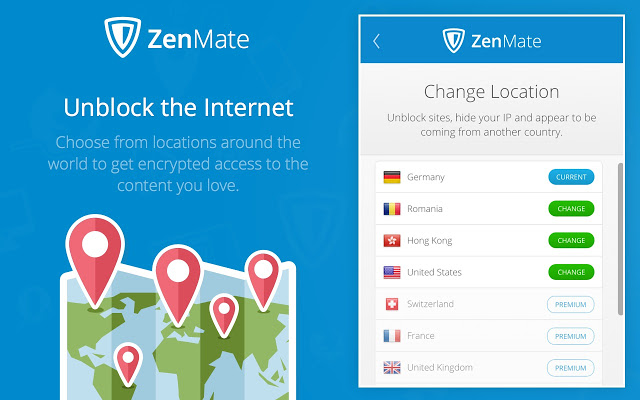
Zenmate is another great option for secure browsing. This VPN doesn’t store any of your data and uses the latest encryption systems.

Just like VyprVPN, it has a Kill Switch (which cuts internet when the VPN is disabled), as well as an option to reconnect to the VPN worry-free when you restart your device.

In addition, it has an adblocker feature, protection against malware and tracking bots, and extensions for the main browsers.

If you get the monthly subscription to Zenmate, it will only cost you $2.80 a month.

Besides the VPN make sure that users can watch Netflix from any geos and they also offer a 30 days money back guarantee

ZenMate VPN Download
8

Hotspot Shield

We’ll continue our list with a veteran VPN: Hotspot Shield. This service, in our lives for a decade, now has 500 million users.

With this app, you’ll access the internet completely securely (besides the VPN, it has an anti-malware shield) for $2.99 a month if you sign up for their biannual plan.

Hotspot Shield Download
8

 Panda VPN

Another security firm that offers its own VPN is Panda. This VPN can work across 5 simultaneous devices.

Panda VPN, on its Premium version, can be yours for $7,44 a month.

Panda VPN Download
8

Avira Phantom VPN

Avira Phantom VPN is from the firm Avira, which also usually appears in the top annual antiviruses. With 36 virtual locations in 25 countries, it’s the perfect VPN for your browsing needs.

The Pro version of Avira Phantom has a price of only $3,70 a month if you go for a multi-device annual plan.

Avira Phantom VPN Pro Download
8

Avast Secureline VPN

The prestigious firm Avast, famous for its antivirus, also has a useful VPN service. Secureline offers you real privacy thanks to its 256-bit protection.

Avast Secureline VPN has 54 locations in 33 countries, so it provides you nearly unlimited access to any internet service.

The best offering of Avast Secureline VPN includes protection for 5 devices at $5.33 a month.

Avast SecureLine VPN Download
8


Edit your way to the Oscars with VSDC Video Editor Pro

Imagine if every great director – from Coppola to Tarantino – released the full, unedited versions of their films. Would they still have won awards? I doubt it. Every masterpiece in the world has been changed in some way during its journey to stardom. Novelists draft, artists sketch, and filmmakers edit.

But despite the importance of editing, many budding filmmakers don’t give it the attention it deserves. Some believe it expensive, time-consuming, and difficult, and in some ways, they’re right: many editing tools are expensive and hostile to beginners, forcing you to climb a steep learning curve that can take months or even years to master.

Thankfully, there’s a simpler way. We’ve been testing a bunch of editing software to find the right balance between simplicity, features, and professional output. We believe we’ve found just the right editing suite in VSDC Video Editor Pro.

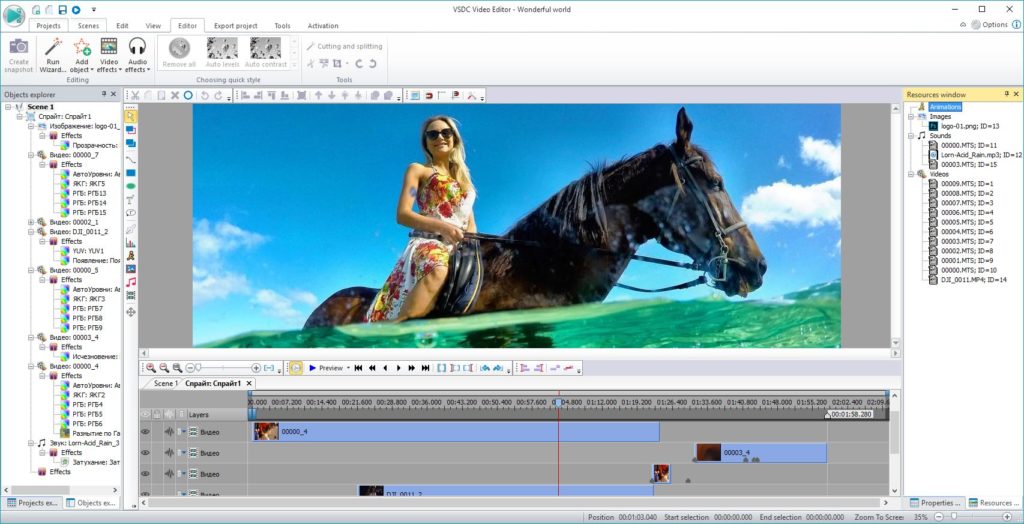
What makes VSDC Video Editor Pro so special? Well, let’s start with the basics. The usual trimming, splicing, and cropping features are all there, so you can stitch multiple movie clips together, break them apart, or zoom in on interesting detail. You can also adjust colour, exposure, and contrast, as well as add sounds, effects, and transitions to really make your movie stand out.

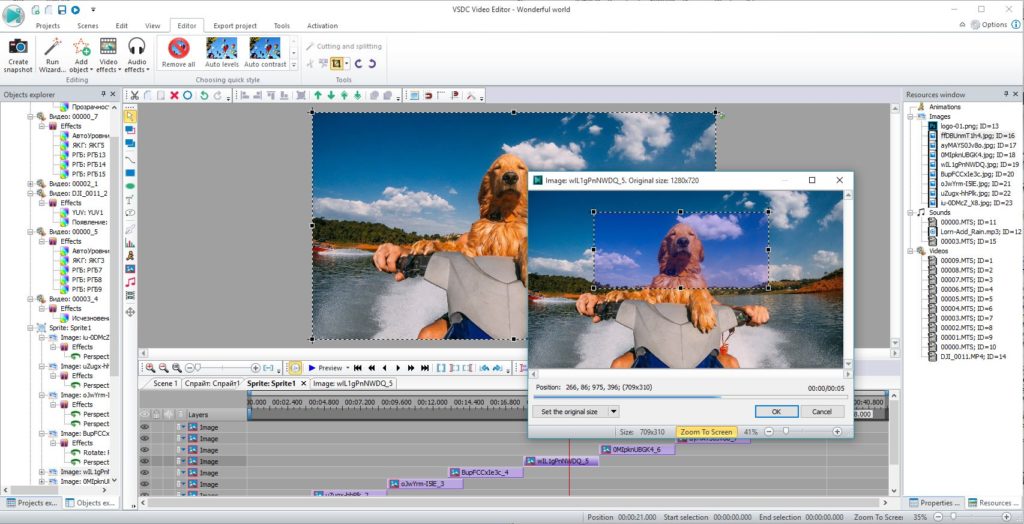
But it’s the professional tools that really shine. Take the sub-pixel editor, for example. Sometimes you need to adjust ultra-fine detail to get the look you want, and this allows you to do it with cinematic precision.

There are also ten video mask types to choose from. Video masking isolates individual objects in your video – a face or car, for example – so you can cut, highlight, or blur them for added realism, or combine them with other media to create something new. While these controls might take longer to master, they can transform your amateur videos into YouTube gold. 

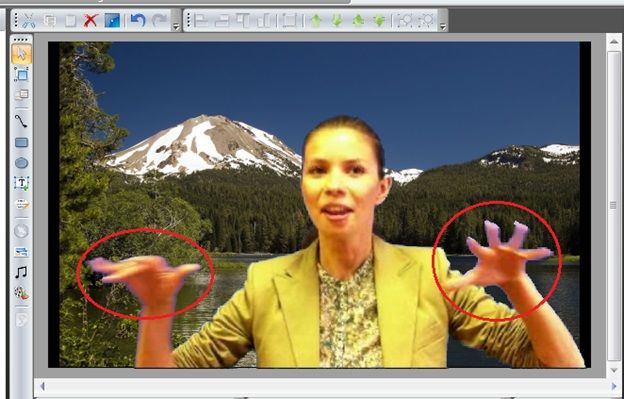
You’ve probably heard of “green screening” where you film in front of a uniform background so you can remove and replace it with something more interesting later. Video Editor Pro’s multiple chroma key support lets you do this in different colours, not just green, so you can match and remove the background without harming the foreground of your shot.

Of course, if you’re pressed for time or don’t want the hassle of manual control, you can select from Video Editor’s extensive selection of preset functions and styles. With 4K support in almost every video file format, you won’t need to do any irritating file conversion before you start, leaving you more time to create the perfect movie.

We think Video Editor Pro is one of the best editing suites on the market. Whether you want to direct the next Revenant, or just add a little quirky style to your YouTube channel, the software is a steal at just $24.19.

Heroes, grannies, and robots: get creative with Voice Changer Diamond 9.5

Faking voices is heaps of fun. Whether impersonating your boss, friend, or favourite TV character, the first thing you mimic is how they speak. Celebrity impressionists, for example, make us laugh over their exaggerated turns of phrase, while voice actors give life to shows like The Simpsons and Family Guy.

Changing the pitch and timbre of our voice is no easy task, however. Just ask the many actors whose foreign accents are often hilariously inconsistent. And while we might get a laugh or two from our impressions of Uncle John’s drunken ramblings, we don’t always nail Aunt Bea’s scathing retorts. So when we want to change our voice, we sometimes need a little help.

Voice changing software has been around for a while. Radio DJs use them all the time, and there are lots on the market. But none of the voice changers we’ve tested comes close to AVSOFT’s Voice Changer Diamond 9.5 for features, quality, or – most importantly – realism. 


Voice Changer Diamond 9.5 is the most natural sounding voice changer we’ve ever heard. Using sophisticated, market-leading algorithms, it modifies and optimises your voice while still sounding real. We found other voice too obvious, but after a few in-office prank calls, we were mightily impressed by how easily it was to fool our colleagues with Voice Changer Diamond.

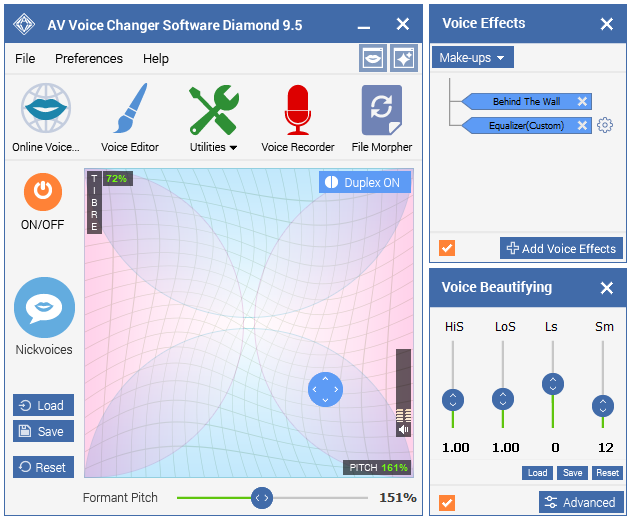
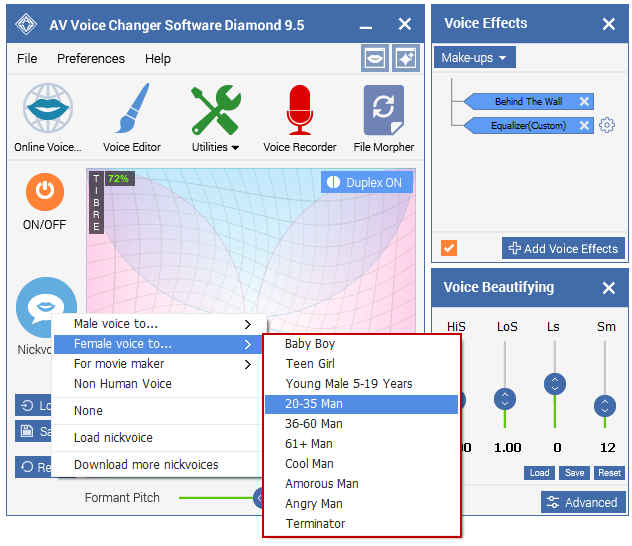
Even the preset “Nickvoices” sound great – turning you from robot to grandma in just a few clicks. But for ultimate realism, you’re better modifying your voice manually. You have full control of timbre and pitch with Voice Changer’s graphical controller, and you can add extra realism from a growing library of effects – anything from “breathy” to “trembling”. You can also save voices as named presets, giving you an army of alter egos with which to amuse your fans.

You can modify your voice on the fly, too, as Voice Changer Diamond integrates with chat services, VoIP applications (like Skype), and web-based applications like role-playing games. Now you can give  proper voice to your Level 37 Bloodhoof Tauren, frightening your World of Warcraft foes with your thunderous war cries.

For editing existing recordings, Voice Changer Diamond offers a host of tools to make your audio sound great, including a simultaneous voice morph and file converter for large jobs. You can also analyse your voice and compare it with others, learning your harmony, pitch, brightness, and score, and use the information to make you a better impersonator. It’s a vocal coach, audio editor, and voice changer in one!

We’re massive fans of Voice Changer Diamond, and to share the love we’ve managed to secure a 60% discount off the asking price. Just visit AVSOFT to buy for $48.38 (normally $99.95). We hope you enjoy creating your own characters, or even just adding a professional note to your own voice – let us know how it goes in the comments below.

What happened at the big Spotify event?

Rumors started surfacing earlier this month about a Spotify smart speaker and a Spotify gadget for your car. Today in New York, Spotify held an event and everybody thought that’s when we’d learn more about these new Spotify peripherals. Turns out, we were wrong. Instead, Spotify released some pretty interesting news about a brand new app that it’ll be offering its free users. Let’s have a look at this in more detail.

Spotify Download Now
8

Having already taken a swipe at traditional record stores, Spotify wants this new app to take on broadcast radio. The app will use machine learning and AI to automatically generate playlists for free users. Users will also have unlimited access to 750 tracks from 15 top playlists and will have unlimited skips so they’ll be able to pick songs directly. This number of tracks is obviously a hell of a lot less than what premium subscribers have access to but resembles something similar to the song lists radio DJs have to pick from when they’re broadcasting.

Spotify is calling the new automatic playlists “self-driving playlists,” which may explain why the Spotify car dongle rumor got started.

The new free Spotify app will start rolling out in the coming weeks so keep your eyes peeled for word on an exact date.

Apart from the new free app, Spotify’s big event brought no more big news. No changes were announced for the premium service and there was nothing mentioned about any hardware. Still, a more dynamic free Spotify experience will please a lot of people. And with Spotify having over 90 million free users, you can expect radio stations around the world will be thinking long and hard about what they’re going to do about this new threat.

Spotify Download Now
8

7 tips to avoid dying right away in Fortnite Battle Royale

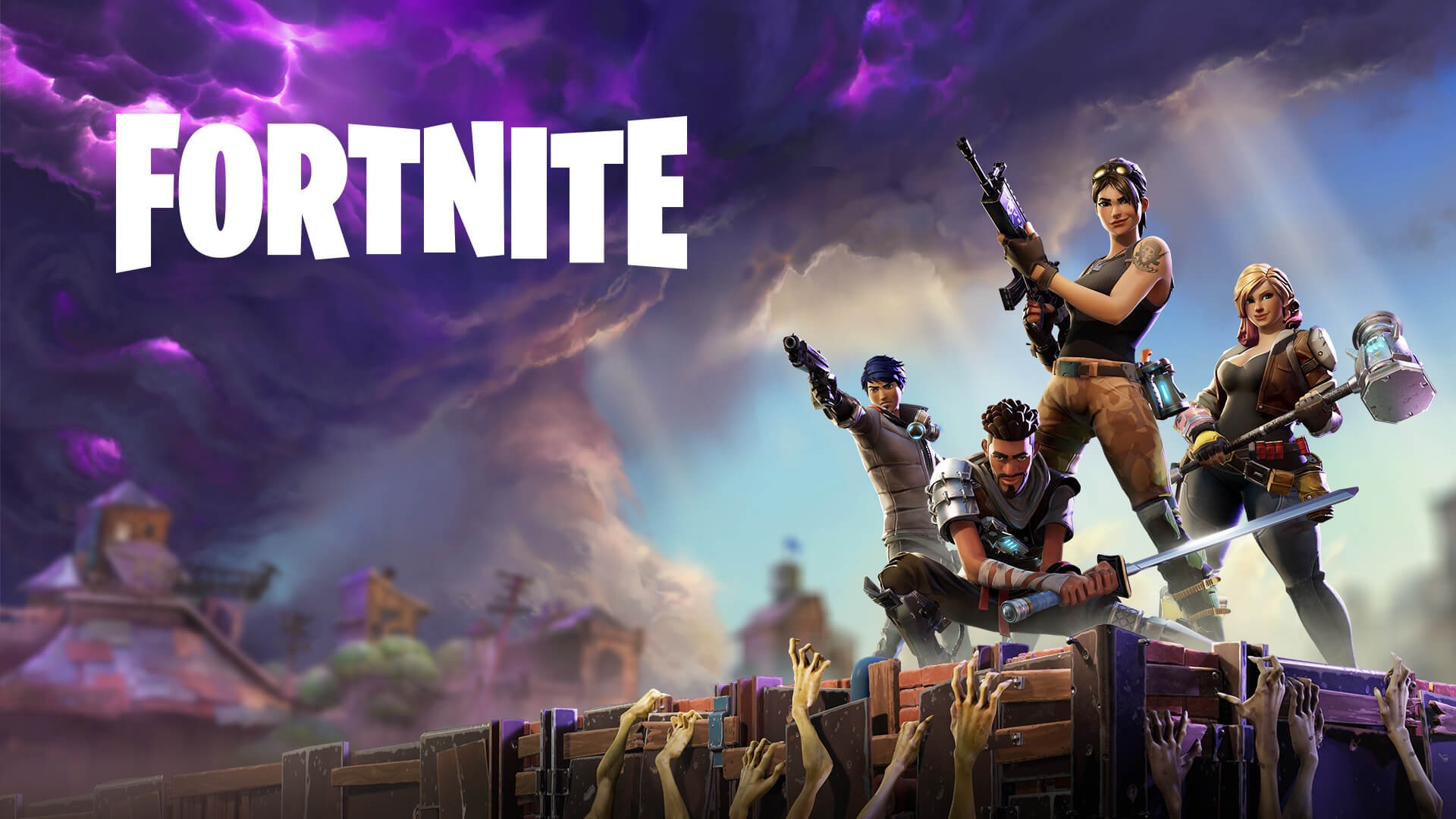
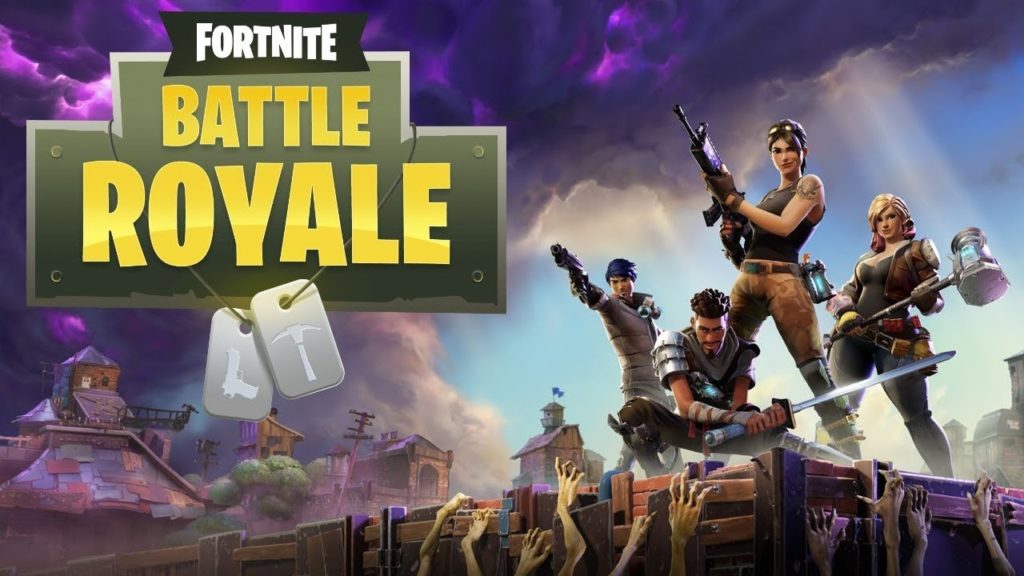
Fortnite: Battle Royale has become the phenomenon of 2018. During 2017, its big rival (PUBG) won the popularity contest. This year, Fortnite is beating all the records. A few weeks ago, Elrubius and other YouTubers got an audience of more than 10 million viewers (among all the channels) while playing the game.

Fortnite: Battle Royale Play Now
10

If you want to join in, here you’ll find seven tips to avoid dying right away on Fortnite.

Choose your landing spot well

This is a basic tip that any expert player will tell you: choose your landing spot well. It’s key that you do this before launching yourself from the Battle Bus, since there could be areas that you can sweep through better than others. Also, and this is key, you shouldn’t forget that there are 99 other players trying to kill you, so watch where they land so you’re not right next to them.

Grab a gun

The second “tip” is also basic: grab a gun. Many users go directly to collect supplies, but our advice is that you start going into buildings to find a gun, rifle, machine gun, etc. It doesn’t matter what kind you get, the important thing is that you have one at the start so you can blow up your enemies.

Build

You made a good landing, scooped up a gun to defend yourself, and now it’s time to construct buildings. Yes, to do this, you need to collect supplies first. Choose the pickaxe and start destroying everything you can. The more materials you have in your inventory, the better. You don’t want to start building a wall and running out of materials midway through.

Learn to build well

Here’s where we get into the advanced stuff. It’s one thing to know how to build a wall (the previous “tip”). It’s another thing to know when to do it.  The best players of Fortnite have shown that they can build elements with frightening speed and in extreme situations. Thanks to these walls, ramps, etc. they are better protected (and covered) against enemies. If you know how to use these materials well, we can assure you’ll be in the top 20 of almost all games.
Watch your surroundings

You could camp out and wait for the enemy. Or you could run for your life. Somewhere in the middle is best, so keep watching your surroundings, but never stop what you’re doing. For example, a good tip is to take advantage of the existing buildings, since they offer materials for building and additional protection. 

Silence

If it’s important to watch your surroundings, remember that all players are doing this. Open fire only when you’re in an extreme situation or when you think the setting is in your favor. It’s usually a common error to see an enemy, shoot without thinking, and later say, “He was very far away, I should have stayed quiet.” Likewise, weapons aren’t the only thing that make noise: building elements does, too. Oh and don’t forget that a player can see you building from a distance.

Don’t forget the storm

Our final tip is the most ridiculous, but perhaps the most important: watch the storm. If you’re within the exclusion area, after a while you know you could die in a matter of seconds. Though it’s hard to believe, it’s unusual to have a game where players don’t die under the cloud.


Hold the phone! You can now use WhatsApp with a landline

The launch of WhatsApp Business has given the messaging service a completely new dimension. WA Business gives companies and customers an official and secure way to communicate with each other and in the coming months and years; we’ll see all sorts of entrepreneurs using this new facility to sell us their wares. WA Business also brings with it an interesting new function; it allows you to hook up your WhatsApp account using a landline number instead of your mobile number.

Although WhatsApp Business is designed for use by businesses, anybody can download the app. You will still need a mobile phone to run the app but you’ll be able to register your landline number instead of the number associated with your SIM card.

WhatsApp Business Download WhatsApp Business Now
7

Once you’ve downloaded WhatsApp Business all you have to do is tell the app that you won’t be registering your mobile number but rather your landline. Normally WhatsApp sends an SMS to verify your number but for landlines, you’ll have to select the Call Me option.

After you receive the call and verify your number, you’ll be able to use WhatsApp Business with your landline number the same you use WhatsApp with your mobile number.

Follow me on Twitter: @PatrickDevaney_

WhatsApp Messenger Download WhatsApp
8

All the Best Free Software for your PC

You spend hundreds of dollars on your brand new PC, and then what happens? You have to go and spend even more money on all the software you need, to do the jobs you bought the PC for in the first place. Never mind what you bought the PC for you have to buy programs just to protect your new PC from viruses and malware.

Well, do not worry because there is a lot of free software you can get your hands on to help you out. You can get free software for Windows 10 you can get free software like Microsoft Word, you can get free software for editing photos, you can get antivirus free software and even free software for video editing. You don’t need to spend a lot of money on expensive programs for your new PC. There are plenty of free programs for PC so let us have a look at some of the best now:

Best free programs for PC

1. Best antivirus free software: Avira Antivirus

Avira header

Avira Free Antivirus offers a broad range of security features that add up to offer the best free antivirus software you’re likely to find. As well as strong antivirus scan and protection facilities Avira offers some great features like safe shopping searches, system speed up and a VPN. This is the best free software download for PC you’ll find and one of the most important. To learn more about Avira Click Here, otherwise…

Avira Free Antivirus Download Avira
8

2. Best backup free software: Google Drive

Google Drive wants to be the Ultimate Backup and Sync Tool

These days you need to do more than just install a free antivirus program to keep yourself safe. Ransomware is a modern threat that sees your data being stolen and then held for ransom. This means if you’re going to download free software you need some to get some backup free software for your computer. Free software downloads like Google Drive are essential. Drive will give you 15GB of free space to keep all of your personal data safely backed up. You need it now!

Google Drive Download Google Drive
7

3. Free software like Microsoft Office: Libre Office

LIbreOffice header

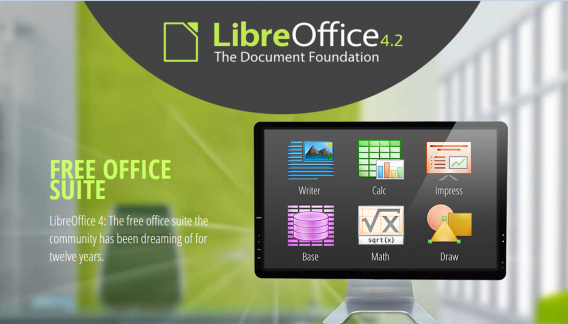
Almost everybody needs to use programs like those found in the Microsoft Office suite so a top priority must go to getting the free software download for PC of Libre Office. Libre Office is an open source productivity suite that rivals Microsoft Office and even has programs, like Math and Draw, that can’t be found in the expensive Microsoft offering. If you work in an office this is an essential free program to download.

LibreOffice Download LibreOffice
7

4. Media Player: VLC Media Player

vlcHEADER

One of the best free programs for PC is VLC Media Player. It is one of the most popular programs in the world and carries the codecs required to play almost every kind of video file. Once you’ve downloaded VLC you will be able to play almost any type of video you can find. As well as offering a complete video playback solution VLC has plenty of other features and you can check out 5 of the best here.

VLC Media Player Download VLC
8

5. Free software for photo editing: GIMP

Do you want the photos you share to be breathtaking - GIMP

If you want free software like Photoshop you should look no further than GIMP. GIMP stands for GNU Image Manipulation Program and it is almost as powerful as Adobe Photoshop. With this free software editing becomes possible for all. Whether you’re merely touching up an old image or creating a brand new one, GIMP offers you a complete set of tools to take care of whatever editing job you have in front of you. GIMP may be the best photo editing free software but we’ve also put a list together of 5 free photo editing programs. Check it out here.

7

6. Free software for video editing: Lightworks

5 Free Programs for Editing Videos lightworks

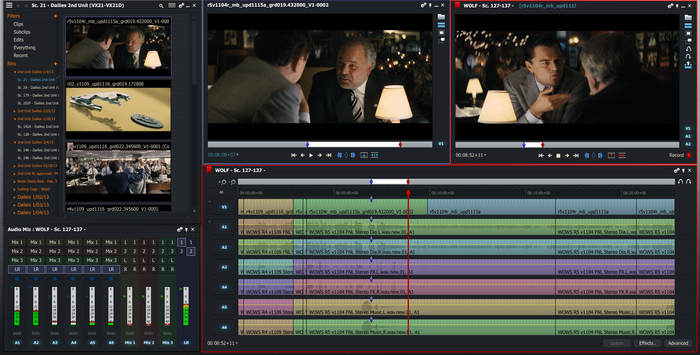
Lightworks is available on many free software download websites but you can get it right here. It is one of the best editing free software programs you can get and is used by professionals as well as amateurs. If you’re a budding video editor or director this is great free video editing program for you to download. For info on other free video editing programs click here.

Lightworks Download Lightworks
7

Follow me on Twitter: @PatrickDevaney_