How to Get Started Selling Membership Subscriptions to a Premium Community Website

Kajabi makes earning money online easy with its intuitive model!

Community

Community is a vital part of any membership site. It’s what brings in the revenue and enables you to create a reputation as an authority in your niche.

Most people would be happy with selling a one-off product to customers, closing the deal, and starting over by marketing to new customers. However, if you already have a community website with members and would like to generate recurring revenue, you might consider setting up a subscription-based membership site.

In this story, we’ll walk you through a step-by-step guide to show you exactly how you can sell monthly membership subscriptions to a premium community website using Kajabi.

Let’s get started!

Why you should sell membership subscriptions (and how to do it right)

As the leader of an online community, you might consider selling membership subscriptions to your premium community website. By doing so, you’ll be able to offer products and services for the entire community and keep them engaged long-term.

In other words, by selling membership subscriptions, you’ll make the most of your marketing efforts and turn your existing online community into a source of long-term steady income.

Here are some of the key benefits of using the membership subscription billing model instead of a per-product model:

  • Generate recurring revenue: By offering membership subscriptions to your online community members, you’re able to create recurring revenue streams for your business. Members can pay you a small monthly fees to access exclusive content, forums, and more.
  • Maximize profit per member: By charging monthly subscription fees, you’re able to make more money off each customer in the long-term as compared to only charging a one-time lump sum.
  • Steady cash flow: With a membership subscription model, you don’t have to worry about your sources of income drying out in case you can’t make a successful sale. Instead, you can set up your online payment system to bill your clients at the start of every month.
  • Sustainable business model: The membership-based pricing model is more reliable than the per-product model. With this model, you can easily upsell a variety of products and services to existing customers. Plus, the more quality content you create, the more attractive your membership site will be to potential customers.

Before you take the plunge, you need to make sure your membership offering will come off as an attractive and rewarding option for community members.

Here are some ways you can make this possible:

1. Creating vibrant forums

Enabling your community members to actively participate in discussions and communicate with one another will help you improve your membership site’s user engagement. With a forum, members will be able to leave comments on posts, give feedback, and start discussions with others.

Platforms like Kajabi come with built-in features that community members can benefit from having. It lets you create an unlimited number of groups and sub-forums within your membership site where members can connect with one another. In addition to this, you’re also able to send email notifications and set up private messaging.

2. Access to live video

Kajabi makes it easy for users to host live video broadcasts and webinars. This is a great way to connect with your site’s members and generate user engagement. You can use this as a platform to discuss certain topics, answer questions, or simply offer training.

3. One-on-ones with the community leader

As a membership site owner, you can use Kajabi to offer all kinds of premium resources to paying members. For example, you could offer private live coaching calls. Often, the community leader’s personal brand is the major draw to a community, so enticing potential members with regular one-on-one time can be a powerful sales tool.

How to sell membership subscriptions using Kajabi

Kajabi enables community leaders to set up and manage membership websites. In addition, it also makes it easy to get started with creating offers and selling membership subscriptions.
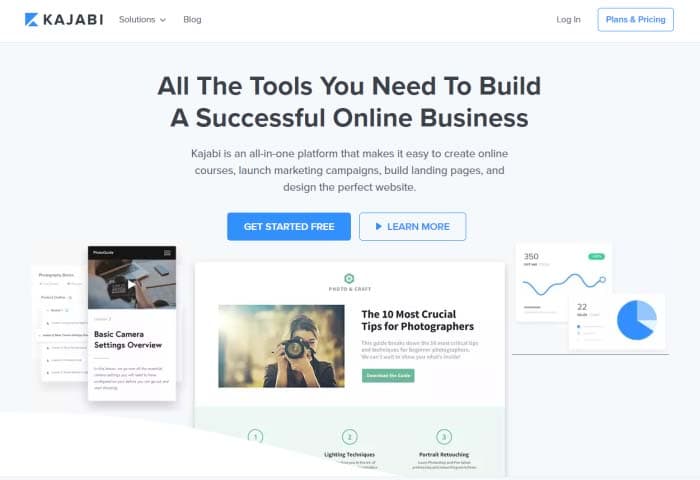
Kajabi tools

Here, we’ll show you how you can set everything up and get started with a step in the right direction.

Step 1: Create Your membership website

The first thing you need to do is to create a membership site. All you have to do is choose a theme, customize it to fit your requirements, and upload your membership content.

From the Kajabi dashboard, navigate to “Design” under the “Website” section. From there, click “Manage Themes.”
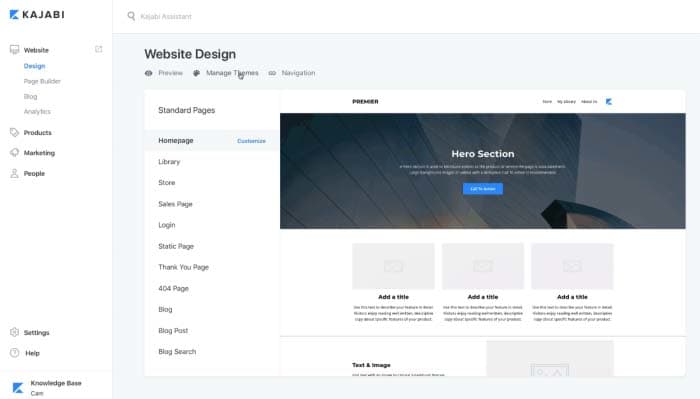
Web Design

Find a theme you like and click the “Install Theme” button to proceed.
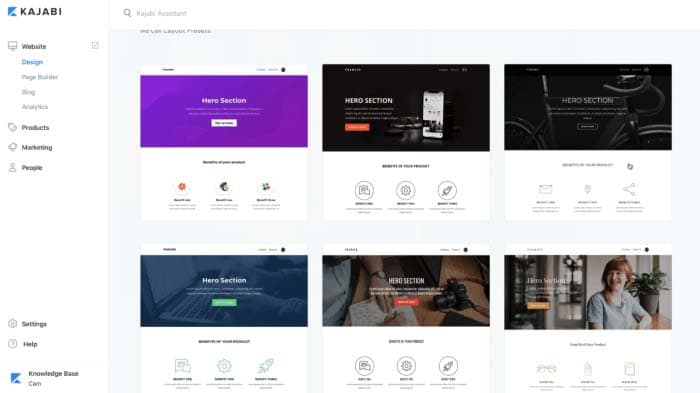
Theme

After you’ve selected a theme for your membership site, you can start adding sections to it using the platform’s intuitive drag-and-drop feature. You can create a simple homepage with a hero section, call to action buttons, and your offers to get started.

Next, go to the “Products” section to add the content and resources you wish to offer community members. You can either start from scratch or choose a “Product Blueprint to get started. These templates can easily be customized to fit your specific needs.
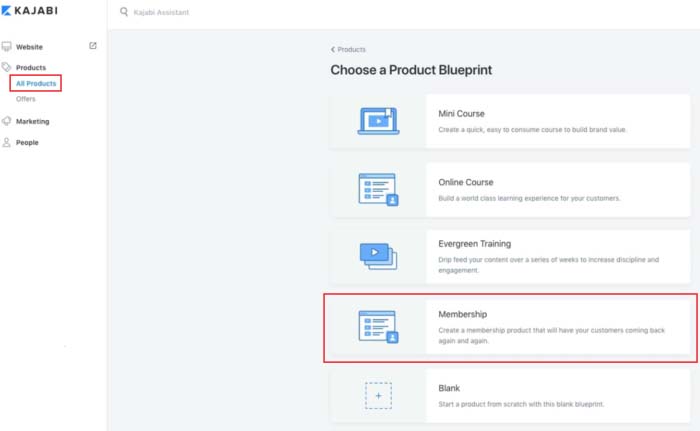
Product Blueprint

Here are some of the main content types you can offer through your membership site:

  • Video content such as training materials, tutorials, and lectures
  • Text copy, audio, and image content for your membership site content
  • Downloadable files and resources such as worksheets, checklists, and guides

Once all of that’s done, simply set the visibility of your membership site to published, and click the “Save” button to proceed. By now, you’ve created a membership site and added some products to it.

Step 2: Set up membership levels as offers

Once you’ve added your main products to your membership, you can create offers. This is how you’ll be monetizing your subscriptions. With Kajabi, an offer typically consists of a single product (or multiple products) that members can subscribe to receive – more on this later.

Head over to the “Offers” section from the Kajabi dashboard and create your membership levels. After saving your initial offer, you can easily set its price and modify your pricing table. You can set the offer price by clicking on the “Edit Price” button from the same screen.

Membership site owners typically sell offers on a recurring subscription basis. This way, customers get access to fresh content every month in exchange for a small fee. In other words, instead of selling a product (like an online course) for, say, $150, you can create an offer for $10 per month. This offer can even drip-feed the online course content to members over a period of time.

Kajabi gives you access to two of the most commonly used payment gateways – PayPal and Stripe. On top of this, you’ll also be able to offer numerous other checkout options to your members. For instance, you can choose to bundle up different products to maximize the order value, or create more offers as membership levels.

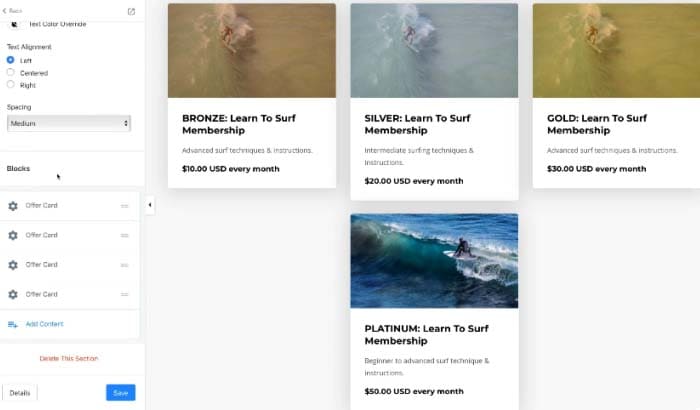
You can name your membership offers based on how much value members will receive from purchasing them. For example, you could call the low-tier option the “Bronze” offer, whereas the mid-tier option and high-tier offer could be “Silver” offer andGold” offer respectively.

Different Levels

You can post the membership levels to your site’s offers section, store page, on the homepage, or publish it on a separate landing page.

Step 3: Add different products to each membership level

Now that you’re done setting up membership levels as offers, you can start adding products to each level.

To do this, you need to create content such as videos, audio, and text copy and add it to the corresponding membership level as a “Product.”

Click on the membership level you’d like to add a product to and select the product(s) you’d like to include in your offer from the drop-down list under the “Included Products” section.
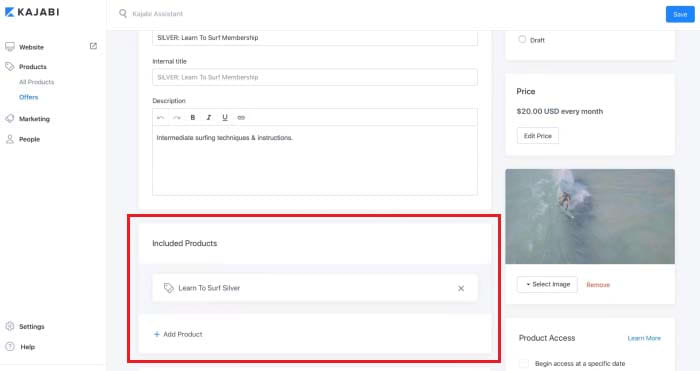
Included Products

Here’s an example of what your final membership model might look like:

  • Bronze Membership Offer ($10 per month): Training material and downloadable resources
  • Silver Membership Offer ($30 per month): Everything included in the Bronze Membership Offer, invite to live webinar, and access to private forums
  • Gold Membership Offer ($40 per month): Everything included in the Silver Membership Offer, and one 30-minute one-on-one coaching session per month

Step 4: Automate email marketing

Now that you’re done creating your membership levels and offers, you can use Kajabi’s built-in marketing automation tools (called “Pipelines”) to market your membership subscriptions.

Head over to the “Email Campaigns” section to set up a pipeline and get started. You can either build your own pipeline template or pick one of Kajabi’s pre-made templates.
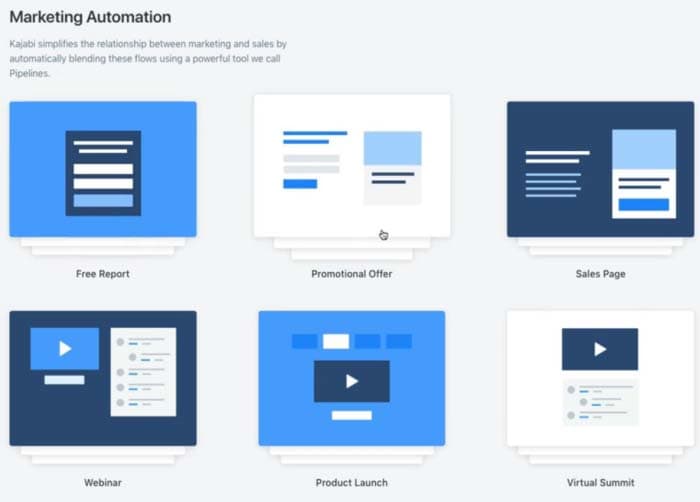
Marketing Automation

Here’s a look at some of the things you get with Pipelines:
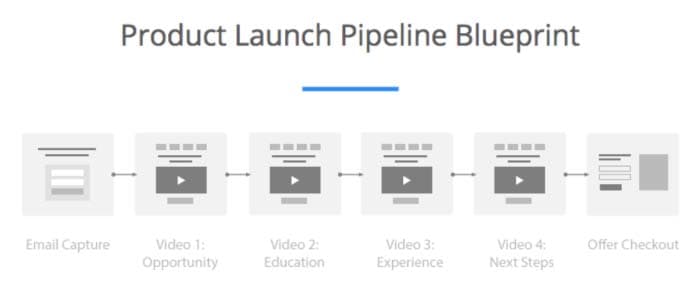
Product Launch

Capture user email addresses by starting a Product Launch Pipeline. This way you’ll be able to send targeted content material (like PDFs and videos), which will help you generate interest in future products and get your existing customers to sign up for pre-purchase offers.

The Free Report Pipeline lets you offer a downloadable report to prospective customers and gather email subscriptions. This allows you to promote other products by upselling them in “thank you” emails.

Start a Promotional Offer Pipeline to gather email subscriptions with a lead magnet and send them to a sales page. You can also send subscribers your site’s weekly newsletters.

Conclusion

By creating a membership site, you’ll be able to sell membership subscriptions to a premium community website and eliminate the need to find new customers.

Kajabi makes it easy for community leaders to set up a subscription-based membership site, manage community forums, and run automated marketing campaigns, all from one platform.

Disclosure:
Softonic is always looking for products we think our readers will value. When you buy through links on our site, we may earn an affiliate commission.


Google Maps feature helps find the best food on the menu

Need help picking out what to eat at a restaurant? Google can help!

Restaurant menu

For quite some time now, Google has been trying to turn Google Maps into more than it is. Yes, Maps is a great navigation tool and Google continues to add new features to help it do this job better. Google, however, is also trying to turn Maps into an interactive business directory. It’s now the place you go when you’re thinking of trying a new restaurant or need a particular company that will provide a particular service.

Google Maps Download Now ►
7

In this respect, we’ve recently seen Google adding hashtags to user reviews to help you find the types of company you’re looking for more easily. They’ve also added messaging to help you talk to the companies once you’ve found them. Google is now adding another restaurant-focused feature to Maps that will help you decide which restaurant you’ll end up eating.

Google Maps will now show a restaurant’s most popular dishes

Maps app

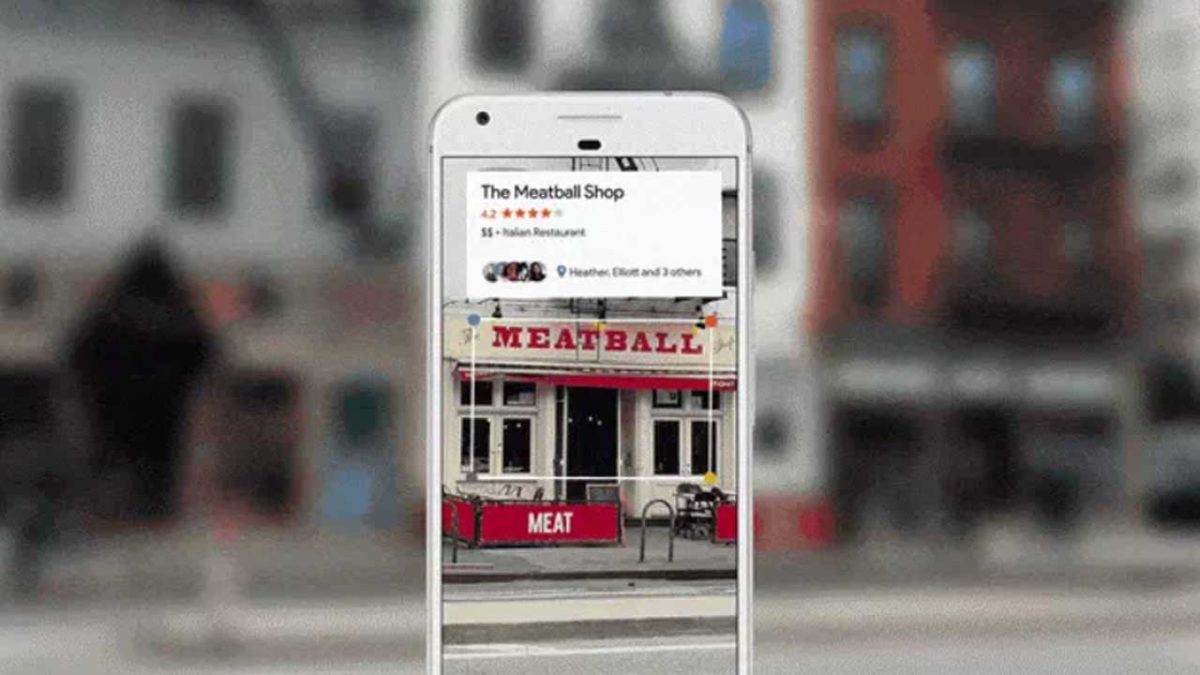
The new popular dishes feature coming to Google Maps is powered by Google’s machine learning algorithms. It is very similar to a new feature that has just landed on Google Lens, too. The algorithm will match user reviews and photographs on a per restaurant basis.

Google Lens Download Now ►
7

This means that whenever you tap a restaurant in Google Maps, you’ll be able to see which dishes are most popular with other Google users. You’ll even get to see what they look like if other users have posted photos. There’ll also be quick one-tap access to user reviews for the dishes you’re thinking about ordering.

Google Maps
Source: Google

How does it work?

As with a lot of Google features, however, this wouldn’t be possible without user participation. Google was keen to point this out in the blog post published to announce its new dish-cover feature.

“At the end of the day, this feature is made possible because of contributions from people around the world who want to help others using Google Maps. So, if you want to pay it forward to the next diner, simply take a photo of your meal (before you’ve scarfed it down!) and add a dish name so others can know what’s good on the menu,” according to the article.

If Google can persuade more users to upload their food photos to Maps rather than Instagram, it’d go a long way to establishing Maps as the go-to business directory Google wants it to be. This would leave apps like Yelp in the dust.

Google points out that the new popular dishes feature is rolling out to Google Maps users on Android right now and will be coming to iOS users in the coming months.

Create professional designs with Canva

Use Canva to create amazing free designs for social media and beyond!

Designers, unite!

And, actually, everyone else! Why? Because Canva makes beautiful design work possible for everyone, even the most unartistic people, while giving those with aesthetic abilities the chance to make seriously wonderful art.

If you’re making a social media post, designing a website, developing an invitation, promoting your podcast, or doing anything that requires a solid graphic representation, give this app a try!

Create professional designs with Canva

Canva App

Let’s begin with the ol’ application! You can download Canva.

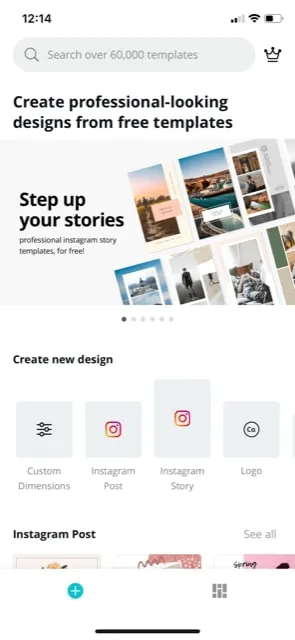
After you’ve finished downloading and opening the program, you’ll find yourself on the main page. From here, hop straight into the action! Canva recommends a number of template categories, ranging from social media posts to logos, flyers, and posters:

CApp1

For example, we’re going to assume you decided on an Instagram Story. Good choice, you!

When you select Instagram Stories, you now have a large bank of templates waiting at your beck and call, including a blank option for those who wish to test their creative abilities. If you’re simply looking to make a good post fast, check out the other designs:

CApp2

We chose the “Today’s Outfit” option. Look how exiting it looks already!

Try clicking around the picture; you’ll find that every facet can be altered, from the corner splotches to the pictures and the frames around them. All it takes are a few quick selections and you can make this your own:

CApp4

There we are! We changed the colors and photos to make the design a little more “Softonic.”

Okay, it’s very Softonic:

CApp6

That took about five minutes, and we enjoyed every one of them! There are admittedly benefits to using the full website, but we appreciate the mobile tools; there’s something satisfying about having a reliable design program in your pocket, on the go.

Canva Website

CSite

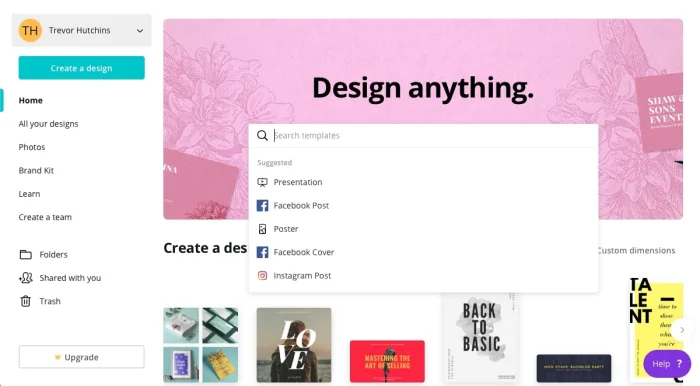
Welcome to the website!

Here, you may notice that Canva’s process has become… bigger.

That’s pretty much all there is to it: you can see designs better, type with a keyboard easily, operate the environment with a mouse, and basically have all the benefits of using a full laptop. Example: access to your entire photo library, something that may come in handy in a design app. Just sayin’.

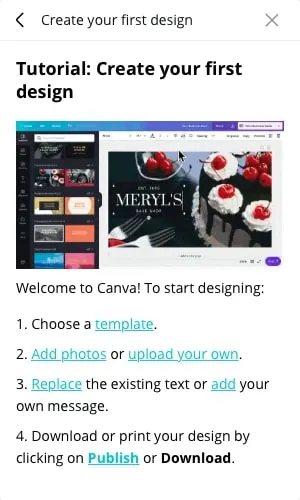
Also, when you begin creating your first design (we chose a Facebook post this time around) you receive a small tutorial drop down menu!

Description

Sounds good, but what does that process look like? Well…

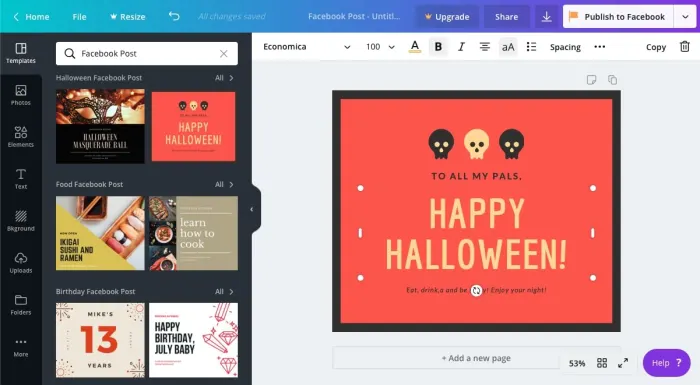
The full-fledged user interface appears something like this:

CSite2

There’s a lot going on here! You can save, resize, and share your design from the top bar. All types of material resources – uploading ports, text controls, and photos – are available on the far left.  Next to that, you can find the main bar of templates (woot woot). And finally, in the middle, you have the creation environment itself:

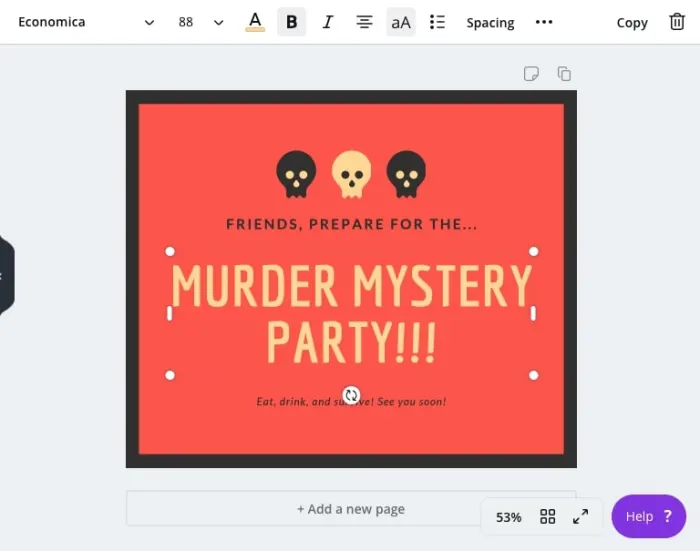
CSite3

Once again, just like the app, you’re able to choose any element of the design and resize it, or alter the contents. In the case of text, the bar at the top will immediately change into your average word processor options.

(We chose this design because, frankly, it looks like the Secret Hitler website! Secret Hitler is and will always be our favorite print-and-play hidden role game and you should definitely try it out.)

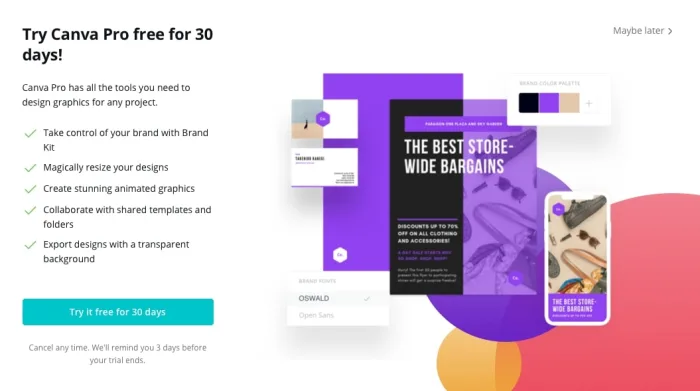
Upgrade

CanvaUpgrade

Canva Pro costs around $12 per month or $120 per year (approximately $10 a month). You get a brand kit, more resizing options, animated graphics, collaboration enhancements, and transparent backgrounds, as seen in the photo above.

Among those, we’re gonna be honest: transparent backgrounds sounds the best! Never know when you’ll need a transparent background, right?

Final Touches

Thanks for reading, we hope you find Canva useful! In the modern digital age, creating visuals that catch the eye can be a powerful tool for everything from generating influence to promoting your upcoming holiday shindig. Have fun making a great design, we’ll see you next time!

Follow these steps to protect your online privacy

Is your data really private? Follow these steps to find out.

online privacy

No matter what you do, internet companies are going to try to learn everything they can about you. Your age, location, income, and other demographic information are hugely valuable to them. That’s why it’s important to protect your online privacy. Follow these rules to stay safe and keep your data locked down.

Social media privacy

Facebook, Instagram, and Twitter can soak up a ton of information if you’re not careful. Our guide to Facebook privacy should help you keep your information safe. Remember, people have been fired for what they’ve posted on social networks, so you want to be careful about what you write and who can see it. Once it’s online, it’s hard to take it back.

Take a moment right now to go to your Facebook privacy settings and give them a thorough once-over.

It’s also important to turn off location services on each of your social media apps. Does Mark Zuckerberg really need to know where you buy groceries? 

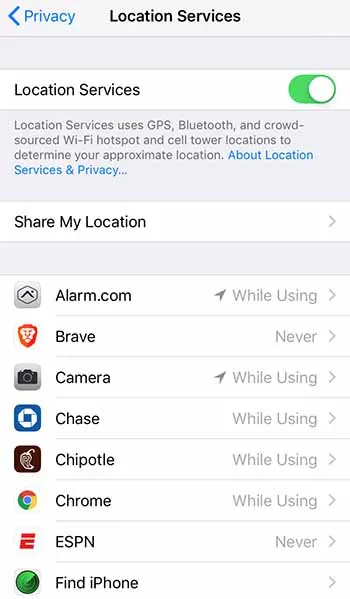
If you have an iPhone, just go to Settings > Privacy > Location Services and you can adjust which apps can track you down. For ultimate privacy, turn it all off. But you also probably want your map functions to be able to find you, so consider your options here.

iPhone location servicesFor Android, go to Settings > Security & location > Location and then adjust Use location as you see fit. Remember that location services can burn a hole through your data plan, so only turn them on for the most essential apps.


It’s also important to limit where your social profile can follow you around the web. Consider these steps to stop Facebook from following you once you’ve left Facebook.

Change your browser

Chrome can be a privacy nightmare. Consider one of these three alternatives for a more private browsing experience.

Enjoy private, secure and fast browsing with Brave.

Best tools for privacy

You need to make sure your antivirus and anti-malware programs are up to the task. If you’re ever on public Wi-Fi, a VPN is a must. Read our recommendations on the best online tools to stay safe.

Consider decentralized options

It’s easy to default to the Google suite of products. They’re free, they’re easy, and they’re everywhere. But that means that Google is compiling a heck of a lot of data on you. There are some decentralized versions of Google Docs, YouTube, and Google Photos that put your privacy at the forefront.

More privacy steps

Are you using Google for search? Most of us do. But it’s one surefire way to leak your information all over the internet. Consider switching to a privacy-focused search engine. A firewall can also be a huge tool in your data-protection arsenal. And while you’re at it, consider encrypting your data when you can.

Set up two-factor authentication

If your accounts fall into the wrong hands, two-factor authentication can really save you. And Google just proved that it’s one of your best defenses against getting your accounts hijacked.

Watch out for new threats

No matter how vigilant you are, the bad guys are always angling for new ways to steal your information. Sometimes, it’s our own lack of awareness; sometimes, it’s a blunder from a company we trusted; sometimes, it’s an all-out assault from people trying to hurt us. In fact, some apps are even tracking us after we’ve removed them.

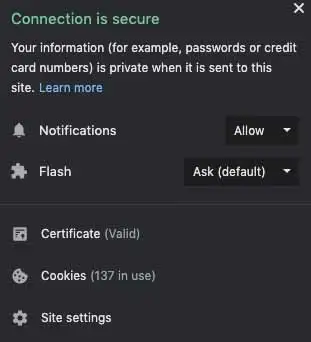
It’s important to stay up to date on privacy threats, that’s why Softonic is here to alert you to emerging dangers. For immediate alerts, we recommend allowing our push notifications. Just click the padlock in the URL bar and make sure your Notifications section is set to Allow.

Push notifications

We’ll continue monitoring the privacy and security landscape, and as soon as we have new information, we’ll be sure to let you know.

Apple kills iTunes

Apple will remove iTunes later this year and will replace it with new apps for music, TV, and podcasts.

iTunes

Apple will be announced the end of iTunes at today’s WWDC. At nearly 20 years old, iTunes has remained a necessary service for many users.

What am I going to do?

ITunes babies

After being the go-to Music app for years, iTunes has been divided into a new app trinity: Apple Music, Apple Podcast, and Apple TV.

If you used iTunes to sync your music to your iPhone, do not worry. You can still sync your music to your iPhone through Apple Music.

In case you want to find a podcast but you don’t remember the name of it, Apple Podcast has a feature that allows you to find podcasts based its content.

Apple TV has 4K HDR playback support, and also features your channel subscriptions similar to Prime Video.

Apple Music is expected to have a feature that allows users to buy digital songs. However, Apple is rumored to stop having users download mp3s altogether in favor of a music subscription product.

Wrapping up

iTunes was a landmark product for Apple for years. It helped drive the sales for nearly half a billion iPods. The departure of iTunes signifies the end of an era, and that Apple is ready to jump into the next generation of music.

New Google Chrome feature aims to tame tabs

Google Chrome on Android is redesigning the tab screen and introducing tab groups.

Google Chrome on a mobile phone

We all do it. Despite the fact that having lots of tabs open on Google Chrome can slows our devices down a lot, we all have a lot of tabs open all the time. Take a look right now, we bet you have at least five open if you’re on desktop and upwards of 10 if you’re on your mobile.

Ever since tabs were first introduced to modern web browsers, they’ve completely changed the way we use the internet. They have, however, remained very much in their original state. We open them up, we use them, we don’t, and if we need them later on, we can save them all as bookmarks. Despite their revolutionary initial effect, tabs haven’t really changed much at all. Until now.

7

Google Chrome on Android is redesigning the tab screen and introducing tab groups

At the moment, whenever you hit the tabs icon in Chrome on Android, you’re presented with all your open tabs as individual cards. You scroll through them until you find the one you want and then when you find it you tap it and return to browsing the web. This is fine, but it quickly becomes tiresome scrolling through the cards, the more tabs you have open.

new tab groups on Google Chrome for Android

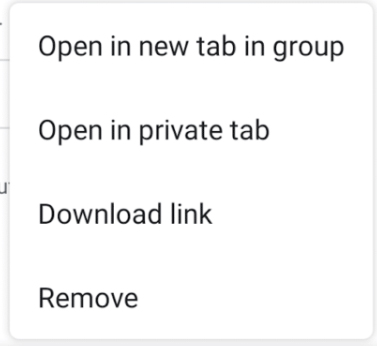
Google is looking to change this on Chrome for Android by adding a new option when you long press on a link. The “Open in new tab group” option will allow you to bunch together various tabs of your choice into groups. When you start a new group, you’ll see a new navigation bar appear at the bottom of the page, which will show all the tabs you’ve placed in the group as favicons. This should make it much easier to switch between them and allow you to start grouping tabs together based on common subjects.

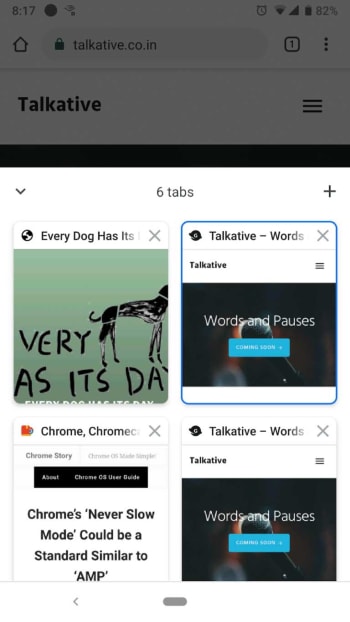
Tab groups on chrome
Image via: Chrome Story

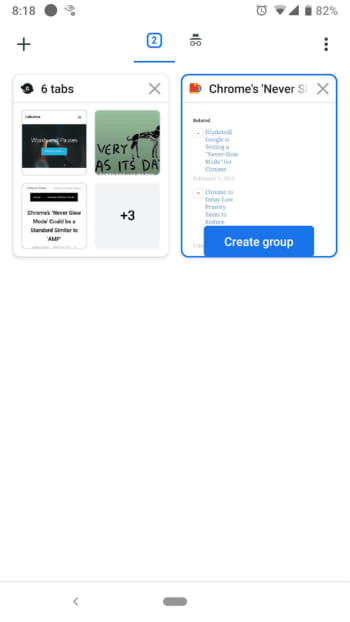
This means that when you click the tabs icon, you’ll no longer be taken to the card scrolling interface. Instead you’ll get a new display that shows all your open groups as in a similar fashion to how you see folders in other file exploring programs. Each group will show a preview of the first four tabs that are open in it, and as mentioned, favicons for the sites they’re on. Clicking on a particular group will then take you to an interface that looks more similar to the current tab card scrolling system, as you scroll through the tabs open in the group.

chrome tab groups screenshot
Image via: Chrome Story

Unfortunately, this new and very useful feature has only been spotted on the Android version of Google Chrome Canary, which Google uses to test advance new features. The feature is still a little rough around the edges, which means Google still has some work to do before we all get to use it.

Google Chrome Canary Download now ►
7

This all looks very promising, however, and seems set to see tabs again completely revolutionize how we use the web. Don’t be surprised if once this feature lands on your phone, you start to notice that you’ve many many more tabs open that you used to have.

Fortnite: Is Godzilla hiding beneath Polar Peak?

Something is living beneath Polar Peak. What could it be?

Any Fortnite players that have paid a visit to Polar Peak recently have probably noticed some strange goings-on around the snow-covered fortress. Roam among the icy halls for any length of time and you’re bound to hear the mysterious roars that emanate from deep beneath the castle, accompanied by earth-shaking tremors. Searching around the base of the Polar Peak mountain will reveal something even more terrifying: a gigantic eye peering out from within the ice. So, what’s going on at Polar Peak, and what might it have to do with “Godzilla?” Read on and prepare for something monstrous.

Fortnite: What’s happening to Polar Peak?

fortnite season 9 polar peak cattus event eye
Image courtesy Epic Games

The Background

Fortnite’s veteran players will know that Polar Peak has been a pretty central game location for several seasons now. First added to the map with the introduction of Season 7’s snow biome, Polar Peak was a focal point for the events of that season. Initially covered in a blanket of snow, the massive glacier surrounding the castle slowly melted to reveal the fortress concealed beneath. As more of the castle was revealed, it soon became evident that it would be connected to the events of the Season 7 finale. Polar Peak served as the home of Season 7’s Ice King antagonist, and as the castle thawed, a countdown and giant floating orb appeared above the castle courtyard.

When the timer reached zero, the Ice King himself emerged, blanketing the entire map in a blizzard and unleashing hordes of snow zombies to terrorize players. After the event concluded, it became clear that the Ice King had frozen Polar Peak to keep the mysterious Prisoner character chained within the dungeons below the castle. It soon became evident that the Prisoner was the Ice King’s fiery counterpart, and eventually created the volcano that was a central focus of Season 8. At the same time, players discovered what appeared to be dragon eggs concealed in the castle dungeons.

For a time, everything at Polar Peak remained quiet, until it was struck by a lava rock during the events of the Season 8 finale. Cracks and fissures from the lava’s impact began to spiderweb up the side of the ice mountain, and players began to notice strange happenings soon after.

What Lies Beneath

fortnite season 9 polar peak cattus event
Image courtesy Epic Games

As the cracks began to spread, players began noticing strange noises that sound like roars emanating from the glacier. Those roars were soon accompanied by gusts of wind and eventually short earthquakes that could be felt event from Polar Peak’s tallest tower. It seems pretty evident at this point that something is trapped inside the glacier, and it was awoken by the lava strike.

Soon after, a gigantic eye appeared at the lowest point of the glacier, and players that venture close to it will noticed that the eye tracks movement.

fortnite polar peak cattus event eye season 9
Image courtesy Epic Games

So, what could this mysterious eye belong to? Nothing has been confirmed yet, but speculation is running rampant in the Fortnite community. Players have long speculated that some sort of large-scale boss battle event is coming to Battle Royale. Though it was expected for the Season 8 finale, these events may indicate that players are finally getting their wish. Most sources seem to point to this upcoming event being some sort of massive battle that takes place beneath the snow biome.

What exactly will players be fighting? Some speculate that the dragon eggs hidden within Polar Peak’s dungeons indicate that a giant dragon will be at the center of the fight, but other sources seem to point to an even greater monster: the legendary Godzilla.

As fans have pointed out, the events of the season so far have some striking similarities to the trailer for the upcoming film “Godzilla: King of Monsters.” This might not be as far-fetched as it might seem at first. PUBG has already confirmed a Godzilla crossover event, and Fortnite is no stranger to movie crossovers of its own. Though no official confirmation has yet been made, some more evidence seeming to confirm this theory has emerged in the form of a sound file buried in the game files.

The eerie screeching noise sounds remarkably similar to the cry of Godzilla’s nemesis Rodan, a creature that features heavily in the trailer for the new movie. Whatever the case, it seems likely that this mysterious event will be occurring at some point in the near future. Fortnite fans, get ready: it’s time to fight some monsters.

Take this test to see if you have a video game addiction

Do you think you are addicted to video games? This test can help you tell!

Video game addict

The next time your mom or significant other yells at you for spending too much time playing video games, you might be able to tell them you have a legit disorder.

Researches from various universities across the United Kingdom, Germany, China, and Australia have created this test to determine whether or not you have an addiction to video games. 

The test takes about 20 minutes to complete. Most questions have you rank statements from “strongly disagree” to “strongly agree.” Once completed, you have the option to see whether you have an unhealthy obsession with watching pornography online or online shopping. 

The test

The test asks questions as to why you play video games, how often you play video games, and also about your mental state. At the end, you are given a percentage total that tells you how open you are. Theoretically, the lower that score, the more likely it is that you are a gaming addict.

Our writer took the test and got the following results:

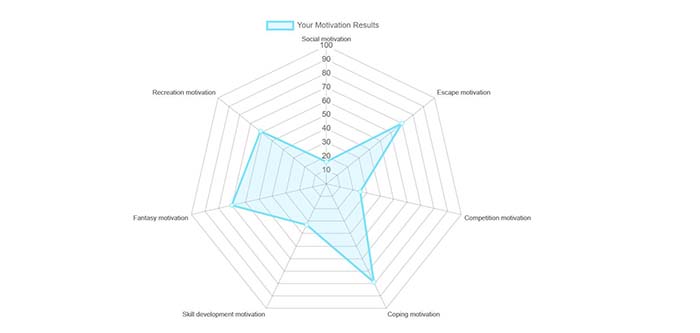
Gaming motivations

Our writer’s score (70%) was higher than 97% of others who took the test. Although the results say that you should consult a doctor or psychiatrist to determine if you truly have a behavioral disorder, the test suggests that our writer is in the clear. (Whew.)

“The self-report scale only provides you with tendencies towards Gaming Disorder in the context of your own usage and should not be seen as a final diagnosis,” according to the test.

The test shows us why we play video games. According to the results, our writer plays to escape from reality, to enjoy a fantasy experience, and as a coping mechanism for things like stress. 

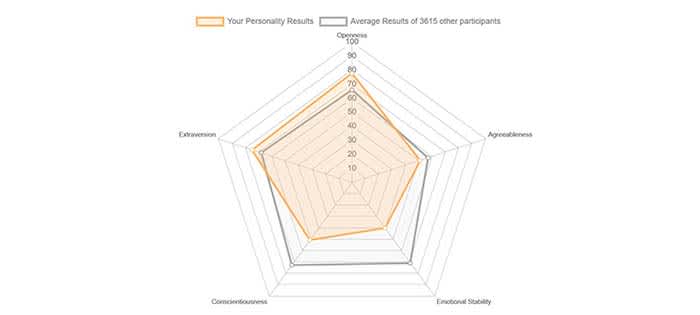
We also got to get an insight into our writer’s personality:

StabilityAlthough the test determined that we are not as emotionally stable or conscientious as the average test-taker, we are more extraverted and open.



A legit disorder

Believe it or not, the World Health Organization (WHO) actually classifies “gaming disorder” as a legitimate mental illness. Luckily, only a small percentage of gamers actually have the disorder, according to WHO. 

If you have gaming disorder, video games “take precedence over other interests and daily activities, and continuation or escalation of gaming despite the occurrence of negative consequences.”

Flipboard data breach: What happened and who is exposed?

There is good news and bad news for Flipboard users.

Flipboard is a popular online news service and mobile app that takes stories from various news sites around the web and puts them together in an aesthetically pleasing interface. Since it first hit the web, Flipboard’s popularity has grown to the point where it enjoys 150 million active users every month. Unfortunately, however, the last few days have been bad both for the app and its users as notices have been going out to tell users that Flipboard has been hacked and user data has been exposed.

There is good news and bad news for Flipboard users

Flipboard

Flipboard has released information on the data breaches it has suffered via a security note posted to its website. The note says, “We recently identified unauthorized access to some of our databases containing certain Flipboard users’ account information, including account credentials.” It goes on to say that following the discovery the Flipboard team launched an investigation, which revealed some telling information.

“Findings from the investigation indicate an unauthorized person accessed and potentially obtained copies of certain databases containing Flipboard user information between June 2, 2018 and March 23, 2019 and April 21 – 22, 2019.” Yes, you read that right, the hacker had access to certain Flipboard databases for nine months.

The security note also points out that not all Flipboard accounts have been compromised by the breach and that the company is still trying to determine just how many accounts have been compromised. There is some good news there but the uncertainty surrounding which accounts have been breached and which haven’t, is probably why Flipboard is prompting all users to reset their passwords.

password and login details
Fortunately the stolen passwords are protected by a robust hashing encryption technique

The real good news, however, is that unlike with recent events at Facebook and Google, Flipboard had encrypted the vast majority of passwords it had stored on the breached database. Flipboard uses a strong password-hashing algorithm named bcrypt, which is widely regarded as being very difficult to break. The hacker may have been able to copy the database containing the sensitive user information, but there is good chance he/she won’t be able to access the data. Unfortunately, Flipboard also pointed out that passwords created or changed before March 14, 2012 were hashed using a weaker algorithm so may be easier to crack.

So, what should you do, if you have a Flipboard account?

As we’ve already pointed out, Flipboard is contacting users and prompting them to change their passwords. Follow the instructions it sends you and your account will be secure once again. The other thing to consider, however, is whether you’ve used the same password on Flipboard as you have on other accounts. This is the type of situation hackers dream of as it enables them to test the security credentials, they steal from one site on various other sites, too. Find out if any password you frequently use has been exposed here.

If you frequently use the same password, this is great time to reset all of your passwords. A password manager is the easiest and most secure way to do this. We recommend Last Pass – its free version offers multi-device support so you can use it to log in to sites on your computer and phone.

8

If you used Flipboard, but only signed in using your Google or social media accounts, Flipboard says you have nothing to worry about as it doesn’t store these credentials on internal databases. You will, however, have to log in again.

All this goes to remind you that you do need to take your online security seriously. A single breach can bring it all down like a house of cards if you’re using the same password across multiple accounts. That said, don’t wait. Act today, change your passwords and activate two-stage verification when possible, and stay safe online.

Google Lens offers great new features for dining out

Google Lens is getting some great new “dining filters” to help us out in restaurants

Google Lens is one of those apps that blew us away when we first heard about it but has since sat dormant on all our phones. It is, of course, a logical move for Google to allow you to “search what you see” by simply pointing your phone’s camera at it. It is very impressive that Google’s AI can take contextual information from what it sees and perform a relevant web search to help you find out what you’re looking at. It is just not something we turn to very often.

Google Lens headerIn fact, the biggest use cases that go along with Google Lens relate to buying things you see when you’re not in shops or learning about things when you’re traveling. Not everybody is interested in these types of activities, however, which is probably why a lot of us don’t think of Lens that often. Google, however, is now adding new skills to Google Lens that’ll give it the power to help us in a much more popular activity: eating out in restaurants.
Google Lens is getting some great new ‘dining filters’ to help us out in restaurants

Not everybody wants to buy the latest clothes and gadgets and not everybody does a lot of traveling. Almost all of us, however, eat out in restaurants occasionally and these new Google Lens filters could help us decide what to eat. If you’ve ever felt rushed in a restaurant and didn’t know what to order, Google Lens can now help you out.

Google Lens screenshot

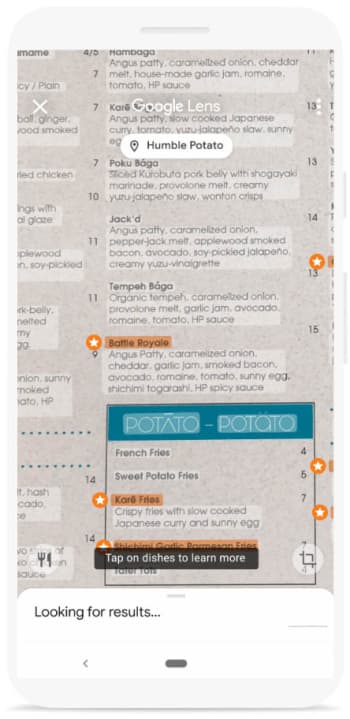
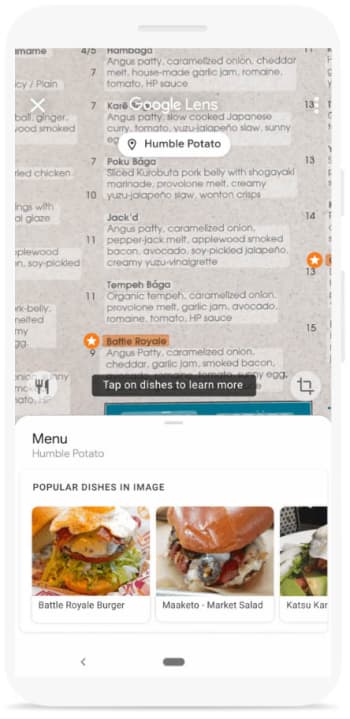
The first new Google Lens skill relates to the restaurant’s menu. If you point Google Lens at the menu, as long the restaurant’s name is visible, it will overlay the restaurant’s most popular dishes on top of what you see. You should see stars next to the restaurant’s most popular dishes and then tapping on them will show more information including pictures of what the dish looks like and reviews other patrons have written about them.

popular dishes

The other key dining-related skill that Google Lens is getting will help you out at the end of your meal. Once your waiter has brought you your bill, show it to Google Lens. Lens will then be able to calculate the tip you should leave and will even help you split the bill evenly, should you need to do so.

It is good to see Google Lens getting some more widely useful features. One of the main reasons Lens hasn’t really grabbed our attention is because it is often quicker to input the search query yourself than it is to wait for Lens to grab the information. Recognizing large amounts of text quickly, however, is one of Lens’ best skills so the new menu feature could offer a genuinely useful use case. The bill feature should be useful too if it works quickly enough.