Top 7 affordable accessories for your car

Now that summer is here, it’s time to jump in your car and get away. Small towns, mountains, cities, beaches… Anywhere is good for disconnecting from your daily routine. But it’s also true that you should be well prepared for the trip. That’s why, today at Softonic, we’re thinking of you: here are the top 7 affordable accessories for your car.

Magnetic car phone mount

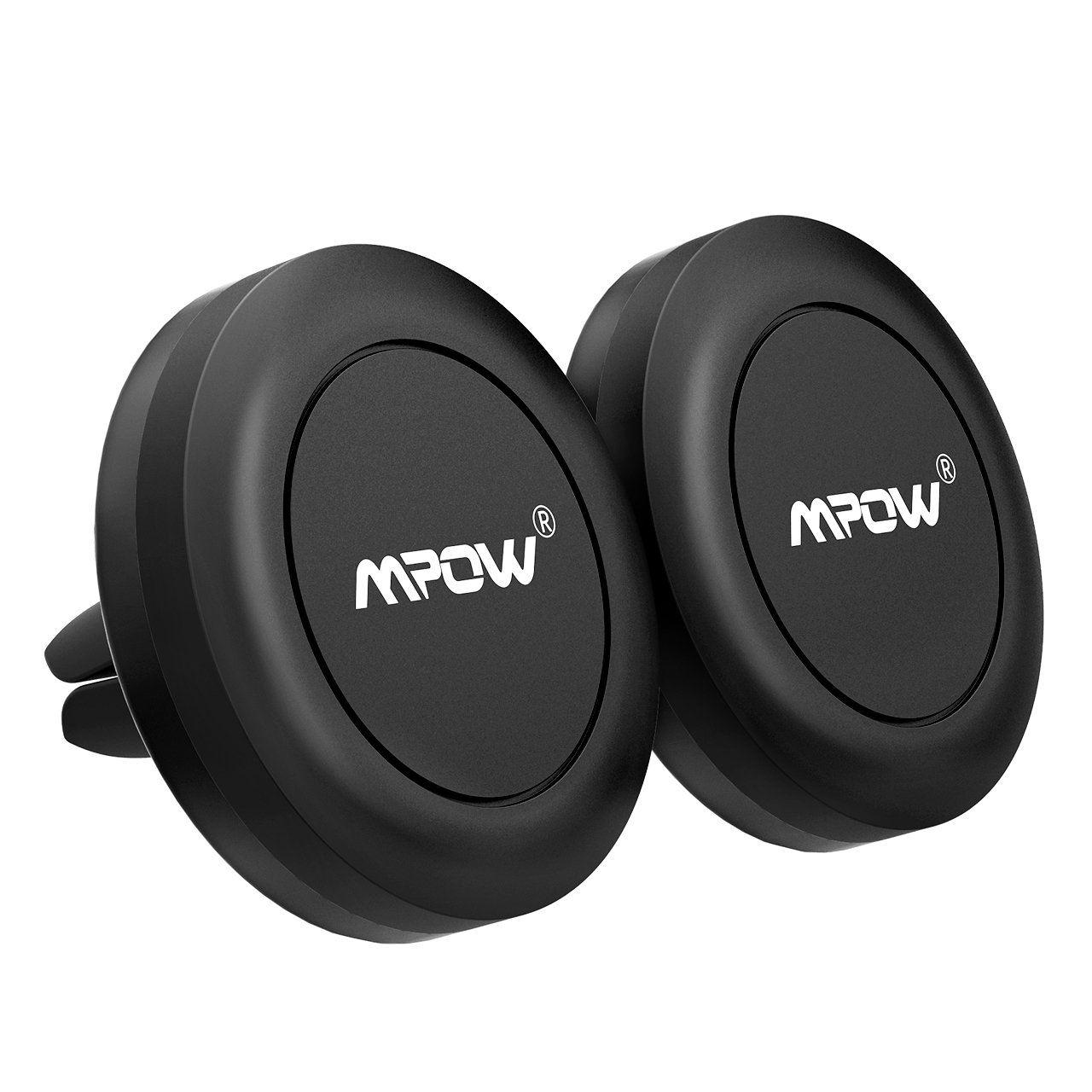
Made of a large rubber base and a magnetic head, its function is simple: it lets you mount your cell phone to your air vent without side grips. It simply brings your device closer and “sticks” there. The magnetic mount is incredibly strong, which guarantees your smartphone won’t fall off when driving through a curve or pothole. Also, we should note that the magnets used in the mount don’t harm your cell phone, one of the main concerns of this kind of gadget. And for less than $8, it’s a steal.
Trunk organizer

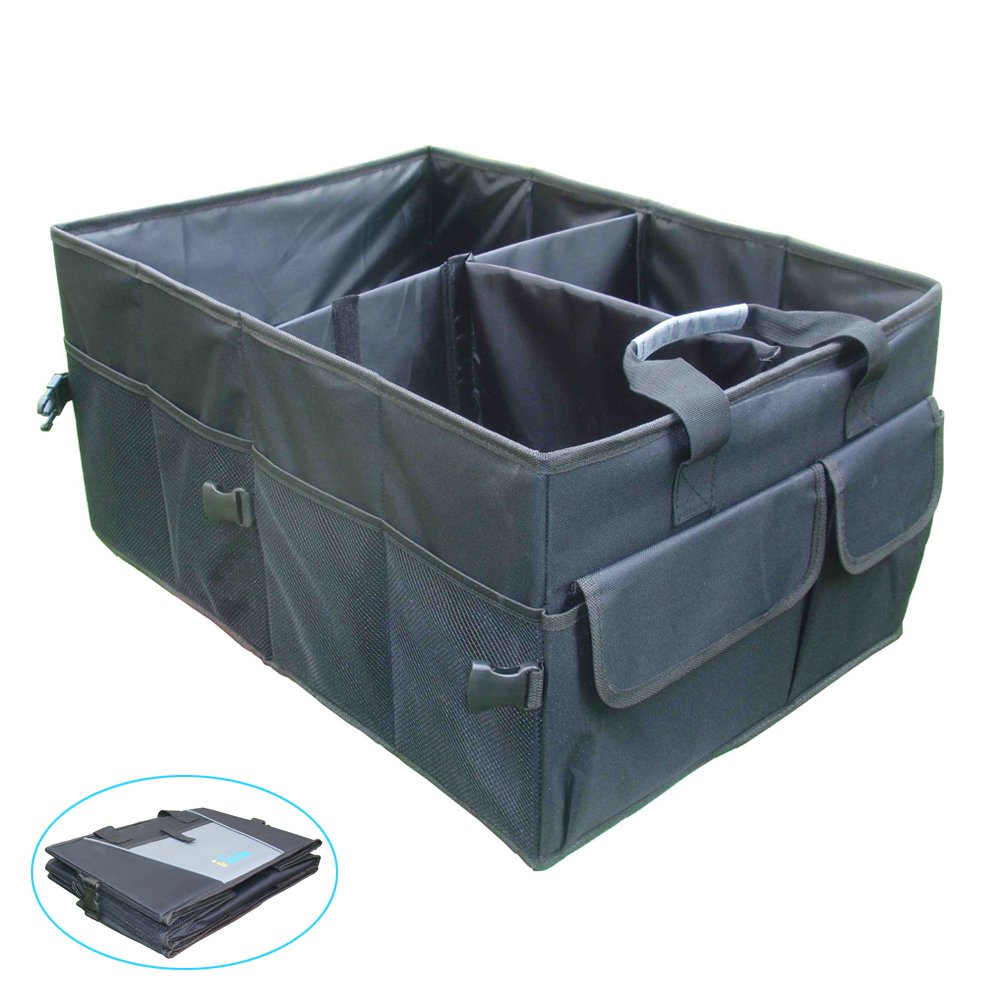
Don’t kid yourself: the trunk of your car is a disaster. It happens to everybody. On one side, you’ve got rags; on the other, tools, a car jack, reflective vests, some old oil change receipts, and a menu from a Chinese restaurant that closed in 2009. This situation is pretty common, so it’s ideal to use a car trunk organizer. Once your trunk is organized, it’ll be easier to keep track of the important stuff and it will be easier to remove if you need to haul something big.
First aid kit

A must-have for any car: a first aid kit. It’s essential to have one in the backseat or in that trunk organizer you just bought. Specifically, this kit includes a total of 100 items, from scissors to metal tweezers, bandages, finger splints, pads, and adhesive tape. All the essentials to get you patched up until you can get some real medical help.

Seat cover for pets

If you have a dog, you’re likely worried about his safety when you take him in the backseat of your car for a long trip. With this backseat cover, you’ll not only make sure it’s secure and comfortable, but you’ll also avoid hair and dirt from getting on your car. Oh, and it’s got a hammock style, so your pet will travel like a furry king.

 

Car neck pillow

If you’ve got a long road trip ahead, why not ride in style? Add a car neck pillow and upgrade your basically useless headrest. Sturdy and with a quality design, they’re great for your car, but you can also use them when traveling on a plane or train, where the headrests are usually more stiff and less comfortable.

Parking sensor

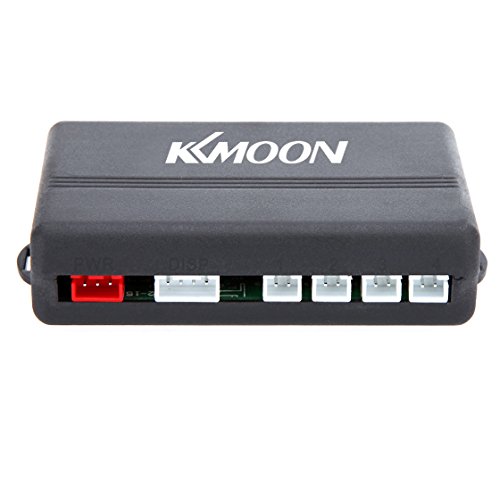
This is something that most new cars have and it’s totally awesome: a parking sensor. With a digital display, it has four types of sensors, a double CPU and an advanced chipset to improve detection. It has a detection range of up to 8 feet, more than enough distance so you don’t back into anything unaware. For $15, you can save yourself hundreds or thousands of dollars in repair fees.
Car air freshener

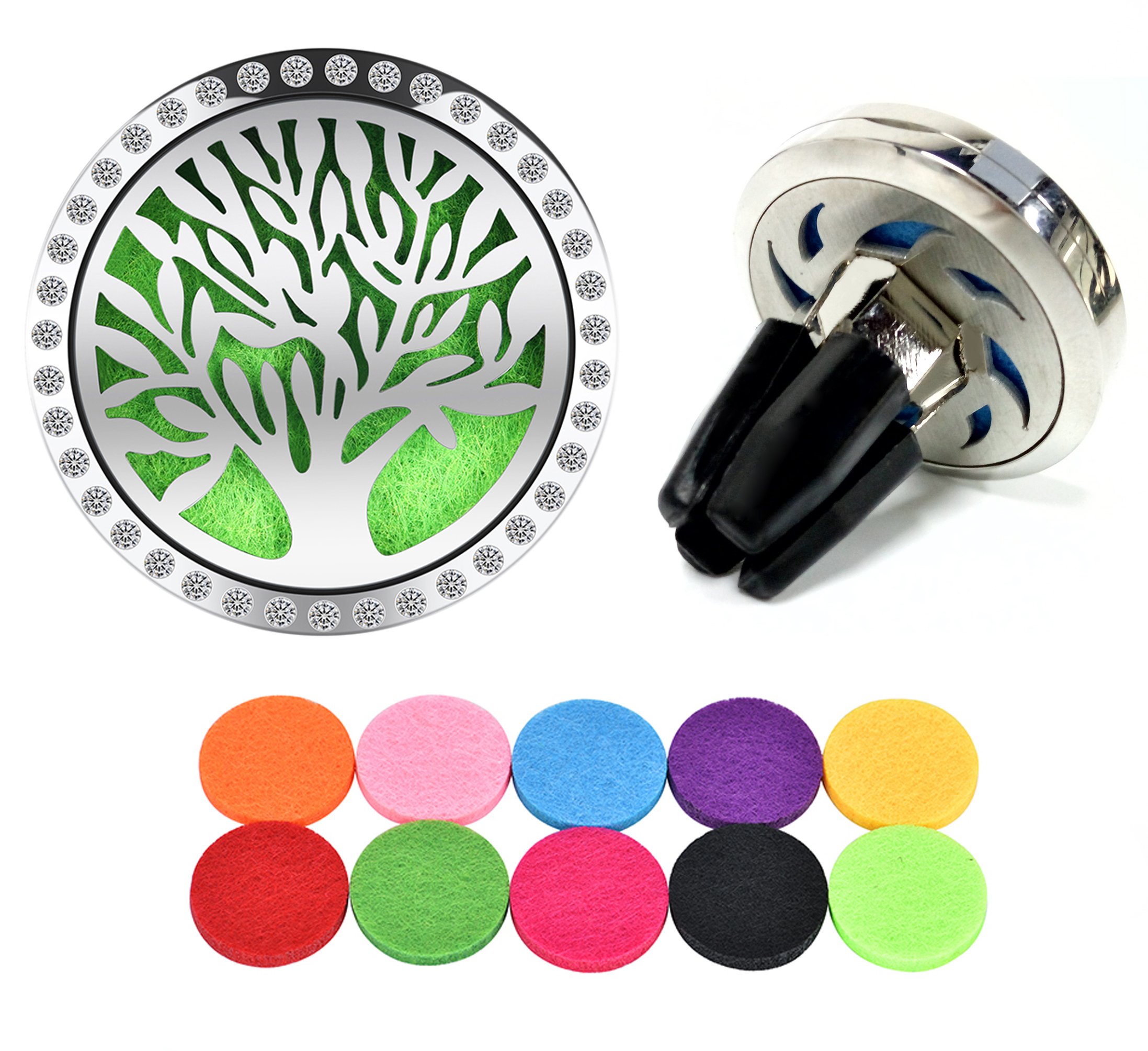
We’ll wrap up this list with a must-have for your car: a good air freshener. This one clips perfectly to any air vent, so you don’t need anything else. In addition, it has a refill kit, so you just have to open it and add a few drops of essential oil to a pad for it to continue working worry-free. Will you make your ride smell like lavender? Cinnamon? Piña colada? You have the power!
How to recover a deleted WhatsApp photo or video

It’s one of the most frequently asked questions when you’re having issues: “How can I recover a deleted WhatsApp photo or video?” For some reason, you deleted that snapshot and now want to get it back on your device. Yes, friends, you can recover it. In fact, today at Softonic we’re going to teach you how.

Before we get started, check carefully

We’re going to recommend a series of recovery programs, but before we get started, we want to ask you something: are you sure you’ve checked carefully?

We’re asking this question for a simple reason: WhatsApp saves all your images and videos in two different folders. One is the device’s “Image gallery” and the other is a dedicated folder for the app called “WhatsApp Images” (within the “Gallery,” of course).

In the case of iOS, the images are also found within every user. If you click on the profile name once the chat is open, you’ll see a field called “Multimedia, links and docs.” Go in and you’ll have access to all the images that you’ve downloaded since you installed the app (if you didn’t delete them previously, of course).

With apps

Once you’ve checked that the images aren’t there, it’s time to use apps to recover the snapshots. For this, we have two tools that work fairly well: DigDeep and Disk Digger, the first free and the second paid.

Starting with DigDeep, this app is extremely easy to use, so much so that its design is the most complex part. With a rough and ugly appearance, this software lets you recover all deleted images with two simple clicks. Literally. Once you have it downloaded and installed, you’ll see that several pictures of deleted images will pop up. Click on the one you would like to recover and click on “Restore.” It doesn’t get any easier.

DigDeep Image Recovery Download Free
9

For Disk Digger, the ins and outs are the same, except the free version of the app only recovers a thumbnail of the photo. Of course, the developers’ idea is that you’ll see the images or videos that you want to recover. And you won’t think twice about upgrading to the paid version.

DiskDigger Undelete Download Free
8

About WhatsApp Web

We’ll wrap up with a little trick that you may not know: WhatsApp Web, i.e. the computer platform for this app, may have your photos. For this, you only have to enter the site, scan the QR code that it requests (following the instructions that WhatsApp indicates) and you’ll see the app opens on your computer.

If you click on the chat of any user, you’ll see that same box as the iOS version (“Multimedia, links and docs”). Go in and you’ll have all the photos and videos that you’ve exchanged with that person at your fingertips!

WhatsApp makes a big change: no more annoying photos from your contacts

Soon you’ll have the power to stop photos and videos sent by your WhatsApp contacts from appearing in your phone’s photo gallery. How many times have you opened your gallery to show a photo to a friend, only to find dozens of goofy photos or videos from those idiotic, muted group chats? Never fear. Those uncomfortable moments are at an end.

WhatsApp Messenger Download WhatsApp
8

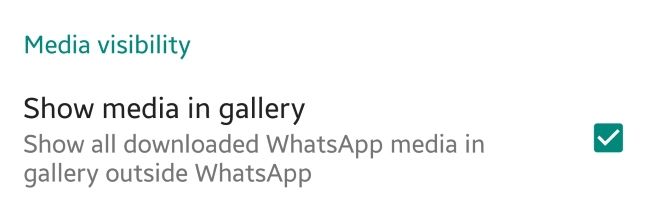
This new feature appears in the latest WhatsApp beta version. This means that soon we’ll have it available in the regular version. Once the update rolls out, just have to go to the settings section of WhatsApp and then to Data and storage. There will be a new option called “Media visibility.” Simply disable “Show media in gallery” and the problem is solved.


What do you think about this new feature? Will you use it? Leave us a comment!

How to use Facebook Marketplace to sell what you no longer use

When Facebook implemented its own system for buying and selling, many wondered if it would actually be successful. And although it has a long way to go before overthrowing Craigslist, Facebook Marketplace is making a dent. At Softonic, we want to tell you about this option, so we’ll show you how to use Facebook Marketplace to sell what you no longer use.

How to access it

The first thing you should know is that Facebook Marketplace isn’t an extra app or hidden site. This buying and selling hub is available from the main Facebook app or browser. You can access the marketplace from PCs or smartphones, and the only requirement is to have a Facebook account.

In the case of PC, the option appears on the left, fourth from the top. As for Android or iOS devices, the Marketplace can be found in the drop-down menu that appears next to “Notifications.”

How to use it

The first thing to clarify is that the Marketplace isn’t a place where you can make financial transactions like Ebay or Paypal, for example. On Facebook Marketplace, you can put a product for sale, but the money needs to be sent with another method, whether that’s Venmo or Zelle or whatever.

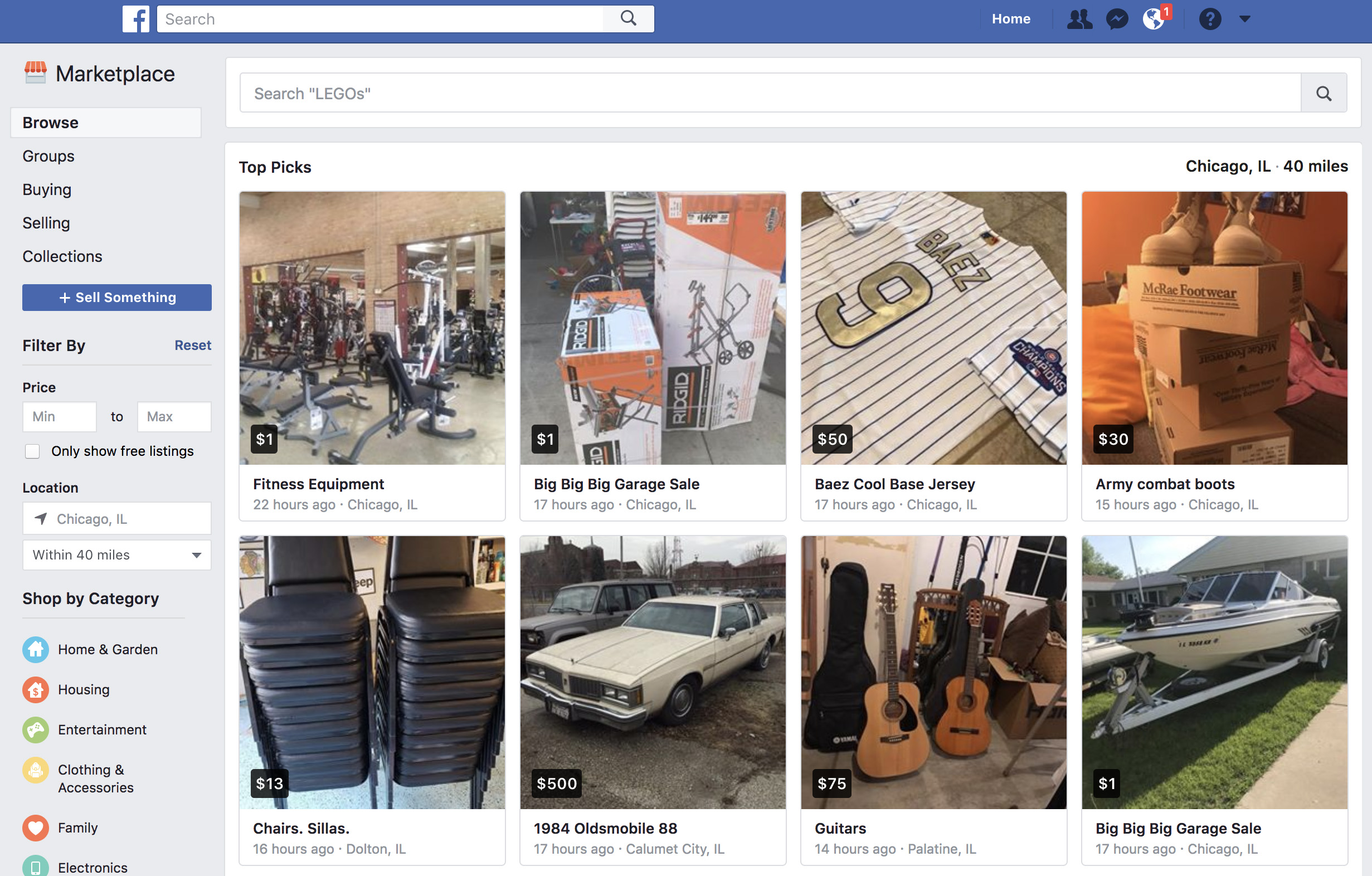
Once you enter Facebook Marketplace, you should check out the categories that appear on the top left: “Browse,” “Buying,” and “Selling.” “Browse” is self-explanatory: it’s where you can search for products. Enter the name of the item you’re searching for and look carefully at the settings that appear on the left, where you can narrow the price and the location. Once you’re interested in the product, click on it and get in touch with the seller. 

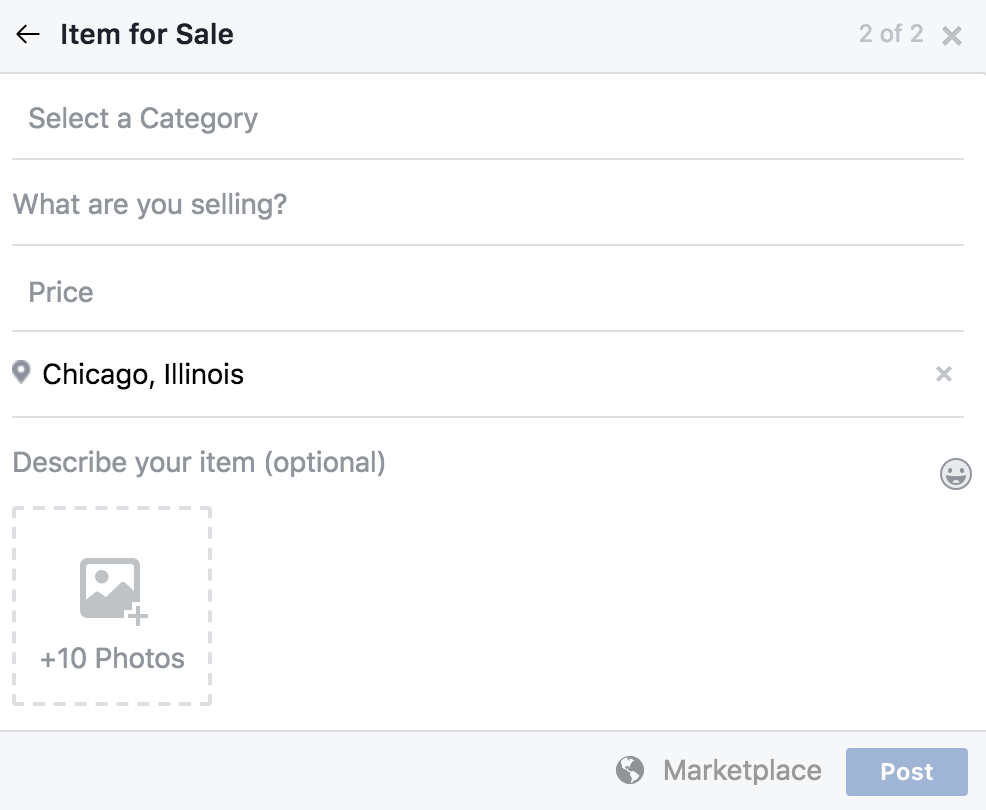
As for the other option (“Selling”), this is for everything you want to get rid of, once somebody has contacted you. However, you just have to click on “Sell something” to create a corresponding ad. Just fill in the “What are you selling?” field, add a price, a location, select a category and upload the photos that best highlight the item. Once you’ve got everything, click on “Publish” so it appears on the Marketplace. Then sit back and let the money roll in!

How YouTube chat works and what you can do with it

YouTube got non-stop updates in 2017. The video streaming platform knows that industry competition is fierce, so last year it launched a lot of new features, and developed some features that were already available but easy-to-miss. This is where YouTube chat comes in. Although it’s hard to believe, the system has a messaging service like WhatsApp or Facebook Messenger. Today at Softonic, we’ll tell you how YouTube chat works and what you can do with it.

Step by step

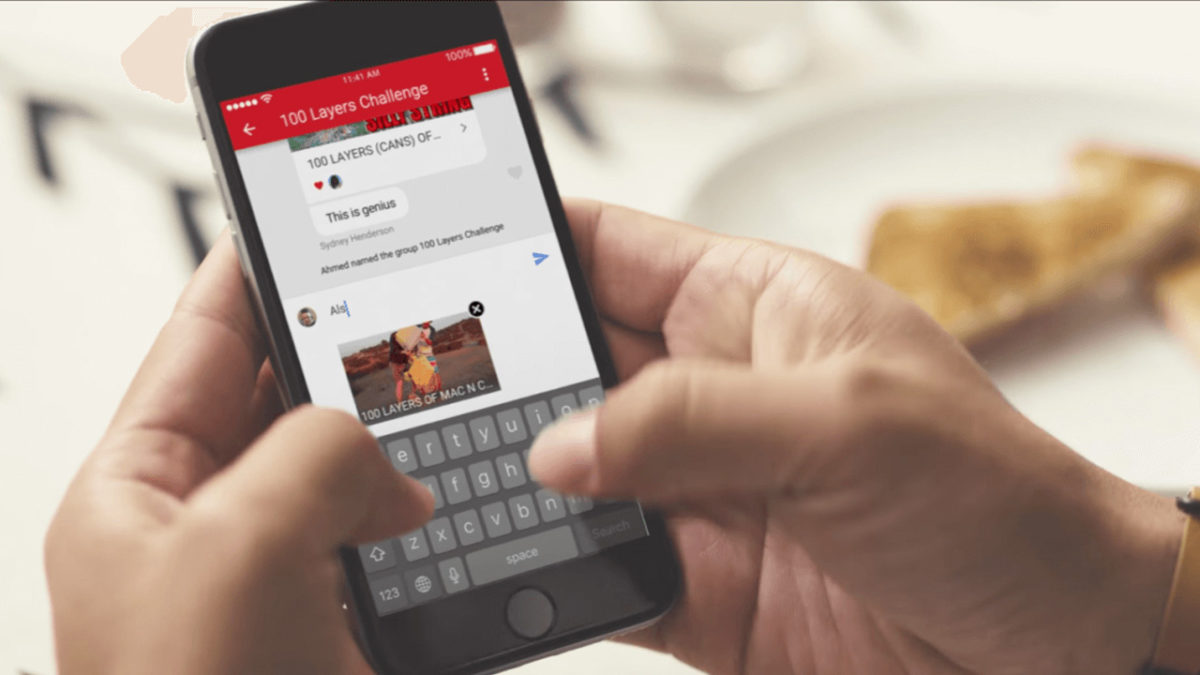
YouTube chat isn’t any different from what you see on major messaging services. In other words, you can write messages, send emojis and hold a normal conversation. However, the biggest difference is that everything is focused on YouTube. Instead of attaching videos or images, the icon is of sharing a YouTube clip. It’s a chat designed for browsing on the platform.

YouTube Download Free
8

For whatever reason, Google hid the chat feature in a place you’re unlikely to look. To chat, we’re going to select a video and click “Share.” When the menu opens, select the user you want to send the video to. Do this and the chat will open.

This screen is the main conversation interface, which hides some secrets. If you click on the three dots that appear on the top, the app will display a menu where some options appear, such as “View participants” of the chat, “Add participants,” “Delete chat” and “Mute notifications.” Of course, each name indicates what you can do under each.

In case you want to see the chat you’ve opened previously, all you have to do is click on “Activity” and then “View contacts.” There all your previous conversations will appear, as well as all possible chats of yours.

A big asterisk to this is that you have to have a confirmed name on YouTube or none of this will work. We spent about an hour looking for these options and couldn’t find them in the app, probably because we don’t want to use our real name on the site.

What is Windows Hello?

When Windows launched Windows 10, the company set out to make the greatest possible leap forward. After a few years of having the operating system with us, there’s no doubt that the Redmond boys have kept their word: it offers good updates, performance, progressive web apps, and another detail: Windows Hello. Today at Softonic we’ll tell you what Windows Hello is, why you should use it, and how to activate it.

What it is and what it’s for

Windows is very concerned about user security and good proof of this is that Windows 10 comes with an antivirus called Windows Defender, the first introduced in its history. However, Windows Hello looks to enhance this security from the moment the system starts up.

“Windows Hello is a more personal way to sign in to your Windows 10 devices with just a look or a touch. You’ll get enterprise-grade security without having to type in a password,” says Microsoft’s page. In other words, Windows Hello is a way to unlock your device instead of entering a classic password or pin. To do this, the system uses your face, eyes and fingerprint to establish a pattern.

At the moment, gadgets such as Surface Pro 4, Surface Book, cell phones with Windows 10, Microsoft Band and most PCs with fingerprint readers can now use Windows Hello (as long as they have Windows 10, that is). Also, gradually more devices are incorporating this feature.

How to activate it

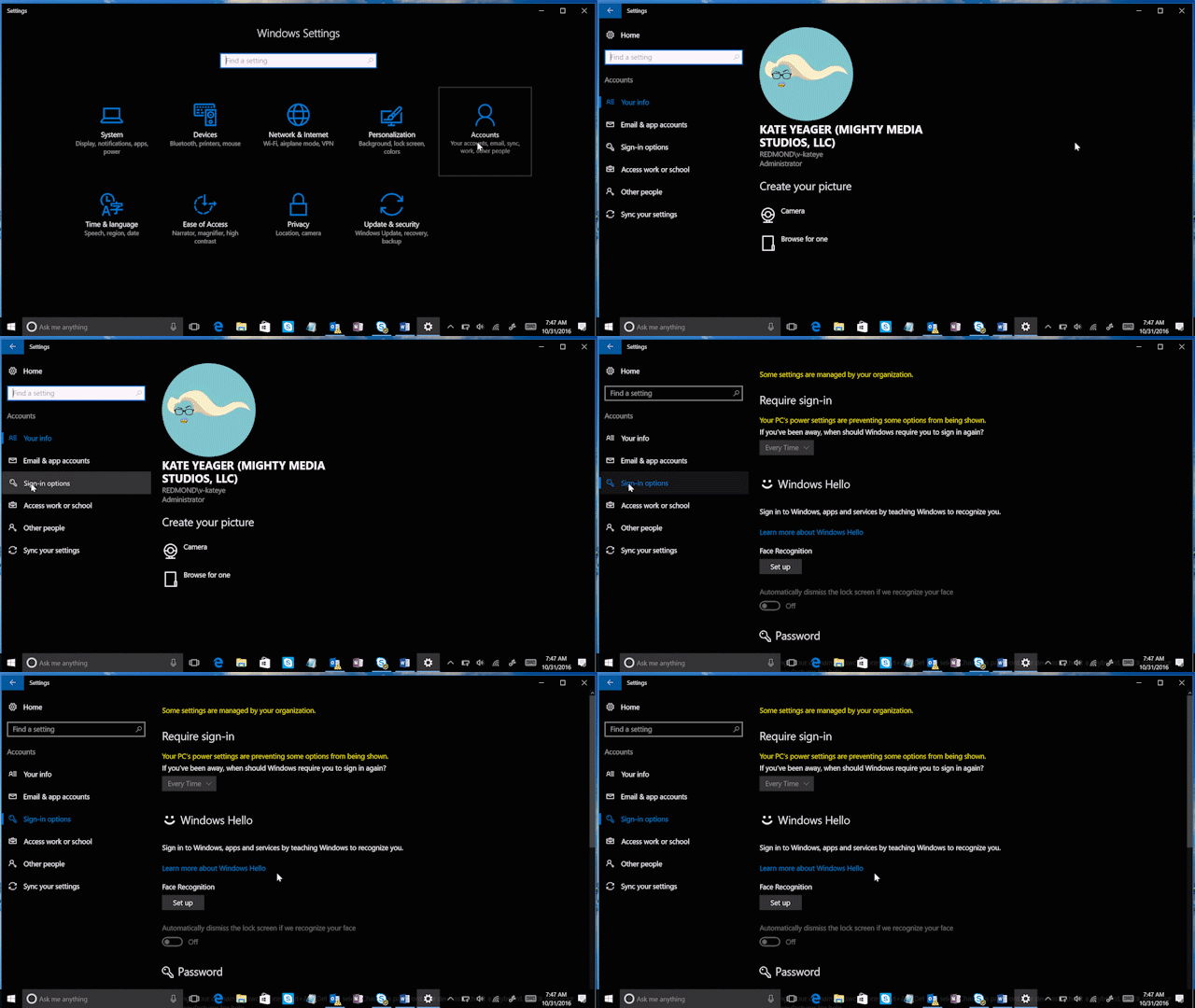
To activate Windows Hello, just click on the “Start” button (on the lower left) and go to the “Settings” icon  -> “Configuration.” When you see the corresponding screen, click on “Accounts.”

Of all the fields to choose from, go for the one that says “Sign-in options.” Click here and you’ll see that Windows Hello appears as a method to activate. Obviously, here you’ve got two possibilities: your device is compatible or it’s not. In our case, our device doesn’t have a fingerprint reader, but it does have a camera, so we can’t complete the process unless we get an external gadget for it (a little ridiculous, we think).

Check if your PC has the possibility of logging in with Windows Hello. If so, our advice is that you use it: you’ll have an extra layer of security.

6 old PC games that are still entertaining

At Softonic, we’re feeling a little nostalgic. Now that summer is here and the days are getting longer, we’ve got more leisure activities than ever, from going to the movies to playing video games. This got us thinking about old PC games that are still entertaining. Here’s a list of six titles you can’t miss.

Monkey Island

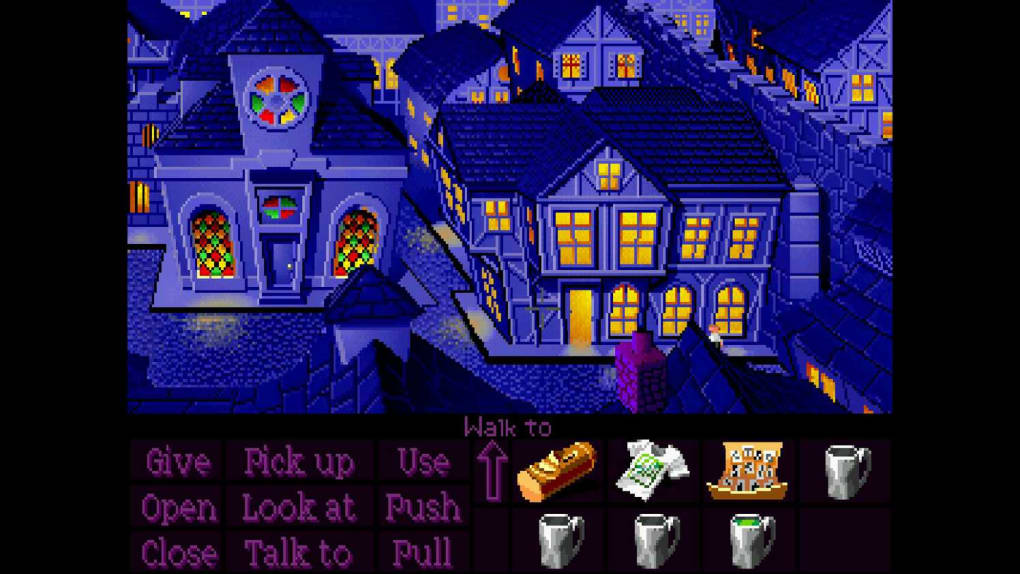
What’s there to say about the famous pirate Guybrush Threepwood that hasn’t already been said? Monkey Island completely redefined the genre of graphic adventure to such an extent that it launched LucasArts to stardom. Names like Ron Gilbert, Tim Schafer, and Dave Grossman came into the media spotlight and become famous in a hurry.

The game was released to the market in 1990, so we’re nearly celebrating its 30th anniversary of sales!

The Secret Of Monkey Island Download Now
10

Lemmings

This game has really straightforward mechanics that still make an impression on players. In Lemmings, we have to lead a group of small rodents to an end point. The key is to do it without losing them, by creating some routes and avoiding others. Launched in 1991, it had more releases later due to its success.

Lemming Download Free
7

Sim City 2000

The year 2000 is so far away, right? For many of us, the year 2000 was a far-off date that would bring flying cars and mind-blowing technology. Now that we’re in 2018, we know we might have been overly optimistic. However, the idea of Sim City 2000, launched in 1994, was to build a state-of-the-art city. Although its graphic interface shows its age, Sim City 2000 is still entertaining.

Simcity 2000 on the Internet Archive access
8

Age of Empires

In 1996, Ensemble Studios launched Age of Empires, a strategy game that didn’t have much impact during its development, but once it hit the shelves, completely took over the real-time strategy game genre. The title was a huge success and still has thousands and thousands of active fans (of the original game, no joke). Its success has been so enduring, a 2018 remake of the original was launched with a new aesthetic look.

Age of Empires: Definitive Edition Download Free
8

Wolfenstein 3D

The saga is more alive than ever thanks to new versions of Machine Games, and this is largely because of how well it maintains the essence of the original 3D Wolfenstein. Created by id Software in 1992, the adventure puts us in the shoes of Lieutenant Blazkowicz. The goal: to put an end to the Nazis and the experiments they’re carrying out in a mysterious castle.

Wolfenstein 3D Download Now
8

Half Life

It couldn’t be any other way: our list ends with Half Life. This year celebrates the 20th anniversary of the first release, a milestone in first-person video games. Today, the development of a third part is still being requested. What if they surprise us at E3 this year? One can always dream…

Half-Life 2 download demo
8

How to download all your Instagram data

Facebook’s privacy scandals have caused millions of users around the world to worry about their security on social networks. Many have gone to the extreme, deleting their profiles. If you’re thinking of doing this on Instagram, first let us show you how to download all your Instagram data in one click.

Instagram Download Instagram
7

What is downloaded

When we access this part of Instagram, the app gives us a file with all our uploaded photos and videos, as well as direct messages, comments, profile info and saved stories. In other words, Instagram has all your activity on the social network, which you can get nicely organized in a file. 

How to download it

Although you may think it’s been available for a while, this feature was launched on the social network relatively recently. To access it, you can either use the mobile app or the PC website. But there’s a key requirement for both: logging into your account (obviously).  

Once you’ve done that, go to this webpage. You’ll see this message: “We’ll email you a link to a file with your photos, comments, profile information and more. We can only work on one request from your account at a time, and it may take up to 48 hours to collect this data and send it to you.” Instagram stipulates a few days, depending on how much you’ve used the app. The more activity, the more difficult to collect all the data.

Once you’ve read the disclaimer, you’ll see that the “email” listed is the one you registered with on the social network. Click “Next,” enter your password and confirm “Request download.”

Ta-da. That’s it. In general, the file usually appears in your inbox within 24-28 hours, though as the previous message makes clear, it could take a month and a half. 

How to scan APK files so you don’t get a virus on your Android device

Google takes the security of its online store very seriously. However, it’s often been blamed for allowing too much harmful content and potentially dangerous apps.

Last year, it launched the Google Play Protect service, a tool that helps provide an extra security layer. Although the problem has improved, the risk still exists. Today, we’re going to take your protection to the next level: we’ll show you how to scan APK files so you don’t get a virus on your Android device.

Preventing before fixing

Every time we install an APK app from outside the Google Play Store, we’re exposing ourselves to risk. You may know the manufacturer, but nobody is free from encountering problems with an app, whether you’ve downloaded it from the Google Play store or another website. Because of this, running a program analysis is a great solution.

Google Chrome Download Free
7

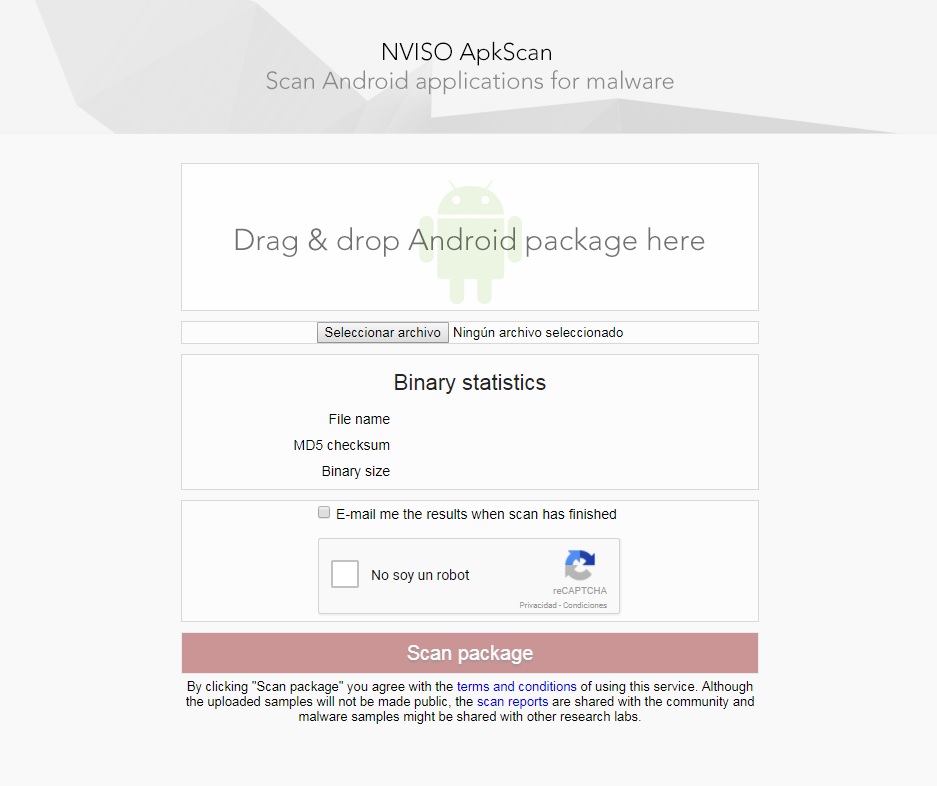
For this, we recommend NVISO ApkScan. This website is becoming a trusted resource in the online community. Why? Because it meets your needs perfectly: making sure there’s no virus in the app you want.

Using it is as simple as dragging the file into the box (or uploading it); the platform takes care of the rest. In addition, you can ask to be sent an email with the data of the analysis. Just check the box that appears above the captcha.

Once you click on the Scan package, be patient, since the analysis usually takes a few minutes. When finished, you have two possible options: one, it’s clean (you can install the app worry-free) or two, it’s infected. If the second happens, the tool will give you extra info.

Google Play Services Download Free
8

How to make your email accounts more secure

Email security is basically a joke these days. Just ask John Podesta. As we use our email addresses to log in to various services around the web, it’s vitally important to have maximum protection. Today we’re bringing you five tips to make your email accounts more secure.

Password

The key of every email account: the password. The more complex it is, the more difficult it will be to access. When security companies conduct annual studies, the statistics never lie: the most common password of users is “123456.” Don’t fall into this trap. Use capital and lowercase letters combined with numbers. A long password is harder to crack than a short one. Also, avoid using your birth date in a password.

Don’t put your email just anywhere

The second tip is as simple as not putting your personal email on social networks, forums or websites. Only give it to trustworthy people or those you would like to get in touch with. Remember that as more people know your email, the possibility of somebody trying to access it to rob you increases.

Disable HTML reading

This is a tip from security experts: if you’re not going to use HTML reading, the best thing is to disable it or avoid it. This format can be used in a harmful way to introduce malware into our email account. Once there, if we click on a wrong link… our PC will also get infected.

Beware of anything strange

Always look carefully at who the email sender is. In general, phishing and malware pages are known for imitating official sites. You may think it’s a bank, your insurance company, or a provider you trust, so you click the link… and surprise, it’s all fake.

Check each and every word of the email carefully. Likewise, keep an eye out if they request personal info, since it’s usually a telltale sign of deceptive senders.

…and files

If you’re careful with who the email sender is, it’s even more important to pay attention to all the attachments in an email. Attachments are usually the easiest way to deliver harmful files used to infect your system. For this reason, our advice is not to download anything unless you’re absolutely sure there’s no risk. Remember that you can also use an antivirus program on any downloaded file before opening it. Trust your gut and be a little paranoid. It’s hard to turn back time when you’ve blown a hole in your computer security.