Google wants to help you find free Wi-Fi and save your mobile data

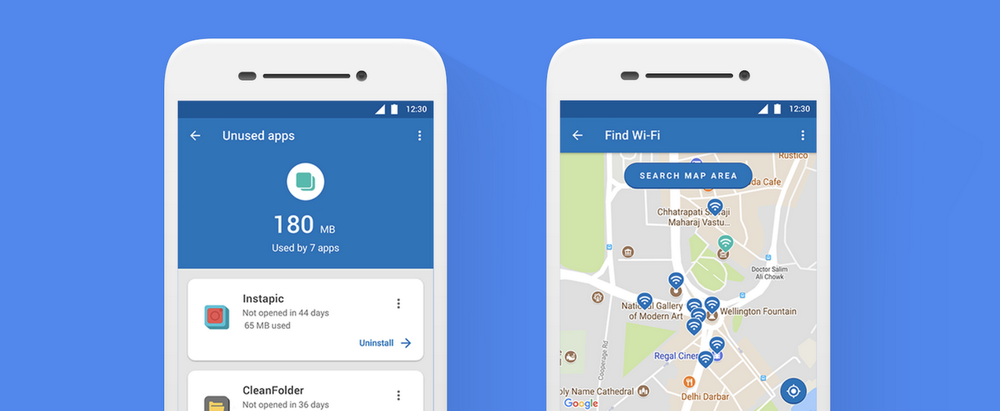
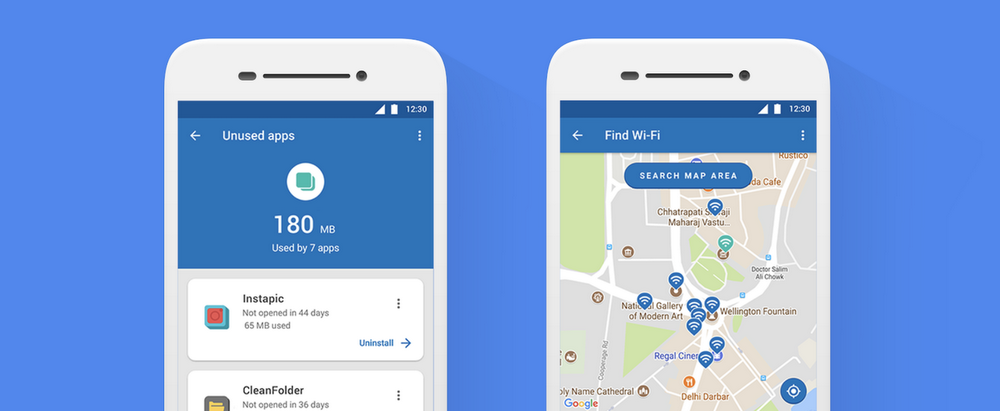
Google released Datally last year to help mobile users take control of their data usage. According to Google, since its release, Datally has helped the average user save 21% of their mobile data. With up to a fifth of your data saved by better management alone, if you’ve ever faced expensive bills due to going over your allowance, Datally is definitely worth downloading. To sweeten the deal further, a recent update has added another great new feature to help us stay within our data allowances. Datally now has a Wi-Fi map that will make it easier than ever to find nearby Wi-Fi networks.

Datally Download Now
8

“The Wi-Fi Map shows you all of the nearby Wi-Fi networks, so you can find the best quality network nearby. More Wi-Fi should help you continue surfing the net without worrying about how much it’s eating into your data plan. You can even rate that network after you connect.”

Image via: Google

As well as the Wi-Fi map, Datally’s other features are worth noting. It gives you greater control over which apps can use your data, allows you to set a daily limit for data usage, has a guest mode so that anybody using your phone can’t hog all of your data, offers easy to understand data usage metrics, and offers personalized recommendations on how you can save data.

All in all, Datally is a very handy app to have, and its latest update has made it even better. If you use too much mobile data, you should download it today and see if it helps you on your phone bill.

Do more, faster, with this digital toolkit

Every household needs a set of tools. You never know when you might need to tighten a screw or put up a shelf. With the right set of tools, you can do just about anything. The same goes for your computer. Your computer is a very capable machine, but it’s not perfect, and a digital toolkit helps you do more, faster, and without calling in an expert.

When your laptop screams “no!”, you normally have to scour the internet for a fix. Maybe you need to extract an archive in an obscure format, encrypt an important email, or recover lost data – whatever the reason, your machine’s native programs won’t always be enough, which is why a digital toolset can really come in handy.

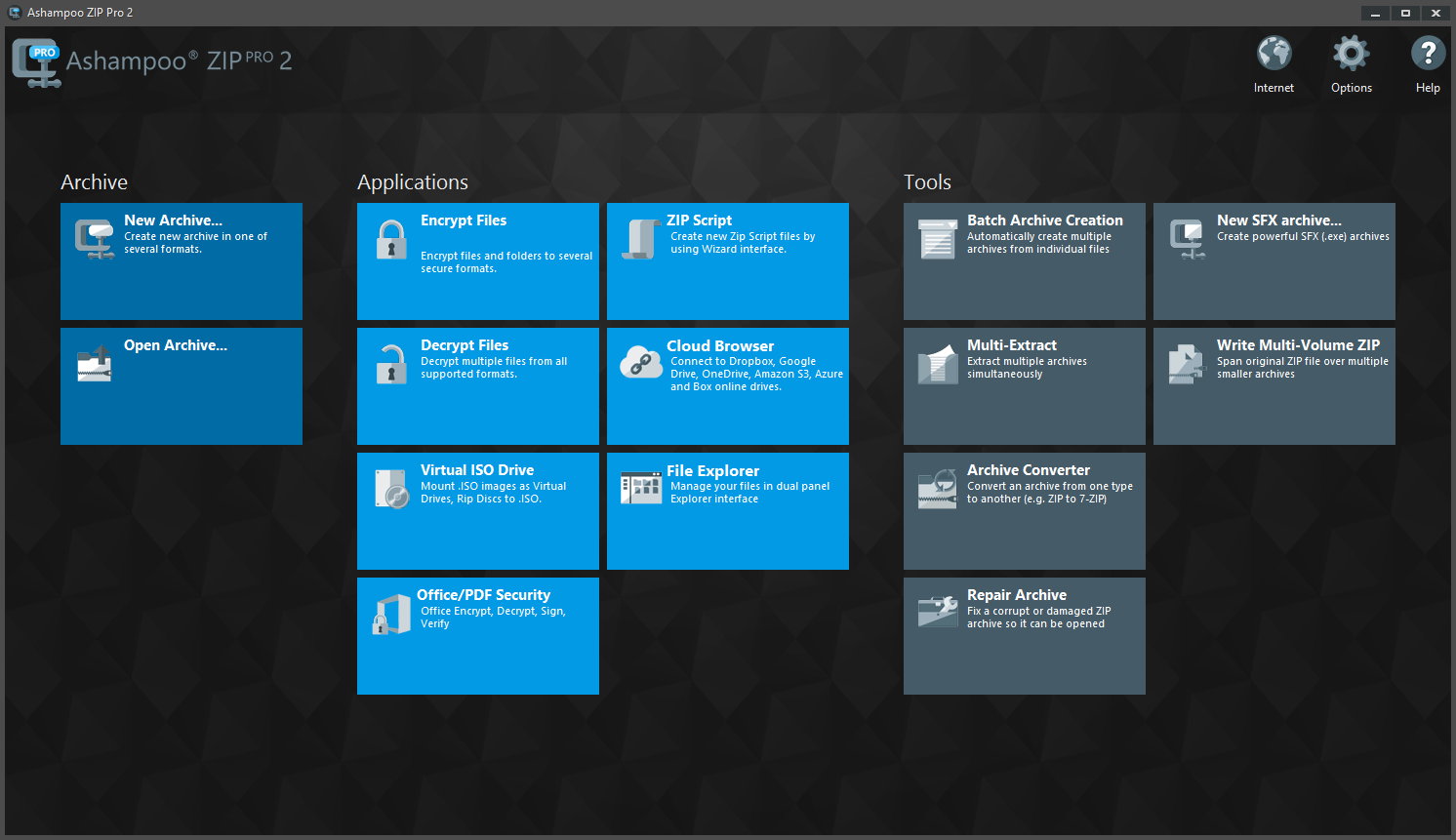
One of our favourite digital toolkits is Ashampoo Zip Pro 2. Why? First, it bundles lots of useful software in one tidy package, so you don’t need to download multiple programs and litter your desktop with separate icons for every little task you throw at your machine. Everything works within your operating system, so you can perform tasks on your files with a right-click alone.

Second, Ashampoo Zip Pro 2 is one of the most powerful file managers we’ve tested. It compresses, archives, and extracts virtually any file system, including .zip, .rar, and .tar. Compression is increasingly common now we share so much data on a daily basis, and although most machines support .zip by default, other formats are gaining ground. Zip Pro 2 ensures you can work with any file, and even upload them to DropBox, Google Drive, or OneDrive with a single click.

Zip Pro 2 also comes with its own version of file explorer, including split-view (like the old Windows Explorer), file preview, and CD/DVD burning tools. Speaking of physical media, if you want to create more space in your home by recycling old CDs and DVDs, just copy them to your computer with Zip Pro 2 and run them on the virtual mount. It works exactly as if the disks were in the drive. And if your media is damaged, Zip Pro 2’s recovery tool will repair and restore damaged files so you don’t waste money or time downloading replacements.

No digital toolset would be complete without robust security, and Zip Pro 2 is as tough as nails. Securing your data with 256-bit encryption, the same used by the US government, ensures sensitive data is for your eyes only. Add Zip Pro 2 to Outlook or MS Office applications and you can compress, sign, and encrypt all your digital property, without ever leaving the application.

if Zip Pro 2 were a real box of tools, you probably couldn’t lift it off the floor. But while it’s heavy on features, Ashampoo Zip Pro 2 is light on price: you can download it today for just $14.99, down 50% off the retail price of $29.99. We think that’s a bargain, and while these tools won’t fix your kitchen sink, they’ll make your digital life so much easier.

YouTube Music and YouTube Premium launch in 17 countries

Image via: Pexels

YouTube has finally launched its much talked about new services YouTube Music and YouTube Premium in 17 countries around the world. Users in countries such as U.S., Australia, New Zealand, Mexico, South Korea, Austria, Canada, Finland, France, Germany, Ireland, Italy, Norway, Russia, Spain, and Sweden can now access YouTube’s new paid-for services.

There are two versions of the new YouTube Music. The free version presents us with the popular YouTube music that we like. Theoretically, the recommendations will be greatly improved thanks to improvements to YouTube’s search algorithms. It’ll also offer full albums, singles, remixes, playlists, etc.

YouTube Download Free
8

For $9.99 a month users gain access to the paid version of YouTube Music, offers an ad-free experience and the ability to listen to YouTube in the background, with the app minimized. Paid users will also be able to download tracks for offline listening.

As many YouTube users listen to music on the video platform, it has been trying to crack a paid-for music service for some time now. Let’s see if YouTube Music finally makes the breakthrough and offer some serious competition to the likes of Spotify.

YouTube Go Download YouTube Go
8
YouTube Go is a free, official app from Google that provides a variety of features that make the YouTube more bandwidth-conscious and help avoid buffering while on the go.

For an extra $2 a month users can subscribe to YouTube Premium for $11.99 a month. YouTube Premium offers everything that comes with the paid version of YouTube Music, but also provides a premium service for all YouTube videos. Subscribers to Premium won’t see any ads, will be able to download videos, and will also get access to YouTube Originals.

YouTube Originals is the home of YouTube’s original series and movies. Some of the more prominent YouTubers make many of these, but YouTube is trying to compete with the original content produced by Netflix and HBO with Originals. The video platform offers creators production budgets so that they can create higher quality videos than usual.

What do you think of YouTube’s new services? Will you be signing up?

Instagram’s IGTV video hub offers videos of up to an hour

Image via: Kerwin Rae

Instagram is launching IGTV, a new hub where content creators can showcase up to 60 minutes of video content. IGTV is not supposed to be to be a direct competitor to the likes of Netflix, Amazon Prime Video, or HBO; but rather an attempt to take on YouTube. The onus will be on well-made user-generated video content created by the people who are most familiar with the Instagram platform.

Instagram Download Instagram
7

We first reported on Instagram’s plans for video at the beginning of the month when a report from The Wall Street Journal indicated that the social network was thinking of removing video time limits. Since then, Tech Crunch reported that the platform will be launching today, June 20. Instagram has been meeting content creators all week to discuss the creation of videos that are much closer to the 10-minute length commonly found on YouTube.

Tech Crunch also revealed various details about the types of videos that Instagram will on allow on IGTV. Videos will be vertically oriented, and content creators will be able to upload 4K videos up to an hour in length. They’ll be available in a centralized hub, which we know will be called IGTV. There’ll also be options for creators to link out to their own social media and web platforms, but the social network will also offer a revenue sharing system.  More info will follow on the partnerships Instagram has fostered over the last week, and examples of the types of content we’re likely to see on IGTV


Gmail notifications to be more useful and less annoying

Back at Google’s big I/O conference in May, Google made a small announcement that crept under the radar due to all the other big news. The company said it was going to try and improve Gmail notifications so that you’ll only get the useful ones you need, rather than be bombarded by everything that comes into your email inbox.  Google has now announced that this change is now available on iOS and is coming to Android soon.

Gmail Access now
8

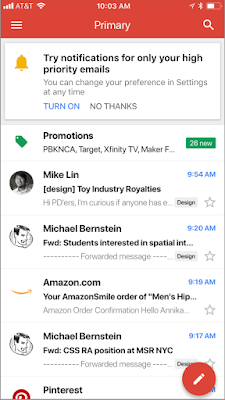
Google claims that these new notifications will use Gmail’s advanced machine learning and artificial intelligence algorithms to learn which emails you may want to read first. If you’re an iOS Gmail user, Google has laid out the following instructions for you to try out the new high priority email notification setting:

“To enable the feature, select “High priority only” from the Notifications drop-down in the settings menu of your Gmail iOS app.”

Image via: Google

For anybody who feels overrun by the constant pings coming from their phone, this will be a great feature. If Google can get this right, there will be a lot of people clicking enable. This will be tricky to get right, however, as if it filters out essential emails it will be impossible to use and next to useless. We’ll be trying this new feature out over the next few days to see how it works, and keeping an eye out for an Android release date.

Let us know your thoughts on the important notification feature for Gmail in the comments below.

9 out-of-this-world features on your favorite apps that NOBODY knows about

Our favorite apps are updated almost every week. The bad news is that these updates usually go unnoticed. Did you know that Facebook helps you look for public Wi-Fi? Or that Gmail can write your emails for you? So you don’t miss out on the best new features on your favorite apps, we’ve compiled the best updates in recent months. 

1. Gmail writes your emails for you

Gmail offers an option called “Canned Responses.” This feature saves messages or phrases that you use most often and suggests them when you draft an email, saving you time.

Want to enable this option? You have to go to the settings section in Gmail called Labs. Gmail Labs is a testing center with “far-fetched” experiments (according to Google) of all kinds. You can access Gmail Labs here.

The feature you’re looking for is called “Canned Responses” and all you have to do is click on “Enable” and then “Save Changes” at the bottom of the page. 

Next time you compose an email you’d like to save as a canned response, click the little triangle on the lower right-hand side of the screen. That opens a menu with an option for “Canned responses.” Just move over and click “Save” if you’d like to save that email so you can fire it off again someday.
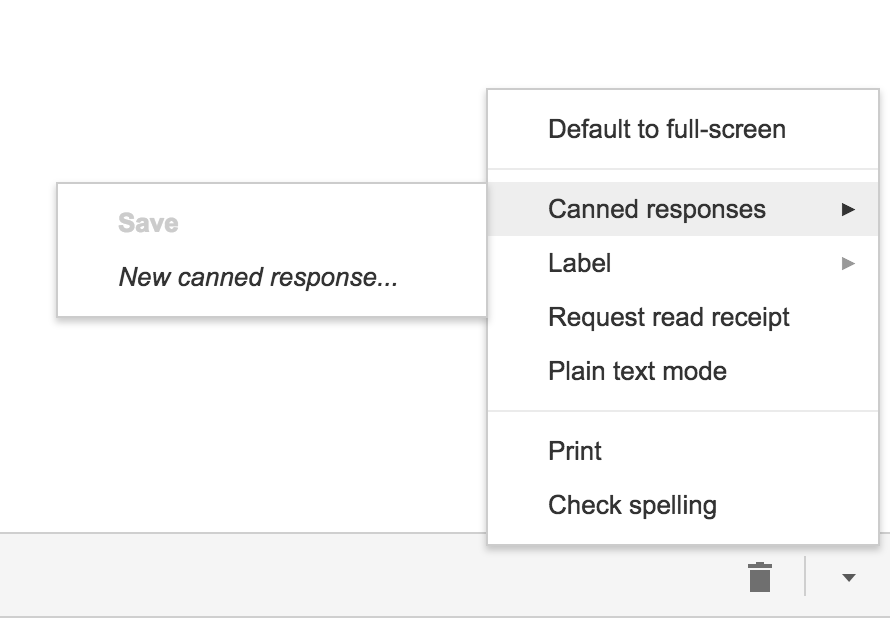
You may have noticed a basic AI version of this at the bottom of messages you read on the Gmail app on your phone. They look like this:

2. Gmail’s most invisible feature

It’s unlikely that you’ve noticed this Gmail update because it’s designed to go unseen.

Haven’t you noticed lately that you’ve received fewer spam emails with suspicious links? Gmail has enhanced its ability to detect and delete this type of email even before it reaches your inbox. It’s not yet 100 percent foolproof, but it’ll keep you safer than before.

3. Make wish lists on Google Maps

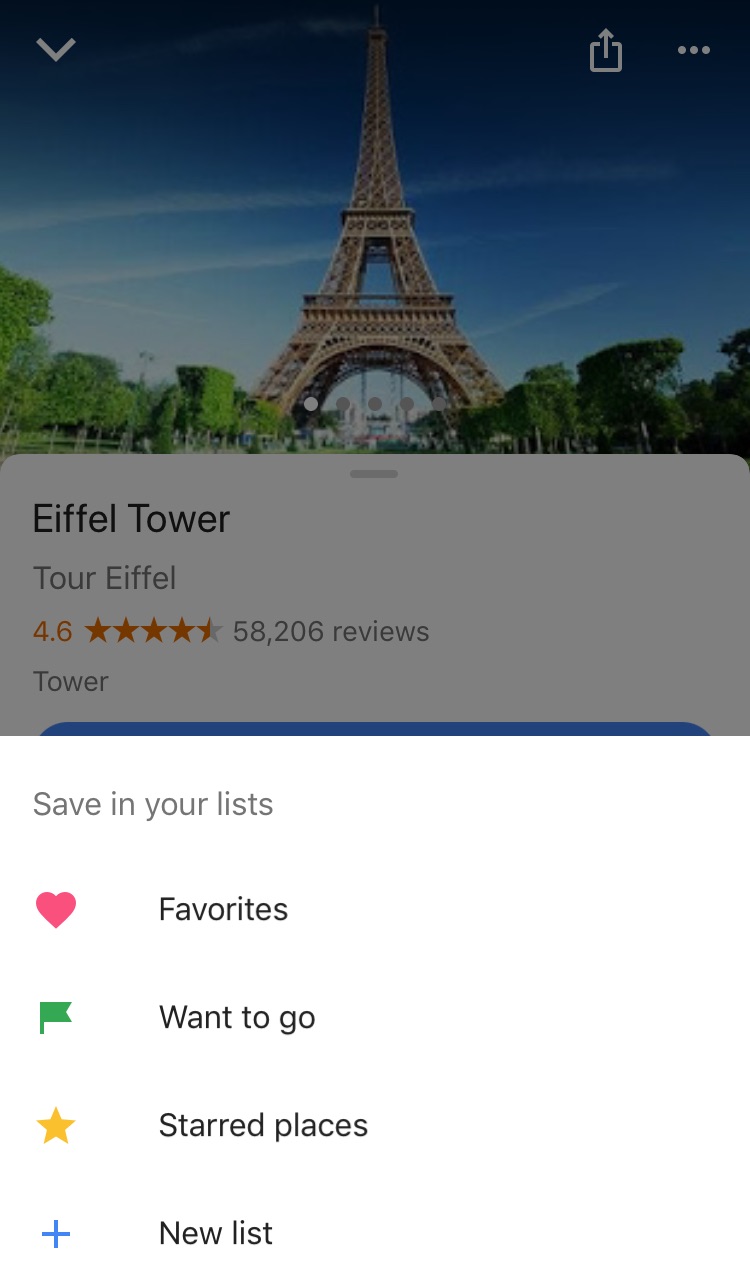
Google Maps lets you make lists of places you’d like to visit. Imagine that you’re planning a vacation to Paris. You can make a list of those museums, restaurants, and attractions that you’d like to visit. And you can share the list with those you’re traveling with. Or with anybody, for that matter!

Google Maps users are making the most of this feature to share recommended places or themed attractions. To use this feature, it’s as easy as pinpointing a place in the app, clicking “Save” and choosing the list with the green label that says “Want to go.”
4. Share anything with WhatsApp

WhatsApp lets you share any file type (mp3, videos…) between contacts provided that these files do not exceed 100MB in size. Instead of sending 100 photos one-by-one, why don’t you send them as a .zip file, for example?

5. WhatsApp gets their act together…kind of

It’s taken a while, but WhatsApp now has filters, like Instagram and the rest! At the time of writing this article, there are just five filters and they’re only available on iOS; no news on when they’ll arrive on Android.

6. Facebook helps you find Wi-Fi

Facebook has a relatively new feature called “Find Wi-Fi.” It’s a little bit hidden. First you have to click on the three horizontal lines on the lower menu bar. Click on “See More.” There you’ll find it and you can enable “Find Wi-Fi.”

After enabling it, Facebook will show you a map with the closest Wi-Fi hotspots as well as details about these hotspots, like which businesses they belong to.

7. Download movies and TV series from Netflix

Taking a plane somewhere? Bring your tablet packed with your favorite Netflix movies and shows! Not all Netflix offerings are available: pay attention to the download icon that appears on the TV series or movie listing. Amazon Prime also offers this feature.

8. Spotify Codes

Spotify has a feature called Spotify Codes. Have you noticed that below songs, playlists, and albums, there is a barcode in the shape of a sound wave? If you don’t see it, click on the three dots to access Spotify’s advanced options.

You can exchange these sound codes with your friends and they only have to open the Camera feature within Spotify for apps to scan them.

Also, Spotify Codes are an excellent way for artists to become known, as they can insert their codes on social media so the rest of the world can quickly access their songs.

9. Muting on Twitter

Got some people on Twitter who won’t stop spoiling your favorite TV series or spewing goofy conspiracy theories? Don’t want to block them because sometimes you talk to them and some of their Tweets are interesting?

Twitter now lets you mute whoever you want. Muting means that their messages will not appear on your feed, all without their knowledge. You’ll receive notifications if they mention you in a Tweet or if you receive direct messages from them. And you can check their Tweets when you feel like it.

Muting is as easy as clicking on the “down arrow” on one of their Tweets. You’ll see this option, among others.

Have you found any hidden features you’d like to share? Let us know in the comments!
 

Google Translate gets a new AI boost no matter where you are

If you use Google Translate a lot, you’ll have probably noticed that over the last couple of years the translations it offers have improved a lot. The reason Translate got better at its job is machine learning. AI algorithms, specifically named neural machine translation (NMT), have allowed Google Translate to offer much more accurate translations.

Google Translate Download now
8

For the last two years, however, there has been a catch in that the NMT has only worked when happening on Google’s hardware. In short, it only works if you’re connected to the internet when you’re using Google Translate

Google Translate offers language specific download packs. If you think you’ll be offline or if you don’t want to use international roaming you can download a language pack and use Google Translate when you’re offline. Although useful, this phrase-based machine translation (PBMT), as Google calls it, falls short of the NMT available if you can connect to Google’s servers.


On-device AI translations much better than the old PBMT but not as effective as AI translation done on Google’s servers


Google has now announced that it is bringing a version of NMT to mobile devices. You’ll be able to benefit from AI assisted translation even if you’re using a downloaded language pack and you’re not connected to Google’s servers.

Amazingly, Google Translate language packs only take up 35-45mb of space, so they’re well worth having. Google points out that the on-device version of NMT still isn’t as effective as the online version but that it is much more accurate than the previous PBMT method. Google says it will be rolling out the new On-device NMT in 59 languages in the next few days and offered these instructions to those wanting to take advantage of it:

“To try NMT offline translations, go to your Translate app on Android or iOS. If you’ve used offline translations before, you’ll see a banner on your home screen which will take you to the right place to update your offline files. If not, go to your offline translation settings and tap the arrow next to the language name to download the package for that language. Now you’ll be ready to translate text whether you’re online or not.”

Offline translation is a really useful feature. If you’re low on data, traveling abroad, or you’re simply prudent enough to want to take advantage of Wi-Fi whenever you have it these new On-device AI algorithms will make a big difference to your language translations.

Error 404, etc: what the most common errors mean on Chrome, Firefox and other web browsers

Image via: Pexels

Error 404, error 401, error 500… Sound familiar? If you regularly browse online, you may have encountered them, since they are the most common errors that appear on Chrome, Firefox, Opera, and other web browsers. To help you out, we’ve made a list of the top errors and explained what they mean.

7

Before we get started, what’s an HTTP error?

HTTP errors occur when you want to go to a web address and the browser isn’t able to access it, which can happen for different reasons.

The most common types of errors start with the numbers 4 and 5. Although there are error codes that start with 1, 2 and 3, you’re unlikely to encounter them when browsing.

These error numbers are usually followed by a short explanation, but they don’t give you much information. So, we’ll give you the full scoop on each of them below.

What the most common HTTP errors mean

Error HTTP 404 (Not Found)

This error means that the page you want to access doesn’t exist at the moment. This may be because you incorrectly entered the web address or because the page owners deleted it. It’s possible that a page showing a 404 error won’t have one later on, which means it’s come back online.

Error HTTP 403 (Forbidden)

This error shows up when you try to access a prohibited web page, i.e. one that isn’t accessible to the public. For example, a database, a backend code (that programmers work with) or a page exclusively for subscribers.

Error HTTP 401 (Unauthorized)

This one is like the 403 error, but it happens when there’s an authentication failure (for example, on the form to access editing of a website). No page should ever show this error, unless it’s for internal use only and isn’t public-facing (for example, a company’s intranet).

Error HTTP 400 (Bad Request)

This error appears when the page you’re trying to access isn’t able to make sense of your request. This usually happens because of a client error or a web address with an invalid format.

7

Error HTTP 500 (Internal Server Error)

This refers to an error with the internal server you’re trying to access. It could involve different issues related to that server, such as incorrect configuration or an overflow of requests.

Error HTTP 503 (Service Unavailable)

The server can’t respond to the browser’s request because of too much traffic or maintenance. This is usually fixed after a few minutes, especially in the second case.

Error HTTP 504 (Gateway Timeout)

This error means the wait time to return the web page has run out. This may be due to a server error (for example, it’s gone offline) or because the web page has a code that never finishes executing and produces a loop.

Error HTTP 509 (Bandwidth Limit Exceeded)

This error indicates that the web page you want to access has exceeded its bandwidth. This primarily happens on web pages with a cheap “hosting” service that doesn’t allow large volumes of traffic.

So there you have it! May all your webpages load flawlessly and may you never encounter these numbers. And if you do, feel free to refer back here so you know why you’re disappointed.


Things you didn’t know you could do with Google Drive

Are you familiar with Google Docs? If the answer is no, you’re missing out on one of the best services available today. Google has dozens of online tools. You don’t have to install anything on your PC. And best of all: they’re free, so you can use them just by having a Google account. And even if you’ve used the service, you may not know all the amazing tools you have access to. Today, we’re bringing you five things that you didn’t know you could do with Google Drive.

Microsoft Word 2016 Download Now
9

Compatible with Microsoft Word

If you’re used to Microsoft Word, never fear: you can open, edit and save Word files simply by using a Google Chrome extension. With it, you can convert documents from Word to Google (and vice versa) in a matter of seconds. The geniuses of Google have introduced excellent compatibility in their products, regardless of the file format. It’s a win-win situation.

No need to save

Google Docs save everything automatically. Every second. Even while you’re writing. If your laptop battery dies or your power goes out or your cat dumps your Big Gulp all over your PC, all the progress on your precious manuscript will be safe. 

Boost teamwork

With Google Docs, you can work as a team simply by adding email addresses of your colleagues. The best part? They can also write and edit in real time. So, maybe you’re working on one paragraph and your coworker on another. Each user appears in a different color, with everything well marked.  You can even leave notes in the margins for your colleagues to consider.

Google Drive Download Google Drive
7

Write from anywhere

Obviously, Google Docs is connected to the internet, so just by having an online connection, you can access the documents. Click on the corresponding folder and you’ll see your file (or files). So it’s easy to pull up all of your documents wherever you are. Make last-minute edits while you’re on the train or spruce up your resume while you’re stuck in the waiting room at your dentist’s office. As long as you’re online, you can be productive.

Add-ons

These are virtually unknown by users. Just like Google Chrome has extensions, Google Docs have add-ons. These take all the features of Docs to a whole new level. The possibilities are endless: formatting tables, instantly translating any phrase, or even adding fonts (beyond the default ones), and many more. Check out these add-ons and see how they can improve your end product. We promise that you’ll discover things you never knew about before!


Does Instagram want to take on YouTube with longer videos?

According to The Wall Street Journal, Facebook is considering removing video length limits on Instagram. The change would mean that people publishing videos on Instagram could start sharing videos up to an hour in length. This is yet to be confirmed, however, as the report in The WSJ says that the big wigs at Instagram are still on the fence and may decide against the change.

At the moment, there is only one way to share videos longer than a minute on Instagram, and that is by live streaming. Other than that, videos in Instagram Stories can be up to 15 seconds, with main feed videos having the one minute limit.

Instagram Download Instagram
7

Instagram Stories has been very successful, with Tech Crunch reporting over 300 million daily active users of the feature back in November. The Stories feature allows users to upload temporary narratives that can include images, stickers, and videos. Many people see it as a direct knockoff of what Snapchat offers, and it looks now like Instagram might be about to start copying YouTube too.

This move towards longer video makes sense for Instagram, and The WSJ reported that they’ve already started discussing partnerships with professional content producers. Facebook has long been pushing premium video content, but with younger users preferring Instagram to Facebook, these efforts will have escaped millions of social media users. If Instagram decides to push ahead and remove video time limits, it’ll surely be a bid to recapture this younger audience and earn the higher yield ad revenues that come with longer video content.

The decision is still very much up in the air, but according to the WSJ report, if Instagram does make the change, users won’t need to download a new app. The longer form videos will be hosted on the main Instagram app.

Would you like to see longer videos on Instagram?