How to download all your Instagram data

Facebook’s privacy scandals have caused millions of users around the world to worry about their security on social networks. Many have gone to the extreme, deleting their profiles. If you’re thinking of doing this on Instagram, first let us show you how to download all your Instagram data in one click.

Instagram Download Instagram
7

What is downloaded

When we access this part of Instagram, the app gives us a file with all our uploaded photos and videos, as well as direct messages, comments, profile info and saved stories. In other words, Instagram has all your activity on the social network, which you can get nicely organized in a file. 

How to download it

Although you may think it’s been available for a while, this feature was launched on the social network relatively recently. To access it, you can either use the mobile app or the PC website. But there’s a key requirement for both: logging into your account (obviously).  

Once you’ve done that, go to this webpage. You’ll see this message: “We’ll email you a link to a file with your photos, comments, profile information and more. We can only work on one request from your account at a time, and it may take up to 48 hours to collect this data and send it to you.” Instagram stipulates a few days, depending on how much you’ve used the app. The more activity, the more difficult to collect all the data.

Once you’ve read the disclaimer, you’ll see that the “email” listed is the one you registered with on the social network. Click “Next,” enter your password and confirm “Request download.”

Ta-da. That’s it. In general, the file usually appears in your inbox within 24-28 hours, though as the previous message makes clear, it could take a month and a half. 

Google gets into Podcasts

Google has a brand new podcast app, but it is not like all the other podcast apps out there. In fact, it is only available for Android users and is built into the Google app. If you’re an Android user, you won’t need to download any new apps or software. You’ll just be able to start using Google to listen to your podcasts.

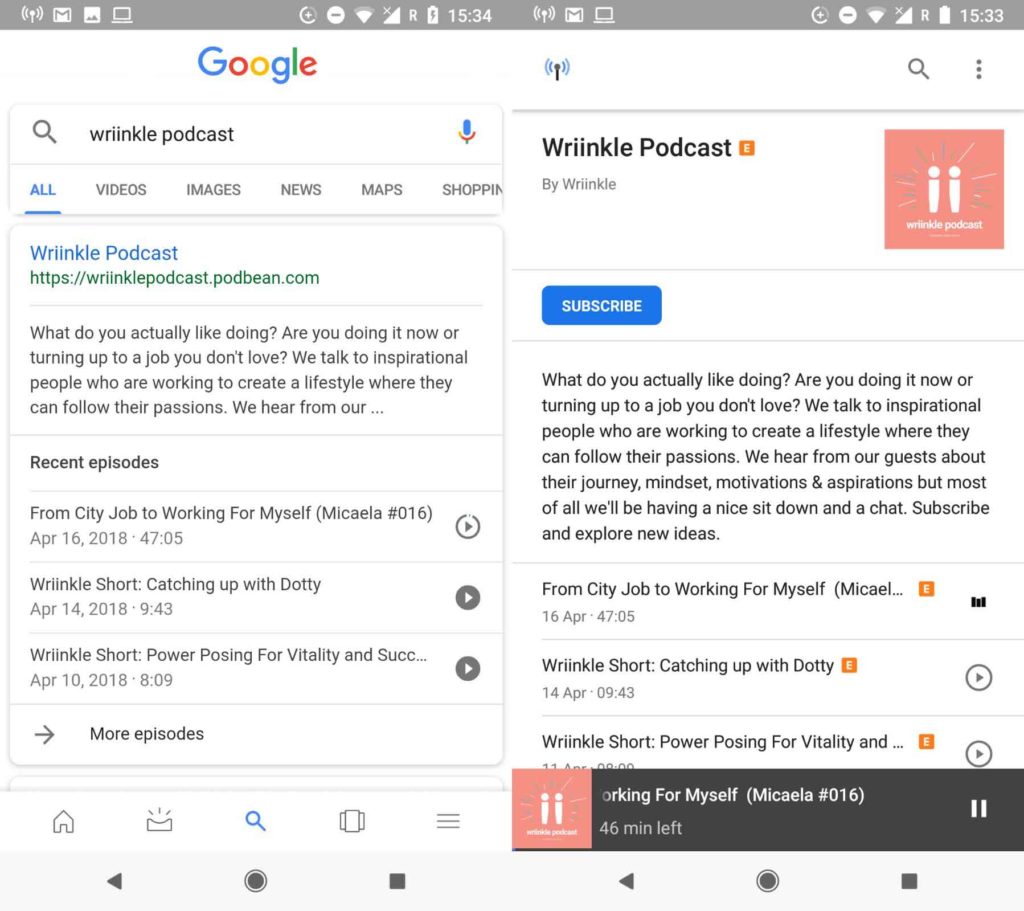
All you have to do to start using the new Google podcast “app” is to search for your chosen podcast using the Google app or Google Assistant. You’ll then find all of the info relating to the podcast, including a list of recent episodes that you can start playing right away by tapping the play button.

Google App Download Now
8

Once you click on the search result, you’ll be taken to the podcast’s page. Here, you can subscribe to the podcast and download episodes for offline listening. You’ll also find a podcast icon in the top left of the page, which will take you to the Google podcast “home page.”

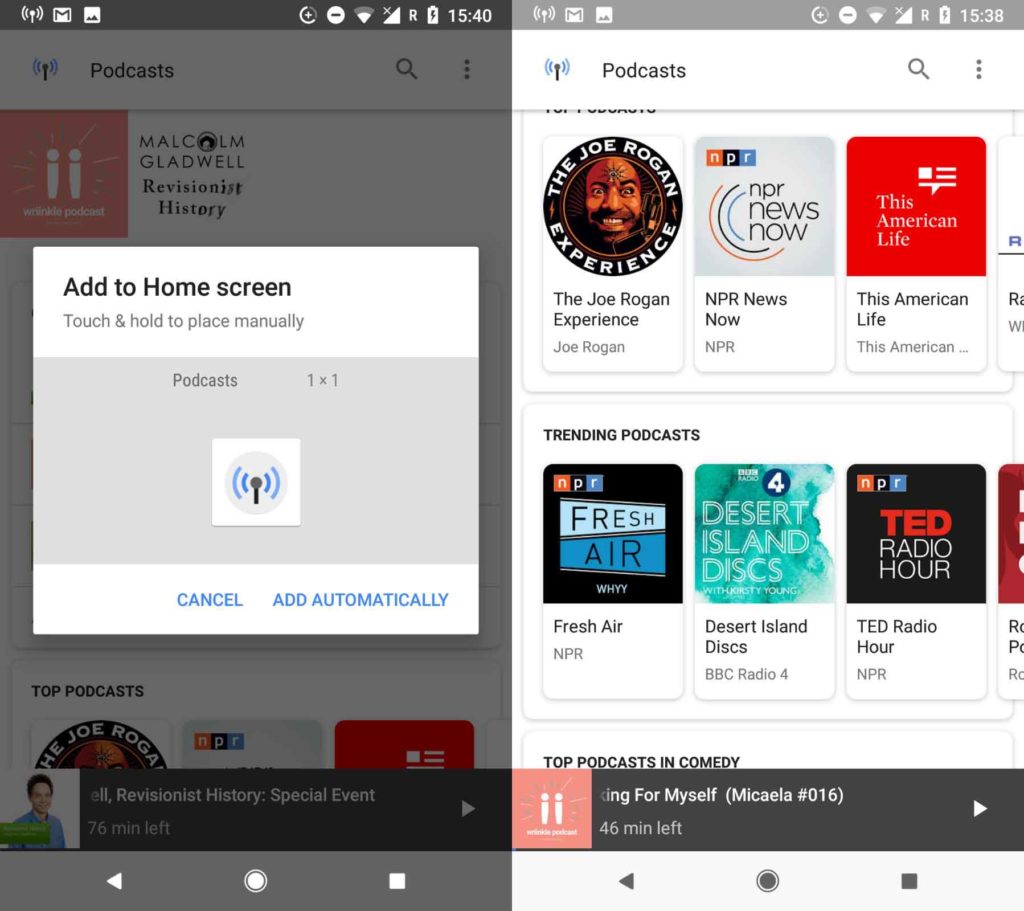
This homepage resembles more established podcast apps. It allows you to search for podcasts, resume listening to the episodes you haven’t finished, view top and trending podcasts, search through different categories, and keep track of the podcasts you follow. Another cool option is that you can create a home screen icon for the new podcasts app and even create particular icons for individual podcasts.

When you’re playing your podcasts, you can skip forward and back in 10- and 30-second increments. The whole experience is pretty lightweight, but overall, it is straightforward to use and does a great job. If you’re an Android user and you listen to podcasts, it is definitely worth checking out. It’s already on your phone, so it should be easy enough. Even if you’ve never listened to a podcast before this new offering from Google gives a simple and intuitive way to get started.

So far, there has been no news from Google about whether or not this will be coming to iOS.

Big things coming to Netflix

Source: Mark Wilson/Getty Images.

From Stranger Things to releasing an entire TV Series at the same time Netflix has never been afraid to try new things. The strategy has been successful as Netflix has a whopping 117 million paying subscribers. With Netflix flying high, it’ll be no surprise that they’re continuing in their efforts to innovate and bring the biggest names to their online streaming platform.

The latest of Netflix’s new efforts come in the shape of gamification. Netflix has rolled out, to test audiences, the addition of Netflix patches to certain Netflix original shows, namely Netflix Original shows for kids. The idea is to offer kids virtual prizes for watching episodes of certain shows on Netflix. Do you think your kid will want to collect all the Netflix patches?

Another effort from Netflix, which is arguably much bigger than virtual patches, is the streaming service’s attempts to sign Barack Obama to produce a show. Obama has already appeared on Netflix, as a guest on David Letterman’s show My Guest Needs no Introduction, and a Netflix show would give President Obama a chance to communicate with the 117 million people around the world who have signed up to Netflix. We’d love to hear your ideas for Obama’s Netflix show in the comments below.

Bose wants to augment reality with sound

Source: Raymond Wong /Mashable

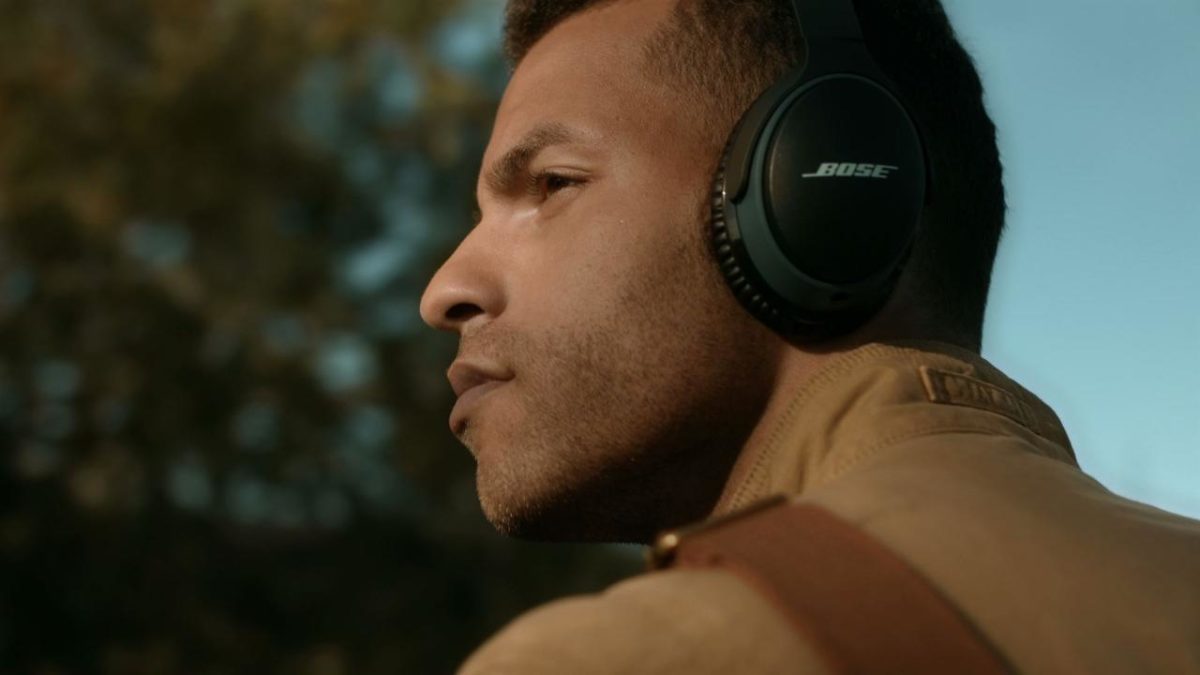
These days when people think about augmented reality, they think about Pokémon Go, Google Glass, or even Ikea’s app that lets you see what furniture would look like in your living room. When people think about augmented reality, they think visual augmentation. High-end speaker and headphone manufacturer Bose want to change that. Bose wants to start augmenting reality with sound as well as images.

To do this Bose is developing augmented reality sunglasses that will give the wearer audio cues about whatever it is they’re looking at. What is even more impressive is that the glasses don’t use cameras at all. Instead, Bose’s glasses use onboard sensors and precise GPS data to understand what the user is looking at so that they can then pass relevant information through the two directional speakers built into the stems of the glasses.

As well as the glasses, Bose is also investing $50 million into a fund that’ll promote the development of the AR platform itself. Already signed up to the platform are giants like Srava, TripAdvisor, TuneIn, and Yelp, but Bose also hopes hardware developers will a start looking at making their own accessories that will take advantage of the Bose AR system.

If this catches on, it could be huge!

No needle, no problem

Source: The Verge

Lead: You’ll soon be able to scratch that DJing itch without an expensive or temperamental needle.

DJing was once derided by fans who couldn’t see the attraction in people playing other people’s music. But since the dawn of disco and through the ascendancy of Hip-Hop, House, Techno, and whatever the latest and greatest forward thinking minimal music genre will be, DJs have become the kings and queens of the party. Everybody wants to be a DJ.

Being a DJ used to mean carting round boxes of records with you everywhere. Then things went digital, which meant a USB pen and a pair of headphones was enough unless you wanted to scratch that is, which requires the record player needle to feel the musical grooves of the record and be dragged back and forth across them. There was a technical solution for that, however, with timecode vinyl allowing the needles to pick up how long a record had been playing and then transmit the data to a laptop that would blast out the music at the corresponding moment.

Needles can be expensive and temperamental, raising problems for DJs. Problems that a brand new device aims to solve. The Phase, which will cost around $300, is a pair of sensors that are placed on the turntables. The sensors send information about their movements to a receiver that then works similarly to the software playing timecode vinyl. With early demos showing no lag and impressive responses, even to complicated movements, The Phase could be about to make scratch DJing cheaper, and easier while also addressing some key industry issues for pro DJs.

All the Best Free Software for your PC

You spend hundreds of dollars on your brand new PC, and then what happens? You have to go and spend even more money on all the software you need, to do the jobs you bought the PC for in the first place. Never mind what you bought the PC for you have to buy programs just to protect your new PC from viruses and malware.

Well, do not worry because there is a lot of free software you can get your hands on to help you out. You can get free software for Windows 10 you can get free software like Microsoft Word, you can get free software for editing photos, you can get antivirus free software and even free software for video editing. You don’t need to spend a lot of money on expensive programs for your new PC. There are plenty of free programs for PC so let us have a look at some of the best now:

Best free programs for PC

1. Best antivirus free software: Avira Antivirus

Avira header

Avira Free Antivirus offers a broad range of security features that add up to offer the best free antivirus software you’re likely to find. As well as strong antivirus scan and protection facilities Avira offers some great features like safe shopping searches, system speed up and a VPN. This is the best free software download for PC you’ll find and one of the most important. To learn more about Avira Click Here, otherwise…

Avira Free Antivirus Download Avira
8

2. Best backup free software: Google Drive

Google Drive wants to be the Ultimate Backup and Sync Tool

These days you need to do more than just install a free antivirus program to keep yourself safe. Ransomware is a modern threat that sees your data being stolen and then held for ransom. This means if you’re going to download free software you need some to get some backup free software for your computer. Free software downloads like Google Drive are essential. Drive will give you 15GB of free space to keep all of your personal data safely backed up. You need it now!

Google Drive Download Google Drive
7

3. Free software like Microsoft Office: Libre Office

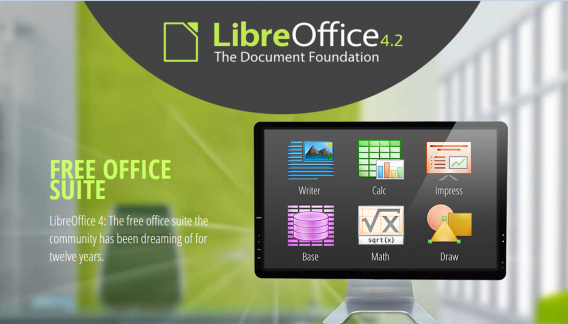
LIbreOffice header

Almost everybody needs to use programs like those found in the Microsoft Office suite so a top priority must go to getting the free software download for PC of Libre Office. Libre Office is an open source productivity suite that rivals Microsoft Office and even has programs, like Math and Draw, that can’t be found in the expensive Microsoft offering. If you work in an office this is an essential free program to download.

LibreOffice Download LibreOffice
7

4. Media Player: VLC Media Player

vlcHEADER

One of the best free programs for PC is VLC Media Player. It is one of the most popular programs in the world and carries the codecs required to play almost every kind of video file. Once you’ve downloaded VLC you will be able to play almost any type of video you can find. As well as offering a complete video playback solution VLC has plenty of other features and you can check out 5 of the best here.

VLC Media Player Download VLC
8

5. Free software for photo editing: GIMP

Do you want the photos you share to be breathtaking - GIMP

If you want free software like Photoshop you should look no further than GIMP. GIMP stands for GNU Image Manipulation Program and it is almost as powerful as Adobe Photoshop. With this free software editing becomes possible for all. Whether you’re merely touching up an old image or creating a brand new one, GIMP offers you a complete set of tools to take care of whatever editing job you have in front of you. GIMP may be the best photo editing free software but we’ve also put a list together of 5 free photo editing programs. Check it out here.

7

6. Free software for video editing: Lightworks

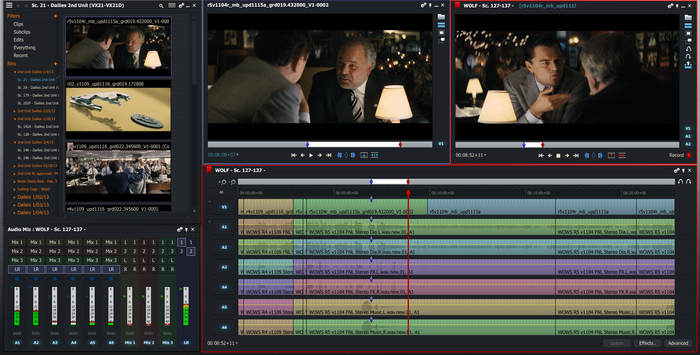
5 Free Programs for Editing Videos lightworks

Lightworks is available on many free software download websites but you can get it right here. It is one of the best editing free software programs you can get and is used by professionals as well as amateurs. If you’re a budding video editor or director this is great free video editing program for you to download. For info on other free video editing programs click here.

Lightworks Download Lightworks
7

Follow me on Twitter: @PatrickDevaney_


How to watch WMV files on Mac

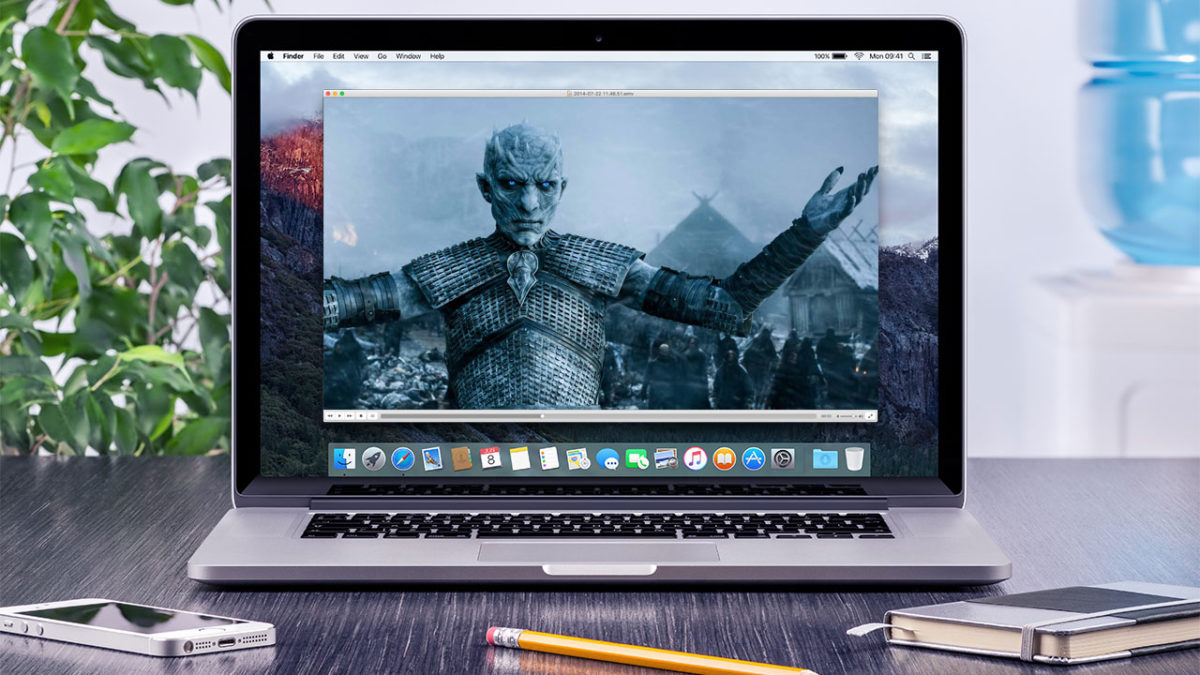
A very common problem Mac users have is playing Windows Media Video (WMV) files. When your Mac attempts to open and play WMV files by default in QuickTime, you’ll commonly receive an error message along the lines of ‘This is not a movie file’.

The reason behind this it the fact that WMV files use Microsoft proprietary codecs that don’t work in OS X. This gets really annoying if you come across a WMV file and want to watch it on your Mac.

Microsoft discontinued Windows Media Player for Mac way back in 2006, meaning there’s no longer a tailor-made player for the WMV format for OS X. Fortunately, there are a few free and easy solutions.

Option 1 – Use a Mac Video Player that Supports WMV

The good news is that there are plenty of simple and useful choices when looking for a wmv player for Mac. There are dozens to choose from in our catalog, but below we’ve selected the top 3 WMV compatible players for you.

flip4macFlip4Mac Plugin

This is probably the easiest solution to watch WMV files because it enables QuickTime playback of WMV files.  This plugin, created by Telestream, allows you to import, export and play Windows Media video and audio files on your Mac. The Flip4Mac WMV plug-in also works with other QuickTime based apps like iMovie and Final Cut Pro, meaning you can even edit WMV files on your Mac too.

Download Flip4Mac Plugin

VLC-media-player-iconVLC Media Player

The most versatile player out there, VLC media players lets you play WMV files without the Flip4Mac Plugin, although it’s only a playback solution; it doesn’t let you edit WMV files in QuickTime supported apps including iMovie and Final Cut. The great thing about VLC Media Player, however, is that it’s lightweight, fast, and can handle almost any media format you throw at it.

Download VLC Media Player

Get More With These 5 Expert Hacks for VLC Player

MPlayerOSX

MPlayer OSX

This player emerged out of the Google Codes project as an attempt to create an all-round player. MPlayer OSX is a simple but powerful video player designed specifically for Mac and can handle WMV playback. It features more options and preferences than VLC Player, with the only drawback being that the first time it plays a video, it has to build a font cache, which can take a while. Luckily, it only has to be done once.

Download MPlayer OSX

Option 2 – Convert the WMV file to a Different Format

Another option, and one that is equally good is to use a tool to convert wmv to mp4 or another popular format supported on the Mac. This is a particularly good option if you’re going to want to share the video with other Mac users. Once again, there are a lot of wmv converters for the Mac in our catalog. To save you some time, we’ve hand-picked some of the best ones right here.

VLC-media-player-iconVLC Media Player

Oh, VLC, what would we do without you? Yes, if you’ve read this far then you know that VLC Media Player already shows up on our list of WMV Video Players.

But VLC is also a killer tool for converting videos of all formats, and it’s hands-down the best tool of the bunch for converting WMV to MP4 or any other major video format supported by the Mac.

Download VLC Media Player

VLC-media-player-iconTotal Video Converter Lite

Another top-notch option for converting WMV files on your Mac to another format is Total Video Converter. It features a friendly user interface that will be more comfortable to some Mac users than VLC and it supports conversions of over 160+ video format types.

The unregistered lite version is limited to converting just the first 30% of your file, however, and you’ll need to upgrade to the Pro version of Total Video Converter to complete the job.

But VLC is also a killer tool for converting videos of all formats, and it’s hands-down the best tool of the bunch for converting WMV to MP4 or any other major video format supported by the Mac.

Download Total Video Converter Lite
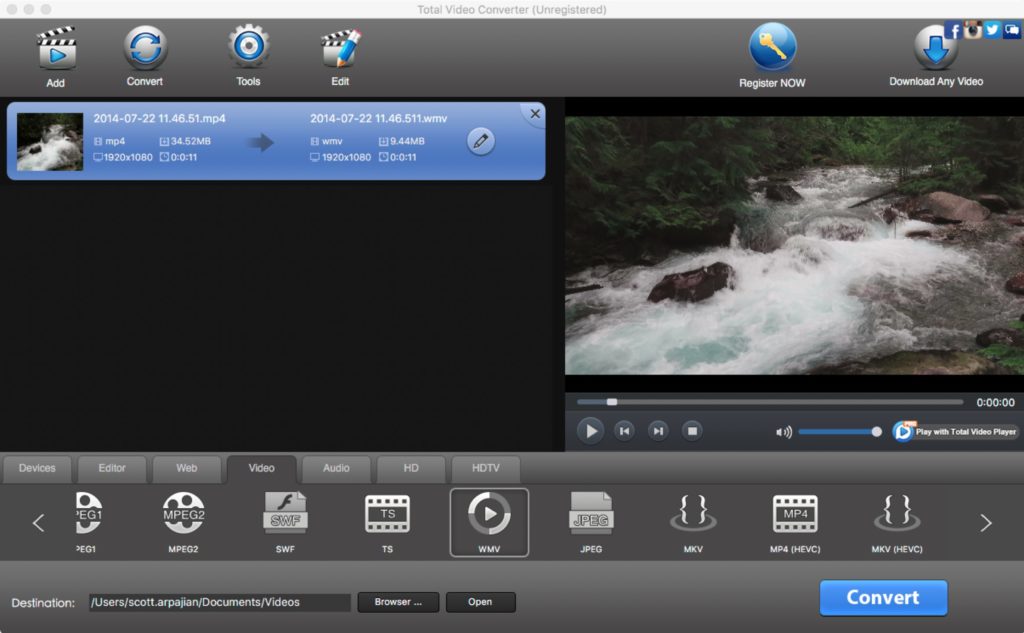
Total Video Converter Lite for Mac

Original article published on July 6, 2009.
Top 5 karaoke software for Macs

Doing karaoke at home doesn’t mean you have to buy SingStar or spend lots of money. If you’ve got a Mac, you can turn it into a karaoke machine. Although there is a definite lack of decent karaoke apps on Mac, here’s a selection of some of the better ones!

SingSong KaraokeSingSong Karaoke

A SingStar-style app without the SingStar style price tag? SingSong Karaoke might not be as powerful but it is more fun by allowing you to measure your voice against the original artist of tracks. The app is a fun karaoke game that claims to allow you to sing to any song in the world and SingSong will rate you based on how well you sing.

Dowbload SingSong Karaoke for Mac

TunePrompterTunePrompter

In contrast to more complicated programs like kJams, TunePrompter makes creating your own Karaoke videos an absolute cinch. Best of all, its absolutely free and a pleasure to use. It is supposed to be designed for use with Griffin Technologies iKaraoke hardware which unfortunately, is discontinued. However, there’s absolutely nothing to stop you creating your videos, exporting them to iPod, iPhone, QuickTime or AppleTV format.

Download TunePrompter for Mac

MidiCo Karaoke Player and MakerMidiCo Karaoke Player and Maker

This app organizes and plays many types of media files, including MDC (MidiCo File Format), KAR, MID, MP3, CDG and Zipped MP3+G. It displays karaoke and movie content in full screen mode, even on a second monitor. Karaoke Maker MidiCo is designed to be as easy-to-use as possible; you may syncronize, re-syncronize or modify synced lyrics in few minutes.

Download MidiCo Karaoke Player and Maker for Mac

QMidiQMidi

QMidi can organize and play many types of media files, including movies and CDG, and allows easy text and chords editing/synchronization. It features real time pitch shifting, time stretching and the ability to display karaoke and movie content in full screen mode, even on a second monitor.

Download QMidi for Mac

AriaAria

Aria is a slick-looking, new generation karaoke app. It’s not just a karaoke app though – it’s actually DJ software, media player and karaoke machine all in one. The app claims to have a huge library of classics and pop hits to choose from, and if you need a little help hitting the notes, Aria lets you change the key of the song to accommodate your vocal range.

Download Aria for Mac

If you’re having a karaoke party at home, your Mac is a great place to start. It’s easy to read lyrics on screen, and you can take easy advantage of your music library via iTunes. Download these apps, call your friends over, and sing your hearts out. We think you’re going to have a lot of fun!

If you like making music on iOS, check out some of the best iPad apps for the job


This article was originally published in January 2010. It has been updated to remove apps that are no longer available.

iPhone: how to send an MP3 via WhatsApp

Want to send a music file with WhatsApp for iPhone? For Android users it’s easy to send a song via WhatsApp, because it’s the operating system itself that offers the option. For iPhone users, it’s another matter.

WhatsApp for iOS allows you to send pictures, videos, contacts and geographic location…but not music. Fortunately,  sending an MP3 via WhatsApp for iPhone is still possible. All you need is the help of a free app that offers an Open With option. There are a few of these, but iZip seems to be the most suitable for our purpose.

Here, I’ll take you through how to send an audio file with WhatsApp for iPhone.

How to send audio files using iZip

1. Install iZip on your iPhone. Open the program.

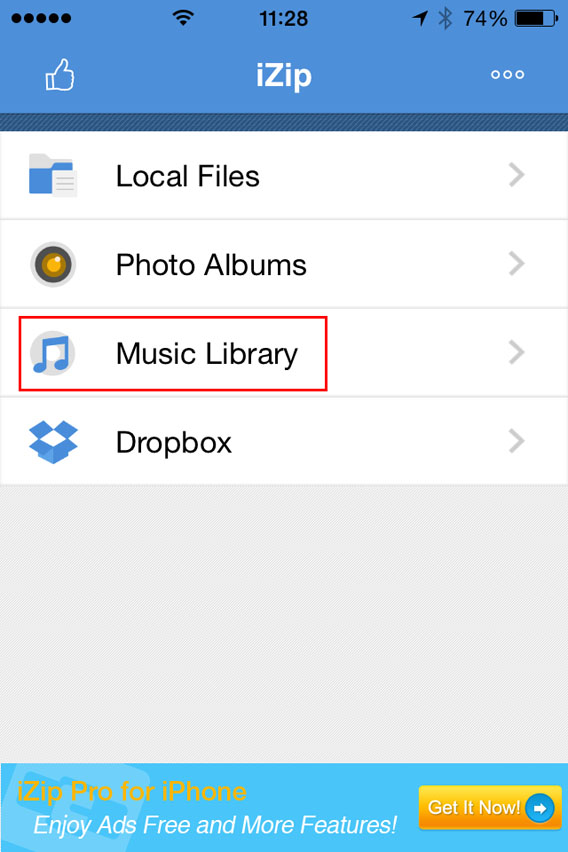
2. Select Music Library.

Select Music Library from the menu

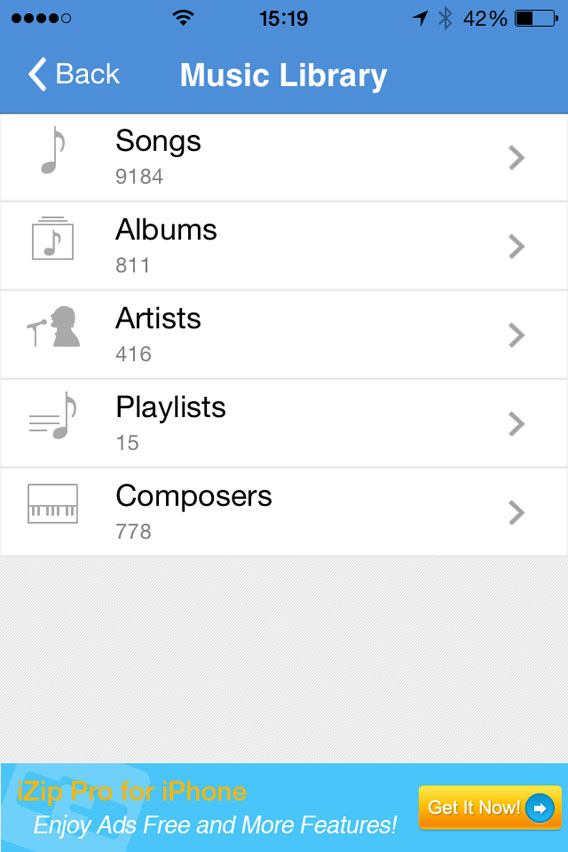
3. Open a folder (e.g. Albums).

Select a folder in the Music Library

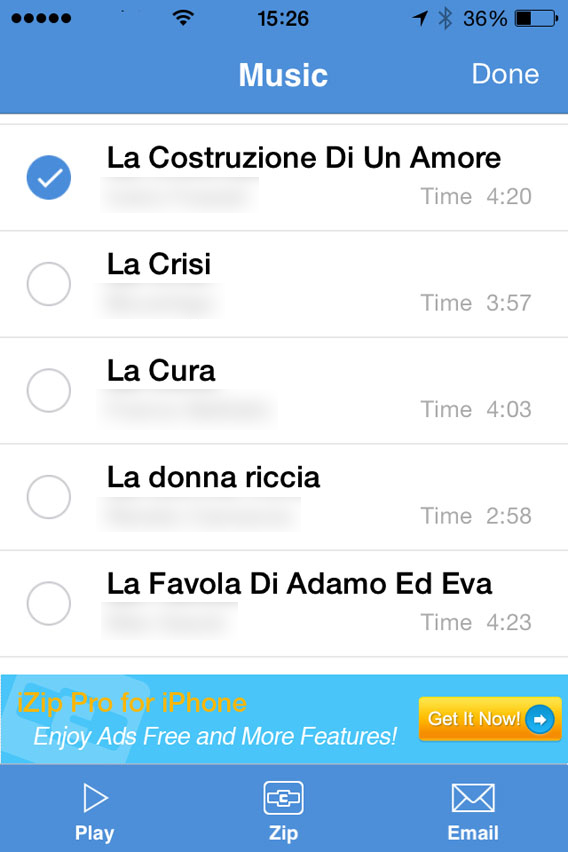
4. Tap Select in the top right of the screen and choose the song you want to send with WhatsApp. At this point, Select will be replaced by Done.

Select the song you want to zip

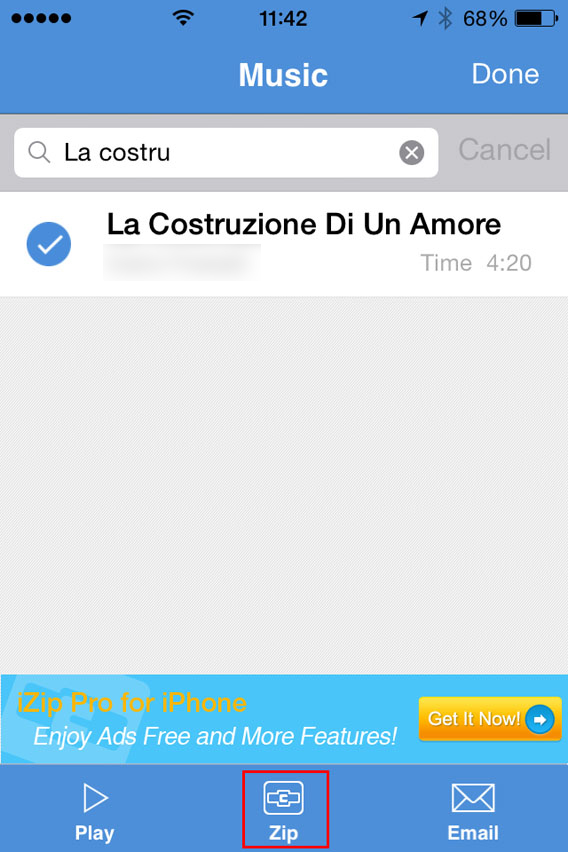
5. Tap the Zip button at the bottom center of the interface. The app will compress the file.

Select the song and then zip

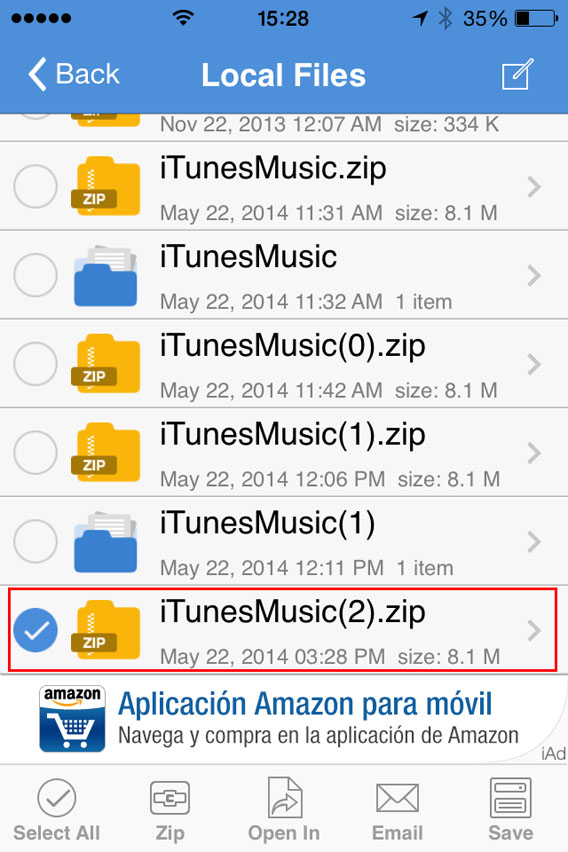
6. This will open the folder Local Files. From there, you can select the ZIP file you just created.

Select the ZIP file you just created

7. You’ll be asked Would you like to extract all files? Tap OK .

Do you want to unzip the file

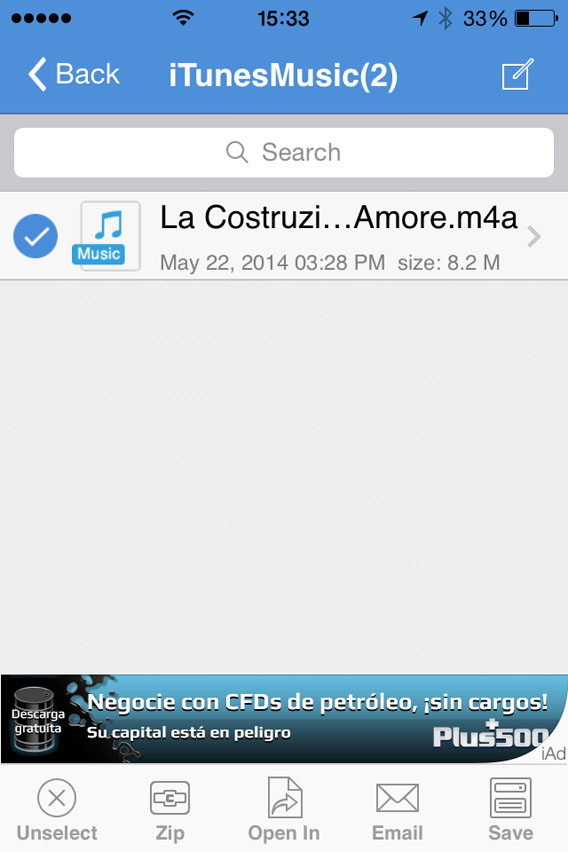
8. This automatically creates and opens a folder in Local Files with the decompressed song. Then select the file .

Select the file to be opened with

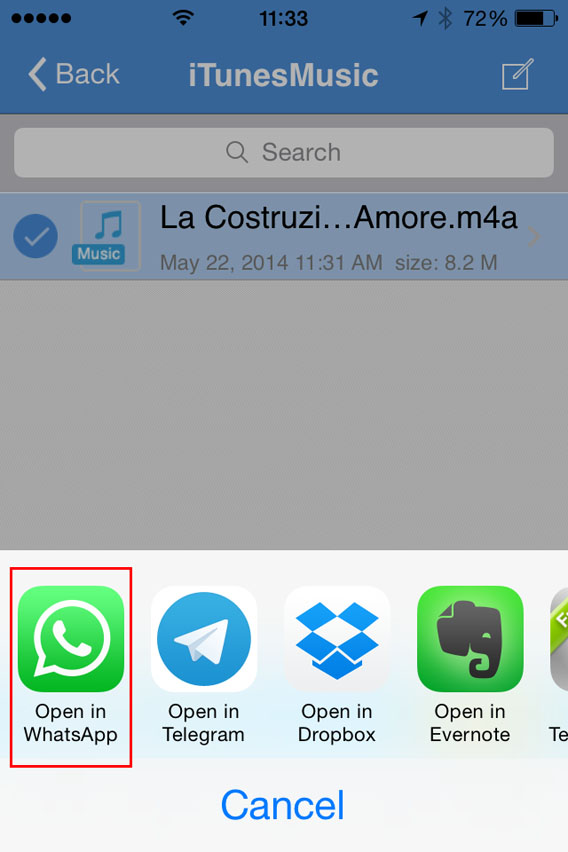
9. Now, tap Open In (at the bottom center of the screen) and, from the choices that appear, select Open in WhatsApp.

Select Open in WhatsApp

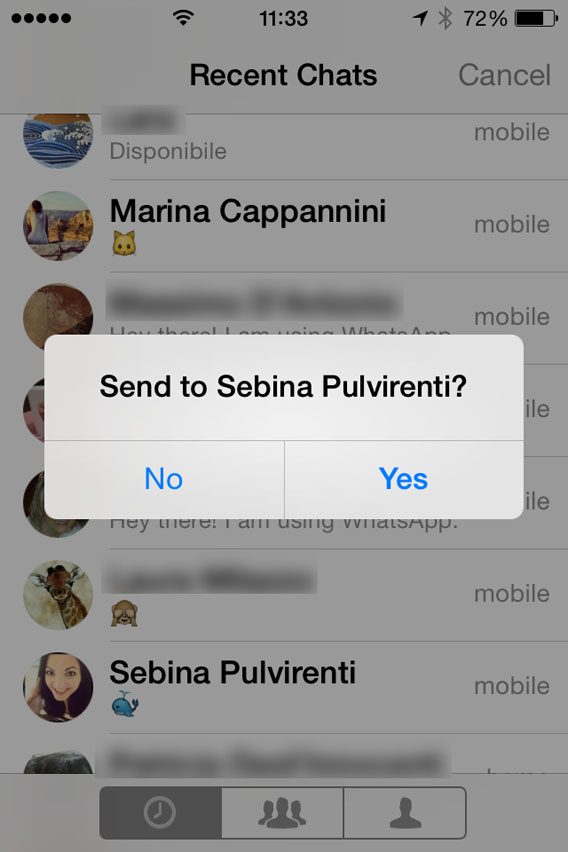
10. It will open WhatsApp automatically. Select the user you want to send the MP3 to, and when it asks you to Send to [contact name], click on Yes.

Confirmation sending files to contact

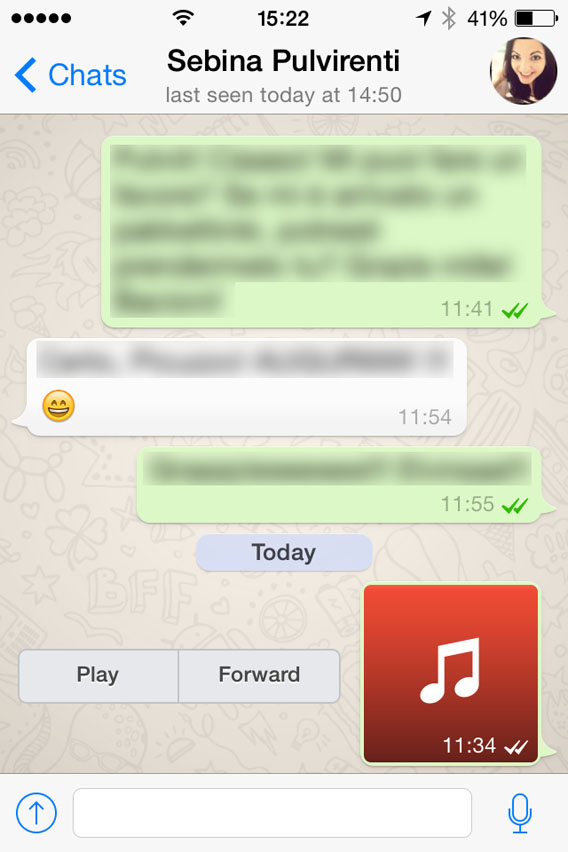
At this point, the file will load and send. When the recipient receives it, you can listen to it by tapping the Play icon next to the music file.

Listen to the file received

Beware of copyright

This method lets iPhone users exchange music via WhatsApp, even if the procedure is a bit more complicated than for Android users.Remember, however, that sharing music files protected by copyright laws is illegal, so only send audio or music that can be freely shared.

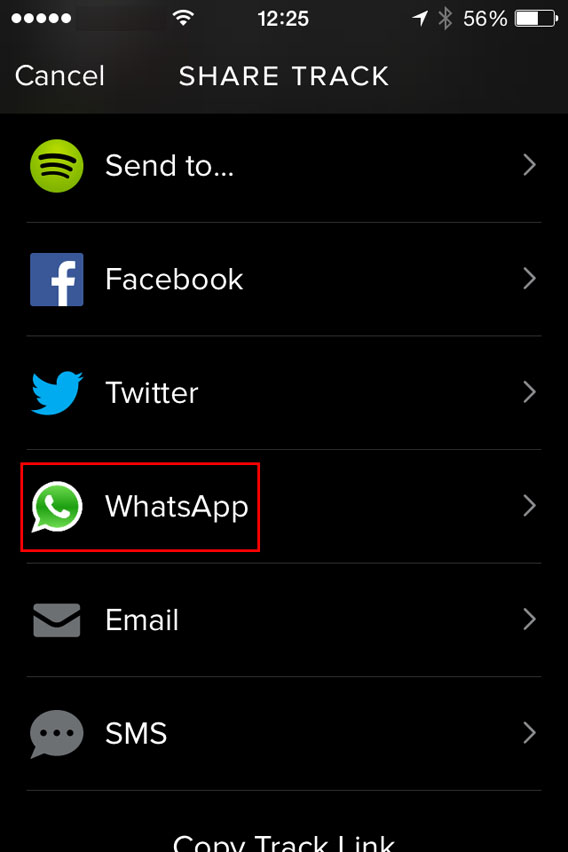
One last tip: if you want to share a new song with a friend, instead of sending the file, you can share it with them via Spotify. To do so, just find the song you like, tap the menu with the three dots next to it, and select WhatsApp.

Spotify - Share with Whatsapp

Then, select the contact, confirm you want to send it, and you’re done. Simple, fast, safe and totally legal.

If you’re looking for other tricks for using WhatsApp, look for them in the index of our comprehensive guide to WhatsApp.

Winamp is dead: 5 things we miss already

Winamp media player is no more after AOL decided to close the company on December 20, 2013, saying goodbye to 15 years of good and loyal service to the public.

For the millions of people who used this player, whose glory days were in the 90s, it’s time for some meditation. Before finally drawing a line through Winamp, here are 5 things that only true fans of Winamp will understand.

The questionable skins

Personalizing the audio player with customizable skins was, on paper, an excellent idea, and the creativity of Winamp community members knew no bounds.

In the late 1990s, download sites even provided special sections dedicated to the NullSoft audio player. From football teams to race cars, landscapes to futuristic imagery, the choices were endless.

Here’s a small selection of “skins” from the past that you’ve probably already seen online.

Winamp for Windows

99% of Winamp skins looked…questionable

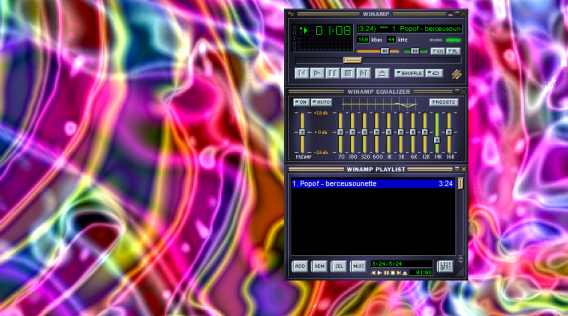
Psychedelic view modes

There’s no doubt that the “View” mode was the first thing that all Winamp fans proudly showed their friends and relatives, back in the days when animations moving in time to the music was kind of a big deal. 

Like all other Winamp users, there’s a good chance that you stayed glued to your screen at least once, trying to guess what the psychedelic sound waves would do next.

Winamp for Windows

Trippy…

The miniature player

Winamp was the mark of the MSN generation, who spent ages configuring eMule and Kazaa to settle down for hours in chat rooms, playing Minesweeper, and listening to their favorite radio station on Winamp. These people will always remember the Winamp “mini-player”, the tiny bar that controlled the majority of the music player’s options. We also remember that the “Minimize,” “Reduce,” and “Maximize” Winamp buttons were anything but clear.

Winamp for Windows

One wrong click and the mini-player wasn’t so mini

Featherweight player

Some faithful Winamp users unwisely decided to download the first versions of iTunes to try. They quickly discovered that iTunes cost patience as well as money. To download iTunes using a 56K connection, it took at least thirty minutes, time which, in those days, would be deducted from your 20-hour monthly package.

Many users can testify that opening iTunes for the first time was a shock in more ways than one. It was significantly slower than the very light Winamp, and iTunes quickly ended up in the trash. The most savvy Winamp users always maintained an aversion to iTunes. Now that Winamp’s on the way out, the most similar replacements would probably be AIMP or foobar2000.

The legendary jingle

“Winamp: it really whips the llama’s ass”. Sound familiar?!? This jingle was the catchphrase of a generation. How many of us have joyfully repeated the jingle, despite not being sure what it really meant! If you’re interested, the llama is the mascot of Winamp’s original developer, Nullsoft.

Despite the closure, all is not lost for fans of Winamp- you can still install the media player until 20 December. After this date, no updates will be released but users can keep Winamp as the default media player on their PC.

What’s the first thing that comes to mind when you think of Winamp?

You may also be interested in: