Mongolian metal exists and it sounds like this

Meet The HU: The Mongolian metal band that’s taking the internet by storm!

Mongolian metal

It doesn’t get much more metal than craving the days when your civilization conquered most of the eastern hemisphere. That attitude is the heart, soul, and blood of The HU, a band from Mongolia that’s donning the leather jackets and motorcycles of your typical heavy metal band. However, they’re pushing the boundaries with a fresh cultural edge.

The HU’s sound is distinctive, incorporating their native instruments (like a guitar called a Tovshuur or a jaw harp called a Tumur Khuur), distinctive guttural throat singing, and their harsh language into the music. Their lyrics are pretty brutal too:

“Ten of us will strike you as thunder. Hundred of us will shatter your hearts. Thousand of us will destroy and obliterate. Ten thousand of us will hand you the wrath of heaven.”

The first couple music videos the band put out went absolutely viral. Together the videos got more than 37 million views, and the number is only climbing. The HU is scheduled to tour later this year in Canada and the United States, and shows are coming to the following places:

More venues are listed on their website.

The HU music video
Never thought we’d see a Keshik horseman leading a pack of motorcycles.

The HU taps into a proud ancestry and ancient violence to rekindle a culture steeped in warfare and bloodshed. They put that fire into their music, and it comes through with the passion and anger that gives metal its bite. As one YouTuber commented, “I was listening to this while riding my bike. Now my bike is a horse.” We’re happy to see the band finding success, and are eager to hear what they churn out next!

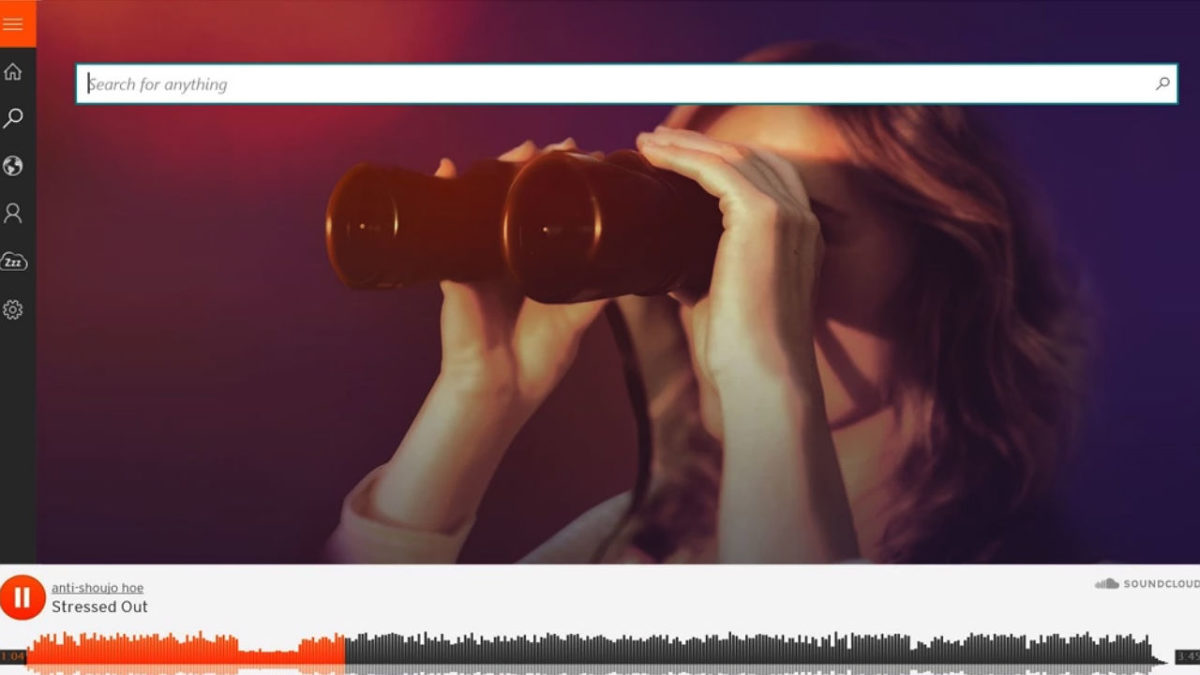
What is Soundcloud, how does it work and how to use it

Spotify may be the big dog when it comes to music streaming, but there’s a lot to like about SoundCloud!

SoundCloud is a free website and app that lets users share, collect and discover music and podcasts. It is the ideal platform to share your own musical creations and mixes with the world. All the music you upload to SoundCloud is streamable. The artist can even make the songs or playlists downloadable or redirect interested parties to a website where they can purchase the songs/albums.

The app is a great platform for discovering new artists or sharing their music with a new audience, thus growing their following. SoundCloud has a desktop version for Mac as well as mobile apps for iPhone and Android. In this SoundCloud guide, we will cover what SoundCloud is, how it works and how to start using it.

What Is SoundCloud?

SoundCloud is known as an online audio distribution platform, which simply means it is a platform where users can share music. SoundCloud was founded in 2007 and remains one of the premier artist-first platforms that is driven by a community of artists and listeners.

While SoundCloud is free to use for artists and listeners alike, a subscription version is available. If you want more freedom, you can consider SoundCloud Go. What is SoundCloud Go? SoundCloud Go is the first tier in the SoundCloud subscription and costs $4.99/month. The subscription version doesn’t contain any ads and offers offline listening options as well. 

If you are an artist, SoundCloud is a great platform to get your music out into the world and start building a global following. If you are a music enthusiast that loves staying on top of the hottest music trends, SoundCloud is a great space to find new talent.

Soundcloud

How Does SoundCloud Work?

To start using SoundCloud, you’ll have to create an account first. This can be done through the Mac desktop client directly or via the app. Once you’ve created your account, you can start listening to music or uploading your own. Anyone can start using SoundCloud to listen to music or start uploading music for free.

If you are an artist, there are also subscriptions available specifically for music creators. These subscriptions include more insights and stats, support and other opportunities. This is perfect once you’ve established your profile and are starting to grow a following.

It is important to note that you can only upload music you have rights to on the platform. This means you cannot just upload your favorite artists’ songs. The creators who hold the rights to those have to upload them.

What Is the SoundCloud App?

The SoundCloud app is a convenient way to take all your music, playlist and likes with you wherever you go. The SoundCloud app is available on both Android and iOS devices. Once you have the app installed on your phone and logged in with your account, you can take your music with you wherever you go.

How to Use SoundCloud?

To start using SoundCloud, the first thing you’ll need to do is create your account. You can do this easily through the SoundCloud website, the app or the Mac desktop client. Once logged in, you can customize your profile by clicking on your display name at the top right of the screen and then selecting ‘Profile’. Once all the basics are in place, you can use the below SoundCloud tips to get started.

Discover new music on SoundCloud

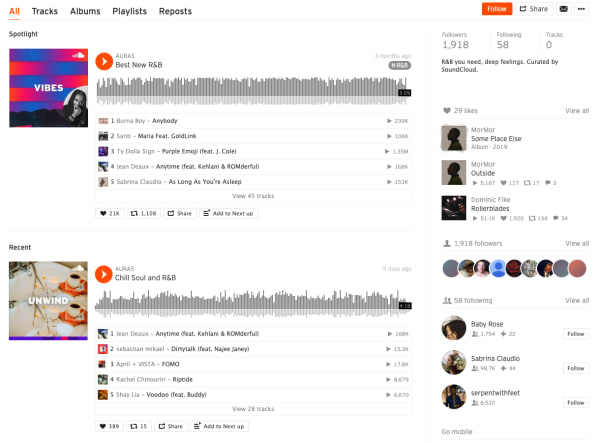
soundcloud feed

Everything is taggable, and it’s easy to bump into music similar to or related to the music you like.

Here are some of the new features included in the SoundCloud app this year:

  • Personalized recommendations
  • “The Feed” is a feature that curates an artists’ likes, follows and reposts on the platform. The idea is, it helps foster a connection between artists and listeners, giving artists a chance to share recommendations.
  • New playlists: The Morning Mourning, Drippin (new rap), and Speed Bumps (new electro), and more.
  • Communities: Genre-based pages designed to help you find new music, in a way that feels different than the Netflix or Spotify approach.

Many of the newer features aim to give users a sense of community, which certainly isn’t unique to the SoundCloud website.

Find your community

SoundCloud is aiming to position itself as a digital community. As such, they’ve introduced community profile pages, which work just like any of the other pages on the SoundCloud website. However, it aims to bring together “authentic” communities (their words).

What these community pages look like out in the wild represents something a bit different than what you’ll get from your average profile page on social media.

Instead, you can follow any of the following communities:

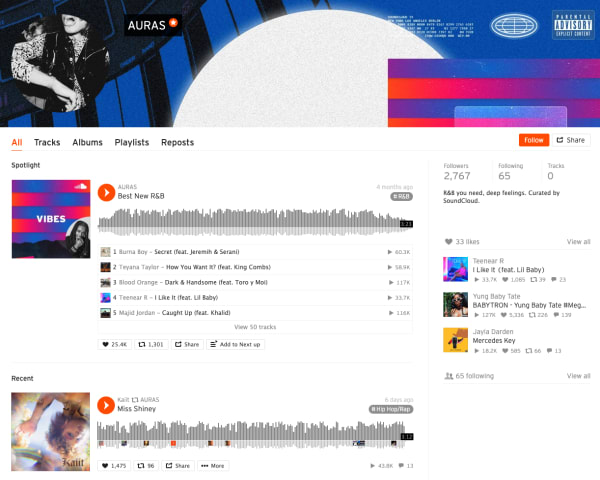
Here’s what AURAS looks like:

Soundcloud communities

As you can see, you’ll get a round-up of different playlists based on your favorite types of music.

While initially, we were a bit confused about how this feature differs from say, following Spotify playlists, it turns out that Communities are a cool way to discover new music. It is not some shoddy attempt at turning SoundCloud into, say, Facebook for music.

The community building part comes in here. Fans and creators can connect with other people who share similar tastes. Join Scenes if you’re looking for some low-key relaxation vibes.

Follow Hustle for the latest in hip hop. AURAS is all about R&B, while Circuits represents the electronic underground.

How to download from SoundCloud

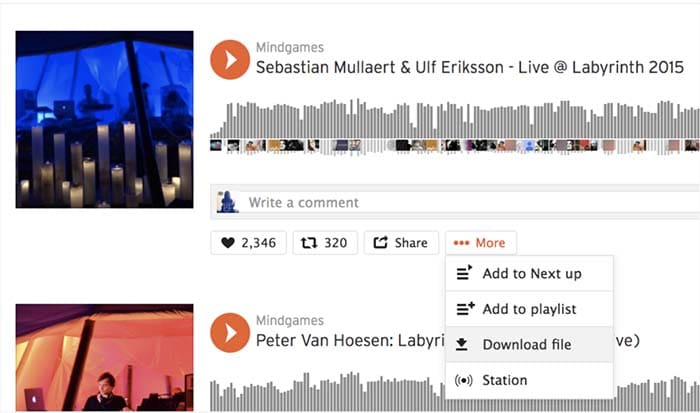
Not every track on SoundCloud is downloadable. To figure out if a track is downloadable, first, find a track on SoundCloud that you’d like to download. Click the More button, and look for the Download file option. If you don’t see one, that means that the creator of the track did not want the track to be downloaded.

SoundCloud
Source: SoundCloud

If it is there, you are in luck, and you can commence with your download! Just make sure you have a decent app for listening to the track.

VLC media player Download free ►
8

How to upload to SoundCloud

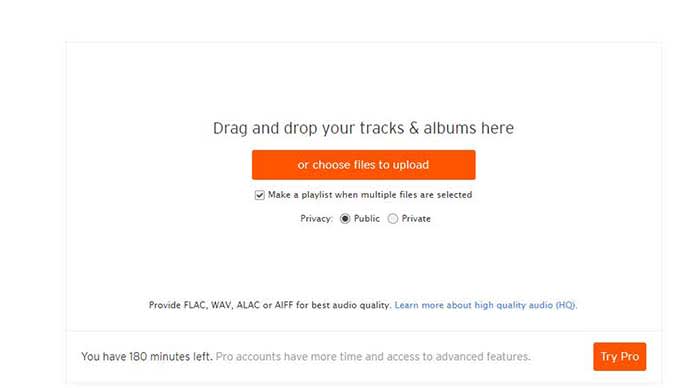
Uploading tracks to SoundCloud is a pretty quick and painless process. First off, in order to upload anything to SoundCloud, you need to sign in. Once you’re signed in, go to the Upload page. From there, you’ll see a page that looks like the one below:

SoundCloud

You can either drag and drop tracks and albums onto the page, or you can use their file uploader. Check the box on whether you want to share your tracks publicly or privately.

Please note that if you don’t have a Pro account, you have three hours worth of content that you can upload. If you only have a few singles you want to share, that should be enough for you. However, if you also have several diss tracks, love ballads, a swan song, and a comeback album, you may want to consider upgrading to pro. 

Once you choose the tracks you want to upload, click the button to begin uploading. Once you’re done, you can fill out the track names, the genre, and add whatever tags you’d like. After that, you’re all done! Make sure you give yourself a cool artist name and tweet out to all your friends so you can share your tracks with them!

Promoting your music on SoundCloud

Not just a listener? SoundCloud is one of the few accessible forms of DIY distribution and marketing for independent artists.

While podcasters have tools like Stitcher, Anchor, Apple, and Google, there are few places for aspiring artists to connect with their fans.

Spotify and Stem recently discontinued their music distribution offerings. Stem announced it would be dropping tens of thousands of artists, while Spotify called it quits on their self-upload beta program.

Music

It may be in your best interest to create a page or a site to help promote your work. WordPress has great tools for making a free website, or a cheap website if you want access to more customization.

Wordpress Download now ►
7

However, one of the best tools for promoting your work is Tumblr. Although posting on all your social networks can help, Tumblr is a cut above the rest.

If you make a Tumblr post, you can copy your track or playlist’s URL and paste it into the Audio section of a post. Tumblr allows users to use tags to help discover new tracks. If you include the genre, your name, and the themes of your music, Tumblr users can start finding you. For example, if you write a break-up song, include “break-up” in your tags so all of the lonely hearts out there can find it!

SoundCloud recently announced that it is adding distribution to its self-monetization Premier program.

Eligible creators now have access to an open beta where they can upload songs, monetize, and publish to external streaming platforms like Apple Music and Spotify.

What’s more, SoundCloud says those who use its distribution service will keep ALL royalties obtained from third-party services.

How to Embed

This is just a quick little note for promoting, but if you want to embed a track, click the Share button next to the track and then on the Embed tab. From there, you will get an embed code that you can copy and paste to your heart’s desire.

SoundCloud vs. Spotify

From a user standpoint, SoundCloud and Spotify bring very different experiences to the table. While it’s almost not really a matter of SoundCloud vs. Spotify, here’s a quick look at some of the pros and cons associated with each platform. You’ll see that there’s plenty of reason why you should get a SoundCloud account.

Spotify vs SoundCloud
8

Spotify

Pros

  • Spotify is more polished. The user interface is super easy to use. You can search for artists, follow playlists, and browse through recommendations without any onboarding tutorials.
  • Spotify allows for offline use. You can download as many songs and podcasts as your phone storage allows. No need to worry about usage caps or dead spots.
  • Spotify has established artists are on the platform. From indie bands to pop stars, most artists that you can name can be found here. It’s the leading streaming platform, so you’ll generally find what you’re looking for.

Cons

  • The free version is super limited. Unless you love hearing ads after every other song, regular listeners should invest the $10/month for an upgrade.
  • It’s not great for finding underground artists and hidden gems. Spotify hosts a ton of music, but mainly from established artists. If you’re all about the “obscure” Spotify won’t cover all of your bases.
  • It’s missing some big names, too. From time to time, an artist might feud with Spotify and pull their music. There’s no guarantee every song you want will be on the platform.

SoundCloud

Pros

  • It’s great for finding independent artists. SoundCloud hosts known artists alongside those still grinding it out from home. The platform provides a great way to find hidden gems from total unknowns. “Old Town Road” and “The Git Up” are recent songs that exploded from SoundCloud.
  • Discovery feels less “algorithm-driven.” While personalized recommendations are a core feature, it’s easier to break out of the recommendation loops you’ll find on Spotify.
  • Stream provides a unique way to get updates. Users can follow artists and playlists they like to receive updates and keep track of their favorite tunes. They can also share tracks with the community, almost like retweeting on Twitter.
  • SoundCloud has private sharing. You can use the share button to privately embed and share artists and tracks.

Cons

  • It does not have the best sound quality. Spotify has SoundCloud beat when it comes to audio. We’re talking 320 kbps vs. 128 kbps. You’ll notice the difference.
  • The user-experience can be confusing. While the design is attractive in a lot of ways, SoundCloud is somewhat hard to figure out.
  • There is no offline support. You’ll need to signup for SoundCloud Go to download songs to your device.

Wrapping up

There’s a lot to take in when it comes to breaking down the SoundCloud experience. For creators and listeners alike, the platform remains a solid choice for anyone who wants to discover new content and break away from the algorithmic rut that sometimes happens when you depend on Spotify or Pandora for recommendations.

Ultimately, the SoundCloud app has some limitations. Again, the usability and sound quality could be better, but it’s also one of the few places online where not everything is super polished, commercial, and on everyone’s radar.


The top 8 DJ software applications available today

Feel the beat with some of the best DJ software out there!

DJ

When it comes to DJ software, your choices include household names, underground favorites, and open-source extravaganzas. With all this variety, it can be difficult to tell which is the right software for you. You’ll hear terms like ‘session view’ and ‘sampler’ tossed around and it can make the whole process seem daunting.

But with a little research, there’s no reason why you can’t start mixing the tracks of your dreams today. Whether you’re a beginner or a seasoned veteran, we’re here to help you find the package that’s right for you. Take a look at the best DJ software available today.

The top 8 DJ software applications available today

1. Native Instruments Traktor Pro

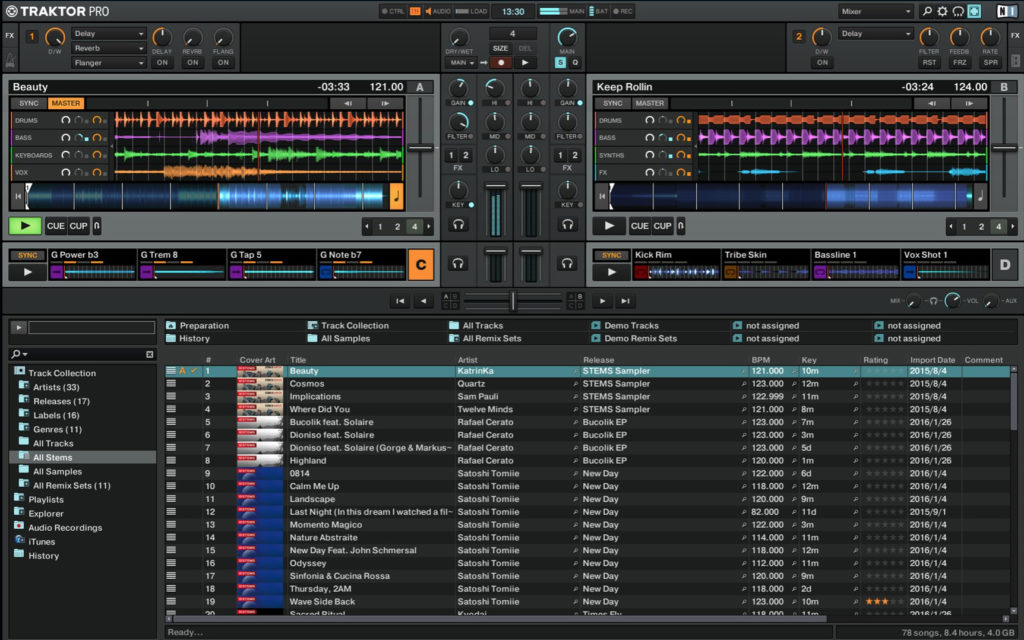
native instrument dj

If you’re looking for a safe pair of hands in the world of DJing, there’s no program like Native Instruments Traktor Pro. With more than 10 years in the game, this platform has risen to popularity because of its reliability and ability to create a diverse range of music. Amateur and professional users will be pleasantly surprised by the versatility of the onboard Sample and Remix Decks.

There’s also a state-of-the-art analytical tool that breaks down the key and beat of your music. One particularly nice touch is the colored waveforms feature, which allows the user to differentiate between high and low frequencies through a jazzy visual color display (Which makes life easier when mixing complex tracks). Native Instruments is currently available for $99.

Traktor Pro Download Now ►
7

2. Pioneer DJ Rekordbox

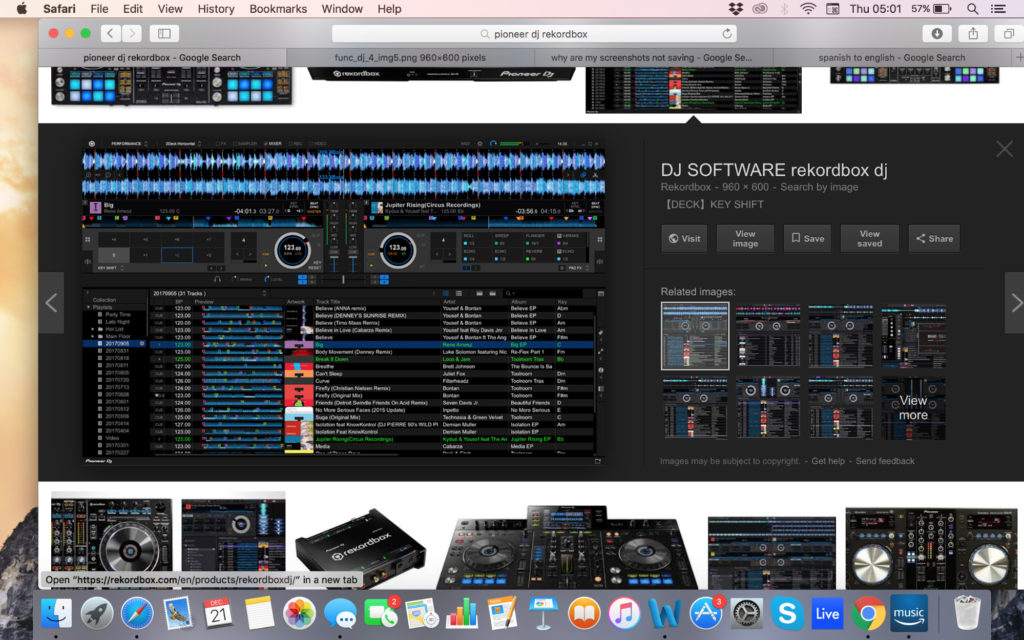
pioneer dj

In the world of DJing, few companies are more famous than Pioneer. Originally Rekordbox was designed to use with Pioneer music players but it’s now morphed into a full-blown mixing and sampling suite. The program boasts a respectable four decks, supported by master effects, an eight-part sampler, and a beat slicer. The visual pads are easy to use and add a lot to the overall feel of mixing.

If you’re lucky enough to have an extra monitor you can even move your library to one screen. That said, the preferences screen can be very confusing to navigate at times and you’ll need a glass of water to cool down if you’re tweaking them for a while. Dj Rekorbox can be yours for $129.

Rekordbox Download Now ►
9

3. Ableton Live

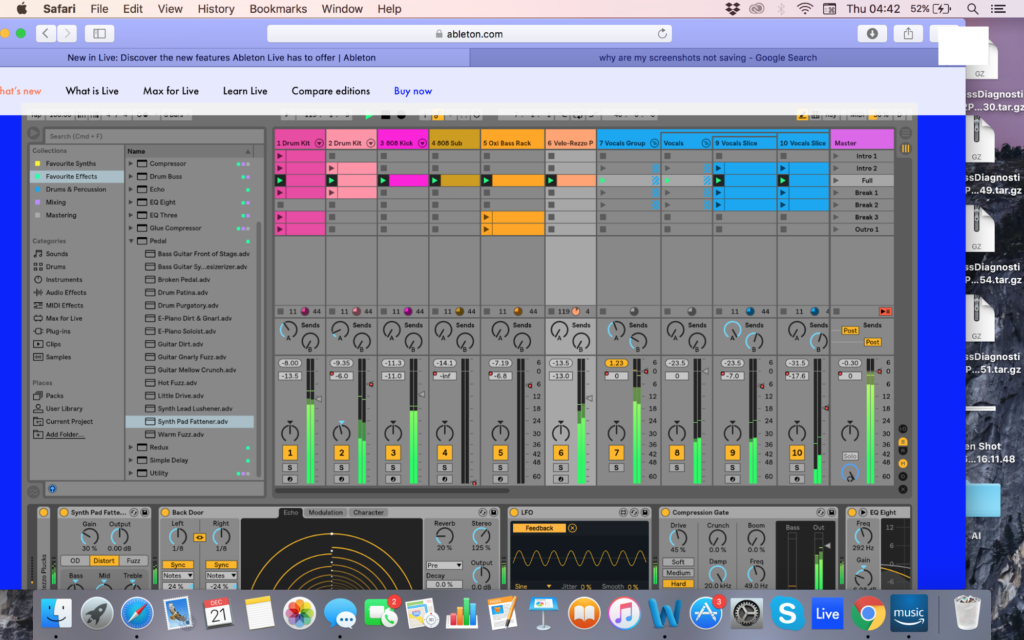
ableton

Whilst Ableton Live not a pure DJ software platform, Ableton has certainly developed a reputation as one. DJs across the world have been using Ableton’s Session View to create blistering live sets. The user interface makes it easy to launch audio samples in sync as well as muting unwanted sections on the go. Likewise, the program’s versatility as DAW can add an extra layer of production to supplement your live sets.

There are hundreds of effects in the standard version (Thousands if you opt for the suite) and packs are regularly released so that you can tweak your tracks with new tools. While there is certainly a learning curve with Ableton, you’ll reap the rewards once you master how to navigate the session view effectively. Ableton Live starts at $99.

4. Serato DJ

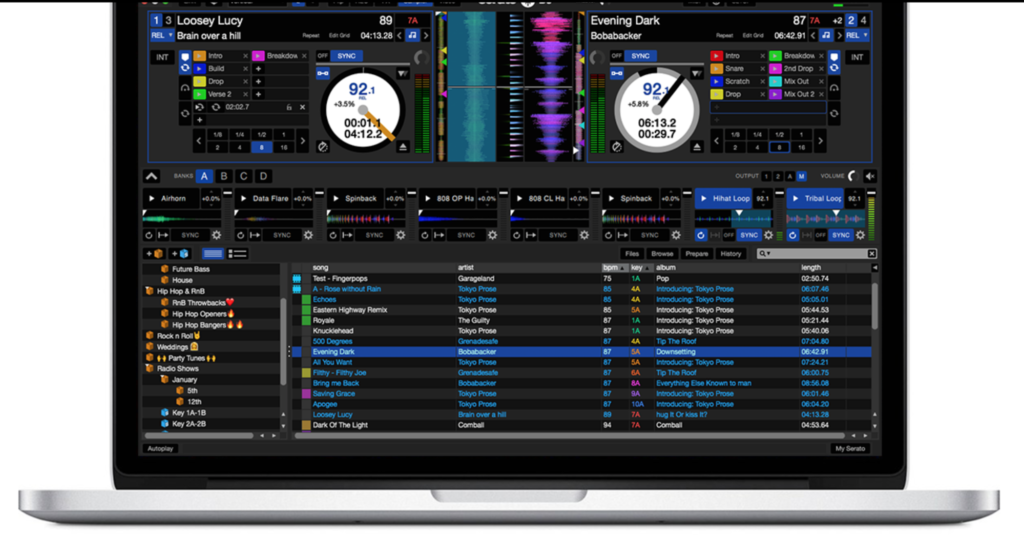
Serato

While not as famous as Pioneer, Serato DJ is one of the leading DJ software packages on the market today. On the main screen, you’ll have all the basic info you need, with your decks, BPM, time scales, pitch, and track progress all kept in clear view. You can also switch between mixing on two or four decks. One of the biggest advantages of Serato is its massive onboard library (which dwarfs every other provider on this list!).

In terms of MIDI, users have access to a clear virtual panel so that they can interact directly with the program and create their own music. DJs looking to be extra strict with their timing can also make use of Quantize Mode to ensure that each segment begins right on the beat. Serato is available for a respectable $99.

Serato DJ Download Now ►
8

5. Mixxx

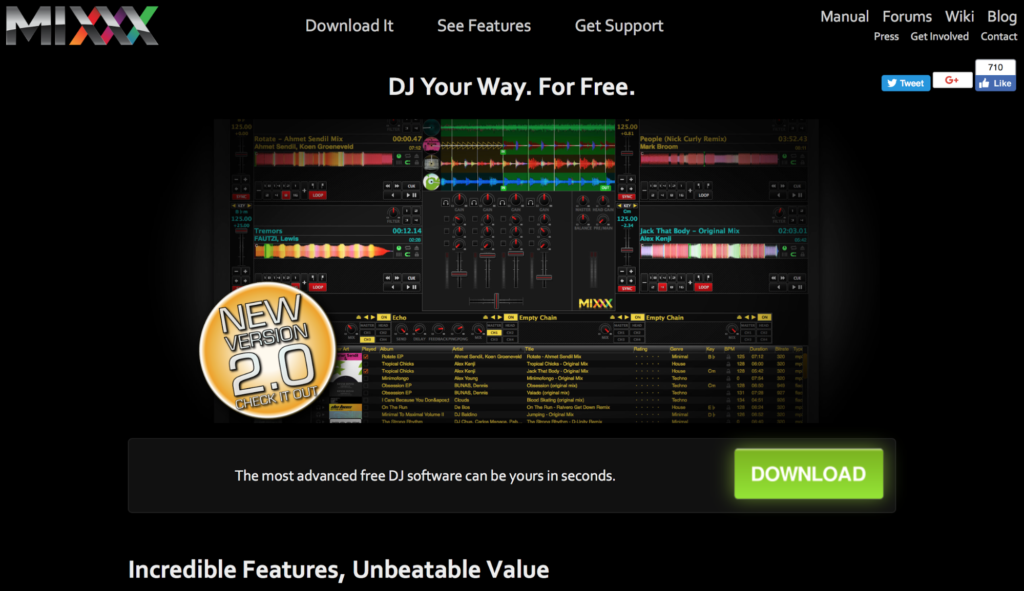
Mixxx

If you’re looking to dabble in the DJ world but you don’t have the budget to spend on an expensive suite, Mixxx is the product for you. This free open-source DJ software allows users to crossfade tracks, detect BPM, run loops and adjust the overall EQ. In other words, everything an amateur DJ could need to hit the ground running.

This nifty open-source program is also available to Windows and Mac users as well. Mixxxx now has five main effects: Flanger, Filter, Echo, Reverb, and Bitcrusher. Just be aware that the mix does not have the quality or nuance to it that many other DJ software packages have on this list.

6. Magix Digital DJ 2

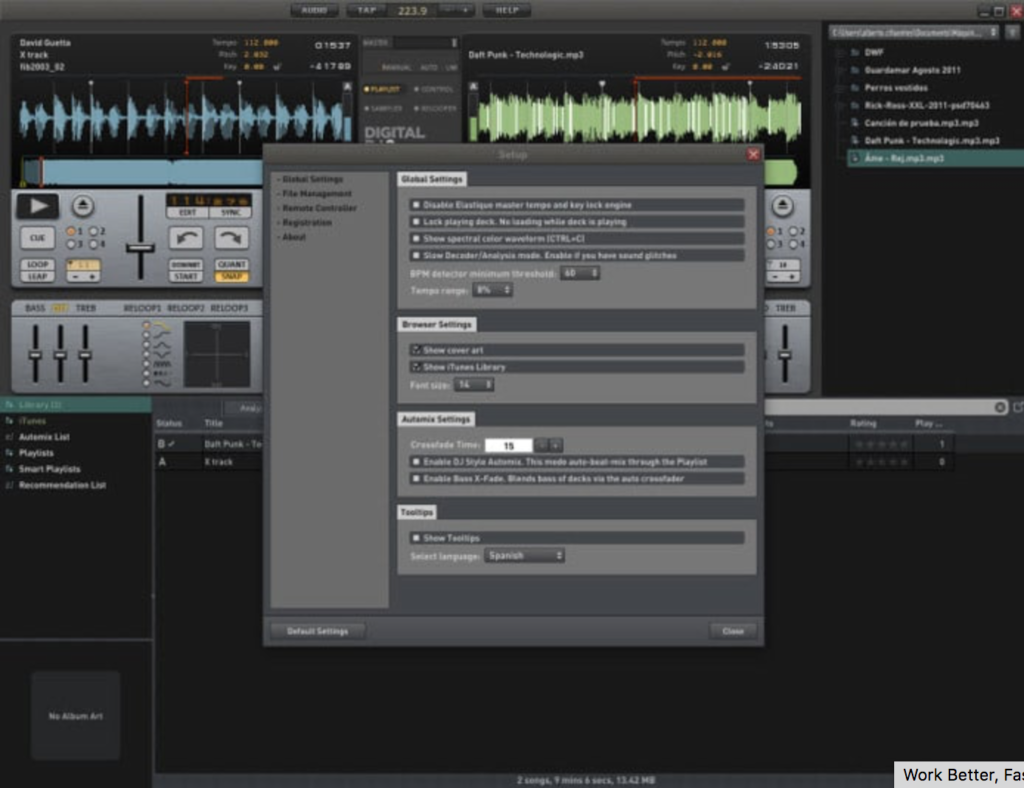
Digital DJ

The user interface is simple to use, and you can drag and drop tracks into the main screen to start mixing. To assist your mixing journey, the onboard app will suggest similar-sounding tracks to the one your playing. The song manager interacts with your iTunes library (if you have one) to search through your tracks for similar songs.

The song manager makes it much easier for beginners to navigate the software and start playing their favorite tracks without too much of a learning curve. While it lacks the advanced depth of some of the other competitors on this list, it’s a good entry-level platform into the world of music sampling.

Magix Digital DJ 2 Download Now ►
7

7. Virtual DJ Pro

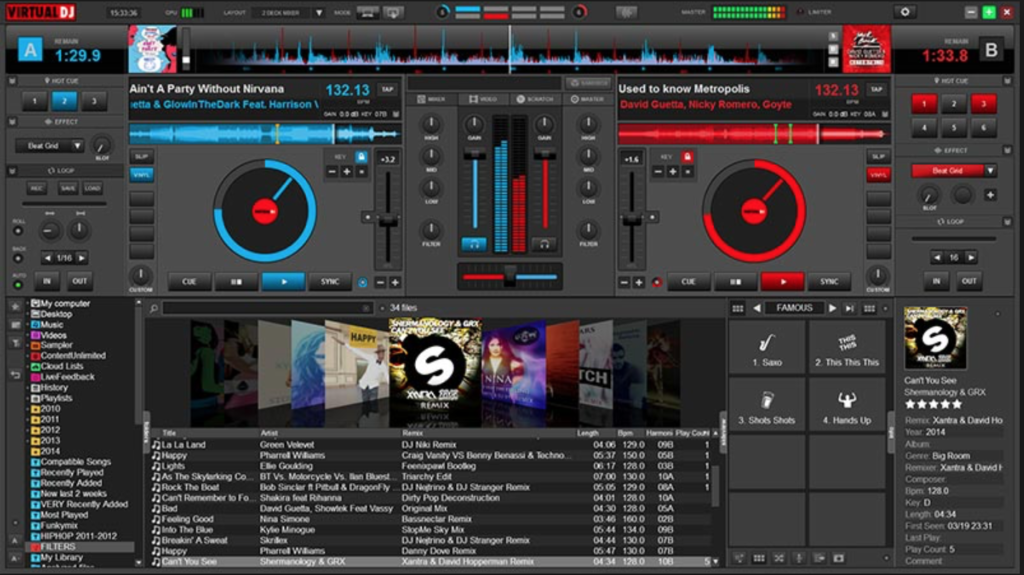
virtual dj pro

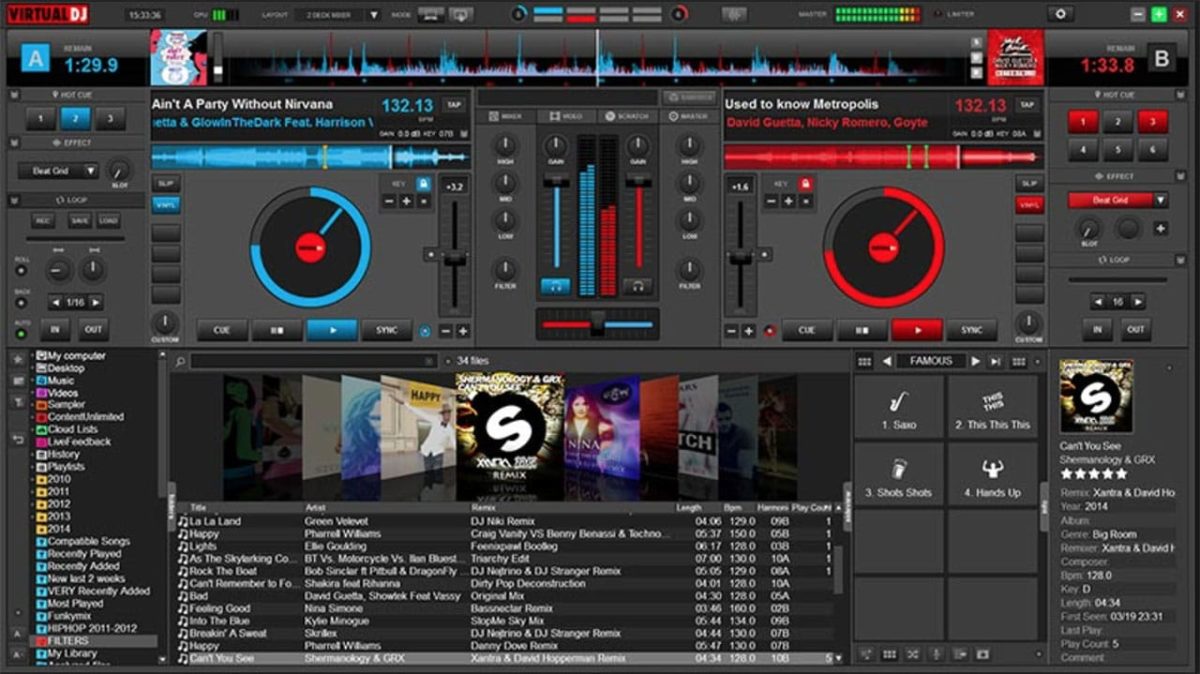
Virtual DJ has caught a lot of flak for being a light option with a poor user interface and overall feeling of clunkiness. However, Virtual DJ 8 looks fluid and contemporary. (And it now supports retina displays, unlike most other competitors!) On the main screen, you’ll have both your decks, with an EQ section in the middle and the crossfader located below.

All you need to do to start mixing is drag and drop. If you want to go old school, you can open up the scratch window to view your waveforms and get that distinct scratch sound. Virtual DJ is compatible with most hardware, making it one of the most versatile software packages on this list. Virtual DJ Pro can be downloaded here for $299 or $19 a month.

Virtual DJ Download Now ►
8

8. MixVibes Cross DJ

dJ

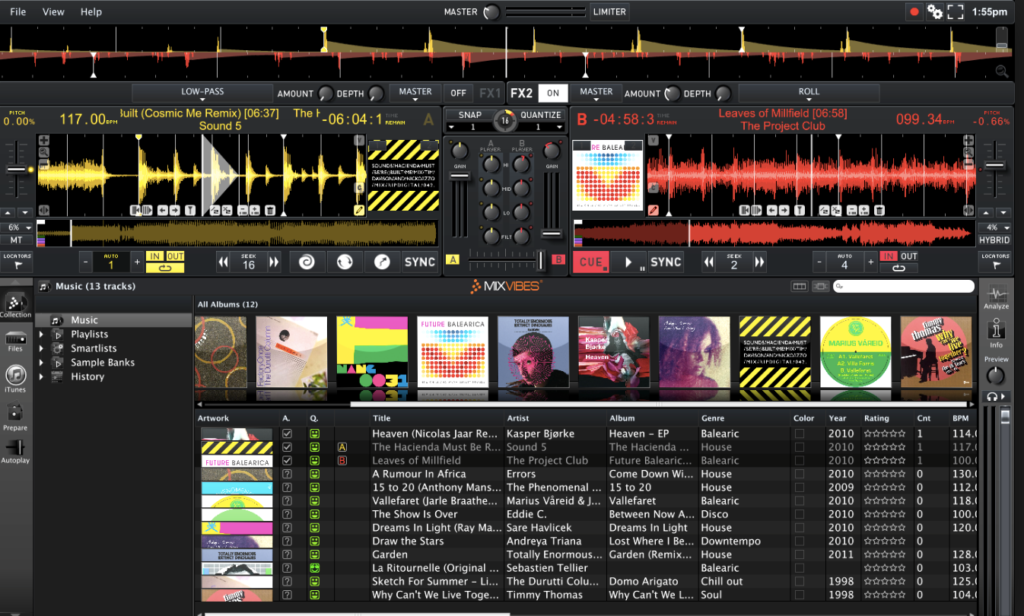
MixVibes Cross DJ make not have the same recognition as Pioneer but it’s been making waves in the DJ community. In terms of core layout, you can choose between 2 or 4 decks, with a selection of different players and samples to choose from as well. There are two main FX units and you can choose between 14 different effects.

One of the biggest advantages of MixVibes is the excellent BeatGrid Editor which helps to resolve any issues with BPM. You can also import from iTunes and connect a SoundCloud account to load up some of your own tracks. MixVibes is also much cheaper than many of its competitors but it still holds its own phenomenally well. MixVibes Cross DJ can be picked up for €49 (about $60 at the time of publication).

Cross DJ Pro Download Now ►
9

Quentin Tarantino reveals his favorite music from his films

Relive your favorite moments from your favorite Tarantino creations with this playlist!

TarantinoIf you’re like us, you are beyond excited to see Quentin Tarantino’s new movie “Once Upon a Time… in Hollywood.”

Tarantino films aren’t just great summer flicks, but each one feels like an event. We know that with each movie he makes, we will get to see what may be considered the next standard in filmmaking.

Along with another movie, Tarantino has given us another gift in the form of a Spotify playlist. 

The famed director has created a playlist filled with music from his work throughout the ages. This includes songs from “Pulp Fiction,” “Kill Bill: Vol. 1,” and “Inglourious Basterds.” 

The playlist begins with a message from Tarantino himself, who tells the listener “they may never want to leave” after listening to his playlist

8

You can view the playlist in its entirety below:

With such a variety of movies, there appears to be a song for everything in this playlist. At one moment, you’ll be listening to the perfect song for when you pick up your boss’s wife for an evening out.

At the next moment, you’ll be listening to the perfect song for when you kill your former lover with the five-point palm exploding heart technique.

VIDEO IS NSFW

Finally, we were looking for the perfect tune for that one.

With more than 60 songs in the playlist, this is sure to have you dancing in no time.

What’s your favorite song in this playlist? Did Tarantino miss one? Let us know in the comments below!

Could this cool new YouTube Music feature tempt you away from Spotify?

YouTube Music listeners can now switch between audio and music videos instantaneously.

Spotify is the king of all music services. Sure, there are other options like Deezer, but whenever somebody sends you a song, playlist, or album nine times out of ten, it’ll be a Spotify link that they send. The other streaming services are good, some are even popular, but none have enjoyed the levels of success that Spotify has.

One such streaming service that is playing for second is YouTube Music. Now, clearly, YouTube has a few aces up its sleeve when it comes to music thanks to the seemingly limitless selection of music videos it houses on its main site. In a bid to try and capitalize on this advantage and possibly close the gap on Spotify a little, YouTube Music has added a very cool new feature indeed.

YouTube Music listeners can now switch between audio and music videos instantaneously

YouTube Music header

YouTube Music Download Free ►
8

YouTube Music Premium and YouTube Premium users now have access to an interesting new feature. Now whenever they’re listening to a track on the Android or iOS versions of the YouTube Music app, they might notice a new button for some of the songs in the YouTube library. According to the YouTube blog post announcing this new feature, clicking this button will allow users to, “make a seamless transition between a song and its music video for uninterrupted listening and watching… with a simple tap, they can instantly start watching the music video or flip back to the audio at the same point in the track.”

Via: YouTube Google Blog

Although this feature won’t work for every song, the post goes on to say that if the song has a video, YouTube Music will offer the new switching button. This is made possible by the fact that the YouTube Music team has, “perfectly time-matched over 5 million official music videos to their respective audio tracks.” Five million is such a big number, it’ll likely be more difficult to find a track that doesn’t have the new feature than to find one that does.

If you’re reading this and instinctively becoming worried about your data allowance, YouTube has you covered. You can opt out of the new data heavy feature by going to the YouTube Music settings menu and turning the “Don’t play music videos” option on.

As you’d expect with a quirky and exclusive feature like this, it is only available to premium users meaning you won’t be able to try it out unless you sign up for a paid version of YouTube Music. At the moment, this will cost you $9.99 a month although there is a discounted rate for students.

If you’re dying to check out this new feature, however, but don’t want to pay, YouTube is also offering a one month free trial of all YouTube Music Premium features, which you can sign up for here.

Queen’s ‘Bohemian Rhapsody’ breaks 1 billion views on YouTube

The epic music video just reached an immortal number!

Bohemian Rhapsody milestone

Mama! Ooooooooo!

It’s been 44 years since Queen released “Bohemian Rhapsody,” but the song just notched an incredible milestone. Today, YouTube announced that the epic video has become the first pre-1990s music video to cross 1 billion views on the platform.

In case you need a refresher, turn up your speakers and let this rip:

The video was even remastered to mark the milestone.

Queen was ahead of its time. Remember that MTV didn’t launch until 1981, so this is considered the first promotional music video of its kind. The video certainly got a boost after the release of the Oscar-winning “Bohemian Rhapsody” biopic that featured the rise of the band before Freddie Mercury’s death in 1991.

1 billion views is an incredible milestone, but the landscape has changed pretty dramatically. “Gangnam Style” has 3.3 billion views in just seven years on YouTube! Now we anxiously await the musical movie about Psy’s life…

Spotify update highlights Disney music

Everybody has a favorite Disney song!

Spotify Disney hub

Great news for Disney fans: Spotify just announced that it is teaming up with the movie studio powerhouse to create a brand-new Disney hub. The new hub will be a place where Spotify users can find all the songs from their favorite Disney movies. The new hub will include Disney songs as well as music and soundtracks from Pixar, Marvel and Star Wars movies. Yes, that means all the John Williams instrumentals will be there, too.

8

The Spotify blog post announcing the new Disney hub said, “Starting July 17, users… can search “Disney” on Spotify to find a designated hub for the music behind some of their favorite Disney movies and TV shows. Stream playlists full of everything from The Little Mermaid to modern favorites like Frozen.” The service will also include playlists curated for all times of the day and many different activities. No matter if you’re in the shower, on the road, or trying to get some sleep you can now find a Disney playlist on Spotify for your exact situation.

The move seems to make Spotify a much more family-oriented platform and could see a spate of family-based subscriptions taken out over the summer. A premium membership costs $9.99 in the U.S., but a family membership, which gives up to six people access to Spotify’s premium features costs $14.99.

The Spotify family account offers individual accounts for up to six people

One of Spotify’s best features is its Discover Weekly feature, which serves up recommended songs based on what you’ve been listening to. This means the new Disney hub could put pressure on mom and dad to get the kids a profile of their own if they don’t want songs from “The Little Mermaid” skewing their personal algorithm.

Everybody has a favorite Disney song!

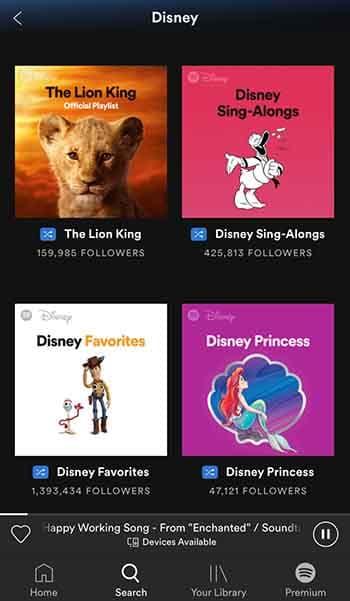
Spotify’s new Disney hub is now available to users in the U.S., UK, Ireland, South Africa, Canada, Australia, and New Zealand. You can find it simply by typing “Disney” into the Spotify search bar. Here’s what comes up when you do:

Disney Spotify hub

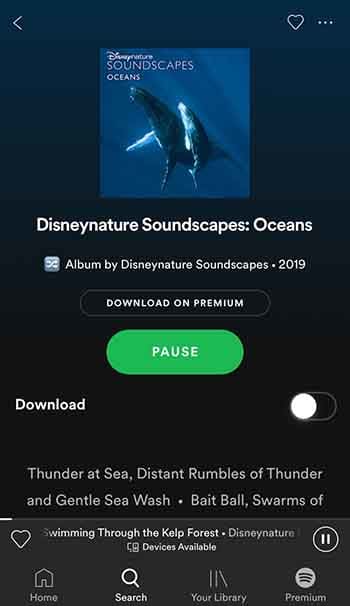
Scroll down a bit, and you’ll even find a playlist called “Disneynature Soundscapes: Oceans,” which provides some super-relaxing white noise to help you unwind.

Disneynature Soundscapes: OceanTo see some other playlist examples, you can check out the Spotify press release announcing the feature here. As well as everything you can see there now, Disney promises to keep adding to the hub throughout the summer and beyond. With big some big Disney hitters like “The Lion King” and “Frozen 2” on the way, that is not to be sniffed at.

This is big news for our family as we’ve developed a bit of a Christmas tradition involving Disney songs and lots of singing along. It isn’t just drunken karaoke Disney Princess wannabes though, who’ll be happy about this move. Anybody who has ever watched a Disney movie will love it because the music is half of the magic when it comes to Disney movies, and it’s magic we’ve all grown up with.

11 hidden Spotify tips and tricks

Make Spotify even better with these 11 features!

Spotify

Having a hard time requesting a song while driving? Or maybe you want to preview a song without playing the whole thing? What about when you can’t find a particular song? Spotify is an awesome for listening to (and for teaching) music, and while it doesn’t take a music degree to create a new playlist or put your library on shuffle, there are some handy tricks to the app that are a little more under the radar. Check out these 11 tips that will add utility and ease to the software:

8

1. Quality vs Data

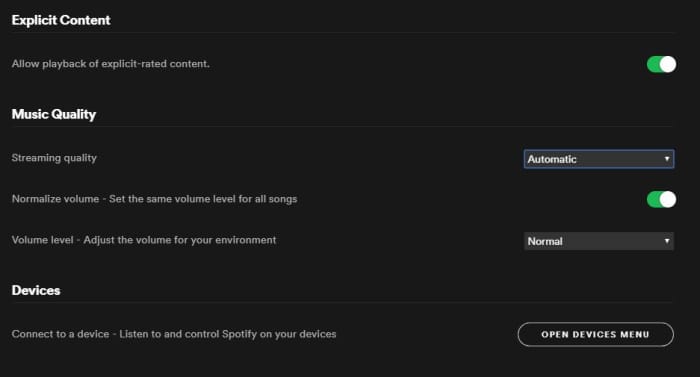
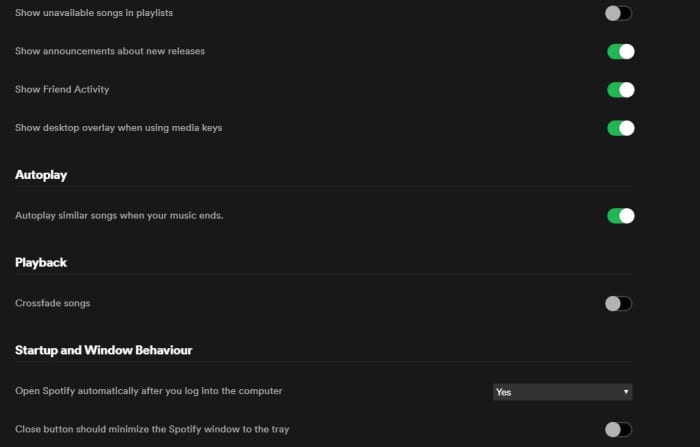
On both desktop and mobile you’ve got the option to either stream or download music on Spotify. By default, this process strikes a balance between fidelity and data, but through the Settings menu you can actually tweak which gets priority.

To do so (on Desktop) open the Settings menu from the drop-down under your profile picture. Scroll down until you see Music Quality. Use the ‘streaming quality’ drop-down to manually select either normal, high, or very high quality for your streaming.

You can use this function via mobile, too; just open Settings from Your Library and find it under Music Quality. On iOS specifically, you can find it under the Streaming Quality menu.

Spotify Settings menu Music Quality

2. Keep tabs with Last.fm

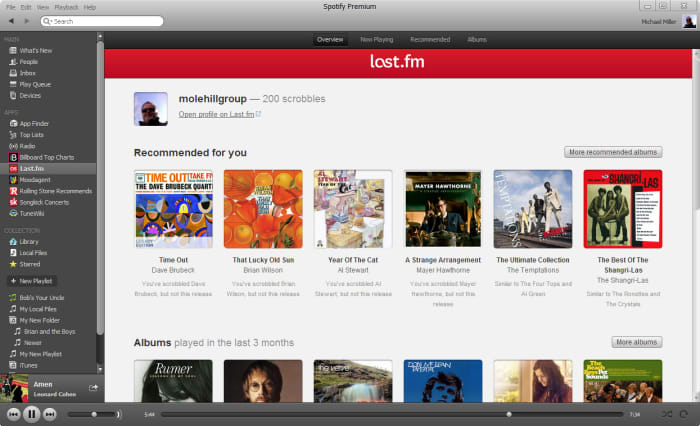
Spotify is integrated with Last.fm, a service that lets you track and discover new music. If you make an account with Last.fm (which you can do right here) it can connect directly to Spotify and you’ll be able to browse through the records it keeps of all the tracks you’ve been listening to on any of your devices. It’s even free!

Spotify Last.fm integration

3. Sing along with the lyrics

How does the second verse to “Tiny Dancer” go? Whether it’s because you’re trying to sing the song on the fly, or simply because not knowing what the singer is saying has always bothered you, it helps to have the lyric sheet handy.

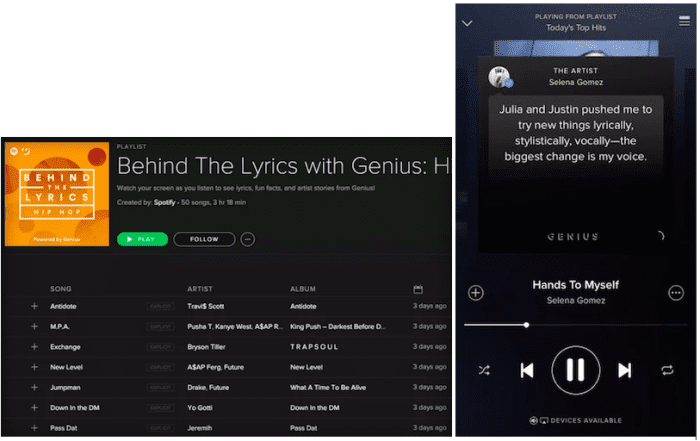
Spotify might have the lyrics up for you already – all you have to do is tap on the album picture while the track is playing. Spotify is partnered with Genius and certain songs have the lyrics integrated right in. Alternatively, you can switch this feature to “Behind the Lyrics” mode which tells information about the song alongside its lyrics.

Spotify Genius lyrics

4. Set up the queue

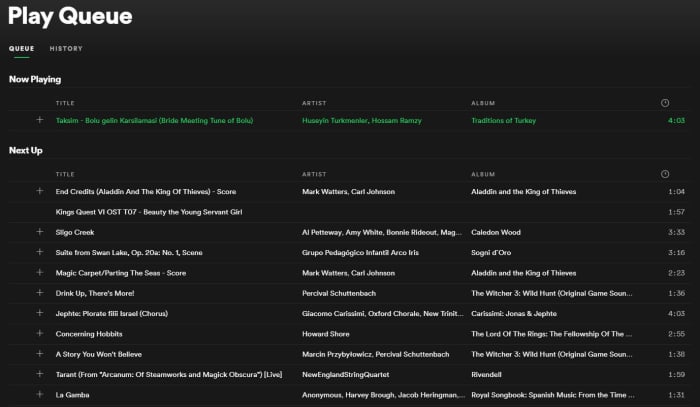
One of our favorite features for Spotify is that you can set multiple tracks in a queue, and they’ll play one after another. Doing so is very easy; on mobile all you need to do is select the song and press the ellipsis. From here you can do all sorts of things (view the album, check out the artist, add it to a playlist, or go to the radio), one of which is “add to queue.”

Once the current song is finished playing, it’ll start the next one in your queue, and then afterwards it’ll go right back into whatever playlist you were in before. It’s especially useful when you’re in something like a “classic rock” playlist but are hankering to hear one specific jazz tune before resuming.

Spotify Queue menu

You can also view the default queue of songs as well as your song history at any time by pressing the “queue” button on the bottom right (on desktop) or by looking through the queue menu on mobile.

5. Preview a track

If you’re a fan of instrumental music, you might not recognize a song by its title (since there are no lyrics to go by). Or maybe you just can’t remember how a song starts.

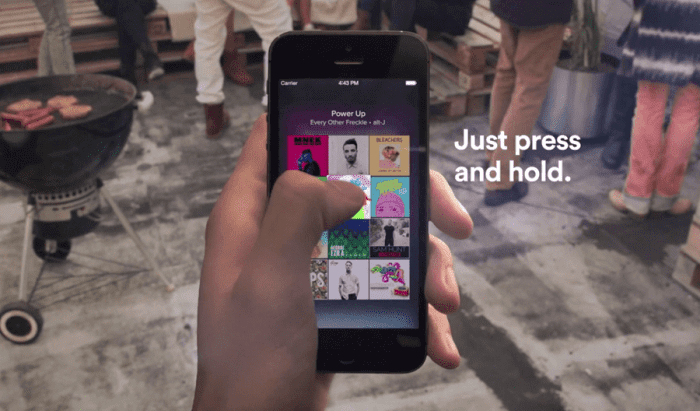
A neat trick on mobile is to press and hold the song title for a quick preview. That way you can navigate away from the page, check out other music, or show your friend a quick sample without committing to the whole track.

Spotify preview track mobile

6. Follow artists

It’s always exciting to find a new artist you like, and Spotify makes it very easy to look up more tunes, more information, or even upcoming concerts from artists in its huge roster.

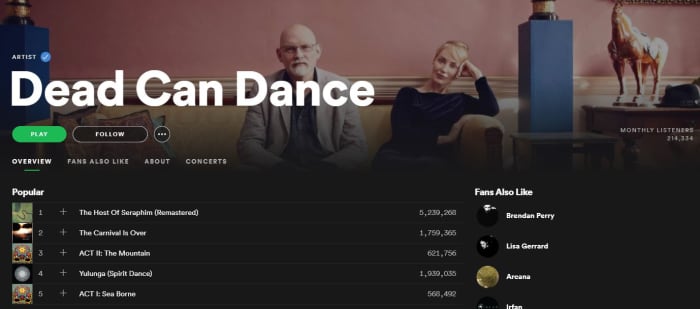
Next time you’re listening to a song on Spotify, click on the artist’s name (or find it via pressing the ellipsis on mobile) and it’ll take you right to their page. Here you’ll see their most popular tracks, albums they’ve put out, and even recommendations for other similar artists.

Spotify artist page

7. Crossfade tracks

If you want your Spotify experience to sound extra fancy, you can set it to seamlessly blend from song to song using crossfades between tracks.

To engage this just go back into your Settings menu and look for “Playback.” Enabling the crossfade feature is the only option here; just toggle it on.

If you’re on desktop you might find this option under “Advanced Settings” instead. Just scroll down and you’ll see a button for it.

Spotify Settings Playback crossfade

8. Request tracks via voice command

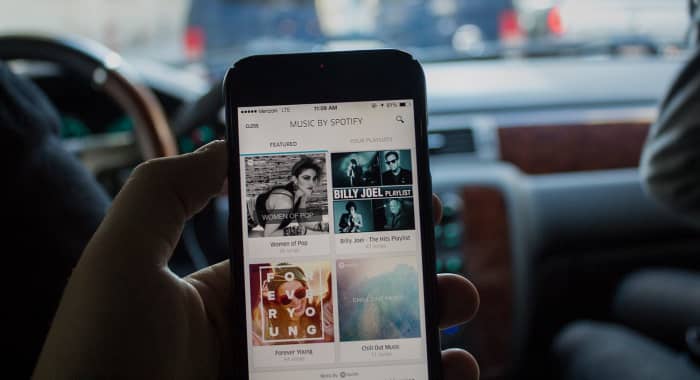
Texting and driving is a terrible idea, and that’s why it’s illegal. If you use Spotify on mobile, there’s a good chance you listen to it while driving, too. Sometimes, there’s a song we really want to hear and it’s tempting to scramble during a red light to try and put it in queue – but there’s actually a much safer, more convenient way.

Spotify can recognize voice commands, so just hit the mic button on your smartphone and tell it the song you want to hear. Tap it and it’ll start to play immediately. It’s faster and nearly hands-free!

Spotify mobile driving voice command

9. Make a collaborative playlist

Planning a road trip with friends? Maybe trying to organize a list of songs for your band to cover? Maybe your friend’s getting married and you and the other bridesmaids are in charge of making a playlist.

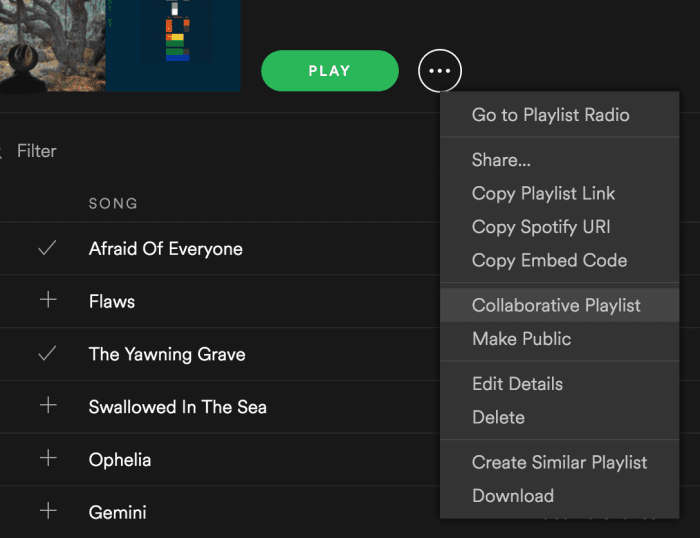
Start making a new playlist and then right-click on it. In the drop-down you’ll see an option to “make it collaborative.” Select this and then select any friends with whom you’d like to share the monumental task of picking the most appropriate music.

Good luck with that.

Spotify drop-down collaborative playlist

10. Recover deleted playlists

There’s definitely a moment of panic when you think you’ve accidentally deleted an entire playlist. Fear not; there’s a way to fix it.

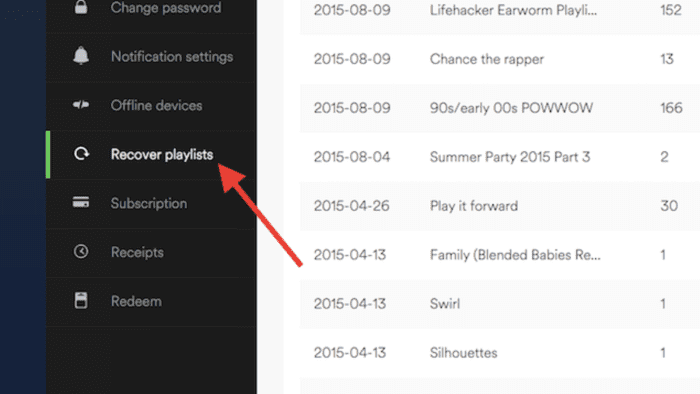
Go to Spotify’s website right here, log in to your profile, and there’s a Recover Playlist option right there. You’re welcome!

Spotify website recover deleted playlist

11. Add music that isn’t on Spotify

Spotify’s got thousands of tracks out there, but there’s still the odd outlier that you can’t find in their massive library. If you’re willing to take a few minutes, there’s a way you can add your own local MP3s to your playlist.

All you have to do is access your Local Files via the Settings menu, add a source (giving Spotify the path through your File Explorer), and then sync it up with whatever playlist you like. Check out our full walkthrough of the process for details!

We hope these tips and tricks will make using Spotify easier and allow you to use it more effectively.

Let us know in the comments below if there’s one that we missed, and stay tuned with Softonic for more Spotify news and info!

Listen: Unreleased Freddie Mercury song will give you chills

Hear a song that’s been lost for 34 years.

Freddie Mercury

Queen frontman Freddie Mercury had one of the most iconic voices in music. But as with so many other stellar talents of the past, the voice was often drowned out by then-popular musical trends like synthesizers or backing choruses.

Today, we’re being treated to the sounds of Freddie Mercury without all the extra mid-80s fluff. Here’s the title track of the sci-fi musical “Time,” stripped down to its incredible singer and a piano:

You can compare it to the original here:

Producer Dave Clark was with Mercury at Abbey Road Studios in 1985 when they recorded the track. After recording the original version, Clark asked the singer to try the stripped-down version. Now, 34 years later, we’re finally able to hear what that sounds like.

People have been marveling at Freddie Mercury’s isolated vocals for a while now. This video removes all the sound of “Under Pressure,” except for the voices of Mercury and David Bowie. It’s been watched more than 12.5 million times.

Learn to play the piano online for free

Want to become an expert pianist? These resources can help!

PLaying piano

If you’re like most people who own a piano, all it really does is serve as a place to put your family photos. It’s a nice piece of furniture, but it would be nice to use it for its intended purpose.

If you have always wanted to learn how to play the piano, the internet has plenty of tools to learn how to play. We compiled some of the best we could find and put them in the list below. If you always wanted to learn how to play the guitar, don’t worry, we’ve got that covered also.

Learn to play the piano online

Check out some YouTube tutorials

Pretty much your best friend for learning how to play the piano online is through YouTube videos. 

You’ll find videos that teach beginner’s tips, and even how to play specific songs.

We especially enjoyed this video that taught us how to play “Imagine” by John Lennon. We never would have guessed that such a profound and popular song would be so easy to play.

If you’re just starting to learn how to play, we thought these were some of the best videos for beginners:

There are a lot of songs that you can play key by key, but in order to truly become a master, you’ll need to learn how to play chords. This video does a good job of teaching you some of the most common chords you will use. Once you’re done, the follow-up video will teach you accompaniment

If you want to learn how to do a fast piano run, this video is a good teacher. Piano runs look complicated, but they also look impressive and really cool. They’re definitely a must-know trick for up-and-coming pianists.

If you truly want to be a pianist, then you need to know what can prevent you from becoming one. The following video was created by a pro. How good is he? He created the last two videos we showed you. In the video, he goes over the most common pitfalls for becoming a pianist, including not maintaining a schedule and setting unrealistic expectations for yourself.

8

Practice on your computer or smartphone

It can be hard to find time to practice. Luckily, there are electronic solutions for you to practice the piano on both your computer or smartphone.

For Windows users, Electric Piano is one of the best apps for playing the piano. Basically, you can turn your keyboard keys into piano keys. You can even add different playing modes to make the piano sound like a different instrument like a harp or cello. Basically, it’s like having an actual electric keyboard but on your computer.

Electric Piano Download Free ►
7

If you want to practice the piano on your smartphone, My Piano for Android is a solid pick. You don’t get all of the same bells and whistles you get from Electric Piano, but that’s to be expected. (Come on, you’re playing the piano on a smartphone.) You are essentially getting a basic piano playing experience, but it’s still nice to have the option to practice.

7

Learn with Flowkey

Flowkey

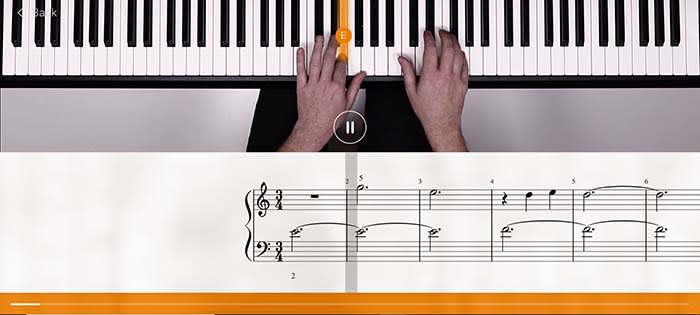
Quite possibly the best online teacher for learning piano is Flowkey. Flowkey has songs that you can play along with, and a microphone tool that listens in to make sure you are keeping up. To make things even better, Flowkey is completely free!

There are courses that you can take that range from beginner to pro. So even after you become a master pianist, Flowkey still has tools to help you hone your craft.

One of our favorite tools is the one that repeats a section. If you’re learning a new song, sometimes a single part of that song will give you a lot of trouble. Flowkey has a tool that will repeat that part of the song over and over again until you have it down pat.

Along with its stellar website, there is also an app for Android and iOS. The app is also free to use.

9

Wrapping up

The main thing you are going to need in order to become an expert pianist is discipline. You need to set realistic expectations for yourself and make sure you are devoting as much time as you can to practice.

As long as you do that, you are well on your way.