Browse privately with Brave

If you think it’s time to browse the Internet in privacy, it’s time to step up and be Brave. Download and install the Brave browser now.

It’s 2019 and ads are everywhere. Whether you’re watching YouTube or just doing a quick Google search everybody’s trying to watch you work. Incognito mode doesn’t help either. If you think it’s time to browse the Internet in privacy, it’s time to step up and be Brave.
Browse the web up to 3x faster FREE DOWNLOAD ►
9
Surf the net free of unwanted ads

Brave blocks all ads

The Brave browser automatically blocks all trackers, pop-ups, cookies, and banners. This not only frees you from irksome advertisements and interruptions, but also saves you time and money. “It’s hard to believe,” says Brave’s co-founder Brendan Eich, “but we’re paying to be bothered by ads.” You’re paying for bandwidth, technically spending money to load not only the content you view, but all the ads that come with it – ads that you never asked to see in the first place.

Brave’s shield requires no set-up and begins working as soon as you open the browser. They’ve recently improved the ad blocker algorithm to keep your browsing even more private. Check out the details here.

Brave rewards content creators

Brave utilizes an advertising platform built on privacy. As long as you’re on Brave you’ll never have to deal with ads again. Choose to turn them back on, though, and you’ll actually be rewarded for viewing them. “The [Basic Attention] Token is derived from, and therefore denominates, user attention,” explains Eich.
Brave Basic Attention Token

As you view pages and tabs, Brave will accurately and privately monitor where you spend your time. It then compiles the time (and attention) you gave these ads, and rewards you with digital tokens, or BATs. “That’s really just focused mental engagement – on an advertisement, on great content, on whatever the user is looking at.” The result is far fewer instances of fraudulent marketing and malvertising.

Adjust the shield

Brave automatically blocks all advertisements and trackers, and even tells you how many it’s succeeded in thwarting every time you open a new tab. Brave even bumps HTTP to HTTPS whenever possible to offer you the highest security possible when you’re online. If you want to personally customize your experience it’s a simple as opening up the Settings menu in-browser. Scroll down to the Shields settings to adjust the level of ads and cookies that make it through. You can even choose to allow or block all fingerprinting.
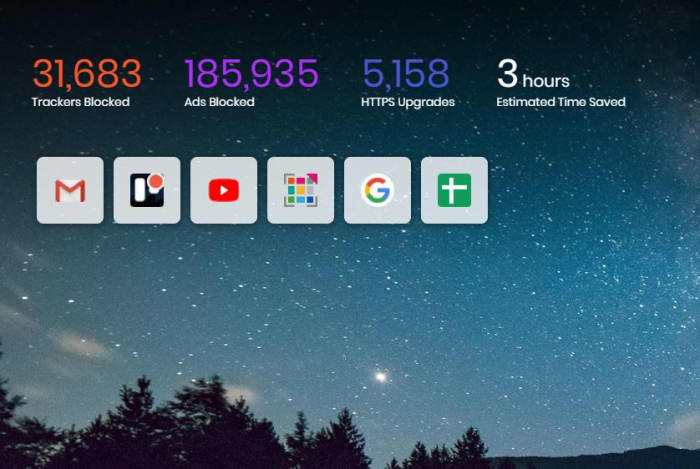
Brave new tab tracker ad blocked
Brave can save you hours of load times

Right below these options, you can also toggle shields pertaining to social media – Google login buttons, embedded Tweets, and posts from LinkedIn or Facebook. If you’re unsure whether Brave is the right browser for you, we recommend installing it and seeing for yourself. Brave has had over 28 million downloads on Android alone, with over 2 million downloaded every month. The download is 100% free and it’s available for download right here. Give it a try and let us know what you think!

Browse the web up to 3x faster FREE DOWNLOAD ►
9
Surf the net free of unwanted ads

Softonic is proud to partner with Brave. When you download from us, we may earn a commission.
Facebook Like and Share buttons may be removed from third-party websites?

The ECJ has ruled that websites using the Facebook “Like” button are responsible for the user data they send to Facebook.

Lots of Facebook like buttons

The Facebook Like button is an iconic symbol of what 21st-century life has become. We can use it to show the world that we like pretty much anything we see online. Your friend posts about something funny they’ve just done, Like it. A local bar is running a special on chicken wings during NFL matches, definitely Like that. Oh, it’s summertime and the sun is shining you say? Yep, I’m going to like that too.

The Facebook Like button and other alternatives from different social networks have become so ubiquitous that more often than naught, we tap them as soon as we feel anything remotely positive. In fact, there is a lot more going on with “Like” and “Share” buttons, a lot more. So much in fact, that they might be about to start disappearing from third-party websites.

8

This ruling might change everything

The reason we’ve slipped into the habit of liking everything we do online is because the like button and others of its ilk have popped on all sorts of websites all over the web. Now, however, thanks to a ruling in the ECJ on a case involving a website called Fashion ID, this might all be about to change.

In 2015, a German consumer group called Verbraucherzentrale NRW (we’ll just refer to them as NRW from now on) sought an injunction against a website called Fashion ID. Basically, NRW claimed that the Facebook Like button on the Fashion ID site was sending data to Facebook that users didn’t consent to share. 

The ECJ has ruled that since the Like button provided a financial benefit to Fashion ID, it is responsible for the user data the button collects and shares.

a like on mobile
WE share a lot of data about ourselves when we visit pages that have like buttons. This new ECJ ruling will mean pages that have them will have to tell us what that data is so that we can give them permission to then share it with a third-party website like a social network.

The move means that when two parties, a social network and a third-party website, both benefit from a social button then both must share responsibility for the user-data collected. Both will need permission, and both will need to make sure their digital infrastructures are compliant with privacy laws and regulations.

With global GDPR changes still fresh in everybody’s minds due to Europe being a regulatory superpower, there is a good chance this judgement could affect websites all over the world and not just in the EU.

Wrapping up

Do you think Facebook’s Like and Share buttons should be removed? Are they causing more trouble than they are worth? Let us know in the comments below!

Keep your messages private for free with Signal

Concerned about data privacy? Signal is the messaging app you’ve been looking for.

Hesitant to share your personal information over messaging or texting? You’re not paranoid – you’re probably right to be cautious. Privacy is a thing of the past. One of the best tools to keep your conversations private is a free little app called Signal.

7

What is Signal?

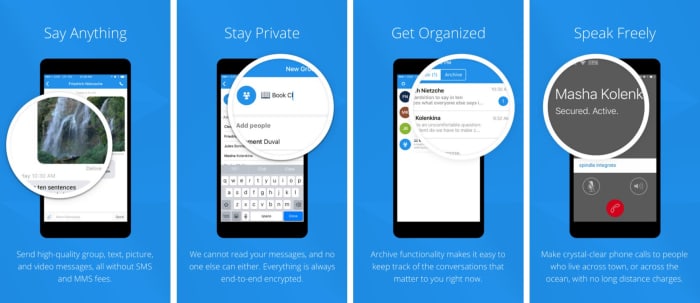
Signal is designed specifically for mobile devices and allows for free, worldwide, encrypted calls for your smartphone. It does so by using ZRTP for secure voice communication.

Signal helps you dodge those pesky SMS fees while communicating, and lets you share media and files as normal, and chat with groups in real-time. It requires no password, uses your existing phone number, and never accesses any of your conversations or stores any of your personal data.

Signal app functions privacy

“Long before we knew that it would be called Signal, we knew what we wanted it to be,” said the company on their blog page. “Instead of teaching the rest of the world cryptography, we wanted to see if we could develop cryptography that worked for the rest of the world. We started Signal with the idea that private communication could be simple.”

As far as simplicity goes, using the app couldn’t be any easier: Installation is free, and the download time is quick. Once it’s done, you’re in the clear. The app’s Contact Discovery immediately displays which of your contacts are reachable with Signal, so you can carry on your conversations in private.

Why you need it

“As more and more of our lives happen online, data protection and privacy are critical,” explains the company’s Executive Chairman Brian Acton. “This isn’t just important for select people in select countries. It’s important for people from all walks of life in every part of the world. Everyone deserves to be protected. We created the Signal Foundation in response to this global need. Our plan is to pioneer a new model of technology nonprofit focused on privacy and data protection for everyone, everywhere.”

True to their word, the company has kept Signal free and open source. It’s the only app of its kind, and even goes as far as sending optional push notifications to conserve your battery life and still stay responsive.

“The best way to continue to ensure the universal availability of high-security and low-cost communications services like Signal is to do so through a foundation structure that is free of the inherent limitations of a for-profit company,” says Acton. “We’ve built a service used by millions, and software used by billions.”

The latest versions of Signal are available on Android, iOS, and Desktop. It also has an integrated link preview function and browser extensions for the Desktop client. Get it free today and let us know how it helps you manage your conversations. Stick with Softonic for more tips and tricks to keep your data private and secure!

Tor anonymous browser targeted by Russian intelligence

Tor users beware: your web-browsing might have been compromised.

Tor

Hackers have discovered that a Russian Intelligence contractor was trying to breach Tor.

What is Tor?

In case you’ve never heard of it, Tor is a web browser that allows you to surf the web privately without fear of government surveillance or being tracked. It is very popular in Russia although it is available in other countries.

Is Tor a good browser?

Aside from this recent news, it’s okay, but there are better options that we will get into later.

How were they trying to do this?

When someone uses Tor, their internet service provider gets a ping that lets them know that it is being used. However, the ISP doesn’t get notified about what websites they were surfing. 

The hackers stole more than seven terabytes of data from SyTech, the Russian Intelligence contractor.

In that data, they discovered that SyTech planned to use a program called Nautilus-S to discover what website a Tor user was on before closing the window. 

Did it work?

Oddly enough, this breaching plan seemed like more trouble than it was worth. Even if you were a Tor user in Russia, there was a slim chance that you were susceptible to the breach, and an even slimmer chance that the info would be sent back to SyTech. 

According to a statement from a Tor spokesperson, even if a Tor user was affected by the breach, they were still kept anonymous. 

What should I do?

Unless you live in Russia and worry about government surveillance, you probably aren’t a Tor user. If you are, you might want to switch your browser of choice. 

If you haven’t been convinced by all the wonderful security features we’ve already written about, then hopefully this news has convinced you to finally switch to Firefox or Brave.

Google might pay you to scan your face

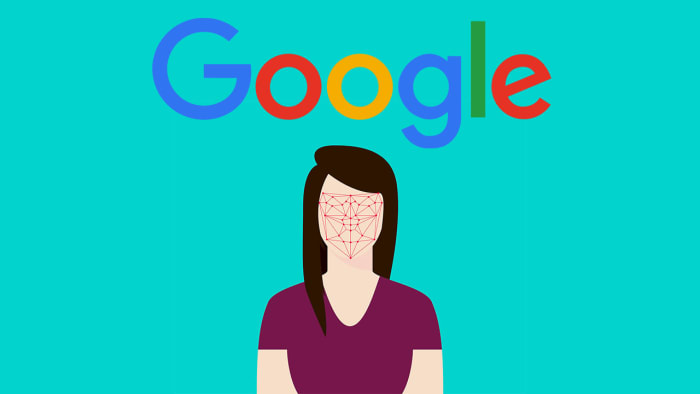
Google employees are stopping people in the street and offering them $5 to scan their faces.

Google leads the pack in a number of fields. From internet search to internet browsers via email clients and smartphone operating systems, the search giant has an impressive portfolio of apps and products that are the best in their field. There is another key area though, where Google excels and that is AI.

Thanks to the huge amounts of internet data Google is able to collect and subsequently use to train its AI, the machine learning algorithms at Google are able to power a lot of cool features in all those leading products we’ve already mentioned.

It seems though, that there is a particular type of data Google currently needs for its AI that the internet itself can’t serve up alone. Not only that, but it looks like the search giant is willing to pay you to get it. If you feel comfortable selling your face to Google, then you might be able to earn yourself the princely sum of $5.

Google employees are stopping people in the street and offering them $5 to scan their faces

Selling your face to Google sounds like a rather terrifying prospect, but according to the guys at ZDNet the process is quick and, rather reassuringly, painless. The whole process takes around five minutes and mostly involves you pointing the selfie camera of a modified smartphone at your face from a number of different angles.

The people at Google aren’t after your actual face; they just want to gather as much information about it as they can get their hands on. So far so good then, but what do they want all of this facial data for?

A facial scan by Google

In the account given on ZDNet, the Google employees are approaching people on the street and saying something like, “Hi, I work for Google and we’re collecting data to improve the next generation of facial recognition phone unlocking.”

Google needs scans of your face so that it can teach its AI how to recognize certain unique facial features. This is likely to be related to the facial biometric security system that Google is rumored to be working on for the upcoming Pixel 4 handset.

When a similar incident took place involving a somebody over at Android Police, all the Google employees said was that the scans were for a “future Google product,” which sounds a little vague for something as personal as scan of your face.

With the recent hysteria surrounding the viral FaceApp, would you hand over detailed scans of your face to a company whose motto is no longer “Don’t be evil” for a mere $5 gift card to Amazon or Starbucks?

Google Play Store had apps that allowed digital stalking

Security specialists at Avast have identified 7 apps on the Google Play Store that allowed people to stalk others.

Malware is bad, but now we have a new threat to contend with. Ladies and gentlemen, let’s talk about stalkerware.

Security specialists at Avast have identified 7 apps on the Google Play Store that allowed people to stalk others

Stalkerware cybersecurity google play store avast

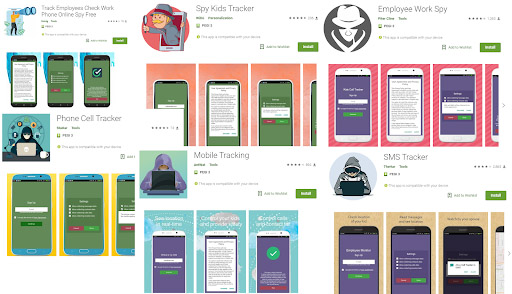
In a recent blog post, Avast announced that it had discovered seven apps available on the Google Play Store that enabled users to stalk other people. The apps work by sharing the victims live location, collecting their contact list, and monitoring their SMS and call history. This made it possible to stalk work employees or colleagues, romantic partners or, perhaps worst of all, children. According to Avast, all seven apps were likely designed by a Russian developer.

Before publishing the blog post, Avast first notified Google of the seven malicious apps and the internet giant has since removed them all from the Play Store. Unfortunately, however, they’d been downloaded over 130,000 times before Google was able to remove them. You can see the names of the seven apps below:

  • Track Employees Check Work Phone Online Spy Free
  • Spy Kids Tracker
  • Phone Cell Tracker
  • Mobile Tracking
  • Spy Tracker
  • SMS Tracker
  • Employee Work Spy
Image via: Avast

Each of the apps first required the stalker to gain access to the victim’s phone. They’d then install the apps on the phone before following instructions that would show them how to hide the apps so that the victim wouldn’t know they were there.

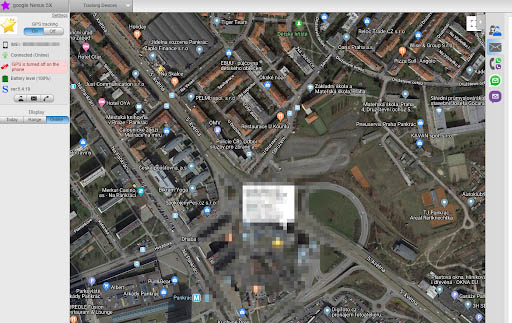
The stalker would then email themselves a link and use it to install the spying app onto his or her own phone. From then on, the stalker would be able to keep tabs on the victim, and even be able to view their location on a map.

Stalkerware removed from the Google Play Store
Image via: Avast

Avast’s head of mobile threat intelligence, Nikolaos Chrysaidos, had this to say of the new type of malware threat, “These apps are highly unethical and problematic for people’s privacy and shouldn’t be on the Google Play Store… They promote criminal behavior, and can be abused by employers, stalkers or abusive partners to spy on their victims. We classify such apps as stalkerware, and using apklab.io we can identify such apps quickly, and collaborate with Google to get them removed.”

These apps offer an insight into a worrying new digital threat that we need to be aware of. Protect your phone with a rigorous password as well as any biometric security measures your phone may offer. Don’t give it to anybody you can’t trust. We’ve also reached out to Chrysaidos to see about how to make sure nobody has installed these apps on your phone.

Facebook and Google know when you’re watching porn (even if you’re in incognito mode)

Thousands of porn sites are sending your info to Facebook and Google!

Man watching porn

It looks like the prying eyes of the internet are on us even at our most private, intimate moments.

A recent study from Microsoft, Carnegie Mellon, and the University of Pennsylvania determined that about 93% of porn sites leak user data to a third-party. 

Google and Facebook both had trackers on thousands of porn sites. Oracle also had trackers on thousands of porn sites. Even if you are watching porn in incognito mode, there is a chance that both Google and Facebook have followed you there.

Why do Google and Facebook want to know if I’m watching porn?

Google and Facebook might be acting like peeping Toms, but they aren’t using the info for what you think.

Tracking tools can be used to gather information about users. However, spokespeople for both Google and Facebook said that information from adult websites are not used to create marketing profiles.

“We don’t allow Google Ads on websites with adult content and we prohibit personalized advertising and advertising profiles based on a user’s sexual interests or related activities online. Additionally, tags for our ad services are never allowed to transmit personally identifiable information to Google,” a Google spokesperson told Business Insider.

Online privacy

If you see a link on a site to share that content on Facebook, there is often a Facebook tracker on that site. Basically, even though you probably can’t imagine sharing a porn video with your friends and family, Facebook may be tracking the site in case you do.

It’s hard to determine just what Google and Facebook are doing with this information, but it could be an accident.

It could be unintentional

As weird as it sounds, web trackers are not uncommon in the slightest. Even companies like the New York Times use web trackers to use and share data about its readers. 

Both Google and Facebook don’t allow pornographic content on their platforms. Even if you watch 18 hours of porn every single day, Facebook and Google won’t show you a single ad for pornography. Basically, there’s a real chance that although Google and Facebook are tracking you on a porn site, they aren’t necessarily doing anything with the data. 

We can’t tell if that makes it more creepy or less creepy.

What can I do?

First off, sign out of Google and Facebook before you start watching anything racy.

 Next, be careful about which sites you choose to visit, regardless of the content. All porn sites look like, well, porn sites, so it can be hard to find one that isn’t trying to give you a virus.  Also, make sure to run an antivirus program just to be safe:

Malwarebytes Download now ►
8

Finally, there are apps you can download that can stop web trackers in, well, their tracks. You can surf the internet safely with a VPN. Again, just make sure you aren’t signed into Google or Facebook.

7

You can also download DoNotTrackMe. It’s a simple little app that blocks web trackers from tracking you as you surf the web. However, although it will block most web trackers, it has been known to have a few slip through the cracks. Using a VPN is the better option, but if you don’t want to use that, this is a good option as well.

DoNotTrackMe Download now ►
7

And you should definitely ditch Chrome as fast as you can. Google is stockpiling huge amounts of data as you browse. Choose Brave or Firefox for a more private experience online.

Finally, make sure you’re not using Google to search for anything improper. A search engine like DuckDuckGo keeps your information private, while Google sucks it up into their giant database about you.

Wrapping up

Now that we know that Google and Facebook have trackers on porn sites, the question remains: “How will they respond?” If the trackers are removed, it means that it was an accident. However, if they stay put, it means that the data is probably being used for something, and we deserve to know what!

Firefox will soon make it much easier to spot websites that are insecure

Starting in October, Firefox will permanently mark all HTTP sites as not secure.

Firefox logo update

When Mozilla releases the next update to Firefox this October, it will make it much easier to spot sites that are more likely to be insecure.

Firefox 70 will follow in the footsteps of Chrome update number 68 from last year, by adding a permanent “not secure” indicator on all non-https websites. This marks a change from the current policy, which only shows the not secure indicator when a HTTP website includes forms or login fields.

Why is this important?

The Firefox team that announced the planned move cited the fact that 80% of all internet pages are now served via HTTPS. This means that rather than HTTPS websites receiving a positive note, it makes much more sense for non-HTTPS sites to be negatively flagged for their added security risk.

Talking to ZD Net, Firefox developer Johan Hoffmann said, “In desktop Firefox 70, we intend to show an icon in the ‘identity block’ (the left hand side of the URL bar which is used to display security / privacy information) that marks all sites served over HTTP (as well as FTP and certificate errors) as insecure.” This move will bring Firefox in-line with Google Chrome that made the same change a year ago.

It isn’t like Mozilla is simply copying Google with this, however, as the privacy valuing foundation has been working on the feature since 2017.

Firefox team considers paid news product that would kill ads

A funding model that replaces ads as a revenue driver will ultimately protect user privacy

ad-free news across multiple platforms

If you’re one of those internet users who hates seeing ads, you might be interested in some of the moves the Mozilla Foundation has been making recently. Mozilla is the not-for-profit organization behind the popular Firefox browser that focuses on user privacy above all else.

Mozilla recently introduced a new web browser called Firefox Preview, which makes it very easy for users to protect their data. The foundation has also been making other noises recently, about offering up an alternative to the current ad-based model that powers and pays for the modern internet. The Mozilla model would see us paying a subscription that would fund the sites we visit so that they’re not forced to show us ads when we do.

A funding model that replaces ads as a revenue driver will ultimately protect user privacy

An ad-free internet fits in with Mozilla’s wider privacy protection mandate as the biggest threat to our online privacy is the value our data holds for big tech companies. The more they can learn about us, the more targeted the ads they can show us, which in turn are worth more money towards their bottom line.

Mozilla confirmed the move towards a paid model a few weeks ago when Dave Camp, the senior VP of Firefox at Mozilla said in a statement, “A high-performing, free and private-by-default Firefox browser will continue to be central to our core service offerings. We also recognize that there are consumers who want access to premium offerings, and we can serve those users too.” Camp was responding to an earlier article in t3n.de where the CEO of Firefox said that the subscription model might arrive sometime by October. We’re now getting a look at what that new premium model might look like.

Preview logo
Firefox Preview is currently in the beta testing stage and puts user privacy front and center

Firefox has recently been testing a funding model in partnership with a news subscription startup called Scroll. The test gave users a chance to sign up to an ad-free news subscription for $5 a month. Scroll offers users a subscription to 12 media partners that include some big names like USA Today, Vox, and Buzzfeed.

The Mozilla test is no longer active, but it gave subscribers access to ad-free audio versions of their news stories as well as working with partnered content across different devices and from a variety of sources and platforms including native apps and social media.

Mozilla is no doubt poring over the data it has collected via its recent test as we move closer towards the October launch date the Firefox CEO talked of back in June.

It is worth noting that Apple offers a similar service for $10 a month, which hasn’t been too successful. If you’re looking for an-free internet though, Apple might not be a company you completely trust.

The Mozilla Foundation, on the other hand, has a solid reputation among web users and their version of an ad-free internet could be the one we see more of in the future.

Make sure you stick with us for more developments on this story, and others, as they happen.

WhatsApp, Telegram security flaw: how to fix it

Security flaw allowed hackers to alter photos sent on WhatsApp and Telegram.

WhatsApp secuirty

We already know that you can’t believe everything you read online, but now we might not be able to trust everything we see on WhatsApp or Telegram!

Researchers from the software company Symantec discovered a vulnerability in WhatsApp and Telegram. The vulnerability would allow a hacker to change what a person sent you.

In the above video, the researchers showed that through the vulnerability, they were able to change the faces in a photo to look like Nicolas Cage. As hilarious, and amazing as that is, there is more to fear than a real-life version of his movie “Face/Off.”

Let’s say someone sent you a receipt or an invoice. A hacker could alter the information about the account, routing number, or the amount! Suddenly, rather than reimbursing someone for last night’s dinner, you just got duped into sending a stranger $50. 

How could this happen?

WhatsApp and Telegram both use end-to-end encryption which basically means that messages are kept between those involved. Even the companies themselves cannot read the messages. 

However, this does not mean the app itself is safe from being hacked. This vulnerability could have allowed for a spyware attack that would have compromised WhatsApp and Telegram users.

WhatsApp Messenger Download free ►
8
8

What’s being done about this?

There is one big thing you can do to protect yourself when using WhatsApp and Telegram: become invisible.

The vulnerability comes from how files are stored on the apps, according to Symantec. In order to close that gap, you need to remove your gallery’s visibility. 

In WhatsApp, turn off “Media Visibility” in the settings menu.

In Telegram, toggle off “Save to Gallery” from the settings as well.

Wrapping up

There are many political activists, politicians, and people-of-interest who need to keep their conversations private, so they use apps like WhatsApp and Telegram. Unfortunately, instances like this and like a few months ago when a human rights lawyer was targeted in a WhatsApp virus attack, are showing that they might not be the most secure.

Although this security flaw was caught early, the point remains that this could have been devastating to users. Next time you go to send something important on WhatsApp or Telegram, you might want to rethink it.