How Firefox can help block invasive ads

Tired of seeing the same ads over and over again? Firefox can help you out!

It’s happened to all of us.

You’re on Facebook, and an annoying ad pops up. You switch over to Instagram and, sure enough, it’s there, too. Finally, you start surfing the web and that same irritating ad just keeps following you.

It turns out that this ad is following you because of something called fingerprinting. Through fingerprinting, a company makes a profile all about you. These profiles make it easier for marketers to send you tailored ads.

Luckily, Firefox is here to help with a feature that can add a layer of protection between you and the companies that want to profile you.

How Firefox can stop fingerprinting

To use Firefox to stop fingerprinting, just follow these basic steps:

  • Open Firefox
  • Click on the menu in the top right of the screen (it looks like three horizontal lines)
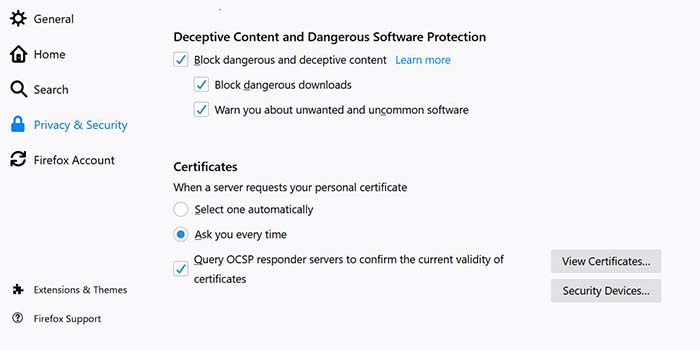
  • Click on “Content Blocking”
  • Scroll down to the “Custom” section
  • From the “Custom” section, check the box for “Fingerprinting”
  • You’re all set!

Firefox block

Wrapping up

Blocking fingerprinting with Firefox can cause some sites to break. But if you put a premium on privacy, the positives could outweigh the negatives. Fingerprinting tracks your data without your permission as well as slows down your computer.

If you’re tired of seeing these ads over and over again, Firefox and its features offer a cleaner, more private online experience.

Softonic is proud to partner with Mozilla. When you download from us, we may earn a commission.

How the newest Firefox keeps you safe

Firefox is more than just a browser. Here’s what it does to keep you safe!

If you’re looking for a browser to keep you safe, the latest version of Mozilla Firefox is here to watch your back. From password management to security alerts and beyond, Firefox makes safety and privacy their top priorities.

Firefox Monitor alerts you to data breaches

Firefox Monitor

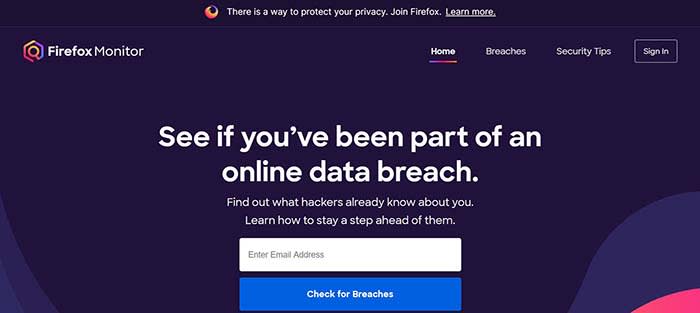
It seems like there’s a new data breach every other day. Have you ever been concerned that you were involved in one, and that your data has been compromised? Firefox Monitor can help you find out!

Simply enter your email address, and Firefox Monitor will tell you if that email address was ever involved in a data breach. Also, when you join Firefox, you can save all of your email addresses in their system, and receive a notification if one is ever involved.

Firefox Lockwise safely saves and syncs your passwords across devices

Many of us have a system for keeping track of our passwords that’s probably less than ideal. Maybe we have a sticky note in the corner of our monitor with a list of them. Maybe we threw them into the notepad on our phone or computer. It could be we just think we have a good enough memory to remember them all. Either way, none of these methods are optimal.

That’s where Firefox Lockwise comes in handy. It keeps all of your passwords safely behind a firewall and autofills them in the login page when you give the okay. The best part? Lockwise can carry those passwords across devices so you’re never locked out or trying to find that Post-It note with the password you created for that site you haven’t visited in three years.

Send big files with Firefox Send

Firefox send

It’s happened to all of us: we have a large file we need to send, but we don’t have a flash drive nearby, and it’s too big to send via email. That’s where Firefox Send comes in handy. Firefox Send allows you to send a file up to 2.5 gigabytes in size just by joining Firefox.

Sync to your Android or iPhone

Maybe you have 12 tabs open on your desktop, but when you jump on your mobile device, you have to remember what those tabs were. Firefox solves that problem by syncing your sessions between desktop and mobile devices.

When you sign in on Firefox on any of your devices, your browser will be personalized the same way thanks to Firefox’s syncing feature. Even better: your sessions are protected by end-to-end encryption.

The newest Firefox is the best version of a trusted browser from a team that puts your privacy first. Give it a spin and see why these features are so groundbreaking!

Softonic is proud to partner with Mozilla. When you download from us, we may earn a commission.

Is Incognito mode really private?

Incognito mode can prevent a lot of embarrassing situations, but how much can it really protect us?

Incognito

Perhaps we’re collectively wising up to the various ways in which we’re being spied on at any given moment.

According to a 2016 study from the University of Washington, at least 75% of the world’s most popular websites use web tracking tools. Three years later, we’re sure that number has only gone up.

As such, there’s a lot to consider when it comes to privacy and how much we care about whether our browsing activities are genuinely private.

Which brings us to this question; how private is Google’s Incognito mode?

Is Incognito search really private?

Most of today’s mainstream browsers such as Google Chrome, Firefox, and Safari have some private browsing features, but it’s important to understand the difference between real private browsing and incognito.

Chrome’s Incognito isn’t private browsing, and they do mention this when you open a new incognito window.

As the name suggests, you’re really just putting a “disguise” on your online activity so that your browser doesn’t store cookies or password info during your next session.

Google Chrome Download FREE ►
7

Chrome’s privacy issues

Chrome privacy

There’s a reason that Google Chrome is currently the most popular browser in the world. It’s easy to use, and it connects with all of your Google accounts. If you’re like most people, you’re probably using it on the regular.

Just think about how often you have to use Google Docs at work or how many people you know who use Gmail.

With all of its convenience and user-friendliness comes a darker side. Chrome stores a ton of information about you from names, addresses, and passwords to what you do online.

Are there any benefits to using an Incognito tab?

incognito

The idea is, if you’re using your own devices, you don’t have to keep logging into various accounts. Also, Google will help you keep track of calendar reminders, save your parking location, and remember multiple passwords, so you don’t have to.

However, if you’re on a public computer or other people have access to your device, you probably don’t want that information stored publicly. You especially don’t if you’re accessing sensitive content online.

That’s the main reason Google developed Incognito mode, not necessarily to provide a totally anonymous browsing experience.

This includes the websites you’ve visited and the information you may have entered, including passwords.

But while Incognito mode brings some privacy into the fold, it doesn’t provide total anonymity. It certainly doesn’t protect against hackers, government surveillance, or even your employer or school.

That said, here are a handful of benefits associated with Incognito search,

Open multiple Google accounts

Let’s say you’re juggling both work and personal accounts, but want to pull them up on the same device. Open an Incognito tab and log into the secondary account.

Get around (certain) firewalls

 HBR incognito browser

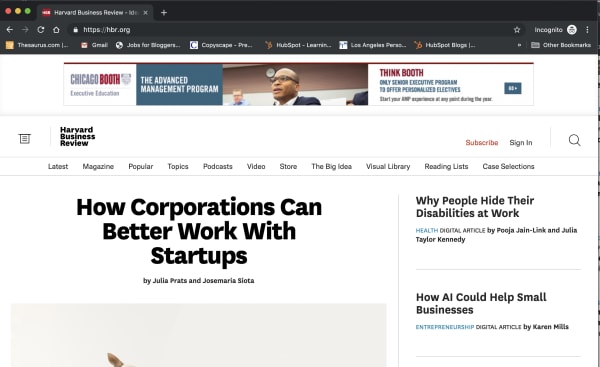
Some sites like the New York Times, the Harvard Business Review, and others have firewalls in place. Apparently, they use cookies to track whether you’ve reached your free article limit.

If you’d like to read an article without shelling out for the full subscription, opening an Incognito tab presents a (somewhat) reliable workaround.

However, it doesn’t work for every paywalled site. The Washington Post and Wall Street Journal, for instance, are onto this particular hack. Also, when you don’t pay for journalism, it has a tendency to die.

Do some benign sleuthing in an Incognito tab

If you’re stalking an ex on social media or scrolling through an acquaintance’s Instagram, or want to see someone’s LinkedIn profile without them knowing, Incognito is the perfect tool.

Sure, you might not be able to see every profile, but you’ll have a layer of protection against accidentally “liking” something.

You can prevent companies from tracking you

One of the key benefits of going incognito is that it prevents websites from tracking your cookies.

This means that you can browse freely without giving your browsing information to the sites you visit. Essentially, this allows you to opt out of remarketing campaigns.

That said, you can’t prevent your own company from monitoring your online activity — whether Chrome is wearing its spy fedora or not.

While your boss will need to install third-party tracking software to do so, you’re better off assuming that any company devices don’t offer much in the way of privacy.

Wrapping up

Incognito does have benefits, but the real downside is the fact that many people misunderstand its purpose.

However, the main thing to remember is that incognito doesn’t equal encrypted. If that’s your aim, you’ll want to make sure to use Tor, Brave, or use a VPN to keep online activity genuinely private.

Google Play Store adware threat could basically lock up your phone

238 apps with over 440 million downloads between them have shipped with an aggressive form of adware.

play store app on dark background

Malware found in Google Play Store app stories are becoming so regular you could set your watch by them. There have been a lot in recent memory, but the biggest by far has been the bulk action Google was forced to take against Chinese app developer DO Global. With apps totaling over half a billion downloads, DO Global’s ban, for a number of reasons including sharing user data with the Chinese government, sent shockwaves through the app world.

It now looks, however, like Google’s problems with apps from China are far from over as a new security report has shed light on some worrying findings. According to the report, Google has a serious problem with the Chinese-based firm Cootek, due to unauthorized adware that can render victims’ mobile phones almost completely unusable.

238 apps with over 440 million downloads between them have shipped with an aggressive form of adware

Security research firm Lookout has released details of a new study its team has performed looking into apps on the Google Play Store. The study’s findings show that a particularly nasty piece of adware called BeiTAd has been found in 238 apps on Google’s app store. 237 of the apps were published by the aforementioned Cootek.

infected apps
One of the more popular infected apps

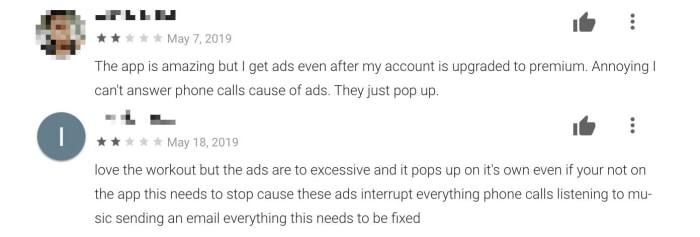
BeiTAd is a rather invasive piece of adware as it propagates “out of app” ads. After the infected apps are downloaded, the plug-in lies dormant for up to a couple of weeks but then wakes to cause havoc on the victim’s device. Basically, out-of-app ads start popping up all over the device, not just in the infected app, including places like the lock screen. Even worse, the plugin could trigger video ads to play while the phone is in sleep mode.

a bad review

In the report, Lookout researcher Kristina Balaam points out just how bad this adware is, “While out-of-app ads are not particularly novel, those served by this plugin render the phones nearly unusable. Users have reported being unable to answer calls or interact with other apps, due to the persistent and pervasive nature of the ads displayed.” In many cases, the onset of ads has been so bad that they’ve interrupted regular use of the device.

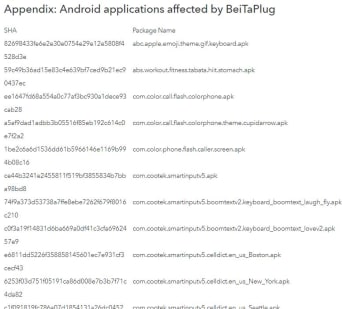
The list of infected apps
The list goes on. Click here for full list of infected apps.

The good news is that Lookout has shared its findings with Google and the internet giant has already taken action. All of the affected apps have either been removed, or updated to new versions that don’t include the BeiTAd plugin. This means if you suspect you might have downloaded a Cootek plugin or you’ve been experiencing problems like those described above, you should update your apps immediately.

Unfortunately, due to the large number of affected apps we can’t list them all here. If, however, you want to check your apps against the list, you’ll find it here.

Visiting or moving to the US? Trump wants to see your social media data before he’ll let you in

All Visa applicants to the U.S. will have to hand over all of their social media and email details from the last five years.

We’ve written a lot in the past about China’s scary use of modern technology. In particular, we’ve been frightened by the authoritarian social credit score it gives all Chinese citizens and the limits it places on those with low scores. It is easy to think, because China is so far away, that it isn’t really something we should worry about at home. But what makes China’s actions so scary is that they could easily be taken up in other countries by other governments. First, they came for the Chinese…

Well, now it seems that these draconian types of laws have just taken a huge step closer to home as the U.S. State Department has just made a rather chilling announcement.

All Visa applicants to the US will have to hand over all of their social media and email details from the last five years

Trump want5s to see your facebook

Anybody planning to visit or migrate to the U.S. on any kind of visa now has to give the State Department all of their social media usernames, previous email addresses, and phone numbers from the previous five years. According to the Associated Press, the move was first proposed in March 2018, but has only just taken effect after the new forms, including the new “social media identifiers” requests, were approved.

The new move marks a huge expansion of the Trump administration’s screening procedures for anybody coming to the U.S. Until this recent move, these types of requests were only made to people who’d been flagged as needing extra attention. These flags could come from a number of reasons including traveling to areas controlled by terrorist organizations. The AP reports that around 65,000 applicants fell into this category each year, but that now almost 15 million visa applicants, mostly for non-immigrant visas, will be required to hand over their social media details.

The new visa forms will list the most prominent social networks, but applicants will also be prompted to include the details for any other networks that aren’t explicitly mentioned. As yet, there are no details on how the State Department will ensure details of all accounts have been included in applications but speaking to The Hill, a State Department spokesperson warned of “serious immigration consequences” for those caught not complying. These consequences could potentially include visa withdrawal and refused entry.

many passports different nationalities
You now have to show much more than your passport, if you want to enter the US

As well as the scary implications that come from the U.S. government doing its best China impression, there is also the huge potential risk that comes from compiling such huge amounts of personal data in one place. We’ve seen time and time again, huge data breaches that have put user privacy and security at risk and as ZDNet points out, U.S. Customs doesn’t exactly have a  flawless record when it comes to data protection. A report in December showed that border agents hadn’t been deleting the data they’d collected from personal electronic device searches.

We’re not just walking down a scary path with this one, it also seems like a disaster waiting to happen at any moment.

How to scan for hidden cameras at your Airbnb

Worried about spying eyes while staying at your Airbnb? These tips can help you out!

Hidden camera

Airbnb has changed the way we travel, offering the comforts of home and the ability to experience life as the locals do.

In recent months, an increasing number of reports have made headlines involving guests finding hidden cameras in their Airbnb accommodations. And no, that information was not disclosed to guests up front.

Most recently, a New Zealand family made headlines for spotting a hidden camera after noticing the device on the Wi-Fi network.

Creepy, right?

While it’s unlikely that most Airbnb hosts spy on their guests, reports like these do make the case for erring on the side of caution.

7

What does Airbnb allow — camera-wise?

Airbnb

Airbnb’s policy states that if you are a host and you have any type of security camera, active or not, it needs to be indicated in the House Rules section of your profile.

They also require that any recording taking place during a guest’s stay must be disclosed. Should the guest report an active recording, they can cancel the reservation and receive a full refund.

What’s more, Airbnb added an extra layer of disclosure before booking.

As of early last year, guests receive a pop-up before confirming the booking, informing them of any cameras on the premises and where they are located.

Guests must actively opt-in indicating that they understand that they will be filmed during their stay.

Hidden camera

The rule applies to any camera ranging from nanny cams to Wi-Fi cameras like Nest or Dropcam.

9

Violators may be subject to penalties, though the website doesn’t exactly lay out what those penalties are.

Airbnb’s trust and safety rep told The Atlantic that the company does try to filter out hosts who might engage in suspicious behavior. Airbnb runs their information through felony and sex-offender records before they can start hosting guests.

How can you scan for cameras?

There are a few things you can do to check for hidden cameras in your Airbnb rental.

Make a habit of following these few steps before checking for bedbugs to ensure that you’re not being watched during your next vacation:

Look for objects that seem out of place

Bear on shelf

Let’s start out with a low-tech tip taken from old school sleuthing. Scan your Airbnb for anything that seems “off” or out of place. This could be as obvious as a can of soda placed in the middle of the room or something more subtle.

Assuming your hosts are at least somewhat savvy, here are some common places you might find a hidden camera:

  • Smoke detectors
  • Stuffed animals
  • Shelves
  • Power strips
  • Night lights
  • Books or DVDs
  • Computers and their accessories
  • Holes in the wall

Do a sweep of these “everyday items” to see if anything seems sort of bulky or odd-looking. In this example below, you’ll notice that this USB plug seems a little bit larger than the norm — and what do you know — there’s a hidden camera attached.
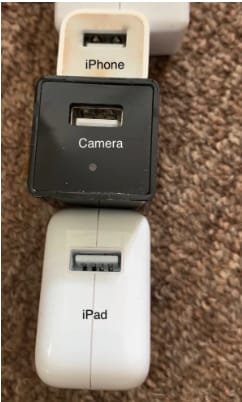
Hidden camera in USB Consider the “best” angles for covering the room

Generally speaking, corners are the best place to place a camera, as you’ll get the widest view of the space.

The Barker family, from the aforementioned article, found their Airbnb’s camera in prime position, that wide angled corner.
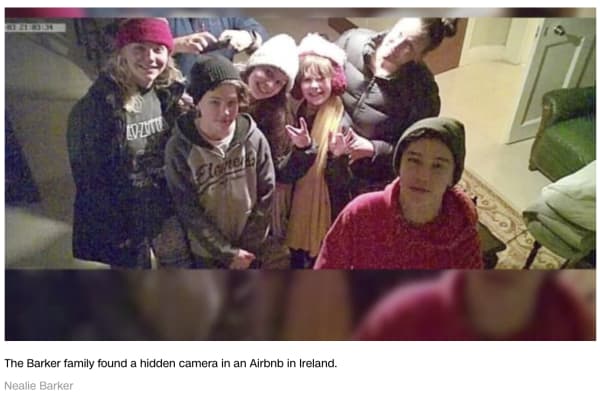
barker family airbnb camera

You’ll also want to use common sense when scoping out the scene.

If you’re worried that someone is spying on you in the kitchen, chances are they’ll be viewing from above rather than in the baseboard.

If they’re trying to catch you in the living room, you might want to spend time looking at anything stored near the television or pointing at the couch.

Shine a light to pick up the reflection of any hidden lenses

Lenses, being made out of glass, reflect light. Try doing a sweep of the room by shining a flashlight to scan for reflections.

Turn off the lights

Turn off the lights to check for hidden night vision cameras. Most hidden cameras have red or green LED lights that blink or shine in low light conditions, in an effort to supply lighting for better images.

Spot hidden smart devices by scanning for Wi- Fi connections

If you connect to the house Wi-Fi — chances are, the host has provided you with a network name and password. Once you’re in, open the network to see what other devices are connected.

Unfortunately, the camera will not be discoverable if it is not connected to the same network you’ve logged into.

Use a Wi-Fi checking app

Unfortunately, scanning with your eyes and flashlights alone won’t catch every hidden camera.

Luckily, there are plenty of apps designed for this express purpose. One example is Network Scanner, which displays IP and MAC addresses, as well as the names of the hosts on the local network.
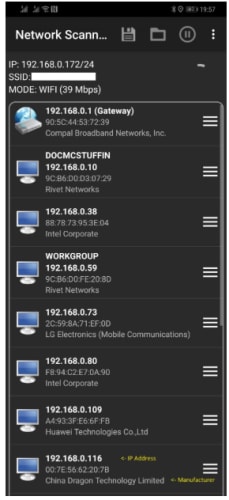
network scanner find unknown devices

Or, another called Angry IP scanner, which also scans the network for devices, security threats, and more.

Angry IP Scanner Download Free ►
7

Just about every hidden camera the average person can buy relies on wireless technology to stream the footage to a remote location.

Smartphone users can download an app called Fing (available on iOS and Android) which is designed to help users “control their digital environment.”

While the app is primarily designed to help you troubleshoot network issues and keep your own devices secure, it can also clue you into peeping hosts.
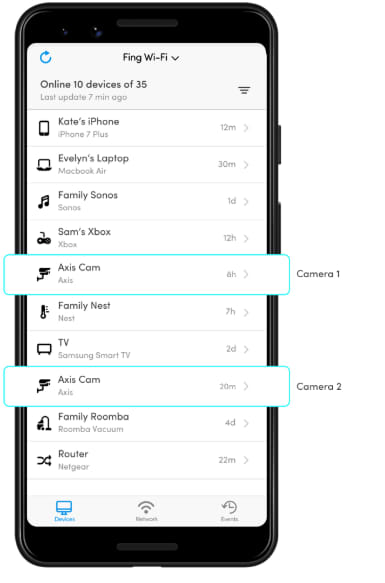
Fing App

What should you do if you find a hidden camera in your Airbnb?

Any undisclosed cameras must be reported to both Airbnb and the host. Make sure you don’t move the devices and take pictures documenting the findings.

In the U.S., it’s fully within your rights to get the police involved, as undisclosed cameras are a criminal offense.

Still, hidden camera laws vary by country. If you’re traveling abroad, read up on local laws to find out if any recourse is available.

Wherever you are, hidden cameras violate the terms of the Airbnb host agreement, so make sure you report all you find.


Your Mac needs malware protection and Intego delivers the goods

The award-winning Mac Antivirus Intego Internet Security X9 now with 30% off.

In January, Mac users were targeted by VeryMal, a piece of malware that tried to trick them into installing a fake upgrade to Adobe Flash Player. If duped into clicking, they would have been gifted with OSX/Shlayer, adware first discovered by security firm Intego, that can monitor your online activity and serve you excessive advertisements. While the attack was halted in just two days, it brought to light an important piece of information that users of Apple computers often overlook: Macs certainly have extremely robust inbuilt protection from malware, but they are not invincible and can always benefit from additional security measures.

Fortunately, the same company that identified Shlayer is also exceptionally good at blocking it, along with other Mac attacks. Intego’s Mac Internet Security X9 software is an affordable best-in-class solution for keeping Macs locked down safely. Here’s why.

Double Shielded Protection

When you download Intego Mac Internet Security X9, you actually get two hard-working utilities.

Intego VirusBarrier

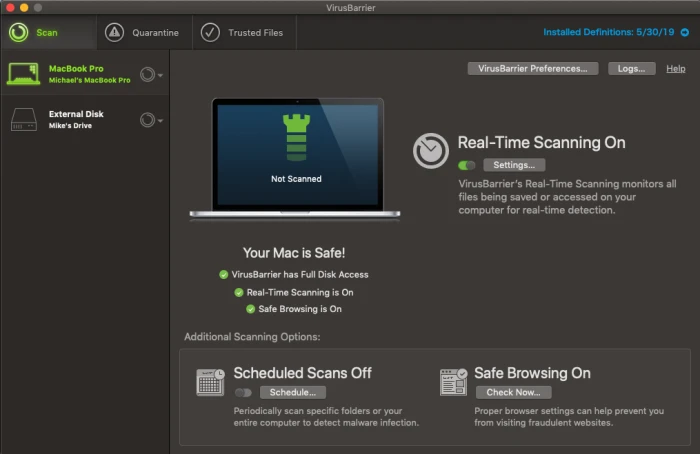
The first is VirusBarier X9, which scans your Mac for every known malware threat and keeps on doing that quickly and efficiently in the background. The interface is pleasant and simple to understand, with a simple toggle switch to control whether or not you want to activate real-time scanning, in which the software constantly monitors files that are accessed on your drive whether by yourself or by other system actions. Pop-up windows alert you to suspicious activity and you instantly have the choice of placing a file in quarantine or allowing it to function normally. You can also set up scheduled scans of either specific folders or your entire computer and can have the software do a quick check of your browsers to ensure they have the proper settings for safe browsing.
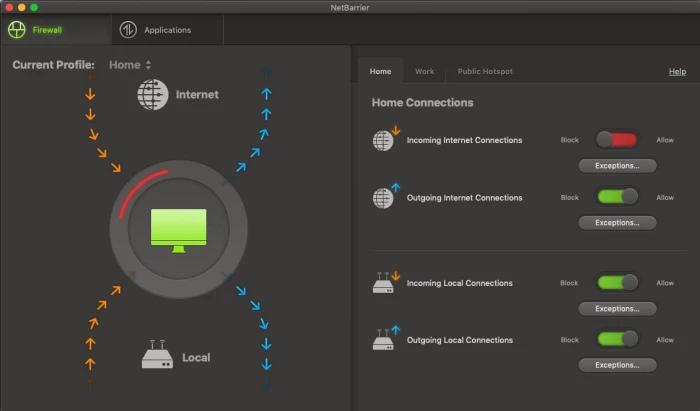
The second component to Intego Mac Internet Security is Net Barrier X9.

Intego NetBarrier

You might already know that Macs have a built-in Firewall that protect you from nefarious inbound connections. But that native functionality doesn’t extend to watching for outbound connections, which is important because some malware could land on your machine and start telegraphing information out to places you don’t want it to go. Net Barrier X9 monitors both inbound and outbound connections to ensure that nothing happens without your permission.

Like Virus Barrier, the Net Barrier interface is extremely straightforward to use. Four simple toggle switches control whether or not you want to allow incoming or outgoing internet connections as well as incoming or outgoing local connections.

The software alerts you any time a program attempts to make contact with the internet and you get to decide whether to allow it or not. Additionally, you are able to establish different profiles for home, work and public hotspot access, and the software will switch to those profiles automatically.

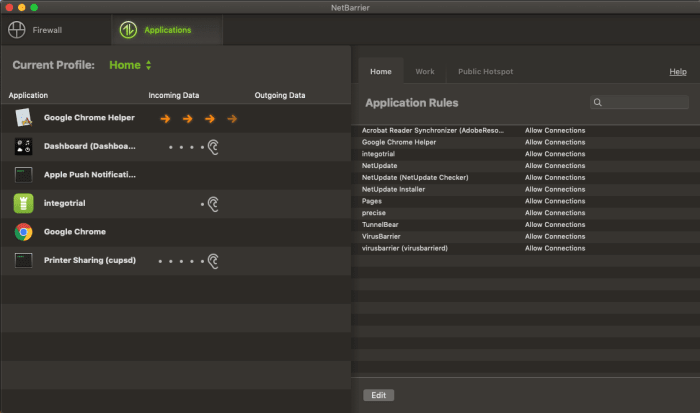
The applications tab allows you to see which apps are accessing the internet at any one time, and which you’ve granted permission to, something you can do permanently or on a case-by-case basis as notifications arrive.

Intego NetBarrier Applications

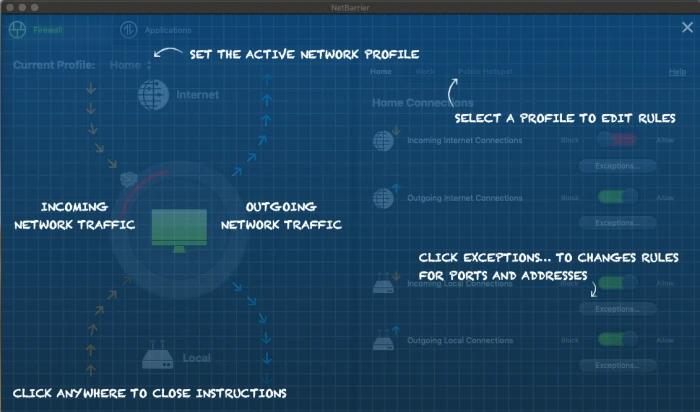
Additionally, when you first use the software, helpful overlays appear on top of the windows to help you understand how to use the program at a glance, which is just another small feature that makes Intego Mac Internet Security X9, such a pleasure to use.

Intego NetBarrier Instructions

Rarely does so much online protection arrive in such a user-friendly package.

The software is available for purchase for the very attractive price of $34.99 for one year or $64.99 for two.

Follow these steps to protect your online privacy

Is your data really private? Follow these steps to find out.

online privacy

No matter what you do, internet companies are going to try to learn everything they can about you. Your age, location, income, and other demographic information are hugely valuable to them. That’s why it’s important to protect your online privacy. Follow these rules to stay safe and keep your data locked down.

Social media privacy

Facebook, Instagram, and Twitter can soak up a ton of information if you’re not careful. Our guide to Facebook privacy should help you keep your information safe. Remember, people have been fired for what they’ve posted on social networks, so you want to be careful about what you write and who can see it. Once it’s online, it’s hard to take it back.

Take a moment right now to go to your Facebook privacy settings and give them a thorough once-over.

It’s also important to turn off location services on each of your social media apps. Does Mark Zuckerberg really need to know where you buy groceries? 

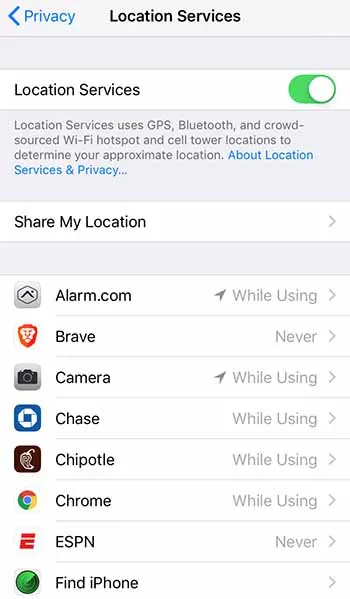
If you have an iPhone, just go to Settings > Privacy > Location Services and you can adjust which apps can track you down. For ultimate privacy, turn it all off. But you also probably want your map functions to be able to find you, so consider your options here.

iPhone location servicesFor Android, go to Settings > Security & location > Location and then adjust Use location as you see fit. Remember that location services can burn a hole through your data plan, so only turn them on for the most essential apps.

It’s also important to limit where your social profile can follow you around the web. Consider these steps to stop Facebook from following you once you’ve left Facebook.

Change your browser

Chrome can be a privacy nightmare. Consider one of these three alternatives for a more private browsing experience.

Enjoy private, secure and fast browsing with Brave.

Best tools for privacy

You need to make sure your antivirus and anti-malware programs are up to the task. If you’re ever on public Wi-Fi, a VPN is a must. Read our recommendations on the best online tools to stay safe.

Consider decentralized options

It’s easy to default to the Google suite of products. They’re free, they’re easy, and they’re everywhere. But that means that Google is compiling a heck of a lot of data on you. There are some decentralized versions of Google Docs, YouTube, and Google Photos that put your privacy at the forefront.

More privacy steps

Are you using Google for search? Most of us do. But it’s one surefire way to leak your information all over the internet. Consider switching to a privacy-focused search engine. A firewall can also be a huge tool in your data-protection arsenal. And while you’re at it, consider encrypting your data when you can.

Set up two-factor authentication

If your accounts fall into the wrong hands, two-factor authentication can really save you. And Google just proved that it’s one of your best defenses against getting your accounts hijacked.
Watch out for new threats

No matter how vigilant you are, the bad guys are always angling for new ways to steal your information. Sometimes, it’s our own lack of awareness; sometimes, it’s a blunder from a company we trusted; sometimes, it’s an all-out assault from people trying to hurt us. In fact, some apps are even tracking us after we’ve removed them.
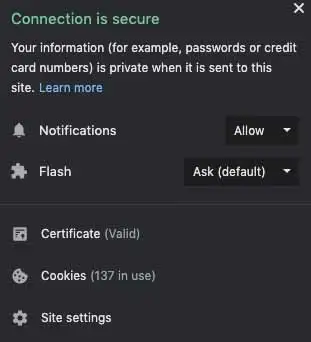
It’s important to stay up to date on privacy threats, that’s why Softonic is here to alert you to emerging dangers. For immediate alerts, we recommend allowing our push notifications. Just click the padlock in the URL bar and make sure your Notifications section is set to Allow.

Push notifications

We’ll continue monitoring the privacy and security landscape, and as soon as we have new information, we’ll be sure to let you know.

Flipboard data breach: What happened and who is exposed?

There is good news and bad news for Flipboard users.

Flipboard is a popular online news service and mobile app that takes stories from various news sites around the web and puts them together in an aesthetically pleasing interface. Since it first hit the web, Flipboard’s popularity has grown to the point where it enjoys 150 million active users every month. Unfortunately, however, the last few days have been bad both for the app and its users as notices have been going out to tell users that Flipboard has been hacked and user data has been exposed.

There is good news and bad news for Flipboard users

Flipboard

Flipboard has released information on the data breaches it has suffered via a security note posted to its website. The note says, “We recently identified unauthorized access to some of our databases containing certain Flipboard users’ account information, including account credentials.” It goes on to say that following the discovery the Flipboard team launched an investigation, which revealed some telling information.

“Findings from the investigation indicate an unauthorized person accessed and potentially obtained copies of certain databases containing Flipboard user information between June 2, 2018 and March 23, 2019 and April 21 – 22, 2019.” Yes, you read that right, the hacker had access to certain Flipboard databases for nine months.

The security note also points out that not all Flipboard accounts have been compromised by the breach and that the company is still trying to determine just how many accounts have been compromised. There is some good news there but the uncertainty surrounding which accounts have been breached and which haven’t, is probably why Flipboard is prompting all users to reset their passwords.

password and login details
Fortunately the stolen passwords are protected by a robust hashing encryption technique

The real good news, however, is that unlike with recent events at Facebook and Google, Flipboard had encrypted the vast majority of passwords it had stored on the breached database. Flipboard uses a strong password-hashing algorithm named bcrypt, which is widely regarded as being very difficult to break. The hacker may have been able to copy the database containing the sensitive user information, but there is good chance he/she won’t be able to access the data. Unfortunately, Flipboard also pointed out that passwords created or changed before March 14, 2012 were hashed using a weaker algorithm so may be easier to crack.

So, what should you do, if you have a Flipboard account?

As we’ve already pointed out, Flipboard is contacting users and prompting them to change their passwords. Follow the instructions it sends you and your account will be secure once again. The other thing to consider, however, is whether you’ve used the same password on Flipboard as you have on other accounts. This is the type of situation hackers dream of as it enables them to test the security credentials, they steal from one site on various other sites, too. Find out if any password you frequently use has been exposed here.

If you frequently use the same password, this is great time to reset all of your passwords. A password manager is the easiest and most secure way to do this. We recommend Last Pass – its free version offers multi-device support so you can use it to log in to sites on your computer and phone.

8

If you used Flipboard, but only signed in using your Google or social media accounts, Flipboard says you have nothing to worry about as it doesn’t store these credentials on internal databases. You will, however, have to log in again.

All this goes to remind you that you do need to take your online security seriously. A single breach can bring it all down like a house of cards if you’re using the same password across multiple accounts. That said, don’t wait. Act today, change your passwords and activate two-stage verification when possible, and stay safe online.

Windows 10: New vulnerability found

A new zero-day vulnerability has been discovered in Windows 10 that could lead to a malicious attack.

Warning Windows 10

Zero-day vulnerabilities are potential security weak points found in programs after they’ve been released. Obviously, the program developers are unaware of the vulnerabilities, so it is often third parties who discover them and then share their findings so that they can be closed up by the developers in question. We’ve reported a couple of times on Google’s dedicated zero-day hunting team and the bugs they’ve found.

A new zero-day vulnerability has been discovered in Windows 10 that could lead to a malicious attack

According to a report by ZDNet, the new vulnerability was discovered by security researcher SandboxEscaper. The vulnerability relates to Windows Task Scheduler but is unable to take control of a victim’s computer alone. However, if it is used in conjunction with other nefarious methods it could prove very harmful to the victim’s online security. When done so, the vulnerability allows the hacker to run a specific .job file within Task Scheduler to grant admin privileges.

zero day windows 10 screenshot
Image via: ZDNet

SandboxEscaper published the details and code of the vulnerability to GitHub, without notifying Microsoft. This means there is still no official word on when a patch for the exploit will be available. As to whether it is responsible behavior to publish a vulnerability, including code and demonstration video, online without first notifying the developers that could close it off is for you to decide. Hackers now know of this vulnerability and we now have to wait for Microsoft to patch it.

This isn’t the first time SandboxEscaper has acted in this way either. According to the same ZDNet report, she released four other Windows zero-day vulnerabilities in the same manner last year. Three of these were patched by Microsoft without any problems but one of them was used in active malware campaigns for weeks after its release.

It took Microsoft between one or two months to patch the four vulnerabilities SandboxEscaper published in 2018 which means there will be a lot of pressure at Microsoft HQ, if the software giant wants to fix this latest vulnerability in time for its next scheduled patch on Tuesday, June 11. Microsoft has two weeks if it wants to hit that deadline.

So, who exactly is vulnerable to this potential exploit? It has only been confirmed so far on Windows 10 32-bit systems but it is believed, however, that, in theory at least, it could be adapted to work on all Windows systems all the way back to Windows XP and Server 2003.

When a hacker gains administrative privileges over a system it gives them complete access to everything on it. This potential vulnerability should be taken seriously, but all we can do for now is hope that Microsoft gets a patch out before hackers start trying to exploit it.