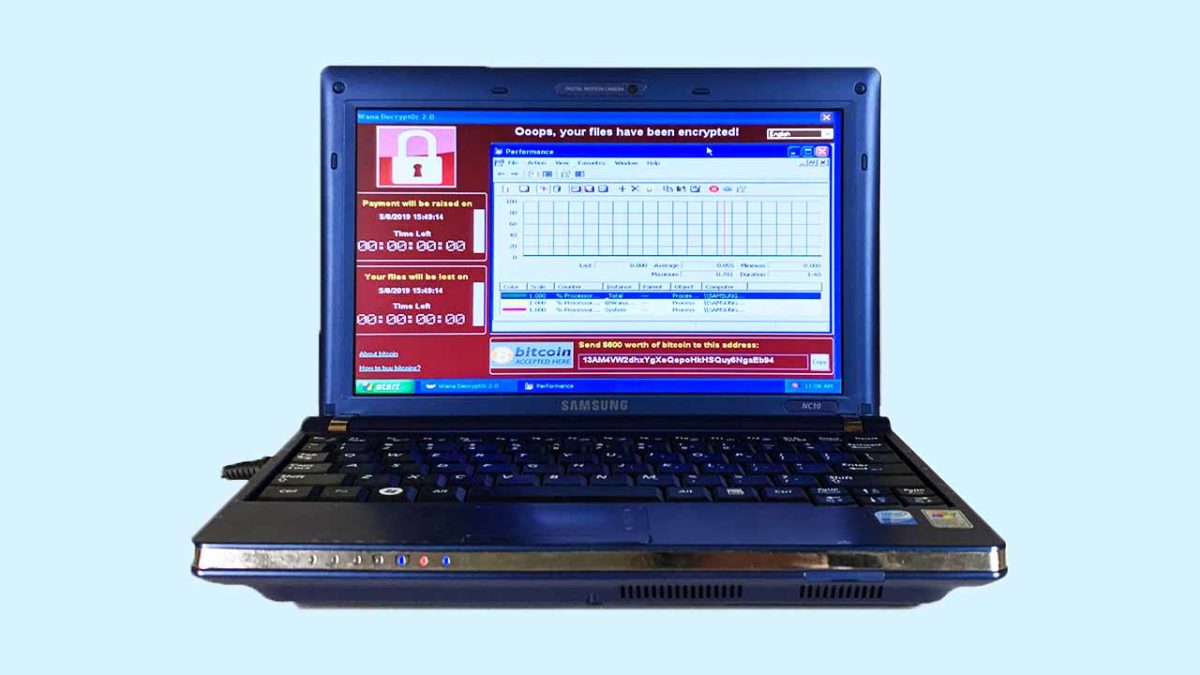
Is this the most dangerous laptop in the world?

A Chinese internet artist is selling a laptop that contains the six most dangerous pieces of malware in existence.

Viruses and malware are an ever-growing threat in today’s world. We’re constantly trying to keep you ahead of the game when it comes to the latest online threats, so hopefully you’ve stayed safe up to now. The threats are out there though, and the biggest of them have wreaked havoc on a global scale. This is why continued vigilance is always recommended.

We’re not here today, however, to talk about how to stay safe when you’re online. We’re here to talk about six of the biggest threats and, surprisingly, a laptop that is on sale that comes fully loaded with each of them.

A Chinese internet artist is selling a laptop that contains the six most dangerous pieces of malware in existence
This laptop cotnains six of the most dangerous pieces of malware ever

Guo O Dong has done something interesting, if not a little bewildering. In the name of art, he has taken an old Samsung NC10 notebook, filled it with the six most dangerous pieces of malware out there, and put it up for sale in an online auction. He has imaginatively named his dangerous creation “The Persistence of Chaos.” The real kicker, however, was that the reserve for Dong’s auction was set at over $1,000,000.

The destructive power of the six pieces of malware installed on the machine can’t be underestimated. Between them, it is estimated that they’ve caused more than $95 billion worth of damage worldwide. Guo has published information on each of them on the auction page, the numbers attached to each will blow you away:


ILOVEYOU

The ILOVEYOU virus, distributed via email and file sharing, affected 500,000+ systems and caused $15B in damages total, with $5.5B in damages being caused in the first week.

MyDoom

MyDoom, potentially commissioned by Russian e-mail spammers, was one of the fastest spreading worms. It’s projected that this virus caused $38B in damages.

SoBig

SoBig was a worm and trojan that circulated through emails as viral spam. This piece of malware could copy files, email itself to others, and could damage computer software/hardware. This piece of malware caused $37B in damages and affected hundreds of thousands of PCs.

WannaCry

WannaCry was an extremely virulent ransomware cryptoworm that also set up backdoors on systems. The attack affected 200,000+ computers across 150 countries, and caused the NHS $100M in damages with further totals accumulating close to $4B.

DarkTequila

A sophisticated and evasive piece of malware that targeted users mainly in Latin America, DarkTequila stole bank credentials and corporate data even while offline. DarkTequila costed millions in damages across many users.

BlackEnergy

BlackEnergy 2 uses sophisticated rootkit/process-injection techniques, robust encryption, and a modular architecture known as a “dropper”. BlackEnergy was used in a cyberattack that prompted a large-scale blackout in Ukraine in December 2015.


Scene of a cyber crime
Between them, the malware loaded onto the Samsung laptop have caused over $95 billion worth of criminal damage

For safety reasons, Guo built his laptop in collaboration with privately owned New York-based cybersecurity company, called DeepInstinct. Together they built a laptop that is completely isolated and air-gapped from the internet at large. The auction page also highlights that all the internet capabilities and available ports will be disabled on the machine once bidding has concluded.

The big question relating to all this is why?  Why create a collection of some of the most dangerous internet viruses and malware known to man and then sell it to the highest bidder? This could literally be the plot a second-rate James Bond movie.

To answer the obvious question, Guo cites his laptop as a work of art. He has created a catalog of historical threats, built to remind us that digital threats can have real world consequences. We shouldn’t ignore the online threats that are out there.

This is something we all know too well and so it is heartening to see an internet artist create a piece of art that is designed to instill vigilance in internet users. The big test for Guo will be whether the security credentials built into the laptop by Deep Instinct are strong enough to prevent the threats from breaking out.

Watch live video from PersistenceChaos on www.twitch.tv

Interestingly enough, according to Guo’s auction site for The Persistence of Chaos, where you can watch a livestream of the laptop just sitting there, somebody has bid on the laptop and the huge reserve has been met. It looks like somebody is going to buy the riddled laptop and all the viruses that come with it. As most of us can’t afford to outbid the current bid of $1,200,749, all we can do is hope that the winner is simply going to put the laptop in a museum and doesn’t want to crack it open and spill its nasty contents onto the internet.


Ultimate online privacy guide

Think your information is private? Think again.

online privacy

Your data is valuable. Whether it’s a marketer who wants to target you or an identity thief looking to swoop in and destroy your finances, it’s more important than ever to keep a lid on your identity. If you’re looking to stay safe, these articles should help you stay under the radar.

How to protect your online privacy

Google proves two-factor authentication works

Research shows that two-step authentication blocks most attacks!

Google account

Keeping safe online can sometimes feel like a Herculean task. We have a growing number of online accounts and each of them needs a long, complicated, and unique password. If we don’t have them, we’re at risk of exposing multiple accounts should one fall. Add to this the regular data breaches that affect even the biggest companies and it can feel like we must keep on top of it.

Password managers are a great weapon to wield in this online battle. Once you’ve set one up, they’re easy to use and will automatically set strong passwords for each of your accounts and store them securely.

Strong passwords aren’t enough though. These days there is another important tool that we need to use if we’re to make sure we’re as secure online as we should be. This, of course, is two-factor authentication. You have to confirm your identity on one device by proving who you are on another one. There are even physical devices you can buy that only exist to authenticate your identity.

The problem with two-factor authentication is it’s annoying.

Having to scramble around finding your phone or tablet, whenever you want to do something important online, can be very frustrating. The thing is though, two-factor authentication works and new data from Google proves it.

Research shows it works!

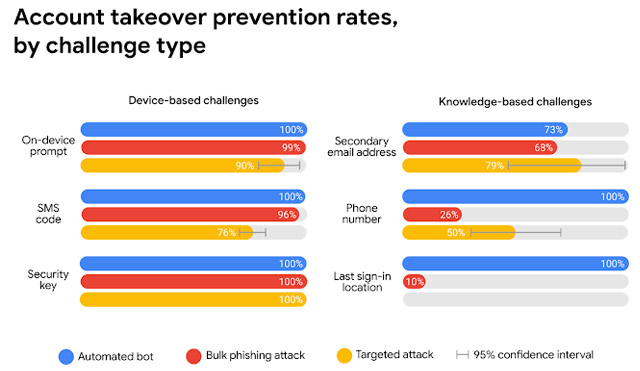
Google teamed up with researchers from New York University and the University of California San Diego. They performed a year-long study looking into various types of cyber-attack and how basic security procedures can block them. The results were striking. The simple act of adding a recovery telephone number blocks every single automated bot attack and 99% of all bulk phishing attempts.

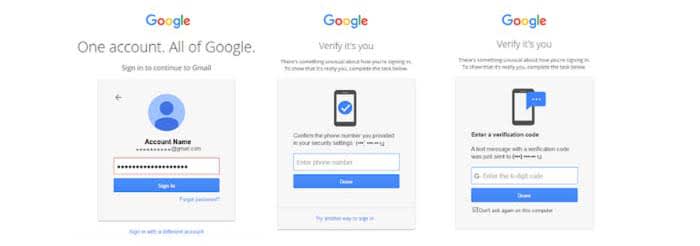
With two-factor authentication, Google was keen to point out the difference between the different types you can use. The first uses a code that is sent by SMS to your nominated recovery phone. You enter it on the site that needs to confirm your identity. In Google’s tests, this type of two-step verification protected against 100% of automated bots, 96% of bulk phishing attacks, and 76% of targeted phishing attacks.

results from Google's study

The other type of two-factor authentication uses an on-device prompt. Rather than receiving a code, you receive a button to press that will prove who you are. This type of verification scored even higher than the SMS code type. It protected against 100% of automated bots, 99% of bulk attacks, and an impressive 90% of targeted attacks.

The message here is clear: If you don’t have two-stage verification enabled on the online accounts that offer it, you need to enable it now. Google pointed out in its report that there are other defenses it uses like last sign-in location if you don’t have 2-stage activated. However, protection rates can fall to as low as 10% for these other methods. It is clear that two-factor authentication is the big boss when it comes to online security. If you don’t have it set up, you should do it now.

Google left a number of user passwords unprotected for 14 years

Due to an error from 2005, your password might have been left exposed.

Google password

Google announced in a blog post that they had stored a number of users’ passwords in plain text for about 14 years. The good news is that Google found no signs of a breach or misuse. 

When Google stores passwords, they go through a process called “hashing.” Hashing scrambles a password so that if someone were to get the scrambled version, they would have no idea what your actual password might be. The passwords in question were not hashed and were instead left in plain text. 

Google did not clarify how many user passwords were unprotected.

“We take the security of our enterprise customers extremely seriously, and pride ourselves in advancing the industry’s best practices for account security,” wrote Suzanne Frey, vice president of engineering at Google. “Here we did not live up to our own standards, nor those of our customers. We apologize to our users and will do better.”

7

How did this happen?

Back in 2005, Google made an error when creating their new password system. Google ended up fine-tuning their hashing system, and those passwords ended up making it to their hashing system. However, the error persisted.

While troubleshooting G Suite customer sign-up flows, Google discovered that the error was still there. A subset of some unhashed passwords remained in Google’s system for a maximum of two weeks at a time. Google has removed the error.

Google Docs Download free ►
8

Should I be worried?

Short answer: not really.

Google did not suffer a breach that led to your password getting stolen by a hacker. The company was careless in how it protected some of the passwords, but they have rectified the problem.

WhatsApp cracks down on clone apps

WhatsApp has sent out cease and desist letters to a number of clone apps.

WhatsApp logo

Recently, WhatsApp has been gripped by a number of crises as fake news has spread across its network. This fake news has been used to aid political campaigns but has also seen terrifying attacks carried out by crowds whipped into a frenzy by horrifying stories that weren’t true.

In response to this, the messaging app has enacted a number of initiatives, with the most prominent being limitations to message forwarding.

WhatsApp Messenger Download Now ►
8

The first move saw a new Forwarded tag appearing above a message that didn’t originate from its current sender. This then evolved into a Frequently Forwarded tag. A tag becomes a Frequently Forward tag if the message had been shared more than four times. Eventually, WhatsApp set a limit on how many times a message could be forwarded at all. Thanks to this move, WhatsApp messages can only be forwarded five times at once.

Problem is though, the people who were spreading all of that fake news in the first place want to continue doing so. This means there is a demand for software that will help them bypass WhatsApp’s message forwarding limits and, accordingly, WhatsApp clone apps have sprung up that do just that.

Tech 2 reports that these clone apps can cost as little as $14 yet give users the ability to send up to 100,000 messages per day, if not more. A report by Reuters found that these tools were available to buy on Amazon. They were also being used to subvert WhatsApp’s new policies for political reasons as well as in marketing attempts for regular businesses.

WhatsApp has sent out cease and desist letters to a number of clone apps

WhatsApp’s response to these clone apps has been strong. The messaging app wouldn’t even allow Reuters to use one for test purposes.

WhatsApp responded, “We are continuing to step up our enforcement against imposter WhatsApp services and take legal action by sending cease and desist letters to hundreds of bulk messaging service providers to help curb abuse… We do not want them to operate on our platform and we work to ban them.”

As well as ordering the owners of the fake apps to stop operating, WhatsApp is also banning accounts that use them.

Whatsapp's fake news problem
WhatsApp knows it has fake news problem and is trying to stamp it out.

This isn’t the first time WhatsApp has taken strong action against users of unofficial versions of the app. Recently, users of GBWhatsApp and WhatsApp Plus were targeted with temporary bans. Some lost their entire chat histories in the process. Those apps were built to offer more user-friendly features like themes and added customization options.

This time, however, the clone apps have a much more criminal underworld feel to them. This money being made facilitating attempts subvert attempts by WhatsApp to make its network a safer place. There is a real battle taking place on WhatsApp, and we all need to hope that the right side wins it.

Instagram hit by a massive data leak

Contact data for over 49 million Instagram users has been exposed online

Instagram wants to be known as the beautiful social network. Instagram feeds all over the world are filled with post after post from seemingly perfect users, celebrities, and so-called influencers. There are literally millions of these types of user on Instagram and it looks like a lot of contact data relating to this exact subset of Instagram user has just been leaked.

Contact data for over 49 million Instagram users has been exposed online

Lots of Instagrams

A report by TechCrunch shows that an unprotected database of well-known and high-profile Instagram accounts has been leaked online. The database was hosted by Amazon Web Services and included private and personal data including email addresses and even phone numbers.

The interesting thing about all this is that the leaked database does not actually come from inside Instagram. The open database was discovered by a security researcher called Anurag Sen who then told TechCrunch about his discovery. After a bit of digging, the media outlet then traced it back to Chtrbox, a marketing company in Mumbai.

Chtrbox is one of the many companies around the world that pays Instagram influencers to publish sponsored posts for their followers to see. As well as containing email addresses and phone numbers, the database also included information about the users’ Instagram accounts, including number of followers and the overall reach of their account. Chtrbox had also given each account a monetary value, showing how much they were worth in marketing terms. The firm will no doubt have used this information to decide how much to pay an influencer for a certain campaign.

According to Instagram HQ, this type of datamining is prohibited on the network. Speaking to TechCrunch, a spokesperson for the Facebook-owned app said, “We’re looking into the issue to understand if the data described – including email and phone numbers – was from Instagram or from other sources… We’re also inquiring with Chtrbox to understand where this data came from and how it became publicly available.” The app is clearly trying to distance itself from culpability on this one.

password lock
This isn’t the first time sensitive Instagram user information has leaked online

This isn’t the first time, however, that Instagram or Facebook has been exposed by leaks like this one. A couple of years ago, Instagram was hit by a similar data scraping issue when details from over six million accounts were leaked online. Recently, it was just a couple of months ago when hundreds of millions of passwords were found unencrypted on an internal server at Facebook. When news of the recent breach first broke Facebook originally claimed that it was only a few thousand Instagram passwords that had leaked. It later had to confirm, however, that the true number was actually in the millions.

Avast Secure Browser sets the benchmark for security and privacy

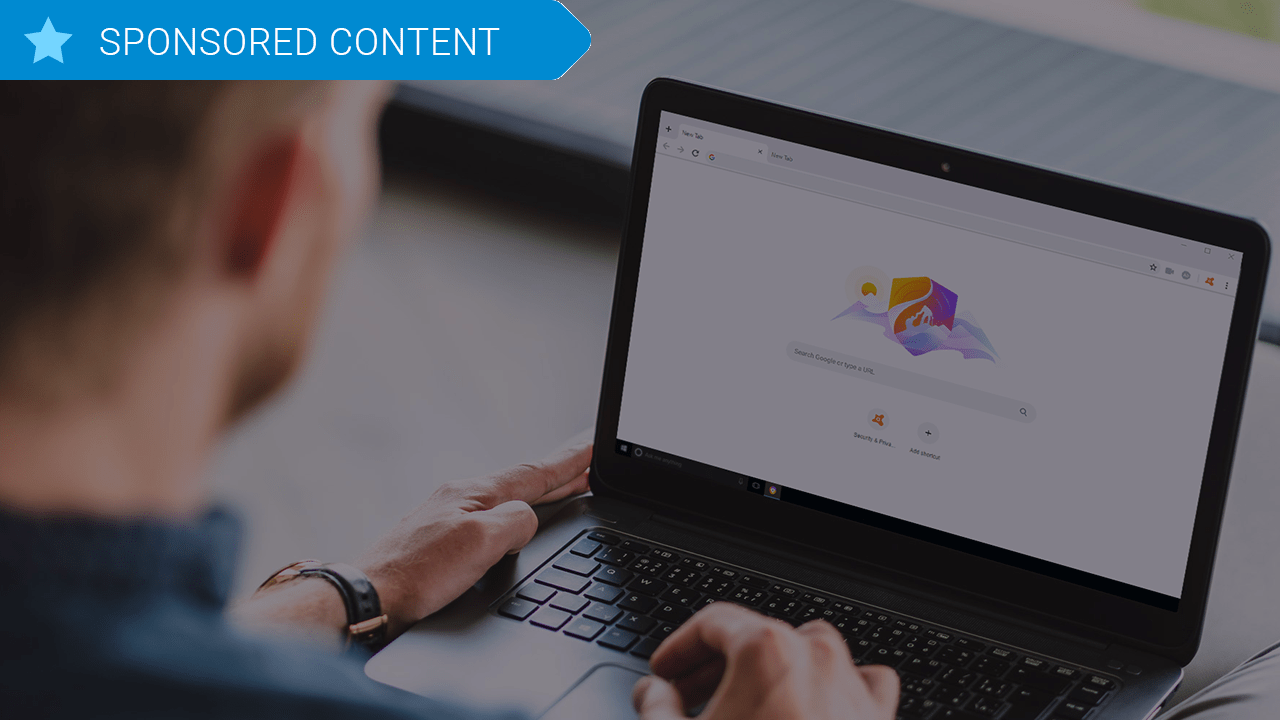
Avast Secure Browser

How many of us can remember a world where we couldn’t turn to Google for easy answers, where Wikipedia didn’t serve as a one-stop shop for research, or where connecting and networking with people was something you could only do with business cards and landline telephones? The world wide web has woven itself into our daily lives, and its use in American homes has increased by 400% in the past 20 years. The number of hours we spend on the internet each week has shot up from 9.4 hours to 23.6 in the past 19 years, and overall internet penetration has increased from 67% to 92%. That’s all time you spend using your web browser (i.e. email, shopping, banking, social media, news & entertainment, etc.). By now you should be using one that’s safe, fast and private.

Avast Secure Browser was designed around those exact priorities, and a new, updated version was released back in April 2019. Avast was built by security experts, their prime focus being to grant users control, anonymity, safety, and smart intuitive browsing. Avast Secure Browser doesn’t follow your searches, clicks, or purchases, and seamlessly brings all your privacy and security tools together, and as of the new update also includes features like an Email Hack Check, a Webcam Guard, and better Anti-Fingerprinting tools than ever before.

Avast Secure Browser Free Download
8
Secure, fast and private web browser with a new customized Security & Privacy Center

Extensions are dangerous

We all love our browser extensions, and while many are useful and safe, it just takes one wrong download to put your computer at risk. A compromised extension can actually grant attackers access to all data on both your computer and the websites that you’ve visited.

Avast polled over 10,000 consumers globally and discovered that even the most popular browser extension frameworks had serious security vulnerabilities despite widespread use. 64% of respondents said they used third-party browser extensions, yet a meager 21% of them said they trusted them. 96% of the same people polled said they wished their browser did a better job of being up front about identifying ads or malware hidden extensions instead of merely apologizing and cleaning up the mess later. When you move to get a new extension, Avast Secure Browser scans for any unsafe add-ons, links and content that could be potential malware.

What is Avast Secure Browser?

Avast Secure Browser is a new approach to internet browsing based on the powerful Chromium open source platform. Other well-known browsers that use the Chromium source code are Google Chrome, Opera, and Brave, with Microsoft Edge next in the queue. Avast Secure Browser is fast and comes with a litany of privacy-enhancing features and customizable settings to bolster your privacy. Officially, Avast Secure Browser is the successor of Avast SafeZone Browser which has since been discontinued in order to pave the way for the new kid on the block. The most obvious example of this level of customization is the new Security and Privacy Center.

Avast Secure Browser Free Download
8
Secure, fast and private web browser with a new customized Security & Privacy Center

Security and Privacy Center

The Security & Privacy Center is a curated collection of tools, features, and settings for managing your online activity. Each feature or setting in the Security & Privacy Center is also a knowledge center helping users understand what the feature is, the benefits, and when it should be used. Avast implemented this feature so users could “easily customize their browser to their own needs. Plus, you’ll get the same familiar look you’re used to so you won’t need to change your browsing habits!”

In the Security and Privacy Center you can view and set various filters to not only craft a more secure and private browser but a more secure PC and personal identity. You can access it by simply clicking the Avast symbol in the top-right corner of the Avast Secure Browser screen.

This way you control browsing aspects such as ad-blocking, privacy, HTTPS encryption, password manager extensions, and other tools such as:

  • Webcam Guard (enabled) to give consumers complete control over who can access their computer cameras.
  • Email Hack Check to let people know if their email addresses have been compromised.
  • Extension Guard (enabled) to block the installation of untrusted browser extensions.
  • Adblock (enabled) to improve browsing speed and block potentially malicious ads.
  • Anti-Phishing (enabled) to protect against phishing attempts.
  • Anti-Fingerprinting (disabled) to prevent websites from tracking people as they browse.
  • Flash Blocker (enabled) to block all Flash content.

You may also launch a new private browsing window (called Stealth Mode) and a Privacy Cleaner (which cleans your browsing data) from the Security & Privacy Center as well – and this time they’ll actually do their job. Enabling Stealth Mode with Avast Secure Browser ensures both anti-tracking and anti-phishing, and automatically upgrades all http to https encryption.

“Consumers using tools like Private Browsing and Incognito Mode are being lulled into a false sense of security as these only offer limited privacy options and no real protection at all against many security or privacy threats,” said Matt Adkisson, Director, Platform Products, Avast.

“Consumers have never been offered a browser that provides both industry leading web protection and online privacy delivered by cybersecurity experts. We are first and foremost a security company and we redesigned Avast Secure Browser specifically to deliver a secure and private online experience. Not only is it a simple and safe choice for the privacy-conscious individual, it’s also substantially faster than other browsers available today.”

How’s the privacy?

While Avast Secure Browser definitely has speed going for it, speed still comes secondary to its stance on privacy and security. The browser has top-of-the-line built-in privacy features that serve to hide your identity, cover your digital footprint, and keep your business strictly your own. “We believe that what you do online is your business,” says the team. “Your posts, your emails, your searches, your browsing history — they’re yours. With our browser, it stays that way.”

Avast Secure Browser Free Download
8
Secure, fast and private web browser with a new customized Security & Privacy Center

Avast Secure Browser is available on Windows 10, 8, and 7 to any new users of Avast Antivirus products and can be downloaded right here. You can also elect to tack on additional paid subscription features like Avast SecureLine VPN for a small annual fee. The full feature list and the link to download the new Avast Secure Browser is available on their website. Stay tuned with us for more information as it becomes available!

Microsoft: Millions of Windows devices are at risk

Devices using an older version of Windows are at risk of getting a rapidly spreading virus.

Windows virus

If you are using an older version of Windows, Microsoft has urged that you install an update to protect against a potential virus.

The company detected a vulnerability in Remote Desktop Services, and recommends that you download a patch from their update catalog. 

By exploiting this issue, a virus could potentially spread to the millions of devices using an older version of Windows. The virus could be contracted simply by accessing an internet connection.

The vulnerability exists in the following versions of Windows:

  • Windows XP
  • Windows 2003
  • Windows 7
  • Windows Server 2008

Some of the vulnerable versions are highly out of date and no longer supported, such as Windows 2003. Howeverthe company wants to preemptively solve the problem as it could widely spread. Luckily, Windows 8 and Windows 10 are not affected.

The latest and greatest version of Microsoft's operating system.

Simon Pope, director of incident response at Microsoft’s Security Response Center, compared the potential risk to the WannaCry malware attack of 2017. He also said that if the issue were left unpatched, the event of a rapidly spreading virus would be “highly likely.”

The WannaCry malware incident involved ransomware being spread through devices running Windows. It encrypted data and demanded ransom in the form of Bitcoin.

“Any future malware that exploits this vulnerability could propagate from vulnerable computer to vulnerable computer in a similar way as the WannaCry malware spread across the globe in 2017,” Pope said. 

Not out of the woods

Although there weren’t any hackers exploiting the vulnerability at the time Microsoft released the patches, Microsoft consequently gave them the tools to create a virus.

Someone with malicious intent could reverse engineer the patch to create the malware, according to Microsoft.

Basically, download the patch and save your hide.

How to tell if your PC is cryptojacked

What is cryptojacking and how do you know if you’re affected?

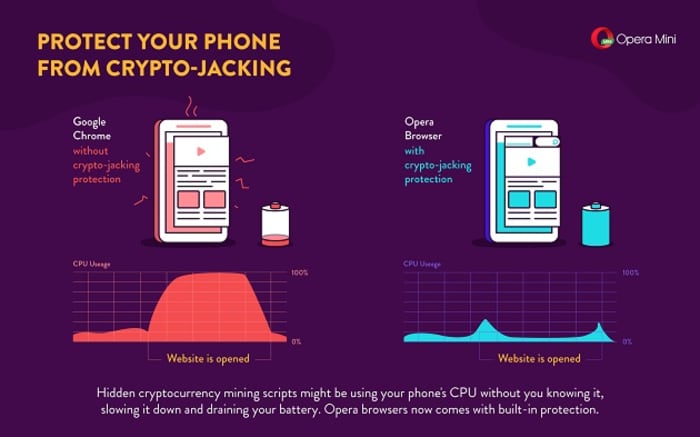
There are a lot of reasons a computer could be slow: Excessive programs running in the background; bloated temp files; a corrupted hard drive; or if you’re unlucky, it could be malware and viruses. One particularly sinister emerging threat is cryptojacking, which can increase overheating, slow down processing speed, and drain your batteries – all under the radar.

What is cryptojacking?

Cryptojacking is when someone takes hold of your computer to mine cryptocurrency. Often, hackers will ensnare you by infecting a website or online ad with an infected JavaScript code. The code auto-executes once loaded into your browser. Alternatively, a hacker might lure you into clicking a malicious link in an email. Once you click it, it uploads a cryptomining code to your computer and suddenly your processing power is getting leeched to an outside source.

Why would someone bother doing this?

Money.

Cryptojacking allows someone with malicious intent to steal computing resources from a victim’s device instead of having to build their own dedicated cryptomining computer. In this way, they can compete against sophisticated cryptomining operations without any of the costly overhead.

Stay protected

Even on a healthy computer, it’s tough to track the origin of a program that’s draining all your CPU. It’s harder still when you’re trying to do so on an infected computer that’s slow as dirt. Troubleshooting when your computer can barely chug along is a nightmare. As such, the best way to deal with cryptojacking threats is to not get infected in the first place.

A smart, secure browser is your first line of defense – especially one that can block JavaScript. While this effectively closes any door on a cryptojacking attempt, the obvious drawback is that blocking JavaScript will also cull functions that you like and need. The best middle ground is Opera, a browser that’s been fighting the cryptojacking war since before we even knew about it. If you install Opera on your mobile device, it’ll actually block risky mining scripts when visiting a site. It’s analyzed over 100 mined websites, and noted how smartphones such as the Galaxy S8 or HTC One suffered reduced performance when exposed to cryptojacking.

Opera Mini cryptojacking

You can also download an extension like No Coin which blocks miners using your computer resources without consent. Opera even comes with the extension already installed on download.

Lastly, Opera even made this cool test to tell you whether you’ve been cryptojacked. If you’re a regular user of cryptocurrency, it might be a good idea to bookmark the page.

Using Opera in tandem with a strong anti-malware tool will help keep your PC protected from cryptojacking attempts, but it always helps to take extra precautions before clicking on that sketchy email, or opening a link that you don’t trust. Stay frosty, and stay tuned with Softonic for more tips and tricks to keep protect your computer protected.

5 tips for using Avast Free Antivirus

Download Avast Free Antivirus and get the most out of it with these 5 tips. Download Avast professional-grade security bundle that offers superior levels of protection against all modern threats.

So you’ve downloaded Avast. You already know that you’re now in possession of a professional-grade security bundle that offers superior levels of protection against all modern threats. Avast will do the heavy lifting for you from now on, but there are still some measures you can take on your own end to get the most out of your product.

Here are five tips to maximize your experience with Avast:

Avast Free Antivirus Download Avast
8

1. Lighten your overloaded computer

You’d think that having antivirus software on your PC would make it run slower – constantly checking for threats, scanning your computer’s health, and monitoring your online activity. Luckily Avast Cleanup is here to help. Chock full of tools to fix crashes, bloating, and freezing, Avast Cleanup alerts you to programs running in the background, programs you haven’t used in ages, and programs that you never asked for in the first place. Avast Cleanup will identify this unwanted bloatware and breathe some energy back into your PC.

2. Manage and protect your passwords

Your account is only as good as your password – all it takes is a low-quality code and suddenly your data is in the hands of a hacker. Rather than writing down dozens of passwords, or coming up with new ones on the spot that you’ll have to later remember, just let Avast deal with it. Avast Passwords  manages your passwords and credit card numbers so you don’t have to. It’ll easily auto-fill your login information and protect your accounts with one Master Password. Not only that, it syncs between your devices, be they PC, Mac, Android, or iPhone.

3. Put a shield around your home

Hackers don’t need your computer to enter your home. With IoT devices on the rise, your home has more vulnerabilities than ever before. You can outfit your home network with Avast’s Smart Life Platform to maintain security and privacy in the IoT age. Whether it’s deployed on the router or directly on the gateway, Smart Life processes and analyzes any data in real-time through Avast’s cloud intelligence platform. It won’t even affect your router performance or Internet connection.

4. Keep an eye on your kids

Avast’s Smart Home Security can offer you some peace of mind by sharing your child’s online behavior. You can install and use it to control the content they view, and even keep tabs on their location. The Internet is a huge place, and Smart Home Security can cut off offensive content and put a cap on how much time your kids are spending on the Internet. Avast Smart Home Security is easily integrated into your existing home network and fully controlled via our companion app. Complete protection, no hassle.

Avast Free Antivirus Download Avast
8

5. Put an alarm on your account

Avast has detected over 19 billion stolen passwords. Enter your email in this link and you can see if yours is one of them. You don’t even need an Avast account to do it, it’s just a great tip for checking whether you’ve been compromised. You can also opt in to receive 24-hour automatic email alerts anytime your password leaks.

Hopefully our tips have helped you get the most out of your new Avast service. Keep diligent with your protection and updates, and check out our other tips for keeping your network secure and your data private.