8 superb apps for shoes

Need a new pair of shoes? These apps will help you out!

Shoes

Shoes!

Of all the clothing types, shoes have the most unexpectedly devoted following. Long ago, we used to think it a rare occurrence for someone to notice new shoes (they’re far below eye level, who’d even check), but the exact opposite is true: sneaker heads exist, and they know their footwear! To connect with this demographic, famous actors, rappers, athletes, and artists have designed awesome shoes, which fly off shelves to this day.

We may never understand the craze, but we do know this: shoes matter. Their quality, design, and even style make a significant difference to the wearer, a simple fact that anybody who’s tried running on a grassy field with skateboarding shoes will understand perfectly. Yes, there are other examples we could’ve used, but… have you ever tried running on grass wearing smooth shoes? You start slipping all over the place, it’s awful.

8 superb apps for shoes!

Zappos

Zappos Exclamation

Zappos tops the charts for shoe-related apps!

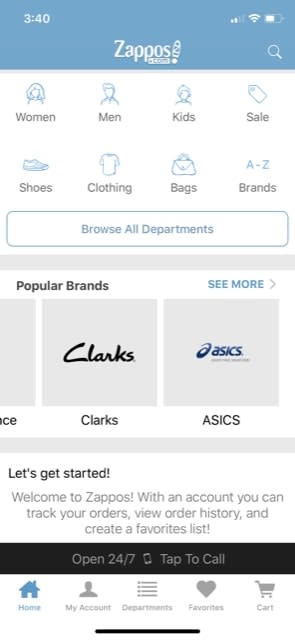
Why? We believe they beat the competition with a mix of easy shipping, good prices, and most importantly, their intuitive search engine. From the main page, you’re able to search by name, or delve into specific categories and brands:

Zappos1

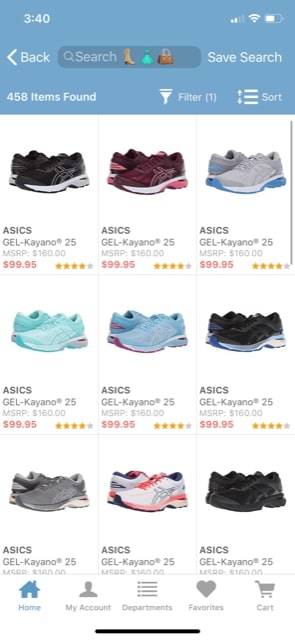
Once you’ve found your section – whether that be women’s shoes, Asics, etc. – one click takes you to a large page of options with comparative prices and user reviews, which can be sorted and filtered to your heart’s content.

Zappos2

Zappos: Shoes, Clothes, & More Download Free
9

SNKRS by Nike

SNKRS

People love Nike. Maybe it’s because the signature “swoosh” logo has become so popular (it’s used as a brand study for college marketing classes the world over). Maybe it’s their wide range of comfortable, athletic footwear that looks equally great in a school or on a playing field.

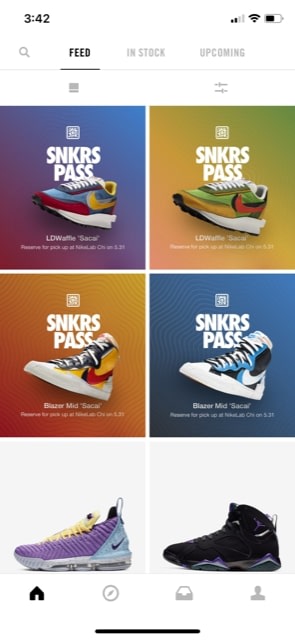
Whatever the case, they have a great app along with their great shoes. We can also say, without a doubt, that their welcome screen has one of the most colorful and vibrant displays to welcome visitors:

SKRS!

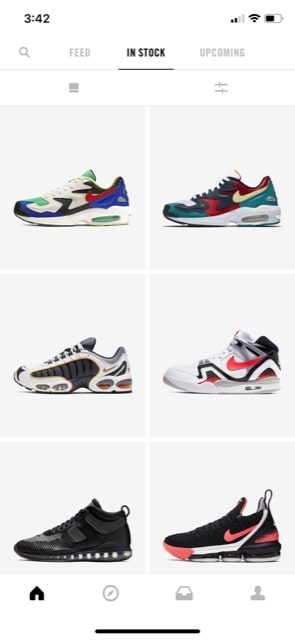
When you want to start shopping, the “In Stock” menu has a gigantic list of available choices. NOTE: You’ll find many Nike and Air Jordan products in other apps, but the SNKRS app allows you to buy them from the source!

SNKRS2

Nike SNKRS Download Free
8

FootLocker

FootLocker

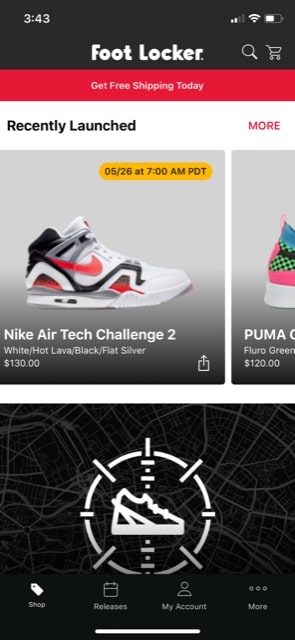
The unique design of Foot Locker’s website mixes well with the range of shoes available. Unlike Zappos, which has nearly everything on the market, Foot Locker restricts their brands to top-tier sneakers without the limitations of Nike’s in-house marketing schematic.

FL1

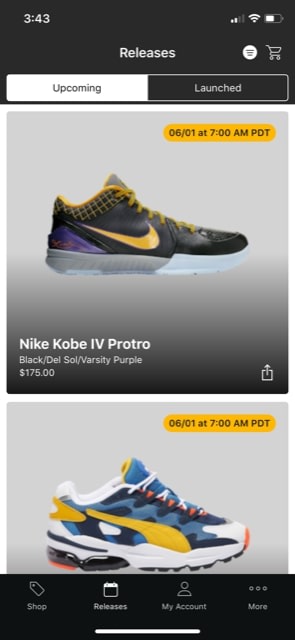
Rather than pack a large number of shoes into their shopping section, Foot Locker also fills the screen with one shoe at a time. If you’re inclined to scroll quickly through a huge block of options, this may help give more emphasis to each product available.

FL2

Foot Locker Download Free
8

DSW (Designer Shoe Warehouse)

DSW

Finally, something other than sneakers!

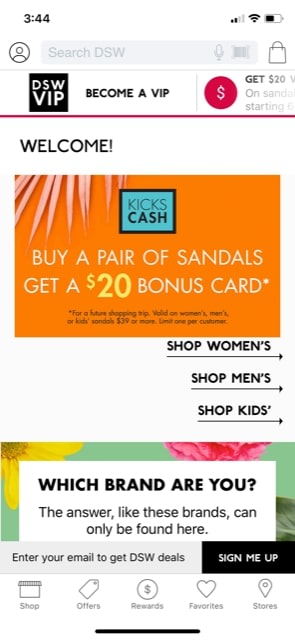
If you’re looking for the variety expected from a department store, check out an app that, frankly, makes you feel like you’re in a department store: Designer Shoe Warehouse! You may have to scroll past a coupon offer or two to get to the shoe categories, so be prepared:

DSW1

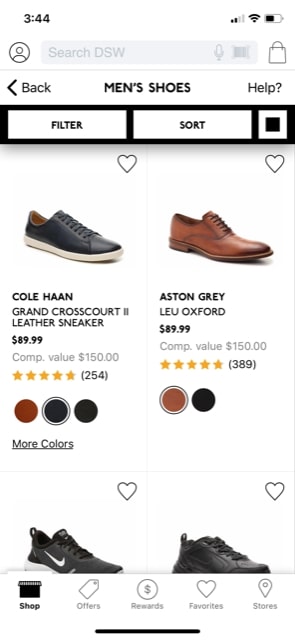
Once you’re there, the athletic shoes you’ve become used to seeing are spaced out between classy leather brands and more!

DSW2

DSW Designer Shoe Warehouse Download free
7

Finish Line

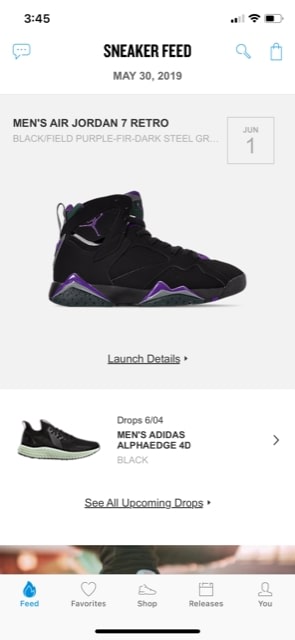
One of Finish Line’s main strengths lies in the “Feed” and “Releases” menus. Both of these sections are intended to provide you various updates on what’s new in the world of shoes, whether it be the next release of an Adidas line or an article on great pairs of Adidas for the summer.

FL1

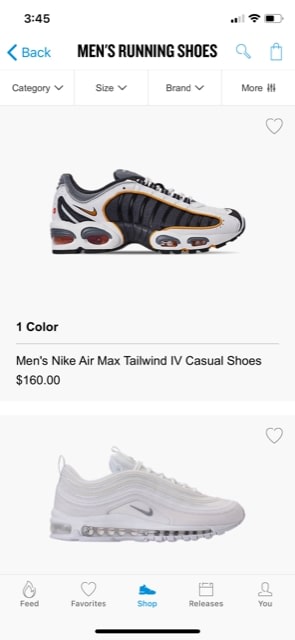
Aside from the updates, prepare for another solid shopping experience! We quite enjoyed the slider they use to cycle between the categories for Men’s, Women’s, and more. Once inside, they provide a similarly excellent set of filters to narrow the field of search.

FL2

Finish Line - Winners Circle Download free
7

Sneaker Crush

Sneaker Crush isn’t our favorite app: there aren’t many ways it stands out and it pretty much does it’s job about as well as the others. However, it has a few distinguishing features we enjoy.

1) That logo. Dang, that logo looks cool.

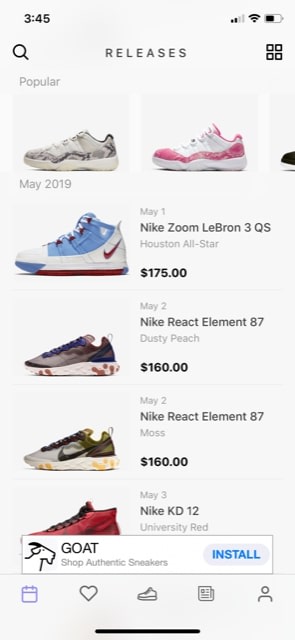
2) The main page for releases. You may notice every single shoe within the list has been compiled in chronological order! If you’re looking for shoes based off release time, this may be perfect for you:

SC1

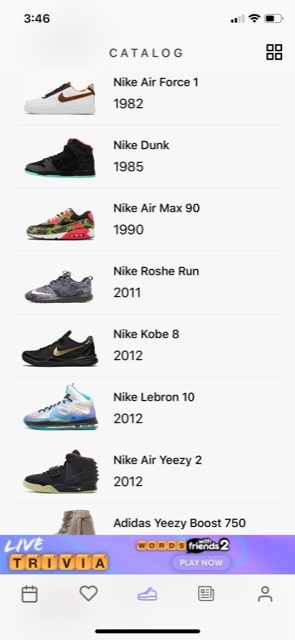
Aside from that, Sneaker Crush does an acceptable job of everything else, including their main catalog.

If you’re looking for other good things, they do have an easy-to-access currency converter in the settings, so that’s a plus right there!

Still, we don’t appreciate the constant ads at the bottom…

SC2

Sneaker Crush download free
7

Champs

Champs

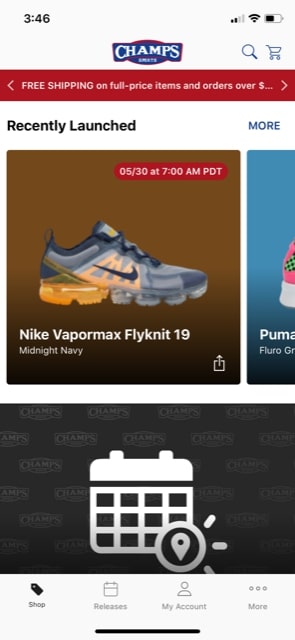
We enjoy the design of Champs, if nothing else! They focus on sporty shoes, so be prepared for more Nikes, Pumas, and Air Jordans.

Still, they don’t appear to sell cleats, wrestling shoes, or golf footwear. Weird, right? They call themselves a sports store…

Champs1

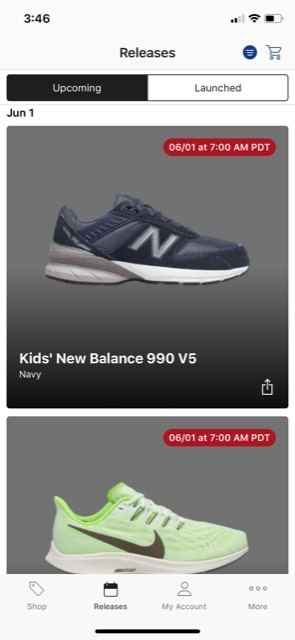
Champs does offer the upcoming news as usual, but also combines the details with an excellent launch locator that can help you find stores selling the freshest footwear in person.

Champs2

Champs Sports download free
7

Adidas

AdidasApp

Finally, last and most specific, we have the Adidas app! After all those huge, all-inclusive applications, it may be nice to have some specificity.

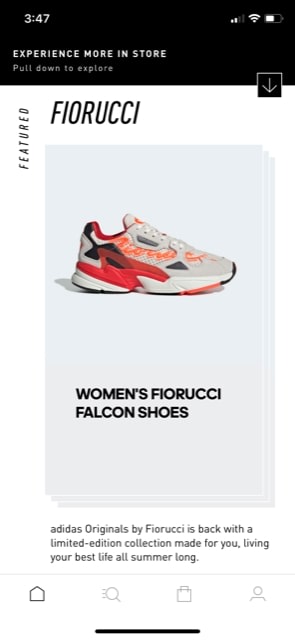
As you can imagine, this app focuses on the Adidas line of footwear. If you’re a fan, grab the app and start learning about what’s new with the company! All your one-brand updates are right here:

Adidas1

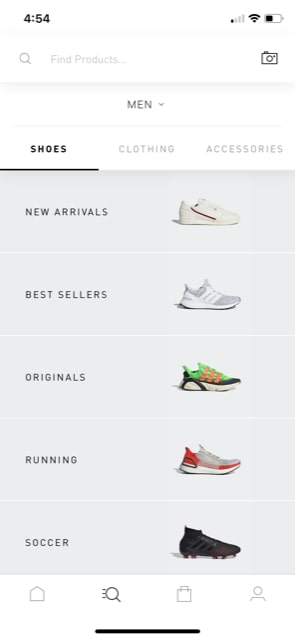
The shopping section of the app begins with an excellent bank of links, which can send you to the new arrivals, best sellers, originals, and more. There are even Clothing and Accessories options! Well done, Adidas, it looks pretty darn slick.

Adidas3

Adidas - Sports & Style Download free
8

Happy Trails

You may still be asking: why did we choose eight apps? Answer: because seven would create too much alliteration in the title, clearly. “7 superb apps for shoes”? That just goes way over the line.

Thank for reading, we hope your quest for new footwear starts with one of these fine apps, arrives at an exciting purchase, and ends with the happy retirement of a well-worn pair of shoes a long way down the road.

What the Brave browser can do for you

There are better options than Chrome… Learn more about how the Brave browser stacks up the competition.

Not all browsers are created equally, and at this day and age when you’re spending so much time online, you should be using the best browsing tool possible. So which is it? Chrome? Firefox? Edge? The truth is there’s no objective ‘best browser,’ but there are certainly strengths and weaknesses to each. And we’ve got some compelling reasons why Brave could be the best browser yet. We’ve compiled a list of pros and cons for each one. Let’s run through them.

Mozilla Firefox

Pros:

  • More privacy than Chrome
  • Can be as fast as Chrome
  • Less likely to mine for data

Cons:

  • Runs slower on pages with lots of images, pop-ups, and videos
  • Lags behind Chrome once you install plug-ins to block those pop-ups and vids
  • No built-in support for Flash

Google Chrome

Pros:

  • Recognizes all plug-ins
  • Fast
  • Tons of extensions

Cons:

  • Bloated and heavy
  • Taxing on your RAM
  • Lacks trustworthy privacy features

Microsoft Edge

Pros:

  • Lightweight and smoother than Chrome
  • Built-in Cortana is very convenient
  • Reading mode fights distractions and blocks ads

Cons:

  • Unavailable on Mac or any Windows OS less than 10
  • If you have Windows 10, Chrome is still a better option
  • Even Internet Explorer is more popular

Opera

Pros:

  • Turbo mode speeds up page loads dramatically
  • Free, built-in VPN
  • Integrated wallet and messenger services, including WhatsApp and Messenger

Cons:

  • Fewer extensions
  • No parental controls
  • Middle of the road option, lacking where other browsers excel

Safari

Pros:

  • Default browser for Apple, very convenient
  • Works in tandem with all software designed by Apple
  • Default pop-up blocking

Cons:

  • Safari is over 15 years old, and its age is beginning to show
  • Lacking in customization
  • Useless if you don’t use Apple products

Brave

Brave is a relative newcomer for iOS, Android, macOS, Windows, and Linux created by Brian Bondy and Brendan Eich, the inventor of JavaScript and the co-founder of Mozilla.

Brave automatically blocks any third party trackers, shutting down anything that might worsen your browsing experience. Without ads in the way, Brave is up to eight times faster than the mobile competition, and offers numerous extensions as well. Brave also helps you support your favorite publishers.

Softonic is proud to partner with Brave. When you download from us, we may earn a commission.

What’s new with Facebook’s redesign

Facebook tries to reinvent itself. Will it work?

facebook new look

Facebook rolled out a redesign in the wake of its many recent privacy scandals. Today, it feels like Facebook is trying to wipe the slate clean with a minimalist interface and a pivot toward digital community-building.

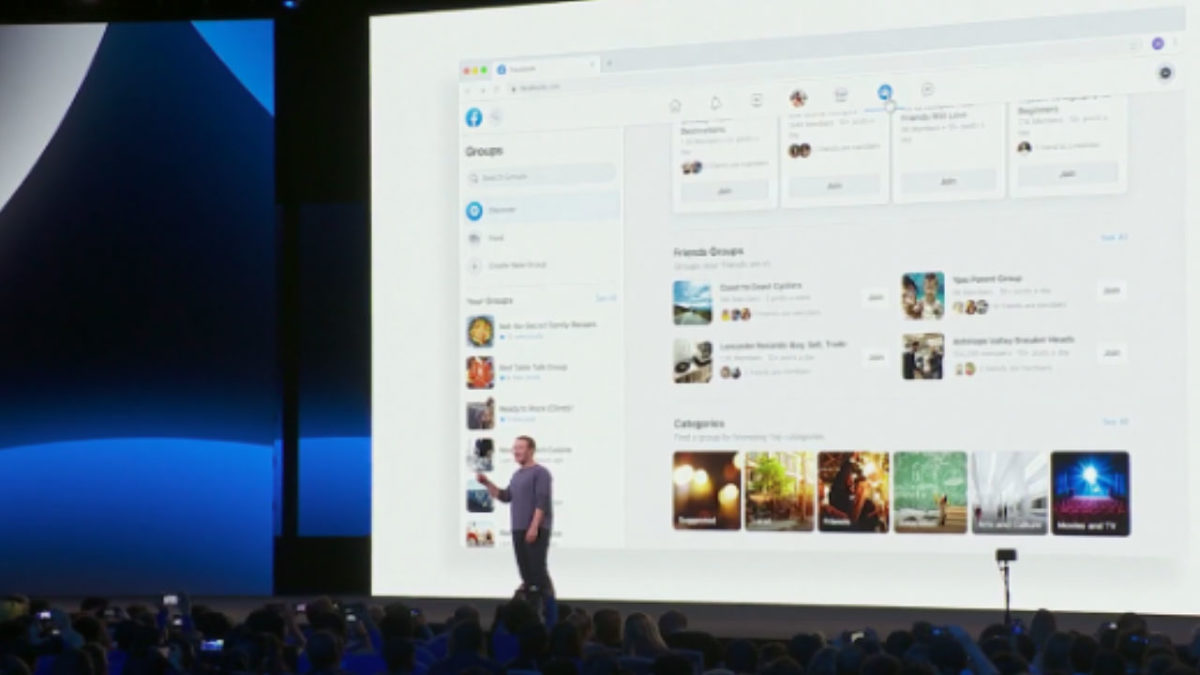
Just last month, Facebook announced that significant changes were coming to the mobile and desktop platforms. They announced the changes would shift away from the news feed and toward the two features people still use: Events and Groups.

Watch the Zuckerberg announcement here, if you’re so inclined:

But, the gist of it is, Facebook is aiming to get more personal. The company is doing so by putting some distance between features like Groups, Messenger, and Events and the increasingly problematic newsfeed.

Here’s what’s changing:

New look, new feel

Facebook redesign

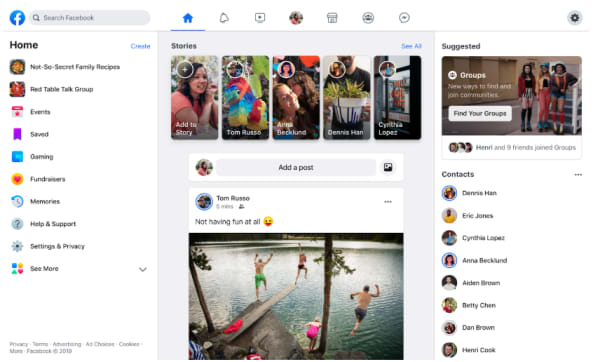
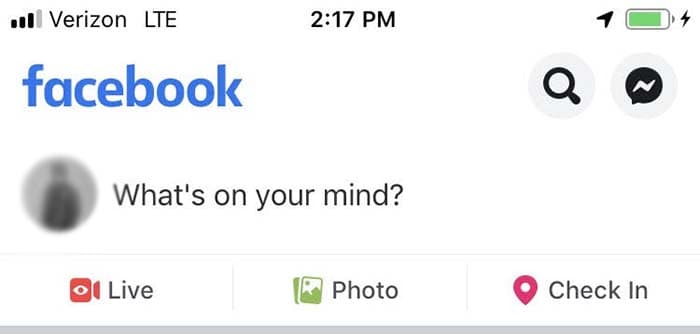
So, before we dive into the real meat of the redesign, Facebook has made some notable aesthetic changes. Instead of the big blue header at the top of the page, the site includes a lot more white space, with light gray icons for accessing your newsfeed, notifications, Messenger, and Facebook Watch.

They’ve also updated the logo, shifting gears from an F within a blue or white square to a brighter, circular icon.

7

It’s all about the groups

suggested groups

Zuckerberg is all about building communities these days. Groups represent a big part of that shift from a centralized newsfeed to a core focus on groups.

That focus on community, according to Zuckerberg, means building out both public and private groups on the platform. Increasingly, users seek private spaces where they can post content that reflects shared interests in front of an engaged audience.

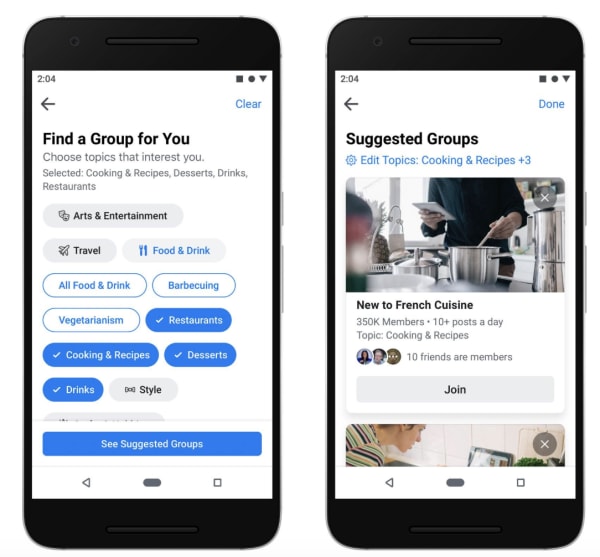
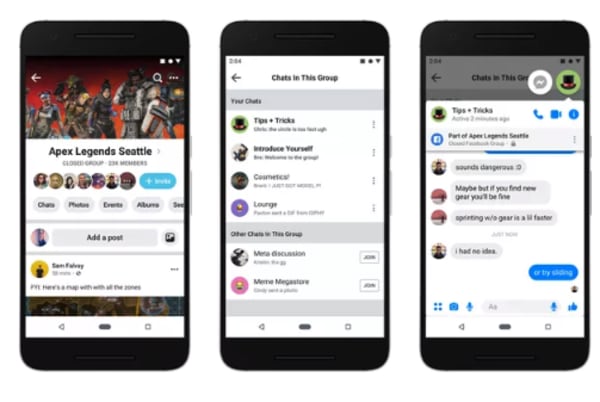
Facebook also plans on helping you expand your online circle by recommending groups based on past interests and interactions. Plus, they’ve improved the feed, making active Groups easier to find — within a personalized feed. Now, you can separate group posts from the regular newsfeed, making it easier to engage with other users.

Meet new friends

new friends on facebook

Remember when we could meet people online? Sure, dating apps are huge, and there are apps like Meetup designed to help you find a book club or a few local folks to go with you to happy hour.

7

But, the days of the chatroom are long gone — perhaps for a good reason (namely, safety).

It’s long been sort of taboo to add someone you don’t know in real life on Facebook. However, part of the redesign involves changing what’s become a digital norm.

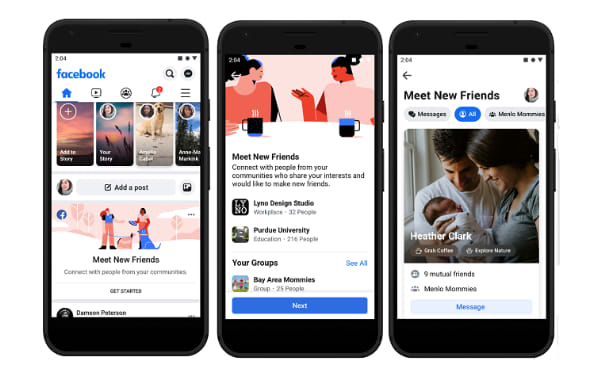
A new feature, Meet New Friends, aims to connect people with strangers who share an interest or connection. The goal is to help them meet up IRL.

Facebook Marketplace got a makeover, too

Facebook marketplace

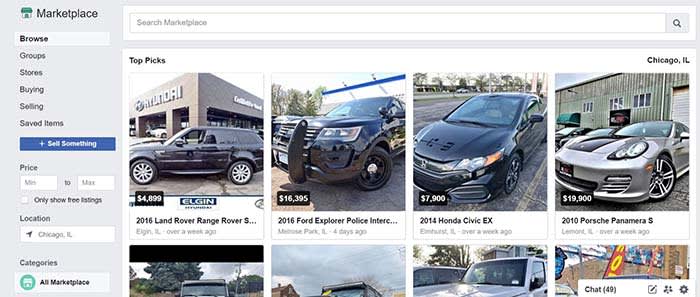
The social network’s e-commerce service, called Marketplace, also got an upgrade.

People selling goods through the platform will now be able to to take payment directly from the platform, including shipping costs.

As it stands, marketplace users have to arrange for payment outside of the platform — though they can do so inside Messenger.

Events

facebook events new look

Another area where Facebook is diving in head-first is its Events page. As is the case with groups, Facebook wants to help you find more things to do near where you live.

The new tab is now next to the Groups tab in the new menu bar layout. It offers a more detailed map view that allows you to see where the events you are interested in are located in relation to one another.

Facebook Watch is front and center

Wait, what is Facebook Watch? Don’t worry; if you’re asking that question, you’re certainly not alone. According to a Diffusion study, 50% of adult Facebook users in the U.S. had never heard about it.

Facebook Watch aims to capitalize on streaming trends — it’s trying to hitch a ride off of the success driving Netflix and YouTube. But, there aren’t any notable “hits” on the platform.

Facebook says that 75 million people now use Watch for at least one minute per day, and not necessarily all at once.

While we get why Facebook insists on making us notice Watch — it’s hard not to feel as though they’re really forcing us to pay attention.

Privacy

Privacy has been Facebook’s Achilles heel going on a few years now.

From Cambridge Analytics to the ongoing debate about the company’s data collection practices, the company has had some difficulties winning back the trust of the public.

To combat this image problem, Zuckerberg has been promoting a message centered around privacy. It runs in stark contrast to its old narrative as this digital public square.

Zuckerberg said, “Privacy gives us the freedom to be ourselves,” pointing to a shift in how we interact online these days.

In the past, the purpose of posting was to reach as many people as possible. Today, Zuckerberg says, we now crave a sense of intimacy online.

Which, in all honesty, is probably true.

Wrapping up

If the recent news about Facebook’s shareholders wanting to hire a chairman to oversee Zuckerberg is proof of anything, it’s that the company wants to change.

These new design changes to Facebook are nice, but we are hoping that the changes to the social media giant go beyond the cosmetic level.

Google Trips app is about to die

Google Trips is leaving the world of apps, but it still will have a home on the web.

Google Trips

So long Google Trips. It’s been real.

Google will be removing the Google Trips app this year on Aug. 5.

Ironically, Google recently released an update for the app to fix a few bugs and make it easier to plan trips. However, Google has also made the service easier to use on the web. The service now works with Google Search to add your research to Google Trips. Even confirmation emails you get from Gmail will also be added.

Basically, the web version of Google Trips just has more bells and whistles than the mobile app ever could, so it makes sense that it’s biting the dust.

What is Google Trips?

Google Trips is used to help make your excursions go smoother. It can help you both plan and organize trips as well as recommend activities for you while on your trip.

For example, next time you plan a Florida beach vacation, Google Trips can find you restaurants, charter fishing trips, wildlife tours, and even things like museums.

Wrapping up

We wouldn’t be surprised to see Google remove more apps in favor of the web experience. It makes sense for Google to homogenize all of the services in their suite under a central platform, as this can make things easier for users.

If you are a fan of Google Trips, you have until Aug. 5 to enjoy the app before it’s gone for good. Until then, we’d recommend you learn to love the service on the web.

Facebook shareholders vote to overthrow Zuckerberg (it doesn’t work)

Shareholders vote for a new Facebook chairman. Why won’t it work?

Zuckerberg

Nearly 70% of Facebook’s shareholders voted to reduce Mark Zuckerberg’s power in the company. This was revealed in a recent filing from Facebook from their shareholder meeting.

Last year, 51% of shareholders voted for an identical proposal. This year, even more Facebook stock owners are tired of how Zuckerberg has been conducting business.

Shareholders are upset with Zuckerberg over several major Facebook scandals. If you’re wondering what scandals they’re referring to, we can name a couple:

What do the shareholders want to do?

Shareholders are hoping to hire an independent chairman to hold Zuckerberg and his top team accountable.

Essentially, the shareholders are tired of Zuckerberg and his team not being held accountable. Hiring a chairman could put forward a set of checks and balances that would keep them from causing more harm to Facebook and its users.

7

Is anything going to come from this?

No.

The issue with hiring a chairman to oversee Zuckerberg is that he owns 60% of the company’s voting power. Zuckerberg and his team voted against hiring an independent chairman, so it’s not happening. Basically, no matter what the majority of shareholders propose, Zuckerberg always gets the final word.

This goes to show the importance of a chairman. Despite Zuckerberg’s majority voting power, a chairman could potentially approve or disapprove decisions made by Zuckerberg and his team. This would provide a new layer of accountability sorely needed at Facebook.

Should Zuckerberg not have as much power?

If you keep up to date with Facebook news, you’d know that there seems to be a new story about a Facebook scandal every week. Although Facebook will make a claim from time to time that they’re trying to make a change, the constant scandals speak for themselves.

To make matters worse, some scandals involved Zuckerberg’s direct actions.

Although Zuckerberg might be the founder of Facebook, his actions might continue to put the company in peril. If Facebook wants to outweigh the negative news with positive news, then they are going to need to make changes like these.

How to play (and win) Plague Inc

Unleash the ultimate weapon in this fun offline game.

Plague IncPlague Inc is a really fun mobile game where you get to let your inner evil genius run wild and destroy the world. Your mission: infect and kill everyone with a disease you created. Here’s how to play and win Plague Inc.

How to start

Plague Inc. Download Free ►
9

Select your plague
Select your plague

When you first play the game, you’ll only have access to Bacteria, but as you destroy the world, you’ll unlock even more plagues. Bio-Weapon is incredibly fun – once you’ve infected everyone on Earth, you essentially get to push a button to kill anyone left standing. Feel the power!

One thing to note is that the different plague types behave differently, and the world reacts to them differently. In some cases, transmission is easy. In some cases, like a Fungus, it requires a lot of effort on your part to get the disease to spread. Some diseases mutate rapidly, which could help you kill people faster, but could also draw unwanted attention from those pesky scientists working toward a cure.

Select your difficulty

In a Casual game, no one washes their hands, research doctors don’t work, and people hug the infected. (Suckers.) In a Normal game, two-thirds of people wash their hands, doctors work three days a week, and people ignore the sick. In a Mega Brutal game, doctors invest in research and there are random medical check-ups, so it’s harder to get your disease into the world. You’ll need to win the game on Casual before moving up the difficulty ladder.

Name your plague

It’s the most fun to name the plague after your ex. He or she already destroyed your heart, why not let them destroy the world?

Modify the genetic code

Modify genetic codeThe first few times you play the game, you won’t have many advantages, but as you win a few rounds, you’ll unlock new genes that can make the game easier. In some cases, you can activate a gene to help the disease spread more quickly over water or survive in warmer climates. These are all things that you can add to your disease over time within the game, but if you start with them, it’s a huge bonus. Yes, you can buy new genes to get a leg up on your destruction. With that, you’re ready to start the game!

How to start your plague

Plague Inc startThis is the main screen where you’ll be monitoring your disease’s progress. As the helpful pop-up suggests, wherever you touch is where the plague begins. It’s a big world out there, and you have to infect more than 7 billion people, so where should you start?

Aggressive beginnings

If you want to get a lot of people infected in a hurry, China or India are home to more than 1 billion people. Those countries also have large pockets of undeveloped regions. You’ll have an easier time infecting poorer countries like those in Africa or South America or Southeast Asia. Just be careful. If you spread too fast or kill too quickly, you’ll draw the attention of the scientists who will fight back with a cure. Still, it’s nice to get one-seventh of the world’s population infected in a hurry.

Stealth attacks

If you start your disease in a place like Europe or the United States where medicine is easier to come by, it will take a lot longer to get rolling. You’ll also have to create a fairly aggressive disease to break through all of those countries’ safeguards and spread beyond those borders. By that time, those annoying scientists will be hot on your trail. It’s best to hold off on starting in the Western world unless you’re an advanced player. Don’t worry, you can infect them all later.

Speed up

speed upAfter you’ve started your plague, click the little drop-down arrow underneath the date and hit that fast-forward button. The spread of your plague will likely take more than a year, so there’s no point in watching time pass slowly.

Pop the bubbles

Plague started in ChinaWhen you’ve started your plague, you’ll notice little red-purple bubbles appearing with the biohazard symbol. Touch them to pop them. Doing so gives you DNA points, noted in the lower left side of the screen above the word “Disease.” You’ll also get DNA points for popping orange bubbles with the DNA double-helix. You need DNA points to manipulate your disease.

Also, take note of the little icons on the map. The anchors denote a seaport. The airplanes mark an airport. Starting your disease in a place that has both will make it easier to spread your sick creation. Thanks, China! Now we’re ready to get even more evil.

Improve your disease

Click the “Disease” button in the lower left corner and you’ll see several options to upgrade.

Transmission

Transmission screen

Sharing is caring! So let’s get the world to share our disease. In the Transmission screen, you have options to upgrade the ways your plague jumps to new hosts. Each one will cost DNA points, so spend wisely and consider which will be the best help in spreading your disease from its starting point.

Bird

Looking to spread your disease over big distances? Birds can help. As the disease gets more aggressive, some countries might shut down air or water travel. That means places like Greenland, Iceland, or Madagascar can be harder to take over. Thankfully, no one can stop birds.

Rodent

Is your disease starting in a city? Rats can do a great job smearing that sickness all over the place.

Insect

If your plague begins near the equator, swarms of bugs can help make life hell.

Livestock

Starting your plague in a rural area? Livestock are a great way to move the sickness around. They work particularly well in large places without a ton of people, like Canada, Russia, or the American midwest.

Blood

Poor areas are susceptible to sharing diseases through blood-to-blood contact. We almost never choose this because it seems like a waste of DNA points. (How often do you rub open wounds with your buddies?)

Air

This is a great one to start. Choosing Air helps your pathogen travel on dust particles. It works especially well in arid climates like Africa or the Middle East. And it helps your disease jump to new countries through air travel. It’s a sickness souvenir!

Water

Another great start, choosing Water means the disease can survive outside the human or animal body in fresh, warm water. This is a great start if your disease begins in a humid environment or a place where ships are in play.

Advanced transmission options

Note that as you add one of these transmission factors, you get the opportunity to unlock more. Choosing Bird I allows you to then add Bird II, for example. The more advanced versions of these transmission factors will help you bypass any filters that may arise or the animals might roam over larger areas.

If you unlock Air I, Air II, Water I, and Water II, you can then add Extreme Bioaerosol, which basically means the disease is just flying everywhere with nothing that can stop it. Good luck not breathing or drinking, humans.

Symptoms

SymptomsThis is the fun stuff! It will cost DNA points to add symptoms to your disease, so consider your plan carefully. Whenever you select one of these six traits, you’ll have the option to add another “more expensive” trait that stacks on top of it. So selecting Insomnia will make it harder for people to sleep. The next advancement is Paranoia, which means sick people will avoid the doctor.

Depending on your disease, it may mutate on its own to give you these symptoms without any DNA cost. But be careful! If your disease becomes too lethal or severe, the scientists will smack it down. In fact, it may be helpful to de-evolve a disease to get rid of symptoms. After all, if the whole world is infected and no one knows, it’s easy to ratchet up the symptoms before research on a cure can begin!

There’s a sweet spot where adding an advanced symptom like Paralysis or Coma can help throw off the research trying to cure your disease. Just wait until everyone is infected before you start going wild. Clicking on a symptom will tell you whether it will slow research into a disease. Total Organ Failure and Insanity are lots of fun to inflict on the populace, but if you do it too early, the scientific urgency kicks in.

Abilities

Plague Inc abilitiesBeginning players may not pay much attention to this screen because it’s more fun to make your victims cough or sneeze, but the Abilities screen is very important.

Some parts of the world require a little work to take down. This may mean making your disease resistant to the heat or cold. It may mean adding drug resistance or other advanced factors to break past modern medicine. And, depending on the disease, the traits to the right of this screen may be super-important. For the Bio-Weapon, you’ll need to knock out a bunch of those traits on the right to unlock the global kill switch. If you’re struggling to infect certain places, it may be that your disease isn’t advanced enough. Stop by the Abilities screen and fix that.

Let’s play Plague Inc

China infectedSo our disease has started in China and we’ve spent some DNA points on upgrading its transmission capabilities. Look at all those gorgeous red infected people! You can click on a specific country to get its stats. As you can see, China is swamped with the sick, but our screen shows us that Japan only has 17 infected with our virus. We’re only really concerned about specific countries if we notice we haven’t penetrated it yet (time to upgrade transmission factors) or if the numbers aren’t growing steadily (might need to upgrade transmission or abilities). Island nations can be particularly troublesome.

Asia dyingWow, our disease is spreading fast! With 4.5 billion infected, we’re well on our way. New DNA bubbles are popping up rapidly as more people get our disease. You’ll also notice that the dead are piling up (453,825, thank you very much), but it’s a small fraction of the infected. This is good. We still have half the world to infect, but the disease isn’t deadly enough to alarm the medical community. You can see there’s only 1% of the cure progress completed.

Pop the cure bubbles

Cure bubbles

As your disease spreads, the world will fight back. You’ll notice little blue planes flying across the map with little blue circles appearing. When you pop those, it helps to slow the progress of a cure.

Things to watch

Your success or failure at this point in the game involves your awareness of what’s left.

Monitor the ticker and pop-up alerts

You’ll often get an alert that a large bird migration event is about to occur. If so, jump into the Transmission tab and make sure Bird I and Bird II are activated so you get the most bang for your buck. If you get a notification about a kissing festival, add Nausea so all your sick people will kiss the healthy people.

Pop up alert

Sometimes, the pop-ups and the ticker at the top of the screen will alert you about steps the humans are taking to fight back.

You’ll also see more fun alerts as you unleash hell on the planet…

Endgame

Everyone is sickWhen everyone is sick, you might consider getting some DNA points back by removing all of your Transmission factors. (Note: some diseases give you points back for devolving, some take points away for devolving.) Once everyone is sick, there’s no need for Transmission.

Now you can go for broke with the most hellish Symptoms. Insanity and Paralysis and Nausea and Projectile Vomiting? Sounds like fun! (That’s also how we felt when dating our ex who the disease is named after, so it’s appropriate.)

Suck it, SwedenSorry, Sweden. With 4.2 billion corpses littering the planet, anarchy seems like a logical step. But we’ve still got 2.9 billion people alive. Time to get even meaner. Let’s go to the Symptoms tab.

SymptomsAs you can see, we’ve got a pretty horrific disease running wild. The Infectivity and Severity are maxed out, but we could be more Lethal. If we click on Total Organ Failure, we see it’ll cost 33 DNA points, but the half-shaded mark on the Lethality bar shows us how much more deadly it will be. Here comes the pain…

We winAh, now to sit back and watch those 350,489 people liquify at the hands of our plague.

VictoryAfter our victory (or if you lose), you can check out graphs to see how your disease progressed.

disease graph

As you can see, we wiped out the planet in 547 days, but we didn’t really start making our disease severe until near the end of our first year. That kept the disease under the radar until nearly everyone already had it. By keeping our lethality in reserve, we also avoided unwanted attention.

Cure graphThe cure graph shows that no one even cared about this disease until the end of the first year. Again, the cure progress tracks pretty closely with our lethality.

One of the best features about Plague Inc is that it works offline. It’s a great way to kill a ton of time if you’re stuck on a plane.

Are you ready to unleash your plague on the world? Download Plague Inc and let ‘er rip!

Plague Inc. Download Free ►
9

How to scan for hidden cameras at your Airbnb

Worried about spying eyes while staying at your Airbnb? These tips can help you out!

Hidden camera

Airbnb has changed the way we travel, offering the comforts of home and the ability to experience life as the locals do.

In recent months, an increasing number of reports have made headlines involving guests finding hidden cameras in their Airbnb accommodations. And no, that information was not disclosed to guests up front.

Most recently, a New Zealand family made headlines for spotting a hidden camera after noticing the device on the Wi-Fi network.

Creepy, right?

While it’s unlikely that most Airbnb hosts spy on their guests, reports like these do make the case for erring on the side of caution.

7

What does Airbnb allow — camera-wise?

Airbnb

Airbnb’s policy states that if you are a host and you have any type of security camera, active or not, it needs to be indicated in the House Rules section of your profile.

They also require that any recording taking place during a guest’s stay must be disclosed. Should the guest report an active recording, they can cancel the reservation and receive a full refund.

What’s more, Airbnb added an extra layer of disclosure before booking.

As of early last year, guests receive a pop-up before confirming the booking, informing them of any cameras on the premises and where they are located.

Guests must actively opt-in indicating that they understand that they will be filmed during their stay.

Hidden camera

The rule applies to any camera ranging from nanny cams to Wi-Fi cameras like Nest or Dropcam.

9

Violators may be subject to penalties, though the website doesn’t exactly lay out what those penalties are.

Airbnb’s trust and safety rep told The Atlantic that the company does try to filter out hosts who might engage in suspicious behavior. Airbnb runs their information through felony and sex-offender records before they can start hosting guests.

How can you scan for cameras?

There are a few things you can do to check for hidden cameras in your Airbnb rental.

Make a habit of following these few steps before checking for bedbugs to ensure that you’re not being watched during your next vacation:

Look for objects that seem out of place

Bear on shelf

Let’s start out with a low-tech tip taken from old school sleuthing. Scan your Airbnb for anything that seems “off” or out of place. This could be as obvious as a can of soda placed in the middle of the room or something more subtle.

Assuming your hosts are at least somewhat savvy, here are some common places you might find a hidden camera:

  • Smoke detectors
  • Stuffed animals
  • Shelves
  • Power strips
  • Night lights
  • Books or DVDs
  • Computers and their accessories
  • Holes in the wall

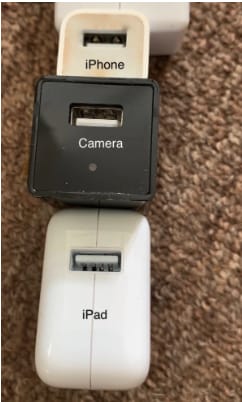
Do a sweep of these “everyday items” to see if anything seems sort of bulky or odd-looking. In this example below, you’ll notice that this USB plug seems a little bit larger than the norm — and what do you know — there’s a hidden camera attached.

Hidden camera in USB Consider the “best” angles for covering the room
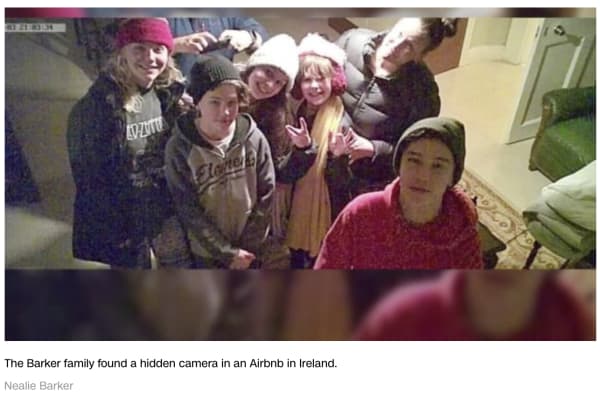
Generally speaking, corners are the best place to place a camera, as you’ll get the widest view of the space.

The Barker family, from the aforementioned article, found their Airbnb’s camera in prime position, that wide angled corner.

barker family airbnb camera

You’ll also want to use common sense when scoping out the scene.

If you’re worried that someone is spying on you in the kitchen, chances are they’ll be viewing from above rather than in the baseboard.

If they’re trying to catch you in the living room, you might want to spend time looking at anything stored near the television or pointing at the couch.

Shine a light to pick up the reflection of any hidden lenses

Lenses, being made out of glass, reflect light. Try doing a sweep of the room by shining a flashlight to scan for reflections.

Turn off the lights

Turn off the lights to check for hidden night vision cameras. Most hidden cameras have red or green LED lights that blink or shine in low light conditions, in an effort to supply lighting for better images.

Spot hidden smart devices by scanning for Wi- Fi connections

If you connect to the house Wi-Fi — chances are, the host has provided you with a network name and password. Once you’re in, open the network to see what other devices are connected.

Unfortunately, the camera will not be discoverable if it is not connected to the same network you’ve logged into.

Use a Wi-Fi checking app

Unfortunately, scanning with your eyes and flashlights alone won’t catch every hidden camera.

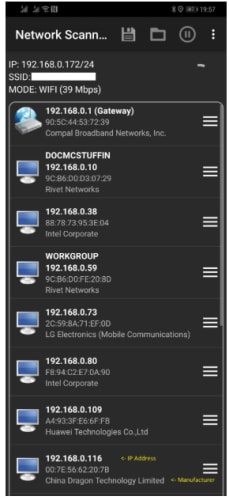
Luckily, there are plenty of apps designed for this express purpose. One example is Network Scanner, which displays IP and MAC addresses, as well as the names of the hosts on the local network.

network scanner find unknown devices

Or, another called Angry IP scanner, which also scans the network for devices, security threats, and more.

Angry IP Scanner Download Free ►
7

Just about every hidden camera the average person can buy relies on wireless technology to stream the footage to a remote location.

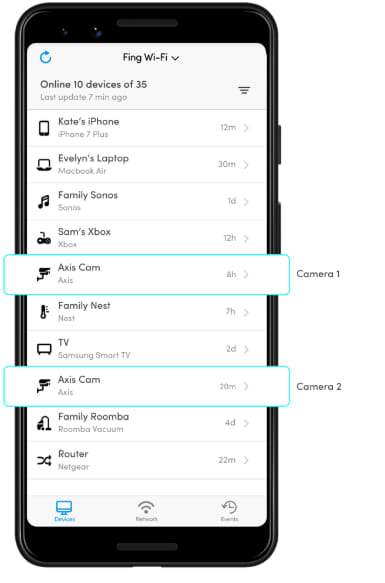
Smartphone users can download an app called Fing (available on iOS and Android) which is designed to help users “control their digital environment.”

While the app is primarily designed to help you troubleshoot network issues and keep your own devices secure, it can also clue you into peeping hosts.

Fing App

What should you do if you find a hidden camera in your Airbnb?

Any undisclosed cameras must be reported to both Airbnb and the host. Make sure you don’t move the devices and take pictures documenting the findings.

In the U.S., it’s fully within your rights to get the police involved, as undisclosed cameras are a criminal offense.

Still, hidden camera laws vary by country. If you’re traveling abroad, read up on local laws to find out if any recourse is available.

Wherever you are, hidden cameras violate the terms of the Airbnb host agreement, so make sure you report all you find.

Airport charging stations could give your phone malware

Think twice before charging your device in public.

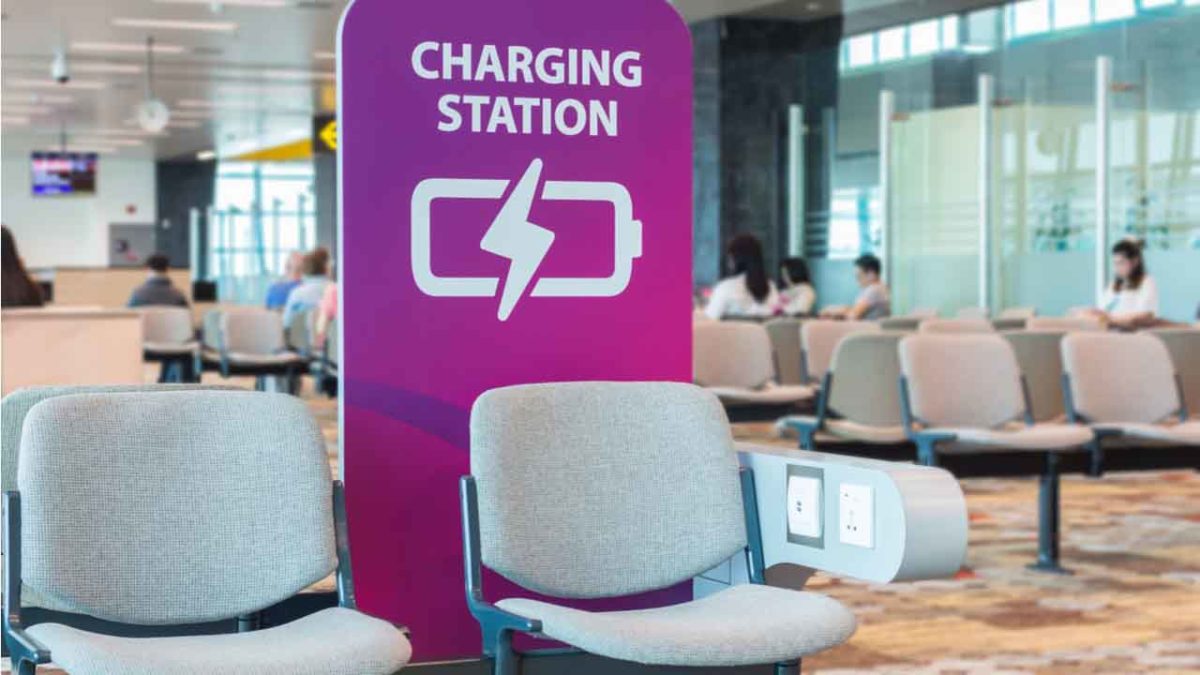
Airport charging station

By 2019, you probably know it’s not safe to hop on the internet without a safety net in place: Anti-malware protection, a firewall, a solid VPN, and a secure password manager. We create quintillions of bytes of data every day, and it’s easy to make an innocent mistake that puts it at risk. Now that innocent mistake can include plugging your phone into a charger at an airport.

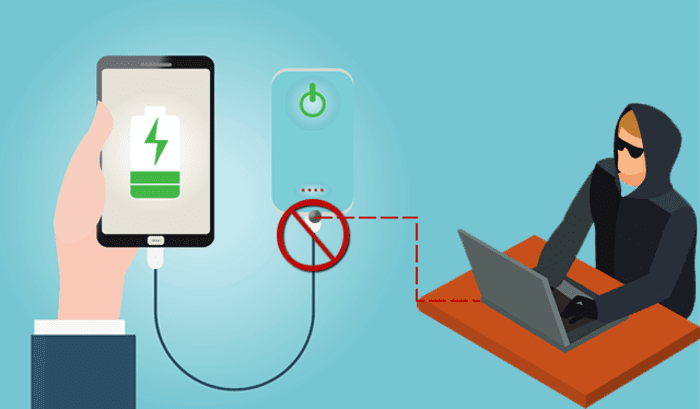
It’s no secret that public Wi-Fi can be sketchy at best, and while it’s convenient to charge your phone at the nearest port, it’s not necessarily safe. Free public phone chargers can be used to secretly install malware on your device, malware that can eat up your data in a process called “juice jacking.”

What’s juice jacking?

It sounds like tinfoil hat propaganda, but in reality, it’s an underrated but serious security threat. ‘Juice jacking’ was coined back in 2011, and refers to a hack attempt that uses public charging terminals to install malware on your device. It does so covertly via USB charging port, and it copies your phone’s data, pictures, and email into someone else’s hands.

juice jacking
Hackers can use public USB charging terminals to copy your personal data

“All they really need to do is load malware on the USB port,” explains IBM cybersecurity expert Charles Henderson. It’s unlikely you’ll even know it’s happened until it’s too late. “There’s really no way to tell,” says Henderson. “You really have to be extremely technologically savvy to detect such an attack.”

3 easy solutions to stay safe in airports

1. Use a portable charger

The best thing you can do is avoid airport charging terminals altogether. These days it’s not too hard to get your hands on a cheap, reliable portable charger. It’s a safe, convenient way to keep your phone charged and ready to go without putting your data at risk with a public outlet.

2. Use an electrical outlet instead

It should also be noted juice jacking can’t be done unless it’s via USB, so as long as you opt for an electrical outlet instead you’ll be safe.

3. Turn off your phone first

Lastly, if you’re in a situation where you’ve got no choice but to charge with a public USB port, completely powering off the device beforehand will prevent the download and transfer of your data.

Luckily, preventing your phone from being juice jacked is pretty easy. Just remember that any time you use public charging stations or Wi-Fi, your online activity could be at risk. Follow these easy steps, and stay informed!

BlueKeep security issue threatens nearly one million Windows users

If you’re running an older version of Windows, your data could be at risk.

Microsoft

There’s a reason people update to new versions of Windows: Old versions don’t get updated, and that makes them more susceptible to issues, both internal and external. While not every Windows update is a move forward, transitioning to a newer OS is almost always a smart step. Google is making the same assertion, too: If you haven’t upgraded to Windows 8 or 10, now’s a very good time; anything older is now putting you at risk.

Windows 10 Download
7
Update to a safer OS

The BlueKeep vulnerability

Just like old browsers are full of holes for malware to enter, an old OS can start becoming fallible as new threats emerge and evolve. Technically known as CVE-2019-0708, BlueKeep is a remote code execution vulnerability that exists in Remote Desktop Services. It’s when an unauthenticated attacker connects to a target system using RDP, and then starts sending requests. A successful hack attempt could then start to inflict arbitrary code on the targeted system, installing programs, deleting data, or creating new accounts that still mimic your user rights. It’s a nasty pre-authentication vulnerability in older Windows Operating Systems, and therefore doesn’t require any user interaction before it latches on.

Which OS is at risk?

Anything less than Windows 8. So if you’re running 7, 2008 R2, Vista, Server 2008, or XP, BlueKeep leaves your computer open to infection. How many people are running these old versions of Windows? Almost a million, Microsoft discovered in a recent report. Frighteningly, that’s not even including the computers on corporate networks. Errata Security predicts that anyone using an older OS probably has a month or two before BlueKeep worms its way in.

How to tell if you’re already infected

If you’re running an older OS, now’s the time to upgrade. In the meantime Errata Security’s Rob Graham has put together binaries on Github to scan for BlueKeep. If you think your PC might be infected, go to the link in his tweet and run the scan:

Hopefully, both your computer and network have not been compromised, but trust us – you don’t want to procrastinate on things like this. Get Windows 8 or 10 today and stay secure!

Your Mac needs malware protection and Intego delivers the goods

The award-winning Mac Antivirus Intego Internet Security X9 now with 30% off.

In January, Mac users were targeted by VeryMal, a piece of malware that tried to trick them into installing a fake upgrade to Adobe Flash Player. If duped into clicking, they would have been gifted with OSX/Shlayer, adware first discovered by security firm Intego, that can monitor your online activity and serve you excessive advertisements. While the attack was halted in just two days, it brought to light an important piece of information that users of Apple computers often overlook: Macs certainly have extremely robust inbuilt protection from malware, but they are not invincible and can always benefit from additional security measures.

Fortunately, the same company that identified Shlayer is also exceptionally good at blocking it, along with other Mac attacks. Intego’s Mac Internet Security X9 software is an affordable best-in-class solution for keeping Macs locked down safely. Here’s why.

Double Shielded Protection

When you download Intego Mac Internet Security X9, you actually get two hard-working utilities.

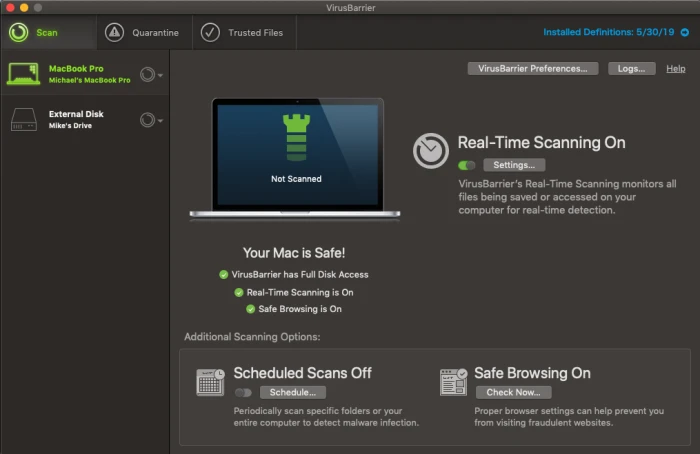
Intego VirusBarrier

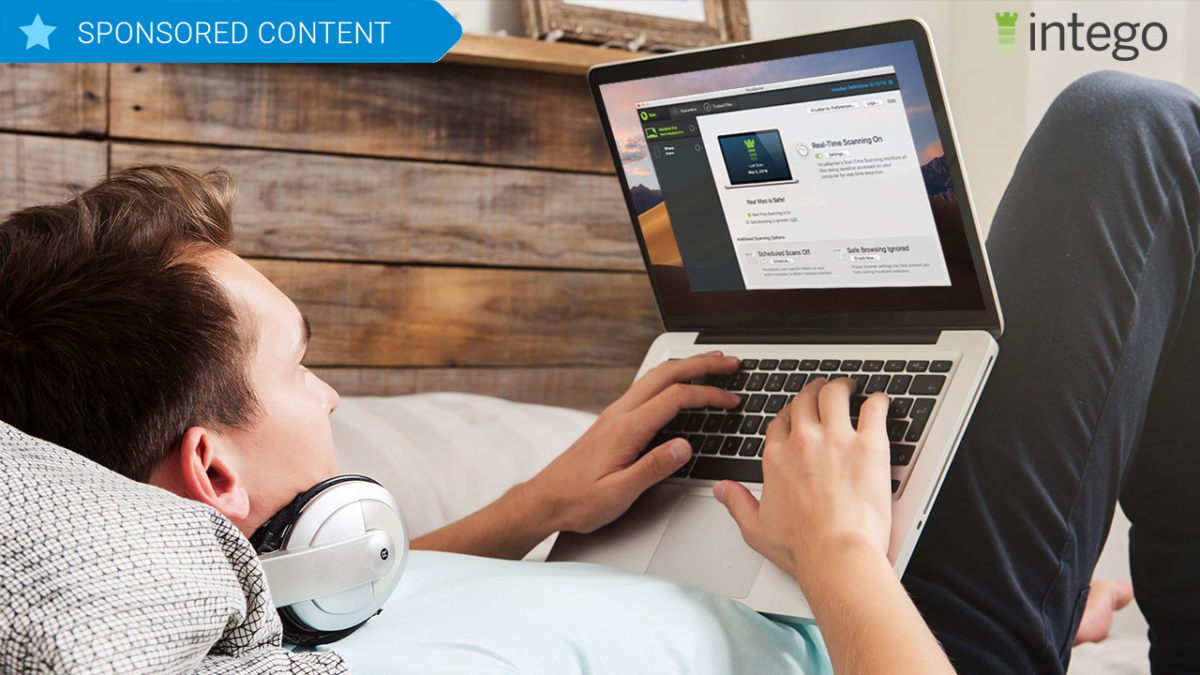
The first is VirusBarier X9, which scans your Mac for every known malware threat and keeps on doing that quickly and efficiently in the background. The interface is pleasant and simple to understand, with a simple toggle switch to control whether or not you want to activate real-time scanning, in which the software constantly monitors files that are accessed on your drive whether by yourself or by other system actions. Pop-up windows alert you to suspicious activity and you instantly have the choice of placing a file in quarantine or allowing it to function normally. You can also set up scheduled scans of either specific folders or your entire computer and can have the software do a quick check of your browsers to ensure they have the proper settings for safe browsing.

The second component to Intego Mac Internet Security is Net Barrier X9.

Intego NetBarrier

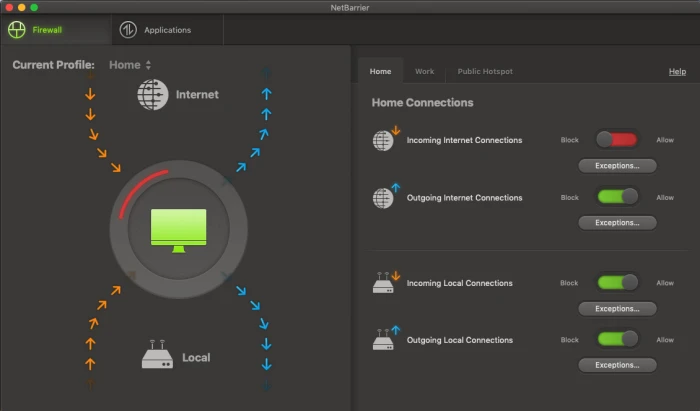
You might already know that Macs have a built-in Firewall that protect you from nefarious inbound connections. But that native functionality doesn’t extend to watching for outbound connections, which is important because some malware could land on your machine and start telegraphing information out to places you don’t want it to go. Net Barrier X9 monitors both inbound and outbound connections to ensure that nothing happens without your permission.

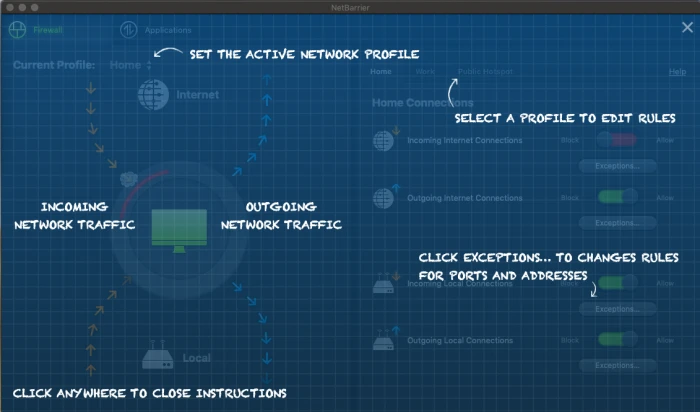
Like Virus Barrier, the Net Barrier interface is extremely straightforward to use. Four simple toggle switches control whether or not you want to allow incoming or outgoing internet connections as well as incoming or outgoing local connections.

The software alerts you any time a program attempts to make contact with the internet and you get to decide whether to allow it or not. Additionally, you are able to establish different profiles for home, work and public hotspot access, and the software will switch to those profiles automatically.

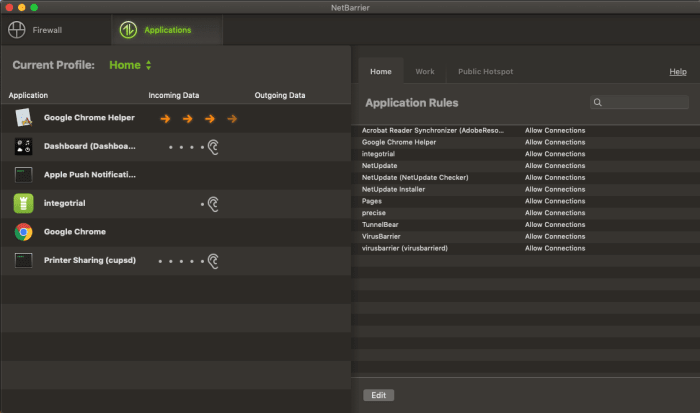
The applications tab allows you to see which apps are accessing the internet at any one time, and which you’ve granted permission to, something you can do permanently or on a case-by-case basis as notifications arrive.

Intego NetBarrier Applications

Additionally, when you first use the software, helpful overlays appear on top of the windows to help you understand how to use the program at a glance, which is just another small feature that makes Intego Mac Internet Security X9, such a pleasure to use.

Intego NetBarrier Instructions

Rarely does so much online protection arrive in such a user-friendly package.

The software is available for purchase for the very attractive price of $34.99 for one year or $64.99 for two.